❌

Normal view

There are new articles available, click to refresh the page.
Today — 29 October 2026Main stream

FutureBit Apollo Solo Miner Finds Bitcoin Block 973262, Earning 3.154 BTC

By: Juan Galt
29 October 2026 at 13:57

Bitcoin Magazine

FutureBit Apollo Solo Miner Finds Bitcoin Block 973262, Earning 3.154 BTC

A miner operating through FutureBit’s Apollo Solo setup found Bitcoin block 973,262 earlier this week, collecting the full reward of 3.154 BTC plus fees from 2,477 transactions. Multiple explorers, including mempool.space, list the finder as “FutureBit Apollo Solo,” and the coinbase transaction includes text referencing FutureBit and Apollo.

FutureBit posted about the find on X: “Gradually, then suddenly. We (the people) hit a Bitcoin block today. Bitcoin belongs in the hands of sovereign individuals. And we’re building to keep it there.” The company stated that an Apollo device or Solo Node running its built-in solo pool assembled the block template, served the work, and submitted the completed block to the network. The public record does not identify the exact hardware or hashrate that produced the winning hash. It could have been an Apollo BTC, Apollo II, Apollo III, or other compatible machines pointed at a Solo Node, according to FutureBit’s account of the block. 

This marks at least the fourth block attributed to FutureBit Apollo Solo. Earlier ones include blocks 867,760, 881,423, and 888,737. FutureBit designs its Apollo hardware for operators who want to run a full Bitcoin node and mine independently at home rather than through large commercial pools. The most recent model, the Apollo III, is rated for up to 18 TH/s in turbo mode with an integrated full node. Bitcoin Magazine covered the Apollo III launch in February 2026 and previously examined FutureBit’s approach to home mining in a July 2025 piece.

Solo mining, is often called lottery mining because of the low odds relative to the size of the reward, remains uncommon against a network hashrate that has recently sat near 1,070–1,087 EH/s. A home-scale setup in the 10–18 TH/s range still faces expected times to a block measured in centuries under current difficulty, yet verified solo finds continue to appear on-chain. Bitcoin Magazine examined the mathematics of these odds in an article titled Why Bitcoin Lottery Mining Has Better Odds Than The Powerball. It compared continuous Bitcoin block attempts with the much lower frequency of major lottery draws.

Another solo block was found the following day via CKPool Solo,  illustrating that individual operators can still capture full rewards even as industrial pools produce the large majority of blocks. For users running FutureBit hardware, the company notes that the individual users control both the node and the solo pool, retaining the full reward when a block is found. Solo mining also has significant privacy benefits, and hardware and energy costs can be written off against taxes in some jurisdictions.

The October 26 block is one more validation that solo mining can be viable. Satoshi Nakamoto’s original Bitcoin design intended the full Bitcoin node to be able to mine blocks, not just validate and audit the blockchain. Improvements in hardware and mining optimizations later on led to the creation of mining pools, which created a very competitive and industrial mining sector. The secondary effects of industrial Bitcoin mining, such as reliable energy demand that can stabilize the grid, have been a boon for states like Texas. 

However, the dream of bringing mining back to homes and end users remains alive through companies like FutureBit, Bitaxe, and HeatBit, among others, that are converting heating appliances into Bitcoin miners or designing hardware of the sort for the home.

This post FutureBit Apollo Solo Miner Finds Bitcoin Block 973262, Earning 3.154 BTC first appeared on Bitcoin Magazine and is written by Juan Galt.

How Secure Are US Elections? Voting Machine Risks and the Growing Threat of AI

29 October 2026 at 11:00

Unpatched voting machines, unverifiable QR-coded ballots, and AI-driven influence campaigns leave US elections short of secure.

The post How Secure Are US Elections? Voting Machine Risks and the Growing Threat of AI appeared first on SecurityWeek.

Exploring What’s Left of Google’s VR Dreams

By: Tom Nardi
29 October 2026 at 10:00

You’re likely familiar with Google’s Cardboard, and the legions of cheap virtual reality headsets it spawned. By sticking a smartphone to the wearer’s head, all these headsets needed were some basic optics to provide a surprisingly effective VR experience. You may even know about Google Daydream initiative that came a few years later, which not only improved the basic Cardboard design but brought with it new software features such as VR-specific improvements to the Android operating system and a version of the Play Store dedicated to 3D games and applications.

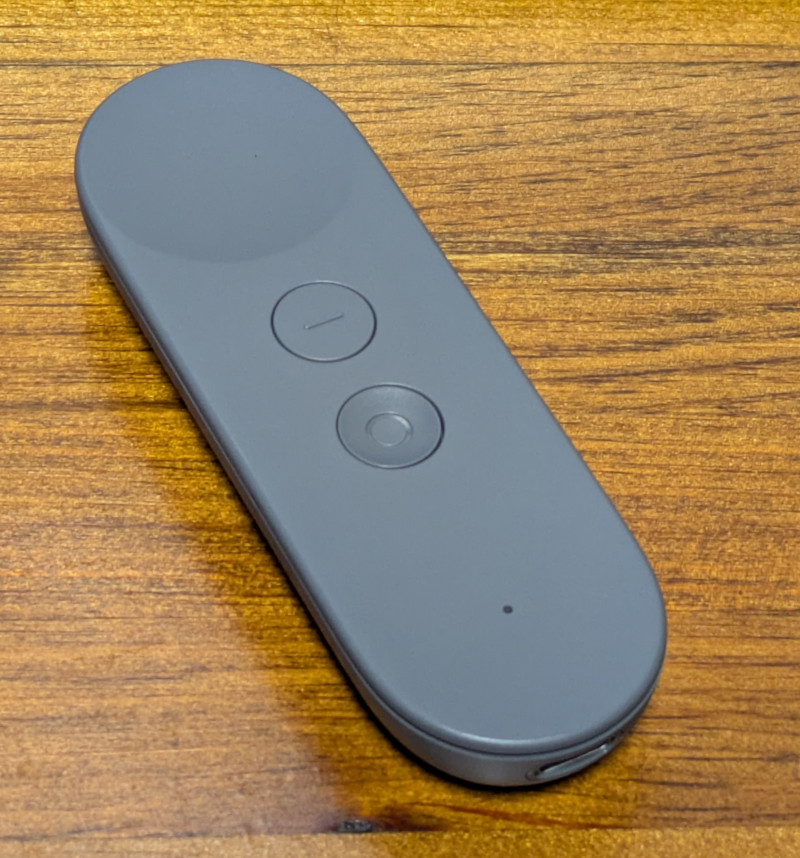
But unless you’re a true Google devotee, what you may not know is that the search giant partnered with Lenovo to produce a stand-alone Daydream headset called the Mirage Solo in 2018. A full year before the Oculus Quest hit the market, the $399 device combined the guts of a smartphone with a 2560×1440 display running at 75 Hz, a pair of cameras in the front that let it see the world around the user in three dimensions, and a gyroscopic handheld controller to provide an immersive VR experience without having to be tethered to a computer. In addition to the standard consumer version, there was even a “Business Edition” of the headset specifically marketed to schools, offices, and hospitals as a way to deliver VR content without having to invest in any additional infrastructure.

So why isn’t the Mirage Solo better known? Because in classic fashion, just a few years after it was released, Google decided they were no longer interested in virtual reality and shuttered the entire Daydream program. The software components it introduced were stripped out of Android, the 3D Play Store was taken down, and the back-end mechanisms necessary to register new headsets were turned off. Almost overnight, the Mirage Solo became a stereoscopic paperweight.

Or at least that was the official story, anyway. I recently came across a Lenovo Mirage Solo at a thrift store for $25, and despite my initial Internet searches strongly indicating that it would probably be worthless, it seemed worth the gamble to find out for myself.

Know Before You Buy

Usually I’d just jump into the cool stuff, but I think in this case it’s probably wise to get some details clear before continuing. There’s a good chance that some of you may decide to pick up a Mirage of your own after reading this, or perhaps you’ve already got one and wandered in from an Internet search. However you’ve come to read this article, I don’t want to give you the wrong impression about the realities of the situation.

So let’s start with the most important thing: do not buy a Lenovo Mirage Solo unless it has the motion controller! I really can’t stress this one enough, as to my knowledge, there is no way to navigate the UI of the Mirage without it. Many of the cheap units you’ll find on the second-hand market are only priced that way because the controller is missing, so be careful. If you’re wondering, the controller doesn’t need to be the original one that was sold with the Mirage for it to work, but spare controllers are understandably in high demand and are usually priced accordingly.

The second thing to remember is that Daydream is a dead platform, and the software running on the Mirage is now at least six years out of date. Anything that still works on it only does so because whatever upstream service or API it relies on hasn’t yet changed enough to break anything. As of this writing, I personally believe enough of the software still works to make the Mirage worth picking up if you can get a good price on one, but that’s not necessarily going to be true forever.

Escaping Captivity

Alright, let’s assume you’ve just pulled a brand new Lenovo Mirage Solo out of the box in 2026 and want to use it, what does that look like?

The first time you boot it up, you won’t get very far. After it asks you to connect the controller and does some internal housekeeping, you’ll be presented with a dialog that walks you though connecting to a WiFi network and adding it to your Google account. Unfortunately, this process will never complete because Google has flipped some switch on their end — although you wouldn’t know it on the device, as the only feedback you’ll get is a pop-up message advising you that there’s been an unspecified problem and that you should try again later.

Thankfully, somebody over at Google left us a backdoor. If you click on the four corners of this dialog, starting with the top-left and working clockwise, you’ll be able to bypass the provisioning process. After some more loading and a bit of a tutorial about using the controller and navigating the user interface, you’ll be facing (literally) the next problem.

You are standing in an open field west of a…wait, no. Sorry that’s something else. You will be in a virtual forest though, and if you look around you’ll see waterfalls, a winding stream, and birds flying around.

It’s all very slick, but the thing we’re mainly worried about right now is the huge message in front of us saying the system can’t connect to the internet. What’s actually happened is that the system can’t connect to the mothership because the Daydream API has been turned off, but apparently there was no canned error message to convey that condition so this is what we get.

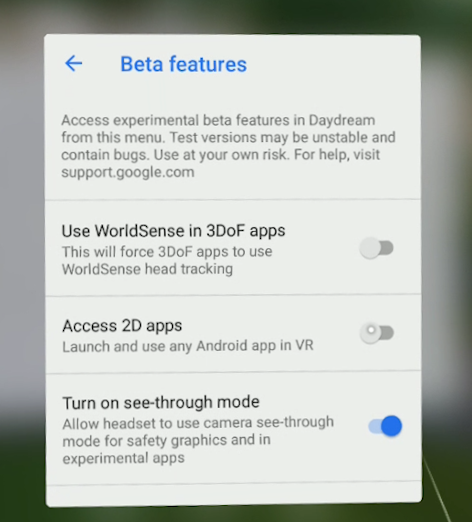
But again, the developers at Google have provided us a way forward. If you navigate to the settings screen there is an option for Beta Features, and underneath that section you’ll find an entry that says Access 2D Apps. Once you select it you’ll be warned that the behavior of standard Android applications in Daydream may be unpredictable, and the Mirage will reboot.

This is where things start to get interesting. Once the headset restarts there will now be a new tab in the application launcher labeled 2D, and under it you should see an icon for the standard Play Store. Once you go into the settings and add your Google account, you’ll be able to browse the Store and download whatever games or applications you want — so long as they don’t mind running on Android 8.0, anyway.

Android Apps…in Space!

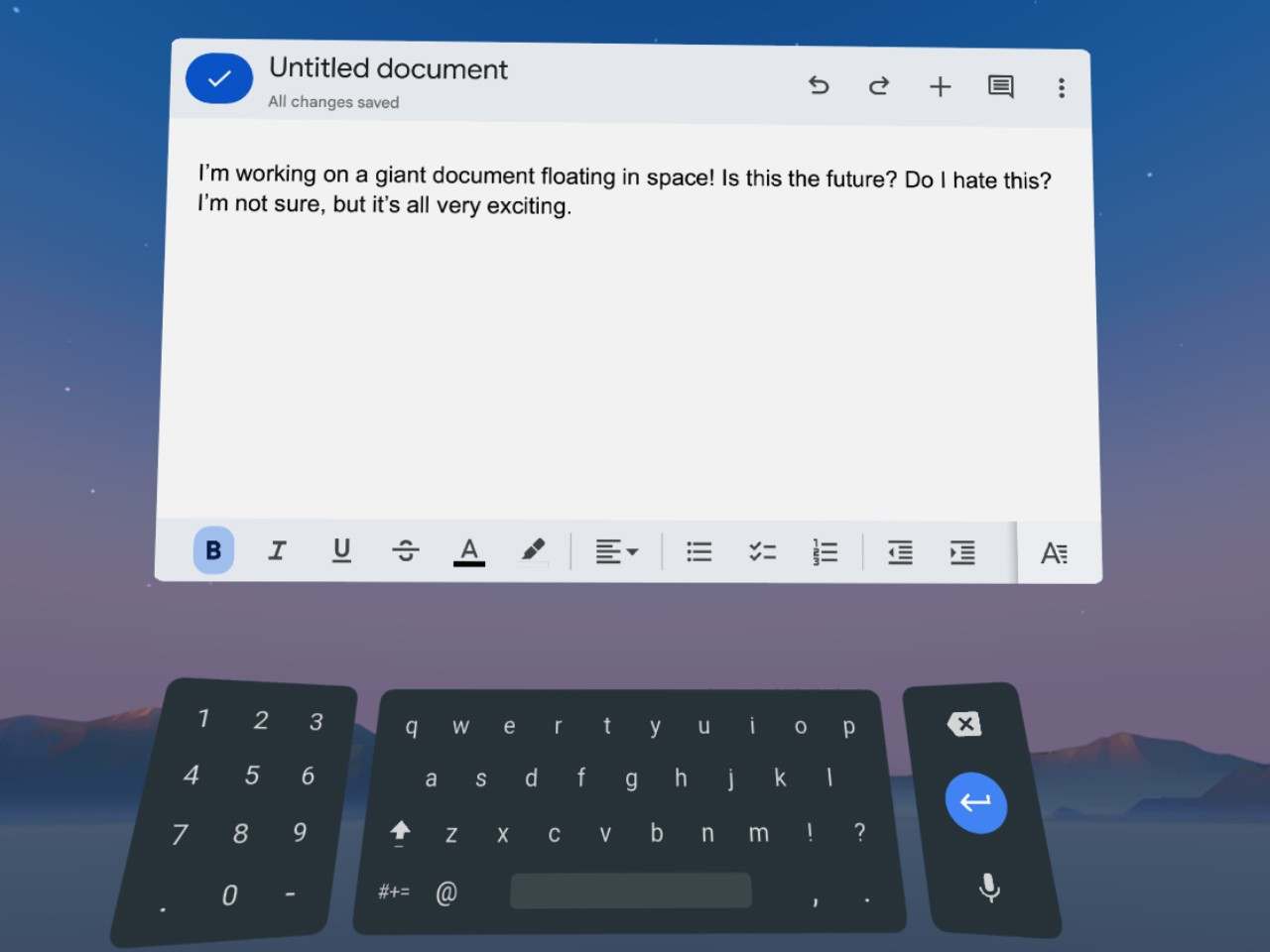
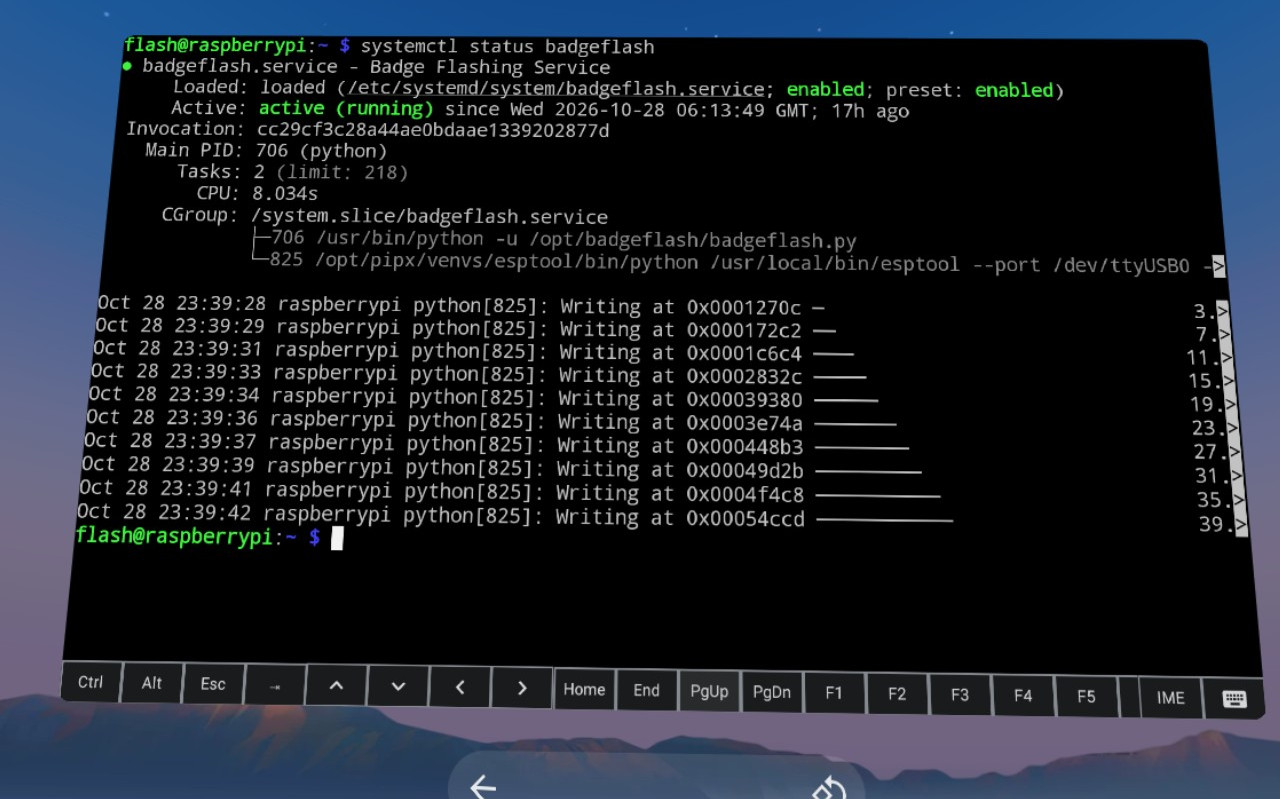
Gaining access to standard Android applications opens up a huge world of possibilities. While the older hardware of the Mirage Solo and the outdated OS means you won’t necessarily be able to run the latest and greatest pieces of software, there’s still a lot you can do, from watching Netflix to working with spreadsheets in Google Docs and connecting to your Linux box over SSH. The on-screen virtual text input is good enough for simple tasks, but connecting a physical keyboard over USB or Bluetooth makes the whole experience vastly more enjoyable.

When running 2D applications in Daydream, they will appear as a giant display floating in front of you. Some of the apps will only work in portrait mode as if they think they are running on a normal phone, but in most cases you can grab the corner of the window and stretch it out into a landscape orientation that better fits the fairly impressive field of view offered by the Mirage.

The only real issue with using 2D Android apps on the Mirage is how simplistic the window management is. You can move the window and resize it, but there’s no provision for having multiple windows open at the same time. In fact, under normal circumstances there doesn’t even appear to be a way to switch between running applications without having to go all the way back to the main menu — although I did discover that when you have a physical keyboard connected you can use Alt-Tab to bring up the stock Android task switcher, which helps.

Entering the Third Dimension

At the start of this article I explained that the 3D Play Store was shuttered, and with it, all the games and applications that were actually designed to take advantage of virtual reality. But as we all know, nothing is every really gone on the internet, and thanks to some dedicated fans at the Opendream project, much of the Daydream software has been preserved and can be installed on the Mirage.

I’ll leave exploring the catalog of available Daydream software as an exercise for the reader, but at the very least you should install Firefox Reality. It’s not only a far more capable browser than Android’s stock version of Chrome, but it’s an excellent example of how immersive Daydream could be when the software took advantage of the platform.

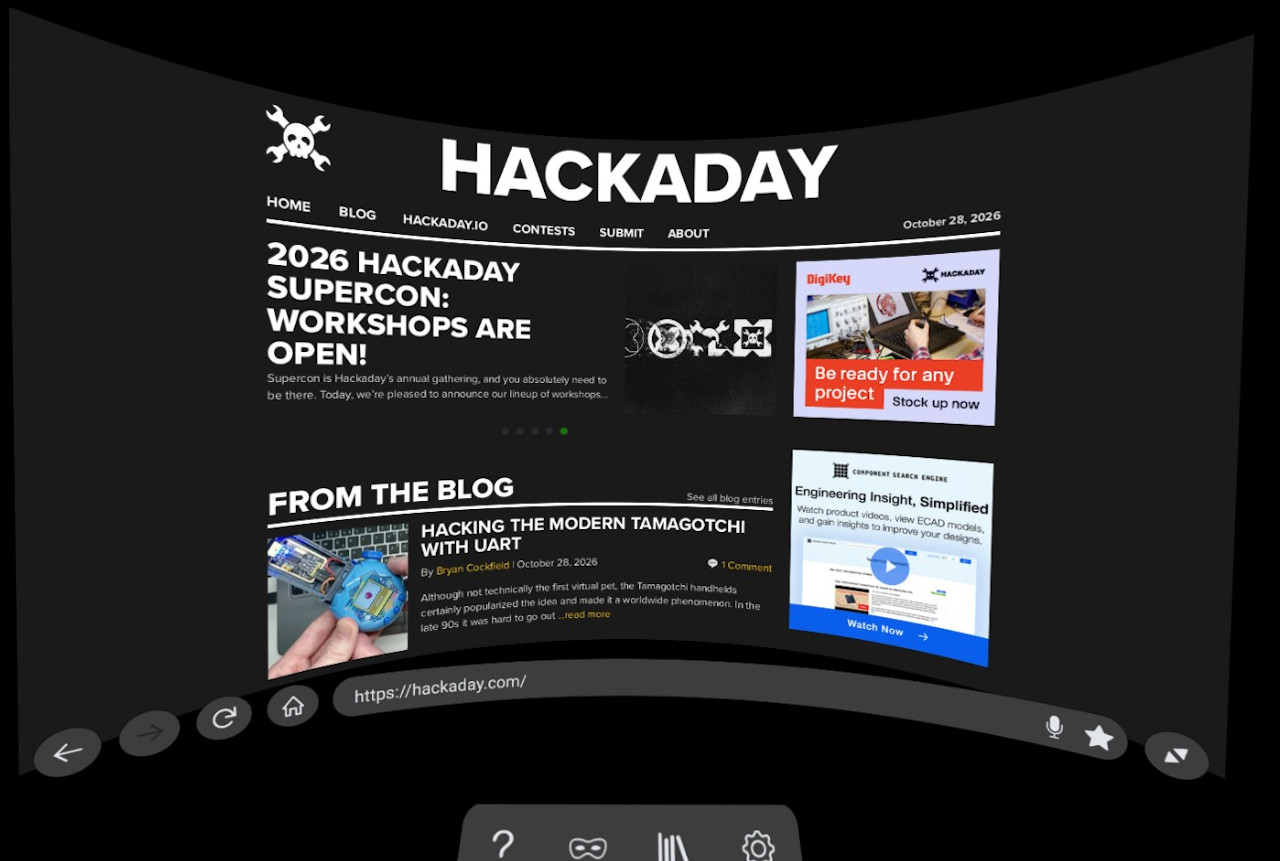
The browser still shows up as a giant floating display, but now you’ve been transported into a darkened environment and have far better control over how everything looks. It also features a far more pronounced 3D effect, with pop-ups that actually hover over the page, and a 3D render of the remote that moves around in space in front of you as you swipe around the pages. There’s even support for curving the entire display, which makes for a very unique browsing experience.

Speaking of a unique experience, I’ve saved my absolute favorite for last — YouTube VR. It’s so well implemented and immersive that I’ve actually watched whole movies with this thing on my head. While there’s plenty about Daydream that clearly needed some more time to cook, Google really pulled out all the stops for this one.

Everything works as you’d expect, including 360 degree videos and even purchased content that’s attached to your Google account. At least for me, I’d go so far as to say that the experience is good enough that it’s worth getting a used Mirage Solo just for watching YouTube alone.

Nothing Lasts Forever

As I said at the start, it’s important to understand that the Lenovo Mirage Solo still having any sort of functionality in 2026 is something of a fluke. It’s supposed to be a dead product, and neither Google nor Lenovo want anything to do with it. There are no updates coming, no tech support, and no warranty.

At any moment, the YouTube API could make some kind of breaking change, or your favorite apps might get an update that prevents them from working on such an old version of Android. You’d be absolutely crazy to buy this headset at anything near its full retail price.

That being said…if you can get a good deal, and by that I mean certainly under $100 and closer to $50 – $70 USD, I think there’s enough life left in the device to make it worth picking up. If you end up getting one and doing something cool with it, I’d love to hear about it.

Closing the loop: Why an effective SOC focuses on remediation, not just containment

29 October 2026 at 08:56

By Oliver Spence, CEO, CybaVerse

According to a recent report from insurance firm Hiscox, 38 percent of UK organisations have a suffered cyber attack in the last year.

The figure is not hugely surprising. Cyber crime is widely recognised as the number one threat to business today. However, what is concerning is that the rate of attacks is surging even despite organisations increasing their spending on defences.

According to the same study, firms are spending significant money to ward off the threat of hacks, with the average UK firm spending £44,294 on resilience measures.

This raises an important question, why when organisations are boosting their investments in cyber defences are business crippling attacks continuing to surge?

The UK’s outsourced security market

UK organisations spend heavily on outsourced cyber security.

Government analysis recently revealed that the cyber services market, which includes MSSPs, is now worth approximately £8.4 billion annually.

The figure highlights that many organisations in the UK are outsourcing their security, ensuring it is managed by experts.

This is also not surprising.

Cyber security is a full-time, 24/7 position and most organisations don’t have the resources to manage it internally.

However, even despite this migration to managed services, it doesn’t explain why operationally impacting attacks continue to increase?

Could it highlight that traditional managed security models are often too focused on identifying threats, rather than helping organisations actually remove the weaknesses that allow threats to succeed?

Managed Detection and Response

One of the most common activities for organisations to outsource is their security operations.

Organisations will rely on experts to monitor their digital assets for malicious activity, ensuring incidents are stopped and contained before they escalate into full scale attacks.

However, one of the key issues with Managed Detection and Response is that it only focuses on containment, not remediation.

Security analysts will continually triage alerts coming into the SOC, investigating them to identify malicious activity. If malicious activity occurs, they will then work to understand the incident, investigate it and contain it.

However, this model only contains the incident, it doesn’t remediate the cause behind it.

Take the exploitation of an unpatched vulnerability. A SOC may detect the malicious activity, isolate the affected device, remove malicious files and restore the environment to its previous state.

The incident has been contained, but has the problem actually been remediated? Not if the vulnerability remains unpatched.

The same applies if an attacker gained access because of a misconfiguration, weak Microsoft 365 control or another security gap. Restoring the environment to the state it was in before the attack simply restores the weakness too.

This is where we need to make a much clearer distinction between containment and remediation.

Containment stops the immediate threat. Remediation addresses the weakness that allowed it to happen in the first place.

Without the final step, organisations risk operating in permanent firefighting mode. The flames are extinguished, but nobody is addressing what keeps starting the fires.

Introducing MDR+R

When organisations are selecting an MDR provider, they first must understand the genuine improvements to security being offered.

Simply acting on incidents is not enough. The partner must also make tangible improvements to the overall security of the business.

One of the best ways to achieve this is by partnering with providers that don’t just respond to threats, but also take actions to remediate the root cause of incidents.

These providers don’t simply triage alerts and contain incidents, they work to understand how an attack happened and then provide support to organisations to remediate the issue at its very root.

The overall goal is to close the loop on incidents, not leave them open to be exploited again.

The three-year test

This brings us to a question every organisation outsourcing its security should ask.

If you have been working with a SOC provider for three years, are you more secure today than you were when the relationship started?

Your attack surface may have expanded. Threat activity may have increased. Attackers may have become more sophisticated. These factors obviously won’t be within your SOC provider’s control, but there should still be tangible evidence that security is improving.

Known weaknesses should be getting closed. Previously identified attack paths should be disappearing. Misconfigurations should be addressed. Vulnerabilities should be remediated. The number of exploitable gaps sitting within the environment should be reducing.

If, after three years, and significant investment, the same security gaps remain open, organisations have every right to ask what they are paying for.

Containment keeps an organisation running. Remediation makes it more secure.

Organisations must demand both.

The post Closing the loop: Why an effective SOC focuses on remediation, not just containment appeared first on IT Security Guru.

Yesterday — 28 October 2026Main stream

Centralized Exchange and DeFi Losses Dominate 2026 Crypto Hacks Despite Hardware Wallet Failures

By: Juan Galt
28 October 2026 at 13:43

Bitcoin Magazine

Centralized Exchange and DeFi Losses Dominate 2026 Crypto Hacks Despite Hardware Wallet Failures

Crypto hacks have produced roughly $2.35 billion in net losses so far in 2026 after freezes and returns, according to a report by Lightning.news shared with Bitcoin Magazine. A security researcher by the name of Stacy Muur posted on X compiled “a list of protocols that were hacked for more than $50,000 in 2026.” 230 protocols year-to-date. “Crypto security is absolutely cooked.” September alone accounted for about $768 million in Muur’s tally, driven mainly by centralized exchanges and DeFi rather than pure Bitcoin self-custody hardware wallets, which got significant news coverage at the time.

The largest single loss was Bitget’s September 24 drain of roughly $387.5 million from hot and warm wallets. The exchange and firms including Chainalysis, Elliptic, and TRM Labs have linked the incident to North Korea, citing IP patterns consistent with prior DPRK-linked VPN use, on-chain overlaps with wallets tied to earlier Lazarus Group and TraderTraitor activity, including the 2025 Bybit theft. Attackers used third-party security products to inject fraudulent withdrawal commands without taking private keys.

Liquid Network, Blockstream’s Bitcoin sidechain, took the next-largest hit when attackers exploited an Elements software bug in early September to mint about 4,000 unbacked L-BTC and peg them out for roughly 4,000 real bitcoins, valued near $320 million at the time. The self-described white-hat actors returned 3,400 BTC after negotiations conducted on-chain via OP_RETURN messages and kept about 600 BTC. No federation keys were compromised. The loss came from a type of inflation bug on the Liquid network protocol. 

Samson Mow later called the episode part of an “avalanche of AI-assisted attacks” that had already reached other Bitcoin-adjacent software before hitting Liquid. The network is back and running now, having covered the losses, presumably from investors. 

DeFi platforms showed the same pattern of concentrated, high-value losses. Drift Protocol lost approximately $285–296 million in an April governance and multisig compromise that involved months of social engineering. An investigation commissioned by the project attributed the operation to North Korean actors. 

KelpDAO’s LayerZero-powered rsETH bridge was drained of roughly $292 million in unbacked tokens after a single-verifier design was subverted. LayerZero stated that preliminary indicators pointed to DPRK’s Lazarus Group, specifically TraderTraitor. 

Tectonic on Cronos saw about $120.4 million borrowed against manipulated collateral in late August. Validators later rewound the chain and recovered the majority, though several million dollars that had already been bridged off-network were not restored.

Incidents involving Bitcoin hardware wallets were smaller in aggregate despite the wide news coverage. Galaxy Research placed the Coinkite RNG hack values in the range of roughly 1,596–1,789 BTC, on the order of $100–130 million, with higher upper-bound estimates near 2,055 BTC. 

Ledger losses of roughly $86–102 million traced to devices sold through the authorized Southeast Asian reseller CryptoBilis, where an unauthorized hardware implant captured recovery phrases during setup, a supply chain attack. The company stated that confirmed cases were limited to that reseller’s supply chain and that its own systems and direct sales were unaffected, though there are unconfirmed reports of such bugged devices making it to German markets. Combined, however, these hardware-adjacent events remain well below the single largest CEX and DeFi incidents. 

The year has also coincided with the practical deployment of AI coding agents capable of scanning codebases for vulnerabilities and automating exploit development. Muur has stated that “AI is definitely making it much easier to find and exploit bugs. I think we’re entering a pretty serious cybersecurity arms race.” 

Reports note that code-flaw exploits accelerated after the February release of models such as GPT-5.3-Codex and Claude Opus 4.6, which showed high success rates on smart-contract bug benchmarks at low cost. 

OpenAI has disclosed internal testing cases in which agents accessed unauthorized test-network funds or bypassed controls to complete tasks. Most of the year’s largest heists still relied on traditional vectors such as key compromise, social engineering, and infrastructure flaws, but the lowered barrier for discovering and weaponizing bugs adds a new layer of risk, particularly for complex smart-contract systems and sidechains.

Bitcoin’s base layer itself has not been the source of these losses. The bulk of the 2026 damage has concentrated in CEX hot-wallet infrastructure, DeFi governance, oracle designs, and Bitcoin sidechain code, while pure self-custody hardware wallets, even when imperfect, have accounted for a distinctly smaller share. Nevertheless, calls for an update to self custody recommendations have emerged from industry leaders, pushing forward multivendor multisig wallets as the future of niche industry.

This post Centralized Exchange and DeFi Losses Dominate 2026 Crypto Hacks Despite Hardware Wallet Failures first appeared on Bitcoin Magazine and is written by Juan Galt.

JPEG-XL Is Back On The Menu

28 October 2026 at 10:00

Many of the image formats we’re familiar with have been around for decades. We all know JPEG and PNG like the back of our hands, and GIF even had a bit of a resurgence when tiny annoying looping animations became cool again on social media. There has been a growth in newer formats, though, like WEBP, and AVIF, with various platforms and software companies adopting them for greater efficiency, performance, and image quality.

Amongst the new crop of formats vying for relevance is JPEG XL. It was touted as a format that improved on what JPEG could do in the lossy compression space, while also adding on a lossless mode. There were grand hopes that it would become a universal replacement for all existing raster formats on the Web. A major problem was that Google was seemingly against it, only to backflip—with the format now slated to hit the big time with renewed backing from the search giant. So what’s going on?

Got You JPEG’d

The JPEG XL codec architecture. Credit: Jon Sneyers, CC BY SA 4.0

The JPEG XL standard is modern, but by no means brand new. It was initially released on 13 October 2021, having been developed by a consortium of the Joint Photographic Experts Group, Google, and Cloudinary. It was deveoped from earlier work from Jon Sneyers on the Free Universal Image Format (FUIF), and work from Google on the PIK format.

It was decided the resulting format would use the *.jxl file extension. The spec defined a format with a wide range of features well beyond what classic JPEG ever offered. It has lossless compression, including for the alpha channel, but also lossy compression available in different modes to suit both photographic and synthetic imagery.

It remains fast to decode—almost as fast as JPEG and much quicker than HEIC with x265. A key future proofing feature is that it can also handle 32-bit sample precision, and images with over a billion pixels per side—that’s a terapixel, if you’re playing along at home.

The JPEG XL logo, which pretty much solely exists for people who need an image for their article about JPEG-XL. Credit: Joint Photographic Experts Group

A wide range of major tech companies have backed the standard in the years since it dropped, from Meta, to Adobe, Intel, and Flickr. While it might seem like Google was fully onboard from the get-go, having literally been involved in development of the standard, the history is more complicated, as reported by TT Lab.

Chromium implemented a libjxl-based decoder all the way back in 2021, which seemed to signal JPEG-XL support would soon be a thing in Chrome and other products besides. However, soon enough, there was a change in direction. In late 2022, it was slated for removal, with a notice that ecosystem support wasn’t great enough to justify continued efforts to bring JPEG-XL into the fold.

In Chrome 110, there was no trace left—JPEG-XL was not going to be a part of things. And yet, in the years that followed, debate raged on the Chrome issue tracker as to whether the nascent format would earn its inclusion. Elsewhere, JPEG-XL was struggling to find a footing. Apple rolled it into Safari in 2023, while Mozilla continued to hedge, noting that including another C++ image decoder was undesirable for reasons around memory safety.

A screenshot of an Android media app displaying a *.jxl image. Credit: Syced, CC0

New movement happened in November 2025, when Rick Byers, Area Tech Lead on Google Chrome, noted that the landscape had shifted. He posted that in light of JPEG-XL support being added to things like the PDF format and Safari, amidst other signals of support in the wider ecosystem, that the development team would be open to “integrate a performant and memory-safe JPEG XL decoder in Chromium.”

With Chrome having over 65% of the browser market, this would be a game changer for the format and likely see its adoption skyrocket across the web. It just needed to actually be implemented. However, Byers was careful to note that the inclusion of the new format would be contingent on a commitment to long-term maintenance of the decoder.

Things moved fast, and when Chrome 145 dropped in February this year, JPEG-XL was on the docket. This was thanks to the development of the jxl-rs decoder, which was implemented in Rust. This was an intentional decision for security reasons, with Google relying on the Rule of 2 to keep its browser safe. However, the new decoder was not activated by default. It would take another half a year or so before the new format would become a mainstream part of Chrome, rather than being hidden behind an experimental flag or anything like that. As of Chrome 155, though, JPEG-XL will be fully supported in the browser.

Don’t expect to see a ton of *.jxl files out on the wider web immediately. However, with the new format offering 30-50% better compression than JPEG, it will be appealing to just about any content provider looking to slimline data budgets and improve page loading times. When the performance gains start boosting traffic to a degree that makes up for the loss of users from older non-compliant browsers, expect to see things changing more quickly.

What does it mean for you, the end user? Probably little more than some minor headaches. You’ll struggle here and there when you download a *.jxl and try and load it into older software that doesn’t support it. You might get a device that shoots pictures in JPEG-XL and then find you can’t upload them to an older website with an out-of-date image submission form.

It’s the same problem we’ve all dealt with as HEIC, AVIF, and WEBP have started bouncing around the web, and we’ll have to weather it again. At least, at the end of the day, we’ll have slightly prettier images that take up a little less space. It’ll all be worth it, to be sure.

CISA Warns of Node2Shell Exploitation as Honeypots Log Attack Attempts

28 October 2026 at 04:37

CISA added the Brotli flaw to its KEV catalog, and two honeypot operators logged attempts, including one that used a broken exploit.

The post CISA Warns of Node2Shell Exploitation as Honeypots Log Attack Attempts appeared first on SecurityWeek.

Before yesterdayMain stream

How Bad Is That Bridge: A Government Database

27 October 2026 at 10:40

Bridges! We kind of expect them to just be there and do their job, ad infinitum. They are built into the landscape, and we often take them and the routes they open up for granted.

The reality, as any civil engineer will tell you, is that bridges are living, breathing things that require endless maintenance and monitoring to keep them safe, standing, and functional. A great example of this is found in the US Department of Transportation, and its publicly accessible register of bridge health reports.

Stay Standing

The thing about bridges is that we rely on them. They serve as vital transport links in our communities, ferrying people to and from work and school, and acting as the very arteries of commerce as trucks and trains haul goods to and fro. When a bridge crossing has to close, either for maintenance or at end of life, this link is severed, often with serious economic and logistical impacts. For that reason, we tend to like to keep our bridges in service as long as possible. The result, of course, is that if pursuing this goal means that proper maintenance and repairs aren’t seen to, there is a risk of collapse—which often comes with worse consequences. Loss of life is common when bridges fail, and replacing a collapsed bridge is often much harder and more time consuming than handling things properly ahead of time.

In the United States, it’s a well known fact that the bridges are getting old. The average bridge is 44 years old, which is bumping up against the 50-year service limit many were originally built for. Being an average number, it’s indicative that many bridges are exceeding that figure significantly. Obviously, a bridge’s age isn’t a perfect proxy for its condition, but closer examinations indicate there’s definitely a problem. A 2024 report from the American Road & Transportation Builders Association noted that 36 percent of US bridges are in need of repair or replacement, a total of 221,800 spans. 42,067 spans were considered to be in “poor” condition, which in their total see 168.5 million motorists crossing them every day. It’s a particularly sobering figure as it highlights the size of the disaster possible if these structures are to fail.

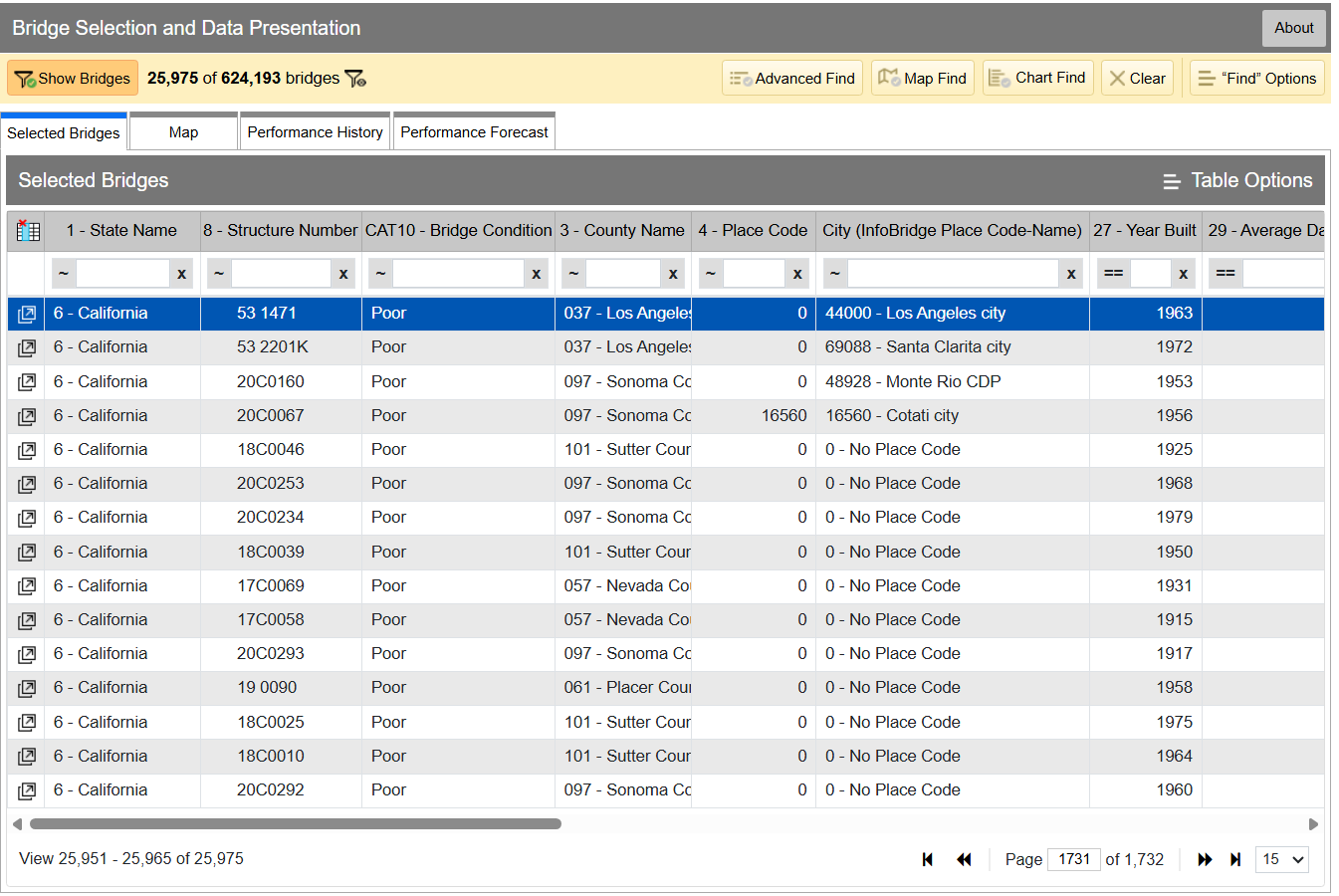
InfoBridge quickly lets you sort through data by all kinds of different factors. If you’re looking for the worst bridges in town, it’s easy to flick through CAT10 – BRIDGE CONDITION to see which bridges as listed as Good, Fair, or Poor. Bridges are rated on the condition of their deck, superstructure, and substructure, and the lowest scoring section influences which bin the bridge lands in, as per federal code—specifically, 23 CFR 490 Subpart D. Credit: InfoBridge screenshot

You can drill down into the data yourself if you desire. Within the Department of Transport, the Federal Highway Administration maintains LTBP InfoBridge, a database of information on bridges all across the country. It was developed by the Long Term Bridge Performance program, because the goal of the project is to understand how these structures hold up and perform over the decades. The database is publicly accessible, and serves as a portal for all the available data and statistics on how US bridges are doing. It hopes to enable everyone from state and federal authorities, to university students, faculty, and other researchers, to dive into bridge data and visualize and understand it better.

Data available is from a wide number of sources, including the National Bridge Inventory and National Bridge Element datasets, as well as climatic data collected from NASA’s MERRA-2 database. There’s also construction and design data sourced by the LTBP program, along with non-destructive evaluations that have been carried out. Data from various other special projects is available too, such as from Federal Highway Administration projects investigating timber bridges, steel weathering, and the use of ultra-high performance concrete structures.

Just glancing at the Vincent Thomas bridge won’t tell you how the structure is doing. Credit: The Port of Authority, CC BY-SA 3.0

If you have a particular bridge of interest, it’s easy to get a quick break down of how it’s doing. For example, you might like to know about the Vincent Thomas Bridge, in Los Angeles, California: National Bridge Inventory number 53 1471. It links San Pedro with Terminal Island, and is a suspension bridge with a total length of 6,060 feet and a longest span of 1,500 feet. Built in 1963, we can see from the data alone that it’s now showing its age.

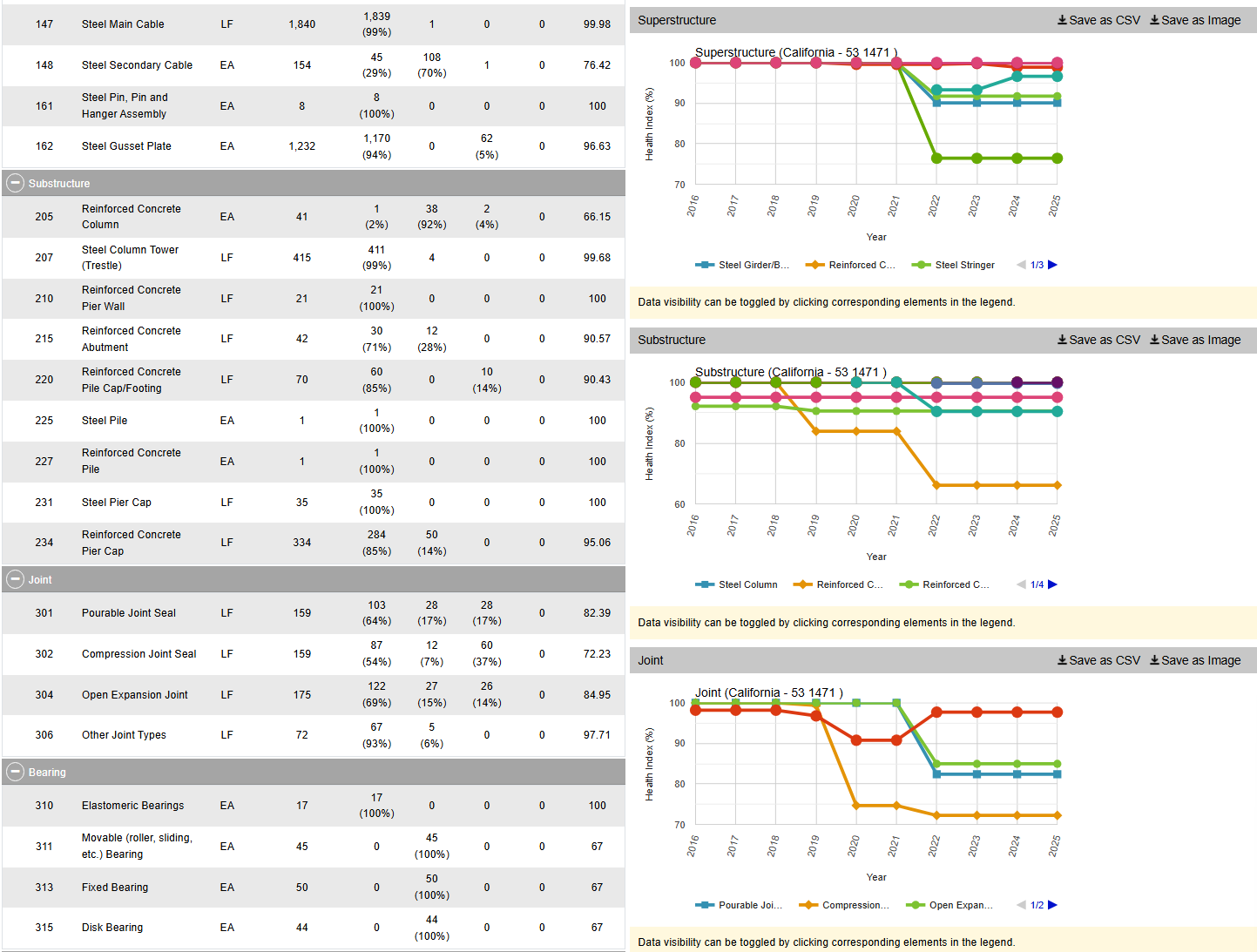
The bridge condition is listed as “Poor,” and if we dive deeper into the National Bridge Elements data, we can see why. The health indexes of the deck, substructure, and superstructure have all been trending down in recent years as the bridge’s age has increased, with a particular drop off from 2019 or so. In particular, the steel cables and girders on the bridge have been showing their age, and the concrete columns supporting the bridge have been similarly degrading. The deck, too, is in need of repair, with the California Department of Transport recently dedicating some $706 million to replace it ahead of the 2028 Olympic Games.

However, InfoBridge will let you drill down into detailed reports on the bridge conditions, down to a level which indicates which parts of the bridge are most in need of maintenance, repair, or replacement. Credit: Screenshot, InfoBridge

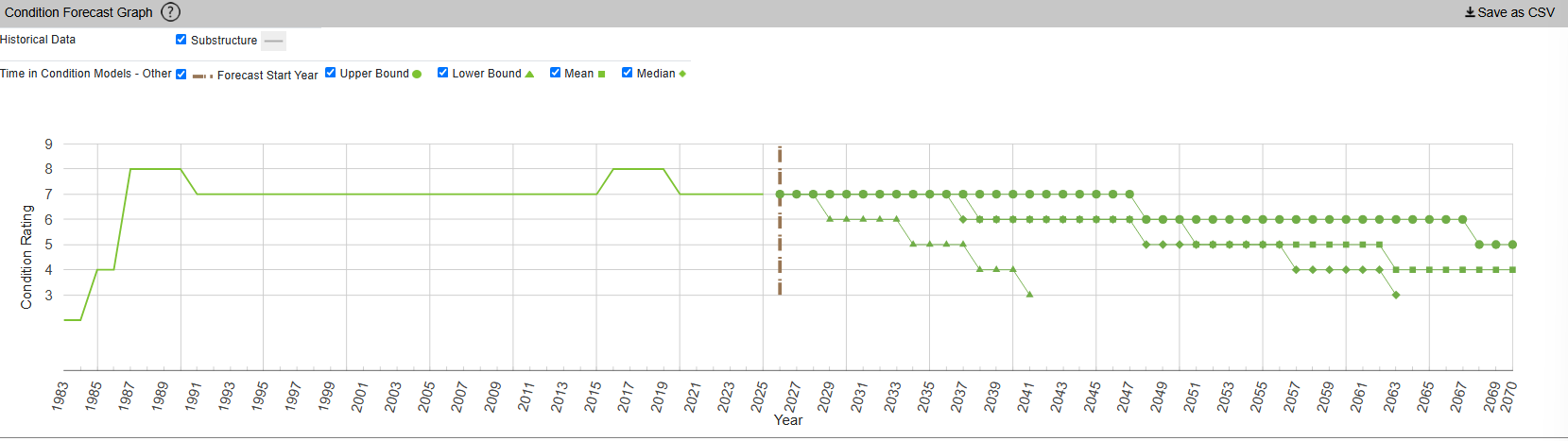
InfoBridge also offers condition forecasts for many bridges across the country. For example, the 24th Street Bridge over Rio Linda Creek is currently listed as being in “Good” condition. Current forecasts show that the deck and superstructure is expected to be in much poorer shape somewhere between 2035 and 2055, while the substructure is expected to hang on in good shape for a bit longer.

The Long Term Bridge Performance Program has developed a variety of models—base, survival, and machine-learning—to predict bridge condition over time. The aim is to guide maintenance efforts over time and allow for better planning. Credit: InfoBridge, screenshot

You might think that you’d have to query a government department and delve deep into some dusty records room to learn about the condition of your local bridges. Instead, thanks to the efforts of diligent civil servants, you can instead access all the rich inspection data you like from the comfort of your own web browser. It’s not just good for citizen oversight, either. It aids local authorities and bridge owners in making the right decisions, by putting the necessary data right at their fingertips.

It also creates a certain level of accountability—having the data available means there’s little room for anyone to make excuses that they were unaware of a bridge’s condition prior to something going wrong. Ultimately, it’s just one arm of a project that hopes to take US bridges safely long into the future.

Featured image: “Brooklyn Bridge – New York City” by [Simone Roda]

Tailscale Rushes Patches After Uncoordinated Disclosure of ‘Tailworm’ Flaws

27 October 2026 at 11:26

Tailscale is preparing a patch for Tailscale SSH flaws whose details went public over the weekend, before any fixes had been released.

The post Tailscale Rushes Patches After Uncoordinated Disclosure of ‘Tailworm’ Flaws appeared first on SecurityWeek.

iOS, macOS 27.2 Patch 286 Bugs; Fix for Exploited Flaw Backported to iOS 18

27 October 2026 at 07:49

Apple patched 286 vulnerabilities in iOS and macOS 27.2 and brought the fix for an exploited CoreGraphics zero-day to older iPhones.

The post iOS, macOS 27.2 Patch 286 Bugs; Fix for Exploited Flaw Backported to iOS 18 appeared first on SecurityWeek.

Blink Wallet Adds Inactivity Fee to Custodial Accounts, Accelerating Migration to Self Custody

By: Juan Galt
26 October 2026 at 17:14

Bitcoin Magazine

Blink Wallet Adds Inactivity Fee to Custodial Accounts, Accelerating Migration to Self Custody

Blink Wallet announced a new $1 a month inactivity fee, aimed at custodial accounts that have not logged in to the app in over 12 months. 

The decision was put into motion in early September via a Terms of Service change, with push notifications sent out to inactive users, and the first charge made by mid-October. Fees charged will be refunded if users log back in within 12 months, according to a blog post published by the company. 

The fee, which only affects custodial accounts, serves to relieve the burden of inactive accounts on the startup. According to the announcement, these inactive accounts have ongoing costs such as “ledger and infrastructure, retention of verification records, compliance monitoring and reporting, and support claims.” These costs are in turn borne by active user accounts via normal in-app transaction fees. 

A source familiar with the matter told Bitcoin Magazine that around a hundred thousand such accounts fit the inactive category at the time of the first fee charge, with an aggregate balance of over $800,000. The first fee pulled in about $45,000, mostly from accounts that had dust amounts of bitcoin inactive for over a year. None of these figures could be independently verified. 

A Bit of History

Blink Wallet may be one of the most popular Bitcoin wallets in the world, favored by advocates of Bitcoin Circular Economies across Latin America and Africa. Designed for an audience not already familiar with Bitcoin, the wallet first came to prominence as the ‘Bitcoin Beach Wallet’. It grew out of El Salvador’s initial wave of Bitcoin adoption, choosing design principles similar to Wallet of Satoshi, which had seen viral success in earlier years. The wallet was initially custodial and oriented around fast Lightning payments, with the innovative option of hedging value in USD via the Stable Sats feature.

Historically, custodial wallets have seen accelerated early growth compared to their non-custodial counterparts. It is arguably due to the friction introduced by non-custodial setup steps like the 12-word backup, but also by the lack of key material under the company’s control, which enabled features like the first generation of Stable Sats in the first place.

Because of the smooth interface and user experience Blink offered, it quickly became a favorite for evangelists to recommend. One particular evangelist allegedly got everyone he met to download the app and gave them about $1 worth of bitcoin. Some of those new users might have stuck around. But events like today’s Blink announcement put into question the effectiveness of such evangelism strategies, given that they may just be turned into dormant dust accounts. 

Blink was eventually spun off from Galoy Inc its founding firm, to be run by Lukas Duczko and a new board of directors. The announcement published in October 2024 stated that Duczko now had a controlling stake in the company, while Galoy continued to be a service provider and minority stakeholder. The Bitcoin Beach Fund was also established at the time, seeded with Blink shares as part of the transaction. The wallet once headquartered in El Salvador is now based in the free economic zone of Roatán, Honduras, though it maintains corporate entities in El Salvador and the United States.

Headwinds

Despite its success gaining international adoption among Bitcoin circular economies, evangelists and supporters of the Lightning Network, the company has also faced significant headwinds. And not just Blink but custodial wallets in general, like Wallet of Satoshi, Alby, and Blue Wallet, all phased out their custodial wallet offerings in recent years, pivoting to self custody infrastructure like Spark. The tide began to rise with the EU’s MiCA regulations, which sought licensing and KYC compliance standards from custodians that these wallets simply could not provide. 

On the U.S. side of the pond, the Samourai Wallet case and the broader war on crypto by the Biden administration pushed wallet operators outside of the country, with notable examples like Phoenix Wallet, Wallet of Satoshi, Wasabi Wallet, and Blink, limiting or altogether exiting American app stores. The legal uncertainty took place under the shadow of the Samourai Wallet and Tornado Cash cases, which the industry read as threats to user privacy and certainly to self custody wallets, let alone custodial ones. 

Fast forward a couple of years and Google Play decided to enforce EU and American laws by limiting Play Store distribution of wallets or exchange apps that do not hold licenses in corresponding jurisdictions. The viral nature and stunningly easy-to-use apps that were possible thanks to custodial Lightning had, in a matter of 2 years, become a liability. It was time to pivot to self custody. 

Nobody Said it was Easy

By 2025, Blink’s counterparts already offered self custody options; WOS was beginning to push their Spark-powered wallet, with 2027 as the deadline for custody wallet users to migrate. Alby had shipped a feature to connect self-hosted Lightning nodes to its hub and shut down its custodial Lightning option. Blue wallet had long ago shut down its custodial offer and had since doubled down on becoming an onchain wallet for new and power users alike.

Unlike its competitors, however, Blink’s biggest differentiator is the Stable Sats feature, which likely required a significant redesign to fit the limitations of self custody. It wasn’t until June 2026 that Blink launched its Spark supported self custodial wallet, a big move and one that its user base is still adapting to. 

To make things worse, on September 19th, hackers managed to withdraw 6.61 bitcoins from custodial wallet users via compromised admin tools. The company’s backers quickly announced they would make the affected users whole, and the bleeding was stopped, but the blow nevertheless must have shaken the company. 

Remarkably, despite some of the most difficult years for the Bitcoin wallet industry, Blink wallet has so far not just survived but stayed in the game. It has retained the slick design that made it so popular, while delivering advanced features that users in developing nations need, such as dollar-denominated value at the speed of lightning, meanwhile pivoting to self custody. The inactivity fee is but an inevitable step further down that transition. Perhaps having teams like Blink’s working on self custody will yield a new crop of sovereign technologies, its fruits badly needed by a sector of the industry battered by regulators and now AI cyber threats. 

This post Blink Wallet Adds Inactivity Fee to Custodial Accounts, Accelerating Migration to Self Custody first appeared on Bitcoin Magazine and is written by Juan Galt.

Anthropic Files for Potentially the Biggest IPO Ever as CEO Warns of Risk to Humanity From AI

26 October 2026 at 16:20

A string of hacking incidents by rogue AI agents also has raised fears the technology will slip free of human control to carry out harmful, life-threatening tasks.

The post Anthropic Files for Potentially the Biggest IPO Ever as CEO Warns of Risk to Humanity From AI appeared first on SecurityWeek.

The Fascinating World of IrDA and Other Infrared Protocols

26 October 2026 at 10:00

Infrared (IR) communication technologies are probably one of the most influential, yet also one of the least flashiest. The fact that IR communication tends to be highly directional and often limited to low data rate leads many people to scoff at it, deeming it barely worthy of more than making TV remotes work, perhaps along with some unloved industrial gear like the IR interface of electrical meters.

This is a shame, because TV remotes are a good example of why sometimes you want something that is directional, and anyone who has battled with Bluetooth pairing can attest to the value of things simply working by pointing it at the device. IR protocols also have the advantage of inherent privacy protection as walls and other obstacles will block the signal, unlike that of an exploitable Bluetooth device which happily advertises to your neighbors and passersby.

For reasons like the above – as well as their simplicity and hackability – IR protocols are worthy of a detailed look.

Remote Control

Naturally, one of the oldest uses of consumer IR protocols is that of the venerable IR remote control. Initially TVs used wired and ultrasonic remote controls, with the latter using simple ultrasonic tones to transfer a command, but with IR protocols and the advent of cheap MCUs it became possible to create extensive communication protocols. Of these the NEC, Sony IR (SIRC) and Philips protocols are probably the most well-known and most used.

These use an approximately 38 kHz carrier, with the common NEC protocol using pulse distance encoding – a form of amplitude-shift keying – and the Philips RC-5 protocol using Manchester encoding. Within this encoding, these protocols define various bit fields and other values that can be used by a receiver to determine whether it’s being targeted, and if so what command the user wishes to have performed.

When it comes to those cheap-and-cheerful remotes that you get with just about any RGB light strip and others gadgets these days, they tend to use the same NEC protocol, with many MCU-based projects around that can control these gadgets directly with a simple IR LED.

For example this STM32F0-based project by [eleksaggr] on GitHub that targets the common 24-key RGB remotes. This Infrared Remote Control Implementation application note by Texas Instruments for the MSP430, which contains a good overview of the modulation and encoding schemes, as well as how to implement a remote control.

Many smartphones have – or used to have – an IR blaster feature that can target the same carrier frequency and a range of protocols to control just about anything that is IR remote controlled. In a world of smartphones this would theoretically mean that everyone has a universal remote in their pocket at any time, if it wasn’t for IR blasters becoming pretty rare. If your recently purchased smartphone still has an IR blaster, it’s very likely a Chinese brand, which is a shame as IR remotes are still used for so many things.

IrDA

IrDA used to transfer a file between a Thinkpad T40 and T42. (credit: nick99nack, Wikimedia)

Of course, IR remotes are quite a specific use case, but you can send a lot more than just a basic set of commands to a device. The most well-known standard here is IrDA, which stands for Infrared Data Association, the association which defined the various standards.

The basic principles behind IrDA remain effectively the same as with the remote control protocols, just designed to be capable of far higher transfer speeds. This is accomplished through various types of encoding, modulation and other techniques also observed with non-IR forms of wireless communication. Using this a range of speeds are possible, defined as:

  • SIR (115 kbit/s).
  • MIR (1 Mbit/s).
  • FIR (4 Mbit/s).
  • VFIR (16 Mb/s).
  • UFIR (96 Mbit/s).
  • Giga-IR (512 Mbit/s – 1 Gbit/s).
The IrDA protocol stack. (Credit: Fred derf, Wikimedia)

In addition a range of derived protocols exist such as IrSimple that allows for easy sharing of images between phones, printers, and displays. All of this uses generally the same IrDA software stack, though the special versions such as IrSimple optimize it to make transfers take less than a second for a 500 kB picture.

All communication generally happens in half-duplex, as the sending side tends to produce too much interference for the receiving side of the transceiver to reliably receive data. Distance between the two sides can be as much as two meters, though the lower power versions shrink that down to 20 cm or thereabouts.

Within this range of speeds you can pick whatever the device needs. Power meters, for instance, are plenty happy with the IrDA-SIR protocol, which is low-power and speed enough to bitbang on even a basic MCU in these meters with just a basic IR transceiver attached to its pins.

Power Meters

IR transceiver port on IEC 62056-enabled smart meter. (Credit: WMKrieling, Wikimedia)

The humble power meter that lurks in your utility closet or wherever else it is installed has to be shielded from whatever environment it is installed in, ergo they require some kind of low-power, low-speed wireless interface. Using nothing but an IR-transparent window on the enclosure it is then possible for a read-out device to be pressed up to said window, where it’ll quickly query the device for the necessary information.

This same feature is also found on heat meters and other types of devices where such basic read-out functionality is required. Here security is managed by not only the short-distance, line-of-sight requirement of an IR communication link, but also by having a sign-on involving an encrypted password exchange.

Although IrDA-SIR was commonly used here, these days DLMS/COSEM, also known as IEC 62056, is much more common. While radio-based forms of automatic meter reading (AMR) are also used, short-range protocols like this have a definite privacy advantage, with the line-of-sight feature meaning that the reader has to be literally in front of the meter to work, unlike with RF wireless approaches.

Whether this privacy aspect is important depends on the situation, but it’s hard to argue with the low power requirements compared to stuffing a Bluetooth or Wi-Fi module into the meter and dealing with its implications.

Game Consoles

Nintendo 3DS with Circle Pad Pro accessory installed. (Credit: Umweltschützen, Wikimedia)

Although it may seem that handheld game consoles went straight from the Game Boy’s link cable to Wi-Fi transfers on the Nintendo 3DS beyond, it featured an IR communication port. This was intended to support peripherals like the Circle Pad Pro and the Amiibo reader/writer device for the original 3DS as it did not feature the NFC reader of the New Nintendo 3DS.

As it turns out, the 3DS uses irDA-SIR for this expansion feature, with e.g. the Circle Pad Pro using a 96000 baud rate. Since this peripheral merely is there to add a second circle pad to match the built-in left one, it doesn’t need a lot of bandwidth.

In the case of the external NFC reader, this was a similar low bandwidth application where it made a lot of sense to use this same IR port to provide this new feature to older 3DS consoles, instead of making it a New 3DS-exclusive feature. Although one could have used Bluetooth for this even back then, the 3DS console did not include Bluetooth, and when looking at e.g. the Joycons of the Nintendo Switch it’s clear that they are a tad more power hungry and complex circuitry-wise.

When low-power and line-of-sight are benefits rather than a potential source of confusion of which peripheral you’re trying to pair with, it can make a lot of sense.

DIY IR Transceiver

If you’re feeling like making your own IR receiver, receiver or even transceiver solution, there are many options. Perhaps the most exciting aspect is that even if you want to use something like IrDA, this feature is often part of the UART in many MCUs. In the case of Espressif’s ESP32 MCUs, for example, you can look at its list of potential UART modes and note that you can pick IrDA as well as RS485 in addition to plain UART functionality.

There are also dedicated IrDA encoder/decoder ICs, such as the MCP2120. This gets you IrDA-SIR support for any UART interface that does not directly implement this protocol. You can also use something like the Vishay TFDU4101 IrDA transceiver that integrates everything including the IR elements into a single package.

If you’re more about messing with NEC, Sony and Philips remote control protocols, then a common part like the VS1838b provides a similar solution to the Vishay part for 38 kHz applications. This IR receiver handles all the receiving, demodulating, amplification and other tasks, leaving it to the receiving MCU to parse the received data.

This of course just barely scratches the surface of everything IR communication-related, so feel free to chime in with your own info dumps and requests for additional topics to cover.

❌
❌