
Normal view

There are new articles available, click to refresh the page.
Today — 13 September 2026Hackaday

Spin FV-1 Emulator Simplifies Sound Pedal Development

13 September 2026 at 01:00

If you’ve never heard of the Spin Semiconductors FP-1 digital signal processor chip, don’t worry– that just means you haven’t been deep into guitar petals and audio effects hardware lately. [adamjvr], a.k.a. [avr] has, and he’s gone to the point of creating a PC-based emulator of this sound chip to simplify development.

If you don’t see the utility, stop and think about the development cycle without a simulation like this: you program, you flash to a board, and you test there. Not only does the ‘flash to the board’ step add time and friction, you do also have a limited number of flashes on the board’s memory. With an emulator on your PC, the workflow tightens to ‘code, test’ and you don’t flash the board until the simulated DSP is doing the sounds you want it to.

As for the FV-1 itself, it’s an interesting little chip in that it’s quite a full-featured DSP– rather, it’s small instruction set is focused entirely on audio effects. If you’re into that world– be it guitar pedals or otherwise– you may find this project very useful. There are releases for Linux, MacOS and Windows, and it’s all open-source on GitHub, under the Mozilla Public License. It’s not the most common choice, but we’re hardly going to complain about licenses to anyone willing to share their hard work.

If you like the idea of testing your work before you go to the bench, we’ve seen software that offer the same functionality for Arduino projects, as well as other AVR and PIC micros. It’s been a while since we featured a programmable guitar pedal, so we hope this tool enables others to rock out.
Yesterday — 12 September 2026Hackaday

2026 Retrocomputing Challenge: 16-Bit Homebrew Relay Computer

12 September 2026 at 22:00
One module of the relay computer

You want Retro? We did, when we started our retrocomputing challenge. [Peter] decided that transistors weren’t retro enough, and sent us this lovely homebrew relay computer, complete with 16- bit CPU, which is rather more bits than one normally associates with clicky clacky contacts.

The architecture is very simple– it just uses an accumulator register, ACCU, and goes from there. All mathematics and save/load operations go through ACCU. There whole instruction set is only 19 commands, and he’s used that set to program such lovely things as calculating 3 digits of Pi– which only took 8 minutes of glorious clicking. There’s a demo video of that embedded below. [Peter] has even implemented a display by hooking his computer to a 32×32 LED matrix, but don’t expect it to relay updates really quickly.

If this computer looks familiar, it’s because its earlier incarnation was one of the more “extra” entries in last year’s one-hertz challenge, where it was used to blink an indicator lamp. Yes, even relay computers apparently get started with the “blinky” sketch.

If you want in on the fun, our retrocomputer challenge runs until October 27th, so there’s lots of time left to turn back the clock.

Before yesterdayHackaday

Hand-Coded ASM Powers Homebrew SNES Game

11 September 2026 at 14:30

Nintendo has made many game consoles in its long history — one that famously overlaps that of the Ottoman Empire — but only one of them was ever Super. It’s that console, the Super Nintendo Entertainment System, that [Inkbox] has decided to delve deeply into as he crafts a game in assembly using all the hardware tricks he can.

Hardware tricks he’ll need, given he’s limited to the two 64 kB RAM banks and 3.58 MHz Ricoh 6502-based CPU. Even the 4 MB limit he sets for a historically-accurate homemade cartridge seems positively claustrophobic by modern standards. The game he’s after making is a top-down adventure game a la Zelda, and [Inkbox] gets right into the weeds explaining how the SNES works as he shows his work in this nearly hour long video. If you’re looking for a deep dive into the architecture, along with how it is meant to be used, you could certainly find worse sources. Everything from the different graphics modes to what registers handle sound are covered in this and the previous video in the series.

We can’t help but call out his dedication to open source — the SNES Sound Engine he has put up on GitHub looks like it could be a real asset to anyone else doing this kind of homebrew. The game itself is on itch.io and is pay-what-you-want.

[Inkbox] doesn’t just limit himself to the SNES’s 6502-esqe assembly — he’s done impressive work in x86 ASM, too.

This Circuit Sculpture is an ESP32-Powered Console

11 September 2026 at 04:00

Expressif might not have intended the ESP32-S3 to become an emulation powerhouse, but that’s certainly what has happened. The little microcontroller seems perfect for recreating the Game Boys or Game Gears of years past, and there are a lot of software options to that end. Having grabbed firmware off a github repo, you still need a physical build to hold, and that’s where this one by [HVT Lab and Huy Vector] stands out.

As you can see, they’re letting everything hang out — not even in a 90s-inspired clear case, but with an open frame of soldered brass, with just a small strip of 2 mm clear acrylic to help stabilize the buttons. That appears to be held with cyanoacrylate glue, but it’s brass and solder doing the majority of the structural work here. We might be a little more confident tossing this lovely device in a bag or pocket if the whole device was boxed in with that acrylic — shorting the exposed power bus on your keys sounds like a bummer — but we can’t argue with the aesthetic vision here. It’s a lovely build on the physical end.

From the video it looks like the software is based on Retro-Go, which we’ve seen in use before. In any case, there are plenty of open source projects you could load onto the ESP32-S3 powering this circuit sculpture, though, from NES to IBM PC.

If It’s Electronic Paper, Why Not Print To It?

10 September 2026 at 04:00

E-ink is supposed to be the electronic version of dead-tree paper, but there’s one enormous difference: how you get your images and text onto it. For paper, you print on it. E-ink? Well, it depends on what it’s hooked up to. If it’s an ESP32C3-based Xteink X4 and X3, then you can just print to that, too, thanks to [Nishant Joshi]’s fork of the popular CrossPoint firmware.

The fork implements the Internet Printer Protocol, IPP, on the ESP32-C3. It makes loading documents a breeze: select the printer in your operating system, and press print. To the computer, the reader advertises itself as a printer that provides monochrome, single-sided output at 300 DPI on A5 paper, and accepts Apple raster and PWG raster formats. Of course these raster images are enormous compared to the paltry RAM available on the microcontroller, so pixels are received and written row-by-row — both to the screen directly, and to the SD card for later perusal. That makes a folder on the SD card the equivalent of a printer’s output tray.

This interface is amazing in its simplicity, and we’d love to see it in other E-ink devices. It reminds us somehow of AlphaSmart word processors — which are still relevant today in large part because their ‘file transfer’ mechanism is to pretend to be a USB keyboard and type the document onto your computer. As long as IPP is available, so too will you be able to get documents onto this e-reader.

Local LLMs Can Work Better Than Claude, At Least For Some

9 September 2026 at 19:00

This is going to be a very personal question, because when you’re talking cloud vs local anything, it comes down to this: how much are you willing to pay for independence? The local option might save you long term, or it might never pay off the capital investment. It will almost certainly cost you your time to set up and maintain your own system — but what you get back is independence. With LLMs, traditionally you lose quite a bit of performance, but as [Anurag Singh] points out on XDA Developers, a lesser model might actually let you get more done, depending on your workflow.

[Anurag] had been on the 20$/month plan with Anthropic when he decided that the scratch just wasn’t worth the sniff– he was hitting usage limits he couldn’t stand at that level, but couldn’t justify a higher tier of access. So he decided to try a local LLM, even though all he had was a 16 GB MacBook Air M5, not a beefy workstation. Since his workflow isn’t so much ‘vibe code the whole thing for me’ as ‘help me find where I went wrong here, electronic rubber duck’, Qwen2.5 Coder 14B proved more than adequate for his use case.

It can’t understand all the moving parts of a large project as well as Claude can — not surprising given how old it is and how much memory it has to work with — but that’s [Anurag]’s job. He’s the programmer, it’s just the assistant. For his use case, he can make use of his existing hardware and having the the LLM right in VS Code is allows for a speedy workflow.

Your millage may vary, but if you want to get into locally running LLMs, we can point you at the easy ways to get started. Depending on your hardware, you might want to grab another GPU.

Sick of Wayland vs. Xorg? How about GEM?

9 September 2026 at 04:00

Between lawsuits from Apple, and Microsoft being Microsoft, Digital Research’s GEM desktop for DOS never really had a chance. It did have another life on Atari home computers, but it’s the DOS version that provided the code for [Tomaz Stih]’s Linux port of the GEM graphical desktop — which isn’t a WM or DE for X or Wayland, for the record. It is entirely it’s own graphical display that will live in the framebuffer of a minimal Linux installation.

[Thomaz] is leveraging DR’s original code — or at least what started as DR’s code before a series of acquisitions and open sourcing — via OpenGEM and FreeGEM. Sample applications include the clock and calendar, but [Thomaz] says the APIs are compatible with Atari ST applications; presumably given the codebase the it will match the DOS version as well.

Much like when it was originally crushed betwixt Macintosh System and Microsoft Windows, we doubt many will be rushing out to use GEM instead of Wayland or XServer on Linux, but there may well be some use cases. If nothing else, it’s got to be lightweight.

If you missed the Digital Research GEM saga, this might get you up to date. If the idea of it running on Linux tickles your funny bone, you might enjoy seeing GEM on an AlphaSmart word processor.

Anti-Doomscroll Tamagotchi Only Lives if You Do

8 September 2026 at 19:00
The virtual pet showing a distressed face while a phone is in use

The odds are, you have a device deliberately designed to be addictive in your pocket or on the table next to you if you aren’t staring at it right now– your smartphone. We’ve seen a number of projects that try and help people control or moderate their phone usage using a variety of techniques; this vitual pet by [brenpoly] does it by weaponizing human empathy, and our bizzare ability to pack-bond with literally anything.

The virtual pet itself is based on an ESP32 in a cutesy 3D-printed case, and we think it would probably work well enough if it just had hard-coded behaviors based on hooks in what you’re doing on your phone– the “my little buddy is sick because I’m doomscrolling” should be effective enough on its own, and that part is hardcoded on the ESP32 along with the regular virtual pet behaviour–but this is the year of our Llama 2026, so there has to be an LLM in there somewhere, right?

Some people would leave this part out, but we think [brenpoly]’s use of a local LLM on the phone does improve the project. The local agent doesn’t just have access to his screen time, but his notifications, too, and runs a whisper model linked to a microphone in the virtual pet via bluetooth. So you can get the contents or a summary of your notifications without looking at your phone, or just ask the little guy to tell you a joke. Giving the pet a voice with a the local piper model is also more effective at getting you to put your phone down when you hit the limits.

They’ve put the whole thing up on GitHub if you want to make your own– and if we can keep one person from strapping themselves to a shock collar, then this project is doing good in the world. If helps [brenpoly] or any of his fans do less scrolling and more hacking, that’s even better. Of course there’s a whole spectrum between “electrocute yourself” and “lovable virtual pet” when it comes to controlling your phone use, a spectrum that includes phone stands or even smart vaults for your device.

Thanks to [brenpoly] for the tip! Remember, all of your doomscrolling is justified if you find something to send to our tipsline. 

ESP32-P4 Powers Video Alarm Clock

7 September 2026 at 19:00

Once upon a time, you had the option of waking up to a bell, a harsh buzzer, or whatever happened to be on the radio that morning. Now that it’s the 21st century, we’ve gotten used to being able to set our alarms to whatever sound or song we want, but what if you don’t just want to wake up to sound? Enter [Impossible_Agent1436] a.k.a. [brunokeymolen]’s Video Alarm Clock that will wake you up to whatever clip you want, as long as it fits on the 720 pixel square display.

That display is a pre-built Waveshare module powered by an ESP32-P4, which looks like a handy bit of kit aside from being out of stock at the moment. The dev board makes this almost entirely a software project– the only hardware [bruno] had to come up with was the 3D-printed stand to hold it on his bedside. That’s not a slight to [bruno]; it was a good choice in the spirit of “work smarter, not harder”. Sometimes you want to reinvent the wheel, and sometimes you just want an alarm clock.

The module’s RTC means it keeps good time, and the built-in SD card reader means you can load up a whole library of clips to wake up to. The only caveat is that those files have to be AVI containers holding 720×720 MJPEG video with PCM stereo audio at 44.1 kHz, and you’re limited to old FAT filename rules: eight characters, and none of them special.

This is an easier project and a better idea than the exploding capacitor alarm clock, but there’s no arguing which would get us out of bed faster. If you miss the old days of clock radios, you can always bring them back with the right microcontroller.

Story via reddit.


NES Radar Tracks Flights at 9600 Baud

7 September 2026 at 01:00

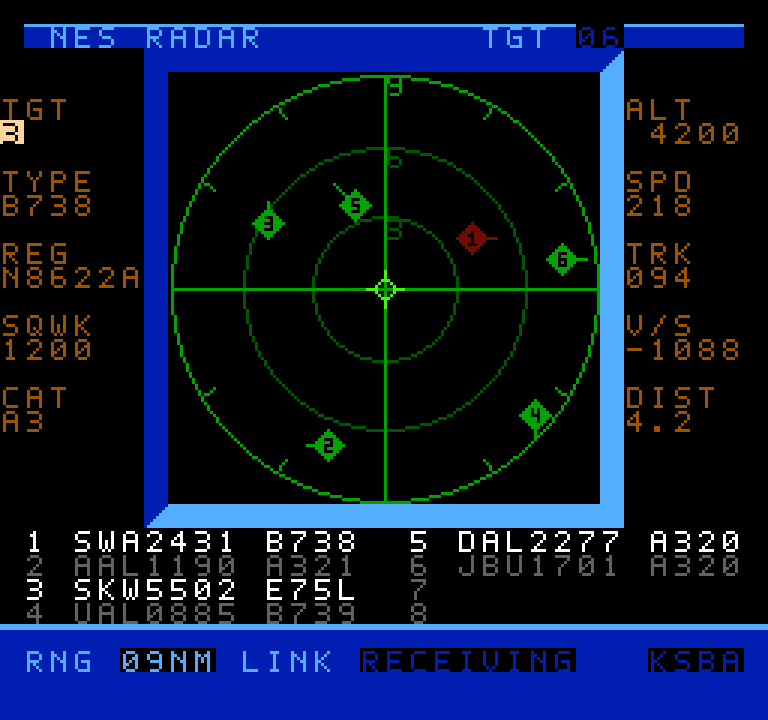
Air traffic visualizers seem to be having a bit of a moment right now, and now that moment has come to the venerable NES thanks to [k6lcm]’s NES Radar project, which is open-source under the GPL on GitHub. In spite of the name, there’s no Radio Direction or Range-Finding involved in this project– no radio at all, in fact, which makes this a bit interesting. It’s just an NES cartridge and a carefully constructed cable.

A screenshot of the NES radar scope
It looks like a period game, but it’s current-day air traffic.

The cartridge is a standard ROM cart that holds the software — no hidden ESP32 or PicoW here, which is what we initially suspected the project would be. So how is it that when you start up the NES with the cartridge inside, you can input an International Civil Aviation Organization (ICAO) code, like, say, KATL, and get a visualization of the traffic? Well, okay, if you put in KATL, you won’t get all the traffic, since the software is limited to 8 sprites, and that’s the world’s busiest airport. Still, how does it know where those airplanes are?

The secret is in the carefully constructed cable mentioned above: this project is using the second controller port on the NES as a serial port, and getting the data that way. A handy Python script on a nearby computer is what actually fetches aircraft positions. It’s based on c64u-radar, also by [k6lcm], which does the same Python server trick but relies on the Commodore 64 Ultimate’s LAN port to get data rather than using serial. The NES has no such ports available, though, so the controller port it was. We saw a similar trick used for satellite tracking on the NES some years ago.

If you like the idea of tracking flights, perhaps you’d like to see it done on a real radar CRT, or projected directly onto the ceiling. Thanks to ADS-B and free APIs, it seems airplane trackers are everywhere; if an interesting one has come onto your radar, please send us a tip.

Speaking of tips, thanks to [Levi] for putting this one on our scopes!

Is This the Year of The Linux… Television?

6 September 2026 at 13:00

The Year of the Linux Desktop hasn’t been on its way for quite as long as nuclear fusion plants, but somehow it seems to recede into the horizon at just about the same rate. Every year, it’s another year in the future. You know what isn’t a desktop? A television. [Haggis on Toast] makes a case that while there may be barriers to desktop adoption, there’s no reason not to use Linux for a set-top box, and shows one such build in a recent YouTube video.

Of course everyone knows commercial set-top boxes and “smart” TVs alike run Android, which is built atop a Linux kernel. Those are getting steadily more frustrating to use as corporate enshittification continues, so why not DIY? [Haggis]’s build uses a miniPC in a custom 3D-printed case, running Nobara Linux with a Waydroid TV build to provide the Android set-top box experience, plus light/casual gaming via Steam.

Control is via gamepads or a cheap USB remote, with the frontend provided by DeckyLoader. Getting it all set up might be a pain if you’re new to Linux. However, everything comes with easy installers, so it should be a breeze if you’re more than casually computer literate in any other operating system. The most intimidating part of this build is probably reflashing the Blu-Ray player to unlock the ability to play and rip 4K disk content. But if you’ve embraced the death of physical media, you can skip that part.

Ironically, old Android TV boxes can also be repurposed into headless Linux machines.

Thanks to [Keith Olson] for the tip!

This Clavichord is a Well-Tempered Project

6 September 2026 at 10:00

The Clavichord needs no introduction to fans of Early Music, and a lengthy one to literally everyone else. Even classical music buffs who have heard of Bach’s works for the “Well-Tempered Clavier” — another word for clavichord — will mostly have heard them performed on Piano. That is perhaps fitting, as the clavichord is a distant ancestor of the modern piano. It has keys — though fewer of them than a piano — whose action strikes strings — though much, much fewer of those than a piano, as each string is required to generate multiple notes. [Ian Summers] has an excellent guide on how he built his, though be warned that that link goes to a PDF and the SSL certificate was having problems as of this writing. If you aren’t comfortable grabbing a PDF over old-style HTTP, we’ve embedded the demo/build video below so you can give a listen to what this pre-piano instrument sounds like.

[Ian]’s Clavichord isn’t a pure reproduction of a historical example, which makes it unusual in the world of Early Music where most obsess over authenticity. That means [Ian] was able to document his design decisions and why he built the instrument the way he did. There are two octaves and ten strings, which means each string is expresses two or three notes since this instrument is fully chromatic– that means there are ‘dark’ keys for the sharps/flats. Like a piano, the keys whack the strings to make sound, but unlike a piano, they do so directly: no mechanism and no hammers, which makes for some interesting differences in the sound. You can add vibrato, for instance.

[Ian] accomplished this build entirely with traditional woodworking, unlike the 3D printed piano mechanism we saw recently. There’s enough meat in the guide, and the instrument is simple enough that we suspect it would be easy enough to adapt the design to make it with extruded plastic or laser-cut parts, like this Zither.

There’s Whole Computer Inside This Mouse

6 September 2026 at 01:00

[Gadget Industry] bills it as “a PC inside a Mouse“, but that depends on your definition of a “PC”. This is a Personal Computer inside a mouse, yes, but there’s nothing IBM-compatible about the tiny ARM board he squeezes inside what’s normally a peripheral — it actually started life as a smartphone, which only takes this build up a notch compared to starting with a single-board computer like a Pi.

Specifically, he starts with a Galaxy S21 5G. Starting with a Samsung means he can leave the stock Android alone and just take advantage of Samsung’s DeX desktop mode, rather than layer a Linux environment on top or replace the operating system entirely with something like Postmarket OS, which are both viable options.

With the battery compartment removed, the phone guts fit with shocking ease in the once-wireless mouse. Of course that’s not a great thermal environment, but that’s what the brass is for. It acts as a heat spreader, which is about as much thermal management as the phone had from the get-go, so it should work well enough. It seems to in the video, certainly. If thermal throttling is a concern, while it’d be hard to fit in a mouse, there’s no beating liquid cooling.

Laser Your Way to Smoother FDM 3D Prints

30 August 2026 at 01:00

Now, not everyone minds the characteristic layer lines you get with Filament Deposition Modeling (FDM) 3D prints, but sometimes you need a smooth surface. If so we might go for filling primer, Bondo, or maybe break out the ABS and vapor smooth. Well, [I changed a thing] has an alternate suggestion: lasers. Laser melting can smooth the walls on a print, or the top surfaces as he shows in two different videos, both embedded below. The results look roughly similar to vapor smoothing, without the chemical exposure small risk of explosion.

Of course, you need a laser to do this, and [I changed a thing] has two diode lasers mounted to the X-axis of his printer. Of the two, the top surfaces were a lot easier to get right than the wall smoothing, which makes sense. Top surfaces are right there for the laser to get at, after all, while with his laser setup [I changed a thing] needs to get at the walls obliquely. [I changed a thing] tries melting layer-by-layer as well as a few methods to get at the walls of a finished print; which works best seems to depend on the size of and geometry of the object, so it looks like this technique is as much art as science right now.

This effort is closely related to the previous work [I changed a thing] did on improving layer adhesion with laser melting.  It’s also not the first time we’ve seen laser-driven print smoothing, but that project used non-planar movements to do a post-print laser pass.

Analog Optical Feedback Generates 4K Fractals With No Computer

27 August 2026 at 07:00

For users of a certain age, fractal patterns and computers are nearly synonymous. Typing in BASIC programs and seeing the Mandelbrot set or other fractals slowly render on screen is a key memory for some of us. Others will have generated recursive patterns mucking about: point an analog camera at the screen showing its video feed, and you’d better believe you get recursion. It’s called video feedback, and it looks a lot better than audio feedback sounds, especially in the hands of a master like [The Light Herder] who has now found a way to take this vintage art into the 4K resolution of the 21st century.

Physically this build is very similar to the “God Machine II” sculpture we covered previously, which in turn built on the first 720p version of his art piece. Getting analog video feedback in HD was hard enough — you need to be able to adjust the hue, saturation, brightness and contrast of the monitor as you go in order to have the full control of the resulting image. Most old TVs had those back in the SD era, but once HD came around it was rare; [The Light Herder] despaired of ever finding a screen that would to this in 4K.

As it turns out, the answer was to embrace digital — all the knobs on his analog control board feed into a Teensy, which is communicating via RS-232 with the LCD driver boards to alter the desired display properties. Obviously judicious selection of driver boards was required. If you watch the build video embedded below, you’ll find there’s an awful lot of tech in this analog, ‘no computer’ setup. If you want to skip the how-to and a master’s explanation of video feedback and just see pretty pictures he’s got a demo video as well. It really has to be seen to be believed.

If you want to create a colorful analog light show that isn’t quite so self-referential and a lot simpler to build, you could always try soap. Actually, we’d love to see him start the feedback with some soap-film colors. The result would likely be as was once said “totally far out, man”.


eenk Provides eInk, ESP32 Powered Text Adventures

27 August 2026 at 04:00

There’s a niche genre of text adventure that’s halfway between a traditional novel and a videogame. Think Zork if it had an extra few novels worth of words of well-crafted story to go with the action. [t0mg] is a fan of such adventures, and also quite enjoys carrying around his palm-sized ESP32 powered Xteink e-ink reader, so decided to create a project to merge the two interests, called eeink.

The Xteink readers have gotten popular lately because their modest internals and size make them very affordable. Not to mention hackable, since they’re basically an ESP32-C3 e-ink dev board that comes with a nice case and battery. The X4 Pro notably comes with an ESP32-S3 which means a lot more RAM, but this project targets both that and the X3/X4 that use the C3 version. Using the C3 means working within some rather stringent limits, as Xteink didn’t spring for any PSRAM, so [t0mg] had less memory to work with than folks did in the 80s.

This project is specifically focused on adventures using the scripting language ink, and comes with its own IDE called eenky to roll your own choose your own adventure book. It’s all on GitHub under an MIT license, and if you want to see it in action there’s a demo video embedded below.

Speaking of Zork, it wasn’t just the first commercial text adventure; it brought some important technological innovations, too.


Encoding MOD Files Optically On Paper, Because Amiga’s Legacy Will Outlast M-Disks

27 August 2026 at 01:00

All but a few of our very youngest readers are surely familiar with music formats that rely on optical disks. When we say [RobDevBuilds] made a MOD tracker that uses an optical disk, then, you might be forgiven for thinking he stuck a bunch of MOD files onto a CD– MOD files being a format of electronic music that was conceived of on the Commodore Amiga that is still used to this day. A dedicated MOD-CD player might be a fun project, but it’s not what [Rob] did; his project is far more impressive and impractical, as he’s come up with a way to encode the MOD files on paper for optical playback. This way the Amiga’s legacy can be preserved longer than the paltry thousand years promised by the optical M-disk format.

Zooming way, way in on the disk reveals that he’s actually printing the patterns of the MOD file row by row, just like you’d see playing it in a ‘tracker’ program. A MOD file, you see, does not encode music like a WAV or MP3; rather, like with MIDI, it lists the notes the software reading the file– traditionally called a tracker–is to recreate. Unlike a MIDI file, though, you don’t have to store the same notes more than once: repeating sections are stored in patterns. So most of the disk is just a long list of hexadecimal numbers: several columns worth, one for each ‘voice’ or instrument playing in the song. Another difference with MIDI is that MOD files are self-contained in that they are supposed to contain the samples, which isn’t in evidence until you flip over the disk.

There’s no B-side to [Rob]’s album; instead a QR-code like series of barcodes is used to encode the samples used in each track on the disk, as well as other information needed to recreate the MOD file, including metadata like title and artist, and the sequencing of the patterns on the front. Of course this means he needs two cameras on his physical mod player, one on each side, and steppers to slide them across the disk like a linear tracking turntable. The front is read via OCR of his modified Amiga “Topaz” font, while the rear holds the first 1084 bytes of the MOD file in a QR-inspired format [Rob] produced specifically for this project.

Unlike the last time we saw someone store music in QR codes, the more modest size requirements of modfiles– something that led to their use in keygens— means this player can store the music’s 8-bit sound samples without the OPUS compression [Rob] is using affecting fidelity. He’s working on another video to give the details of the player– as he works out the bugs, right now it can’t jump betwixt patterns on the disk as fast as some modfiles need–but we’re willing to hazard a guess he’s got a Raspberry Pi in there, and that it’s probably not running the Amiga-inspired AROS operating system.

Reject Fluid Simulations, Return To Rheoscopic Fluid

25 August 2026 at 19:00

Fluid simulations are one of the “killer apps” of high-performance computing, but if you can’t afford the performance, they can take a depressingly long time to run. Depending on your use case, as long as you keep the Reynold’s number in mind– or are just looking for a qualitative look at pretty flows–you might be able to get away with purely-practical simulations using rheoscopic fluid, as [Visual Thinker] demonstrates in a recent video.

The fluid, as you can guess from the name, lets you scope out rheos— that’s flow, for those of you didn’t take Greek. Making it is as simple as you could ask for: get some mica flakes, which are readily available to add ‘sparkle’ to cosmetics, and mix with water and a drop of soap. The soap isn’t always necessary, but depending on your mica it helps keep it in suspension and avoid clumping– [Visual Thinker] found it helped him a good deal. Being flat plates of reflective material, the mica flakes catch the light and sparkle beautifully– and since they align with the fluid shear, they show you exactly what’s going on in your ‘simulation’.

[Visual Thinker] isn’t starting with serious simulations; the first thing he tries is essentially a toy that lets him see fluid flow around a Benchy by sticking magnets in it and using it to move a cross-section of its hull though a thin layer of fluid sandwitched betwixt pieces of laser-cut acrylic. We don’t call it a toy to disparage it, though– we totally want one. [Visual] mentions the idea of a coffee table combining the concept with the kind of underslung mechanism we see in sand drawing tables, which sounds dangerously hypnotic. If any of you build one, please try and tear your eyes away long enough to let us know.

He has another beautiful piece that make the video worth watching: a wind-tunnel, again made of laser-cut acrylic and printed parts. With careful consideration of the scale and flow speeds, that one might actually prove useful– and even if it doesn’t, it’s pretty enough that it doesn’t really matter. Beauty has its own utility sometimes.

Most wind tunnels we see around here use actual wind, but rheoscopic fluid was invented for this sort of thing, even if it does make for pretty baubles.

Amiga-Inspired AROS Goes Bare Metal on Raspberry Pi

23 August 2026 at 10:00

There’s no actual data, but if we had to guess the least-favourite Disney movie of former Amiga owners would have to be Frozen, because none of them will ever be able to “Let it Go”. The Amiga-derived AROS Research Operating System has just been ported to boot bare-metal on the Raspberry Pi, in both 32-bit and 64-bit versions. Yes, there’s a 64-bit Amiga-compatible OS that runs on ARM. It truly is a time of wonders.

AROS has already been ported to a number of platforms. Besides x86, there’s a PPC port that provided a lot of code to the MorphOS, which you can read about here, and a back-port that brings AROS back to original Amiga 68k hardware. There is even a build for RISC V.

AROS developers are making sure that Amiga legacy isn’t stuck on any given hardware, so they never have to let it go. So while not totally out of left field, this development is “pretty nifty” both in that it gives another ultralight operating system for the Pi, with boot times to rival RiscOS, and another platform for ex-Amiga users to play with that isn’t 40 years old. Previously if you wanted to run AROS on a Pi it was virtualized in Linux, making it similar to all other Amiga emulators.

While some software has been recompiled for ARM, the available software isn’t as full-featured as x86, but that’s almost certain to change as time goes on. It’s early days yet and this build is very much a work in progress. Likewise we expect support for other Pi boards to expand, as while right now the target is the Pi3, the forum threads include discussion of the Pi4 and even Zero2W.

You can check the port out in action in a video by [Dan Wood] embedded below, sent to us by tipster [Stephen Walters]. Thanks [Stephen]!

We have featured AROS once before, thought it’s been a while.

Bluetooth Shock Collar Keeps Wearer On Task

23 August 2026 at 07:00

Like a lot of us [Liam Kloppers] had a problem with doomscrolling. Unwilling to go cold-turkey because he does find some utility in social media. He tried a number of things before deciding to say “Screw it” and just go full Pavlov on himself with some old-fashioned classical conditioning. Who needs willpower when you have electric shocks to dissuade you?

The key here was finding an electric-shock dog collar that could be controlled via a smartphone application, which meant he could reverse-engineer its Bluetooth protocol and get it linked up to his own software. The initial implementation ties his quick-and-dirty Python control program with a web server living on his laptop, which he’s configured MacroDroid to call on when his personal criterion for ‘doomscrolling’ is met.

With the shock collar wrapped around his leg, [Liam] was ready to test. It turns out dogs are a lot tougher than people, because even when set to a low level, the shock from the device made him toss his phone across the room and had him hesitant to even pick it up again.

Since he couldn’t bring himself to put the shock collar back onto his leg, he’s now thinking of an audible alarm, something we’ve seen work before. If you’re as unhappy with your habits as [Liam], perhaps consider a device like Commodore’s social-media-free phone before resorting to self-electrocution.

❌
❌