A Florida county that discovered a clump of mysterious unpermitted Flock cameras during a countywide takedown effort won’t investigate who owned the sketchy cameras, which have since disappeared.
On Wednesday, The Washington Post reported that St. Lucie County residents "remain upset,” not knowing who installed the cameras or how they were using the data collected. Hannah Galindo, a 31-year-old resident who petitioned to get Flock cameras removed, told the Post that she was worried “that data could be anywhere.”
Of the 12 cameras found, five were eventually claimed by city law enforcement, the Post reported. Apparently, a police department mistakenly issued guidance claiming that officers could post multiple cameras under one permit, a Flock spokesperson told the Post, even though the county required individual permits. However, neither Flock nor the city police departments in Port St. Lucie and Fort Pierce that claimed the sketchy cameras will confirm who gave the guidance.
Two Democratic senators who have long overseen US intelligence say the Trump administration is illegally withholding a secret court’s findings from Congress until lawmakers renew a program that lets federal agents read Americans’ communications without a warrant.
Seven months ago, the Foreign Intelligence Surveillance Court objected to search filters that let intelligence analysts pull Americans’ messages from intercepted data without the approvals, written justifications, or records the law requires. The court approved another year of surveillance anyway. The ruling has never been made public, and Senators Ron Wyden of Oregon and Adam Schiff of California say the administration’s own deadline for releasing it passed in September.
The program, Section 702 of the Foreign Intelligence Surveillance Act (FISA), lapsed in June after Congress failed to renew it, though collection continues under the court’s March approval. The administration’s own public documentation says rulings like this one are reviewed for public release “within 180 days of issuance.” That window closed September 13, even as intelligence officials press lawmakers to reauthorize the program by the end of the year.
A small-business owner in Georgia has sued Flock and the Coweta County Sheriff’s Office over alleged retaliation using license plate cameras.
“[The lawsuit] alleges illegal [license plate tracking] searches over many months without probable cause and unrelated to any specific investigation,” Hall & Lampros, attorneys for plaintiff Tyler Murkerson, wrote in a press release. “The lawsuit alleges that Flock also failed to put safeguards in place to prevent illegal surveillance by officers by accepting free-text-field entries instead of specific case numbers or investigations.”
Murkerson’s saga began in February 2023, when he was arrested by sheriff’s deputies over an alleged seatbelt violation; those charges were dropped months later. In September 2024, Murkerson sued the department, accusing them of excessive force. The case was only recently settled.
As you know, there are thousands of Bluetooth and WiFi signals we pass through daily, especially if we live an active life in a big city. That includes tags, smartphones, WiFi routers, drones, surveillance devices, vehicles, body cams and mesh radios. Clearly it doesn’t stop here and the list goes on.
Many of you are privacy focused individuals and want to know what’s going on around you and whether you’re being tracked or watched by someone. That’s okay, protecting your privacy is a good thing. FieldWatch was made for this. It matches what it hears against an editable signature catalog of roughly 250 device types and shows the results in live views, recorded sessions, path maps and reports. Everything runs on the device and works fully offline.
FieldWatch
FieldWatch is a free, open-source Android app that listens to nearby Wi-Fi and Bluetooth signals using the radios already in your phone. It compares what it hears against a list of known device signatures and shows them. It only receives signals. It never transmits.
Source: OGridPeteSource: OGridPete
You can set alerts for specific devices, record what’s present during a walk or drive, and later compare sessions. All the findings are sorted under their category. It also has basic GNSS interference detection and can send results to mapping tools like TAK. Matches are based on patterns, not guaranteed identifications, and the app only sees what the phone’s radios and Android allow it to see.
Depending on your preferences, you may want to see these devices on a radar or on a map. The app found the location of the drone operator as well as the drone itself.
Source: OGridPeteSource: OGridPete
TAK Support
TAK and ATAK are free mapping apps used by military, emergency responders and some civilians to share locations and information on a map in real time. FieldWatch can send what it detects straight to TAK over the local network.
When FieldWatch sees a drone that’s broadcasting Remote ID, it can place a moving marker on the TAK map for the drone and a second marker for the pilot if that location is available. Other devices it finds, plus any GNSS interference alerts, can also appear as markers. Several phones running FieldWatch can send data to the same map at the same time, so a team sees the same picture.
Source: OGridPete
GNSS Interference Detection
Newer versions check for signs of GPS interference or spoofing using the phone’s own receiver. After a short outdoor calibration, it can alert you and mark the spot on your path or on a TAK map. It shows where you were, not where the interference came from.
Source: OGridPete
Limits
Now let’s talk about its limits. It isn’t a direction finder. Also, it doesn’t scan Bluetooth Classic, cellular networks or full Wi-Fi traffic. Matches are based on patterns and those are not confirmed identities. Your results depend on the phone and what Android lets the app see. For better results use newer phones. Official versions only come from the GitHub repo.
Android App
Download the APK from the official GitHub page and sideload it. Android 10 or newer is required. Android 11 has more functions that can be used with this app. A short instruction file and manual are included. The repository has all the answers in terms of the app. It works on a cheap phone with no SIM card. OffGridPete recently posted that he used a Moto G for $30 for his test and it worked well. If you decide to use it, use it for your own privacy and security, and be respectful of other people’s privacy.
Summary
You can use your cheap phone as a scanner for devices nearby, and find jamming and tracking. There are different apps that do similar things, but they’re bound to Linux only, which is very inconvenient. FieldWatch works on an Android phone to find trackers, cameras, drones, body cams and more.
If you enjoy experimenting with frequencies and trying new things, we recommend signing up for our SDR for Hackers training. With Master OTW, you’ll learn how to use your computer and inexpensive SDR hardware to explore and hack a wide range of radio signals.
The Treasury Department is scrapping two long-stalled crypto surveillance proposals, handing a major win to privacy advocates and the digital asset industry.
The Financial Crimes Enforcement Network filed notices Monday withdrawing its 2020 “unhosted wallet” rule and a 2023 plan to brand international crypto mixing a “class of transactions of primary money laundering concern.” Both notices are set to appear in the Federal Register on Tuesday.
In a Monday statement, the Washington crypto policy group Coin Center said the news was “a significant victory for financial privacy.”
“The definition of mixing was extraordinarily broad, sweeping in common techniques used by ordinary cryptocurrency users to preserve their privacy,” Coin Center said.
“And because FinCEN acknowledged the difficulty of determining where a mixing transaction occurred, we argued that risk-averse financial institutions would inevitably report even purely domestic transactions, with potentially severe collateral consequences for innocent users, including account restrictions or closures.”
The wallet rule would have required banks and other financial institutions to report certain crypto transactions above $3,000 and $10,000 when customers held the assets in unhosted wallets.
The mixing proposal cast an even wider net. It defined mixing as anything that obscured the source, destination or amount of a crypto transaction, sweeping in pooled funds, split transfers, single-use wallets and even swaps between assets. FinCEN said commenters warned the definition “could have a chilling effect on legitimate activity” and would bury institutions in paperwork.
Institutions would have had to hand over wallet addresses, transaction hashes, IP addresses and customer identity details.
The reversal also tracks White House policy. A July 2025 report from the President’s Working Group on Digital Asset Markets said “the Trump Administration supports the ability of lawful users of digital assets to privately transact on a public blockchain,” and urged the Treasury to reconsider the rule.
The report acknowledged that criminals use mixers to launder funds but noted that lawful users rely on them for financial privacy.
FinCEN isn’t giving mixers a free pass. The agency said illicit actors “continue to use mixers and other tools and methods to hinder law enforcement investigations.”
It added that it will keep watching for money laundering and terrorist financing and may act in the future.
A few weeks ago we published PwnEye, which is a great tool for camera hacking. We talked about the importance of keeping your IoT devices patched to prevent unauthorized access. A less hardened device is a lot more appealing to a hacker, especially when it sits on the same network as other infrastructure.
Cheap devices aren’t really built with security in mind and some of them come with backdoors that sooner or later get discovered and abused by anyone who finds them online.
Today let’s look at a tool that can identify cameras, test credentials and help you harden them.
Eyesharvester
Eyesharvester is a recon tool for IP cameras, DVRs and NVRs. You give it an IP range, it scans common ports, fingerprints the vendor and optionally tries default credentials. It can also show known CVEs associated with a brand and give you basic hardening advice. The tool is mainly for identification and reporting.
Setting Up
Let’s quickly download the repository and install the tool. No dependencies needed to get started.
kali > git clone https://github.com/Exhunterx/eyesharvester.git
kali > cd eyesharvester
kali > bash install.sh
The help menu covers everything the tool can do.
kali > eyesharvester --help
Now let’s look at the ways you can use it.
Testing Cameras
You don’t always get the camera IP ranges from admins, so recon comes first. We need to figure out which IPs belong to cameras.
kali > eyesharvester IP/24
A few cameras were found. Now let’s pipe all those IPs to a text file. The flag below will silence the noise.
kali >  eyesharvester IP/24 -q  > cameras.txt
kali > cat cameras.txt
You can keep these IPs for future tests, say with PwnEye for example. Or maybe you want to update the spreadsheet of your surveillance infrastructure, as admins often do, though there are better ways to keep a record of everything.
We can also run confirmation checks to make sure these are actually cameras.
kali > eyesharvester IP/24 -c confirmed -v
There’s a confirmed Hikvision camera above. We’ll test it and the rest of those we found for default credentials.
kali > eyesharvester IP/24 --check-creds
Finding a camera with default credentials internally is very common.
Hardening Cameras
Testing cameras is fun, but hardening them is a bigger question that needs to be addressed. Both pentesters and defenders should know how to do it and your report should include recommendations on how to harden these devices.
kali > eyesharvester IP --harden
Based on the vendor and open ports, a hardening checklist is generated along with the CVEs that affect your device. This mainly covers segmenting devices away from business and IT networks, disabling unused services, replacing weak credentials and updating firmware.
It’s very common to find Hikvision cameras vulnerable to CVE-2021-36260. The exploit can give you a shell on the device and lets you run commands.
We tested the same device and it was vulnerable with no patch applied.
This vulnerability is particularly interesting because you can generate a payload with Metasploit for this camera and connect it back to your C2. Then using a Meterpreter proxy or reverse SSH tunnel that camera becomes a proxy for attacking other reachable hosts on the network.
Summary
Testing cameras is definitely fun and PwnEye can help a lot here, but securing them can be part of your job too. Knowing how to both break and fix these devices gives you a better understanding of cybersecurity overall. That’s why you need Eyesharvester.
There are many other attacks on cameras, and it would be a very long article to cover them here. That’s why we created our IP Camera Hacking Training. It’s now part of our Cybersecurity Starter Bundle II. With it you get Wi-Fi Hacking, Python Basics for Hackers, Remaining Anonymous and more.
Lately we’ve been seeing a lot of posts about God’s Eye, a spy satellite simulator that runs in your browser. It’s a great tool developed by Bilawal Sidhu, but it requires certain paid APIs. Those APIs make the experience a lot richer, but they can be hard to get or you just don’t want to pay for them. That’s fine. For that reason we want to cover a fork developed by Gh0st-mods.
God’s Eye
God’s Eye is basically a website you run on your own computer that shows the Earth as a 3D globe with live public data on top of it. You can see planes in the air, ships at sea, some satellites, earthquakes and public traffic cameras. When you select those objects on the map, it tells you everything it knows about it. This can be its identity, speed, heading and other details. It looks like a spy movie. The data is just ordinary public feeds.
Let’s set up the fork and see how the free version works.
Setting Up
First, make sure you have all the dependencies installed.
kali > sudo apt update
kali > sudo apt install nodejs
kali > sudo apt install npm
Then clone the repository and install what it needs.
kali > git clone https://github.com/Gh0st-mods/Gods-Eye-Ghost-Edition.git
kali > cd Gods-Eye-Ghost-Edition
kali > npm install
kali > npm run dev -- --host localhost --port 4173
The app is available at http://localhost:4173, so we can open it in a browser.
Let’s walk through some of its features.
Data Layers
There are multiple data layers and many of them work without any API key. You can always add them to the .env file if you want a richer experience.
Aircraft Tracking
Each aircraft gets rendered in 3D flying over the Earth. You can switch visual presets too. Here we have a civil aircraft flying over the south of England.
Below you can see all the information on it.
Maritime Vehicles
These include transport and nontransport vessels. You’ll see plenty of them scattered across the globe. Here’s a tanker moored somewhere in Miami. Military vessels will also be shown on the map, so you can monitor their activity.
The satellite image quality looks good, since the tool sharpens it for you.
Dams
Water dams are part of critical infrastructure. Their locations are publicly available and integrated into the tool. Here is the Barro Blanco Dam in Panama. All critical facilities need good care and protection, especially during wartime, since they’re one of the things an enemy tries to attack.
Data Centers
Just like dams, data centers are important targets. If an enemy attacks data centers (drones/missiles, sabotage or cyberattacks) the result can be permanent data loss. Data centers are the physical backbone of banking, payments, logistics, government systems, AI and often military/cloud services. Hitting them will inflict economic and operational pain. The effects will cascade across almost everyone, even those who are completely offline.
One of these attacks happened recently when Iran attacked Amazon data centers.
Source: Wired
Satellites and Earthquakes
This isn’t the most notable feature on the platform, but it’s there and might be interesting to some. The data updates regularly. Below you can see several earthquakes hitting Japan in the last 24 hours. No surprise there, that region is highly seismic.
Summary
World monitoring apps are getting more popular. Some don’t even need to be installed, like Osiris. The original project by Bilawal Sidhu is great, but it still requires a paid Google API, which not everyone is comfortable with. The fork we covered today works for free out of the box. If you liked it, you might also want to check out ShadowBroker.
Bluetooth is often seen as something short range and therefore harmless. Many people think that because it only works over a limited distance, it must also be secure by design. But that’s not true. Bluetooth is convenient, but convenience often comes at the cost of security and privacy. A big number of vulnerabilities show that Bluetooth devices can expose much more information than many realize. At a technical level, they constantly announce their presence to the surrounding environment. Even when you are not actively using them, they still send small pieces of data. Over time these pieces form patterns that show detailed information about people’s lives.
Hackers can take control of devices, pair with them without permission and even use them as remote listening tools. In other cases, simply listening is enough.
WhisperPair Vulnerability
In January 2026, researchers from KU Leuven disclosed a critical Bluetooth vulnerability known as WhisperPair (CVE-2025-36911). This vulnerability affects hundreds of millions of Bluetooth audio devices, including headphones and headsets that rely on modern pairing mechanisms. The attack takes advantage of a feature called Fast Pair in Android. Fast Pair was designed to simplify the user experience. With a single tap users can connect their Bluetooth accessories and synchronize them with their account. It’s convenient and widely adopted.
However, some devices don’t properly ignore pairing requests when they aren’t in pairing mode. A hacker can exploit this by sending crafted pairing initiation packets to a vulnerable device. Even if the device isn’t actively trying to connect, it may still respond. Once the hacker receives that response, they can establish a normal Bluetooth connection.
Source: WhisperPair
From that point on, the hacker gains control over the accessory.
Source: WhisperPair
Then they can activate the microphone to record conversations. The attack works from up to 14 meters away, which is plenty for offices, cafes or public transport.
Source: WhisperPair
This can be combined with device tracking. Some Bluetooth accessories integrate with Google’s Find Hub network, which allows lost devices to be located using nearby Android devices. If a vulnerable accessory has never been paired with an Android device before, a hacker can register it under their own Google account. In doing so, they become the “owner” of the device in the tracking system.
An attacker tracks the victim’s location through the Find Hub network. Source: WhisperPair
The victim may eventually receive a notification about unwanted tracking, but the alert can appear misleading. If the user’s own device is responsible for tracking, that will cause confusion and reduce the likelihood that the threat is taken seriously. Meanwhile, the hacker continues to track the device over time. It affects multiple vendors, chipsets and product lines. As a result, exploitation is likely to continue well beyond 2026.
Bluehood Scanner
Sometimes, attacks are completely passive. In February 2026, a developer released a Bluetooth scanner called Bluehood. It looks like a monitoring tool and shows how much information can be extracted from the environment without ever connecting to a device.
Bluetooth is almost always enabled. Phones, laptops, smartwatches, headphones, cars and even medical devices continuously broadcast signals. Bluehood listens to that data and builds patterns over time. By passively listening to this traffic over days or weeks, hackers can reconstruct behavior.
For example, you can find out when delivery vehicles arrive and whether the same driver appears regularly. You can see daily routines by tracking when certain devices appear and disappear. You can also correlate devices that are always seen together, such as a phone and a smartwatch, which likely belong to the same person. You can even determine approximate schedules when someone leaves for work or returns home.
You don’t need to buy hardware for that. In many cases, a laptop will do the job. If you want, you can get a Raspberry Pi with a Bluetooth adapter.
Some devices are designed to always keep Bluetooth active. Hearing aids, for instance, rely on Bluetooth Low Energy for configuration and diagnostics. Pacemakers may also broadcast BLE signals for similar reasons. These aren’t devices that users can simply turn off.
Many cars use Bluetooth for diagnostics, driver assistance and connectivity features. Consumer devices add even more noise to the environment. Smartwatches, pet trackers and fitness equipment all give off signals. Together, they create a dense network of signals that can be analyzed.
Bluehood works only in passive mode. It doesn’t try to connect to devices. It identifies them based on manufacturer data and BLE service UUIDs, then tracks when they appear and disappear. The tool also includes a web dashboard. It generates hourly and daily heatmaps, tracks dwell time and has filters. New devices often use randomized MAC addresses for privacy and Bluehood can detect and filter these.
Installation
You can install the tool quickly using Docker.
kali > git clone https://github.com/dannymcc/bluehood.git
kali > cd bluehood
kali > docker compose up -d
Alternatively, you can install it using package managers and Python tools.
kali > sudo apt install bluez python3-pip
kali > pip install -e .
kali > sudo bluehood
After the installation you can start the scanner.
# Start with web dashboard (default port 8080)
kali > bluehood

# Specify a different port
kali > bluehood --port 9000

# Use a specific Bluetooth adapter
kali > bluehood --adapter hci1

# List available adapters
kali > bluehood --list-adapters

# Disable web dashboard (scanning only)
kali > bluehood --no-web
Keep in mind that if you installed the app with Docker Compose, it should be accessible at http://localhost:8080.
Collected data is stored in SQLite, and the tool can optionally send notifications through ntfy.sh when devices arrive or leave a location.
Summary
Bluetooth security is often underestimated because the technology feels invisible and low risk. That’s not the case though. There are active and passive techniques that can be used for tracking. Big cities often have listeners scattered around public places and stations, working like Bluehood. Active techniques like WhisperPair can lead to full device compromise with tracking and audio surveillance.
If you enjoy experimenting with frequencies and trying new things, we have our SDR for Hackers training. With Master OTW, you’ll learn how to use your computer and inexpensive SDR hardware to explore and hack a wide range of radio signals.
We recently updated our article on ShadowBroker, which a lot of you liked. The latest release brought some new features and made the dashboard even richer.
But ShadowBroker is resource intensive and might need you to allocate a good chunk of resources to your VM, which not all systems have. Instead, there’s Osiris and it can do similar things without any installation. You can run it in the browser or host it on your Kali. Both versions are identical.
Osiris
Osiris is a global intelligence dashboard that aggregates live flight tracking, CCTV, earthquake monitoring, conflict zone mapping and 24/7 news feeds. It’s made to give you situational awareness across multiple intelligence domains. The tool was built with Next.js 16 and MapLibre GL and every data point is rendered via WebGL for 60fps performance even with thousands of concurrent entities on screen.
Dashboard
Let’s start with the live version. It’s available here.
The world looks busy once you enable all the data layers on the left side of the screen.
Camera Feeds
There’s a huge number of cameras available around the world that are free to access. They are usually scattered across different websites and don’t look nearly as good as they do on a map. The dashboard has integrated a big number of them, marked with green dots on the map.
Here’s a camera in Toronto. Looks empty at 5 am.
Aircraft Tracking
All kinds of aircraft and maritime vehicles can be tracked. Not only that, you can do a deep dive on the intel available for each one. Below you can see we picked a random flight over the UAE and the dashboard pulled up the company it belongs to, Tim Clark who is the CEO and some publicly known information on him.
You can do similar things with other objects on the map.
So if you’re monitoring military activity in a certain region, that can come in handy.
Critical Infrastructure
There are different data assets you can display by clicking the database icon on the right side of the screen. The data is relevant for various places, but mostly for the US.
Above you can see the critical infrastructure in New York (red) and nationwide (yellow).
Conflicts and Dangerous Zones
Wars, tensions and threats are differentiated by color and notes are assigned to each with a severity level.
Market Analysis
When someone loses, someone else wins. Osiris can do some Market AI overview, which you obviously shouldn’t take as legit advice. But you can see it does some basic analysis and warns of potential price spikes.
Satellite Tracking
All kinds of satellites are available on the dashboard and they can also be tracked. Here you can see Starlink flying over the Atlantic and Canada.
Malware Threats
Finally, you can view malware threats and attacks on the map. There was a big node in China linked to a lot of attacks, with more scattered around the rest of the country.
Hosting Locally
Although the live version is stable and its uptime is good, you might still want to run it locally. It’s pretty easy to set up:
kali > sudo apt install npm
kali > git clone https://github.com/simplifaisoul/osiris.git
kali > cd osiris
kali > npm audit fix --force
kali > npm run dev
Then it’ll be available at http://localhost:3000
Summary
As you can see, there are different platforms available for different setups. Having compared the two, ShadowBroker looks richer and more professional, but Osiris hosts a live version you can use without any installation and it already has most of what you’d want to test. The installation itself is quick and easy and the dashboard consumes way fewer resources than ShadowBroker. Test it yourself and see what you like.
You can learn more with us! Get our Cybersecurity Starter Bundle II and unlock WiFi Hacking, Python for Hackers, Radio Basics and other training.
Some cameras protect a building, others betray it. Camera hacking isn’t hard, and that’s the problem. These devices are often the most vulnerable in any environment. Once installed, they aren’t maintained until there’s a problem. Many “problems” can go unnoticed if you know how vulnerable cameras are. Hackers can use them for persistence or as an entry point into an organization.
We do have different articles on this topic, but this time there’s something else we want to show. It’s PwnEye.
PwnEye
PwnEye is a newer tool that didn’t get enough attention yet. It works with both ONVIF and RTSP and that’s pretty much all you need. Once it has compromised a camera, it can reboot it, factory reset and open an interactive shell via ONVIF.
You also black out the operator’s view. Just like in movies.
Setting Up
Let’s set up the tool. You’ll need ffmpeg first.
kali > sudo apt install ffmpeg
Then install pipx and grab the tool.
kali > sudo apt install pipx
kali > pipx install git+https://github.com/Hackerest/pwneye.git
Once it’s ready, you can test it:
kali > pwneye -h
The help menu’s large. The tool can be used to find cameras in a local network with –discover, but it can be pointed at any camera IP. That’s where we’ll start.
ONVIF Attacks
ONVIF is the protocol that lets cameras from different manufacturers talk to each other without buying the same product. It’s basically a standard, but it’s also an attack vector.
kali > pwneye -t IP
If the camera’s running default or weak credentials, you get access. The tool extracts everything after compromise. Below you can see the network config, MAC address, DNS entries and configured users. DNS entries may sometimes point to interesting internal servers.
Look at the configured user credentials in the output. You’ll use those to get a shell.
The tool also finds snapshots that the camera captures regularly. You can view them in the browser or wait for PwnEye to open the stream.
Some cameras support deface (black the screen), PTZ movement and factory reset through ONVIF. Not all. Depends on the model.
Finally, once it finishes, you get the stream.
Well, it’s just a bus station. Nothing fancy here.
Defacing Cameras
If the camera supports it, you can deface it.
kali > pwneye -t IP --deface [MESSAGE]
It’s not sophisticated, but it works.
Shell
That’s probably the most interesting part. Take the credentials from the user profile output and get a shell.
kali > pwneye -t IP -ou admin -op ‘’
Once you’re in, run help and see what it has. Some cameras let you do more than others.
RTSP Attacks
ONVIF compromise is worse than RTSP compromise, but RTSP often works when ONVIF doesn’t. The tool tries both by default, but you can skip ONVIF and go straight to RTSP if you want.
kali > pwneye -t IP -so
The tool has more than 450 credentials built in. You can also try common corporate passwords like Company123 or just Company.
Once it gets credentials, you get the stream.
Summary
Some IP cameras might be accessible from the internet and locally. That means compromising them also gives you a foothold on the internal network. They aren’t upgraded regularly and IoT devices in general lack proper software updates. There are dozens of known CVEs on most camera models. Cameras can be used to proxy through them, attack other hosts or maintain persistence.
There are many other attacks on cameras, and it would be a very long article to cover them here. That’s why we created our IP Camera Hacking Training. It’s now part of our Cybersecurity Starter Bundle II. With it you get Wi-Fi Hacking, Python Basics for Hackers, Remaining Anonymous and more.
In May 2026, we discovered a new cyber-espionage campaign by the Armored Likho group, also known as Eagle Werewolf, that targets private individuals and organizations across various industries in Russia, including major corporations, the public sector, IT, and education. The attackers used a fake app as bait that mimics a service for donations. However, the most interesting part of this campaign isn’t the initial infection method – it’s the malicious implants the attackers use for cyber-espionage.
We’ve written previously about recent Armored Likho attacks, but our analysis shows that the campaign discussed below has more in common with the group’s activity from February. That said, the attackers have significantly expanded their arsenal.
During our research, we found a new cyber-espionage toolkit written in Rust: the Still Toolkit. One of its components, Still Sync, steals Telegram session data to gain ongoing access to the victim’s account. With this stolen data, attackers can leverage the Telegram API to automatically pull chat logs, media files, and other information from the account.
The second component, Still Audio, is an implant for covert audio surveillance. It analyzes the incoming audio stream, automatically detects speech, records conversations, and sends the recordings to a command-and-control server.
In this article, we’ll look at the initial infection method, how the new Still Toolkit components are built, and the technical details of how they operate.
Kaspersky products detect this threat as Trojan.Win64.Agent.* and HEUR:Backdoor.Win32.Generic.
Background
Armored Likho’s malicious activity has been documented several times before: in November 2024, and in February and July 2026. The current campaign shows significant overlap with the November and February campaigns, which used malicious droppers disguised as documents and applications related to Starlink activation or fundraising efforts as the initial infection vector. This campaign also uses fundraising as its lure. At the same time, our research uncovered a number of new tools that point to the attackers expanding their capabilities.
Initial infection
The infection chain starts with an app that mimics a donation service. As of this writing, the app distribution method remains unknown. During our research, however, we obtained several samples posing as apps from different Russian foundations.
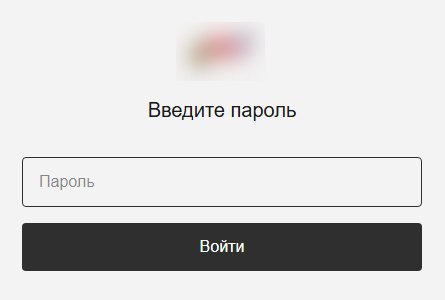
In reality, the app is a dropper. Its developers wrote it in Rust on top of the popular Tauri framework, and it has a graphical interface designed to deceive the user. After launch, it displays a login form that asks for a password, presumably one the attackers supplied.
The login form
After the user enters a valid password, they see a catalog of donatable items. The app pulls item and category information from orderapiserver[.]info through the public/categories and public/products endpoints. A clickable catalog makes the app look legitimate. While the user browses the items, the dropper quietly decrypts and launches the payload for the next stage in the background.
Our analysis shows that the mechanism for decrypting the payload and launching subsequent stages hasn’t changed since the February campaign. However, we found a new cyber-espionage toolkit – the Still Toolkit – made up of two components: Still Sync and Still Audio.
Still Sync
Still Sync is a stealer written in Rust that steals Telegram session data. However, its capabilities don’t stop there. With this stolen data, Sync can log in to the victim’s account and pull messages and media files through the Telegram API.
Architecturally, Sync is an asynchronous application based on the Tokio library. It talks to the server over gRPC and serializes messages with FlatBuffers. It supports both HTTP and HTTPS as transport protocols; the URL of the command-and-control server determines which one it uses.
How it works
When Sync launches, the attackers set several environment variables. Before starting any malicious activity, the implant pulls configuration parameters from these:
STILL_SYNC_ADDR: the address of the command-and-control server. By default, this is https://tg4service[.]com:443.
STILL_SEND_PATH: the path to the tdata
STILL_TELEGRAM_PASSCODE: the password for decrypting the tdata folder, if Telegram data encryption is enabled on the victim’s device.
Sync also supports several command-line arguments:
--console: runs as a console application. If this parameter is absent, the implant creates a TReload service to keep running in the background.
--version: prints version information and exits.
--firefly: launches a trace thread that monitors the program’s operation. It writes error messages to a hidden file, bin, located in the same folder as the main executable.
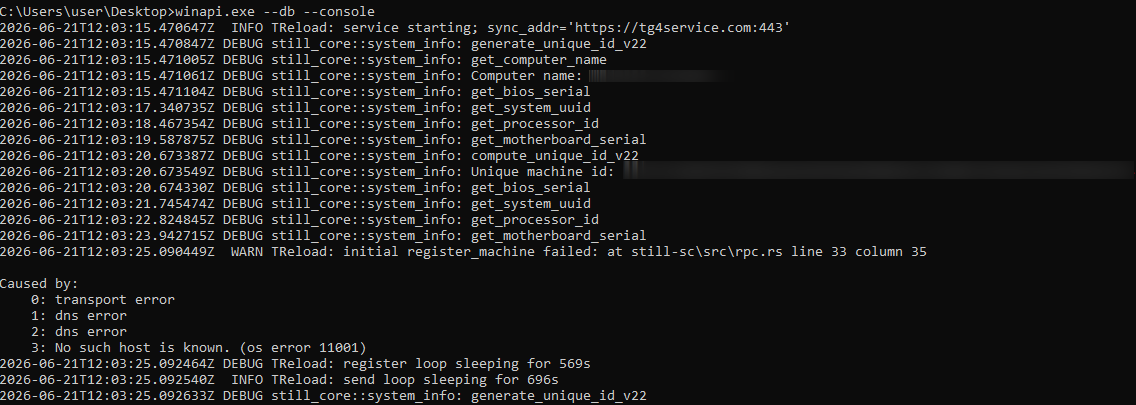
--db: turns on debug mode with detailed logging.
Example Still Sync logs
Once it launches, the malware begins registering the device with the C2 server. To do this, Sync collects the following information about the victim’s system:
Motherboard serial number
CPU ID
System UUID
BIOS serial number
Computer domain name
The malware combines the collected data into a single string with a colon as the separator. It then hashes that string with SHA-256 and stores the resulting hash under the key sysmarker. Worth noting: other Armored Likho tools, AquilaRAT included, use this same hashing algorithm.
Sync then serializes a package containing all the collected information and the agent version, and sends it in a POST request to /still.rpc.Sync/RegisterMachine. The response contains a machine_id value, which Sync uses to identify itself in subsequent requests.
Once registration succeeds, Sync sends a POST request with the machine_id parameter to /still.rpc.Sync/GetMachineSettings. The server responds with the following settings:
enabled: triggers malicious activity on the infected device.
scan_portable: turns on extended scanning when searching for the tdata We’ll cover this feature in more detail below.
fetch_telegram: if this parameter is on, Sync attempts to log in to Telegram and extract data. We’ll cover this feature in more detail below.
download_channels: if this parameter is off, Sync skips channel dialogs when exfiltrating Telegram data.
These parameters have no default values, so Sync doesn’t perform any malicious actions until the registration and settings-retrieval processes both complete successfully.
Telegram data collection
Before stealing a Telegram session, Sync searches for the tdata folder, unless the STILL_SEND_PATH variable is already set. The list of search paths includes both standard and nonstandard directories, if the scan_portable option is turned on:
C:\Users\<username>\AppData\Roaming\Telegram Desktop\: the standard Telegram Desktop installation directory.
C:\Users\<username>\AppData\Local\Packages\<package_folder>\LocalCache\Roaming\: the installation directory for the Microsoft Store version. Sync identifies the package folder by a name that contains the string TelegramMessenge.
C:\: used for the extended search (if the scan_portable option is on).
Sync then sends a POST request with a list of files from the tdata folder to the /still.rpc.Sync/CheckFiles endpoint. The server responds with the following values:
snapshot_id: an identifier the server assigns to the current data snapshot.
present: a list of file paths that are already present on the server.
This lets the C2 server avoid re-receiving files it already has. In addition, if Sync can’t access files on disk through standard methods, it falls back on three mechanisms that abuse the SeBackupPrivilege privilege:
Opening files with the CreateFileW function using the FILE_FLAG_BACKUP_SEMANTICS parameter
Creating a backup copy through the Shadow Copy service and reading files from there
If the previous methods all fail, attempting to copy the file using the Robocopy utility in backup mode
Beyond stealing Telegram session data, Sync can carry out full-scale collection of user information from the messaging app. When the fetch_telegram option is on, it launches a separate thread that authenticates to the chat app using the previously obtained tdata. Once authentication succeeds, Sync gains access to the account data and sends the following collected information to the server:
User details, such as username, phone number, first and last name
Information about private chats, groups, or channels, such as chat name and ID, the member list, and so on
Dialogs from private chats, groups, and channels (if the download_channels option is on)
Media files under 250MB: photos, documents, stickers, and contacts
Still Audio
Still Audio is an audio surveillance implant written in Rust. Its main job is to analyze the incoming audio stream and start recording voice when certain conditions are met – we’ll cover those in the next section. Architecturally, Still Audio largely mirrors Sync and uses the same mechanisms for communicating with the C2 server.
On launch, Still Audio performs a sequence of actions:
It extracts libmp3lame.dll, a file stored inside the executable. This is a library used to encode audio data.
If the --console command-line argument is absent, the implant creates a service named auxhost, connects to it, and continues running in the background.
While running in the background, it creates a file, logfile.log, to write logs to.
Next, Still Audio retrieves the C2 server address. As with Sync, it stores the URL in an environment variable – in this case, STILL_AUDIO_SYNC_ADDR. If that variable isn’t set, it falls back to STILL_SYNC_ADDR, which shows the two modules are compatible with each other. If neither variable is set, it uses the default URL, https://srwinservice[.]com.
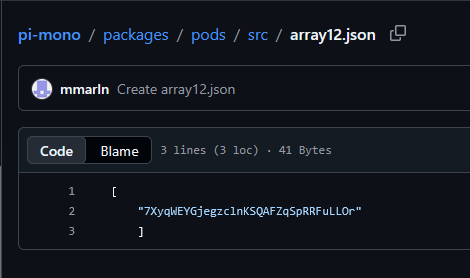
Still Audio also uses the Dead Drop Resolver technique as a fallback mechanism for obtaining the C2 address. If the current server stays unreachable for three days, the tool tries to pull the current C2 URL from a GitHub repository. In the sample under analysis, we found the following URL for the page containing C2 information: hxxps://raw.githubusercontent[.]com/mmarln/pi-mono/refs/heads/main/packages/pods/src/array12.json
Encrypted C2 address inside the GitHub repository
The repository, a fork of a popular project, contains the server URL Base64-encoded and encrypted with the Blowfish algorithm in ECB mode, using the key 5c8e153228edd3c6cbf75684 (lowercase string). Older AquilaRAT samples use this exact same algorithm and key.
Once it obtains the current C2 address, the Audio module starts a registration process similar to Sync’s, but through a different endpoint:
/still.rpc.Audio/RegisterAudioMachine. Also, unlike Sync, Audio sends a list of available audio input devices along with the system information.
The server responds with settings for the implant:
machine_id: a unique identifier for the current device.
vad_threshold: the threshold value for the VAD (Voice Activity Detection) algorithm. Expressed as a decimal fraction, it represents a proportion of the maximum sound level the input device can pick up. Sound above this threshold counts as voice activity. The default vad_threshold is 02.
max_silence_duration: the number of audio samples with a VAD value below the set threshold after which the implant considers the recording finished.
max_buffer_size: the maximum buffer size for recorded audio data.
active_device: the name of the input device selected for recording, from the list of available devices.
The eavesdropping process
Still Audio works with raw audio samples it captures directly from the input device. To detect voice activity, it implements an algorithm based on Root Mean Square (RMS), a lightweight signal-processing method that distinguishes speech from silence by measuring the audio signal’s average power over time. The implant doesn’t rely on any third-party libraries here; it implements all the calculations itself.
The implant compares the calculated RMS value against the vad_threshold parameter. If RMS meets or exceeds this threshold, recording starts. To avoid losing the beginning of the recording, Still Audio uses a pre-buffer, a size-limited buffer that stores samples from just before the current recording moment. A sequence of max_silence_duration samples (320 by default) with RMS values below the threshold signals the end of the recording. For example, with a standard headset running at a 44.1kHz sampling rate, recording stops after roughly 7ms of silence.
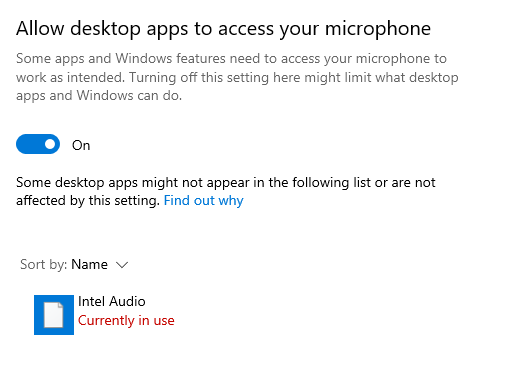
Interestingly, the Audio module makes no attempt to hide its use of the microphone: its name shows up in Windows settings. In the sample we examined, the file was saved to disk as IntAudio.exe, and it appeared in the list of apps using the microphone as “Intel Audio”:
The malicious module in the list of apps using the microphone
Before sending recordings to the server, the implant uses the libmp3lame library to encode the raw audio samples. It sends the recording files via a POST request to /tgfrg, adding a Client-Id header containing the machine_id obtained during registration to identify the device.
Infrastructure
This campaign draws on a broad set of hosting providers and domains registered at different points in time, which suggests the attackers are trying to make their infrastructure harder to detect. We found no direct overlap in domains or IP addresses with the February campaign. Even so, the two infrastructures share some similarities:
They use the same hosting providers, with the ASNs 149440, 202448, and 215311.
Their domain names follow similar naming patterns that mimic Windows system services and update mechanisms.
Domain
IP address
Registration date
ASN
orderapiserver[.]info
187.127.153[.]38
April 18, 2026
47583
tg4service[.]com
159.198.37[.]74
October 4, 2025
22612
srwinservice[.]com
213.252.244[.]123
March 19, 2026
61272
screenserv[.]com
23.26.237[.]250
February 13, 2026
149440
windowserv[.]net
23.27.24[.]30
February 10, 2026
149440
managementapiservice[.]com
188.212.124[.]178
May 1, 2026
202448
service8date[.]com
145.223.69[.]143
January 13, 2026
215311
updateservs[.]com
145.223.68[.]66
December 23, 2025
215311
Victims
In this campaign, we’ve determined that the attackers’ primary targets are users in Russia. Most victims are private individuals, though the corporate sector, government organizations, IT companies, and educational institutions are also affected.
Attribution
This campaign has been using both new tools and malware families documented in BI.ZONE’s February report. While some components turned up for the first time, they show significant code-level overlap with malicious tools seen in earlier Armored Likho campaigns. Based on these overlaps, along with additional technical artifacts, we’re highly confident the Armored Likho group is behind the campaign. The overlaps we identified include:
Identical dropper architecture in the February and current campaigns, which includes the use of the Tauri library to build the graphical interface, a similar user-input handler, a payload with the ICRYPTMP header, and the same multi-part encryption format.
The same encryption algorithm and key used in AquilaRAT from the previous campaign and in the Still Audio module from the current campaign, both implementing the Dead Drop Resolver technique.
Identical logic for generating the sysmarker value in older AquilaRAT samples and in the Still toolkit from the current campaign. The algorithms match down to the PowerShell commands used to collect system information.
Substantial infrastructure overlap, which includes the hosting providers and domain-naming patterns described in the Infrastructure section.
Takeaways
The campaign described in this post shows Armored Likho’s toolkit evolving, with the group steadily expanding its cyber-espionage capabilities. Beyond the components we already knew about, the attackers rolled out new modules that let them not only access Telegram data but also conduct audio surveillance on victims. Together, these capabilities significantly widen the range of information attackers can collect in a single compromise.
One point deserves particular attention: the new tools form a cohesive set, sharing similar architecture, C2 communication mechanisms, and common implementation elements. This points to the group building out its own tool ecosystem, designed for long-term use and further expansion.
The emergence of new, specialized modules shows the attackers aren’t just trying to preserve their existing capabilities – they’re working to make intelligence-gathering more effective by controlling multiple communication channels at once.
Take a second and think about how many devices are actually working around you right now. Cameras on street corners, routers sitting inside nearby homes, Bluetooth earbuds in someone’s pocket, cell towers just outside of view. All of that is happening constantly, yet almost none of it is visible to the average person walking by. If you actually wanted to check what devices were nearby today, you would probably end up jumping from one app to another, waiting for each one to load, and still walking away without the full picture. It is slow, it is frustrating, and honestly, it takes all the fun out of exploring what is really going on around you.
A lot of these devices are not just sitting there minding their own business. Many of them are built specifically to track you. A recent video on X showed this. It captured a flock camera taking several pictures of a moving vehicle, running those pictures through some kind of analysis, and then filing everything away in an indexed format.
In the screenshot above, you can see the guy picking up the signal coming straight off the camera, while the camera itself keeps emitting a steady beam of infrared. Here is the full video.
Privacy is not a crime, and you have every right to know what might be watching you. The real challenge has always been figuring out where all of these surveillance devices are hiding. That’s where WireTapper can help us. It pulls data from Wigle, Shodan, and OpenCelliD one at a time. That way, you can see every one of these devices in your area.
WireTapper
WireTapper is a wireless OSINT tool designed to discover, map, and analyze radio based devices using passive signal intelligence. WireTapper detects and correlates signals coming from all the common wireless technologies you would expect to run into. This helps you understand what devices actually exist nearby and where they are likely located all without ever having to actively intrude on anything.
WireTapper can identify leaked Wi-Fi network credentials, and it does this through a privacy-protecting k-Anonymity query scheme, meaning it can check for exposed passwords without ever exposing your own search to the outside world.
Setting Up
Let’s quickly walk through the installation process. It’s a lot simpler than it looks.
kali > git clone https://github.com/h9zdev/WireTapper.git
kali > cd WireTapper
kali > python3 -m venv venv; source venv/bin/activate
kali > pip3 install -r WireTapper.txt
Once that finishes, you will need to grab API keys from each of the services mentioned above. Do not worry too much about Shodan, since its API is paid and WireTapper will still run fine without it. There are two ways to plug these keys into the app. You can either open app.py and enter them directly, or you can use app-env.py instead, which pulls the keys in through environment variables.
After you have picked your method, we recommend also installing python-dotenv, since it makes handling those environment variables a lot smoother.
kali > pip3 install python-dotenv
Working with WireTapper
Once everything is installed, you are ready to start the app and open the web interface.
kali > python3 app.py
The web interface will be waiting for you right here: http://localhost:8080/map-w
This is the dashboard you will land on the moment you open the page. It takes a little while to load everything, so give it a few minutes before you start clicking around. Once it settles in, you can zoom into whatever area you are curious about and start picking apart what is actually hiding there.
Just keep in mind that you need valid API keys for the app to work the way it is meant to. Without them, WireTapper will simply generate dummy data so you can still see how everything normally looks inside it. On Wigle specifically, your email needs to be verified before the connection will work properly.
At the top of the dashboard, you will notice a switch that lets you jump between Wi-Fi uplink and Bluetooth scanners. That is how you filter what you are looking at.
Flip the switch back the other way, and you get the same kind of view but for Wi-Fi devices instead. This side usually includes things like cameras, routers, and other similar devices.
Exporting Results
All of these results can be exported complete with their names and coordinates, in case you decide to use them somewhere else later on.
The example above is just a taste of how those exported results are going to look. You can use this JSON file with other tools.
Summary
There is far more happening around us than most people realize. WireTapper makes it easier to visualize that activity by bringing together information about nearby wireless infrastructure in one interface. If you’re into OSINT, privacy, or wireless security, it’s a handy tool.
OSINT is a valuable skill in many areas, especially when it comes to privacy, cybersecurity, and cyber warfare. The more you understand what information is publicly exposed, the better you can protect yourself and your digital assets. Our Ultimate OSINT Beginner training covers OPSEC, tracking, investigations, and much more across 23 lessons and 7.5 hours of video content.
We’re also hosting a live Remaining Anonymous training on August 11-13 at 3:00 PM UTC for all Subscriber and Subscriber Pro students.

 Login
Login