The humble credit card reader — most of us have used hundreds, perhaps even thousands of them over the years. But even for folks like us, it’s not the sort of device we give a lot of thought to. It’s just a keypad, a display, and a magnetic stripe reader. How interesting could it possibly be?
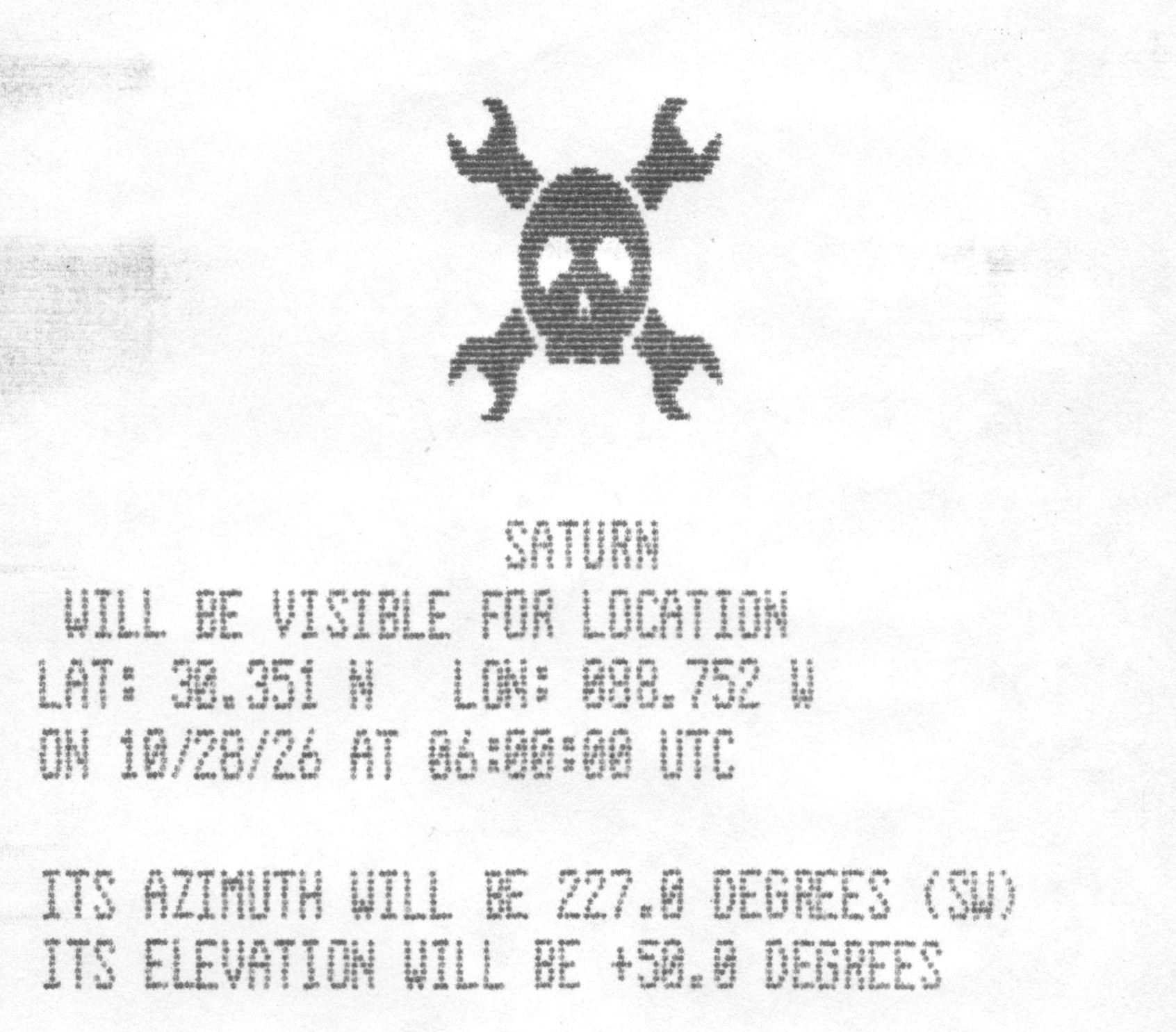
That may be true in some cases, but at least for the 1990s-era TRANZ 330, there’s a bit more to the story than that. As [CharlesD] explains, these particular readers are essentially complete Z80 computers just waiting to do something more exciting than processing PINs. In the case of this particular unit, the addition of a GPS module and some new code has turned it into an interactive guide to the solar system.
Thanks to the UV erasable ROMs used in the TRANZ 330, loading new code on the device is easy enough. With a bit of educated poking around, [CharlesD] was able to map out what did what. Working from the basics of getting the display and keypad working, he moved onto the serial interface, which in turn let him communicate with a modern GPS module and era-appropriate thermal printer. From there it was just a matter of getting the math implemented to compute the azimuth and elevation of a given planet, and he had an offline map of the solar system for use with his telescope.
This is one of those projects which is awesome enough on its own merits, but it’s particularly exciting to see just how easy it is to repurpose one of these card readers, especially since [CharlesD] was kind enough to share his source code. If you end up picking one of these up and getting something running on it, be sure to let us know.
We’re big fans of pushing hardware into situations it wasn’t designed for here at Hackaday, but sometimes you’ve got to appreciate a nicely designed gadget doing more or less exactly what it was intended for — especially when it’s courtesy of code that’s freely available for you to run and hack on however you like.
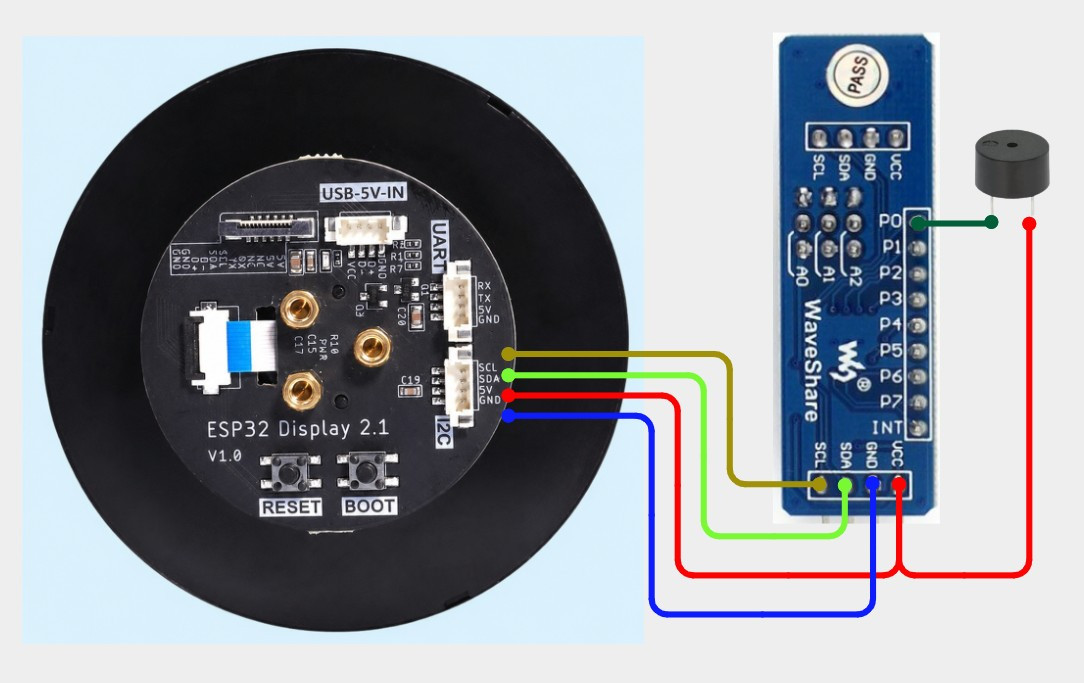
That’s precisely what [mircemk] has done with their “Universal Timer” project. The 2.1 inch CrowPanel “Rotary Display” at the heart of the build combines an ESP32-S3 with a 480×480 round touch screen display and a rotary encoder.
The all-in-one device — clearly meant to be reminiscent of the Nest thermostat and similar commercial offerings — is technically all you need, but in this case it’s been joined by a PCF8574 I2C I/O expander which in turn is used to drive a buzzer that provides a bit of audio feedback at the end of the countdown.
With the code [mircemk] has provided flashed onto the board, the rotary encoder ring built into the housing makes for an exceptionally intuitive input for setting the desired time. It’s a bit like a high-tech version of the classic kitchen timer, as shown in the video below, you simply twist the ring and the graphics on the display rotate accordingly. Unlike grandma’s clockwork timer of old however, this one can change color as it nears zero, which makes it easier to estimate how much time remains from across the room.
As the popularity of smartwatches has brought the cost of these circular displays down, we’ve started to see some very slick projects utilizing them. The various efforts to turn them into desktop “radar” displays for nearby flights are a particular favorite.
Some disappointing, but perhaps not entirely unsurprising news this week out of Denmark — after announcing last year that they would transition away from Microsoft’s proprietary software, the realities of making it work seem to have caught the government off guard. The word is that a trial program immediately ran into problems when government employees that had been given Collabora tried to collaborate with their peers running Office, and has since been quietly abandoned.
Although there’s probably a joke to be made about different parts of the government not knowing what the other ones are talking about, the reality is that if one group of staffers can’t reliably access the data being produced by another, that’s a pretty big problem. Of course, had they simply asked us nerds, we could have advised them that these sort of issues are inevitable if you don’t fully commit to the effort.
Had the entire government moved to the Open Document Format (ODF) at once they would have avoided the issue, at least when it came to newly created documents, but obviously that’s a considerably larger undertaking than installing Collabora or OpenOffice on a few dozen machines and calling it a day. There’s no word yet on how this stumble will impact Denmark’s larger effort to free themselves of proprietary software, but we’d hazard a guess it’s not a great sign. Hopefully things go better for the Dutch.
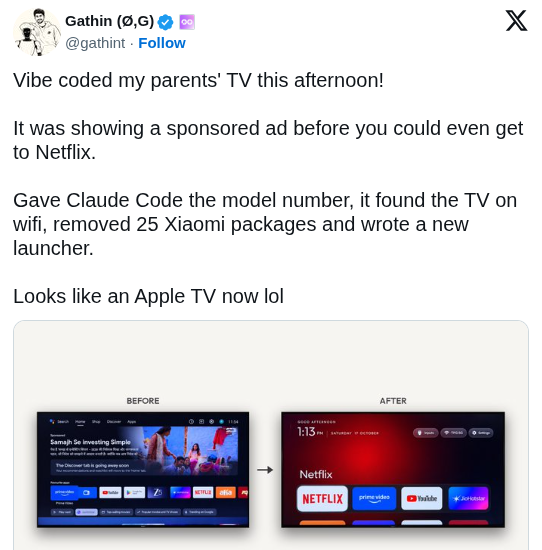
Speaking of users trying to improve their personal software situation, The Verge has an interesting article on a recent trend of frustrated users pointing AI tools like Claude at their smart TVs, with a few success stories posted to social media showing off interfaces that have been stripped of ads or replaced with something else entirely. It’s compelling stuff for anyone who’s unhappy with their current smart TV experience, but the whole thing isn’t quite as technically impressive as it might seem on the surface.
As the TV’s in question are running Android, all the AI tools need to do is connect to them over Android Debug Bridge (ADB) and uninstall any offending packages that might be providing ads, and similarly creating a customized launcher interface is a matter of spinning up an Android app and installing it over the network. The results may look like arcane magic to the uninitiated, so we appreciate The Verge pointing out that it’s all pretty basic stuff for anyone familiar with Android development.
On the subject of extracting unwanted components, a delicate operation to remove the masts of the sunken WWII cargo ship SS Richard Montgomery was completed successfully earlier this week off the coast of Sheerness, England. To those unfamiliar with this particular vessel that might not sound like a big deal, but when you’re dealing with a wreck holding an estimated 1,400 metric tons of explosives that have been deteriorating since 1944, even approaching the area needs careful planning and coordination.
Masts of the SS Richard Montgomery in 2014. Image Credit: Christine Matthews
There was a concern that the masts and their supporting structures were on the verge of collapsing into the hull of the wreck, which experts warned could potentially trigger an explosion large enough to endanger life and property. Actually removing the explosives from the ship itself will be a far larger undertaking, but at least for the time being, removing the masts has helped stabilize the situation.
Finally, if you’re looking to learn about something a little more local than a potentially explosive situation in Sheerness (apologies to anyone in Sheerness), check out Local Wikipedia. Created by [Ed Jefferson], the site lets you filter Wikipedia pages by their distance from your location or whatever other landmark you wish. By default it shows results that are within 1.5 miles, but if you don’t have anything too exciting within range it will start opening up the radius to pull in more results.
See something interesting that you think would be a good fit for our weekly Links column? Drop us a line, we’d love to hear about it.
Humanity has been sending robotic explorers to Mars since the 1970s, and for our efforts we’ve been rewarded with not only incredible imagery of the Red Planet’s magnificent desolation, but a wealth of information about the alien world and how it’s changed over the last several billion years. But comparatively, we know almost nothing about the planet’s two moons, Phobos and Deimos. In fact, as recently as the 1960s, there were some scientists that believed the unusual shape, mass, and orbit of Phobos hinted at the possibility that it was no moon at all, and was in actuality a derelict spacecraft of some type.
Martian Moons eXploration Spacecraft
Once the first Viking probes arrived at Mars, we had the photographic evidence and up-close measurements to prove that Phobos wasn’t artificial. But even today, we still don’t know exactly what it is. The data suggests that it’s not solid rock, and that large voids may be hiding under its surface. While we can be fairly sure there won’t be any mummified remains of Martian astronauts to be found within Phobos, vast deposits of ice are a tantalizing possibility.
With the launch of the Martian Moons eXploration (MMX) mission earlier this week, the Japan Aerospace Exploration Agency (JAXA) hopes to bring us one step closer to understanding the formation and structure of Phobos. Should everything go to plan, MMX will deploy a small rover to its tenuous surface in 2029, and by 2031, a sample return capsule will bring pieces of the mysterious moon back to Earth for further study.
A Delicate Operation
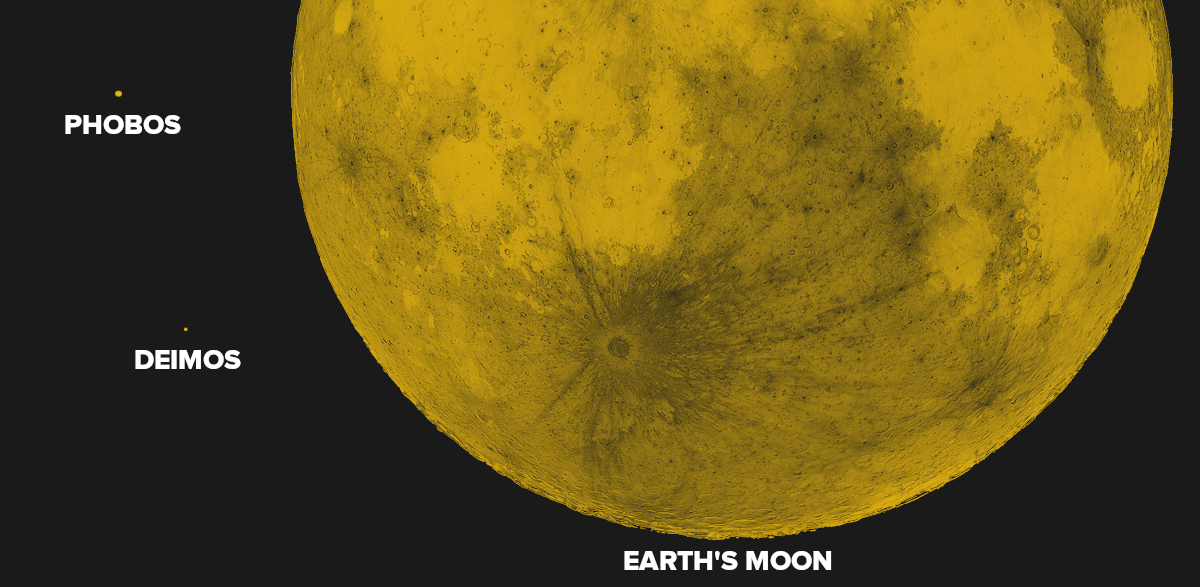
It’s only natural that we’d imagine Phobos and Deimos to be similar to Earth’s moon, but the reality of the situation is very different. For one thing, the Martian moons are absolutely dwarfed by our nearest celestial neighbor. Phobos has a diameter of just 22.2 kilometers (13.8 miles), and Deimos is even smaller at roughly 12.6 km (7.8 miles). For reference, Luna is approximately 3,474 km (2,159 miles) across.
Due to their low mass, putting a spacecraft into a stable orbit around either of the Martian moons isn’t really an option. Some clever maneuvering will put the MMX mission within range of both Phobos and Deimos at different points during the mission, but it won’t be able to stay around for long.
As such, final approach to Phobos will look more like a slow-motion “crash” than a traditional landing. A close comparison would be the OSIRIS-REx mission, where the spacecraft effectively “bumped” into the asteroid Bennu while collecting its samples. The impact velocity will need to be very low to prevent the spacecraft from bouncing off, and even then, some reports indicate that JAXA expects the craft to make at couple of hops before finally settling down.
The situation is compounded by the fact that we still don’t know what the surface conditions are like on Phobos. Based on previous observations, it’s expected that the moon is covered with a layer of fine regolith that could make traversal difficult for the mission’s Idefix rover. Indeed, one of the rover’s primary mission goals is to determine if wheeled motion in such an environment is even viable.
Tiny Moon, Huge Potential
Landing a crewed vehicle on Mars and successfully bringing it back home afterwards is perhaps the most daunting engineering challenge ever conceived. There’s even a solid argument to be made that it’s currently beyond our technological capabilities. The energy requirements of making a propulsive landing on the planet and then lifting off and getting back into orbit are enormous, and will very likely require in situ propellant production to refuel the craft between the two phases of the mission.
Landing on Phobos or Deimos however would require a small fraction of that energy. Moreover, due to their low orbital altitude, the moons would make ideal outposts from which to make detailed observations of Mars. This close proximity to the planet also means human operators on Phobos could directly command robotic vehicles on the Martian surface without the transmission delays that make real-time telerobotics from Earth impossible. While such a mission might not have quite the same symbolic impact of actually putting boots on Mars, it could be a valuable stepping stone towards that eventual goal.
The viability of such a landing may well depend on the findings of Japan’s Martian Moons eXploration mission. Not only in terms of the actual mechanics of rendezvousing with Phobos and touching down on it, but should the mission succeed in returning surface samples, we may be able to confirm whether or not the moon is made from ejected Martian material. Should that be the case, there will likely be even greater interest in studying the planet’s strange little moons up close.
Granted, she was standing there for long enough that the police were eventually called, but still. Previous reporting indicates that Carolyn Marvin has a history of blocking delivery robots as a form of protest, but this is the first time law enforcement got involved. We’re not lawyers here at Hackaday, so we can’t say for sure whether or not blocking the progress of a robot engaged in commercial operation actually violates any laws. But we do know that refusing a lawful request from a police officer will get you in trouble, and that seems to be what Marvin was actually charged with when she refused to move.
From a robot stopped in its tracks to one that keeps on trucking, NASA is reporting that the odometer on the Perseverance Mars rover recently ticked over to 28.10 miles (45.22 kilometers). That might not seem like a lot, but it officially makes it the most traveled rover in the solar system, breaking the record set by Opportunity at 28.06 miles (45.16 km). One might expect that the Curiosity rover would hold the distance record as it had been rolling around on the surface for more than a decade before Perseverance dropped into the neighborhood, but the different scientific missions of the two nearly identical rovers have taken them on very different courses.
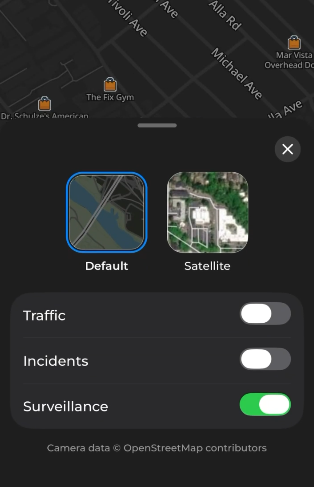
On the subject of navigation, MapQuest recently announced the availability of the “Surveillance Layer” in their smartphone application. When enabled, it shows the location of known license plate readers and cameras on the map, allowing the user to plan their route accordingly. A note in the application’s user interface mentions that they’re pulling at least some of this data from OpenStreetMap, though it’s not clear currently if other sources such as DeFlock are being used.
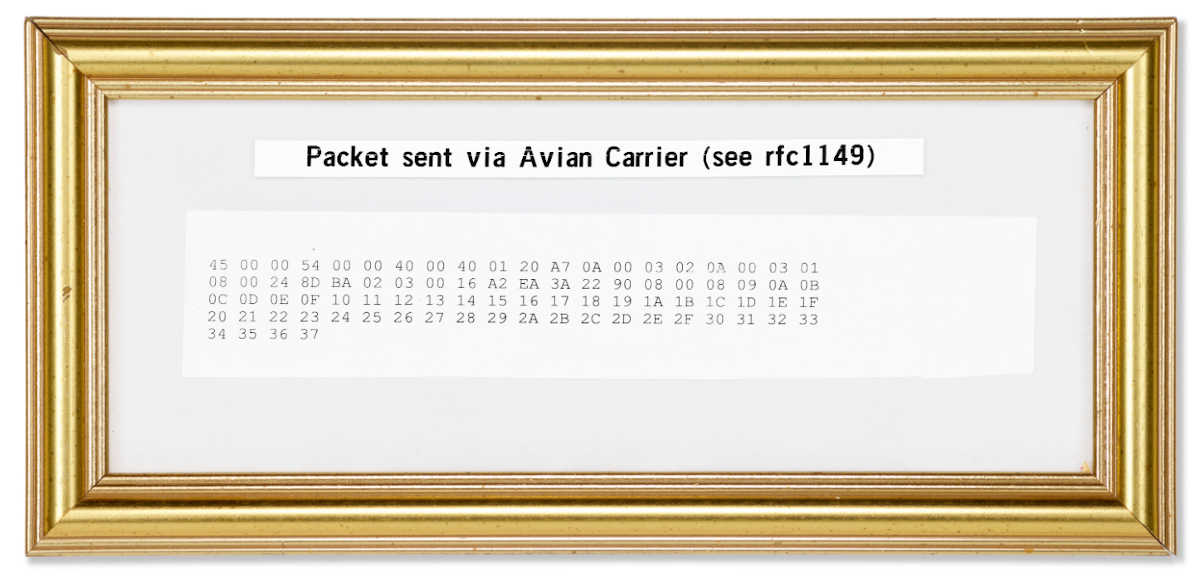
Finally, we have an update on the Christie’s auction for the carrier pigeon data packet sent back in 2001 by Norway’s Bergen Linux User Group. The auction house thought the framed datagram might fetch as much as $3,000 USD, but when the hammer finally went down earlier this week the winning bid was a staggering $20,480. Given all the weird gadgets we’ve picked up on a whim, we’re not in a position to lecture anyone else about how they spend their money…but damn.
See something interesting that you think would be a good fit for our weekly Links column? Drop us a line, we’d love to hear about it.
Hackaday Editors Elliot Williams and Tom Nardi start this episode off with a discussion about Philadelphia’s budding hacker conference and the imminent retirement of the EZ80. After considering the parallels between the wide world of aviation headsets and our personal projects, talk moves on to the exciting developments in the world of software-defined radio on the ESP32, a Meshtastic pager from a bygone era, and how all the wild flying machines entered into DARPA’s Lift Challenge ended up losing to a simple helicopter.
You’ll also hear about turning plastic bottles into printer filament, pushing e-ink screens to their limits, and browsing the web on the PSP in 2026. To wrap things up they’ll marvel at all the modern abstraction sitting between software and the memory it’s running on, and revisit some RF concepts that might be particularly useful now that everyone is playing with a new SDR device.
Check out the links if you want to follow along, and as always, tell us what you think about this episode in the comments!
These days, it’s common to give even very young children a mobile device loaded up with educational software that aims to improve everything from basic motor skills to reading and arithmetic. But even the cheapest phone or tablet isn’t the kind of thing most parents would like to see get destroyed, and there’s always a concern about giving children a device that’s capable of connecting to the Internet.
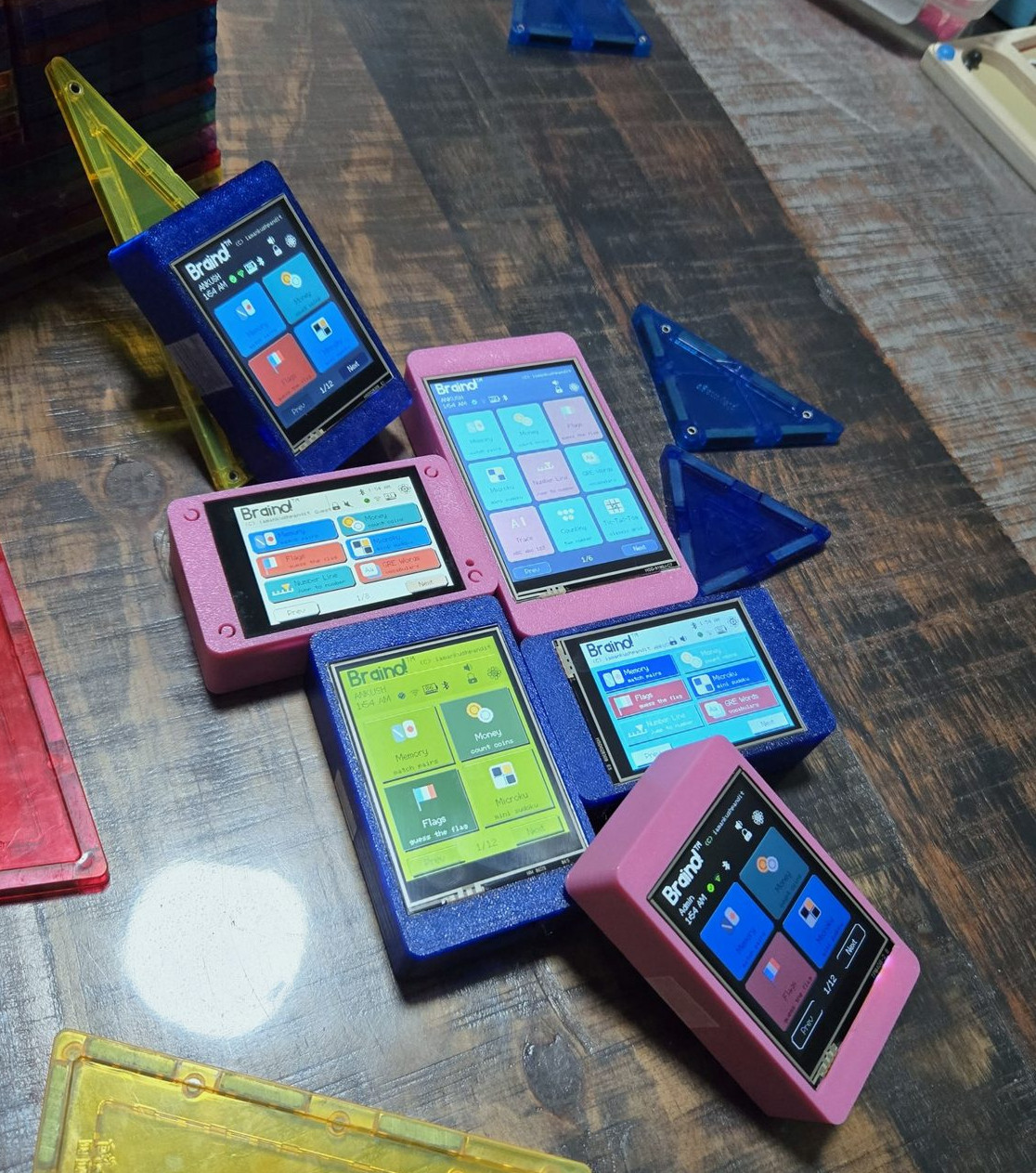
Which is where Braino! from [Ankush Pandit] comes in. This suite of applications can be easily flashed to a common Cheap Yellow Display to turn it into a legitimate educational tool. Combined with a 3D printed case, the total cost of the build is low enough that you don’t have to feel bad about handing it off to even the roughest of youngsters.
[Ankush] makes it clear that this project isn’t trying to sell you anything. You’re responsible for picking up a compatible CYD and installing Braino via the web flashing application. The software is released under the GPLv3 license, and it contains no ads, user accounts, or cloud connectivity. We know not everyone is thrilled with how much time young kids spend staring at screens these days, but opinions on modern parenting aside, it’s hard to find fault with the way things have been implemented here.
When the parent sets up Braino they can pick which of the 40 games can be accessed, allowing the experience to be tailored to the individual child’s age and ability. Should you decide to enable Bluetooth, some of the games even support wireless multiplayer between devices.
The commonality of the Cheap Yellow Display is one of its best features, and Braino does an excellent job of showing why that’s so important. Trying to develop a project like this without a standardized platform of some type would be a non-starter, but when anyone can get a CYD sent to their house from Amazon and flash it right from the browser, it’s makes the whole thing far more accessible.
It’s often said in this community that DOOM can be made to run on anything, and as time goes on, that’s becoming more and more accurate. We’re at the point now that every “normal” device seems to have some version of the iconic 1993 shooter, so now there’s nothing left but to start working on the more oddball targets.
As a perfect example, [piuppi] recently wrote in to share their efforts to get DOOM — or at least something that looks like it — running on the Sonoff Basic R2 smart switch. We say something that looks like it because the game you’re seeing in the video below isn’t actually DOOM. In fact, it’s not even really a full game. It’s essentially a tech demo that’s capable of rendering graphical data pulled from the game, but only within the confines of simplistic map. Still, not bad for something designed to turn lamps on and off.
The GitHub repo includes excellent documentation should you want to rip and tear on your own Sonoff device. As you might expect the process is a bit involved, and does require you to provide your own copy of DOOM for the script to extract the necessary data from. After it’s setup, you can hit the switch from any browser on the local network and take out your frustrations on the state of modern home automation on some imps. The best part is, even after the game is installed and running on the switch, the device still actually works as a switch.
But don’t worry. Even in the unlikely event that we run out of devices that can be hacked to run DOOM, there’s still a whole world of gadgets out there that need their own port of Duke Nukem 3D.
Philadelphia’s homegrown hacker con returns this weekend, and this time it’s starting a day early to pack in even more talks, demos, and activities. Tickets are still available for anyone who can get themselves to Arcadia University by the end of the week, and as always, students with a valid .edu email address get in for free. The talks will also be recorded for hackers that can’t make it out in person, but of course there’s no substitute for a weekend spent hanging out with like-minded folks.
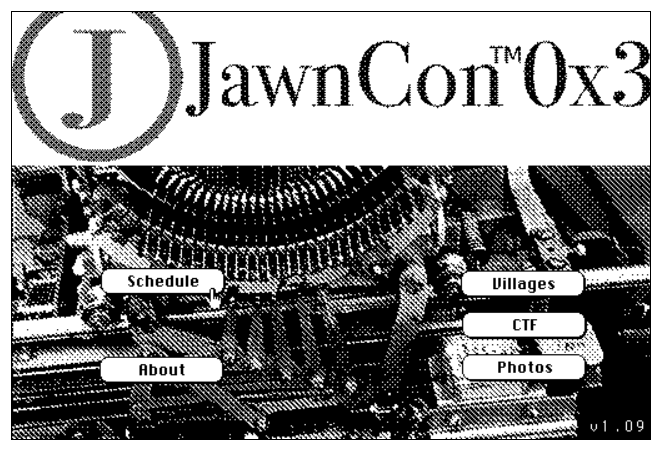
Now in its fourth year, JawnCon continues to steadily grow and evolve. In 2026, it’s not only getting an extra day, but also a second stage for talks, delivering nearly 30 presentations on everything from board games to modern pager networks. For style points, the schedule is available via HyperCard running on an emulated Macintosh Plus, but you can also just read it off the web page if you insist.
In addition to the talks, there will be exhibits from local groups such as Philly Mesh, PhilTel, and the Open Organisation Of Lockpickers, as well as a dedicated classroom for those looking to study ahead of their amateur radio exams. Attendees can even use a pair of Zebra ID printers to produce custom badges, and we’re sure nothing untoward will happen with them.
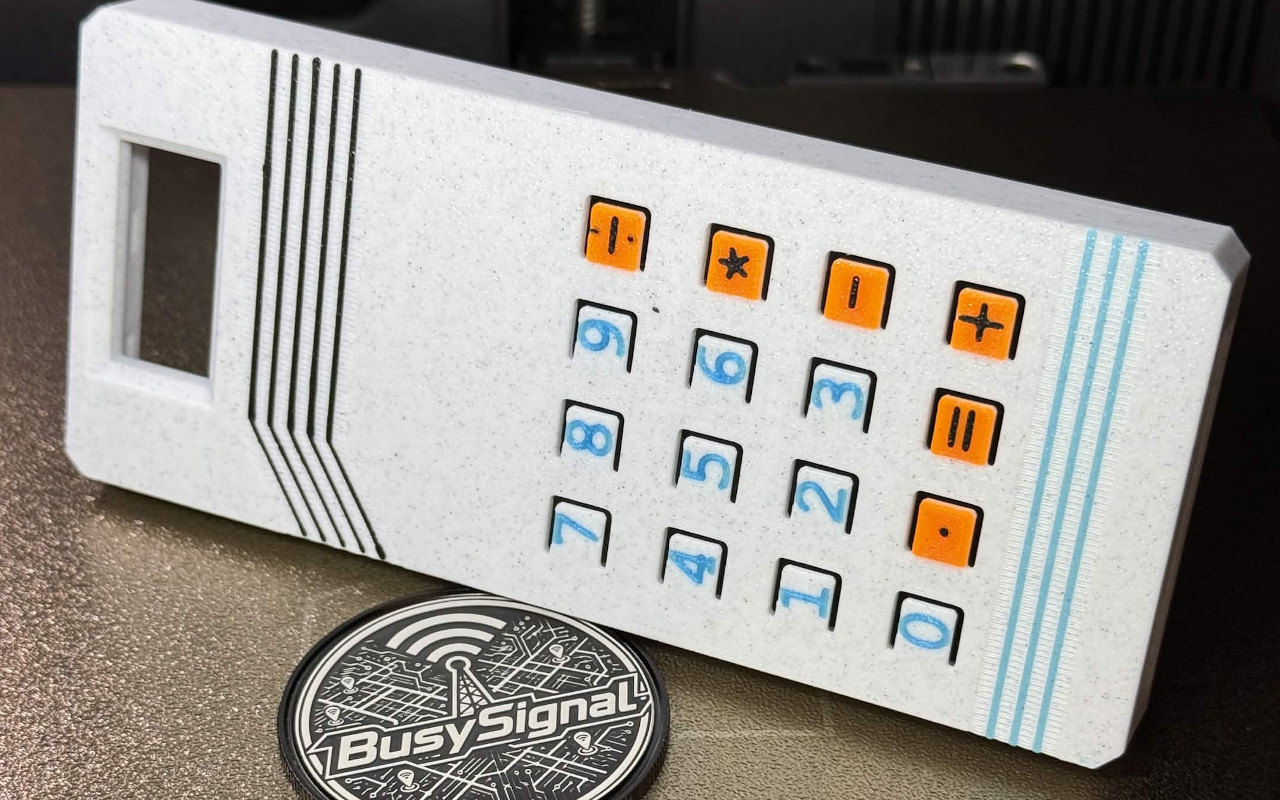
[BusySignal] shows off the retro coloring of his printed case. InstagramSpeaking of badges, as in previous years, the organizers drew inspiration from technology of a bygone era. This year’s badge looks like a simple handheld calculator, but it also includes a touch-tone (DTMF) generator, various games, and the ability to link up with other badges.
Powered by an ATmega328P-P, the badge comes in either assembled or kit form and features an edge connector along the bottom of the board, letting attendees slot in their own hardware creations. In classic hacker con style, the badge will be distributed as a bare PCB, but STL and 3MF files to print your own case ahead of time are available.
Stay tuned for our first-hand account of our time at JawnCon 0x3 once the dust settles — or better yet, come out this weekend and see it for yourself.
If you’ve been reading Hackaday for any length of time, you’ll know we love seeing hackers replacing the stock firmware on their devices with open source alternatives. Usually this is done because the open firmware offers more features, or lifts some arbitrary limitation. But if you find yourself installing OSIRIS on an Onkyo AV receiver such as the TX-NR717, it’s probably because you’re trying to bring the thing back to life.
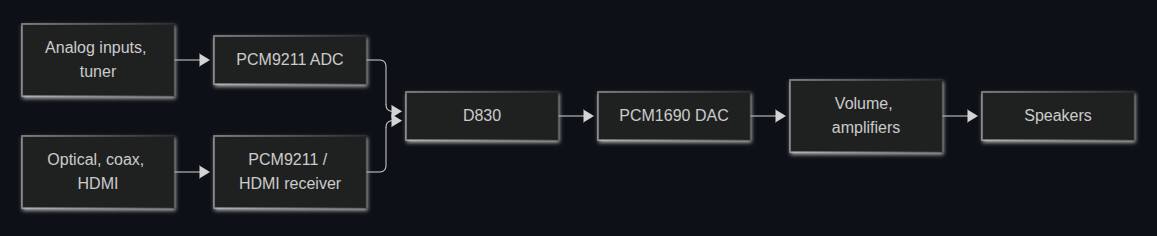
As developer [Jokūbas] explains, certain Onkyo receivers that use the Texas Instruments D830 are known to suffer from a very specific failure — the device will power on and appear functional, but no audio will come through. When this happens, it’s either because the D830 itself has failed or the 64 MiB NAND flash chip that holds the firmware it runs is cooked. Unfortunately, replacing either component is a bit more difficult than you might expect.
Everything passes through the Texas Instruments D830. If it goes, you’ve got a problem.
If you swap the D830 with a pin-compatible chip that’s easier to find and less prone to failure, the stock firmware won’t boot. If you try to replace the NAND, you’ll find that the original software is only capable of addressing 512-byte pages, while the flash you’ll find on the market today uses 2 KiB or 4 KiB pages. In both cases, it’s OSIRIS to the rescue.
The open firmware not only supports D830 compatible chips such as the OMAP-L137, but it’s able to address modern NAND flash, making the replacement of either or both component far more practical. With fresh hardware and the new firmware installed, your Onkyo receiver should spring back to life. That said, OSIRIS isn’t feature complete yet, and truthfully the items listed as untested or not implemented on the feature list currently outnumber the entries for what actually does work. But at least it’s a start.
It probably goes without saying that if you send four humans to observe the Moon up close, they’ll see things that those of us stuck here on Earth have never noticed. Luckily for us, they took impeccable notes and brought plenty of cameras, which NASA has shared with the rest of the class as Artemis II: Sights & Sounds of Science.
Well, technically it’s called the Artemis II Preliminary Lunar Science Report, but we appreciate the space agency adding a little flair to it and formatting the findings for public consumption. Arguably the most significant observations detailed in the report are the impact flashes on the lunar surface. As you may recall, the trajectory of the Orion spacecraft meant the crew experienced a unique solar eclipse on the sixth day of the mission, giving them an unprecedented close-up view of the darkened Moon. During this time, they were able to see flashes of light with their unaided eyes, which NASA has since confirmed were small rocky fragments — perhaps no more than a few inches wide — slamming into the lunar surface at incredible speeds.
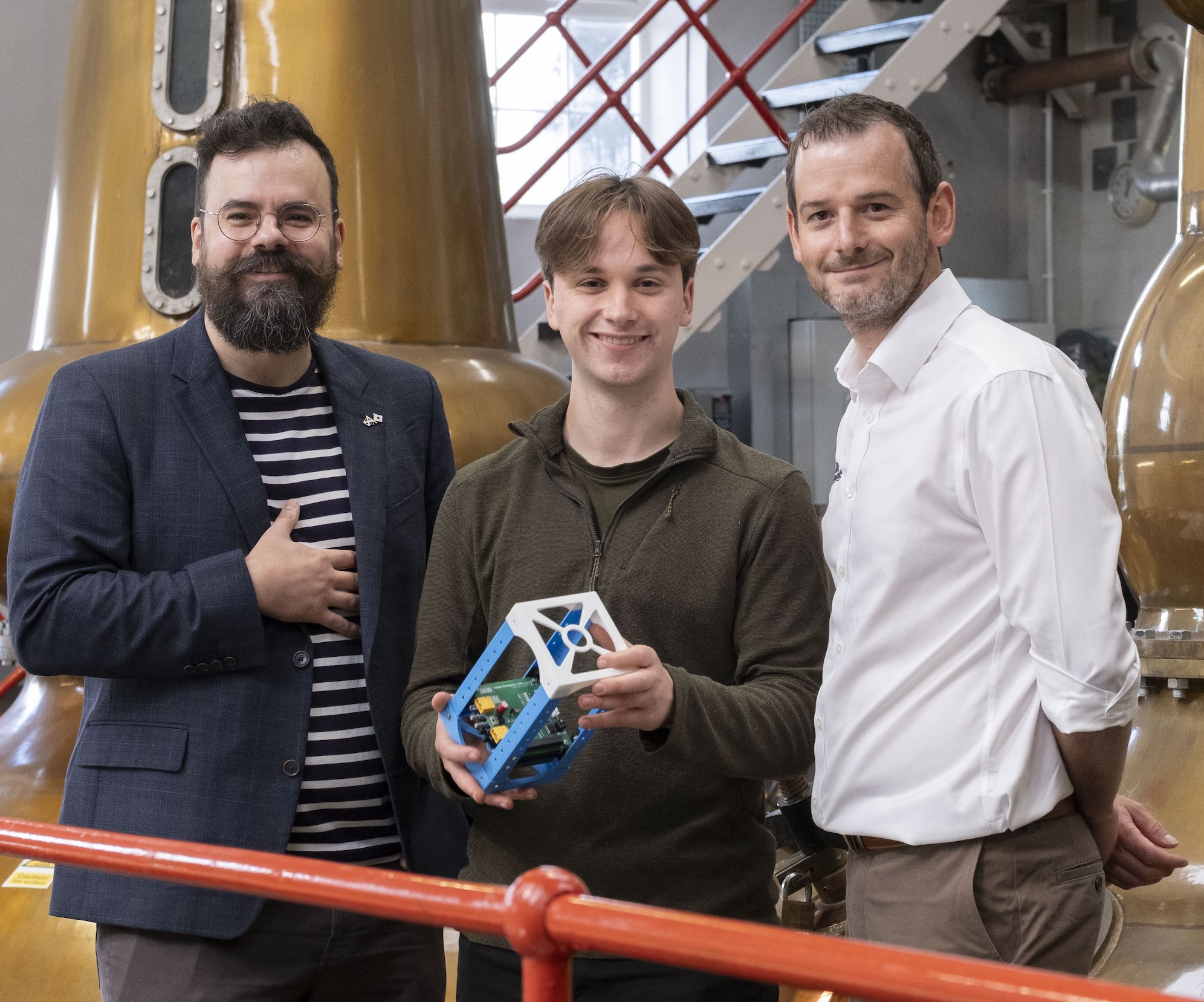
To boldly go where no whisky has gone before.
The Artemis II mission was one for the history books, for most of us the most significant space mission of our lifetimes. But as access to space becomes cheaper and more routine, it stands to reason that not all activities in orbit will be quite so momentous. For example, students from the University of Glasgow and Japan’s Kyushu Institute are currently collaborating on a planned mission to distill whisky in space for the first time.
Scheduled to launch in 2028, the CubeSat will carry 10 ml of fluid and spend five years in orbit studying how its chemical composition changes, with a special interest in how the frequent changes experienced as the spacecraft travels around the Earth could influence the maturing process. While this might not seem terribly interesting to teetotalers, it offers an opportunity to gain more practical experience with orbital manufacturing which will likely inform future missions.
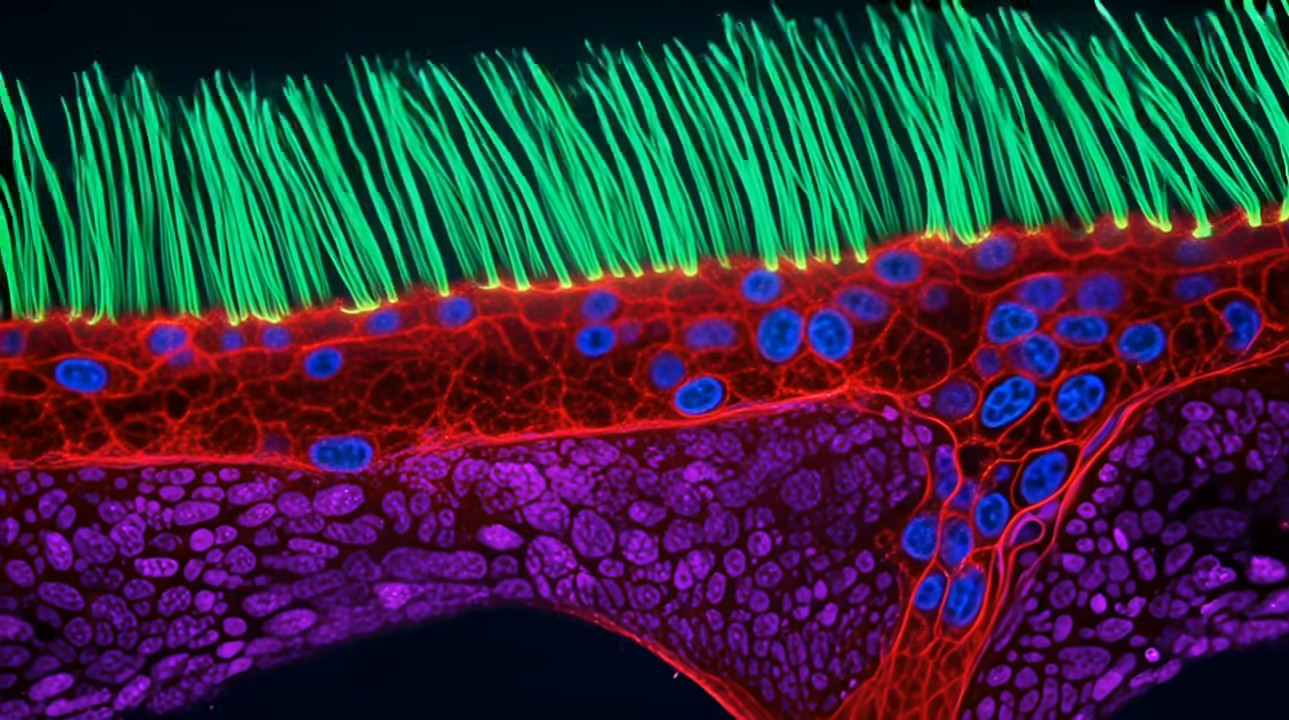
Speaking of studying how things behave — or perhaps how they don’t behave, as the case may be — we have an update on the controversy around this year’s Nikon Small World in Motion competition. After several experts in the field raised the alarm last week, Ning Xu’s winning video supposedly showing cilia in airway tissue samples taken from a child with primary ciliary dyskinesia (PCD) has been disqualified for using generative AI. This shifted all the previous winners up a rank, so Nguyen Nam Nhat of Vietnam now takes the top spot with a video of a roundworm and a single-celled Dileptus.
According to experts, Dr. Ning Xu’s entry was literally too good to be true.
Xu had previously claimed that AI was only used for post-processing the original images, which would have already put the entry into something of a gray area as far as the competition was concerned. But according to researchers familiar with PCD, the structures shown in the video don’t look like anything they’d ever seen in a patient, prompting suspicion that the admittedly fascinating visuals were actually the result of an AI hallucination.
Finally, on the subject of beautiful images, we’d like to point you to ascii.rest. As you’ve probably noticed, we appreciate minimal web design around these parts, so this collection of ASCII animations and art immediately caught our eye. Some of the pieces, like “aurora fjord” shown here, can be exported as a GIF or video clip. But there’s also the option to embed them in your HTML with a couple of lines, which also gives you the opportunity to customize and manipulate them in various ways. If you do anything cool with these designs, we’d love to see it.
See something interesting that you think would be a good fit for our weekly Links column? Drop us a line, we’d love to hear about it.
There are many ways to display text on a computer screen, but most require at least some manual effort from the user. It’s annoying enough even if you’re dealing with one machine, but it gets even more of a hassle when you’re trying to display something on multiple devices of varying size and capability. That’s where BIGWORDS.PAGE by [SpeakingOfBrad] comes in.
It’s essentially a simple web page you can control via a carefully crafted URL, letting you create all sorts of text displays you can “distribute” to browsers on other devices with a simple link. So, for example, if you wanted to let everyone see what your favorite website is, you need only point the browser on your phone or laptop to https://bigwords.page/#Hackaday. As the image at the top of this post shows, you can also change the font and text colors by adding a few more values.
It’s an easy enough style of markdown that you can manually throw together links without much trouble, but there’s also a visual editor that will spit out a finished link once you’re happy with how it looks. Beyond simple text strings, you can also show images, create countdown timers, and even produce animated presentations that work across multiple pages of information.
The project is released under the MIT license, and the documentation includes instructions for self-hosting your own version. For most folks, that’s probably not necessary, but we can see it being useful if you want to support a number of displays on a local network without having each one connect to the Internet.
Although the feature has been deleted from newer models, there was a time when Amazon’s Echo devices included a 3.5 mm “aux” input jack that let you connect other audio sources to the smart speaker. Alexa would even let you switch over to an external source with a voice command — or at least, it used to.
As first reported by Reddit user [n8-sd], Amazon has started informing users that voice control over the 3.5 mm jack is no longer supported. While the physical input will still function on models equipped with it, if you want to mute the audio coming from an external device you’ll have to wade through the Alexa smartphone application to do it.
In a statement to Ars Technica, an Amazon rep confirmed that voice control over the auxiliary input has been removed as of the latest software version, and that their analytics showed not many people were using the feature in the first place. They also pointed out that no changes have been made to voice control of Bluetooth devices. While we don’t doubt that the total number of users that were physically plugging an audio source into their Echos was probably low in the grand scheme of things, that doesn’t really explain why such a simple feature needed to be actively removed.
Some commenters have theorized that the real reason behind the change is the fact that Amazon has no way of monitoring what users are playing over the auxiliary input. Since cataloging and selling the media consumption habits of users is big business these days, that’s a problem. While they might prefer to disable the feature entirely, they know that would stir up some bad press, so they’re opting to simply make it more annoying to use. We’re not saying we entirely buy this explanation, but it’s not the craziest thing we’ve ever heard either.
We’ve seen the GeekMagic SmallTV line of devices before — these cheap gadgets combine a microcontroller and a display in a little plastic case that can be used to show the time or weather. Powered by either an ESP8266 or an ESP32, the things could easily pass for a hobby build if it wasn’t for their professionally produced enclosures. In fact, we wouldn’t be surprised if GeekMagic lifted the idea from an existing DIY project.
As you might expect we’ve seen several hacks for these devices already, which usually involves replacing the stock firmware. But this latest approach is unique in that you don’t need to mess with the stock software, nor do you need to break out the soldering iron. By leveraging a built-in photo viewer function of the SmallTV [Yongha Kim] shows how you can get the gadget to display pretty much whatever you want.
The trick here is that the image is being generated by a machine on the network, say your desktop or server, and being pushed over to the SmallTV over HTTP. In this example the image is being generated in Python with the Pillow library, and [Yongha] has it showing Claude and Codex usage data, but you could really approach this however you wish.
All you need to do is create a 240×240 image and shoot it over to the device, so you’re free to come up with whatever sort of visuals you’d like. It even supports GIF if you’d like to work animation into it. The content can of course be whatever information you’re interested in showing, and it can be generated by whatever programming language or tool you’re most comfortable with. It’s a fascinating proof of concept, and now that the method has been demonstrated we’re interested to see where the community can take it.

 Login
Login

 Thanks to the UV erasable ROMs used in the TRANZ 330, loading new code on the device is easy enough. With a bit of educated poking around, [CharlesD] was able to map out what did what. Working from the basics of getting the display and keypad working, he moved onto the serial interface, which in turn let him communicate with a modern GPS module and era-appropriate thermal printer. From there it was just a matter of getting the math implemented to compute the azimuth and elevation of a given planet, and he had an offline map of the solar system for use with his telescope.