❌

Normal view

There are new articles available, click to refresh the page.
Today — 29 October 2026Main stream

An Attempt at a Useful Desktop OS For Microcontrollers

29 October 2026 at 16:00

We’re living at an interesting time here in 2026, when microcontrollers are becoming powerful enough to surpass the capabilities of “real” computers from a time when those real computers were starting to become useful. We’ve seen plenty of microcontrollers emulating machines from the 1990s, but what if instead they were giving all their power to the OS? It’s a question [Thomas] is trying to answer with SylphideOS, a general purpose GUI operating system aimed at multiple microcontroller platforms.

On the surface it has a GUI that appears to owe a lot to the early Macintosh machines, but underneath it has the FreeRTOS kernel, something that has been around for quite a while. You can argue among yourselves as to whether this make it an OS in its own right or a FreeRTOS distro. Aside from driving a screen through a framebuffer it also has the hardware interfaces you’d expect, for keyboard and storage. There’s support for RP2350 and selected ESP32 platforms so far, as well as an emulator.

We have already seen a few operating systems for microcontrollers that provide a user interface for a binary bootloader rather than persisting under whatever programs are running, so this marks an interesting departure. Only time will tell if it becomes a success, but perhaps it’s one to watch.

Robot Picks up Othello

29 October 2026 at 11:30

Experience is a great teacher. Ask [Jeneus], who, in high school, tried to make a program that played Othello. It didn’t go well. But years later, the idea produced an impressive Othello robot. At first glance, the robot looks a bit like a 3D printer with an aluminum extrusion XYZ motion system. But there’s a lot more to it, not to mention the software to play the game. Check it out in the video below.

The Z-axis has a vacuum system that can pick up clear tokens and place them on the board. If you know the game, you might remember that on a real board, players have to flip the tokens as they “capture” pieces. The robot has a smarter way to go. The tokens are clear because they are lit with one of two colors. So flipping the token is a simple LED color change. The LEDs also flash a different color to show you where you can move.

The device uses laser-cut components and 3D printed parts in PLA and TPU. Of course, there is a camera for the computer — a Raspberry Pi — to see the board. Overall, a very nicely done project. We’ve seen several checker and chess robots. We wonder if some of them could also play Othello?

Exploring What’s Left of Google’s VR Dreams

By: Tom Nardi
29 October 2026 at 10:00

You’re likely familiar with Google’s Cardboard, and the legions of cheap virtual reality headsets it spawned. By sticking a smartphone to the wearer’s head, all these headsets needed were some basic optics to provide a surprisingly effective VR experience. You may even know about Google Daydream initiative that came a few years later, which not only improved the basic Cardboard design but brought with it new software features such as VR-specific improvements to the Android operating system and a version of the Play Store dedicated to 3D games and applications.

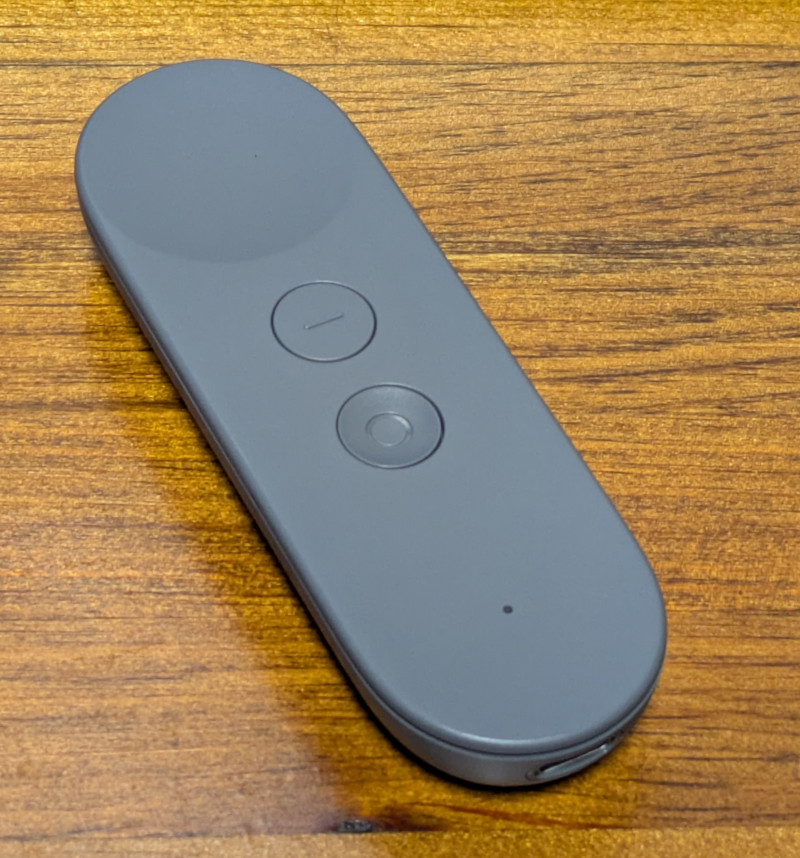
But unless you’re a true Google devotee, what you may not know is that the search giant partnered with Lenovo to produce a stand-alone Daydream headset called the Mirage Solo in 2018. A full year before the Oculus Quest hit the market, the $399 device combined the guts of a smartphone with a 2560×1440 display running at 75 Hz, a pair of cameras in the front that let it see the world around the user in three dimensions, and a gyroscopic handheld controller to provide an immersive VR experience without having to be tethered to a computer. In addition to the standard consumer version, there was even a “Business Edition” of the headset specifically marketed to schools, offices, and hospitals as a way to deliver VR content without having to invest in any additional infrastructure.

So why isn’t the Mirage Solo better known? Because in classic fashion, just a few years after it was released, Google decided they were no longer interested in virtual reality and shuttered the entire Daydream program. The software components it introduced were stripped out of Android, the 3D Play Store was taken down, and the back-end mechanisms necessary to register new headsets were turned off. Almost overnight, the Mirage Solo became a stereoscopic paperweight.

Or at least that was the official story, anyway. I recently came across a Lenovo Mirage Solo at a thrift store for $25, and despite my initial Internet searches strongly indicating that it would probably be worthless, it seemed worth the gamble to find out for myself.

Know Before You Buy

Usually I’d just jump into the cool stuff, but I think in this case it’s probably wise to get some details clear before continuing. There’s a good chance that some of you may decide to pick up a Mirage of your own after reading this, or perhaps you’ve already got one and wandered in from an Internet search. However you’ve come to read this article, I don’t want to give you the wrong impression about the realities of the situation.

So let’s start with the most important thing: do not buy a Lenovo Mirage Solo unless it has the motion controller! I really can’t stress this one enough, as to my knowledge, there is no way to navigate the UI of the Mirage without it. Many of the cheap units you’ll find on the second-hand market are only priced that way because the controller is missing, so be careful. If you’re wondering, the controller doesn’t need to be the original one that was sold with the Mirage for it to work, but spare controllers are understandably in high demand and are usually priced accordingly.

The second thing to remember is that Daydream is a dead platform, and the software running on the Mirage is now at least six years out of date. Anything that still works on it only does so because whatever upstream service or API it relies on hasn’t yet changed enough to break anything. As of this writing, I personally believe enough of the software still works to make the Mirage worth picking up if you can get a good price on one, but that’s not necessarily going to be true forever.

Escaping Captivity

Alright, let’s assume you’ve just pulled a brand new Lenovo Mirage Solo out of the box in 2026 and want to use it, what does that look like?

The first time you boot it up, you won’t get very far. After it asks you to connect the controller and does some internal housekeeping, you’ll be presented with a dialog that walks you though connecting to a WiFi network and adding it to your Google account. Unfortunately, this process will never complete because Google has flipped some switch on their end — although you wouldn’t know it on the device, as the only feedback you’ll get is a pop-up message advising you that there’s been an unspecified problem and that you should try again later.

Thankfully, somebody over at Google left us a backdoor. If you click on the four corners of this dialog, starting with the top-left and working clockwise, you’ll be able to bypass the provisioning process. After some more loading and a bit of a tutorial about using the controller and navigating the user interface, you’ll be facing (literally) the next problem.

You are standing in an open field west of a…wait, no. Sorry that’s something else. You will be in a virtual forest though, and if you look around you’ll see waterfalls, a winding stream, and birds flying around.

It’s all very slick, but the thing we’re mainly worried about right now is the huge message in front of us saying the system can’t connect to the internet. What’s actually happened is that the system can’t connect to the mothership because the Daydream API has been turned off, but apparently there was no canned error message to convey that condition so this is what we get.

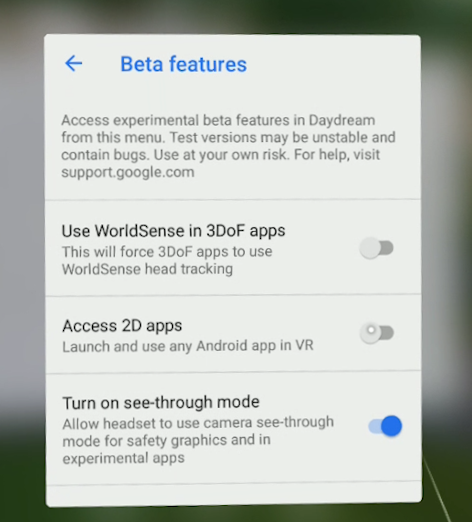
But again, the developers at Google have provided us a way forward. If you navigate to the settings screen there is an option for Beta Features, and underneath that section you’ll find an entry that says Access 2D Apps. Once you select it you’ll be warned that the behavior of standard Android applications in Daydream may be unpredictable, and the Mirage will reboot.

This is where things start to get interesting. Once the headset restarts there will now be a new tab in the application launcher labeled 2D, and under it you should see an icon for the standard Play Store. Once you go into the settings and add your Google account, you’ll be able to browse the Store and download whatever games or applications you want — so long as they don’t mind running on Android 8.0, anyway.

Android Apps…in Space!

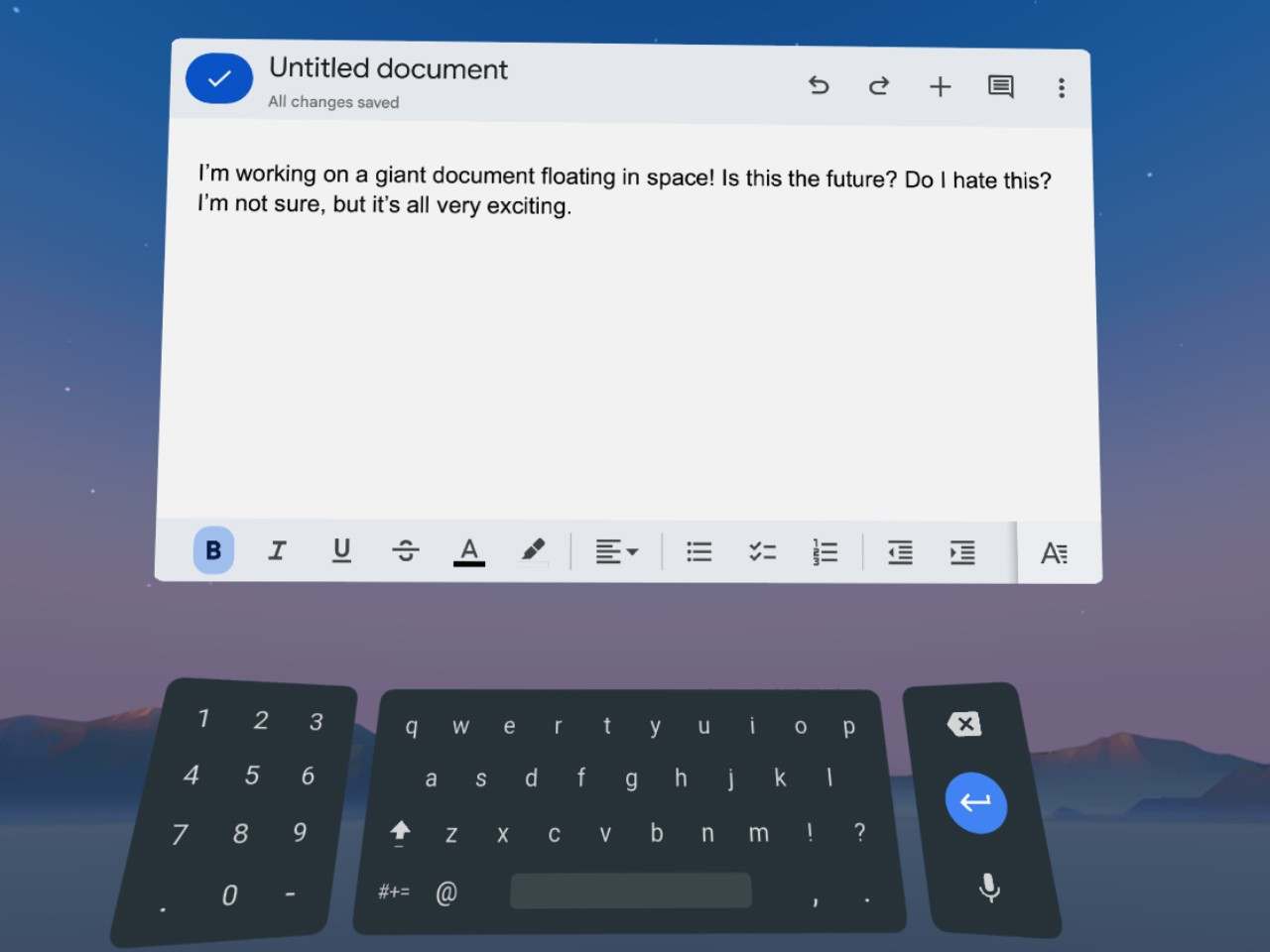
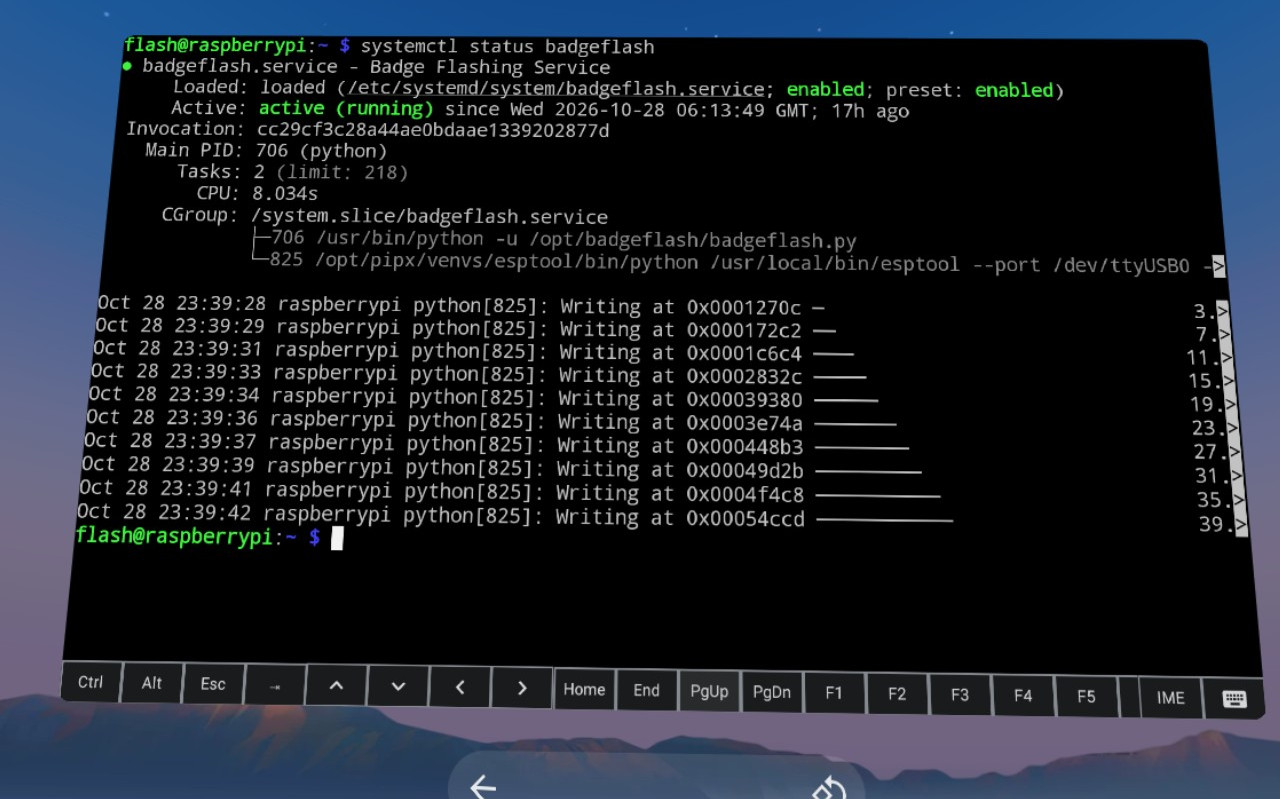
Gaining access to standard Android applications opens up a huge world of possibilities. While the older hardware of the Mirage Solo and the outdated OS means you won’t necessarily be able to run the latest and greatest pieces of software, there’s still a lot you can do, from watching Netflix to working with spreadsheets in Google Docs and connecting to your Linux box over SSH. The on-screen virtual text input is good enough for simple tasks, but connecting a physical keyboard over USB or Bluetooth makes the whole experience vastly more enjoyable.

When running 2D applications in Daydream, they will appear as a giant display floating in front of you. Some of the apps will only work in portrait mode as if they think they are running on a normal phone, but in most cases you can grab the corner of the window and stretch it out into a landscape orientation that better fits the fairly impressive field of view offered by the Mirage.

The only real issue with using 2D Android apps on the Mirage is how simplistic the window management is. You can move the window and resize it, but there’s no provision for having multiple windows open at the same time. In fact, under normal circumstances there doesn’t even appear to be a way to switch between running applications without having to go all the way back to the main menu — although I did discover that when you have a physical keyboard connected you can use Alt-Tab to bring up the stock Android task switcher, which helps.

Entering the Third Dimension

At the start of this article I explained that the 3D Play Store was shuttered, and with it, all the games and applications that were actually designed to take advantage of virtual reality. But as we all know, nothing is every really gone on the internet, and thanks to some dedicated fans at the Opendream project, much of the Daydream software has been preserved and can be installed on the Mirage.

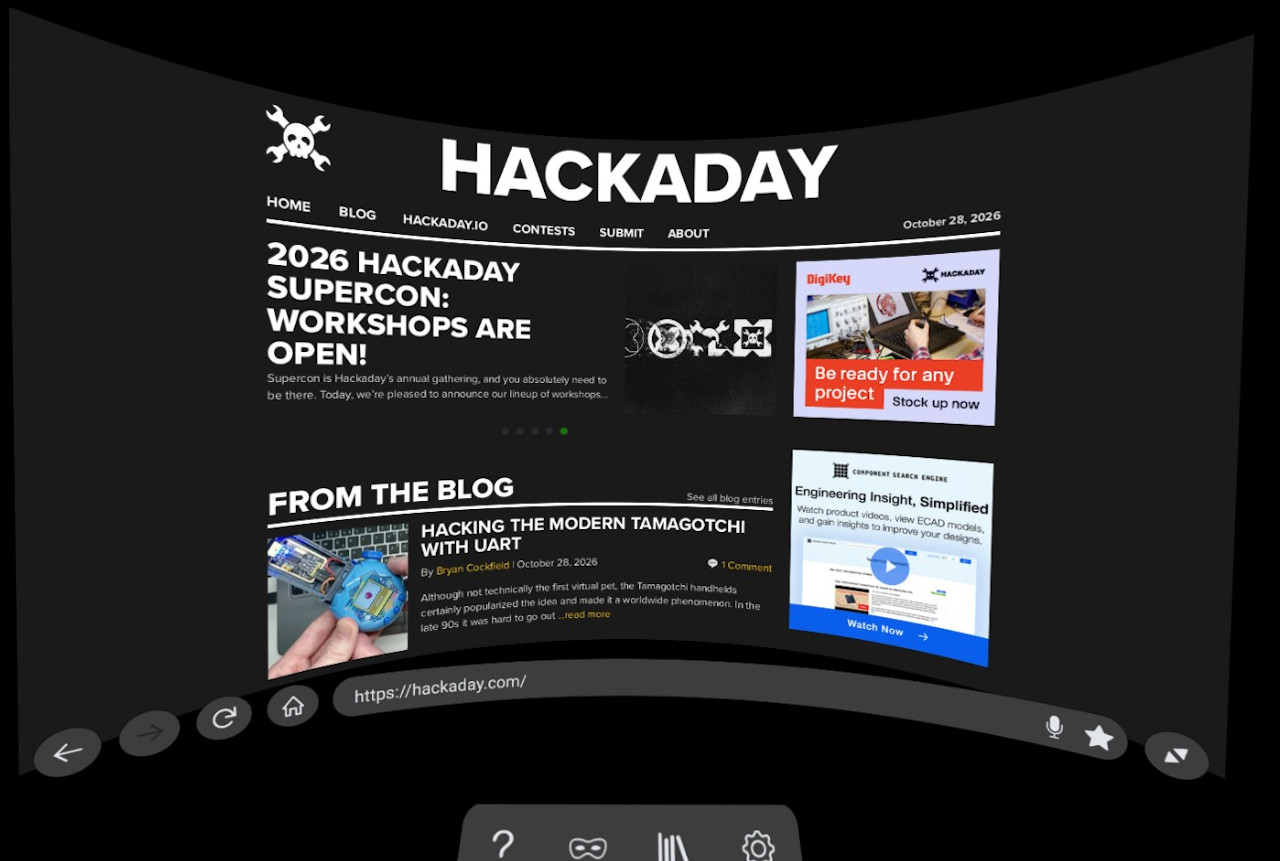
I’ll leave exploring the catalog of available Daydream software as an exercise for the reader, but at the very least you should install Firefox Reality. It’s not only a far more capable browser than Android’s stock version of Chrome, but it’s an excellent example of how immersive Daydream could be when the software took advantage of the platform.

The browser still shows up as a giant floating display, but now you’ve been transported into a darkened environment and have far better control over how everything looks. It also features a far more pronounced 3D effect, with pop-ups that actually hover over the page, and a 3D render of the remote that moves around in space in front of you as you swipe around the pages. There’s even support for curving the entire display, which makes for a very unique browsing experience.

Speaking of a unique experience, I’ve saved my absolute favorite for last — YouTube VR. It’s so well implemented and immersive that I’ve actually watched whole movies with this thing on my head. While there’s plenty about Daydream that clearly needed some more time to cook, Google really pulled out all the stops for this one.

Everything works as you’d expect, including 360 degree videos and even purchased content that’s attached to your Google account. At least for me, I’d go so far as to say that the experience is good enough that it’s worth getting a used Mirage Solo just for watching YouTube alone.

Nothing Lasts Forever

As I said at the start, it’s important to understand that the Lenovo Mirage Solo still having any sort of functionality in 2026 is something of a fluke. It’s supposed to be a dead product, and neither Google nor Lenovo want anything to do with it. There are no updates coming, no tech support, and no warranty.

At any moment, the YouTube API could make some kind of breaking change, or your favorite apps might get an update that prevents them from working on such an old version of Android. You’d be absolutely crazy to buy this headset at anything near its full retail price.

That being said…if you can get a good deal, and by that I mean certainly under $100 and closer to $50 – $70 USD, I think there’s enough life left in the device to make it worth picking up. If you end up getting one and doing something cool with it, I’d love to hear about it.

Yesterday — 28 October 2026Main stream

Battery Prototype Uses Superextensive Quantum Effects to Charge Faster

28 October 2026 at 22:00

Although the term ‘quantum battery’ is a bit of a vague term, the cell that [Kieran Hymas] et al. demonstrate in a recent paper does seem to suggest that it uses quantum effects to charge faster than would otherwise be possible, with this rate increasing faster than its volume, meaning at a superextensive rate.

The general idea behind a quantum battery is that these somehow use a quantum effect to store and release energy faster than would be possible using classical physics. First proposed in 2013, the initial Dicke model saw its theoretical quantum advantage shot down by 2020, leading to the search for alternative models.

We have previously seen claims of a quantum advantage in batteries based on the Sachdev-Ye-Kitaev model, such as by [Davide Rossini] et al., but this new paper may be the first prototype cell demonstrating a reproducible effect.

In the here demonstrated cell a microcavity is created with strong light-matter coupling, allowing for both energy storage and discharging, with the illuminated particles super-absorbing the light with what the researchers claim to be due to these particles cooperating using a quantum mechanism. Effectively scaling up the cell would thus scale up the charge- and discharge rate faster than in a conventional chemical cell.

Whether this demonstration can be replicated and expanded upon remains to be seen, naturally. The stored energy in this experiment was very small and the storage time only very brief, so for now it serves primarily as an interesting experimental result for researchers to dig through.

Does Running an E-Paper Display at 30 FPS Destroy It?

28 October 2026 at 16:00

Although e-paper displays are famous for being low-power and lasting essentially forever if not damaged physically, the recent push to drive even cheaper e-paper displays at a framerate like 30 FPS for a decent monochrome gaming experience does raise a few questions. The first being what this does to the power usage of these displays, and the second whether this will wear out the display in short order. To investigate this, [Bo Made It] set up a few experiments.

Subject of this test was a Waveshare ESP32-S3-ePaper board, which had previously been demonstrated running a Game Boy emulator at 30 FPS. With this software running, the board consumed on average about 115 mA, which would run down the device’s 400 mAh battery in about 3.5 hours. From here key was to isolate the power consumption of the display itself, with the system minus the display updates consuming about 90 mA.

Running the frame calculations for the greyscale mode without rendering to the screen pushed that up to 107.6 mA, with even in the 30 FPS greyscale mode the display thus only consuming about 7.4 mA, which is vanishingly small. Clearly the low-power claims of e-paper remain intact even at higher framerates.

As for lifespan, one datasheet gives the typical lifespan as one million updates. This would translate to about 9.3 hours at 30 FPS, though that assumes a full display refresh. Since a smart driver only updates changed pixels, obviously this will be longer, but the question is how much longer, and what will degradation look like?

After running 2.16 million frames of a custom endurance test featuring repeating patterns, some ghosting was apparent, but repeated refreshing made this go away again. This means that so far no permanent damage has been detected within the no doubt conservative limit provided by e-paper manufacturers.

It should be noted that Waveshare itself also recommends against running such high-FPS applications on their device, meaning that this is definitely one big longevity experiment. If actual damage occurs, this means that obviously this won’t be covered under any warranty.

C64 Keycaps For Everybody

28 October 2026 at 14:30

If you’ve got an MX-style keyboard and want some retro charm, you might like a recent project from [Levente Szabadkai]. It’s a set of C64-style keycaps that you can print yourself at home!

The project started as an attempt to produce a set of C64 keycaps for an Ajazz 75% keyboard layout, but [Levente] kept pushing until it developed into a universal set. The keys have C64 legends, plain legends, or blank, and work for ANSI boards from 60% to full size. There are a few ways they can be printed. — you can do two-color printing with an FDM machine, or you can print the caps alone and fill the legends with paint, either in FDM or resin.

As a part of this work, [Levente] had to obviously create the glyphs to print upon all the keycaps. He thus decided to release that as the C64 keyboard font, in fact. It’s available in TTF and OTF formats, and you can preview the font in your browser, if so desired. It includes the function key labels, the 63 PETSCII graphic font legends, and various symbols, punctuation, and selected accented letters, too.

We’ve seen lots of vintage C64 parts recreated from scratch. It’s been at the point for a while where you can build a new machine with what’s available off the shelf. They said Amiga would never die, but it’s the earlier Commodore that really lives on today…

Turning an Old Phone’s Motherboard into an RC Plane Controller

28 October 2026 at 11:30

Upcycling smartphones makes a lot of sense, especially since they contain so many components that remain useful long after their desirability as a smartphone has faded. In the case of [Mountain DS Lab], they opted to use an 8-year old Xiaomi Mi 8 phone to add long-range FPV video link and remote control functionality to an RC plane, using the phone’s LTE cellular connectivity.

The smartphone was bought used for $23, with the default Xiaomi ROM overwritten by LineageOS to get a more lightweight and up to date Android installation on it. From the video it’s clear that this phone has seen better days, with the glass back cracked and a few ugly lines running across the display. Fortunately all that is needed is the motherboard itself.

One gotcha here is that the OS checks for the display on boot and will time-out if it’s not present, potentially halting the process entirely. The workaround requires disabling the display in the device tree, which is done by modifying the boot.img file as explained in the video. Next a custom bracket for the motherboard was printed so that it could be fitted inside the target airplane.

To communicate with the avionics, a USB-to-UART adapter PCB was created with a CH340 IC on it. This was then connected together for an initial test, with the extended front camera being used as the FPV camera for the custom Android application. Using the controller via the remote LTE link worked with the flight controller, so next the airplane was assembled for initial testing.

From this point it’s all pretty standard RC airplane assembly and testing, just with the typical RF-based control and FPV link replaced with the LTE link. Unfortunately flying drones isn’t permitted in the immediate area where the creator lives, so only some taxiing was tried prior to its maiden flight at a local airstrip that will be featured in an upcoming video.

Naturally, this isn’t the first time that someone has tried this type of remote control, with the ongoing Russo-Ukraine war being a prime example of LTE-based remote control of drones. Although we do not advocate wiping out a third of a nation’s strategic bomber fleet with upcycled smartphones, ultimately this is the same technology and a good way to create an RC drone that can last more than the few kilometers eked out from a 2.4 GHz link or so. Just be prepared for the LTE link to add a few milliseconds of latency.

Emulate the 486 in Your Browser

28 October 2026 at 07:00

You might fondly remember the days of the Intel 486, but you probably don’t have one on your desk anymore. If you’d like to emulate that classic hardware, you can now do it in your browser, thanks to [Jan de Jager].

What [Jan] has built is a 100% browser-based emulator for an Intel 80486DX2-66 PC. Obviously, it’s not just a CPU that’s being emulated here—[Jan] has gone so far as to throw in the motherboard and ISA/VLB adapter card emulation necessary to make this a real and functioning computer that runs inside a solitary browser tab.

It’s all written in ES6 JavaScript. It will happily run SeaBIOS, VGA BIOS, FreeDOS 1.3, and a whole bunch of classic games, like Wolfenstein 3D, Duke Nukem, and DOOM. There’s even a control panel where you can configure the PC how you like, from storage to expansion cards and all the rest.

Once upon a time an emulator was an application you had to download and run, hoping all the while that your new machine had enough grunt to emulate the classic hardware of your desires. These days, we have endless piles of CPU cycles to throw at everything and you can do it all within a browser. Or even on a tiny microcontroller, if you feel like it!

Coinbase Data Breach Shows Why Crypto Security Goes Beyond Self-Custody

28 October 2026 at 07:12

The Coinbase data breach has reignited questions about crypto security, but the incident raises a bigger question than whether users should trust centralized exchanges. An incident at analytics provider Amplitude exposed contact information belonging to a small subset of Coinbase customers.

Coinbase described the affected group as a “small subset” of customers, but has not publicly confirmed an exact victim count. Yet, the exposure could still create opportunities for targeted phishing and social engineering. Criminals may use genuine customer details to make fraudulent security alerts, support calls, and account-verification requests appear legitimate.

⚠ DATA BREACH ALERT: Coinbase customer contact information exposed in security incident at analytics provider Amplitude.

Hackers have allegedly accessed contact information belonging to more than 70,000 Coinbase users.

Coinbase confirms there is no evidence of unauthorised… pic.twitter.com/teinDjUk9H

— Coin Bureau (@coinbureau) October 28, 2026

Coinbase also suffered a separate security incident in May 2025, when criminals bribed overseas support personnel to obtain customer information. The company estimated potential reimbursement and remediation costs at up to $400 million.

The incidents involved different reported methods, but both highlight the importance of restricting access to customer data and scrutinizing third-party relationships.

The incident comes as hardware wallet maker Ledger faces scrutiny following a customer-data exposure and a separate hardware-implant attack. Together, these cases show how crypto users face risks even when private keys remain protected.

Ledger Shows Why Hardware Wallets Cannot Eliminate Every Risk

Ledger provides another example of how security threats extend beyond private-key storage. In January 2026, a breach involving payment processor Global-e exposed names and contact information associated with Ledger customers. We covered the incident in Ledger Hit by Another Data Breach, Customer Names and Contact Details Exposed.

The incident did not show that Ledger wallets or private keys had been compromised. However, exposed customer details can help criminals identify hardware wallet owners and tailor convincing phishing campaigns.

‼ BREAKING: Ledger confirmed an unauthorized hardware implant in a wallet sold through its official reseller CryptoBilis.

The supply chain attack has drained $92.9M from 311 wallets.

CryptoBilis has stopped selling all hardware wallets (also Trezor, Tangem and SafePal). pic.twitter.com/udS7NLwI0V

— International Cyber Digest (@IntCyberDigest) October 10, 2026

More recently, Ledger confirmed that devices sold through Southeast Asian reseller CryptoBilis contained unauthorized hardware implants. Ledger’s security team said the implants captured recovery phrases displayed during device setup and transmitted them over LTE.

The company has not verified the total losses or number of affected users. Its investigation also found no indication that Ledger’s own infrastructure had been compromised.

These incidents illustrate two risks: customer-data exposure and supply-chain tampering. A hardware wallet can protect private keys against remote attacks, but that protection depends on the integrity of the device and its distribution channel.

Discover: The Best Token Presales

Should You Not Trust Crypto After The Coinbase Data Breach? Have Banks Face Similar Security Risks?

Crypto is not alone in dealing with data leaks and third-party vulnerabilities. Traditional banks have suffered data breach incidents that closely resemble Coinbase, yet those failures do not automatically invalidate the banking system.

In April 2025, ransomware hit Toppan Next Tech, a printing provider serving DBS and Bank of China in Singapore. The incident potentially exposed information belonging to 8,200 DBS customers and 3,000 Bank of China customers.

The exposed information included names, addresses, and certain account-related details. Both banks said their internal systems had not been compromised and customer funds remained safe, according to Reuters.

The Coinbase data breach and Ledger incidents show why crypto security extends beyond self-custody, with banks facing similar risks.

Another incident affected Lloyds Banking Group in March 2026. A software defect allowed customers using Lloyds, Halifax and Bank of Scotland apps to see other customers’ transactions. Up to 447,936 customers may have been affected.

The bank said it had identified no resulting financial losses. The incident nevertheless exposed sensitive information and prompted parliamentary scrutiny.

These cases show that banks also face failures involving vendors, software and customer data. Their size does not make them immune to attacks, and there is insufficient evidence to conclude that bank breaches attract less attention simply because the industry is larger.

Crypto Security Must Go Beyond the Custody Debate

This Coinbase data breach does not prove that centralized exchanges are inherently unsafe, just as Ledger’s incidents do not mean hardware wallets have no value.

Self-custody reduces dependence on exchanges to safeguard private keys. Centralized platforms can provide account monitoring, fraud detection, and recovery procedures. Neither model automatically prevents data leaks, phishing or compromised hardware.

Security must extend across the entire ecosystem, including customer databases, external vendors, employee access controls, device manufacturing and distribution.

Crypto companies need stronger vendor oversight, restricted access to sensitive information, and transparent incident reporting. Hardware wallet manufacturers must scrutinize resellers and strengthen device-verification processes.

Users also need to protect themselves. Strong authentication, trusted purchasing channels, and caution around unsolicited support messages can reduce exposure. Recovery phrases should never be disclosed to anyone claiming to provide customer support.

Ultimately, the Coinbase data breach shows a problem that extends beyond one exchange. Security is not a competition between self-custody and centralized platforms. It is a shared responsibility across every company, service provider, and user involved in protecting digital assets.

Discover: The Crypto Presales This Q4 2026

The post Coinbase Data Breach Shows Why Crypto Security Goes Beyond Self-Custody appeared first on Cryptonews.

SLAM Navigation For an Arduino Powered Car

28 October 2026 at 04:00

There are plenty of “robot” projects out there that are really just a small remote control platform of some sort. We often like to think of robots of having some sort of autonomy though. [Luca Fagioli] demonstrates a great example of this with his explorer robot that uses Simultaneous Localization and Mapping (SLAM) to navigate its environment.

The robot is a built on a small plastic chassis, with one gear motor per drive wheel. Running the show is an Arduino Uno R4 Wi-Fi, paired with the Sensor Shield 5.0 and an L298N motor driver board. There’s also an HC-SR04 ultrasonic sensor module onboard, mounted atop an SG-90 servo motor so it can be panned around. The ultrasonic sensor determines the range between the robot and surrounding walls, and a map is constructed at the same time as the robot is localizing itself within it. There are also infrared sensors on the bottom of the robot for detecting tape marks on the floor for checkpointing purposes.

Often, SLAM mapping is done with advanced laser rangefinders or time of flight sensors, but there are many ways to go about it as this project demonstrates. We’ve even seen it done in a distributed manner with coordinated drones combining their efforts. Overall, it’s a highly useful technique for robot navigation and wayfinding.

Hacking a Marine Radio Dish

28 October 2026 at 01:00

Having watched some fun videos on repurposed satellite dishes on YouTube, [Melan] wanted to get in on the action, managed to source an Intellian i4 — a dish built for marine use — and set about hacking it.

[Melan] first needed to convince the antenna that it was still on a boat by using an RP2040 microcontroller and an RS-422 module to send NMEA sentences. This was necessary to tell the i4 the “heading” of the “boat”, even though [Melan] was really using the rig stationary on land. From there, a simple email to the company itself sufficed to get the Intellian software running on the antenna.

But could it be controlled without the software?. Sniff the communications between the software and the Antenna Control Unit, and decompile the code. This done, it was relatively straightforward to put together a protocol description and figure out how to command the antenna where to point simply by issuing commands for azimuth and elevation.

We’ve featured other great bits of satellite equipment before, like this truck tracker teardown from a few years ago. If you’ve got some nice equipment on the bench that listens in on (or transmits out to) birds in space, don’t hesitate to let us know on the tipsline.

Hackers Abuse Online Ads to Track Starlink Users and Spy on Individuals Across 49 Countries

By: Divya
28 October 2026 at 01:08

Advertising infrastructure is increasingly being repurposed as a surveillance channel that can profile internet users and track their movements across sensitive locations, according to research from TrendAI. Investigators identified an operation, referred to as SHADOW-EARTH-79, that made unusual ad purchases and used a reconstructed software interface, suggesting its primary purpose is intelligence gathering rather than […]

The post Hackers Abuse Online Ads to Track Starlink Users and Spy on Individuals Across 49 Countries appeared first on GBHackers Security | #1 Globally Trusted Cyber Security News Platform.

Before yesterdayMain stream

Where Did Your Mouse Come From?

27 October 2026 at 13:00

Many readers will be familiar with Douglas Englebart’s 1968 so-called “Mother of All Demos”, in which he described many of the devices and technologies we would be using two or three decades later. Among these was a primitive computer mouse, but while famous it was by no means the earliest pointing device. At the recent Vintage Computer Festival Berlin, [Dmitriy Kostiuk] delivered a fascinating lecture of the history of the pointing device.

It’s a long video that we’ve placed below, and it’s an exhaustive examination of the topic from the earliest examples to the 1990s when mice became commoditized. It’s a surprise to find that the first pointing device was a trackball built for a 1950s Canadian warship, with a surprisingly modern-looking optical encoder. Englebart’s 1966 wooden block with its pair of wheels and potentiometers had a less-well-known and much more stylish competitor in the same year from Telefunken.

We visit the various design iterations as the form of what we’d call a mouse today took shape. It’s unexpected to find that those Sun mice with the spotty mouse pad weren’t from Sun at all, they were from Mouse Systems. The first mice from Microsoft and Apple make an appearance, as do some awful designs for 8-bit computrs. Remembering those in particular perhaps it’s as well we didn’t have the cash to buy such a disappointing product for ourselves.

The video is long, but interesting. Give it a watch.


Header image, Douglas Englebart’s prototype, Michael Hicks, CC BY 2.0.

ESP32 Rotary Display Makes Ideal Timer

By: Tom Nardi
27 October 2026 at 04:00

We’re big fans of pushing hardware into situations it wasn’t designed for here at Hackaday, but sometimes you’ve got to appreciate a nicely designed gadget doing more or less exactly what it was intended for — especially when it’s courtesy of code that’s freely available for you to run and hack on however you like.

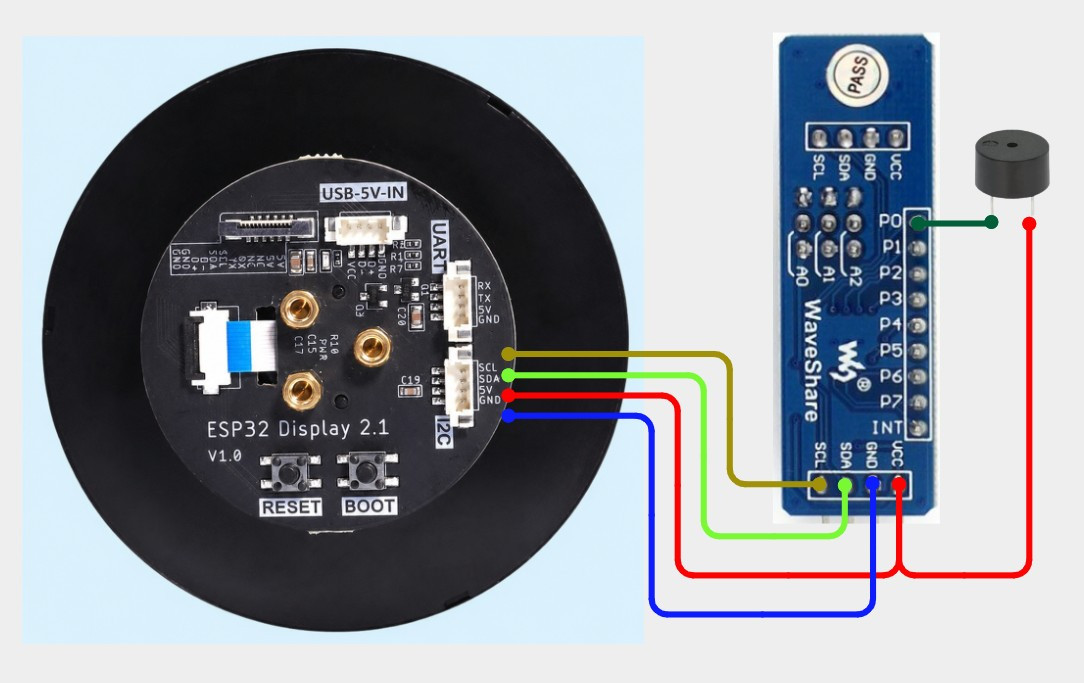
That’s precisely what [mircemk] has done with their “Universal Timer” project. The 2.1 inch CrowPanel “Rotary Display” at the heart of the build combines an ESP32-S3 with a 480×480 round touch screen display and a rotary encoder.

The all-in-one device — clearly meant to be reminiscent of the Nest thermostat and similar commercial offerings — is technically all you need, but in this case it’s been joined by a PCF8574 I2C I/O expander which in turn is used to drive a buzzer that provides a bit of audio feedback at the end of the countdown.

With the code [mircemk] has provided flashed onto the board, the rotary encoder ring built into the housing makes for an exceptionally intuitive input for setting the desired time. It’s a bit like a high-tech version of the classic kitchen timer, as shown in the video below, you simply twist the ring and the graphics on the display rotate accordingly. Unlike grandma’s clockwork timer of old however, this one can change color as it nears zero, which makes it easier to estimate how much time remains from across the room.

As the popularity of smartwatches has brought the cost of these circular displays down, we’ve started to see some very slick projects utilizing them. The various efforts to turn them into desktop “radar” displays for nearby flights are a particular favorite.

Enable Resizable BAR on Unsupported Motherboards

26 October 2026 at 19:00

Recently [Rod Burlamaqui] released the arc-rebar project on GitHub, enabling Intel GPUs to work significantly more efficiently if the system’s mainboard does not support resizable BAR. It does require a Debian or Ubuntu installation and of course a supported Intel GPU.

Although the resizable base address register (ReBAR) feature has been part of the PCIe specification for a while, its use was quite limited until Intel released its Arc series of graphic cards. These use this feature to map much more of the GPU’s video RAM (VRAM) into the PC’s address space than the standard 256 MB, assuming that the system is capable of decoding addresses above 4 GB, i.e. allow for 64-bit BARs.

For GPU manufacturers like AMD and Nvidia this wasn’t so much of an issue as their GPU designs developed in a world where ReBAR didn’t exist, while Intel’s new GPU generations were designed with ReBAR as a core feature, which naturally cripples performance if the mainboard does not have it enabled during PCIe bus enumeration.

This initramfs-based fix runs before the GPU driver loads and performs the requisite BAR configuration. In testing with an Intel Arc B580 GPU on a 2015-era Intel Xeon mainboard the difference between the default and the fixed bandwidth was a bump from a pitiful 15 GB/s to a respectable 392 GB/s, showing how this one fix can breathe new life into older systems.

Practice Japanese on an Inkplate 4Tempera eInk Device

26 October 2026 at 16:00

Learning a new natural language can be a daunting proposition at the best of times, with repetition and immersion generally considered to be the best ways to build up not only vocabulary but also that innate sense for grammar and cultural details that sneak into every spoken language. Flash cards are one way to help with vocabulary and sentence building, such as [Peter Hraska]’s Enkiplate project that uses the Inkplate 4Tempera being an  interesting alternative to lugging a stack of cards with you.

Although the software also works in the browser, using the Inkplate or similar device means that you can keep it with you while it keeps track of your progress in learning the shown cards, with a starting pace of 12 cards per day to learn. It also shows you calendar items for that day and the weather using an online weather service.

Starting from basic kana, i.e. the two phonetic writing systems, the difficulty is slowly ramped up to cover kanji and then sentences. Due to the limitations of the 4Tempera’s ESP32-WROVER-E module’s local storage up to 16 flash cards can be stored at a time, with an application on a PC being necessary to obtain new cards.

❌
❌