With the Xtensa Lx7 twin CPU cores in the ESP32-S3 running at a relatively zippy 240 MHz and accompanying PSRAM of up to 16 MB, you might find yourself wondering whether it could run Linux. As [Paulneja] demonstrates with Linux kernel 6.11, the answer is a ‘yes’, though with the usual caveats.
What complicates matters with the ESP32-S3 is that it lacks certain amenities that spoiled OSes like Linux have come to take for granted, such as a Memory Management Unit (MMU). To deal with this, the NOMMU Linux configuration was used, along with a custom fork() implementation. Although the previous 0.7 version sort-of worked, the current 0.8 release is the first that manages to actually boot reliably and has a usable amount of RAM available after boot.
You can see the comparison between the two versions in the header image, with v0.8 having a blistering 3.7 MB available after booting and with overall resource usage and performance having improved massively. Note that only one core is available to Linux, with the other used by the typical FreeRTOS ESP-IDF stack to provide WiFi and Bluetooth.
This was all run on an ESP32-S3 with the N16R8 configuration, meaning 16 MB Flash that’s also used for writable storage and 8 MB of octal PSRAM. As for practical applications, it’s noted by [Paulneja] that this is a research project, though one could imagine this being an embedded Linux project along the lines of a network router running something like BusyBox.
Apparently, people hate typing. As every movie and TV show suggests, the future is talking to computers. There was a time when speech recognition was complex and not very good. But these days, even our lowly phones can do a pretty good job of speech recognition. Of course, one problem is that your phone probably isn’t actually doing the speech recognition. It sends it to the big business of your choice to interpret. I’ve been using Handy, a speech recognition system that works well for me. I’ve also looked at some that didn’t.
After all, it is sometimes nice to dictate to your computer, and it would be even nicer if you could keep your data local. On Windows, oddly enough, there is a well-developed speech feature that, as far as I can tell, almost no one talks about or uses. One video estimates that 99% of users don’t use it. Linux, of course, has many options, but historically, these have been difficult to set up or finicky.
Of course, the good news is that many of the Linux tools are open source and the models are quite good. That means other people have had the freedom to fork the tools and make them easier to use, at least in theory. The licensing of the models themselves may be different, but those will be hard to modify, anyway and they generally work well. The biggest problems on Linux isn’t the technology itself, but the tremendous variety of systems and setups.
Suppose you want to write a speech-to-text program. Will it work on ARM? What desktops will it integrate with? Can it use a GPU? What kind? What about specialized instructions in some CPUs? Then there’s the forced input situation; typing into arbitrary programs once you know what the user said. On X11, it is easy, but Wayland needs different handling.
A Shortcut
I’ve thought about using my phone with KDE Connect, which is an excellent program. It can let you use your phone as a keyboard and mouse for your Linux computer. Unfortunately, it is aimed at character-at-a-time input, and I’ve never found a way to make it work with voice.
Besides, the phone is beaming all the data to “the cloud.” You probably type things you’d rather not broadcast to the ether.
I had looked at Speech Note before, but it is sort of a speech recognition notepad. I didn’t find it seamless, and it didn’t work well on my system anyway. Vocalinux looks nice, but a quick test kept complaining that my Intel extensions were not available. Makes sense, since I have an AMD CPU. Even though the documentation said it should work, I was never able to get it to work.
The Easy Way
Turns out the application that worked readily on my machine was Handy. Keep in mind, Handy is just another tool that uses one of several models out there, along with other open-source tools. You might need to install some tools to deal with your system like xdotool or dotool, but they are probably already installed anyway. That isn’t to minimize the value of Handy. It is — well — Handy. You don’t have to load and configure models, set up a bunch of system-level hooks, or install a bunch of libraries. You install it, and it works.
You can configure it. The best model for you, for example, may depend on your machine and the languages you speak. You can configure the hotkeys and how the app types into your computer. But it does all the work of downloading and configuration.
No Cloud, Unless…
The models do run on your computer and you can make sure it takes advantage of your hardware. However, there is an optional alternate hotkey that takes your speech, processes it to text, and then sends it to your choice of AI engines to clean it up.
Of course, you could be running your own AI engine, but normally you’ll have it sent somewhere else with a prompt. You can tune the prompt or create your own, but the default one starts: “Clean this transcript: 1. Fix spelling, capitalization, and punctuation errors 2. Convert number words to digits (twenty-five → 25, ten percent → 10%, five dollars → $5) 3. Replace spoken punctuation with symbols (period → ., comma → ,, question mark → ?) 4. Remove filler words (um, uh, like as filler)…”
You do need an API key, but there are free options available. For experimenting purposes, I went to OpenRouter, generated a key, and attached it to one of several free models they have. The nice thing is that you can experiment with different models while keeping the same key.
If you search for free in the models box, you will find a few choices including openrouter/free which just picks a free model that isn’t too busy. That can be important because some of the models will introduce long wait times into your transcription.
On the other hand, you can make a new prompt, copy the original one in, delete the part about keeping the language the same, and add instructions to translate the output to French, and that will work, at least most of the time. So there are a lot of possibilities.
Rather than tell you all about it, we’d encourage you to install it and try it or watch the reveiw video below.
Special Mention
Although Handy is my first choice for day-to-day transcription use, there is another open source project that’s worth mentioning. Nerd Dictation is a very lightweight wrapper around the Vosk model. It does take a little bit to set up, and then it provides you with a command line tool that can start and stop dictation. Of course, you can assign those to macro keys. However, there is also a switch that allows you to simply output to stdout. That opens up a lot of possibilities for writing programs or even shell scripts that respond to voice.
To see what’s possible, run nerd-dictation begin --help. This will show you how to output to stdout, set a timeout, and handle other options.
Of course, the obvious project would be a voice typewriter. Many of the tools mentioned here either rely on or can use OpenWhisper and, of course, you can use it too, if you roll your own code.
Between lawsuits from Apple, and Microsoft being Microsoft, Digital Research’s GEM desktop for DOS never really had a chance. It did have another life on Atari home computers, but it’s the DOS version that provided the code for [Tomaz Stih]’s Linux port of the GEM graphical desktop — which isn’t a WM or DE for X or Wayland, for the record. It is entirely it’s own graphical display that will live in the framebuffer of a minimal Linux installation.
[Thomaz] is leveraging DR’s original code — or at least what started as DR’s code before a series of acquisitions and open sourcing — via OpenGEM and FreeGEM. Sample applications include the clock and calendar, but [Thomaz] says the APIs are compatible with Atari ST applications; presumably given the codebase the it will match the DOS version as well.
Much like when it was originally crushed betwixt Macintosh System and Microsoft Windows, we doubt many will be rushing out to use GEM instead of Wayland or XServer on Linux, but there may well be some use cases. If nothing else, it’s got to be lightweight.
[Michael] has a thing for playing audio over beepers using a single bit. He’s done it with the Apple ][ and the IBM PC. This time he turns to the ZX Spectrum. He didn’t get quite as good a result — at least not yet — but he did manage to get some things working. He documents everything, so even though this wasn’t a successful week, there’s sometimes more to learn from reasonable failures than from unreasonable successes.
Of course, the whole thing relies on pulse code or pulse width modulation. Of the two techniques, PWM should produce better results. However, he wasn’t able to get PWM working yet. Some other target computers drive the buzzer through a dedicated hardware timer. However, with the Spectrum, it is all software.
Getting multichannel music was another algorithm, and that makes for an interesting read, too. We are sure next week there will be more, and if you are interested in this sort of thing, going back to some previous weeks will show you a lot more, too.
Word processors and editors are a funny thing. It doesn’t really matter what’s “best,” whatever that means. If you have finger memory built up for one program, it’s painful to change. That’s why most of us don’t learn how to type on a Dvorak keyboard and why [George R. R. Martin] writes with WordStar. Many people of a certain age have a deep memory of WordStar. Now you can run it on a modern machine or even in your browser without a lot of trouble, thanks to [nampara-ai].
The idea is simple. Take a vintage copy of WordStar for MSDOS, wrap it with DOSBox, and package it up with some basic scripts for Linux, Mac, or Windows. In addition, there’s a WebAssembly version for the browser if you’re into that sort of thing.
On Linux, the wordstar.sh file grabs the current directory and sends it to launch.sh. This script makes sure everything is ready, builds a DOSBox config file from a template, and launches everything. The only problem is that it doesn’t correctly resolve symlinks if you want a link on your path. Luckily, that’s easy to fix:
#!/usr/bin/env bash
 # Run me to launch WordStar 4.0 on Linux:  ./wordstar.sh
DIR="$(realpath "$0")"
DIR="$(dirname $DIR)"
cd "$DIR"
DIR="$(pwd)"

#DIR="$(cd "$(realpath "$(dirname "$0"))" && pwd)"
"$DIR/native/lib/launch.sh"
Practical? No. Irreplaceable? Not really. You could run WordStar under RunCPM or set up DOSBox yourself. You can even find a sort of modern version to run, if you prefer. But for just a quick way to get it running easily, it is hard to beat. If you want to play with the web version, it is easy to navigate to the web subdirectory and run Python:
python3 -m http.server 5309
Then you can point your browser to http://localhost:5309, and you are in business. Or, get a flavor for it from [TigerClawTV]’s walk-through video below.
[Gadget Industry] bills it as “a PC inside a Mouse“, but that depends on your definition of a “PC”. This is a Personal Computer inside a mouse, yes, but there’s nothing IBM-compatible about the tiny ARM board he squeezes inside what’s normally a peripheral — it actually started life as a smartphone, which only takes this build up a notch compared to starting with a single-board computer like a Pi.
Specifically, he starts with a Galaxy S21 5G. Starting with a Samsung means he can leave the stock Android alone and just take advantage of Samsung’s DeX desktop mode, rather than layer a Linux environment on top or replace the operating system entirely with something like Postmarket OS, which are both viable options.
With the battery compartment removed, the phone guts fit with shocking ease in the once-wireless mouse. Of course that’s not a great thermal environment, but that’s what the brass is for. It acts as a heat spreader, which is about as much thermal management as the phone had from the get-go, so it should work well enough. It seems to in the video, certainly. If thermal throttling is a concern, while it’d be hard to fit in a mouse, there’s no beating liquid cooling.
This custom enclosure for a 64×64 RGB LED matrix by [Davisan1001] not only provides a mount point for a Raspberry Pi, but presents a clean and smooth face with square pixels thanks to a 3D-printed grid, some parchment paper, and a sheet of clear plastic.
The first clever thing in this design is the way [Davisan1001] created the grid that acts as a light blocker for each LED in the matrix, preventing light from “spilling” over into its neighbors. Instead of designing the grid from scratch, the solution was just to leverage slicer settings. By printing a flat square with a grid pattern infill and zero solid top and bottom layers, the slicer creates the grid all by itself. A little trial and error was required to get the spacing just right, but it seems to have worked out fine. We’re not sure it’s better than designing a grid in CAD, but it was certainly a clever way to avoid having to do so.
[Davisan1001] also struggled to find an effective and economical solution for a diffuser. Certainly, high-quality diffuser films are available for sale, as are specialty acrylic sheets, but surely there was some household DIY option to do the trick. A sheet of plain white paper blocks too much light. Wax paper handles poorly, and off-angle viewing is poor. The sweet spot was parchment paper.
Parchment paper is commonly used in baking and is thin, easy to handle, flat and even in color, and just opaque enough to act as an effective diffuser while still transmitting enough light to not impede clarity. Cover the LED matrix with the 3D-printed grid, lay parchment paper over that, cover with a sheet of clear plastic, and the job is done.
Light diffusion can be tricky to get just right in a DIY project, and what works for one application won’t necessarily work for another. Our community had loads of suggestions on different solutions, so consider this one more idea to try the next time you have a project that calls for it.
CVSS rankings are determined by the severity of a flaw, the ease of exploiting the bug, if authentication is required for exploitation, if the vulnerability exposes confidential data, and other criteria. A CVSS of 10 is as bad as it gets, and having three of them at once is certainly attention-getting. Of the three vulnerabilities fixed, one allowed unauthenticated modification of data in the hosted instance, a second allowed arbitrary code execution via the GraphQL interface, and the third allowed arbitrary SQL commands that could modify the database.
ServiceNow claims Adobe, Lenovo, Fedex, and Fujitsu among their high-profile customers. With luck, the vulnerabilities were patched before significant public exploitation could happen.
Router Malware
Previously in 2026 the US Government warned against embedded malware found in consumer routers, which may be linked to the FCC enacting bans against certification and import of foreign-made consumer devices. This week, the NVD (National Vulnerability Database) reported specific embedded malware in the Zbtlink and MoreQuick brands of devices.
Multiple versions of the firmware, for multiple lines of products, contain a backdoor service that uses unencrypted UDP to connect to a command and control (C2) service. The service, or anyone able to intercept the network traffic, since it’s unencrypted, can execute commands as root, allowing them to change configurations, open tunnels, or steal ISP credentials.
The malware is baked into the firmware, so removing it is impossible for most users: a factory reset wouldn’t do. In theory if third-party firmware like OpenWRT supports these devices, the hardware could be made safer with a custom install.
Given how commonly the same device is marketed under dozens of names, likely the same devices and firmware have yet to be identified under other brands.
Qubes is built on top of the Xen virtualization system, where each application can be given a dedicated container. The utility to copy files from the primary container into an application container, qvm-copy-to-vm, displays a message if there is an error copying the file. To show the message, the utility launches kdialog with the error as arguments, but fails to ensure that the error doesn’t include shell commands.
The system call used to show the alerts has the dangerous side effect of calling the command as if it was a normal shell. This is extremely powerful, but equally risky: a shell typically allows multiple commands per lines, require quoted strings to protect arguments with spaces or complex text, and can expand variables. Generating an error that escapes out of the message and runs arbitrary commands was all it took.
Qubes already has a fix ready and everyone getting standard updates should have it waiting.
Independent researchers noticed growing reports in Reddit threads that freezer units were out of service, with other service members and families reporting the same. At least fourteen bases throughout the United States appear impacted, and the story has been picked up by the official military newspaper “Stars and Stripes” as well as by mainstream media outlets.
Posts by staff at the bases clarify that it was not a power loss or cooling loss, the fridges and freezers were placed in defrost mode where they self-heated. The commissaries are operated by the Defense Commissary Agency, with central monitoring and control of facilities. Central monitoring makes complete sense when you need to ensure devices are keeping food at a safe temperature, but something definitely seems to have gone wrong.
Diving into it further, M. Elizabeth finds a post from August 9, 2026 describing vulnerabilities in the Danfoss controllers that allow unauthorized access to the refrigeration controller, and a second paper by the same team exposing over 20 vulnerabilities in Copeland refrigeration controllers that included full control of the unit settings. M. Elizabeth is careful to point out that without confirmation from the commissary agency, it’s impossible to know for sure that this was a hack of the control system, but the evidence is mounting.
Border Gateway Protocol (BGP) is a core routing system underlying the Internet at large. Service providers use BGP to announce the ranges of IP addresses they handle and how to reach them. BGP is operated as basically a global gentleman’s agreement: the protocol itself lacks any authentication or encryption. If you think this sounds vulnerable to disruption, you’d be completely right.
Global disruptions have happened accidentally, like when an ISP in Pakistan took down YouTube, deliberately, such as when thieves hijacked the routes to cryptocurrency exchanges, and mysteriously, like when China hijacked parts of the Internet repeatedly with no explanation.
This time, the BGP attack targeted the IP range used by Virtualizor, and was combined with spoofed SSL certificates for the Virtualizor servers to push spoofed updates. The BGP announcement was targeted to a specific class C: a relatively small allocation of 253 addresses, similar to what a home network would use. BGP gives precedence to the smallest announcement for an IP range, so all systems that received the spoofed announcement routed those addresses accordingly. The network advertising the false route was based in Romania, though of course they could also be a victim.
With control over the IP range, the attackers were able to generate a certificate via Lets Encrypt, which was sufficient for browsers and the updater to accept the rerouted addresses. The attackers then published a malicious package that appears to install additional services. The company has not provided details about the trojaned update, so it’s not clear what other risks it poses.
Virtualizor does not have a public list of customers, but one has to assume it includes high-profile companies to make such an attack viable. Hijacking BGP is extremely obvious, and isn’t frequently used for such obvious spoofing attacks.
Relatively recently, some operating systems have added the ability to alert the user when an application access the clipboard. Unfortunately, Linux is not yet one of them, but thanks to other clipboard management tools, Simon noticed that the recent update to Zoom 7.1.5 copies the contents of the clipboard as soon as they change. What happens to the clipboard contents once copied is currently a mystery.
Considering that the clipboard can often contain passwords, authentication tokens, or simply data you might not want to share with Zoom, automatically scraping the contents isn’t what you’d hope for.
Plex Vulnerabilities
The Plex media streaming software sent out an advisory this week warning about security updates for the server and desktop application.
Details are currently thin, with the promise of future details once CVEs have been assigned. For now, make sure you’re on version 1.43.4 or newer. The Plex post has additional directions for updating on platforms that may not have pushed new packages yet.
CrowdStrike observed that 88% of exploits happened with 48 hours of the proof of concept code being released, crediting AI tools for shortening the adaptation. Typically proof of concept code is designed to demonstrate the vulnerability without providing an immediate mechanism for malicious use, and the window from exploit announcement to wide-spread risk was on the order of weeks. The report notes some vulnerabilities being widely exploited in 20 hours after public disclosure.
The tightening window makes patching even more important, but rapid patching caries the risk of instability when the patches themselves haven’t had extensive testing. Unfortunately there’s no simple solution; faster exploitation via AI tools drives faster patching, often also with AI tools that can introduce more bugs as well.
I’m an experienced programmer, and I’ve worked in many different languages. Sometimes being a programmer is a two-edged sword. You want to accomplish something, and you can do it easily — but it can be a lot of work to do it right. Maybe more work than you want to do.
Normally, I’ll kick out a few lines of script for something I want and be done, accepting that it isn’t production-hardened. This time, however, I decided to try an AI tool to see whether they could do the work I was too lazy to do myself. While I’ve played with chatbots, I wanted to try one of the dedicated coding agents, in this case, Codex. Outside of asking ChatGPT to write a simple function or find the cause of an error message, I haven’t done much coding with AI assistance, so I was interested to see what these agents brought to the table.
A Radio Problem
The problem was simple: I wanted an easy way to put buttons on my Linux desktop that launched Internet radio stations. Sure, I could open a player and paste in a long URL, but I’m far too lazy to remember all those URLs.
I searched for a way to make Shortwave — an Internet radio player — open a URL from the command line. Apparently, you can’t. Google Gemini suggested writing a script that launches cvlc, the command-line VLC player, with the URL as an argument.
That’s easy, so I did it. Of course, then I had to find the stream URLs for all my favorite stations. It turns out that Radio Browser maintains an extensive database of stations. I considered scraping the site or using its API, but honestly, the little script was becoming too much of a project.
Besides, I was already struggling to manage the media player’s lifetime. I didn’t want a new station playing on top of one that was already running, and I wanted a command to stop playback, so the script had already grown larger than I first imagined.
My first version used a temporary file containing the player’s process ID so a future script execution could kill the old player. That usually works, but it isn’t very robust, and I knew it. But how much work did I really want to do here? I decided I had done enough and turned the rest over to Codex, OpenAI’s coding assistant.
What Can Codex Do?
Codex is more than a chatbot that produces code snippets. With access to a project, and limited access to your machine, it can inspect existing files, edit them, run commands and tests, examine Git history, and manage commits and remotes. OpenAI describes Codex workflows as including coding, testing, analysis, code review, and repository automation.
The important distinction is that Codex works on the actual project. Instead of copying code out of a chat window, I could say, “Have a look at this shell script,” and it examined the script in place. It also noticed that I already had an uncommitted modification and avoided overwriting it. It also understands version control, and that turns out to be one of its really nice features.
Fixing Problems
My first request was:
Have a look at this shell script. I know it needs a trap. Is there a better way to keep it from accidentally killing something with a stale playradio.tmp?
Codex pointed out that a trap was not the only solution. The launcher exits immediately after starting VLC, so it is not around later to receive SIGCLD or clean up after the player. Sure, it could run something to wait around, but there was a cleaner way to get the job done.
It initially suggested verifying that the saved PID still belonged to cvlc. Then it caught a subtler problem in its own proposal: if Linux reused the PID for a different cvlc process, the name check could still kill the wrong player. This is probably very rare, but when it does happen, it will be a mysterious, hard-to-reproduce bug.
The final solution records both the PID and Linux’s process start-time token:
Part of a Codex session. Entire transcripts are on GitHub.
Before sending a signal, the script confirms that both still match. It also uses a private per-user runtime directory, serializes concurrent start and stop operations with flock, sends SIGTERM first, waits for a graceful shutdown, and rechecks the process identity before falling back to SIGKILL. That is considerably more thought than I wanted to put into a desktop radio button. Overkill? Maybe, but it is robust.
Another pleasant surprise was that Codex built a suite of tests to ensure that everything worked as it should. It runs these tests when it makes changes. So it doesn’t just create code. It creates code, executes it with test cases, and fixes any issues it discovers.
Searching the Database — and More
Once the process handling was safe, I asked:
Radio Browser allows you to search via API for radio stations. How hard would it be to make $1 a search string and take the best match, while allowing -u for a URL instead?
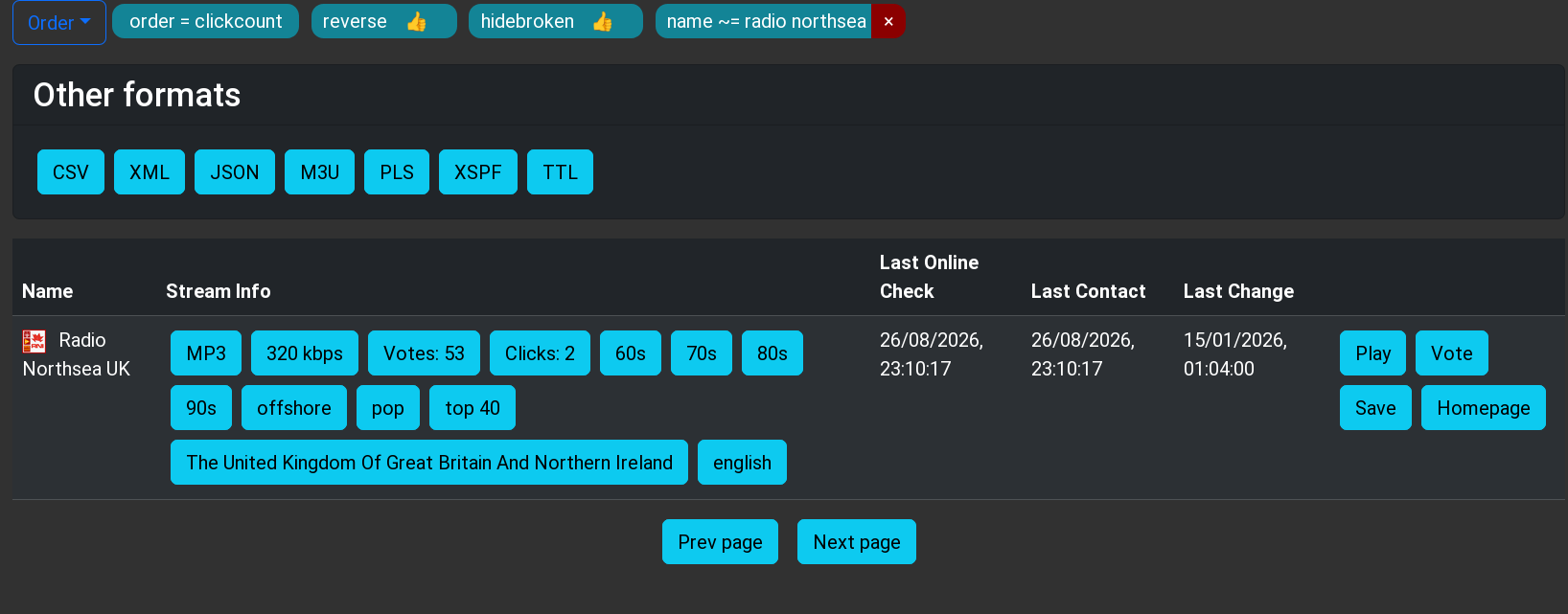
Codex checked the current API documentation, found that curl and jq were already installed, and implemented the search. It hides broken stations, orders matches by votes, selects the top result, and reports the selection back to Radio Browser’s click counter. I told it I wanted specific command-line options over several iterations. The program can play a URL, search the database for a station, or even just query the database. It can also give you a list and let you pick. (See the README.md for the entire interface.)
RadioBrowser is human-readable, but also provides the same data via API.
I did make a few requests. For example, if you pass a URI, the program should figure it out and skip the database search. I also wanted the player to be configurable through a PLAYRADIO_PLAYER environment variable. I asked it to fall back on wget if curl wasn’t installed. Missing dependencies should produce useful installation advice rather than mysterious failures. I also asked it to produce a GitHub-style README and a traditional Unix man page.
Human Guidance Still Matters
There were a few places where human intervention improved the result. For example, the PLAYRADIO_PLAYER configuration and its explanatory comment originally appeared near the bottom of the script. That works, but it is inconvenient for someone who wanted to edit the file. I asked Codex to move it near the top.
Another example was the first version of --pick. I had specifically suggested Bash’s select command, so Codex printed the formatted list and then let select print a second numbered list. It worked, but the duplication was distracting and, as far as Codex was concerned, it was what I asked for.
I pointed the duplication out. Codex replaced select with a simple numeric read, keeping the detailed table and adding only one extra row:
1 Jazz One
2 Jazz Two
3 Cancel
Station number:
This is a good example of how I think these tools work best. The AI handles the implementation, edge cases, tests, and documentation, while the human provides design input and flags anything awkward or that doesn’t fit the intended experience.
Does It Scale?
I’m not an expert at using these kinds of tools, but I think this worked very well. I generally asked for what I wanted and then made technical observations about the results.
I also tried this with a script, originally from [Petar Marinov], that I’ve used and modified for years to replace the cd command (see GitHub). I didn’t tell it what to do. I just let it look at the code. It correctly determined what it was supposed to do and made solid suggestions for making it more robust. It suggested features and even a major improvement to make it work not just with cd but with anything that changes pwd, like pushd. Of course, I couldn’t resist getting a man page and a README for free.
One feature I asked the tool to create was a simple bookmark system. It proposed and created a way to create and maintain a bash associative array that it persisted in a configuration file. That worked, but I knew it would be better, on many levels, to keep the bookmarks as proper symlinks. When I pointed this out, the AI did get it, saying:
That has several nice consequences:
changes from cdmark are instantly visible in every shell; no reload or synchronization issue
ls -l ~/.config/cdfunc/bookmarks is already a crude cdmark list
bookmarks can be created or removed manually with ordinary Unix tools
Syncthing/git/backup tools handle them naturally
no parsing, quoting, escaping, or rewriting a bookmarks file
no associative-array initialization at shell startup
broken bookmarks are naturally represented as broken symlinks
I think that’s substantially cleaner.
It also noted that this makes shell completion very simple, which I had not thought about. However, its implementation broke normal shell completion for the commands. It fixed that after I pointed it out. Well, actually, it took two tries to work out all the bugs. This is another case where human guidance is critical.
For a more advanced project, I forked a simple editor, kilo, and added a few Emacs commands. I asked Codex to review it. It found a number of bad edge cases, some in the original code, and fixed them. I then asked it to suggest Emacs-like features it could easily do. We added a ton! (see GitHub). It was impressive how well it analyzed and understood the code. I had done similar modifications to the code a few weeks earlier and, I have to admit, Codex understood the original code base much faster than I had.
Again, though, human guidance is necessary. Emacs uses an Esc prefix for some commands. You can also hold down the Alt key to get the same result. So pressing Alt+W in a terminal sends an Esc character and a W.
Initially, Codex wrote code to detect an Esc, wait a short time for a command, and then, if nothing came, treat it as a bare escape. It even understood that this would be a problem and mentioned it. Alt+W would work, but there was no way for a human to press Esc and then W in the time allotted. I prompted:
Yes I see that in the program. Would it be possible to have it wait indefinitely for ESC UNLESS a caller set some flag. So when other parts of the editor (search/save/etc.) are prompting for input they would set that flag (or call a separate entry point) and, at that point, ESC=>ESC. Any other time ESC is treated as a prefix (and perhaps ESC ESC gets sent as an escape just as a — ahem — escape hatch.
That fixed the problem. It is hard to remember that while Codex seems smart, it doesn’t have human judgment or human-level problem-solving skills. You have to supply that. Sure, it found problems in its own code. It found problems in my code. It devised solutions. But you still have to make sure those solutions make sense and sometimes nudge it — at least — in the right direction.
If you are interested, each of the GitHub repos (playradio, cdfunc, and kilo) has a session directory that contains transcripts of the AI chats that produced the final versions of the code. Admittedly, none of these started from a totally blank slate, but working on an existing code base is certainly a realistic test.
The Git Assistant
One feature I particularly liked was Codex’s ability to manage Git. I didn’t even try the GitHub plugin for Codex, which would probably be even better. I asked it to commit the current version before starting a new feature, which gave me a clean checkpoint. Later I said:
Commit please. I’m going to add a remote GitHub repo. Can you set this as origin and push it after the commit?
Codex committed the changes, added the remote, pushed the branch, configured upstream tracking, and verified that the working tree was clean. The entire evolution is visible in the repository’s history — from process-safety changes, to Radio Browser search, to configuration and documentation, to the interactive station picker.
You can see the final project and follow each commit in the repositories along with transcripts of the AI sessions. Having things in version control is especially useful with a tool like Codex. You can easily see what has changed and roll back if you like.
Wrap Up
The original script solved my immediate problem in a handful of lines. The finished utility solves the same problem safely, handles failures, searches a public database, supports different players, has good documentation, and leaves a traceable Git history. One important note. Codex and other agents have a limited context window, so you won’t get the same results trying to work with extremely large code bases unless you pay for a larger model. But for these tasks, normal consumer Codex worked well.
Could I have written all of that myself? Certainly. Would I have bothered to go this far? Probably not for what is basically a one-off desktop hack.
That may be the most useful role for a coding agent: They don’t always enable you to do something you couldn’t otherwise do. But they make it cheap enough in time and attention span to do all the boring and defensive coding and testing that you know you should do, but so often don’t. Codex didn’t replace me. It just augmented my patience.
While the sound and fury of launch is exciting, it’s just the beginning of the journey for Roman. It will take several months for the spacecraft to complete its roughly 1.5 million-kilometer trek out to Earth’s second Lagrange point (L2), where it will set up shop near — in cosmic terms, anyway — the James Webb Space Telescope (JWST). Along the way, it will switch on and test various systems and components, with its primary 300 megapixel infrared camera scheduled to power up in three weeks or so.
There’s a lot to cover about the Roman Space Telescope. Built from spy satellite spare parts donated by the National Reconnaissance Office and featuring a field of view 100 times greater than that of Hubble, its launch is widely considered to be one of the most important scientific milestones of the decade. We’ll be bringing you more about the past, present, and future of this flagship mission as it progresses.
From real space missions to virtual ones, this week the developers of EVE Online announced that 2.4 million lines of code that keep the massively multiplayer online role-playing game running would finally be making the switch to Python 3. Given the immense complexity of the codebase, it’s been stuck at Python 2.7 since their last overhaul back in 2010, a situation which has become increasingly difficult to manage as time goes on.
The announcement goes into a surprising amount of depth about the state of Python in EVE. We imagine most players couldn’t care less, but naturally the developers have strong feelings about the situation and perhaps thought it would benefit others in a similar situation to get their thoughts out there.
While there’s certainly an argument to be made that the only justification they really need for making the migration is that 2.7 hit end-of-life back in 2020, the developers explain that the more immediate problem for them was that various tools and libraries they wanted to use were no longer compatible with the Python 2.x series. They also point out hopes that speed improvements made in the latest version of Python will eventually translate into better game performance down the road.
In more terrestrial news, this week the necessary regulatory amendments were passed to make plug-in solar systems legal in the United Kingdom. Assuming the wiring meets the necessary requirements, consumers can pick up the hardware and install it themselves without involving an electrician, although they may still need to contend with landlords and local ordinances that may limit their ability to physically mount the panels. The rules as they stand now allow each residence to have four panels with a total combined output rating of no more than 2,000 watts, although critically, the system is only allowed to generate a maximum of 800 watts at the inverter. As the government and consumers get more comfortable with plug-in solar systems, these numbers will likely increase over time.
Solar isn’t the only area where DIY approaches are moving into the mainstream. This week, Citrix pitched a “different approach to endpoint resiliency”: an isolated Linux-based operating system called UniconOS that users can boot into should the computer’s primary Windows installation become compromised or otherwise inoperable. The idea is that an independent, read-only backup OS kept on its own partition will reduce downtime, since the computer can still be used while IT figures out what the hell happened.
This solution will sound suspiciously familiar to anyone who’s booted a live Linux system from CD/DVD/USB in the last few decades. Try not to keep yourself up all night wondering why you never pitched the idea to some hungry venture capitalists in exchange for a yacht in the Bahamas.
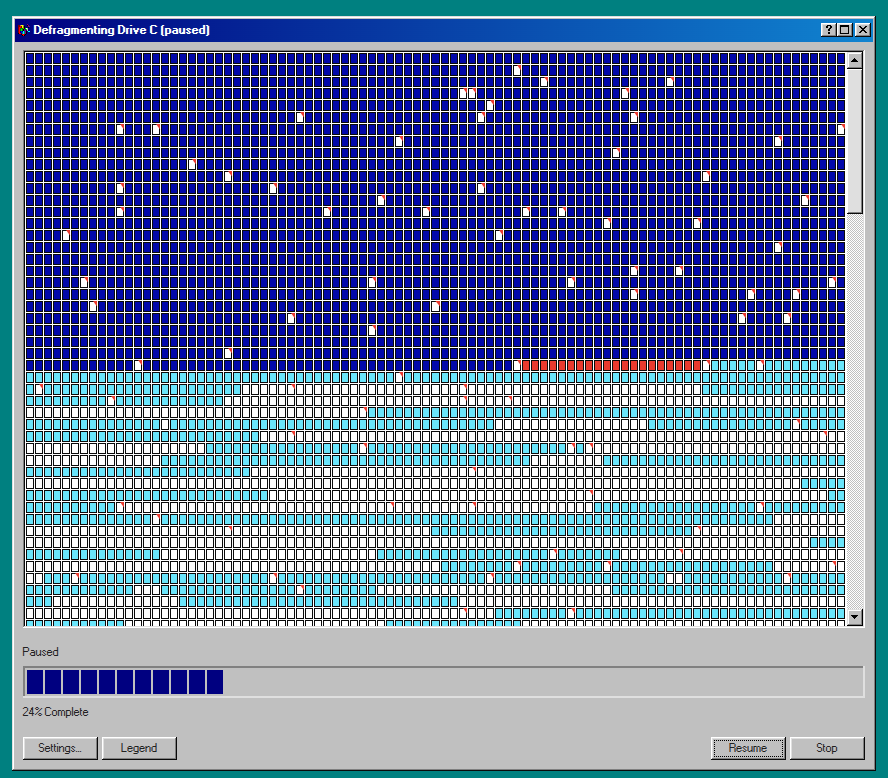
Finally, on the theme of new technology embracing the old ways, we bring you Defrag98, a web reincarnation of Microsoft’s dial-up era Disk Defragmenter tool. While it won’t actually improve the performance of your modern solid-state drive, you may find your own mood boosted by the wave of nostalgia when you see — and hear — the classic tool go to work.
That’s right, not only do the blocks dutifully flip from red to blue just like you remember, but all the while you’ll be treated to the unmistakable whirs and clicks of a spinning hard drive circa the turn of the millennium. Never forget what they took from us.
See something interesting that you think would be a good fit for our weekly Links column? Drop us a line; we’d love to hear about it.
Humanoid robots, even scaled-down ones, tend to be expensive. The Berkeley Humanoid Lite offers a more accessible and economical option by centering the design around 3D printed actuators that make up the bulk of the robot’s frame.
The actuators are made by combining motors with printed cycloidal gearboxes and an embedded magnetic encoder. They’re modular, so even if one has no desire to recreate the whole robot it might be worth checking out the actuator design details to see if they might be useful in some other way.
The Berkeley Humanoid Lite isn’t a finished product so much as an open-source, easily customized reference design. The GitHub repository contains everything one might need, and you can watch some basic demonstrations, including VR-driven teleoperation, in the video embedded below.
At a total hardware cost of under $5,000 USD it’s still expensive, but much more economical than other humanoid robots, open-source or not. As mentioned, even if one doesn’t plan to build one, the modular actuator design is worth keeping in mind for other purposes.
Multiple warnings have been issued by the FBI and CISA regarding malware on media box Android devices. Many devices have been caught participating in botnets providing residential proxies, ad-click fraud, and DDOS services. [AyaanB] sets out to discover if a $30 set-top streaming box is pre-infected with malware, and extracting it – without ever letting the device talk to the Internet or access other devices on the local network.
Picking a device named in the advisories, [AyaanB] discovered that it was, indeed, preloaded with multiple app stores and applications that wouldn’t typically make sense on a set-top TV box. After identifying the serial port test pads and obtaining a low-voltage serial adapter, they were able to gain access to the bootloader and from there dump the contents of the MMC over TFTP.
With the entire filesystem accessible out-of-body, proving it was infected with malware at the factory becomes simple: the malware is signed as a system application, baked onto the system partition of the MMC, granted SELinux exceptions to mark it as a system binary with shell privileges, and has multiple launch scripts to make sure it is executed even if partially removed. With the malware identified, [AyaanB] continues to dig through to uncover the capabilities.
By installing hooks into the low-level Android process spawning system, the malware installs hooks into every application as it is launched: even if an application isn’t trojaned already, by the time it finishes executing, it’s definitely been subverted. The functions patched and the methods used match the Vo1d botnet, which is used for account takeovers, residential proxies, free “VPN” services, and other unfriendly behavior.
Further digging into the system showed hooks for ad-click fraud, where hidden browser windows are allowed to run unthrottled and display overlays are configured to obscure ads below where the user may click. Other included tools bid in real-time ad auctions, claiming to directly publish ads to the user which may or may not be visible. To cap it all off, a root level backdoor allows botnet operators to access the systems directly and install additional tools.
Be sure to check out [AyaanB]’s writeup for more details on exfiltration methods and other malware found on the devices.
Hijacking Calls to Military Bases with DNS
In the early 2000s, a domain name scheme was developed to directly map telephone numbers to DNS records for SIP and VOIP calling. (Who knew? I didn’t!) But [Lina] did, with an excellent writeup on accidentally positioning themselves to intercept phone calls by registering an expired domain.
The e164-arpa number to name scheme was never widely adopted, and quickly forgotten about. As is the way with all forgotten standards, the infrastructure slowly fell apart. [Lina] noticed that several country records were delegated to name servers hosted in expired domains, and by simply registering them, they were able to begin resolving queries. For a five Euro registration fee, [Lina] gained control over an abandoned DNS resolution protocol for Saint Helena, Diego Garcia, and Ascension Island. After watching the logs for some time and not getting any traffic, and running into the bureaucratic tangle of standards committees and the actual United Nations, the project was shelved.
Six months later, [Lina] examined the logs of the other domains, and found hundreds of thousands of records of attempted calls, and since you read the section header, you already know where the calls were headed. Clearly some phone systems still attempt to use the ill-fated e164-arpa calling scheme even in 2026, and because the DNS records control the destination of the call, it would have been possible to hijack all the calls transparently and mine them for information, and all for five Euros. With military bases involved, and with one of the bases targeted by missiles during recent conflicts, suddenly agencies cared significantly more, and the story has the happy ending of the domains being transferred to the National Cyber Security Center in the UK.
The fingerprinting plays a waveform in the background of the page with the volume set to zero, and measures variances in the computed values. Variances in the computed waveform are introduced by the browser type, CPU, audio hardware, and even the driver versions. While most of the headlines have focused on the audio fingerprinting, AliExpress also used other fingerprinting techniques to build profiles of each browser, including WebGL, WebRTC, screen resolution, and other web integrations.
The purpose of the advanced device fingerprinting is unknown: AliExpress could use it for fraud prevention, but could also be using it to identify and track customers when they have disabled traditional tracking cookies. The audio fingerprinting was discovered when a user experienced trouble with Bluetooth headphones being attached to the silent audio stream.
Unfortunately with fingerprinting techniques which leverage standard features in the browser it can be difficult to block them. Sometimes, ad blockers may be able to identify and block some of the fingerprinting resources, as can disabling some features in the browser, but many features like audio and WebGL can’t usually be turned off.
Most chat apps allow you to discover users from your contacts list who also use that app – but then you’ve given your contact list to the app, helping them build their marketing and social graphs. Signal of course handles it differently, allowing you to discover users from your contacts list while preventing the Signal corporation from being able to access your list of contacts. Well, mostly.
Signal runs the contact discovery process inside an Intel SGX Enclave. A SGX Enclave is an Intel extension similar to a Trusted Execution Environment (TEE) on Arm, where memory and execution can be partitioned for a restricted process. In theory, code and memory inside an enclave can not be read by other processes, root processes, or even a hypervisor or virtualization system. Signal uses enclaves so that the users encrypted contacts list and the encryption key itself are fully insulated. The Signal client is then able to validate the integrity of the enclave using known measurement values baked into the client releases.
Researchers using the V12 AI agent discovered this wasn’t always the case. Because a SGX Enclave shares resources with the rest of the system, a malicious host could create exploitable race conditions in the algorithm by generating page faults and pausing execution of the enclave. The malicious server running the enclave is still unable to directly read the contents, but it could extract the secret values needed to then create false servers which could fully expose the user contact list.
A second attack would allow a malicious host to manipulate the list of clients connected to the enclave, gaining full code execution inside the enclave with the predictable result of exporting contact data.
Both of the issues were reported to Signal and fixed before the public writeup, and there is no evidence they were ever abused: to attack either flaw, a compromised host would have to be running the Signal enclave code and be part of the Signal infrastructure that clients would connect to.
The company has been unwilling to release any details of the attack, but expects to be able to resume shipping of medical products in “less than three weeks,” which sounds like a pretty major disruption. Boston Scientific manufactures defibrillators, pacemakers, and surgical equipment. It’s unclear if any patient data has been compromised, though presumably regulations will require disclosure if that’s determined to be the case.
With no additional information about the attack, it’s also unclear if any source code or other data which could aid attacking medical devices was impacted, either.
The ShinyHunters group claims responsibility; previous victims of the group include casinos, car manufacturers, medical companies, and government agencies. The leak claims to include over 50 gigabytes of customer and employee data, with customer data including email, phone numbers, and physical shipping addresses. The group demanded $3.3 million in ransom for the data, and published it when Carhartt didn’t pay.
Have I Been Pwned linked the data to a compromise of the Databricks instance used by Carhartt, which is a platform for linking business data and AI.
Normally, llms.txt and llms-full.txt are used to instruct AI agents on how to summarize and index the sites content, but researchers in Israel indexed the files of Fortune 500 companies, defense contractors, and tech companies and found that over a hundred of them included directions to install packages which didn’t exist or referenced domain names that were not registered. The researchers were able to create packages with matching names and record agents inside multiple high-profile companies installing and executing them.
While documenting the reach of the exposed packages, researchers found at least one had already been replaced by attackers with live malware which would execute inside whatever context the agent was executing in, potentially exposing authentication tokens or company data. The attacks which have been rampant in the NPM and PyPI package repositories can make even legitimate packages dangerous to install, but agents blindly following instructions from arbitrary websites inflates the danger even higher.
TeamPCP has been behind some of the worst of the supply chain attacks plaguing PyPI, NPM, and VSCode plugin repositories, and have released the source code to some of the worms used in the supply chain attacks to muddy the waters and recruit new members. TeamPCP has also been involved in compromising thousands of GitHub repositories, and is affiliated with multiple other crime and malware groups.
While the identities of the arrested individuals have not been officially released, in typical Brian Krebs fashion, dozens of connections are correlated showing their likely identities and links to TeamPCP and other groups. If nothing else, this should serve as a reminder that the best time to pay attention to operational security was ten years ago.
As TeamPCP doesn’t appear to be a state-sponsored group, or even strongly organized, the arrests of a few members are unlikely to drastically slow down the compromises. Krebs details conversations held with one of the arrested men, in which they discuss struggles with sobriety and plans to leave the malware scene, stating that others have already taken over leadership roles in the group.
As software updates cease for operating systems, they eventually begin to lose access to parts of the LAN and internet due to out of date encryption features, as well as the inability to handle file sharing protocols like SBM3, which is somewhat of a necessity if you have e.g. a NAS on the LAN. Such too was the case with [watermark_hd]’s 20-year old PowerPC Macs and their installations of OS X Tiger and Leopard.
Cue Aqualink, a native SMB3 client for these older OS X versions that uses [Ronnie Sahlberg]’s libsmb2 server/client library for SMB2 and SBM3. The source code can be found over on GitHub, along with a Japanese translation. By using a local WebDAV server Tiger’s built-in mount_webdav feature can be used to mount these remote volumes.
While you can often still use SMB1 even on modern Windows and Linux/BSD via Samba, allowing even retro systems like these PowerMacs to speak SMB3 is at least a great boost for network security, even if the aforementioned encryption shortcomings mean that you cannot quite run encrypted file shares yet.
Although OS X eventually began to adopt modern SMB versions, some of us may remember how incredibly buggy they were, to the point that us OS X users often had to fall back to CIFS (SMB 1.0), so this is another potential use for this Aqualink application.
It’s likely that even those of us who have never picked up a guitar in our lives will recognize the sound of an electric guitar with a fuzz box effects pedal. The raspy distorted sound has been at the heart of so many very well known recordings. Behind it is a distortion circuit, or as [Bill Jehle’s Mad Scientist Guitar Lab] is here to tell us, eight different circuit topologies.
The result is a fascinating trip through the evolution of rock music through the 1960s, as he examines circuits from simple diode clippers through to frequency doublers and phase shifters. He’s provided a playlist as an accompaniment so you can even have an immediate listen to each sound. It’ll mess up our YouTube recommendations, but worth it for the informative journey.
It’s also a window into a lost period in electronics where all they practically had was the transistor, so each device had to put in the maximum work for a living. Designing circuits like these called for intimate knowledge of the device characteristics, and just how they could be safely exceeded. The video is below the break, and well worth a watch.
[Joseph DiGiovanni] is the owner of a Litter Robot 4. It’s a convenient mechanized litter box for cats that can clean itself to reduce unwelcome odors inside the home. He wanted to run automations based on the operation of the litter box, but was not eager to use the manufacturer’s cloud service to do it. Instead, he set about reverse engineering the device for his own ends.
Since the Litter Robot 4 relies on an ESP32 microcontroller for external connectivity, it was entirely possible for [Joseph] to whip up a custom firmware for the device instead. He started with ESPHome as a base, which is a popular firmware used for building smarthome devices based on Espressif hardware. The architecture of the Litter Robot 4 helped in this regard. It uses a PIC microcontroller to handle the low level hardware control, while the ESP32 is responsible for connecting to the cloud over WiFi. This allowed [Joseph] to mess with the connectivity features and get the device hooked up to Home Assistant without compromising the basic mechancial functionality of the device or any of the safety features.
All [Joseph] had to do was figure out how the original hardware’s ESP32 talked to the PIC and emulate that in his own firmware, which was achieved with some snooping and data capture and processing with an LLM. This was used as a basis to whip up an ESPHome firmware that could integrate the hardware neatly with Home Assistant.
If there’s one thing that’s guaranteed in the tech world it’s that nothing is guaranteed. From AOL, Netscape, Yahoo, and MySpace, every tech empire seems to eventually fall to ruin. One method to reliably maintain information or online experiences that are lost to whims of computer users and markets is to backup, preserve, and host that information on one’s own computers, and the Kiwix project aims to help make offline backups of favorite websites.
The open-source tool started as a way for users to make their own offline backups of Wikipedia but eventually expanded into having the ability to backup many other sites as well. Wiki-type sites are generally the easiest, but it can also create backups of other sites like StackExchange so that when the Internet goes down or the site vanishes from the world, the information is preserved for use. There are plenty of guides online for setting up Kiwix as well, with it running easily on most Linux systems with or without the help of Docker, as well as versions available for Windows, Android, and Apple platforms.
Although the Kiwix software hosts the website backups, creating the backups needs to be done with another tool called Zimit to create the .zim files Kiwix uses. The Kiwix organization also hosts pre-downloaded .zim files of common websites so each user is not independently crawling Wikipedia on their own, a task that could take months on limited consumer hardware. As for what hardware to ultimately host it on, we might recommend an armageddon-proof machine like this one.
FTP isn’t exactly cutting-edge technology. These days, if you control both ends of a connection, you’re probably using scp, SFTP, rsync, or something even fancier. But FTP refuses to die, especially if you are perusing old public FTP servers or talking to retrocomputers. Every now and then, you still need an FTP client. Naturally, there are plenty of graphical clients. But some of us would rather stay at the command line. You could just type ftp, of course. It works, and if you haven’t used it lately, it is probably better than you remember. However, I’ve long been a fan of NcFTP. While some other FTP clients have caught up, it still has unique features that make FTP a lot more productive.
Not Your Father’s FTP
Before maligning the standard ftp command, though, we should point out that it probably isn’t the FTP client you remember from 30 years ago. For example, on openSUSE Tumbleweed, /usr/bin/ftp is really tnftp, a portable version of NetBSD’s enhanced FTP client. Debian uses it too; the ftp package in both Bookworm and Trixie leads you to tnftp. Since current Raspberry Pi OS is based on Debian Trixie, you’ll encounter tnftp there, too. That’s significant because tnftp has already fixed many of the irritations you might associate with old-fashioned FTP.
You get command-line editing, history, and filename completion, things that are also in ncftp. Both understand passive FTP and IPv6. The tnftp client can also retrieve HTTP, HTTPS, and file: URLs, so commands such as:
ftp https://example.com/something.tar.gz
aren’t necessarily typos, although ncftp lacks this ability. But ncftp does have some killer features.
Remember Me?
One of NcFTP’s nicest creature comforts is bookmarks. Connect to a machine, move to a useful directory, and save it:
ncftp /pub/micros> bookmark oldstuff
Then later you can simply type:
ncftp oldstuff
The bookmark can remember more than just the hostname, making frequently used FTP sites feel much more like named resources than anonymous servers you repeatedly have to navigate.
NcFTP also maintains a cache of remote directory listings. If you’ve ever used FTP over a slow link, you know how annoying it is to ask for the same directory listing over and over. NcFTP can often work from what it already knows instead. Neither feature sounds earth-shattering, but together they make an interactive FTP session considerably more pleasant.
Get All The Things
Another difference becomes obvious when you want an entire directory. NcFTP supports recursive transfers:
get -R foo
or:
put -R foo
That seems obvious if you’re accustomed to modern tools, but traditional FTP is fundamentally organized around transferring individual files. NcFTP does the tedious directory walking for you. It also handles resuming interrupted transfers more naturally, something particularly welcome when the file in question is a multi-gigabyte disk image rather than README.TXT. With tnftp, you have to explicitly ask to resume an interrupted file. NcFTP will detect it and, depending on configuration, either resume or, at least, offer to resume the transfer.
Go Away, I’m Busy
NcFTP also has a clever background-transfer system. Commands such as:
bgget giant-file.iso
Hand a transfer to NcFTP’s spooler rather than tying up your interactive session. There are corresponding facilities for uploads. That’s an interesting distinction from simply detaching a shell command. NcFTP knows that this is a transfer job and maintains a queue of FTP work that can be retried and processed independently.
Shell Games
But perhaps the biggest reason to know about NcFTP is that NcFTP isn’t just one program. The package includes commands such as ncftpget, ncftpput, and ncftpls. These perform FTP operations directly from the Unix shell without starting an interactive FTP command interpreter. For example:
ncftpget ftp.example.com /tmp /pub/widget.bin
or:
ncftpput ftp.example.com /incoming widget.bin
This is much nicer in a script than sending commands to ftp using, for example, a here document and automating login with .netrc. For example:
ftp <<EOF
open ftp.example.com
cd incoming
put widget.bin
quit
EOF
Sure, it works, but any time you send input to an interactive program it is, at best, messy. The ncftpput program expresses what you actually wanted to do in the first place: put this file there. That’s much more Unix-like.
Don’t Do This At Home
None of these conveniences change FTP’s fundamental problem: ordinary FTP is not secure. Usernames, passwords, and data can travel without encryption. If you’re designing a new system and control both ends, you usually have much better choices. But sometimes you don’t control both ends. If FTP is something you run into, ncftp is worth knowing about. Bookmarks, cached directories, recursive and background transfers, and especially the script-friendly companion commands turn an antique protocol into something that feels surprisingly at home on a modern Unix command line.

 Login
Login