❌

Normal view

There are new articles available, click to refresh the page.
Before yesterdayMain stream

Hairy Armor For Combat Robot? It’s Not Terrible!

26 October 2026 at 04:00

[Angus] of Maker’s Muse enjoys combat robotics, in which contenders zip about in an arena, attempting to disable one another with weapons that lift, spin, and smash. He got a funny idea a short while ago and wondered whether a stiff mane of bristles could serve as lightweight, ablative, impact resistant armor?

Just to set the stage, [Angus]’s new robot competes in the plastic antweight (or “plant”) division, in which robots are limited to 150 grams with both chassis and weapons made of plastic. In such circumstances, one can see how a mane of thick, rigid “hairs” might actually punch above its weight, so to speak.
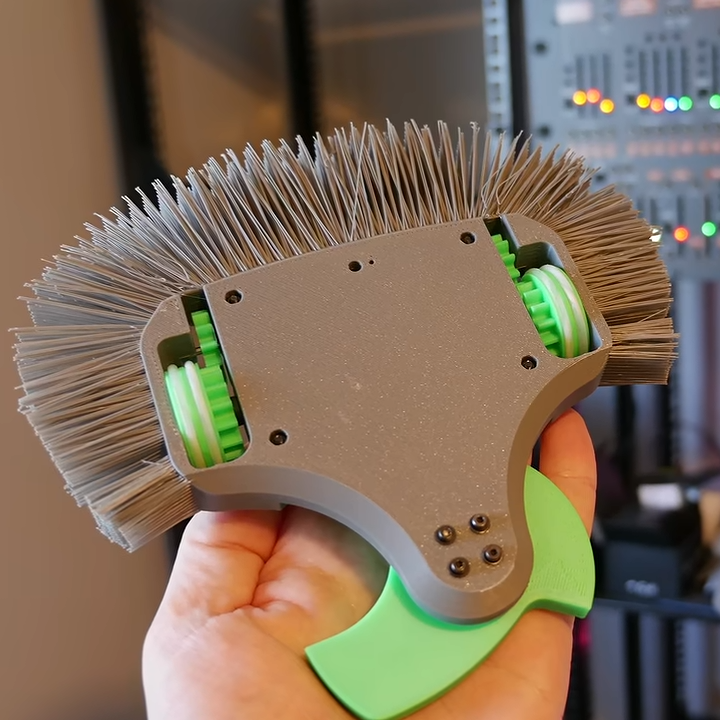
The green shape at the bottom is a spinning weapon. The bristles cover the sides and rear.

Nothing settles a question like a good experiment, so [Angus] sat down and redesigned his latest robot to replace its outer shell with a thick wad of bristles, in the style of a 3D printed lion’s mane. Filament is bridged between the model and an outer support structure, which is cut away afterwards to expose the “hairs”.

How well did it perform? Well enough to merit further study! Where past robots got their outer shells broken up, the hairy robot seems to have come through quite intact. It seems the idea might not be as silly as it first seemed, at least in the plastic antweight division.

3D printers have been fantastic in the field of combat robotics. First they were great because they made custom parts easier and more accessible to hobbyists, but things have evolved more since then. Now folks compete by putting motors and electronics inside almost entirely 3D printed robots. There’s never been a better time to get into combat robotics, and experiment with unorthodox designs.

If you want to try a hairy robot for yourself, be sure to watch the followup in which [Angus] improves the hair-generating process considerably.

Clotty The Custom Period Tracker Can, Of Course, Run DOOM

21 October 2026 at 07:00

[kati]’s Clotty might run DOOM and game-ify the menstrual tracking process with a playful Tamagotchi-like aspect, but don’t let that distract you. It is, at its heart, a personal menstrual cycle tracking device that is defined as much by what it does do as what it doesn’t.

Clotty brings a Tamagotchi-like playfulness to the table.

What doesn’t it do? Well, it will never quietly upload one’s menstrual tracking data to a remote server. Nor will it harvest, mishandle, disclose, or sell that same data. Shamefully, that alone sets it far apart from the wide range of period tracking services and apps out there. Also setting it apart is its cheerful lack of discretion. As [kati] puts it, she wanted Clotty’s design to scream “HELLO I AM A PERIOD TRACKING DEVICE” and at this she absolutely succeeded.

Clotty uses an RP2040, color LCD display, and a small variety of sensors built into a palm-sized, uterus-shaped PCB complete with touchpad ovaries. Right now it’s still in its early stages, and basically at the point that everything works hardware-wise and the essentials are there for software, but it’s still in active development. Keep an eye on Clotty’s GitHub repository for updates as features get fleshed out.

Of course, as [kati] observes, the core validity of a device can be defined by whether it can run DOOM, which of course Clotty can. You can find [kati]’s fork of RP2040-DOOM here.

[kati] has a knack for designing effective hardware that gamifies functions and incorporates a playfulness to the design that’s a delight to see. Take a moment to check out her Slightly Sentient D20 which is another excellent example of the kind of work she does.

Birduino Plays Bird Calls on Demand with NFC-enabled Cards

20 October 2026 at 01:00

All [Hannah Robertson]’s Birduino needs is for one to tap an NFC-enabled card to the reader, and the device plays one of the vocalizations associated with the bird shown on the card. It ties together a few different components into a whole, and acts as a good reference design for similar work. There are a few time-saving construction tips worth keeping in mind, too.

The major components are an Arduino Nano, an RC522 RFID reader, and an MP3 player module. Using hardware modules and breakout boards means simpler wiring and being able to take advantage of existing libraries and sample code. There are also a few other things in this build that avoid re-inventing the wheel.

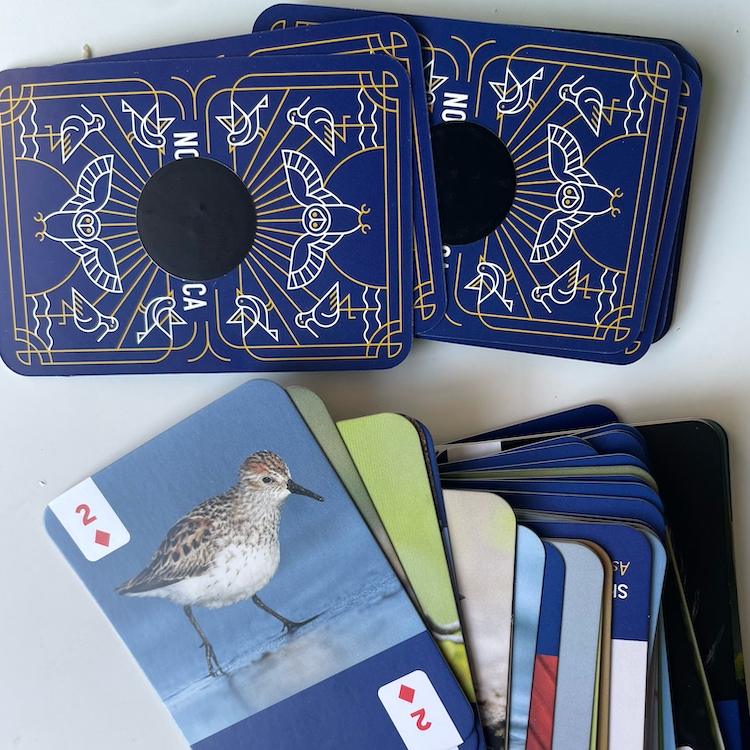
A deck of bird cards plus a roll of NFC stickers equals a ready-to-scan assortment without having to design it oneself.

Rather than design, print, and cut a set of bird cards, [Hannah] found a set of bird-themed playing cards with a different North American bird on each. The back of each card gets an NFC sticker off a big roll purchased online. The result? A set of NFC-enabled bird cards with a minimum of work and fuss. The RC522 RFID reader doesn’t fully support NFC, but it works well enough to read the ID off the stickers.

When the user touches a card to the reader, the device plays one of the vocalizations from a collection of sounds for each bird. Creating the manifests and linking each card’s ID to them was a lot of manual work, but the result is great. The sound themselves come from the Cornell Guide to Bird Sounds of the United States and Canada, a $20 USD curated compilation of vocalizations from a staggering 908 bird species of North America. In a way, the biggest bottleneck is the card deck itself. At 52 cards plus two Jokers, it contains only a small subset of the total birds in the Cornell collection.

The enclosure is laser-cut clear acrylic, and here [Hannah] offers some time- and money-saving advice for anyone looking to glue acrylic to acrylic in a way that doesn’t frost or cloud the clear acrylic: Clear Gorilla Glue Gel. There are of course other glues made for this purpose, but Clear Gorilla Glue Gel (the one in a squeeze tube) is something one should be able to find in just about any hardware store. Another tip: double-check before buying, because many Gorilla Glue products are very similarly named despite being significantly different products.

Watch (and listen to) the video embedded below. If birds and their vocalizations are something that intrigues and inspires you, Cornell also has a resource for identifying birds by sound alone — we’ve seen it implemented with a Raspberry Pi and USB microphone.

One-stop Tool Shows Apple Intelligence The Door

19 October 2026 at 11:30

Don’t want AI features on your Mac? Tough luck, unless one wants to imperfectly do it by hunting down settings in about a dozen different places. Even then, the multi-gigabyte models stay on disk. Unsatisfied by this state of affairs, [omlahore] created RemoveMacAI, a one-stop-shop debloater that shows Apple Intelligence the door, reclaiming its disk space on the way out.

With RemoveMacAI one has a single location from which to turn individual AI features off, delete the models behind them, and block MacOS from downloading them again by redirecting attempts to a closed local port.

What’s refreshingly nice about the tool is how transparent it is about what each setting or preset will change, and communicates clearly what exactly one loses access to by disabling it. Want it all gone? Easy. Use one or two features, but don’t want the rest? No problem. All changes are shown up-front before the tool changes anything, and all alterations are reversible.

Released only a couple weeks ago, to say the tool is popular would be an understatement. Windows 11 also got a “remove AI features” tool, and it requires constant updating to stay functional. Will a future MacOS update interfere similarly with RemoveMacAI? Probably, but one thing that is clear is that a tool like this resonates deeply with a nontrivial number of users.

2026 Retrocomputing Challenge: Dollhouse Arcade Cabinet Runs Remote DOS Games

17 October 2026 at 19:00

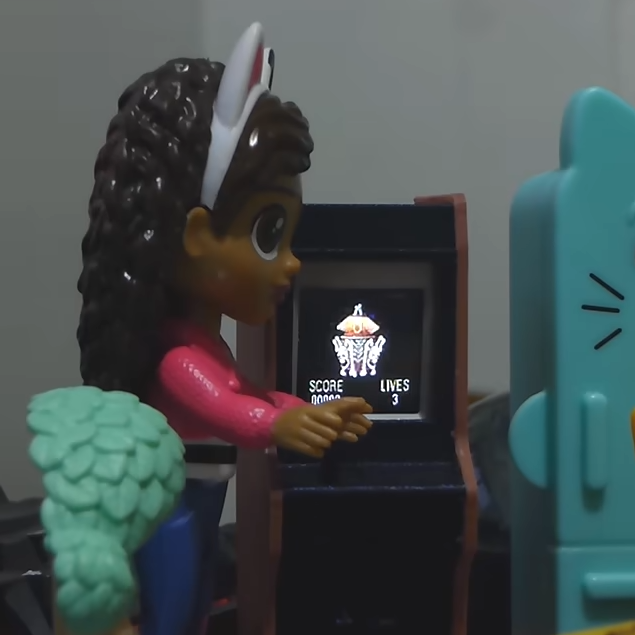
Classic DOS games never ran from within stand-up arcade cabinets in dollhouses, but [Juha Lilja] imagines a world in which they did. His Micro DOS arcade cabinet is described as a device that “runs nothing” because the tiny unit is actually streaming the games over Wi-Fi from a nearby PC. That doesn’t mean it’s just a glorified movie player, though — the cabinet is playable, if a bit awkward to do so.

An economical development board and a 3D-printed enclosure is all it takes to put classic DOS games into dollhouse-sized arcade cabinet.

The core of the micro arcade cabinet is a M5Stack AtomS3R running as an embedded remote terminal. One tilts the whole cabinet as if it were a virtual joystick to send up, down, left, and right. Button presses are done by pushing on the physical screen; it supports single, double, and long-clicks. While in theory one could install a micro joystick and buttons instead, [Juha] aimed to keep everything self-contained and use only what was already built into the AtomS3R. In this case, that’s a motion sensor and the single button which is activated by pressing the screen.

The games themselves run on a PC, with screen contents being streamed wirelessly to the little display and inputs being sent back. The firmware on the AtomS3R doesn’t know or care what game is being played; all it does is display what it’s told, and send back input events. The back end does the rest. This makes it pretty flexible, and a tiny arcade cabinet is a handy way to demonstrate the whole system. It’s a pretty slick addition to his daughter’s dollhouse, too.

If streaming DOS games (or whatever else) to economical endpoints is giving you some ideas, the GitHub repository holds code and a fuller explanation of how it works. There’s a deeper discussion on some of the finer technical points, as well. Watch it in action in the video embedded just below the page break.

2026 Hackaday Retrocomputing Contest

SolidCraft is Parametric, Automation-friendly CAD for Desktop and Browser

17 October 2026 at 07:00

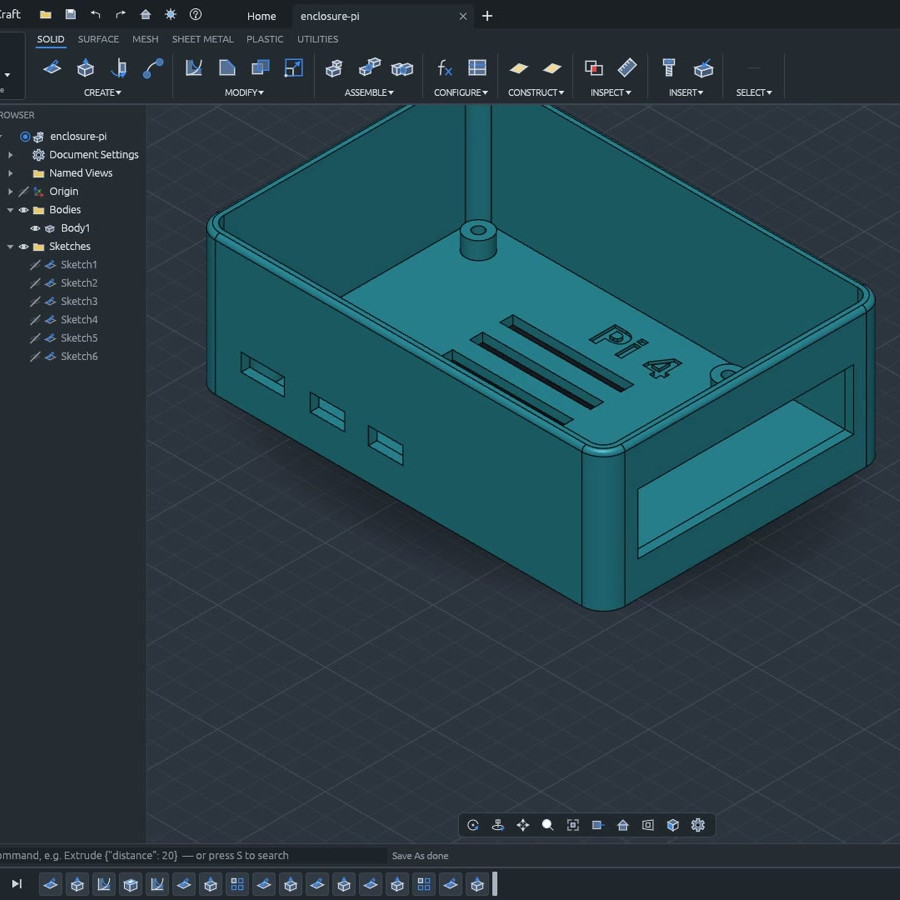
If you’re looking to try a new, open source 3D modeling CAD suite, especially one with automation-friendly interfaces, take a look at SolidCraft. It’s under development but there’s support for all the usual features like sketches, solid modeling, and constraints as well as a full parametric feature timeline.

SolidCraft offers desktop, browser-based, headless CLI, and MCP interfaces.

A parametric timeline essentially means the model exists not as a single discrete object, but as the sum of a sequence of operations. One advantage of this is being able to set things up so that if one changes a value (like wall thickness), all the features that depend on that change automatically get rebuilt as a result. But there’s more!

Written entirely in Rust, SolidCraft can run as a desktop app or as a web app in a browser. Everything the user can do in SolidCraft is a command with JSON parameters, and it offers a built-in headless command line interface and even an MCP (Model Context Protocol) server built specifically to give AI agents a way to use the program, should one be interested in experimenting with that sort of thing.

SolidCraft is still in early development, but so far quite a few features seem to work as they should. Check out the development roadmap for details, and there’s a live online demo if you’re in the mood to click around and get a feel for things.

We have seen quite a few open-source, browser-based CAD efforts over the years and it’s encouraging to see developers continuing to explore fresh ideas and features in the CAD landscape.

Slim Type for Small Screens, with PixelFonts

11 October 2026 at 01:00

Small displays are affordable and easy to use, but their size can present a challenge. To help address this, [mcer12] created PixelFonts, a family of condensed fonts designed specifically for low-resolution displays, making sure every line holds as much text as it can fit.

PixelFonts works alongside either the AdafruitGFX or U8g2 libraries; one writes to the display using the common syntax of the chosen library, and the font itself comes from PixelFonts. Text can be displayed in regular and 3D shadowed versions, as well as in a wide variety of heights and weights. There’s support for accented letters, albeit only in lowercase due to space constraints. Want to make some changes? Every font comes with a BDF file to make alterations as widely accessible as possible.

Making the most of every pixel is important with small displays, but there’s more than one way to do so. For example, when it comes to color LCDs, subpixel rendering can improve legibility of small fonts; another way to get the most out of limited display sizes.

Valve Releases Hardware and CAD Reference For New VR Headset

10 October 2026 at 16:00

Valve recently began shipping its long-awaited VR headset, the Steam Frame. Now, there is a hardware reference repository that includes everything a budding modder might need, and then some.

No need to 3D scan or break out the calipers if one wants to design their own add-ons.

Want to design and 3D print some add-ons, or a carrying case, or some other doodad? There’s no need to break out the calipers or 3D scan the hardware. The repository contains STEP format models of the VR core module, head strap, and controllers, so it’s as easy as possible to design things that’ll fit. The location of the IR tracking LEDs embedded in the controllers is also documented, so one can ensure their design doesn’t occlude them.

That’s not all. The Frame has a user-accessible hardware expansion port at its front. This port exposes two interfaces: high-speed MIPI camera and PCI Express. This expansion port is documented in the repository, and even has a simple reference design built in both KiCad and Altium.

We’re glad to see Valve maintain their hacker-friendly hardware design with the Steam Frame. Demand for The Frame outstrips supply so far, so if you’re on the waitlist, you might want to browse the repository and get an early start on whatever customizations you have in mind while you wait for your confirmation. And when you get something working, drop us a note on the tips line!

Why Every Microwave Has a “Popcorn” Button, But Every Bag Warns You Not to Use It

10 October 2026 at 07:00

[Hyperfixed] has a podcast episode that does a deep dive into exactly why bags of microwave popcorn advise against using your microwave’s popcorn setting (in North America, anyway.) The answer is probably more complex than one expects, and involves the long history of microwave oven development as well as consumer behavior.

There are really two questions involved: one is “what does the Popcorn button actually do?” The other is “Why does every package of microwave popcorn say not to use it?”

The answer to the first question is “it depends”. Microwave ovens are amazing things, but the popcorn setting on any given microwave oven could be anything from just a dumb timer, to a setting that tells the oven to monitor popping sounds or humidity levels (because popping releases steam). These kinds of microwave oven features were figured out ages ago, meaning the technology to precisely handle a bag of microwave popcorn not only exists in equipped ovens right now, but has existed for decades.

The problem is not all microwaves are so equipped. A microwave oven where the popcorn setting is just a dumb timer is really an invitation to under- or overcook the bag. And when overcooked, microwave popcorn scorches and could even burn.

That brings us to the answer of the second question: why does every package warn not to use the popcorn setting? In short, because the popcorn maker has no idea what any given user’s microwave oven is doing. When people hit a button marked “Popcorn” they tend to leave the process unattended, and when a microwave oven ruins a bag of popcorn, the user blames the popcorn manufacturer.

This means microwave popcorn manufacturers stick to some variant of the only process known to work in all ovens: monitor the process, wait for popping to slow to a rate of one pop every two seconds, then stop.

That’s the quick answer, but [Hyperfixed] goes in a ton of researched detail across the entire spectrum of this issue. If deep-dive niche technical podcasts are your thing, we recommend queuing it up for a listen.

Belt File from Old Mixer and Junk Bin Parts

9 October 2026 at 04:00

Making one’s own power tools can be a rewarding way to upcycle parts, and [bluesyann] does exactly that with a belt file made from an old mixer. We like how the enclosure for the old mixer is preserved and acts as a handle, so there’s no need to worry about motor mounting and wiring separately. It looks perfectly usable, and all the hardware needed is the sort of thing one finds in a scrap pile.

[bluesyann] stretches the sanding belt between a 3D printed pulley attached to the mixer motor, and a bearing fitted into the end of some aluminum U-channel. Scrap wood and more nested U-channel make up the rest of the assembly, and there’s even a tension adjustment made from a threaded rod.

There’s a bill of materials and a 3D model for the pulley, but a build like this is more about sharing the broad strokes rather than the exact design. Whenever one modifies or integrates an existing piece of equipment (the mixer, in this case) into a project, most of the work is about working with and around the bits one can’t change.

Watch it in action in a brief video, embedded just below. If you like the idea but don’t have a mixer like the one [bluesyann] used, let us point you toward a similar DIY attachment to get a similar result from a common angle grinder.

2026 Retrocomputing Challenge: Retro Terminal Bartop Arcade Topper

8 October 2026 at 04:00

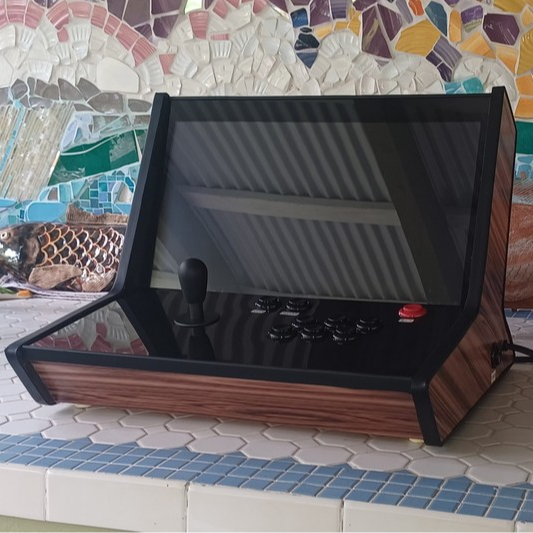
Retrocomputing is more than just hardware. It’s also a feel, a vibe, and [valkyrie0528]’s Retro Terminal Bartop Arcade Topper has it in spades.

The same unit, in bartop arcade machine mode.

Here’s how it happened. The gorgeous device you see in the image above in fact started out as a bartop arcade cabinet build. The front section — with arcade buttons and joystick — is a removable panel. While building it, the panel was uninstalled and [valkyrie0528] placed a keyboard in the empty recess to do some configuration. Sitting at the machine like that felt like being right back in the 80s, perched at an 8-bit home computer. Cue a visit from the Good Ideas Fairy.

Now, in addition to being an arcade cabinet, one can swap the arcade controls panel for a one that has a keyboard (clicky and mechanical, of course), touchpad, and small USB breakout. The result looks amazing either way. As an arcade machine it’s beautiful, and in retro terminal mode it’s simply gorgeous.

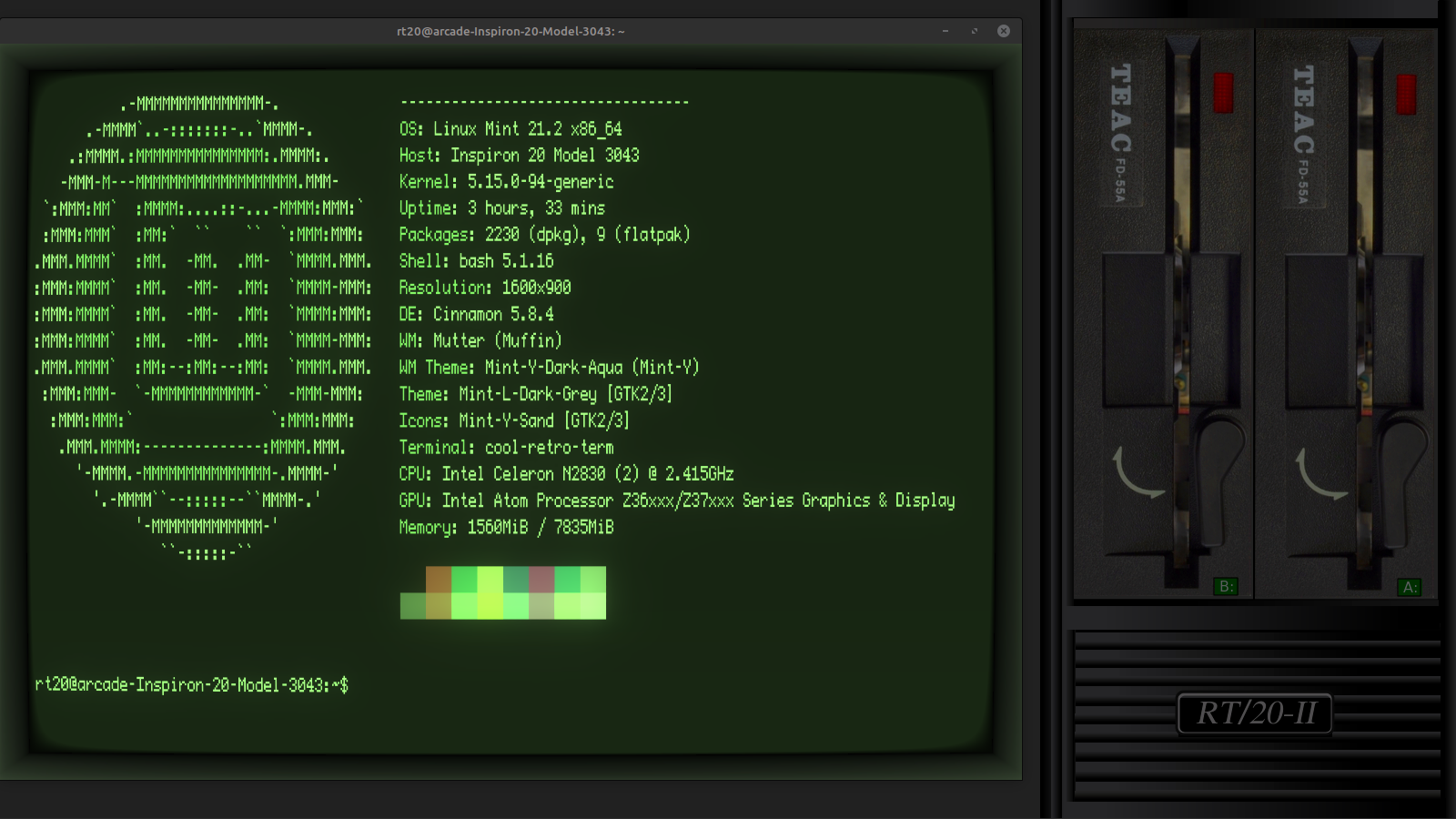
The icing on the cake is [valkyrie0528]’s use of cool-retro-term as the terminal emulator, and there’s even a widescreen wallpaper accompanying it that puts an image of two 5.25″ floppy drives to the side. If you like that idea, you can download the wallpaper file from the project page for your own use.

A widescreen wallpaper with two 5.25″ floppy drives is the perfect complement to a retro terminal emulator.

There’s still time to enter our 2026 Retrocomputing Challenge, so if you find yourself inspired and want to show off your own take of things, there’s no time to lose!

2026 Hackaday Retrocomputing Contest

2026 Retrocomputing Challenge: Dungeons of Daggorath, But Without Quite So Much Typing

7 October 2026 at 11:30

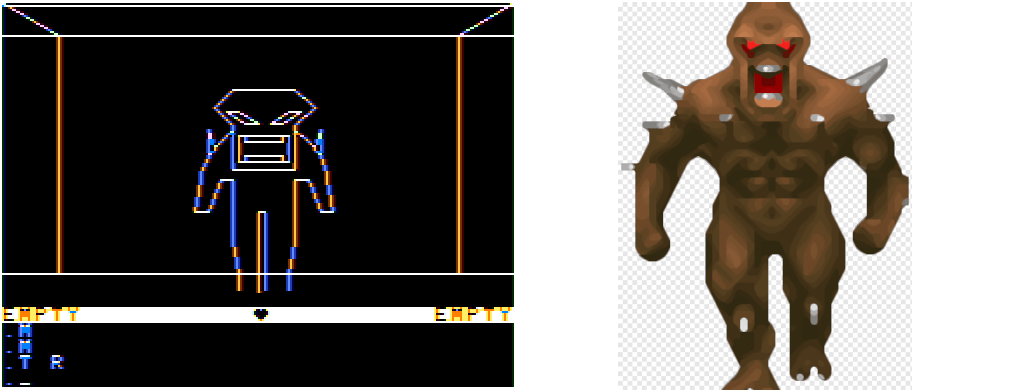
People mod games all the time, but it’s not every day someone mods Dungeons of Daggorath for the TRS-80. [Nick Bild] did exactly that, adding joystick support and a couple DOOM-inspired monsters for good measure. And while he was at it, optional unlimited player health and power because why not?

A pretty good representation, in our opinion.

Dungeons of Daggorath was pretty unusual for its time. It portrayed a dungeon and its contents from a first-person perspective, and events progressed in real time.

Gameplay-wise, most commands entered by the player revolved around moving around and attacking monsters, and that was done with text commands like ATTACK RIGHT which could mercifully be shortened to A R. Still, not the most efficient control scheme.

[Nick] downloaded the original source code and made several modifications. A joystick moves the player much more efficiently, with the button acting as a shortcut to attacking with whatever is in the player’s right hand. He also replaced the spider and viper enemies with creatures inspired by DOOM‘s imp and cacodemon monsters, as well as the aforementioned optional limitless health and power.

[Nick] dubbed the modified game Dungeons of Doom and while the terms of the original don’t allow redistribution of modified code, his changes are simple enough to follow. Especially so for those from the generation that remembers typing programs in by hand from a magazine page.

2026 Hackaday Retrocomputing Contest

A New Type of LLM on the Block: Decision-Making Models

6 October 2026 at 04:00

Large language models (LLMs) output language, but they are commonly tasked with making a decision or classification of some kind instead of writing an essay or chat reply. An LLM will be provided with input, and asked to classify that content in some way: with a rating, yes/no answer, a best-fit categorization, and so forth. A recent new type of model by the name of Jev was released only weeks ago and it is extremely fast, ultra-cheap, and laser-focused on that decision-making role. It can’t write even a single sentence, but it can classify and categorize very, very quickly.

Jev works like this: it still accepts text input, but it outputs only floating-point numbers. Those numbers are the “answers” to user-specified yes/no type questions, lists of choices, and scoring-type requests. [Simon Willison] provides a concise summary of what Jev does, and what makes this new category of model so interesting.

To say that the idea has caught on would be a wild understatement. Folks are making their own decision-type models and experiments in a flurry. Kev and Nimble are two examples (Nimble was added as a supported model in Ollama just recently, and is small enough to run locally with relative ease.)

If this type of local AI model was the missing link you needed to get an idea working, don’t keep it to yourself! Tell us all about it on the tips line.

❌
❌