As a certified RC airplane fan, the [RCMakerLab] on YouTube found themselves looking at one of those nifty mini air blowers that provide an alternative to a compressor and canned air for dusting and other high-volume, high-pressure air-related tasks.
Inside these quite affordable units is a ducted fan (EDF) that can produce fairly high levels of airflow to get to every last dust bunny hiding on a PCB or inside a keyboard, raising the question of whether you could use these to fly a model airplane with.
As can be seen in the torn down unit, there isn’t a lot to these air blowers, with the ESC bolted onto the EDF and only the speed regulator and on/off switch being external controls. This would make it very easy to integrate into an airplane, but leaves the question of whether it can generate enough thrust to make it worth the effort.
Using a custom rig, it was shown to generate up to 110 grams of thrust with a current of 16.5 A, which would at least go a long way to carrying its own battery pack. In order to create an airplane with it, probably two of these motors are needed. There’s also the potential of reducing weight by changing the ESC and such, making reusing these little EDFs from any discarded or broken mini air blowers at least worth a shot.
Yesterday, Isar Aerospace secured its place in the history books when the upper stage of their Spectrum rocket put a payload of CubeSats into low Earth orbit (LEO). Not only does this make them the first European company to achieve such a feat, but it also marks the first time a booster departing from continental Europe has reached orbit. Not bad for a second attempt.
Standing 28 meters (92 feet) tall, the two-stage Spectrum rocket is just shy of half the size of the SpaceX Falcon 9 and designed to put a maximum of 1,000 kilograms (2,200 pounds) into LEO and 700 kg (1,500 lb) into the Sun-synchronous orbits used by Earth observation satellites. That puts its performance considerably ahead of other commercial launchers such as Rocket Lab’s Electron. Although the booster is not reusable, Isar Aerospace has stated they’re targeting a respectable launch cost of €10,000 ($11,700) per kilogram. The German company notes there are several more Spectrum vehicles currently in production, and when their new factory is operational, they’ll have the capacity to produce up to 40 of them each year.
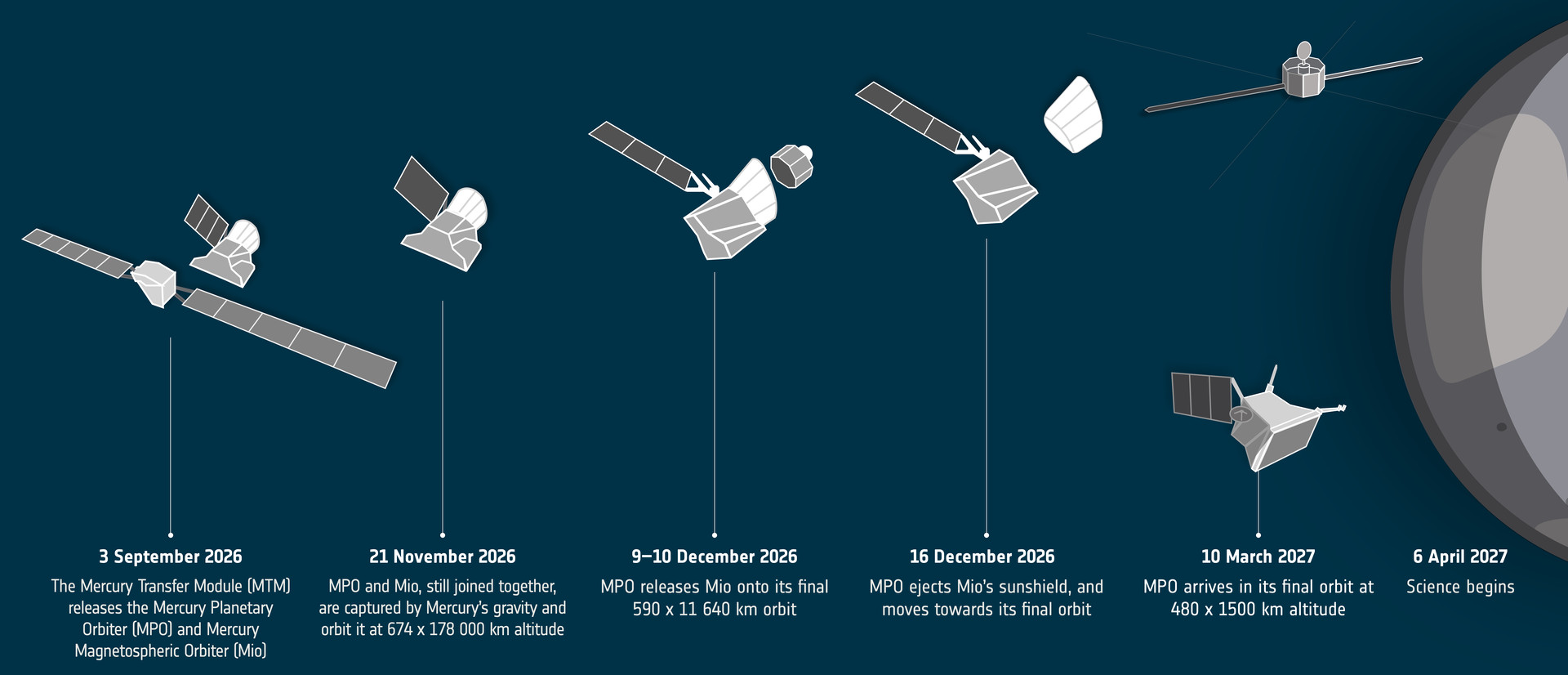
In other European space news, BepiColombo has now entered what the European Space Agency (ESA) is calling the “arrival phase” of its nearly decade-long journey to Mercury. On Thursday, the spacecraft jettisoned its ion propulsion module as it had achieved the necessary trajectory and velocity to be captured by the planet’s gravitational field when it swoops by in November.
Launched in 2018, the BepiColombo mission is actually carrying two separate craft: the ESA’s Mercury Planetary Orbiter and the Mercury Magnetospheric Orbiter from Japan. After the two separate from each other in December, they will operate independently to study their respective aspects of the solar system’s innermost planet for the next year, although, as is often the case for missions like this, an extension is always possible if things are still going well at that point.
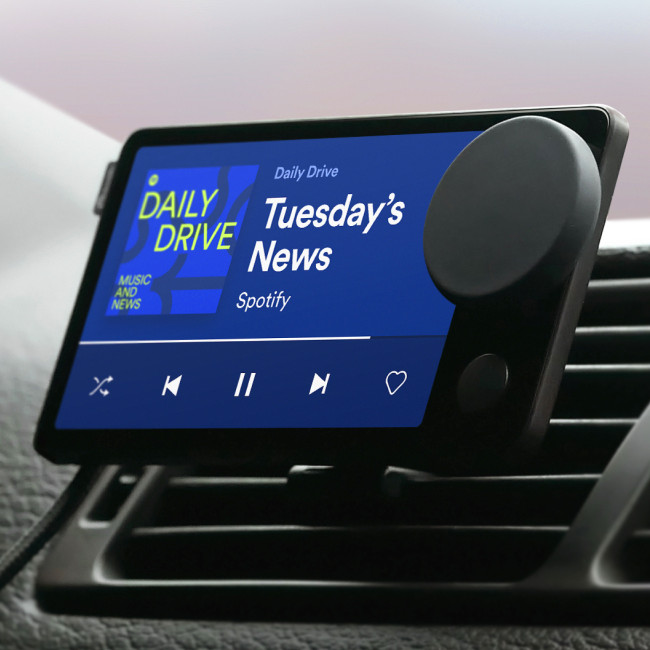
On the subject of hardware outliving its original design lifetime, an active community of hackers has done a fantastic job of keeping the Spotify Car Thing up and running after the company officially pulled the plug on it just two years after its 2022 release. They’ve got a full Linux distribution running on it featuring a slick UI that can launch apps, check the weather, tap into Home Assistant, and of course, play music. The community is currently running a contest with cash prizes to spur on development of new open source software for the liberated Car Thing, and we’re eager to see what comes of it.
The Car Thing, back when Spotify still cared.
Speaking of keeping things open, the Free Software Foundation (FSF) has joined Bluesky — but they aren’t exactly thrilled with it. Being federated and largely comprised of free and open-source software, the FSF admits that Bluesky is the lesser evil when compared to something like X or Facebook. But they still can’t recommend others join the service, as the actual signup process requires your browser to run non-free JavaScript code.
One may wonder why the FSF would join Bluesky if they can’t recommend the service to others, and the answer is simply because they want to get the word out to a wider audience. While the FSF already operates an account on Mastodon, there’s a good chance that anyone who’s willingly regularly using said platform doesn’t need any additional convincing when it comes to the evils of proprietary software.
This is as good a time as any to point out that Hackaday is on Bluesky and Mastodon as well, and unlike the FSF, we’re also on Facebook, although the automatic sharing of new posts hasn’t worked for quite some time and honestly we can’t be bothered to figure out why. For our readers with a particular aversion to grass, we’ve even got an official IRC channel on libera.chat where you and nearly 50 others can feel superior to the thousands of immoral heathens that have joined our Discord server.
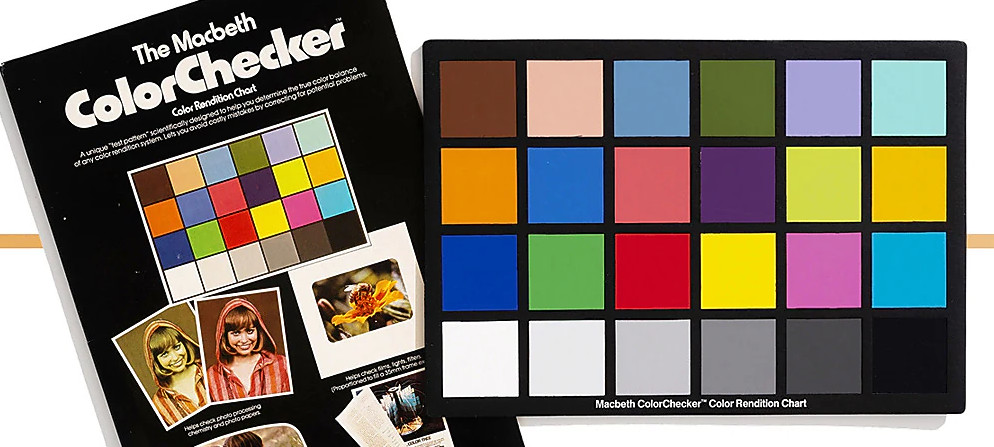
Finally, it’s been 50 years since the introduction of the ColorChecker — that little card with 24 blocks of colors that’s placed in the frame of a picture or video to provide a visual reference point. In honor of the milestone, Calibrite has put together a timeline that walks you through its history, starting with its inception in the 1976 paper “A Color-Rendition Chart” by C.S. McCamy, H. Marcus, and J.G. Davidson and running up to how the handy tool evolved for the digital age.
There are plenty of facts and trivia about the ColorChecker that you can bring up the next time you want to impress a photographer, and we especially appreciated the breakdown of what each of the original 24 colors was meant to represent.
See something interesting that you think would be a good fit for our weekly Links column? Drop us a line; we’d love to hear about it.
If you were interested in computers in the early 1970s, you struggled to get time on real computers since owning your own was all but impossible. In the middle of the decade, though, you could get a few computers: the Mark VIII, the Altair, the Apple I, and several others. Those were still pretty expensive, though. But in late 1976, an article in Popular Electronics said you could build a “powerful, expandable” computer for $80. The article in question was by [Joseph Weisbecker], who, unknown to most of us at the time, was actually the RCA employee behind the CPU — an RCA 1802. [Tech Time Traveler] takes a close look at the spunky little computer’s history in the video you can see below.
The 1802 was actually the second generation of the CPU, but the first that was all-in-one chip. [Weisbecker] started building the CPU as a personal project. He’d been a hacker even in high school, building relay-based tic-tac-toe games, among other things.
The first incarnation in his lab was “Fred,” with 100 TTL chips, and his idea was to have the computer be at least partially used as a video game — an interesting point, with Pong being very popular at the time.
The video covers a lot of history, but from a hacker’s point of view, the CPU was both amazing and limited. In a day when the 8080 and Z80 were kings, the 1802 had built-in DMA. This allowed a cheap companion video display that simply read bytes from memory and pushed them out to a TV.
Another neat feature was that the device had 16-bit registers and, even more interesting, 16 of them. On the one hand, any register could be, for example, the program counter or a memory index register. But on the other hand, there was no direct stack for doing calls and returns. The idea was that you’d use different registers for different subroutines, which was fine and efficient for very simple programs but not for the general case. One thing all 1802 programmers knew about was SCRT, the “standard call return technique” routines in the 1802 manual. But, as you might expect, this made calls and returns expensive.
There’s more that you’ll see in the video. People still build 1802-based computers and, of course, there are plenty of simulators, including ours. One thing you’ll notice is that the instruction set is very regular. Even if you didn’t know, you might guess that one guy designed the architecture.
If you’re intending to transmit on the VHF band, you’re probably going to reach for a handheld or some kind of rackmount rig in your ham shack. But you needn’t bother with all that complexity, when you can use the computer on your desk to spit out such signals using a simple browser tool from [Efe].
The concept is straightforward—[Efe]’s tool manipulates pixel clocks in order to create spurious transmissions from your computer’s graphics hardware. The math pencils out pretty easily—multiply the horizontal resolution by the vertical resolution by the refresh rate, while paying attention to the precise timing of the video standard your monitor is using, and you’ve got your transmission frequency. For example, for a screen displaying 1080p at 60 Hz, with the CEA-861 timing standard, your horizontal and vertical resolutions are 2200 and 1125 respectively when paying attention to the requisite blanking intervals. Multiply those by 60 hz, and you’ll find you’re creating a signal at 148.500 MHz. Leverage this by displaying the right pattern of black and white pixels to maximise changes in voltage state on the HDMI or DisplayPort lines, and you might create a strong enough signal that you can actually pick something up. [Efe] created a tool to display these patterns to send simple Morse code messages over VHF just by flickering your screen just right.
You can test the transmitter tool for yourself here, right in your browser. You’ll want to hold your radio’s antenna nice and close to the monitor to see if you can pick up much of a signal. After all, the monitor, connectors, and cable are all built to optimize for clear signal transmission to the display, while preventing signal from leaking out to interfere with surrounding equipment.
Of course, a fair warning—you’re not supposed to intentionally transmit on bands you’re not licensed for, even if it’s incredibly weak and unlikely for anyone else to notice in a scenario like this. Still, it’s an interesting project that shows you just how electromagnetic interference can leak out of just about anything under the right conditions.
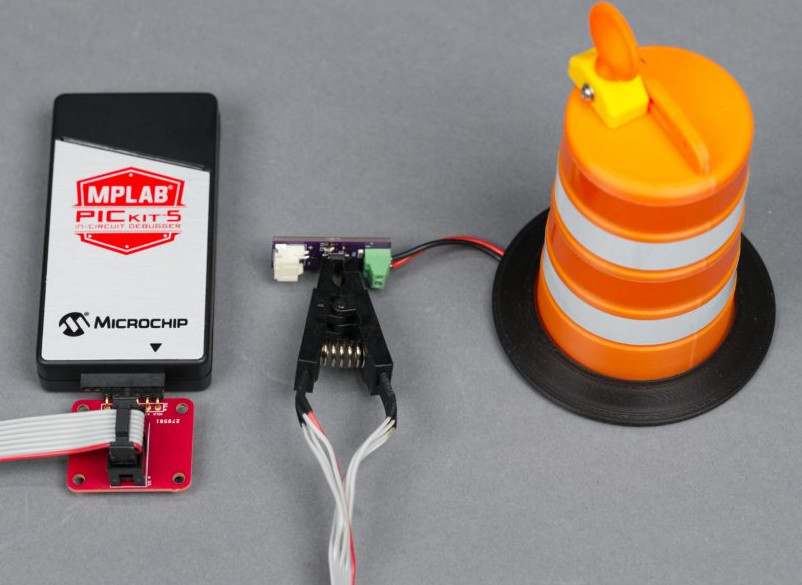
Your desk or bench is a work area, so why not make it look the part? That’s the idea behind the miniature blinking traffic barrels that [Glen Akins] recently put together. Of course, just a single blinking light doesn’t really sell the idea of a busy construction zone, so he spent a somewhat surprising amount of time and effort optimizing the design for small-scale production.
The end result is a fascinating write-up that dives into the design decisions [Glen] made. Every aspect of this project, from the overhang of the “handle” on the 3D printed barrel to the number of passive components on the PCB was carefully considered. Critics may say [Glen] put too much thought into something that didn’t need to be so complex, but projects like these are an excellent way to keep your skills sharp — there’s no such thing as practicing too much.
Starting with the design of the barrel itself, we appreciate that [Glen] kept the capabilities of his desktop 3D printer in mind. By breaking the design up into multiple pieces and avoiding overly steep angles, he produced a design that prints cleanly without the need for support material. His step-by-step documentation and screenshots also serve as a great introduction to designing parts in Fusion if that’s something you’re interested in.
From there, things switch over to the electronics. Some in the audience will bemoan that he’s using a PIC12F1612 microcontroller to blink a single LED instead of a 555, but [Glen] brought the receipts on this one. Not only does the PIC offer more flexibility in terms of getting the blinking to look the way he wants, but it requires fewer passive components on the board and is considerably more energy efficient than the iconic timer IC. Even if you ignore all the other advantages, he calculates that going with a 555 would have cut the battery life of the finished product by approximately 15%.
This is one of those projects that’s difficult to summarize in such a terse format, as every time you think the write-up must be about over it takes a new turn on you. We were mildly bemused when the second iteration of the PCB popped up, but by the time he introduced the custom programming adapter board, we knew [Glen] wasn’t messing around.

 Login
Login