
❌

Normal view

There are new articles available, click to refresh the page.
Before yesterdayHackaday

JPEG-XL Is Back On The Menu

28 October 2026 at 10:00

Many of the image formats we’re familiar with have been around for decades. We all know JPEG and PNG like the back of our hands, and GIF even had a bit of a resurgence when tiny annoying looping animations became cool again on social media. There has been a growth in newer formats, though, like WEBP, and AVIF, with various platforms and software companies adopting them for greater efficiency, performance, and image quality.

Amongst the new crop of formats vying for relevance is JPEG XL. It was touted as a format that improved on what JPEG could do in the lossy compression space, while also adding on a lossless mode. There were grand hopes that it would become a universal replacement for all existing raster formats on the Web. A major problem was that Google was seemingly against it, only to backflip—with the format now slated to hit the big time with renewed backing from the search giant. So what’s going on?

Got You JPEG’d

The JPEG XL codec architecture. Credit: Jon Sneyers, CC BY SA 4.0

The JPEG XL standard is modern, but by no means brand new. It was initially released on 13 October 2021, having been developed by a consortium of the Joint Photographic Experts Group, Google, and Cloudinary. It was deveoped from earlier work from Jon Sneyers on the Free Universal Image Format (FUIF), and work from Google on the PIK format.

It was decided the resulting format would use the *.jxl file extension. The spec defined a format with a wide range of features well beyond what classic JPEG ever offered. It has lossless compression, including for the alpha channel, but also lossy compression available in different modes to suit both photographic and synthetic imagery.

It remains fast to decode—almost as fast as JPEG and much quicker than HEIC with x265. A key future proofing feature is that it can also handle 32-bit sample precision, and images with over a billion pixels per side—that’s a terapixel, if you’re playing along at home.

The JPEG XL logo, which pretty much solely exists for people who need an image for their article about JPEG-XL. Credit: Joint Photographic Experts Group

A wide range of major tech companies have backed the standard in the years since it dropped, from Meta, to Adobe, Intel, and Flickr. While it might seem like Google was fully onboard from the get-go, having literally been involved in development of the standard, the history is more complicated, as reported by TT Lab.

Chromium implemented a libjxl-based decoder all the way back in 2021, which seemed to signal JPEG-XL support would soon be a thing in Chrome and other products besides. However, soon enough, there was a change in direction. In late 2022, it was slated for removal, with a notice that ecosystem support wasn’t great enough to justify continued efforts to bring JPEG-XL into the fold.

In Chrome 110, there was no trace left—JPEG-XL was not going to be a part of things. And yet, in the years that followed, debate raged on the Chrome issue tracker as to whether the nascent format would earn its inclusion. Elsewhere, JPEG-XL was struggling to find a footing. Apple rolled it into Safari in 2023, while Mozilla continued to hedge, noting that including another C++ image decoder was undesirable for reasons around memory safety.

A screenshot of an Android media app displaying a *.jxl image. Credit: Syced, CC0

New movement happened in November 2025, when Rick Byers, Area Tech Lead on Google Chrome, noted that the landscape had shifted. He posted that in light of JPEG-XL support being added to things like the PDF format and Safari, amidst other signals of support in the wider ecosystem, that the development team would be open to “integrate a performant and memory-safe JPEG XL decoder in Chromium.”

With Chrome having over 65% of the browser market, this would be a game changer for the format and likely see its adoption skyrocket across the web. It just needed to actually be implemented. However, Byers was careful to note that the inclusion of the new format would be contingent on a commitment to long-term maintenance of the decoder.

Things moved fast, and when Chrome 145 dropped in February this year, JPEG-XL was on the docket. This was thanks to the development of the jxl-rs decoder, which was implemented in Rust. This was an intentional decision for security reasons, with Google relying on the Rule of 2 to keep its browser safe. However, the new decoder was not activated by default. It would take another half a year or so before the new format would become a mainstream part of Chrome, rather than being hidden behind an experimental flag or anything like that. As of Chrome 155, though, JPEG-XL will be fully supported in the browser.
Don’t expect to see a ton of *.jxl files out on the wider web immediately. However, with the new format offering 30-50% better compression than JPEG, it will be appealing to just about any content provider looking to slimline data budgets and improve page loading times. When the performance gains start boosting traffic to a degree that makes up for the loss of users from older non-compliant browsers, expect to see things changing more quickly.

What does it mean for you, the end user? Probably little more than some minor headaches. You’ll struggle here and there when you download a *.jxl and try and load it into older software that doesn’t support it. You might get a device that shoots pictures in JPEG-XL and then find you can’t upload them to an older website with an out-of-date image submission form.

It’s the same problem we’ve all dealt with as HEIC, AVIF, and WEBP have started bouncing around the web, and we’ll have to weather it again. At least, at the end of the day, we’ll have slightly prettier images that take up a little less space. It’ll all be worth it, to be sure.
Restoring a Soviet ES-4001 Mainframe Control Panel

23 October 2026 at 01:00

Recently the [Chornobyl Family] got their hands on an ES-4001 control panel for a 1970s-era Soviet mainframe, with the intention to restore it to full working order. Not just because they’re really into cool old Soviet technology, but also because of the connection that this control panel holds to the Chernobyl nuclear accident that was so instrumental to the area in modern times.

The Duga-1 computer room with what's left of the ES-1060 mainframe. (Credit: Chornobyl Family, YouTube)
The Duga-1 computer room with what’s left of the ES-1060 mainframe. (Credit: Chornobyl Family, YouTube)

During the 1970s the USSR felt that it could not be left behind in the race to create better digital computers. This led them to not only create a few original designs, but also effectively clone the IBM System/360 and System/370. This resulted in the ES EVM-series of mainframes, with an ES-1060 finding itself installed at the Duga-1 early warning radar system near what is now the Chornobyl nuclear power plant in Ukraine.

Although the radar arrays are the most well-known feature of the Duga-1, below it is the computer center where the ES-1060 was installed. It was never put into service following the ChNPP Unit-4 accident — all that remains of a once pinnacle of Soviet engineering are the picked-over carcass of the mainframe and its control panel.

The control panel in question was obtained was from the early 1980s, serving a more gentle service life in a datacenter and looks to be in a mostly good condition. That said, there was still enough to be done to make it work and undo the damage of its violent removal from the mainframe. Along the way we also learn how the system was used and how the control panel works.

Although similar in some ways to the System/370, it’s still very different, and with only about 300 of these mainframes produced, it’s worth saving whatever elements still remain today, along with the surviving documentation.

Evolving RC circuits

By: Ian Bos
18 October 2026 at 07:00

We are surrounded by evolving algorithms and AI models, and it feels like we have to evolve to them as well. Of course, the world itself is always evolving, and when we have to implement filtering circuits based on current environments it might not last all that long. [Saikarthik Ramakrishnan] realized that this phenomenon can easily apply to simple RC circuits, so why not make them adapt to the changing world itself? This is exactly what the Darwin Board is meant to do: act like an evolving simple RC circuit for whatever environment or signal you want gone.

RC circuits are normally considered to be relatively simple in the world of circuits; however, the real world isn’t always all that simple. This simple evolutionary algorithm implemented by [Saikarthik Ramakrishnan] attempts to apply similar principles used in other evolving models to the humble RC circuit. Based on an ESP32, the Darwin Board is a fairly simple model of 2040 possible combinations of genomes. Yes, each possible RC circuit is its own genome, which allows simple evolution from one to another based on current requirements.

You should certainly consider checking out the project’s GitHub repository here to try out the mutating circuit itself. While this project might complicate what is normally fairly simple, there is sometimes beauty in simplicity. So why not use a comically simple circuit for a smart home feature?

Braino! Takes the Cheap Yellow Display to School

By: Tom Nardi
16 October 2026 at 11:30

These days, it’s common to give even very young children a mobile device loaded up with educational software that aims to improve everything from basic motor skills to reading and arithmetic. But even the cheapest phone or tablet isn’t the kind of thing most parents would like to see get destroyed, and there’s always a concern about giving children a device that’s capable of connecting to the Internet.

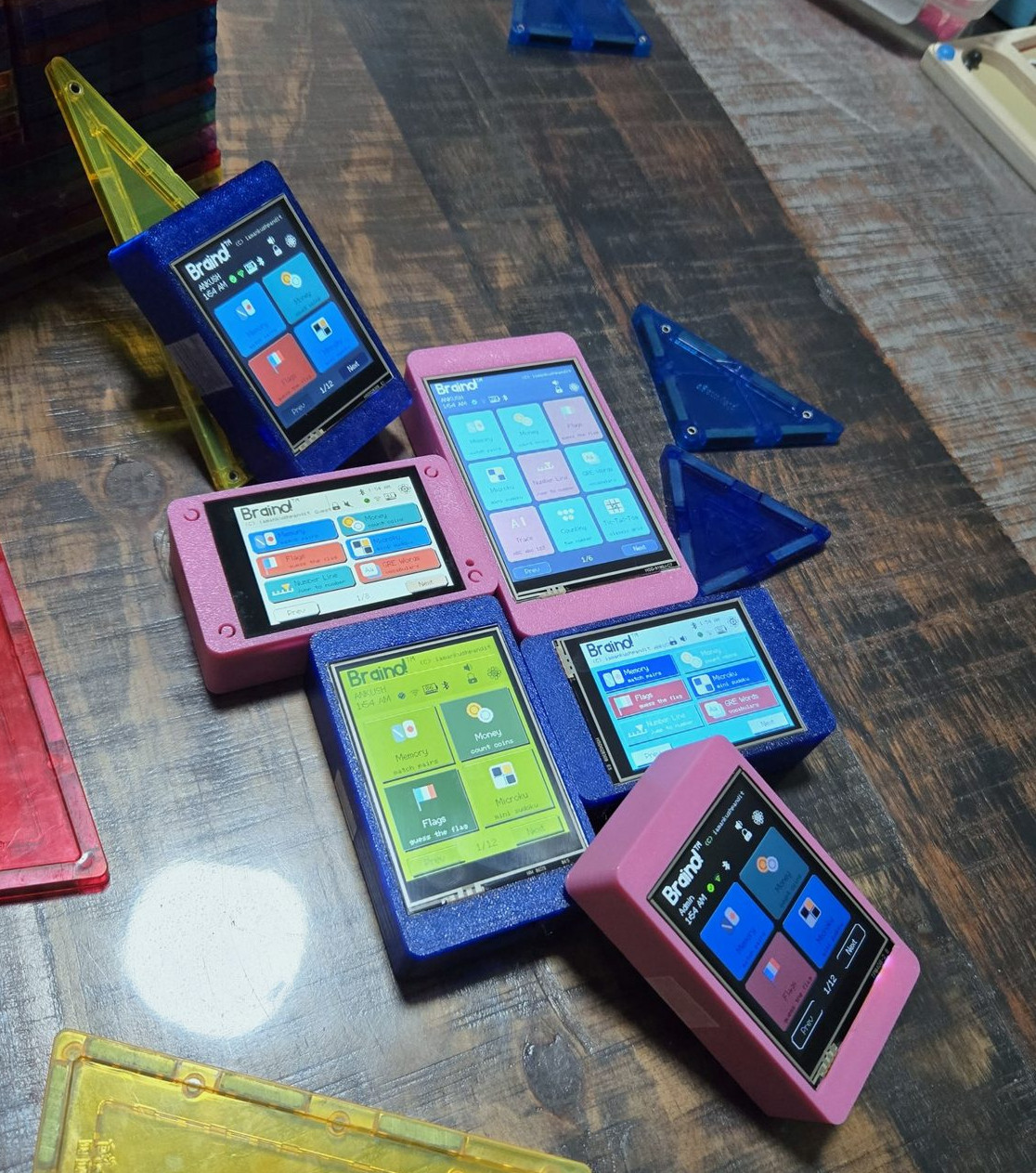
Which is where Braino! from [Ankush Pandit] comes in. This suite of applications can be easily flashed to a common Cheap Yellow Display to turn it into a legitimate educational tool. Combined with a 3D printed case, the total cost of the build is low enough that you don’t have to feel bad about handing it off to even the roughest of youngsters.

[Ankush] makes it clear that this project isn’t trying to sell you anything. You’re responsible for picking up a compatible CYD and installing Braino via the web flashing application. The software is released under the GPLv3 license, and it contains no ads, user accounts, or cloud connectivity. We know not everyone is thrilled with how much time young kids spend staring at screens these days, but opinions on modern parenting aside, it’s hard to find fault with the way things have been implemented here.

When the parent sets up Braino they can pick which of the 40 games can be accessed, allowing the experience to be tailored to the individual child’s age and ability. Should you decide to enable Bluetooth, some of the games even support wireless multiplayer between devices.

The commonality of the Cheap Yellow Display is one of its best features, and Braino does an excellent job of showing why that’s so important. Trying to develop a project like this without a standardized platform of some type would be a non-starter, but when anyone can get a CYD sent to their house from Amazon and flash it right from the browser, it’s makes the whole thing far more accessible.

Single Button, Handheld Gaming Console

14 October 2026 at 19:00

Those of us who grew up in the 70s and 80s might be familiar with the Atari 2600 console and its now relatively unrecognizable (by modern standards) controller with only a single button and stiff whole-hand joystick. By comparison, the Steam Deck has somewhere around 24 buttons and two joysticks depending on how they are counted. But even the Atari might be providing more user inputs than are really necessary for quality gaming. Take a look at the Dinoboy, a handheld console with only a single button.

Part of what makes this system work is that it’s playing the classic dinosaur jumping game first included in Google Chrome which loads when the browser can’t connect to the Internet, and the user’s single input was the space bar. In this case, the handheld has its single button where the user’s thumb naturally rests. The console itself is in two parts, hinged where the button is placed. When unfolded, the top half reveals a wide screen and the bottom half is held by the hand. The screen supports two color formats, a black and white style and another which replicates the dot matrix display of the original Game Boy.

The small handheld console has another trick up its sleeve too. [Paul], the system’s creator, built it as a way to stop doomscrolling so along with having this quick-deploying game on hand, there’s also an NFC tag hidden near the hinge which, when swiped passed a phone, also turns that phone’s airplane mode on. It’s a double-whammy of removing the gamer from the dark patterns and algorithms dominating the mainstream Internet. And, this isn’t [Paul]’s only dinosaur jumper console either. We recently featured a similar (but much larger) build of his housed in a classic arcade-style cabinet.

❌
❌