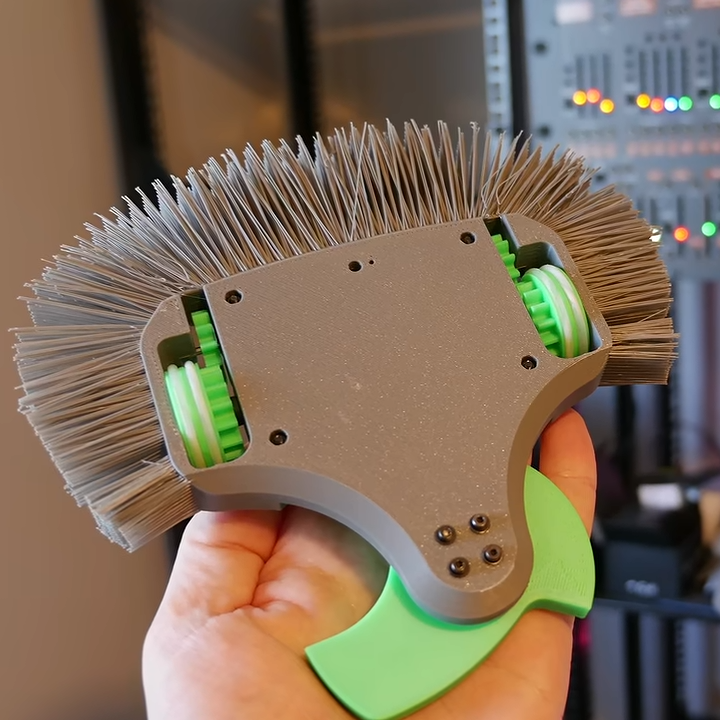
Just to set the stage, [Angus]’s new robot competes in the plastic antweight (or “plant”) division, in which robots are limited to 150 grams with both chassis and weapons made of plastic. In such circumstances, one can see how a mane of thick, rigid “hairs” might actually punch above its weight, so to speak.
The green shape at the bottom is a spinning weapon. The bristles cover the sides and rear.
Nothing settles a question like a good experiment, so [Angus] sat down and redesigned his latest robot to replace its outer shell with a thick wad of bristles, in the style of a 3D printed lion’s mane. Filament is bridged between the model and an outer support structure, which is cut away afterwards to expose the “hairs”.
How well did it perform? Well enough to merit further study! Where past robots got their outer shells broken up, the hairy robot seems to have come through quite intact. It seems the idea might not be as silly as it first seemed, at least in the plastic antweight division.
3D printers have been fantastic in the field of combat robotics. First they were great because they made custom parts easier and more accessible to hobbyists, but things have evolved more since then. Now folks compete by putting motors and electronics inside almost entirely 3D printed robots. There’s never been a better time to get into combat robotics, and experiment with unorthodox designs.
I recently got the Amazon Christmas toy book in the mail, and it is definitely the modern version of the Sears Christmas Wish Book for last century’s youth. Or at least the majority of last century’s youth. For the true hacker, we had a different set of wishes. Recently, I found something I’ve clung to for over 50 years: the 1975 “The Age of Altair” catalog from MITS. Now that was a wish book!
The poor thing has been dragged around for decades and, I’m sad to say, it looks it. It isn’t totally trash, but I decided I should scan it. Then I realized that Bitsavers has already done it for me and with a much nicer copy, too. The images in this post are from their scan instead.
About the Altair
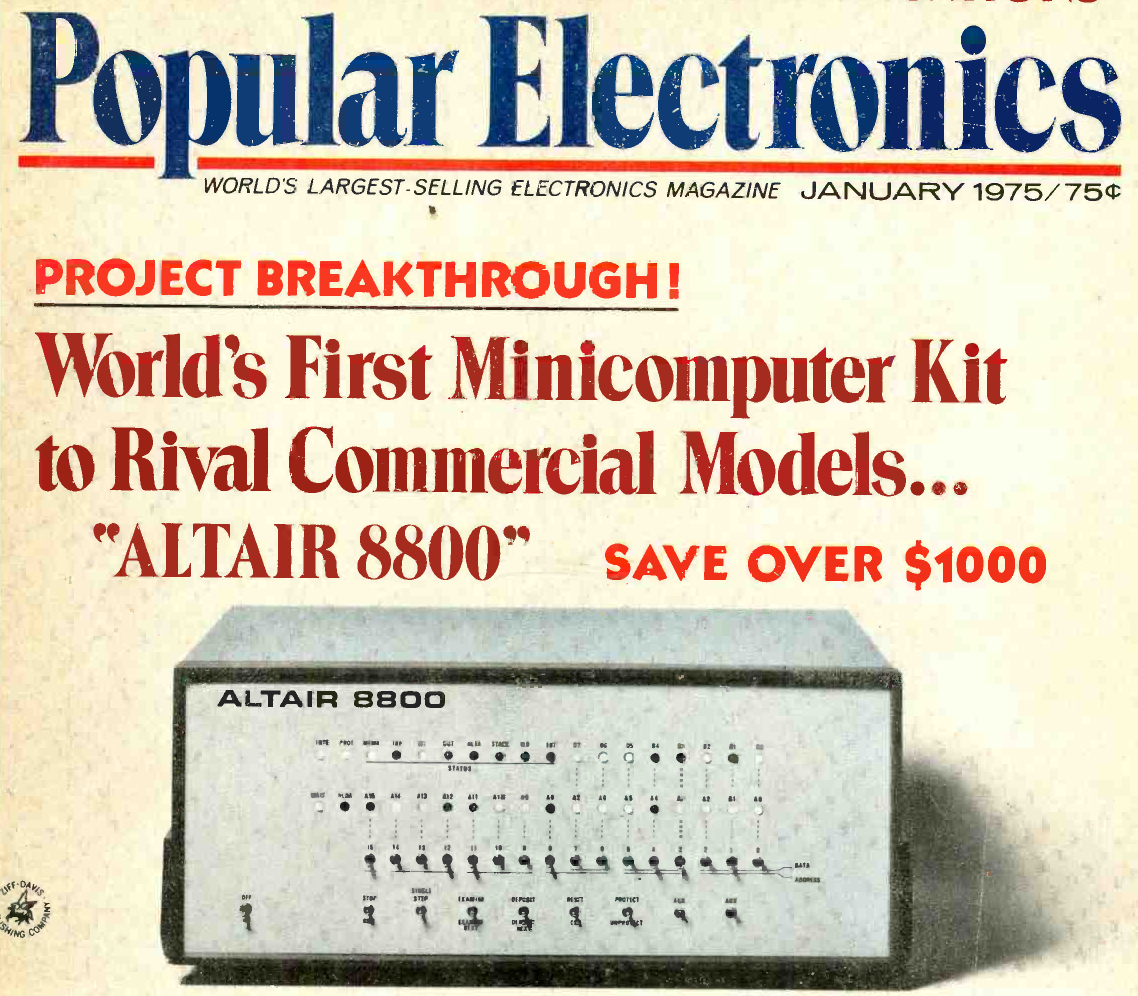
The magazine that started it all (World Radio History).
If your first computer ran Windows, you might not get the significance of the Altair. Back in 1974, the idea of having your own computer was practically ludicrous. Sure, Radio Electronics had published plans for the Mark 8 in July of that year. But it used an anemic 8008 CPU, and it wasn’t easy to get all the parts you’d need to build one. Other limited computers, like the Kenbak-1 or the occasional surplus minicomputer, ended up in personal hands. But you couldn’t just decide you wanted a real computer, plunk down some money, and have one delivered unless you had extremely deep pockets.
To stay on magazine stands longer, old print mags would come out earlier than their cover date suggested. The January 1975 Popular Electronics arrived, actually, in December of 1974 — just in time for the holidays. It showed a computer you could buy as a kit or assembled: the Altair 8800. Many of us were mesmerized by the idea of owning an actual useful computer.
Reality Check
Of course, the problem is, it wasn’t actually a useful computer. All by itself, it was a bunch of switches and LEDs with a CPU. You’d need memory, and even a little was super expensive. But it was still cheaper than anything else. Want a terminal and enough memory to run BASIC? That’s going to be even more.
In those days, magazines had “bingo cards.” Each ad had a number, and if you wanted more information, you circled that number on the card and mailed it to the magazine. A while later, you’d be rewarded with mail from the company in question. I have no idea how many of the “Age of Altair” catalogs were sent, but I know I got one.
The machine on the cover didn’t look much like the machine in the magazine. The story is that the original machine was sent to the magazine for photography and was lost in the return shipping. But either way, it looked like a small minicomputer of the era.
Micro
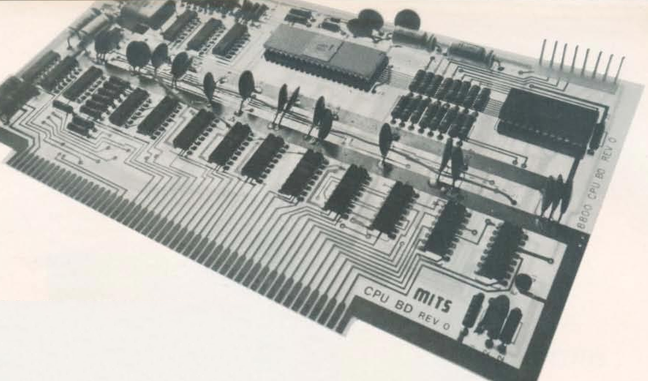
The CPU board used what would later be called the S-100 bus.
The catalog notes a cycle time of two microseconds, or about 500 kHz. That’s a little misleading. The CPU actually ran at 2 MHz, but each instruction took multiple clock periods, and some instructions required several machine cycles. Even a simple NOP took two microseconds, while more complex instructions could take considerably longer. It wasn’t a speed demon.
One nice thing about the Altair is that it had a card cage, and you could plug in whatever you wanted with what would later be called the S-100 bus. Of course, to save money, you might not get all the card guides and connectors.
If you had deep pockets, you could get fast static memory. This would cost more and provide less memory, but the chips stored bits in flip-flops, and it was fast. Or you could opt for more dynamic memory, which stored data in tiny capacitors on its memory chips. The downside is that the memory had to periodically refresh itself, stealing cycles away from the already slow CPU.
Down with Switches
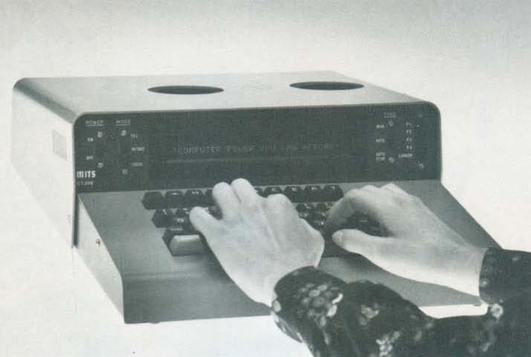
The Comter 256 showed a whole 32 characters at a time!
Naturally, you didn’t want to flip switches all the time. MITS offered the Comter 256 terminal. It had 256 bytes of its own storage and a whopping 32-character display. It even had holes to stick your phone in, if you wanted to talk to a remote computer.
This was, of course, not very practical. Your best bet was a TeleType. The TeleType Model 33 had a printer and a keyboard. The ASR variant had a paper tape reader and punch, too. Mass storage and a printer that operated at 10 characters per second. No screen, though. Everything you did was on paper. And it was pricey, too.
Software
The catalog offered a 4K and 8K BASIC along with “Extended” BASIC, which needed 12K but got you double precision math, PRINT USING, and disk I/O. There was also a single page of 8080 instructions in binary. I remember fixating on that page, trying to understand how you’d program this machine. There was a lot of missing detail.
Pricing
For as cheap as these were compared to the alternatives, they were still out of reach for many people, especially a kid. The computer itself was just a bit over $600 unless you wanted to build it yourself. Then you could save just under $200.
You couldn’t do anything without memory, though. A board that could hold 1 kB of static RAM (but only came with 256 bytes) was $134 assembled, plus $61 for every 256 bytes after that. If you wanted the board fully loaded, they discounted that to $209. The slower 4 kB dynamic RAM board was a cool $338. If you didn’t have paper tape, you probably wanted the interface to load and save programs from cassette. That was another $174.
Wanted something with a keyboard? The Comter terminal was $885, but for $35 more, you could get one that would also work with your cassette recorder to save and load things. Or opt for the TeleType for $1,500. You might be tempted by the 88-VLCT (the “low cost terminal”) at only $169. But if you saw it, it only had seven numeric keys (for octal) and two other buttons.
That’s not all. Those terminals had to plug into something. That board would run you around $140, depending on which variant you wanted. Even something like a real-time clock was an extra purchase.
The base computer price had four available slots, one of which held the CPU. So if you had a CPU, two memory cards, and a serial I/O card, you were full unless you bought more slots. To make it easier, you could buy a bundle. The cheapest was just shy of $3,000.
Perspective
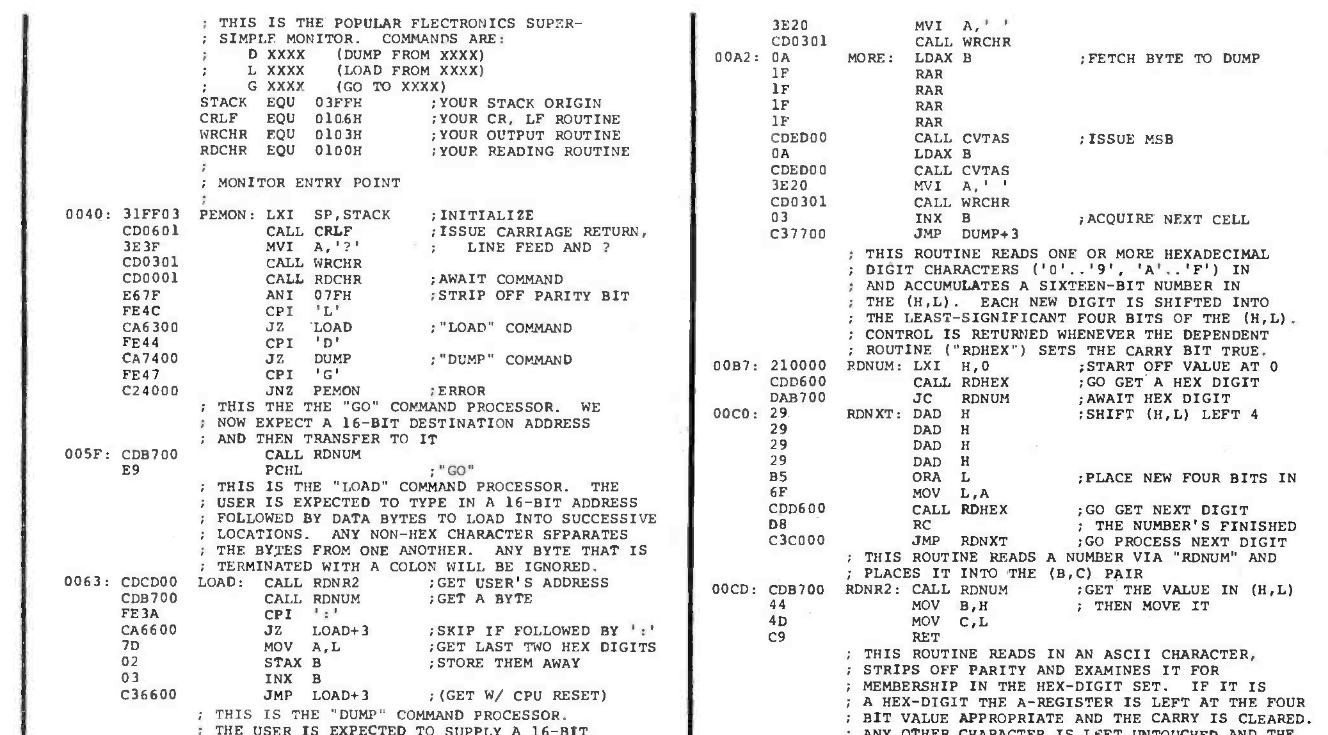
Why are the addresses backward? Part of the PEMON monitor from the November 1975 Popular Electronics.
I know. It is easy enough to spend $3,000 on a state-of-the-art computer today and, at the time, this was pretty state-of-the-art. But in today’s dollars, that’s about $19,000. A new car was about $5,000, and $3,000 would get you a very nice used car. An average home ran about $42,000, and $3,000 would be a hefty part of a down payment. The median income in 1975? Under $14,000.
Still, these were the first real computers you could at least imagine buying. It wouldn’t be long before the prices of even better machines dropped considerably.
I wasn’t the only one who wanted one of these machines. I conspired with friends to pool money to get one, but we never managed it. I pored over machine code listings in later magazines and the instruction reference in the catalog, trying to puzzle it out. I finally did. In those days, you couldn’t just download the manuals or watch a video about it.
Then again, the value of an original working Altair 8800 today makes it, again, out of reach for most of us. There are always faithful recreations. Or even less-than-faithful ones. I have plenty of these recreations and simulations now, but I still have kept the catalog I pored over so many years ago.
Although solar panels may seem like a kind of magic, they’re really quite simple devices, in their silicon form featuring nothing but the p-type silicon wafer and an n-type layer doped with e.g. phosphorus. Because of this simplicity it’s quite possible to make your own solar cells at home using only a few basic, off-the-shelf ingredients and a kiln, which in this recent video by [Dr. Semiconductor] uses a microwave kiln and thus justifies the video’s title.
Even the silicon wafer that you start with can be easily purchased online, though you have to be careful that it’s a bare wafer, without existing etchings on it. On this you need to get a phosphorus-rich layer, which is done by creating a delicious mixture of 1 mL of tetraethyl orthosilicate (TEOS), 0.3 mL of 85 wt% phosphoric acid, 5 mL of ethanol and 0.25 mL of distilled water. After low heat boiling this for 30 minutes, it is spincoated onto the cut square of silicon wafer using a spinning platform, like a PC fan.
Next, you shove the coated silicon into the kiln and put it into the microwave to bake at a fairly low power level for half an hour. In the video it took less than 50% power of the microwave to not melt the silicon, so remember that those microwave kilns get pretty hot.
With the delightful smells of freshly baked silicon now teasing your nostrils, you can then take out the doped silicon to sand or etch off the thin layer of glass that’s formed around the new PV cell. On the clear spots you can now put a gallium-indium contact on the p-type Si side and a wad of indium on the newly doped Si-P side, which are now your contacts for the PV cell.
The full recipe along with many of the issues discussed in the video can also be found on the blog article, though the video conclusion notes that many improvements are still possible. The created PV cell in the video reaches an efficiency of about 5%, but this could be improved through changes like the use of a clean-room, adding an anti-reflection coating and improving the contact with the cell.
One of the often made claims about plastics is that they are chemically inert under most conditions, such as when exposed to water. This long-held belief has also challenged the notion that micro- and nanoplastics (MNPs) are dangerous to organisms such as us human animals. A hitherto unknown mechanism between common plastics as investigated by [Naixin Qian] et al. and published in Nature serves to generate highly reactive hydroxyl radicals when exposed to water.
Hydroxyl radicals (HO•) are the neutral form of the hydroxide ion (OH–). It’s a free radical that tends to be extremely short-lived due to its reactivity, much like the singular oxygen molecule that is freed at the plastic-water interface. The energy provided for this reactivity comes from the electrostatic effect, itself highly correlated with many plastics, with the six types of microplastics used in the experiment showing varying levels of free radicals, particularly for the more hydrophobic types.
This high reactivity of free radicals is a well-known problem in cellular biology, with evolution having developed many tools over the years to deal with capturing these radicals as well as repair the (DNA) damage that they can cause. The effect of these microplastics and their generated free radicals was thus studied as well.
Of note here is that the electrostatic effect itself already serves to draw charged biomolecules to it, before the impact of free radicals is considered. By using mouse red blood cells and exposing them to polystyrene (PS) microplastics fatal damage was observed to the red blood cells.
This indicates that there are at least three possible ways in which MNPs can be harmful to organisms. It also provides another clue to how this may affect the ageing of plastics, among other implications.
Currently there is still ongoing debate on whether MNPs are truly harmful and just how prevalent they may be in e.g. our bodies. Reliably detecting them in e.g. biological tissues remains a challenge, which this new study may also be helpful with, since one of our biggest blind spots is that we lack solid knowledge of how MNPs may behave inside an organism.
Sometimes, you want to build a simple project– the minimum viable product that solves your problem and nothing else. Other times you might be feeling a little extra, and want to use oodles of machined aluminum, six steppers, two cameras, a Teensy and a PC with a GPU just to bounce a ball. That’s the mood behind [T-Kuhn]’s hexa-bouncer, a Stewart Platform on steroids. You can read all about it on his blog or witness it in action in the video below. Trust us, really have to see it in action.
The six stepper motors connected to planetary gearboxes each drive an arm. Ingenious linkages allow the steppers to control a ping-pong paddle in every axis of rotation and translation. A Teensy 4.0 coordinates those steppers, but the marching orders are coming from a PC where a Unity application — available on GitHub — is performing Inverse Kinematics using the two cameras to track the ball in 3D. You might imagine a GPU comes in handy there. Both the article and the video get into more detail on the IK.
As for the physical build, as stated, it’s mostly aluminum milled out on [T-Kuhn]’s CNC machine, and while the pieces aren’t actually innumerable, he has to carve out 27 chunks of aluminum for each arm– plus all the bits in the base. The total count is over 300. It’s a very impressive robot to do the very mundane job of ball bouncing, which makes it probably the most overengineered thing we’ve seen this week. Kudos to [Tobias] for that!
Thanks to [Tobias] for the tip! If you’ve built something so amazingly over-the-top that friends and family question your sanity, bounce it into our tips line! We understand.
People mod games all the time, but it’s not every day someone mods Dungeons of Daggorath for the TRS-80. [Nick Bild] did exactly that, adding joystick support and a couple DOOM-inspired monsters for good measure. And while he was at it, optional unlimited player health and power because why not?
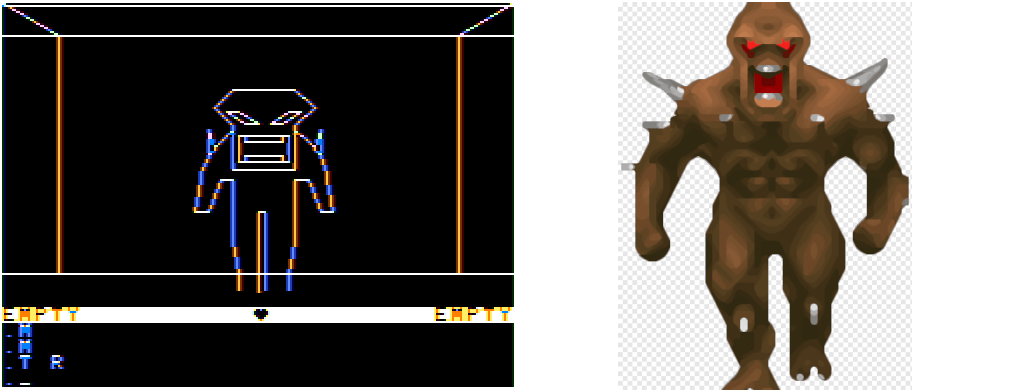
A pretty good representation, in our opinion.
Dungeons of Daggorath was pretty unusual for its time. It portrayed a dungeon and its contents from a first-person perspective, and events progressed in real time.
Gameplay-wise, most commands entered by the player revolved around moving around and attacking monsters, and that was done with text commands like ATTACK RIGHT which could mercifully be shortened to A R. Still, not the most efficient control scheme.
[Nick] downloaded the original source code and made several modifications. A joystick moves the player much more efficiently, with the button acting as a shortcut to attacking with whatever is in the player’s right hand. He also replaced the spider and viper enemies with creatures inspired by DOOM‘s imp and cacodemon monsters, as well as the aforementioned optional limitless health and power.
[Nick] dubbed the modified game Dungeons of Doom and while the terms of the original don’t allow redistribution of modified code, his changes are simple enough to follow. Especially so for those from the generation that remembers typing programs in by hand from a magazine page.

 Login
Login