Device code phishing abuses a legitimate authentication feature designed for devices with limited input capabilities. This article breaks down how the technique works, examines a recent observed case, and outlines the layered security measures organizations can implement.
The US House Agriculture Committee has scheduled a hearing on sports prediction markets as two gaming associations press Congress to prohibit sports contracts offered by platforms including Kalshi and Polymarket. According to a committee release, the Subcommittee on Commodity Markets,…
In this episode of the podcast, host Paul Roberts interviews Nishawn Smagh of the firm GreyNoise Intelligence about the findings of their State of the Edge report, an analysis of GreyNoise data on risks stemming from compromised edge devices such as broadband routers, VPN gateways, smart home devices and more. Shawn and Paul talk about how attackers are turning edge devices into their favorite entry point, and strategies for organizations to counter the growing risk of compromised edge devices.
The U.S. granted the UAE license-free access to advanced AI chips and servers after upgrading its export status, reshaping AI partnerships and export controls.
The U.S. granted the UAE license-free access to advanced AI chips and servers after upgrading its export status, reshaping AI partnerships and export controls.
Germany approved more weapons for export in six months than most countries manage in years, and the country that received the single biggest share of that approval, once again, is not a NATO member at all. It’s Ukraine. Germany’s Federal Ministry for Economic Affairs and Climate Action, the government agency responsible for reviewing and approving […]
TrendAI™ Research analyzed over 200 Gemini CLI session logs showing how a Russian-speaking threat actor used AI to run a live botnet, finishing a full C&C migration in six minutes while doing just 11% of the work himself.
A consulting firm best known for advising Fortune 500 companies on corporate strategy just landed a nearly $20 million contract to fix one of the U.S. military’s most persistent headaches: getting American weapons into allied hands faster. The Boston Consulting Group received a $19.9 million contract from the Army to help redesign how the service […]
Last month, we passed along Modern Vintage Gamer's (MVG) confident assertion that Doom is functionally impossible to run on the Neo Geo, owing to the console's sprite-based display hardware and lack of a frame buffer. We all should have known better than to tell a dedicated group of hackers that something is "impossible," though, as two recent projects have made great progress toward functional Doom ports on stock Neo Geo hardware.
Both of these projects have significant graphical compromises that limit how viable they would have been for a marketable, '90s-era console port, as MVG lays out in a new video. Still, they stand as a testament to the surprising results that clever, determined coders can coax out of legacy hardware.
It looks like Doom if you squint
To create the Doom64KB project for the Neo Geo, coder FrenkelS adapted an earlier Doom port they designed to run on 16-bit PC processors like the 8088 and 286. Using that engine, the Neo Geo code then makes a kind of proto frame buffer out of the console's fix layer, an area of display memory that's usually used to display menus and HUD information on top of gameplay.
Google announced that it helped take down NetNut, a 2 million strong malicious residential proxy network. The incident highlights the growing risks posed by residential proxy networks that quietly conscript consumer devices into services used by cybercriminals and nation-state actors alike.
Every year, KnowBe4 analyzes millions of simulated phishing tests to measure one thing: how likely is your workforce to fall for a phishing attack? The results, published in the 2026 Phishing by Industry Benchmarking Report, paint a clear picture of where human risk concentrates — and what organizations can do about it.
This is the final article of our Drone Warfare series on Ukraine’s rise as a drone powerhouse. But Ukraine’s success story is not one it achieved alone. The country’s drone industry was built with the support of partners from around the world who helped Ukraine during its most difficult times. Here we look at Ukraine’s export strategy and how it can serve as a way to give back by sharing hard-earned battlefield experience and technology with the nations that helped make this success possible.
Battlefield Experience
For most of the war, Ukraine’s drone sector existed on the demand side of the defense market. The country needed huge volumes of FPV drones, interceptor drones and reconnaissance systems simply to keep pace with the battlefield. By 2026, that position began to change. Ukraine started to present itself not only as a state that needed drones, but as a state that could supply them, co-produce them, and teach others how to use them. In March 2026 President Volodymyr Zelenskiy discussed joint arms production with Dutch Prime Minister Rob Jetten and said Ukraine was ready to export interceptor drones that are not needed on its own battlefield.
Interceptor drones and the latest AI developments. Source: Ukraine’s Arm Monitor
Ukraine is not trying to sell a platform developed in peacetime and polished for foreign buyers. It is offering weapons and systems that were shaped by daily combat against a technologically capable enemy. That gives Ukrainian exports a different value proposition. They are presented as battlefield-tested tools that have already survived the hardest possible proving ground.
The Export Model
Ukraine’s export strategy depends on the fact that it is producing more than it can immediately absorb on the front line in certain categories, especially interceptor drones. In June 2026 Ukraine said it could produce 2,000 interceptor drones per day, with about half potentially available beyond domestic needs, and that it could supply at least 1,000 interceptor drones a day to allies facing Shahed attacks if investment improves. That is the logic behind the export conversation. Ukraine is not opening the floodgates on every weapon it makes. It is identifying categories where production has moved beyond immediate domestic consumption.
Business Insider also reported that Ukraine wants to protect its own security first and only share technologies that do not compromise its battlefield position. That means exports are likely to focus on systems that are already partially superseded on the Ukrainian front, or on systems that can be co-produced under controlled conditions.
Europe
Europe is the most obvious destination for Ukraine’s export strategy because the continent is already moving in Ukraine’s direction. The Netherlands are going to spend €248 million on drones for Ukraine, with production split between the Netherlands and Ukraine. On 17 June 2026 the Netherlands pledged another €500 million for drones and air defense equipment. These are signs that European governments are beginning to fund drone production as an industrial activity.
The Drone Squad Fury unmanned aerial platform developed by OM Defense Systems on display at the Eurosatory defense exhibition in Paris, June 2026. Source: Militarnyi
The broader European defense picture points the same way. It was reported that G7 countries and the United States had agreed to allow Ukraine-based and European firms to produce long-range missiles and air defense systems under license. Europe is no longer only buying Ukrainian results, it wants to buy into the production model behind them.
Source: Airbus’ drone portfolio
The broader European defense market is also moving in Ukraine’s direction. For instance, Airbus partnered with the French counter-drone startup Alta Ares. Under the June 2026 memorandum of understanding, Airbus will integrate Alta Ares’ AI-guided interceptors, including the Black Bird and X-Lock systems, both combat-tested in Ukraine since 2024, into its Fortion IBMS command-and-control platform, connecting Alta Ares’ targeting software and interceptor drones to Airbus’ battle management systems to create a sensor-to-shooter chain against drone and cruise missile threats.
Middle East
The Middle East is the second major market because it faces a different but equally urgent drone threat. In March 2026 Zelenskiy said Ukraine was ready to send instructors to the Middle East and export interceptor drones that are not needed at home. Business Insider added that Ukrainian officials see older Ukrainian counter-drone technology as still useful for allies facing Shahed attacks, even if those systems are already outdated by Ukraine’s own battlefield standards. A weapon does not need to be the newest model to be valuable if the user’s threat environment is less intense than Ukraine’s.
Ukrainian interceptor drone in open terrain (desert-like background works well for the Middle East angle)
That makes the Middle East a natural fit for Ukraine’s export model because the buyer often wants a system, not just a drone. The package includes interceptor drones, training, radar integration, and electronic warfare resilience. Zelenskiy explicitly framed the issue that way, saying that without radar coverage and software that can operate under jamming, an interceptor is not a real defender.
Production
The most interesting part of Ukraine’s export strategy is not the sale itself. It is the move toward co-production. The point of co-production is to make exports more durable and less vulnerable to disruption. It also lets allies develop industrial capacity while Ukraine keeps access to the newest combat-tested designs. The G7 agreement reported by The Guardian shows a model where production can be shifted into partner territory while still drawing on Ukrainian experience and requirements. That approach helps solve three problems at once. It spreads risk away from the battlefield. It makes procurement faster for partners. And it creates a legal framework for sharing sensitive technology without handing over full control of the most advanced systems.
The Financial Logic
The export strategy also has a budget logic. Drone exports and co-production can help bring in foreign money, expand industrial capacity, and reduce pressure on the domestic defense budget. The Netherlands’ funding would support drones and air defense equipment for Ukraine, while Ukraine’s officials see export volume as a way to unlock more production capacity. The practical idea is that external orders help keep factories busy, while revenue and investment help scale the next generation of systems.
Ukraine’s Drone Industry arrives in Düsseldorf. Source: DroneXL
This logic is important in wartime because the domestic state cannot fund every possible expansion on its own. Exports make production more sustainable. They also let Ukraine distribute risk across several partners rather than relying only on its own budget and wartime aid flows. In other words, the export strategy is partly about money, but it is also about industrial resilience.
Main Constraints
Ukraine’s export strategy is still tightly constrained by its own security needs. Ukrainian officials want to keep priority for domestic forces and treat exports as selective. That means the country is not trying to become a free-market weapons bazaar in the middle of a war. It is trying to manage surplus capacity without weakening the front line. There is also the issue of sensitivity. Not every system can be exported, and not every partner can receive the same level of access. Licensed production in allied countries solves part of that problem, but only part. The more advanced the system, the more likely it is to remain under stricter Ukrainian control. That is why the export strategy is likely to be layered. That means some hardware is going to be sold directly, while some systems will be co-produced, some software and training will be shared for integration, and some capabilities will stay in-house.
Strategic Value
Ukraine’s biggest advantage in the export market is not price alone. It is combat credibility. Allies are interested because Ukraine’s drones and counter-drone systems were developed in the harshest possible environment. A state that has spent years fighting under heavy electronic warfare pressure, missile strikes, and mass drone attacks has something to offer that many peacetime defense industries do not. That does not mean Ukraine will dominate global drone exports. Competition is still strong, and certification with production security all remain real obstacles. But the country has already crossed an important threshold, where it’s no longer only asking for help. It is now a partner that can supply systems, share production, and train others to fight the same kind of war.
Conclusion
Europe wants production. The Middle East wants interception. Ukraine wants revenue and industrial depth. That creates a new model built around selective exports and battlefield-tested expertise. Ukraine is no longer only defending itself with drones, but it is using drone expertise to build alliances. That is the meaning of its export strategy today.
We continue to share details on the malicious techniques and toolsets used by the ToddyCat APT group. In the first part of this report, we examined the group’s attacks aimed at stealing data from browsers, as well as from local and cloud email services. The methods used in that campaign indicated that ToddyCat was attempting to access corporate correspondence while evading monitoring tools. However, all of the group’s methods we described previously are effectively detected by EPP and EDR solutions.
The attackers continued their search for ways to bypass security solutions and developed a new tool to gain access to a victim’s cloud account via the Google API. Armed with this tool, the group automated all stages of the attack and managed to remain undetected by monitoring systems.
In this part of the report, we break down the mechanics of this new attack and analyze the tool that was used to automate it. We’ll also discuss how to detect and defend against this threat.
Umbrij
In this campaign, the attackers focused their attention on corporate email communications hosted on Gmail, targeting access compromise via APIs. Because the Google API relies on the OAuth 2.0 protocol for authorization, applications can use an OAuth token to access requested email resources. To acquire this token, the threat actors developed a tool called Umbrij and used it to connect to the browser’s management console in headless mode via a remote debugging port. Through a series of requests, they obtained an OAuth authorization code, which they subsequently exchanged for an access token to reach the target resources via the API. We have dubbed this technique Shadow Token via Remote Debug (STRD).
This attack is viable on Chromium-based browsers. If the user has not logged out of their Gmail account, the browser maintains an active session. The attackers exploit this: they launch the browser, connect via the remote debugging port to take control, and send a request to the Gmail service to grant access to the Google account resources within the context of the user’s saved session.
During our investigation of this attack, we discovered several versions of the Umbrij tool. These versions included a variety of helper functions designed for debugging, as well as for searching and selecting user accounts within the browser, among other tasks.
Kaspersky solutions detect this tool with the following verdicts: HEUR:Trojan-PSW.MSIL.Umbrij.gen, HEUR:Trojan.MSIL.Agent.gen, HEUR:Trojan-PSW.MSIL.Agent.gen.
Execution
The Umbrij tool was discovered during a proactive threat hunting operation: a scheduled task, KasperskyEndpointSecurityEDRAvp, was running on a user host, launching a digitally signed file. Kaspersky solutions do not create scheduled tasks with that name; the attackers were attempting to masquerade their malicious activity as a legitimate process.
The signed file then used the DLL sideloading technique to load the malicious tool.
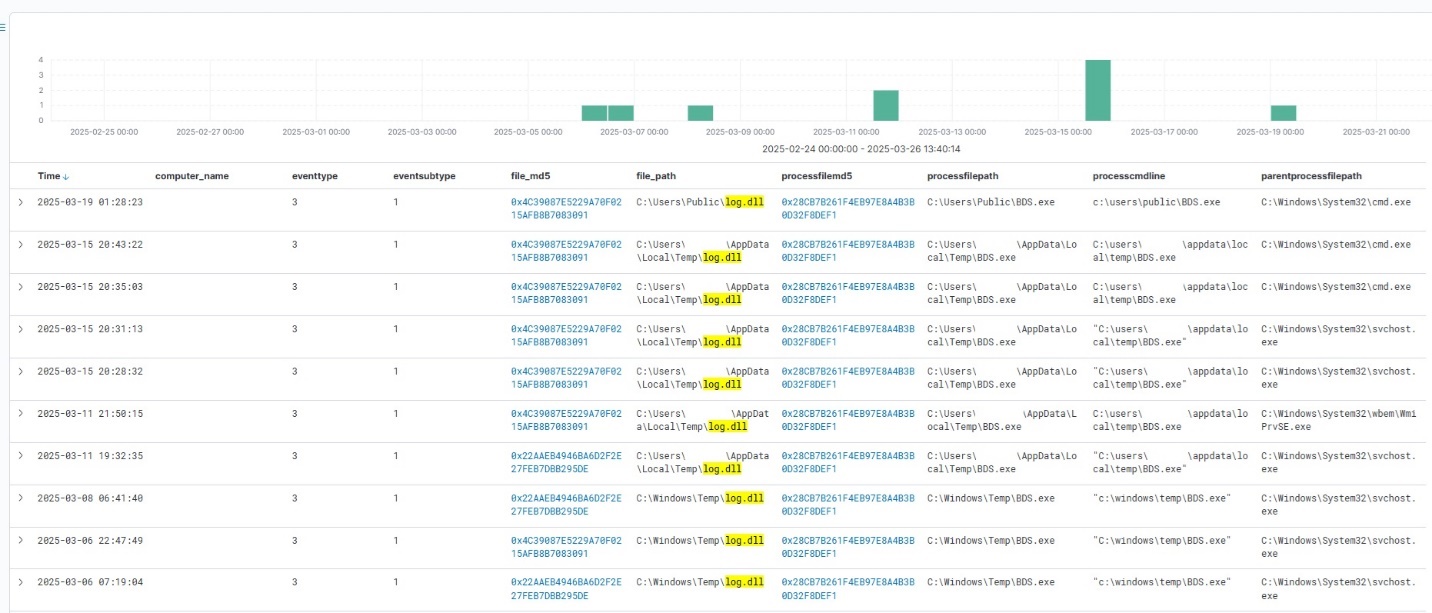
Umbrij execution events within Kaspersky Managed Detection and Response
Throughout our observation period, we identified the following legitimate files vulnerable to the DLL sideloading technique that were used to launch Umbrij:
BDSubWiz.exe: a component of the Submission Wizard in Bitdefender ConnectAgent, which is used to support connection features and interaction with other Bitdefender services or agents. This file insecurely loads a file named log.dll.
VSTestVideoRecorder.exe: a component of the video-recording tool used for testing with Visual Studio (VS Test). This executable insecurely loads a file named Microsoft.VisualStudio.QualityTools.VideoRecorderEngine.dll.
GoogleDesktop.exe: the discontinued Google Desktop Search application for indexing files and performing quick searches on a local Windows computer. This executable insecurely loads a file named GoogleServices.dll.
These files were used to load different versions of Umbrij; the same legitimate file could be leveraged to launch more than one variant. In total, we discovered three versions of Umbrij, which we refer to as a, b, and c for convenience.
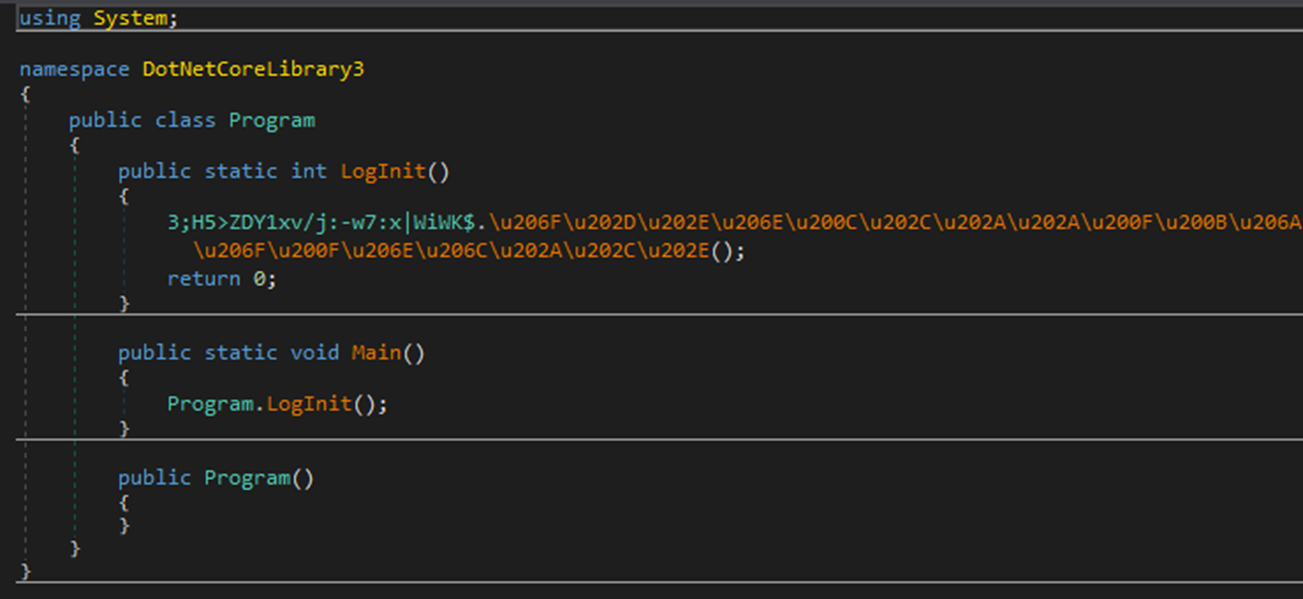
The tool itself is a DLL written in .NET and obfuscated with ConfuserEx, an open-source obfuscator for .NET applications.
Example of an obfuscated code snippet
Umbrij is managed with the help of parameters passed through a command line at startup, although it is occasionally executed without any parameters. Below are examples of the command lines observed in attacks against users:
However, these are not the only parameters the tool can accept and process. During the analysis of its executable code, we discovered additional parameters that vary depending on the version of Umbrij. See the table below for the parameters and their descriptions.
Version
Command
Description
a
-regex <string>
Used in conjunction with the -deepsearch parameter. Specifies a substring to search for within the user_name field of the user profile file, which typically contains the email address. The tool will utilize the user profile that matches this specified substring
a
-user <username>
Specifies the system username under which the tool will run
a
-runas-currentuser
Configures Umbrij to run within the execution context of the current user
a
-deepsearch
Enforces additional checks on the user_name field in the user profile: verifying that it is not empty and that it contains the substring specified in the -regex parameter
a, b, c
-path <path>
Specifies the full path to the directory containing the browser’s executable file
a, b, c
-browser <both|msedge|chrome>
Specifies which browser the tool should target: Google Chrome, Microsoft Edge, or both
a, b, c
-debugport <port>
Specifies the remote debugging port number
a, b, c
-sync
When this parameter is specified in the URL, the value 1095133494869 replaces 279448736670 in the permission request
b
-domainAd
Specifies the domain name if the user account is a domain account
b
-savepdf
Instructs Umbrij to save a screenshot of the user profile as a PDF file
c
-lport
Same as debugport
Environment preparation
At startup, the tool evaluates several prerequisites required to carry out the attack and performs preparatory actions to subsequently compromise the Gmail account.
First, Umbrij verifies the availability of the port that will be designated for browser debugging. To accomplish this, the tool utilizes a function named ChekPortAvailable() (original spelling retained), which accepts the target port number as a parameter. It then retrieves information about active connections on the host using the .NET GetActiveTcpConnections() function from the System.Net.NetworkInformation namespace. The tool iterates through each connection in a loop, comparing the port number to the one it is checking.
The ChekPortAvailable function used to verify open ports
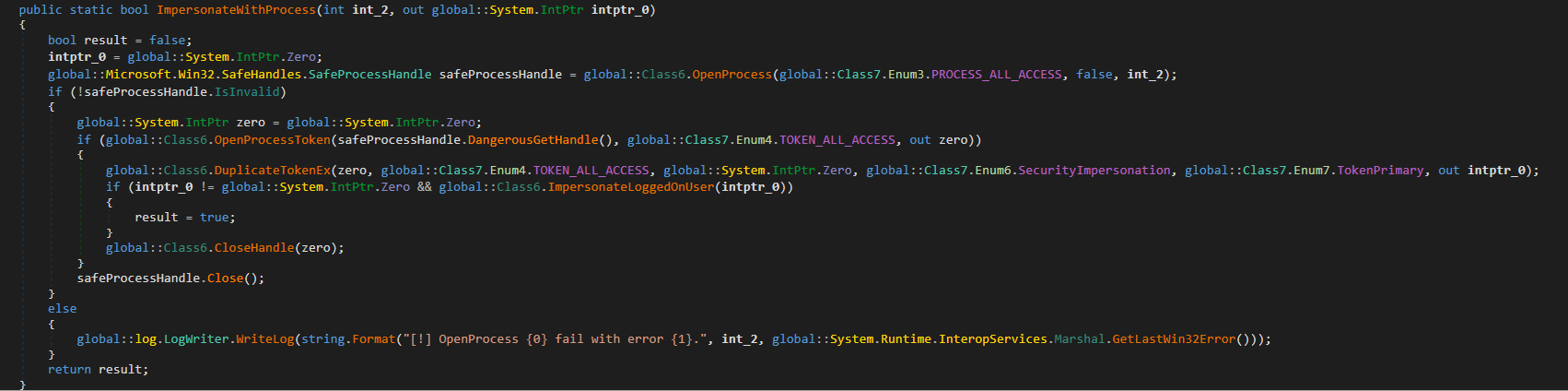
After this, the tool retrieves the user context. It searches the system for the explorer.exe process and duplicates its token, retaining all of its privileges (T1134.003 Access Token Manipulation: Make and Impersonate Token). This is the exact same mechanism used by another tool in the group’s arsenal, TomBerBil, which we covered previously.
The ImpersonateWithProcess function used to retrieve user context
By default, Umbrij duplicates the token of the first explorer.exe process it encounters. If multiple users are logged in to the system, the -user <username> switch can be used to specify the name of the target user whose token to duplicate. If the -runas-currentuser switch is specified, the tool will execute within the context of the current user without duplicating any tokens.
Next, Umbrij constructs the path to the browser application folder within the user’s local application data repository. To do this, it uses the Environment.SpecialFolder.LocalApplicationData command to retrieve the repository directory from the environment variable and appends the directory of the target browser. The tool then searches for the Local State file in the following folders:
%LOCALAPPDATA%\Google\Chrome\User Data\Local State
%LOCALAPPDATA%\Microsoft\Edge\User Data\Local State
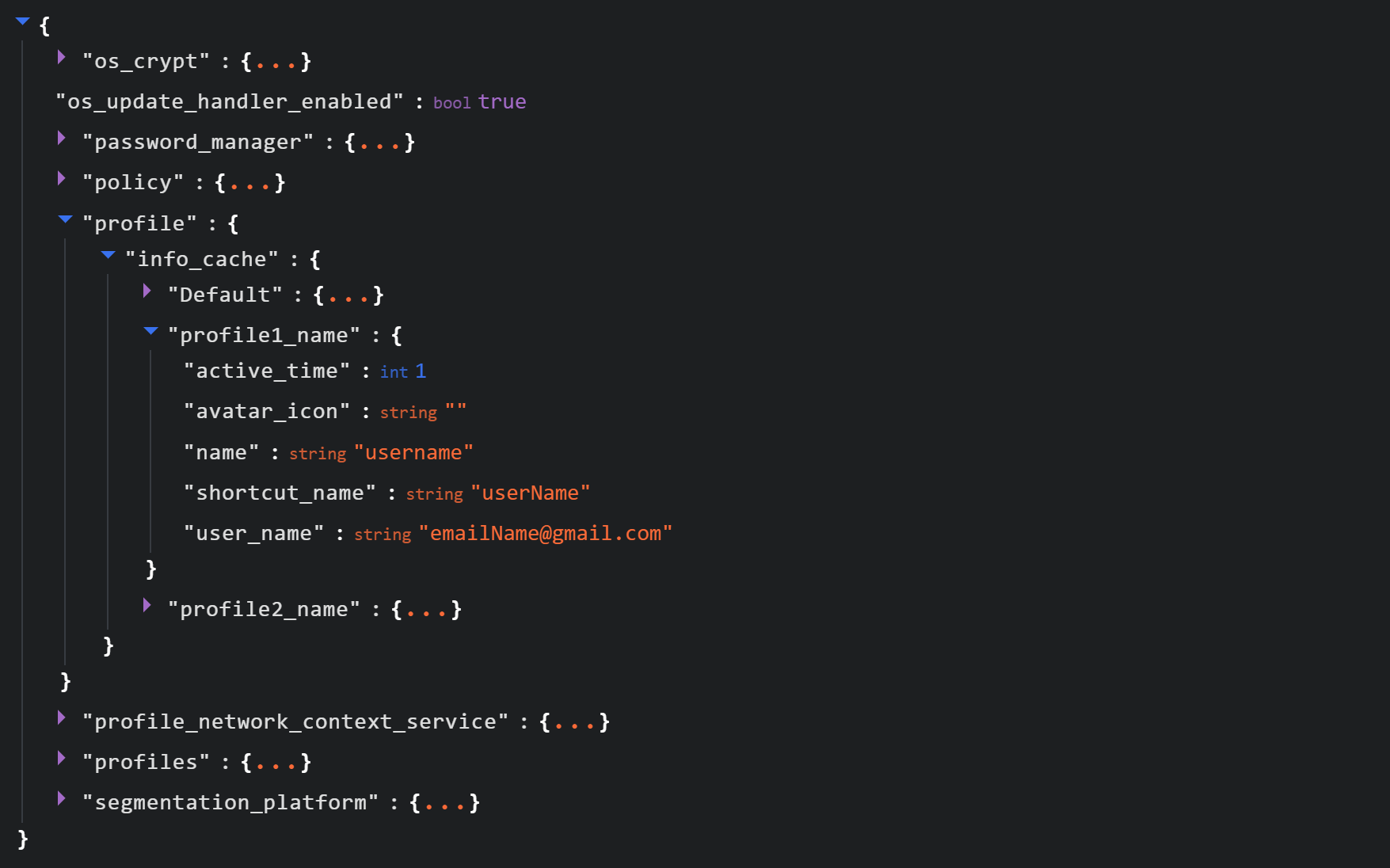
See below for an example of the Local State file structure.
Structure of the Local State JSON file
Within this file, the tool searches for the info_cache array, which stores information about browser user profiles. Umbrij enumerates all user profiles and looks for those containing a user_name field that includes an email address. The presence of an email address indicates that the user is authenticated to a Google service. While the tool can interact with every profile it finds, if the -regex <string> parameter is passed through a command line, it searches for the specified substring within the email addresses being enumerated and proceeds exclusively with those matches.
Next, Umbrij creates the following directories for Google Chrome and Microsoft Edge, respectively:
%LOCALAPPDATA%\Google\Chrome\BackupFiles\
%LOCALAPPDATA%\Microsoft\Edge\BackupFiles\
The tool copies the following user files and folders of each target user profile into these directories:
IndexedDB: a folder containing a relational database used for client-side storage of structured data
Local Storage: a component of the browser’s web storage that provides a key-value mechanism for storing data on the client side
Network: a folder where the browser stores files related to network requests and caching, such as the network cache and session files
Login Data: a file that stores saved passwords for various websites and applications
Login Data For Account: a file that stores credentials associated with a Google account or other synchronized accounts within the browser
Preferences: a file containing profile-level browser settings
Secure Preferences: a file that stores protected configurations, such as security and synchronization data
Web Data: a file that stores auto-fill data
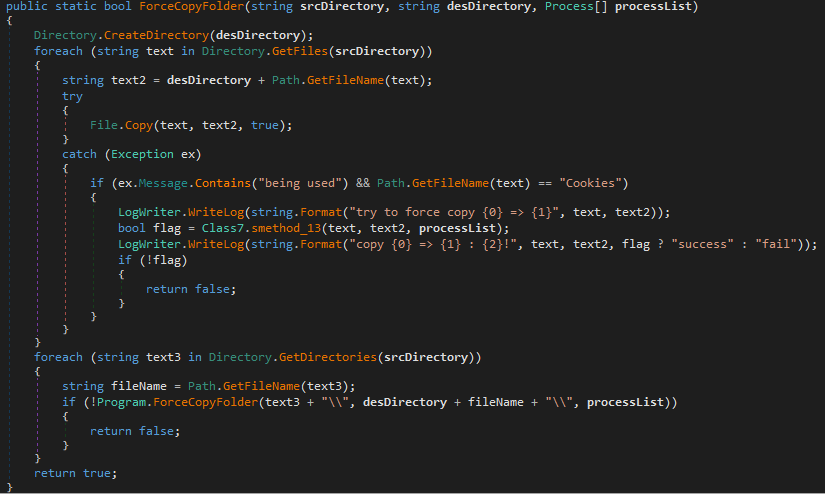
If these files are locked by other processes, the tool includes a dedicated function to force-copy them.
The ForceCopyFolder function used to copy files locked by other processes
As the next step, the tool searches the “Program Files” and “Program Files (x86)” directories for the browser installation folder. Once it locates the executable file and successfully copies all required files, it is ready to proceed with acquiring the authorization code.
Acquiring the authorization code
In the next phase of execution, Umbrij launches Google Chrome, Microsoft Edge, or both browsers sequentially, depending on the parameters passed in the command line. It then passes arguments to the browser based on the following template:
It populates the template with the following values:
{0}: the path to \BackupFiles\, where the user profile files were copied
{1}: the path to the browser executable file
{2}: the remote debugging port number
The table below describes the parameters used in this browser launch template:
Parameter
Description
–user-data-dir
Specifies the path to the root directory that will store the shared browser data and user profiles
–remote-debugging-port
Opens a port for remote browser debugging over the DevTools protocol. This switch is commonly used for automated testing with frameworks like Selenium
–profile-directory
Specifies the name of the specific profile folder within the user-data-dir
–headless
Launches the browser in headless mode, that is, without a graphical user interface
The browser process runs in headless mode while utilizing the copied user profile. Consequently, all active user cookies are applied, which means sites with saved credentials will skip authentication prompts. Furthermore, the browser will log history to a new folder, keeping it completely hidden from the user’s primary account view.
Through this method, the threat actors gain access to the user’s authenticated sessions — specifically their Google account — along with the ability to erase any trace of their activity within the browser.
Code snippet showing Umbrij connecting to the browser via the debugging port
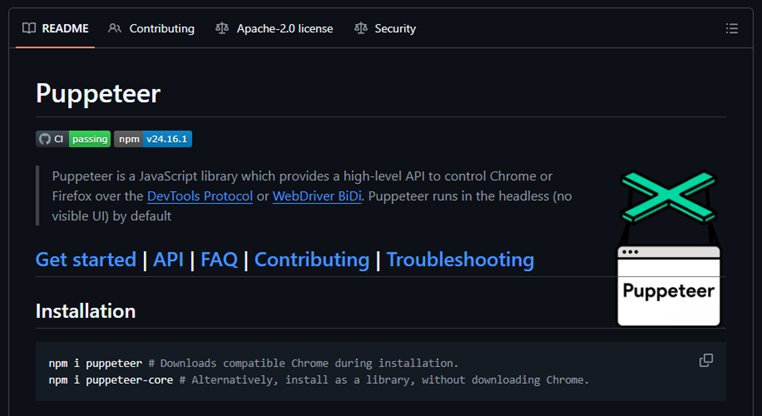
Next, the tool uses the Puppeteer Sharp library, a .NET version of Puppeteer, to connect to the remote debugging port. Puppeteer provides a high-level API to control Chrome or Chromium browsers over the DevTools protocol. Its primary use is for automated testing.
The Puppeteer module GitHub page
If the connection to the remote debugging port is successful, Umbrij sends a GET request to direct the browser to the following URL:
The value specified in the client_id field belongs to Google Workspace Migration for Microsoft Outlook (GWMMO). This is Google’s official tool for importing email, calendar events, and contacts from Microsoft Exchange accounts or local PST files into a Google Workspace account.
Umbrij also includes the ability to switch the client_id value from 279448736670 to 1095133494869 by using the -sync parameter. This second identifier belongs to another application: Google Workspace Sync for Microsoft Outlook (GWSMO), which allows users to sync email, calendars, and other data from the cloud account directly into Microsoft Outlook.
Code snippet where the client_id replacement occurs
The remaining parameters used in the request differ from those typically utilized by the legitimate applications. See the table below for a comparison of these parameters:
GET request parameter
URL used by Umbrij
Original URL
flowName=GeneralOAuthFlow
Present
Absent
code_challenge (PKCE)
Absent
Present (method=S256)
state
Absent
Present
login_hint
Absent
Present
redirect_uri
http://localhost
http://localhost:61619/callback
As seen from the list above, Umbrij omits several parameters characteristic of the legitimate applications. For instance, Umbrij drops the code_challenge parameter, normally used for data protection when retrieving an authorization code. Additionally, the tool modifies the redirection address: while the legitimate application specifies a dedicated port and a callback path, the tool simply points to localhost.
The authorization code request specifies the set of permissions for Google services required by the application. This list also differs significantly between requests issued by the legitimate application and those generated by Umbrij. The table below details the variations in the requested scopes:
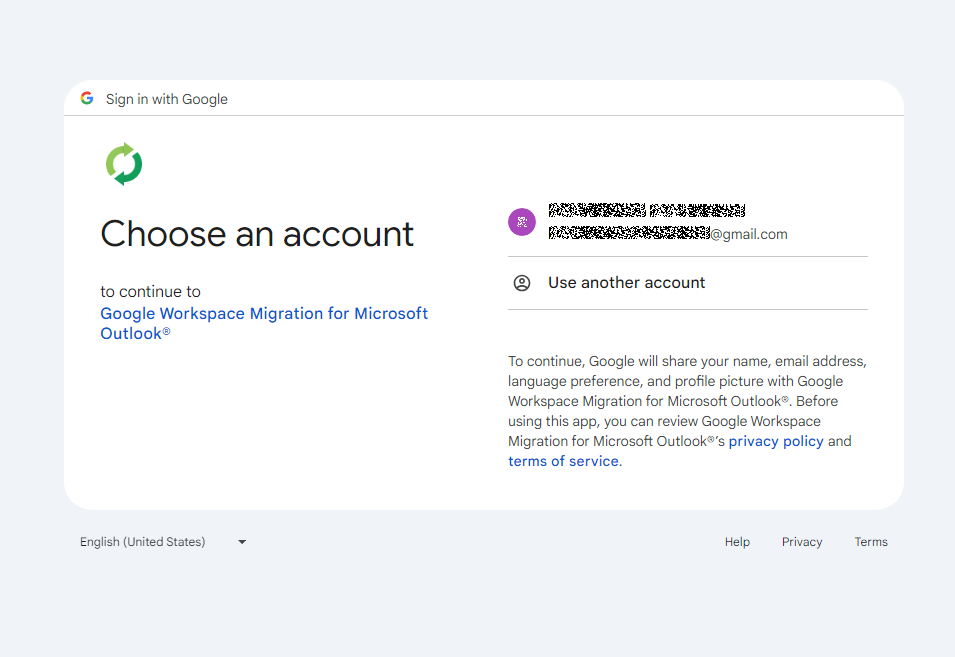
After the browser navigates to the URL provided by Umbrij, the Google account selection page opens.
Account selection
Because the attackers copied the victim’s profile folder and are operating within their specific environment, the account selection options will include the currently signed-in user’s authenticated session. Umbrij identifies the corresponding element within the page’s HTML source code.
Searching for HTML code elements on the page
The tool uses JavaScript to emulate a mouse click on the elements, allowing it to proceed to the next step.
Simulating a mouse click on a page element
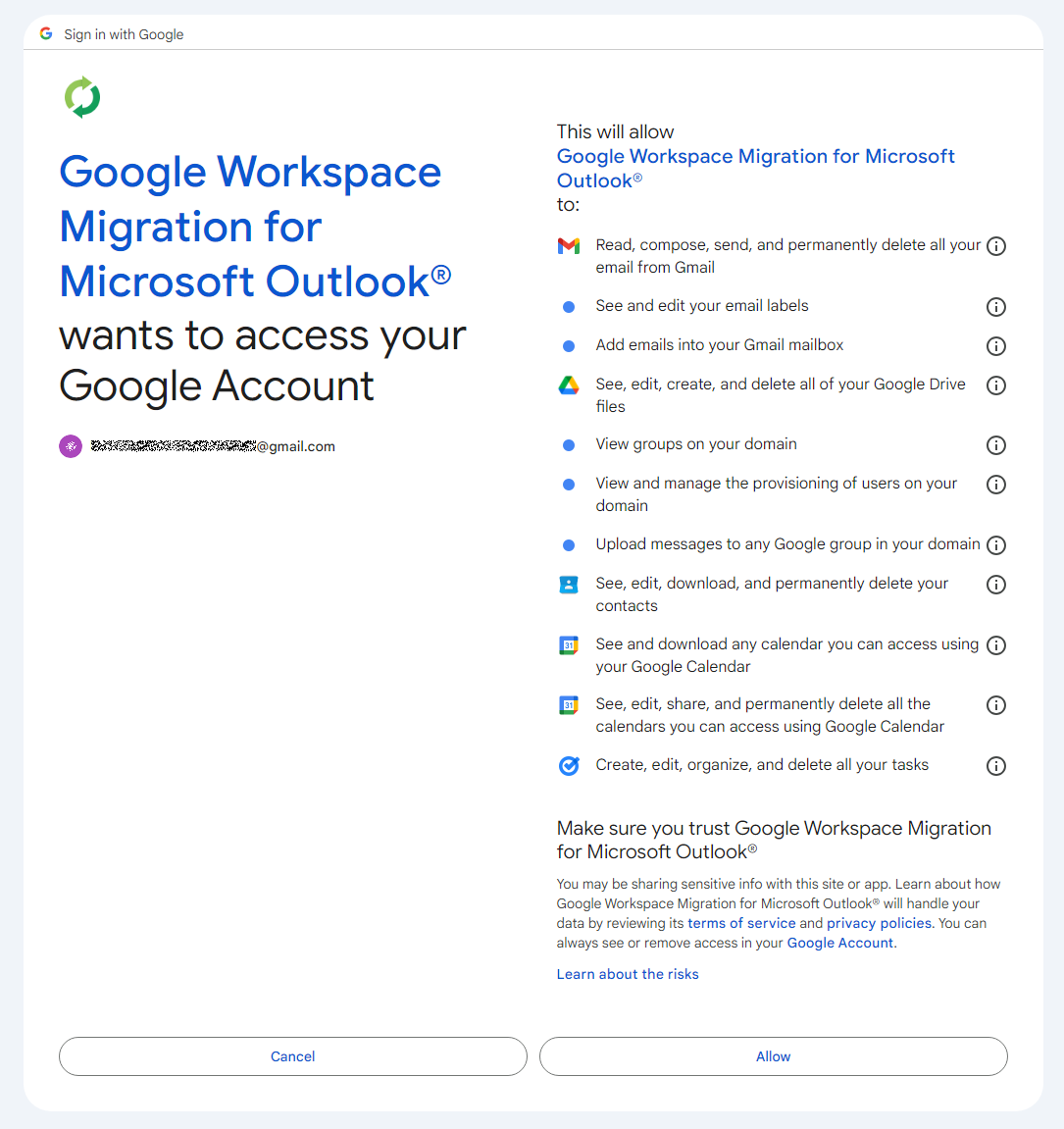
The subsequent step opens a page displaying the list of requested permissions.
Confirming the list of requested access permissions
As shown in the screenshot, Umbrij requests full access to email, cloud storage, and contacts. Just like in the previous step, it uses JavaScript to click the “Allow” button, which completes the authentication process.
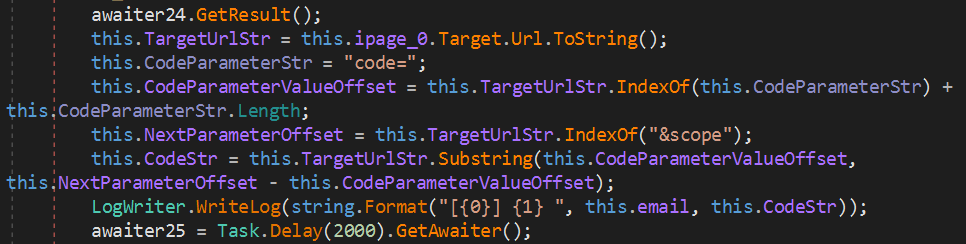
The browser is then redirected to the local address that was specified in the redirect_uri parameter of the initial request. The tool intentionally omits a port and a path to a specific page in the redirect_uri because the true objective of this action is simply to capture the code parameter from the context of the GET request. This parameter contains the OAuth authorization code. To retrieve it, Umbrij extracts the substring located between the code= and &scope parameters.
Extracting the authorization code from the GET request
Results
Umbrij, like most other tools in ToddyCat’s arsenal, logs its actions in detail and saves them to a file. It also saves the retrieved authorization code to this log file, which the operator subsequently exfiltrates from the compromised host.
Below is an example of a log file generated by version a of the tool.
------------------------------
^^^^^^^^^^^^^^^^^^^^^^^^^^^^^^^
[*] switch to sync mode.
[!] port 11111 is available!
[*] Impersonate <username> success!
[*] browser switch to chrome .
Parsing C:\Users\<username>\AppData\Local\Google\Chrome\User Data\Local State ...
[*] detected profile: Profile 4 ==> <email>@gmail.com
[*] ready auth for <email>@gmail.com.
[*] Browser Exe path C:\Program Files\Google\Chrome\Application\chrome.exe.
[!] CreateProcessAsUserW...
[*] Browser created with pid 3108
[???] <email>@gmail.com
[pup] mail : <email>@gmail.com
[pup] account choice click !
[pup] Allow click !
[<email>@gmail.com] 4%2F0AcvDMrDtzQaC-TT8<hash>uMhg
[*] RevertToSelf succeed!
^^^^^^^^^^^^^^^^^^^^^^^^^^^^^^^
The log indicates that the sync mode is selected (meaning the Google Workspace Sync for Microsoft Outlook application is used) and the debugging port is set to 11111. After locating the user profile and copying its folder, Umbrij launches Google Chrome. After this, the tool emulates clicks on the appropriate buttons to confirm permissions, ultimately outputting the final result of the operation: the stolen OAuth authorization code.
Since all requests occur within a background browser instance, the tool includes a feature to generate a PDF snapshot of the web page where the permission confirmation process halted in the event of an error.
Saving a web page as a PDF file in the case of an error
Additionally, the tool can create a PDF file for the user profile in Google Chrome and Microsoft Edge by navigating to the following internal addresses:
edge://profile-internals
chrome://profile-internals
Example contents of a generated PDF file
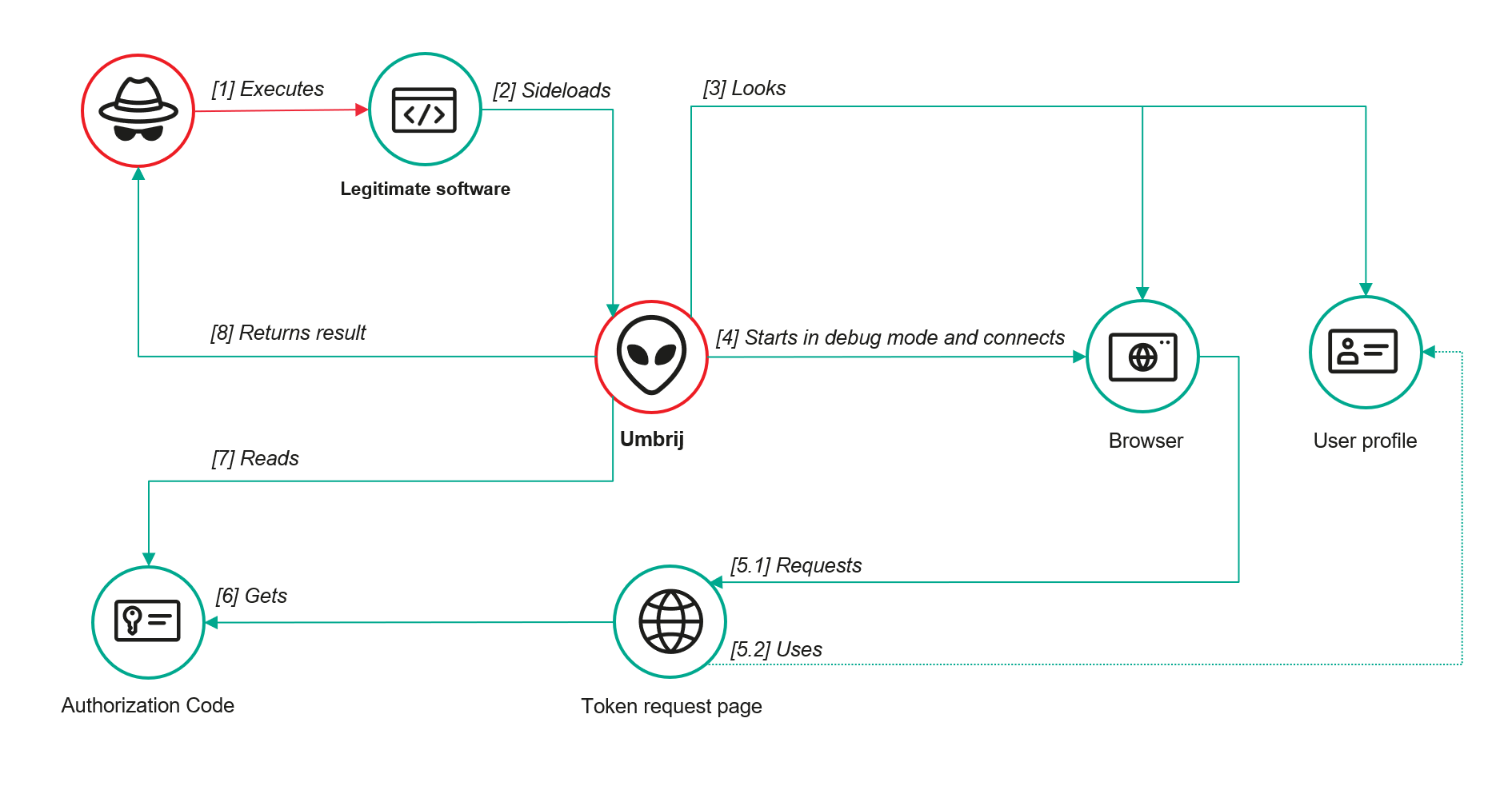
The acquired authorization code is then exchanged for an OAuth access token. The threat actors use that token to connect to the Gmail account through the API, thus compromising corporate email communications. The diagram below illustrates the complete attack workflow.
Umbrij workflow diagram
Detection
DLL sideloading
First and foremost, defenders should monitor library loading events (DLL loads) associated with the known applications vulnerable to DLL sideloading that are exploited by this tool: Bitdefender ConnectAgent, Visual Studio, and Google Desktop Search.
title: Possible Dll Hijacking Of Microsoft VisualStudio QualityTools dll
id: 246f1409-2993-46f6-9b77-e447a327df5d
status: experimental
description: Detects possible DLL hijacking of Microsoft.VisualStudio.QualityTools.VideoRecorderEngine.dll by looking for suspicious image loads, loading this DLL from unexpected locations
author: kaspersky
date: 2025-08-11
tags:
    - attack.defense-evasion
    - attack.t1574.001
logsource:
    product: windows
    category: image_load
detection:
    selection:
        ImageLoaded|endswith: 'Microsoft.VisualStudio.QualityTools.VideoRecorderEngine.dll'
    filter:
        ImageLoaded|contains: '\IDE\Extensions\TestPlatform\Extensions\'
    condition: selection
falsepositives:  Legitimate activity
level: high
Browser launch
Launching a browser with a remote debugging port specified is a highly unusual event on standard user hosts that are not running web application development or automated testing workflows. Consequently, monitoring for these specific command-line arguments can serve as a reliable indicator of this attack.
title: Launching Chrome With Debug Parameters
id: f072803f-3cf4-4537-82e6-e8b3a201d99f
status: stable
description: Detects the execution of Chromium based browsers launched with incognito mode and remote debugging enabled
author: kaspersky
date: 2025-12-11
tags:
    - attack.lateral_movement
    - attack.defense_evasion
    - attack.t1550.001
logsource:
    category: process_creation
    product: windows

detection:
    selection:
        CommandLine|contains|all:
            - '--remote-debugging-port'
            - '--headless'
    condition: selection
falsepositives: Opening a browser as part of web application testing. Legitimate activity
level: high
Revoking third-party access
To review the authorization codes granted to applications, navigate to the Google Account settings under the Third-party apps & services section, or access the following URL directly:
https://myaccount.google.com/connections
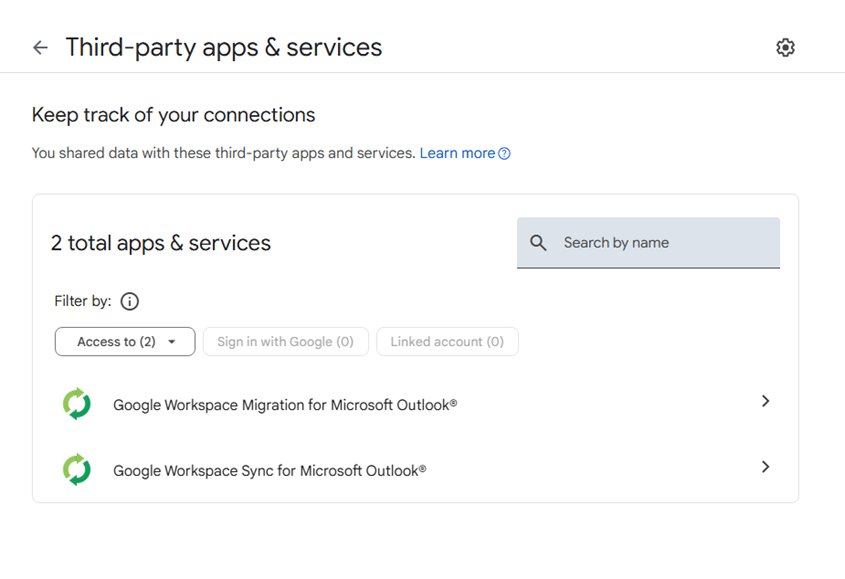
This page displays a comprehensive list of applications and services that currently have permission to access the account.
List of apps connected to the Google account
If the Google Workspace Migration for Microsoft Outlook or Google Workspace Sync for Microsoft Outlook applications appear in this list but are not actually used within your organization, revoke their access immediately. This will invalidate all potentially compromised OAuth tokens associated with them.
Risk mitigation
Launching a browser with a remote debugging port enabled is inherently suspicious for users who do not engage in web development. For these employees, you can completely disable Chromium-based browser developer tools.
This can be achieved by configuring the DeveloperToolsAvailability policy. To enforce this, set the registry value to 0x00000002 for the following Windows Registry key and restart the browser:
To verify that the policy has been successfully applied, navigate to the browser’s internal policies page at chrome://policy:
Note that while disabling developer tools can successfully disrupt the automated retrieval of the OAuth authorization code, it will not help, however, if the adversary decides to leverage the browser’s graphical user interface (GUI) — though this manual approach is significantly less likely due to the friction it introduces for the attackers. Therefore, as a risk mitigation measure, users should be instructed to explicitly log out of their Google accounts as soon as their sessions are complete.
Takeaways
The ToddyCat APT group continues to search for ways of compromising corporate email communications. We have been tracking the group for a long time and we have observed continuous updates to its arsenal in an attempt to bypass security defenses, even as their core techniques remain consistent. For instance, the group has long relied on DLL sideloading to stealthily drop malicious utilities and scheduled tasks. However, their new tool, Umbrij, automates the attackers’ attempts to gain access to organizational email accounts. This automation not only helps increase the scale and frequency of their attacks but also demonstrates ToddyCat’s strong motivation and advanced technical skills.
To defend against these threats, corporate security teams must monitor for suspicious library loading events initiated by legitimate files, watch for instances of browsers launching in developer mode, and conduct regular audits of third-party applications and services with access permissions to Google accounts. Furthermore, deploying a robust, comprehensive security solution — such as Kaspersky Next — is critical to detect this type of malicious host-based activity in a timely manner.

 Login
Login