As a general rule, don't use the router that comes from your ISP. It's typically overpriced, but that's not all — it may even be causing issues with your smart home, at least with the default settings.
Smart bulbs are one of the most common entries into the world of smart home devices, but they're not without their problems. If your internet goes down, you may find that you lose features or simply can't control your bulbs at all. There are several ways to stop this from happening.
NASA’s Nancy Grace Roman Space Telescope is set to launch at 7:26 a.m. EDT on Sunday, Aug. 30. While you wait to watch the launch, brush up on some key facts about this wide-view mission.
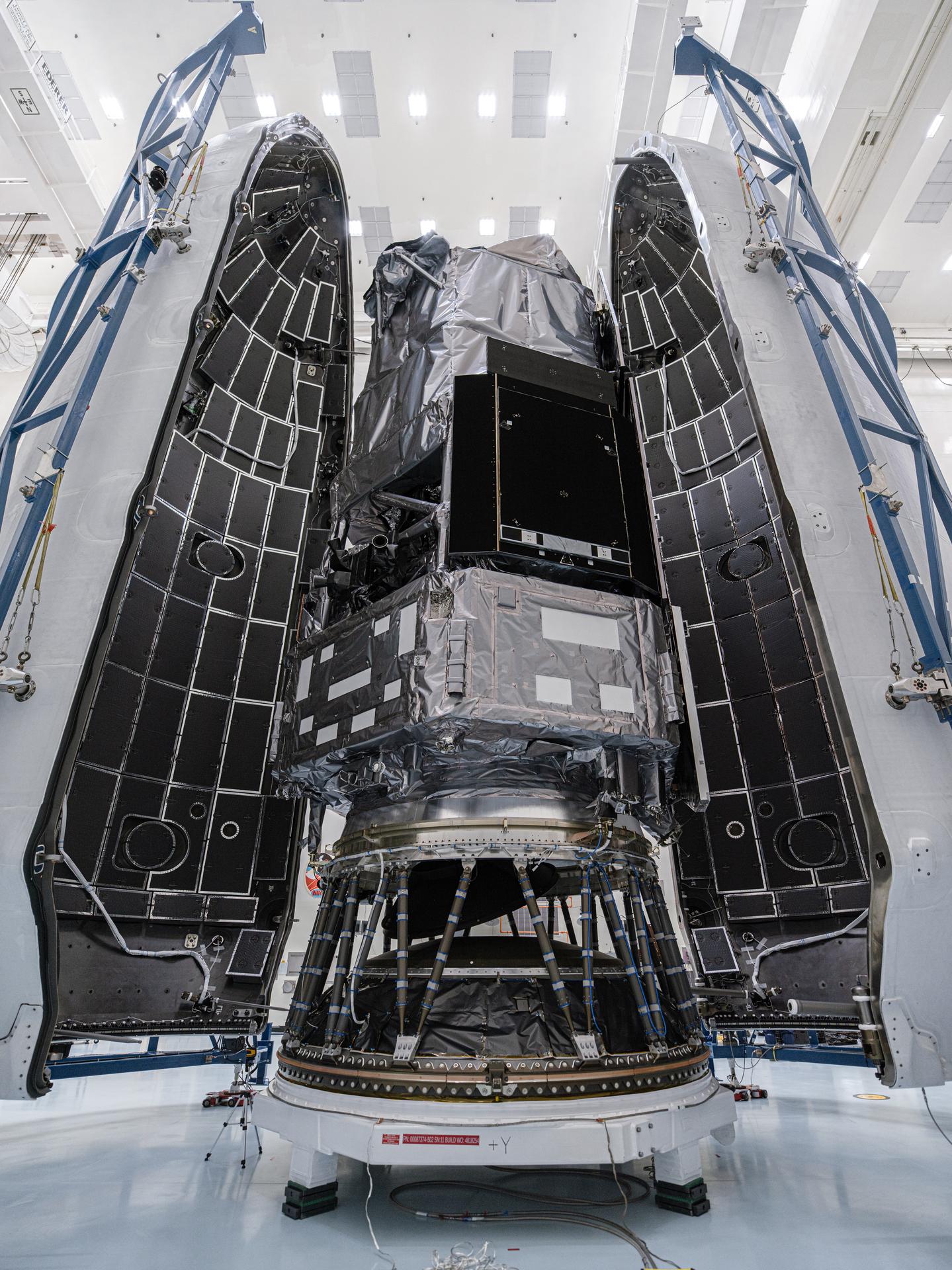
Teams inside the Payload Hazardous Servicing Facility at NASA’s Kennedy Space Center in Florida encapsulate the agency’s Nancy Grace Roman Space Telescope within the payload fairing on Friday, Aug. 21, 2026, ahead of mating to a SpaceX Falcon Heavy rocket. Encapsulation shields the spacecraft during rollout, ascent, and the early phases of flight. Roman will investigate dark energy and dark matter, conduct a statistical census of planetary systems, and enable a broad range of additional astrophysics research. Liftoff from Launch Complex 39A at Kennedy is targeted for no earlier than Sunday, Aug. 30, 2026.
NASA/Sydney Rohde (Rocz)
01
The mission is named after NASA’s first chief astronomer, Dr. Nancy Grace Roman.
Roman is named after Dr. Nancy Grace Roman (1925–2018), NASA’s first chief of astronomy. She championed space-based observatories that could study the universe above Earth’s hazy atmosphere while making their data broadly available to the scientific community.
While she’s known as the “mother” of the Hubble Space Telescope, Roman played an even broader role as the driving force behind NASA’s entire Great Observatories program, which included Hubble along with the Chandra X-ray Observatory and the retired Compton Gamma Ray Observatory and Spitzer Space Telescope.
Her vision and leadership helped establish NASA as a world-class scientific institution and laid the foundation for generations of space telescopes that continue to expand humanity’s understanding of the cosmos.
02
Roman will transform our view of the cosmos by showing us the bigger picture.
Roman will pair a large field of view with crisp infrared vision to scan vast, deep swaths of sky. This flagship mission is designed to help astronomers explore dark matter, dark energy, and planets outside our solar system, called exoplanets.
Since each of Roman’s surveys will sample such a large volume of the cosmos, the mission will also offer practically limitless opportunities for astronomers to conduct a broad range of additional science. From objects in our outer solar system and exploding stars to growing black holes and galaxies by the billions, very little will be beyond Roman’s reach. Roman’s data will be made public as soon as it’s processed, allowing many teams to analyze it simultaneously.
03
The observatory will journey a million miles to join Webb at Lagrange point 2.
Roman will orbit 1 million miles away at the second Sun-Earth Lagrange point (L2), the same location as NASA’s James Webb Space Telescope. At L2, gravity from the Sun and Earth works together with an object’s motion around the Sun to hold it roughly in place. This balance will give Roman a relatively steady orbit without using much fuel.
Like Webb, Roman will trace out a large orbit around the actual L2 point — much larger than the Moon’s orbit around Earth — and the two will easily be kept far apart.
04
The spacecraft carries the names of more than a million people.
This summer, everyone was invited to submit their name to be added to a memory card attached to a plaque on the Roman spacecraft. More than 1.3 million people did so and will have their names carried all the way to L2.
05
Roman will scan the skies for at least five years.
Roman will have a primary mission lifetime of five years and is designed to support an additional five-year extended mission. Fuel is expected to be the mission’s life-limiting resource, and while NASA does not currently have an ability to service observatories at L2, Roman is designed to be refuelable.
06
Two instruments will enable myriad discoveries.
The observatory’s Wide Field Instrument is a 300-megapixel infrared camera that will give Roman the same sharpness (angular resolution) as Hubble but with a field of view at least 100 times larger. Using this instrument, each Roman image will capture a patch of the sky about 1.5 times bigger than the apparent size of a full Moon.
Roman’s Coronagraph Instrument is designed to demonstrate the most advanced technologies ever flown in space for directly imaging planets around other stars. It will block the glare from stars and make it possible for scientists to see the faint reflected light from planets in orbit around them, revealing giant worlds that are older, colder, and in closer orbits than the hot, young super-Jupiters direct imaging has mainly revealed so far.
07
Roman joins an international cohort of teamworking telescopes.
Roman will work in tandem with many other NASA-led and international missions to provide the most complete view of our universe yet. Roman’s large panoramas will uncover interesting targets that Hubble could follow up on using infrared, visible, and ultraviolet light to offer a more comprehensive view. NASA’s James Webb Space Telescope can then use its larger mirror and more powerful vision to deliver even more detailed, ultra-sharp observations. And Roman can view regions around objects Hubble or Webb observe to offer context.
Euclid, an ESA (European Space Agency) mission with key contributions from NASA, will observe a larger area of the sky than Roman, though with less detail. Since their survey areas will overlap, scientists can use Roman’s higher-quality data to apply corrections to Euclid’s, then extend these refinements over Euclid’s much larger area.
Scientists can also pair Roman’s infrared data with visible-light observations from the ground-based Vera C. Rubin Observatory, a National Science Foundation–Department of Energy collaboration. That will allow astronomers to inch closer to achieving Roman-like quality over Rubin’s much greater sky coverage.
By showcasing technology to directly photograph Jupiter-like exoplanets, Roman will also provide a crucial stepping stone for NASA’s Habitable Worlds Observatory concept, a flagship space telescope that would be designed to photograph Earth-like planets in other solar systems for the first time ever.
08
Watch the Roman launch live from anywhere.
NASA will stream this event live through a variety of platforms. Learn where to watch online: nasa.gov/live. The launch broadcast will continue until approximately one hour past launch to follow the first several critical milestones post-launch.
09
NASA expects to share Roman’s first images by early 2027.
The Roman team will complete a carefully orchestrated series of deployments, calibrations, and tests in the three months following launch before the observatory reaches its final orbit. Science operations begin once this commissioning period is completed, starting with the release of Roman’s first science images.
During pentests, we often run into EDRs and antiviruses protecting endpoints. These mainly stop you from dumping hashes and running malware on the hosts. Although they’re often good at what they do, they still have flaws that make them vulnerable to chokers and killers that can terminate their process.
If you’ve ever tried dumping LSASS or extracting SAM and SYSTEM hives, you’ve seen the EDR block your attempts. There are legit ways to do it, for instance with reg.exe or Task Manager, but these have been abused for so long that they can’t be relied on anymore. Despite all that, dumping hashes is really easy if you do a complete memory dump with forensics tools and pull the hashes from the dump. These tools don’t just target LSASS, they do a full memory dump that includes everything. That’s what’s supposed to happen during incident response procedures, so nothing gets flagged and it won’t, because that would interfere with security work.
Today we want to show you how to use FTK Imager with DeadMatter to extract different credentials. FTK Imager needs a GUI, so if you don’t have it try running DumpIt from CLI instead. It’s available on GitHub.
What is DeadMatter
DeadMatter is written in C# and its whole job is to extract sensitive information from memory dumps. It scans raw data to find patterns associated with credentials, that way you can recover them even when the memory dump is incomplete or the format isn’t predictable. The tool is also lightweight and isn’t flagged by AV/EDR, so you can extract hashes on the victim machine directly without transferring these huge files around. The results include NTLM hashes, DPAPI keys, and other artifacts tied to logon sessions. The tool was first presented at Black Hat USA 2025.
Compiling DeadMatter
The repository for DeadMatter doesn’t include a precompiled binary and you will need to build it yourself. You can do it with Visual Studio or using the .NET Framework.
If you choose to compile it manually, you can clone the repository and execute the build process from PowerShell.
PS > dotnet build -c release
Once it completes, Deadmatter.exe will be in the bin\Release directory. The build process usually completes without issues, if you have the required .NET components installed correctly.
If you prefer not to compile the tool yourself or run into problems during the process, you can use our compiled version to save time. We uploaded the compiled executable to our GitHub.
Capturing RAM
Before moving forward, it is important to understand that this technique relies on the ability to extract credentials from memory, which is significantly affected by the state of Credential Guard. If Credential Guard is enabled, credentials are isolated and you won’t be able to access them.
But in many environments with Windows 10 Pro or Windows Server versions prior to 2025, Credential Guard is often disabled. These systems are still widely used across corporate infrastructures. Newer deployments usually have it enabled by default now. To avoid unnecessary effort you can check the status of Credential Guard before proceeding.
If it shows that it’s disabled {0}, you can proceed with memory acquisition.
We used FTK Imager to capture RAM. You just need open the app and click “Capture Memory”
Then you specify the name and the destination path. The default settings are enough.
Our next step is exfiltration. Modern systems often have large amounts of RAM. Servers commonly have 16-32GB as a baseline, and systems that have Microsoft Exchange may have significantly more. A raw memory dump of this size can be quite large, but you can compress it with 7z. It’s possible to reduce it from 32GB down to 12 GB, if you don’t want to run DeadMatter directly on the compromised system.
Extracting Credentials
Once the dump is transferred, you can extract creds. To process a full memory dump in raw format using structured parsing and carving, run this:
PS > .\Deadmatter.exe -f memory_dump.raw
The output is quite detailed. As you scroll through the results, you will find different credentials associated with active or recently active sessions on the system.
If you want to rely purely on carving methods, you can ignore structured parsing and search the raw data directly:
PS > .\Deadmatter.exe -f memory_dump.raw -m carve
When you work with a minidump file and want to use a specific parsing method, you can define the technique and the Windows version:
There are also more advanced options available. For instance, you can extract both credentials and DPAPI keys with additional brute-forcing to find initialization vectors within the data:
PS > .\Deadmatter.exe -f memory_dump.raw -b -d
Try different methods and see if you can find more information.
Defense
To protect yourself from these attacks, make sure Credential Guard is on. It’ll make the credentials inaccessible. It’s also a good idea to monitor which forensic tools are being used. Ideally, keep a whitelist of approved tools that way you can spot someone trying to do a dump without authorization.
Summary
While defenders should have a red team mindset, hackers should have a blue team mindset to know how things work on the other side. Digital forensics is a great field and applies to both sides. Extracting credentials from systems is just one of its uses, more advanced knowledge can help you with behavior analysis and evasion.
If you want to learn more about Digital Forensics, we have training for beginners and for those who want to advance their skills in it.
The first device I added to my smart home was a light bulb. It seemed like the safest possible place to start. I could turn it on from anywhere, put it on a schedule, and eventually work it into routines with everything else. Then I tapped the button in the app and waited. The delay […]

 Login
Login