Normal view

There are new articles available, click to refresh the page.
Before yesterdayMain stream

Angry Birds: Toy Ghouls’ new toys

Introduction

We continue tracking the activity of Toy Ghouls (also known as Bearlyfy, Laboo.boo, and Feral Wolf), a financially motivated group that has been targeting Russian organizations since 2025. The attackers initially relied exclusively on tools pulled from public GitHub repositories along with leaked Babuk and LockBit ransomware builders, later shifting to their own custom ransomware, GenieLocker. In early July 2026, we observed the group using a custom backdoor for the first time.

We identified two versions of this backdoor: one uses the HiveMQ MQTT broker as its C2 server, while the other relies on the Element messenger. Both versions include “bird” in their names:

  • mqtt-bird-agent 0.1.0 (HiveMQ version)
  • matrix-bird-agent 0.1.0 (Element version)

This post examines how the backdoor is delivered to target systems, how it establishes persistence, and how it communicates with its C2 server.

Technical details

Delivery

In this campaign, the attackers use Windows Remote Management (WinRM) to deliver the backdoors and their configuration files to compromised systems. The group relies on open-source tools such as Evil-WinRM and WinRM-fs to do this.

Installation

The backdoor can both run within an interactive command-line session and establish persistence as a Windows service, using the --install or install option, depending on the backdoor version. The --service (or service) option is not available by default and is instead used as an argument for the installed Windows service.

Other launch options are listed in the backdoor’s help output:

C:\cplsupport.exe -h
Bird Agent - MQTT server monitor
Usage: cplsupport.exe [OPTIONS]

Options:
-c, --config <CONFIG> Path to config.toml config file
--install Install as a system service
--uninstall Uninstall the system service
--seal Encrypt sensitive config fields in-place using a machine-bound key
-h, --help Print help
-V, --version Print version

HiveMQ version backdoor help output

In the Element version, the backdoor help output looks as follows:

C:\wtass.exe -h
Matrix monitoring agent

Usage: wtass.exe [OPTIONS] [COMMAND]

Commands:
  install    Register this agent with the Matrix homeserver and panel
  uninstall  Remove this agent's service and credentials
  service    Run as a Windows service (internal)
  help       Print this message or the help of the given subcommand(s)

Options:
  -c, --config <CONFIG>
  -h, --help             Print help
  -V, --version          Print version

Element version backdoor help output

By default, the backdoor looks for a config.toml configuration file in the directory where the executable was launched, then falls back to %PROGRAMDATA%\SynapseAgent\config.toml (Element version) or %PROGRAMDATA%\cplsupport\config.toml (HiveMQ version). If no configuration file is found in either location, the full path can be specified using the -c (--config) option.

The backdoor accepts both unencrypted configuration files and files with partially encrypted sections. In the first case, once the backdoor is launched, it reads the file and partially encrypts it using the seal() function (the --seal option in the HiveMQ version), applying the ChaCha20-Poly1305 algorithm with a key derived from the value of the HKLM\Software\Microsoft\Cryptography\MachineGuid registry key. This means that after the backdoor’s first run, the configuration file becomes bound to that specific machine. On subsequent runs, the configuration is decrypted automatically. If the input configuration was already partially encrypted, it is likewise decrypted automatically.

If the configuration cannot be decrypted, the backdoor stops running.

Encrypted configuration files look as follows:
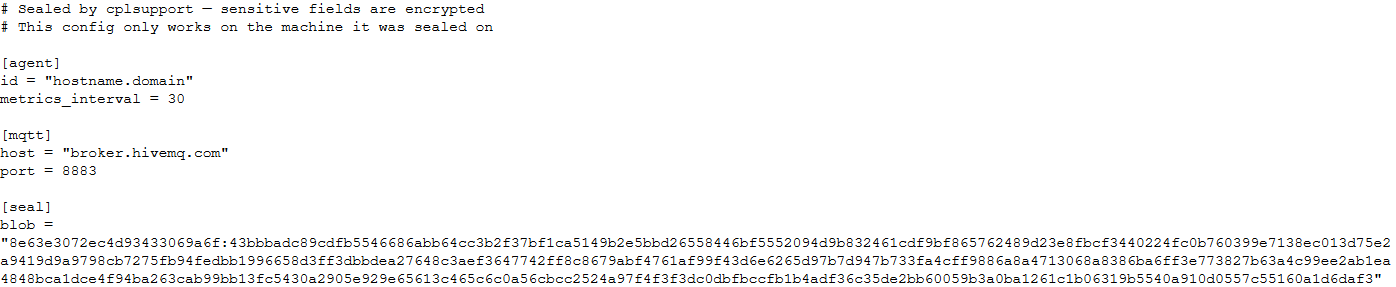
Encrypted backdoor configuration file, HiveMQ version

Encrypted backdoor configuration file, HiveMQ version

The encrypted portion of the HiveMQ version’s configuration contains the following parameters:

  • agent_privkey: the agent’s private key
  • channel_id: the channel identifier used to communicate with the broker
  • server_pubkey: the server’s public key
Decrypted blob field in the HiveMQ version's configuration

Decrypted blob field in the HiveMQ version’s configuration

In the Element version, the configuration file is deleted immediately after the first run, and the relevant parameters are instead written to the HKLM\Software\synapse\Config\SealedConfig registry key. On subsequent runs, the backdoor checks the registry for its configuration first.
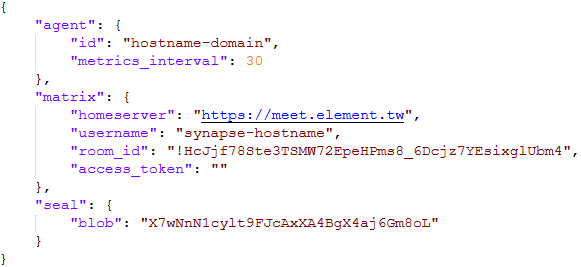
Decrypted Element version configuration file, retrieved from the registry

Decrypted Element version configuration file, retrieved from the registry

The Element version’s configuration specifies the address of an Element server controlled by the attackers, a room identifier, and an access_token used to access that room. If this parameter is left empty, the backdoor prompts for the password interactively during installation. After successfully creating a session, the backdoor saves the received token to the blob field.

Communication

At startup, both backdoor versions send a GET request to http://ip-api.com/json to determine the system’s public IP address and country of origin.

The first version uses the public HiveMQ MQTT broker (broker.hivemq.com) as its C2 server. The free tier of this broker supports up to 100 concurrent connections and up to 10 GB of traffic per month. The attackers set up their own cluster and used it both to collect telemetry from compromised systems and to send commands to the backdoor.

  • Once a connection is established, the system’s status is sent via a POST request to broker.hivemq.com:8883/[cluster_id]/status. The message format is: {"online":bool,"hostname":"hostname.domain","timestamp":unix_timestamp,"location":{"json"}}.
  • At intervals defined in the configuration file, system information, such as CPU load and available memory, is sent via a POST request to broker.hivemq.com:8883/[cluster_id]/metrics3. The message format is: {cpu_percent":float,"mem_used_bytes":int,"mem_total_bytes":int,"disk_used_bytes":int,"disk_total_bytes":int,"load_1m":float,"load_5m":float,"load_15m":float,"uptime_secs":int,"hostname":"hostname.domain","timestamp":unix_timestamp}.
  • The backdoor sends GET requests to broker.hivemq.com:8883/[cluster_id]/cmd/req to retrieve commands from the C2 server. The server responds in the format: {"cmd_id":int,"command":"str","timeout_secs":int}.
  • Commands are executed via PowerShell.exe in hidden mode, using the -NonInteractive -NoProfile -Command parameters.
  • Command execution results are sent to the command server at broker.hivemq.com:8883/[cluster_id]/cmd/res in the {"stdout":"str","stderr":"str","exit_code":int,"duration_ms":int} format.

For the second backdoor version, the attackers set up their own Element server running on the Matrix protocol, meet.element[.]tw, as the C2 server. On this server, they created a room used to receive messages containing device information and to send commands for execution on the compromised system. The communication flow is as follows:

  • Once a connection is successfully established, the backdoor sends an m.bird.status message containing the system’s status. This message format is identical to that used in the HiveMQ version.
  • At intervals defined in the configuration file, information about the compromised system is sent as an m.bird.metrics message. Field names are slightly different from those in the first version: {cpu_percent_x100":float,"mem_used_bytes":int,"mem_total_bytes":int,"disk_used_bytes":int,"disk_total_bytes":int,"load_1m_x100":float,"load_5m_x100":float,"load_15m_x100":float,"uptime_secs":int,"hostname":"hostname.domain","timestamp":unix_timestamp}.
  • This version of the backdoor supports two types of commands, distinguished by the start of the received message.
    • To set a new interval for sending metrics, the attackers send a message beginning with config:set_interval (accepting values from 5 to 3600 seconds). The new value is saved to the HKLM\Software\SynapseAgent\metrics_interval registry key.
    • Messages containing commands to execute begin with the string cmd:. Based on data extracted from Element’s SQLite databases on the compromised system, we were able to identify the account name the attackers used to send commands: panel-bot.
  • Received commands are executed via the Windows command line interface.
  • Command output is sent as an m.bird.cmd_response message. This message format mirrors the one used in the HiveMQ version.

Takeaways

We have been tracking Toy Ghouls’ activity for quite some time. We previously found that the group had expanded its arsenal with a custom ransomware strain, GenieLocker, and we have now discovered that it has also developed a backdoor capable of giving it full control over an infected device. The new tools use unconventional channels to communicate with their C2 server: the HiveMQ MQTT broker and the Matrix-based Element messenger. This shift away from publicly available open-source projects toward custom-built tools suggests that Toy Ghouls is working to make its attacks more sophisticated and to evade detection for longer.

Indicators of compromise

Kaspersky security solution verdicts:

  • HEUR:Backdoor.Win64.Suptoml.gen
  • HEUR:Trojan.Script.Zapchast.conf
  • Backdoor.Win64.Agent.smgdvy
  • Trojan.Script.Zapchast.abwm
  • Trojan.Win64.Agent.smgsfo
  • Trojan.Script.Zapchast.abwo

File names and MD5 hashes:

Registry keys:

  • HKLM\Software\synapse\Config\SealedConfig
  • HKLM\Software\SynapseAgent\metrics_interval

Service names:

  • cplsupport (Problem Reports Control Panel)
  • wtas (Windows Telemetry Aggregator Service)

Domain names:

  • meet.element[.]tw
  • broker.hivemq.com (a legitimate resource used by cybercriminals)
  • ip-api.com (a legitimate resource used by cybercriminals)
The invisible passenger in your car

21 August 2026 at 04:00

While monitoring Android threats in June 2026, we discovered a new piece of Android malware. What struck us as unusual was that it installed like an ordinary user app yet made no attempt to disguise itself as legitimate software: it had no user interface at all. This led us to suspect the app might be reaching users’ devices without their knowledge. Further investigation confirmed that hypothesis and allowed us to reconstruct the entire infection chain.

Key findings:

  • We identified new Android malware: a multi-stage downloader whose ultimate purpose is ad fraud and creation of a proxy botnet.
  • The malware spread through the built-in updaters of Android-based automotive head unit firmware. This is the first documented case of malware found on a car head unit with an infection chain specific to that type of device.
  • We attribute this activity, with high confidence, to the MoYu Group, an actor linked to the BADBOX botnet.

Kaspersky solutions detect the threats described below under the following detection names:

  • HEUR:Trojan-Dropper.AndroidOS.Agent.vu
  • HEUR:Trojan-Downloader.AndroidOS.Agent.ov
  • HEUR:Trojan-Proxy.AndroidOS.Zhima.*
  • HEUR:Trojan.AndroidOS.Vo1d.*

Head unit firmware overview

A head unit is a system that combines multimedia functions with partial control over certain vehicle functions. Head units may come as part of a car’s factory equipment or as an aftermarket upgrade. The main attack vectors for these systems are compromise via physical access and vulnerabilities in the head unit’s OS or components, both of which we’ve covered previously.

In some cases, head units run on Android, primarily because it’s convenient for manufacturers: Android’s source code already accounts for use cases within automotive head units. Android also allows manufacturers to add their own system applications during the build process, which they can use for a range of purposes: customizing the UI, adding system components tailored to the vendor’s needs, and more.

Most apps developed for Android devices can also run on an Android-based head unit, and that is true for malware as well. That said, it’s hard to imagine certain categories of smartphone-targeted malware being used to attack a head unit. Banking Trojans are a good example: since mobile banking is used almost exclusively on smartphones, infecting a head unit with a banking Trojan would be a waste of the attacker’s resources.

It’s worth noting that head units often include SIM card slots and can connect to the internet, enabling features like navigation and software updates. Since a head unit typically holds nothing of value to an attacker, one of the more likely attack scenarios using “classic” Android malware is infecting the device to recruit it into a botnet – similar to attacks on IoT devices.

During our research, we found exactly that kind of malware. The design of firmware for DoFun head units enabled attackers to distribute malware. We notified the vendor about the distribution scheme, and they subsequently reported fixing the security issues.

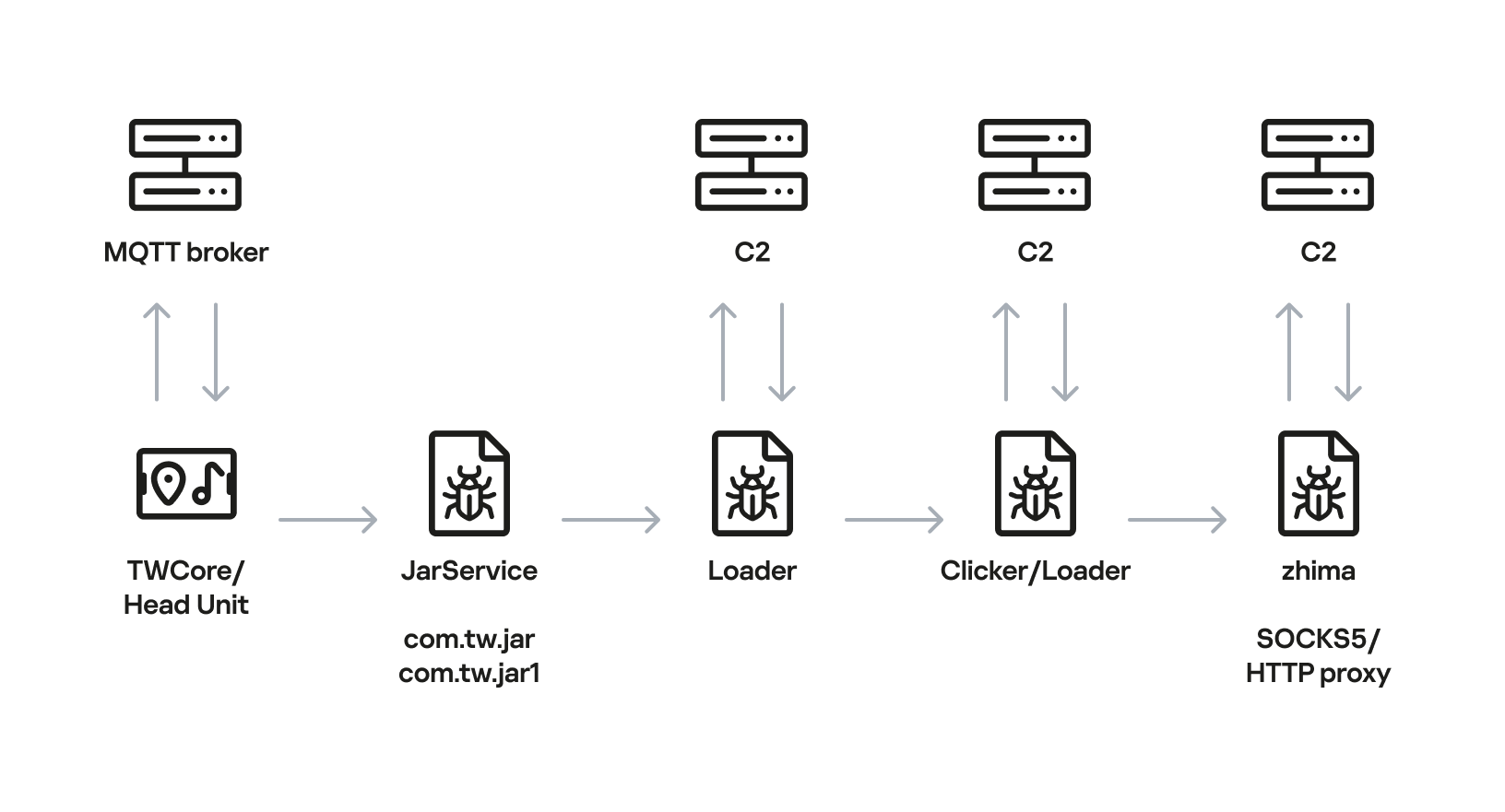
Below is the entire infection chain:

Head unit infection scheme

Head unit infection scheme

Let’s look at exactly how these head units became infected.

The TWCore app

TWCore is a legitimate system application responsible for collecting analytics data and updating the head unit software. Let’s take a closer look at how the update function works.

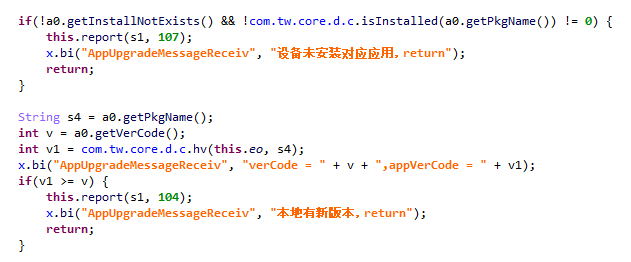
The process is fairly simple. An MQTT message broker hosted on the subdomain cardoor[.]cn sends a message containing information about the APK files that need to be downloaded and installed on the head unit. Notably, the object describing this message includes an installNotExists field, a Boolean flag that can be set to true or false. This flag allows TWCore to install apps that weren’t originally present on the device.

TWCore only checks whether an app is already installed on the device when installNotExists = false

TWCore only checks whether an app is already installed on the device when installNotExists = false

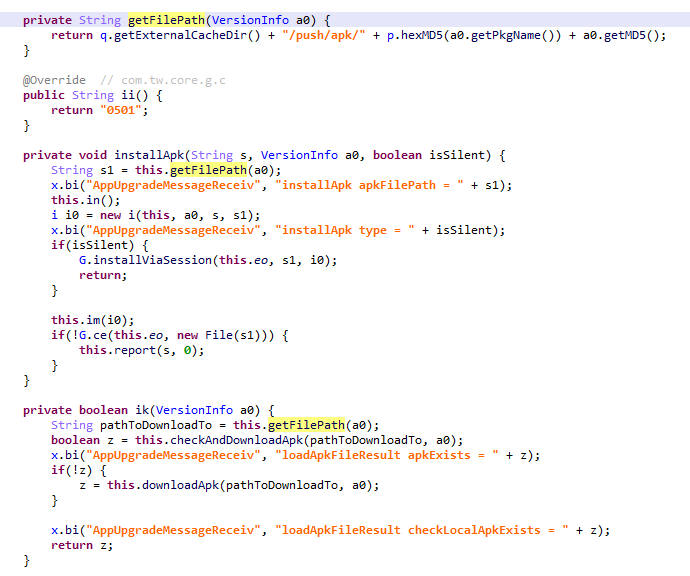
The APK file is downloaded to <TWCore external cache dir>/push/apk/ for installation.

The path TWCore uses to download APK files

The path TWCore uses to download APK files

Our telemetry revealed previously unknown malware at these file paths. On top of that, our data indicates that in every observed case, the malware was installed by an app with the package name com.tw.core, which matches the TWCore package name.

Next, we’ll break down the malware installed by TWCore: the JarService dropper.

Stage 1: the JarService dropper

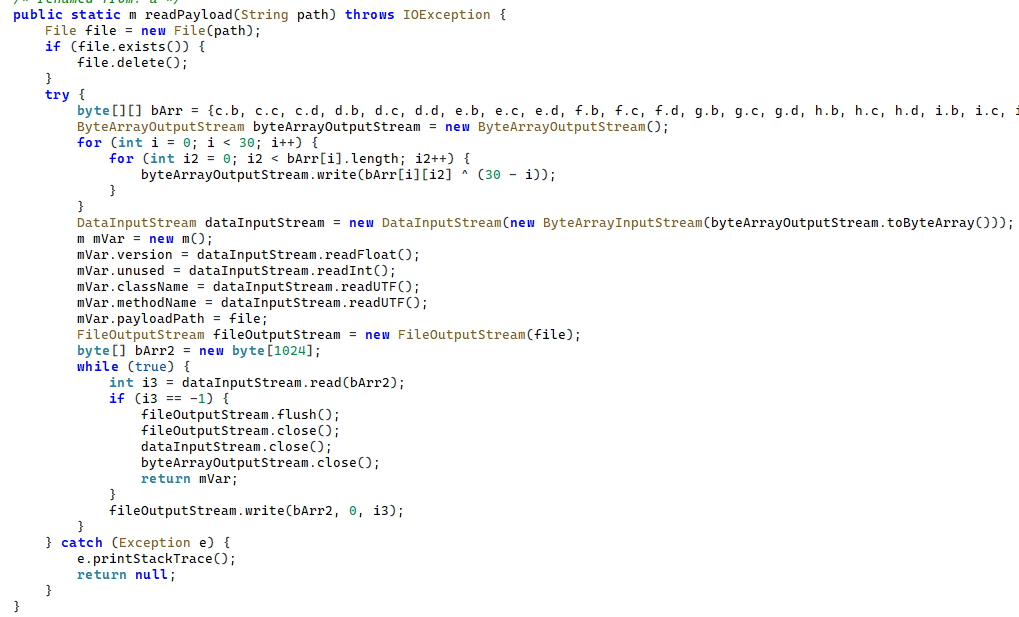
As mentioned earlier, JarService is a small dropper app with no UI of any kind. It decrypts data stored as encrypted blocks within the Trojan’s code. Each block is XOR-encrypted with a single-byte key that shifts linearly from block to block. The decrypted data contains serialized information about the payload version and entry point, along with the malware’s own code for further loading.

Decrypting and deserializing information about the stage 2 payload

Decrypting and deserializing information about the stage 2 payload

In the version of JarService we analyzed, the entry point for the next-stage payload was the wa method of the com.c.j.qbh class.

Stage 2: the loader

This stage’s payload is a malicious loader. Its code contains encrypted strings that are later used as class names to execute the stage 3 payload using the reflection mechanism. The loader sends implant information to one of the attackers’ servers via a POST request. Example of a request to the C2 server:

{
    "userId": "REDACTED",
    "dexVersion": "1.7",
    "dexType": 1,
    "channelId": "2039",
    "packageName": "com.tw.jar1",
    "appVersion": 12,
    "appName": "JarService"
}

In response to the POST request, the C2 server returns a link for downloading the stage 3 payload. An example of a C2 response is shown below.

{
    "code": 200,
    "data": {
        "dexUrl": "hxxp://144.217.243[.]201/vr34der34/dex3.68.png",
        "dexVersion": 3.680,
        "status": 0
    }
}

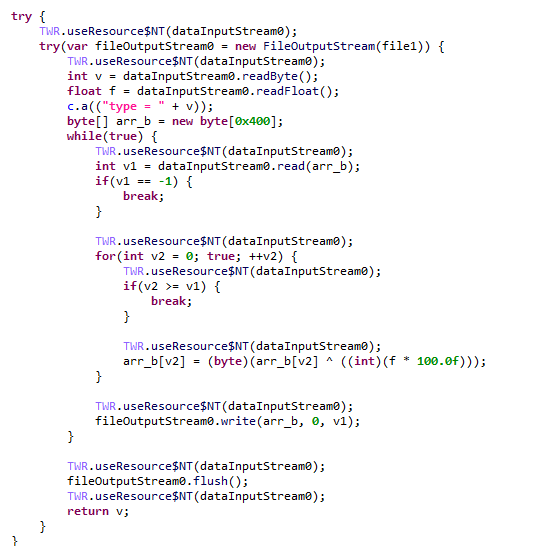
The Trojan uses the link in the dexUrl field of the data object to download serialized data for loading the next stage. This data begins with a single-byte integer, a key used to decrypt the strings in the loader’s code. Immediately following this number is a four-byte floating-point value used to XOR-decrypt the stage 3 payload, which itself is located after these keys.

Decrypting the stage 3 payload

Decrypting the stage 3 payload

In the decrypted payload, the entry point is the init method of the com.ast.sdk.BillingMain class, shown in the screenshot below.

Entry point of the stage 3 payload

Entry point of the stage 3 payload

While analyzing this stage, we noticed that the download link for the next-stage payload includes a version number. We decided to try other version numbers to retrieve different payload versions, and ultimately obtained seven distinct variants, which we list under “Indicators of Compromise” at the end of this report. The earliest version, numbered 3.57, uses a different decoding algorithm than the one described above. This may indicate that an earlier version of the infection chain used a different loader between JarService and the stage 3 payload.

Stage 3: clicker / reverse proxy loader

In this stage, the malware sends a POST request to /cpc/api/task every 90 minutes by default, containing information about the infected device (display resolution, device model, the SSID of the connected Wi-Fi network, MAC address, and so on) along with the Trojan’s configuration version. If the configuration is outdated, the C2 server returns an updated configuration containing new C2 addresses and new paths for sending HTTP requests. An example of a response is shown below. Note that at the time of our research, the most up-to-date configuration version was 3.82.

{
    "code": 100,
    "data": {
        "configVersion": 3.820,
        "hosts": ["hxxp://t2.kshahnd[.]sbs", "hxxp://t2.mdsjhd[.]sbs", "hxxp://t2.nmnsny[.]sbs", "hxxps://t2.nmnsny[.]sbs"],
        "interval": 5500000,
        "reportApi": "/cpc/api/report",
        "tagName": "config",
        "taskApi": "/cpc/api/task",
        "updates": ["hxxp://a2.kshahnd[.]sbs", "hxxp://a2.mdsjhd[.]sbs", "hxxp://a2.nmnsny[.]sbs", "hxxps://a2.nmnsny[.]sbs"],
        "vn": 1.010
    }
}

If the configuration version doesn’t need updating, the C2 server instead returns integer command identifiers, which the attackers refer to as productId. The Trojan maps each identifier to command information, which it stores as a serialized JSON object using the SharedPreferences API. Each identifier also has its own version, expressed as a UNIX timestamp. If the C2 response includes an unknown productId or one whose version is outdated, the malware sends a GET request to the attackers’ server at /cpc/api/xml to retrieve the command contents for all such identifiers. The C2 server responds with command information for each unknown identifier. An example of a response is shown below.

{
    "code": 200,
    "data": [{
        "productId": 979,
        "script": "{\n  \"loadType\": 1,\n  \"reload\": true,\n  \"method\": \"start\",\n  \"url2\": \"hxxp://144.217.243[.]201/vr34der34/sh65.io\",\n  \"md52\": \"de77c3303e93c9450424759f1741441c\",\n  \"name\": \"zhima\",\n  \"className\": \"com.miyc.transfer.Client\",\n  \"thread\": true,\n  \"tagName\": \"loadlib2\",\n  \"params\": [\n    {\n      \"type\": \"Context\"\n    },\n    {\n      \"type\": \"String\",\n      \"value\": \"107.151.248[.]132\"\n    },\n    {\n      \"type\": \"String\",\n      \"value\": \"1002\"\n    },\n    {\n      \"type\": \"int\",\n      \"value\": 1337\n    },\n    {\n      \"type\": \"int\",\n      \"value\": 7777\n    },\n    {\n      \"type\": \"int\",\n      \"value\": 8888\n    },\n    {\n      \"type\": \"int\",\n      \"value\": 15000\n    }\n  ],\n  \"url\": \"hxxp://144.217.243[.]201/vr34der34/sh65.io\",\n  \"md5\": \"de77c3303e93c9450424759f1741441c\"\n}",
        "version": 1778650942
    }, {
        "productId": 1019,
        "script": "{\n  \"loadType\": 1,\n  \"reload\": true,\n  \"method\": \"start\",\n  \"url2\": \"hxxp://144.217.243[.]201/vr34der34/sh65.io\",\n  \"md52\": \"de77c3303e93c9450424759f1741441c\",\n  \"name\": \"zhima\",\n  \"className\": \"com.miyc.transfer.Client\",\n  \"thread\": true,\n  \"tagName\": \"loadlib2\",\n  \"params\": [\n    {\n      \"type\": \"Context\"\n    },\n    {\n      \"type\": \"String\",\n      \"value\": \"128.14.210[.]58\"\n    },\n    {\n      \"type\": \"String\",\n      \"value\": \"1002\"\n    },\n    {\n      \"type\": \"int\",\n      \"value\": 9999\n    },\n    {\n      \"type\": \"int\",\n      \"value\": 7777\n    },\n    {\n      \"type\": \"int\",\n      \"value\": 8888\n    },\n    {\n      \"type\": \"int\",\n      \"value\": 15000\n    }\n  ],\n  \"url\": \"hxxp://144.217.243[.]201/vr34der34/sh65.io\",\n  \"md5\": \"de77c3303e93c9450424759f1741441c\"\n}",
        "version": 1766001509
    }, {
        "productId": 3505,
        "script": "{\n\"tagName\":\"http\",\n\"url\":\"hxxps://api.kookjar[.]com/sayhi?channel=daihai&uuid={get_uuid_10}\"\n}",
        "version": 1776656317
    }],
    "msg": ""
}

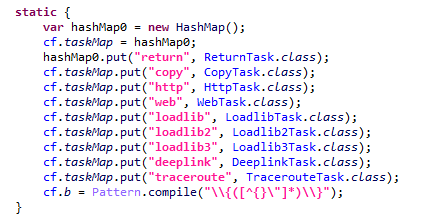
The command information includes a tagName field, which is the command name. The code maps each name to the corresponding class responsible for executing it.

List of executable commands

List of executable commands

At the time of our research, the attackers had implemented nine commands. The table below lists command names, brief descriptions, and arguments. The functionality of these commands suggests that the malware can be used to display ads, commit ad fraud (serving as a clicker), and download additional malicious code.

Command name Description Arguments
return Return a value from SharedPreferences. key: the key whose value should be returned
copy Set the contents of the clipboard. text: the key whose value from SharedPreferences is returned as the clipboard contents
url: a link for downloading gzip-compressed data (optional); this data is then concatenated with the value of the text key, with      (5 spaces) used as a separator
http Make a POST/GET HTTP request to a specified resource and, if instructed, save the response in SharedPreferences under a specified key. url: the resource address
method: the HTTP method name (optional)
startLabel: a marker for the start of the data to save from the resource (optional)
endLabel: a marker for the end of the data to save from the resource (optional)
valueLabel: the key under which to save the value (optional)
header: a dictionary of headers for the HTTP request (optional)
content: the content of the POST request (optional)
web Open a link in the WebView and execute arbitrary JavaScript code within it. url: the link to open in the WebView
js: base64-encoded JavaScript code to execute in the WebView; used when the url parameter is empty or absent
corejs: JavaScript code to execute when the resource loads in the WebView (optional)
param: a string dictionary of parameters for launching the WebView
client: if this key is present, WebViewClient is used to handle redirects manually
time: task timeout
loadlib Not fully implemented at the time of publishing this report.
loadlib2 Download and execute arbitrary code. url: the address to download the payload from
name: the name of the module being downloaded
md5: the MD5 hash of the payload
clear: a comma-separated list of payload names to delete (optional)
params: an array of parameters to launch the payload with
className: the class name of the payload entry point
method: the name of the virtual method at the payload entry point
cmethod: the name of the static method used to instantiate the entry-point class (optional)
thread: a flag; the payload runs in a separate thread if this flag is not set
reload: a flag that, when set, restarts already loaded modules
loadlib3 Not fully implemented at the time of publishing this report.
deeplink Open a resource in the browser. url: a link to the resource
traceroute Check resource availability via an ICMP ping. host: comma-separated list of resources to check

However, attackers use only a relatively small subset of these commands in real-world attacks. As shown in the example C2 response above, at the time of publishing this report the attackers were using the loadlib2 and http commands. The payload downloaded via the loadlib2 command is a reverse proxy module named “zhima”, which researchers from the Nokia Deepfield Emergency Response Team independently discovered in TV set-top boxes around the same time as we did and also described in their report. This confirms that the attackers’ ultimate goal is building a proxy botnet.

While investigating this stage of the attack chain, we noticed that the zhima download link also included a version number. As with the previous stage, we tried other possible version numbers and found eight variants of the zhima module, the earliest of which was version 57. The complete list of identified zhima modules is provided under “Indicators of Compromise” below.

Attribution

While analyzing the complete infection chain, we noticed that the stage 2 loader created a thread with the meaningful name mosdk-host-loader. We decided to investigate what mosdk referred to in that name. This led us to a malicious app installed on various TV set-top boxes with the package name com.abc.nexus (3AD4BF5A86D26FFBF09CAE42AF330A98). It consists of several components (including a dropper similar to JarService), each used by the attackers to covertly monetize the device’s computing power. Each malicious component in the app corresponds to its own service, and the service containing the launch code for the JarService-like dropper is named AdmoyuService. In light of this and the name of the malicious thread found in the payload code, we concluded that moyu in the service name referred to MoYu Group, one of the actors linked to the BADBOX malware platform, which had been described by researchers at HUMAN. This assessment is further supported by extensive overlap between the malware’s network infrastructure and that of MoYu Group, which was independently identified by researchers from the Nokia Deepfield Emergency Response Team around the same time as our own research. Based on these similar naming patterns and prominent infrastructure overlap between the activity of MoYu Group and the attacks described in this report, we attribute it to the same actor with high confidence.

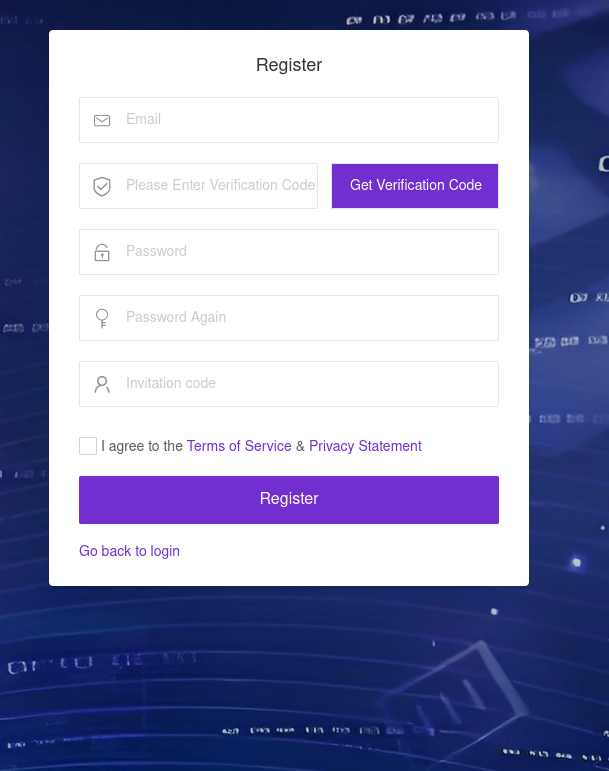
While investigating the malware downloaded by TWCore, we noticed that the domain admin.uipoxy[.]com resolved to the IP address 128.14.210[.]58, one of the C2 servers for the zhima reverse proxy module. It appears that the URL hxxp://admin.uipoxy[.]com/proxy/u/login hosts the zhima admin panel. Interestingly, this panel allows anyone to register as long as they have a valid invite code.

The malware operator registration page

The malware operator registration page

During registration, users are prompted to review the terms of use and privacy policy. Both documents are hosted on links under the pxyedge[.]com domain, which belongs to PXYEDGE, a vendor specializing in the sale of residential proxies.

On the registration page hosted at admin.uipoxy[.]com, we also found the string copyright © 2020 proxyforu[.]com all rights reserved, which linked to hxxps://proxyforu[.]com, the website of ProxyForU, another vendor of residential proxy services.

We found several similarities in the authentication APIs across all of these sites:

  • The sign-in page was hosted on an admin.* subdomain.
  • The sign-in page was located at /proxy/u/login.
  • The signup page was located at /proxy/register?channelKey=<invitation code>.

Based on this, we believe these services are connected to MoYu Group.

Conclusion

Despite efforts by cybersecurity professionals and law enforcement to shut down the BADBOX botnet, individual actors linked to it continue their malicious activity, infecting devices worldwide. Delivery methods for this kind of malware vary widely, from downloads via pre-installed backdoors to infected builds of IPTV apps. The case examined here demonstrates an even more sophisticated delivery method: distribution through the legitimate update functionality of a system application. Attackers are also actively expanding into new platforms. This malware is the first known malicious app targeting head units, which means these platforms now require protection against malware as well.

Indicators of compromise

Stage 1: JarService

ba27951b4ee1c341f4415d033369ecd3
d63bacd6d6709dd68a10ef9d374c7835
6c2e34b30da42085240ede53ab6107d4
8b5e513144a6138a966ea59e68bf9da2
e119845877089d6f4b0a70dc7388f316

Stage 2: loader

e9f3a0dab6949ce2cddab9e0aa80ae1a

Stage 3: loader/clicker

0fbaa7092204f4b1494e0b840b014774
1dcf031c40ce456b6a36a00b0acf3d11
44b6b213a6a3f299eaf88e078de95ecb
67dc78e544ebce16b85dc7c195dfbc58
9642ae619b3165d23c6349002d1abe24
b067d5b0dbecbd6498bcdfba45dba77e
f0e3f7eba2cde91e2dedb921bab47422

zhima module

412e9243f2981bbea3894254d105b3b8
71ab5517f71866279d0d87d37f2ae320
89ef78f716a75964539f2db6520be362
a4223ce4288a230d1e6c3ff2c7639045
bd4d81cd27125ad3d9a114922d468499
c6bfb1643ac7474ed8a7b4f96a187fdb
de77c3303e93c9450424759f1741441c
f8cf8c23ff597700d471fb7767df8bac

Domains and IP addresses

xmsae[.]sbs
ishano456[.]sbs
xshaon123[.]sbs
kshahnd[.]sbs
mdsjhd[.]sbs
nmnsny[.]sbs
kookjar[.]com
ty54fgd435[.]my
ue886578433[.]online
ty4523[.]space
144.217.243[.]201
107.151.248[.]132
128.14.210[.]58

Addresses used to download JarService

hxxp://ovcloudcontrol.cdn.cardoor[.]cn/upgrade/2026-06-08/bd80bd3c3d0e4bf6b5b4a825650d01f5.apk
hxxp://ovcloudcontrol.cdn.cardoor[.]cn/upgrade/2025-06-10/fe71af9ecf174de48d2b2ccc2c15fb04.apk
hxxp://ovcloudcontrol.cdn.cardoor[.]cn/upgrade/2024-11-07/fa831c3c23824b99871163387bcda7ad.apk

Hashes of TWCore (the legitimate software used to distribute JarService)

2a64c3efc11bf224aa54f24e876446c9
7a4d3ba2dacccfdda55859a5dfee2671
ea24487996eb70c1780922fb3063bcc5

SDR (Signals Intelligence) for Hackers: Tracking People with ESP32-Paxcounter

21 July 2026 at 10:39

Welcome back, aspiring cyberwarriors!

Lately, we’ve covered several tools you can use with your laptop to track nearby devices and people. While they’re useful, their effectiveness depends on the strength of your Bluetooth adapter, and, of course, you need to have your laptop with you.

This time, we’re doing things differently. We want to show you a device that can automatically monitor nearby devices for extended periods, anywhere you choose to place it, and as often as you want. It doesn’t rely solely on Bluetooth, as it also uses Wi-Fi, which is far more likely to be enabled, increasing the chances of detecting someone in your area.

What is Paxcounter

Paxcounter is an open-source firmware project that takes a cheap little ESP32 development board and turns it into a sensor that can count people. Almost every smartphone in the world is constantly sending out small Wi-Fi signals, called probe requests, and Bluetooth signals too, even when the phone is not connected to anything. Paxcounter listens for these signals in the air. It counts how many different devices it hears during each scan, and from that, it can tell you a real time estimate of how many people are nearby.

The project started out as a simple way to measure how many passengers or pedestrians pass through a certain spot. But over time, it grew into something much bigger. Now it works as a general purpose IoT platform, built on hardware that usually costs somewhere between $10 and $30. Besides its main job of counting Wi-Fi and Bluetooth devices, a Paxcounter can also read environmental sensors, track its GPS position, keep accurate time, and send all of that data out through LoRaWAN, MQTT, a local serial connection, or straight onto an SD card. 

How the Counting Works

The way Paxcounter counts people is simple, but it was clearly built with privacy in mind from the very start. Every scan cycle, which lasts 60 seconds by default, the device switches its Wi-Fi and Bluetooth radios into scanning mode and listens for probe requests and advertisement packets coming from nearby devices. Each of these packets carries a MAC address. Paxcounter takes just the last two bytes of that address and turns them into a short, temporary ID. This ID is only used to check for duplicates during that one scan cycle. Once the cycle ends, the count of unique IDs gets sent out, and the whole list is wiped from memory. The firmware also does not try to fingerprint any device. It never tries to figure out a phone’s brand, its operating system, or who owns it. All it wants to know is whether that device has already been counted in the current window.

paxcounter

This scan and clear cycle just keeps repeating, either nonstop or on a schedule if deep sleep power saving is turned on. The results, which include the Wi-Fi count, the Bluetooth count, and sometimes live sensor readings too, get packed into a small payload and sent out through whatever channel the device is set up to use. One thing worth knowing is that Wi-Fi and Bluetooth scanning actually share the same 2.4 GHz radio hardware on the ESP32. So running both scans at the same time slightly lowers the accuracy of each one. Because of that, the project’s own advice is to split Wi-Fi only counting and Bluetooth only counting across two separate devices whenever the best possible accuracy is needed for both.

One Firmware, Many Boards

Paxcounter comes with a hardware abstraction layer and its own pin mapping files for dozens of ESP32 and ESP32-S3 boards. These come from well known manufacturers like LILYGO and TTGO, Heltec, Pycom, WeMos, M5Stack, and Adafruit, and there is also a generic template ready for boards that are not officially supported yet. LILYGO even sells a ready-made board called Paxcounter LoRa, built specifically to run this firmware. 

lilygo paxcounter

Depending on which board you pick, your device can end up supporting a LoRaWAN radio for sending data over long distances while using very little power, an OLED status screen, or a single color, RGB, or larger LED matrix light to show status. It can also support a physical button for flipping through display pages or sending an alarm message, battery voltage monitoring, GPS positioning, a real time clock chip along with IF482 or DCF77 time telegram output, and even an SD card slot for logging data locally when there is no network around.

Because the whole system was designed to be truly portable, the documentation goes into real detail about power draw, which usually sits somewhere between 450 and 1000 milliwatts depending on how the device is set up. It also makes good use of the ESP32’s deep sleep mode, so a device can keep running for a long stretch of time on just one 18650 lithium ion battery cell. Members of the community have already shared several 3D printable enclosure designs on Thingiverse for the more popular boards.

3d printed enclosure

Getting the Device Up and Running

Paxcounter is built using PlatformIO instead of the plain Arduino IDE. This choice lets it work smoothly with editors like Visual Studio Code, Atom, or Eclipse, and it gives the project reproducible, script driven builds. In fact, the repository runs an automated PlatformIO build check every single time the code changes, using GitHub Actions, and there is even a CodeFactor badge that keeps an eye on ongoing code quality.

The configuration is intentionally spread across a handful of different files instead of being crammed into just one. This keeps board specific settings, behavioral settings, and personal settings nicely separated from each other. The platformio.ini file is where you select which board’s hardware profile you want to compile against. The paxcounter.conf file handles behavioral settings, things like how long a scan cycle lasts, sleep timing, and payload options. The shared lmic_config.h file sets the LoRaWAN region and frequency plan, so it matches the rules where you live. The shared loraconf.h file holds the device’s LoRaWAN join credentials, and the project recommends using OTAA rather than ABP for this. And the shared ota.conf file stores the Wi-Fi credentials the device uses for over the air firmware updates.

You can upload firmware the traditional way, over USB, or once a device has joined a LoRaWAN network, you can push updates over the air instead. A remote command tells the board to connect to Wi-Fi, check a hosted repository called PAX.express for a newer build, and then download and flash it automatically. If anything goes wrong during that process, it will roll back to the previous version on its own. Devices can also be set up to open a small local web based bootstrap menu right when they power on, which lets you upload a firmware file manually, even from a phone in tethering mode, without needing PlatformIO installed on site.

Configuration and Extensibility

Beyond just picking a board, Paxcounter gives you a long list of settings you can tune to fit your needs. It can log environmental data from sensors like the Bosch BMP180, BME280, BMP280, or BME680, read a Nova SDS011 particulate matter sensor to track dust in the air, and keep accurate time using either a DS3231 real time clock or a connected GPS module. 

extensions

Display and LED

On boards that come with an OLED display, Paxcounter shows live status information you can cycle through with a short press of the button. This includes the current pax count, meaning the people count, a histogram of recent activity, GPS status, environmental sensor readings, and the time of day. 

display

A long press of that same button sends an alarm message out over the network instead, which is a simple way to flag a problem from out in the field without needing any other kind of interface. Even on boards that do not have a display at all, a status LED still tells you what the device is doing through its blink pattern. You get a brief flash whenever a new Wi-Fi or Bluetooth device is spotted, a quick blink while the device is joining the LoRaWAN network, a short blink during data transmission, and a slow, long blink if there is a LoRaWAN stack error. Boards that have an RGB LED get a color coded version of these same signals.

led

How You Receive the Data

Once a Paxcounter has counted the people nearby and packed everything into a message, that data has to go somewhere so you can actually see it. How that happens depends on which output the device is using, and the good news is you can turn on more than one at the same time. If you are using LoRaWAN, which is the most common setup, the device does not send the data straight to you. Instead, a nearby LoRaWAN gateway picks up the signal first and forwards it on to a network server, usually The Things Stack. There is a small decoder script included with the project, and its job is to take that raw message and turn it into numbers you can actually read, something like a pax count of 14. From there, The Things Stack can pass the data along to your own app or dashboard using MQTT or a webhook, or you can simply watch it come in live through the built in console.

If a board does not have LoRa hardware built in, it can just skip the gateway completely and send that same kind of data straight to an MQTT service over Wi-Fi instead. You can also connect the device to a computer using a USB cable and read the numbers directly from a serial connection. This is a simple way to test things out without needing to set up a network at all. If SD card logging is turned on, everything also gets saved locally as a CSV file, so you can pull the card out later and open it up in a spreadsheet. This comes in handy in places where there is no network coverage to rely on. 

Where It’s Used

Because a single Paxcounter device is cheap to build and can be left running unattended for a long time, you will find it popping up in a pretty wide range of places. Retailers and shopping centers use it to measure foot traffic without needing to install cameras. Event organizers use it to watch how crowds move around a venue in real time. Pentesters can get a passive read on how many Wi-Fi and Bluetooth devices are active in a building, or to notice unexpected devices showing up where they shouldn’t, all without needing camera access or network credentials.

Legal and Privacy Considerations

Since Paxcounter’s whole job involves listening to wireless traffic, its documentation is unusually upfront about the legal side of things. It points out that sniffing Wi-Fi and Bluetooth MAC addresses may be regulated or restricted depending on where you live, and it links to specific starting references for the US, the UK, the Netherlands and the EU, and Germany. It also makes clear that the legal responsibility for how a device is built and deployed falls on the person doing it, especially for public deployments where the results might get published somewhere. On the technical side of privacy, the project’s own design actually holds up pretty well against that legal backdrop. Identifiers are only ever built from the last two bytes of a scanned MAC address, they are kept in memory just for the length of one scan cycle, and then they are discarded completely. No MAC addresses or identifiers are ever sent out over the network, and the firmware does not do any extra tracking or fingerprinting of the devices it scans.

Summary

What really makes Paxcounter stand out is not any single feature on its own. It is the whole combination working together. One piece of open source firmware supports dozens of cheap boards, runs for a long time on a small battery, counts people without saving anything identifying about them, doubles as a general environmental sensor node, speaks LoRaWAN, MQTT, serial, and SD card all at once, and can be fully reconfigured from a distance once it is out in the field. The full source code, the complete board list, and all the documentation are available on GitHub.

If you enjoy experimenting with frequencies and trying new things, we recommend signing up for our SDR for Hackers training. With Master OTW, you’ll learn how to use your computer and inexpensive SDR hardware to explore and hack a wide range of radio signals.

The post SDR (Signals Intelligence) for Hackers: Tracking People with ESP32-Paxcounter first appeared on Hackers Arise.

❌
❌