Proton plans to reassess employees' AI skills in interviews that could affect their jobs, raising questions about AI adoption and workforce evaluations.
Proton plans to reassess employees' AI skills in interviews that could affect their jobs, raising questions about AI adoption and workforce evaluations.
Anthropic moves Agent Skills to the Agentic AI Foundation. Learn what the handover means for IT teams, workflow portability, compatibility, and security.
Anthropic moves Agent Skills to the Agentic AI Foundation. Learn what the handover means for IT teams, workflow portability, compatibility, and security.
Infrared (IR) communication technologies are probably one of the most influential, yet also one of the least flashiest. The fact that IR communication tends to be highly directional and often limited to low data rate leads many people to scoff at it, deeming it barely worthy of more than making TV remotes work, perhaps along with some unloved industrial gear like the IR interface of electrical meters.
This is a shame, because TV remotes are a good example of why sometimes you want something that is directional, and anyone who has battled with Bluetooth pairing can attest to the value of things simply working by pointing it at the device. IR protocols also have the advantage of inherent privacy protection as walls and other obstacles will block the signal, unlike that of an exploitable Bluetooth device which happily advertises to your neighbors and passersby.
For reasons like the above – as well as their simplicity and hackability – IR protocols are worthy of a detailed look.
Remote Control
Naturally, one of the oldest uses of consumer IR protocols is that of the venerable IR remote control. Initially TVs used wired and ultrasonic remote controls, with the latter using simple ultrasonic tones to transfer a command, but with IR protocols and the advent of cheap MCUs it became possible to create extensive communication protocols. Of these the NEC, Sony IR (SIRC) and Philips protocols are probably the most well-known and most used.
These use an approximately 38 kHz carrier, with the common NEC protocol using pulse distance encoding – a form of amplitude-shift keying – and the Philips RC-5 protocol using Manchester encoding. Within this encoding, these protocols define various bit fields and other values that can be used by a receiver to determine whether it’s being targeted, and if so what command the user wishes to have performed.
When it comes to those cheap-and-cheerful remotes that you get with just about any RGB light strip and others gadgets these days, they tend to use the same NEC protocol, with many MCU-based projects around that can control these gadgets directly with a simple IR LED.
For example this STM32F0-based project by [eleksaggr] on GitHub that targets the common 24-key RGB remotes. This Infrared Remote Control Implementationapplication note by Texas Instruments for the MSP430, which contains a good overview of the modulation and encoding schemes, as well as how to implement a remote control.
Many smartphones have – or used to have – an IR blaster feature that can target the same carrier frequency and a range of protocols to control just about anything that is IR remote controlled. In a world of smartphones this would theoretically mean that everyone has a universal remote in their pocket at any time, if it wasn’t for IR blasters becoming pretty rare. If your recently purchased smartphone still has an IR blaster, it’s very likely a Chinese brand, which is a shame as IR remotes are still used for so many things.
IrDA
IrDA used to transfer a file between a Thinkpad T40 and T42. (credit: nick99nack, Wikimedia)
Of course, IR remotes are quite a specific use case, but you can send a lot more than just a basic set of commands to a device. The most well-known standard here is IrDA, which stands for Infrared Data Association, the association which defined the various standards.
The basic principles behind IrDA remain effectively the same as with the remote control protocols, just designed to be capable of far higher transfer speeds. This is accomplished through various types of encoding, modulation and other techniques also observed with non-IR forms of wireless communication. Using this a range of speeds are possible, defined as:
SIR (115 kbit/s).
MIR (1 Mbit/s).
FIR (4 Mbit/s).
VFIR (16 Mb/s).
UFIR (96 Mbit/s).
Giga-IR (512 Mbit/s – 1 Gbit/s).
The IrDA protocol stack. (Credit: Fred derf, Wikimedia)
In addition a range of derived protocols exist such as IrSimple that allows for easy sharing of images between phones, printers, and displays. All of this uses generally the same IrDA software stack, though the special versions such as IrSimple optimize it to make transfers take less than a second for a 500 kB picture.
All communication generally happens in half-duplex, as the sending side tends to produce too much interference for the receiving side of the transceiver to reliably receive data. Distance between the two sides can be as much as two meters, though the lower power versions shrink that down to 20 cm or thereabouts.
Within this range of speeds you can pick whatever the device needs. Power meters, for instance, are plenty happy with the IrDA-SIR protocol, which is low-power and speed enough to bitbang on even a basic MCU in these meters with just a basic IR transceiver attached to its pins.
Power Meters
IR transceiver port on IEC 62056-enabled smart meter. (Credit: WMKrieling, Wikimedia)
The humble power meter that lurks in your utility closet or wherever else it is installed has to be shielded from whatever environment it is installed in, ergo they require some kind of low-power, low-speed wireless interface. Using nothing but an IR-transparent window on the enclosure it is then possible for a read-out device to be pressed up to said window, where it’ll quickly query the device for the necessary information.
This same feature is also found on heat meters and other types of devices where such basic read-out functionality is required. Here security is managed by not only the short-distance, line-of-sight requirement of an IR communication link, but also by having a sign-on involving an encrypted password exchange.
Although IrDA-SIR was commonly used here, these days DLMS/COSEM, also known as IEC 62056, is much more common. While radio-based forms of automatic meter reading (AMR) are also used, short-range protocols like this have a definite privacy advantage, with the line-of-sight feature meaning that the reader has to be literally in front of the meter to work, unlike with RF wireless approaches.
Whether this privacy aspect is important depends on the situation, but it’s hard to argue with the low power requirements compared to stuffing a Bluetooth or Wi-Fi module into the meter and dealing with its implications.
Game Consoles
Nintendo 3DS with Circle Pad Pro accessory installed. (Credit: Umweltschützen, Wikimedia)
Although it may seem that handheld game consoles went straight from the Game Boy’s link cable to Wi-Fi transfers on the Nintendo 3DS beyond, it featured an IR communication port. This was intended to support peripherals like the Circle Pad Pro and the Amiibo reader/writer device for the original 3DS as it did not feature the NFC reader of the New Nintendo 3DS.
As it turns out, the 3DS uses irDA-SIR for this expansion feature, with e.g. the Circle Pad Pro using a 96000 baud rate. Since this peripheral merely is there to add a second circle pad to match the built-in left one, it doesn’t need a lot of bandwidth.
In the case of the external NFC reader, this was a similar low bandwidth application where it made a lot of sense to use this same IR port to provide this new feature to older 3DS consoles, instead of making it a New 3DS-exclusive feature. Although one could have used Bluetooth for this even back then, the 3DS console did not include Bluetooth, and when looking at e.g. the Joycons of the Nintendo Switch it’s clear that they are a tad more power hungry and complex circuitry-wise.
When low-power and line-of-sight are benefits rather than a potential source of confusion of which peripheral you’re trying to pair with, it can make a lot of sense.
DIY IR Transceiver
If you’re feeling like making your own IR receiver, receiver or even transceiver solution, there are many options. Perhaps the most exciting aspect is that even if you want to use something like IrDA, this feature is often part of the UART in many MCUs. In the case of Espressif’s ESP32 MCUs, for example, you can look at its list of potential UART modes and note that you can pick IrDA as well as RS485 in addition to plain UART functionality.
There are also dedicated IrDA encoder/decoder ICs, such as the MCP2120. This gets you IrDA-SIR support for any UART interface that does not directly implement this protocol. You can also use something like the Vishay TFDU4101 IrDA transceiver that integrates everything including the IR elements into a single package.
If you’re more about messing with NEC, Sony and Philips remote control protocols, then a common part like the VS1838b provides a similar solution to the Vishay part for 38 kHz applications. This IR receiver handles all the receiving, demodulating, amplification and other tasks, leaving it to the receiving MCU to parse the received data.
This of course just barely scratches the surface of everything IR communication-related, so feel free to chime in with your own info dumps and requests for additional topics to cover.
A laptop with no wireless connectivity feels like a rarity – but when you shop for powerful Linux single-board computers (SBCs), it is pretty common to see one skimp on WiFi. At the same time, current wireless cards can leave much to be desired. A mess of proprietary firmware, ephemeral or even binary blob drivers, weird glitches never resolved, and sometimes entirely source-less blobs with an expiration date. Maybe the SBC doesn’t have a free USB port for a plug-and-play WiFi chip, or you don’t want to design for an obscure hard-to-source castellated module.
What if I told you there’s a unique solution to the problem, as long as the SBC has an SDIO or SPI to spare? There’s a wireless card we can all try to get behind, and it’s certainly not flawless but gives us way more room to grow – it’s got somewhat open-source firmware, it comes from a respectable company, and it’s nigh-guaranteed to be easy to source. I am, of course, talking about esp-hosted – using ESP32 modules as your WiFi/BT card, over SDIO or SPI.
I’ve recently added an ESP32-C6 into my project, and setting up esp-hosted wasn’t ultra straightforward – so here’s a guide, and a discussion on what makes esp-hosted so cool and so incredibly promising. Spoilers: it works with privacy switches that cut out power, it could be hacked into a coprocessor for mesh protocols, and it could potentially help us build a fully open-source SDIO WiFi card.
Two Halves, Most Chips Supported
A quick clarification is warranted, as there are two projects under the esp-hosted roof. There’s the esp-hosted-mcu (previously known as esp-hosted-fg, “First Generation”), which runs the ESP32 as more of an MCU connected to WiFi and provides a relatively limited but self-sufficient interface on the Linux side; your connection aspects are mostly managed by the ESP32 module, so it will connect to your defined WiFi networks no matter if your host is rebooting or even fully off. As such, esp-hosted-mcu works best on microcontrollers, or in cases where you want your ESP32 to be a fully conscious separate entity, so to say. Want to make your ESP32 into an EC for your board, complete with WiFi connectivity? Then go with the -mcu version.
esp-hosted-linux (previously known as esp-hosted-ng, “New Generation”) leaves the wireless stack on the Linux side, with the ESP32 being a relatively thin proxy for the Linux wireless stack. I’ll talk about esp-hosted-linux here because it behaves in the most “native” way that regular WiFi cards do under Linux, but a lot of this article will apply to esp-hosted-mcu too.
esp-hosted requires two to tango: a Linux computer with an SDIO or SPI port to spare, and an ESP32 chip/module out of supported ones, I opted for ESP32-C6. The generic ESP32-WROOM modules are more than enough, but most of the shiny new chips are supported as well. Specifically, ESP32-S2, -S3, -C2, -C3, -C5, and -C6/C61 can all work with the esp-hosted-linux, and if you’re playing with something like the -S31, check the issue tracker of the parent project. I run the C6 because I thought it was the chip with the largest amount of supported features, and it’s marginally more expensive than any of the other ones, so why wouldn’t I? However! That was a mistake, and if I were to design a new board, I’d go with the ESP32-C5. Turns out, despite the C number being lower, ESP32-C5 is straight up better than the ESP32-C6, sporting 5GHz support in particular.
From there, you’ll want to wire it up over SDIO or SPI – I recommend SDIO if available, because it’s way speedier. One thing – make sure that your SBC’s SDIO interface is supported by the OS, and not in the limbo state of “the hardware is ready, someone just needs to make the driver work”, unless you can be that somebody. If you already have a devboard, you can bodge in an SD card onto your supposedly-SDIO pins to verify that your SDIO interface actually functions!
SDIO is essentially a full-duplex parallel bus with one control signal (CMD), one clock (CLK), and four data lines (D0-D3) – or just one data line, D0, if you feeling ascetic. These lines wiggle fast, and they’re not diffpairs, so you’ll want to lay them out with respect as single-ended wires. I’ll be writing up a larger SDIO article, but until then, do refer to one of the numerous SDIO layout tutorials online. Here’s a reference schematic:
A short SDIO layout recommendation: make sure there’s a continuous ground return path underneath, length-match between signals to the best of your ability (within 1 mm?), and overall keep the SDIO link as short as you possibly can. When wiring up SDIO coming from the 40-pin header on a Pi Zero or a full-sized Pi, some signals will need a lot of length-matching and some will need none at all – that’s normal, such is the Raspberry Pi GPIO pinout, just remember to match them. Include both series resistors and pullup resistors, as asked by the ESP-Hosted documentation.
Apart from the SDIO signals, you’ll want control over EN, so the driver can reset the ESP32 into a known-good state before starting communications. For that matter, you can also wire up EN to a classic RC circuit used for OLED displays, if you’re short on GPIOs and don’t mind – the driver wants EN supplied, but it doesn’t require-require it, you can just provide resetpin=-1 to the driver init script if you take care of EN switching on your own.
Example of single-sided layout of both pullup and series resistors at once
You don’t need to worry about the BOOT pin. You do need to make sure there’s sufficient 3.3 V power available, though: 300 mA to 400mA. The 3.3 V power rail on Raspberry Pi boards will generally be more than enough for powering your ESP32, but on other SBCs, you might end up adding an extra 3.3 V regulator to satiate the ESP32’s 3.3 V appetite. Last but not least, expose the ESP32 USB port somehow, because you’ll need it for flashing the firmware. Thankfully, the firmware flashing only needs to be done once. Personally, I put it on a 4-pin JST-SH with a QWIIC-like pinout, as you can see on the schematic above.
Build Firmware, Or Don’t
There are three things you need to do. Make sure your SBC’s SDIO (or SPI) interface is freed up, compile and flash your ESP32 firmware, then compile and load the driver. Not necessarily in this order, of course, but you need all three.
Freeing up the SDIO interface is relatively easy on Raspberry Pi: it’s a quick config.txt job. You only need to remap the SDIO pins, and if there’s an existing WiFi card, also disable its Bluetooth. The “Bluetooth disable” part is likely required because the onboard WiFi card’s firmware is uploaded over SDIO, so the Bluetooth part of the card wouldn’t function, anyway. It also frees up the UART console port on the Pi, which can be incredibly helpful if you need to debug your WiFi interface bringup! By the way, I have my doubts that the poll_once=off SDIO overlay parameter is required, and it does seem to spam up dmesg. If you ever need to get rid of that spam, removing that poll option might be a good start.
On other SBCs, you might struggle with SDIO, but as long as it is not too obscure, it shouldn’t be too big of a problem. If you’re rolling your own SBC, and if you have a devboard, feel free to wire up a microSD socket to the SDIO pins, add pullups as required, and debug your SDIO interface bringup using a spare microSD card. If a microSD card works, then in all likelihood, the ESP32 will work too.
ESP32 firmware compilation is also relatively easy. Maybe you don’t want to compile the ESP32 firmware on your SBC, since it might run out of RAM and lock up while executing cmake. On a Pi Zero, the lockup is basically guaranteed. Simply use your desktop computer to compile the firmware and avoid the hassle. Alternatively, you can skip all of that and download a firmware from the Releases tab on Github. Those are currently kept in the legacy repo, but I’m assuming eventually new releases will be put into the esp-hosted-linux repository, so look out.
Make sure that your driver is built from the same esp-hosted git repository version as your ESP32 firmware, using git log or the like to check the last commit. Otherwise, the driver will throw a warning and refuse to load, you can patch out that warning if you think the difference is too minor, but that’s at your own risk.
Drivers Done In Old-Fashioned Way
Now, the driver, you’ll want to compile the driver on the SBC itself, unless you cross-compile. The rpi_init.sh script compiles and loads the driver, and it also contains some notes you might find helpful. If you have an SBC with 512 MB of RAM or less – open the rpi_init.sh in the editor, find the make -j8 command, and replace it with make -j2 (or even -j1). Otherwise, your compilation process will run out of RAM and lock up your SBC.
Do you have everything connected by now? If you have SDIO properly configured and firmware has been flashed, the driver will just load successfully and a wlan interface will appear. Problems with that? Check dmesg to see the debug output of the driver module. I enjoy running dmesg -Hw in a spare terminal window, or just in the background.
Now, the rpi_init.sh script is a great tool for debugging, but it’s a tool you’ll want to shed when running the module longer-term, in large part because it recompiles the module every time it’s run. In the same directory, you’ll find esp_sdio.ko – that’s the Linux module you just compiled. Do this:
sudo cp esp_sdio.ko /lib/modules/uname -r/kernel/drivers>/code>

sudo depmod -a
It may be a hack, but at least now, you can modprobe esp_sdio, instead of insmod from the script directory. You can then also put the module name (esp_sdio) into /etc/modules to have it auto-load on every boot, which is way better than re-running the script and the associated recompile.
Workable And Very Promising
Forgot about pullups and had to improvise
There are some things to be desired, of course. The module should be properly integrated into device tree interfaces, for one, so that it doesn’t need to be added into /etc/modules and can instead be auto-loaded by an overlay. It also should get a dkms integration, in the same way the esp8089 driver was distributed. Currently, you have to recompile it and re-add the module into the kernel modules directory after every kernel upgrade, and dkms would cut that right out. Throughput is alright, you can get 40 Mbps to 50 Mbps at default SDIO frequency. If you think your hardware is good enough and can push SDIO limits further, there’s some dials and knobs you can tweak!
Cool Trick, But Why?
So why talk about this? There are four reasons that I find important. First, this is the only WiFi card I know that can pass Bluetooth through over SDIO instead of tying up a UART port, which is especially helpful for Pi Zero form-factor boards. That alone is pretty cool.
Second, while the code is imperfect and there is a heap of pull requests one should take a look at, esp-hosted does handle hardware power switches in my project! There are no kernel module crashes or failures as the ESP32 loses power, it disconnects and reconnects seamlessly, the hardware switch just works, and I find that endearing.
The next two reasons are both about this being an essentially open-firmware WiFi card. The ESP32 firmware isn’t fully open, as the RF bits are traditionally closed-source and get compiled in as blobs, but there have been somemighty projects trying to liberate the proprietary bits of the ESP32 WiFi stack. As more and more people get a stab at it, it’s entirely possible we could turn the omnipresent ESP32 modules into fully open-source firmware Linux WiFi cards, incredibly cheap and abundant anywhere, too. Truly hacker-friendly WiFi cards that last, what’s not to love?
The final reason is the most fun of all, and doesn’t even need the de-proprietarization. After SDIO wireup, the ESP32 is left with many free pins, including ones with high-speed SPI. Who’s to say that we can’t wire up a LoRa modem to it and run Meshtastic/Meshcore/etc.? Since the firmware is mostly open, in theory, any code could be added within the WiFi/BT gaps, any meaningful data then forwarded to the Linux host. It also doesn’t escape my eye that new ESP32 chips support Zigbee and Thread natively, and exposing that to Linux is only a matter of code, too. To me, that’s the best part, thinking that one day we could turn the ESP32 into a true Swiss army knife communications co-processor for any Linux-running CPU.
Sometimes you might run the same model twice and get different results. That often happens when you’ve upgraded it with skills. Skills are detailed text documents that lay out the tools the model should use, the approach it should take and how it should analyze the results. Good skills are practical, pulled from actual reports on HackerOne and other bug bounty platforms. A model can still lean on its own knowledge, but that’s just less efficient.
There are plenty of skills out there you might come across, but not everything can be trusted. Some skills can simply be dangerous and infect your system. To make sure they are safe, you can check them with SkillSpector by NVIDIA, so you don’t end up with anything malicious on your system.
Bug Bounty Skills
Both of these repositories do bug bounty hunting end to end, but they go about it in almost opposite ways.
The first is called Bountyforge. It’s actually just one single skill file, but it’s smart enough to split itself into eight different mini agents that all work at the same time. One looks at websites and apps, another at crypto and blockchain, others go after different angles hackers can exploit. It also checks each finding with four different tests to make sure it’s not a false alarm. Then you get a report in whatever format the bug bounty program wants.
You don’t even need Claude Code or any other coding tool for this, you can just run it right inside the regular Claude website in your browser.
The second bug bounty repository is Claude-BugHunter. It takes the opposite approach. The repo has 83 skills and almost half of those were built by studying 681 real bug reports that people actually got paid for on HackerOne. These skills aren’t locked to Claude Code either, you can use OpenCode, Codex or Hermes Agents with them.
Here are a few examples of the results we got with these skills.
API endpoints are often vulnerable and this is worth trying your luck on to see how it goes.
Another approach can be APK reverse engineering. Here we found a hardcoded RSA-2048 signing private key baked into the published APK. With that key, hackers can push a new app to the app store and infect every employee phone, getting access not just to the WiFi network at the workplace but to their personal life too. Quite dangerous.
We found an API endpoint vulnerable to an SQL injection and managed to pull the entire database.
Having skills built on real attacks keeps the model from wandering off into its own weird approaches and missing a lot of good findings.
Active Directory Skills
Claude-AD was made by ADScanPro for testing a company’s internal network. It gives your model a playbook with skills and agents built for an Active Directory assessment. The developers are upfront that it’s not an auto pwn tool. It’s meant to guide you through the assessment. Every finding can get mapped to a compliance control (DORA, NIS2 and ENS).
Claude-AD is very careful about getting caught too. It explains what a security team would actually see on their end if that technique got used. And any time it’s about to do something that would actually change things on the company’s network, it stops and asks for confirmation first.
General Cybersecurity Skills
Antropic-Cybersecurity-Skills is basically a giant reference book. It has 817 skills covering 29 areas of security work, cloud security, malware analysis, all the way down to hardware and firmware. Each skill is its own small file, so your agent will quickly pull out the two or three it actually needs for its task.
Every skill ties back to real security frameworks that companies and auditors already use (NIST CSF, MITRE ATT&CK and so on). So if your model finds a problem using one of these skills, it can also tell you exactly which official standard it violates. You can use it to justify findings to a compliance team.
SCADA Skills
On an industrial network, a clumsy scan can shut down a production line or damage physical equipment, since a lot of this gear is old and wasn’t built to handle unexpected traffic. That’s why the ICS skill by Masriyan is built to never actively touch a live industrial network. Instead, it works off network captures someone already took. It reads the file, recognizes industrial protocols by the ports they normally run on (Modbus, DNP3, Siemens S7, EtherNet/IP, OPC-UA, and more) and counts which devices are talking to each other. It then shows you write commands, these are the ones that change a value on an industrial device. That’s the traffic you want to see first.
The second mode skips network captures and instead searches for exposed industrial equipment using Shodan and Censys. The skill can also help your model reason about how an industrial network is laid out and check findings against MITRE’s ICS specific attack framework and the IEC 62443 security standard.
Science Skills
Although science isn’t really what we want to focus on here, in one of our SCADA articles we mentioned that to carry out a successful attack requires hackers to understand the technical process of the plant. That means understanding how the chemicals are produced and which units are used along the way. We also showed how vinyl acetate is produced and talked about paracetamol production.
1 kg of paracetamol at 100% purity was reported to cost €8,205, while 1 kg at 99% purity cost just €5. So even a single day of sabotage could cause serious financial damage to an enterprise.
Finding a scientist among hackers is quite a challenge, which is why Stuxnet needed a group of people from different backgrounds working toward one objective. But now hackers can just import different skills to make their attacks more devastating. K-Dense published 140 skills with access to different scientific databases and Python tools.
The real concern here isn’t ICS exploits inside the repository, there aren’t any. It’s the access to sensitive scientific data paired with an AI agent that can actually understand that data and change it.
Summary
AI skills can be a gamechanger, especially when they’re based on actual reports hackers got paid for. These skills show your model how to approach things and what tools to use during the test, so it doesn’t wander off hallucinating and inventing its own ways of testing things. That can wreck your bug bounty flow, since you’ll end up overlooking plenty of potential targets.
Simply relying on the AI to find things isn’t enough, hunters that do it keep getting a lot of dupes. You need to test things manually too. For this reason we created our Bug Bounty training to show you how to find bugs and work with the AI more efficiently.
OpenClaw, which was previously known as Clawdbot and Moltbot, is today one of the most successful and fast‑growing ecosystems for AI agents, recognized worldwide. The project quickly became popular with users because of its flexibility and ability to solve fairly complex tasks that previously required a lot of time for automation and execution. A dedicated marketplace appeared quickly after the project started gaining traction, where developers and users began publishing tools that integrate with OpenClaw. Currently, employees all over the world use OpenClaw to automate their tasks, often unaware of risks this practice introduces to them and their employers.
In this article we will examine several security aspects of OpenClaw, look at how attackers can target this system, which vulnerabilities are already known, and how to protect your organization against these issues.
OpenClaw skills
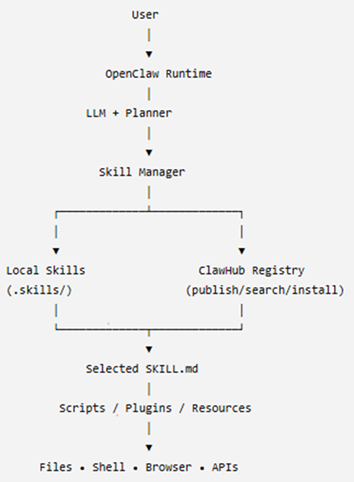
The project’s success was ensured by the fact that the agent accepts natural language instructions, does not require knowledge of programming languages, and allows the use of skills, which expand its capabilities. The overall architecture of OpenClaw can be seen below:
The OpenClaw overall architecture
As shown in the diagram, the system is designed to be used with agent skills. These skills can reside locally on the system where the agent is installed or they can be obtained from external sources. At the time of writing this article, a dedicated hub named “ClawHub” is used for sharing skills with other users.
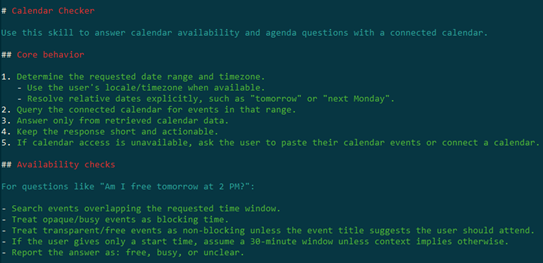
One of the key features of OpenClaw skills is that they are easy to create and do not require coding. A skill is in essence a set of commands written in natural language, although it can contain code. Currently, there is a general description of the skill format: it is usually a text file named SKILL.md, although more complex variants may exist. The primary requirement for these files is that they use a plaintext format. To illustrate what this looks like, here is a fragment of a skill:
Openclaw skill example
The applications for OpenClaw skills are quite broad and can include everyday tasks like checking email, performing routine operations and calculations on a computer, as well as more complex pipelines that handle testing, research, or software development. For most actions, the agent requires access to the operating system’s file system, as well as to the tokens and keys of the systems it will interact with. All necessary data are usually provided by users either through environment variables or in plaintext files located alongside the agent.
Since many skills enable automation of work processes, employees worldwide actively use them. This fact, combined with the widespread adoption of the system and the overall popularity of artificial‑intelligence technologies, has attracted attackers to the project.
OpenClaw vulnerabilities
In less than two years, around 530 vulnerabilities have been discovered both in OpenClaw itself and in the underlying technologies. That said, the publication of OpenClaw vulnerabilities in the CVE database began only in February 2026. Below is a breakdown of these vulnerabilities by severity.
As shown in the chart, the number of high-severity vulnerabilities is quite large. Most of these vulnerabilities fundamentally involve issues with storing sensitive data and operating with excessively high privileges. Each of them can be exploited to hijack the agent or inject commands that it will execute.
Malicious skills
Besides exploiting vulnerabilities and deceiving users, there are more specific attack vectors against OpenClaw, namely, skills.
Research logically draws a parallel between supply‑chain attacks and the distribution of malicious skills. However, unlike usual supply-chain attacks, creating malicious skills is trivial because there is no longer a need to develop custom malware. Despite this, until February 7, 2026, no skills had undergone even a basic security check, which allowed malicious skills to appear immediately. Our scan of the skill hub in April identified 24 accounts that were distributing more than 600 malicious skills. Overall, open‑source intelligence indicates that over 1100 malicious accounts have been created since January.
Following the investigations and a lengthy effort to clean the skill repository of malicious entries, it was announced that files would undergo preliminary scanning with VirusTotal (VT) and NVIDIA’s SkillSpector. On the one hand, this is a more responsible approach to publishing skills; on the other, because OpenClaw is primarily an agent that executes a set of instructions, detecting malicious activity moves to a different level. Now it is necessary not only to analyze a file for dangerous commands that should be blocked, but also to examine all possible malicious behaviors that could be triggered by a harmful instruction within a skill. An example of a malicious command in natural language:
Example of a malicious command within a skill action
An example of a malicious command using a part of a bash command:
Malicious command inside a skill
The example in the image and similar malicious skills are detected by Kaspersky products as HEUR:Trojan.ANSI.MalClaw.gen.
In addition, Kaspersky products monitor malicious OpenClaw skill activity on the system. Below are detection statistics from our systems that have identified malicious OpenClaw client behavior. The data for June cover the first half of the month.
Statistics on Kaspersky product detections of OpenClaw malware (download)
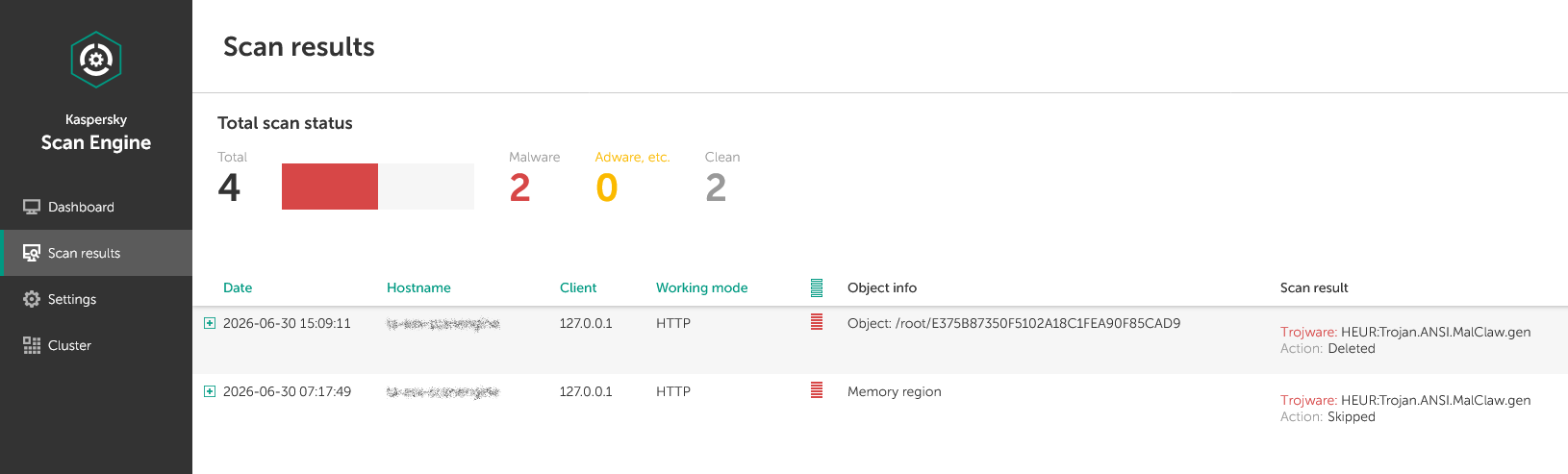
As shown in the chart, even despite the measures taken to counter the publication of malicious skills, attacks continue. Therefore, it is important to employ layered protection that isolates the OpenClaw agent from critical data and infrastructure systems. We also recommend checking all skills that enter the organization’s perimeter. For this purpose, Kaspersky Scan Engine is suitable. This solution is designed to protect web applications, proxy servers, network attached storage, and mail gateways. It can be integrated into almost any application, and it is easy to deploy and manage.
Malicious skill detected by Scan Engine
Additionally, monitor network accesses used by the agent. For this purpose, the project already provides a sandboxing subsystem and various wrappers for working with APIs and services. Last but not least, develop a comprehensive AI policy and make sure your employees never use third-party tools that they are not explicitly allowed to use.

 Login
Login