
❌

Normal view

There are new articles available, click to refresh the page.
Today β€” 14 September 2026Main stream

Rosy Retrocomputing

14 September 2026 at 10:00

Most of us are guilty of romanticizing the past. Do you long to be the captain of a tall ship? Just as long as you don’t mind weevils in your food, vitamin deficiencies, and death from an infection when there were no antibiotics. Want to be a medieval knight? Even worse. But surely, retrocomputing is as fun as we remember, right? Turn your computer on, and it comes up with BASIC! Ready for you to write your own programs. None of this GUI foolishness. Of course, this is just another example of rosy retrospection.

Even if you like BASIC or a similar language today, things have changed. You have a nice text editor, a fast computer, debugging tools, along with things like named functions, no line numbers, and modern control structures. None of those things were very common in the 1980s. At least, not on a hobby-grade computer.

Why am I thinking about this? Well, the Hackaday Retrocomputing Challenge is on, and it occurred to me that I wanted to work with some young students in glorious MBASIC on a CP/M machine I built and modified from a Hackaday project. Perfect, right? Many of us started that way, so why shouldn’t they?

But it quickly got old. Even a simple program gets bogged down with GOTOs and GOSUBs to mysterious line numbers. It made me remember the time back in the early 1980s, or maybe even the late 1970s, that I wrote a BASIC preprocessor to scan BASIC with no line numbers and produce proper source, converting labels to line numbers in two passes.

Of course, that code is long gone or, at least, on a floppy I haven’t tried to read in a few decades. I decided to take another crack at it six years ago, but I still didn’t make it much more robust. For example:

PRINT: X=X+10

Is that two statements? Or a label? Hard to tell. My 2020 version used awk. Awk is great for this kind of thing because of the regular expressions and the input loop. But it still has some issues with things like comments and strings. Consider the code below.

PRINT "HELLO: IS IT ME YOU'RE LOOKING FOR?"

This would probably have made my awk preprocessor chew the string up and create a bogus label named HELLO.

History of Preprocessors

Preprocessing one language to another is nothing new. RATFOR and RATFIV by Brian Kernighan converted modern constructs to conventional FORTRAN IV. Even C++ started out as a program that emitted C code.

So the idea is good, but there are dozens of corner cases. As I anticipated having another go at the idea for BASIC, I realized my earlier versions had some design choices that made it harder than it should have been. So I started from scratch.
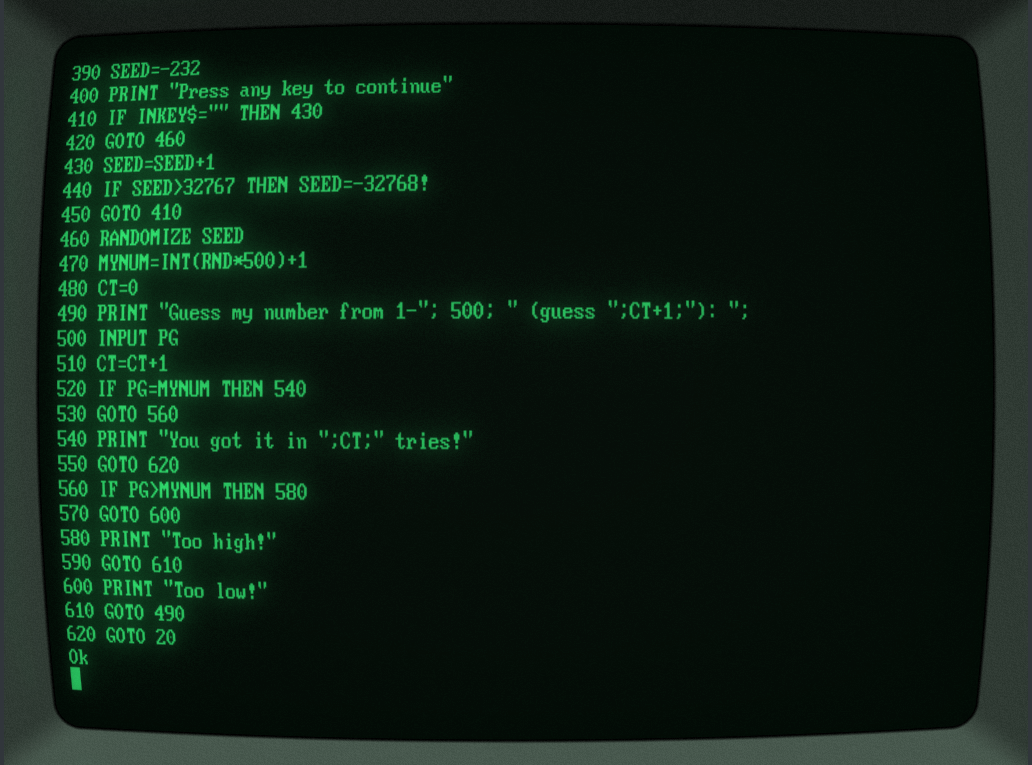
BASIC as it was (courtesy of Cool-Retro-Terminal)

First, I gave up the idea of just having labels as you might in other languages. Instead, they’d be part of a comment and hard to mistake. This makes for easier parsing and also allows you to keep them around for reference. I also gave up on having labels magically expand. You need a way to make them unique, too. Here’s what I settled on:

':TOPLABEL

GOTO @TOPLABEL

The plan was to go through the source once to assign line numbers. When a label occurs, it adds to the symbol table. Then a second pass actually writes output, replacing @TOPLABEL with the value from the symbol table. Of course, you still want this line to not trigger a label expansion:

PRINT "Send messages to @JTKIRK"

I decided to keep going in awk, but my eventual goal was to rewrite the whole thing in BASIC using the same syntax. Then you could convert the translator itself using the awk version once and then run it on an old computer using BASIC, even if you wanted to retranslate the translator itself. Perverse, huh? But that allows you to keep that authentic development experience. You don’t have to jump over to a PC to process your code, unless you just want to.

Awk as in Awkward

So I decided to do a better job on the awk part with this new scheme. At some point, though, you lose some of the advantages. Then feature creep set in.

I suppose I was subconsciously remembering RATFOR. I decided to add a small number of modern control structures. Again, I wanted something easy to pick out of the source file, so I went with this:

IF X=0 THEN!
PRINT "There is no X!"
X=10
ENDIF!

There’s also WHILE!, DO!, EXIT!, and CONTINUE!

Of course, it didn’t end there. I decided to add a way to include or exclude parts of the source (sort of like #if in C but simpler), along with source code inclusion and a few other neat options such as numeric constants, conditional source blocks, compile-time errors, and even a small numeric stack with PUSH! and POP!.

The source code inclusion can be made to work with awk, but it is ugly. I decided it was better to proceed with another language, but since I didn’t feel like starting over, I just had an LLM convert my awk to Python, which it did with no trouble at all. I then did a little more feature development in Python, but I made sure not to use those new features in the translator itself so the awk version could still process an input file.

So while the original plan was to develop and test in awk and then implement similar code in MBASIC, I now had three versions: a frozen awk script, a Python version, and an MBASIC version.

This was getting a bit much to test. I had the LLM cook up some documentation, additional comments, and tests. It was especially nice to verify that all three versions β€” awk, Python, and BASIC β€” did the same things for their common features. The LLM was good at running tests and finding corner cases. It would even run tests in a RunCPM session on the MBASIC version.

BASIC

As you might expect, the BASIC version is a little more convoluted. However, the use of labels and control structures makes it much easier to write, read, and maintain.

Writing the translator in MBASIC imposed some very old-fashioned constraints. There are no dictionaries or dynamic lists, so labels and block state live in fixed-size arrays. Included files require an explicitly managed stack, and parsing strings and comments has to be done character by character. It is not as compact as the Python version, but it is ordinary MBASIC and can run on the target CP/M machine. The limitations also influenced some features that would have been feasible in Python but are nearly impossible in an MBASIC program.

Better yet, lblbasic.bal stays within the subset the original awk translator understood. That provides a bootstrap path: awk produces the first lblbas.bas, after which the MBASIC translator can process its own BAL source.

A Few Samples

One project I had in mind was to drive an LED display module. I wrote a library and then wrote the test program below. It doesn’t matter, but I used .bal as a file extension.

REM TM1637 TEST – PORT 3, BIT 2=DIO, BIT 3=CLK
REM Uses the TM1637.BAL library with LBLBASIC

STACK! 8 ' Required by the library

' Confirm that the library preserves I while initializing its data table.
I=3141
gosub @init
print "I is now:";I
PRINT "Starting number: ";
INPUT CT
PRINT "1-Up, 0-Down: ";
INPUT UD
OFFSET=-1
IF UD<>0 THEN OFFSET=1
':CDLOOP
WHILE! CT>=0 and CT<=9999
NUM=CT
GOSUB @sendnum4
CT=CT+OFFSET
WEND!
CT=0
IF OFFSET=-1 THEN CT=9999
GOTO @CDLOOP
END

' Include the library after the main program.
'INCLUDE! TM1637.BAL

The BASIC code, including a few lines of the library, is much harder to read:

10 DIM LBLBSTACK#(8):LBLBSP=0
20 I=3141
30 gosub 230
40 print "I is now:";I
50 PRINT "Starting number: ";
60 INPUT CT
70 PRINT "1-Up, 0-Down: ";
80 INPUT UD
90 OFFSET=-1
100 IF UD<>0 THEN OFFSET=1
110 ':CDLOOP
120 IF CT>=0 and CT<=9999 THEN 140
130 GOTO 180
140 NUM=CT
150 GOSUB 330
160 CT=CT+OFFSET
170 GOTO 120
180 CT=0
190 IF OFFSET=-1 THEN CT=9999
200 GOTO 120
210 END
220 ':init
230 IF LBLBSP+1>64 THEN PRINT "BAL stack overflow":STOP
240 LBLBSTACK#(LBLBSP+1)=I:LBLBSP=LBLBSP+1
250 DIM D(9)
260 FOR I=0 to 9: READ D(I): NEXT I
270 DATA 63,6,91,79,102,109,125,7,127,111
280 X=12:OUT 3,X
290 IF LBLBSP<1 THEN PRINT "BAL stack underflow":STOP
300 I=LBLBSTACK#(LBLBSP):LBLBSP=LBLBSP-1
310 return
320 ':sendnum4
330 GOSUB 500
340 B=64:GOSUB 610
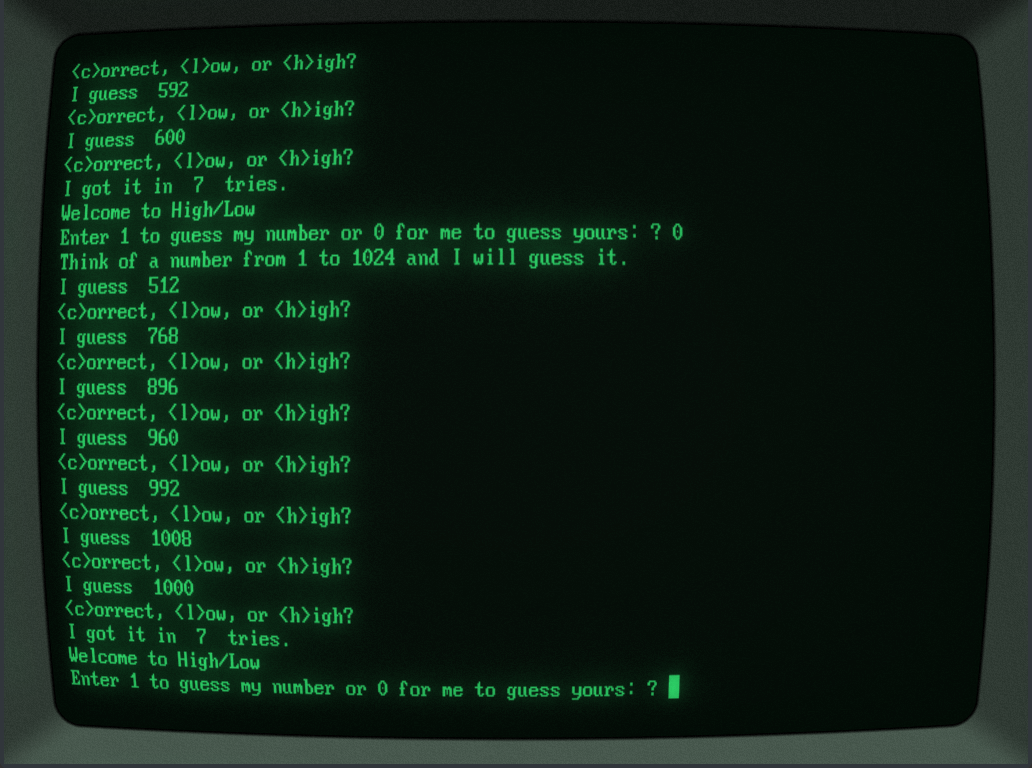
One of the HILO games running.

If you haven’t used the TM1637 before, it uses a serial protocol with a clock and data line and is very forgiving of timing. The display update speed is quite slow, partly because MBASIC isn’t that speedy and partly because the Z80 chip communicates to the outside world via another microcontroller talking over an I2C bus. But non-BAL code would be just as slow on the same computer. You’ll notice, though, that I took all the delays out and the code and it still works fine.

The bigger sample, though, is HILO.BAL. This lets you set a few compile-time constants that let you select what parts of the program get built. It also makes good use of the control loops. Of course, if you really want to dig in, lblbasic.bal uses quite a bit of the awk-compatible syntax and is a substantial program: around 1300 source lines of BAL which generate nearly 900 lines of regular BASIC due to comment and white-space stripping.

Conclusion

Does this turn MBASIC into a modern language? Of course not. The generated program still has line numbers, the machine is still tiny, and the implementation makes compromises that would horrify anyone writing a real compiler. But it removes enough friction that programming the old machine becomes enjoyable again, especially with WordStar as an editor.

More importantly, the translator can live on the machine it targets. The awk prototype can translate lblbasic.bal once, producing ordinary MBASIC. From then on, the CP/M machine can translate BAL programs β€” including the translator itself β€” without help from Python or a modern computer.

So perhaps the lesson isn’t that retrocomputing was better than we remember. It’s that, with a little strategic cheating, it can be almost as much fun as we remember.

Why the Smartest AI Strategy Is the One You Own

14 September 2026 at 10:26

The Business Case for Local Hardware Deployment

As inference bills climb and GPU allocations grow scarce, more technical and financial leaders are reaching the same conclusionβ€Šβ€”β€Šthe most defensible AI infrastructure is the one sitting in your own facility.

GPU clusters

For the past three years, the default assumption in enterprise AI has been simple: rent compute from a hyperscaler, pay by the hour, and let someone else worry about the hardware. That model made sense when nobody knew whether a given AI initiative would survive its first quarter. It makes much less sense now that AI has moved from experimental budget line to permanent operational dependency.

A growing body of cost analysis, procurement data, and operational experience points toward a different conclusion: for organizations running AI workloads continuouslyβ€Šβ€”β€Šnot experimenting with them occasionallyβ€Šβ€”β€Šowning the hardware is very often the more rational decision. And crucially, that conclusion holds whether the hardware in question is a top-of-the-line accelerator or a modest, previous-generation card that cloud providers have already retired from their premiumΒ fleets.

This article lays out the business case in full, section by section, the way a CFO or infrastructure lead would actually need to evaluateΒ it.

1. The Economics Stop Favoring the Cloud Once Utilization Climbs

Cloud compute is genuinely the right choice for bursty, unpredictable, or short-lived workloads. Nobody disputes that. The problem is that a large share of enterprise AI workloads today are neither bursty nor short-livedβ€Šβ€”β€Šthey are continuous inference services, internal copilots, and fine-tuning pipelines that run for months orΒ years.

Independent cost modeling on this exact question has converged on a consistent pattern: at sustained utilization below roughly 70%, cloud rental tends to win on total cost. But above 80% sustained utilization, owned infrastructure typically wins over a multi-year horizon once hardware is priced against standard hyperscaler rates. One recent industry analysis using a five-year amortization framework found that owned infrastructure can deliver up to a seventeen-fold cost advantage per million tokens processed compared to pay-per-use model APIs, once the hardware has been fully amortized.

The reason is straightforward: cloud pricing is built to be profitable for the provider across all utilization patterns, including the idle time between bursts. If your organization isn’t idleβ€Šβ€”β€Šif your accelerators are doing real work most hours of most daysβ€Šβ€”β€Šyou are paying a continuous premium for flexibility you aren’tΒ using.

The purchase price is also less frightening than it onceΒ was.

A market-rate enterprise-class GPU today typically costs somewhere in the same range as one year of continuous cloud rental for an equivalent card. After that first year, every additional month of use is functionally free compute, offset only by power, cooling, and maintenanceβ€Šβ€”β€Šcosts that are, for most facilities already running IT infrastructure, incremental rather thanΒ new.

2. Data Never Has to Leave theΒ Building

For any organization handling proprietary models, customer data, financial records, health information, or trade secrets, this is frequently the deciding factorβ€Šβ€”β€ŠnotΒ cost.

When inference or fine-tuning happens on a third-party cloud, sensitive data and model weights necessarily transit infrastructure you do not fully control, subject to a provider’s security posture, jurisdiction, and breach history. Local deployment removes that dependency entirely. Data stays inside your network perimeter, under your access controls, governed by your own auditΒ trail.

This matters in two distinctΒ ways:

β€’ Regulatory compliance. Data residency and sovereignty requirementsβ€Šβ€”β€Šincreasingly common across finance, healthcare, defense, and government-adjacent sectorsβ€Šβ€”β€Šare dramatically simpler to satisfy when the hardware processing the data physically sits inside the jurisdiction you operateΒ in.

β€’ Intellectual property protection. A fine-tuned model built on your proprietary data is a competitive asset. Every time that model or its training data touches external infrastructure, you introduce a new point of potential exposure. Keeping the entire pipeline in-house closes thatΒ gap.

3. You Can’t Rent Your Way Out of aΒ Shortage

The past two years have made one thing clear to any organization that has tried to provision serious AI compute on demand: availability is not guaranteed, even with an open checkbook. Lead times for current-generation server-class GPUs have regularly run from several weeks to several months, and top-tier hardware has at various points been effectively pre-sold before it reached theΒ market.

This creates a strategic problem that has nothing to do with cost: you cannot build a roadmap around a resource you might not be able to get when you need it. Organizations that own their computeβ€Šβ€”β€Šor that work with a supplier who can reliably source itβ€Šβ€”β€Šremove this variable from their planning entirely. A project timeline built around owned hardware capacity is a commitment you can actuallyΒ keep.

4. Predictable Performance, Without the β€œNoisy Neighbor” Problem

Cloud infrastructure is, by design, shared infrastructure. Even with dedicated instances, performance can vary with regional demand, provider maintenance windows, and network conditions entirely outside your control. For latency-sensitive applicationsβ€Šβ€”β€Šreal-time inference in a customer-facing product, for instanceβ€Šβ€”β€Šthis variability is a real operational risk.

Local hardware removes the variable. The accelerator is doing exactly one organization’s work, on a network you designed, with latency characteristics you can measure and guarantee. For applications where response time is part of the product experience, this is not a marginal benefitβ€Šβ€”β€Šit is often the difference between a viable deployment and an unreliable one.

5. Yesterday’s Flagship Hardware Still Has Real Work toΒ Do

Here is where the conversation usually goes wrong. Many organizations assume that if they aren’t running the absolute newest accelerator generation, local deployment isn’t worth pursuing. This assumption is outdated, and it is costing companies real efficiency.

The AI field has spent the last two years perfecting techniquesβ€Šβ€”β€Šquantization chief among themβ€Šβ€”β€Šspecifically designed to make older and more modest hardware highly capable. Post-training quantization can cut a model’s memory footprint by roughly half to three-quarters with minimal accuracy loss, and industry benchmarking has repeatedly shown quantized models achieving two-to-four-times faster inference than their full-precision counterparts on the same hardware. A model that once required a flagship card to run comfortably can, after quantization, run well on a card two or three generations olderβ€Šβ€”β€Šthe kind of hardware many organizations already have sitting underutilized, or can acquire at a fraction of flagshipΒ pricing.

A company does not need to buy the most expensive accelerator on the market to deploy AI locally and get genuine value fromΒ it.

A well-specified previous-generation or mid-tier accelerator, correctly paired with a quantized model suited to the actual workloadβ€Šβ€”β€Šcustomer support automation, document processing, internal search, moderate-scale inferenceβ€Šβ€”β€Šcan deliver production-grade performance at a fraction of flagship cost. The β€œlosing potential” hardware referenced in many procurement conversations is, in practice, often still exactly the right tool for a well-scoped job.

6. Full Control Over theΒ Stack

Cloud AI platforms are, by necessity, standardized. That standardization is convenient, but it also limits what an organization can doβ€Šβ€”β€Šwhich model architectures are supported, which quantization formats are available, which drivers and frameworks are current, how workloads can be scheduled and prioritized.

Owned local infrastructure removes those constraints. Engineering teams can select exactly the software stack, framework version, and configuration their workload actually needs, without waiting on a provider’s roadmap or working around a platform’s limitations. For organizations doing serious model customizationβ€Šβ€”β€Šfine-tuning, domain adaptation, retrieval-augmented pipelines with strict latency budgetsβ€Šβ€”β€Šthis flexibility is frequently the difference between a system that merely works and one that performs at its true potential.

Conclusion: The Right Hardware Strategy Is a Deliberate One

None of this is an argument that cloud compute has no placeβ€Šβ€”β€Šit remains the right tool for genuinely unpredictable or short-term workloads. But for the large and growing share of AI use cases that are now permanent, continuous, and business-critical, the calculus has shifted. Sustained high utilization favors ownership. Sensitive data favors ownership. Supply security favors ownership. And thanks to quantization and modern inference optimization, ownership no longer requires flagship-tier spending to deliver flagship-tier value.

The organizations getting this right are not simply buying the most expensive accelerators available and hoping for the best. They are matching hardware tier to actual workload, securing reliable supply before they need it, and building infrastructure they fully controlβ€Šβ€”β€Šfrom the siliconΒ up.

That is precisely the gap Atom Minersβ„’ exists to close. As a licensed gold-status supplier, we source and export the full spectrum of AI acceleration hardwareβ€Šβ€”β€Šfrom high-end GPU clusters and inference accelerators to cost-efficient, right-sized cards suited to quantized and mid-scale deploymentsβ€Šβ€”β€Šall CE, FCC, and RoHS certified, with full compliance documentation and reliable delivery to North America, Canada, Europe, the UAE, and South Korea. Whether the goal is a flagship training cluster or a lean, efficient inference deployment built on smart hardware choices, we supply the infrastructure to make local AI a practical reality rather than a theoretical one.


Why the Smartest AI Strategy Is the One You Own was originally published in Coinmonks on Medium, where people are continuing the conversation by highlighting and responding to this story.

It’s The Speech Synthesiser You Wanted, For The Computer You Had

14 September 2026 at 07:00

If you had an 8-bit computer in the 1980s and bought a speech synthesiser for it, what you got was invariably an alophone-based synthesiser using the SP0256 or similar. You definitely couldn’t afford DEC’s DECtalk, a high-end standalone speech synthesiser made famous to the masses as the unit used by Stephen Hawking. But now those two worlds can come together, thanks to [Michael Wessel], whose Perfect Paul ][ is a drop-in DECtalk emulator card for the Apple ][.

The PCB includes an RP2040-based Raspberry Pi Zero, plus an I2S DAC and amplifier, speaker, and bus-interface logic. It appears at a set of memory addresses, and interfacing to it is as simple as POKEing DECtalk commands to those addresses. Looking at it, we are guessing this would be easy to bring to other 8-bit era machines.

You can see and hear it sing in the video below the break, and it certainly has the feel of the real thing. We can say with certainty that this would have been a sensation had it appeared back in the early 1980s. This one may be a modern reproduction, but it’s not the first time DECtalk has appeared here; we’ve even brought you a real one.

Yesterday β€” 13 September 2026Main stream

A 386 PC For Your RP2350

13 September 2026 at 13:00

We’re at a fortunate moment: microcontrollers available at modest prices are edging into the capability level previously reserved for full-fat systems and can, through emulation, run software beyond classic 8-bit home computers, consoles, or old arcade games. A project we’ve been watching for a while is tiny386, an emulator for ESP32 boards that provides a 386 PC with just enough 486 and 586 instructions enabled to run a modern Linux kernel. Now we’re pleased to note that this platform is making it to the RP2350, with ports for both the FRANK emulation platform and the Waveshare Pi Zero boards. You can now have a 32-bit PC with all the peripherals, including VGA and DVI/HDMI, for the cost of an inexpensive development board.

Having seen tiny386 run on its minimum-spec ESP32 platform, we’ll concede that while it’s usable, it’s not the fastest experience, but the RP2350 port promises better performance. It’s not for a modern full-fat Linux distro, but should work well for running older operating systems such as DOS, or Windows 3.1 and 95, or even a lean Linux setup. This has fascinating potential: while these systems are old, they still have an enormous software library. The idea of useful general-purpose computing, 1990s style, in the palm of the hand, is interesting.

If you’re curious, you can find tiny386 here and the FRANK boards here. Maybe they’re a better route to ’90s fun and games than a 386 laptop.

Before yesterdayMain stream

2026 Retrocomputing Challenge: 16-Bit Homebrew Relay Computer

12 September 2026 at 22:00
One module of the relay computer

You want Retro? We did, when we started our retrocomputing challenge. [Peter] decided that transistors weren’t retro enough, and sent us this lovely homebrew relay computer, complete with 16- bit CPU, which is rather more bits than one normally associates with clicky clacky contacts.

The architecture is very simple– it just uses an accumulator register, ACCU, and goes from there. All mathematics and save/load operations go through ACCU. There whole instruction set is only 19 commands, and he’s used that set to program such lovely things as calculating 3 digits of Pi– which only took 8 minutes of glorious clicking. There’s a demo video of that embedded below. [Peter] has even implemented a display by hooking his computer to a 32Γ—32 LED matrix, but don’t expect it to relay updates really quickly.

If this computer looks familiar, it’s because its earlier incarnation was one of the more β€œextra” entries in last year’s one-hertz challenge, where it was used to blink an indicator lamp. Yes, even relay computers apparently get started with the β€œblinky” sketch.

If you want in on the fun, our retrocomputer challenge runs until October 27th, so there’s lots of time left to turn back the clock.

This Mac Is Open Source Hardware

12 September 2026 at 13:00

Apple hardware has always been proprietary, sometimes to an extreme. But that’s not to say that it’s impossible to make something that does the same job, which is what [DosFox1] appears to have done with the OSHintosh. It’s an open source PCB that implements a Mac 512k. Is it a 68k Hackintosh? You decide.

While it boots into a classic Mac OS image, it’s not quite a Mac. For a start, there are no disks, and no SCSI. Instead it boots from a disk held in ROM, which we guess will be a lot faster than the floppy from back in the day. They’ve even managed to do it on a 2-layer board, which means that despite its size, it shouldn’t be too expensive to have made.

We’re not sure quite what the legality of dumping a Mac ROM image to the ROM on this board would be, but assume for a moment that you own a copy in a defunct original Mac. This board can’t yet replace the original due to the disk issue, but given that original Macs are now long in the tooth, a modern replacement for those who must have hardware rather than an emulator sounds like a good idea. Perhaps for some people it will join the FPGA Amiga.

Looking at a TRS-80 12 MB External Hard Drive from 1983

12 September 2026 at 04:00

Although hard disks weren’t a common feature yet in many home computers in the 1980s, they were becoming increasingly more affordable. For relative meanings of the word β€˜affordable’, naturally. This is illustrated by the 12 MB HDD for the Radio Shack TRS-80 that [Clint] over atΒ LGR recently took a peek at.

Costing a cool $3,495 in 1983 – or $11,932 in 2026 USD – this 12 MB storage wonder used a Tandon TM-603 full-height 5.25β€³ HDD inside. Lacking a working TRS-80 to try it out with, the video is limited to just a basic powering up and opening up of the unit, but [Clint] will be donating it to a computer museum who can hopefully put it to use again.

The connection to the TRS-80 computer is handled by a ribbon cable, while the HDD has its own built-in power supply, rated at 60 Watt.

On the main board for the external HDD controller there is a Signetics 8X300 microprocessor that forms the brains of what makes it into an external drive for the TRS-80. Despite its age, it still looks brand new inside, so despite the Rifa capacitors in the PSU, [Clint] decided to power it on. This resulted in an auditory experience that’s probably best compared to a very rusty jet engine spinning up after languishing for a decade prior to spooling up for take-off.

Hopefully we’ll find out whether this particular unit and its HDD are still working in 2026.

The 450x storage leap: Why jumping from 1.44MB floppies to 650MB CDs changed PCs forever

11 September 2026 at 12:00

Physical media is having a bit of a revival at the moment, and vinyl is getting a lot of attention with claims about its supposed superiority over digital audio. Music CDs, on the other hand, have received a more muted revival.

South Korea to Launch 614-Petaflop Supercomputer: What It Can Do

10 September 2026 at 10:58

South Korea will launch the 614-petaflop Hangang supercomputer in December, opening high-end compute to researchers, national projects, and companies.

The post South Korea to Launch 614-Petaflop Supercomputer: What It Can Do appeared first on TechRepublic.

❌
❌