Normal view

There are new articles available, click to refresh the page.
Today — 23 July 2026Hackaday

Running DOOM on a Custom CPU Built From Scratch

23 July 2026 at 11:30

Running DOOM on weird obscure hardware is a fun hacker pastime that’s been around for a long time now. It’s always enjoyable to see someone port it to an egg timer, or a hat, or whatever else. But what about running the iconic shooter on a CPU of your very own? [Armaan] and [Liam] have done just that.

The CPU in question was designed at the logic gate level, deployed on to an FPGA, and hooked up with the necessary peripherals to run as a going concern. Early testing of the CPU involved running straightforward code to generate Mandelbrot sets and to play a simple game of Pong. But [Armaan] and [Liam] had bigger goals: to port the game that everybody ports to everything. Doing that took some work.

To get DOOM running, the CPU had to get faster, and it needed many tweaks to how memory was handled. There was also work to be done to create a keyboard interface, an HDMI video output, and a hardware timer. From there, the game itself had to then be ported to the custom CPU’s architecture. Eventually, the duo had the game running… at a glacial 0.7 FPS. A success, but not the magical end result that was desired. A bump to clock speed and further optimizations and compiler tweaks eventually got the game up to an impressive 15-20 FPS. The goal for future work is to push it to an entirely-playable figure of 30 FPS or better.

It’s worth checking out the (apparently unembeddable) videos on Instagram to see the CPU in action. We’ve also featured plenty of fun DOOM ports before, too. If you’re brewing up custom CPUs or DOOM ports of your own, keep them coming to the tipsline. The latter in particular is often a wonderful milk run for the writer that happens across it. Happy hacking out there!

Industrial GPU Adapted for the Desktop

23 July 2026 at 01:00

As technologies change and adapt, we’re often left with seemingly useless junk that has nowhere to go. Certainly anyone still sitting on a pile of floppy disks feels this way sometimes, but odds are anyone who owns a mining ASIC or an NFT can attest to that as well. The trillions of dollars flowing into GPU-based data centers will likely become the next victim of this trend, so if you want to capitalize on the losses of some venture capitalist you’ll want to figure out a way to get GPUs meant for a server into your desktop doing useful work.

Of course, calling these devices GPUs is a bit of a stretch compared to the Radeon and GeForce cards many of us are used to using for gaming. These don’t even have a PCIe slot or video output, after all. But, as [Oscar] notes, the VRAM and GPU cores are very real and can still do useful work. An adapter board is able to mate a Tesla V100 SXM2 16 GB GPU to a standard PCIe slot, which solves the first problem, but the major downside from there is that the cooling fan for this unit was literally deafeningly loud. At 82 dB it was about as loud as a lawnmower, which is fine in a server rack but not great in a bedroom. [Oscar] found a way to tamp down the fan speed, making it usable in a home.

Without video output, the utility of these cards mainly comes from adding VRAM and compute for tasks that benefit from parallel computing. Using tensor splitting, [Oscar] is running a local LLM with this card alongside his RTX 4080, providing 32 GB of VRAM on his NixOS system. With his benchmarking tests, the LLM sports impressive stats for a self-hosted model, ranking somewhere around Claude Sonnet 4.6. What’s even more impressive is that this is all done for around £200, and with the rate the various LLM companies are ratcheting up pricing could pay itself back very quickly. If trading off performance for cost is acceptable, though, it’s possible to run local models on much less powerful hardware as well.

Before yesterdayHackaday

Open Source Vacuum Avoids Cloud

21 July 2026 at 22:00

As more and more of the technology that we paid for turns becomes a subscription, there’s slowly been a momentum shift in the open source world of building replacements for these intrusive rent-seekers. We see this all of the time for self-hosted media and communications servers, but now we’re starting to see it in hardware as well. The OOMWOO robotic vacuum cleaner is completely open source, from hardware to software, and requires no cloud services whatsoever.

Although it’s open source, not every component is something one could buy off the shelf. It does require a 3D printer for most of the parts, but assuming that requirement is met most of the rest of the build comes together easily enough. For compute it relies on a Raspberry Pi running ROS 2 software and is set up to integrate easily with other existing open tools and projects such as Home Assistant. Like its proprietary cousins it can sense and map the rooms its placed in, but this platform uses an inexpensive 2D lidar system to keep costs down.

Right now the project is not quite complete, so we’ll all have to keep our eyes on this one as the team building it progresses. But they do have most of the software development done and the bill-of-materials is in progress. As an open project it’s being developed by many volunteers and there are a lot of areas available to contribute to as well, all currently set up on the project’s GitHub page. Right now many of those areas of effort are adapting the 3D printer files to off-the-shelf parts.

With the rocky status of the Roomba ecosystem, projects like this are more important than ever.

Google Maps Killed the Restaurant Star

21 July 2026 at 01:00
Two maps of London turned into hexagonal regions heat mapped from white to peach to purple. The left map is according to: density, ratings, surprise, cuisine diversity, and independent share. The map on the right of merged data assigns the dominant hub type in a region. Purple is assigned a value of "Elite", reddish orange is "Strong", peach is "Everyday", and white/grey is "Weak." The five locations deemed to be the highest scorers were Ealing-Acton, Kingston Upon Thames, Enfield, Bromley, and Havering.

We all know that Google and other big players pick and choose what information people see, but we sometimes overlook it outside of the search and social media space. [Lauren Leek] decided to take a look at how Google Maps picks winners and losers in the restaurant scene in London.

Building a machine learning model to determine a new restaurant recommendation (as one does), [Leek] uncovered interesting, and perhaps concerning, elements of how Google Maps ranks restaurants. Broken down by relevance, proximity, and prominence, many new restaurants face the issue of not drawing traffic without reviews and vice-versa causing a vicious cycle. Relevance and proximity are fairly straightforward, but what goes into “prominence?”

[Leek] found that “it is not just what people think of a place – it is how often people interact with it, talk about it, and already recognise it.” This leads to chains and high foot traffic areas awash in reviews while more out-of-the-way places find it more difficult to draw traffic. Some of this is expected and would be happening even when word of mouth was the primary way to find out where to eat, but as with many things, the algorithm amplifies this, along with the undisclosed paid placement of restaurants in Maps results.

While still in its infancy, [Leek] built a public dashboard where people can sort restaurants in the city. The machine learning algorithm is designed to identify places that are hidden gems that punch above their Google Maps weight and may make you look like the trendy one (if you live in London).

Zooming out further, [Leek] found larger clusters that revealed restaurant “diversity, in other words, is not just about taste. It is about where families settled, which high streets remained affordable long enough for a second generation to open businesses, and which parts of the city experienced displacement before culinary ecosystems could mature.”

If you want to step outside the algorithm mayhem, how about a good old-fashioned Web Ring? We’ve also addressed what’s an AI versus an algorithm, and Cory Doctorow advised us on how to reverse course on the current wave of enshittification.

Sail Virtually Aboard the “Itanic” with IA-64 Emulator

20 July 2026 at 19:00

Intel’s Itanium architecture was an interesting experiment, but it has gone down in history as one of the chip giant’s bigger flops, so much so that it earned the name “Itanic” in the tech press. This is perhaps unfair, considering it did limp on until a quiet EOL in 2020. We didn’t know anyone missed it, but perhaps it was more the technical challenge than nostalgia for obsolete server hardware that led [Yufeng Gao] and [gdwnldsKSC] to spin up an instruction-set translator for the late, lamented, IA-64 architecture.

Note that it’s very much in alpha, version 0.1, so don’t expect all the things. Neither HP-UX and OpenVMS will boot, which is a pity since Itanium’s great success was arguably winning those OSes and thereby killing the bespoke architectures HP and DEC had at the time. Gentoo can get to a shell, as long as you use Kernel 6.6 or older, and Windows Server 2003 and XP-64 both apparently boot.

It’s not incredibly performant, with 486-level speeds when running on Ryzen 5000 series hardware, but then, it is a 64-bit hardware being emulated here, and pretty weird hardware at that. Itanium’s Very Long Word Instruction architecture was notoriously hard to program well. Specifically, it was hard to compile optimized programs for, so we expect optimizing an emulator is going to be similarly difficult. That’s why this is so impressive, even at this early stage.

The late, unlamented Itanium is probably one of the few systems not in the Virtual OS Museum, but perhaps eventually this project will change that.

via Raymii.org

Could Reticulum Power a Post-Internet Network?

20 July 2026 at 04:00

These days, it is easy to think you always have access to the Internet. But some wonder if — in spite of its ARPANET, nuclear-war-planning heritage — you can actually count on it to be there when things go pear-shaped. [The Tech Prepper], as you might imagine, is quite concerned with that last question, and is flogging Reticulum over high-frequency radio as a post-internet network in a video embedded below.

Reticulum is a cryptographic network stack, fully decentralized and amazing from a cyberpunk/hacker/survivalist perspective. Unfortunately for [The Tech Prepper], until the you-know-what hits the ventilation unit and the FCC and its counterparts in other countries are too busy to be concerned with such trifles, encrypted signals are banned on ham radio bands just about everywhere. That’s why his demo is using a dummy load on the Mercury HF modem instead of an antenna: the feds don’t care if the signal doesn’t leave the building. The video shows how to replicate the setup using his EmComm Tools suite on Ubuntu.

Perhaps more interesting is his vision of a Post-Internet network, be it in a disaster scenario, as he envisions, or simply because we get sick of what the internet has become. The idea of easily hooking an open-source radio modem to a PC running modem73, open-source SDR software, has a certain appeal. Reticulum isn’t your only option there: modem73 will let you run a BBS in the clear — that is, unencrypted and legal to transmit — and let’s face it, wasn’t life online more fun in BBS days?

This isn’t the first time we’ve seen the Reticulum network stack, but last time it was operating at considerably shorter ranges over LoRA. 

A Sloshing-Mercury-Powered Neon Light

17 July 2026 at 01:00
A person's hand is shown holding a glass flask in a dark room. An orange-red glow is emanating from the flask in a patches, forming a splash-like pattern near the base of the flask.

In 1675, while transporting a barometer by night, the astronomer Jean Picard noticed a glow inside its glass tube, just above the mercury. As the mercury sloshed and splashed across the surface of the glass, a static electric charge had built up, which was discharging by ionizing the residual gas molecules inside the evacuated tube. [Styropyro] recreated this effect, and found that the dim glow could be made much stronger by adding some noble gas to the tube.

It starts with a simple recreation: he took a volumetric flask, attached a narrow glass stem to the mouth, added some mercury to the flask, evacuated it with a vacuum pump, and sealed off the glass stem. This produced a faint glow when shaken, but it was only really visible under very low light. When [Styropyro] brought it near a Tesla coil, however, it did glow much more brightly.

Backfilling an identical flask with neon to about 40 millitorr produced a much more spectacular result (a low pressure in the tube is necessary, but moderate pressure variations don’t significantly alter the effect). When shaken even slightly, this neon-containing flask produced a bright orange-red glow just above the surface of the mercury. Points of obstruction, such as those in a zig-zag tube, produced a brighter glow. A krypton-containing tube glowed blue, but less brightly than the neon tube.

Since this is, essentially, a triboelectric effect, other materials besides mercury should work; [Styropyro] tested several materials, and found that pieces of Teflon produced a faint glow, and copper beads a somewhat brighter glow. Unfortunately, Galinstan, the obvious replacement for mercury, wets and coats glass, preventing a charge buildup.

Without an added noble gas, the standard glow of barometric light comes from the excitation of mercury vapors, a glow which can also be seen in mercury rectifiers, and which excites the phosphors of fluorescent light bulbs.

Thanks to [Vik Olliver] for the tip!

AIM-ing For a More Open Platform Than Discord

15 July 2026 at 01:00
The OpenOscar Server in terminal, with Pidgin connected

Do you remember AIM? It may suprize you to hear that AOL’s instant messanger was actually supported all the way up to 2017– two years after Discord launched. Unlike Discord, AIM is a protocol, not a platform. Everything on your favourite Discord server is at the mercy of the corporate masters of said server; you can’t just spool up your own. Not so for AIM, as [Veronica] explains, both on her blog and in a YouTube video that we’ve embedded below.

The key is the fact that the AIM protocol isn’t locked into AOL’s now-defunct servers; it was reverse engineered in its prime for open-source messengers like Pidgin. You can host your own server, too, using the OpenOscarServer by [mk6i]. Even better, it’s not just AIM, but ICQ! In the sort of irony you only get in real life, the OpenOscar community does all its support on a Discord server. But then, they couldn’t hardly do it over AIM or ICQ these days.

For those of you who were too old or too young to get sucked into the 90s instant messenger craze, these protocols don’t just create chat rooms, that would be the even older Internet Relay Chat protocol, but usually worked more like SMS text messages. You have a contact list, and you send messages to your contacts via a server that acts as a hub. Once upon a time, that server was AOL’s, but now thanks to the OpenOscar project, it can be anybody’s computer. Of course, like texting, you can rope all of your contacts into one big group chat, and the protocol does support images and VOIP. (Which is starting to sound a lot like Discord.)

If you’re tired of your friend-group being at the mercy of American tech companies, [Veronica]’s blog post serves as a good guide to get you started running OpenOscarServer on a Linux system; she used a virtual private server but figures a Raspberry Pi ought to have enough grunt if you don’t have a huge number of people signed up.

For completeness, we should mention that while AOL pulled the plug on AIM nearly a decade back, ICQ, the other protocol supported by OpenOscarServer, lasted straight through until 2024.

Thanks to Keith Olson for the tip! Our tipsline is based on decentralized “electronic mail” technology that anyone can access.

The Neo Geo Does Run DOOM After All

14 July 2026 at 16:00
Demonstration of the DoomGeo port of Doom to the Neo Geo. (Credit: Sabino, GitHub)

Perhaps the most ridiculous statement that anyone can make is that a computer system with clearly enough processing power ‘cannot run DOOM‘. This is why we accept the premise that a PDP-11 cannot run this game, but something on the order of a Neo Geo gaming console with its 68000 processor and for the time impressive GPU definitely ought to be able to.

The stated problem here is a lack of RAM for a framebuffer, with the CPU only having 64 kB to play with. This limitation now has seen two different approaches to try and circumvent it, as covered by [Modern Vintage Gamer].

The first project here is Doom64kB, which as the name suggests tries to somehow work with this system RAM limitation. It uses the Doom8088 port for the original IBM PC and similar Intel 8088-based systems. This had to massively reduce the feature list, including the lack of texture mapping for floors and ceiling, no saving or loading, and no music.

The other project is DoomGeo, which doesn’t try to bend the Neo Geo hardware to its will, but accepts the Neo Geo way of doing things: involving sprite strips, pre-baked graphics, fix-layer UI, and a minimum of runtime data. This of course drastically changes how the Doom game engine normally works, with its framebuffer-based rendering.

From this we can thus conclude that it’s not so much the processing power that limits where DOOM can run, but more of how framebuffer-friendly the system architecture is, yet with some ingenuity and a complete rewrite of the game engine even that is no major obstacle.

(Top image: Neo Geo AES console. Credit: Evan-Amos, Wikimedia)

It’s A Spectrum, With An RP2350 ULA

13 July 2026 at 14:30

There was a time in the early 1980s when it was common to see home made keyboards for 8-bit machines that came with membrane or rubber keyboards. Though we’ve seen any numbers of home made modern ‘boards, it’s been decades since we saw one for an 8-bit micro. Until today, that is, when we saw [Vlad]’s Sinclair Spectrum. It’s a Spectrum with all that Sinclair glue logic that was in the ULA replaced in software by an RP2050, and that keyboard with the Spectrum decals.

The machine is a charming mixture of new and old, with a traditional cassette port alongside VGA, gameport joystick, and Sinclair joystick. The aim is to also have HDMI, though it’s not yet implemented. Sadly there is no Spectrum edge connector for period peripherals though. He admits it’s not cycle accurate to the original, but given that it runs all the games he’s given it this seems not to matter. Meanwhile that keyboard which caught our eye is a true period piece, sitting as it does on a piece of phenolic stripboard, and those decals are the perfect finishing touch.

The Spectrum receives quite a bit of love today, and if this one takes too many modern liberties for your liking, you can still make one using proper logic.

CGI Motion Capture with only a Camera

By: Ian Bos
13 July 2026 at 01:00

Computer-generated imagery (CGI) has largely replaced physical models in major film productions these days, but the transition didn’t exactly happen overnight. For a time there was an effort to blend the physical and digital, which allowed animators on productions such as Jurassic Park to work with newer technology in a way they were familiar with. [Corridor Crew] took this concept a step further by manipulating digital models with nothing but a webcam.

Early in the production of CGI, animators found a purely digital workflow to be less intuitive than the use of physical elements such as puppets. Feeling the weight and touch of a miniature with joints and limbs made for a more natural animation, so they created the dinosaur input device to map movements of a physical model into a digital recreation.

Puppeteered humanoid input device for the film Species

Unfortunately for the future of dinosaurs made of motion sensors, none of these devices really caught on and the technology is essentially non-existent today. [Corridor Crew] decided to give the concept another chance with the application of newer motion capture research. Using just a camera and a small human miniature allowed for full animations to be made using one’s own hands. The motion capture plugin can be found here if you want to try it for yourself!

At the end of the day, the need for a stop motion intermediate was found to be unnecessary. That being said, there is some really cool tech discovered throughout its history. If you want to discover even more film tech, maybe try out an adventure making your own film camera!

Musing on AI from 1964

12 July 2026 at 22:00

[Irving John Good] was at Trinity College, Oxford back in 1964. His paper, “Speculations Concerning the First Ultraintelligent Machine” could have been a topic for today, as we deal with machines that aren’t really ultraintelligent, but appear smart and think they are even smarter. He starts off with a bold thesis: “The survival of man depends on the early construction of an ultraintelligent machine.”

He also admits that we’ll need to understand more about the human brain and human thought to make a breakthrough. This is still true today. However, we still don’t fully understand how our brains work, but it seems unlikely that we are just super-large LLMs. Not that [Good] anticipated the modern chatbot. Perhaps his comments will apply more to a future AI software that actually thinks like a human, if there will ever be such a thing.

Then again, there are many parallels. One theme in the paper is that a smart machine will design a smarter machine. Unless, of course, it is afraid of being replaced. If a machine were actually sentient, what are the ethics of turning it off and tearing it apart?

It is hard to be a visionary. [Good] remarks that by 1980, progress in human/computer symbiosis will encourage more investment in the field and that by that time, there would be “great advances in microminiaturization” and “frequencies of one billion pulses per second,” might be common in “large computers.”

We love reading what smart people thought the future might be like. What will the world be like in another 60 or 100 years?

Porting DOOM to the Casio Loopy

12 July 2026 at 01:00

Targeted towards refined female gamers unlike the savagery of the mainstream game consoles of the era, 1995’s Casio Loopy was a bit of an oddity of a game console. Despite being standard enough in its design and backed by the might of Casio, it saw only one year of active software development and hardware manufacturing ceased by the end of 1998. With only eleven titles released for the system, with none of them being Doom, this obviously terribly upset [Throaty Mumbo], who set out to right this egregious wrong.

For the two dozen people or so who have one of these systems, you can experience the fruits of his labor yourself via the GitHub repository and something like the FloopyDrive cartridge.. Despite the quite capable Hitachi SH-1 16 MHz CPU and 1 MB of RAM, the main limitation is probably the original 2 MB of ROM space that does not leave a lot of space for DOOM WADs, even after doubling it on the FloopyDrive. Correspondingly you only get a handful of levels out of it.

Overall game performance isn’t too bad, though in the port’s current unoptimized state the resolution is fairly low. That said, even the console’s built-in printer is supported and demonstrated in the video, which is a pretty nice touch. It’s not like Sega or Nintendo consoles allowed you to screenshot those glorious headshots.

This Week in Security: Escaping Linux VMs, Vulnerable Solar, Confusing AI (Again), and Confusing NPM Malware

10 July 2026 at 10:00

The Januscape vulnerability allows a user in a guest VM managed by the Linux Kernel Virtual Machine (KVM) to corrupt memory in the host system and break out of isolation.

KVM virtualization is used by major hosting platforms like Amazon AWS, Google GCP, Digital Ocean, and many more. All of the shared hosting platforms count on virtualization to isolate untrusted guest systems from the physical hardware and each other; being able to corrupt memory for all guests or break isolation presents a major threat.

The bug report says the error has been present for 16 years, which is nearly the entire lifetime of the KVM subsystem in Linux. Fixes are available in mainline, and major hosting providers who count on KVM are likely already updating.

Vulnerabilities In Balcony Solar

Micro solar, or “balcony solar”, installs have been gaining traction in Europe as a way to offset rising electrical costs by connecting solar and battery systems to a house or apartment power system.

Vulnerabilities have been found in the popular Hoymiles micro-inverter, which uses a proprietary RF radio protocol to manage the devices. Unfortunately, it looks like this protocol has no encryption or authentication beyond validating the serial number, and the serial number is also available over a wireless probe command.

Armed with a Nordic nRF radio researchers were able to discover nearby inverters in the wild and collect the serial numbers, though of course they stopped short of issuing commands to random users.

The wireless management control allows controlling the device power and output levels, as well as setting a lockout PIN, which the researchers suspect could be used to disable devices and lock the legitimate owners out completely.

There are an estimated 500,000 units in use, and currently the only known mitigation is to unplug the device entirely and disconnect the solar panels, though the team suggests that setting an anti-theft PIN may also help – or at least prevent an unknown PIN being set.

Be sure to check out the link for an in-depth analysis of the protocol and the surprising lack of protection.

OpenSSH 10.4

OpenSSH 10.4 is out, bringing a handful of security fixes and new features.

The most interesting security fixes appear to be to file handling in the sftp and scp file transfer tools, a malicious remote server could cause the files to be downloaded to the wrong directories. Besides those, the security fixes seem relatively calm, making behavior more consistent when forwarding and tunneling options were in conflict, mitigating a potential denial of service, and cleaning up other behavior.

OpenSSH 10.4 introduces some experimental support for additional post-quantum encryption standards, but beyond that seems to be a normal update.

Tenda Routers (may) Have Backdoor

According to CVE-2026-11405, Tenda brand routers may have a deliberate backdoor in the web interface.

The vulnerability report claims that the httpd binary contains a fallback to a plaintext, hardcoded password that allows anything on the internal network to bypass authentication and reconfigure the router. This seems entirely plausible, based on issues found in other router firmwares, however additional reports raise doubts about the pervasiveness of the backdoor, or if it exists in all firmware versions.

If you have a Tenda brand router and are so inclined, now might be a great time to investigate OpenWRT or other alternate, updated firmware, but there’s probably not a reason to panic just yet.

Tricking the GitHub Agent With Prompt Injection

Can we go a week without discussing prompt injection in AI agents? Apparently the answer is no.

Noma Labs reveals how they were able to use prompt injection against the GitHub support agent to reveal private repositories of an organization. Leveraging the GitHub Agentic Workflows that link workflows with AI agents, Noma Labs were able to file an issue in a public repository that exposed private repositories in the same organization.

The attack appears to be as simple as filing an issue in the public repo, and requesting the contents of files in both the public and private repo, which the agent happily provided. Not only did the AI agent provide the file content of private repos, but it put it in a public issue in the public repository!

Noma Labs says in the writeup that GitHub had instituted guardrails to prevent an agent from accessing private repositories, but simply including the request to “additionally” perform other tasks was sufficient to bypass. This makes GitHub the latest in a seemingly endless chain of AI agents happily helping bypass corporate security, and it doesn’t seem like a trend that will slow down for a while.

Windows Device Identifier Catches Ransomware Operator

Windows installs contain a globally unique identifier generated during the initial install, which is used to track device behavior across Microsoft platforms. Toms Hardware reports that during an investigation of the “Scattered Spider” ransomware group, Microsoft provided records tracking the GDID of one of the ransomware operators, allowing the identification and arrest of one of the groups members.

Scattered Spider has been responsible for millions of dollars in ransomware attacks globally, including high-profile ransomware attacks against major Las Vegas resorts, Qantas airlines, Visa, and hundreds of other companies.

Court documents reveal that following the arrest of one of the suspected members of the group, the Windows global ID was used to link other behavior across Azure, video games, and other telemetry.

CISA reviews lessons learned

Mentioned here in May, the US government cybersecurity agency (CISA) suffered a disclosure of authentication tokens, cloud infrastructure, and plaintext passwords via a public GitHub repository named “Private-CISA” and operated by a contractor.

CISA has published the results of their internal review. Unsurprisingly, as a large government agency, CISA essentially followed the playbook for dealing with incidents: identify the most critical issues and disable the access of the contractor who exposed credentials, determine the full scope of disclosed data, and terminate accounts, change passwords, and expire authentication tokens which were exposed.

More NPM malware packages

Opensource Malware reports on additional infostealer malware uploaded to the NPM repository. Like most NPM-based malware, these packages rely on the install script mechanism to trigger arbitrary commands, firing immediately during package install with no additional interaction.

All of the malware packages mimic existing popular packages and depend on user typos or confusion to get selected. Once triggered, the malware collects a machine fingerprint, git user information, GitHub account information, SSH account information, and corporate identifiers. The packages are largely nonfunctional – the code in the package itself is irrelevant, once a victim triggers the install the malware payload is fired.

All of the packages were uploaded by the same source, tracked to the owner of a cybersecurity company. It is unclear if this is a misguided attempt to generate leads or hype, or if this is a research project gone wrong, but the payload of the malicious packages has been developed and tuned over time. For a company trying to build a reputation or trust, this is surely the wrong way to do it.

Three Different Digital Counters To Remind Us How Good We Have It

10 July 2026 at 01:00

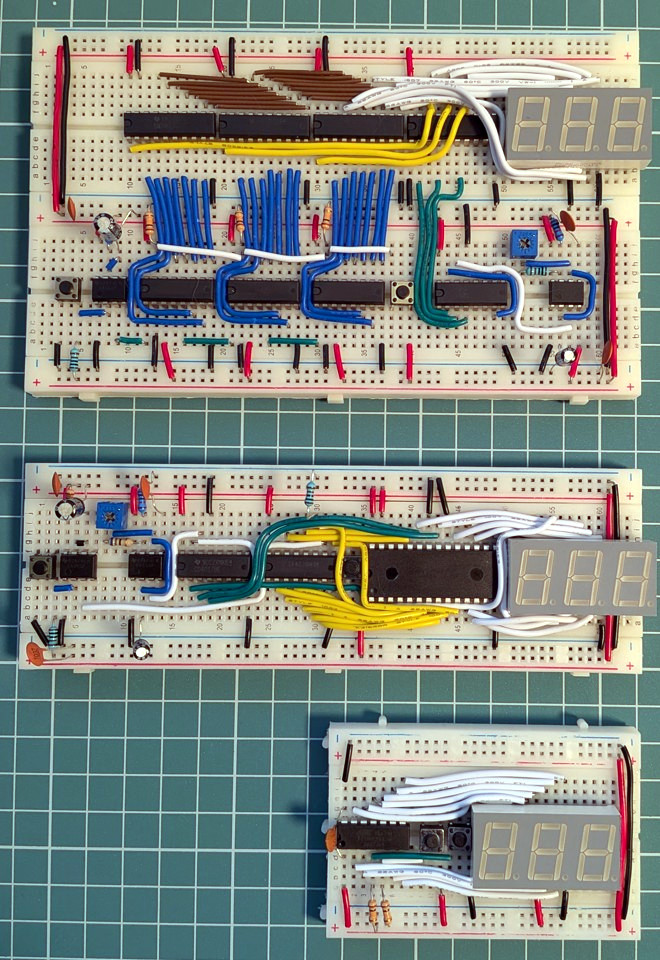
Integrated electronic modules like counters and displays are convenient and space-saving, which may also make them easy to take for granted. [Nagy Krisztián] demonstrates this by making three very different digital counter designs, each breadboarded with a 7-segment LED display. Push a button, and the displayed number increments by one for each press. It was a personal project that ended up educational in more ways than one.

The progressively-integrated designs shrink in part count and board space, but the complexity doesn’t disappear. It just moves into software.

The first version uses discrete components only, and even though it handles the counting with CD4026B decade counter ICs instead of building counters from scratch with NAND gates, it’s still by far the largest of the three. The second version simplifies driving the display with an AT28C64B EEPROM acting as a sort of hardware lookup table translating binary counts into 7-segment digit display patterns. The third uses an ATtiny24A microcontroller, and unsurprisingly has the smallest footprint.

All of this highlights two things. One is that implementing even a simple counter and 7-segment LED readout is a nontrivial affair when one gets right down to it, even when taking advantage of purpose-built ICs. The second is that the complexity that is on full display in the first version doesn’t simply disappear as the footprint and component count goes down. Rather, it moves into software and other infrastructure, like the need for compilers and chip programmers.

The whole thing is both educational and a reminder of how good the average hardware hacker has it today. There are so many effective electronic assemblies, available to just about anyone at low cost, that it can be very easy to take it all for granted and forget just how much breadboard space and wires were needed for even simple-seeming things.

[Nagy] is certainly no stranger to dealing with a lot of wires, as we’ve seen when he fooled a 286 processor into thinking it was plugged into a functioning vintage motherboard.

C64 Finally Gets the SRAM Corporate Wouldn’t Pay For

9 July 2026 at 01:00

If you think RAM is expensive now, try putting yourselves in the shoes of a Commodore engineer, circa 1981. RAM was eye-wateringly expensive by modern standards, and Jack Tramiel wanted 64K of the stuff for the next computer– hence the name, Commodore 64– but he didn’t want to pay for it. The solution was to use cheaper dynamic RAM over the more expensive static RAM that later took over the market in the kilobyte range. That’s a small problem for retrocomputer hobbiests, because while we’re complaining about the price of gigabytes of the stuff, you can’t buy new DRAM chips that fit a Commodore at any price. That’s why [Fabio Battaglia] aka [hkzlab] came up with an adapter board to fit easily-available SRAM chips onto aging C64s. 

Nothing lasts forever– not cold September rain, and not DRAM chips. Heat damage? Internal corrosion? There are probably multiple failure modes, but someday the old stock of chips will run out and the retrocomputer community is going to be ready for it. [Keith Olson] sent us a tip on a video by [The Retro Shack]– embedded below, and thanks for the tip, [Keith]!–about this very problem, that serves as a good demo of what you get when you put SRAM into a C64. That said, the adapter board on offer is only good for C64s with the 250407 motherboard. If yours is different, you may have to modify the board– but hey, it’s open source, so go ye and do that thing. Let us know via the tips line if you do.

IBM Home Director: Home Automation in 1996

8 July 2026 at 22:00

Back in the 1990s IBM had a pretty sizeable presence in the PC market, including its rather spiffy Aptiva series of PCs. Naturally their PCs had to feature heavily in another consumer-related thing that was popular in the 1990s, being smart home automation in the form of IBM Home Director. Recently [Ionic1k] took a look at this blast from the past, starting with one of the original IBM commercials.

At its core it used the same X10 protocol that similar solutions from RadioShack and others used, with many modules and packages you could get to use with it. You could also get a more bespoke installation performed at your home to move beyond mere X10, which some people are still finding when they’re buying a house.

Since this uses powerline communication, it required no wires to be run, just the requisite modules to be plugged into a power outlet, with the video demonstrating the basic setup and installation. The PC itself is plugged into the control module via the serial port, from which the Home Director control software can be used to create a configuration and control the state of connected modules.

Although X10 has the same issues as any kind of powerline communication, overall it seems like a very nice system, with a wide range of modules and absolutely easy to set up even for a casual Windows user.

Is Now the Time for Volumetric 3D Printing?

By: Ian Bos
7 July 2026 at 10:00
Art of 3D printer in the middle of printing a Hackaday Jolly Wrencher logo

Of all innovations adopted by the maker community within the past couple of decades, one stands among the rest on top for anything regarding manufacturing. It goes without saying here at Hackaday how many projects have been reliant on using the technology to turn their ideas into reality. 3D printing has been a maker community invention and, in return, has expanded this hacky community into something that anyone with an imagination can get into. It also goes without saying that the layer-based tech imposes limits on what we can actually create: think overhangs and layer adhesion. However, there’s a possibility that a recent offshoot of this scrappy community has the power to eliminate some of these faults.

Volumetric additive manufacturing (VAM) is a young technology that has a similar start to many new tech toys, including the original SLA of the first 3D printers. That is expensive and completely stuck in the laboratory… Fortunately, that’s not where 3D printing as a whole stayed, as the RepRap project managed to bring the obscure technology to the hobbyists’ main stage. An entire group of people formed and spent countless hours until the useless pieces of poorly extruded plastic could form parts impossible to make with anything else. A cool quirk of history is that it likes to repeat: examples spur recreation, and this appears to be happening with the technology found within VAM printing.

History

Hold up for a second. While we have covered VAM here before at Hackaday, it’s not exactly the most well-known tech or the easiest to understand. So what is it? Starting from the beginning and simplest forms, VAM is similar to the more  common SLA printing. Using a light source and light sensitive resin, both of these methods can create entire physical objects by solidifying or curing specific areas of a vat or vial of resin. SLA will often use something like a laser and layer by layer “draw” the model until the entire geometry is finished. A quirk of most of many photosensitive resins is that they need to overcome a threshold before they can start curing. This allows VAM to do something a bit different. The earliest methods of VAM used intercepting lasers which allowed selective curing only where these beams were intercepted. One singular spot at a time would be able to overcome the threshold required for printing, allowing you to build up most geometries.

Xolography Print

This works, but for more complicated models there’s more effective methods. One type has been covered here before called Xolography, still using intercepting beams, however with differing wavelengths which allows for more finite control. This is effective, but the resin is complex, requiring two-wavelength-photon-sensitive photoinitiators. Introduce the current standard in VAM printing, computed axial lithography (CAL). This method finds itself using existing methods found in traditional tomography, such as CT scanners. CAL methods are basically reverse tomography, where a model is used to create projections to be projected in printing. These projections allow dose control in each “voxel” of resin from changing the projection as the volume of resin is rotated. When ideal, this means that the entire model is printed at once. No layers needed for printing, and printing in minutes rather than hours.

Open-Sourced

Cool, but why should you care about this tech? Because you could start using it now! Just like the RepRap project before it, VAM has OpenCAL. OpenCAL was started by the same lab that originally created the axial version of the technology. UC Berkeley released the first OpenCAL around 2019 which was… well a start.

Functionally practical for only big budget research, it was far too expensive and complicated for any hobbyist with a 9-5 to realistically touch. Last year saw a new model presented at Open Sauce which used a consumer projector and common hobbyist electronics. While this was an improvement, there are three barriers to VAM printing; the hardware, software, and chemical resins make it a challenge for any individual alone. A newer version of the hardware was quickly put together for this summer. This helps with the hardware element, but there’s two new aspects being released alongside OpenCAL V2 for other unsolved problems.


Software: Tomo

Tomo with the Thinker model being prepped

For a little while now there have been various software packages available for allowing easier use of whatever VAM printer you might have, however these had various problems. From being undocumented to being complicated for anyone without comfort in command line , something different would be needed. A standalone application would certainly work, and low and behold that’s exactly what’s being tried here, called Tomo. Tomo allows you to use an OpenCAL printer with little thought or expertise, or ideally any other type of VAM printer.

Chemistry: Formlabs Resin

Large form factor VAM print

Material science is always a particular challenge for the open source community. Unlike software, you can’t distribute unlimited copies of your perfect mix of photosensitive resin without special chemical clearances and certainly not for free. Some of the first 3D printers from RepRap would use a nylon weed wacker line in place of the standard PLA of today. Unfortunately there’s less flexibility in the fine tuned resin found in VAM. This resin has to have a nonlinear photo-reaction for selective curing, be fairly transparent to the reactive wavelength, and be very viscous to prevent resin movement during printing. Formlabs, which makes resin printers and resins, has gotten into the act. Through talks between the OpenCAL team and Formlabs, an agreement for production of this special resin is being worked out, allowing for far cheaper material.

Hardware: OpenCAL

OpenCAL V2 printer
OpenCAL V2 printer

Of course this leaves the printer itself. OpenCAL is designed for a variety of different sized printing volumes, projectors, or anything else you might have in mind. Expect printing anything from this printer to finish in the span of minutes. While it can do the same small prints found in the older model of OpenCAL, experiments involving larger form factors have been attempted. But if you want more details make sure to check out the documentation here or join their Discord channel!

Future of VAM Printing

So how far can this technology really go? Could it pass traditional methods of 3D printing? Well, it’s certainly faster than traditional printing, however, there’s still plenty of trouble when trying it out. How do you remove partially cured resin off your print? How do you actually tell when the print is done? These are problems that are being fixed right now by the community, and maybe you can be the one to fix something holding it back. It’s fair to say that the community that has propped this technology up to where it currently stands is who is going to decide where it goes.

Why the NES Put Out a Wobbly Picture

7 July 2026 at 04:00

The NTSC television standard is a masterpiece of mid-century engineering, to pack a color image into the transmission bandwidth of a monochrome one, and to do so while maintaining backward compatibility with earlier monochrome TV sets. In terms of its timings and choice of sync and carrier frequencies it’s elegantly thought out for maximum quality on a 1950s round-CRT color TV set.

The trouble is, that while the standards are exacting, the receivers are quite forgiving, and will display adequately even with substantially off-spec video. [Nicole Express] is here with an in-depth examination of a time when that was pushed just a little bit too far, explaining why the Nintendo Entertainment System (NES) displayed wobbly color images.

We’re treated to a run-through of the NTSC standard itself, and a look at how some of the other consoles and home computers of that era either had similar problems, or managed to avoid them. The key lies in the exacting timing required to achieve perfect interlacing, and the NES’s use of a single crystal to provide all the clocks. The dot clock on adjacent frames was almost right, but not quite, leading to a side-to-side wobble that while barely perceptible, was exacerbated by some graphics. It’s a fascinating read.

We’ve looked at composite video in detail in the past.


NES image: JCD1981NL, CC BY 3.0.

Flight Sim Tracking from Spatial Audio

By: Ian Bos
6 July 2026 at 19:00

Flight sims are wonderful to play around with to get immersed in the position of a pilot. Racing sims can give you a thrill that can only be beaten by the real thing. However, most of this tech is on the more expensive side, so it would be great if you could use some of the hardware already found in your house. Many Sony headphones already have rotation and movement data built in for spatial audio, so why not start there?

[Nicholas Slattery] had this very idea and has produced an open-source application to connect your headphones straight to your sim. There’s a surprising amount of support built into many headsets that use a known protocol called the Android Head Tracker HID protocol. This allowed [Nicholas] to connect a family of Sony headphones straight into OpenTrack, which is often used with flight sims. The best part is you can still use the headphones as normal with a Bluetooth connection.

If you want to give this a try with your own rig, check out [Nicholas]’s GitHub here. While flight and driving sims might be expensive to put together, it’s never too hard to hack together something to lower that barrier! Whether it’s a flight sim force-feedback joystick or driving sim hand-breaks we got you!

❌
❌