❌

Normal view

There are new articles available, click to refresh the page.
Today — 29 October 2026Hackaday

An AI Chatbot for the Apocalypse

29 October 2026 at 07:00

You don’t have to be a full-on “prepper” to at least occasionally wonder what would happen if civilization collapsed. One thing you probably couldn’t do is go on the Internet and ask your favorite AI how to purify water, repel zombies, or treat a burn, all of which may be highly relevant depending on your situation. Now, with Survival LLM, you have a chance.

The  LLM is pretty much the stock chatbot, but it is trained on survival topics, and it runs locally. Naturally, you need the Internet to set it up, so you’d want to do that now before everything hits the fan. The training set uses medical references, survival manuals, FEMA and CDC documents, and nearly a million Wikipedia articles. It includes the survival references in a library and links to them when answering, too.

The installer is small, but it assesses your system and loads a model based on what you have. If you have less than 32 GB of RAM, you’ll get the IBM Granite 4.2 8B model, which was able to correctly answer 14 of 22 test questions. Other models do better, including the NVIDIA Nemotron 3.5 Super model, which got 21 correct, but requires at least 128 GB of memory.

Now, somehow you have to power your computer, but that’s a separate problem. At least there will be plenty of GPUs to scavenge from abandoned data centers. We’ve seen prepper digital libraries before. More than one, in fact.

Before yesterdayHackaday

SIMD-accelerated Machine Vision on an ESP32-S3

27 October 2026 at 07:00

Recently [shraiwi] decided to have a bit of good nerdy fun and implement the FAST machine vision algorithm on an ESP32-S3 using its SIMD ISA. This involves using the assembly instructions for the ISA, making for an exciting opportunity to become familiar with this part of this Xtensa Lx7-based twin-core MCU.

The Features from Accelerated Segment Test (FAST) algorithm is a corner detection method that can determine with reasonable accuracy and in real-time whether a given input frame contains said corners which thus may correspond to objects and other characteristics worthy of note. This is essential for machine vision, with machine learning able to bump up its recognition accuracy even more.

Implementing this algorithm on the ESP32-S3 proved to be a bit of a challenge due to somewhat limited SIMD ISA. Missing instructions included things like comparisons between unsigned byte values, and there is no support for direct misaligned reads.

All of these required some creative coding to work around, but in the end the ESP32-S3 running at 240 MHz was able to process a VGA stream in real-time at 30 FPS. This means about a 2x speed-up over a naive implementation using only non-SIMD instructions.

If you want to play along at home, the Platform IO project is made available on GitHub.

A Walkie Talkie Interface For Claude

24 October 2026 at 04:00

[Bookmari] had a problem — working as a delivery driver, they wanted to work on various projects with Claude Code while out and about. Unfortunately, it simply wasn’t practical to write prompts and read answers on the job. Thus, they whipped up Walkie Claudie, so they could use their voice instead.

The concept is simple enough, it’s an interface that lets you talk to Claude using speech recognition, and lets Claude talk back to you with a text-to-speech engine. It runs on a smartphone, with a direct network connection to the PC running Claude, though you can use a VPN if you’re distantly located. [Bookmari] has a push-to-talk setup so that pushing a button on their Bluetooth earbuds lets them talk directly to Claude. There’s also a special mode to keep the channel active during long pauses if you need a while to collect thoughts and vocalize them. Just for fun, the interface is styled like an old-school walkie LCD, and there’s fun little details like synthesized squelch and channel-switch noises and so on.

If you’re looking for a way to stay hooked up to your AI assistant at all times, this could prove useful to you. Alternatively, consider if maybe it’s worth taking a break sometimes, or check out other Claude Code projects we’ve seen of late.

One-stop Tool Shows Apple Intelligence The Door

19 October 2026 at 11:30

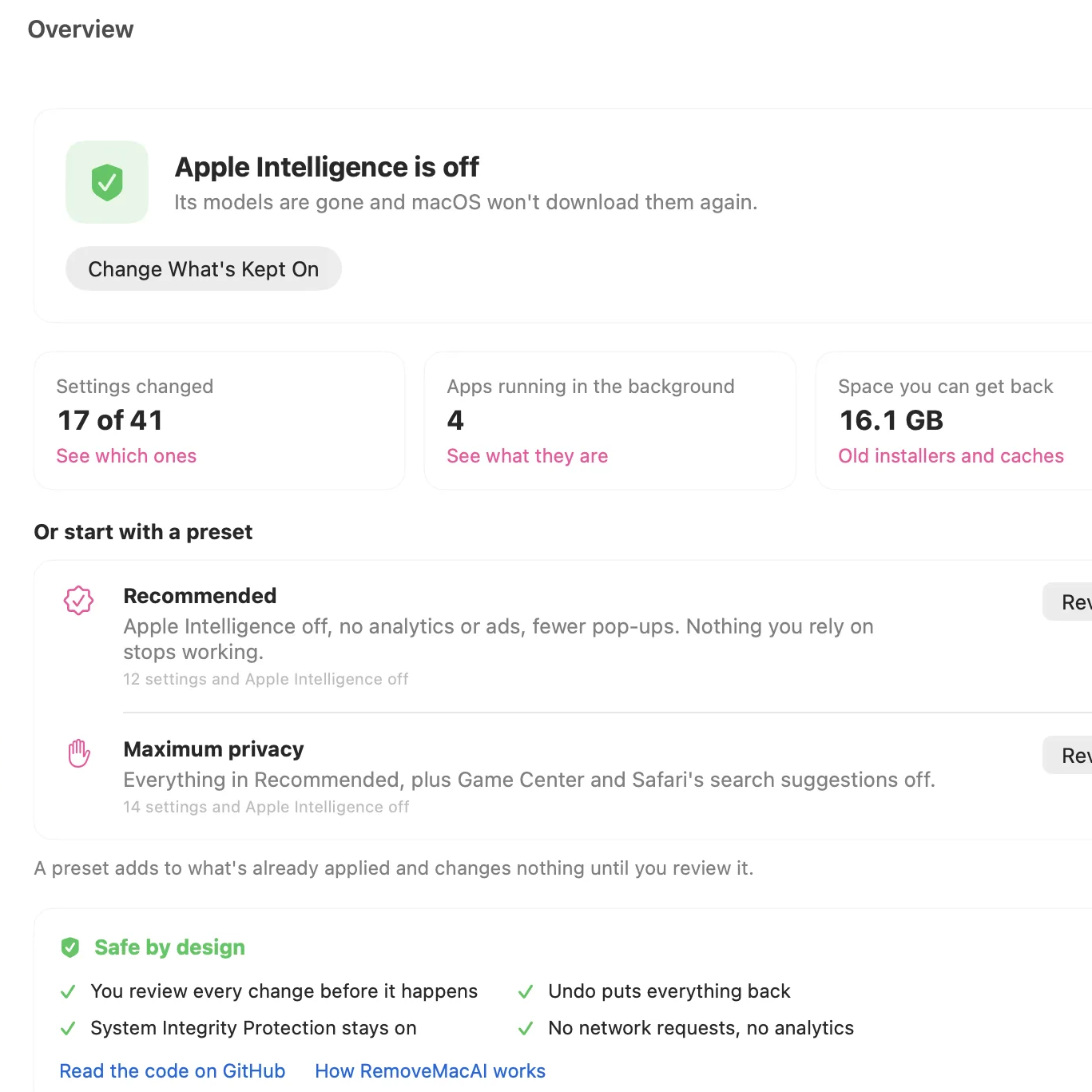
Don’t want AI features on your Mac? Tough luck, unless one wants to imperfectly do it by hunting down settings in about a dozen different places. Even then, the multi-gigabyte models stay on disk. Unsatisfied by this state of affairs, [omlahore] created RemoveMacAI, a one-stop-shop debloater that shows Apple Intelligence the door, reclaiming its disk space on the way out.

With RemoveMacAI one has a single location from which to turn individual AI features off, delete the models behind them, and block MacOS from downloading them again by redirecting attempts to a closed local port.

What’s refreshingly nice about the tool is how transparent it is about what each setting or preset will change, and communicates clearly what exactly one loses access to by disabling it. Want it all gone? Easy. Use one or two features, but don’t want the rest? No problem. All changes are shown up-front before the tool changes anything, and all alterations are reversible.

Released only a couple weeks ago, to say the tool is popular would be an understatement. Windows 11 also got a “remove AI features” tool, and it requires constant updating to stay functional. Will a future MacOS update interfere similarly with RemoveMacAI? Probably, but one thing that is clear is that a tool like this resonates deeply with a nontrivial number of users.

Testing Oneself for AI Slop

14 October 2026 at 07:00

The feed of a Hackaday writer brings many surprises, some rubbish, and the occasional diamond which of course we bring to you. Sometimes a page catches the eye that’s not a Hackaday piece per se, but makes for interesting reading. Today there was an example which provides a catalyst for a story if not being one itself.

It’s an AI skill intended to make a slop-writing operation look less sloppy, and since it contains a list of slop behaviours, of course it’s irresistible to turn it on yourself. To delve into the archives, if you will. So here goes, how slop-like is your scribe?

It kicks off with the old favourite, “Delve“. Oh dear, that one’s in the List Hackaday corpus quite a bit. Earliest appearance: 2016. Then landscape terms, in which it’s easy to recognise “Sphere” again. Oops. 2016 again. How about “Testament“? Well, that one’s a 2017 word. “Pivotal“? Four years of the Raspberry Pi, back in 2016. How about “Showcase“? Yup, it’s there, in 2019. Meanwhile “Foster“, goes back to 2017.

Next up are “Leverage” and “Utilise“. Safe ground here. Editors have what are referred to a “Pet Peeves”, language tics that annoy them on sight, and those two regrettable pieces of business-speak never evade this red pencil. The word you are looking for is “Use”.

The page goes on to name a load more words as tells, and we could continue to dissect them for your amusement, but we think you get the message from long-pre-LLM Hackaday. It gets more interesting when it talks about paragraph structure, and there are the things we’d recognise as tells. Staccato paragraphs, one-line stacks for impact, and repeated sentence start words. Whether AI slop is sounding like a business influencer’s Linkedin posts, or the other way round, is anybody’s guess. And yes, Hackaday does use em-dashes — get over it.

It’s amusing to poke mild fun at your past writing style, but if there’s a serious point in there it’s that spotting slop is never as easy as having a check-box list of tells when in fact you’re just looking at professional-grade command of the language. After all, given that Hackaday is in its corpus, the LLM can even make a passable effort at writing like one of us. Perhaps the key lies in that article, when the fake Hackaday piece became obvious because it lacked the inference of the real one.

A Free Cloud AI

12 October 2026 at 04:00

If you would like an AI “personal agent” but don’t want your data on some opaque cloud computer, there’s a new option that appears to be somewhat nicer: [rociiu] has talorys, an AI agent that runs in your Cloudflare account. True, it is still on a cloud computer, but it is your account on a cloud computer. It is designed so you can use it on Cloudflare’s free account with reasonable limits, and the code running is all on GitHub, so you can — if you are so inclined — look to see what it is doing. The data, too, is all in your cloud instance.

This seems like a reasonable compromise. Cloudflare provides the hosting, and the software in your virtual computer does all the work. At least, that’s how it is promoted. Honestly, we haven’t combed over the code, but the assertion is “Free-tier friendly… no telemetry.”

We are fairly sure they are using Cloudflare’s AI engines, too, so it would be interesting to see how much of your data they could, in theory, harvest in transit. Of course, your data is still in the cloud, so if you are really worried about privacy, this might not be for you. But since everything is in your account and open, you can at least have more control over what’s there. For example, you can easily download or delete your data. You can even see exactly what prompts it uses.

Are there downsides? Sure. The tool can’t integrate with your calendar, for example. It can’t deal with e-mail, nor can it search the web. It won’t write code for you. This isn’t meant to be a general-purpose chatbot replacement. It is more like an AI tool for keeping a task list.

While Cloudflare does have a free tier, it does have daily limits, and you may hit them. And, of course, if things like this get too popular, they could reduce those limits. The system does let you export your data, though.

It isn’t flawless. We asked it to set up three recurring meetings. It got one right, put the other one in for Sunday instead of Monday (even though the title said Monday), and hit a Cloudflare rate limit and failed to create the third one. We asked it to retry the failed one once, and it didn’t work. So I waited a bit and tried again. It claimed it worked. However, when I looked at the schedule, it wasn’t there.

We then asked it to fix the Sunday schedule and add the one it had missed again. It did add it that time. It also added the Monday meeting, but despite saying it would delete the Sunday one, it didn’t. I manually deleted it.

Installation is easy. You can connect a domain you own to Cloudflare or use the subdomain on pages.dev that they give you, which works fine. You run a single command on your computer. It handles authentication to the server and sets up all the services and data stores.

So essentially it is a to-do, reminder, and note-taking system. However, it does work well when it works. It can remember things and will find things it remembers or in notes very easily. Can you do that with non-AI tools? Of course. Not to mention, any of the “big” chatbots can do all of that and more. But not in your own hosted server account.

Besides, it is interesting that for small uses, Cloudflare offers plenty of free-tier compute resources that might come in handy for other projects. It is nice to have some free cloud-based computers, as we noted in a recent Linux Fu post where we used Oracle’s free servers.

A New Type of LLM on the Block: Decision-Making Models

6 October 2026 at 04:00

Large language models (LLMs) output language, but they are commonly tasked with making a decision or classification of some kind instead of writing an essay or chat reply. An LLM will be provided with input, and asked to classify that content in some way: with a rating, yes/no answer, a best-fit categorization, and so forth. A recent new type of model by the name of Jev was released only weeks ago and it is extremely fast, ultra-cheap, and laser-focused on that decision-making role. It can’t write even a single sentence, but it can classify and categorize very, very quickly.

Jev works like this: it still accepts text input, but it outputs only floating-point numbers. Those numbers are the “answers” to user-specified yes/no type questions, lists of choices, and scoring-type requests. [Simon Willison] provides a concise summary of what Jev does, and what makes this new category of model so interesting.

To say that the idea has caught on would be a wild understatement. Folks are making their own decision-type models and experiments in a flurry. Kev and Nimble are two examples (Nimble was added as a supported model in Ollama just recently, and is small enough to run locally with relative ease.)

If this type of local AI model was the missing link you needed to get an idea working, don’t keep it to yourself! Tell us all about it on the tips line.

❌
❌