UAT-11473, an advanced persistent threat actor deploying KeyDrift, a custom malware framework targeting Cisco Catalyst SD-WAN controllers. The framework embeds inside legitimate control-plane processes to maintain access, intercept decrypted communications, and extract sensitive network encryption material. Observed targets span space and satellite services, defense and aerospace technology, and policy research. Talos assesses with high confidence […]
A couple of months ago, our research revealed a highly sophisticated infection chain and a complex .NET assembly-loading framework built on XAML markup, which strongly indicates a supply-chain attack targeting a custom Windows build used exclusively by government entities in Asia. The malicious framework has been labeled NetamLoader; at present, no attribution to any known APT group has been established.
The sample came to light in the first half of 2026, when Kaspersky Security Network (KSN) issued a malware detection alert for a .config file using AppDomainManager injection to load arbitrary .NET assemblies. The file was packaged inside a CAB archive placed in the directory that stores Windows operating system update packages. Initial analysis of the CAB contents found no malicious code: most executables were legitimate components of the third-party patch management tool Patch My PC, and even the .NET assemblies used for the injection were Microsoft-signed. A later re-examination of the original .config file and the full loading process revealed the infection chain and framework described in this report.
Kaspersky’s products detect this threat as HEUR:Trojan.MSIL.NetamLoader.gen, Trojan.MSIL.Zapchast.*, and Trojan.Script.Agent.*.
Background
During routine threat hunting, KSN sent us a malware detection alert. The notification flagged a .config file that employed AppDomainManager injection to load arbitrary .NET assemblies. The file was compressed into a CAB archive named e4537a1762fcafd2fd96bfc825bad34f9db9a24d and saved in the folder that stores Windows operating system update packages. Below is the full path to this archive:
Starting with this CAB archive, we uncovered a highly complex infection chain that uses a previously unknown advanced loading framework.
Initial infection
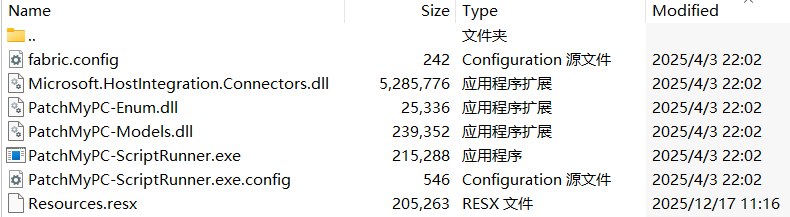
The CAB file contains the following seven files, which are extracted and placed in the path C:\Windows\SoftwareDistribution\Download\Install\:
Files compressed in the CAB file
Except for Resources.resx, none of the files contain malicious code. We did not observe how the CAB file was delivered to the victim; we only saw the process PatchMyPC-ScriptRunner.exe running with the following arguments:
After the file is launched in this manner, the infection chain progresses to stage 1.
Stage 1
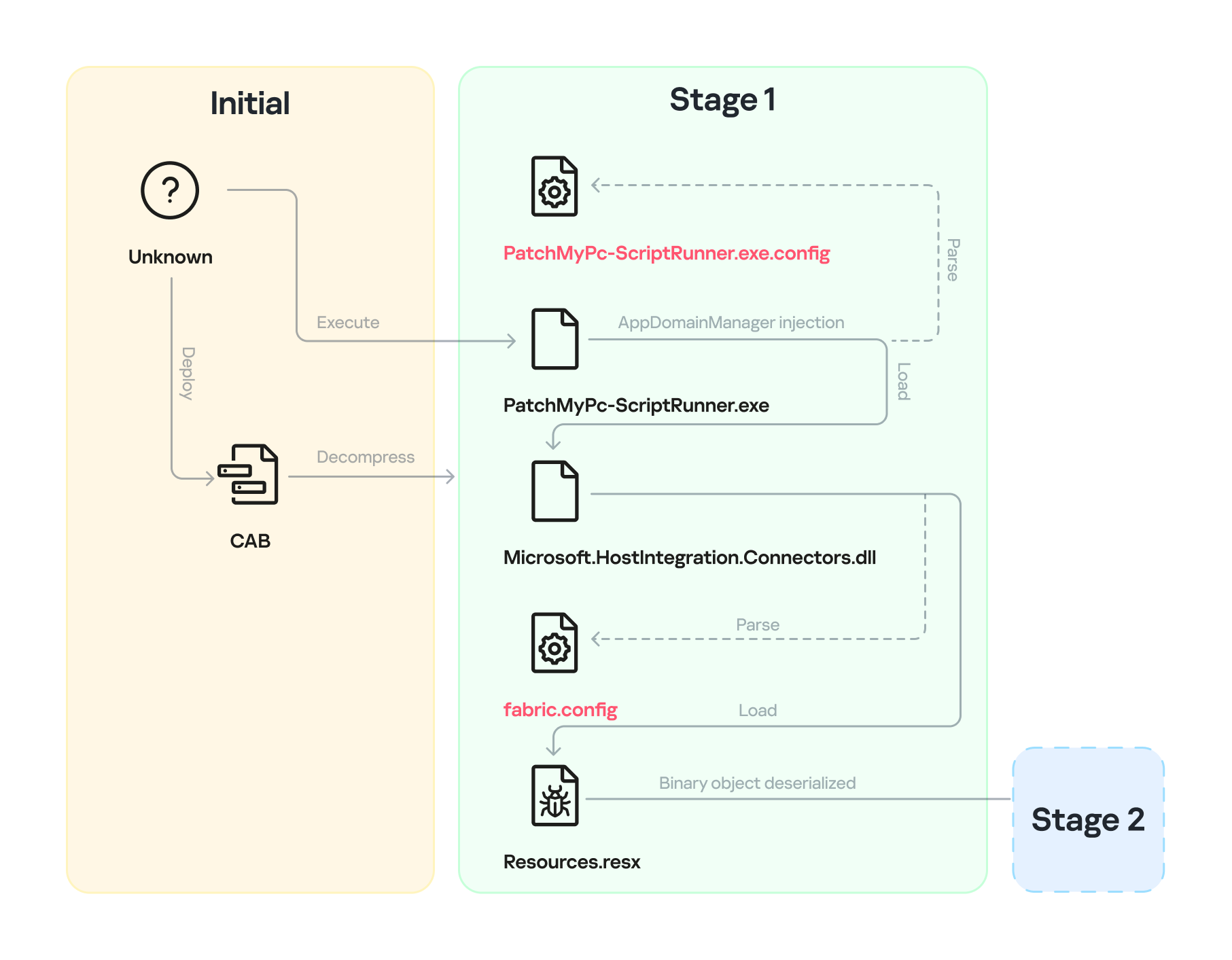
Starting with the execution of PatchMyPC-ScriptRunner.exe, which then served as a host process for loading several payloads, we identified a complex two‑stage loading mechanism with multiple steps. The overall flow of stage 1 is summarized in the diagram below.
Infection chain: Stage 1
Step 1
The AppDomainManager injection technique is used to load an arbitrary .NET assembly. With this mechanism, when PatchMyPC-ScriptRunner.exe runs, the accompanying configuration file PatchMyPC-ScriptRunner.exe.config in the same directory is loaded before the executable’s main function runs. Below is the content of PatchMyPC‑ScriptRunner.exe.config.
According to the configuration file, the class Microsoft.ApplicationServer.Caching.DataCacheFactoryConfiguration from the Microsoft.HostIntegration.Connectors.dll module (a Microsoft‑signed assembly) is loaded. DataCacheFactoryConfiguration is the configuration class for the Windows Server AppFabric Cache Client, specifying the settings for a new cache client. When the configuration class is loaded, its instance first attempts to find and read the default configuration file, fabric.config, located in the same directory. The contents of fabric.config are shown below:
The DataCacheFactoryConfiguration class has a design flaw that can be abused to load arbitrary assemblies. The fabric.config file is meticulously crafted. When the file is loaded, the DataCacheFactoryConfiguration instance examines its className attribute, loads the specified type (System.Resources.ResXResourceSet from the System.Windows.Forms assembly), and creates a ResXResourceSet instance, passing “Resources.resx” to its constructor for parsing.
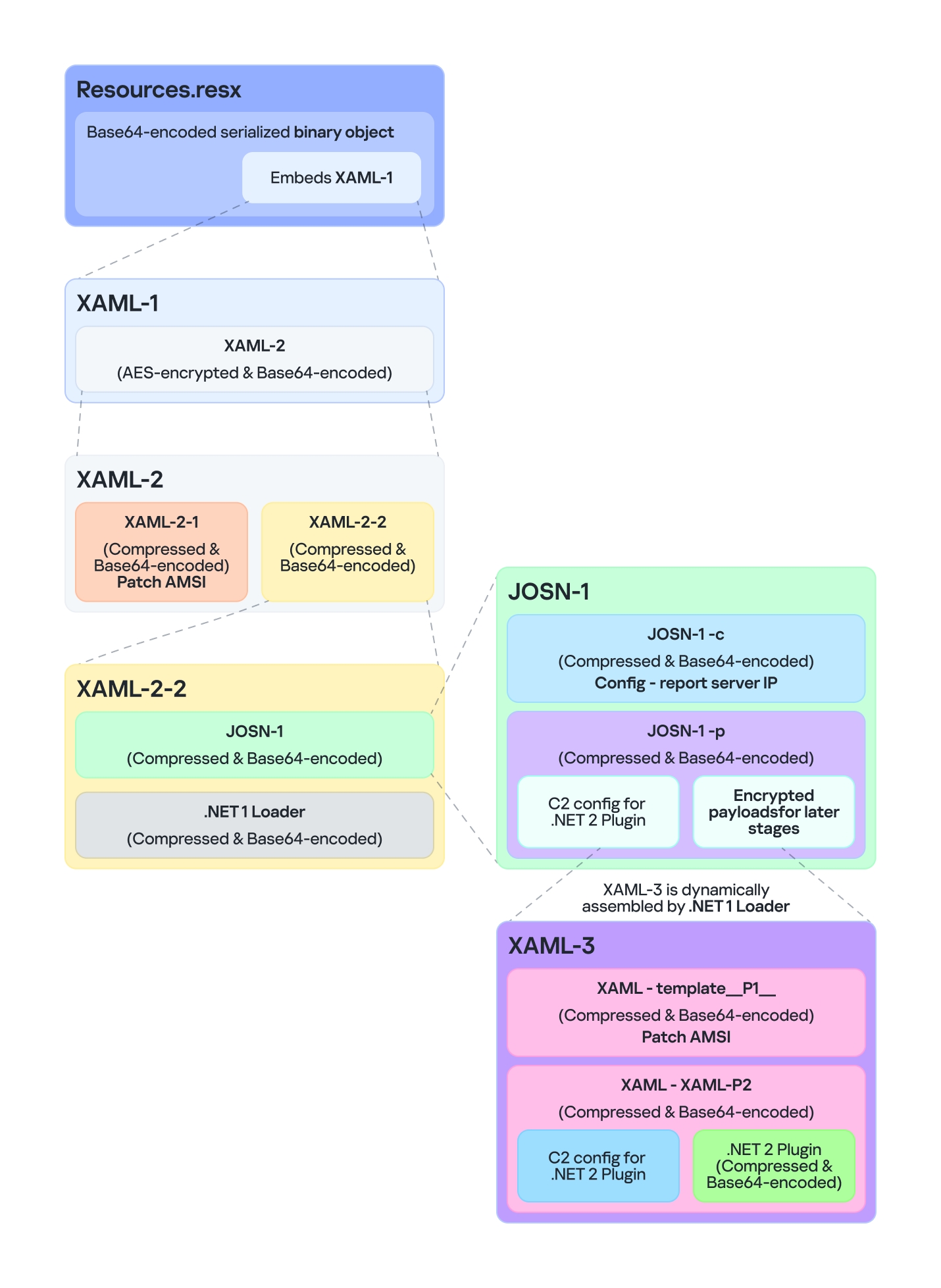
In the .resx file, multiple layers of payloads – including several XAML files, .NET assemblies, and JSON data – are encoded, compressed, or encrypted (see the diagram below). Each layer is unpacked and loaded by the layer above it. Once a layer finishes its operation, the next layer is extracted and loaded. Below, we analyze each layer in the order in which it is loaded:
Multiple layers of payloads are compressed and encrypted in the .resx file
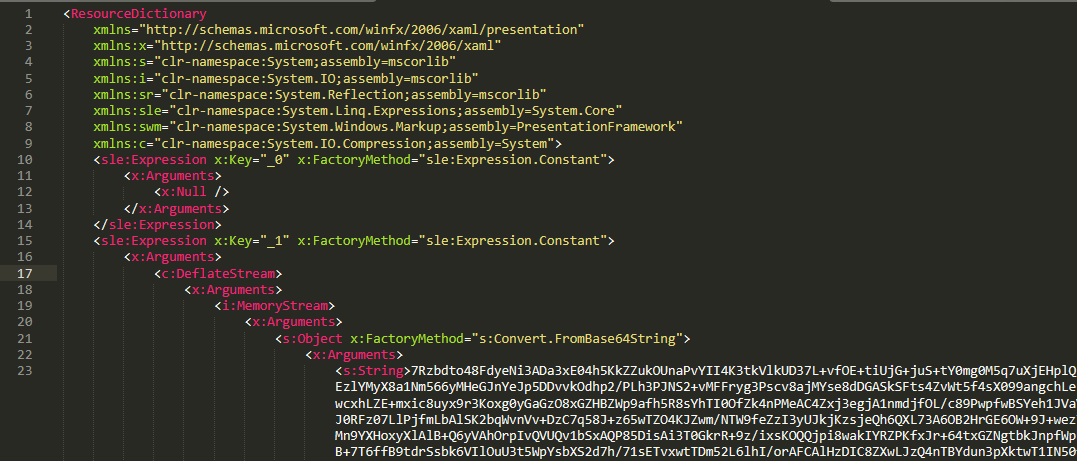
The Microsoft RESX schema defines the XML layout used by .resx files, which has a human-readable structure and can hold application resources: strings, images, icons, and serialized objects. The Resources.resx file contains a Base64‑encoded binary object that was serialized using the well‑known, highly vulnerable .NET BinaryFormatter class.
Base64-encoded serialized binary object in Resources.resx
Parsing this .resx file with ResXResourceSet causes the embedded Base64‑encoded binary payload to invoke BinaryFormatter.Deserialize(), triggering a deserialization vulnerability that enables a TypeConfuseDelegate attack. The TypeConfuseDelegate then invokes XamlReader.Parse(), which loads a XAML payload (named XAML-1) embedded within the binary object.
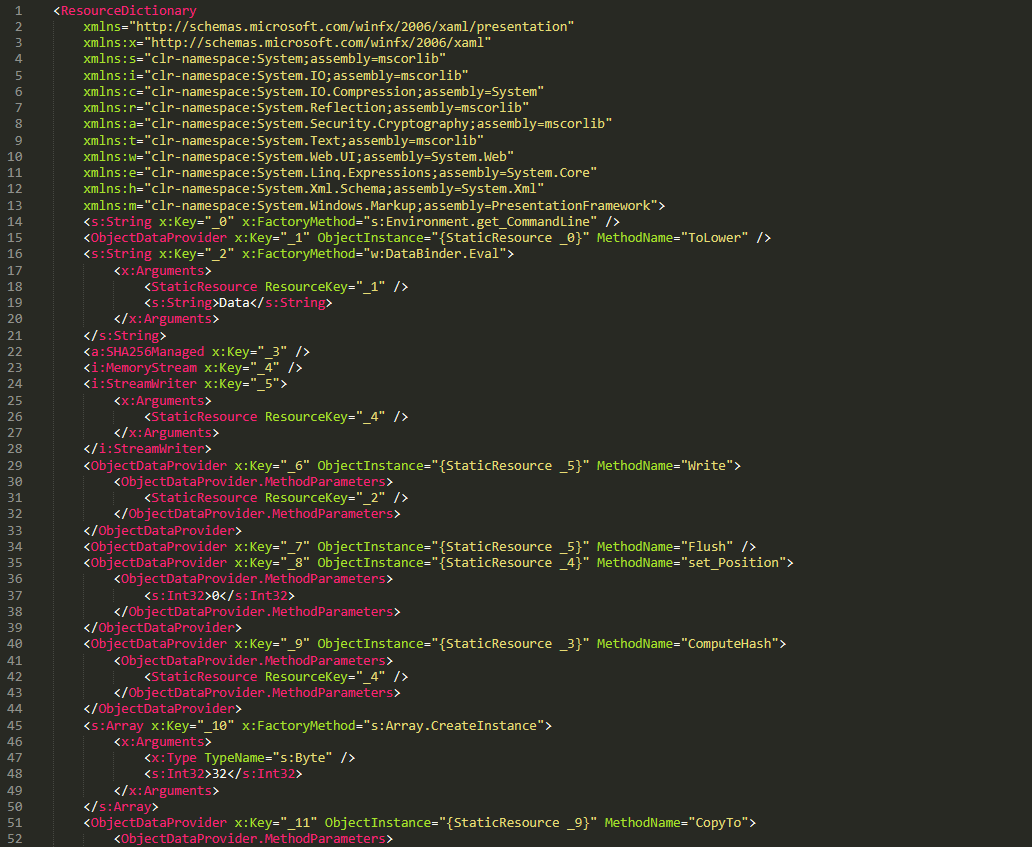
XAML is a markup language for building user interfaces in .NET applications, but its capabilities extend far beyond that. Using two built‑in objects, ObjectDataProvider and ResourceDictionary, logic equivalent to C# code can be expressed in an XML‑like syntax.
A code snippet of XAML-1
Step 3
The XAML-1 code acts as a loader for an embedded payload. The process is as follows:
Retrieve the full command line of the current host process PatchMyPC‑ScriptRunner.exe, converting all arguments to lowercase.
Generate the AES key by hashing the command‑line string with SHA‑256.
Decode the Base64 string embedded in XAML-1 into a binary array. Use the first 16 bytes of that array as the IV, then decrypt the remaining encrypted data with AES. The decrypted output is another piece of XAML code, which we refer to as XAML-2.
If any exception occurs during decryption, trigger Environment.Exit(0), silently terminating the host process to prevent error messages that might reveal the attack.
Stage 2
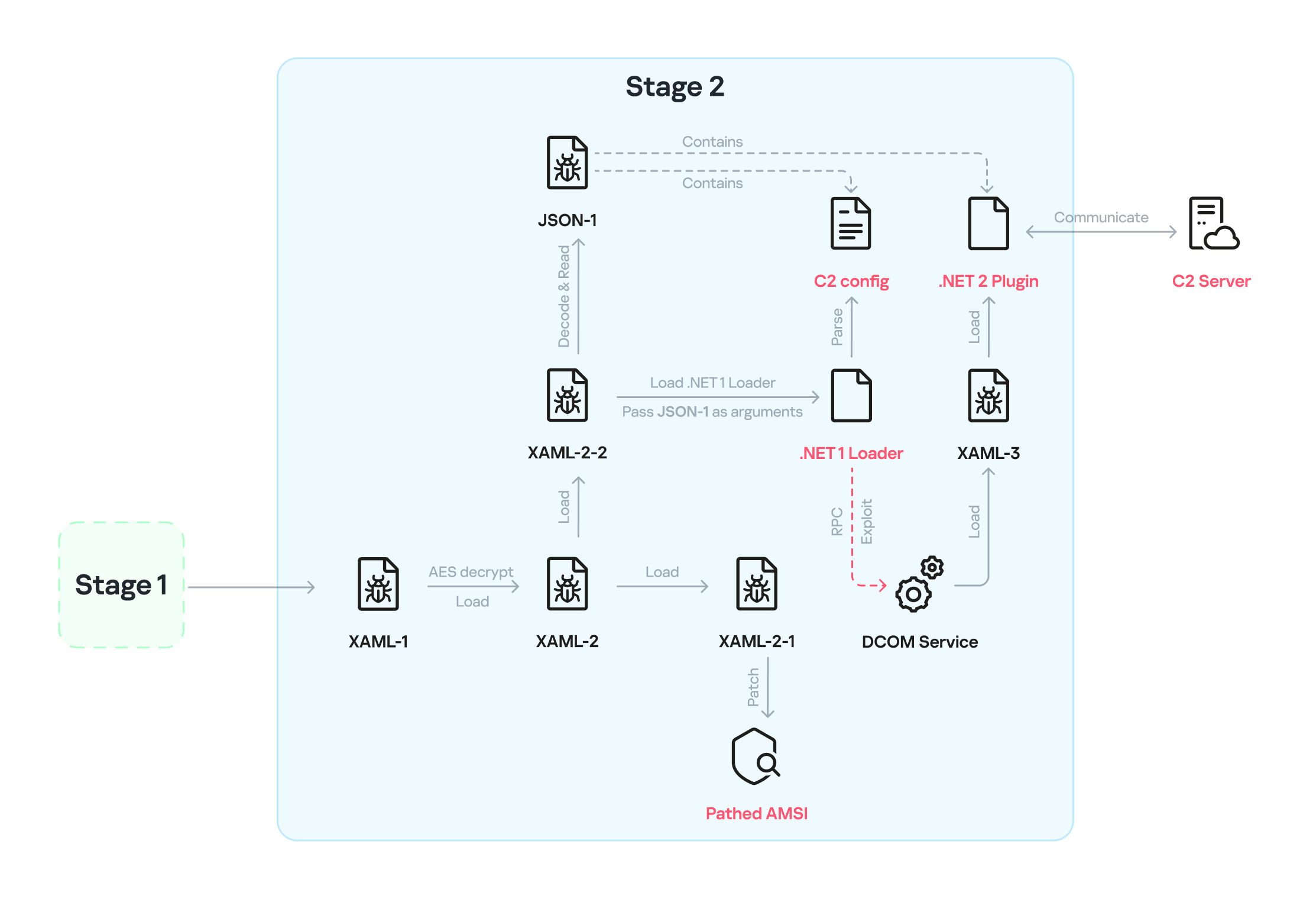
XAML‑2 initiates stage 2 of the infection. The diagram below shows the overall flow of this stage.
Infection chain: Stage 2
XAML‑2 contains two embedded Base64‑encoded sections. These sections are actually two additional XAML files (referred to as XAML-2-1 and XAML-2-2) that were first compressed with ZIP and then encoded in Base64. After decoding and decompressing, XAML-2 loads each file into memory separately with XamlReader.Load().
A code snippet of XAML-2
XAML-2-1
The first file consists of 796 lines. Its sole purpose is to hijack a key AMSI API to bypass anti‑malware scanning.
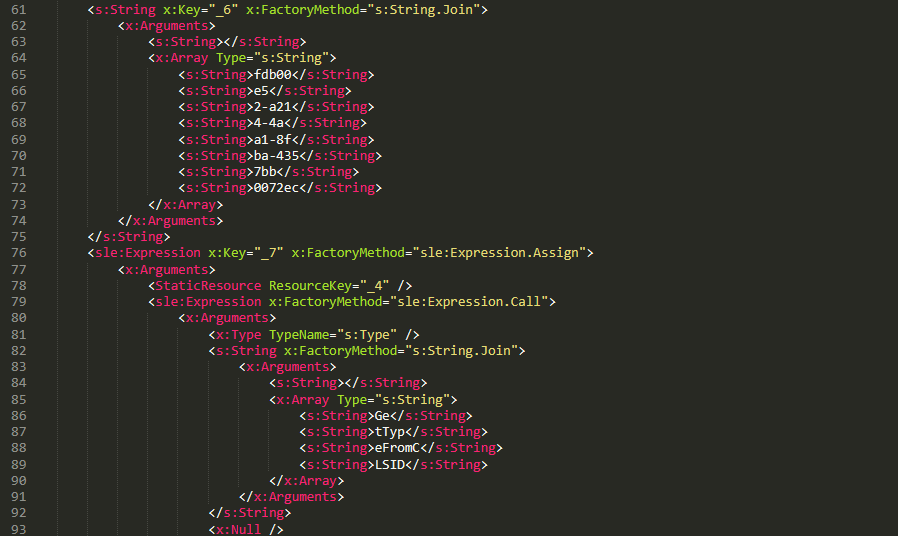
Sensitive strings in XAML-2-1 are cut into tiny pieces
To avoid detection by anti‑malware signature scans, sensitive strings are split into very short fragments. When XAML-2-1 is loaded and parsed, the fragments are reassembled into the original string.
The key steps it takes to achieve its goal are as follows:
Check the OS architecture by verifying whether IntPtr.Size equals 8. If it does not, the host process isn’t 64‑bit, so abort the hijack operation.
Combine the split strings into a single CLSID GUID (fdb00e52-a214-4aa1-8fba-4357bb0072ec), then try to create an instance of the AMSI COM object using this GUID.
Patch the AMSI module.
Create a delegate for the runtime method Console.Clear() and then obtain its native function pointer. Next, patch the method by overwriting its first bytes in memory with the binary payload (41 C7 00 01 00 00 00 33 C0 C3).
Obtain the native pointer of the AMSI COM object with Marshal.GetIUnknownForObject(). From this pointer, read the address of its virtual method table and add 0x18 to reach another pointer that holds the address of the CAmsiAntimalware::Scan method.
Use VirtualProtect() to make the Scan() pointer writable, change its value from the address of the CAmsiAntimalware::Scan() method to the address of the patched Console.Clear(), and then restore the pointer’s original protection attributes. Once this step is complete, every scan returns AMSI_RESULT_CLEAN (value = 0).
One patch targets the Console.Clear() API, which resides in the memory space of an existing legitimate module, while the other modifies only the virtual tables of the AMSI module, allowing the malware to pass code integrity checks.
XAML-2-2
XAML-2-2 consists of two parts: a .NET module (the first loader, .NET 1 Loader) and a JSON data payload (the C2 configuration, JSON-1). Both components are compressed with ZIP and then encoded in Base64. XAML-2-2 first decodes and decompresses the .NET assembly .NET 1 Loader, then uses the Assembly.CreateInstance() API to create an instance of the .NET 1 Loader and passes the Base64‑encoded JSON-1 to the m.C() method of .NET 1 Loader as a parameter.
.NET 1 Loader
.NET 1 Loader decodes, decompresses, and parses JSON‑1. The decoded and decompressed JSON‑1 is shown below:
{
    "p": "[Base64‑encoded JSON, which we call JSON‑1-p]"
    "c": "[Base64‑encoded JSON, which we call JSON‑1-c]"
}
JSON-1-c
This JSON contains the configuration data that .NET 1 Loader uses to report the execution results of the loaded payload to the C2 server.
sc
false
Flag. Determines whether to report the execution result of m.C(). When set to false, reporting to C2 is skipped.
c
null
Reporting C2 server. The result returned by the m.C() method of .NET 1 Loader is sent to this server.
tp
null
Unknown item, suspected to be a trusted SSL certificate. Thumbprint was used to verify this alleged C2 certificate.
e
null
The AES key that encrypts the JSON result returned by the m.C() method of .NET 1 Loader.
JSON-1-p
JSON-1-p is a more complex configuration file. .NET 1 Loader parses its data to prepare and load the subsequent stages. The following configuration keys store the payloads:
oib: Base64‑encoded .NET 2 Plugin (PE file)
oub: Base64‑encoded XAML that invokes Exit(0)
ibk: AES key used to decrypt ibi
ibi: A Base64‑encoded collection of compressed, encrypted XAML templates used to build XAML-3. Detailed instructions for decrypting and assembling XAML‑3 are provided in the XAML‑3 section below.
Other items are passed as C2 configuration to the .NET 2 Plugin at a later stage.
After obtaining the configuration, .NET 1 Loader proceeds with the following key steps:
Delete the update records from the system log related to the malicious update packages, along with the malicious files and cache files used in stage 1.
Retrieve the files in the folders matching the pattern 20???? at the path below, where each file name starts with “20” followed by six more characters (e.g., 20260101). Read the files’ contents, filter out any lines containing the exact substring GetExtendedUpdateInfoHandler, and write the filtered content back to the log files. The path contains the keyword CmitUpdateAgent, which may be linked to a custom Windows 10 build used by a government in Asia.
"%WINDIR%\Logs\CmitUpdateAgent\20????\20??????"
Reset a registry‑based exception‑state logging system by deleting the nine GUID keys under the path LocalMachine\SOFTWARE\Classes\appid\[specific_GUID] one at a time, along with all of their child subkeys. The algorithm that generates the GUID path is unique– it derives the GUID from the C2 URL– so each C2 server has its own distinct set of bound GUIDs. Of the nine GUIDs derived using this method, one indicates that an exception occurred, and the others are numbered 0 through 7.
For example, when the malware catches exception code 129, it creates the registry subkey {bde7ddc2-1f6f-4397-a0df-ae7c7d67d65a} to indicate that an exception occurred. It then checks the bit mask, where 129 equals binary 10000001. Consequently, it creates the eighth subkey {74084115-433e-4fe8-8d01-41c48fbfeef6} and the first subkey {bf6f4bde-97db-4dcd-9546-7ebf10061519}.
Verify that each necessary configuration item exists in JSON-1-p, then validate some of its items against hardcoded values. If any item fails the check, halt the infection chain and submit the execution result to the reporting C2 server.
Verify that the current user is an administrator; if not, throw an exception with code 128.
Check whether the configuration item aop exists. If it does, Base64-decode its value, use the result as XAML-3, and skip to step 9.
Generate a unique malware instance ID for the configuration item ii by calling Guid.NewGuid().
Query the SusClientId value from the registry key SOFTWARE\Microsoft\Windows\CurrentVersion\WindowsUpdate. Then generate the value for the newly defined configuration item si by computing a GUID using the same algorithm as above. Use the concatenation of the retrieved SusClientId value and the byte sequence \x14\x43\x9B\x64 as the input data for the algorithm.
Parse JSON-1-p, extract the relevant items and their values, and convert them to XAML format. Next, follow the steps outlined in the XAML-3 section to generate the complex XAML script XAML-3.
Create a COM instance of WScript.Shell (CLSID: 41904400-BE18-11D3-A28B-00104BD35090) and retrieve the environment of the current process. Then set the COMPlus_ETWEnabled environment variable to 0 to prevent the CLR from registering the .NET ETW provider, which hides the associated events.
Use RPC to create a remote COM object (CLSID: ab8902b4-09ca-4bb6-b78d-a8f59079a8d5). Exploit it via an unknown binary object deserialization vulnerability and the TypeConfuseDelegate technique. Once the exploit succeeds, XAML-3 is loaded into the remote host process dllhost.exe. This is a covert method for initiating a new process that loads the malicious payload XAML‑3. This technique effectively separates the infection chain from its initial process, allowing it to bypass behavioral monitoring by security solutions such as EDR.
The execution result (in JSON format, shown below) is first AES‑encrypted using the key from the item e. A randomly generated IV is prepended to the encrypted data, and the result is then Base64‑encoded.
[
    {
        // Fixed value
        "_": "0202097a-5c1e-460d-b5e0-030b9756b242",
        // Error number: 0 indicates successful execution
        "e": "0 ",
        // Value of config "ii"
        "i": "94aafd58-c00c-402a-aae6-858b4486a1a4"
    }
]
POST the encrypted and encoded result to the reporting C2 server.
XAML-3
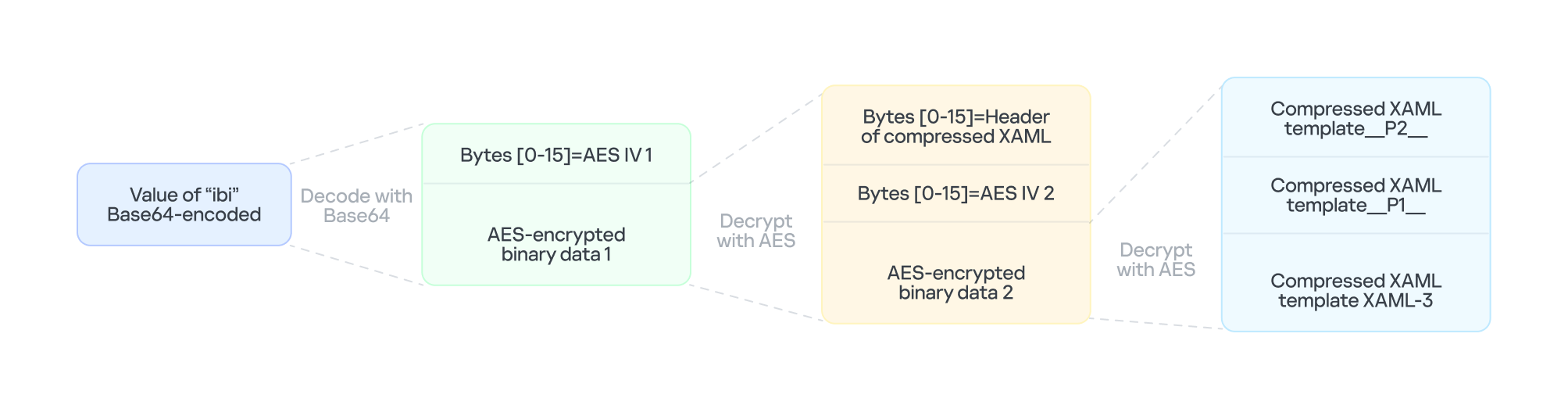
XAML-3 is a critical payload that, after leaving the original process tree, is loaded and executed in a different process: dllhost.exe. XAML-3 is generated from template XAML-3. As shown in the diagram below, the template is decoded and decrypted using the value of the ibi item in JSON-1-p. In addition to template XAML‑3, the final decryption includes two other XAML templates (template __P1__ and template __P2__).
The multi-layer encryption structure of “ibi”
The AES key is taken from the config item ibk. The first 16 bytes of the encrypted binary data serve as AES IV 1. After decryption, the data consists of a simple header followed by AES IV 2.
Template XAML‑3 includes two string placeholders, __P1__ and __P2__. Each placeholder is replaced with compressed, Base64‑encoded XAML (template __P1__ and XAML‑P2).
The content of template __P1__ is identical to XAML-2-1 and bypasses AMSI in the new process. XAML-P2 is generated from the template __P2__.
Some of the item values in template __P2__ come from the C2 configuration data in JSON-1-p. Within template __P2__, the placeholder __P__ is replaced with a compressed, encoded payload – the .NET 2 Plugin – which is decoded from the oib value in JSON-1-p. After completing all the operations, the template __P2__ becomes XAML-P2.
The C2 configuration in XAML‑P2 is shown below:
Item
Value
Description
ii
94aafd58-c00c-402a-aae6-858b4486a1a4
Unique ID for this malware instance (if the ii value in the configuration is null, the malware will generate a random one).
ec
9fT04e03tAiZAPogcDWt0w==
Base64-encoded AES master key: same as item e in JSON-1-p, used for C2 traffic encryption and authentication.
bi
79200-100800
Actual polling delay if the C2 doesn’t respond: 79200-100800 seconds (22-28 hours) – the code parses the values and multiplies them by 1000 to get milliseconds. This item indicates that the malware uses very long polling intervals.
is
1200-2400
Actual delay: 1200-2400 seconds (20-40 minutes) – a long delay before the initial connection to the C2 server, used for sandbox evasion.
u
Base64encodedXAML
A short XAML snippet that calls Environment.Exit(0)
wi
100801
Actual initial wait: 100801 seconds (~28 hours). The malware waits approximately 28 hours after initial execution and then exits the process.
de
False
Local exception logging switch: when set to False, exception logging is enabled.
si
41bd7f37-c3f6-4a9e-b2f3-5363e9a2c095
UID: generated using a custom method based on the registry key value SusClientId.
cu
https://openaigpt4vcom/model_v4/
Command-and-control (C2) server URL taken from the C2 server list.
tp
*
Trusted SSL certificate thumbprint:* indicates that any certificate is trusted (disabling SSL pinning/validation). This entry also appears in a list, corresponding to the C2 item cu.
rh
Additional route header/data: not configured in this instance.
When dllhost.exe loads XAML-3, it loads template __P1__ and XAML-P2 one by one. When XAML-P2 loads, it retrieves the current domain via AppDomain.GetCurrentDomain() and then stores the values of the C2 configuration items (cu, tp, and rh; see the table above) in that domain using AppDomain.SetData(). Finally, XAML-P2 decodes and decompresses the embedded payload (.NET 2 Plugin), loads the .NET 2 Plugin into the current domain, and then calls the plugin’s entry method, m.C().
.NET 2 Plugin
This payload is a .NET assembly (PE file). As discussed above, it is loaded by XAML-P2 into the host process dllhost.exe. In the plugin’s entry method m.C(), a thread is spawned to execute the malicious operations.
The following key steps are executed in this thread:
Configuration initialization: Load the C2 configuration from the current AppDomain’s data storage and assign it to the corresponding member variables.
Combine the queried values into a single string, for example: "4.7.03190\n17763.rs5_release.180914-1434". If any query fails, replace its result with a hyphen (“-“).
Clear the state of the exception‑state logging system: .NET 2 Plugin uses the same exception‑state logging system as the .NET 1 Loader.
Recursively delete 12 GUID subkeys from the registry. The algorithm that generates the GUID path is the same as the one used by .NET 1 Loader. The first eight GUIDs are the same as those that .NET 1 Loader attempted to remove. The remaining four GUIDs were generated using different integer seeds (integer seed = [From 1 to 4]|65536).
If steps 1 and 2 are completed successfully, generate a subkey using the integer seed 3|65536. Then create the following registry subkey:
Anti-analysis: Check whether the current host process is dllhost.exe by examining Environment.CommandLine.
Prevent the host process from exiting: Create a managed object and retrieve its IUnknown interface. Then call ole32.dll’s CoLockObjectExternal(IUnknown interface) to lock the object in memory, ensuring that the dllhost.exe process created by RPC is not released by the system.
Jitter delay: Before the initial request to the C2 server, wait for a random jitter delay of 20-40 minutes (set by the configuration item “is”=”1200-2400”) to evade sandboxes by causing them to time out.
Set maximum execution time: Create a timer that registers a callback function as a watchdog. The timer waits approximately 28 hours (100801 seconds, retrieved from the configuration item wi) before invoking the callback. The callback fetches the configuration item u, decodes its Base64‑encoded string, decompresses the output, and extracts a XAML snippet from the resulting data. It then loads this XAML, which ultimately triggers Environment.Exit(0).
Periodic polling:
Retrieve the config items cu and ii to build the full URL https://openaigpt4v.com/model_v4/94aafd58-c00c-402a-aae6-858b4486a1a4
Obtain the system proxy using three methods (see the Discovering proxies section below).
Register an HTTPS callback (ServerCertificateValidationCallback) that verifies the server‑side X.509 certificate against the configuration value tp before establishing the connection.
Then, combine the system information with additional details, such as whether the proxy is bypassed, whether it is using a proxy, and the current index in the C2 server list.
If a valid response is received from C2, the loop pauses for 5-6 minutes before the next request; otherwise, it pauses for 22-28 hours, checking every 10 minutes to determine whether the allotted time has elapsed.
AES encryption scheme for network traffic
All traffic between the malware and the C2 server is encrypted and authenticated using AES‑128‑CBC with HMAC. The encryption and authentication keys are derived from a master key – specified in the configuration as "ec"="9fT04e03tAiZAPogcDWt0w==" – by applying HMAC with distinct seed values.
For a given master key and a single-byte seed, the derivation works as follows:
Generate a 16‑byte sequence from the seed; this serves as the HMAC key.
Compute HMAC‑SHA256 over the master key to obtain an intermediate key.
Use this intermediate key as the HMAC key to compute HMAC‑SHA256 on the constant byte 0x01.
Take the first 16 bytes of the resulting hash; this becomes the final derived key.
Accordingly, the server-side encryption and decryption keys mirror those on the client (malware) side.
Seed
Key type generated (client side)
Key type generated (server side)
0
Decryption key
Encryption key
1
Decryption authentication key
Encryption authentication key
2
Encryption key
Decryption key
3
Encryption authentication key
Decryption authentication key
The code implements an encapsulation of AES-CBC encryption combined with HMAC-SHA256 integrity verification. It uses a randomly generated IV to symmetrically encrypt the plaintext in CBC mode and produces ciphertext. Next, it calculates an SHA256 message authentication code for the concatenated “IV+ciphertext” using a separate HMAC key. Finally, it concatenates the three segments – IV (16 bytes) | ciphertext | HMAC (32 bytes) – into a single byte array that constitutes the final encrypted message. This follows the standard cryptographic Encrypt-then-MAC construction. The receiver must validate the HMAC before decrypting with the corresponding key and IV, which ensures confidentiality, integrity, and tamper resistance.
Discovering proxies
.NET 2 Plugin detects the system proxy using three methods:
Retrieve the system‑wide proxy configuration using the Win32 WinHTTP API function WinHttpGetDefaultProxyConfiguration(), then extract the proxy server with the regular expression (?:([a-zA-Z]+)=)?(.*).
If that fails, locate the running explorer.exe process, impersonate its access token using Impersonate(), and retrieve its proxy configuration with the .NET API WebProxy.GetDefaultProxy().
If both methods fail, fall back to obtaining the proxy from the .NET property DefaultWebProxy.
These methods ensure that the malware can reach external networks even in complex network environments with proxies.
Execute downloaded XAML payload in an isolated AppDomain
This technique abuses MulticastDelegate again by using reflection to modify its private _invocationList array. .NET 2 Plugin creates a multicast delegate (CrossAppDomainDelegate) and replaces one entry in its invocation list with a malicious delegate pointing to XamlReader.Parse(). When AppDomain.DoCallBack() executes this multicast delegate, it iterates through the invocation list and invokes the injected XamlReader.Parse() to parse and execute the downloaded XAML.
In more detail, the process is as follows:
Create a new isolated AppDomain with a randomly generated GUID as its name.
Copy all configuration data from the current AppDomain into the new one.
Set the proxy information in the new AppDomain and assign it to the variable px.
Use TypeConfuseDelegate to replace TimeZoneInfo.ClearCachedData() with XamlReader.Parse(), thereby modifying the MulticastDelegate(CrossAppDomainDelegate).
Use appDomain.DoCallBack() to invoke XamlReader.Parse() within the isolated AppDomain, executing the downloaded XAML payload.
Transfer any updated configuration data from the new AppDomain back to the original AppDomain.
Unload the isolated AppDomain to complete the cleanup.
This technique keeps the downloaded malicious payload out of the main AppDomain, which increases stability and allows the payload to be fully cleaned up after execution.
Infrastructure
The attack relies on commercial hosting infrastructure. The C2 IP is part of Cloudflare’s CDN, and the domain name is registered with Cloudflare.
Domain
IP
First seen
Domain Registrar/ASN
openaigpt4v[.]com
104.18.14[.]219
Sep 27, 2023
Cloudflare, Inc. / 15169
Victims
Based on KSN telemetry data, we identified a single victim in Asia. Additionally, we learned that the malware was designed to target a specially customized government‑only version of the Windows operating system. Consequently, we infer that the victims are Asian government entities.
Attribution
After analyzing the TTPs, code similarities, and infrastructure, we were unable to link the attack to any known APT group.
Conclusions
Technological sovereignty has become a global trend. In today’s geopolitical climate, a growing number of countries are building their own core software platforms, including operating systems, databases, middleware, and cloud services, with operating systems often the top priority. The advantage is that each country controls the development, operation, and upgrading of its own operating systems, granting it full autonomy over the entire process. On the other hand, it also means that each country must protect this entire vast ecosystem on its own. Bringing the operation and maintenance of such a system to maturity is a lengthy process. Until then, both the system and its emerging supply chain could be exposed to attacks through multiple vectors, increasing potential vulnerabilities.
INJ3CTOR3 has expanded its FreePBX toll-fraud campaign with automated credential theft, letting attackers keep billing unauthorized calls to victims even after infected servers are cleaned. September 2026 artifacts described in the supplied research show the installer targeting 17 configuration files containing telephony, database, management, and mail-relay secrets. The change separates the attacker’s revenue stream from […]
A judicial-themed phishing campaign targeting Colombian organizations that delivers XWorm through obfuscated scripts, encrypted PowerShell, and a reusable .NET loader. The recovered loader is binary-identical to one documented in a September 10, 2026, UK-linked case, connecting otherwise differently packaged delivery chains. The overlap establishes loader reuse, not common attribution. Different payload hashes, execution targets, and […]
ANY.RUN analyzed 1,258 sandbox submissions showing how fake ChatGPT and Claude downloads and setup guides steal corporate credentials and browser session data.
Attackers are compromising camera management software to gain remote access, run malicious DLLs through a legitimate Windows component, and maintain persistent footholds in enterprise environments. The incidents show how overlooked surveillance applications can become entry points into broader corporate networks. Huntress observed several intrusions during September and October involving CMS.exe, a camera management application installed […]
Research has identified 42 weaponized GitHub repositories belonging to 11 legitimate owners in the testmetest npm campaign, exposing an operation that combines credential theft, development-tool execution hooks, and malicious package publishing. The findings establish that the campaign extended beyond attacker-controlled test packages into established developers’ repositories. Researchers Guy Korolevski and Yair Benamou uncovered oversized payload […]
Hackers are exploiting growing interest in AI tools to spread Yoba malware through fraudulent GitHub projects that claim to offer non-existent desktop applications named GPT-5.6 Sol, GPT-6 Astra, and Claude Opus. According to Check Point Research, these repositories and GitHub Pages attracted users through apparent SEO poisoning, with download buttons that delivered malicious ZIP files. […]
Attackers have compromised at least 17 internet-exposed Cairn AI penetration-testing panels, turning autonomous security agents against their own infrastructure to steal credentials, establish unauthorized access, and deploy malware. Victims included panels associated with suspected criminal operations, alongside instances apparently used for legitimate red teaming, bug bounty research, and capture-the-flag challenges. The attacks exploit unauthenticated administrative […]
Hackers are injecting JavaScript into Magento CMS blocks to maintain access to compromised storefronts while selectively hiding malicious responses from security scanners. Registered on October 6, 2026, the domain appeared on infected stores the following evening. Sixty of the 83 victims previously loaded infrastructure belonging to the same operator, including 34 infected since October 2025. […]
More than 400 incidents in which attackers abused Microsoft Teams external chats to impersonate IT support, obtain remote access, and deliver malware. Researchers identified recurring tenant names, deceptive display names, remote administration tools, and payload infrastructure across incidents. Teams federation, enabled by default, allows communication between organizations when both tenants permit external access. Attackers exploit […]
A newly observed infostealer called Aokigahara is targeting AI coding assistants, developer workstations, and cloud credentials, expanding credential theft beyond browsers and cryptocurrency wallets. The targets include Claude Code and Desktop, ChatGPT Desktop, Codex, Cursor, Windsurf, GitHub Copilot, Gemini CLI, and JetBrains AI Assistant. Rather than exploiting an identified vulnerability in these products, the malware […]
Malware campaigns that combine phishing, obfuscated VBScript, PowerShell, and legitimate Windows applications to conceal infections targeting users in Brazil and Portugal. The investigation covers Overlord RAT, Lampion, and an unidentified payload delivered through a malicious newdev.dll. Rather than exploiting Windows Error Reporting itself, attackers impersonated its components and naming conventions, disguising malicious executables and scheduled […]
Citrix NetScaler ADC and Gateway appliances are under active attack via CVE-2026-88771, a critical, unauthenticated remote code execution vulnerability that requires no optional features to be enabled. ThreatLabz observed attackers poisoning logs to trigger command execution, planting web shells and attempting to deploy a FreeBSD x64 implant. Citrix disclosed the vulnerability on September 27, 2026, […]

 Login
Login