Network-connected surveillance cameras are now widespread in both home and enterprise environments, so securing them is essential to safeguarding physical spaces and sensitive assets. As these devices continue to gain new features and network connectivity capabilities, vulnerabilities in their implementation can have significant security implications.
During our research, we discovered a denial-of-service vulnerability that affects Intelbras IP cameras systems. The flaw resides in a firmware update endpoint that is accessible without authentication and allows anyone with access to the local Wi-Fi network to knock cameras offline. A single request disrupts the camera for only about a minute, but sending periodic requests keeps the device offline indefinitely. We reported the issue to Intelbras, monitored the remediation process, validated the fix in the new firmware, and will now demonstrate the exploitation procedure step-by-step.
Following our notification, Intelbras patched the vulnerability and released updated firmware (R.260804) along with update instructions. A candidate ID of CAN-2026-2035970 has been assigned by MITRE following submission, pending the final CVE assignment. Additionally, the Intelbras team recently informed us that MITRE has classified the vulnerability as Medium, assigning it a score of 5.1 under the CVSS 4.0 framework. The issue discussed in this article is no longer present in the latest firmware version.
Firmware
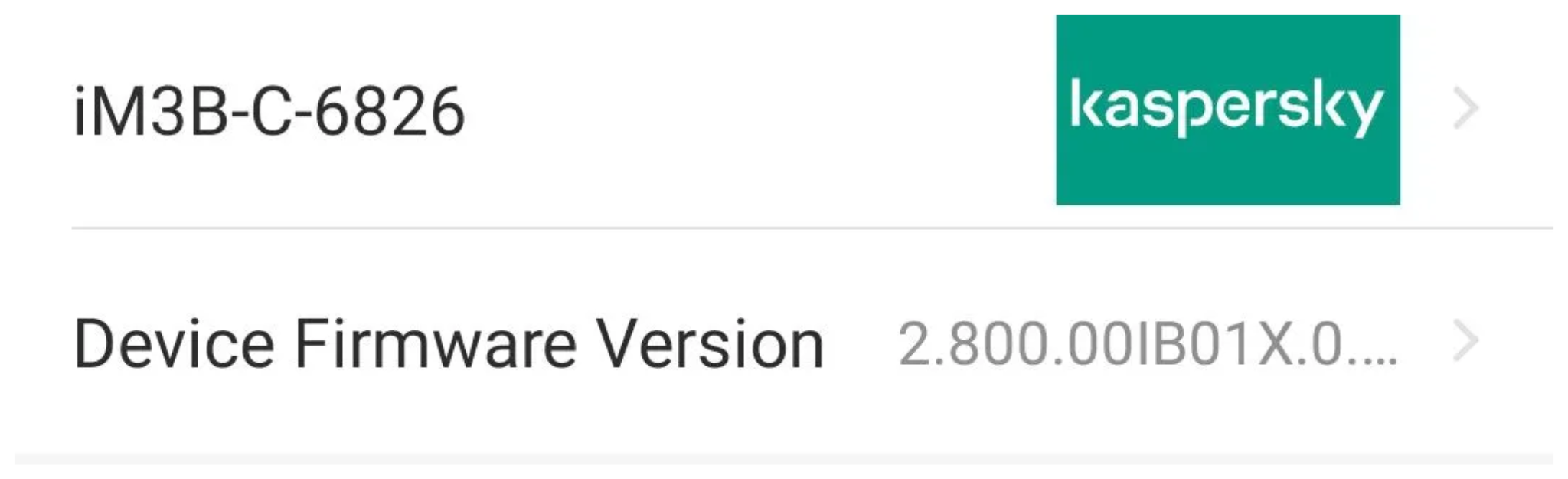
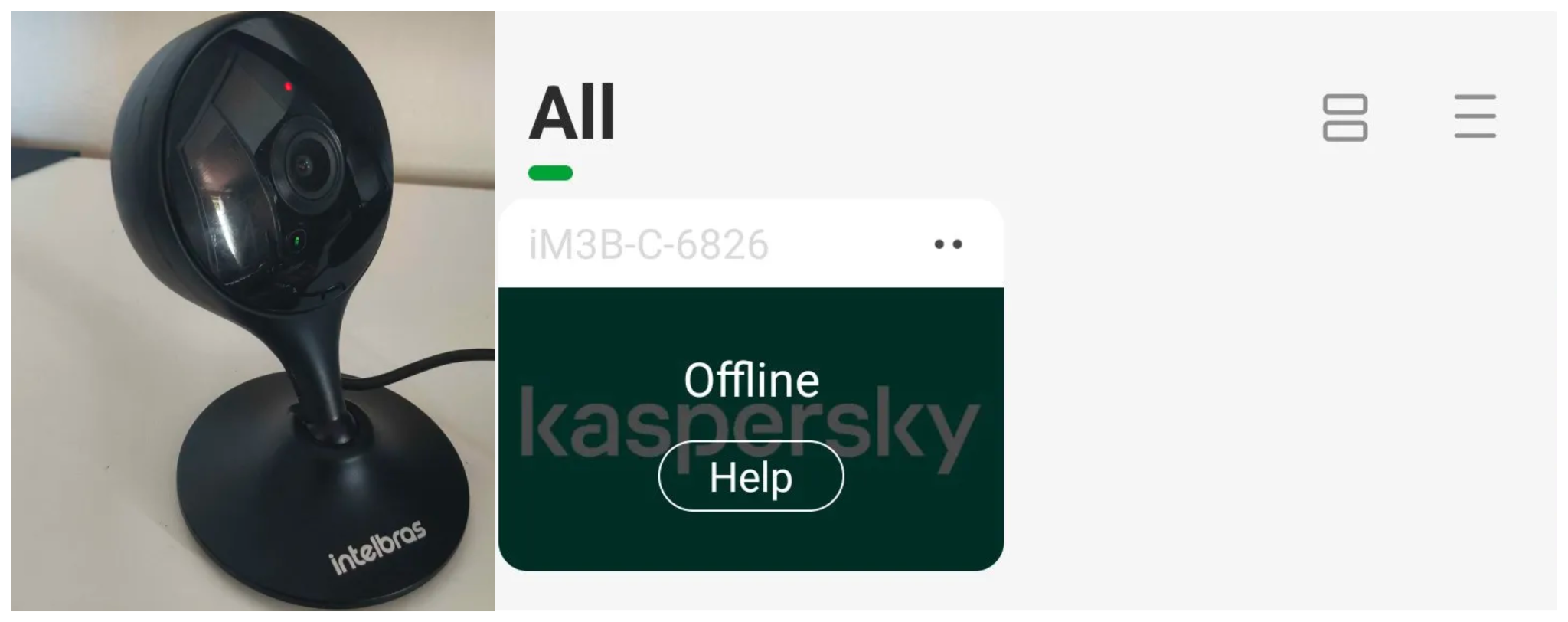
Intelbras provides firmware files on its official website. While users can manually install these updates via an SD card, the cameras also natively support firmware upgrades over the local network via their web interface and mobile app. We obtained the firmware version v240927 for the iM3B-C (IM3 C) camera, which was the latest available version at the time of our research. According to Intelbras, the same firmware is also compatible with the iMX C, iM4 C, iM5 SC, iME 360 C, and iM7+ FC models. Below, we can view the firmware version and the camera model used as an example.
To provide context, we will explain how the camera’s authentication mechanism works and why it is relevant to accessing the camera’s endpoints. The main firmware component is an ARM binary named sonia, responsible for controlling the kernel drivers used by the camera hardware, authentication, and livestream recording, among other things.
How authentication works
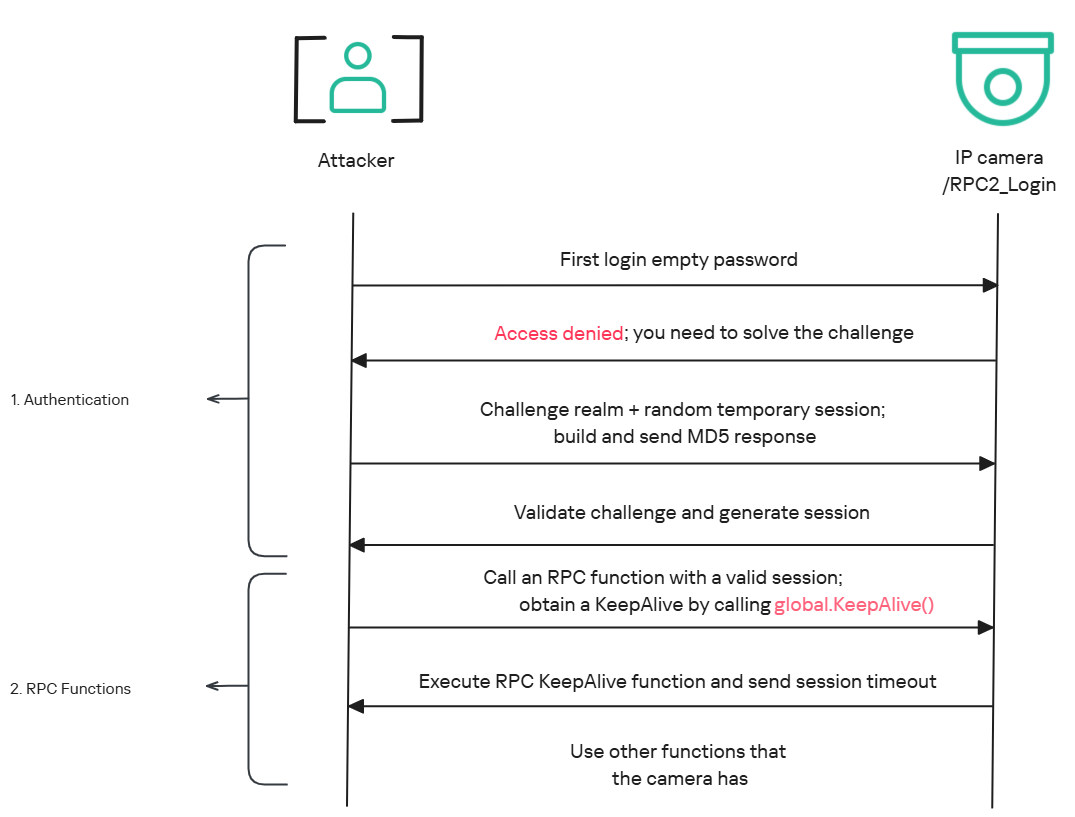
The global.login RPC method handles authentication at the /RPC2_Login endpoint. First, the client, such as the mobile app or a custom script, sends the username and an empty password. The camera responds with an authentication challenge (a set of values to verify the password without transmitting it). This response returns a temporary session, the encryption type in the encryption field, a random value, and a realm (authentication scope). At this stage, a false response is normal and does not indicate a failed login, as the authentication process is not yet complete.
Next, the client calculates the response password from the authentication challenge. It first generates an MD5 (username:realm:original_password) hash as the base. It then calculates a second MD5 (username:random:first_md5) hash, where first_md5 is the result of the previous step. To complete the authentication, the client sends this final result back to /RPC2_Login in a second global.login call, passing the username, calculated password, and temporary session ID.
If the login is accepted, the camera returns true and a new, authenticated session. This session must be used for all subsequent RPC calls, including the camera’s other endpoints, for example, the one that reboots the device or those that expose sensitive information.
Affected endpoint
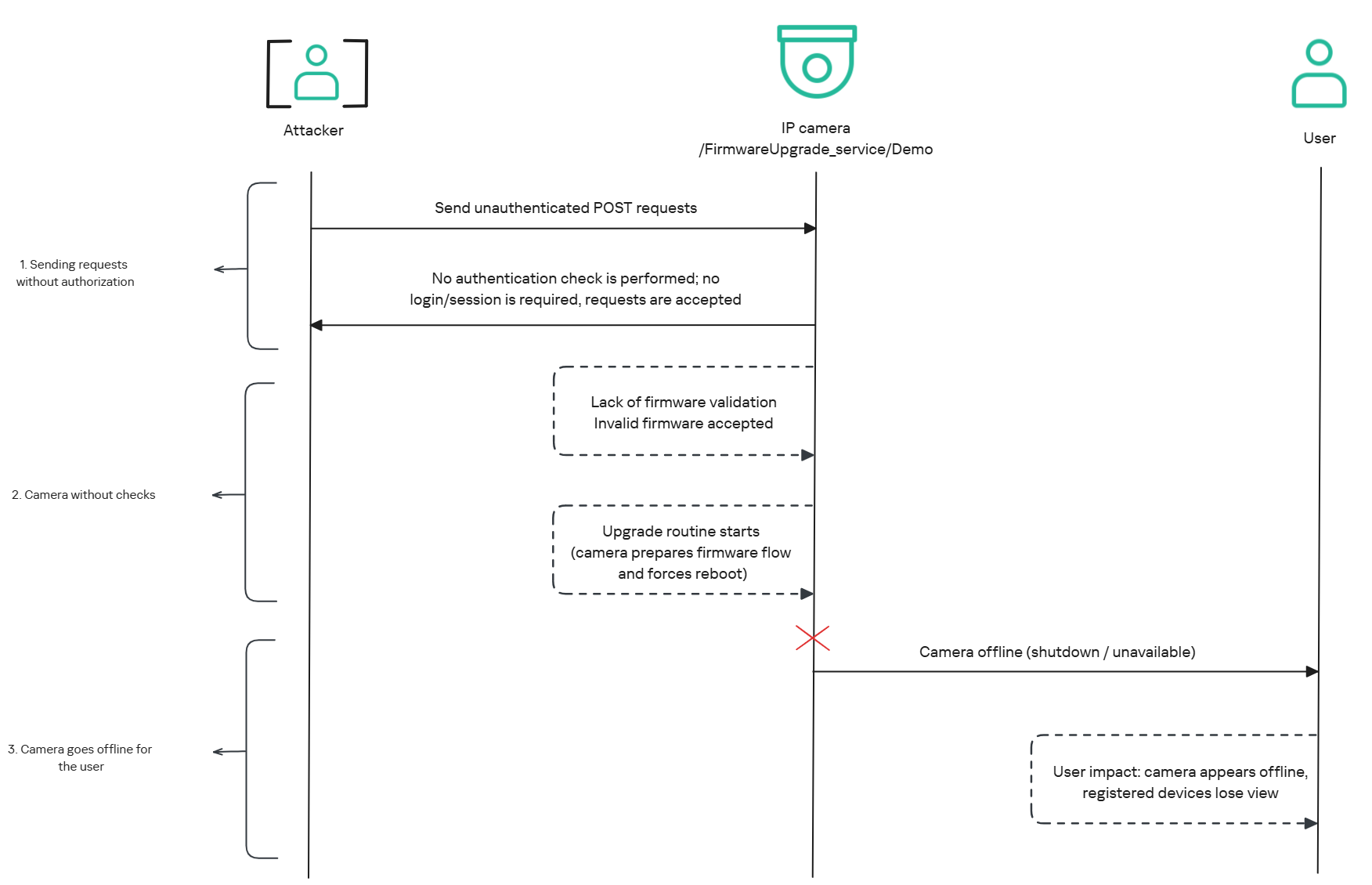
The affected endpoint is the firmware upgrade route http://<ip_address>/firmwareUpgrade_service/Demo, which lacks authentication checks; furthermore, it fails to verify whether the firmware is actually valid before initiating the upgrade process. This creates a serious issue because the upgrade requires the camera to reboot, and that is precisely when the problem occurs: the camera enters reboot mode and eventually shuts down, appearing offline to the user and anyone who has the camera registered on their device.
PoC: vulnerability exploitation
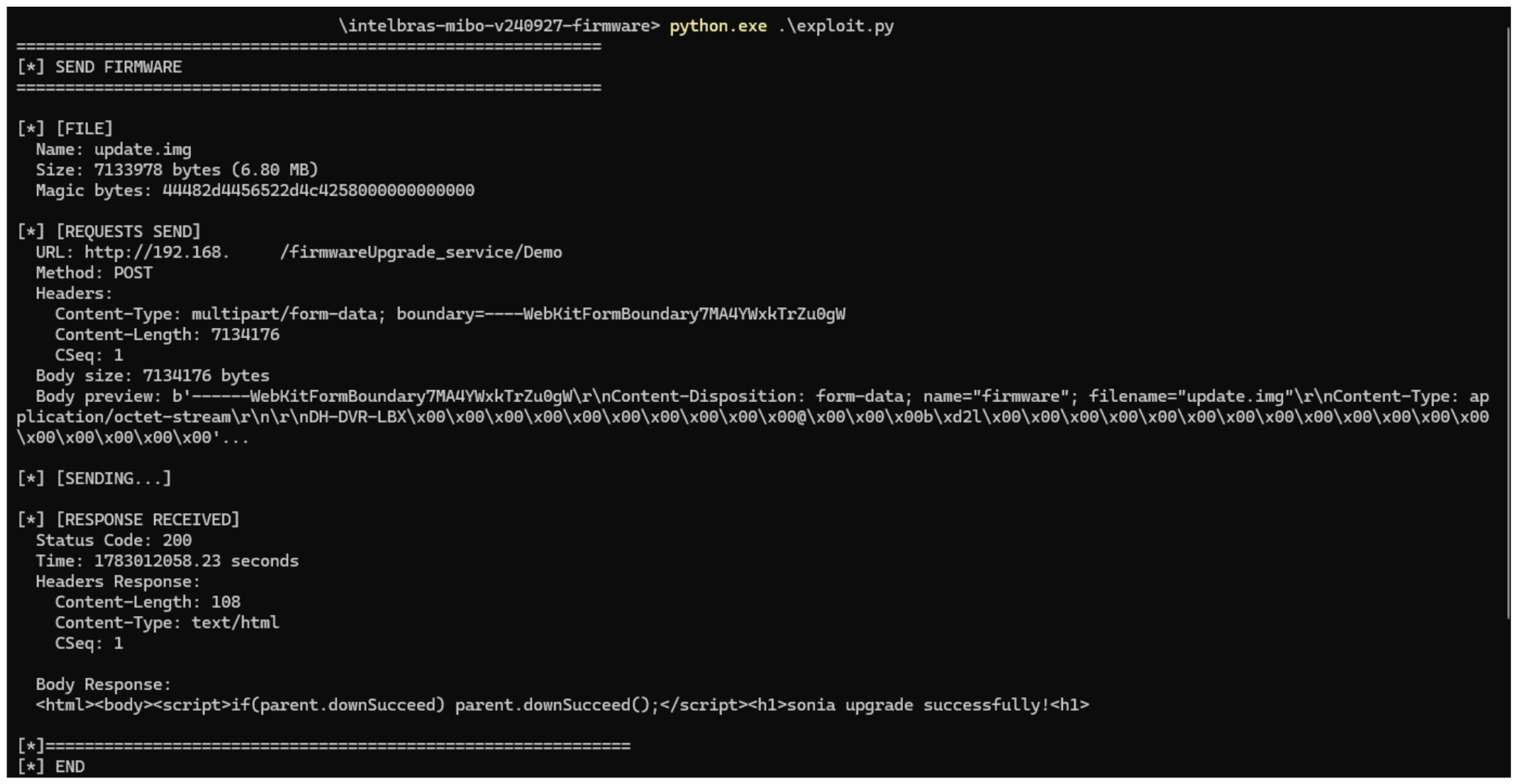
Now that we have outlined how the vulnerability works, we will use a Python script on an iM3B-C camera to exploit it for demonstration purposes. The exploit contacts the camera’s endpoint to upload firmware. Below, we can see sonia creating the endpoint responsible for the firmware upgrade.
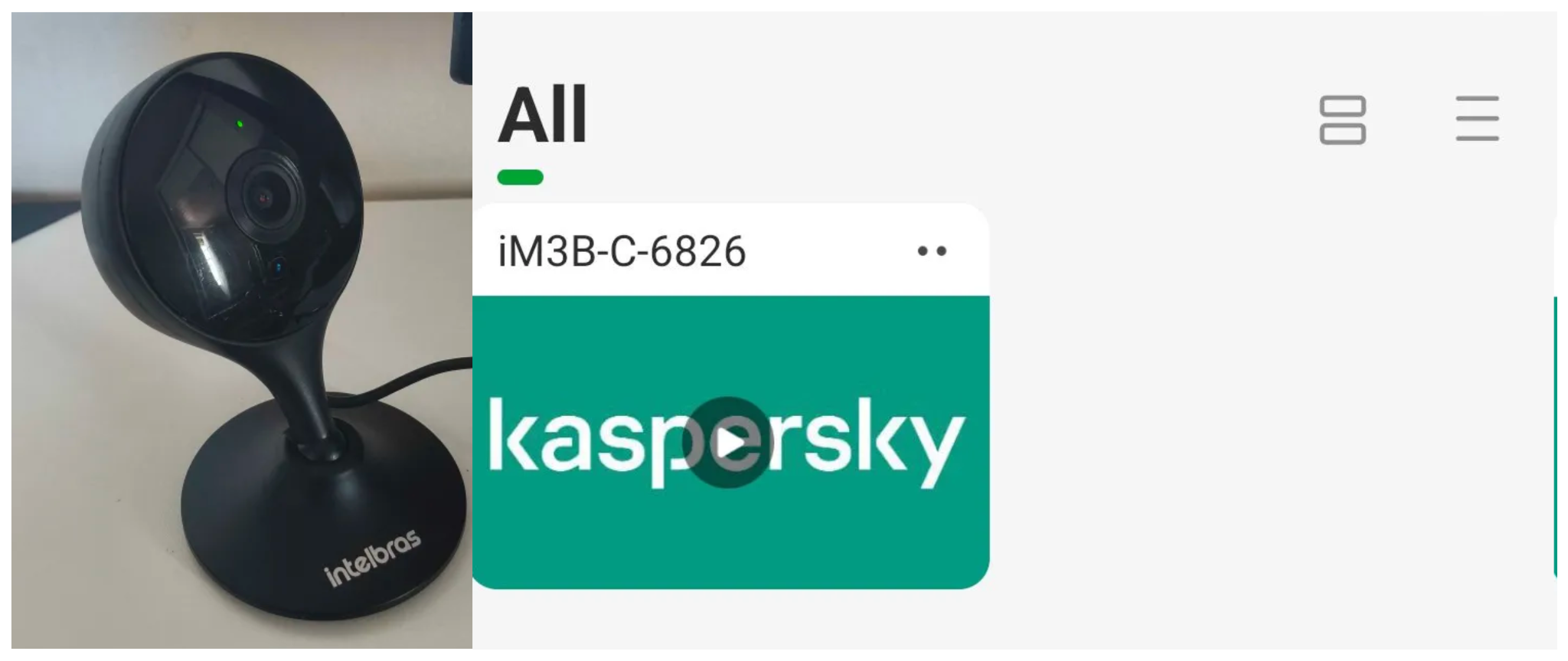
Next, the exploit will hit the endpoint and cause the camera to reboot. Consequently, mobile phones running the Intelbras app will lose connection with the registered device. Below, we can see the camera operating normally: the green light is on and the app is showing it is available for viewing.
The camera is online
After the exploit executes, we can see the effects: the camera goes offline and loses connection to the registered devices.
The camera is offline
The exploit is quite simple: it sends an HTTP POST request with the firmware, which causes the camera to accept the request and initiate the reboot process. It does not matter whether the firmware is original; the reboot process will start regardless.
New firmware version
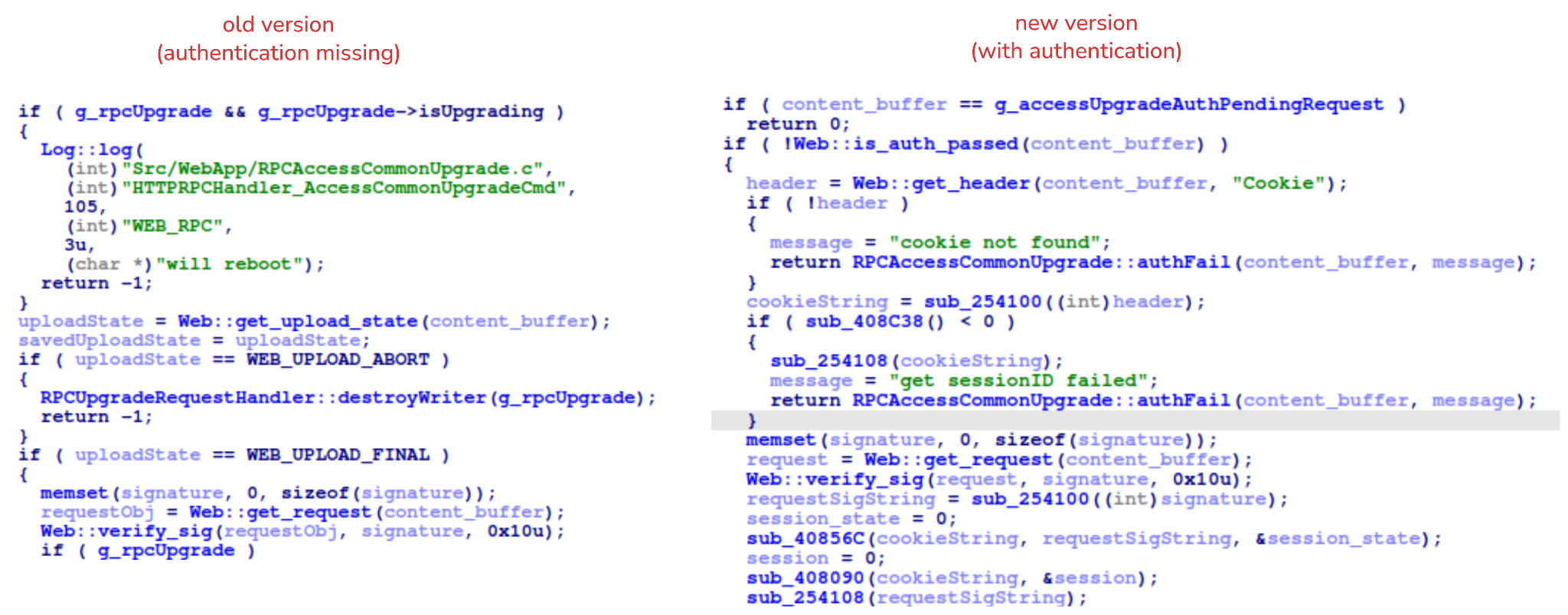
After we notified Intelbras about this flaw in the endpoint implementation, the company contacted the OEM vendor. As a result, a new firmware version was released that requires authentication to initiate an update through this endpoint.
Below, we can compare the new firmware, which validates cookies and session data, with the old firmware, which performed no authentication checks and proceeded directly to the update routine.
Real risk
An attacker can remotely trigger the camera firmware upgrade and reboot process without authenticating or supplying a valid firmware image. This may cause the device to go offline, which results in a denial-of-service condition preventing legitimate users from accessing live monitoring or managing the camera.
The potential impact is significant due to the number of affected users. The Intelbras Mibo Smart app, which the company provides to connect and manage the devices mentioned in this report, has over 4,000,000 downloads. Brazil represents the largest user base, followed by Paraguay, Ecuador, Colombia, Argentina, Chile, Peru, Bolivia, Uruguay, and Venezuela. As a result, exploitation of this issue affects a large number of users.
Takeaways
This is a medium-severity vulnerability that Intelbras is already aware of. The issue has been addressed in a newer firmware release (R.260804 along with update instructions), which mitigates this attack vector. Because the vulnerability directly affects the availability and normal operation of the affected cameras, it is highly recommended that users verify the firmware version currently installed on their devices and update to the latest available version as soon as possible. Keeping the firmware up to date is an essential security practice, especially for internet-connected surveillance devices, as outdated versions may remain exposed to known vulnerabilities.
While monitoring Android threats in June 2026, we discovered a new piece of Android malware. What struck us as unusual was that it installed like an ordinary user app yet made no attempt to disguise itself as legitimate software: it had no user interface at all. This led us to suspect the app might be reaching users’ devices without their knowledge. Further investigation confirmed that hypothesis and allowed us to reconstruct the entire infection chain.
Key findings:
We identified new Android malware: a multi-stage downloader whose ultimate purpose is ad fraud and creation of a proxy botnet.
The malware spread through the built-in updaters of Android-based automotive head unit firmware. This is the first documented case of malware found on a car head unit with an infection chain specific to that type of device.
We attribute this activity, with high confidence, to the MoYu Group, an actor linked to the BADBOX botnet.
Kaspersky solutions detect the threats described below under the following detection names:
HEUR:Trojan-Dropper.AndroidOS.Agent.vu
HEUR:Trojan-Downloader.AndroidOS.Agent.ov
HEUR:Trojan-Proxy.AndroidOS.Zhima.*
HEUR:Trojan.AndroidOS.Vo1d.*
Head unit firmware overview
A head unit is a system that combines multimedia functions with partial control over certain vehicle functions. Head units may come as part of a car’s factory equipment or as an aftermarket upgrade. The main attack vectors for these systems are compromise via physical access and vulnerabilities in the head unit’s OS or components, both of which we’ve covered previously.
In some cases, head units run on Android, primarily because it’s convenient for manufacturers: Android’s source code already accounts for use cases within automotive head units. Android also allows manufacturers to add their own system applications during the build process, which they can use for a range of purposes: customizing the UI, adding system components tailored to the vendor’s needs, and more.
Most apps developed for Android devices can also run on an Android-based head unit, and that is true for malware as well. That said, it’s hard to imagine certain categories of smartphone-targeted malware being used to attack a head unit. Banking Trojans are a good example: since mobile banking is used almost exclusively on smartphones, infecting a head unit with a banking Trojan would be a waste of the attacker’s resources.
It’s worth noting that head units often include SIM card slots and can connect to the internet, enabling features like navigation and software updates. Since a head unit typically holds nothing of value to an attacker, one of the more likely attack scenarios using “classic” Android malware is infecting the device to recruit it into a botnet – similar to attacks on IoT devices.
During our research, we found exactly that kind of malware. The design of firmware for DoFun head units enabled attackers to distribute malware. We notified the vendor about the distribution scheme, and they subsequently reported fixing the security issues.
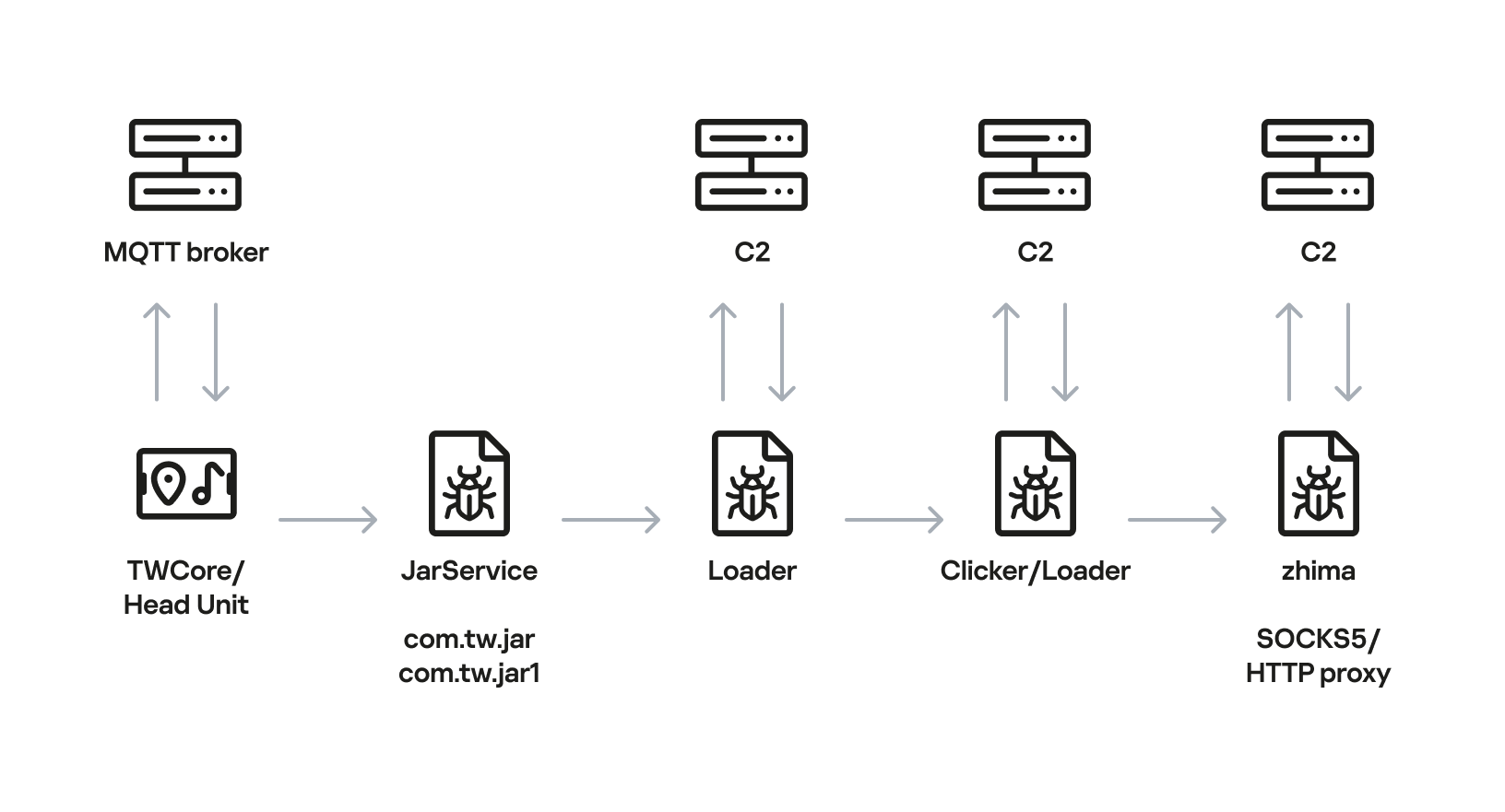
Below is the entire infection chain:
Head unit infection scheme
Let’s look at exactly how these head units became infected.
The TWCore app
TWCore is a legitimate system application responsible for collecting analytics data and updating the head unit software. Let’s take a closer look at how the update function works.
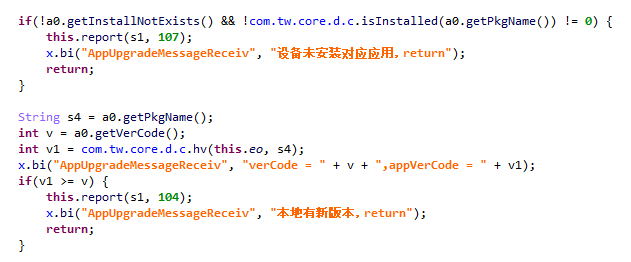
The process is fairly simple. An MQTT message broker hosted on the subdomain cardoor[.]cn sends a message containing information about the APK files that need to be downloaded and installed on the head unit. Notably, the object describing this message includes an installNotExists field, a Boolean flag that can be set to true or false. This flag allows TWCore to install apps that weren’t originally present on the device.
TWCore only checks whether an app is already installed on the device when installNotExists = false
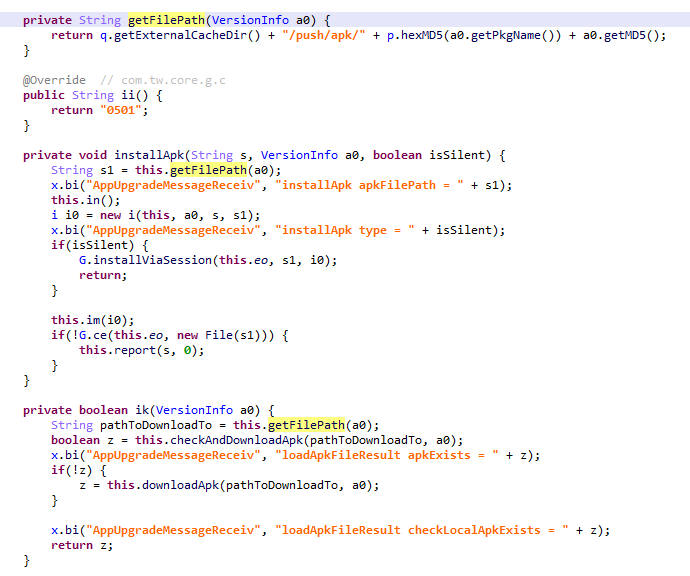
The APK file is downloaded to <TWCore external cache dir>/push/apk/ for installation.
The path TWCore uses to download APK files
Our telemetry revealed previously unknown malware at these file paths. On top of that, our data indicates that in every observed case, the malware was installed by an app with the package name com.tw.core, which matches the TWCore package name.
Next, we’ll break down the malware installed by TWCore: the JarService dropper.
Stage 1: the JarService dropper
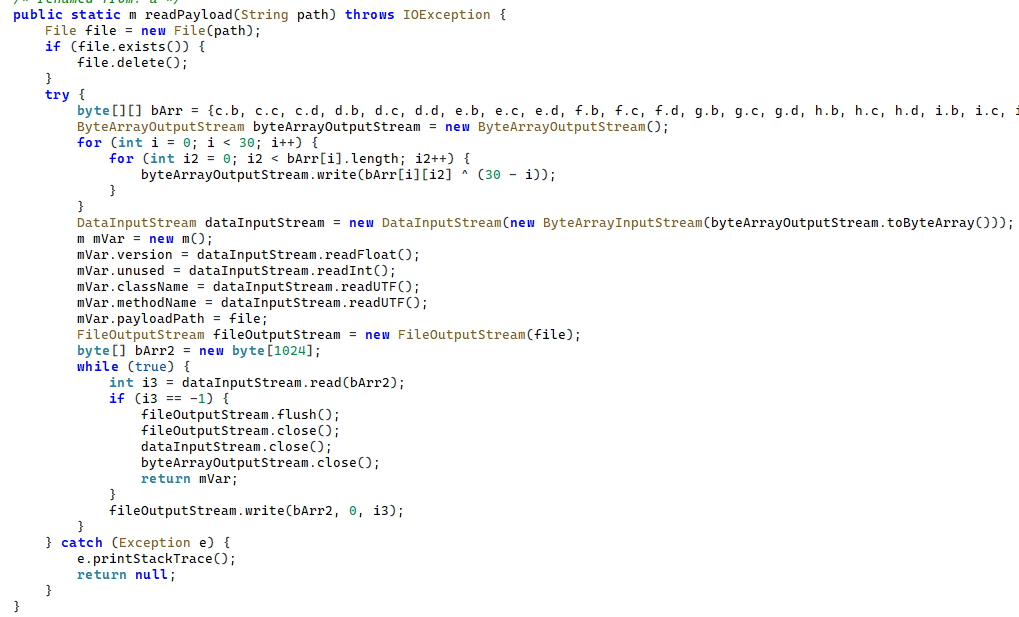
As mentioned earlier, JarService is a small dropper app with no UI of any kind. It decrypts data stored as encrypted blocks within the Trojan’s code. Each block is XOR-encrypted with a single-byte key that shifts linearly from block to block. The decrypted data contains serialized information about the payload version and entry point, along with the malware’s own code for further loading.
Decrypting and deserializing information about the stage 2 payload
In the version of JarService we analyzed, the entry point for the next-stage payload was the wa method of the com.c.j.qbh class.
Stage 2: the loader
This stage’s payload is a malicious loader. Its code contains encrypted strings that are later used as class names to execute the stage 3 payload using the reflection mechanism. The loader sends implant information to one of the attackers’ servers via a POST request. Example of a request to the C2 server:
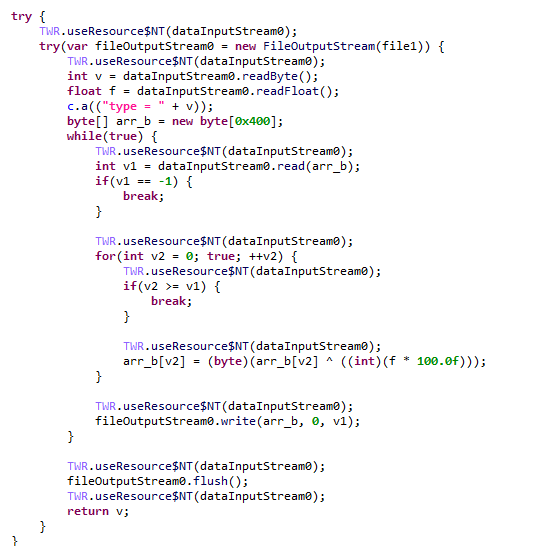
The Trojan uses the link in the dexUrl field of the data object to download serialized data for loading the next stage. This data begins with a single-byte integer, a key used to decrypt the strings in the loader’s code. Immediately following this number is a four-byte floating-point value used to XOR-decrypt the stage 3 payload, which itself is located after these keys.
Decrypting the stage 3 payload
In the decrypted payload, the entry point is the init method of the com.ast.sdk.BillingMain class, shown in the screenshot below.
Entry point of the stage 3 payload
While analyzing this stage, we noticed that the download link for the next-stage payload includes a version number. We decided to try other version numbers to retrieve different payload versions, and ultimately obtained seven distinct variants, which we list under “Indicators of Compromise” at the end of this report. The earliest version, numbered 3.57, uses a different decoding algorithm than the one described above. This may indicate that an earlier version of the infection chain used a different loader between JarService and the stage 3 payload.
Stage 3: clicker / reverse proxy loader
In this stage, the malware sends a POST request to /cpc/api/task every 90 minutes by default, containing information about the infected device (display resolution, device model, the SSID of the connected Wi-Fi network, MAC address, and so on) along with the Trojan’s configuration version. If the configuration is outdated, the C2 server returns an updated configuration containing new C2 addresses and new paths for sending HTTP requests. An example of a response is shown below. Note that at the time of our research, the most up-to-date configuration version was 3.82.
If the configuration version doesn’t need updating, the C2 server instead returns integer command identifiers, which the attackers refer to as productId. The Trojan maps each identifier to command information, which it stores as a serialized JSON object using the SharedPreferences API. Each identifier also has its own version, expressed as a UNIX timestamp. If the C2 response includes an unknown productId or one whose version is outdated, the malware sends a GET request to the attackers’ server at /cpc/api/xml to retrieve the command contents for all such identifiers. The C2 server responds with command information for each unknown identifier. An example of a response is shown below.
The command information includes a tagName field, which is the command name. The code maps each name to the corresponding class responsible for executing it.
List of executable commands
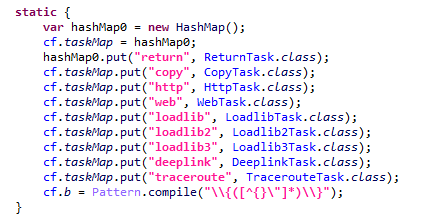
At the time of our research, the attackers had implemented nine commands. The table below lists command names, brief descriptions, and arguments. The functionality of these commands suggests that the malware can be used to display ads, commit ad fraud (serving as a clicker), and download additional malicious code.
Command name
Description
Arguments
return
Return a value from SharedPreferences.
key: the key whose value should be returned
copy
Set the contents of the clipboard.
text: the key whose value from SharedPreferences is returned as the clipboard contents url: a link for downloading gzip-compressed data (optional); this data is then concatenated with the value of the text key, with (5 spaces) used as a separator
http
Make a POST/GET HTTP request to a specified resource and, if instructed, save the response in SharedPreferences under a specified key.
url: the resource address method: the HTTP method name (optional) startLabel: a marker for the start of the data to save from the resource (optional) endLabel: a marker for the end of the data to save from the resource (optional) valueLabel: the key under which to save the value (optional) header: a dictionary of headers for the HTTP request (optional) content: the content of the POST request (optional)
web
Open a link in the WebView and execute arbitrary JavaScript code within it.
url: the link to open in the WebView js: base64-encoded JavaScript code to execute in the WebView; used when the url parameter is empty or absent corejs: JavaScript code to execute when the resource loads in the WebView (optional) param: a string dictionary of parameters for launching the WebView client: if this key is present, WebViewClient is used to handle redirects manually time: task timeout
loadlib
Not fully implemented at the time of publishing this report.
–
loadlib2
Download and execute arbitrary code.
url: the address to download the payload from name: the name of the module being downloaded md5: the MD5 hash of the payload clear: a comma-separated list of payload names to delete (optional) params: an array of parameters to launch the payload with className: the class name of the payload entry point method: the name of the virtual method at the payload entry point cmethod: the name of the static method used to instantiate the entry-point class (optional) thread: a flag; the payload runs in a separate thread if this flag is not set reload: a flag that, when set, restarts already loaded modules
loadlib3
Not fully implemented at the time of publishing this report.
–
deeplink
Open a resource in the browser.
url: a link to the resource
traceroute
Check resource availability via an ICMP ping.
host: comma-separated list of resources to check
However, attackers use only a relatively small subset of these commands in real-world attacks. As shown in the example C2 response above, at the time of publishing this report the attackers were using the loadlib2 and http commands. The payload downloaded via the loadlib2 command is a reverse proxy module named “zhima”, which researchers from the Nokia Deepfield Emergency Response Team independently discovered in TV set-top boxes around the same time as we did and also described in their report. This confirms that the attackers’ ultimate goal is building a proxy botnet.
While investigating this stage of the attack chain, we noticed that the zhima download link also included a version number. As with the previous stage, we tried other possible version numbers and found eight variants of the zhima module, the earliest of which was version 57. The complete list of identified zhima modules is provided under “Indicators of Compromise” below.
Attribution
While analyzing the complete infection chain, we noticed that the stage 2 loader created a thread with the meaningful name mosdk-host-loader. We decided to investigate what mosdk referred to in that name. This led us to a malicious app installed on various TV set-top boxes with the package name com.abc.nexus (3AD4BF5A86D26FFBF09CAE42AF330A98). It consists of several components (including a dropper similar to JarService), each used by the attackers to covertly monetize the device’s computing power. Each malicious component in the app corresponds to its own service, and the service containing the launch code for the JarService-like dropper is named AdmoyuService. In light of this and the name of the malicious thread found in the payload code, we concluded that moyu in the service name referred to MoYu Group, one of the actors linked to the BADBOX malware platform, which had been described by researchers at HUMAN. This assessment is further supported by extensive overlap between the malware’s network infrastructure and that of MoYu Group, which was independently identified by researchers from the Nokia Deepfield Emergency Response Team around the same time as our own research. Based on these similar naming patterns and prominent infrastructure overlap between the activity of MoYu Group and the attacks described in this report, we attribute it to the same actor with high confidence.
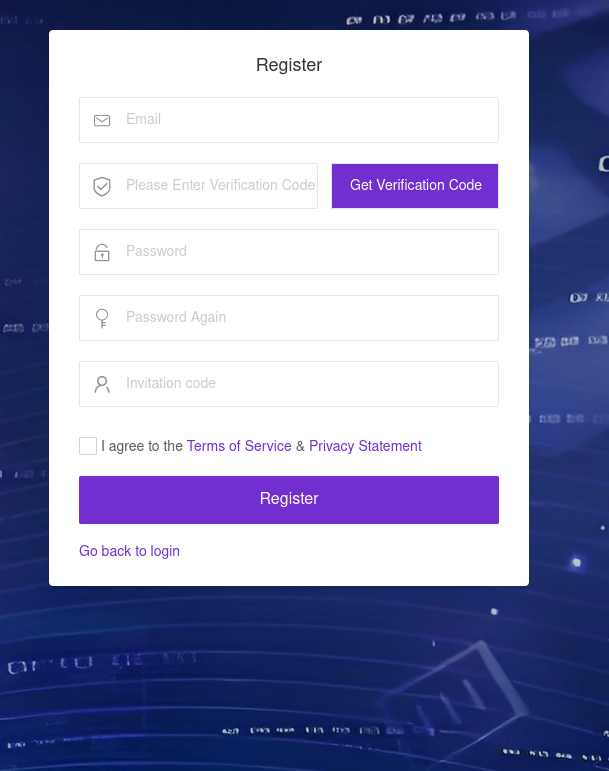
While investigating the malware downloaded by TWCore, we noticed that the domain admin.uipoxy[.]com resolved to the IP address 128.14.210[.]58, one of the C2 servers for the zhima reverse proxy module. It appears that the URL hxxp://admin.uipoxy[.]com/proxy/u/login hosts the zhima admin panel. Interestingly, this panel allows anyone to register as long as they have a valid invite code.
The malware operator registration page
During registration, users are prompted to review the terms of use and privacy policy. Both documents are hosted on links under the pxyedge[.]com domain, which belongs to PXYEDGE, a vendor specializing in the sale of residential proxies.
We found several similarities in the authentication APIs across all of these sites:
The sign-in page was hosted on an admin.* subdomain.
The sign-in page was located at /proxy/u/login.
The signup page was located at /proxy/register?channelKey=<invitation code>.
Based on this, we believe these services are connected to MoYu Group.
Conclusion
Despite efforts by cybersecurity professionals and law enforcement to shut down the BADBOX botnet, individual actors linked to it continue their malicious activity, infecting devices worldwide. Delivery methods for this kind of malware vary widely, from downloads via pre-installed backdoors to infected builds of IPTV apps. The case examined here demonstrates an even more sophisticated delivery method: distribution through the legitimate update functionality of a system application. Attackers are also actively expanding into new platforms. This malware is the first known malicious app targeting head units, which means these platforms now require protection against malware as well.

 Login
Login