Network-connected surveillance cameras are now widespread in both home and enterprise environments, so securing them is essential to safeguarding physical spaces and sensitive assets. As these devices continue to gain new features and network connectivity capabilities, vulnerabilities in their implementation can have significant security implications.
During our research, we discovered a denial-of-service vulnerability that affects Intelbras IP cameras systems. The flaw resides in a firmware update endpoint that is accessible without authentication and allows anyone with access to the local Wi-Fi network to knock cameras offline. A single request disrupts the camera for only about a minute, but sending periodic requests keeps the device offline indefinitely. We reported the issue to Intelbras, monitored the remediation process, validated the fix in the new firmware, and will now demonstrate the exploitation procedure step-by-step.
Following our notification, Intelbras patched the vulnerability and released updated firmware (R.260804) along with update instructions. A candidate ID of CAN-2026-2035970 has been assigned by MITRE following submission, pending the final CVE assignment. Additionally, the Intelbras team recently informed us that MITRE has classified the vulnerability as Medium, assigning it a score of 5.1 under the CVSS 4.0 framework. The issue discussed in this article is no longer present in the latest firmware version.
Firmware
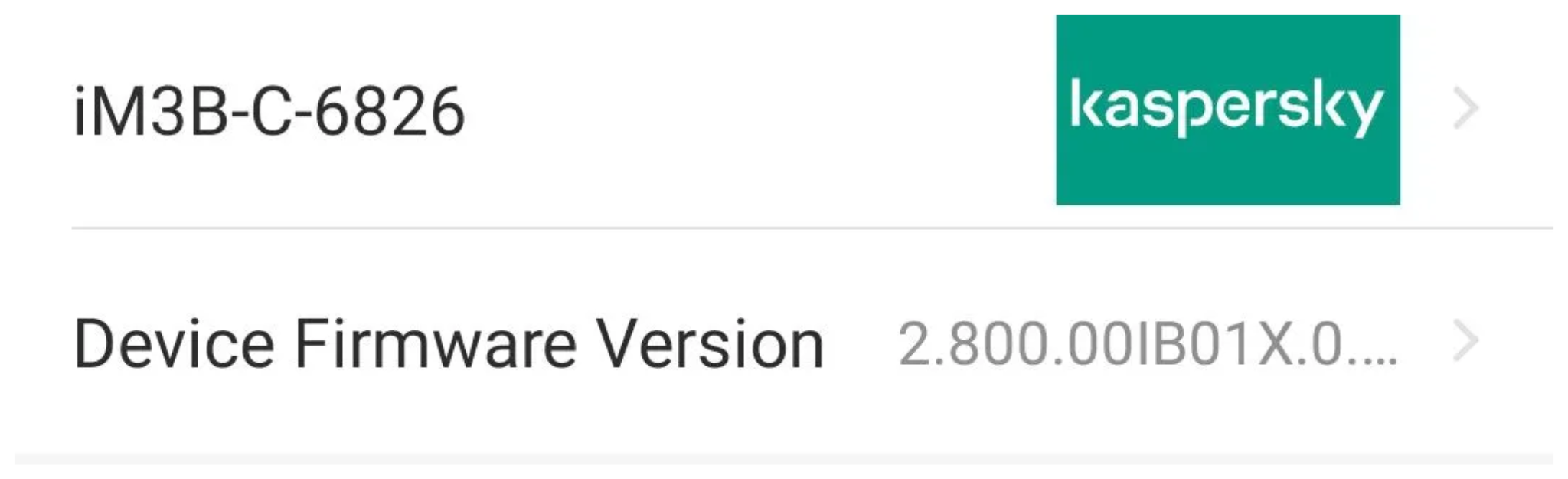
Intelbras provides firmware files on its official website. While users can manually install these updates via an SD card, the cameras also natively support firmware upgrades over the local network via their web interface and mobile app. We obtained the firmware version v240927 for the iM3B-C (IM3 C) camera, which was the latest available version at the time of our research. According to Intelbras, the same firmware is also compatible with the iMX C, iM4 C, iM5 SC, iME 360 C, and iM7+ FC models. Below, we can view the firmware version and the camera model used as an example.
To provide context, we will explain how the camera’s authentication mechanism works and why it is relevant to accessing the camera’s endpoints. The main firmware component is an ARM binary named sonia, responsible for controlling the kernel drivers used by the camera hardware, authentication, and livestream recording, among other things.
How authentication works
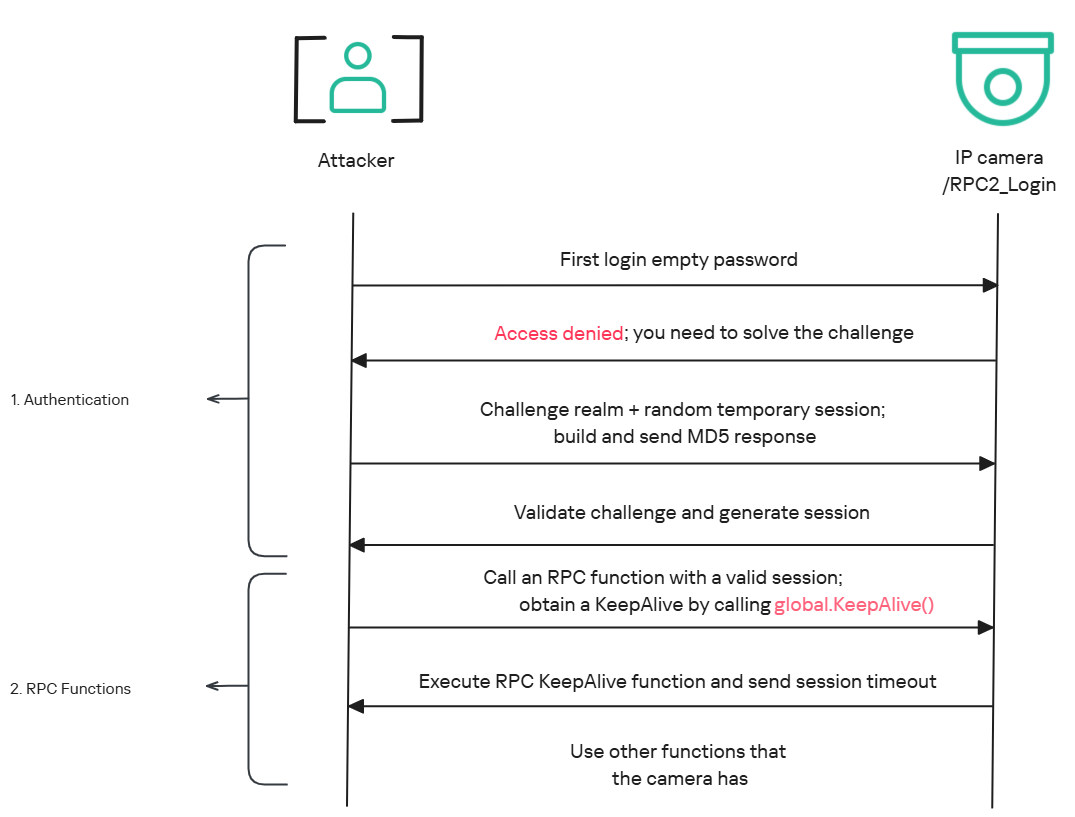
The global.login RPC method handles authentication at the /RPC2_Login endpoint. First, the client, such as the mobile app or a custom script, sends the username and an empty password. The camera responds with an authentication challenge (a set of values to verify the password without transmitting it). This response returns a temporary session, the encryption type in the encryption field, a random value, and a realm (authentication scope). At this stage, a false response is normal and does not indicate a failed login, as the authentication process is not yet complete.
Next, the client calculates the response password from the authentication challenge. It first generates an MD5 (username:realm:original_password) hash as the base. It then calculates a second MD5 (username:random:first_md5) hash, where first_md5 is the result of the previous step. To complete the authentication, the client sends this final result back to /RPC2_Login in a second global.login call, passing the username, calculated password, and temporary session ID.
If the login is accepted, the camera returns true and a new, authenticated session. This session must be used for all subsequent RPC calls, including the camera’s other endpoints, for example, the one that reboots the device or those that expose sensitive information.
Affected endpoint
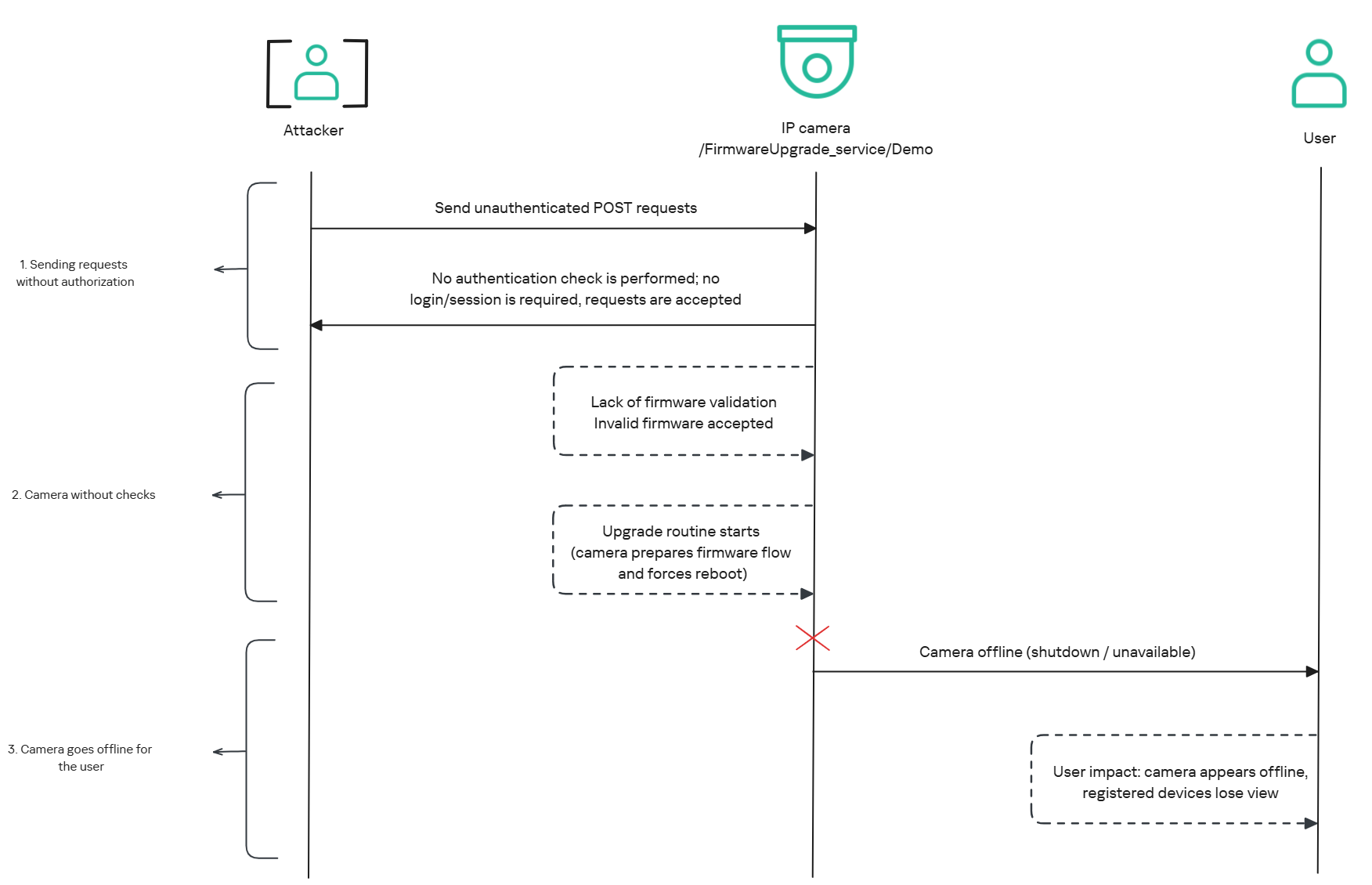
The affected endpoint is the firmware upgrade route http://<ip_address>/firmwareUpgrade_service/Demo, which lacks authentication checks; furthermore, it fails to verify whether the firmware is actually valid before initiating the upgrade process. This creates a serious issue because the upgrade requires the camera to reboot, and that is precisely when the problem occurs: the camera enters reboot mode and eventually shuts down, appearing offline to the user and anyone who has the camera registered on their device.
PoC: vulnerability exploitation
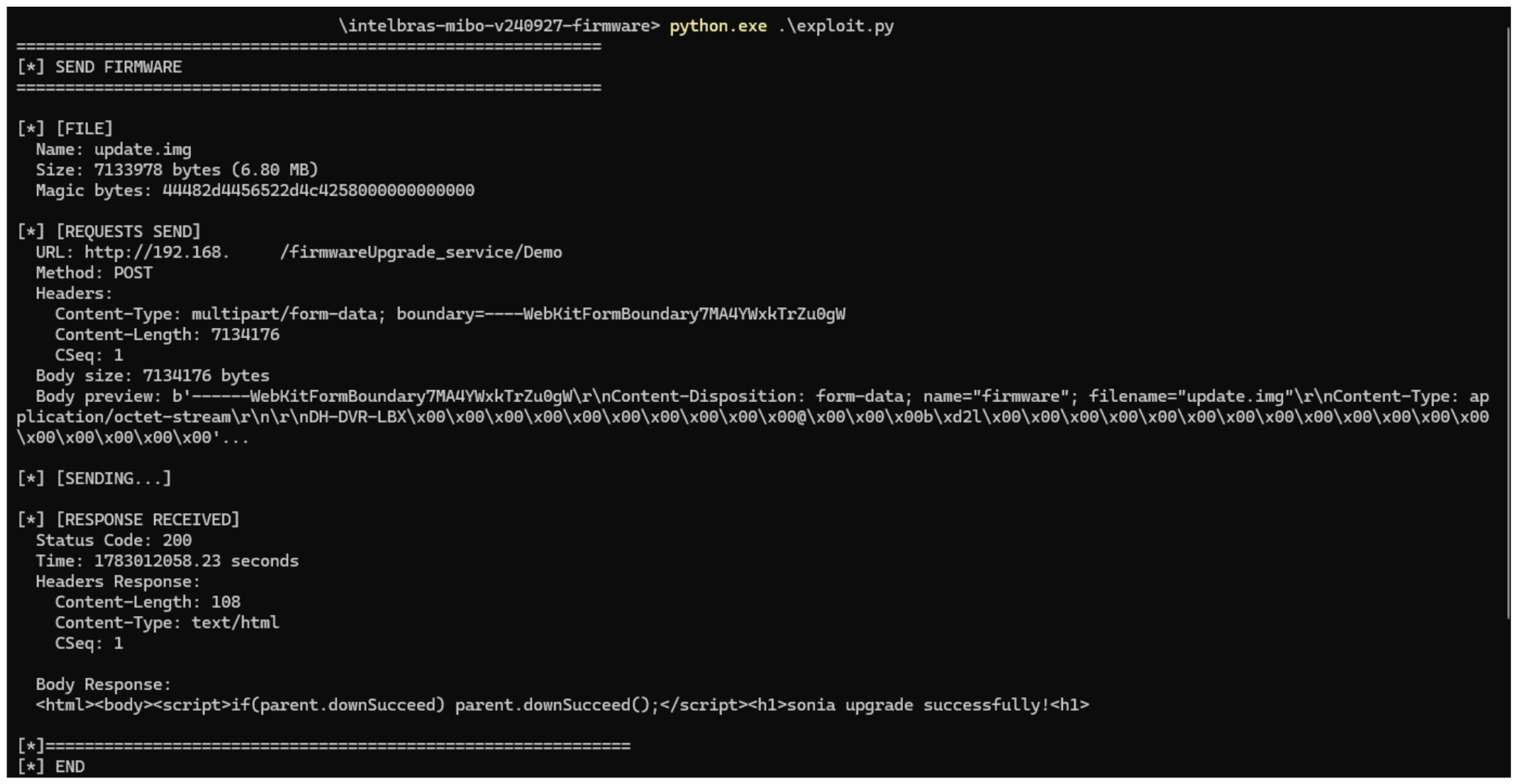
Now that we have outlined how the vulnerability works, we will use a Python script on an iM3B-C camera to exploit it for demonstration purposes. The exploit contacts the camera’s endpoint to upload firmware. Below, we can see sonia creating the endpoint responsible for the firmware upgrade.
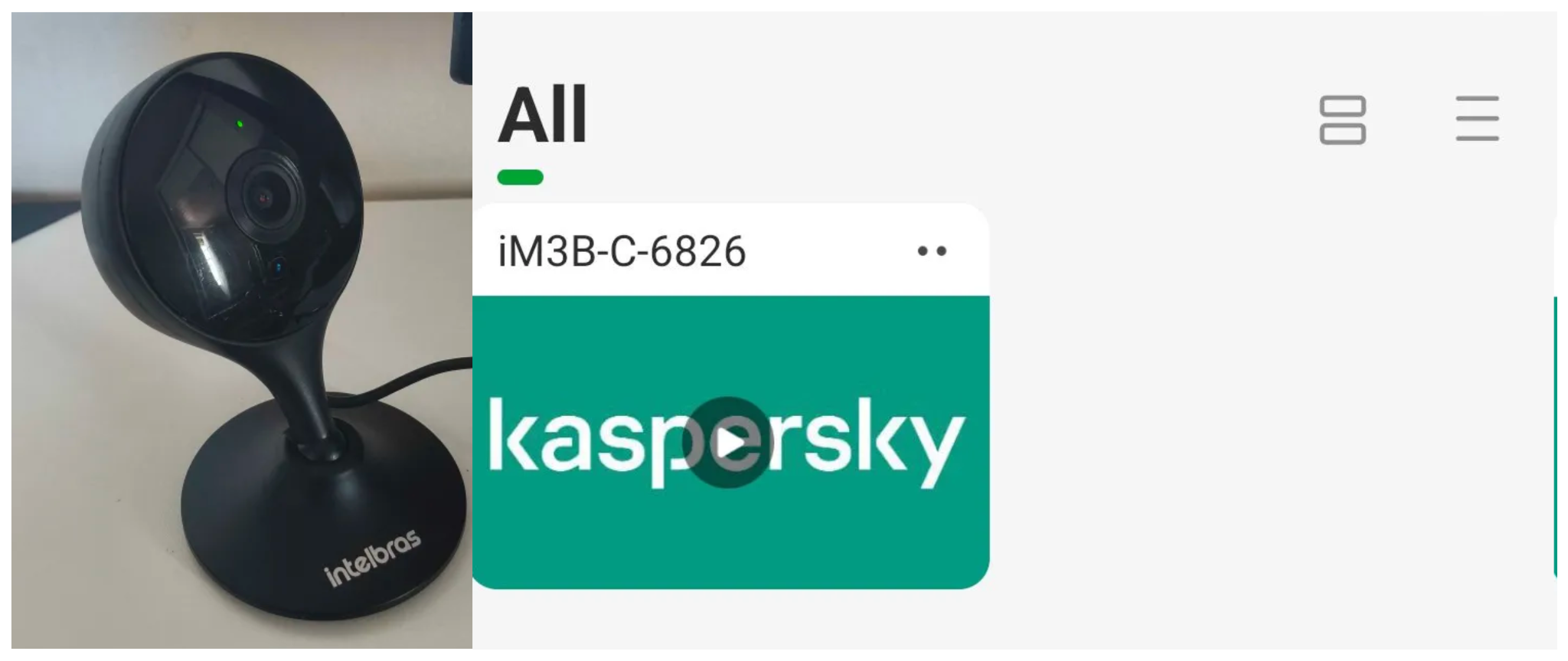
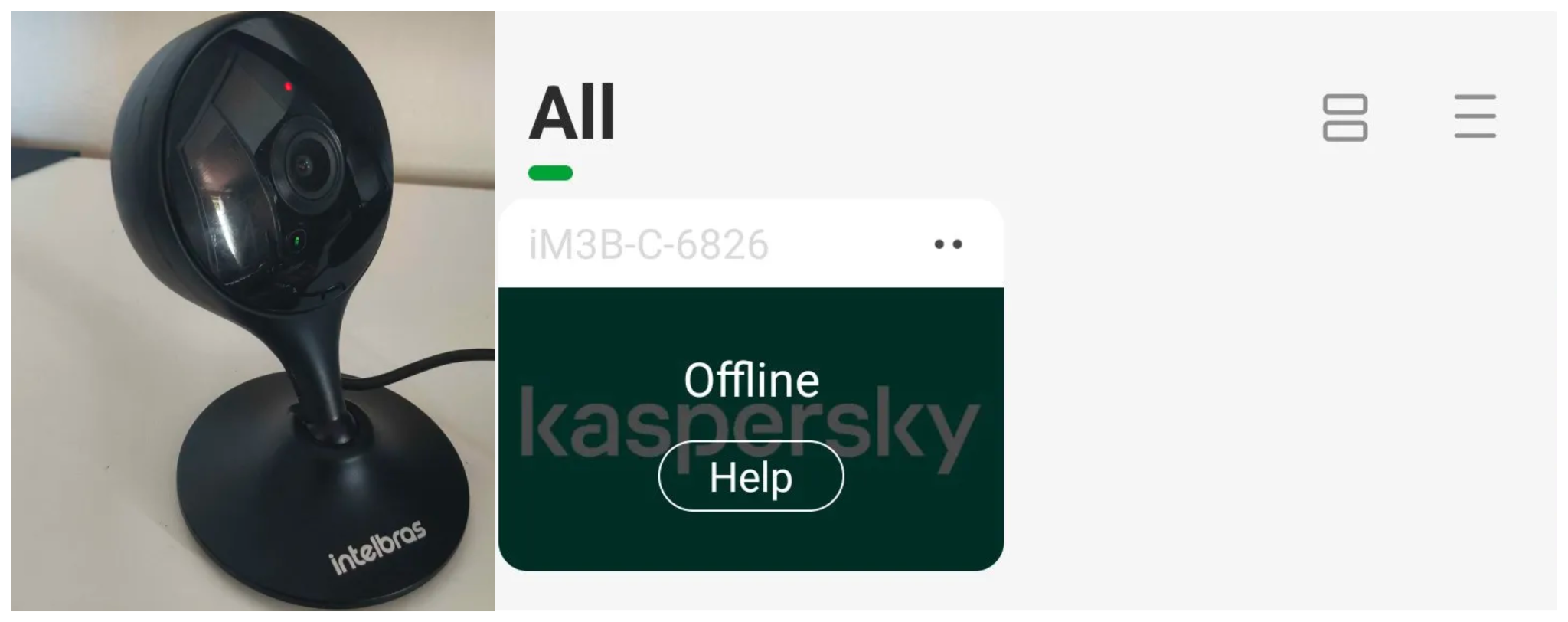
Next, the exploit will hit the endpoint and cause the camera to reboot. Consequently, mobile phones running the Intelbras app will lose connection with the registered device. Below, we can see the camera operating normally: the green light is on and the app is showing it is available for viewing.
The camera is online
After the exploit executes, we can see the effects: the camera goes offline and loses connection to the registered devices.
The camera is offline
The exploit is quite simple: it sends an HTTP POST request with the firmware, which causes the camera to accept the request and initiate the reboot process. It does not matter whether the firmware is original; the reboot process will start regardless.
New firmware version
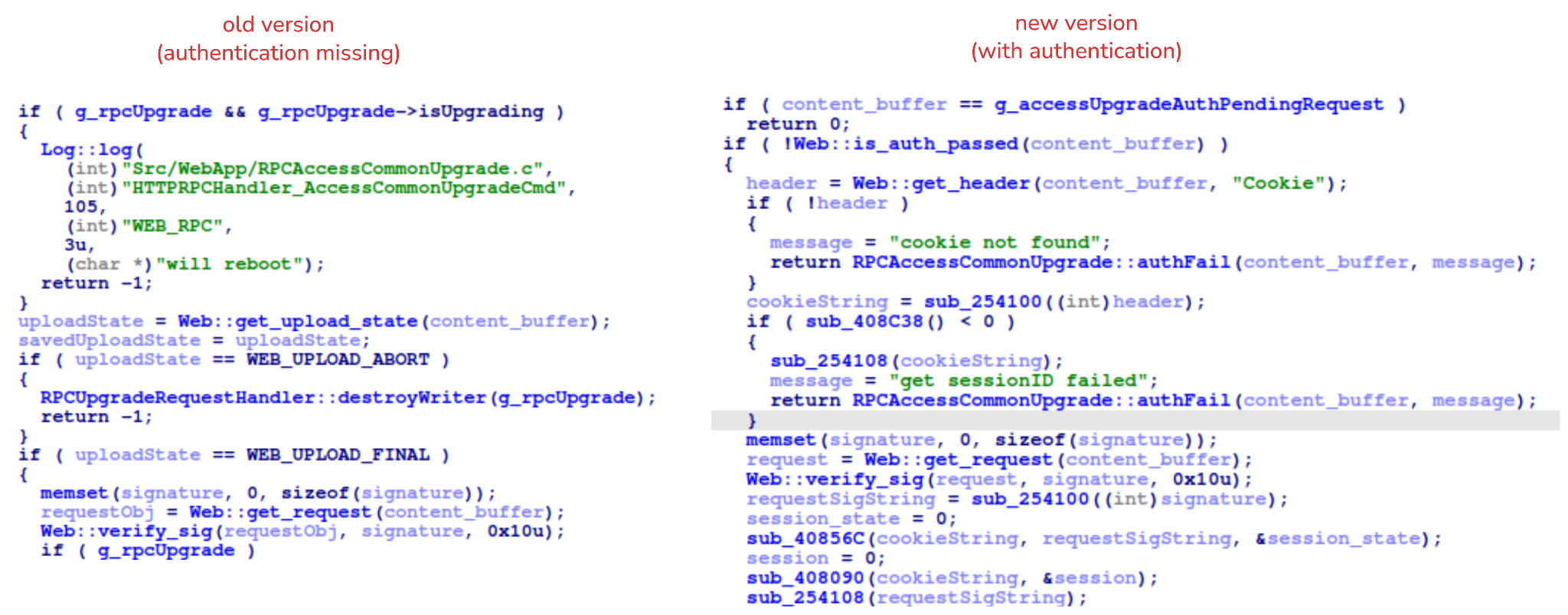
After we notified Intelbras about this flaw in the endpoint implementation, the company contacted the OEM vendor. As a result, a new firmware version was released that requires authentication to initiate an update through this endpoint.
Below, we can compare the new firmware, which validates cookies and session data, with the old firmware, which performed no authentication checks and proceeded directly to the update routine.
Real risk
An attacker can remotely trigger the camera firmware upgrade and reboot process without authenticating or supplying a valid firmware image. This may cause the device to go offline, which results in a denial-of-service condition preventing legitimate users from accessing live monitoring or managing the camera.
The potential impact is significant due to the number of affected users. The Intelbras Mibo Smart app, which the company provides to connect and manage the devices mentioned in this report, has over 4,000,000 downloads. Brazil represents the largest user base, followed by Paraguay, Ecuador, Colombia, Argentina, Chile, Peru, Bolivia, Uruguay, and Venezuela. As a result, exploitation of this issue affects a large number of users.
Takeaways
This is a medium-severity vulnerability that Intelbras is already aware of. The issue has been addressed in a newer firmware release (R.260804 along with update instructions), which mitigates this attack vector. Because the vulnerability directly affects the availability and normal operation of the affected cameras, it is highly recommended that users verify the firmware version currently installed on their devices and update to the latest available version as soon as possible. Keeping the firmware up to date is an essential security practice, especially for internet-connected surveillance devices, as outdated versions may remain exposed to known vulnerabilities.
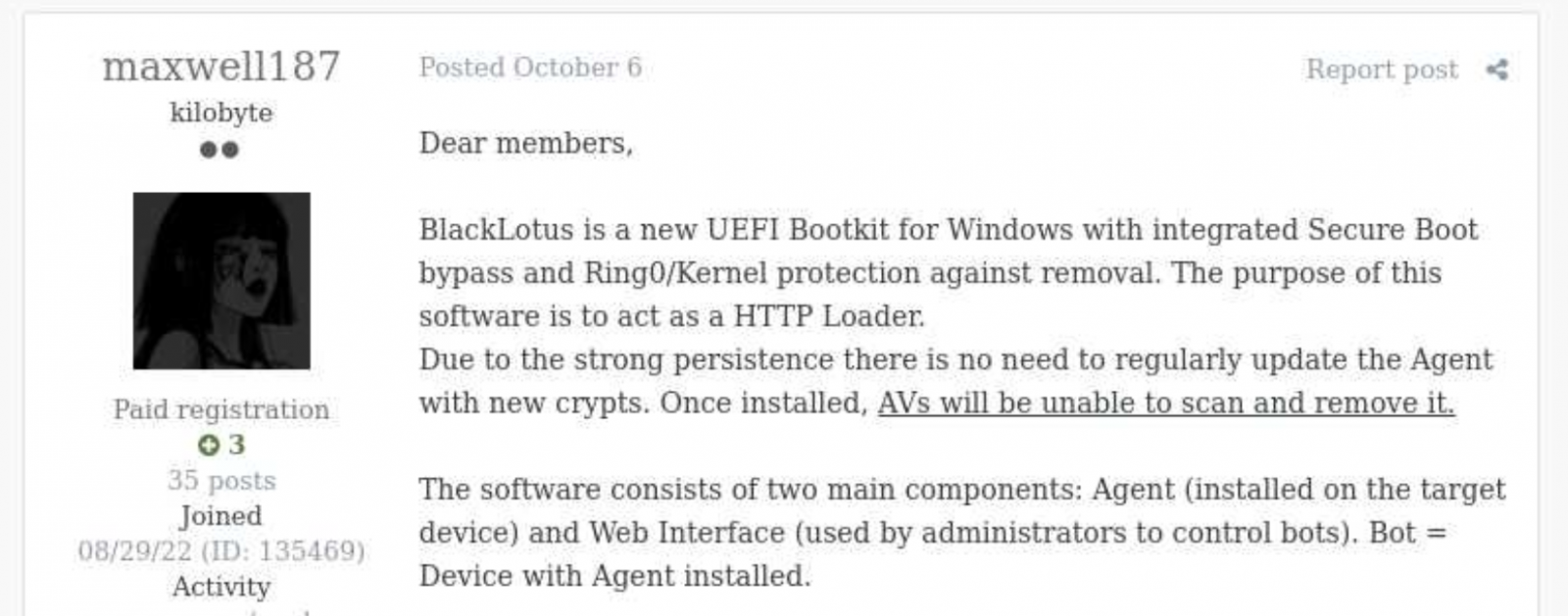
Back in October 2022, Kaspersky GReAT was looking into a peculiar advertisement on a hacking forum. A cybercriminal had been advertising a UEFI bootkit, dubbed BlackLotus, that could bypass Secure Boot, for $5,000. Given the low price for such powerful capabilities, the cybersecurity community initially took this advertisement with a grain of salt. As no BlackLotus samples were found in the wild, no one could at the time verify the claims made in the forum post.
BlackLotus advertisement
However, about half a year later, in March 2023, ESET confirmed that the BlackLotus advertisement was genuine. The researchers tracked down samples of this bootkit and confirmed that it can indeed bypass Secure Boot through a vulnerability called Baton Drop (CVE-2022-21894). As this vulnerability was still exploitable in 2023, Microsoft had to release multiple security updates to address it.
Since the release of these updates, the BlackLotus bootkit has gone quiet — no publicly known attacks have used it. Yet in early 2026, we discovered a malware sample similar to BlackLotus that was used in an APT campaign in Central Asia. In this report, we share our findings, including new payloads and possible attribution of this campaign.
The return of the infamous bootkit
In early 2026 we identified a complex APT attack targeting diplomatic agencies in Central Asian countries — namely Tajikistan, Uzbekistan, and Turkmenistan. This attack involved a UEFI bootkit that we dubbed BlackX. Having examined it, we found it to be similar to BlackLotus.
Attackers have been deploying BlackX after compromising the victim machine networks and obtaining administrator privileges. To install the bootkit, we observed them dropping the following files:
inst.exe, an installer executable
PVMDIJGKAX2, an RC4-encrypted extensionless file containing files and strings required for the installation
The installer was launched with the command line C:\ProgramData\Intel\inst.exe PVMDIJGKAX2 Q46F6MDLI3RX2KV1. The last argument here is the RC4 key used for decryption.
Curiously, the file inst.exe does not contain any malicious strings or embedded blobs. All the files needed to install the malicious payload are inside PVMDIJGKAX2, which makes it harder for incident responders to retrieve the bootkit components.
The installer package drops a set of files to both system and UEFI partitions, designed to exploit the Baton Drop vulnerability. We noted that the implementation of the exploit is remarkably similar to the one used in the BlackLotus malware. As with BlackLotus, the goal of the exploit is to install custom Machine Owner Keys (MOK), which allows loading arbitrary EFI files on the target machines to manipulate Secure Boot.
While the vulnerability exploitation chain was implemented very similarly to BlackLotus, we spotted differences between the exploits in BlackLotus and BlackX. That said, the source code of the BlackLotus bootkit has never been published online. This could mean that the attackers behind BlackX either reverse-engineered the BlackLotus bootkit or purchased its source code from cybercriminals. Either way, this is an interesting observation, as we rarely see APT actors borrow ideas or code from cybercrime actors.
Payload launched by the bootkit
The UEFI payload delivered during the Baton Drop exploitation has a classic bootkit goal — to inject a malicious driver into the Windows kernel. This driver differs from the one deployed by BlackLotus and is signed with a certificate belonging to an organization named 温江区明宇网络技术服务工作室 (English: Wenjiang District Mingyu Network Technology Service Studio). At the time of writing, this certificate (serial number: 0bcdf5e0da32d68900b8b7638459d072) has been revoked by its issuer.
The driver aims to tamper with security solutions installed on the machine. For example, it disables process, thread, and registry callbacks related to security solutions. It also tampers with ETW providers so that security solutions cannot access their output. Curiously, some of the tampering procedures are designed to run only if Kaspersky or Avast solutions are installed on the infected machine. However, during dynamic analysis of this driver, we found that these procedures are useless — they fail to interfere with Kaspersky products in any way.
The driver also protects the bootkit’s files from tampering. It intercepts kernel requests to open these files and returns a handle to calc.exe instead of a malicious file handle.
User-mode second-stage payloads
Apart from tampering with security solutions, the driver also deploys a user-mode payload. We observed two such payloads, used for cyberespionage, in the wild. One of them is a RAT that can load further-stage .NET payloads. This RAT uses cloud storage for C2 server communications — we observed its versions using Google Drive, OneDrive, and Yandex.Disk. Having connected to a cloud storage service, this RAT iterates over files available there and interprets them depending on the file suffix. Below is a list of supported suffixes:
File suffix
Description
Type
0X01
A .NET file. The task is to parse it and run the method TEST.Class1.RunCMD(argument_array) from the module
Input
0X02
Result of the call TEST.Class1.RunCMD(argument_array)
Output
0X03
Task to upload a file to the drive
Input
0X04
Uploaded file
Output
0X05
Task to download a file to an infected machine
Input
0X06
File download status
Output
SSSR
Contains initial system info
Output
We also observed another payload delivered through the bootkit, which we dubbed OxiDLLRunner. It is a malicious DLL obfuscated with OLLVM. It is loaded by the legitimate file googleupdate.exe (original filename: jcef_helper.exe, MD5: AF8A983B9ADA07EAE1259BF2953ABD40), which is also delivered by the bootkit. The DLL decrypts the contents of the file v8_context_snapshot.bin, which resides in the same folder, and then jumps to the beginning of the decrypted content. The decrypted data starts with shellcode followed by a PE file, which is a Rust payload designed to communicate with the www[.]archivetj[.]com C2 server. During communication, this payload is supposed to receive DLL files exporting a function named create_plugin, which are then executed in separate threads.
Attribution
Based on the following facts, we have attributed this attack to the APT41 threat actor with medium confidence:
In June 2026, ESET published a blog post on attacks by the FishMonger threat actor, which the community assumes to be related to APT41. This post describes a kernel implant with a PDB path starting with C:\Users\xdd\Desktop. While describing the campaign, the post also suggests the possible use of an unspecified UEFI bootkit component, which might exploit CVE‑2023‑24932. We observed the identifier “xdd” used multiple times in the BlackX bootkit payloads, so we assess that BlackX is the UEFI bootkit referenced in the ESET blog post;
The payloads deployed by BlackX are loaded using a legitimate executable abused via DLL sideloading, and an encrypted file — this pattern is common among Chinese-speaking threat actors;
The OxiDLLRunner file has been obfuscated with OLLVM, an obfuscator commonly used by Chinese-speaking actors.
Why did the target organizations get infected?
During our initial analysis of BlackX, we thought that attackers succeeded in deploying it due to the negligence of the target organizations. Baton Drop, the vulnerability used to deploy BlackX, was disclosed back in 2023 and was patched, so we first thought that the infected machines lacked the relevant updates. However, our investigation proved this wrong — the targeted machines were fully patched.
Instead, we found out that the problem was with the patch itself. As it turned out, the patch for the Baton Drop vulnerability is designed to revoke the “Windows Production PCA 2011” certificate used to sign vulnerable UEFI components. However, this revocation does not happen automatically upon patch installation — the user has to trigger it manually. This is done with the following steps:
A registry flag is set inside HKEY_LOCAL_MACHINE\SYSTEM\CurrentControlSet\Control\Secureboot;
A scheduled task named Secure-Boot-Update is created.
This patch is designed to be applied manually — for instance, applying it automatically could break dual-boot systems relying on the “Windows Production PCA 2011” certificate to load. At the same time, this patch deployment practice creates a problem — as it is extremely unusual for a system administrator to take extra steps after installing an update. Usually, when applying patches, system administrators take no further action unless an installation failure occurs. These instructions for activating the patch are buried deep on the Microsoft website, and we assess that they are quite hard for an average IT administrator to notice.
Curiously, Microsoft’s plan for deploying the Baton Drop patches mentions an “Enforcement Phase” that involves revoking the “Windows Production PCA 2011” certificate automatically, without user interaction. At the time of publishing this post, this stage has not been implemented. On October 19, 2026, this certificate expired, but this does not prevent the vulnerable binaries from loading unless the certificate is blocklisted.
It is likely that the threat actor behind this campaign took into account that few organizations realized the importance of manually activating the Baton Drop patch. As such, we believe they decided to invest time in understanding how BlackLotus works and creating a copycat of this bootkit.
Conclusion
Patch management is important for every organization, as updates from vendors help protect software and hardware against known vulnerabilities. However, sometimes installed patches fail to protect against the flaws they address. The BlackLotus story we described is not the only such example — for instance, in 2025 Microsoft released an update against the ToolShell vulnerability that also had to be applied manually.
However, modern security solutions are designed to account for such cases when installed patches fail to protect against security flaws for one reason or another. For instance, the Exploit Prevention component available in Kaspersky products prevents exploits from running if the patch is not applied, or if it is a zero-day vulnerability with no available patch. It is thus crucial to equip all machines in an organization with security solutions and constantly monitor the alerts they raise.
UPD 23.10.2026: added Kaspersky SIEM rules and events for developing custom detection rules or conducting threat hunting.
UPD 22.10.2026: added a description of how the Kaspersky Managed Detection and Response service detects the described malicious activity.
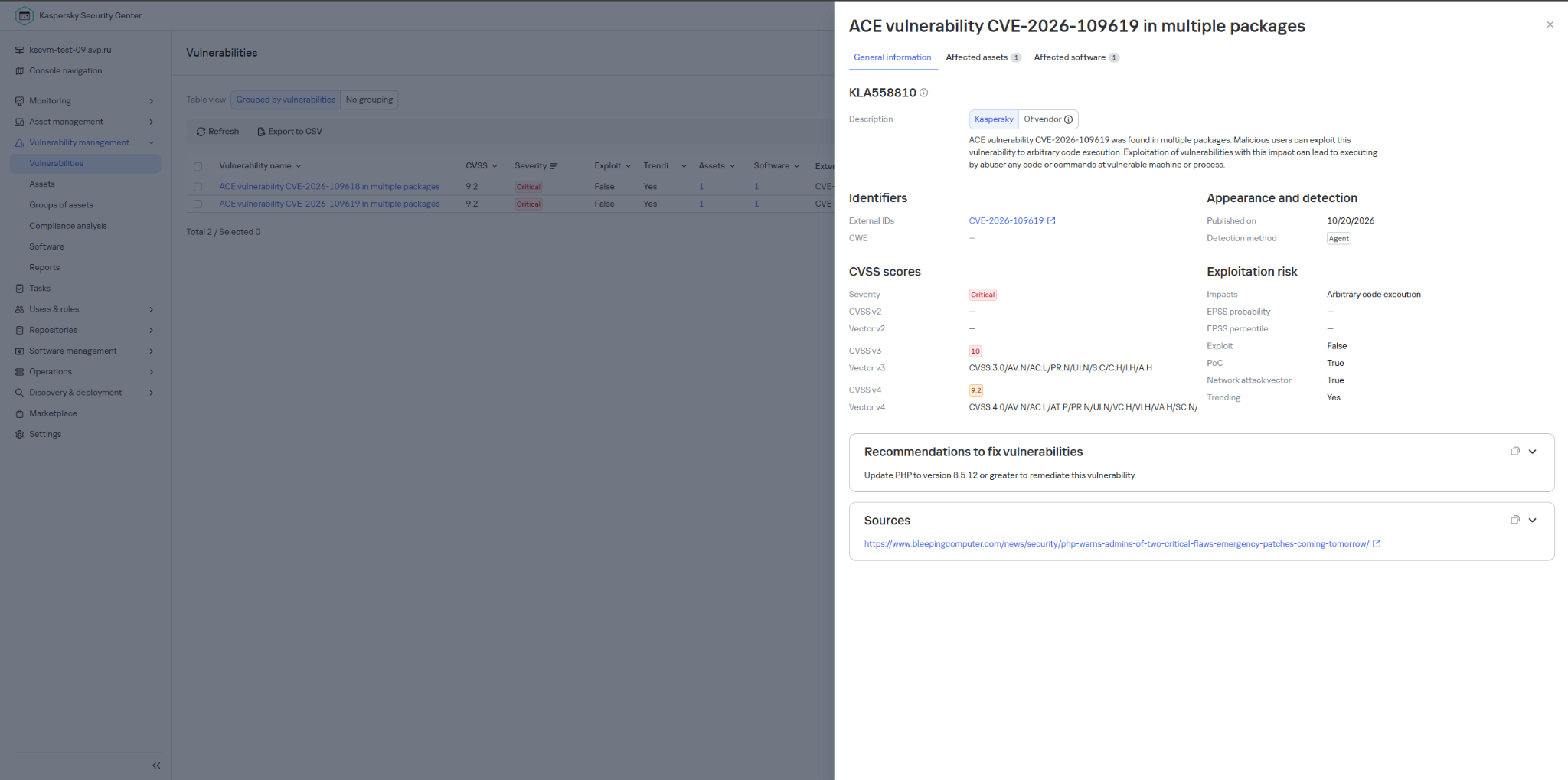
UPD 22.10.2026: added a description of how Kaspersky Vulnerability Management detects vulnerable versions of PHP.
Vulnerability overview
On October 20, 2026, the PHP security team published a preliminary notice regarding an upcoming emergency release that addresses two critical vulnerabilities (both rated 9.2 on the CVSS scale). The patches were released on Wednesday, October 21, 2026, at 14:00 UTC.
The release was expedited after information about the vulnerabilities was leaked to the public before the scheduled embargo was lifted. In a post on Hacker News, a user reported two RCE vulnerabilities in PHP, allegedly affecting all versions starting with PHP 5.4.0.
The vulnerabilities in question are CVE-2026-109618 and CVE-2026-109619. Shortly after the post appeared, researchers confirmed the existence of the vulnerabilities. Along with the leak of details, an exploit unofficially named PHP2Shell appeared online. In the leaked demo video, the exploit is shown in action on web servers running WordPress, MediaWiki, phpBB, Magento, Joomla, Laravel, Symfony, Drupal, and WHMCS — platforms that power many modern websites. The authenticity of the demonstration and the exact behavior of the exploit had not been independently verified at the time of publication.
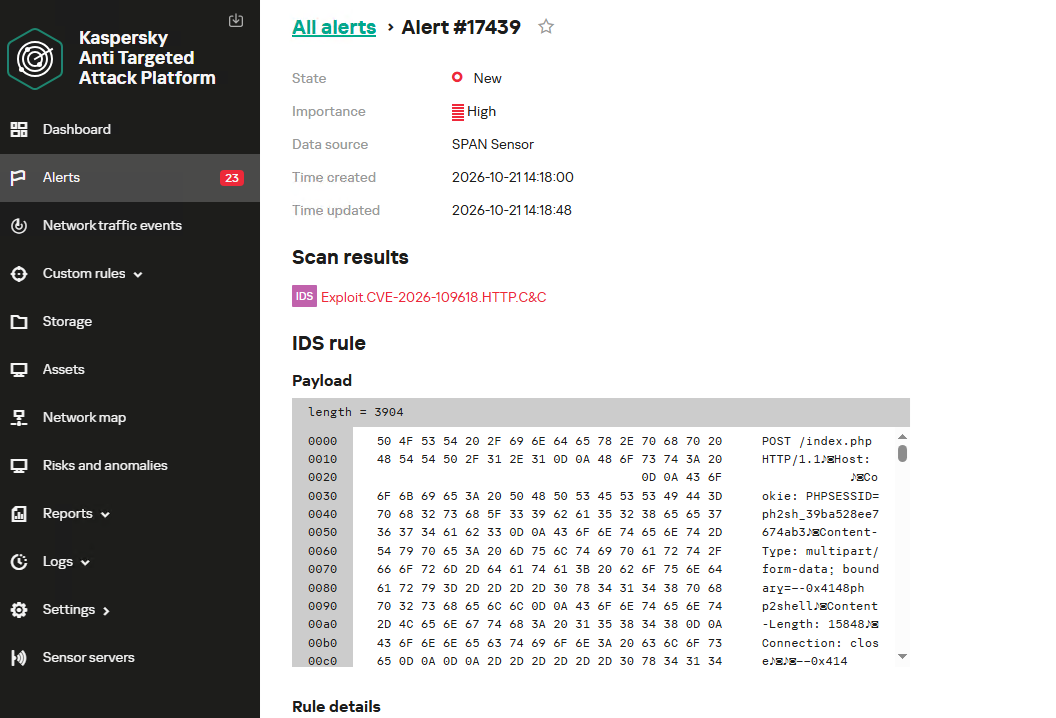
According to the researcher who published the PoC, the vulnerabilities are related to the handling of the multipart/form-data MIME type in conjunction with the session upload progress mechanism (session.upload_progress) in the PHP core and fall under the categories of use-after-free and memory corruption. This means that the flaws cannot be fixed via application code, and the only fix is to update PHP on the server. The attack requires no authentication: an attacker with network access to a PHP application can execute arbitrary code with the privileges of the PHP process without needing to authenticate. Security advisories issued by the PHP team on October 21 confirm this information.
The vulnerabilities affect PHP versions 5, 7, and 8. As of this publication, branches 8.2 through 8.5 are supported. Older branches, including PHP 8.1, 8.0, 7.x, and 5.x, have reached the end of their lifecycle; however, due to the critical severity of the vulnerabilities, backported patches have also been released for versions 7.4, 8.0, and 8.1.
Sansec experts estimate that widespread exploitation could begin within 15 minutes of the update’s release. We strongly recommend that administrators responsible for publicly accessible PHP web servers take the following steps before the patch is available:
Take an inventory of all PHP-based systems in your infrastructure (such as web servers, control panels, and third-party software).
Disable upload-progress: set session.upload_progress.enabled = Off using the php_admin_flag in PHP-FPM pools.
Block multipart requests on nginx and Apache servers.
Consider temporarily isolating PHP applications that connect to the Internet until fixes are released.
Be ready to install the patch immediately upon its release.
Plan to migrate servers running unsupported versions (8.1 and earlier) to the latest PHP branch.
Detection by Kaspersky solutions
Kaspersky solutions detect the described malicious activity at various stages of the attack. Possible detection scenarios are listed below.
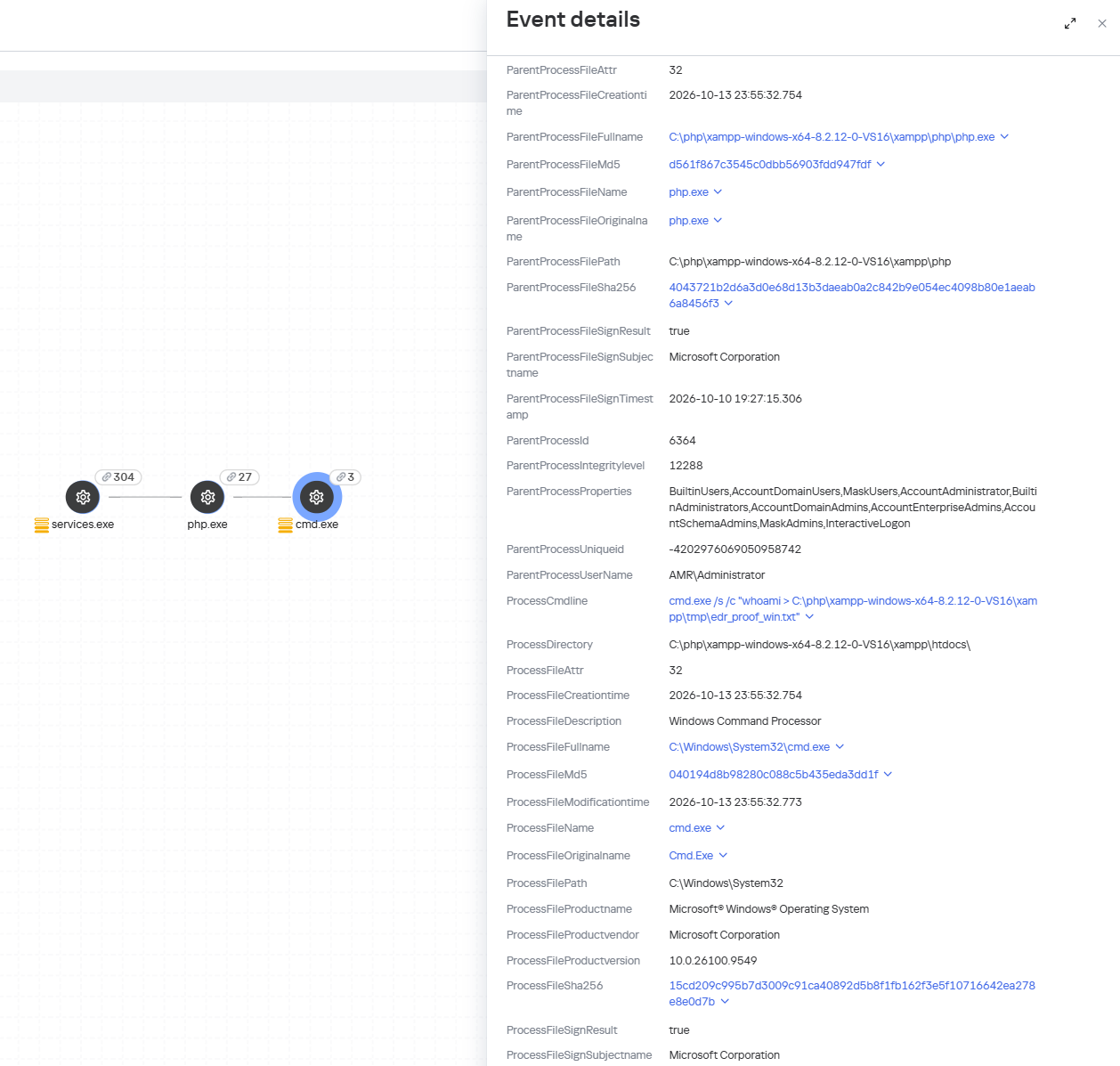
When an attempt is made to exploit these RCE vulnerabilities, Kaspersky Endpoint Detection and Response promptly alerts the user to suspicious actions performed in the context of a web server, on both Linux and Windows machines. This activity is detected by the following rules:
Spawning of suspicious processes by the web server;
Creation of suspicious executable files in the web application directory;
Creation of suspicious scripts in the web application directory;
Creation of files with uncommon extensions in the web application directory;
Execution of reconnaissance commands by the web server process;
Execution of persistence commands by the web server process;
Delivery and launch of web shells on the web server.
Moreover, MDR detects other malicious activity not directly related to remote code execution.
To protect companies that use our Kaspersky SIEM system, the product repository includes rules that help detect the following malicious activity.
Execution of suspicious executable files by web server processes on Windows and Linux machines:
R300_04_Windows shell started by a web application
R152_08_A running Linux shell process has a suspicious parent process
Execution of reconnaissance commands by the web server process:
R286_05_Possible web-shell (Linux)
We also recommend monitoring the creation of scripts or executable files in the web server directory when developing your own detection rules or conducting threat hunting:
((DeviceEventClassID = '4663' AND DeviceCustomString1 ilike 'WriteData') OR DeviceEventClassID = '11')
AND match(FileName,'(?i).*\.(php|asp|aspx|ashx|jsp|js|jar|jse|dll|exe|bat|ps1|vbs|wsf|wsh|msi|msp|hta|cpl)$')
AND match(DestinationProcessName,'(?i).*(php-cgi|nginx|httpd|w3wp)\.exe')
Name = 'openat' AND has(SA.Nametype, 'CREATE')
AND
length(arrayFilter(x -> match(x, '(public_html|var/www|usr/local/apache2|usr/local/httpd|var/apache|srv/www|home/httpd/html|srv/http|usr/share/nginx/html|var/lib/pgsql/data|usr/local/mysql/data|var/lib/mysql|var/vsftpd|etc/bind|var/named)'), SA.FileName))>1
AND
length(arrayFilter(x -> match(x, '\.(aspx|asp|asmx|asax|ashx|jspx|jsp|js|phpt|php|phtml|pht|cfm|shtml|htaccess|fcgi|cgi|pl|py|sh)'), SA.FileName))>1
Imagine you’ve ordered a small paper unicorn from an online marketplace. You clicked “Buy”, received a cheerful notification, and expect a courier to bring the box tomorrow. If the unicorn is delayed by a day, it will be annoying but not catastrophic: an apology, a discount promo code — and the incident is forgotten.
Now let’s multiply one late unicorn by several hundred thousand orders.
Packages start heading to the wrong cities. The website shows an item is in stock, even though the required bin is empty. Conveyors stop, boxes get stuck between floors, the cargo piles up with no freight manifest. Trucks line up at the gates, and every minute of downtime turns into blown schedules, support tickets, fines, and lost sales.
It is at exactly this scale that a cyberincident in a warehouse becomes a problem for the entire business. A modern warehouse is no longer just a big building with shelving. It is a tightly interconnected hybrid system: web applications, radio channels, and an automated factory. Physical processes here depend on data, and errors in data have very physical consequences. Examples include an outage that affected warehouse management systems at the grocery giant Morrisons, and the 2025 Form 10-K annual report of United Natural Foods, Inc. (UNFI), which confirmed unauthorized activity on information technology systems that impacted order fulfillment. More recently, reports emerged that a cyberattack disrupted eight CEVA Logistics warehouses across Europe and exposed customer delivery data.
This paper follows a single order through a warehouse to show where the operation is vulnerable, the stages it traverses, the systems that drive it, and the points where an attacker can reach them. We then set out the threat model: what is at risk, who is in a position to take it, and how each risk lands on the business. From there, we look at how an attacker gets in, and what reaching the warehouse management system costs in practical terms: orders unshipped, inventory records nobody can trust, and an operation that stops. We close with recommendations on where the controls that matter actually sit.
Tracing the unicorn
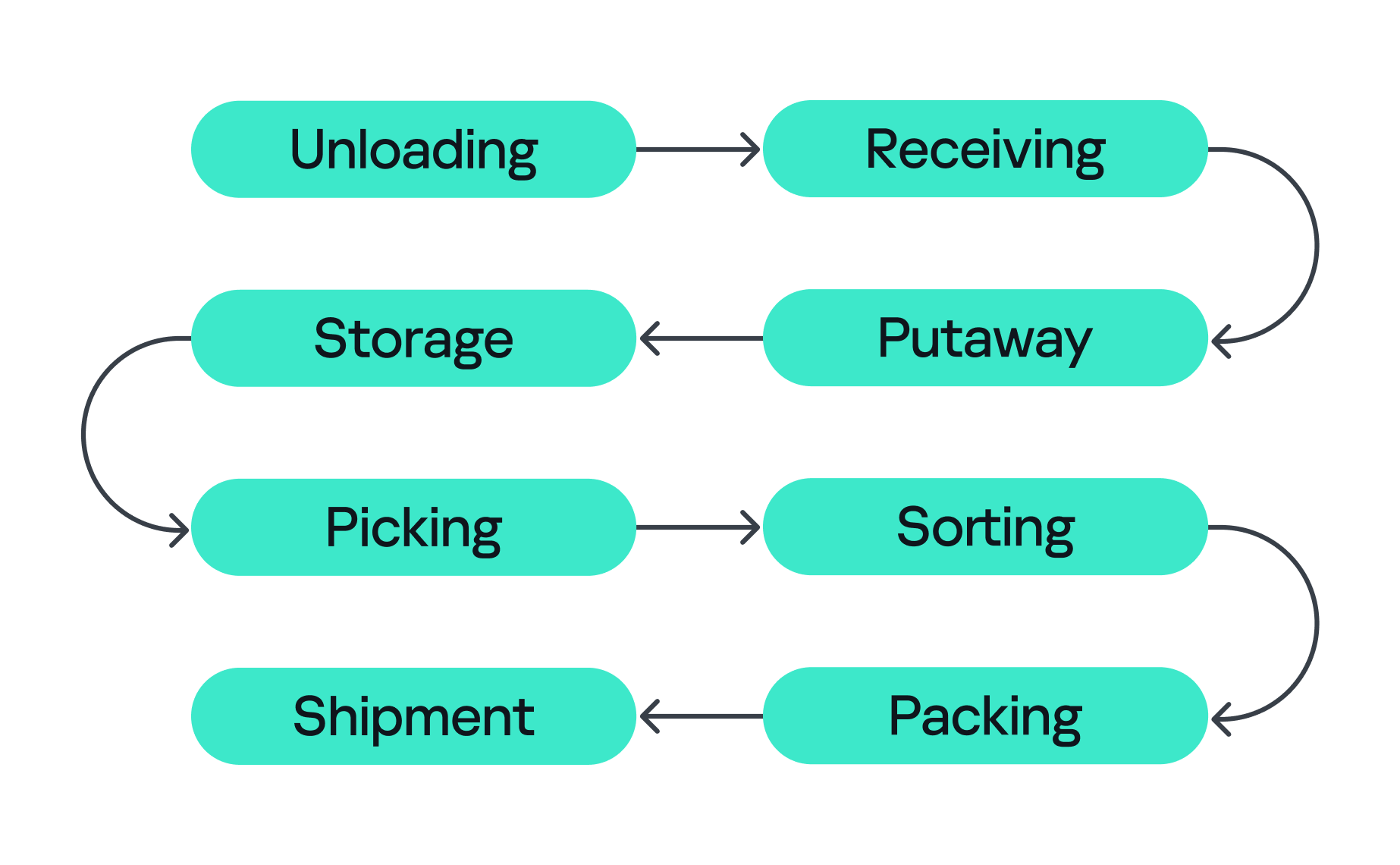
A modern warehouse is a sequence of stages involving many machines and people, all working together to keep the business process stable so that, in the end, your order gets delivered. This process consists of eight main stages, shown in the figure below.
Stages of order fulfillment
So let’s assume we’ve ordered our paper unicorn and are waiting for it at home. Let’s follow our order through all the main stages, from its arrival at the warehouse to the final stop on its journey.
Unloading First, the unicorn arrives in the unloading zone, packed in a big truck. The driver is assigned a gate, for example, via a tablet with kiosk mode enabled, or an outdoor display board, indicating where the truck should park and where the cargo will be unloaded. Even at this very first step, a digital command (the gate number on the screen) is already triggering a physical action. Therefore, incorrectly assigned gates can create a queue, delay unloading, or send goods into the wrong workflow.
Receiving At this stage, employees identify the cargo. They scan a barcode using a portable data terminal (PDT) and the central system receives a message indicating that this object arrives at the warehouse. From this moment, the unicorn exists in two forms at once: as a real box and as a record in the information system. If these two versions diverge, the error is inherited by all subsequent processes.
Putaway Next, the goods are moved into internal storage. Two new devices come into play here. First, a thermal printer, connected to the internal network over Wi-Fi, creates an internal label for each item. Then an employee, forklift, or automated system moves the goods to the assigned bin, often with the help of lifts controlled by PLCs. Both of these devices can be valuable attack entry points: one can let an adversary pivot into the internal network, while the other can give them control over an electric motor.
Storage Then the unicorn goes into storage. Many distribution centers use multi-level mezzanine structures: several floors of metal shelving inside a huge space. They allow efficient use of the building’s height, but at the same time complicate control over the technical infrastructure. Wi-Fi access points, cameras, switches, cables, and sensors may be mounted high overhead or buried deep inside the rows. A forgotten Ethernet cable or misconfigured networked device (access point or switch) left behind in a dark corner can become a convenient initial access point into critical infrastructure.
Picking When the customer places an order, picking begins if the goods were already stored in the warehouse or as soon as they are unloaded. A PDT, workstation, light indicator, or voice terminal directs the employee to the required bin where they pick the goods and move them to the next stage. These devices are themselves potential attack entry points: compromising a workstation or PDT could allow an attacker to manipulate picking information, which could misdirect employees to the wrong bin. Here, both the speed and integrity of the information are critical, and any manipulation or disruption can lead to wrong orders, delays, or problems in subsequent stages.
Sorting At the sorting stage, the warehouse starts to look more like a factory. Boxes move through conveyor belts and pass through different scanners, diverters, and chutes. The sorting plans are usually stored and managed by dedicated servers, while PLCs are responsible for controlling the machinery and executing these plans. For example, when the warehouse management system (WMS) decides that our unicorn should take route A, the control system needs to activate the right diverter at the right moment, sometimes within a fraction of a second.
Packing During packing, an employee or a robotic arm places the goods into the final box, prints the shipping label, and sometimes measures the dimensions and weight of the package. Safety mechanisms usually prevent robotic arms from leaving the controlled zone and harming nearby operators, but their compromise might inflict physical damage on the packages being processed.
Shipment Finally, at the shipping stage, the parcel heads to the gates. Automated guided vehicles (AGVs) and autonomous mobile robots (AMRs) move containers and pallets across the warehouse, while the dock management system coordinates the truck that will carry the unicorn onward to a store, a sorting center, or straight to the customer. These robots are themselves a potential target for attackers. Attacks can be conducted against AGVs and AMRs to interfere with their operation, for example by affecting their navigation or preventing them from reaching their intended destination.
All eight stages are coordinated by the WMS. It looks like a large web application, but in its role it’s closer to the operating system of the entire warehouse: it knows which goods exist, where they’re located, who or what should move them, and where they go next, linking employees, inventory levels, storage addresses, tasks, and orders. It also exchanges data externally: with ERP systems, transport platforms, marketplaces, dark stores, and external carriers.
Surrounding the WMS is an even larger digital ecosystem: identity services, databases, APIs, printers, carrier systems, technicians’ laptops, video surveillance, access control, fire and gas alarms, power supply, and a building management system (BMS).
That is why a single “warehouse network” doesn’t really exist. As we’ve seen, there are many overlapping technologies — IT infrastructure, OT systems, radio, cloud services, building security, and automation — layered on top of one another. A lone vulnerability scanner will never tell you whether a warehouse is secure.
Hunting the unicorn
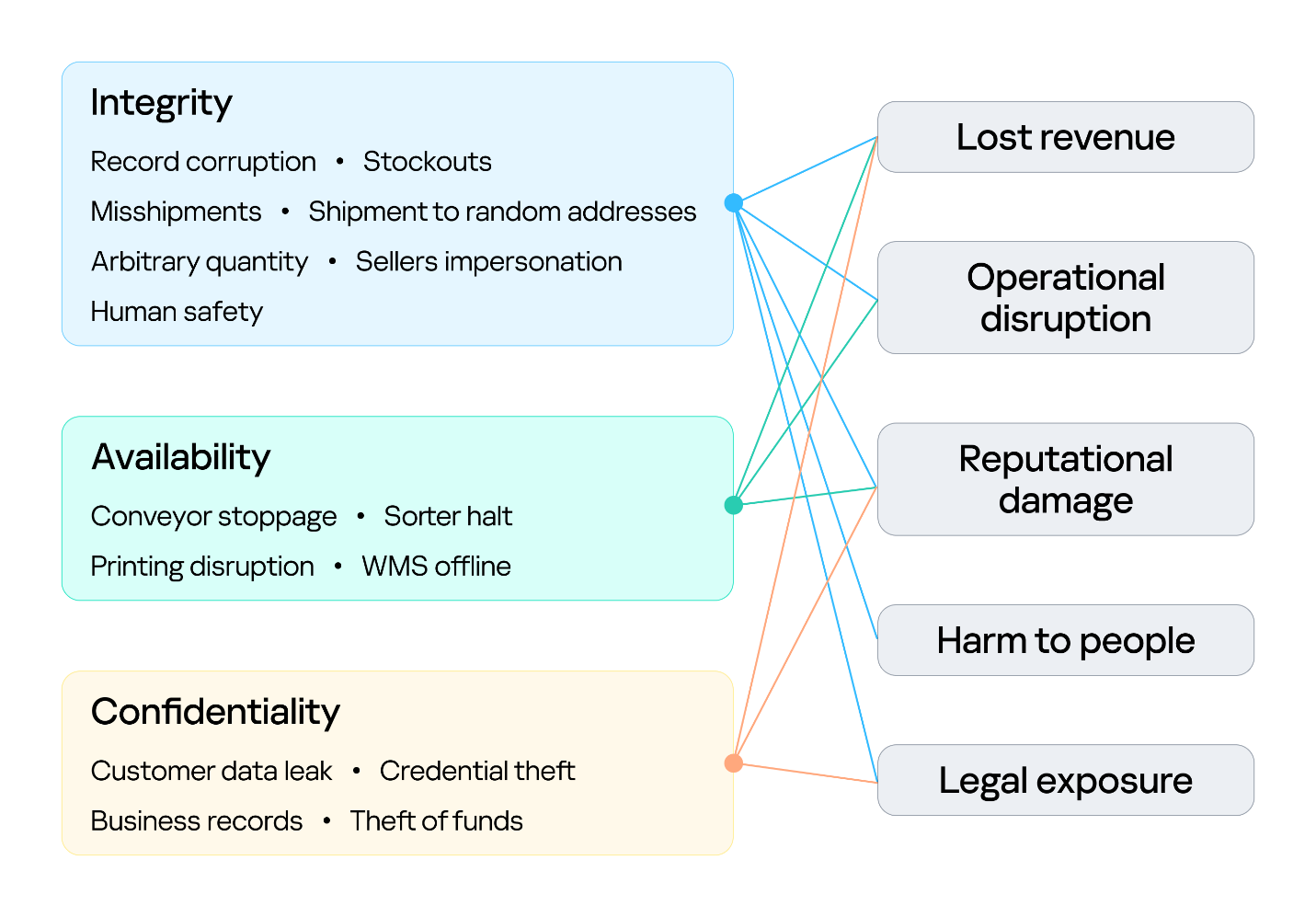
Securing an environment such as a warehouse requires a comprehensive security assessment covering all of its interconnected systems. This involves identifying vulnerabilities across each system and understanding how weaknesses can be combined into attack paths that a real attacker could exploit. But a vulnerability only matters in proportion to what it exposes and who is able to reach it, so before looking at the weaknesses themselves, we need to understand what an attacker in this environment is actually after, because in a warehouse, the blast radius extends well beyond data. Everything we just traced — the systems, the devices, and the people operating them — exists to keep goods moving, and attacks in various parts along that chain can affect the business differently. The chart below shows what is at risk in the warehouse and where those risks land for the business. The segment on the left groups them under the three core security properties: integrity, availability, and confidentiality. The segment on the right maps each property to the business outcomes a failure can cause.
Warehouse risks
The first area at risk is integrity. Inventory counts, locations, orders, and shipment data must stay in sync with the physical world. Corrupting a record silently desynchronizes the operation, and because the eight stages form a dependency chain, one falsified entry early on is inherited downstream, surfacing later as stockouts and mis-shipments. In its deliberate forms, this lets an attacker redirect goods, release stock, and perform other actions on behalf of the platform’s vendors under cover of legitimate records. Integrity is also a safety concern: when people or machines act on information that no longer reflects the physical environment, a data failure can become a physical incident. This is why integrity is the only property linked to all five outcomes, including harm to people.
The second is availability, the warehouse’s ability to keep goods moving. Halting a conveyor, a sorter, label printing, or the WMS stops orders from shipping, and in a business built on speed, every hour of downtime means delayed deliveries and broken promises. Ransomware can bring the whole warehouse to a standstill. The impact shows up as operational disruption, lost revenue, and reputational damage.
The third is confidentiality. Customer data, business records, and system credentials are valuable targets. Their exposure leads to legal liability and reputational damage, and stolen credentials often open the door to further attacks. Where the WMS connects to financial or ERP processes, the risk extends to theft of funds.
Knowing what is at risk tells us what an attacker stands to gain; the next question is who is in a position to take it. Threat actors differ in the access they already hold. For example, an attacker may be authenticated and privileged, have limited physical or remote access, or have no legitimate access to the environment at all. Based on their relationship with the warehouse and their level of access, threat actors can generally be divided into two categories:
External. An attacker with no legitimate relationship with the warehouse or the organization, operating without authorized access. External attackers can be divided into two categories based on their physical proximity to the environment:
Remote. An attacker operating from outside the site’s physical area, reaching the environment through whatever the organization exposes or makes reachable over the internet, including web services, remote access infrastructure, and third-party connections used by suppliers, carriers, and integrators.
Proximate. An attacker with no legitimate access who has nevertheless moved within physical range of the site’s locally reachable technologies. They may, for example, be in a parking lot, a neighboring unit, or a delivery bay. Their proximity may allow them to interact with wireless, radio, Bluetooth, or other short-range interfaces without possessing an account, badge, employment relationship, or other authorized access.
Internal. An individual with legitimate access to the warehouse, its systems, or its information, who intentionally or unintentionally creates a security risk. This includes employees, administrators, operators, contractors, and temporary staff.
Combining these threat actors and their access levels with the risks identified earlier, the vulnerabilities present in each system, the resulting attack surfaces, and the potential attack paths between them provides a threat model for the warehouse environment. This allows an organization to understand how different systems and people could be targeted, how individual weaknesses could be combined, and where security controls are most needed.
Cornering the unicorn
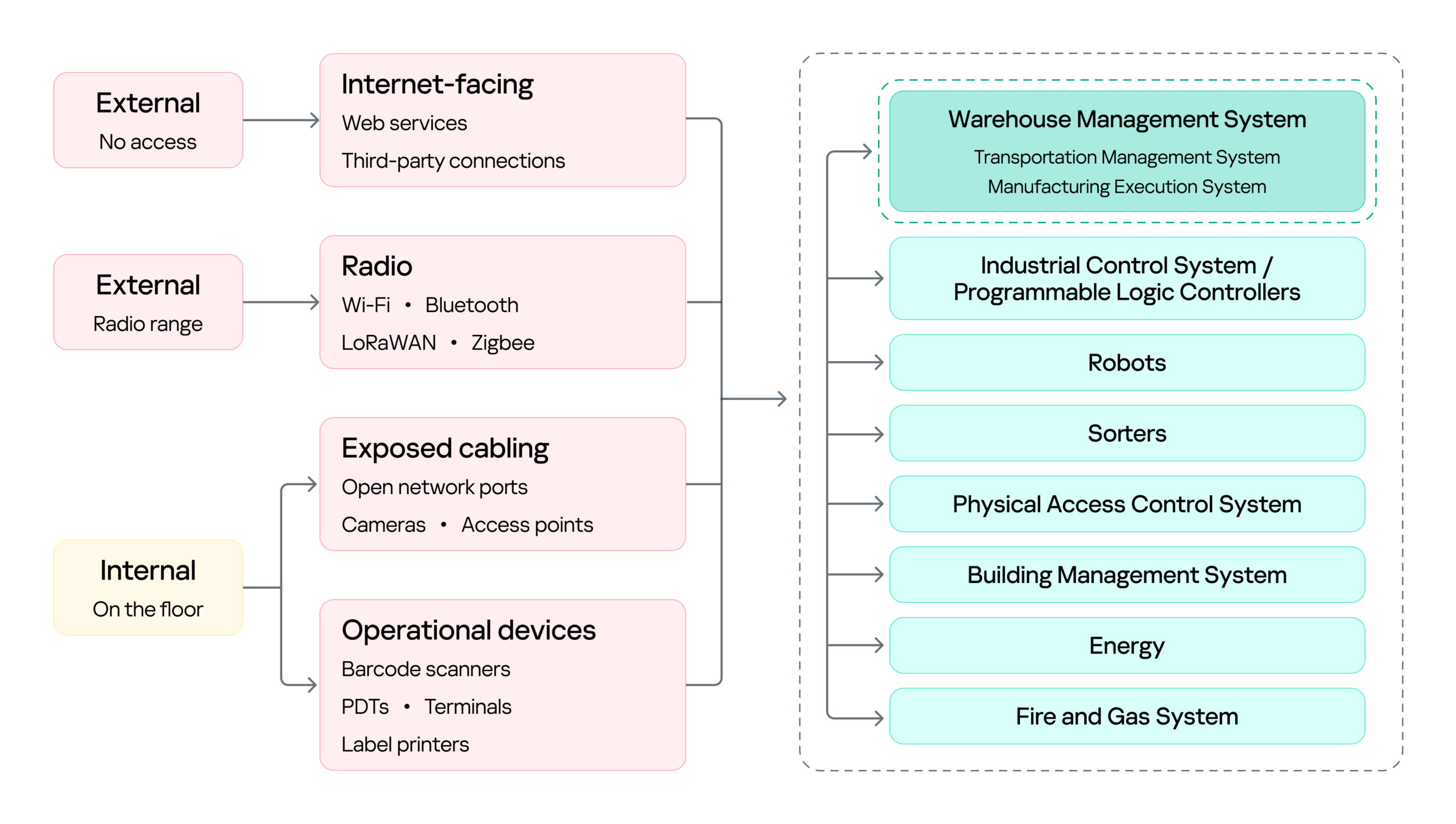
Knowing what is at risk and who might come after it still leaves the most practical question open: how they would actually get in, and how far they could go once they did. The diagram below sets out the warehouse’s attack surface: every point where an attacker can get in, organized by the access that reaching each point requires.
Warehouse attack surface
On the left are the attacker categories discussed above, distinguished by where they stand and what access they already hold. Each reaches the environment through a different set of entry points, and the impact of a successful attack can land on several systems, from the WMS to OT systems such as robots, sorters, and physical access control system (PACS). The WMS is highlighted because it is the most significant of these: it coordinates the OT systems, so compromising it can affect the entire operation rather than a single process.
Next, we will cover the initial access vectors, the points a threat actor can use to reach the warehouse environment. Following that, we turn to the impact on the logistics processes themselves, focusing on the WMS, since its compromise affects every logistics operation that depends on it.
Initial attack vectors
Internet-facing services
Remote access through internet-facing services, third-party connections, and corporate networks gives an external attacker a foothold on the warehouse network infrastructure. It is a well-covered problem and not specific to this environment, so we note it here as an entry point but will not examine it further.
Wi-Fi, Bluetooth, and other radio channels
Wi-Fi connects handhelds, tablets, printers, cameras, and workstations. Bluetooth serves scanners, headsets, and positioning beacons. Zigbee and similar low-power protocols run lighting, sensors, and building automation, while LoRaWAN carries telemetry over long distances. Cellular provides a backup channel for kiosks and contractor equipment, and proprietary protocols control industrial panels and specialized machinery.
Radio passes through windows, gates, roofing, and thin external panels, so a network built for receiving and processing goods may be reachable from the parking lot and, with a directional antenna, from considerably farther away.
That reach matters in two ways. It gives an external attacker a place to start, as proximity alone is enough to reach the Wi-Fi and the low-power protocols, and from there to gain an initial foothold in the warehouse networks.
However, radio does not only lead into the network. It also connects directly to the field devices and carries the live control traffic of warehouse operations, which makes availability a first-order concern. If hundreds of handhelds lose their connection at once, picking stops. If an AGV loses its control channel, the safe reaction may be to halt in place, and a stopped machine can block an entire route.
Physical network
The scale of the warehouse itself is part of the attack surface. A fulfillment warehouse can run up to tens of thousands of square meters, with racking climbing several stories and walkways threading through it. Structured cabling runs along that racking, cameras and access points are mounted on that, and wall jacks sit behind pallets that have not moved in months. Almost none of it is in anyone’s line of sight.
That gives a person in the warehouse something a normal office does not: unsupervised access to live network infrastructure. Unplugging a ceiling camera leaves an active port. An unused jack behind a shelf leaves another. Neither requires tools, credentials, or any interaction with a system that logs anything. And since the camera or access point sits on the same segment as the rest of the site, the compromised port, not being isolated, opens a path to the network core.
Barcode scanners
Barcode scanners are everywhere in a warehouse. They are the main tool workers use to tell the system what is moving and where, supporting receiving, picking, packing, and inventory management. A typical setup has handheld scanners communicating with a base station, which is in turn connected to a workstation or another business system.
This makes the scanner an entry point into the core network in two ways.
First, through the barcode itself. Since the scanner acts as a keyboard to the connected host, a maliciously crafted barcode or QR code can inject keystrokes when scanned, potentially giving the attacker an initial foothold on the host without directly accessing the network.
Second, through the scanner’s wireless link. During a customer engagement, with the provided test stand of such a device, we discovered that an attacker within range could inject keystrokes into the connected host and potentially achieve remote code execution without user interaction. This attack pattern was observed across multiple vendors, including, for example, Honeywell devices affected by CVE-2026-4272.
In both cases, the result is the same: a foothold on a host inside the warehouse network. The scanner is simply the entry point; the significance of that foothold comes from the host’s trusted position within the operational environment and its connectivity to core systems.
Portable data terminals
Portable data terminals (PDTs) are essentially ordinary Android devices with an embedded barcode scanner, carried by workers to scan items; each scan is passed to a dedicated application that forwards it to a remote server over an API. To keep workers on task, the devices usually run in kiosk mode, locking the user to that single application and preventing interaction with the rest of the Android system.
That lockdown is exactly what an attacker wants to break, and breaking it is what turns the terminal into an initial access vector: escaping the kiosk can expose the Wi-Fi password of the network the terminal is connected to, or allow malicious software to be installed that gives the attacker remote access to the network over the internet.
Printers
Warehouses contain different types of printers. Alongside the usual IT printers used for documents and paperwork, there are specialized thermal printers, small devices that use heated elements on the printhead to create labels, barcodes, and tags. As we mentioned earlier, these are mainly used to print the labels, usually containing barcodes, that are attached to goods during the putaway stage.
Here we focus on mobile thermal printers: small, battery-powered devices that workers can carry or wear. They typically connect to the internal network over Wi-Fi to receive print commands, while also supporting Bluetooth for connecting to nearby devices. This combination makes them a potential entry point into the internal network.
Some models, such as the Zebra ZQ630, support multiple interfaces and can run applications directly on the device. During a security assessment, we discovered that apps can be uploaded and executed over Bluetooth. By exploiting a pairing misconfiguration, an attacker within Bluetooth range could bypass pairing, upload malicious software, and gain an initial foothold through the printer.
Impact on logistics processes (attacks on WMS)
With a foothold in the network, an attacker can pivot to the logistics processes themselves: from the WMS through the warehouse infrastructure to the PLCs and the machinery they drive. As we saw earlier, all OT systems and devices are interconnected and the WMS sits at the head of that chain: it is the system of record every other process reads from and writes to, so compromising it reaches all of them at once. That, and its being specific to this environment, is why it is the focus here.
Warehouse management systems (WMS) are the software platforms that optimize warehouse processes from the entry of goods to their exit. They provide real-time visibility into inventory and orchestrate end-to-end fulfillment by integrating with many warehouse subsystems and pieces of automation equipment, such as conveyors, PLCs, robotics, scanners, and voice systems. A typical WMS includes modules for receiving, inventory control, order management, labor management, shipping, and reporting. Major vendors include SAP EWM, Oracle Warehouse Management, Manhattan Active, Blue Yonder, Infor, Körber/HighJump, Microsoft, and TECSYS.
To picture how central this is, think back to our unicorn. From the moment it was scanned at receiving, it stopped being only a physical box and became a record inside the WMS, a record the system then used to decide where it should be stored, when it should be picked, how it should be sorted, and where it should ship. Every device employed along the way — the PDT at receiving, the printer at putaway, the workstation at picking, the conveyor at sorting — was really just talking to the WMS. It is the thread that ties all eight stages together, which is exactly what makes it such a valuable target.
Because modern WMS platforms are usually web-based and heavily interconnected, they inherit common web and API vulnerabilities alongside flaws specific to the WMS itself. A recent example is CVE-2026-70774 in Oracle Warehouse Management, part of Oracle E-Business Suite. Oracle rated it High and described it as an easily exploitable authorization bypass flaw in which a low-privileged attacker with network access can compromise the application, affecting integrity and availability by allowing unauthorized creation, deletion, or modification of critical data.
A flaw like this may look like a typical web application issue, but its consequences in a warehouse are more serious, because the WMS is the system of record. If an attacker can modify its data, they can alter stock levels, bin locations, receiving records, picking tasks, or shipment information, silently corrupting the digital twin of the warehouse. And since the eight stages form a dependency chain, that corruption doesn’t stay contained: a falsified record at receiving is inherited by putaway, picking, and everything downstream. The physical box and its record diverge, and every later process trusts the record.
The most direct version of this attack comes from an authorization bypass flaw like the Oracle vulnerability above. Here the threat actor can be an external attacker who has reached the application over the network, or an insider such as a low-privileged operator or storekeeper who already holds a legitimate account.
The danger grows when such a flaw is chained with others. An external attacker who combines remote code execution with SQL injection could generate shipment orders to arbitrary addresses together with the documents needed for goods to physically leave the warehouse, fabricate waybills, acceptance or transfer records, and registers, while also exposing customer data such as names and delivery addresses. In effect, the goods are sent out with legitimate-looking paperwork.
This is why ordinary web vulnerabilities carry considerable weight in a WMS. For an external attacker or an insider probing beyond their assigned role, broken access control could open a path into another warehouse zone, allow manipulation of other workers’ tasks, permit unauthorized exception operations, or expose administrative APIs. A server-side request forgery flaw could force the WMS server to reach resources an external attacker cannot touch directly, and if the network is flat or only formally segmented, that server may in turn reach internal management panels, cloud service interfaces, or systems sitting close to the operational network, turning a single web bug into a bridge between IT and OT.
Attacks on a WMS don’t always target the application directly, though. As we saw while tracing the unicorn, the warehouse is full of connected devices that already hold trusted access. A handheld terminal carries authenticated WMS API access as a matter of course, and anyone who gains control of that terminal inherits it (by escaping the kiosk, for example). Depending on the device’s permissions, that might mean confirming picks that never occurred, falsifying receiving operations, adjusting stock counts, or marking orders complete — something warehouse employees themselves could use to avoid their assigned duties.
Where the WMS is connected to control and automation systems, access to the WMS can extend into physical operations, including conveyors, sorting systems, lifts, doors, and pumps.
PLCs translate WMS instructions and sensor inputs into physical actions. Compromising a system that controls them therefore creates an opportunity to manipulate those actions. The impact can be as simple as a sorting diverter sending boxes down the wrong route, a conveyor repeatedly entering an error state and creating a backlog, or a falsified sensor value causing a line to be treated as clear when it is full.
However the WMS is compromised, the business consequence is the same: inventory corruption, unauthorized shipments, and operational disruption, each reaching the customer in the end as a late or missing delivery, the wrong item in the box, or a personal address exposed to a stranger.
Securing the unicorn
We followed our unicorn through web applications and databases, radio channels and PDTs, printers, conveyors, robots, and the loading zone. Because warehouse environments combine IT, OT, wireless, physical, and human components, security controls should be implemented as a single, coordinated security architecture rather than as isolated measures. Network segmentation should be a foundational control, with clear separation between corporate IT, warehouse OT, operational devices, management networks, and externally connected systems. Segmentation should also extend across facilities and customer environments so that each site and customer integration is isolated from the others, limiting the potential impact of a compromise. A zero-trust approach should reinforce this architecture by requiring explicit authentication and authorization for connections between systems, regardless of their network location, and by applying least-privilege access wherever possible. Regular penetration testing of the corporate IT environment, including domain services, identity infrastructure, and endpoints, should be incorporated into the warehouse security program.
Physical and network access controls should be implemented together. Access to warehouse facilities, network rooms, communication cabinets, and operational areas should be restricted according to business need, with appropriate authentication, monitoring, and access logging. Network infrastructure should be hardened through controls such as switch port security, MAC-based access restrictions where appropriate, and IEEE 802.1X with EAP-TLS for strong device and user authentication. Network equipment should also be securely configured and regularly reviewed to ensure that unused interfaces, insecure management protocols, default credentials, and unnecessary services are disabled.
Web applications and their supporting infrastructure should be governed through a secure software development lifecycle (SSDLC), including security requirements, secure coding practices, code and dependency review, and application security assessment before deployment and throughout the application’s lifecycle. Third-party applications and components should be continuously monitored and updated, with a defined vulnerability and patch management process. This should explicitly include warehouse management systems (WMS), warehouse portals, APIs, and other applications that provide operational or customer-facing functionality.
Wireless technologies should be subject to dedicated security assessment and engineering. Radio-frequency surveys should be conducted to establish expected coverage, identify unauthorized or unexpected signals, validate the availability and protection of operational communications, and determine whether wireless deployments create unintended access paths into warehouse networks. Wireless security should be assessed not only from a connectivity perspective but also in terms of authentication, encryption, device provisioning, protocol exposure, interference resilience, and the potential impact of unauthorized devices.
Warehouse operational devices should be incorporated into the organization’s endpoint security and vulnerability management processes. Devices should receive security updates and firmware patches on a defined schedule, with accelerated remediation for critical vulnerabilities. Security assessments should be performed periodically to identify weaknesses in device configuration, applications, exposed services, and authentication mechanisms.
Personnel security should form an additional layer of the warehouse security architecture. In most industrial and ICS environments, getting inside means clearing background checks, holding relevant qualifications, or proving prior experience; the hiring process itself acts as a filter. A warehouse is different. Roles in sorting, packing, and courier work are hired quickly and in volume, and they typically require no prior expertise, certification, or specialized background at all. An ordinary person can walk in off the street, be hired within days, and immediately hold legitimate physical access to the facility. Therefore, a more restrictive and risk-based approach to hiring should be considered, particularly for roles that provide access to sensitive areas, operational systems, network infrastructure, or customer assets.
Ultimately, all of these measures serve the same objective: protecting the continuity and reliability of the warehouse as a whole. This matters because real warehouses handle food, medicines, machine parts, and the millions of ordinary things people and companies depend on every day. Protecting their journey means seeing the warehouse as it has actually become: a single digital system with doors, motors, shelving, and radio signals, and with entirely real consequences when it fails. And if the security program works, the customer never knows any of this happened. The unicorn simply arrives at the scheduled time.
If your warehouse operations rely on interconnected systems like these, we can help identify the gaps before an adversary does. Reach out to discuss a security assessment.
Over the past year, our Global Emergency Response Team (GERT) has investigated several incidents involving the NightEagle group (also tracked as APT-Q-95). This group has been active since at least 2023 and originally focused on organizations in Asia. We have now identified attacks by the group targeting businesses in Russia. This post examines both known and new tools NightEagle used in its latest campaign.
Initial access
In most incidents, the attackers used compromised valid credentials to gain access to corporate VPNs. VPN connections originated from IP addresses in the Russian segment linked to Cloudflare WARP tunnels, as well as from IP addresses associated with European virtual infrastructure providers.
GhostContainer on Microsoft Exchange
Both during the initial access stage and as the attack progressed, the attackers deployed the GhostContainer backdoor on Microsoft Exchange servers. It incorporates components from several open-source projects, including the Neo-reGeorg tunnel, an exploit for the CVE-2020-0688 vulnerability, and the GhostWebShell class from the ysoserial utility. All of these components are publicly available on GitHub.
We were unable to determine the exact method the attackers used to deliver the backdoor to Microsoft Exchange servers. We believe with a high degree of confidence that they applied a technique already familiar to us: extracting the cryptographic keys used by Microsoft Exchange from the ASP.NET configuration, overwriting the VIEWSTATE framework parameter, and injecting a payload into it, which then launched the GhostContainer backdoor in memory.
The backdoor is a .NET assembly containing three classes that implement its core functionality:
Stub: processes C2 commands delivered to the infected system through the x-owa-urlpostdata headers and evades detection by the Antimalware Scan Interface (AMSI) and Windows Event Log mechanisms by overwriting addresses in amsi.dll and ntdll.dll.
App_Web_843e75cf5b63: accepts the fakePath and fakePageName parameters and creates virtual paths that redirect requests to the App_Web_8c9b251fb5b3 class.
App_Web_8c9b251fb5b3: implements network traffic redirection (proxying) and socket forwarding functionality.
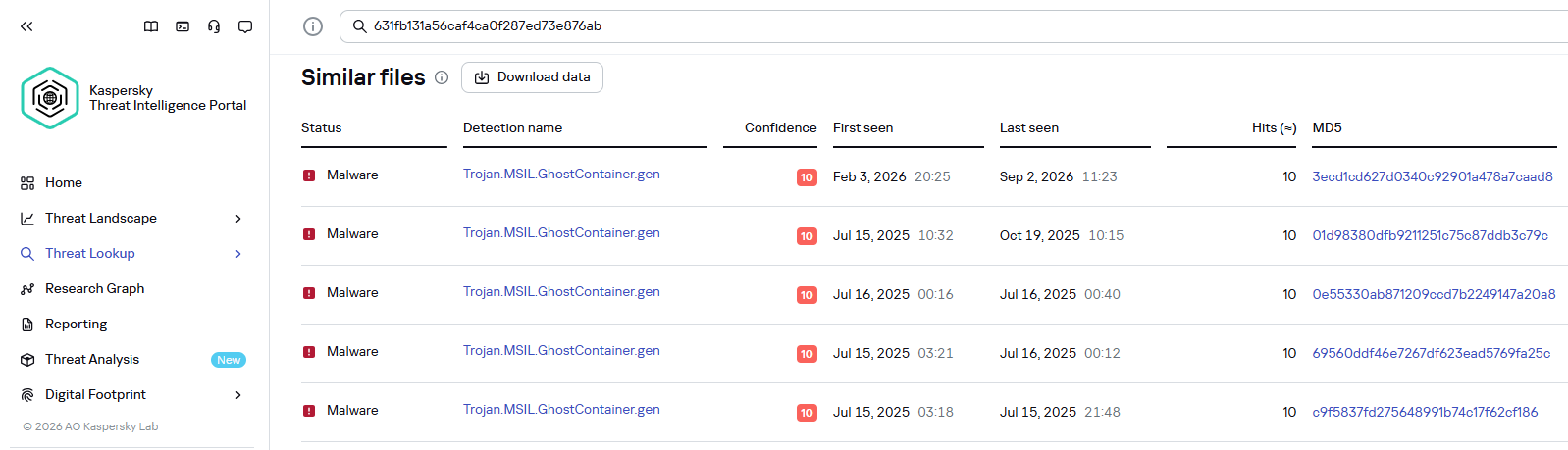
Kaspersky products detect the GhostContainer backdoor as Trojan.MSIL.GhostContainer.gen.
GhostContainer samples identified by the Similarity technology from Kaspersky Threat Analysis
Traffic redirection
Once the attackers gain sufficient privileges during an attack, they leverage RDP to move laterally within the internal network segment. To do this, they download and run tools for tunneling and redirecting network traffic.
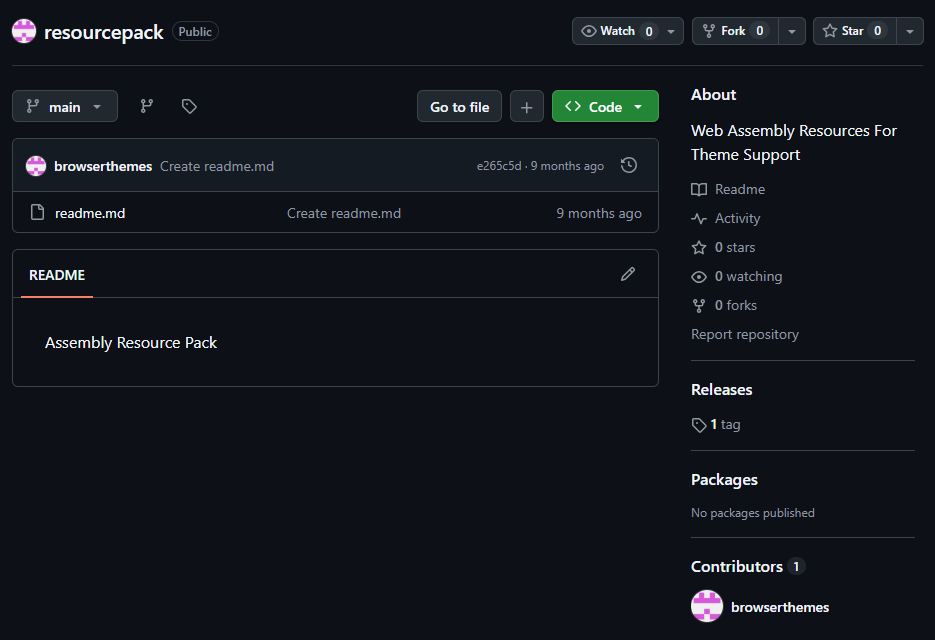
The attackers used GitHub repositories to host their archived tools. The names of the repositories and archives were disguised to look legitimate:
One of the repositories used for storing network tools
The files contained within the archives were also given names mimicking known legitimate software, though unrelated to the archive names:
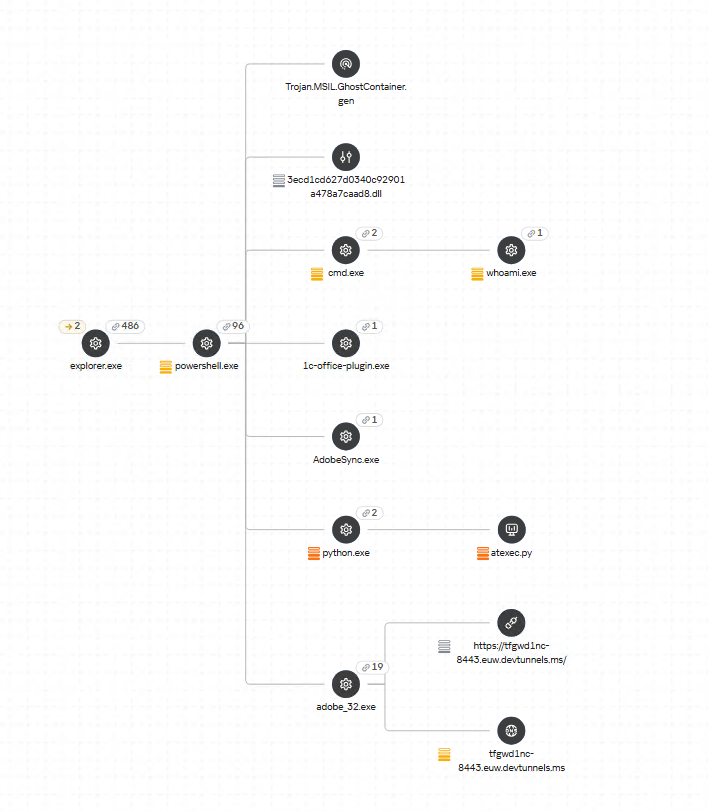
adobe_32.exe;
AdobeSync.exe;
trueconf.exe;
1cbroker.exe;
1c-office-plugin.exe;
trueconf-broker.exe.
Across the incidents we investigated, we found two tools that the attackers combined for traffic tunneling.
Microsoft dev tunnels
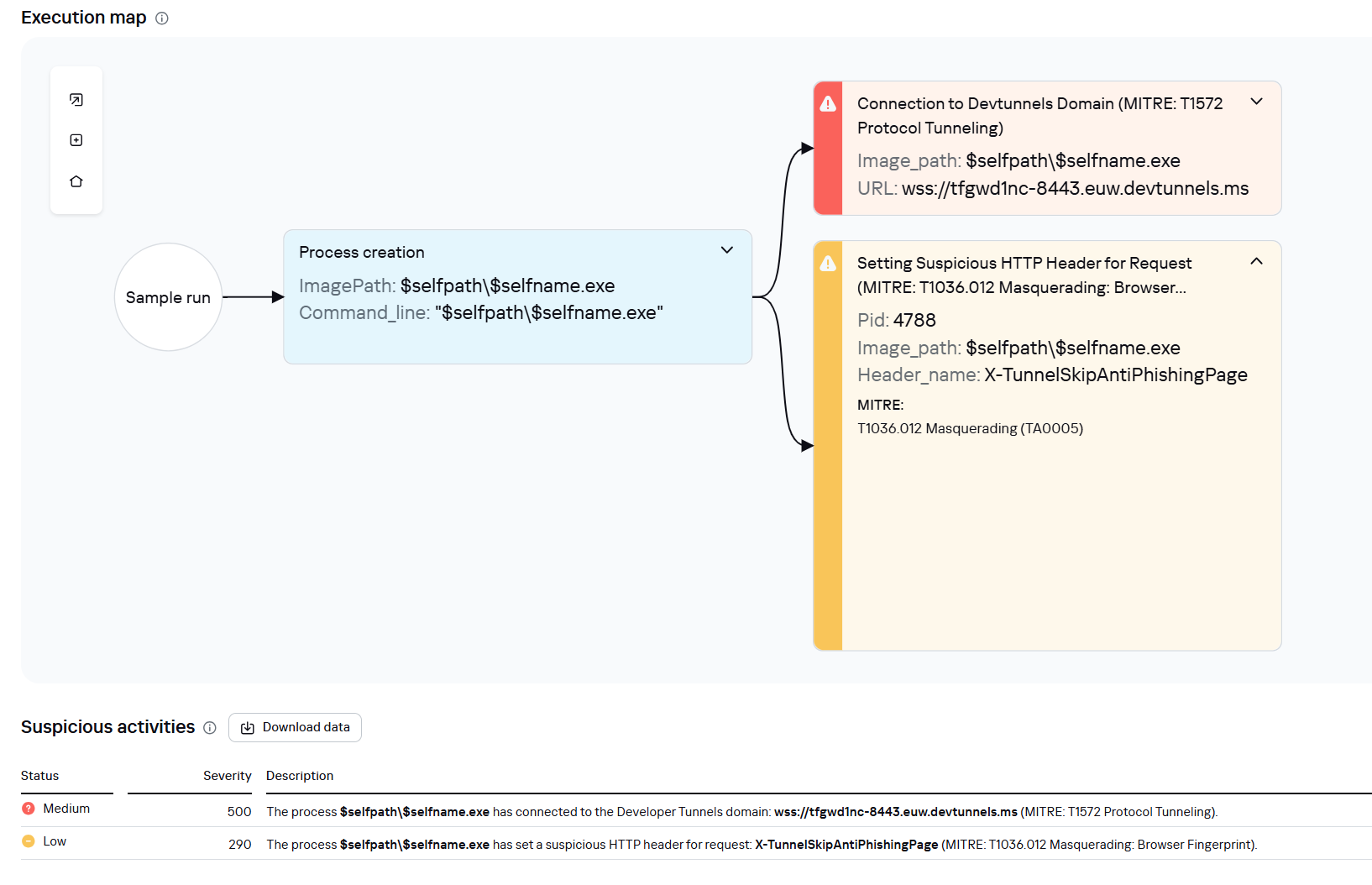
This is a legitimate Microsoft mechanism that allows local web services to be published for internet access on *.*.devtunnels.ms domains. The attackers used this tunneling capability to expose port 3389 (RDP) on the compromised system.
Execution graph of adobe_32.exe in Kaspersky Research Sandbox
rdp2tcp
This is a publicly available tool for tunneling TCP traffic over an established RDP connection. It includes a server component that runs on the target system and a client component that runs on the attacker’s side.
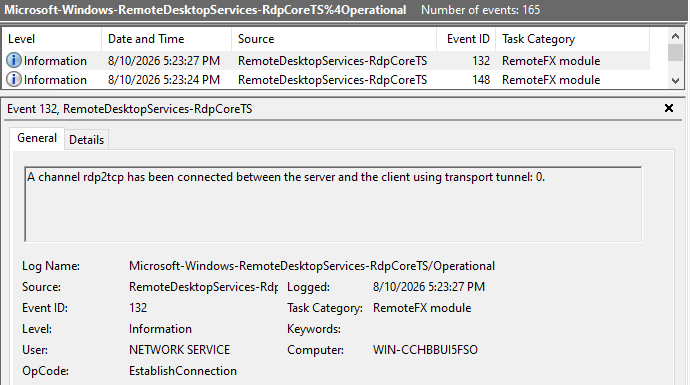
When virtual channels are opened and closed, corresponding events with IDs 132 (channel opened) and 148 (channel closed) are logged in the Microsoft-Windows-RemoteDesktopServices-RdpCoreTS/Operational.evtx Windows log. These events contain the names of the channels (such as XPSRD, cliprdr, Microsoft::Windows::RDS::DisplayControl, and others) used by the RemoteFX module, which extends the capabilities of the RDP protocol.
When the rdp2tcp tool is used, events with IDs 132 and 148 will contain the channel name rdp2tcp or other random alphanumeric combinations chosen by the attackers.
Creation event for a channel named rdp2tcp (server component startup)
The combination of Microsoft dev tunnels and rdp2tcp allows the attackers to maintain network access by using legitimate services without opening additional suspicious ports.
The attackers also used the atexec utility from the Impacket toolkit to create scheduled tasks on target systems. These tasks enabled network port forwarding through standard Windows functionality:
To obtain elevated privileges and move laterally through the network, NightEagle exploited various vulnerabilities in Active Directory. The attackers used previously established tunnels to connect to internal infrastructure systems.
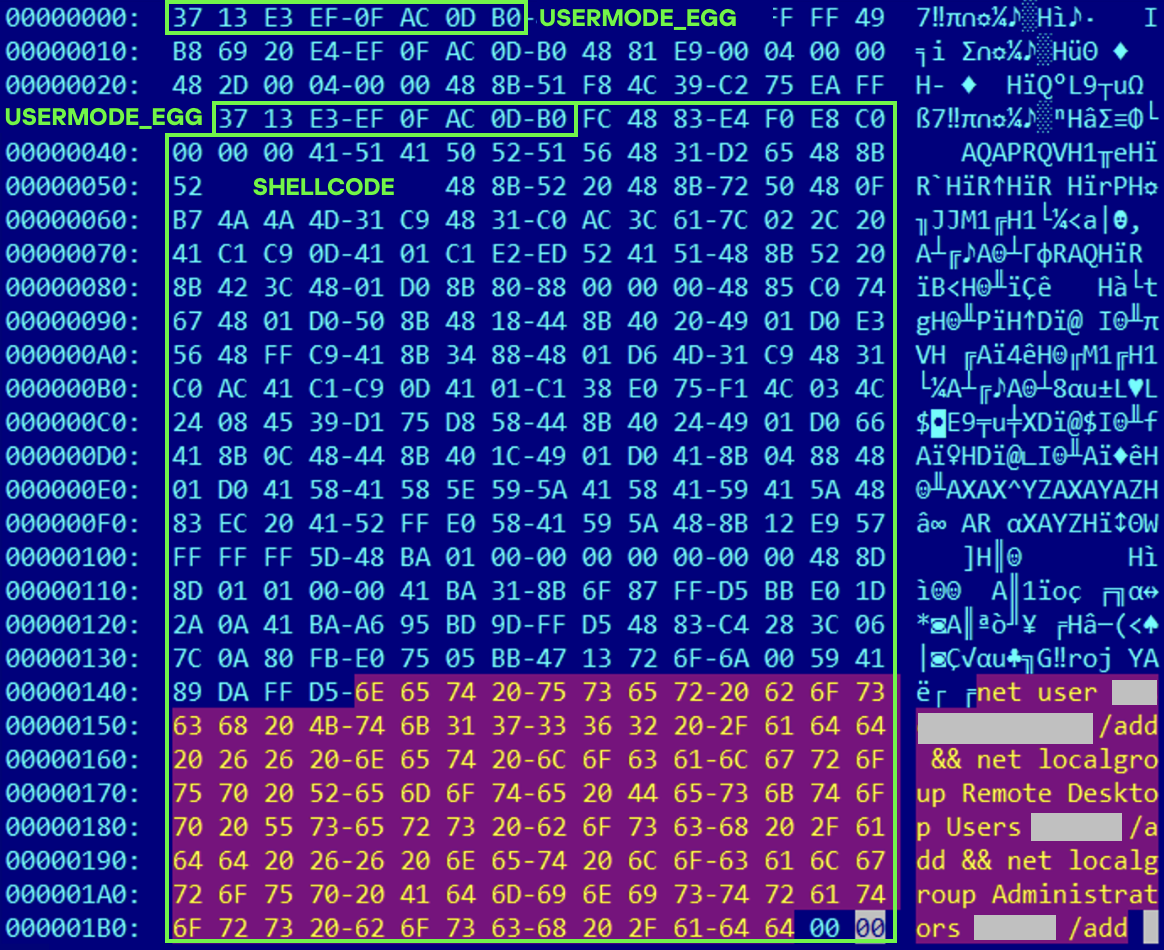
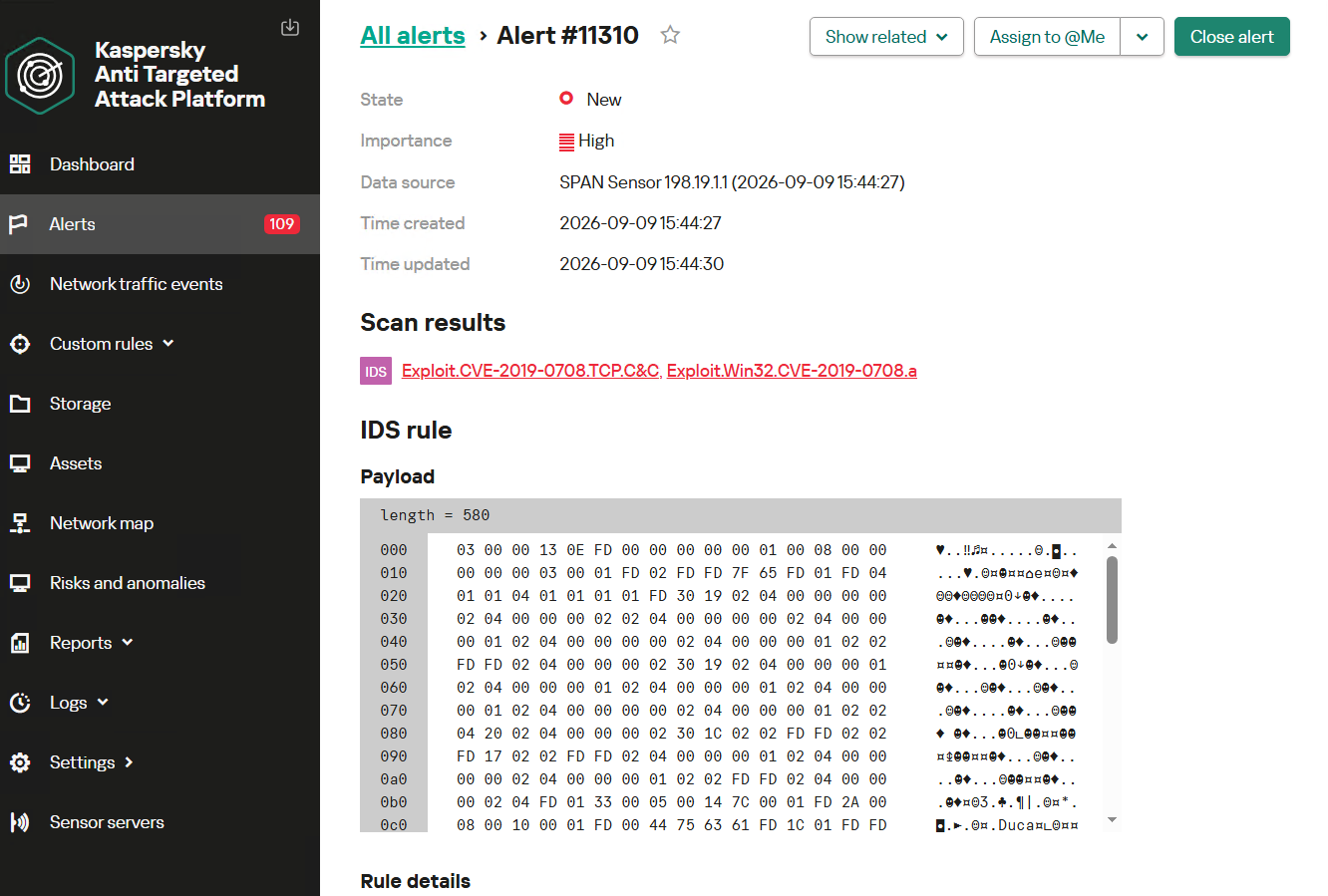
In one incident, they exploited a well-known RDP implementation vulnerability, CVE-2019-0708 (BlueKeep). They used the vulnerable mechanism to create a local account on the system and add it to the Administrators and Remote Desktop Users groups.
Contents of a system memory dump showing artifacts of the CVE-2019-0708 exploit
The attackers also requested Kerberos tickets with a non-standard combination of flags (Forwardable, Proxiable, Renewable) and attempted to replicate the Domain-Password object from the Active Directory database to impersonate the domain controller (a technique known as DCSync) after obtaining an account with sufficient privileges.
Through these methods, the attackers establish persistence in the infrastructure, obtain password hashes for domain accounts, use long-lived Kerberos tickets to gain legitimate access to target resources, and ultimately compromise domain controllers and the victim’s entire Active Directory infrastructure.
Takeaways
To expand the geographic scope of its targets, NightEagle is updating its methods and adopting new techniques for persistence and lateral movement. Despite the group’s efforts to stay hidden, timely detection of anomalies combined with a comprehensive approach to infrastructure protection can significantly hinder the attackers from achieving their goals. Since the attackers rely on known legitimate tools and infrastructure vulnerabilities, well-configured monitoring can help detect NightEagle’s presence on the network.
Detection by Kaspersky solutions
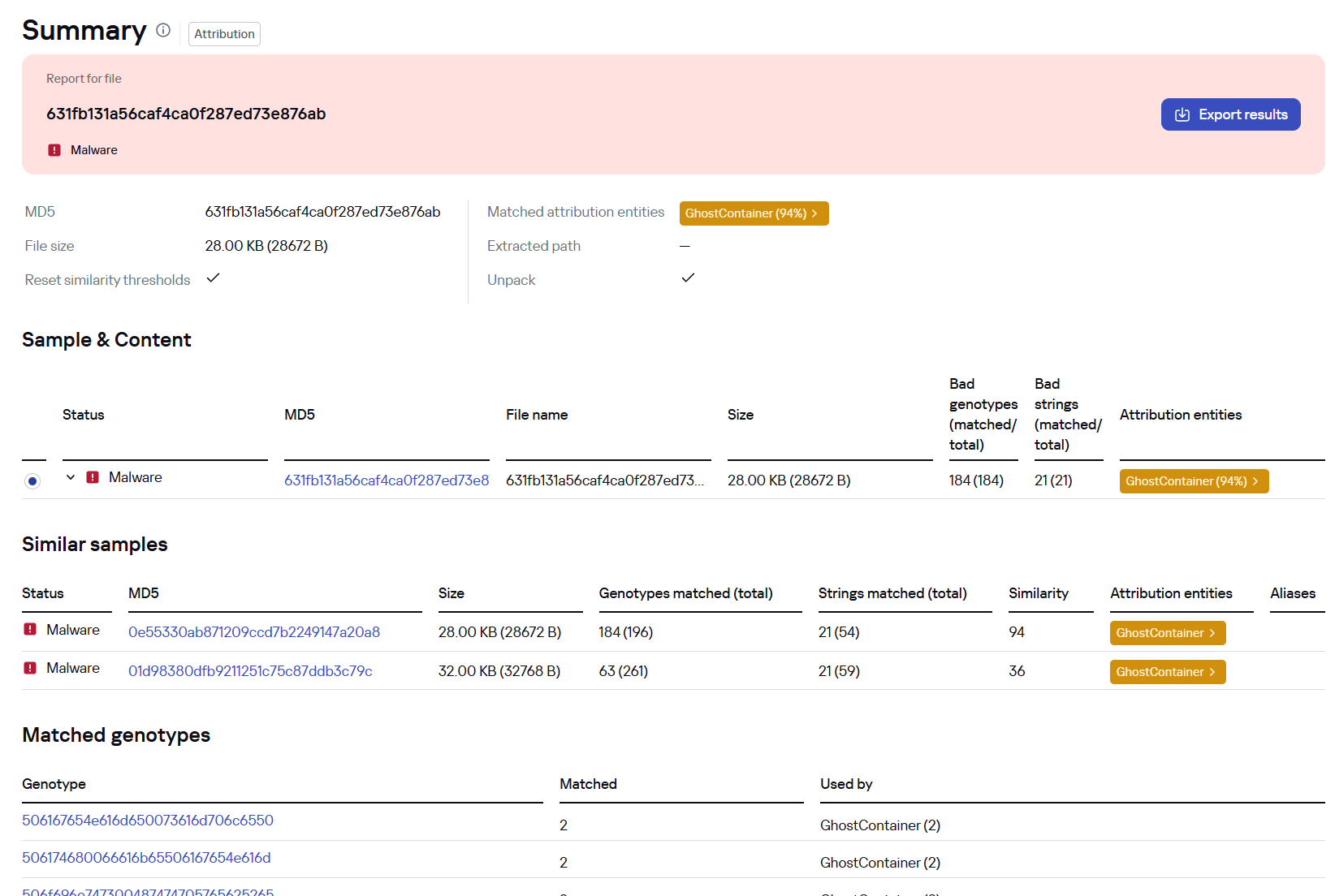
Kaspersky solutions reliably identify the malicious activity described above at various stages of the attack. We showed examples above of how Kaspersky Threat Analysis detects samples of the GhostContainer backdoor and the tunneling utility. This toolkit also includes the analytical solution Kaspersky Threat Attribution Engine (KTAE), which helps SOC analysts and incident responders determine which APT groups malware can be attributed to. The solution uses a proprietary comparison method that measures the similarity between analyzed samples of suspicious files and known malicious samples in Kaspersky’s collection.
The backdoor we discovered showed similarity to previously analyzed GhostContainer samples and a connection to the NightEagle APT group:
Backdoor analysis with KTAE
However, detection scenarios for this kind of attacks are not limited to file analysis. Deploying a backdoor on a target host produces numerous characteristic artifacts, which allow Kaspersky Endpoint Detection and Response Expert to alert users to anomalies in the infrastructure in a timely manner.
This malicious activity is detected by the following rules, available in the repository:
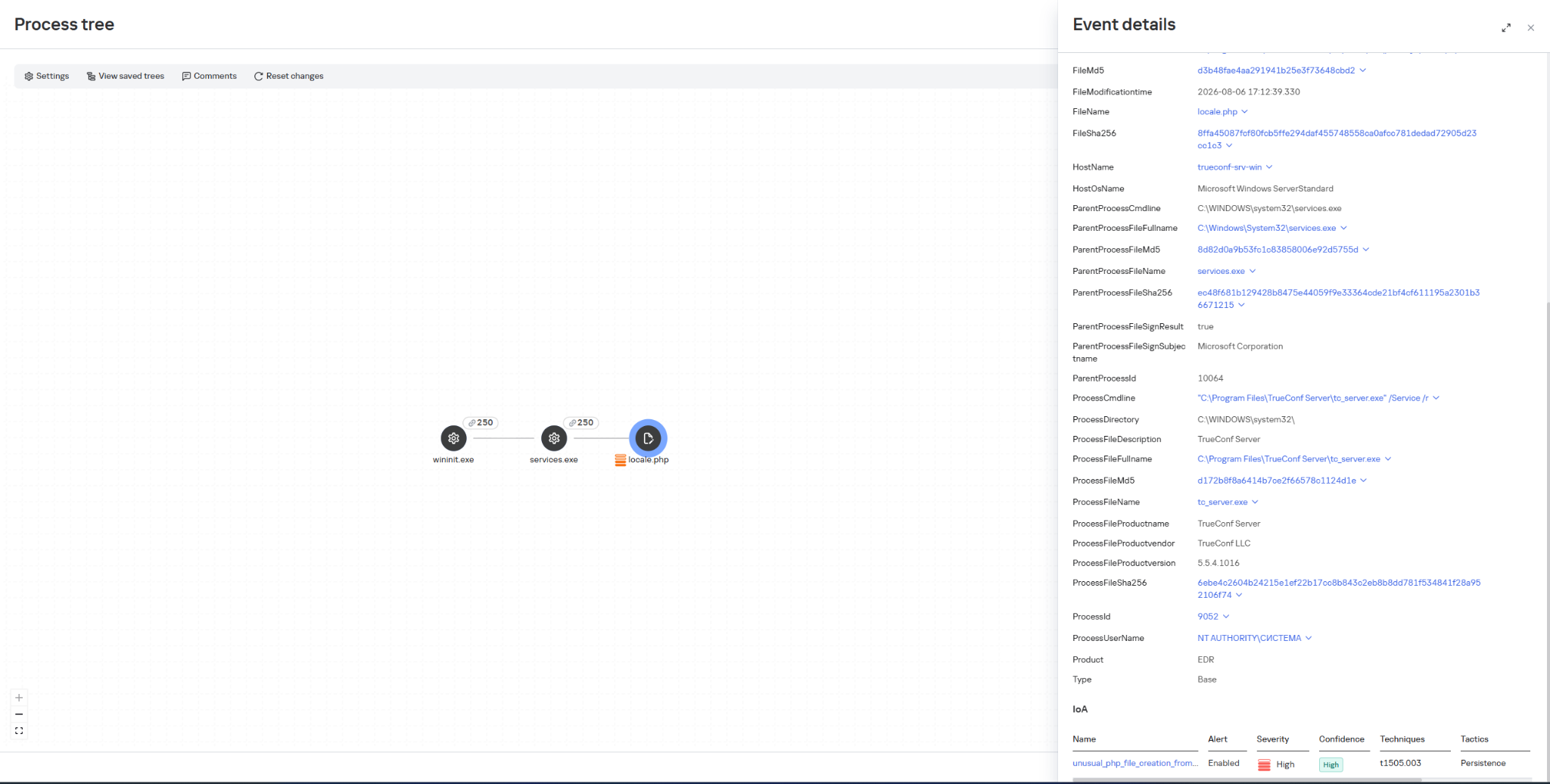
Initial detection of the malicious signature occurs through the generic_ransomware_related_detection rule, based on EPP module events
The vulnerability landscape shifted significantly in Q2 2026. First, the number of registered CVEs reached an unprecedented level. This is driven primarily by the widespread adoption of AI, both for application development and search for security flaws. This resulted in entire new classes of vulnerabilities emerging, particularly in the Linux networking subsystem.
Second, security researchers have been publishing exploits for unpatched vulnerabilities more frequently. Publications like these can generate significant fallout, since they potentially open the door for attackers to target unprotected systems.
Statistics on registered vulnerabilities
This section provides statistical data on registered vulnerabilities. The data comes from Kaspersky’s vulnerability knowledge base, which draws on the CVE database as well as the Russian BDU database and GitHub Advisory (GHSA). As a result, the figures for previous reporting periods may differ from those published in earlier reports.
We examine the number of registered vulnerabilities for each month over the last five years. As the chart below shows, this number continues to surge, a trend reflected across all the databases we track. It’s driven primarily by the widespread adoption of AI tools: as we predicted in our previous report, these tools have played a major role in the discovery of vulnerabilities in third-party software. Meanwhile, these tools often contain security issues of their own. For example, OpenClaw, a popular AI project, ranked 12th among those with the highest number of vulnerabilities discovered and published in Q2, with over 200 CVEs registered during the reporting period. Finally, AI development tools are also contributing to the vulnerability landscape, since the quality of the code they produce can vary widely. Therefore, the rate at which new vulnerabilities are discovered will inevitably keep growing.
Total published vulnerabilities per month from 2022 through 2026 (download)
Next, we analyze the number of new critical vulnerabilities (CVSS > 9.0) over the same period.
Total critical vulnerabilities published per month from 2022 through 2026 (download)
As the chart shows, the number of published critical vulnerabilities jumped sharply in Q2. This is because using AI for vulnerability research makes it possible to analyze massive amounts of previously unexamined code, uncover new attack surfaces, and identify entire classes of vulnerabilities that have gone unnoticed for decades. In particular, AI was used to find a series of Dirty Frag vulnerabilities in the Linux kernel.
Exploitation statistics
This section presents statistics on vulnerability exploitation for Q2 2026. The data draws on open sources and our telemetry.
Windows and Linux vulnerability exploitation
Q2 2026 saw a new precedent in the publication of vulnerabilities in Windows components and exploits for these: researchers no longer waiting for CVE registration, let alone patches. A case in point: a researcher who goes by Nightmare Eclipse (also known as Chaotic Eclipse) published a list of new “named” vulnerabilities across various Windows subsystems. At the time the technical details were published, none of the vulnerabilities had been assigned a CVE identifier:
BlueHammer: a local privilege escalation vulnerability in Windows Defender. During signature database updates, a time-of-check to time-of-use (TOCTOU) race condition occurs, allowing an attacker to substitute the directory where temporary update files are written. The researcher published a fully functional exploit for the vulnerability.
RedSun: another logical vulnerability in Windows Defender with a working exploit. Suspicious and malicious files marked as “cloud” can be overwritten or restored to their original directory with elevated privileges. The exploit incorporates fragments of algorithms that make it possible to leverage various logical vulnerabilities in Windows, effectively combining a large number of popular exploitation techniques.
YellowKey: a vulnerability that lets the user bypass BitLocker full-disk encryption and access system data through the Windows Recovery Environment (WinRE). A fully functional exploit was also published.
GreenPlasma: a vulnerability that enables system object injection via the CTF loader for the Collaborative Translation Framework (CTFMON) service in Windows. The original publication included an exploit with limited functionality.
RoguePlanet: yet another Windows Defender vulnerability that, like BlueHammer, stems from a TOCTOU issue, this time in the engine responsible for real-time system scanning. The published exploit uses the vulnerability to overwrite the system file wermgr.exe with a malicious one.
UnDefend: another vulnerability in the Windows Defender service. This time, the exploit causes a denial of service and blocks updates.
Even though such cases remain isolated for now, we believe they’ll grow into a full-fledged trend. Early publication of exploits gives attackers an advantage over software developers, who are left with no time to fix the issues.
Veteran vulnerabilities in Windows software also remain relevant. These are the ones our solutions most frequently detect exploits for:
CVE-2018-0802: a remote code execution (RCE) vulnerability in the Equation Editor component
CVE-2017-11882: another RCE vulnerability also affecting Equation Editor
CVE-2017-0199: a vulnerability in Microsoft Office and WordPad that allows an attacker to gain control over the system
CVE-2023-38831: a vulnerability in WinRAR that involves improper handling of objects within an archive
CVE-2025-6218 (formerly ZDI-CAN-27198): another WinRAR vulnerability allowing the specification of relative paths to extract files into arbitrary directories, potentially leading to malicious command execution
CVE-2025-8088: a vulnerability similar in exploitation method to CVE-2025-6218. The attackers used NTFS Streams to circumvent controls on the directory into which files are being unpacked
The vulnerabilities listed here can be leveraged to gain initial access to a vulnerable system and for privilege escalation. This underscores the critical importance of timely software updates.
That said, the number of Windows users who encountered exploits declined slightly in Q2, hitting an 18-month low.
Dynamics of the number of Windows users encountering exploits, Q1 2025 – Q2 2026. The number of users who encountered exploits in Q1 2025 is taken as 100% (download)
Linux also hit a rough patch in Q2 2026. Specifically, the period saw the disclosure of the Dirty Frag family of vulnerabilities, which lets an attacker reliably escalate privileges within the operating system.
All the vulnerabilities published in Q2 2026 were, in one way or another, related to the Linux caching subsystem. Here are the ones being most actively exploited:
CVE-2026-31431 (Copy Fail): a local privilege escalation vulnerability in the Linux kernel that lets an unprivileged user modify the page cache and gain root privileges. Especially dangerous for cloud and containerized environments
CVE-2026-43284, CVE-2026-43500 (Dirty Frag): a family of vulnerabilities in the Linux networking subsystem (IPsec ESP and RxRPC) that lets a local user overwrite the page cache and escalate privileges to root
CVE-2026-46300 (Fragnesia): a local privilege escalation vulnerability in the Linux kernel related to packet fragment handling and the page cache mechanism. It lets an unprivileged user gain root privileges and is also classified as part of the Dirty Frag family
CVE-2026-31635 (DirtyDecrypt): a Linux kernel vulnerability that lets a local attacker escalate privileges due to improper handling of decryption operations and page cache data modification
CVE-2026-43494 (PinTheft): a Linux kernel vulnerability that lets a local user gain elevated privileges due to errors in the memory page pinning mechanism
CVE-2026-46331 (pedit COW): a vulnerability in the Linux kernel’s traffic control subsystem (tc-pedit) that exploits a flaw in copy-on-write to modify the page cache and subsequently escalate privileges to root
The vulnerabilities described above were quickly embraced by attackers. At the same time, our solutions continue to detect exploitation attempts targeting older vulnerabilities as well:
CVE-2022-0847: a vulnerability known as Dirty Pipe, which enables privilege escalation and the hijacking of running applications
CVE-2019-13272: a vulnerability caused by improper handling of privilege inheritance, which can be exploited to achieve privilege escalation
CVE-2021-22555: a heap out-of-bounds write vulnerability in the Netfilter kernel subsystem
CVE-2023-32233: another Netfilter subsystem vulnerability that allows for Use-After-Free conditions and privilege escalation through improper processing of network requests
Dynamics of the number of Linux users encountering exploits, Q1 2025 – Q2 2026. The number of users who encountered exploits in Q1 2025 is taken as 100% (download)
In Q2 2026, the number of Linux users who encountered exploits declined slightly compared to Q1. Given that a significant share of new vulnerabilities are tied to the operating system’s caching subsystem, we recommend installing patches as quickly as possible, or disabling vulnerable kernel modules if patching isn’t an option.
Most common published exploits
The distribution of published exploits by software type in Q2 2026 includes categories that haven’t appeared in the sample for a long time. For instance, we’re once again seeing exploits targeting SharePoint. It’s worth noting that while several vulnerability write-ups for Exchange and SharePoint were published during the quarter, most turned out to be fake, AI-generated research. While the articles and exploit source code themselves look fairly polished, they describe nonexistent problems in the software or its components — often close to genuinely vulnerable mechanisms — in order to mislead researchers. This type of attack is aimed at increasing the time it takes to detect real vulnerabilities. In some cases, the description of a nonexistent vulnerability came bundled with completely unrelated malware.
Distribution of published exploits by platform, Q1 2026 (download)
Distribution of published exploits by platform, Q2 2026 (download)
Vulnerability exploitation in APT attacks
We analyzed which vulnerabilities were exploited in APT attacks during Q2 2026. The rankings provided below include data based on our telemetry, research, and open sources.
TOP 10 vulnerabilities exploited in APT attacks, Q2 2026 (download)
In Q2 2026, a trend emerged in APT attacks toward exploiting new vulnerabilities right from the moment they’re published. As before, we’re also seeing a large number of zero-day vulnerabilities. The Langflow vulnerability deserves particular attention: it’s one of the first cases of an APT group exploiting AI technology, which many organizations are only just beginning to integrate. Because most of this tech is proprietary, it has a considerable number of security blind spots. Therefore, given the growing number of AI-based automation tools, we strongly recommend going beyond the usual patching and developing secure procedures for credential use and sensitive data handling in systems that rely on agents and LLMs.
C2 frameworks
In this section, we examine the most popular C2 frameworks used by APT groups and analyze the vulnerabilities targeted by the exploits that interacted with C2 agents in APT attacks.
The chart below shows the frequency of known C2 framework usage in attacks during Q2 2026, according to open sources.
TOP 10 C2 frameworks used by APTs to compromise user systems, Q2 2026 (download)
Sliver, Havoc, AdaptixC2, and Metasploit remain the most widely used C2 frameworks. After studying open sources and analyzing samples of malicious C2 agents that contained exploits, we determined that the following vulnerabilities were utilized in APT attacks involving the C2 frameworks mentioned above:
CVE-2026-35273: a vulnerability in Oracle PeopleSoft PeopleTools that security vendors classify as server-side request forgery (SSRF). The details of the vulnerability have never been disclosed, although some research covers the post-exploitation steps
CVE-2023-46604: an insecure deserialization vulnerability in Apache ActiveMQ that allows arbitrary code execution in the context of the service process
CVE-2024-12356 and CVE-2026-1731: command injection vulnerabilities in BeyondTrust software that allow an attacker to send malicious commands even without system authentication
CVE-2023-36884: a vulnerability in the Windows Search component that allows commands to be run on the system, bypassing the mark-of-the-web (MoTW) mechanism
CVE-2025-53770: an insecure deserialization vulnerability in Microsoft SharePoint that allows for unauthenticated command execution on the server
CVE-2025-8088 and CVE-2025-6218: similar directory traversal vulnerabilities in WinRAR that allow files to be extracted from an archive to a predetermined path, potentially without the archiving utility displaying any alerts to the user
These vulnerabilities show that attackers used them for initial access and privilege escalation on vulnerable systems, setting the stage for launching a C2 agent. They include both zero-day vulnerabilities and fairly well-known security issues.
LLM/AI tool vulnerabilities
This section analyzes data published in Kaspersky’s vulnerability knowledge base. We reviewed the Q2 2026 version of the knowledge base.
As mentioned above, AI tools, plugins, and technologies have proven fairly effective at automating the search for problematic code and anomalous behavior. The high speed at which new vulnerabilities are being discovered has naturally created a need to fix them just as quickly. AI is often used for this too, which increases the volume of code being generated. However, neither code written without human involvement nor AI-generated advice is always correct.
The chart below covers registered vulnerabilities in AI tools for 2025–2026.
Number of published vulnerabilities in LLMs, AI tools, and plugins with similar functionality, 2025–2026 (download)
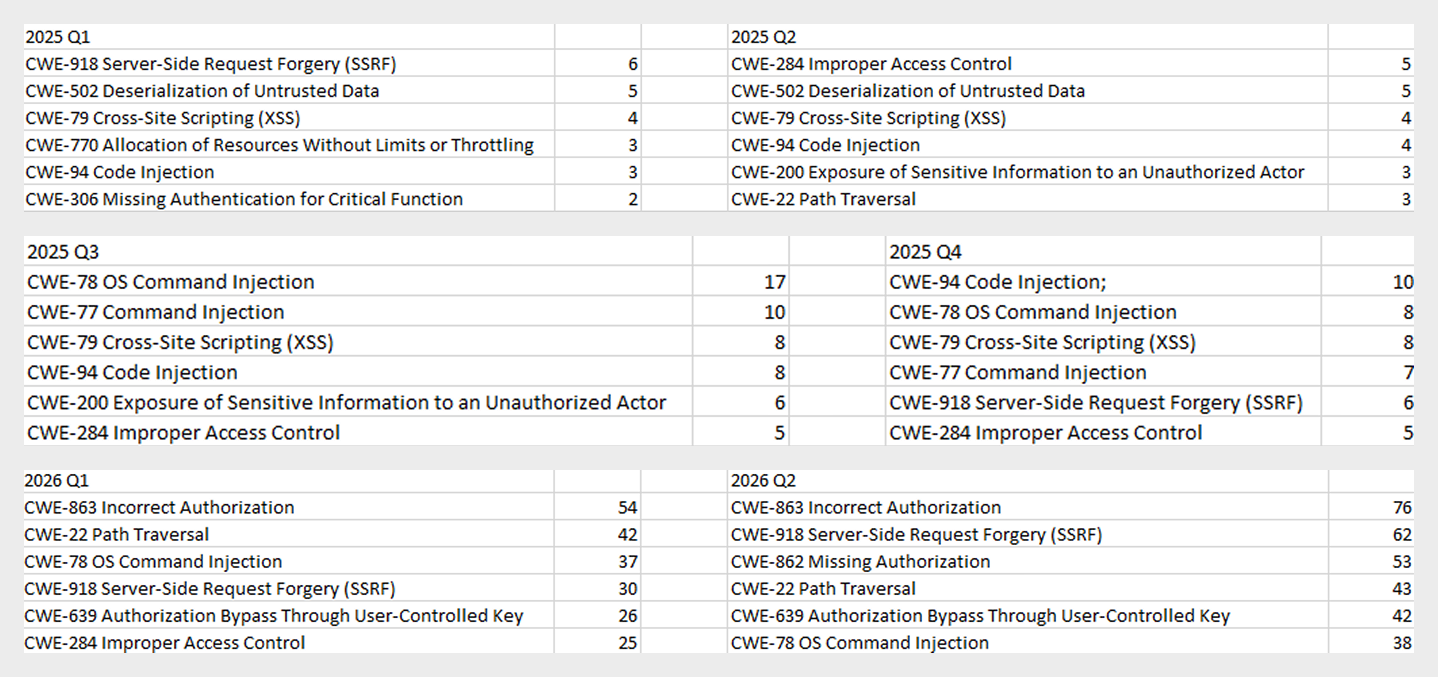
As the charts show, AI tools are racking up a substantial number of registered vulnerabilities, and that number keeps growing quarter over quarter. It’s also worth looking at how AI tool vulnerabilities break down by type, according to the CWE system:
TOP 6 vulnerability types in products that implement or use AI/LLM logic, 2025–2026
Interestingly, vulnerabilities of an undetermined type have ranked first in every quarter since the start of 2025. Traditionally-made software has the same issue, and it doesn’t look like the growing number of AI tools will fix it. It’s also notable that the list includes classes CWE developers themselves don’t recommend using for vulnerability classification, since they lump together a whole range of more specific types. CWE-284 is an example of this.
Looking at the most common classes, the key issues found in AI-related software can be summed up as follows:
Inadequate access control over critical system objects
Improper implementation of authentication and authorization mechanisms
Injections
It’s worth noting that injection-related vulnerabilities were relatively rare before AI agents took off (previously, they mostly affected web apps). Recently, though, these security issues have become relevant again.
Looking back at a year and a half of the AI boom, one conclusion stands out regarding registered vulnerabilities: AI tool developers are more focused on expanding functionality than on security. This is worth keeping in mind when using these tools. Let’s look at the projects and applications that either integrated AI tools or offered them as the core product. Below is a list of the those with the highest number of registered vulnerabilities for 2025–2026.
TOP AI/LLM-related projects by number of published vulnerabilities, 2025–2026 (download)
Notable vulnerabilities
This section highlights the most significant vulnerabilities published in Q2 2026 that have publicly available descriptions. Since the above already covers several significant vulnerabilities published during the reporting period, this section consists mainly of LLM/AI tool vulnerabilities.
CVE-2026-25253: a gatewayUrl vulnerability in OpenClaw
The issue stems from the fact that the OpenClaw user interface trusts the value of the gatewayUrl parameter passed in the URL and automatically establishes a WebSocket connection to the specified address. During this connection process, it sends an authentication token without any additional user confirmation.
The attack algorithm exploiting this vulnerability works as follows:
The application obtains a critical connection address from an external source (the gatewayUrl URL parameter), which is controlled by the attacker.
There is no validation before use.
The client automatically initiates a connection to the address specified in the parameter, which belongs to the attacker.
While connected, the application sends credentials (an access token) to the specified address.
If the attacker obtains a valid token, the consequences depend on that token’s level of access within the system. In general, this could lead to:
User session compromise
Execution of operations on the user’s behalf
Modification of the AI agent configuration
Unauthorized access to tools and resources connected to the agent
Under certain OpenClaw configurations, further compromise of the host running the agent
It’s worth noting that the risk of exploitation arises from a combination of several factors: the automatic connection and token transmission, the lack of address trust verification, and the high privileges granted to the local AI agent.
CVE-2026-41948: a path traversal vulnerability in the Dify AI platform
The vulnerability lets an authenticated user craft a request that enables the application to escape its permitted tenant and gain access to internal REST APIs that weren’t meant for that user. The root cause is insufficient normalization and validation of the URL path before it’s passed to the internal service.
Depending on the Dify configuration, the consequences can include:
Unauthorized access to internal service interfaces
Breach of isolation between workspaces
Exposure of internal service information
Conditions favorable to further attacks when combined with other vulnerabilities
The use of Dify in enterprise AI platforms is particularly risky, since internal services there tend to hold elevated privileges.
CVE-2026-45386: an improper access control vulnerability in Open WebUI
In Open WebUI, pin/unpin operations on messages are write operations, since they modify that message’s metadata (is_pinned, pinned_by, pinned_at). In vulnerable versions, however, before performing these actions, the API only checked for read access to the channel (a chat between a user or group and the AI) containing the message, not permission to modify its content. As a result, a user with a role limited to viewing messages could still change a message’s pinned status.
The vulnerability’s mechanism works as follows:
The user initiates an action that changes the state of an object.
The application treats this action as a regular read request.
Only channel view permission is checked.
The application performs a write without verifying the required user authorization.
This violates one of the fundamental principles of access control models — namely, that any operation that changes the state of data must be checked for the appropriate write or moderation permissions, regardless of whether the object itself is readable.
Although the vulnerability doesn’t lead to arbitrary code execution or compromise of sensitive data, it can affect data integrity and collaborative workflows. Potential consequences of exploitation include unauthorized pinning or unpinning of messages, disruption of channel moderators’ and administrators’ activities, changes to the display order of important information, and even the potential spread of false or misleading information by altering the channel containing a pinned message.
Open WebUI is widely used as an interface for interacting with local and enterprise LLMs. In these systems, pinned messages often contain important instructions, announcements, or tips for users. The ability to modify them with minimal privileges can disrupt collaborative workflows, cause confusion, and undermine trust in information published by administrators and moderators.
CVE-2026-45501: a vulnerability in Microsoft Exchange
The vulnerability stems from improper neutralization of user input when generating Exchange web pages. As a result, the browser may interpret specially crafted data as active content instead of plain text.
Although Microsoft categorizes the potential impact of exploiting this vulnerability as spoofing, flaws like this can lead to alteration of displayed content, imitation of trusted interfaces, actions on behalf of the user within an active session, and abuse of user trust.
It’s worth noting that issues like this are still relevant in modern software, given that mechanisms like Content Security Policy and various parsers were specifically created to help developers neutralize dangerous parts of user page content.
Conclusion and advice
Q2 brought the first significant results of AI automation adoption in software development and vulnerability hunting tools. This research shows that beyond traditional patch management, organizations now need real-time monitoring of systems and access controls, since infrastructure and everyday applications now contain far more AI functionality that could lead to compromise.
Accordingly, besides quickly detecting infrastructure vulnerabilities and managing security patches, modern enterprise-grade security solutions need to provide a broad range of preventive measures for tracking the overall health of systems and workstations. Kaspersky Next meets these requirements by combining proactive mechanisms with the ability to respond promptly to emerging threats.
In July 2026, Kaspersky experts detected a new attack by the Head Mare group. Previously, we classified them as hacktivists, but now we define them as an APT group due to the sophistication of their TTPs and the absence of destructive activity (encryption, wiping) in the targeted infrastructures. In this latest campaign, the attackers exploited a chain of vulnerabilities in the TrueConf video conferencing server and replaced the original TrueConf client installers with infected versions that installed the PhantomCore malware on the system.
An investigation of the compromised server revealed that the attackers used a combination of two new vulnerabilities (assigned the internal identifiers KLCERT-26-057 and KLCERT-26-058), allowing them to execute arbitrary code with the highest privileges.
The attack occurs in several stages:
The attackers connect to the TrueConf server without prior authorization via port 4307/TCP, which, according to the product documentation, is open by default. The attack targets TrueConf servers running versions 5.3.X through 5.3.9, 5.4.X through 5.4.9, and 5.5.X through 5.5.5.
Once connected, attackers call a server function to transmit a malicious script and execute it on the server. The vulnerability that allows this stage of the attack to be carried out has been assigned the internal identifier KLCERT-26-057.
The received script runs on the TrueConf server in an isolated environment. By default, operating system functions are not accessible in this environment, which should limit the capabilities of the executed code.
To escape the isolated environment, attackers exploit a second vulnerability, assigned the internal identifier KLCERT-26-058. Exploiting this vulnerability allows them to bypass the restrictions of the isolated environment and proceed to execute commands in the context of the operating system.
Once the environment’s restrictions are bypassed, attackers gain the ability to execute arbitrary code on the server with the privileges of the NT AUTHORITY\SYSTEM account.
Once they have gained elevated privileges, attackers replace the file …\public\js\locale.php with a web shell, which can be used for subsequent remote control of the compromised server.
This web shell was used for the following activities:
collecting data on the IT infrastructure;
gaining privileged access to the TrueConf database;
replacing the original TrueConf Client distribution with an infected version containing the PhantomCore backdoor.
The vulnerabilities exploited by the attackers were patched by the vendor in the latest TrueConf Server updates (versions 5.3.9, 5.4.9, and 5.5.5). These updates were released on June 18, 2026.
The PhantomCore backdoor was successfully detected by Kaspersky solutions.
To automatically launch the malware after the system boots, a registry key is created: HKEY_CURRENT_USER\Software\Classes\CLSID\{0340F119-A598-4ed9-B0AC-6F6A12D3E755}\InprocServer32, with the value set to the path to the malicious program’s file.
Using a web shell, in addition to PhantomCore, the attackers load a backdoor that we have named PhantomGraph, consisting of two modules:
SysExcSvc.dll is responsible for receiving commands from the attackers and transmitting the results of their execution. The attackers used an account on Microsoft OneDrive cloud storage as their command-and-control (C2) server.
SysReadSvc.dll reads the command transmitted by the first module, executes it, and saves the execution result.
To establish persistence on the system, the attackers execute a Base64-encoded PowerShell command that installs SysExcSvc.dll and SysReadSvc.dll as Windows services. We believe the attackers deliberately split this malicious command into two components to make it harder to detect using EDR tools. Additionally, the program’s code partially matches that of PhantomCore, indicating that it belongs to Head Mare’s arsenal.
We also managed to identify the commands executed by the attackers when connecting to the backdoor. The SysReadSvc module executes commands using a BATCH file. Example of execution:
In addition, we discovered several commands that did not work due to the attackers’ typos and encoding issues.
We are observing several active Head Mare campaigns targeting Russian organizations across various industries: instrument manufacturing, electronics, transportation, energy,
IT, and software development. The attackers distribute their backdoors using various methods, including phishing, exploiting public web servers, or through a subcontractor.
We recommend that all organizations using TrueConf software install the latest server version (versions 5.3.9, 5.4.9, and 5.5.5) in accordance with the vendor’s recommendations.
We also recommend verifying that the client distributions downloaded from the TrueConf server used by your organization have a valid TrueConf digital signature and have not been tampered with. The malicious distributions we detected did not have a valid digital signature. You can also verify authenticity on the vendor’s website.
Important: Even if your organization does not use a TrueConf server, your employees may connect to compromised TrueConf servers belonging to business partners to participate in online meetings and download infected installation packages.
Specifically, activity involving the replacement of the legitimate file …\public\js\locale.php with a web shell, as well as the deletion of entries from TrueConf event logs, is detected by the rule unusual_php_file_creation_from_trueconf_process.
Downloading a file containing the PhantomCore backdoor via the replaced legitimate file …\public\js\locale.php is detected by KEDR Expert with the rule unusual_file_creation_from_trueconf.
Activity related to the installation of an infected TrueConf client installer containing the PhantomCore backdoor is detected by KEDR Expert using the unsigned_trueconf_installer rule.
Creation of suspicious files by TrueConf Server processes.
Execution of a TrueConf Client installer file that lacks a software developer’s signature.
Suspicious process chains associated with TrueConf Client executables and TrueConf Client update executables.
Registration of suspicious libraries in the HKEY_CURRENT_USER\Software\Classes\CLSID\ registry key.
Actions related to retrieving information about the lsass.exe process.
Memory dump creation for the lsass.exe process using the comsvcs.dll library.
Accessing the memory of the lsass.exe process.
Creating tunnels using the ssh process.
To protect companies using our Kaspersky SIEM system, a general set of rules is available in the product repository that allows detection of the following techniques:
Creation of suspicious files in the C:\Windows\System32\inetsrv\* directory: R405_07_File write to IIS native modules folder or OWA via WriteData.
Creating a memory dump of the lsass.exe process using the comsvcs.dll library: R233_04_Process memory dump via comsvcs.dll.
Accessing the memory of the lsass.exe process: R262_Suspicious access to the LSASS process.
We also recommend paying attention to the following events when developing your own detection rules or conducting threat hunting:
Registration of suspicious libraries in the registry key \Software\Classes\CLSID\{0340F119-A598-4ed9-B0AC-6F6A12D3E755}\InprocServer32:
(DeviceEventClassID = '4657' OR DeviceEventClassID = '13')
AND FileName like '%\Software\Classes\CLSID\{0340F119-A598-4ed9-B0AC-6F6A12D3E755}%' AND DeviceCustomString6 = 'InprocServer32'
Creating the SysExcSvc and SysReadSvc services to run executables from temporary directories in the background via cmd:
DeviceEventClassID = '4697'
AND (DestinationServiceName = 'SysExcSvc' OR DestinationServiceName = 'SysReadSvc')
AND match (FileName, '.*cmd\s+\/c.*temp\\cmd_cmd_.*\.bat.*')
Creation of suspicious processes originating from the TrueConf update process (trueconf_windows_update.exe)
(DeviceEventClassID = '4688' OR DeviceEventClassID = '1')
AND SourceProcessName LIKE '%\trueconf_windows_update.exe'
For the detection rules to work correctly, ensure that events from Windows systems are received in full, including Security events 4688, 4663, 4657, and 4697 and Sysmon events 1, 7, 11, and 13.
The following analysis presents the key findings from Kaspersky Compromise Assessment engagements performed in 2025. A compromise assessment is an independent, expert-driven service that examines whether a target network has been compromised. The service combines threat intelligence analysis (including darknet sources), tool-aided endpoint scanning, a systematic review of security event logs and network traffic, and, when necessary, an initial incident response and digital forensic investigation.
This report focuses on missed incidents – threats that remained undetected for weeks, months, or even years.
Key trends observed during compromise assessment engagements
Proactive compromise assessment decreases the number of missed high-severity incidents. The highest proportions of high-severity incidents were revealed in organizations that requested our compromise assessment service after containing a known incident. The lowest proportions of high-severity incidents were observed in organizations that conducted regular audits. Of all the incidents discovered, 20% were found manually, while enterprises missed 60% because of the absence of high-confidence alerts from the tools in place.
Nearly a third of discovered incidents took over three months to detect. The longer a threat persisted in the target environment, the greater the likelihood that an incident would be severe. 30.8% of all discovered incidents and 52% of high-severity compromises had historical activity spanning over three months. The oldest incident discovered in 2025 had gone undetected for four years.
Malicious files often remain in backups and are restored after incident response activities. 40% of all discovered web shells resided in backups and went unnoticed until a proper compromise assessment was conducted.
Threat actors rely on remote management tools and LoLBins. These types of tools were found in all compromise assessment engagements that resulted in an incident detection.
Monitoring tools and controls are not self-sufficient; operational maturity makes the difference. Monitoring tools must be configured and adapted to the changing threat landscape. Furthermore, human analysts need to review low-confidence alerts. A lack of continuous monitoring and threat hunting activities increased the likelihood of high- and medium-severity incidents to 84–86%. At the same time, high‑severity incidents were rare among organizations with in-house capabilities to reverse-engineer malware.
Communication issues lead to missed incidents. Nearly a third of the compromise assessments revealed communication issues that impacted incident response activities.
The incident response playbook is not set in stone. For incident response to be efficient and effective, playbooks must be updated as new artifacts are discovered. Treating the incident response plan as a living document reduces the risk of missing threats.
About the Kaspersky Compromise Assessment service
Our global compromise assessment portfolio spans several regions. In 2025, around 71% of the incidents we identified affected our customers in the META region, while the APAC and CIS regions accounted for the remaining 29%.
Geographic distribution of incidents identified during Kaspersky Compromise Assessment projects in 2025 (download)
Our service was requested by organizations from a diverse set of sectors. The government sector accounted for around 29% of incidents, followed by the education (19%) and financial (17%) sectors.
Distribution of economy sector incidents identified during Kaspersky Compromise Assessment projects in 2025 (download)
Detection logic families
Our compromise assessments operate on a continuously updated catalogue of indicators of attack (IoAs). Because the raw set of IoAs is too granular for high-level reporting, we map them to a concise set of detection logic families. The statistics indicate that three detection families dominate the incident mix:
Credentials from dumps: 12.4% of all incidents;
Specific living-off-the-land (LOTL) tools: 11.2 %;
Specific malware families: 11.2 %.
These three detection logic families represent high-fidelity indicators of attack that reliably signal infrastructure compromises ranging from dormant, disk-based malware to persistent and multi-stage attacks.
Distribution of detection logic families (download)
Reasons for requesting Kaspersky Compromise Assessment services
Analysis of our compromise assessment engagements that took place in 2025 reveals a clear correlation between the stated purpose of the engagement and the risk profile of the findings. General audits dominate the portfolio with 56% of requests, followed by authority reporting engagements (19%), post-incident checkups (17%), and acquisitions (9%).
Statistics on the reasons behind CA project requests (download)
When the findings are classified by severity, the post-incident checkup category exhibits the highest proportion of high-severity incidents (40.7%). The full breakdown is shown below.
Incident severity breakdown by service engagement reason
Incident severity (%)
High
Medium
Low
Reason for service
Acquiring new company
28.6
42.8
28.6
General audit
27.7
36.7
35.6
Report to an authority
30
46.7
23.3
Checkup after a cybersecurity incident
40.7
25.9
33.4
Post-incident checkups are frequently initiated after an initial incident response (IR) effort. The elevated share of high-severity findings suggests that IR activities, which are typically limited to containing a known incident, do not provide a complete view of the broader environment. Consequently, other threats may remain undetected until a full compromise assessment is performed.
Merger and acquisition-related assessments are proactive assessments performed when a company acquires another entity. This involves the target’s network being scanned for hidden threats before the two environments are merged. These assessments demonstrate a balanced distribution of severity: 28.6% low-severity, 42.8% medium-severity, and 28.6 % high-severity. This reflects the mixed risk posture of target environments of acquisitions, which are often evaluated for both known vulnerabilities and hidden malicious activity. Similarly, other proactive approaches like general audit assessments or assessments driven by the need to regularly submit a compliance report to a regulatory authority, share almost the same ratio. This indicates that regular, proactive and compliance-oriented assessments tend to reveal substantive issues earlier in the attack lifecycle, reducing the likelihood that they will evolve into high-severity incidents.
Organizations that conduct regular audits have the highest rate of low-severity findings (36%) and the lowest rate of high-severity issues (28%). We can assume with medium confidence that continuous, proactive compromise assessments are more effective at limiting the emergence of high-severity compromises than reactive, incident-driven evaluations. The data collected in 2025 are consistent with this hypothesis. Integrating regular, third-party compromise assessments into governance processes can therefore reduce the probability of unexpected high-severity findings and improve overall risk posture.
The following case study illustrates the impact of relying on a reactive rather than proactive approach. It describes a persistent threat that remained dormant on a client’s network and was only discovered after a comprehensive compromise assessment was performed following initial IR activity.
Case study: Dormant threat uncovered only by a compromise assessment
A midsize enterprise suffered a high-severity intrusion that was contained and remediated by the IR team within the defined scope of the initial alert. Following containment, the organization requested a check to determine if any additional footholds existed elsewhere in the network. To address this need, the organization engaged Kaspersky’s Compromise Assessment (CA) service, which performed a full forensic review of the environment beyond the scope of the initial incident.
Compromise assessment experts collected forensic metadata, historical security event logs, and Active Directory configuration data from the entire infrastructure. Threat hunting queries were executed against the aggregated telemetry, focusing on persistence mechanisms, lateral movement artifacts, and anomalous process activity. As a result, a number of severe threats were detected and reported; for example, malicious persistence:
A cron job that recreates a web shell
A critical Linux system (web server) had a cron job that automated fetched a copy of a PHP web shell from a public GitHub repository and placed it in an online directory. Even if the file was removed by security personnel, the cron job would simply download it again, giving the attacker a persistent remote code execution point on the web server.
A live reverse shell
On a server hosting a published web application, the process list showed a bash reverse shell.It was run by a user with the username “apache,” which was the account used to run the web application. This may indicate that the attacker exploited a vulnerability in the web application to gain remote code execution, allowing them to establish a reliable command and control channel that bypassed the firewall because it was initiated from inside the network.
ClipBanker data stealer persisting via Windows registry
A ClipBanker variant was detected on a user’s workstation machine maintaining persistence by adding itself to the registry key HKU\S-1-5-21-[REDACTED]-500\Software\Microsoft\Windows\CurrentVersion\Run\9Er6IIp.
This was done after adding the malware’s folder to Windows Defender exclusions and applying hidden and system attributes to the file to hide it from regular users.
Malicious WMI event consumer with deceptive alias
A malicious WMI event consumer was detected that downloads and executes a PowerShell script. It created the alias “Kaspersky” for “Invoke-Expression” in an attempt to blend in as legitimate activity in the hope that a quick glance at the script would not raise suspicion. Kaspersky’s Cyber Threat Intelligence confirmed that the downloaded script (no longer reachable) was a weaponized payload used to spread the infection further.
The IR containment was rapid, focused and effective in addressing the specific incident that triggered the alert. However, the broad-scope compromise assessment revealed multiple backdoors across the environment, each using a different persistence technique: cron jobs, scheduled registry runs, and WMI subscriptions. The infected hosts were outside the original IR scope, so they remained unseen until a comprehensive hunt was conducted.
Incident response excels at stopping the bleeding and ensuring business continuity after a known incident. A compromise assessment provides a health check that determines whether any other wounds exist. By pairing timely IR with regular, full network compromise assessments, the organization had both the reactive agility to contain incidents and the proactive visibility to eradicate malicious persistence wherever it was hiding. The investigation uncovered additional undetected footholds, providing a clearer view of the environment and reducing the likelihood of a repeat incident.
Missed long-term incidents
The statistics on the mean time to detect (MTTD) incidents identified during compromise assessment projects are concerning. Many incidents go unnoticed for extended periods. For example, in 2025 we identified an incident that was approximately four years old!
Such prolonged detection times can lead to severe consequences, as 30.8% of incidents have historical activity spanning over three months. These incidents can range from dormant malware to persistent threats, highlighting the need for robust detection and response mechanisms.
Severity distribution of incidents by MTTD (download)
The relationship between detection latency and incident severity was analyzed by grouping findings according to their MTTD:
For incidents detected within the first month, severity is more or less evenly distributed among the low, medium and high categories.
However, as the MTTD increases, the severity of incidents shifts towards higher severity. Notably, a high proportion of incidents that took between 30–60 days to be detected are medium-severity incidents (78.57%), while those detected between 60–90 days are predominantly high-severity (71.43%).
Among incidents detected after 90 days, a significant proportion are also high-severity incidents (52%).
Overall, 52% of high-severity incidents are only identified after 90 days of going undetected. This represents a concrete risk: the longer an incident goes undetected, the higher the probability of severe compromise. Organizations that integrate continuous detection, threat hunting activities, and regular compromise assessments can reduce MTTD, limit threat escalation, and lower their overall risk profile.
The following case study highlights the importance of timely detection and response to prevent incidents from escalating into high-severity events.
Case study: Four-year-old crypto mining activity on domain controllers
In May 2025, our compromise assessment experts identified three domain controllers on a customer network that were infected with malicious files. The files had remained hidden for almost four years. They were created in the C:\Windows\Fonts\Mysql directory, abusing its unique characteristic whereby only font files in this directory are visible to regular users. Files with the names nei.bat, dl1host.exe, bat.bat, cmd.bat, and a spoofed svchost.exe were found there. These files were created in June and July of 2021.
Kaspersky Threat Intelligence confirmed that these files are part of a crypto-mining campaign called NSABuffMiner, which spreads via the SMB protocol by exploiting the EternalBlue (MS17-010) vulnerability. A patch was released for this vulnerability in March 2017, four years before the initial compromise. This was more than enough time to patch the systems. This underscores the importance of implementing effective patch management operations and staying informed through threat intelligence news feeds.
Based on the organization’s request, the malicious files were collected along with a forensic image for analysis and revealed the following:
bat.bat and cmd.bat generate random IPs and scan them with a lightweight port scanner renamed taskhost.exe to locate live hosts with SMB port 445 and NetBIOS port 139 open and looking for vulnerable machines.
Discovered vulnerable IPs are handed to helper scripts named bat, poab.bat, load.bat, and loab.bat that execute the malware mance.exe, Eter.exe, and puls.exe to inject the malicious DLLs Eternalblue2.dll and Doublepulsar2.dll into lsass.exe and explorer.exe, enabling lateral movement.
Persistence is then established by creating scheduled tasks to execute the propagation and infection scripts, and services are created to execute the crypto miner, with the names MicrosoftMysql, MicrosoftFonts, and MicrosoftMSSql. Other scheduled tasks were also observed with the names At1 and At2 and created for the same purpose.
After successfully compromising the machine and installing the persistence mechanisms, a cleanup task is performed to delete temporary files and dropped malware.
Because of the lack of proper monitoring and threat hunting procedures, the organization was unaware that a mining operation had been hijacking their resources for four years, running on their domain controllers.
Unintentional malware preservation
An issue that is frequently discovered during compromise assessment activities is that of web shells remaining or being restored on target systems. Based on data collected during 2025 compromise assessment engagements, 64% of web shell incidents were classified as high-severity findings, 7% as low-severity (possibly legitimate files, but potentially compromised), and 29% as medium-severity findings requiring eradication.
Web shell incident distribution by severity (download)
One way web shells persist is through infected backups. The distribution of discovered incidents in our projects shows that 60% of the web shells were located on active systems, while 40% were stored in backups. Restoring such backups can reintroduce the threat long after the initial infection.
Another common issue is asset inventory gaps, which were observed in 25% of engagements. This resulted in untracked devices, particularly cloud-only Linux web servers that are not joined to Active Directory, evading routine scans.
An attacker can plant a web shell on such a cloud server, and that server never appears in the inventory, though is still regularly backed up. As a result, the web shell may persist on the cloud server for a long time. If it is occasionally deleted, the backup server later restores the infected files, exposing the web shell to third parties again. This demonstrates that without a complete and up-to-date asset inventory, detection capabilities are significantly impaired.
One case was observed in which the web shell was located on an internal file server (not a web server) within a .rar archive at the following path: D:\backup\[redacted_for_privacy].rar/wwwroot/<…>/[redacted_for_privacy].aspx
During the investigation, the server administrators indicated that the folder had been copied from a different server that was offline at the time of the assessment. Because of poor asset inventory, the company’s security team did not detect the infection of this server. As a result of the backup procedure, the web shell was copied to the internal file server. Forensic analysis of the offline server revealed that the adversary had introduced a backdoor to the majority of the Windows servers in the environment, configuring the local administrator account with an identical password.
The technique involved using PsExec to execute a .cmd script across all the servers listed in a .txt file; the script altered the local administrator password to a common value:
Legitimate, yet suspicious: LoLBins and remote management tools
In 2025, nonstandard remote management (RM) utilities were observed in all compromise assessment engagements. Living-off-the-land binaries (LoLBins) were also present in every engagement. These findings highlight the ongoing challenge for security operations centers (SOCs) that must distinguish between legitimate administrative use and malicious abuse.
The observed remote management utilities span both proprietary platforms, such as TeamViewer and AnyDesk, and freely available tools, including PsExec, VNC servers, and open-source RM frameworks. These binaries are used daily in many environments for troubleshooting, software deployment, or remote support. However, the same capabilities – creating a new local admin account, copying files to a remote share, or launching a network port scan for diagnostics – are also typical of attacker post-exploitation activity. Our analysts frequently encounter cases where a legitimate sysadmin action resembles a lateral movement step. This makes the mere fact that “a remote management tool was executed” insufficient to classify it as an incident. Instead, the incident must be judged against an organization-specific baseline of expected usage. Establishing that baseline requires a deep, contextual understanding of who is authorized to run the tool, from which endpoints, and under which circumstances – a resource-intensive process on a case-by-case basis.
LoLBins, binaries that are part of the operating system or commonly installed utilities (such as certutil, bitsadmin, regsvr32, and wmic), were also present in every assessment. While these files are trusted system components, threat intelligence confirms they are often repurposed for lateral movement, data exfiltration, and persistence. The graph below shows the severity distribution for incidents involving riskware or a LoLBin binary. The relatively high share of medium- (40%) and high-severity (31%) findings underscores that misuse of legitimate utilities is often the vector that enables a compromise to progress beyond the initial foothold.
Severity distribution of incidents involving riskware or LoLBin involvement (2025) (download)
To address the potential use of LoLBins and remote management tools by attackers, we recommend a multi-layered approach that goes beyond static deny lists:
Formalize a policy that enumerates the remote management tools authorized for use. The policy must be coupled with a requirement to forward software operational logs to a central log management platform (SIEM or dedicated log collector). Continuous monitoring of these logs enables a SOC to detect deviations from authorized usage patterns.
Periodically perform a software inventory audit to identify unauthorized remote management tools. Consider collecting data from the following registry keys on all hosts:
Enrich the hashes (MD5/SHA-256) of every executed binary with a functional category, such as “Remote Access”, “Golden Image”, or “Security Software.” Correlating the category with the execution path makes it possible to hunt for instances where a “Remote Access” binary runs from a non-standard location, such as %TEMP% or a user’s Downloads folder.
Deploy detection rules that capture known LoLBin abuse patterns, such as certutil -decode, bitsadmin -transfer, regsvr32 -i <dll>, wmic process call create. These rules should be continuously baselined against the organization’s normal activity. The baseline is derived from a period of verified legitimate use and refreshed whenever new legitimate use cases emerge. Alerts are generated only when observed behavior diverges from the established norm, thereby reducing noise while preserving sensitivity to genuine abuse.
Impact of not having continuous monitoring and proactive threat hunting
Analyses of recent compromise assessment projects reveal a systematic blind spot in organizations that follow the security-by-purchase model to defend their networks. Without continuous human monitoring or a dedicated threat hunting program, the severity profile of detected incidents becomes heavily skewed toward a higher impact:
Incident severity breakdown, where 24/7 monitoring or threat hunting is absent
Control type
Low-severity
Medium/high-severity
No continuous monitoring
14%
86%
No threat hunting
16%
84%
Often, the problem is not a lack of tools, but rather a lack of operational use of those tools. Many enterprises deploy next-generation security solutions and then let them run in “set-and-forget” mode, or they rely exclusively on an alert-driven workflow. The following issues are common in such organizations:
Alert fatigue: high false positive rates drown analysts in noise, forcing them to triage superficial indicators rather than conduct deep, contextual investigations.
Fragmented analyst assignment: without a dedicated hunting team, the same analyst may be tasked with dozens of unrelated alerts, limiting the time available for the hypothesis-driven exploration required to uncover stealthy footholds.
The practical consequence is that adversaries retain an extended dwell time, enabling continued lateral movement and data exfiltration before the organization becomes aware of the breach. This pattern represents a measurable risk exposure that translates directly into business impact. As the following example illustrates, merely purchasing security controls does not guarantee detection; continuous monitoring, regular alert validation, and structured threat hunting are essential to reduce dwell time and limit business impact.
Case study: Secure by design without continuous monitoring
The enterprise invested in security controls and assumed that the environment was secure by design. However, security controls require proper configuration, continuous tuning, and active monitoring to be effective. The tools had been installed, but no one was ensuring that the security controls were configured effectively, there was no analyst reviewing the alerts they produced, and no schedule existed to review the collected logs.
The organization opted for Kaspersky’s Compromise Assessment service. Historical security logs were collected and investigated as part of the assessment procedures. The goal was simple: to determine what had really been going on in the network over the previous few months.
Log analysis revealed clear evidence of malicious activity. Activities related to Impacket behavior were discovered that led to the deployment of Cobalt Strike and Mimikatz on several critical servers, including the domain controllers. These activities were three months old at the time of detection, and the enterprise was unaware of them because there was no effective 24/7 monitoring in place.
Impacket is a collection of Python scripts for network protocols and low-level network packet manipulation. Attackers can abuse it to move laterally into the network. The following are examples of its artifacts detected in the network:
The attacker used Impacket to execute a PowerShell command that downloaded an executable from a command-and-control server. This server was found to be associated with Cobalt Strike. Cobalt Strike is a post-exploitation tool that provides capabilities for remote command execution and lateral movement within a compromised network. The execution was set up via a scheduled task that attempted to masquerade as a legitimate Google Chrome update task.
The timeline assessment confirmed the presence of a Mimikatz binary and a memory dump associated with the same incident on the compromised system, confirming that a credential theft operation had indeed taken place.
The organization was completely unaware of the breach. The activity had gone undetected for three months because the deployed controls were never monitored. Upon learning of the findings, a full-scale incident response was initiated to eradicate the footholds, rotate credentials, and harden the security of the environment.
Security controls are not self-sufficient. Deploying a firewall or an EDR solution does not automatically protect you. Without proper configuration, baseline tuning, and, most critically, continuous log monitoring and threat hunting, those controls become merely decorative. Always-on monitoring, either performed internally or delegated to an external managed security service, can turn weeks-old compromises into minutes-old alerts by correlating events, hunting for anomalous use of penetration testing or hacking tools, and escalating suspicious activity.
Incident response action statistics
An analysis of historical compromise assessment projects reveals a persistent discrepancy between the best practices described in incident response playbooks and the operational realities of executing them in unprepared, often legacy-affected environments. The figure below shows how frequently each response action was required during the initial response phase of a compromise assessment.
Incident response actions required after compromise assessment (download)
The distribution highlights three frequently observed patterns:
Forensic analysis accounts for the majority of cases, with around 59% requiring at least one forensic package collection and analysis.
Remote eradication, i.e., file or registry key removal, was reported in 39% of cases.
Plans evolve as the investigation proceeds; 39% of engagements required a mid-engagement plan update, reflecting the iterative nature of incident response.
Why forensic collection is the default entry point
Forensic package collection and analysis was the most frequent response action, occurring in 59% of cases. The prevalence of forensic package collection can be explained by two observable factors in CA engagements: (1) the targeted organization’s limited historical visibility and (2) the fact that a substantial proportion of incidents were older than 90 days at the start of the assessment. In many cases, native logs had already been rotated or purged, forcing investigators to rely on residual artifacts (e.g., MFT entries, registry hives, filesystem timestamps) to reconstruct timelines.
Our observations suggest that remote forensic package collection is effectively a prerequisite rather than an optional convenience. The graph below summarizes the reported ability to collect forensic packages, categorized by incident severity level. It highlights that, in a significant proportion of high-severity cases, the affected organization lacked this capability.
The organization’s ability to collect forensic data by incident severity (download)
Containment: The remove files/registry keys paradox
Response execution and eradication actions, such as file or registry key removal (reported in 39% of cases), were also common. However, they highlighted a notable gap in execution practices. While many organizations reported having EDR capabilities for remote removal, execution was often delegated to IT teams or MSPs via ticketing systems. This can introduce delays and reduce the precision of the removal process. Malware removal is a surgical process, particularly in multi-stage, fileless, or persistence-heavy scenarios. Capability alone is insufficient without expertise, sequencing, and planning, especially when artifacts may exist in shadow copies, backups, hidden paths, or downloader chains.
Communication failures: An additional operational overhead
A notable organizational finding emerged regarding communication. In 32% of projects, internal communication issues at the assessed organization materially impacted response execution. Below are the typical blockers:
Unclear action confirmation – system administrators could not quickly confirm whether a suspicious file was legitimate.
Delayed owner validation – ticket escalations stalled while waiting for system owners to respond.
Compromised communication channels – email accounts or ticketing portals may already be under the attacker’s control in the event of a suspected domain compromise.
Staff turnover – loss of knowledge about historical configuration baselines.
These findings suggest that regular tabletop exercises are required to test not only technical playbooks, but also human and communication workflows, as well as operational level agreements that govern and facilitate communication between different teams, and standard operating procedures for proper documentation.
The iterative nature of response plan updates
The need to update response plans based on new analytical input arose in 39% of cases, emphasizing the inherently iterative nature of incident response. Early-stage plans cannot realistically account for all variables. Examples of the most commonly observed causes for updating the response plan are listed below:
Reverse engineering results that reveal previously unknown command-and-control (C2) servers or behaviors.
Forensic discoveries, such as hidden scheduled tasks, shadow-copy artifacts, or dormant DLLs.
Traffic analysis outcomes that expose additional lateral movement paths.
Human constraints – unavailable system owners, changes in management processes, or supervisor approval.
Based on our experience, teams that treat the IR plan as a living document – incorporating each new artifact, reprioritizing actions, and reissuing the playbook before the next containment step – reduce the risk of missed eradication steps. Conversely, strict adherence to an initial, evidence-limited plan can increase the risk of overlooking persistent footholds.
Distinguishing real attacker artifacts from penetration testing leftovers
Finally, distinguishing attacker activity from penetration testing artifacts remained a recurring challenge (12% of cases). Compromise assessments frequently uncover remnants of legitimate testing tools, which can create uncertainty about whether a detected artifact originated from a malicious intrusion or a legitimate penetration test. Contributing factors:
Poorly documented penetration test report and artifact cleanup.
Overlapping toolsets (e.g., SharpHound) used by both red team operators and adversaries.
Running compromise assessments and active penetration testing projects simultaneously, which degrades analyst focus and increases false positive rates. Although correlating findings with penetration testing reports is essential, compromise assessments are human-driven investigative processes, and confusing analysts with overlapping “legitimate” attack signals leads to misinterpretation and weaker outcomes.
Incident response maturity and its effect on severity
Our data show a correlation between the presence of internal digital forensics or malware reverse engineering capabilities and the distribution of incident severity categories. Across the 2025 compromise assessment engagements, the distribution of low-, medium- and high-severity findings differed markedly between organizations that possessed these capabilities and those that did not. The data below illustrate this correlation and provide a basis for assessing the business value of expanding internal response skill sets.
Incident severity split for cases requiring digital forensics, based on an organization’s capabilities (download)
Organizations capable of analyzing digital forensic artifacts independently experienced half as many high-severity incidents and a higher proportion of low- and medium-severity cases.
Incident severity split for cases requiring malware analysis, based on an organization’s capabilities (download)
The presence of a dedicated reverse engineering resource correlates with a total absence of high-severity cases in our sample set; the majority of incidents were rated as medium severity, with a significant proportion of low-severity outcomes.
The analysis of this correlation indicates, with medium confidence, that the observed shifts are unlikely to be caused solely by sample size effects. Rather, they are more likely to reflect a genuine operational phenomenon: internal digital forensics and malware analysis capabilities contribute not only to SOC processes, but also to cyber-resilience in general.
Case study: In-memory LionTail infection on critical Windows servers
During a compromise assessment, a persistent in-memory threat was identified on several critical servers. The activity was attributed to the LionTail framework, a sophisticated set of custom loaders and memory-resident shellcode implants. LionTail takes advantage of undocumented Windows HTTP.sys driver behaviors to covertly deliver and retrieve payloads via inbound HTTP traffic, effectively blending malicious activity into legitimate network flows.
Several observed variants are attributed to the Scarred Manticore actor, which generates a unique implant per compromised host and performs data exfiltration while carefully masking command-and-control communications within normal-looking traffic.
Detection was achieved through static memory signatures discovered within the scrcons.exe process. Although scrcons.exe is a legitimate WMI host binary located under C:\Windows\System32\wbem, it is frequently abused to host injected payloads, making it an attractive target for stealthy in-memory operations.
The response plan comprised a number of actions, the most critical of which are highlighted below:
Collection of volatile memory dumps for in-depth analysis.
Acquisition of full forensic disk images from affected systems.
Detailed analysis of the collected artifacts and subsequent updates to the incident response plan.
Executing these actions proved challenging for the organization because of its limited digital forensics and reverse engineering capabilities. In incidents dominated by fileless memory-resident threats, these capabilities are not optional – they are essential. Without them, organizations risk losing critical evidence, misjudging the scope of the compromise, or failing to fully eradicate advanced implants that leave minimal traces on disk.
While our specialists were able to complete the investigation and contain the breach, the case revealed a readiness gap. It demonstrated the operational risk of depending on external assistance during high‑impact incidents and reinforced the necessity of in‑house forensic and reverse‑engineering maturity to achieve timely, confident and comprehensive incident handling.
Solving the root cause problems
Upon completion of a compromise assessment engagement, the focus shifts from incident response to a consulting phase. The final workshop focuses on preventing recurrence of incidents by identifying underlying deficiencies that allowed them to go unnoticed. The recommendations are actionable and tailored to the environment. For the purpose of this report, they have been grouped into a limited set of high-level categories.
Root-cause category
Share of incidents
Typical findings
Insufficient detection fidelity
60.7%
• No high-confidence alerts were generated by the EPP/EDR or related log sources.
• In 9.4% of cases, the product was mis-configured or out of date or malfunctioning.
Missing alert-driven monitoring
35.9%
• Alerts that could have indicated compromise were generated, but an incident was not declared.
• Signals with high uncertainty (e.g., heuristic web shell detections) required analyst validation.
Deficient vulnerability and configuration management
28.2%
• Evident misconfigurations (e.g., disabled audit logging, over-permissive service accounts).
• Known vulnerabilities left unpatched or unmitigated.
Lack of structured threat hunting processes
27.4%
• Low-fidelity alerts were never reexamined after initial dismissal.
• High-volume telemetry remained unchecked due to staffing constraints.
Inadequate security awareness programs
25.6%
• Credential leaks from personal devices of employees or contractors accounted for 27.2% of incidents where inadequate security awareness was identified.
• Social engineering attempts were successful because of insufficient user training.
Absence of documented policies/processes
23.9%
• No formal incident response playbooks, change management procedures or data handling guidelines were available.
Common observations on root causes
The detection health check was the most frequent corrective action. In more than half of the cases where alerts were missing, a simple verification of sensor health and rule relevance was recommended to fill the gap. Without such validation, immediate attribution of the failure to the product capability could not be made.
Human analysis is still essential for low-confidence alerts. Automated pipelines alone cannot compensate for rules prone to false positives (e.g., generic web shell heuristics). Embedding a manual triage step was recommended to reduce the dwell time for incidents.
Process hygiene (vulnerability management, threat hunting, security policies) accounts for a substantial proportion of the root causes. Even mature organizations exhibited gaps in routine activities that could be mitigated with disciplined workflows. The absence of documented policies/processes was the root cause of 23.9% of cases.
A modern example of a policy gap is the use of generative AI development tools that operate without clear data handling rules. During one project, we identified a macOS workstation that executed the Claude Code (Anthropic) command-line assistant as a VS Code extension. The tool automatically captured filesystem snapshots to enrich its language model prompts. These snapshots included full directory listings and absolute paths to several Excel workbooks containing internal confidential data:
ls -lh /Users/[REDACTED]/Documents/[REDACTED].xlsx /Users/[REDACTED]/Documents/[REDACTED].xlsx /Users/[REDACTED]/Documents/[REDACTED].xlsx .. [REDACTED]
The organization was advised to conduct awareness sessions for employees on the risk of exposing confidential internal data to generative AI tools, and to develop a policy governing the use of such tools with confidential information.
Lack of detections: Causes and impacts
Compromise assessment engagements repeatedly show that insufficient detection fidelity is a significant contributing factor to high-severity incidents. In cases where the target organization’s detection coverage was rated low, 52% of incidents were classified as high severity and 15% as low severity. This suggests a correlation: limited visibility appears to increase the proportion of incidents that evolve into high-severity compromises.
Incident severity distribution when detection coverage was insufficient (download)
A common assumption is that engaging a managed security service provider (MSSP) improves detection maturity. The data, however, show a more nuanced picture. Even when an MSSP is engaged, 26.5% of incidents related to low detection coverage remain unidentified, and roughly 50% of MSSP-supported projects have basic Windows audit gaps (e.g., missing event log collection or disabled audit policies).
These findings suggest that outsourcing alone does not guarantee effective detection; active governance and continuous validation are required. Detection should be treated as an evolving capability that requires continuous testing, measurement, and refinement, irrespective of whether it is managed internally or by a third party.
Statistics of missed incidents due to lack of detection capability with or without MSSP (download)
The analysis of root causes of missed detections reveals several recurring themes. In many environments, the technology is present but poorly operationalized. The main issues are:
Absence of endpoint protection platform (EPP) health check – nearly 50% of incidents escalated to high severity in engagements where the EPP health check was weak or absent. This reflects the classic “installed-but-not-enforced” risk, where agents are present but not tuned, updated, or validated.
Threat intelligence gaps – when there was no functional threat intelligence feed or platform, about half of the incidents reached high severity. Without curated indicators of compromise and contextual enrichment, analysts rely on generic alerts and may overlook known malicious behaviors.
The underlying issue is an alert-driven, set-and-forget mindset: organizations assume that deployed tools will automatically protect them, even though the tools are not continuously tuned, validated, or enriched with threat intelligence.
Incident severity breakdown where there was no EPP health check or threat intelligence
Missing control
High-severity
Medium-severity
Low-severity
EPP health check
48.3%
36.7%
15%
Threat intelligence feed
50%
40%
10%
Detection failures are rarely caused by a single missing control; they emerge from weak configuration, insufficient telemetry, and an absence of regular checks of controls and processes to ensure they are functional, especially in outsourced models. A hybrid monitoring approach that combines internal ownership with external MDR or MSSP support consistently proves to be the most resilient model when roles, expectations, and performance metrics are clearly defined. Detection must be treated as a living function, not a procurement outcome.
The following example illustrates the real-world consequences of control gaps by walking through a severe incident that persisted undetected for months simply because the organization lacked the necessary detection capabilities and security tools.
Case study: In-memory PurpleFox infection evades conventional endpoint protection
During a compromise assessment engagement, memory was scanned on the target hosts using the threat hunting rule set. Two hidden objects were identified:
PurpleFox rootkit code injected into legitimate svchost.exe processes on several critical servers.
PurpleFox drops specially crafted DLLs and forces svchost.exe to load them. From there, it installs a kernel-mode driver that gives the attacker persistent and stealthy execution capabilities, as well as the ability to pull additional payloads. This results in the loading of the XMRig miner.
The deployed EPP solution monitored file creation, registry modifications and network connections. However, its memory inspection module was disabled. Additionally, the signature set applied at the time of the assessment was not up to date. As a result, no alerts were generated for the injected DLLs or the miner’s shellcode. The compromise assessment team identified this detection gap during the memory analysis phase and documented the missing in-memory inspection capability in the final report.
The organization’s security operations were outsourced to an MSSP, which collected the logs and forwarded them to the SIEM solution. Because the logs never contained alerts for in-memory activity, PurpleFox activity was not identified.
Insufficient vulnerability management: A catalyst for high-severity compromises
In the 2025 compromise assessment engagements, more than half of the threats identified and linked to insufficient vulnerability management practices or missing patches were classified as high severity. The most frequently observed consequences were the deployment of web shells that enabled persistent remote code execution and the exploitation of misconfigured Active Directory instances.
Severity distribution of incidents due to improper vulnerability management (download)
The root causes of missing patches are multifaceted. They include inadequate asset inventory management (25% of projects) and the absence of formal vulnerability management processes (41% of projects). Moreover, 86% of organizations that claimed to have a vulnerability management program still exhibited exploited misconfigurations during compromise assessment engagements. These findings suggest that robust patch management, comprehensive asset inventory practices, and structured vulnerability management processes are critical for preventing high-severity incidents.
Case study: How overly permissive GPO-based software distribution goes wrong
During multiple compromise assessment engagements, a high-impact misconfiguration was consistently observed: a Group Policy Object (GPO) was used to point to an executable in a shared folder and run it on every workstation via a scheduled task. The access control list (ACL) on the share was set to “Everyone – Full Control”.
Given that any authenticated domain user can write to the share, an attacker who compromises a single low-privilege account can replace the legitimate binary with a malicious payload. The next scheduled task run propagates the payload automatically to all endpoints that receive the GPO. This provides:
Elevated execution context: the scheduled task typically runs under the SYSTEM or local administrator account.
Automatic lateral movement: the malicious binary propagates without requiring additional network exploitation.
Privilege escalation: a compromised low-privilege account can lead to domain administrator code execution.
Vulnerability management procedures that include systematic GPO and share permission audits would have flagged the writeable ACL as a high-severity finding, enabling remediation before exploitation. Remediation typically involves restricting the share permissions to “Authenticated Users” with read-only access and limiting modifications to certain privileged accounts. Incorporating these checks into the baseline security controls reduces the attack surface, demonstrating the tangible risk reduction achievable through disciplined vulnerability assessment and penetration testing (VAPT) practices.
Conclusion
In 2025, Kaspersky Compromise Assessment helped organizations reveal a persistent detection gap: 30.8% of all incidents and 52% of high-severity compromises had historical activity spanning over three months. Of all the incidents discovered, 20% were found manually, while 60% were missed by enterprises because of the absence of high-confidence alerts from existing tools. The oldest missed incident identified by the Kaspersky Compromise Assessment team in 2025 was four years old.
Post-incident checkups produced the highest percentage of high-severity findings, while regular proactive audits, compliance-driven audits, and audits performed before merging two networks tended to reveal issues earlier. This indicates that purely reactive investigations often miss hidden persistence. The top high-level recommendations for immediate improvement in 2025 for all projects were:
Run a comprehensive detection engine health check within 30 days of project closure, prioritizing telemetry integrity and rule relevance.
Introduce a Tier 1 alert validation team that reviews all low-confidence events on a defined schedule.
Ensure robust 24/7 monitoring augmented with threat hunting capabilities focused on baselining, low-fidelity alerts, and emerging adversary techniques.
Reevaluate the vulnerability management pipeline to ensure continuous patching and audit log activation across all critical assets.
Update security awareness curricula to address credential leakage from personal devices and reinforce secure BYOD practices.
Ensure periodic tabletop exercises are run to test technical playbooks and sharpen the team’s skills and communication workflows.
Establish operational-level agreements to govern and facilitate communication between different teams and standard operating procedures used for proper documentation.
Addressing the root cause categories systematically will reduce the likelihood of future blind spots and improve the overall security posture of the engaged organizations.
OpenClaw, which was previously known as Clawdbot and Moltbot, is today one of the most successful and fast‑growing ecosystems for AI agents, recognized worldwide. The project quickly became popular with users because of its flexibility and ability to solve fairly complex tasks that previously required a lot of time for automation and execution. A dedicated marketplace appeared quickly after the project started gaining traction, where developers and users began publishing tools that integrate with OpenClaw. Currently, employees all over the world use OpenClaw to automate their tasks, often unaware of risks this practice introduces to them and their employers.
In this article we will examine several security aspects of OpenClaw, look at how attackers can target this system, which vulnerabilities are already known, and how to protect your organization against these issues.
OpenClaw skills
The project’s success was ensured by the fact that the agent accepts natural language instructions, does not require knowledge of programming languages, and allows the use of skills, which expand its capabilities. The overall architecture of OpenClaw can be seen below:
The OpenClaw overall architecture
As shown in the diagram, the system is designed to be used with agent skills. These skills can reside locally on the system where the agent is installed or they can be obtained from external sources. At the time of writing this article, a dedicated hub named “ClawHub” is used for sharing skills with other users.
One of the key features of OpenClaw skills is that they are easy to create and do not require coding. A skill is in essence a set of commands written in natural language, although it can contain code. Currently, there is a general description of the skill format: it is usually a text file named SKILL.md, although more complex variants may exist. The primary requirement for these files is that they use a plaintext format. To illustrate what this looks like, here is a fragment of a skill:
Openclaw skill example
The applications for OpenClaw skills are quite broad and can include everyday tasks like checking email, performing routine operations and calculations on a computer, as well as more complex pipelines that handle testing, research, or software development. For most actions, the agent requires access to the operating system’s file system, as well as to the tokens and keys of the systems it will interact with. All necessary data are usually provided by users either through environment variables or in plaintext files located alongside the agent.
Since many skills enable automation of work processes, employees worldwide actively use them. This fact, combined with the widespread adoption of the system and the overall popularity of artificial‑intelligence technologies, has attracted attackers to the project.
OpenClaw vulnerabilities
In less than two years, around 530 vulnerabilities have been discovered both in OpenClaw itself and in the underlying technologies. That said, the publication of OpenClaw vulnerabilities in the CVE database began only in February 2026. Below is a breakdown of these vulnerabilities by severity.
As shown in the chart, the number of high-severity vulnerabilities is quite large. Most of these vulnerabilities fundamentally involve issues with storing sensitive data and operating with excessively high privileges. Each of them can be exploited to hijack the agent or inject commands that it will execute.
Malicious skills
Besides exploiting vulnerabilities and deceiving users, there are more specific attack vectors against OpenClaw, namely, skills.
Research logically draws a parallel between supply‑chain attacks and the distribution of malicious skills. However, unlike usual supply-chain attacks, creating malicious skills is trivial because there is no longer a need to develop custom malware. Despite this, until February 7, 2026, no skills had undergone even a basic security check, which allowed malicious skills to appear immediately. Our scan of the skill hub in April identified 24 accounts that were distributing more than 600 malicious skills. Overall, open‑source intelligence indicates that over 1100 malicious accounts have been created since January.
Following the investigations and a lengthy effort to clean the skill repository of malicious entries, it was announced that files would undergo preliminary scanning with VirusTotal (VT) and NVIDIA’s SkillSpector. On the one hand, this is a more responsible approach to publishing skills; on the other, because OpenClaw is primarily an agent that executes a set of instructions, detecting malicious activity moves to a different level. Now it is necessary not only to analyze a file for dangerous commands that should be blocked, but also to examine all possible malicious behaviors that could be triggered by a harmful instruction within a skill. An example of a malicious command in natural language:
Example of a malicious command within a skill action
An example of a malicious command using a part of a bash command:
Malicious command inside a skill
The example in the image and similar malicious skills are detected by Kaspersky products as HEUR:Trojan.ANSI.MalClaw.gen.
In addition, Kaspersky products monitor malicious OpenClaw skill activity on the system. Below are detection statistics from our systems that have identified malicious OpenClaw client behavior. The data for June cover the first half of the month.
Statistics on Kaspersky product detections of OpenClaw malware (download)
As shown in the chart, even despite the measures taken to counter the publication of malicious skills, attacks continue. Therefore, it is important to employ layered protection that isolates the OpenClaw agent from critical data and infrastructure systems. We also recommend checking all skills that enter the organization’s perimeter. For this purpose, Kaspersky Scan Engine is suitable. This solution is designed to protect web applications, proxy servers, network attached storage, and mail gateways. It can be integrated into almost any application, and it is easy to deploy and manage.
Malicious skill detected by Scan Engine
Additionally, monitor network accesses used by the agent. For this purpose, the project already provides a sandboxing subsystem and various wrappers for working with APIs and services. Last but not least, develop a comprehensive AI policy and make sure your employees never use third-party tools that they are not explicitly allowed to use.

 Login
Login