❌

Normal view

There are new articles available, click to refresh the page.
Before yesterdayTech

Braino! Takes the Cheap Yellow Display to School

By: Tom Nardi
16 October 2026 at 11:30

These days, it’s common to give even very young children a mobile device loaded up with educational software that aims to improve everything from basic motor skills to reading and arithmetic. But even the cheapest phone or tablet isn’t the kind of thing most parents would like to see get destroyed, and there’s always a concern about giving children a device that’s capable of connecting to the Internet.

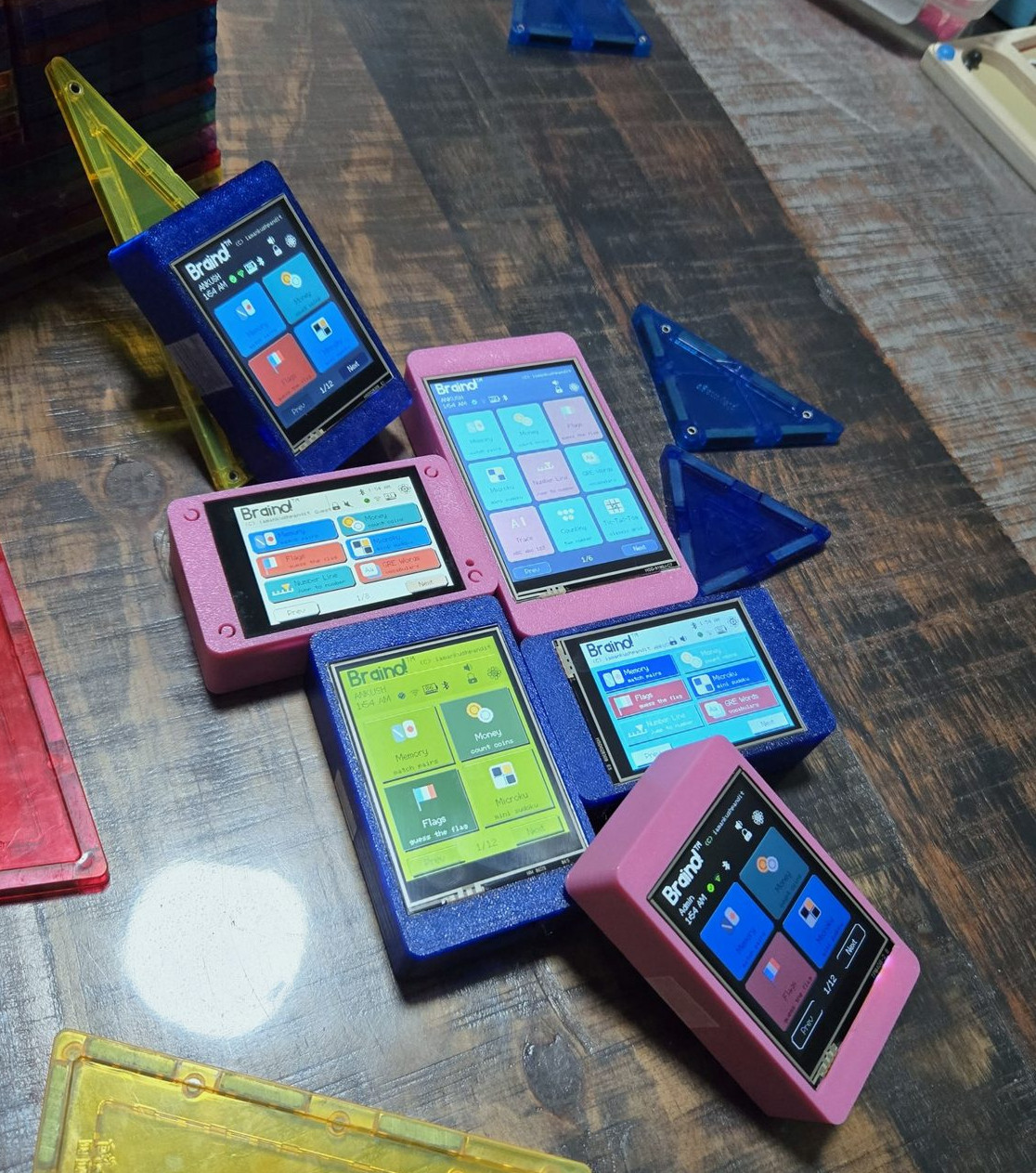
Which is where Braino! from [Ankush Pandit] comes in. This suite of applications can be easily flashed to a common Cheap Yellow Display to turn it into a legitimate educational tool. Combined with a 3D printed case, the total cost of the build is low enough that you don’t have to feel bad about handing it off to even the roughest of youngsters.

[Ankush] makes it clear that this project isn’t trying to sell you anything. You’re responsible for picking up a compatible CYD and installing Braino via the web flashing application. The software is released under the GPLv3 license, and it contains no ads, user accounts, or cloud connectivity. We know not everyone is thrilled with how much time young kids spend staring at screens these days, but opinions on modern parenting aside, it’s hard to find fault with the way things have been implemented here.

When the parent sets up Braino they can pick which of the 40 games can be accessed, allowing the experience to be tailored to the individual child’s age and ability. Should you decide to enable Bluetooth, some of the games even support wireless multiplayer between devices.

The commonality of the Cheap Yellow Display is one of its best features, and Braino does an excellent job of showing why that’s so important. Trying to develop a project like this without a standardized platform of some type would be a non-starter, but when anyone can get a CYD sent to their house from Amazon and flash it right from the browser, it’s makes the whole thing far more accessible.

Open Firmware Fixes Dead Onkyo AV Receivers

By: Tom Nardi
13 October 2026 at 04:00

If you’ve been reading Hackaday for any length of time, you’ll know we love seeing hackers replacing the stock firmware on their devices with open source alternatives. Usually this is done because the open firmware offers more features, or lifts some arbitrary limitation. But if you find yourself installing OSIRIS on an Onkyo AV receiver such as the TX-NR717, it’s probably because you’re trying to bring the thing back to life.

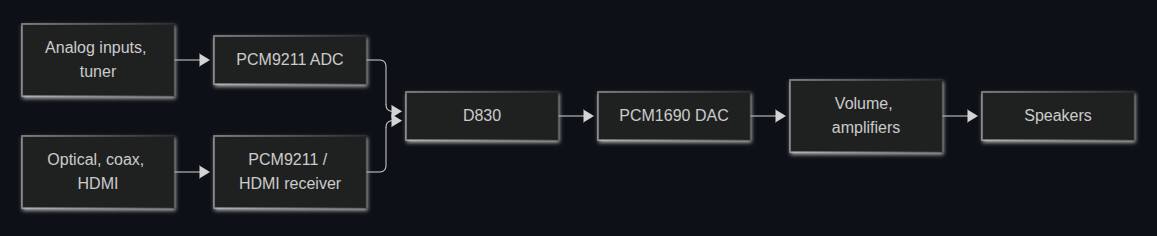
As developer [JokΕ«bas] explains, certain Onkyo receivers that use the Texas Instruments D830 are known to suffer from a very specific failure β€” the device will power on and appear functional, but no audio will come through. When this happens, it’s either because the D830 itself has failed or the 64 MiB NAND flash chip that holds the firmware it runs is cooked. Unfortunately, replacing either component is a bit more difficult than you might expect.

Everything passes through the Texas Instruments D830. If it goes, you’ve got a problem.

If you swap the D830 with a pin-compatible chip that’s easier to find and less prone to failure, the stock firmware won’t boot. If you try to replace the NAND, you’ll find that the original software is only capable of addressing 512-byte pages, while the flash you’ll find on the market today uses 2 KiB or 4 KiB pages. In both cases, it’s OSIRIS to the rescue.

The open firmware not only supports D830 compatible chips such as the OMAP-L137, but it’s able to address modern NAND flash, making the replacement of either or both component far more practical. With fresh hardware and the new firmware installed, your Onkyo receiver should spring back to life. That said, OSIRIS isn’t feature complete yet, and truthfully the items listed as untested or not implemented on the feature list currently outnumber the entries for what actually does work. But at least it’s a start.

Of course, not all the burned out parts on your Onkyo receiver require a firmware flash to replace. Sometimes a misbehaving unit just needs to have a few of its passive components replaced.

Two-Component H-shifter for Racing Sims

9 October 2026 at 16:00

Flying and driving simulators can go as far as money will take you, and at some point it might end up being cheaper to buy a plane or race car than to keep adding capabilities to some of the sim rigs we’ve seen. But it can also be a fairly affordable hobby as well, with entry-level components being within reach for many. The price can drop precipitously from there too, provided some parts can be sourced and a 3D printer is made available, and [Jason] is demonstrating one of the lowest-cost H-shifters we’ve seen which only uses two parts at its core.

The two components only cover the electronics for the build, but this gets almost everything needed for the shifter squared away. A joystick like those found inside many game controllers is paired with an Arduino Pro Micro, with a very straightforward wiring configuration between them. These components are paired with a prototype 3D printed case and shift knob which provides the H pattern of choice. From there it’s as simple as uploading some readily-available firmware, which [Jason] also demonstrates, and which has many options for various configurations of shifters.

Although this was just a prototype, it shows was just a few off-the-shelf components and a 3D printer can provide to an affordable driving sim setup. Even then a 3D printer is not always necessary, like this three-pedal setup using extruded aluminum frame as a base. From there, all kinds of other features can be added like force feedback on the steering wheel.

❌
❌