❌

Reading view

There are new articles available, click to refresh the page.

Confessions of a Professional Hacker: Can the CIA or other Intelligence Agencies Track My Every Move?

Welcome back my aspiring cyberwarrior and others interested in cybersecurity!

When people find out I am a professional hacker, one of the most common questions they ask is, “Can the CIA (or other intelligence agency) track my every move?” The short answer is Yes!, they can track your every move if you have a cellphone AND the interested party (CIA or other intelligence agency) has your phone’s unique IMEI number.

Let’s look at how they do this and what you can do to make their job much harder.

IMEI

The IMEI or the International Mobile Equipment Identity number is unique to each phone and can not be altered. If the CIA or other intelligence agency knows this number of your phone, they can track your movements by tracking your phone. This number is available to them by subpoena, search warrant or US Patriot Act provisions.

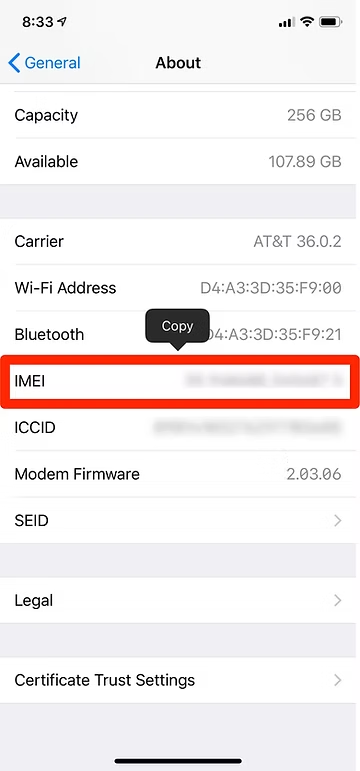
The IMEI is stamped on your phone and when you open the phone you can find it like below.

In addition, you can find the IMEI under settings of your phone. It is different places in different phones, but look for something such as “About Phone” like below.
IMSI

It is also possible to track a phone and its user by its IMSI (International Mobile Subscriber Identity) number of the phone. Fortunately, this IMSI can be changed out by changing out the SIM (Subscriber Identification Module) card.
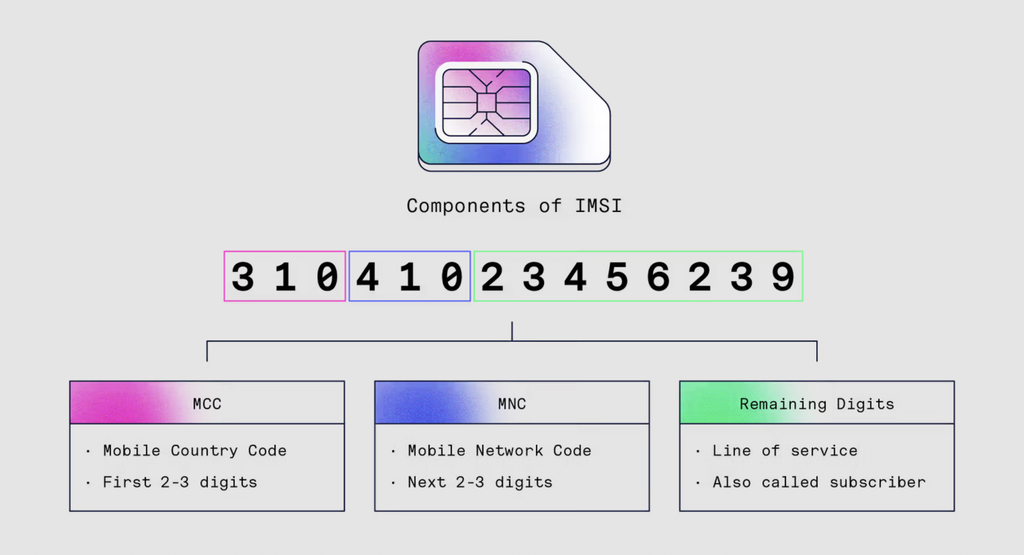
MSI numbers are broadcast by your phone when its sends a beacon to connect to the cell tower. It is possible for anyone with the right equipment to intercept and read those IMSI numbers. 

Every time a cell phone attempts to connect, it pings the cell towers in the area to determine which is closest. Every cell phone or other device connecting to the cellular network (such as iPads) does this. Every time a cellphone pings a tower, the phone’s IMSI, IMEI numbers as well as the the location of the cell tower is stored in the carrier’s database.
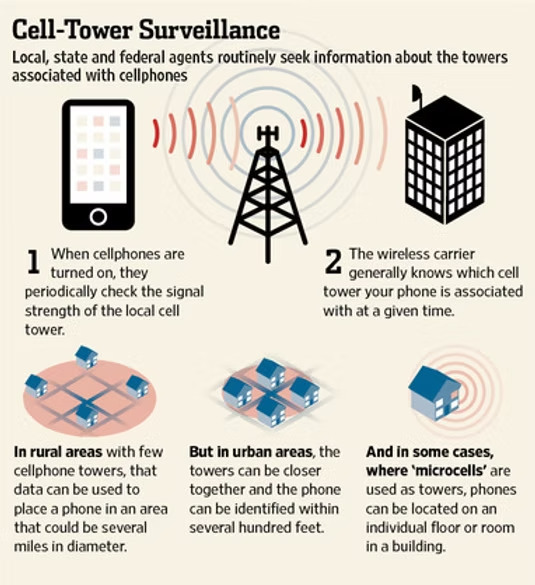
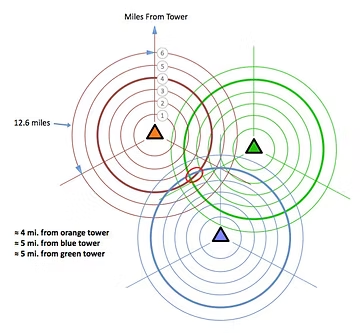
By triangulating (multiple towers are used to track the phone’s location by measuring the time delay that a signal takes to return back to the towers from the phone) between the pings to the towers in the area, the location of the phone can be determined within 50-500 meters, depending upon the concentration of cell towers. The closer the cell towers are together, such as in an big city, the more precise the data on the location of the phone. In urban areas, your location can be narrowed down to within 50 meters.
Stingrays

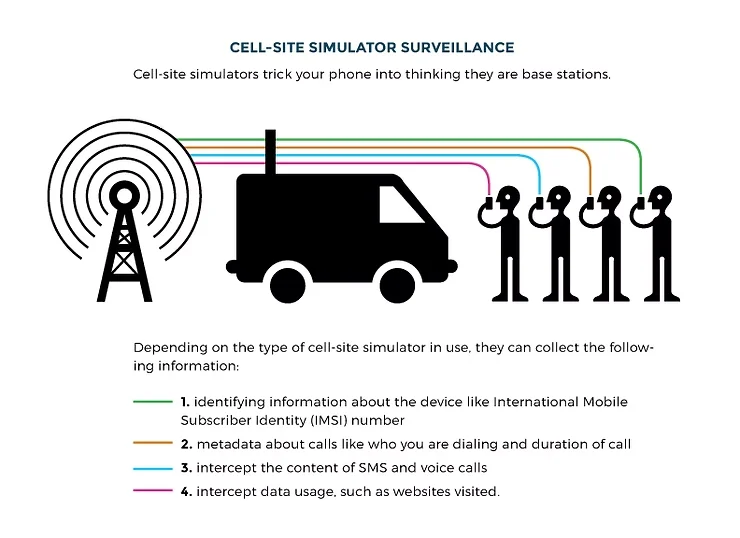
Although not a method of tracking but rather of eavesdropping, stingrays are one of the tools intelligence agencies and law enforcement use to listen to cellphones. A stingray is just a compact, mobile cell tower. Law enforcement and intelligence agencies can simply move one into your neighborhood. Your phone will then connect to the closest cell tower. The stingray looks and acts just like a cell tower so you phone connects to it without asking further questions. Once your cell phone connects to the cellular network, the owner of the stingray has access to all the calls and data leaving your phone. For more on stingrays, see my article here.
In the US and other countries (they are banned in the EU), you can buy an inexpensive, limited-feature, pre-paid phone at a local retailer without having to register your name. In this way, it is very difficult for intelligence agencies to connect the phone and its unique IMEI to your identity. To take further precautions, the phone should be purchased with cash so that no credit/debit card trail remains.

When purchasing a burner phone, make certain that you are NOT carrying your other phone with you. Your other phone is tracking all your movements. If you are carrying your that phone, you are creating a record of your visit to the “burner phone” retailer linking you to the purchase and the IMEI of the burner phone thereby frustrating your attempts to remain anonymous. 

Summary

The CIA, any intelligence agency or law enforcement can track your every move very precisely by tracking the cell towers your phone pings before it connects. All this data is stored in the phone carrier’s database and can be accessed by these agencies. The burner phone is probably the best way to frustrate this type of tracking but make certain to take the precautions described above.

The post Confessions of a Professional Hacker: Can the CIA or other Intelligence Agencies Track My Every Move? first appeared on Hackers Arise.

SCADA/ICS DFIR, October 27-29

Welcome back, my aspiring SCADA/ICS security engineers!

SCADA/ICS hacking is one of the most important areas of cybersecurity and one of the least understood. SCADA/ICS systems power our entire industrial infrastructure and are critical to the every day functioning of our economy and lives. These systems include;

  1. Electrical generation and transmission
  2. Chemical processing
  3. Oil refineries
  4. Food processing
  5. Pharmaceutical manufacturing
  6. Water and wastewater systems
  7. Cellular and mobile communication systems

Without any of these systems, an economy can be crippled. Hackers-Arise is one of the leaders in SCADA/ICS cybersecurity, and next month we are offering a new class in this discipline, SCADA/ICS Forensics.

If we are to protect these systems, we need to understand how hackers can access these systems and how we can detect their presence and actions.

SCADA/ICS Forensics Training Outline

1. Introduction to ICS/SCADA Systems

Overview of industrial control systems (ICS) and SCADA architecture

Key components: PLCs, RTUs, sensors, actuators, HMIs, data historians

Differences between IT and OT environments

2. ICS/SCADA Protocols and Communications

Common industrial protocols (Modbus, DNP3, OPC, PROFIBUS, etc.)

TCP/IP and fieldbus network topologies

Protocol vulnerabilities and forensic implications

3. Threats, Attacks, and Incident Scenarios

ICS-specific threats (insider, supply chain, targeted malware)

Case studies: from Russia’s attacks Ukraine’s infrastructure,Stuxnet, Industroyer, Triton, and ransomware in ICS

Attack methodologies unique to ICS/SCADA

4. ICS/SCADA Forensic Fundamentals

Principles of digital forensics in ICS/SCADA

Preservation of volatile and non-volatile evidence

Chain of custody, legal and compliance considerations

5. Evidence Collection Techniques

Safe imaging of PLCs, HMIs, and historian servers

Capturing network traffic in industrial environments

Handling physical and logical data acquisition in situ

6. Log Analysis and Event Correlation

ICS-specific log sources (controller logs, SCADA system logs)

Event timeline reconstruction and anomaly detection

Dealing with proprietary and legacy logging systems

7. Malware Analysis and Reverse Engineering in ICS

Identifying ICS-focused malware (e.g., OT ransomware, custom payloads)

Static and dynamic analysis of binaries from field devices

Artifact recovery from embedded devices and firmware

8. Network Forensics in OT/ICS Environments

Deep packet inspection of industrial protocol traffic

Identifying network-based evidence (command/response, unauthorized access)

Use of specialized tools (Wireshark with ICS dissectors, etc.)

9. Reporting and Remediation

Documentation of forensic findings for ICS/SCADA

Coordinating with OT/IT teams for incident response

Lessons learned and post-incident review practices

Summary

If you job requires you to protect SCADA/ICS systems or you simply want to add SCADA/ICS cybersecurity to your skill set, then this class is for you!

You can enjoy and benefit from all 4 of our SCADA/ICS classes in our SCADA/ICS career path here.

The post SCADA/ICS DFIR, October 27-29 first appeared on Hackers Arise.

IP Camera Hacking: Hacking IP Cameras with Cameradar

Welcome back, my aspiring IP camera hackers!

As most of you know, we have played a key role in the defense of Ukraine. Among our many activities in defense of Ukraine is the hacking of IP cameras throughout the country. In this way, we can spy on Russian activities and war crimes. We did this at the request of the Ukraine Army starting in April 2022.

For more on Hackers-Arise activities in Ukraine check out this post.

For more information on our IP camera hacking to support Ukraine, check out this post.


To hack these cameras we used multiple methods and techniques. In hacking, we often need to explore multiple methods to be successful. Persistence is a key hacker characteristic.

As hackers, of course, it is important to take a strategic approach to any target. Always use the simplest methods first before progressing to more advanced and time-consuming attack methods.


In our first step, we identified the unprotected cameras using such sites as Shodan, Google, and Censys. Next, we tried default credentials. These default credentials vary by camera and manufacturer, so make certain to check our list of default credentials for nearly every camera and manufacturer. That technique yielded a few cameras.

Next, we tried to hack the cameras with weak passwords. This yielded significant results! The primary tool we used in that effort was cameradar.

In this tutorial, I will show you how to use this tool for IP camera hacking just like we did in the Ukraine war!

RTSP

Before we begin to hack IP cameras, you need a bit of background in RTSP. RTSP is the protocol that most of these IP cameras use. Not all of the cameras use RTSP, but the vast majority do. Before we go any farther, we need to say that those cameras using proprietary or other protocols will not be exploitable by cameradar.

RTSP is an application-layer protocol used for commanding streaming media servers via pause and play capabilities. It thereby facilitates real-time control of the streaming media by communicating with the server — without actually transmitting the data itself.

Rather, RTSP servers often leverage the Real-Time Transport Protocol (RTP) in conjunction with the Real-Time Control Protocol (RTCP) to move the actual streaming data.

Most IP camera use the Real-Time Streaming Protocol (RTSP) to establish and control video and audio streams. The content is delivered using Real-time Transport Protocol (RTP). RSTP does not provide any configuration of the device. That must be done using the URI and IP address. Any configuration changes must be done via the web interface.

Most systems support RTSP as a fallback even if they are using a different protocol such a PSIA or ONVIF

When a user initiates a video stream from an IP camera using RTSP, the device sends an RTSP request to the streaming server. This jump starts the setup process.

Subsequently, the video and audio data can then be transmitted using RTP.

You can think of RTSP in terms of a television remote control for media streaming, with RTP acting as the broadcast itself.

While similar in some ways to HTTP, RTSP defines control sequences useful in controlling multimedia playback.

While HTTP is stateless, RTSP has state; an identifier is used when needed to track concurrent sessions

Like HTTP, RTSP uses TCP to maintain an end-to-end connection and, while most RTSP control messages are sent by the client to the server, some commands travel in the other direction (i.e. from server to client).


 RTSP uses the following commands, typically sent from the client to the server, when negotiating and controlling media transmissions: 

Options: This request determines what other types of requests the media server will accept.

Describe: A describe request identifies the URL and type of data.

Announce: The announce method describes the presentation when sent from the client to the server and updates the description when sent from server to client.

Setup: Setup requests specify how a media stream must be transported before a play request is sent.

Play: A play request starts the media transmission by telling the server to start sending the data.

Pause: Pause requests temporarily halt the stream delivery.

Record: A record request initiates a media recording.

Teardown: This request terminates the session entirely and stops all media streams.

Redirect: Redirect requests inform the client that it must connect to another server by providing a new URL for the client to issue requests to.

Other types of RTSP requests include ‘get parameter,’ ‘set parameter
,’ and ’embedded (interleaved) binary data,’

Now that you have a little background in RTSP, you are ready to start cracking IP camera credentials!

Step #1: Download and Install cameradar

Although cameradar can be run natively in Linux, I find that it works best in a docker container.

First, install docker.

kali > sudo apt install docker

Next, start docker with the systemctl command;

kali > sudo systemctl start docker

Now, download cameradar.

kali> sudo git clone https://github.com/Ullaakut/cameradar

Now, you are ready to begin to brute-force IP cameras!

Step #2: Run the RTSP Credential Brute-forcer

Now that you have docker and cameradar installed, you only need to point cameradar at the IP address of the camera that you want to brute-force!

For instance, to brute force a camera at 192.168.1.101 (obviously, not an IP address of a real camera), we would simply enter;

kali > sudo docker run ullaakut/cameradar -t 192.168.1.101


Cameradar will now attempt to find a RTSP stream at one of the default RTSP ports namely 554, 5554 and 8554. If you suspect there may be other ports with RTSP streams (you may want to run an nmap scan first), you can add them with the -p switch, such as

kali > sudo docker run ullaakut/cameradar -t 192.168.1.101 -p 9554

Step #3: Using Custom Username and Password Lists

By default, cameradar uses a small username and password list of the most common usernames and passwords. It’s good strategy to use these first but if they are unsuccessful, it’s time to bring out the big guns!

In this context, big guns means larger and more appropriate username and password lists. From my experience hacking cameras in Ukraine and Russia, the usernames usually are simple such as admin, root, admin1, admin3, etc. This means that you can probably use the default username list but passwords vary quite a bit. That’s why you should use a good password list that is appropriate for your environment (for instance, using a Spanish list in a Spanish speaking nation).

First, the password list must be json format. There are several websites that can covert your text file to json such as https://anyconv.com/txt-to-json-converter/. Your .txt file will then be appended with a json extension. So, if we were using the seclist’s password list;

/usr/share/seclists/Passwords/Common-Credentials/10-million-password-list-top-1000000.txt,

I would first convert it to json format and then use that file with cameradar. It will then appear as 10-million-password-list-top-1000000.json.

Now to use that password list with cameradar, you can run the following command;

kali> sudo docker run ullaakut/cameradar -t

-v /usr/share/seclists/Passwords/Common-Credentials:/tmp/dictionaries

-c “tmp/dictionaries/10-million-password-list-top-1000000.json”

-t 192.168.1.101


Summary

Password Cracking of IP camera credentials is very similar to other remote password cracking once you become familiar with the RTSP protocol. In fact, in many ways it is easier, as it is rare to find a lockout (limiting how many attempts you can make) on the RTSP protocol. By using a tool like cameradar, we were able to successfully access a large percentage of IP cameras with weak passwords.


The post IP Camera Hacking: Hacking IP Cameras with Cameradar first appeared on Hackers Arise.

CUDA Basics for Hackers, Part 1: Getting Started

Welcome back, my aspiring cyberwarriors!

I think it is abundantly clear by now that the future of cybersecurity depends upon AI. This is the reason we are offering the Wittgenstein Award for the best AI cybersecurity agents. It is also the reason we are offering a series of tutorials and classes in using AI in cybersecurity.

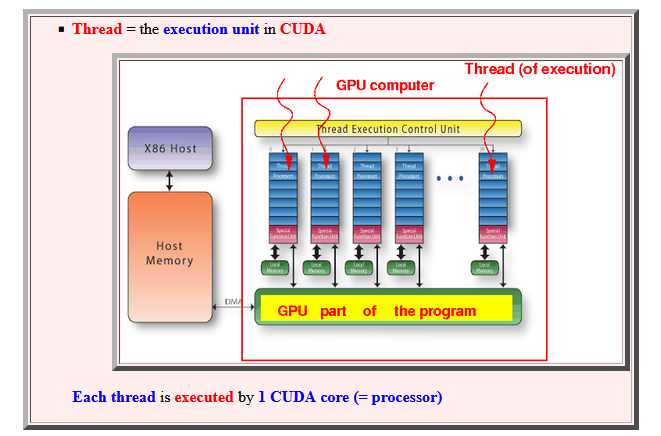
As you know, most of the AI models run on NVIDIA GPU’s. These graphics processing units are unique in that they can process thousands of threads simultaneously (your CPU can run (4-16). These means that a GPU can do calculations on many processes at the same time, perfect for generating the graphics in your favorite game.

Artificial intelligence or large language models (LLMs) use neural networks to calculate the best answer to your prompt. Each token (~word) is chosen by the probabilities that it is the right token in the right order. This requires calculating probabilities simultaneously for thousand or even millions of tokens. This where the NVIDIA GPU’s come in.

Many years ago, NVIDIA developed a system they call CUDA or Compute Unified Device Architecture for running general purpose applications on a GPU. It is CUDA that nearly every AI developer started with and why NVIDIA is the GPU of choice. CUDA is perfect for running operations on many pieces of data simultaneously. It’s ideally suited for tasks where the work can be broken into many independent pieces and run the calculations in parallel such as image processing, deep learning, or even password cracking.

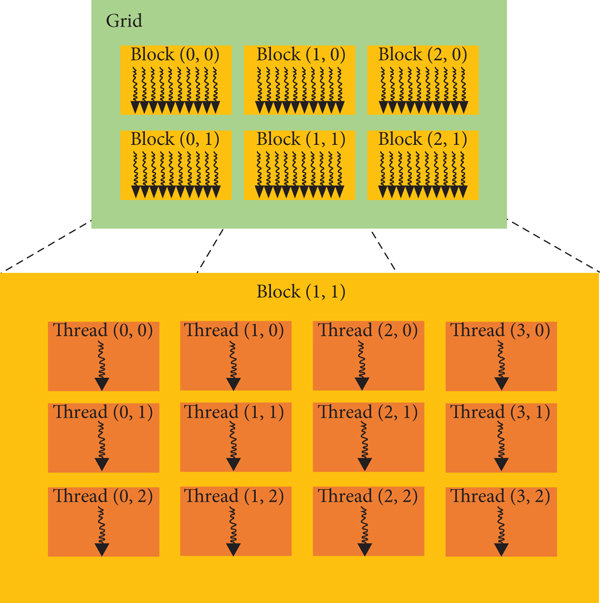
The code of any application that executes on the GPU is referred to as device code and those functions are referred as kernels. When a application launches a kernel, it launches many threads. These threads can number as many as millions. These threads are grouped and organized into thread blocks and these thread blocks are organized into a grid. These thread blocks are all exactly the same size with the same dimensions.

Since CUDA is such a key element of artificial intelligence development, we thought you should know at the least the basics of CUDA. This is the first of a series on using CUDA.


Step #1: Getting Started

Before we begin, let’s discuss the pre-requisites.

First, you need a NVIDIA GPU with CUDA support.

Second, as with any compute intensive task or cybersecurity, in general, I strongly recommend you use Linux (see my book, Linux Basics for Hackers from No Starch Press). Ubuntu or Debian is recommended (Kali Linux is Debian).

Third, you need to install the CUDA toolkit.

kali>sudo apt install nvidia-cuda-toolkit -y

Just like creating compiled programs in Linux with gcc, you will need the CUDA compiler or nvcc. You can check to see whether it is already installed by entering:

kali > nvcc --version

If you system responds with the nvcc version, the compiler is installed and we are ready to start!


Step 2: Write the CUDA Program

NVIDIA’s CUDA C++ is an extension of standard C++ designed for using the power of the GPU. Those of you comfortable with C++ should find CUDA C++ familiar and easy to work with. For the rest of you, pay close attention.

Let’s begin by creating a new file called hackers_arise_vector_cuda.cu (note the .cu extension).

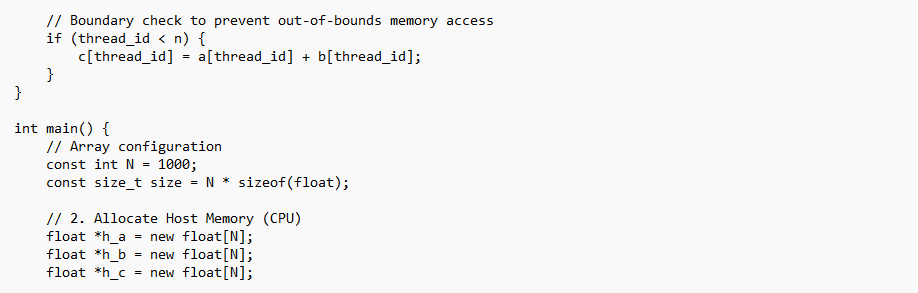
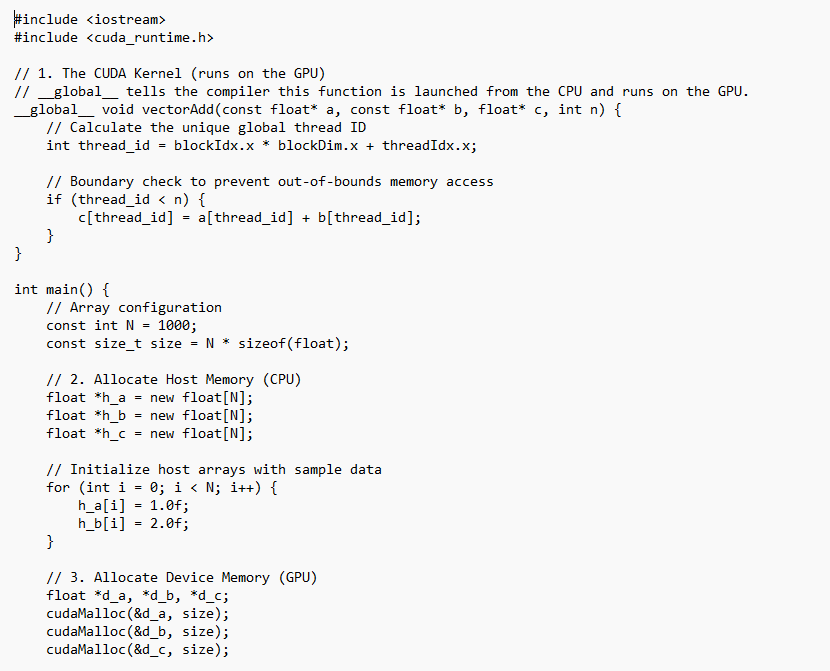
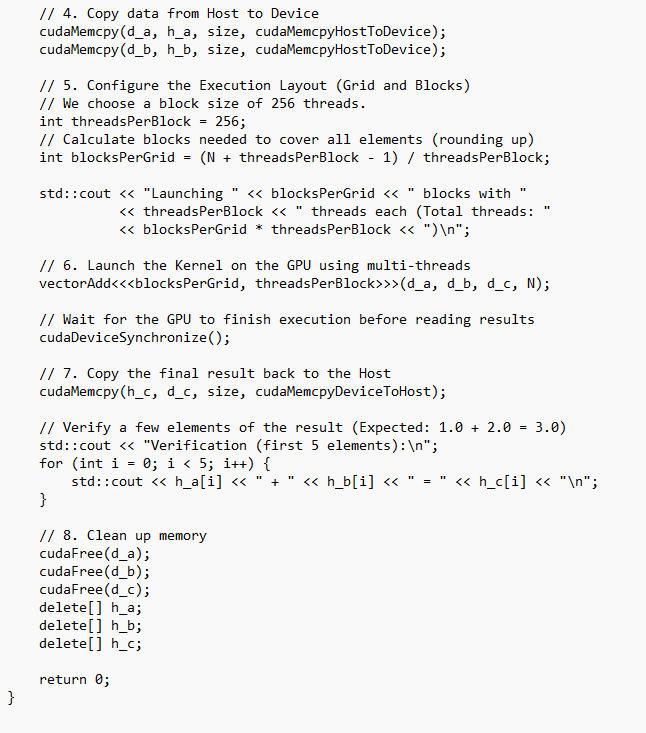
Copy this program into that file.


Step 3: Compile the Code

Use the NVIDIA CUDA compiler or nvcc:

kali > nvcc hackers_arise_vector_cuda.cu -o myfirstcuda.cu

If you don’t see an error, your program has compiled successfully and is ready to run as myfirstcuda.cu (all CUDA programs use the .cu extension).


Step 4: Run the Program

Next, let’s run this simple CUDA program.

kali > ,/myfirstcuda.cu

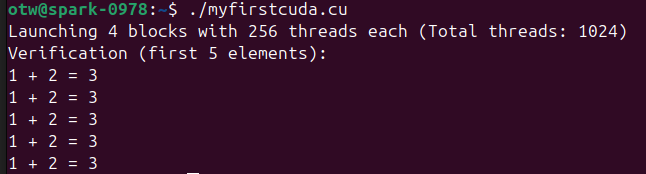
Your output should look something this.


Step 4: What Happened?

Now, let’s look at what happened in our program.

In the first line, the code includes the C++ iostream that runs on the CPU providing standard in and standard out. In the second line, the code includes cuda_runtime.h which is the primary header file for the CUDA Runtime API.

Next, we create a CUDA kernel function that can run on a GPU. the __global__ indicates that this function can be installed from the CPU and run in the GPU.

Our program then calculates the global thread ID.

Next, after boundary checking, we generate the array size and then allocate memory on the host CPU.

Then, we initialize the host (CPU) arrays with sample data.

Next, we allocate memory on the device or GPU.

Then we copy the data from the host CPU to the device, GPU.

Next, we define the execution configuration (threads and blocks). In this case, we are designating 256 threads per block and then calculate how many blocks we need.

Next, we launch the kernel on the GPU using multiple threads

We need to wait for the GPU to complete it’s work before trying to access on the CPU.

Then we copy the results from the GPU to the CPU.

Next we verify the results by sending the first 5 values to standard out.

Finally, before we leave, we need free up the memory.

Summary

CUDA or Computer Unified Device Architecture is a framework developed by NVIDIA to fully utilize the strength of GPU’s. It use an extended C++ (as well as Python) to convert the problem in to a multi-threaded application. It is this framework that makes NVIDIA GPU’s the first choice for AI developers.

CUDA can also be used for many applications in cybersecurity including:

  1. Password cracking and brute-force attacks
  2. Real-time threat detection
  3. Phishing and Malware Analysis
  4. Post-Quantum Cryptography
  5. Network Graph Analysis.

As this world transitions to artificial intelligence, stick to Hackers-Arise for the latest developments and techniques including the awarding of the Wittgenstein Award in 2027 for the best cybersecurity AI agents.


The post CUDA Basics for Hackers, Part 1: Getting Started first appeared on Hackers Arise.

The NVIDIA AI Ecosystem: A Quick Guide

Welcome back, my aspiring cyberwarriors!

Many aspiring cyberwarriors write to me asking where they should start in artificial intelligence for cybersecurity and the answer is simple, Hackers-Arise! We have dozens of tutorials–and now classes– on how to apply AI to cybersecurity. In addition, we are the sponsor of the upcoming Wittgenstein Award for the best AI cybersecurity agents. This will give our students an inside look at the development of the best of the best in AI cybersecurity as our students will have an opportunity participate and use the models and agents we develop.

Beyond learning AI for cybersecurity, there is another issue. There are many platforms, models, and hardware to choose from. Comparable to Cisco at the advent of internet in the 1990’s, those who hitched their wagon to Cisco found themselves in an advantageous position regarding jobs and promotions. I want to make the case that NVIDIA is the company you should be hitching your wagon to in this new era.

As you know, NVIDIA is the most valuable company in the world! It is rapidly growing an eco-system that will exceed that of Apple and Cisco. They have quietly built an eco-system of AI that will make it very hard to dislodge them from this dominant position. Jensen Huang and NVIDIA are building an almost impenetrable wall around their eco-system assuring it will be here for years to come.

NVIDIA began as a start-up 1993 building graphics processing units (GPU) for PC gamers. Processing pixels for any graphics intensive product is very compute intensive and NVIDIA made those games come alive. Graphics processing is compute intensive as every image is made of millions of tiny polygons that the GPU must compute it’s size, color, and movement. This means crunching a vast amount of data and Jensen Huang and his colleagues developed a graphics card capable of doing all those calculations very fast through massive parallelism. GPU’s have thousands of cores capable of doing these calculations serially and simultaneously. That is the magic of NVIDIA GPU’s and it is what makes NVIDIA GPU’s the preferred chip for AI. Neural networks–the foundation of our LLM’s at this moment– are built almost entirely from matrix multiplications. This means that the same calculation needs to run over and over on different data. The NVIDIA GPU is uniquely designed for this.

Now let’s take a look at the NVIDIA eco-system that Jensen Huang is building in AI.

Major Equity Investments / Strategic Partnerships

Jensen Huang has made numerous investments in companies positioned to benefit from the coming age of AI, including:

Mellonox –in 2019 NVIDIA agrred to buy Mellanox, an Israeli maker of high-speed Infiniband and Ethernet interconnects for $6.9 billion. NVIDIA needed faster interconnects between to communicate to and from it’s super fast GPU’s and other hardware and Mellanox provided that.

ARM— the British chip designer was the next firm in NVIDIA’s cross-hairs. Jensen Huand recognized that needed powerful and efficient CPU’s to manage his systems. ARM designs RISC-based CPU’s that power the mobile world due to their unique combination of speed and efficiency. NVIDIA offered $40 billion to purchase ARM for what Huang called “the world’s premier computing company for the age of AI.” The US FTC sued to block the acquisition and NVIDIA dropped it’s pursuit of owning ARM. Instead, it holds ARM and it’s CPU’s in close partnership integrating their CPU’s in a multitude of products. Interestingly, ARM is now worth about $250 billion, 6x what Huang offered for it just 6 years ago.

OpenAI — NVIDIA and OpenAI announced a letter of intent to deploy at least 10 gigawatts of NVIDIA systems, with NVIDIA intending to invest up to $100 billion in OpenAI progressively as each gigawatt is deployed. Earlier in 2026, OpenAI raised $110 billion at a $730 billion pre-money valuation, with NVIDIA and SoftBank each investing $30 billion and Amazon investing $50 billion. NVIDIA also noted in its 10-K ( a type of disclosure required by US regulators at the SEC) that it’s finalizing an investment and partnership agreement with OpenAI, though there’s no assurance the transaction will be completed.

Anthropic — NVIDIA and Anthropic announced a deep technology partnership to optimize Claude models for NVIDIA architecture and vice versa; Anthropic’s Series H in May 2026 raised $65 billion at a $965 billion post-money valuation, making it one of NVIDIA’s two largest single-company bets alongside OpenAI.

CoreWeave — NVIDIA holds a stake with an original 7% stake (24.2 million shares) worth roughly $2 billion at IPO, plus an additional $2 billion investment in early 2026, on top of a prior $6.3 billion agreement to purchase CoreWeave’s unused computing capacity through 2032.

xAI — A structure of $7.5 billion in equity plus $12.5 billion in debt, largely through a special purpose vehicle for GPU purchases, supporting xAI’s Colossus 2 data center in Memphis.

Hugging Face — A pending acquisition-related investment of $12.9 billion.

Mistral AI — NVIDIA remains an investor alongside lead backer ASML, with Mistral valued at €11.7 billion (about $13.8 billion).

AI Infrastructure Financing

In August of this year (2026), NVIDIA announced a partnership with some of the largest financial firms in the world including Apollo, BlackRock, Brookfield, Goldman Sachs, and KKR. This partnership was designed to facilitate financing of AI infrastructure and, of course, NVIDIA GPU’s.

Venture / Ecosystem Programs

A roughly £2 billion (~$2.6 billion) UK commitment flowing through partner VCs — Accel, Air Street Capital, Balderton, Hoxton Ventures, and Phoenix Court — into startups in London, Oxford, Cambridge, and Manchester.

Similar “VC Alliance” partnerships extended to European firms including Accel, Elaia, Partech, and Sofinnova, offering DGX Cloud Lepton marketplace credits to portfolio companies.

Scale

NVIDIA has committed over $50 billion across AI labs, cloud services, data centers, and optical communications, with private company assets reaching $47.9 billion by July 2026 and about $18 billion in equity commitments still to be executed.

This list isn’t exhaustive — NVIDIA also has long-standing commercial partnerships with cloud providers (AWS, Microsoft Azure, Google Cloud, Oracle), automakers, and chip/hardware partners that function differently from these financial stakes. Let me know if you’d like me to dig into any particular category.

Summary

NVIDIA and Jensen Huang have quietly built an almost impenetrable eco-system of artificial intelligence systems through acquisitions, partnerships, and financing. Similar to the eco-system CISCO built with networking equipment at the advent of the Internet, it will be advantageous to become part of this eco-system as it will likely be dominant for the foreseeable future.

The post The NVIDIA AI Ecosystem: A Quick Guide first appeared on Hackers Arise.

Post-Quantum Network Readiness

The Quantum computing industry is making leaps and bounds towards developing quantum computers that can–among other things–break the encryption that keeps our data safe and confidential. Some say it will take place in as little as two years, but even the most conservative estimates are for four years or 2030. In either case, it is time to begin to prepare your network for the coming post-quantum world.

To learn more about this risk, see my interview with David Bombal on Quantum Computing here.

When that day arrives, all of our encryption– and therefore all our data– will be exposed to anybody who has a quantum computer. Initially, this will be only nation state actors such as the US, China, Israel, and Russia.

No need to fret or stress as people have been preparing for this day for many years and have developed post-quantum cryptography (PQC). This field is in constant flux and recently one of the post-quantum cryptographic algorithms (HAWK) was found to be breakable by quantum computers. The point here is that this field is changing rapidly, not unlike artificial intelligence.

Some people have compared this to the Y2K crisis that took place some 26 years ago. At that time, nearly everybody was looking for a crisis that would break systems once we transitioned from a two-digit year to a four-digit year.The fact that no crises took place in 2000 can be attributed to years of preparedness for that potential crisis. Companies and institutions spent at least two or three years preparing for it and as a result nothing adverse really took place. It all went very smoothly.

For your organization, you need to start preparing now. To help you to prepare, Hackers Arise has developed a course on preparing your network for the post-quantum world. The training will be offered over 3 days October 13-15.

Post-Quantum Network Readiness

Outline

1.What are Quantum Computers are What Makes them Different

2. The Quantum Countdown: Harvest-Now-Decrypt-Later & Why Your Network Is Already Exposed

3. Know Your Attack Surface: Automated Cryptographic Discovery & CBOM

4. The New Arsenal in Action: NIST PQC Standards (ML-KEM, ML-DSA, SLH-DSA) with OpenSSL 3.5 & liboqs

5. Hardening the Wire: Hybrid TLS 1.3 & Quantum-Safe Tunnels

6. Post-Quantum PKI at Scale: Certificates, Signature Bloat & Real Network Performance Impact

7. From Vulnerable to Quantum-Ready: A Phased Migration Roadmap, Crypto-Agility & End-to-End 

The post Post-Quantum Network Readiness first appeared on Hackers Arise.

The CyberWarrior Handbook, Part 01

Welcome back, my cyberwarriors!

In this series, we will detail how an individual or small group of cyberwarriors can impact global geopolitics. The knowledge and tools that YOU hold are a superpower that can change history.

Use it wisely.

To begin this discussion, let’s look at the actions of a small group of hackers at the outset of the Russian invasion of Ukraine. We will detail these actions up to the present, attempting to demonstrate that even a single individual or small group can influence global outcomes in our connected digital world. Cyber war is real and even a single individual can have an impact on global political outcomes.

Let’s begin in February 2022, nearly 3 years ago. At that time, Ukraine was struggling to throw off the yoke of Russian domination. As a former member state of the Soviet Union (the successor to the Romanov’s Russian Empire), they declared their independence, like so many former Soviet republics (such as Estonia, Latvia, Lithuania, Georgia, Armenia, Kazakhstan, and others) from that failed and brutal alliance in 1991 (this is the moment that the Soviet Union disintegrated). This union failed primarily due to the inability of the Soviet Union to address the needs of their citizens. Simple things like food, clean water, and consumer goods. And, of course, the tyranny.

Russia, having lost absolute control of these nations, attempted to maintain influence and control by bending their leaders to Putin’s will. In Ukraine, this meant a string of leaders who answered to Putin, rather than the Ukrainian people. In addition, Russian state-sponsored hackers such as Sandworm, attacked Ukraine’s digital infrastructure repeatedly to create chaos and confusion within the populace. This included the famous BlackEnergy3 attack in 2014 against the Ukrainian power transmission system that blacked out large segments of Ukraine in the depths of winter (for more on this and other Russian cyberattacks against Ukraine, read this article).

In February 2022, the US and Western intelligence agencies warned of an imminent attack from Russia on Ukraine. In an unprecedented move, the US president and the intelligence community revealed, (based upon satellite and human intelligence-) that Russia was about to invade Ukraine. The new Ukrainian president, Volodymyr Zelenskyy, publicly denied and tried to minimize the probability that an attack was about to take place. Zelenskyy had been a popular comedian and actor in Ukraine (there is a Netflix comedy made by Zelenskyy before he became president named “Servant of the People”) and was elected president in a landslide election as the people of Ukraine attempted to clean Russian domination from their politics and become part of the free Europe. Zelenskyy may have denied the likelihood of a Russian attack to bolster the public mood in Ukraine and not anger the Russian leader (Ukraine and Russia have long family ties on both sides of the border) .

We at Hackers-Arise took these warnings to heart and started to prepare.

List of Targets in Russia

First, we enumerated the key websites and IP addresses of critical and essential Russian military and commercial interests. There was no time to do extensive vulnerability research on each of those sites with the attack imminent, so instead, we readied one of the largest DDoS attacks in history! The goal was to disable the Russians’ ability to use their websites and digital communications to further their war ends and cripple their economy. This is exactly the same tactic that Russia had used in previous cyber wars against their former republics, Georgia and Estonia. In fact, at the same time, Russian hackers had compromised the ViaSat satellite internet service and were about to send Ukraine and parts of Europe into Internet darkness (read about this attack here).

We put out the word to hackers around the world to prepare. Tens of thousands of hackers prepared to protect Ukraine’s sovereignty. Eventually, when Russian troops crossed the border into Ukraine on February 24, 2022, we were ready. At this point in time, Ukraine created the IT Army of Ukraine and requested assistance from hackers across the world, including Hackers-Arise.

Within minutes, we launched the largest DDoS attack the Russians had ever seen, over 760GB/sec (as documented later by the Russian telecom provider, Rostelcom). This was twice the size of any DDoS attack in Russian history (https://www.bleepingcomputer.com/news/security/russia-s-largest-isp-says-2022-broke-all-ddos-attack-records/) This attack was a coordinated DDoS attack against approximately 50 sites in Russia such as the Department of Defense, the Moscow Stock Exchange, Gazprom, and other key commercial and military interests.

As a result of this attack, Russian military and commercial interests were hamstrung. Websites were unreachable and communication was hampered. After the fact, Russian government leaders estimated that 17,000 IP addresses had participated and they vowed to exact revenge on all 17,000 of us (we estimated the actual number was closer to 100,000).

This massive DDoS attack, unlike any Russia had ever seen and totally unexpected by Russian leaders, hampered the coordination of military efforts and brought parts of the Russian economy to its knees. The Moscow Stock Exchange shut down and the largest bank, Sberbank, closed. This attack continued for about 6 weeks and effectively sent the message to the Russian leaders that the global hacker/cyberwarrior community opposed their aggression and was willing to do something about it. This was a
first in the history of the world!

The attack was simple in the context of DDoS attacks. Most DDoS attacks in our modern era involve layer 7 resources to make sites unavailable, but this one was simply an attack to clog the pipelines in Russia with “garbage” traffic. It worked. It worked largely because Russia was arrogant and unprepared without adequate DDoS protection from the likes of Cloudflare or Radware.

Within days, we began a new campaign to target the Russian oligarchs, the greatest beneficiaries of Putin’s kleptocracy (you can read more about it here). These oligarchs are complicit in robbing the Russian people of their resources and income for their benefit. They are the linchpin that keeps the murderer, Putin, in power. In this campaign, initiated by Hackers-Arise, we sought to harass the oligarchs in their yachts throughout the world (the oligarchs escape Russia whenever they can). We sought to first (1) identify their yachts, then (2) locate their yachts, and finally (3) send concerned citizens to block their fueling and re-supply. In very short order, this campaign evolved into a program to capture these same super yachts and hold them until the war was over, eventually to sell and raise funds to rebuild Ukraine. We successfully identified, located, and seized the top 9 oligarch yachts (worth billions of USD), including Putin’s personal yacht (this was the most difficult). All of them were seized by NATO forces and are still being held.

In the next few posts here we will detail;

  1. The request from the Ukraine Army to hack IP cameras in Ukraine for surveillance and our success in doing so;

  2. The attacks against Russian industrial systems resulted in damaging fires and other malfunctions.

    Look for Master OTW’s book, “A Cyberwarrior Handbook”, coming in 2026.

The post The CyberWarrior Handbook, Part 01 first appeared on Hackers Arise.

Mr Robot Hacks: Building a Deadman’s Switch in Python

Welcome back, my Mr. Robot aficionados!

A deadman’s switch can be very powerful defensive weapon. A deadman’s switch is only triggered if the human being holding is dead. Hence, the name. This can be powerful weapon if one’s life is threatened. You set up a deadman’s switch to trigger some powerful event (emails, data exposure, videos, graphics) if you are dead and can not maintain the switch. This might save you life someday!

As you know, Mr. Robot is my favorite TV show because of its realistic depiction of hacking. Nearly all of the hacks in the show are real, although the time frame may be compressed (real hacking is not like a TikTok video).

In the first season, Elliot’s “girlfriend”, Shayla, has been kidnapped and held as hostage by the psychopathic drug dealer, Vera. Vera has been arrested and is sitting in jail waiting for trial. He insists that Elliot get him out of jail by some sort of elaborate hack in 24 hours! For more of the prison hack, see my tutorial here and my David Bombal YouTube video here.

Elliot goes to the jail to visit Vera and explain the difficulties of hacking him out jail in 24 hours. Vera insists. Elliot explains that he has all the evidence from Vera’s brothers cellphone (he hacked it over the LAN in his apartment probably using the shellshock vulnerability) to put Vera and his brother away forever. When Vera threatens him, he explains that if anything happens to him, a deadman’s switch will be triggered and send all the evidence to law enforcement, thereby guaranteeing his safety,

Deadman’s switch is not a new concept. It has a long and storied history in its many physical forms. A deadman’s switch is simply a safety mechanism that triggers if there is NO user action. This means that if the owner or holder of the switch is dead or otherwise incapacitated, an action is triggered. They have long been used within industrial society to stop machines if the operator is “dead” such as locomotives, amusement rides, and aircraft refueling, among many applications. It has also been used by to preserve the operator’s life. Imagine a person wearing a suicide vest. They often hold a deadman’s switch that triggers the explosive should they be killed. You have probably seen this in many TV shows and movies.

Elliot is using this strategy to preserve his life from Vera’s assassins except that here he creates a digital deadman’s switch. If he is dead, the program triggers and notifies law enforcement with all the digital evidence against Vera and his brother.

Let’s see whether we can create such a digital deadman’s switch in Python, the favorite language of cybersecurity and artificial intelligence.

Step # 1: Getting Started

A deadman’s switch is a safety mechanism that triggers an action if the user fails to perform a periodic task (like pressing a key or sending a signal) within a certain time frame. In our script, we will wait to get receive an ENTER from the user. If you user does not hit ENTER within a specified period of time, we assume they a are dead and execute the action, in this case send an SMS message.

To develop our deadman’s switch, we will need;

  1. code or a function to send the message when the user is dead
  2. some code or function to track the time and determined time is exhausted
  3. a main function to take user input on the desired time out and determine when that time has exhausted and trigger the action function

Let’s get started by importing the modules necessary:

import threading

The threading module in Python allows your program to run multiple operations concurrently within the same process by using threads.

  • Wait for input or other blocking operations (like in your deadman’s switch).
  • Perform background tasks while the main program continues (e.g., downloading a file while updating a UI).

import requests

The requests module in Python is a simple and powerful library for making HTTP requests — it lets your program talk to websites or APIs over the internet

Step # 2: Create a function named action to send an SMS Message If the User is Dead

Now that we have all the necessary modules, let’s create a function called action. In this function, we will use the requests.post command to send a SMS message through textbelt.com (we have used this service before with the sending a fake SMS message here). This function executes if the action indicating life (hitting ENTER) is not completed within specified amount of time entered by the user in the main function below. So, to simplify, the user defines the amount of time and if no action is detected within that time period, the switch is triggered.

Here we use the requests module to build a payload to be sent to the URL, https://textbelt.com/text

def action():
# Create a payload to send to the SMS provider
payload = { ‘phone’: ‘xxxxxxxxxxx’, # enter phone number of sms destination
‘message’: ‘Hi OTW. I am dead. I am sorry, you are on your own in this case. Send the evidence against Vera to the police’,
# put the message you want to be sent when you are dead
‘key’: ‘xxxxxxxxxxxxxxxxxxxxxxxxxxxxxxxxxxxxxxxxxxxxxx’ # enter you textbelt api key here
}
response = requests.post(‘https://textbelt.com/text’, data=payload)
print(response.json())

Step 3: Wait For Input

In this function, we named wait_for_input, we use the threading module to create a timer.

def wait_for_input(timeout):

“””

Waits for user input with a timeout.

Returns True if input received, False if timeout occurs.

“””

timer = threading.Timer(timeout, deadman_action)

timer.start()

try:

input(f”Press Enter within {timeout} seconds to reset the deadman’s switch: “)

timer.cancel()

return True

except Exception:

timer.cancel()

return False

Step 4: Create a main function

Here, we create our main function. In this function, we prompt the user for the number of seconds to wait and convert it into integer, then print the timeout for the user to see and another print statement simply telling the user that the switch is activated and they must press enter to keep it alive.

def main():

timeout = int(input(“Enter the length of timeout in seconds: “)) # seconds

print(“Deadman’s switch activated. Press Enter regularly to keep it alive.”)

while True:

if not wait_for_input(timeout):

break # Deadman’s switch triggered, exit loop or take other action

Step # 5

In this section, we use a python convention that ensures that some code only runs when the file is executed directly, not when it’s imported as a module in another script.

As you already know;

  • name is a special built-in variable in Python.
  • When a file is run directly, name == “__main__” is True.
  • When a file is imported, name is set to the module’s name, not “__main__”.

Now, we only need to give ourselves execute permissions;

kali > sudo chmod 755 deadmans_script.py

Now, if Vera’s thugs kill Elliot, the deadman’s switch will be triggered and law enforcement will be notified with all the evidence on Vera’s brother’s phone!

How It Works

  • The program waits for the user to press Enter within the timeout.
  • If the user presses Enter in time, the timer is canceled, and the loop continues.
  • If the user fails to press Enter before the timer expires, the action() function is called.
  • You can customize action() to perform any critical task (e.g., email, alerting, shutting down, encrypting files, etc.).

Summary

Mr. Robot is a fascinating TV show that demonstrates many of the realistic hacks we all use but in compressed time frames. In this tutorial, we demonstrated how you can use the hacker’s favorite scripting language, Python, to create a Deadman’s Switch that will only be triggered if the user fails to do the required action in the required time frame.

For more on Python, check out my upcoming book, Python Basics for Hackers!

The post Mr Robot Hacks: Building a Deadman’s Switch in Python first appeared on Hackers Arise.

The “Homeland” VP Pacemaker Hack: Is This Attack Realistic?

Welcome back, my aspiring cyberwarriors!

IoT hacking is one the cutting-edge fields of cybersecurity. This includes IP cameras, Bluetooth devices, Home Security systems, Smart Home devices, and well…unfortunately, medical devices. Each of these devices is vulnerable to attackers taking control of the device, using it in a botnet, or even using it as foothold within your network to pivot to more valuable systems in your home or office.

I really enjoy when mass media depicts hackers accurately. Most TV shows and movies make the hackers look like wizards with superpowers but, in reality, we are just regular people…with superpowers. Mr Robot is my favorite show because it depicts real hacks and hacking.

Often, art imitates and life, and sometimes life imitates art. There was an intriguing TV show a few years back called Homeland. It was about an American soldier captured in Iraq who is turned against his country. When he is released from captivity and sent back to the US, he is determined to exact his revenge upon the US Vice-President who had committed war crimes in Iraq that he witnessed (most people would infer that this character is the former US VP, Dick Cheney). To do so, he attempts to hack his heart pacemaker. Is this hack real?

Let’s examine it.

The Scene

In the show, Nicholas Brody, the American soldier, assassinates the U.S. Vice President by hacking his heart pacemaker. In this case, Brody learns the VP has a heart pacemaker (the real-life Cheney does have a pacemaker) with wireless management capability to make it easier for doctor to monitor and control. Brody then gets the device’s serial number via a corrupt congressman. He then remotely connects to the pacemaker using the serial number and sends a lethal command, causing the VP’s heart to fail instantly killing the Vice-President and accomplishing his mission.

How Real Is This?

This scene is not pure fiction. The Homeland scenario is dramatized, but the core risk is real. A famous hacker known as Barnaby Jack, developed a hack that he said could kill someone from 50ft away. Suspiciously, he died suddenly before he could give the details at a cybersecurity conference.

Here are the steps necessary to execute (no pun intended) this attack.

Step 1. Wireless Medical Devices Are Vulnerable

  • Many pacemakers and implantable cardioverter-defibrillators (ICDs) use wireless protocols (like Bluetooth or proprietary RF) to communicate with doctors’ equipment for monitoring and reprogramming.
  • Security researchers have shown these wireless links can be intercepted or spoofed, especially if encryption/authentication is weak or missing.

Step 2. Serial Numbers and Authentication

  • In Homeland, the serial number is used as a “password.” In reality, some devices have used static or easily guessable credentials, and some have been shown to accept commands with minimal authentication.
  • Security researchers (like Barnaby Jack) have demonstrated attacks requiring only proximity and a bit of device info to take control of pacemakers and ICDs.

Step 3. What Can a Hacker Do?

  • Pacemakers: Typically, they only deliver low-voltage pulses to regulate heartbeat. They cannot deliver a lethal shock.
  • ICDs: These can deliver high-voltage shocks to correct dangerous arrhythmias. If hacked, an attacker could theoretically trigger a shock at the wrong time, potentially inducing heart attack.
  • Remote attacks: If the device is internet-connected (directly or via a paired device), attacks could be launched from anywhere.

Step 4. Real-World Paranoia

  • Former VP Dick Cheney had the wireless feature of his own ICD disabled out of fear of assassination by hacking.
  • The FDA has recalled devices over vulnerabilities, and researchers have repeatedly shown proof-of-concept hacks on medical devices

Attack Chain: How a Real-World Pacemaker/ICD Hack Might Work

StepTechnique/Vector
ReconIdentify device make/model (hospital records, social engineering, physical access)
Info GatheringObtain serial number (physical inspection, medical leaks, social engineering)
Wireless ProbingUse SDR, Bluetooth, or RF tools to sniff device traffic
Authentication BypassExploit weak/no authentication to connect
Command InjectionSend malicious commands (change pacing, trigger shock on ICD)
ImpactDisrupt heart rhythm, potentially cause cardiac event

Why This Matters to You

  • Medical devices are computers: Old, unpatched, and often lacking basic security controls.
  • Attack surface is growing: More devices connect via Wi-Fi, Bluetooth, or even the internet for remote monitoring.
  • Life-and-death consequences: Unlike most hacks, these can kill.

Summary

Although the Homeland hack is dramatized, the underlying threat is real. IoT hacking is among the most important fields of cybersecurity and is often overlooked. IoT devices, like this heart-pacemaker, are often shipped with little concern for security. If the medical device industry does not up its cybersecurity game, sadly, people will die.

As a hacker or defender, know that:

  • Medical device security is often an afterthought.
  • Wireless and networked implants are vulnerable to attack if not properly secured.
  • Physical and cyber hygiene (disabling wireless, patching firmware, strong authentication) is critical for life-critical systems.

Look for our upcoming Medical Device Hacking training

The post The “Homeland” VP Pacemaker Hack: Is This Attack Realistic? first appeared on Hackers Arise.

Smart Home Hacking: Getting Started

Welcome back, my aspiring cyberwarriors!

As smart homes become ever more common in our digital world, they have become a favorite target for hackers around the world. We have seen SO many smart home devices compromised and then the hackers use those devices to pivot to other devices connected to the local area network such as phones and laptops.

Smart home devices now include so many devices, such as;

  1. Smart TV’s
  2. Smart Lighting
  3. Smart Garage Door Openers
  4. Smart Security Systems
  5. Smart Cameras
  6. Smart Appliances (Refrigerators, stoves, washers, dryers, etc.)
  7. Smart Picture Frames
  8. Smart Infotainment Systems
  9. …and so many more

Each of these smart devices has a small CPU, small amount of RAM, and a Linux operating system, most commonly BusyBox, due to its very small size. These systems are very often shipped with little aforethought regarding security. This makes them relatively easy to hack and, in many cases, they have embedded backdoors or easily bypassed authentication.

In addition, these devices are often connected to your Wi-Fi, Bluetooth, or Zigbee network. Each of these network types are vulnerable to multiple attack vectors making the entire home and the devices therein vulnerable.

To learn more about Smart Home Hacking, consider purchasing our Smart Home Hacking training.

Here are the most significant security risks documented in recent research and threat reports:

Common Smart Home Vulnerabilities

  • Weak or Default Credentials
    • Many smart home devices ship with weak, default, or hardcoded passwords, which attackers can easily guess or find online.
    • Credential stuffing and password reuse across multiple devices leads to widespread compromise.
  • Outdated and Unpatched Firmware
    • A high proportion of smart devices run old firmware with known vulnerabilities and rarely receive updates or security patches, leaving them open to exploitation.
    • Supply chain vulnerabilities can introduce malware before devices even reach the consumer (such as Badbox 2.0).
  • Vulnerable Network Services and Open Ports
    • Devices expose unnecessary or insecure services to the local network or internet (e.g., Telnet, UPnP, poorly secured web interfaces), facilitating remote exploitation.
    • Automated scanning for open ports is a dominant attack method, accounting for over 93% of blocked events in recent studies.
  • Poor Encryption and Data Protection
    • Many smart devices transmit sensitive data (e.g., audio, video, sensor readings) without proper encryption, enabling eavesdropping and privacy breaches.
    • Weak or flawed cryptographic implementations allow attackers to decrypt captured traffic or manipulate device functionality.
  • Device Hijacking and Botnets
    • Attackers can take over smart devices, using them as proxies for further attacks (DDoS, ad fraud, credential theft) or as part of large-scale botnets (Mirai, EchoBot, PUMABOT).
    • Compromised devices may serve attacks on other systems without user awareness—sometimes even posing physical safety risks (e.g., hijacked locks or thermostats).
  • Privacy and Data Exposure
    • Insecure cameras, microphones, and voice assistants can be used for covert surveillance or to steal sensitive data.
    • Exposed cloud APIs and device “phone home” features can leak data to third parties or attackers.
  • Weak Access Controls
    • Poor onboarding, lack of two-factor authentication, flawed pairing mechanisms, and weak authorization checks let attackers gain access to devices or sensitive controls.

Real-World Examples (2025)

This isn’t just theoretical. In recent years, there are been a large number of attacks against smart home devices including;

  • Smart TVs (BadBox attack), streaming devices, and IP cameras are currently the most exploited categories, often running on Linux/Android with outdated kernels.
  • Malicious firmware (such as BadBOX) pre-installed on consumer devices has led to huge botnets and residential proxy abuse, sometimes before devices are even plugged in by the end user.
  • Large-scale privacy violations include attackers publicly streaming home camera footage due to default credentials or unpatched vulnerabilities.

Summary Table

Vulnerability TypeExample Consequence
Default/weak credentialsEasy unauthorized access
Outdated firmwareExposure to known exploits
Open network servicesRemote code execution, botnets
Poor encryptionData interception, manipulation
Device hijacking/botnetsDDoS, fraud, lateral movement
Weak access controlsDevice takeover, privacy breaches
Privacy/data exposureSurveillance, data theft

Summary

Smart homes are becoming increasingly popular in industrialized countries particularly among higher income households. These smart homes offer the user convenience while offering an enticing target for hackers. If the attacker can compromise even one device within the home, then all of the devices on the home network are at risk!

To learn more about Smart Home Hacking and Security, consider purchasing our Smart Home Hacking training.

The post Smart Home Hacking: Getting Started first appeared on Hackers Arise.
Join Us on a Joy Ride to the Best of AI Cybersecurity!

Welcome back, my aspiring cyber warriors!

In this post I want to invite you on a wild joy ride to the best of AI cybersecurity. As you know, Hackers-Arise has initiated a worldwide contest, the Wittgenstein Award, meant to award the best AI cyber security agents from any place on earth (right now, we have over 100 contestants from over 20 countries). We are setting out to produce the very best AI agents that are secure, don’t leak your data to big brother, that stay small, run locally, are open-source and open-weight. These are the elements that we’re looking for.

As we look around the AI industry in August 2026, we’re seeing the industry moving in the direction that I first laid out in the Hackers-Arise AI Manifesto. In that manifesto, I laid out the key elements that would make for an excellent AI for cyber security. Those people who put together the best models and agents will be awarded $15,000. That’s a nice little prize but you, as part of the Hackers Arise team, will be working directly with us to develop the very best AI cyber security agents. You’ll be part of the process, you’ll work as part of the team, and you’ll learn how to specify and how to maintain these models. If you’re working in an institution, then you can implement it into that institution later on. If you get a job that specifies that you need to implement AI cybersecurity agents, you can go and bring these skill sets with you because you’ve done it already and you’ve done it with the best.

We’re inviting you to join us on this joyride. We want your input. We love community input on anything that we’re doing. If you see something in our development work that you don’t like, you’re welcome to criticize it and change it to make it better. That’s what we want, right? Hopefully you’ll join us. All Subscriber Pro‘s will be eligible to participate in this program and will actually have access to the model and the agent when we put it all together and release it to the world!

The post Join Us on a Joy Ride to the Best of AI Cybersecurity! first appeared on Hackers Arise.
Software Defined Radio (SDR) for Hackers: Choosing the Best Hardware for SDR

Welcome back, my aspiring RF hackers!

Before embarking upon the study of SDR for Hackers it is good idea to take a close look at the options available for hardware in this field. Of course, you will need a computer with a USB port but there are numerous options available for the radio receiver/transceiver. Let’s take a look at the specs and advantages and disadvantages each of the most common hardware options for software defined radio (SDR).

USRP

USRP is open-source hardware, firmware and host code making it an excellent choice for developers. USRP has multiple models with varying interfaces and sizes. The USRP X series uses 10g Ethernet interface, the USRP N series uses iG Ethernet, the USRP B series uses USB 2.0 (old) interface and USB 3.0 (new) and the USRP E series has a built in ARM processor and does not need a host computer.

The USRP B series is a favorite among developers as it uses USB 3.0 and the USRP B200mini is the size of a business card.

RTL-SDR

The RTL-SDR is among the most popular among hobbyists. It is low-cost, very capable and a good place to start in SDR for Hackers without making a major investment (less than $40).

It is based upon the DVB-T dongle that uses the RTL2832U chip. This dongle was originally used to watch TV on computers. The RTL-SDR supports many pieces of software based upon the library librtlsdr.

The RTL-SDR can be used to analyze signals and in combination with the HDSDR software can be used for a multitude of purposes.

The strength of the RTL-SDR is its low cost. The weakness of the RTL-SDR is that it is only a receiver and can not transmit signals such as in replay attacks.


HackRF

HackRF is great choice for beginners looking for an inexpensive SDR hardware that can both transmit and receive. Many “SDR for Hackers” projects require transmitting such as replay attacks.

HackRF is all open-source including its schematic diagram, PCB diagram, driver code, and single chip firmware. HackRF supports frequencies from 1MHz- 6Ghz. HackRF is only capable of transmitting and receiving at half-duplex, a major drawback for high performance systems.


BladeRF

BladeRF is a high performance hardware for the SDR for Hackers. Unlike HackRF, it is full-duplex making it ideal for high performance applications such as OpenBTS (OpenBTS is an open-source cellular base station). It’s only drawback is its frequency range. The BladeRF is only capable of sending and receiving radio frequencies to 3.8Ghz.


LimeSDR

LimeSDR is open-source, apps enabled SDR platform. It is capable of receiving and transmitting UMTS, LTE, GSM, LoRa, Bluetooth, Ziggbee, RFID and Digital Broadcasting and more.

One of the great strengths of LimeSDR is being apps enabled. LimeSDR is integrated into the Snappy Ubuntu core and anyone capable downloading and using an app can use the LimeSDR. This makes its capabilities available to a much wider audience. EE, the UK’s largest mobile operator is distributing LimeSDR to educational institutions for training and development. Apps available for the LimeSDR include;

  • Radio astronomy
  • RADAR
  • 2G to 4G cellular base station
  • Media streaming
  • IoT gateway
  • HAM radio
  • Wireless keyboard and mice emulation and detection
  • Tire pressure monitoring systems
  • Aviation transponders
  • Utility meters
  • Drone command and control
  • Test and measurement

SDRplay RSPdx

The SDRplay RSPdx offers the user a better dynamic range and sensitivity than the RTL-SDR dongles. This becomes important in crowded RF spaces or where the signals are weak.

The SDRplay is excellent for aircraft tracking, receiving NOAA weather satellite images, listening to FM radio, and receiving weather balloon telemetry, and scanning trunked radio systems.

LibreSDR

The LibreSDR is one of the newest SDR’s on the market. It is a USRP B220 clone making it a powerful transceiver for all types of SDR work. It uses the AD9361 RF transceiver, the same as the Ettus Research USRP b210/220. This makes it ideal for private cellular network development, RF experimentation, and signal analysis. The LibreSDR is popular as the core of cellular cores like Open5GS and srsRAN. Since they are clones of the USRP they get the performance of these advanced SDR’s without the high-cost.


Specification Comparison


Summary

These seven hardware platforms offer a wide-range of capabilities and prices for the hacker looking to get into SDR. We recommend RTL-SDR for those just starting out and on a limited budget. For those looking to hack radio signals, you will likely need a transceiver and the HackRF One is an excellent platform at a reasonable price. Those needing high performance and full duplex will likely want to spend a little extra and buy the BladeRF or the LibreSDR For those looking for a simple to use set-up and application, LimeSDR might be your best choice.


The post Software Defined Radio (SDR) for Hackers: Choosing the Best Hardware for SDR first appeared on Hackers Arise.
Mobile Network Hacking:What is a Mobile Network and How Does it Work?

Welcome back, my aspiring cyberwarriors!

Cellular or mobile networks have become a favorite target for Chinese APT and other hackers trying to:

  1. Collect location data
  2. Eavesdrop on voice conversations
  3. Intercept confidential data.

To understand what these hackers are doing and how to protect your organization against it, let’s delve into how mobile networks work.

What is a Mobile Network?

A cellular network is not a single antenna or a single piece of infrastructure, but a layered system that lets moving devices stay connected wirelessly while the network manages identity, coverage, mobility, and routing in the background. At the edge is the UE, the user equipment: essentially the phone together with its SIM. The SIM proves who the subscriber is, while the phone provides the radio interface and the user-facing functions. From the user’s perspective it feels simple: the phone has signal and connects. Technically, that simplicity is created by several coordinated layers working at the same time.

The Radio Access Network (RAN)

The access layer is the RAN, the Radio Access Network. This is where base stations communicate with phones over the air. Different generations use different names for roughly the same role: BTS in 2G, NodeB in 3G, eNodeB in 4G, and gNodeB in 5G. Behind that sits the core, which acts like the brain of the network. It authenticates the user, keeps track of where the device is, sets up calls and data sessions, and connects traffic toward other networks and the internet. Coverage is then divided into many cells, and frequencies are reused carefully across cells that are far enough apart to avoid interference. That reuse is one of the key reasons cellular systems can serve millions of users with limited spectrum.

The Handover

Mobility is handled through handover. As a device moves, the network silently transfers the connection from one cell to another so that a call, stream, or download can continue without the user noticing. The complete path is therefore UE to RAN, RAN to core, and core to the internet or another network. The telemetry reinforces that this is an active, managed system: signal quality, connected cells, traffic load, uplink, downlink, latency, and packet loss all describe the health of the connection. So after defining what must stay inside the lab, this gives us the basic architecture we are allowed to study safely: device, access network, core, cells, and mobility working together as one coordinated network.

The Control Plane vs the User Plane

Building on the architecture of UE, RAN, core, cells, and handover, the next distinction is about what kind of traffic is moving through that architecture. A cellular network carries two very different conversations at the same time. One conversation is about managing the connection itself, and the other is the actual content the user cares about. That difference is captured by the split between the control plane and the user plane.

The control plane is signaling. It is the network’s coordination layer: registering the device, authenticating the subscriber, tracking where the device is, deciding how calls and messages should be routed, and maintaining the session as the user moves. The user plane is the payload: voice, video, web traffic, app data, and messages carried through the channels that signaling has already established. A simple way to think about it is that the control plane is the set of instructions that says where traffic should go, while the user plane is the traffic itself.

This split matters for security because the two planes have different characteristics and different risks. Signaling tends to be small, structured, and network-wide; payload traffic is usually larger and more local to the user’s active session. They also run through different systems and are protected in different ways. The important insight is that attacks do not always need to break encryption on the content itself. If someone can manipulate signaling, they may be able to influence where calls, SMS, or sessions are routed. So the defensive focus is not only protecting the data, but also protecting the instructions that control the data.

Summary

Mobile networks have become ubiquitous and essential to our digital life in our modern times. Billions of people rely upon these networks to communicate and transmit data around the world. Despite security measures implemented in 4G and 5G networks, advanced attackers continue to breach these networks almost at will. If you or your organization use these networks to transmit data, make voice calls or otherwise utilize these networks, you are at risk. By better understanding these networks, you are better prepared to protect you and your organization from eavesdropping, data interception, and rogue location services.

To learn more about these systems and how they can attacked, check out our Building Your Own Mobile 4G/5G Base Station where we demonstrate real attacks on our networks.

The post Mobile Network Hacking:What is a Mobile Network and How Does it Work? first appeared on Hackers Arise.
❌