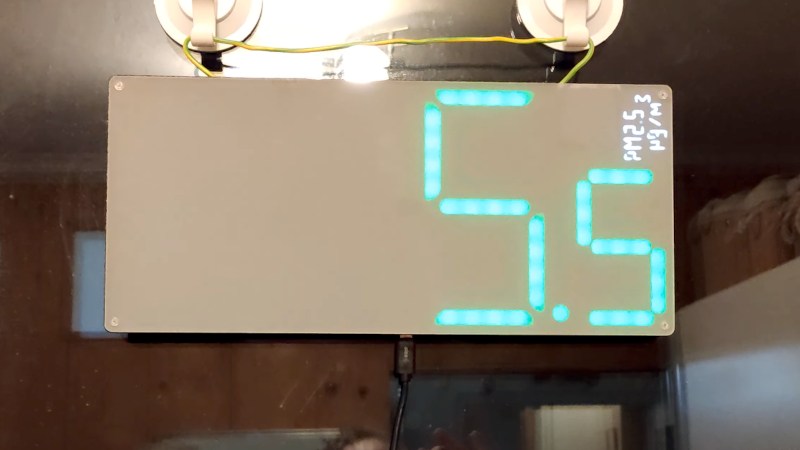
Airborne micro particles can be a significant health hazard in a workshop, and thus it’s important to maintain a high standard of ventilation. But monitoring their concentration is also important, and thus there exists a range of sensors to help keep you safe. [WeSpeakEnglish] has taken this idea to the MAX, with a PM2.5 sensor that drives a very large wall mounted display. You’ll never be uncertain what the level is now!
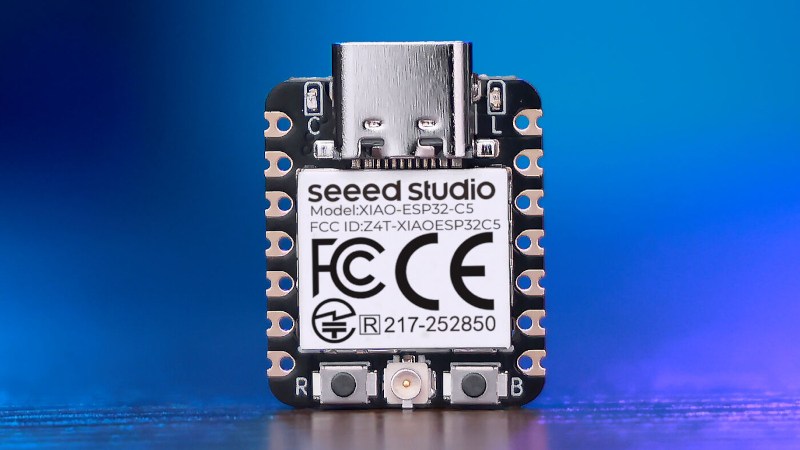
The standout feature of this thing is a huge addressable LED seven segment display PCB, upon the back of which sits a tiny Seeed Studio Xiao board to which the particle sensor is hooked up. The software displays the particle count, and handily changes the colour as the number creeps upwards. Meanwhile should you wish to log the readings, the USB exposes a serial port upon which they are placed.
We can see this is a useful project for anywhere that is likely to have a high particle count, but it’s worth noting also that a large 7-segment display with an ESP32 board attached could have plenty of other uses. Meanwhile this is a nicely finished air quality monitor, but it’s certainly not the first we’ve seen.
If we care to cast an eye over the history of ubiquitous personal computing as we know it today, we might immediately point at the original IBM PC. After all, for most of us our machines share backward compatibility in some form through multiple generations back to that original box from 1981.
But if we look at the things we use today and take for granted, from laser printers to graphics cards to the routers which power most of the Internet, they’re not from IBM at all. At the recent Vintage Computing Festival Berlin, [Michael Engel] delivered a talk naming a surprising progenitor for much of that technology, none other than Sun Microsystems.
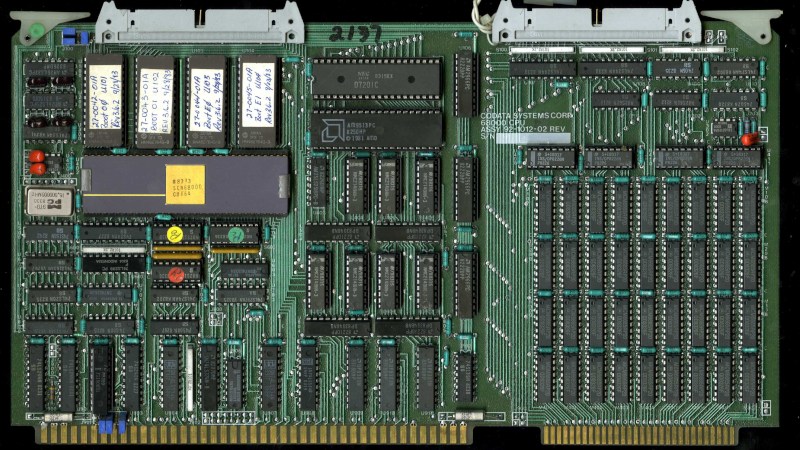
It all starts with [Andy Bechtolsheim], famously Sun’s co-founder, when at the end of the 1970s he was a postgraduate at Stanford University. Working on the Stanford University Network — SUN — project he designed a computer to be used as a workstation on the network. The processor of choice then was Motorola’s 68000, but it lacked the MMU that would be required to run UNIX. His design had an MMU implemented externally to the 68000, with a bank of SRAM serving as the page table. This design would form the CPU board of the first Sun workstation.
The story might end there, were it not that many other companies had the same requirement, and Sun could supply them a CPU board. Silicon Graphics, the distant ancestral progenitor of your GPU, was one of them, so the first SGI workstation also had the same CPU as the first Sun. It appeared in the early Imagen laser printers too, as well as commercial AppleTalk to Ethernet bridges. Perhaps the biggest surprise is that because the original Stanford board had also been used as a router, the software for that became part of Cisco’s first product.
The video is below the break, and it’s a fascinating watch.
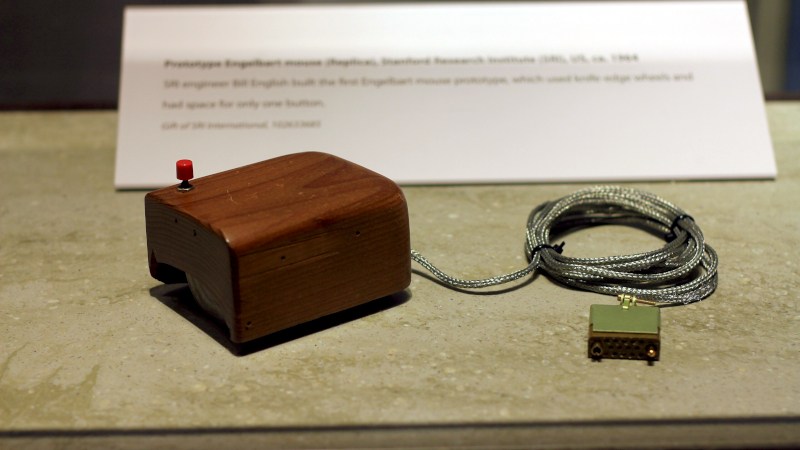
Many readers will be familiar with Douglas Englebart’s 1968 so-called “Mother of All Demos”, in which he described many of the devices and technologies we would be using two or three decades later. Among these was a primitive computer mouse, but while famous it was by no means the earliest pointing device. At the recent Vintage Computer Festival Berlin, [Dmitriy Kostiuk] delivered a fascinating lecture of the history of the pointing device.
It’s a long video that we’ve placed below, and it’s an exhaustive examination of the topic from the earliest examples to the 1990s when mice became commoditized. It’s a surprise to find that the first pointing device was a trackball built for a 1950s Canadian warship, with a surprisingly modern-looking optical encoder. Englebart’s 1966 wooden block with its pair of wheels and potentiometers had a less-well-known and much more stylish competitor in the same year from Telefunken.
We visit the various design iterations as the form of what we’d call a mouse today took shape. It’s unexpected to find that those Sun mice with the spotty mouse pad weren’t from Sun at all, they were from Mouse Systems. The first mice from Microsoft and Apple make an appearance, as do some awful designs for 8-bit computrs. Remembering those in particular perhaps it’s as well we didn’t have the cash to buy such a disappointing product for ourselves.
The video is long, but interesting. Give it a watch.
Header image, Douglas Englebart’s prototype, Michael Hicks, CC BY 2.0.
In the open source world we are used to software being compiled from source for our particular distro, so while in a few cases an ancient release may still be in use, it’s just going to run on the latest distro version. But in the Windows world it’s rare for software to come with the source, so you’re left with a binary that will only run if your Windows version has the right APIs for it. Since the more recent versions of Windows dropped 16-bit support a while back, that means there must be a hard date set on the earliest Windows GUI application that can still run today. [Enlyth] decided to investigate.
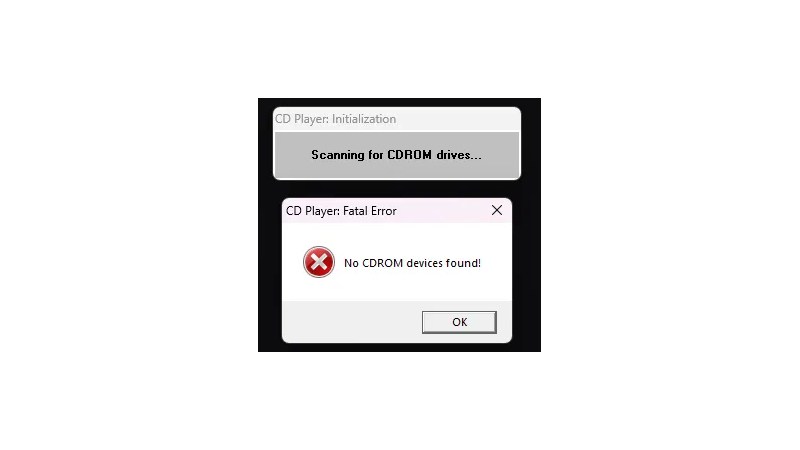
Given that the earliest API supported in WIndows 11 is the 32-bit version, the hunt led straight to either the first Windows NT release and ancestor of Windows 11, or the Win32s extension for WIndows 3.1. Thus a 1993 Win32S version of Freecell runs happily, but that want’s the end of the trail. Somewhere in the pre-release builds of Windows NT 3.1 would be the requisite binary, but there’s a snag. Early Windows NT 3.1 APIs were incompatible with later ones. This led through a lot of crashing binaries to a November 1992 version of the CD player app, that ran because it called a DLL which happens to still be present. The need for another DLL to emulate a CD drive speaks volumes about the progress of the PC world, back then they were the last word in storage but who’s got one now?
That’s the earliest official binary to run, but the story’s not quite over. Windows 11 may not have a VDM to run 16-bit apps, but there’s a WINE VDM for that. Behold, Reversi from Windows 1.01 in November 1985, in Windows 11. Your ancient software may yet be saved.
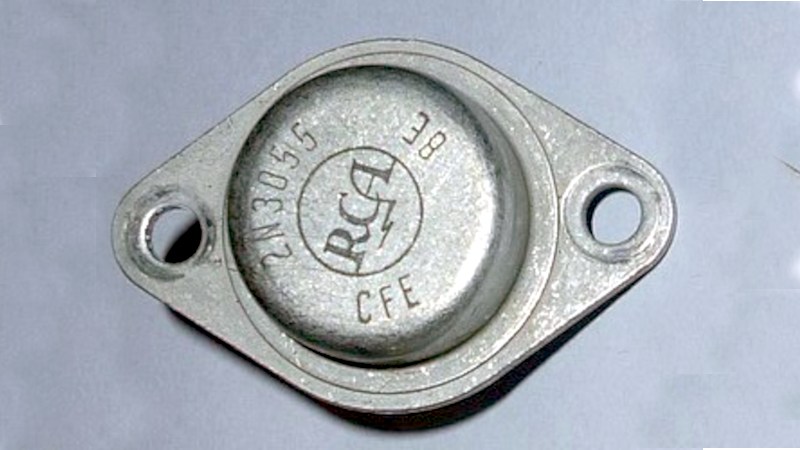
There are some devices which achieve electronic immortality, it’s likely that you have used a few of them yourself. The 555 timer of course, or the 741 op-amp. [ElectronicsNotes] is here with another candidate that might not have been on your mind as you read the previous sentences, and it’s a transistor. The 2N3055 is an NPN power transistor, no, THE NPN power transistor, that has found its way into an astounding array of devices over the last six decades or more.
For such a ubiquitous device one might imagine that there’s not much new to know, but the video delivers on that front. Here as well as probably for you the 3055 has always been an epitaxial device whose quirks you likely know well, but originally it was something different. It used the hometaxial construction process on its launch in the early 1960s, but in the mid 1970s it was replaced by a version with the same capabilities but using the epitaxial process. The consequent higher Ft required modifications to circuits using the device to stop unwanted oscillation.
Where this is being written there are several 2N3055s, in the by now rather old office audio amplifier, in a bench power supply, and probably elsewhere too. It’s been superseded in many ways and its TO3 case now feels antiquated, but it will probably never entirely go away. Meanwhile if you’d like to read about another iconic 1960s device that never went away, we have you covered.
Header: a really early example. Eule4404, CC BY-SA 4.0
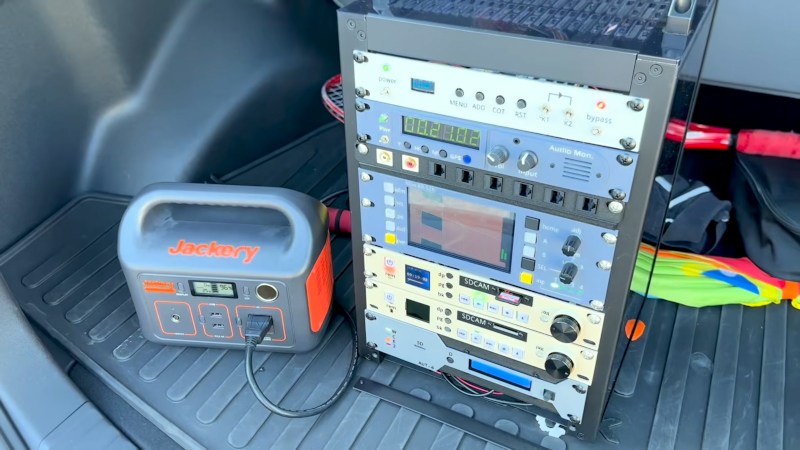
If you’re a collector of older TVs, you’re probably facing the problem in some form of having no transmissions to tune in to. With many sets you can use a SCART or other A/V input, but nothing beats using the thing as it was intended. [BorisDigital] had exactly this problem, and since he worked in a TV transmitter control room in the 1990s, he’s made a small TV station that looks and operates like the real thing.
It’s a 10 inch rack stuffed with goodies, each of which replicates the function of a piece of broadcast gear which would have cost a small fortune back in the day. At the top is a transmitter, a relatively inexpensive board from China. Below it a clock and audio monitor powered by a Pi Pico, then a vectorscope, waveform monitor, and monitor powered by a set of Pi 5s with USB video digitisers, a pair of SD card video record/play units — yet more Raspberry Pi — and at the bottom, an automatic scheduler powered by another fruity board from Cambridge. If you’re not into TV the construction may be worth a second look. Those neat looking rack front panels are 3D printed with different filaments for the lettering, and are both robust and stylish. We can already see how this could be used in our work.
We miss analogue TV, partly because it was a wonderfully intricate technology that, beautifully, just worked. it’s a few years now since we reported on the last gasp of analogue TV in the USA, about a decade after it was turned off where this is being written.
With the ESP32 series of microcontrollers having had hidden software-defined radio (SDR) facility revealed, we’re now moving on from the announcement into projects making use of the finding. [Twotoz] has one using an ESP32-C5, to receive and demodulate analog FM video.
You might think that video is something which has largely gone away in 2026, with TV transmissions having made the switch more than a decade ago, and home entertainment appliances having used HDMI for longer. But it’s still very popular in the world of drones however, where it exists as 5 GHz FM transmission. There’s no digital cliff-edge to lose your picture if you fly into somewhere with bad propagation of radio waves, and perhaps more importantly, it has an extremely low latency. This receiver uses a Seeed Studio Xiao ESP32-C5 board with a simple resistor-ladder DAC to produce the video. It has a simple button channel interface, and a serial link for more in-depth options.
It’s good to see these projects appear, especially as this one’s 5 GHz and shows those chips work too with the hack. We’d be interested to know whether the latency of the SDR affects its usability though. You may be interested to know this isn’t the first time we’ve seen an SDR do video.
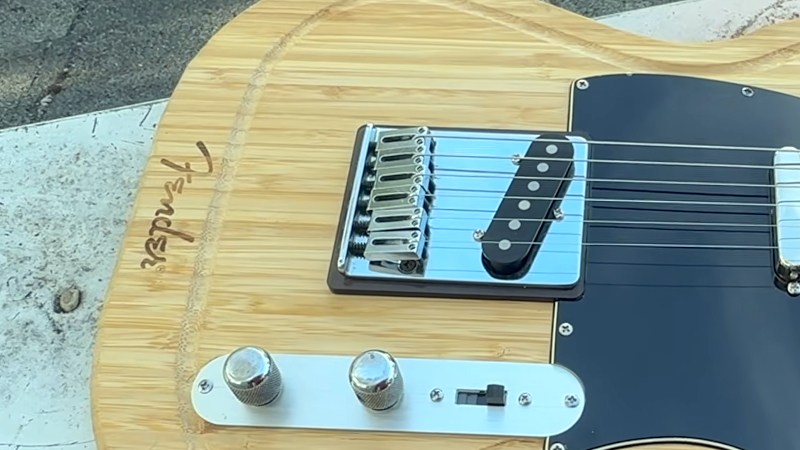
There’s a tendency among cherished brands to licence their name and logo onto all sorts of novelty items in order to make a quick buck. Joining this trend is the guitar maker Fender, who have lent their name to a chopping board in the shape of their famous Telecaster. The existence of such a product seems to have been a direct challenge to [Not A Luthier], who promptly bought one and turned it into a real guitar. It’s a genuine Fender, but is it a genuine Fender guitar? Not really, but it’s an entertaining build.
The chopping board isn’t made of great material, instead it’s a set of strips of wood, we’re guessing probably bamboo or rubberwood, glued together. It’s robust, but noticeably thinner than the guitar whose shape it takes, and with a not-great finish. The build is not too different from any other electric guitar build we’ve seen, with the main challenge being that the bridge and pickups need spacers underneath them to compensate for the reduced thickness of the wood.
The video is below the break and makes for a soothing watch as an in-depth guitar build, complete with a moment of drilling all the way through the board and fabricating a plug to hide the evidence. The final guitar seems to sound alright, but we’re not guitarists so maybe a more practiced ear should judge. The genuine Fender logo is still proudly on it so it’s a Fender of sorts, but just like with the chopping board, it’s best value is in novelty.
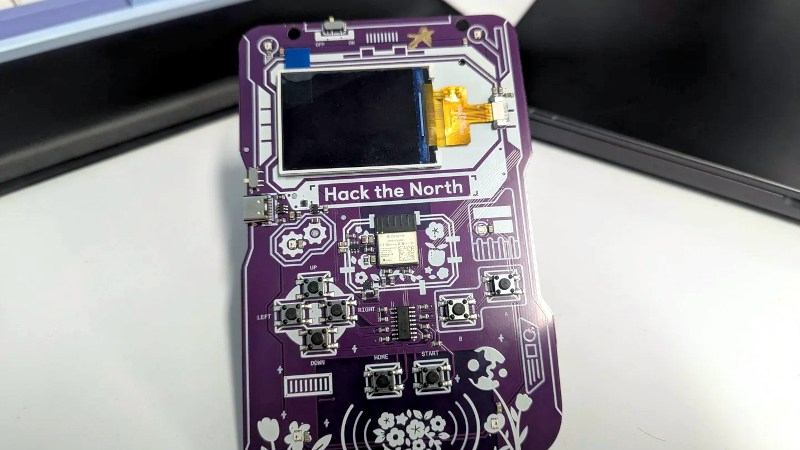
On the face of it, making an event badge should be an easy process. After all, most of us can hand-assemble a microcontroller, some buttons, a battery, and a screen. But anyone who has been involved in producing one will tell you, the difference between producing one or two, and making sure hundreds or even thousands appear on day one of the event fully working is enormous. [Nicholas Ficara] produced 1750 of his first badge for Canada’s Hack The North hackathon, and he’s shared the full story.
We’ve been involved with the gestation of more than one badge here at Hackaday, so we recognise some of his learning moments only too well. He approached it with a well-planned series of prototype and release candidate steps to catch the problems, which came in handy as there certainly were a few. Wrong footprints, misplaced components, power supply issues, and rotated parts were fixed, and eventually they were delivered in time. It’s good to see that they were well received and well used at the event.
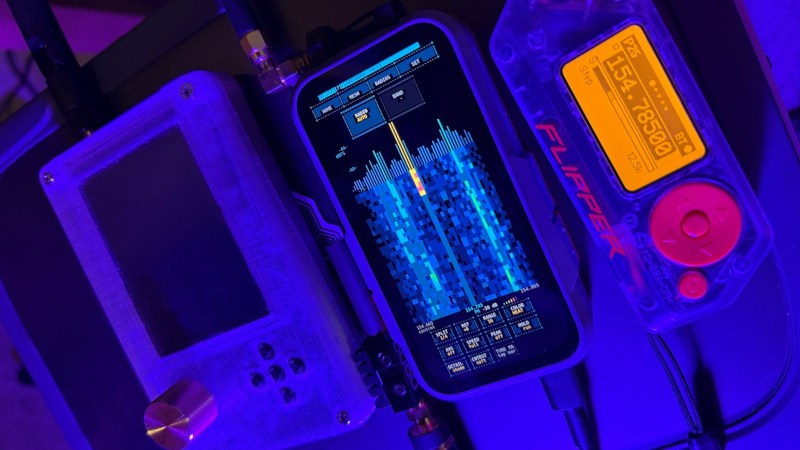
The news of the past couple of weeks has seen the ESP32 turned into an software-defined radio (SDR) thanks to a hidden baseband mode, an exciting development by anyone’s standards. It seems unexpected SDRs are like busses in that you wait for ages and two turn up at once, because hot on the heels of the ESP32 story is [Samson1te], revealing the SDR functionality hidden within the LR2021 LoRa chip. This one is especially interesting because as well as a 2.4 GHz radio, the chip sports a radio that works from 150 to 960 MHz.
We’re indebted to them for posting this in a comment on our receive converter post, as a complimentary project to the ESP32 one. It gives a 16-bit SDR with receive and transmit, however as with the ESP32 it’s early days and we hope great things lie ahead. There are comprehensive docs available, should you wish to enter the fray. Currently the main demo is P25 digital voice.
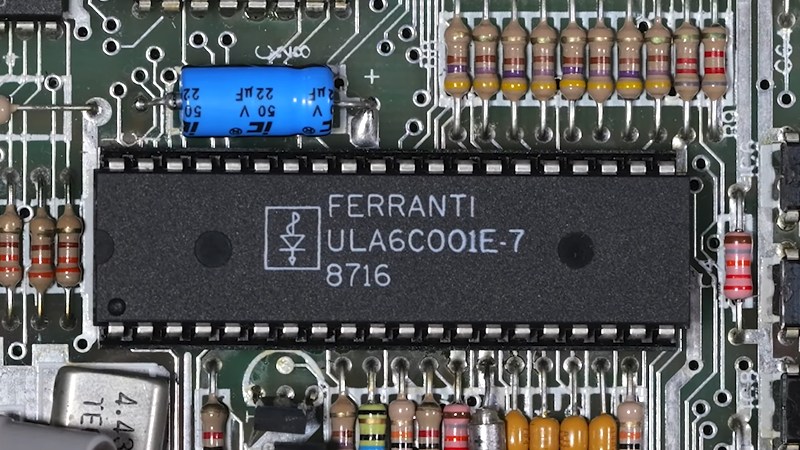
In the 8-bit home computer boom of the early 1980s, Sir Clive Sinclair’s machines were always among the cheapest on the market, often packing a surprising level of sophistication in their limited hardware. If there was one component that was key to their success it was the Ferranti ULA, or Uncommitted Logic Array, a clever way to make an ASIC from a chip containing a library of logic parts ready made. The Sinclair ULAs have been reverse engineered, but their full details have remained a mystery. Until now it seems, because here’s [Happy Little Diodes] with a treasure trove of original Ferranti design documents covering all the Sinclair parts.
The documents were picked up on eBay, and contain folders with printouts, engineering drawings, and hand written design notes. They cover the full range of Sinclair products of the era, including the ZX81 and Spectrum, the ZX printer, the Microdrive, the Spectrum Interface 1, and even the curious little flat screen TV. Oddly the IP is now held by the satellite broadcaster Sky as the holder of Amstrad’s portfolio, but fortunately Sky have recognised their historical importance and allowed their sharing with minimal changes. They’re all catalogued with download links in a Google spreadsheet, so dig in and see what you can find. Of particular interest are the ULAs that haven’t been reverse engineered yet, and the subtle differences between different versions of the same ULA as the engineers tried to fix bugs. The video is below the break.
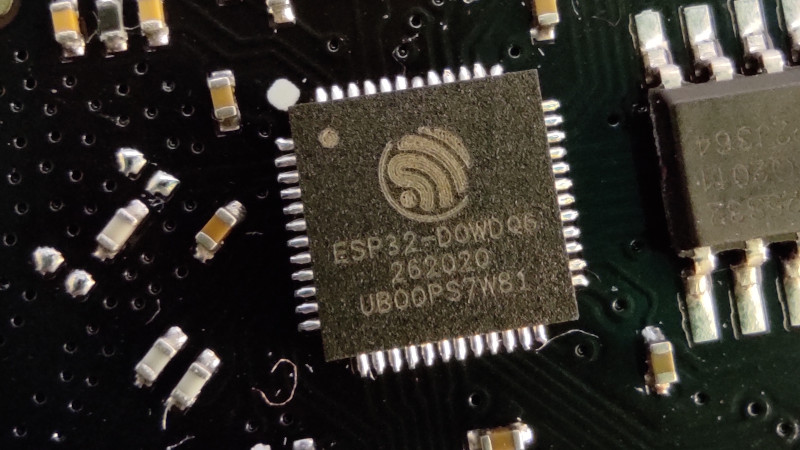
Perhaps the most exciting news of the past few weeks in the world of hardware hacking has been the unlocking of hidden SDR functionality in the Wi-Fi radios found on Espressif ESP32 microcontrollers. They can be used as both transmit and receive SDRs, and given that it’s early days for this hack we expect that great things are yet to come.
There’s one snag though, despite speculation that they might be dragged down to much lower frequencies, as far as we know they’re only proven to work around the Wi-Fi frequencies. Though the reality may be wider we’ll take that for a 2.4 GHz part as a 100 MHz slice from 2.4 GHz to 2.5 GHz. Plenty of possibilities there, and they might even work down to 1.8 GHz, but there would be so much more to do if it could work elsewhere in the spectrum. So it’s time to look at the converter, a tried and tested old way to make a radio work on a different frequency.
A Lesson From Analogue Receivers
TV tuner front end block diagram. Derived from Chetvorno (Own work) [CC0], via Wikimedia Commons.I hope most of you will be familiar with what happens when you mix two frequencies; the resulting spectrum contains both their sum, and their difference. This was the mechanism behind the tuning dial on your analogue radio or TV, the dial moved an oscillator, and a sensitive circuit tuned to a so-called intermediate frequency would filter out the difference frequency between the oscillator and the station you wanted. A few years ago we had a deep dive into the UHF hackers playground of an analogue TV tuner, where we examined this in depth.
A converter uses exactly this principle. The antenna frequency range is mixed with the output of a fixed oscillator whose frequency is chosen so that their difference represents the frequency band of your radio. THus tuning your radio tunes across the output of your mixer, which is the same as tuning across the antenna frequency range. For a numerical example, if the ESP32 receives from 2.4 GHz to 2.5 GHz, a mixer on its input with a 2 GHz local oscillator would allow the ESP32’s receiver to pick up the 400 MHz to 500 MHz band. In practice the circuit requires filters for both input and output to keep out-of-band stuff from going where it shouldn’t, but it really is that simple. Best of all, with appropriate handling of power and amplification, it works for transmitters too, and such a device is called a transverter.
Towards An Achievable Receive Converter
To make a practical converter then, we need an input filter, a mixer, an output filter, and a local oscillator. The filters are often off-the-shelf parts and needn’t be too expensive, the mixer can be as simple as a fast Schottlky diode, and the local oscillator could even in this case be another ESP32, they’re that cheap. You can add amplifiers if you want and what I am about to describe is a somewhat janky receive converter, but it can be made to work.
The Filter
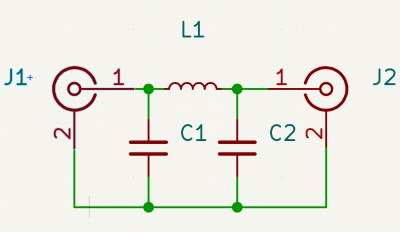
A very simple Pi network low pass filter
In most cases such a converter will be intended to receive signals lower than the ESSP32’s range, so let’s assume you’re looking somewhere from HF through to VHF. The input filter has to reject anything above your maximum input frequency and stop any stray local oscillator leakage to the antenna, which most of you will identify as a low-pass filter. These can be bought off the shelf for a price, but are easy enough to make for yourself.
The most common low pass filter is often referred to as a Pi network because its circuit superficially resembles a Greek letter Pi, and takes the form of an inductor in the signal path with a capacitor to ground either side of it. If you know your maths you can calculate the values for yourself, but if you don’t there are many online Pi network calculators to help you. Constructing a Pi network at these frequencies is straightforward enough.
For the output filter, you need something that rejects the local oscillator frequency as much as possible, and passes the ESP32 receive range. Here you’re in luck, because the Wi-Fi hardware industry needs exactly those filters, so they can be had from Mouser or Digi-Key for cheap. I’m not going to specify a particular part, but I’d like to point you at the TDK Wi-Fi filter range and invite you to pick one with the bandwidth you need.
The Local Oscillator
Your local oscillator for an ESP32 working at much lower frequencies is likely to be around or above 2 GHz. Back in the day you would have used a crystal oscillator and multiplier circuits, if you like you can buy an expensive PLL oscillator module, but your simplest and probably cheapest method is to use another ESP32, now that it can be used as an SDR transmitter. Program it to output a single carrier on your desired frequency, dial down the output level, and there you have it, a 2 GHz local oscillator for a dollar or two.
The Mixer
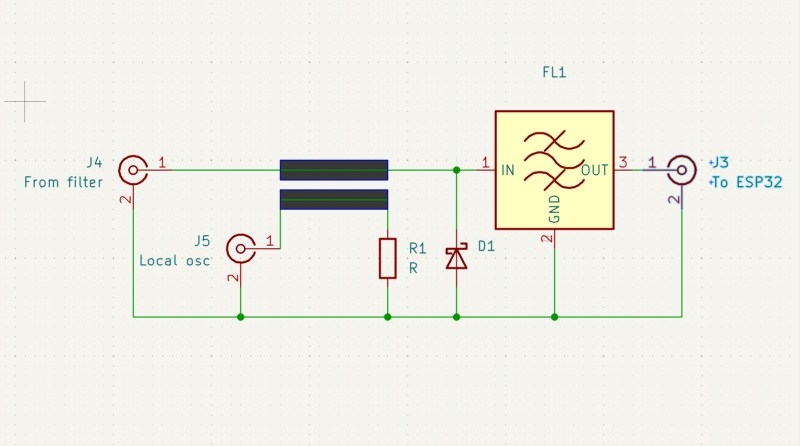
Yet again you can buy an off the shelf mixer as a module, though one for a 2.4 GHz output will be expensive. Happily there’s a simple circuit which can do the job, and it uses a diode as a non-linear element fed with both antenna and local oscillator signals. At these frequencies you are looking for a very fast small-signal Schottky diode with as low a capacitance as you can find, and happily such parts are available from multiple manufacturers at cent rather than dollar prices. The basic circuit is shown below, and as you can see it’s quite simple.
The circuit of a simple unbalanced diode mixer with a bandpass filter on its output.
In the circuit above the diode is your Schottky device, the input low pass filter isn’t shown, and the output filter is an off-the-shelf Wi-Fi bandpass filter. The two thick lines represent a stripline coupler, and they are simply two parallel PCB traces side by side over a groundplane. Their size should ideally be calculated to present the right impedance, often 50 ohms which is also the value of R1, but in practice the jankiest solutions can work here. With an ESP32 as a local oscillator I would hazard a guess that laying the trace on the PCB under the module’s antenna with the power turned down would be enough. I may earn the scorn of some of my peers, but I have a long history of RF bodging and I think it might just work.
Making It Transmit
The same technique as above works for shifting the ESP32’s transmit output down to the desired frequency, but there’s a catch. Even the modest output from an ESP32 can be enough to damage or overload parts designed for receivers, so you have two choices. Pick transmit-appropriate parts, or dial back the power to a low level, and amplify it at the lower frequency.
By Now, You Should Be Able To Bodge A Converter
The information above isn’t a ready-to-go design for a receive converter to get your ESP32 listening to lower frequencies, but it should give you all the signposts you need to get there. People have built converters for the RTL-SDR for ages now, so you could pilfer ideas there too. If you build a downconverter, for transmit or receive or both, let us know!
At a superconference about a decade ago there was a talk about RF construction techniques which will save you a lot of pain, and with luck such a simple circuit should be within your grasp. Good luck.
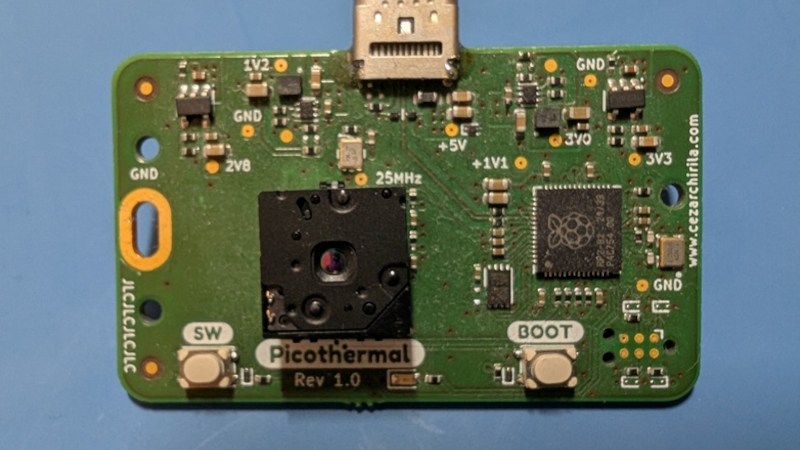
When creating a peripheral for a mobile phone, an obvious path is to create a companion app with which to talk to it. But as we all know today’s app is tomorrow’s non-functional abandonware, so to give his infrared camera a long life, [Cezar Chirila] made it talk WebUSB to a browser instead.
The hardware is conventional enough, a FLIR sensor talking to an RP2040. There’s very little in the way of supporting circuitry save for a power supply regulator, as so much that might be on a standalone project is already present in the USB host device. Running the thing is as simple as going to a landing page in a browser that supports WebUSB, and using the camera. The whole lot is in a GitHub repository, if you’re interested.
We’re big fans of WebUSB, for exactly the reason it’s been used here. While there are a few browser features which have been deprecated over the years — who remembers the BLINK and MARQUEE HTML tags — it’s likely WebUSB won’t be one of them. This could only be topped by having the microcontroller share a small USB disk with the landing page as an HTML file.
The feed of a Hackaday writer brings many surprises, some rubbish, and the occasional diamond which of course we bring to you. Sometimes a page catches the eye that’s not a Hackaday piece per se, but makes for interesting reading. Today there was an example which provides a catalyst for a story if not being one itself.
It kicks off with the old favourite, “Delve“. Oh dear, that one’s in the List Hackaday corpus quite a bit. Earliest appearance: 2016. Then landscape terms, in which it’s easy to recognise “Sphere” again. Oops. 2016 again. How about “Testament“? Well, that one’s a 2017 word. “Pivotal“? Four years of the Raspberry Pi, back in 2016. How about “Showcase“? Yup, it’s there, in 2019. Meanwhile “Foster“, goes back to 2017.
Next up are “Leverage” and “Utilise“. Safe ground here. Editors have what are referred to a “Pet Peeves”, language tics that annoy them on sight, and those two regrettable pieces of business-speak never evade this red pencil. The word you are looking for is “Use”.
The page goes on to name a load more words as tells, and we could continue to dissect them for your amusement, but we think you get the message from long-pre-LLM Hackaday. It gets more interesting when it talks about paragraph structure, and there are the things we’d recognise as tells. Staccato paragraphs, one-line stacks for impact, and repeated sentence start words. Whether AI slop is sounding like a business influencer’s Linkedin posts, or the other way round, is anybody’s guess. And yes, Hackaday does use em-dashes — get over it.
It’s amusing to poke mild fun at your past writing style, but if there’s a serious point in there it’s that spotting slop is never as easy as having a check-box list of tells when in fact you’re just looking at professional-grade command of the language. After all, given that Hackaday is in its corpus, the LLM can even make a passable effort at writing like one of us. Perhaps the key lies in that article, when the fake Hackaday piece became obvious because it lacked the inference of the real one.
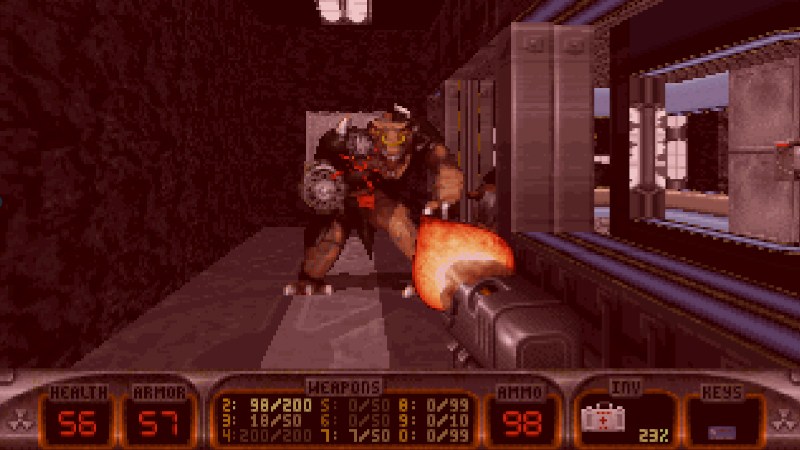
When id Software released DOOM back in 1993 it helped define the genre, but it was hardly the only hit first-person shooter of that decade. There was also 3D Realms’ 1996 Duke Nukem 3D, a game which added some humor to the genre. Here’s [PicoPlus-devel], with pico-duke3D. It’s Duke Nukem 3D, on an RP2350.
Before reaching the conclusion that this might be obvious and easy, the three years between the two releases saw quite significant movements in the world of gaming PCs. DOOM’s minimum spec in 1993 was a 386 and 4 MB of memory, and would have been playable on a basic VGA card in an ISA slot. By contrast three years later Duke Nukem 3D required at least a 486DX2 and 8 MB, which would inevitably have had VESA local bus or PCI graphics. It’s a Quake competitor rather than a DOOM competitor, thus the power required to run it has stepped up a notch or two.
The RP2350 then is up to the job, and runs the game on a DVI equipped Pico clone. It can be controlled via either SNES or USB controllers given the right hardware, making it the perfect one-game console. The shareware game works, as does the full version if you own a copy. Having been around in the ’90s then, we’re curious. Could it be made to run Shadow Warrior as well? You no mess with Lo Wang!
The Sony PlayStation Portable, better known as the PSP, is now over two decades old. In its day it was an impressive handheld gaming machine, not least because of the inclusion of wireless networking and a web browser.
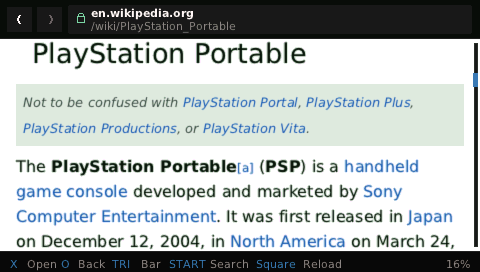
We tried the browser back then, and it’s fair to say the experience was a little underwhelming. We’re thus mightily impressed at [Steve Janovitz], who has produced Tilefinch — a modern web browser for the PSP.
Depending on the model, the PSP came with a 333 MHz MIPS32 processor, and for all but the first model, 64 MB of RAM. Powerful back in 2004,but leagues behind something that would run any modern web browser. So how’s he doing it? The answer seems to be by careful choice of software components and use of the PSP’s built-in capabilities for jobs such as video decoding. The browser engine is Lexbor for example, while JavaScript is handled by QuickJS.
We don’t have a PSP to hand so we can’t tell how it would render Hackaday or even how fast it is, but we’re suitably impressed by this project. For PSP enthusiasts it’s a game-changing browser, but for us it also points the way towards web browsing being a possibility for other platforms. As the distinction between a high-end microcontroller and a low-end SoC becomes blurred, we’re starting to see exciting new hardware emerging with devices such as Espressif’s ESP32-P4 that, on paper at least, might be capable of running this browser. Exciting times in limited hardware web browsing might be upon us.
The Commodore 1541 is famously the floppy drive for the Commodore 64 series of 8-bit computers, and can be found with relative ease. Not so well known is its 1551 sibling — the drive made for the Commodore 16 and Plus/4 machines.
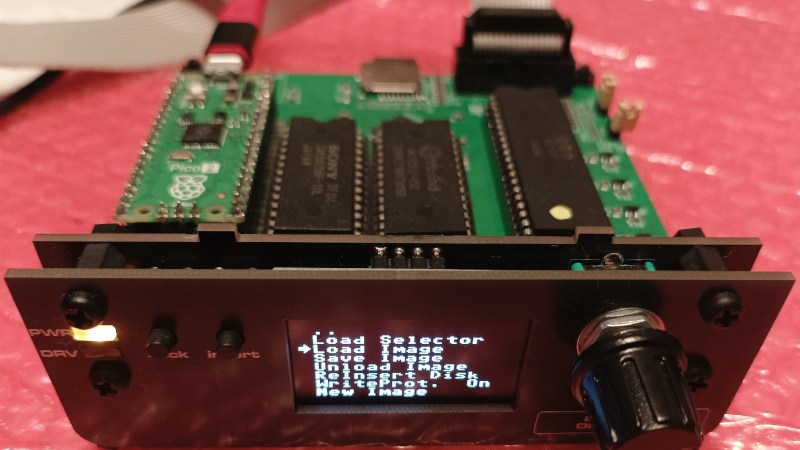
They’re particularly rare in 2026, so [Maciej Witkowiak] has made an emulator. But it’s not just modern silicon emulating the whole thing. Instead it’s the same 6510 and ROM you might have found on the original, talking to a Pi Pico emulating the drive hardware. It’s a gloriously over the top solution to the problem of emulating a disk drive, the reason being that it started life as a daughter board plugged into an original drive mainboard.
Complementing the Pico is a CPLD for glue logic, and an OLED for selecting disk images. The Pico even generates the clock and IRQ timing for the venerable 8-bit part. The ROM is 64k in size, room enough for both the original firmware and enhanced community versions. The whole thing can be found in a GitHub repository, should you wish to have a go yourself.
Long time Hackaday readers will know [Bil Herd] as one of our contributors. If you’re interested in the back story to the series of computers that included the Commodore 16, his book makes for interesting reading.
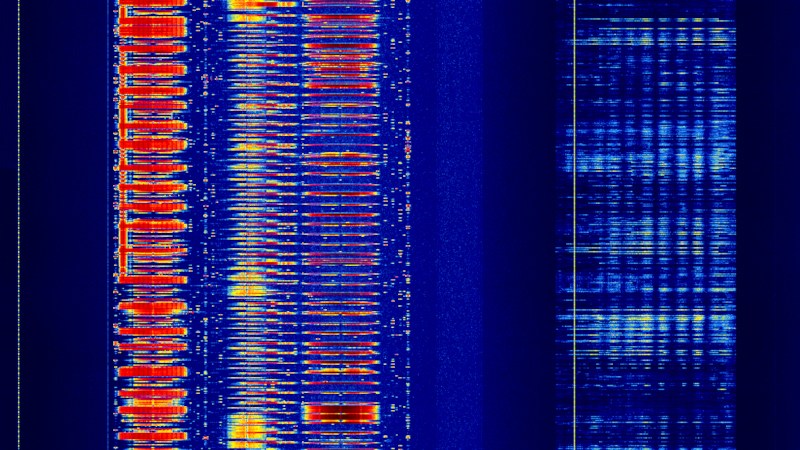
Perhaps the most famous of software-defined radios is the RTL-SDR, which is very cheap because it’s a digital TV receiver that’s been pressed into service delivering raw I and Q data streams. But the RTL-SDR is certainly not the only chipset that can do this, and today we have a new one.
The radio works on the 2.4, 5, and 6 GHz bands, depending upon which version of the device — and thus which radio chip — you have. These may not be entirely useful to many who use lower bands, and given that a similar hack has been found for ESP32 radios on 2.4 GHz it’s likely a demand will arise for a receive up-converter. Until then, you can look at WiFi packets in a waterfall view to your heart’s content.
Since more and more devices now incorporate a radio, we hope that more such undocumented raw streaming modes will be found, and that we’ll see some other new SDRs. Something to look forward to.
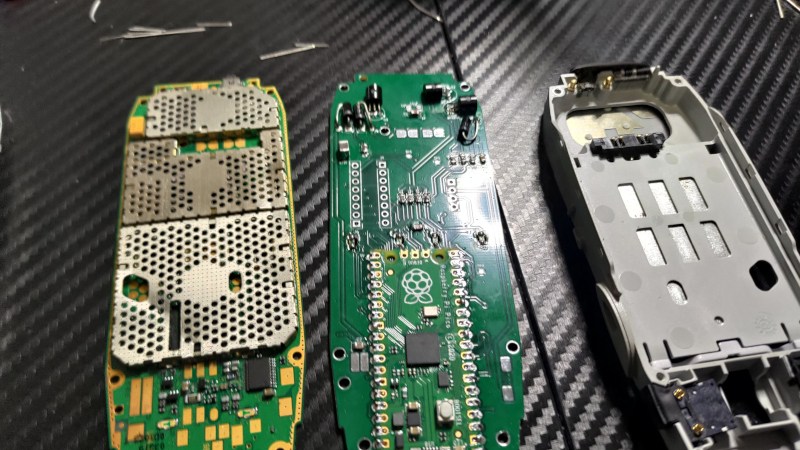
Game jams are a fun competition in which the aim is to write a game under a particular theme while under a time constraint, usually a weekend. [Hoani] entered one where the aim was to write a game within the constraints of the Nokia 3310’s user interface: a 94 by 48 pixel grey LCD, a buzzer, and a keypad. His entry was Trick Shot II, a ball-bouncing game running on his game engine, which is cool enough, but making a custom PCB for a Nokia 3310 case to run it on? Next level.
Look away if you don’t like restomods, for a real Nokia 3310 is gutted to take this board. On it is a Pi Pico, the Nokia LCD, which has outlasted the original phone as a part by decades, and a Nokia keypad layout. The first prototype was not a perfect fit because it had a 1.6mm board rather than 1mm.
The engine meanwhile is written in Go, and has both graphics and sound APIs. Considering that the Pico’s power exceeds whatever CPU the phone had by many orders of magnitude, we’d imagine it has no problems with such a tiny screen.
We like the attention to detail of this project, and that such a limited interface can still deliver gaming fun. Meanwhile, if you would prefer to use a 3310 as a phone, you can charge it the 21st-century way.
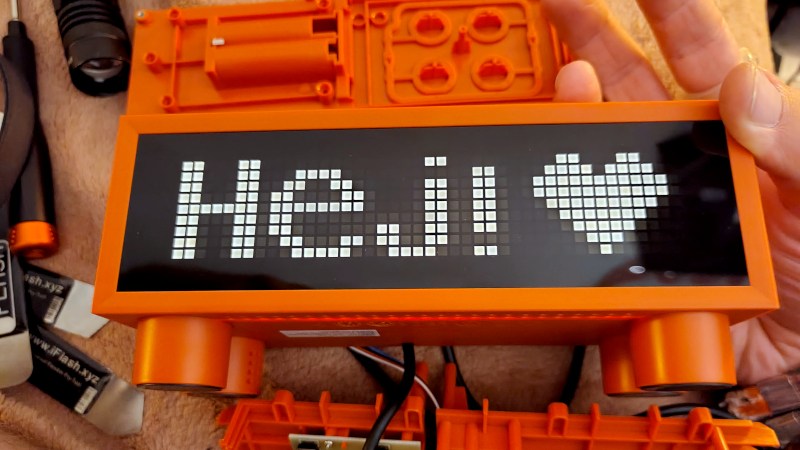
The IKEA Kortlinje is a digital clock that costs around 20 dollars, featuring a hygrometer and thermometer. It’s another cheap appliance, you might think, were it not that the display is a white LED matrix. Best of all, with three VK1640 LED controllers, it has hacking potential. You’re in at the ground floor if you hack one of these, but so far we’ve seen a post from the RevSpace hackerspace in the Netherlands, and the first glimmerings of a firmware on GitHub from [VIPnytt].
We have one on the bench here, and cracking it open we find the three LED drivers, an unidentified microcontroller with a 32.768 kHz watch crystal, and a mystery chip nobody’s yet identified that may either be some kind of I2C multiplexer or have something to do with those sensors. Neither has any markings, so no help there. The hackability comes in the relative ease of desoldering the microcontroller and substituting your own. In which case with access to I2C and the LED drivers, you can make it do your bidding.
This thing is part of a rich tradition of hacking IKEA products. Perhaps one of our favorites is the use of bowls from the Swedish furniture giant to make a telescope mount.

 Login
Login
![TV tuner front end block diagram. Derived from Chetvorno (Own work) [CC0], via Wikimedia Commons](https://hackaday.com/wp-content/uploads/2016/07/rf-front-end.jpg)