It is a classic Hackaday situation. You have an Egret GT E-scooter. It has a screen that shows the usual dash stats, but that led to an annoyance. You could accidentally enter firmware update mode and, from there, enter operational mode without the security PIN. [Ben] couldn’t let that stand, so he reverse-engineered the protocol and rewrote the firmware in Rust. As he put it, “… because I have to break… everything I own…” We get it.
The mobile app was useful for some basic info, since sniffing Bluetooth is fairly easy and analyzing mobile code is, more or less, straightforward. Analysis revealed some data that doesn’t show on the display and that several things are sent back to home base tagged with the scooter’s unique ID — another reason to gut the existing firmware.
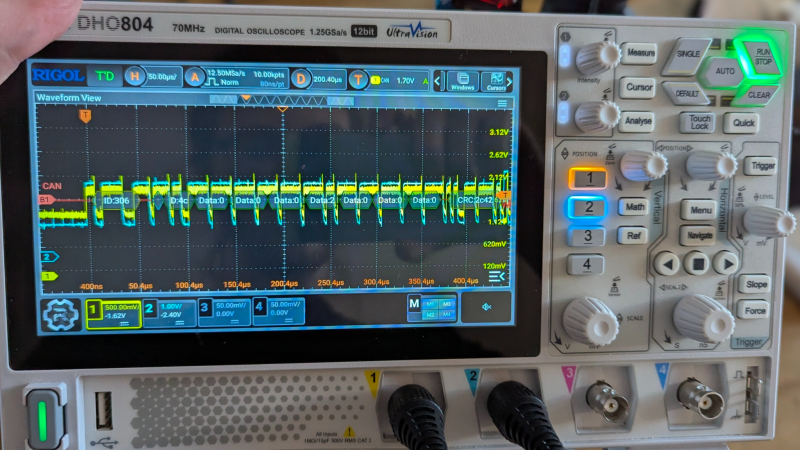
Internally, the scooter uses the CAN Bus, so out came the oscilloscope and a homebrew CAN decoder. Surprisingly, the CAN bus is accessible on the USB-C port’s data pins. Officially, the port is only for charging phones, so you have to wonder what your phone makes of the alien signals on the data pins when it is charging.
Firmware updates actually come in at least three flavors: display, input panel, and main controller. Reverse engineering the firmware update process was crucial to installing the new firmware.
If you own a similar scooter, this post is a goldmine. If you don’t, it is still a very detailed breakdown of a reverse-engineering workflow, and you can apply many of the tools and techniques to your next project.
Of course, another option is to just keep the scooter and replace the brains. If you want to learn more about reverse engineering, there are literally dozens of Hackaday posts to help you get started.
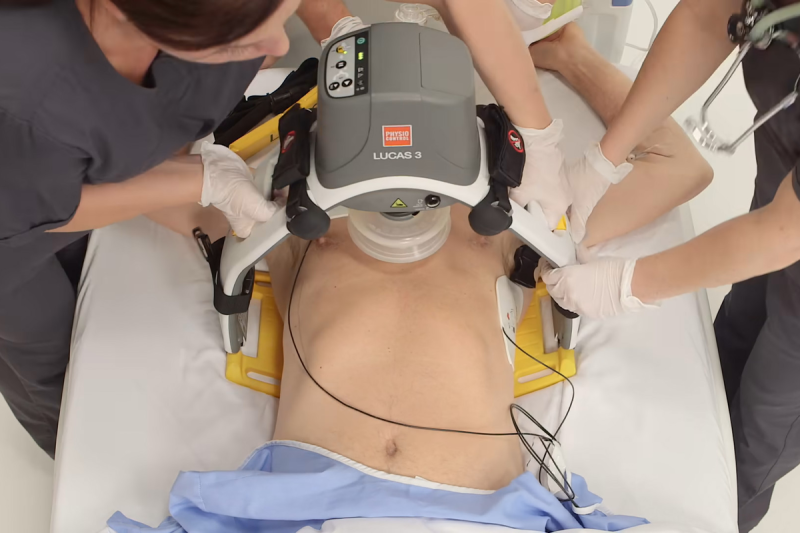
Usually in Tech In Plain Sight, we talk about technology you probably see every day, even if you don’t notice it. But we hope you don’t get to see one of the latest crop of medical robots, such as the LUCAS chest compression system. If you watch the popular TV series “The Pitt”, though, you may have caught a glimpse of one of these medical marvels. They aren’t fiction. They are very real devices.
Calling them robots might be stretching the definition a little. They don’t roam the halls looking for patients. But once attached to someone in cardiac arrest, they can take over one of the most important — and physically demanding — parts of CPR: chest compressions.
Keep The Blood Moving
When someone’s heart stops pumping blood, time is critical. CPR doesn’t normally restart the heart on its own. Instead, chest compressions produce enough blood flow to keep oxygen reaching the brain and heart while rescuers work on the underlying problem and, when appropriate, use a defibrillator.
Doing that well is harder than it looks on television. Current American Heart Association guidelines call for adult chest compressions 100 to 120 times per minute, at least 5 cm deep but generally no deeper than 6 cm, while allowing the chest to recoil fully between compressions. Interruptions should be kept to a minimum.
That’s hard physical work. In fact, studies show compression depth begins to fall after only about 90 to 120 seconds, which is one reason CPR teams normally swap compressors every two minutes. But a robot doesn’t get tired.
Meet LUCAS
LUCAS stands for Lund University Cardiopulmonary Assist System, reflecting the device’s origins in Lund, Sweden. Early versions entered clinical use around 2002-2003 and were pneumatically powered. Later versions replaced the compressed-gas system with an electric motor and battery.
The current LUCAS 3 looks something like a small drill press straddling the patient as you can see in the video below. A backplate goes beneath the torso, and a frame locks onto it. An electrically driven piston presses a suction-cup-like pad against the sternum. Internally, the motor drives a belt and ball screw that moves the piston up and down.
Factory settings are around 102 compressions per minute and roughly 53 mm compression depth for a typical adult, although parameters can be configured.
Beyond tirelessness, another obvious advantage is that LUCAS doesn’t need hands. Medics can deal with ventilation, drugs, defibrillation, IV access, and the dozens of other things occurring during a cardiac arrest. More importantly, the device can keep compressing while a patient is being carried, wheeled through corridors, or transported in an ambulance — situations where doing good manual CPR is awkward and sometimes dangerous to the practitioner.
So Does It Save More People?
You might reasonably expect perfectly regular machine CPR to beat a tired human. Large randomized trials haven’t demonstrated that, however. The 4,471-patient PARAMEDIC trial found 30-day survival of 6.3% with LUCAS versus 6.8% with manual CPR, not a statistically significant difference. The 2,589-patient LINC trial similarly found essentially identical four-hour survival — 23.6% versus 23.7% — and no significant improvement in longer-term neurological outcomes.
That doesn’t make the machines useless. It says something slightly different: high-quality mechanical CPR hasn’t proven superior to high-quality manual CPR as a routine replacement. The International Liaison Committee on Resuscitation currently recommends against routine mechanical CPR, while specifically noting that it can be a reasonable alternative when sustained manual compressions are impractical or would endanger the practitioner.
One issue is setup. Installing the machine adds a time penalty: compressions must stop briefly while the backplate and mechanism are positioned. Good training is essential to keep that interruption short. Another problem is that some studies show potential links to higher rates of internal chest injuries, such as bleeding around the lungs. There have also been rare device malfunctions or power failures that can compromise care.
Not The Only Game In Town
LUCAS isn’t alone. ZOLL’s AutoPulse takes a very different mechanical approach. Instead of a piston pushing on one spot, a motor tightens a broad load-distributing band around the patient’s chest.
There’s also the German corpuls cpr, which returns to the piston idea but uses a cantilevered single-arm mechanism. That leaves much of the chest unobstructed and makes the system useful during procedures such as cardiac catheterization.
So perhaps these aren’t quite the autonomous robot doctors science fiction promised us. But when your heart has stopped, and a machine is tirelessly pumping your chest a hundred times a minute while the medical team works around it, you probably won’t complain. We hope you don’t have to find out.
We’ve seen DIY devices, though certifying medical devices for actual use isn’t for the faint of heart. Robots can also help train humans to do better CPR.
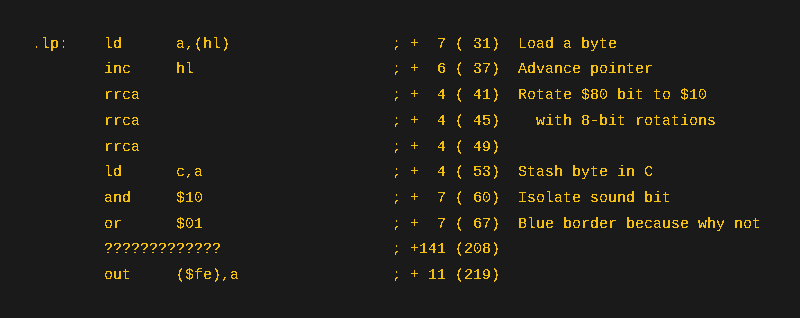
[Michael] has a thing for playing audio over beepers using a single bit. He’s done it with the Apple ][ and the IBM PC. This time he turns to the ZX Spectrum. He didn’t get quite as good a result — at least not yet — but he did manage to get some things working. He documents everything, so even though this wasn’t a successful week, there’s sometimes more to learn from reasonable failures than from unreasonable successes.
Of course, the whole thing relies on pulse code or pulse width modulation. Of the two techniques, PWM should produce better results. However, he wasn’t able to get PWM working yet. Some other target computers drive the buzzer through a dedicated hardware timer. However, with the Spectrum, it is all software.
Getting multichannel music was another algorithm, and that makes for an interesting read, too. We are sure next week there will be more, and if you are interested in this sort of thing, going back to some previous weeks will show you a lot more, too.
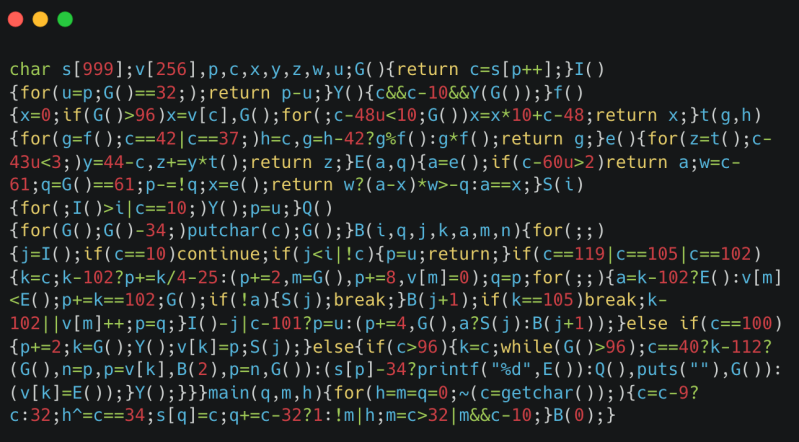
Like many of us, [Austin] finds writing code satisfying — especially if it is challenging. His latest challenge: shoehorn something that looks like Python into 512 bytes. Ok, that didn’t work out, but would you believe 1024 bytes of source code?
The goal was to properly execute a fizzbuzz program using a decidedly Python-like syntax. Since he is only interpreting Python, some things were simplified. In addition, he tried hard to minimize things like whitespace and variable names. Still, there were other things to do, and he borrowed from tips for code golfing.
The resulting code is essentially illegible, but it handles integer variables and literals, assignment, arithmetic, many control structures, functions, and even print. Not bad for 1 K.
Despite being tiny, the parser does a lot, but it does cut corners. No bytecode, no syntax tree, and no error handling. Variables have to be a single lowercase letter. So, ok, it isn’t really Python. But it is something.
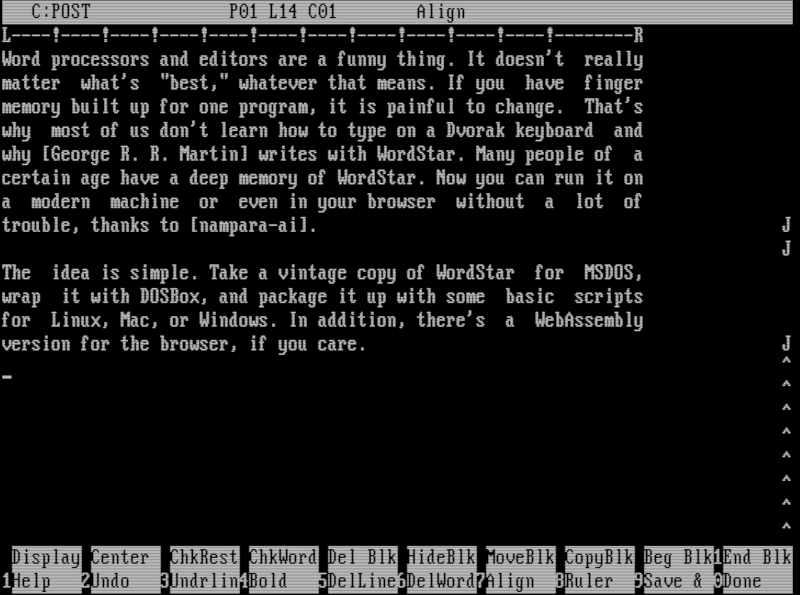
Word processors and editors are a funny thing. It doesn’t really matter what’s “best,” whatever that means. If you have finger memory built up for one program, it’s painful to change. That’s why most of us don’t learn how to type on a Dvorak keyboard and why [George R. R. Martin] writes with WordStar. Many people of a certain age have a deep memory of WordStar. Now you can run it on a modern machine or even in your browser without a lot of trouble, thanks to [nampara-ai].
The idea is simple. Take a vintage copy of WordStar for MSDOS, wrap it with DOSBox, and package it up with some basic scripts for Linux, Mac, or Windows. In addition, there’s a WebAssembly version for the browser if you’re into that sort of thing.
On Linux, the wordstar.sh file grabs the current directory and sends it to launch.sh. This script makes sure everything is ready, builds a DOSBox config file from a template, and launches everything. The only problem is that it doesn’t correctly resolve symlinks if you want a link on your path. Luckily, that’s easy to fix:
#!/usr/bin/env bash
 # Run me to launch WordStar 4.0 on Linux:  ./wordstar.sh
DIR="$(realpath "$0")"
DIR="$(dirname $DIR)"
cd "$DIR"
DIR="$(pwd)"

#DIR="$(cd "$(realpath "$(dirname "$0"))" && pwd)"
"$DIR/native/lib/launch.sh"
Practical? No. Irreplaceable? Not really. You could run WordStar under RunCPM or set up DOSBox yourself. You can even find a sort of modern version to run, if you prefer. But for just a quick way to get it running easily, it is hard to beat. If you want to play with the web version, it is easy to navigate to the web subdirectory and run Python:
python3 -m http.server 5309
Then you can point your browser to http://localhost:5309, and you are in business. Or, get a flavor for it from [TigerClawTV]’s walk-through video below.
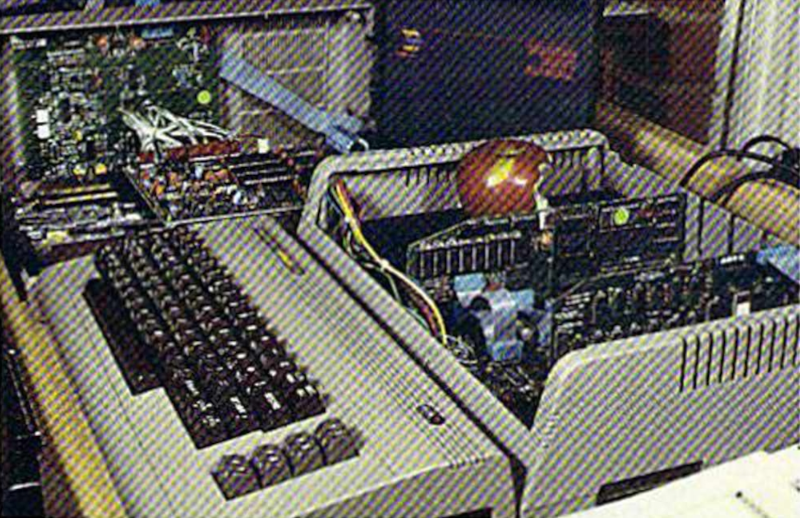
The computer business in 1984 was a bizarre mix of hobby-level companies, a few small companies that had made it big, and a lot of big companies starting to take notice of personal computers. Plenty of money followed, which led to strange products and even stranger ads. [Such Bad Tech Ads] reveals a very bad ad from that time for a product we have barely heard of: the Spartan. The Spartan’s job was to convert your Commodore 64 so it could run Apple ][ software. The ad campaign had, inexplicably, a mime. We think. Or maybe a clown. Hard to say.
On the face of it, the Spartan might not be a bad idea. In 1984, there was plenty of Apple software. Well, relatively, anyway. But a Commodore computer was far cheaper. Other conversion kits like the Intel Inboard/386 managed to find some success in the market later. The problem, outside of strange ads, was one of timing.
If the product was available in 1984, it might have worked out better for the Canadian company, Mimic, behind it. Instead, it was about two years before an actual piece of hardware would show up in anyone’s hands. By that time, there was a ton of software for the Commodore 64. Not to mention that even when Mimic announced the Spartan, Apple had discontinued the Apple ][+ computer.
Why use a mime to promote a product that turns your Commodore 64 into a keyboard and monitor? We have no idea. But he was in all the ads and even on the product box. Strange.
We’ve seen the Spartan before, naturally. Being late usually has bad consequences. Ask FedEx.
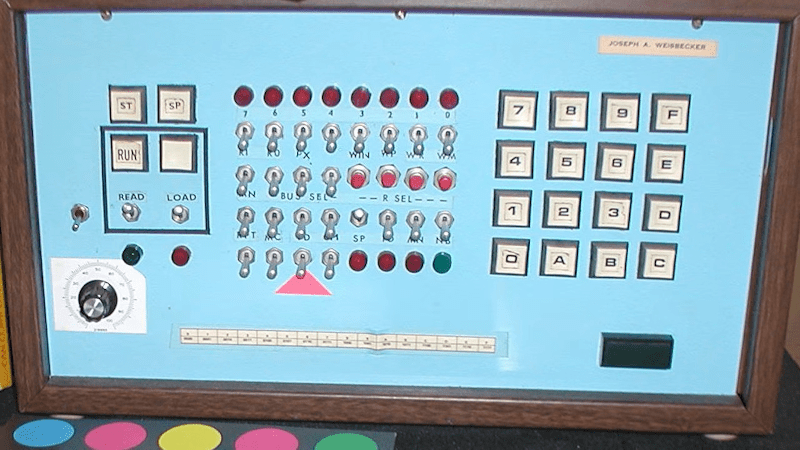
If you were interested in computers in the early 1970s, you struggled to get time on real computers since owning your own was all but impossible. In the middle of the decade, though, you could get a few computers: the Mark VIII, the Altair, the Apple I, and several others. Those were still pretty expensive, though. But in late 1976, an article in Popular Electronics said you could build a “powerful, expandable” computer for $80. The article in question was by [Joseph Weisbecker], who, unknown to most of us at the time, was actually the RCA employee behind the CPU — an RCA 1802. [Tech Time Traveler] takes a close look at the spunky little computer’s history in the video you can see below.
The 1802 was actually the second generation of the CPU, but the first that was all-in-one chip. [Weisbecker] started building the CPU as a personal project. He’d been a hacker even in high school, building relay-based tic-tac-toe games, among other things.
The first incarnation in his lab was “Fred,” with 100 TTL chips, and his idea was to have the computer be at least partially used as a video game — an interesting point, with Pong being very popular at the time.
The video covers a lot of history, but from a hacker’s point of view, the CPU was both amazing and limited. In a day when the 8080 and Z80 were kings, the 1802 had built-in DMA. This allowed a cheap companion video display that simply read bytes from memory and pushed them out to a TV.
Another neat feature was that the device had 16-bit registers and, even more interesting, 16 of them. On the one hand, any register could be, for example, the program counter or a memory index register. But on the other hand, there was no direct stack for doing calls and returns. The idea was that you’d use different registers for different subroutines, which was fine and efficient for very simple programs but not for the general case. One thing all 1802 programmers knew about was SCRT, the “standard call return technique” routines in the 1802 manual. But, as you might expect, this made calls and returns expensive.
There’s more that you’ll see in the video. People still build 1802-based computers and, of course, there are plenty of simulators, including ours. One thing you’ll notice is that the instruction set is very regular. Even if you didn’t know, you might guess that one guy designed the architecture.
I’m an experienced programmer, and I’ve worked in many different languages. Sometimes being a programmer is a two-edged sword. You want to accomplish something, and you can do it easily — but it can be a lot of work to do it right. Maybe more work than you want to do.
Normally, I’ll kick out a few lines of script for something I want and be done, accepting that it isn’t production-hardened. This time, however, I decided to try an AI tool to see whether they could do the work I was too lazy to do myself. While I’ve played with chatbots, I wanted to try one of the dedicated coding agents, in this case, Codex. Outside of asking ChatGPT to write a simple function or find the cause of an error message, I haven’t done much coding with AI assistance, so I was interested to see what these agents brought to the table.
A Radio Problem
The problem was simple: I wanted an easy way to put buttons on my Linux desktop that launched Internet radio stations. Sure, I could open a player and paste in a long URL, but I’m far too lazy to remember all those URLs.
I searched for a way to make Shortwave — an Internet radio player — open a URL from the command line. Apparently, you can’t. Google Gemini suggested writing a script that launches cvlc, the command-line VLC player, with the URL as an argument.
That’s easy, so I did it. Of course, then I had to find the stream URLs for all my favorite stations. It turns out that Radio Browser maintains an extensive database of stations. I considered scraping the site or using its API, but honestly, the little script was becoming too much of a project.
Besides, I was already struggling to manage the media player’s lifetime. I didn’t want a new station playing on top of one that was already running, and I wanted a command to stop playback, so the script had already grown larger than I first imagined.
My first version used a temporary file containing the player’s process ID so a future script execution could kill the old player. That usually works, but it isn’t very robust, and I knew it. But how much work did I really want to do here? I decided I had done enough and turned the rest over to Codex, OpenAI’s coding assistant.
What Can Codex Do?
Codex is more than a chatbot that produces code snippets. With access to a project, and limited access to your machine, it can inspect existing files, edit them, run commands and tests, examine Git history, and manage commits and remotes. OpenAI describes Codex workflows as including coding, testing, analysis, code review, and repository automation.
The important distinction is that Codex works on the actual project. Instead of copying code out of a chat window, I could say, “Have a look at this shell script,” and it examined the script in place. It also noticed that I already had an uncommitted modification and avoided overwriting it. It also understands version control, and that turns out to be one of its really nice features.
Fixing Problems
My first request was:
Have a look at this shell script. I know it needs a trap. Is there a better way to keep it from accidentally killing something with a stale playradio.tmp?
Codex pointed out that a trap was not the only solution. The launcher exits immediately after starting VLC, so it is not around later to receive SIGCLD or clean up after the player. Sure, it could run something to wait around, but there was a cleaner way to get the job done.
It initially suggested verifying that the saved PID still belonged to cvlc. Then it caught a subtler problem in its own proposal: if Linux reused the PID for a different cvlc process, the name check could still kill the wrong player. This is probably very rare, but when it does happen, it will be a mysterious, hard-to-reproduce bug.
The final solution records both the PID and Linux’s process start-time token:
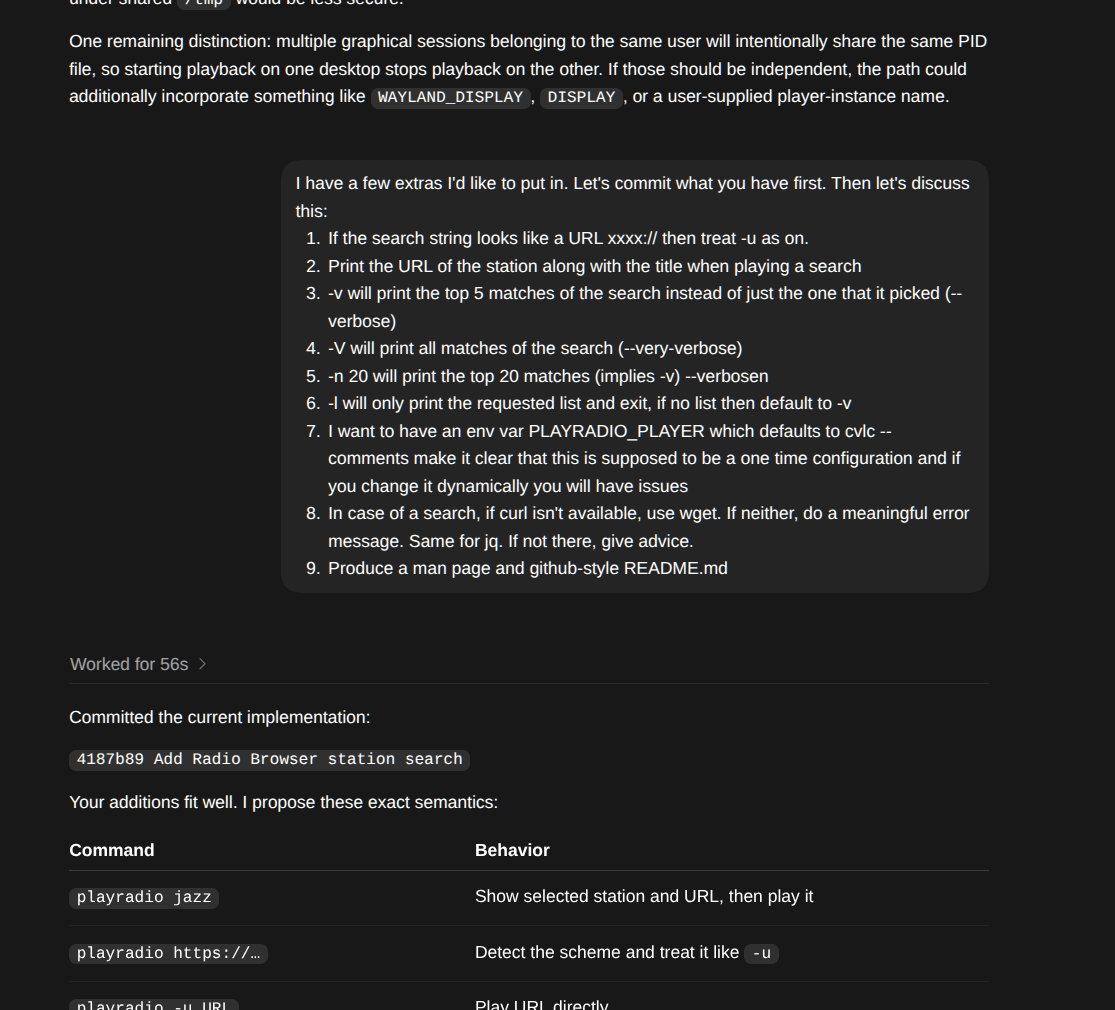
Part of a Codex session. Entire transcripts are on GitHub.
Before sending a signal, the script confirms that both still match. It also uses a private per-user runtime directory, serializes concurrent start and stop operations with flock, sends SIGTERM first, waits for a graceful shutdown, and rechecks the process identity before falling back to SIGKILL. That is considerably more thought than I wanted to put into a desktop radio button. Overkill? Maybe, but it is robust.
Another pleasant surprise was that Codex built a suite of tests to ensure that everything worked as it should. It runs these tests when it makes changes. So it doesn’t just create code. It creates code, executes it with test cases, and fixes any issues it discovers.
Searching the Database — and More
Once the process handling was safe, I asked:
Radio Browser allows you to search via API for radio stations. How hard would it be to make $1 a search string and take the best match, while allowing -u for a URL instead?
Codex checked the current API documentation, found that curl and jq were already installed, and implemented the search. It hides broken stations, orders matches by votes, selects the top result, and reports the selection back to Radio Browser’s click counter. I told it I wanted specific command-line options over several iterations. The program can play a URL, search the database for a station, or even just query the database. It can also give you a list and let you pick. (See the README.md for the entire interface.)
RadioBrowser is human-readable, but also provides the same data via API.
I did make a few requests. For example, if you pass a URI, the program should figure it out and skip the database search. I also wanted the player to be configurable through a PLAYRADIO_PLAYER environment variable. I asked it to fall back on wget if curl wasn’t installed. Missing dependencies should produce useful installation advice rather than mysterious failures. I also asked it to produce a GitHub-style README and a traditional Unix man page.
Human Guidance Still Matters
There were a few places where human intervention improved the result. For example, the PLAYRADIO_PLAYER configuration and its explanatory comment originally appeared near the bottom of the script. That works, but it is inconvenient for someone who wanted to edit the file. I asked Codex to move it near the top.
Another example was the first version of --pick. I had specifically suggested Bash’s select command, so Codex printed the formatted list and then let select print a second numbered list. It worked, but the duplication was distracting and, as far as Codex was concerned, it was what I asked for.
I pointed the duplication out. Codex replaced select with a simple numeric read, keeping the detailed table and adding only one extra row:
1 Jazz One
2 Jazz Two
3 Cancel
Station number:
This is a good example of how I think these tools work best. The AI handles the implementation, edge cases, tests, and documentation, while the human provides design input and flags anything awkward or that doesn’t fit the intended experience.
Does It Scale?
I’m not an expert at using these kinds of tools, but I think this worked very well. I generally asked for what I wanted and then made technical observations about the results.
I also tried this with a script, originally from [Petar Marinov], that I’ve used and modified for years to replace the cd command (see GitHub). I didn’t tell it what to do. I just let it look at the code. It correctly determined what it was supposed to do and made solid suggestions for making it more robust. It suggested features and even a major improvement to make it work not just with cd but with anything that changes pwd, like pushd. Of course, I couldn’t resist getting a man page and a README for free.
One feature I asked the tool to create was a simple bookmark system. It proposed and created a way to create and maintain a bash associative array that it persisted in a configuration file. That worked, but I knew it would be better, on many levels, to keep the bookmarks as proper symlinks. When I pointed this out, the AI did get it, saying:
That has several nice consequences:
changes from cdmark are instantly visible in every shell; no reload or synchronization issue
ls -l ~/.config/cdfunc/bookmarks is already a crude cdmark list
bookmarks can be created or removed manually with ordinary Unix tools
Syncthing/git/backup tools handle them naturally
no parsing, quoting, escaping, or rewriting a bookmarks file
no associative-array initialization at shell startup
broken bookmarks are naturally represented as broken symlinks
I think that’s substantially cleaner.
It also noted that this makes shell completion very simple, which I had not thought about. However, its implementation broke normal shell completion for the commands. It fixed that after I pointed it out. Well, actually, it took two tries to work out all the bugs. This is another case where human guidance is critical.
For a more advanced project, I forked a simple editor, kilo, and added a few Emacs commands. I asked Codex to review it. It found a number of bad edge cases, some in the original code, and fixed them. I then asked it to suggest Emacs-like features it could easily do. We added a ton! (see GitHub). It was impressive how well it analyzed and understood the code. I had done similar modifications to the code a few weeks earlier and, I have to admit, Codex understood the original code base much faster than I had.
Again, though, human guidance is necessary. Emacs uses an Esc prefix for some commands. You can also hold down the Alt key to get the same result. So pressing Alt+W in a terminal sends an Esc character and a W.
Initially, Codex wrote code to detect an Esc, wait a short time for a command, and then, if nothing came, treat it as a bare escape. It even understood that this would be a problem and mentioned it. Alt+W would work, but there was no way for a human to press Esc and then W in the time allotted. I prompted:
Yes I see that in the program. Would it be possible to have it wait indefinitely for ESC UNLESS a caller set some flag. So when other parts of the editor (search/save/etc.) are prompting for input they would set that flag (or call a separate entry point) and, at that point, ESC=>ESC. Any other time ESC is treated as a prefix (and perhaps ESC ESC gets sent as an escape just as a — ahem — escape hatch.
That fixed the problem. It is hard to remember that while Codex seems smart, it doesn’t have human judgment or human-level problem-solving skills. You have to supply that. Sure, it found problems in its own code. It found problems in my code. It devised solutions. But you still have to make sure those solutions make sense and sometimes nudge it — at least — in the right direction.
If you are interested, each of the GitHub repos (playradio, cdfunc, and kilo) has a session directory that contains transcripts of the AI chats that produced the final versions of the code. Admittedly, none of these started from a totally blank slate, but working on an existing code base is certainly a realistic test.
The Git Assistant
One feature I particularly liked was Codex’s ability to manage Git. I didn’t even try the GitHub plugin for Codex, which would probably be even better. I asked it to commit the current version before starting a new feature, which gave me a clean checkpoint. Later I said:
Commit please. I’m going to add a remote GitHub repo. Can you set this as origin and push it after the commit?
Codex committed the changes, added the remote, pushed the branch, configured upstream tracking, and verified that the working tree was clean. The entire evolution is visible in the repository’s history — from process-safety changes, to Radio Browser search, to configuration and documentation, to the interactive station picker.
You can see the final project and follow each commit in the repositories along with transcripts of the AI sessions. Having things in version control is especially useful with a tool like Codex. You can easily see what has changed and roll back if you like.
Wrap Up
The original script solved my immediate problem in a handful of lines. The finished utility solves the same problem safely, handles failures, searches a public database, supports different players, has good documentation, and leaves a traceable Git history. One important note. Codex and other agents have a limited context window, so you won’t get the same results trying to work with extremely large code bases unless you pay for a larger model. But for these tasks, normal consumer Codex worked well.
Could I have written all of that myself? Certainly. Would I have bothered to go this far? Probably not for what is basically a one-off desktop hack.
That may be the most useful role for a coding agent: They don’t always enable you to do something you couldn’t otherwise do. But they make it cheap enough in time and attention span to do all the boring and defensive coding and testing that you know you should do, but so often don’t. Codex didn’t replace me. It just augmented my patience.
If you used a scientific calculator in the 1970s or 1980s, there was a fair chance that it worked differently from almost every calculator you see today. Instead of typing:
2 + 3 =
you entered:
2 ENTER 3 +
There wasn’t even an equals key. Hewlett-Packard made this system — Reverse Polish Notation, or RPN — practically synonymous with serious scientific calculators until other players like TI and Casio got serious. Once you got used to it, ordinary algebraic calculators could feel annoyingly clumsy.
Today, RPN calculators look like a nearly extinct species. HP left the calculator market, licensing the HP calculator line to Moravia Consulting. Old HP-15Cs, 16Cs, 32Ss, 42Ss, and 48s have become collectibles. But RPN isn’t dead. You can still buy new hardware, build your own, or turn almost any computer or phone into a very capable RPN machine. There are reasons some of us still want to.
But Why Polish?
The name goes back to Polish logician [Jan Łukasiewicz], who devised a notation in which operators precede their operands. Instead of writing:
A + B
you can write:
+ A B
The big advantage is that parentheses aren’t required. The structure of the expression tells you exactly what operates on what. Reverse Polish notation simply puts the operator at the other end:
A B +
[Łukasiewicz] wasn’t designing calculators, of course, but the same idea turned out to be extremely convenient for computers and calculators. Your software doesn’t have to remember what operation is in progress. Each operator is ready to go and can simply work on the operands that you’ve already read.
RPN isn’t exactly the way people calculate with pencil and paper, and it certainly wasn’t derived from the slide rule, but there is a similarity in the way you work. With a slide rule, you generally establish some value, operate on it, and continue from the result. When doing a long-hand calculation, you often calculate a subexpression, write down the answer, and use that answer in the next step. You will probably start with the inner parenthesis and work outward, just like someone with an RPN calculator does. RPN formalizes that process with a stack.
Suppose you want:
(3 + 4) × (5 + 6)
On a conventional calculator, you either need parentheses, or you have to calculate one result and remember it. On an RPN calculator:
3 ENTER

4 +

5 ENTER

6 +

×
The first + leaves 7 on the stack. The second leaves 11 above it. The multiply consumes both and leaves 77.
Notice what’s missing: parentheses, an equals key, and any need to tell the calculator about precedence. This isn’t much of a win for a five-key calculation. It becomes more apparent with something like computing the value of a bunch of parallel resistors:
R=1/(1/R1+1/R2+1/R3…)
An RPN user can calculate each reciprocal, add it to the running result on the stack, and finally take the reciprocal. Intermediate answers stay in the calculator naturally instead of being stuffed into memory registers or enclosed in increasingly impressive collections of parentheses.
Is RPN better? Calculator users have been arguing about that for half a century. But once RPN gets wired into your fingers, it can be surprisingly hard to give up.
RPN Before HP
Although RPN and HP are nearly inseparable in popular memory, HP didn’t invent the RPN calculator. That distinction generally goes to the Friden EC-130, introduced in 1964. It was a 44-pound transistorized desktop calculator costing $2,150, and its CRT actually displayed all four levels of its RPN stack at once. More than 18,000 were eventually made. You can even simulate it in Verilog, if you like.
HP entered the business in 1968 with the HP 9100A, a programmable desktop scientific calculator. It weighed about 40 pounds and sold for $4,900, but it provided logarithms, trigonometry, hyperbolic functions, coordinate conversion, programming, and RPN operation. HP famously called it a calculator rather than a computer partly because customers could often buy calculators without getting corporate computer departments involved.
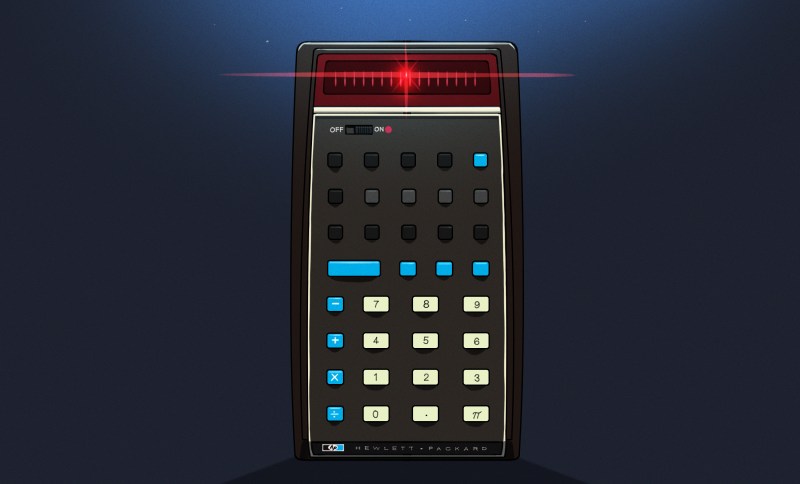
Then came the machine that changed everything: 1972’s HP-35, the first HP pocket scientific calculator. From there, RPN became a defining characteristic of HP calculators for decades.
There were financial calculators, programmer’s calculators, scientific calculators, graphing calculators, and eventually the RPL machines such as the HP-28 and HP-48, which generalized the stack idea into an entire programming environment.
Eventually, though, algebraic entry won the mass market. Even HP began producing machines with algebraic modes, and some later calculators let you choose either system.
So did RPN die out? Are there any RPN machines left in 2026? Quite a few, as it turns out. The real question is do you want a calculator that pretends, in some way, to be your favorite old-fashioned RPN calculator, or do you want a more modern device that happens to use (or, at least, is able to use) RPN?
RPN You Can Still Hold In Your Hand
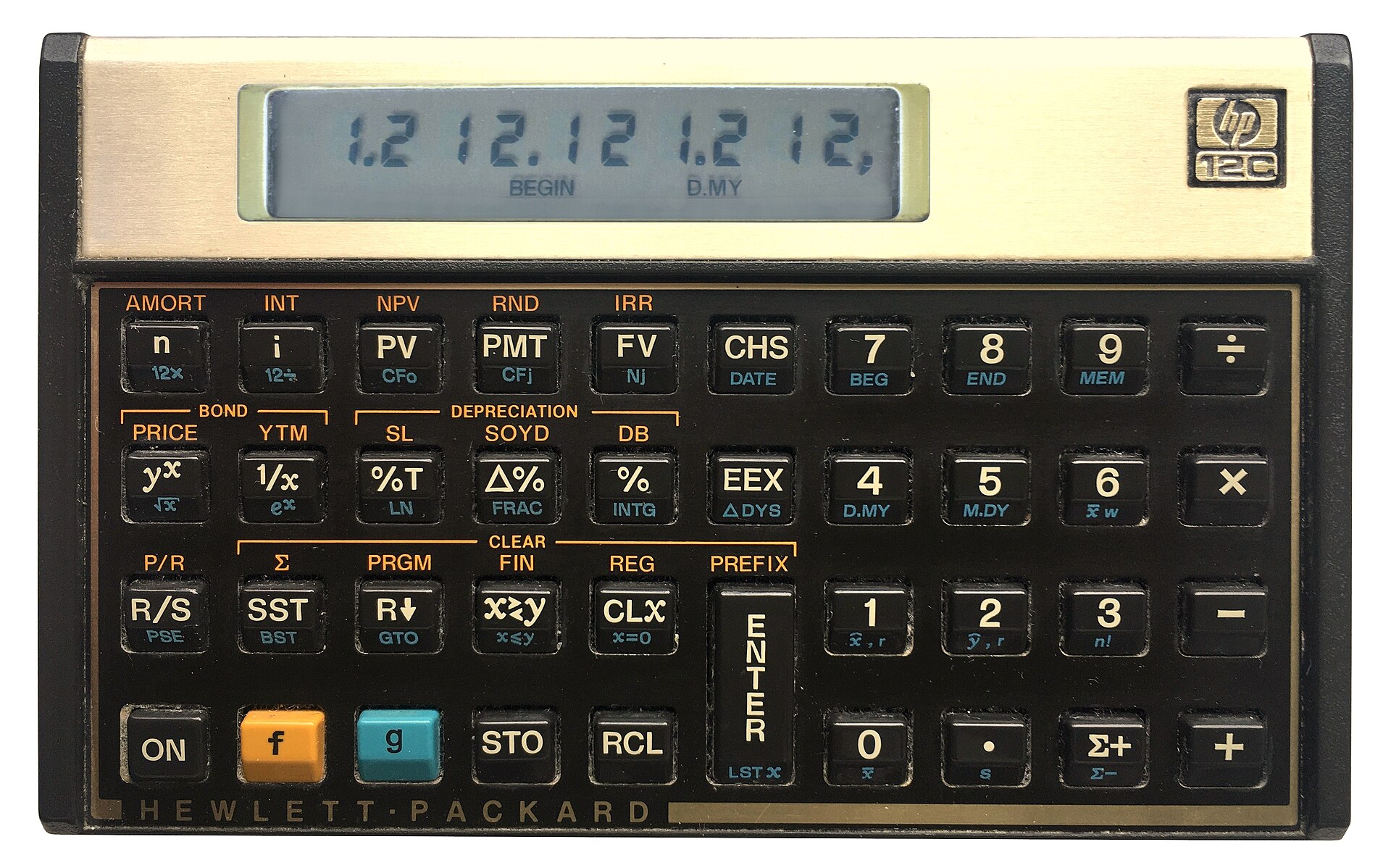
You can still get an HP12C (public domain).
The strange survivor is the HP-12C. Introduced in 1981 as a financial calculator, it remains available new more than four decades later. Depending on the retailer, expect something around $50 to $70. The 12C Platinum, which can operate in either RPN or algebraic mode, is also still available for roughly $80 to $110.
Then there is the HP Prime G2, generally around $150 to $170. The Prime is a graphing calculator with CAS, programming, symbolic mathematics, touch screen, and textbook-style input — but buried among all of that is an RPN entry mode. It isn’t an old-fashioned HP RPN calculator, but it certainly qualifies.
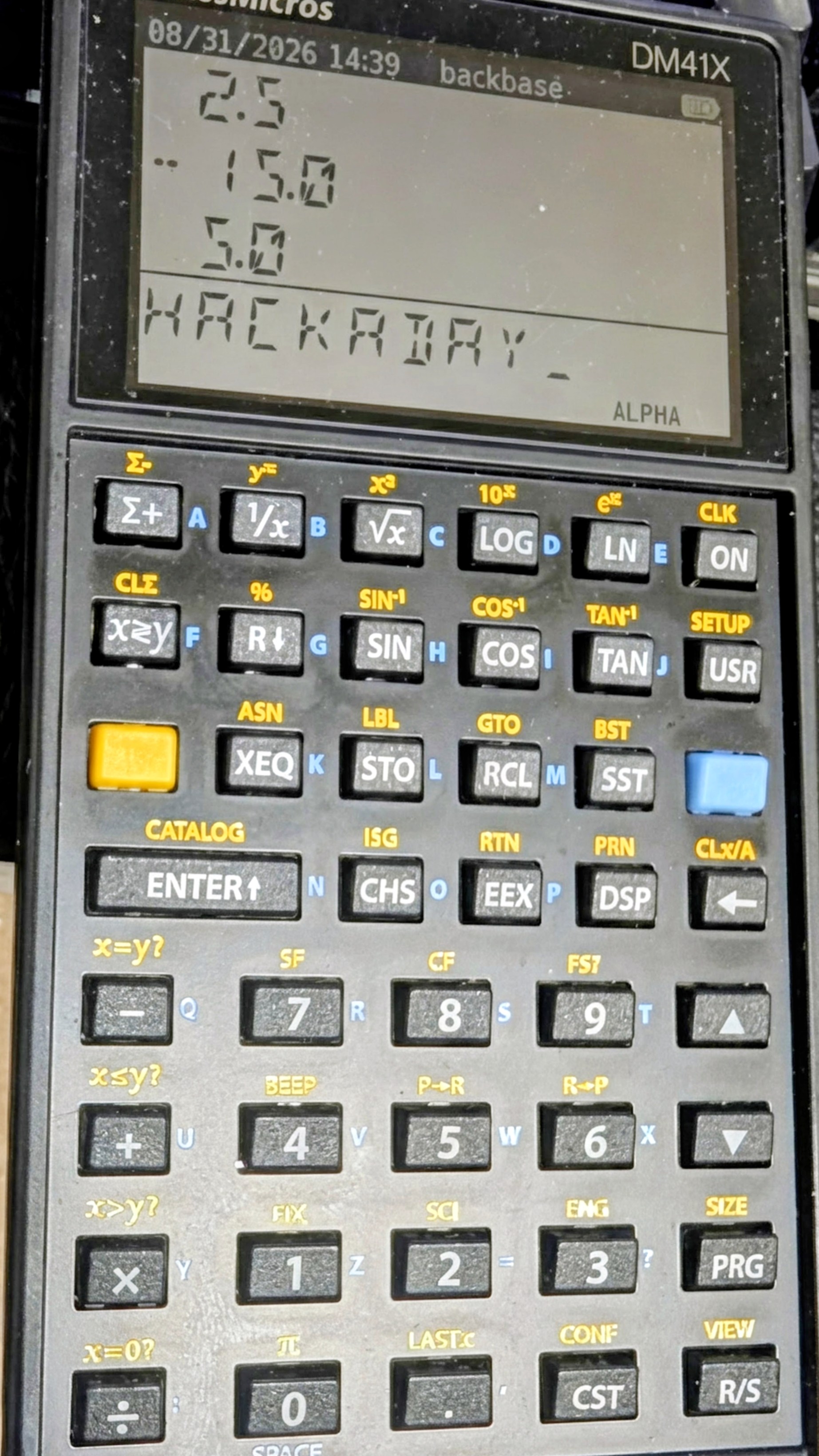
The real center of new RPN hardware today, however, is SwissMicros. SwissMicros started by producing modern implementations of classic HP designs and has since moved well beyond simple reproduction. Its current machines include the DM15L, modeled after the HP-15C; the DM16L programmer’s calculator; DM41L, DM41C, and DM41X machines inspired by the HP-41 family; and the DM32, which occupies roughly the territory once covered by the HP-32SII.
The SwissMicros answer to the HP41C (thanks [Julian]).At the high end is the DM42n, a modern descendant of the HP-42S idea. It has a 400×240 display, USB-C, programmable operation, matrices, complex numbers, equation solving, numerical integration, and 34-digit decimal arithmetic. It currently sells for a bit more than $300.
Perhaps more interesting is the R47, at about the same price. Instead of recreating a particular HP calculator, it grew out of the WP34S/WP43 community projects and attempts to be a modern enthusiast’s RPN calculator. It has an eight-level stack, matrices and vectors, complex arithmetic, base-N and bit operations, statistics, units, financial calculations, equation solving, integration, programming, and even built-in electrical engineering functions. Its firmware is still officially considered beta. This is probably the closest thing today to somebody asking, “What calculator would an obsessive HP engineer build if we started over?”
SwissMicros calculators aren’t cheap. Depending on the model, you’re generally looking at roughly $180 to more than $300 after currency conversion. But they are real, currently manufactured calculators rather than 40-year-old collectibles.
Heat Up The Soldering Iron
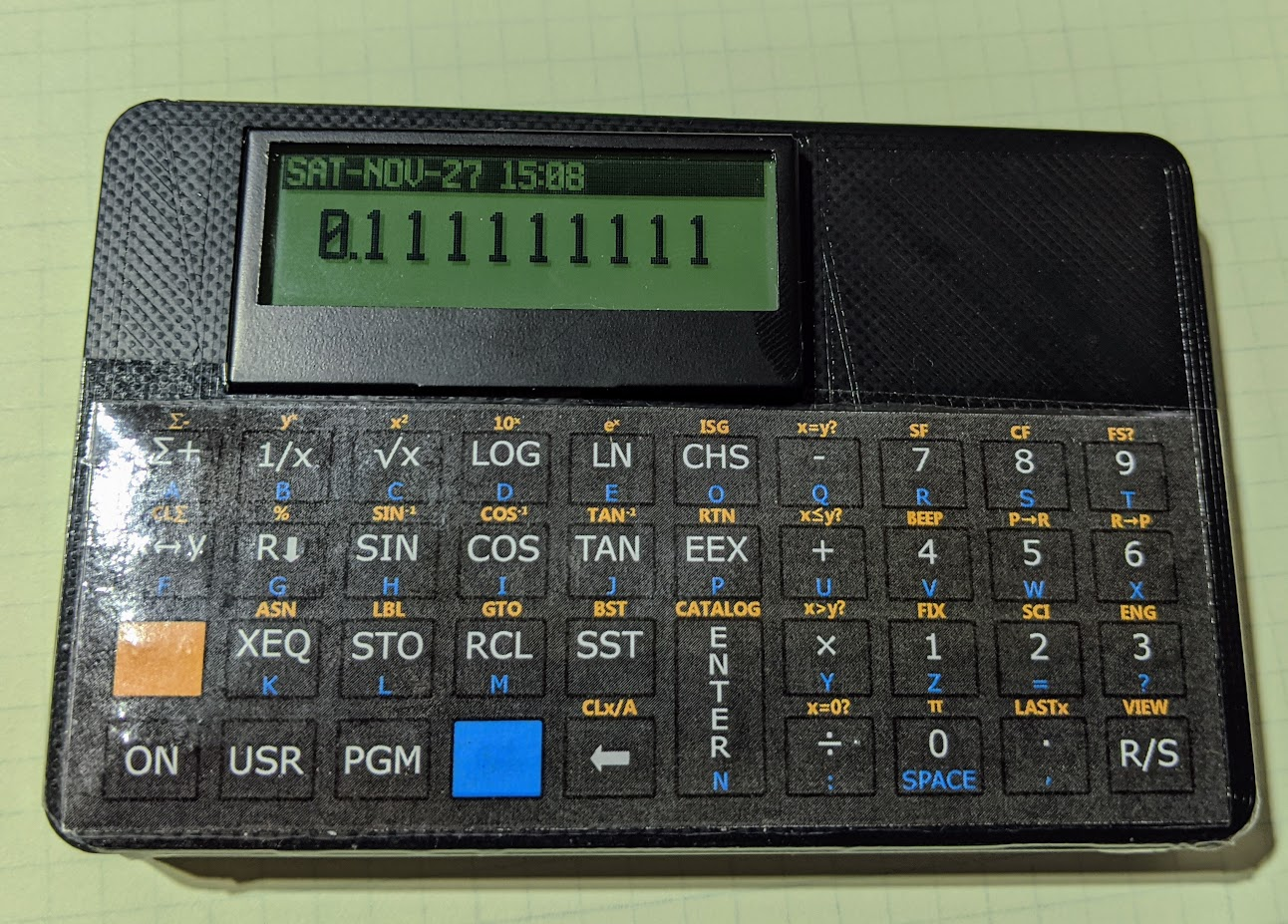
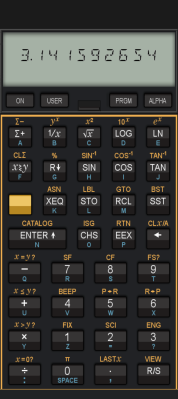
Sure, a real HP41C is in portrait mode, but otherwise, [Garza’s] is a pretty good clone.There is also a suitably hacker-friendly route. [Alex Garza’s] PAXER calculator projects reproduce machines such as the HP-15C, HP-16C, and HP-41C using an ATmega328. They’re available in kit form, use through-hole components, and aren’t just empty cases containing old calculator electronics.
The ATmega scans the keyboard, drives the display, and emulates the original machine. The design adds such modern amenities as continuous memory, an LCD backlight, real-time clock, and considerably higher execution speed than the originals. Kits and assembled versions are typically under $100.
There is also the 10LC (and related models), which approaches the problem from the other direction: take inexpensive ESP32-based M5Stack Cardputer hardware, add calculator firmware and key labels, and turn the whole thing into a pocket RPN calculator. Figure roughly $50-$60.
It isn’t going to make a calculator collector forget an HP-42S keyboard, but it does show how little hardware is actually required to build an extraordinarily capable calculator today.
There’s An App For That
CalcTastic is a modern RPN phone app.If physical keys aren’t mandatory, RPN is actually thriving. You can get a host of RPN calculators on your Android or iPhone. There are many options for desktop computers, too. You can generally find these on your platform’s program repositories.
One of the best places to start is Free42, [Thomas Okken’s] free, clean-room implementation of the HP-42S. It runs on Android, iOS, Windows, macOS, and Linux. Plus42, from the same author, takes that foundation and expands it with equations, units, directories, plotting, financial functions, and other capabilities that the original HP-42S never had.
Android users also have CalcTastic, which can switch between algebraic and RPN modes and provides scientific calculation, complex numbers, fractions, statistics, conversions, and — in the paid version — programmer functions. The basic version is free, and the Plus version is only a few dollars.
For the HP-48 crowd, there is Droid48 on Android and several HP-48 implementations on iOS. If your idea of a calculator includes directories, symbolic objects, programs, lists, and an RPL command line, the phone in your pocket can impersonate a 48 far faster than the original hardware ever could. If you prefer the HP41C, go41C is the one I like.
Apple users have an especially large selection. i41CX recreates and extends the HP-41 environment. PCalc isn’t primarily an RPN calculator, but has long offered a very good RPN mode. There are also modern RPN calculators including MathU, RPN Calc, RPN Calculator 48, and a growing number of simulations of individual classic HP machines.
Real HP
Even HP’s current flagship environment is available in software. HP Prime Pro runs on Android and iOS and supports optional RPN input.
Desktop users aren’t left out either. HP provides a free HP Prime Virtual Calculator for Windows, and there has also been a macOS version. Most unusually, HP once produced an actual native Linux version. The Linux release was packaged as an AppImage and survives as a 2019 technical preview — build 2.1.14288 in the copy sitting on my Linux machine. It isn’t the Windows version hidden inside Wine; it’s a native HP build, and it still works remarkably well. Unfortunately, it predates one particularly interesting addition to the Prime: Python programming.
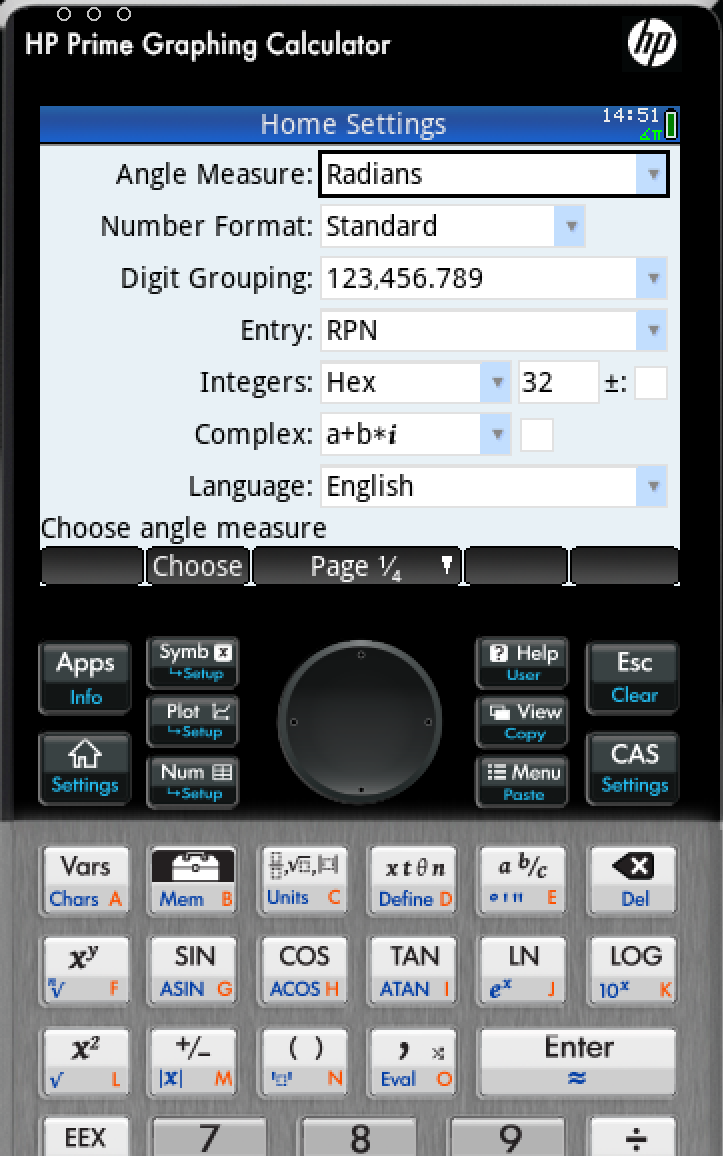
The HP Prime needs a setting to change to RPN mode.
There is a way to get that on Linux, although HP doesn’t make it easy. I found that the December 2024 Windows release of the Virtual Calculator, version 2.2.15212, runs under Wine using the Soda 9 runner in Bottles. That version includes the Prime’s Python app and reports MicroPython 1.9.4. The catch is that you don’t want to accept its offer to upgrade. Updating to the current Windows version causes the simulator to stop working under the same setup, and Soda 11 doesn’t appear to fare any better. So there is a slightly absurd sweet spot where an older Windows Prime under an older Wine runner provides a more up-to-date Prime on Linux than HP’s own native Linux build.
Between Free42, Plus42, Prime, HP-48 emulators and innumerable smaller projects, software may actually be the easiest way to use RPN today.
The Used Option
Of course, another source is available: millions of old calculators are already out there. If you’ve always wanted an HP-11C, 15C, 16C, 28S, 32SII, 41CX, 42S, or 48GX, auction sites and used-equipment dealers will happily provide one. Sometimes you can still find a bargain, especially if you’re willing to buy a cosmetically ugly machine or something outside the most desirable models. The problem is that the best old calculators aren’t merely used calculators anymore. They’re collectibles.
A calculator that originally lived in an engineer’s shirt pocket may now be a pristine example with its case, manuals, and box — and priced accordingly. Even fairly ordinary examples of desirable models can sell for enough money that carrying one around every day starts to feel irresponsible. My treasured HP41C, for example, works fine, but is already scuffed up enough that I rarely risk using it at my desk these days.
That creates a slightly absurd situation. A perfectly functional 35- or 40-year-old calculator may cost considerably more than an astonishingly capable modern computer because one is being priced as a collectible and the other as a tool.
On the other hand, battered calculators exist. If you don’t care about scratches, engraved names, missing battery doors, or someone’s old asset-control sticker, those are often exactly the machines to buy. You’re going to use it, after all.
ENTER Isn’t Dead
RPN plainly lost the calculator wars. Walk into an office supply store, and almost every calculator on the shelf expects conventional algebraic input. But it didn’t disappear.
You can still buy an HP-12C. You can buy sophisticated new RPN machines from SwissMicros. You can solder together your own HP-inspired calculator around an 8-bit AVR. You can turn an ESP32 gadget into one. Or you can install an app and have an HP-42S, HP-48, or modern RPN calculator in your pocket for anywhere from nothing to a few dollars.
That’s a surprising amount of life for an input system the mainstream calculator industry decided we didn’t want decades ago. Then again, people who like RPN tend to really like RPN.
If 2 ENTER 3 + looks more natural to you than 2 + 3 =, apparently somebody is still willing to sell you a calculator. If you want to see how easy it can be to parse RPN in a program, we’ve done that.
If you tear into old TVs or recording equipment, you may see shields made from some exotic-looking metal. Old timers will tell you it’s called mu metal, and its purpose is to — sort of — shield things from magnetic fields. The qualification is important. Unlike a conductive RF shield, mu metal doesn’t really stop a magnetic field. Instead, it gives magnetic flux an easier path to follow around whatever you’re trying to protect.
What’s In The Metal?
Mu metal belongs to a family of soft magnetic nickel-iron alloys. A typical modern formulation is about 80% nickel and 15% iron, with molybdenum and a few other elements making up most of the remainder. What makes it useful is its extremely high magnetic permeability. Commercial material can have relative permeability around 100,000 or more, and some specialty alloys can reach even higher.
You can think about reluctance as the magnetic equivalent of resistance. Put a high-permeability shell around something sensitive, and magnetic flux would much rather travel through the shell than through the space inside it, just like current tends to take the path of least resistance.
This works particularly well for DC and low-frequency fields, exactly where your usual copper or aluminum EMI shield isn’t much help.
You May Have Seen It Before
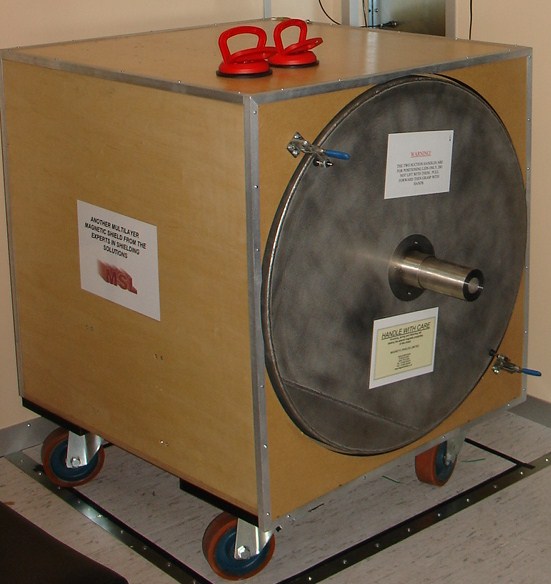
A multilayer magnetic shield box. (Photo by [Zureks] CC-BY-SA-3.0)Classic applications included shielding CRTs, tape heads, transformers, photomultipliers, and sensitive analog instruments. Put a transformer too close to the wrong part of an old television or audio amplifier and 60 Hz magnetic fields could cause very visible — or audible — trouble. The disappearance of CRTs and magnetic tape might make mu metal sound like another material destined for the antique electronics cabinet.
However, mu metal is still around. Modern applications include magnetometers, precision current sensors, electron microscopes, scientific instruments, and experiments that require extremely low magnetic fields. Commercial multi-layer mu-metal chambers are still sold for creating near-zero-field environments; with suitable construction and degaussing, some claim attenuation of static and low-frequency fields by factors approaching a million.
Quantum and cryogenic instrumentation have also created some 21st-century magnetic shielding problems. Ordinary mu metal loses performance at very low temperatures, so related nickel-iron alloys are made specifically for operation at liquid-nitrogen and liquid-helium temperatures.
Don’t Bend It
There are a couple of catches. First, mu metal gets much of its impressive permeability from its metallurgical structure. Machining, stamping, welding, or even bending it can introduce stresses and seriously degrade its magnetic properties. High-performance shields are therefore commonly formed first and then hydrogen annealed to restore their permeability.
So buying a sheet of wonderfully permeable material and folding it into a box isn’t necessarily the recipe for a wonderfully permeable box.
The second surprise is saturation. Mu metal is superb with weak fields but isn’t necessarily what you want closest to a powerful magnet. Its saturation induction is only around 0.75 tesla. In strong fields, manufacturers recommend combining it with a lower-permeability material having higher saturation capability, letting that outer layer tame the field before the mu metal handles what’s left.
History
British scientists Willoughby S. Smith and Henry J. Garnett patented mu metal in 1923 for inductive loading of submarine telegraph cables for a British company that built the Atlantic undersea telegraph cables. The seawater surrounding these cables added capacitance, requiring inductance to compensate. This was first done by wrapping the conductors with a helical wrapping of metal tape or wire of high magnetic permeability, which confined the magnetic field.
Mu-metal was invented to directly compete with permalloy, the first high-permeability alloy used for cable compensation, but it belonged to competitor Western Electric. Mu-metal was developed by adding copper to permalloy to improve ductility. Each 1.6 km of cable needed about 80 km fine mu-metal wire so there was a great demand for the alloy.
Other Tricks
Mu metal isn’t the only way to fight magnetic interference, as you can see in [FesZ’s] video below. Ordinary steel and other high-saturation magnetic alloys can redirect stronger fields. At higher frequencies, conductive copper or aluminum shields become effective through induced eddy currents. Ferrite is good at high frequencies, too, but is not very ductile nor is it very conductive. When you really need a quiet magnetic environment, active compensation coils can measure the ambient field and generate an opposing one.
But if the problem is a weak DC or low-frequency magnetic field, the basic trick hasn’t changed much. You just give the magnetic flux an easier path. Sometimes the old material in that 50-year-old television can be at home in a quantum computer, too.
What did Hackaday editors Elliot Williams and Al Williams read in Hackaday last week? Probably everything, but you can tune in and hear about their favorites on this week’s podcast. They heard from lots of listeners this week, and also saw DIY projects running from a 3D-printed Stirling engine, to clogs, to LEDs.
There are some over-the-top hacks like a refit for a decades-old watch to do tap-to-pay and a — for lack of a better word — a record player that optically reads MOD files. Want to emulate an iPod? Talk to Eliza? Print a hand-operated rail car? Hackaday is the place to read about it all.
The can’t miss articles included a talk from Hackaday Europe about making magical PCBs and a not-so-brief history of space stations starting in the 1800s.
Check out the links if you want to follow along, and as always, tell us what you think about this episode in the comments!
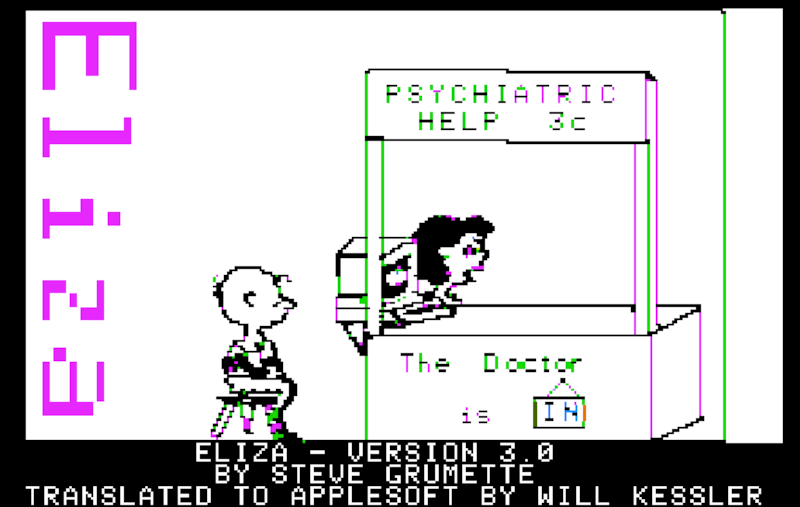
One day, people will look back at what we call Artificial Intelligence and laugh. We do the same thing today, as chat bots totally outstrip what the computer industry called AI up until pretty recently. This didn’t escape curators at the Internet Archive, apparently, and [Jason Scott] tells us about a recent collection, “Vintage Artificial Intelligence.”
These are old software titles that will run for you in emulated machines right in your browser, ranging from somewhere in the 1970s to the 1990s. There’s Eliza, of course. Actually, there are several copies of Eliza. Given how simple it was to write Eliza, it did a pretty good job. Then there are adventure games that are pretty conversational, Lisp, Prolog, which was going to spawn expert systems to replace us all, and Racter, which tried to write fiction.
There was even Alter Ego that was supposed to help you explore life decisions, maybe? There are a couple different versions of even a few versions of Conway’s Game of Life. We aren’t sure that’s ever really been AI, but perhaps it depends on your definition. We’re happy to see Sargon, the chess program, represented.
We didn’t see Hexapawn, which is a shame. We also didn’t see Parry (the paranoid counterpart to Eliza) or that elusive software we remember but can never find that built word chains from text called George.
Last time we found out the idea of space stations is surprisingly old. By the 1950s, everyone knew we’d be working in beautiful space stations that rotated like a wheel to give us the illusion of gravity. Of course, that didn’t happen. But we did get some practical space stations, even before the current crop. The road to get there, though, was predictably bumpy.
Convair: From TASSEL to MARS
Convair had been studying multi-person orbital stations under Krafft Ehricke since the late 1950s. One result was TASSEL, an acronym for the Three Astronaut Space System Experimental Laboratory. Proposed in 1960, TASSEL was a three-man laboratory intended for an Atlas-Centaur launch into a roughly 200-nautical-mile orbit and missions lasting two or three weeks.
Around the same time, the Air Force asked contractors for proposals for a Military Test Space Station, or MTSS. Convair was one of five companies selected for the study in 1960. The surviving record suggests that Convair’s TASSEL work fed directly into its MTSS proposal.
Then Convair did something unusual for an era overflowing with beautiful paintings of spacecraft that never existed: they built theirs. Well, sort of.
During late 1960 and early 1961, the company constructed a full-scale ground mockup called the Manned Astronomical Research Station, or MARS. The station itself was about ten feet in diameter and fourteen feet high, with two floors for working, cooking, housekeeping, and sanitary facilities. A Mercury-like reentry capsule beneath it brought the whole assembly to about 28 feet tall. You can see a contemporary video about the program below. There’s also a cache of photos and a post by [The Space Review] explaining it all.
MARS obviously wasn’t going to orbit, but that wasn’t the point. Engineers could use it to work on the less photogenic parts of putting people in orbit: life support, oxygen consumption, water regeneration, contaminant monitoring, controls, displays, and simply discovering whether people and equipment actually fit where the drawings said they would. Crews later spent as long as 30 hours inside the mockup.
Exactly where MARS fits among Convair’s various proposals is still being pieced together. Archival evidence indicates that it grew out of TASSEL and closely overlapped Convair’s submission for the Air Force MTSS program. Photographs in the San Diego Air and Space Museum archive are even identified as “MTSS/MARS.” Whatever name was on the proposal of the week, by 1961 Convair had progressed from drawing space stations to building a high-fidelity example on the ground.
Olympus and MOL
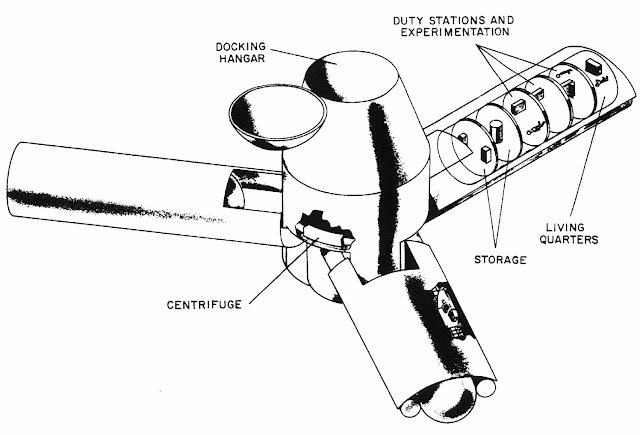
Olympus was nearly 140,000 pounds, 150 feet wide, and each arm provided 35,000 cubic feet (NASA).
NASA wasn’t far behind. In 1962, Edward Olling at the Manned Spacecraft Center proposed Project Olympus. It would have been an 18-person station intended for launch around 1966 or 1967. It wasn’t the classic doughnut. Instead, three long arms extended from a large central hub, and rotation would provide different artificial-gravity levels at different distances from the center. The station would orbit about 300 nautical miles above Earth.
This is especially interesting because Olympus wasn’t a far-future colony study. It was being considered while Mercury was still flying. Then President Kennedy gave NASA a somewhat more pressing assignment involving the Moon.
Olympus joined the large pile of spacecraft that looked great in presentations.
The U.S. Air Force had another station that got considerably closer to hardware: the Manned Orbiting Laboratory, or MOL. Approved in 1965, MOL would have put two military astronauts into a polar-orbiting station attached to a modified Gemini spacecraft (Gemini B). Its actual classified purpose was high-resolution reconnaissance. You can see some silent footage of some of the hardware in the video below.
They selected astronauts. They built hardware. They modified a Gemini capsule with the unnerving idea of putting a hatch through its heat shield so the crew could crawl into the laboratory behind it. MOL was canceled in 1969 without a crewed station ever flying.
Meanwhile, docking — one of the basic tricks required to make stations useful — was becoming real.
Dock of the Bay
On January 16, 1969, Soyuz 4 and Soyuz 5 docked in orbit. There was no pressurized tunnel connecting them. So Yevgeny Khrunov and Aleksei Yeliseyev put on spacesuits, climbed outside Soyuz 5, traveled across the docked spacecraft, and climbed into Soyuz 4. Two spacecraft had effectively become a tiny space station, but changing rooms required going outside.
Apollo 9 flew less than two months later and provides an interesting parallel. The command module and lunar module could dock, and crews could normally transfer internally. But what if the tunnel couldn’t be used? NASA planned to demonstrate a contingency EVA transfer from the lunar module to the command module.
Rusty Schweickart was supposed to perform the exercise, but space sickness caused NASA to shorten his EVA. He tested the lunar EVA suit and portable life-support backpack from the LM porch while Dave Scott partially exited the command module, but the complete external transfer was never performed.
Salyut and Almaz
On April 19, 1971, the Soviet Union launched Salyut 1, the first actual space station. The first crew failed to dock successfully. The second crew, Soyuz 11, spent more than three weeks aboard, but all three cosmonauts died during reentry when their Soyuz depressurized. There is some video from Salyut 1, but no audio.
The Salyut name also concealed a second program. Some of the stations were civilian Salyuts, while others were military Almaz reconnaissance stations similar in purpose to MOL. Salyut 2, 3, and 5 belonged to the Almaz line, although Salyut 2 failed before a crew could arrive.
Later Salyut stations gained a second docking port. That was a huge improvement because Progress cargo ships could bring supplies and fuel while a Soyuz remained attached as the crew’s ride home. Long-duration spaceflight was becoming practical rather than heroic improvisation. Of course, none of them rotated.
Skylab
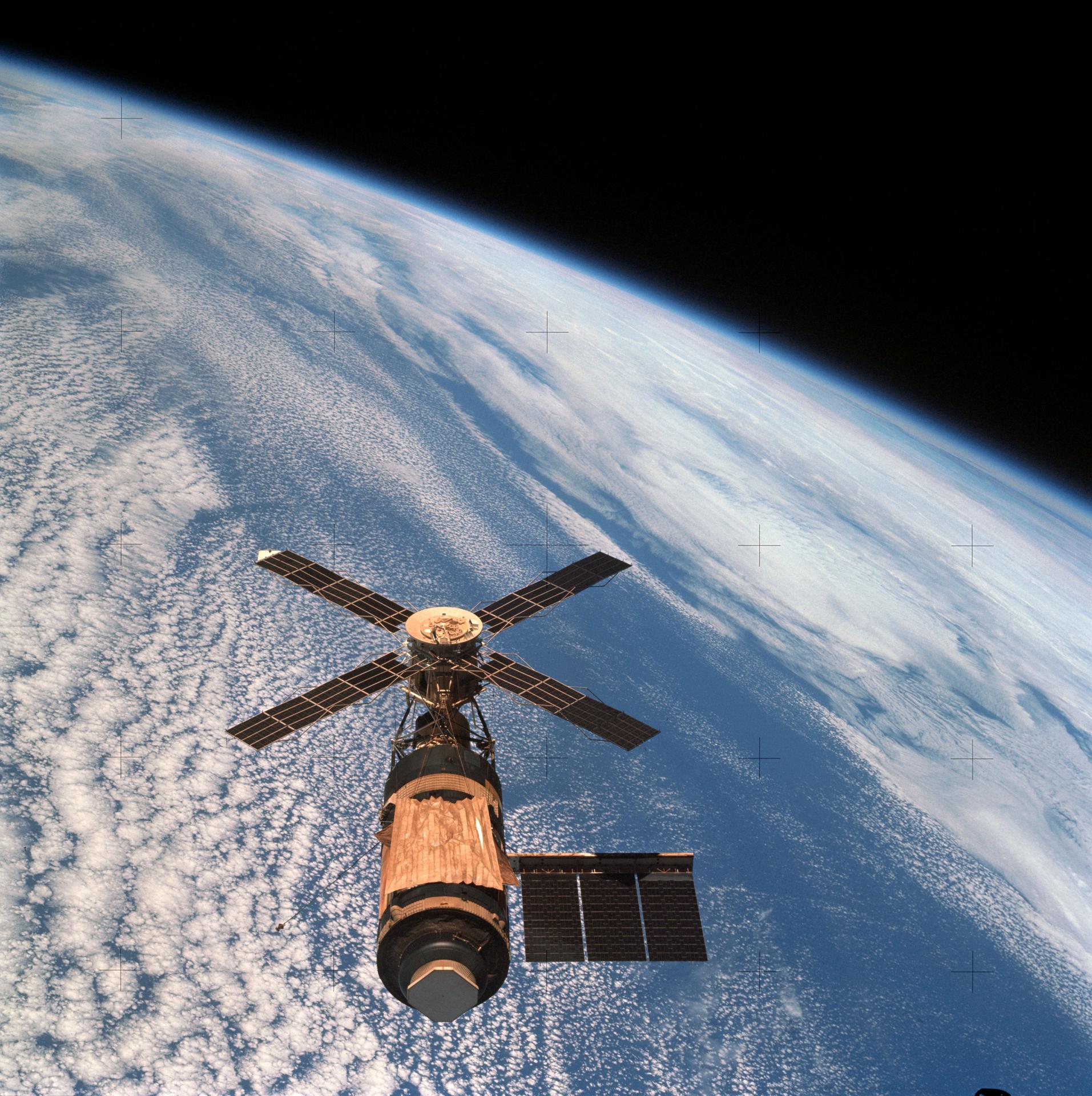
Skylab as the last crew says goodbye (NASA).
The United States took a different route. Skylab was essentially an enormous converted Saturn V upper stage. Launched in 1973, it gave its crews something previous spacecraft had lacked: room.
Three crews occupied Skylab, staying as long as 84 days. They conducted solar astronomy, Earth observations, medical studies, and experiments designed to determine what happens when human beings spend months rather than days in weightlessness. After all, why build a giant rotating station if people could simply learn to live without gravity?
Then again, we learned that long-term microgravity isn’t free. Bones, muscles, cardiovascular systems, eyes, and assorted other bits of the human body complain when they don’t have proper gravity. Still, a nonrotating station was far easier to build, so rotating wheels stayed on the drawing board.
Freedom Isn’t Free
By the 1980s, NASA was ready to try again. In his 1984 State of the Union address, President Ronald Reagan directed NASA to build a permanently occupied space station within a decade. What eventually became known as Space Station Freedom was supposed to be a large modular facility assembled by the Space Shuttle.
It would support research, Earth observation, satellite servicing, and eventually serve as a staging point for missions beyond Earth orbit.
Freedom went through redesign after redesign as costs and requirements fought each other. It did not rotate. While NASA redesigned Freedom, the Soviets quietly launched something considerably more important.
Peace In Orbit
Mir seen from STS-89 (NASA).
On February 20, 1986, the Soviet Union launched the core module of Mir.
The name means “peace,” although the Russian word can also mean “world.” Unlike the earlier Salyuts, Mir was designed from the beginning as a modular station. Additional laboratory and equipment modules arrived over the years and docked around its core.
It looked nothing like Noordung’s wheel. It looked more like somebody had been assembling an enormous machine in a garage and kept finding useful places to bolt things on.
Mir represented decades of incremental Soviet experience: Soyuz, docking, Salyut, Progress, long-duration crews, orbital repairs, and modular construction. It demonstrated that a space station could become not merely a spacecraft but a place — one that crews could maintain, modify, repair, and inhabit for months at a time.
Where’s My Wheel?
That may be the most surprising thing about the history of space stations. The rotating station wasn’t some goofy 1950s science-fiction invention. Serious engineers were proposing artificial gravity before anyone had launched anything into orbit. Oberth discussed rotating stations in 1923. Noordung drew a remarkably complete wheel station in 1929. Von Braun made the concept famous in the 1950s. NASA seriously studied rotating stations in the 1960s. The physics works.
We’ve simply never needed artificial gravity badly enough to pay the cost.
If you can tolerate microgravity, a station can be a collection of pressure vessels, trusses, solar arrays, and docking ports. If you insist on one g at a comfortable rotation rate, suddenly you are contemplating a structure hundreds or perhaps thousands of meters across.
Still, Edward Everett Hale put people aboard an artificial moon in 1869. Noordung put them aboard a rotating wheel in 1929. Kubrick had airline passengers walking around one in 1968. So after more than a century and a half of talking about space stations, I have only one question: When do I finally get my rotating space station?
People have lived in space stations for decades now, but something is wrong with them. Where are the big rotating wheels? You know the ones. They show up in old paintings of the future and, perhaps most memorably, in 2001: A Space Odyssey. Spin a great wheel in space, and people can stroll around inside with something that feels suspiciously like gravity. It seems like an obvious idea.
It is also an old idea. Much older than actual spaceflight, in fact. But to find the beginning of the space station, we have to go back to a time when powered aircraft were still several decades in the future.
A Moon Made of Bricks
In 1869, Edward Everett Hale published The Brick Moon in The Atlantic Monthly. The moon in question wasn’t natural. Hale imagined building a 200-foot-diameter sphere made from bricks and putting it into orbit as a navigation aid. Sailors could sight it and use its known orbit to determine their longitude. There was only one small problem: the thing was accidentally launched with people aboard.
That makes The Brick Moon generally regarded as not only the first fictional artificial satellite, but also the first fictional space station. Hale followed it in 1870 with Life on the Brick Moon, describing how the accidental colonists got along up there.
Hale didn’t have rockets. He proposed flinging the thing into the sky with giant flywheels, but, then again, it was 1869, so we’re inclined to cut him some slack. As the 19th century turned into the 20th, however, people started doing the math.
Konstantin Tsiolkovsky is best remembered for putting rocket flight on a sound theoretical footing. The Russian schoolteacher wrote extensively about orbital flight and space habitation, envisioning people living in orbit long before anyone had demonstrated that a liquid-fueled rocket actually worked. His ideas included rotating habitats to provide artificial gravity.
Hermann Oberth’s 1923 book Die Rakete zu den Planetenräumen — The Rocket into Planetary Space — Oberth went beyond fiction and seriously considered a permanently inhabited station. He envisioned it being periodically supplied by smaller rockets, serving as an observation and communications platform, and even acting as a jumping-off point for trips farther into space. He also suggested spinning the station to give the crew artificial gravity.
Enter The Wheel
Noordung’s space station concept from his 1929 book.
But the space station that looks like the space station in your head probably comes from a different Hermann. Herman Potočnik was an Austro-Hungarian army officer and engineer who wrote under the name Hermann Noordung. In 1929, he published Das Problem der Befahrung des Weltraums, translated by NASA many years later as The Problem of Space Travel: The Rocket Motor.
Noordung didn’t merely say, “We should have a space station.” He drew one. His station consisted of several components, but the memorable one was the Wohnrad — literally the habitation wheel. Living quarters occupied a rotating ring connected to a central hub. Rotation provided artificial gravity, while other portions of the complex could remain weightless. He considered power, communications, observing Earth, astronomy, docking, and the practical business of living in orbit. NASA calls his work one of the first detailed technical designs for a space station.
If you have seen Wernher von Braun’s famous wheel station from the 1950s, you may notice something. Von Braun certainly knew Noordung’s work — he had cited it years earlier — and the family resemblance between Noordung’s 1929 Wohnrad and the wheel station that von Braun and Willy Ley presented to American readers in Collier’s in 1952 is hard to miss. The only place we have found the articles is the reprints in Horizons, by the AIAA (start with page 46).
Whatever the exact family tree, von Braun was the man who put the wheel-shaped station into American popular culture. In 1952 he described a 250-foot-class rotating station in Collier’s, accompanied by some gorgeous Chesley Bonestell artwork. A few years later he took the idea to television with Walt Disney.
If you’ve never seen these, they are worth your time. Disney’s 1955 Man in Space and Man and the Moon let von Braun explain a remarkably detailed vision of rockets, orbital stations, and trips to the Moon to a mass television audience. A generation of kids grew up expecting this stuff. What happened?
Gravity, More Or Less
The attraction of the wheel is simple. You can’t really make gravity, at least not without bringing along a planet-sized lump of mass, but acceleration will do nicely. Stand on the inside of a rotating ring, and the floor keeps accelerating you toward the axis. In your rotating frame, it feels as though something is pushing you outward against the floor.
The acceleration is a=ω2r where (r) is the radius and (ω) is the angular velocity. Sadly, the numbers explain part of the problem.
If you want one Earth gravity at the floor, you need to either spin fast or have a large ring. For example, at 1 RPM the ring has to be 1.79 km in diameter. Speed up to 2 RPM, and you can get away with 447 meters. At 4 RPM, you are down to 112 meters.
Seems like you could just keep going faster, but there’s a problem. Four RPM doesn’t sound very fast until you are inside the thing moving your head around.
Humans can adapt to rotation, but increasing the speed makes Coriolis effects increasingly noticeable. Move your head, climb a ladder toward the hub, throw something, or even walk spinward instead of anti-spinward, and the results aren’t quite what your inner ear expects. NASA artificial-gravity studies have often used approximately four RPM as an important practical region for human tolerance, although this isn’t a hard physical limit and training matters.
There’s also a gravity gradient. Your feet are farther from the axis than your head, so they weigh slightly more. Make the radius large enough, and you won’t notice. Make the station small enough, and things get strange quickly. So bigger is better except when it comes to cost, of course.
Space Station V, still under construction. Note the window placement.
There is another oddity that movies sometimes get wrong. The outside circumference of the wheel is the floor. “Down” is away from the hub. Imagine a tire in space. You aren’t walking around on one of the flat sidewalls with the axle beside you. You are walking around the inside of the tread. So when a movie gives you a nice conventional room with a picture window on what looks like the outer wall, stop and think about where gravity ought to be pointing. Depending on the geometry, that window would probably be underfoot.
Stanley Kubrick got this wonderfully right in 2001: A Space Odyssey. Both Space Station V and the rotating centrifuge aboard Discovery make “down” follow the rotation. The famous jogging sequence works precisely because the circular wall of the set becomes the floor as the camera watches.
Next Time
Next time, I’ll look at early attempts to make a space station ranging from TASSEL, MTSS, and MARS to real Soviet and U.S. stations that had varying degrees of success. Spoiler alert: none of them are going to rotate for gravity.
Of course, people didn’t just imagine space stations. They also imagined moon bases, both fictional and actual.
While Hackaday’s bread and butter is, of course, hacks, we sometimes cover things that most of us are interested in that are probably out of reach for the typical hacker. Space, for example, is undeniably cool, even though your chances of putting yourself or even your own rover on the Moon aren’t very good at the moment (but, of course, give it time). If you are looking for something to put on your e-reader and you are also interested in space, save your money and get some downloadable books directly from NASA.
There’s something for everyone on the site. The site has four main categories: aeronautics, Hubble, science, and NASA history. Aeronautics has two volumes of “NASA’s Contributions to Aeronautics,” a book on the X-15, and a book about aviation pressure suits. Want to know more about the giant wind tunnel at Langley?
For the Hubble, you’ll find titles that have great images, of course, but also a book with an overview of the telescope or, if you prefer, about gravitational lensing.
The science titles go really deep with books on black holes, Landsat, the Cassini mission, and the Spitzer telescope. If you prefer history, there’s everything from a history of near-Earth object research to lessons from the Columbia tragedy for engineers, managers, and leaders. We were also interested in the book “Archaeology, Anthropology, and Interstellar Communication.”
The books are typically available in EPUB or PDF, and they are all free. Just what you need for your next plane trip or to round out your Calibre library.
FTP isn’t exactly cutting-edge technology. These days, if you control both ends of a connection, you’re probably using scp, SFTP, rsync, or something even fancier. But FTP refuses to die, especially if you are perusing old public FTP servers or talking to retrocomputers. Every now and then, you still need an FTP client. Naturally, there are plenty of graphical clients. But some of us would rather stay at the command line. You could just type ftp, of course. It works, and if you haven’t used it lately, it is probably better than you remember. However, I’ve long been a fan of NcFTP. While some other FTP clients have caught up, it still has unique features that make FTP a lot more productive.
Not Your Father’s FTP
Before maligning the standard ftp command, though, we should point out that it probably isn’t the FTP client you remember from 30 years ago. For example, on openSUSE Tumbleweed, /usr/bin/ftp is really tnftp, a portable version of NetBSD’s enhanced FTP client. Debian uses it too; the ftp package in both Bookworm and Trixie leads you to tnftp. Since current Raspberry Pi OS is based on Debian Trixie, you’ll encounter tnftp there, too. That’s significant because tnftp has already fixed many of the irritations you might associate with old-fashioned FTP.
You get command-line editing, history, and filename completion, things that are also in ncftp. Both understand passive FTP and IPv6. The tnftp client can also retrieve HTTP, HTTPS, and file: URLs, so commands such as:
ftp https://example.com/something.tar.gz
aren’t necessarily typos, although ncftp lacks this ability. But ncftp does have some killer features.
Remember Me?
One of NcFTP’s nicest creature comforts is bookmarks. Connect to a machine, move to a useful directory, and save it:
ncftp /pub/micros> bookmark oldstuff
Then later you can simply type:
ncftp oldstuff
The bookmark can remember more than just the hostname, making frequently used FTP sites feel much more like named resources than anonymous servers you repeatedly have to navigate.
NcFTP also maintains a cache of remote directory listings. If you’ve ever used FTP over a slow link, you know how annoying it is to ask for the same directory listing over and over. NcFTP can often work from what it already knows instead. Neither feature sounds earth-shattering, but together they make an interactive FTP session considerably more pleasant.
Get All The Things
Another difference becomes obvious when you want an entire directory. NcFTP supports recursive transfers:
get -R foo
or:
put -R foo
That seems obvious if you’re accustomed to modern tools, but traditional FTP is fundamentally organized around transferring individual files. NcFTP does the tedious directory walking for you. It also handles resuming interrupted transfers more naturally, something particularly welcome when the file in question is a multi-gigabyte disk image rather than README.TXT. With tnftp, you have to explicitly ask to resume an interrupted file. NcFTP will detect it and, depending on configuration, either resume or, at least, offer to resume the transfer.
Go Away, I’m Busy
NcFTP also has a clever background-transfer system. Commands such as:
bgget giant-file.iso
Hand a transfer to NcFTP’s spooler rather than tying up your interactive session. There are corresponding facilities for uploads. That’s an interesting distinction from simply detaching a shell command. NcFTP knows that this is a transfer job and maintains a queue of FTP work that can be retried and processed independently.
Shell Games
But perhaps the biggest reason to know about NcFTP is that NcFTP isn’t just one program. The package includes commands such as ncftpget, ncftpput, and ncftpls. These perform FTP operations directly from the Unix shell without starting an interactive FTP command interpreter. For example:
ncftpget ftp.example.com /tmp /pub/widget.bin
or:
ncftpput ftp.example.com /incoming widget.bin
This is much nicer in a script than sending commands to ftp using, for example, a here document and automating login with .netrc. For example:
ftp <<EOF
open ftp.example.com
cd incoming
put widget.bin
quit
EOF
Sure, it works, but any time you send input to an interactive program it is, at best, messy. The ncftpput program expresses what you actually wanted to do in the first place: put this file there. That’s much more Unix-like.
Don’t Do This At Home
None of these conveniences change FTP’s fundamental problem: ordinary FTP is not secure. Usernames, passwords, and data can travel without encryption. If you’re designing a new system and control both ends, you usually have much better choices. But sometimes you don’t control both ends. If FTP is something you run into, ncftp is worth knowing about. Bookmarks, cached directories, recursive and background transfers, and especially the script-friendly companion commands turn an antique protocol into something that feels surprisingly at home on a modern Unix command line.
We’ve heard of wave overhangs before. It is a new technique for printing horizontal overhangs with no supports. Building on some other techniques like arc overhangs. The idea is to teach the slicer not to try to draw overhangs in the middle of free space. Instead, when the slicer realizes there is a horizontal overhang, it tries to “grow” the overhang from the main part. You can see an overview in the video below.
For example, imagine printing a letter ‘T’ vertically. The stem of the T is no problem, but when you try to print the arms it will normally need support. But if you could just print the arms starting at the stem with slight overlapping, the arms could grow as they hang onto either the stem or the last overhang line.
That makes sense, but it only works for very simple cases. Arc overhangs can fill more complex cases, but suffer from little dimples at the center of each arc. The realization for wave overhangs is to replace the arcs with waves as you would see in a pond. The waves diffract around holes and corners.
Perfect? Not quite. They are still experimenting with settings, but there seems to be some increase in warping. If you want to experiment, you can download a fork of Orca and contribute your results to the community.
We looked at this technique earlier, but we haven’t seen much about it in practice yet. Let us know in the comments if you’ve tried it and how it worked for you. There are more details in the paper on the subject, or you can jump right to the software.

 Login
Login