AI agents and associated tooling are becoming increasingly common in corporate infrastructure. Agents can perform a range of actions with the user’s privileges, such as accessing data, running commands, and interacting with external services. This creates new security risks, especially when these tools are used without the security team’s oversight or well-designed policies.
Detecting, tracking, and controlling AI agents is becoming one of the most pressing tasks for security teams today. We closely follow technological developments and continuously update our solutions to respond to new threats in a timely manner amid a rapidly changing technology landscape. This post describes new expertise built into Kaspersky products that helps counter the threats posed by the proliferation of AI agents. We approach this problem from several angles.
First, you need to thoroughly understand the threat you are dealing with. To this end, we added profiles to the Kaspersky Threat Intelligence Portal that describe various AI agents and how attackers exploit them. At their core, AI agents are programs (processes) that run in the operating system on endpoints and can also launch other processes. This means that Endpoint Detection and Response solutions are among the key endpoint controls for this threat. These solutions detect the presence and launch of AI agents, track their activity, and identify potentially dangerous behavior. When needed, they also take action, such as stopping a suspicious process, blocking the activity, or isolating the host, to reduce the likelihood of an incident escalating. For this purpose, we developed specially adapted detection rules.
You can use Kaspersky Endpoint Security, now also available as Kaspersky Next, to control and restrict the launch of AI agents. This solution uses two components to detect AI agents and control how they are used. Application Control categorizes the application processes launched on endpoints, and Web Control manages access to specific categories of web resources for users on endpoints.
Finally, even harmless AI agents can contain malicious instructions (skills), such as those downloaded from unsafe external sources. Kaspersky Scan Engine analyzes installed applications to detect these threats and also checks LLM files for malicious code. Let’s take a closer look at these solutions and technologies.
Popular AI applications and services in organizations
Tools from Anthropic and OpenAI take the top spots in the September 2026 ranking of AI agents by popularity among Kaspersky users. This list is based on telemetry from Kaspersky solutions. It shows the number of users who had the relevant AI vendors’ products installed at the time of the study.
#
AI product
1
Claude
2
Claude Code
3
Codex
4
OpenCode
5
Zed
6
Wispr Flow
7
LM Studio
8
ZCode
9
Chatbox
10
Cherry Studio
The data shows that agentic systems, especially AI agents for software development, are the most popular AI applications. The TOP 10 also includes an application for running large language models locally (LM Studio) and a voice note-taking app (Wispr Flow).
According to open sources, these are the most widely used AI services in 2026:
Number of published vulnerabilities in LLMs, AI tools, and plugins with similar functionality, 2025–2026 (download)
* Data for previous quarters was updated and may differ slightly from previously published data.
Application Control and Web Control
To enforce the organization’s security policy for AI agents and other AI applications on the corporate network, Kaspersky products offer application control based on KL categories. These categories classify installed software and give you granular control over which approved applications can run in the organization.
Application Control analyzes the processes launched on endpoints, tracking which AI agents are running in corporate systems at any given moment, on which hosts, and under which accounts. Application Control also shows how long a given program has been in use.
This makes it easier for the Kaspersky Security Center (KSC) administrator to control applications. Administrators can use KL categories to allow or block AI agents inside the company for specific groups of employees.
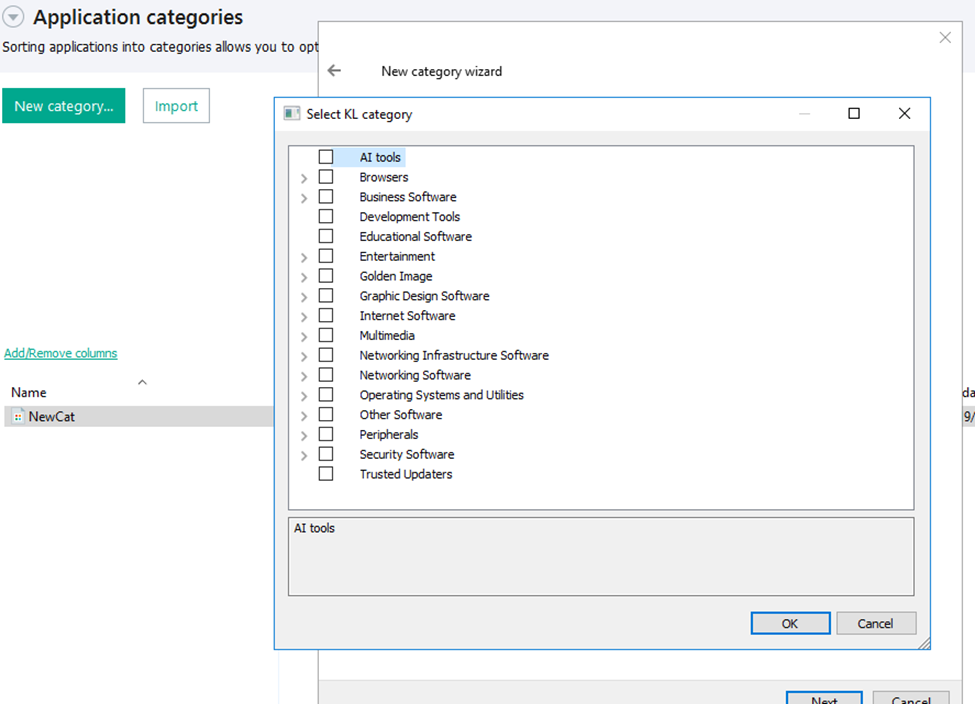
Here is what this functionality looks like to KSC administrators:
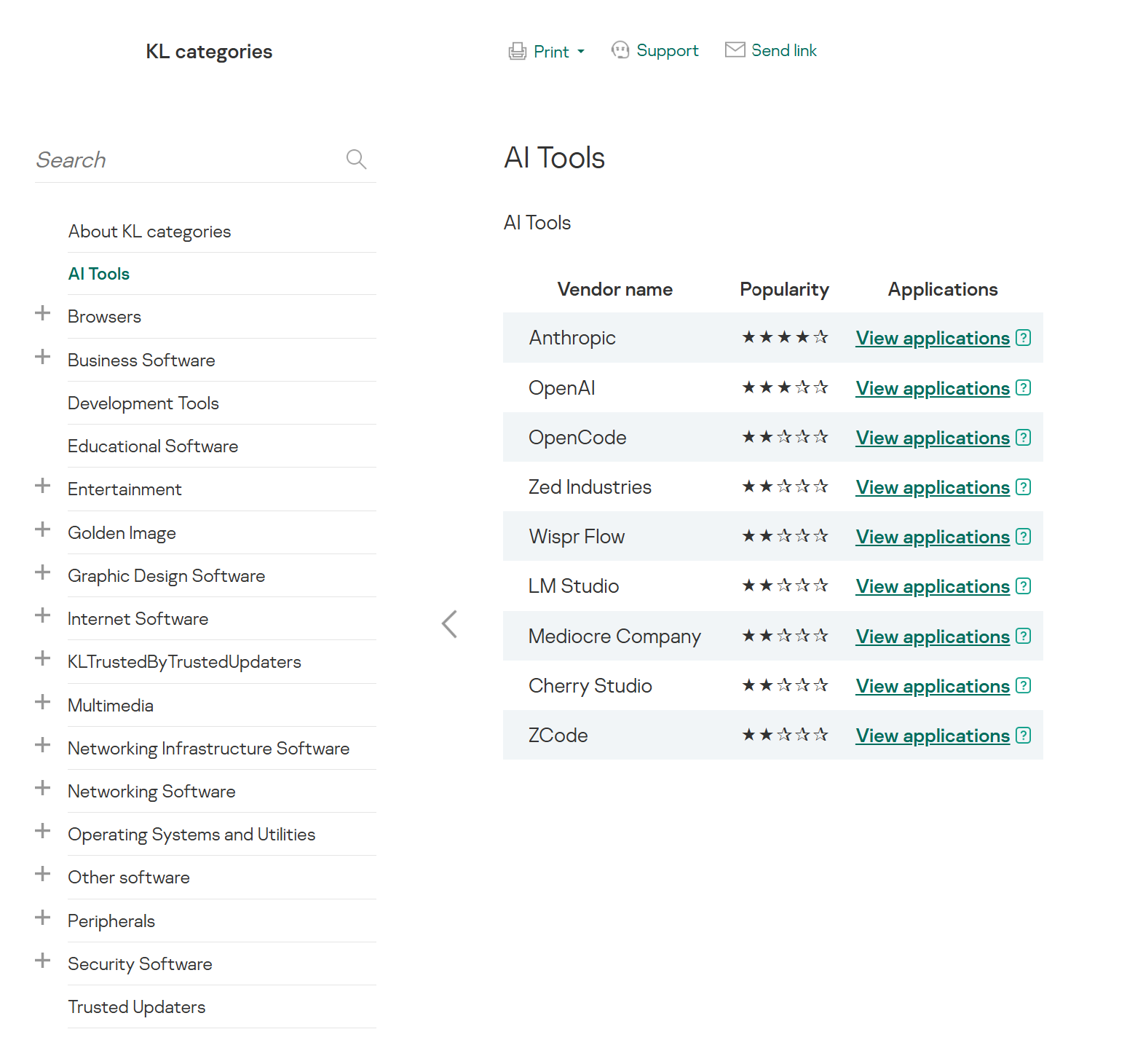
KL categories available when configuring Application Control
For details on how to configure Application Control in KSC, follow this link.
In Kaspersky Endpoint Security (KES), Application Control can operate in two modes:
Denylist. In this mode, Application Control lets users run any applications except those blocked by Application Control rules. This is the default mode.
Allowlist. In this mode, Application Control blocks users from running any applications except those explicitly allowed by Application Control rules.
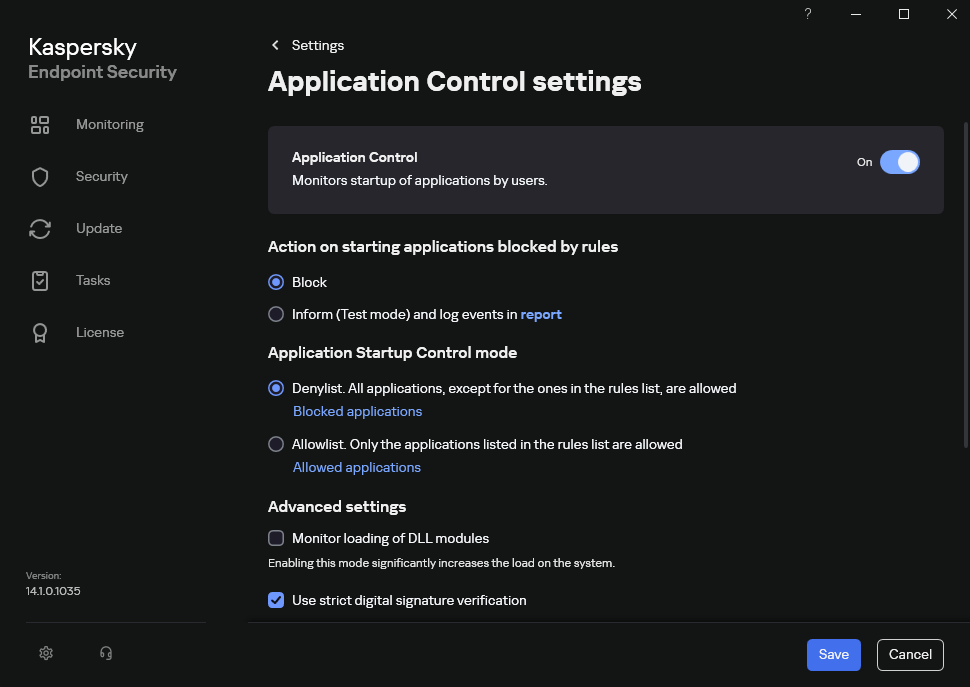
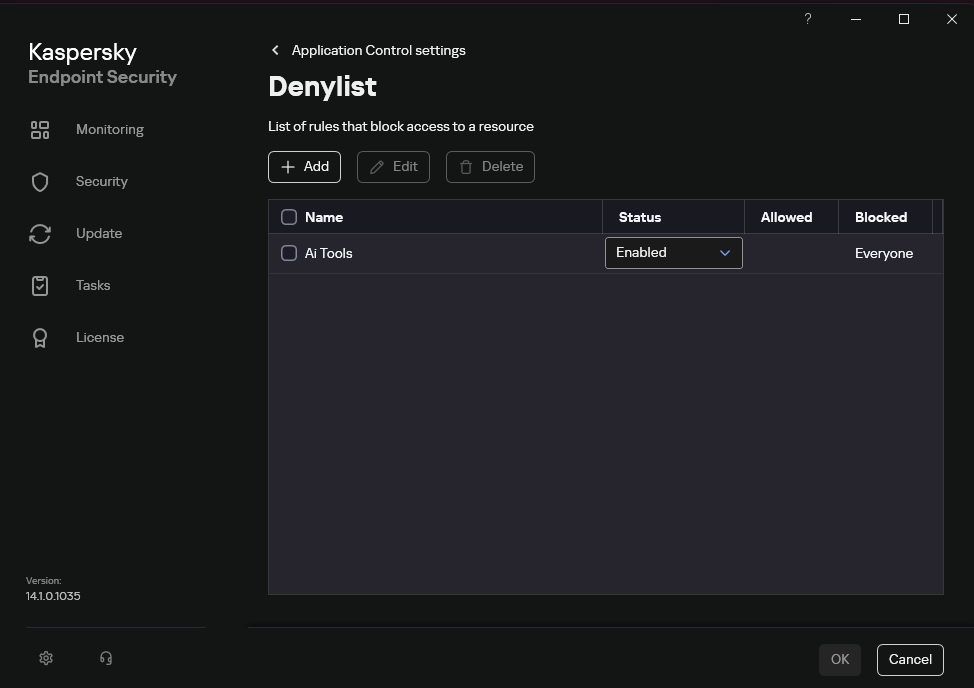
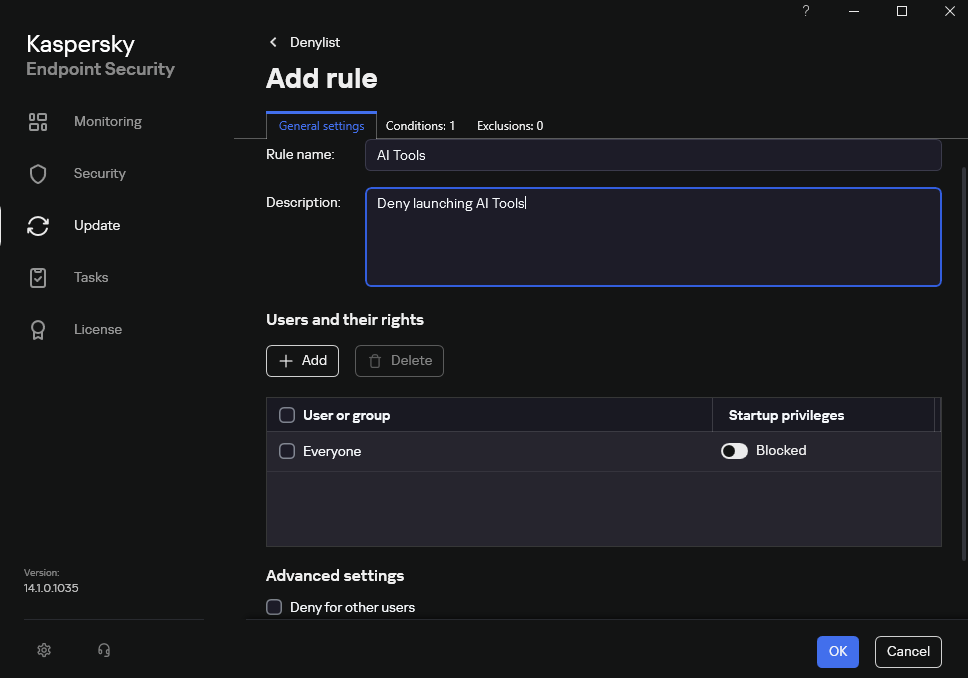
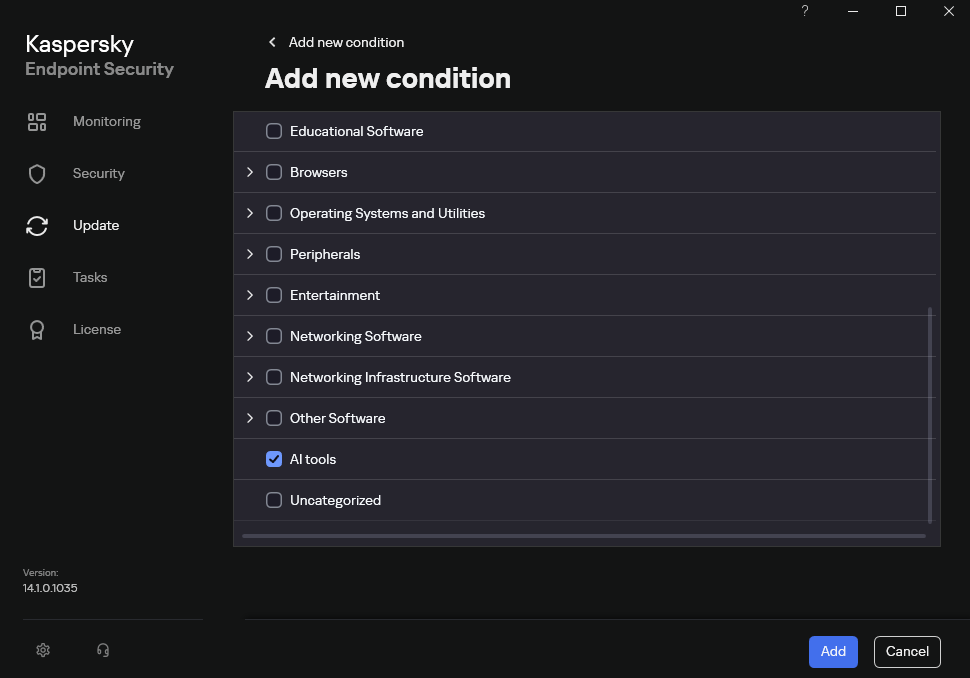
Below are the steps to configure Application Control to block AI tools.
Configuring Application Control for the AI Tools category in KES
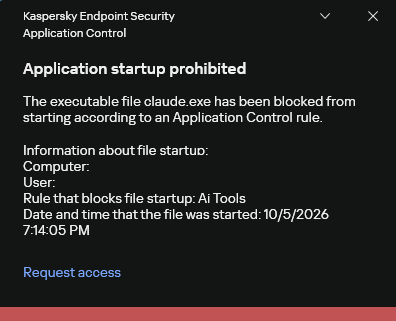
With this setup, when a user tries to launch an AI agent, they get a notification and the agent doesn’t start.
KES notification about an attempt to launch an AI agent
The View applications drop-down list shows products for a specific vendor.
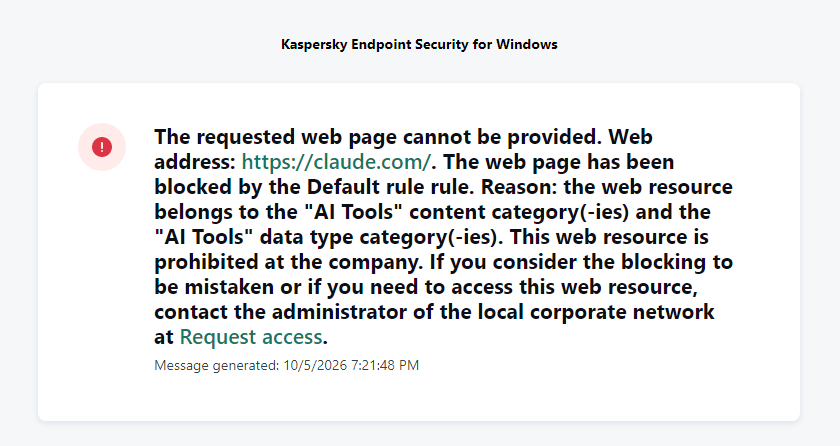
Similarly, Web Control lets you manage user access to web resources. If a user tries to open a denylisted website, KES blocks access and shows a warning.
KES notification about an attempt to access a prohibited web resource
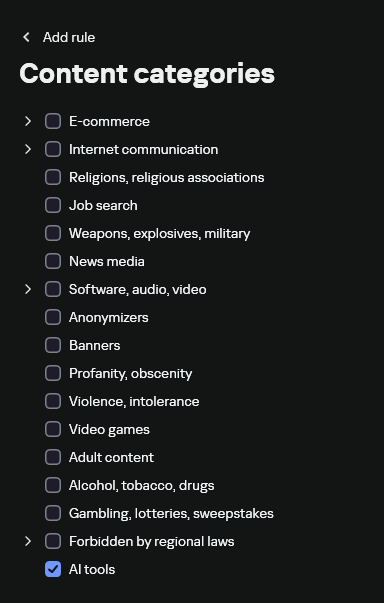
When configuring access, the administrator can block websites that provide AI as a service.
Website categories
For more on configuring Web Control, follow this link. The help portal also provides information on website categories that can be assigned to resources to configure access control.
Kaspersky Endpoint Detection and Response
To an EDR solution, an AI agent is a regular process. It has its own executable, a tree of child processes, and network communications, all of which need to be monitored for suspicious activity. An attacker can use an AI agent as an automation tool. An AI agent installed as a legitimate user tool can also be leveraged in a ClickFix attack, where it executes a malicious instruction received from an untrusted source, such as a document, web page, or email. That said, unsafe actions by an agent do not always indicate an attack. There may be no malicious intent in the chain at all. An incident can result from what looks like an ordinary instruction from a user who doesn’t fully understand the consequences of having it executed. The mere fact that an agent was launched does not reveal whether it is being used in an attack. That is why Kaspersky EDR (KEDR) uses both conventional behavioral rules and rules written and adapted to detect AI tools. The latter identify risky agent actions and settings, and help determine which AI tool was involved in suspicious activity.
Conventional KEDR rules detect the vast majority of familiar malicious techniques, including when performed by an AI agent. A suspicious PowerShell launch, persistence via Task Scheduler, or an attempt to steal credentials leaves clear, identifiable traces. These traces look the same no matter what initiated the actions. The rules analyze launch parameters, process relationships, affected files, network activity, and other telemetry events.
For example, in a recent Armored Likho campaign, we found signs that AI had been used to create loader and dropper samples, which were later compiled with NSIS (Nullsoft Scriptable Install System). The key telltale artifacts were icons in the scripts and excessive comments on every function, which is uncharacteristic of human-written code. In addition, the group continues to generate new modules for its BusySnake Stealer and BusySnake RAT samples. For example, the attackers used AI to develop a module that runs multiple checks for virtual environment artifacts and calculates a score. Depending on the score, the sample either runs or exits with code 0. Even though the initial access samples, payloads, and their modules were AI-generated, the commands they execute via rundll32 and PowerShell are detected by the shell_creation_by_rundll32 and suspicious_powershell_cmd_or_script_spawning rules.
So, for detecting an attack like this, it is not important who wrote the loader, the payload, or its modules: they are given away by the commands they execute, process relationships, and other traces of activity in the system. AI can be involved both in preparing the code and in carrying out the attack directly on the device.
In the latter case, the attacker uses the agent to carry out their tasks and lets it choose and run the required commands within the privileges it has. For effective protection, it is critical to link suspicious actions back to the AI tool and the conditions under which it operates. In KEDR, several specialized rules handle this task.
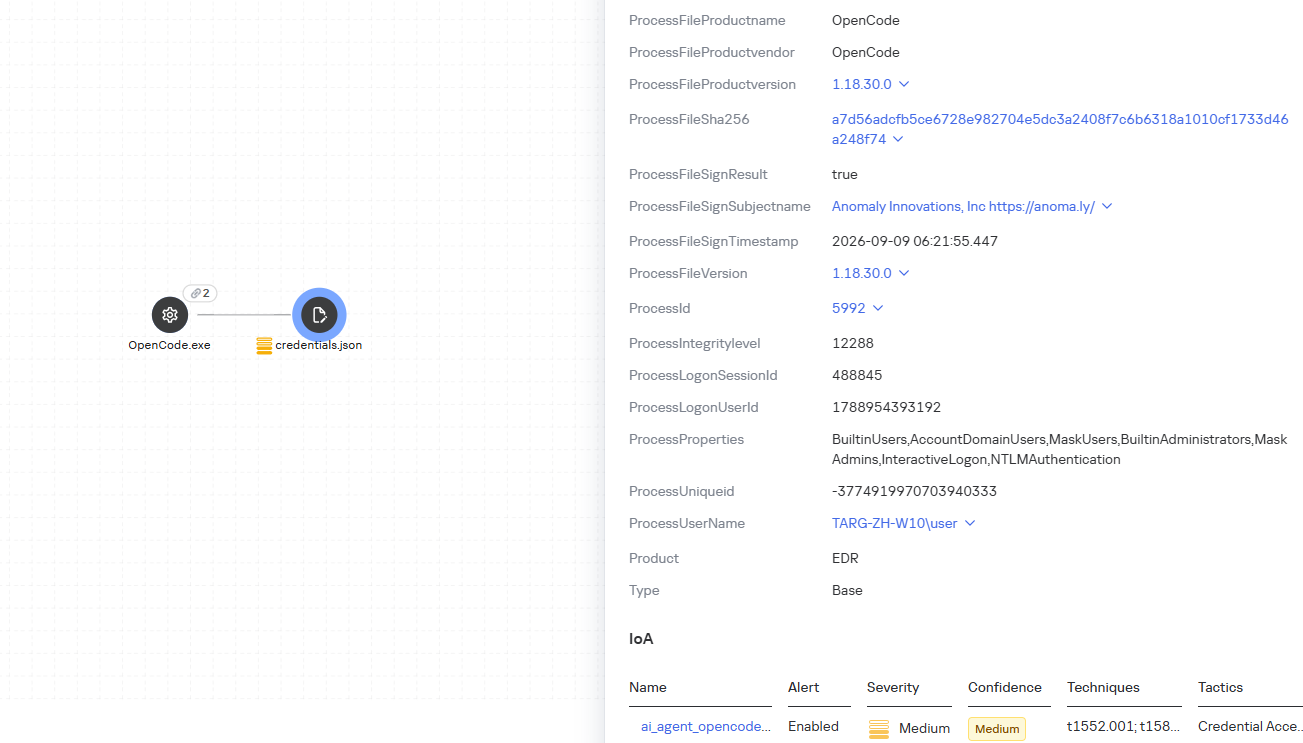
We have created separate rules for popular AI agents, ai_agent_*_access_to_sensitive_file_**, where * is the tool name and ** is the operating system. They generate alerts when an agent accesses files that contain credentials, tokens, or keys.
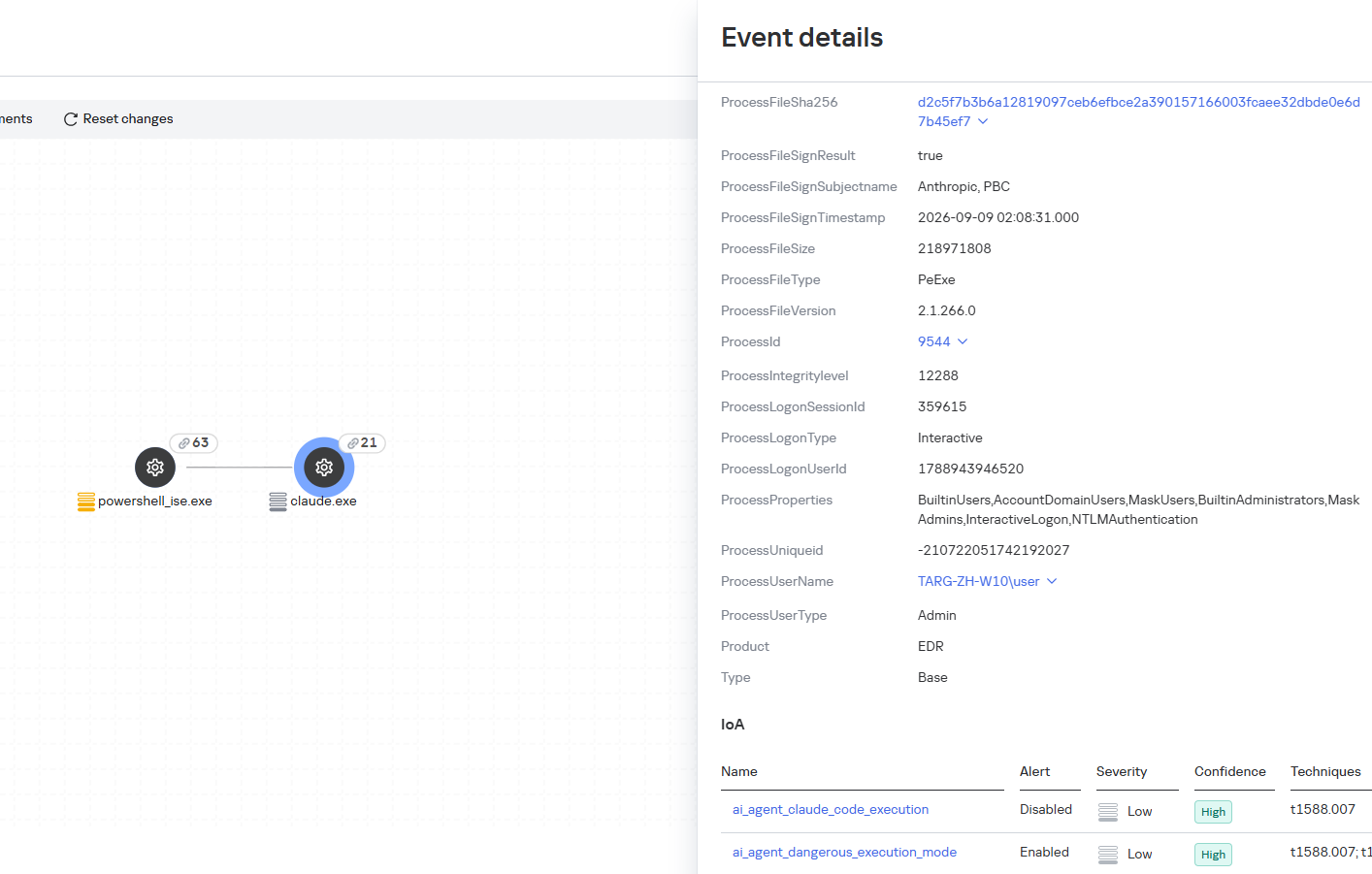
The ai_agent_dangerous_execution_mode rule detects agents launched with auto-approval of all actions (so-called YOLO mode) or with the sandbox disabled. These settings do not indicate an attack on their own, but they let the agent perform dangerous actions without user confirmation.
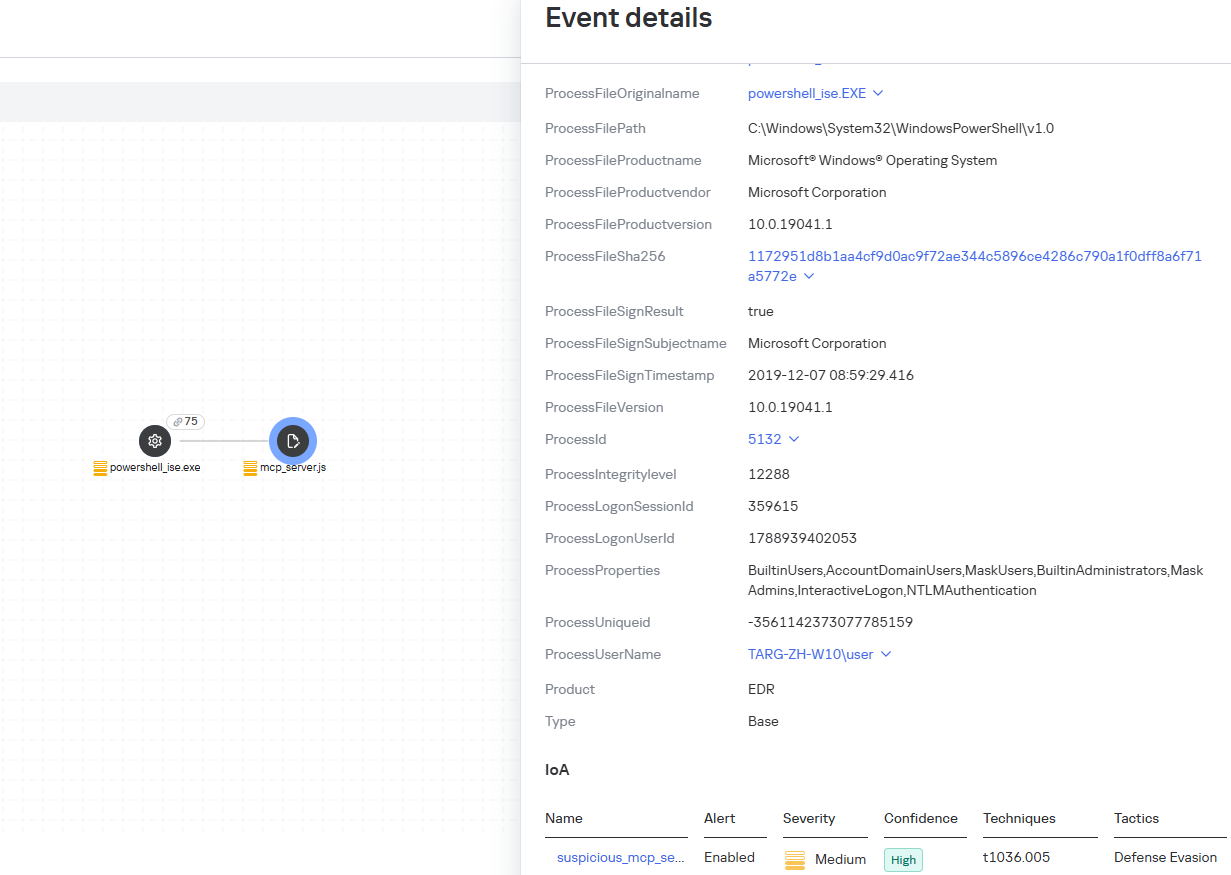
The suspicious_mcp_server_artifact rule triggers when MCP server scripts are created or modified in hidden, temporary, or cache directories. Attackers can place an MCP server in these locations to quietly connect it to the agent: through the MCP server, they can pass instructions to the agent, call third-party tools, and access the user’s data.
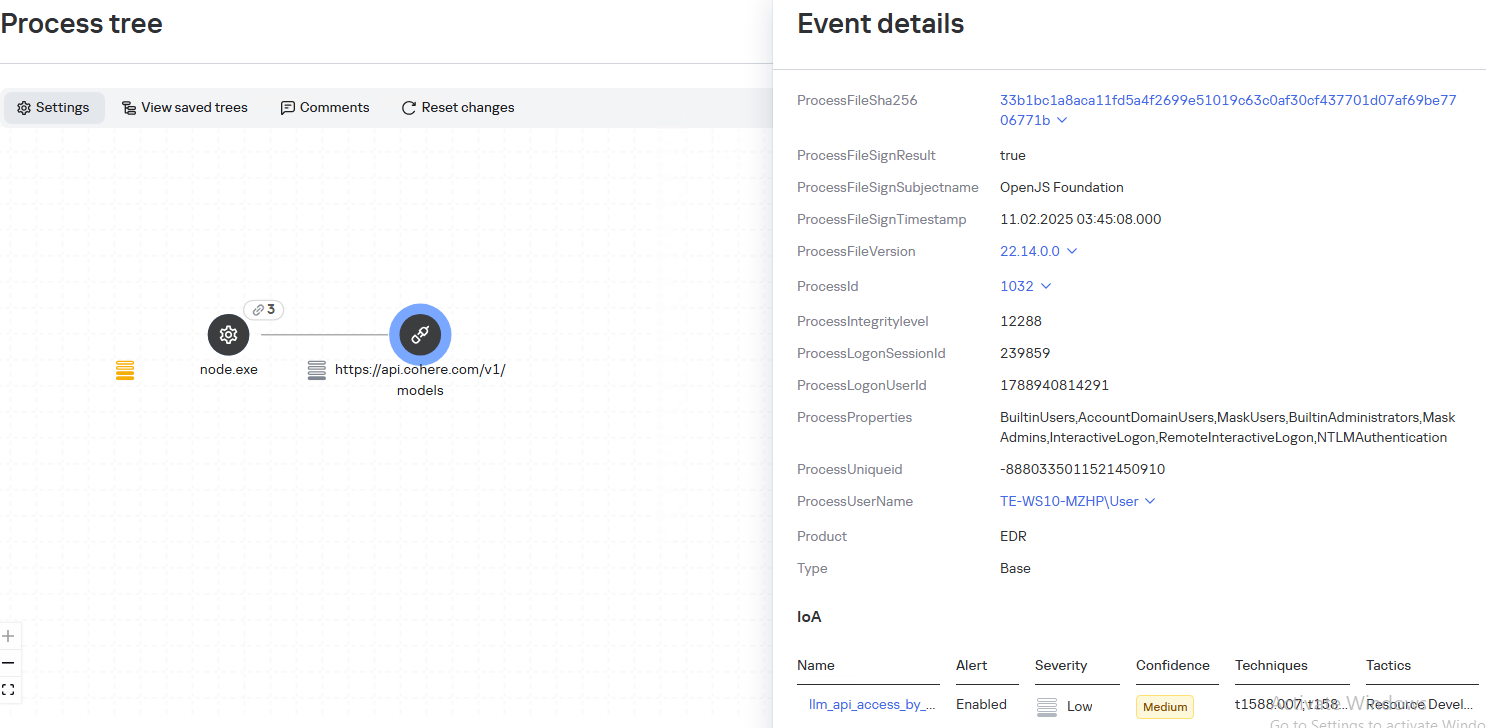
The llm_api_access_by_unusual_apps rule generates an alert when an application on Windows, Linux, or macOS connects to the API of a known external LLM service, unless this activity falls under predefined exclusions. This helps spot model access by applications that do not normally behave this way.
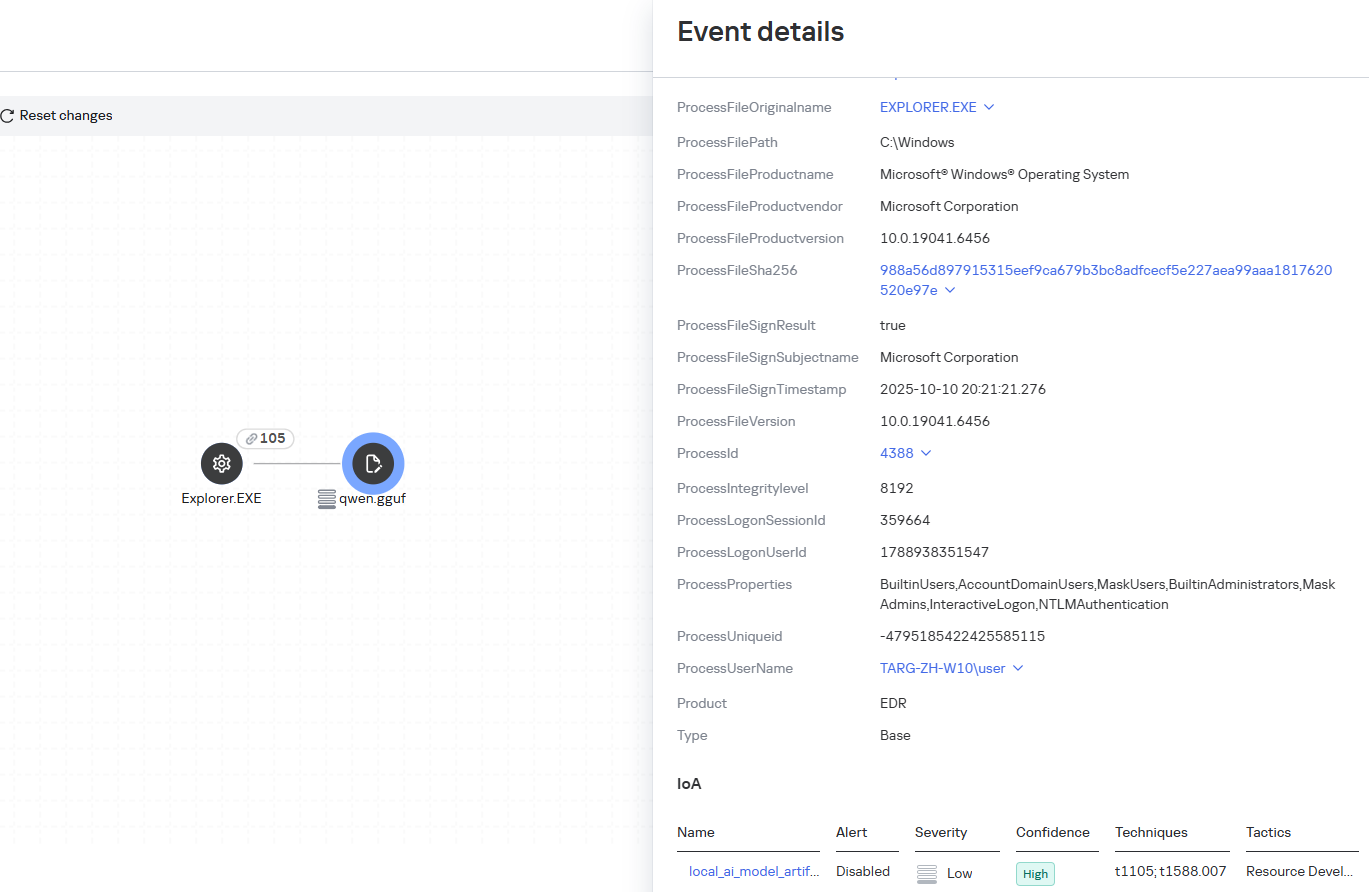
Some Kaspersky EDR rules tag events for investigation but do not generate alerts. For example, the ai_agent_**_execution rules flag launches of known agents on Windows, Linux, and macOS. The local_ai_model_artifact rule records the creation or modification of AI model files in typical application, runtime, and cache directories. These events reveal AI tools on the device, including tools that run on local models and never call an external API.
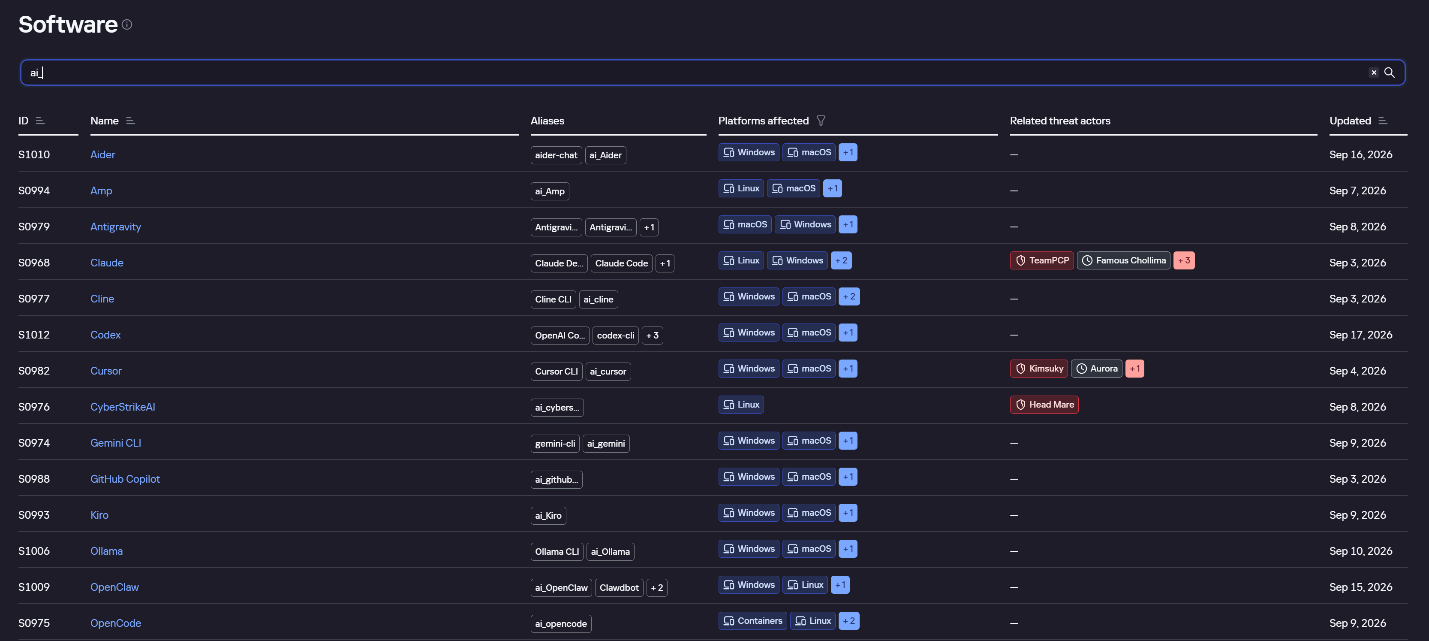
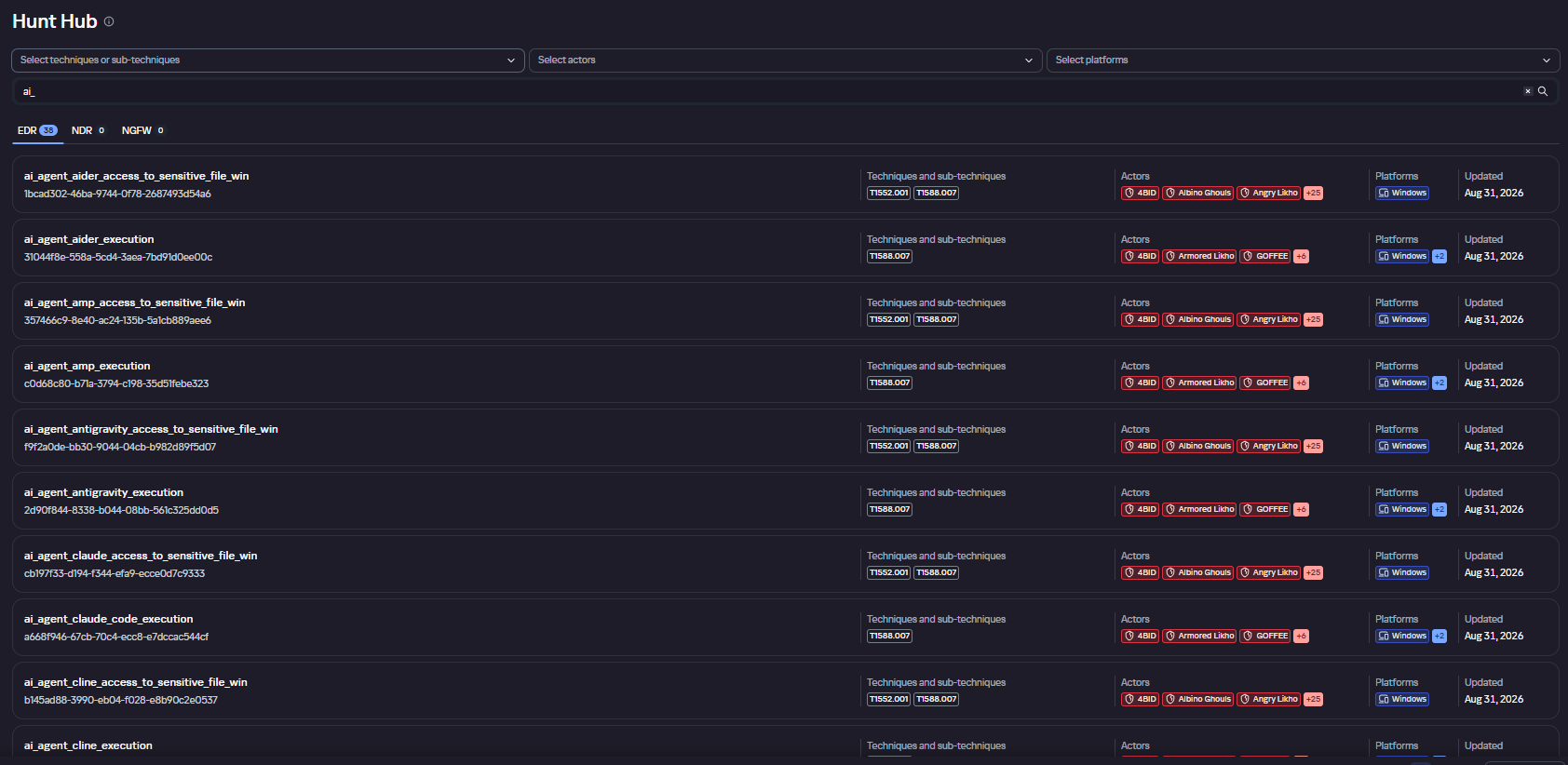
The Kaspersky Threat Intelligence Portal offers a large number of software profiles, including profiles of AI agents. You can sort them by the ai_ prefix:
AI agent profiles on Kaspersky TIP
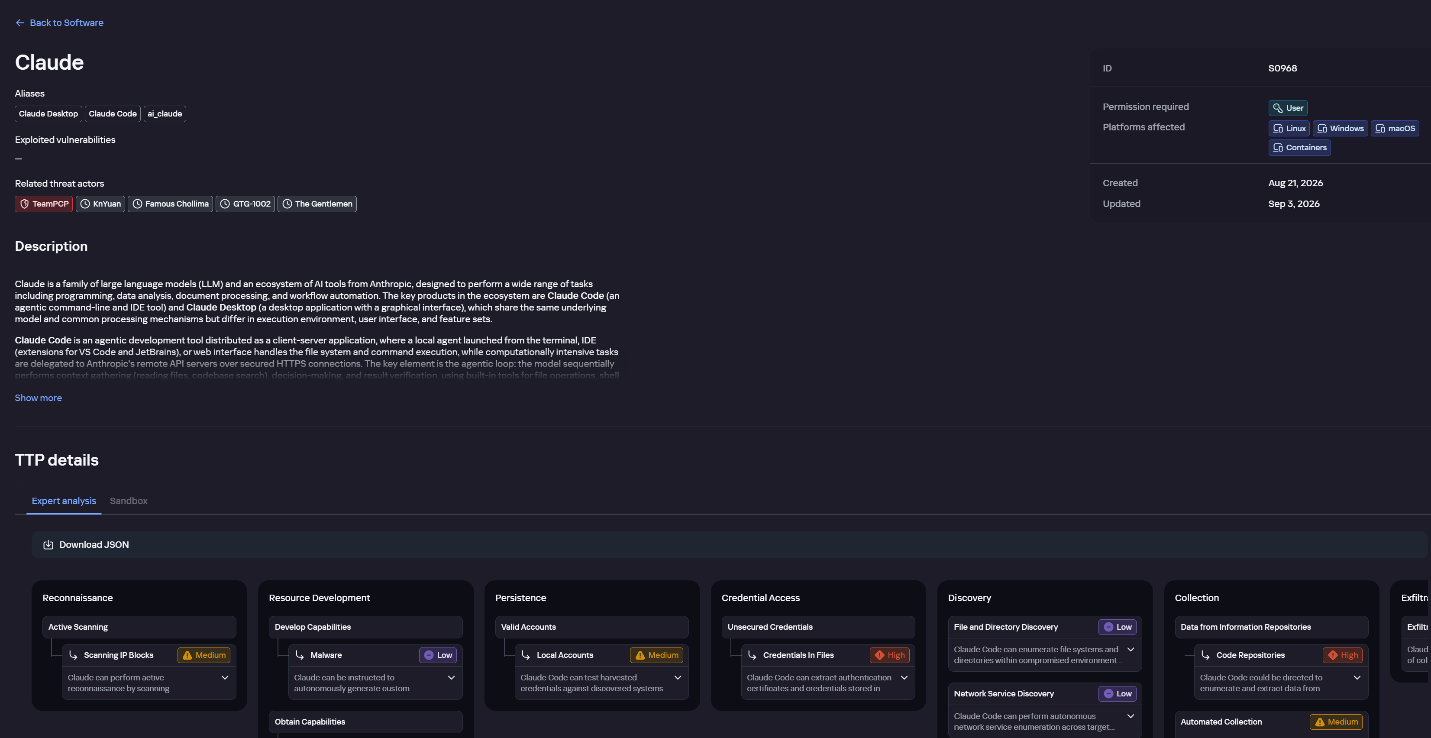
The profile of an AI agent such as Claude Desktop includes a detailed description of the software, the privilege level required to run it, supported platforms, and threat actor groups known to use it. It also lists tactics and techniques mapped to the MITRE ATT&CK framework, with descriptions of the procedures the tool can be used for.
Claude profile on Kaspersky TIP
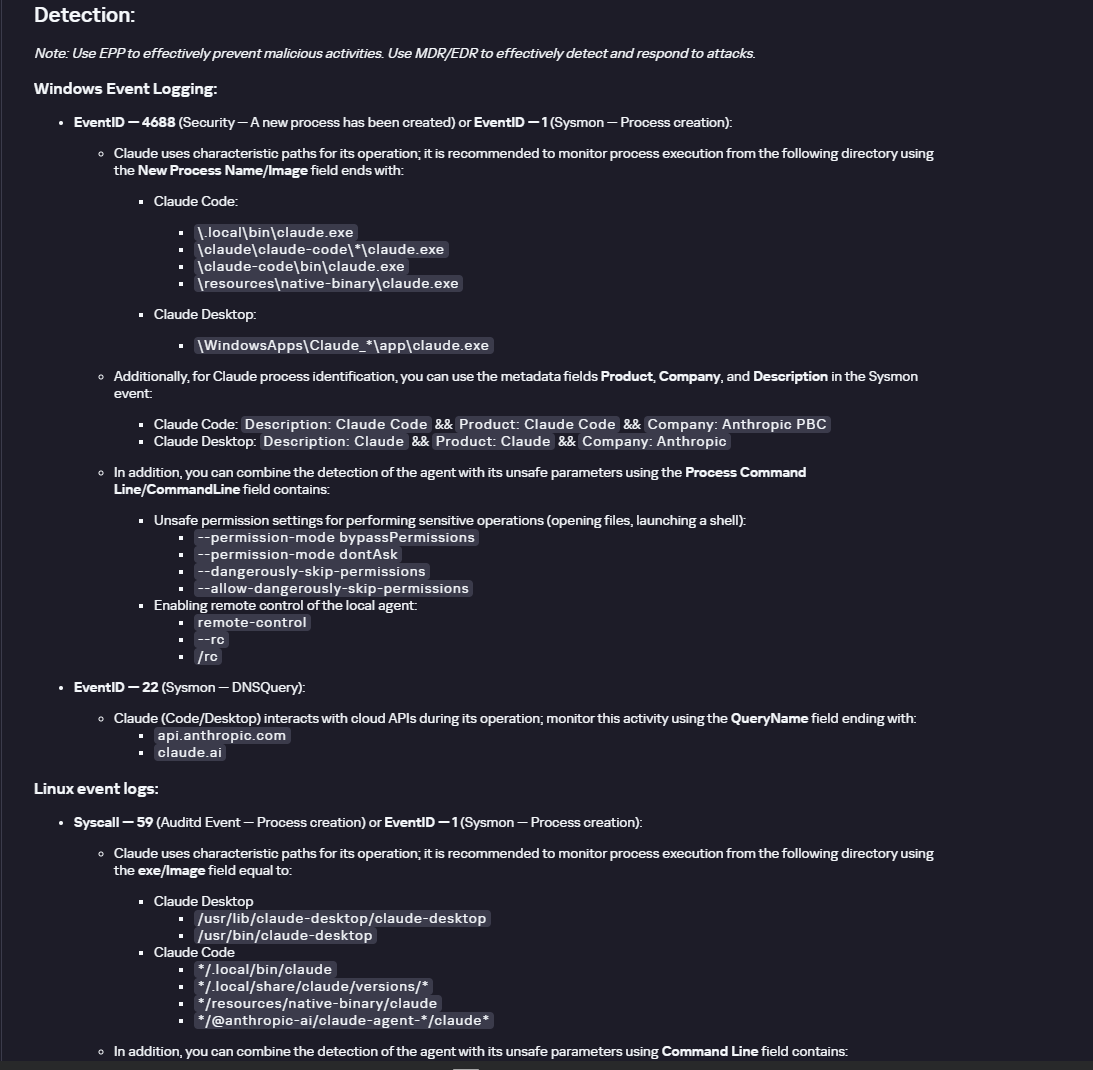
The description also lists ways to detect the software through standard system auditing mechanisms:
Windows: events from standard audit logs and Sysmon events
Linux: syscall audit events and Sysmon events
Network auditing: a set of protocols and the traffic generated by the software
The detection section lists the main artifacts the software leaves in the system: command lines, possible launch parameters, names of the services and scheduled tasks it creates, and the key network artifacts.
Detection section in the Claude profile
Hunt Hub
In December 2025, the Kaspersky Threat Intelligence Portal added Hunt Hub (HH), a repository of detection rules. This is a unique Kaspersky project, and we developed it in response to growing market demand.
This functionality is available in the Threat Landscape section of the portal. It gives analysts access to detection rules: their descriptions and their mapping to MITRE ATT&CK tactics and techniques, as well as to the associated cybercriminal groups.
In the Hunt Hub section, customers can explore the detection logic of EDR, NDR, and NGFW products, including the logic for detecting AI agents.
Rules in the Hunt Hub repository
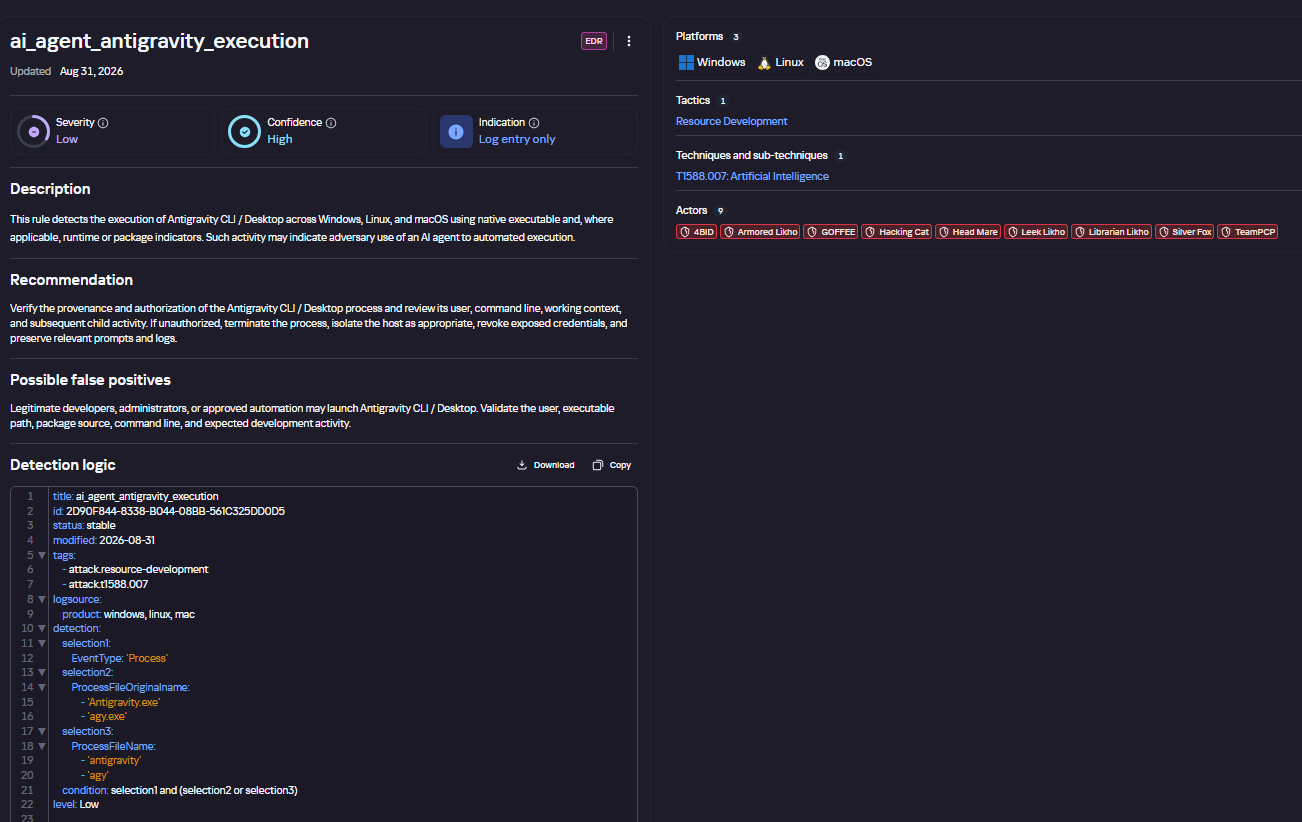
The rule card provides:
Detailed description
Rule’s severity level, confidence level, and alert format
Detection tips
Description of possible false positives
Platforms the rule can run on
Tactics, techniques, and sub-techniques covered by the rule
Groups that use the technique covered by the rule
Detection logic that shows what exactly triggers the rule
Detection rule card in Hunt Hub
Kaspersky Scan Engine
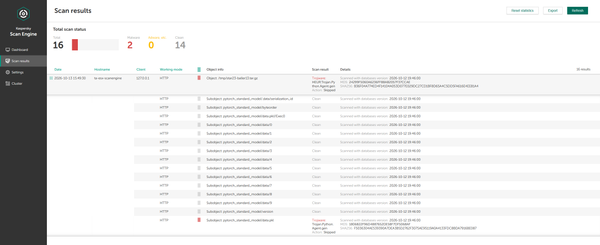
Skills are a key component of the AI agent ecosystem. They’re prewritten sets of natural-language instructions that extend agent functionality. We previously covered the risks that malicious skills pose to agent users. A skill can require the usage of additional programs and services, come with helper scripts (for example, written in Python), or contain a malicious command embedded right in the instruction text. This means that adding skills to an originally harmless AI agent opens up several new ways for malicious code to enter the system. To prevent this, any skills obtained from external sources must be scanned. Kaspersky Scan Engine is well suited for this task. This is a cyberthreat detection and response solution that seamlessly integrates with various applications. It can detect malicious code in agent skills, associated scripts, and in files generated by running agents.
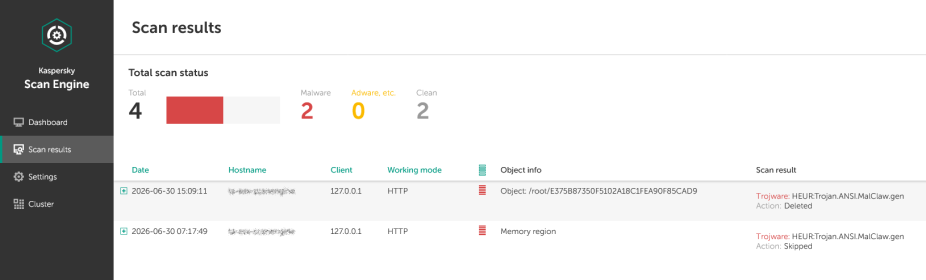
Detection of a malicious agent skill in Kaspersky Scan Engine
Trained LLMs come in many formats. Some of them (PTH, PT, PKL, KERS, and others) also store parameters and weights (training datasets). These files can also contain malicious code, so it’s critical to scan them before running and using them. Kaspersky Scan Engine scans potentially dangerous LLM formats for infected data. It can deserialize and analyze models to detect malicious code regardless of model size.
Detection of an LLM with malicious code in Kaspersky Scan Engine
Conclusion
AI agents are rapidly making their way into corporate environments: they help employees work faster and take on a wide range of tasks, but they also open up new opportunities for attackers. To take advantage of this technology without compromising security, organizations need to build multi-layered protection and minimize risks. A range of Kaspersky solutions can help with this:
Kaspersky TIP keeps you up to date on current scenarios in which attackers use AI agents, and its Hunt Hub section provides rules for detecting suspicious AI agent activity.
Kaspersky EDR detects AI agents in the infrastructure and monitors their activity on endpoints. If it detects potentially dangerous actions, the product can log the event, notify the SOC, and take response actions, such as stopping the process or isolating the host.
Application Control in Kaspersky products can fully restrict the use of AI agents within the company by using application categorization. The Web Control component can restrict access to AIaaS web resources.
Kaspersky Scan Engine can be integrated into various company processes to detect malicious code in any files, including AI agent skills and LLMs.
When companies combine the tools described above in a comprehensive approach, they can adopt AI agents in an informed way: with an understanding of the associated risks and effective means of minimizing them.
Details have been published of a critical flaw in the programming language PHP, which is the backbone of more than 70% of all websites. Left unfixed, the flaw would allow hackers to easily take over and compromise millions of websites and the information held on their servers.
Under the sea’s surface, a potential battle is brewing. This battle, centered on sabotage and deception, involves energy and telecommunication infrastructure being held at risk by a mixture of adversarial, opportunistic geopolitical strategies for expansive influence and control of critical resources, trade, and core industries. The ability to observe this conflict is also more constrained. Operating below the ocean’s surface is not like operating in other domains: Maneuvering is complex, and the terrain is highly dynamic.
You may know that privacy laws aren’t respected everywhere. In some places you can be forced to decrypt your files, or worse, get accused of a violation just for having encryption. A VeraCrypt hidden volume helps with the first problem but not the second. That’s why the project developer built Phantomdrive.
Phantomdrive is a fully open source USB drive that shows up as an 8GB disk when you plug it in. The OS has no way to detect the rest of the storage. To unlock the hidden partition, you open a text file on the visible part of the drive, type password: YOURPASSWORDHERE and save it. The drive disconnects, remounts the hidden partition, and AES-256 handles the encryption and decryption on the fly.
Design
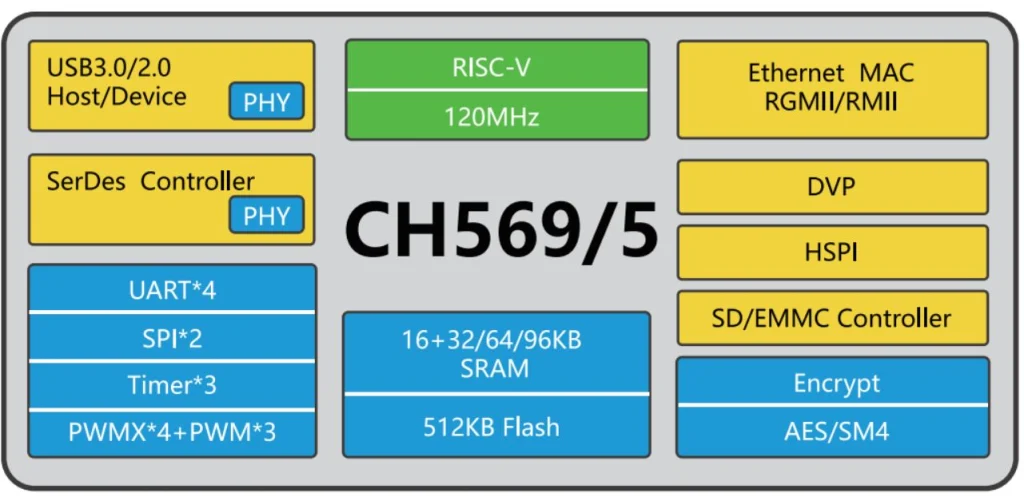
The hardware, firmware, and mechanical design are all open source. The developer built it around a small chip called the CH569, from the same company behind the CH340 USB-to-Serial chip you’ll find on most Arduino clones. It has USB3, SD/eMMC support, and a hardware AES block built in.
eMMC was too expensive due to AI-driven demand, so the developer went with an SD card instead. If someone tears the device apart they’ll find it, but everything on it is encrypted. The enclosure is sealed with epoxy, so any attempt to get inside means destroying it first. Once eMMC prices drop, a version using it will follow.
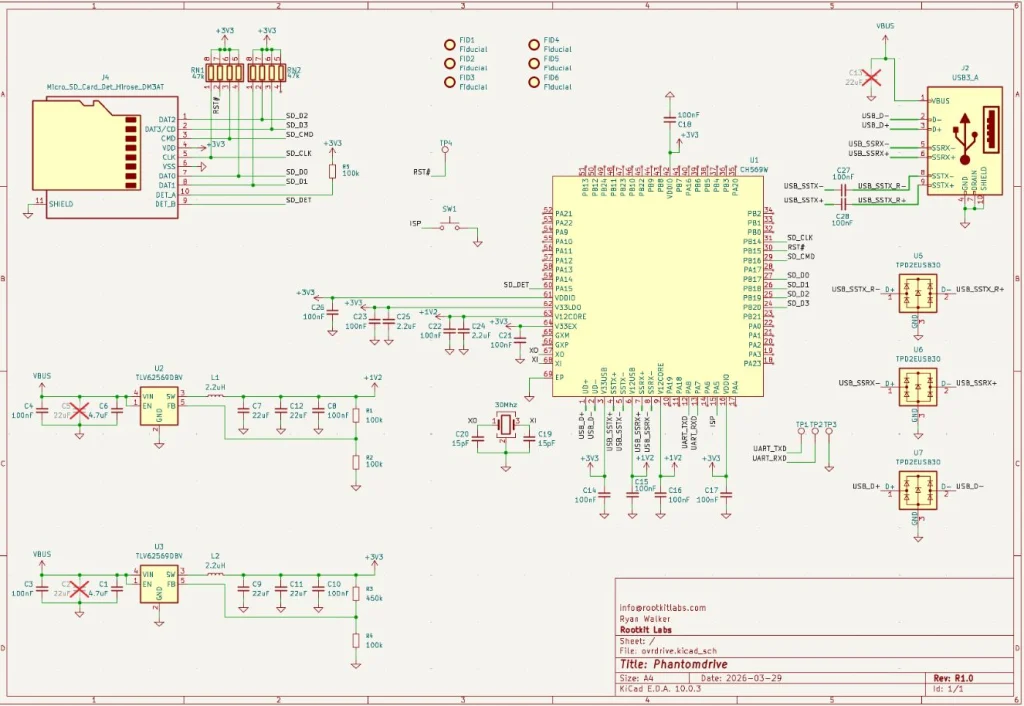
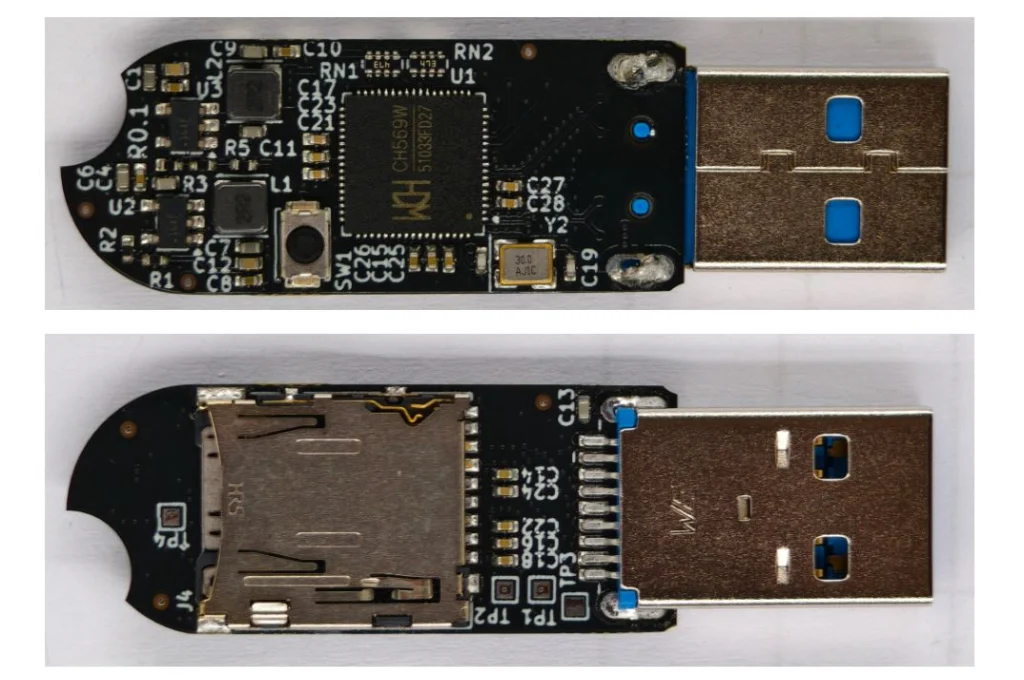
The board itself is simple. It’s a CH569 chip, a USB port, two buck converters, a firmware update button, an SD card, and some supporting components.
Cryptography
The developer verified encryption works through functional tests and ran it against OpenSSL’s AES implementation. Most of the GitHub issues that surfaced were AI-generated noise or already fixed bugs, with one real exception around AES-XTS covered below.
Key Derivation
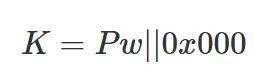
A Key Derivation Function (KDF) turns your password into an encryption key. The naive approach is padding the password to 32 bytes and using it directly.
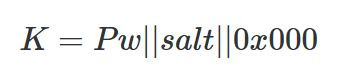
That’s weak. A precomputed table could crack it without even brute forcing. To fix that, Phantomdrive adds a unique salt per device.
With different salts, an attacker has to compute keys for each device separately, and you can’t swap the SD card between devices. You can read your salt like this:
udevadm info --query=property --name=/dev/sdc | grep ID_SERIAL_SHORT
ID_SERIAL_SHORT=Phantomdrive:34FC1FA7145467F7
So, 34FC1FA7145467F7 is the salt for this device, which you will need to recover the data if it ever fails. Save that value. You can also change the Phantomdrive name and the USB PID/VID in firmware if you want more stealth. On top of the salt, the KDF runs 100,000 rounds of SHA-256.
That adds about 3 seconds to unlock time, which is already at the limit of what the chip can handle. Argon2 isn’t an option since it needs too much memory. If you need stronger security, you can increase the round count, use a software encryption layer on top, or look for a different device.
AES Modes
AES is a block cipher that works on 16-byte chunks. Different modes turn it into a stream cipher.
AES-ECB is the naive approach, encrypting each block directly. The problem is that identical plaintext blocks produce identical ciphertext blocks, which leaks patterns. Attackers can also manipulate the ciphertext in predictable ways. Not good.
AES-CTR solves this by encrypting a counter and XORing the output with plaintext.
The main risk with CTR is nonce reuse. If an attacker copies your ciphertext twice and can guess one version, they can recover the other. The developer gets around 9 MB/s write and 20 MB/s read with AES-CTR.
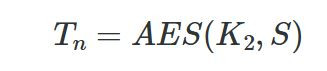
AES-XTS is the disk encryption standard and uses two keys. K1 protects the data, K2 generates a tweak per sector.
Each 16-byte block gets its own adjustment (T0, T1… Tn), then blocks are encrypted one by one to produce the final ciphertext.
It’s more secure but slower, around 6 MB/s write and 10 MB/s read on this hardware.
Firmware
The firmware is built on two open source libraries:
BSP: https://github.com/hydrausb3/wch-ch56x-lib
ISP: https://github.com/hydrausb3/wch-ch56x-isp
Password Snooping
The device doesn’t understand file systems. It just handles raw USB WRITE10/READ10 commands and passes them to the SD card. To detect the unlock password, the firmware scans every write for the string password: before passing data through.
void phantomdrive_snoop_write(uint8_t *buf, uint32_t len)
{
    const char *prefix = "password:";
    const size_t prefix_len = 9;
    uint32_t i;

    for (i = 0; i + prefix_len <= len; i++) {
        if (buf[i] != 'p')
            continue;
        if (memcmp(buf + i, prefix, prefix_len) != 0)
            continue;

        size_t pw_start = i + prefix_len;
        size_t pw_end = pw_start;
        while (pw_end < len && (pw_end - pw_start) < sizeof(pending_pw) &&
               buf[pw_end] != '\n' && buf[pw_end] != '\r' && buf[pw_end] != '\0')
            pw_end++;

        size_t pw_len = pw_end - pw_start;

        memcpy(pending_pw, buf + pw_start, pw_len);
        pending_pw_len = pw_len;

        memset(buf + i, 0, pw_end - i);
        return;
    }
}
Once the password is found, it gets copied into RAM and the buffer gets zeroed out so the password never touches the disk. Keep in mind, if you store a lot of data on the unencrypted partition and any of it contains the string password:, you could get a false match. If that’s a concern, you can change the trigger string in firmware or look for a different approach.
Video
The developer has also published a video, if you want to get into details of this project.
Summary
Phantomdrive is an open source USB drive that shows up as a plain 8GB disk while hiding the rest of its storage. You unlock the hidden partition by saving a password in a text file on the visible disk. The firmware catches it in the raw write traffic, keeps it in RAM, and never writes it to disk. Encryption is AES-256 on a CH569 chip, with a per-device salt and 100,000 SHA-256 rounds for key derivation. It’s limited by the hardware, so it’s weaker than memory-hard options like Argon2.
If you want to go deeper into how privacy can be preserved on real systems and how forensic traces are created and analyzed, our Anti-Forensics training is your next step. We covered advanced techniques for preserving your privacy and understanding what investigators can still see even when you think you have covered your tracks.
UK-based secure data exchange specialist DOQEX has achieved Cyber Essentials certification, adding another recognised security standard to its existing portfolio of accreditations.
The York-based company, which specialises in protecting sensitive information shared between organisations, already holds ISO 27001, ISO 27017 and ISO 27018 certifications. The latest achievement reflects its continued focus on maintaining strong security controls and protecting customer information.
Cyber Essentials is a UK Government-backed scheme designed to help businesses defend themselves against common cyber threats. It assesses five fundamental areas of cybersecurity: firewalls, secure configuration, security update management, user access control and malware protection.
Getting the Cybersecurity Basics Right
While DOQEX already operates under established international security standards, the company said completing the Cyber Essentials certification process provided a valuable opportunity to revisit its existing controls.
Nick Case, Director and Co-Founder of DOQEX, admitted that the company had initially underestimated the process.
“Having already achieved ISO 27001, ISO 27017 and ISO 27018, I’ll admit we initially underestimated Cyber Essentials. We thought we had the fundamentals well covered, but going through the process reminded us why they matter.”
He explained that the certification’s emphasis on practical security measures provided an important reminder that even organisations with mature cybersecurity programmes need to regularly assess their defences.
“Cyber Essentials has a clear focus on practical, verifiable security controls, and that has genuine value. It’s easy to concentrate on more complex security challenges, but the basics still need attention.”
The certification comes as organisations face increasing pressure to demonstrate that appropriate security measures are in place, particularly when handling sensitive business information or working with external suppliers.
Strengthening Trust Across the Supply Chain
As businesses become more reliant on third-party technology providers and external partners, cybersecurity certifications are playing a growing role in procurement decisions and supplier assurance.
Recognised standards can help organisations demonstrate that they have implemented appropriate safeguards, providing customers and partners with greater confidence in how their information is managed.
Case believes improving baseline security across UK businesses is particularly important as supply chains become more interconnected.
“We fully support what Cyber Essentials is trying to achieve. Raising the baseline of cybersecurity across UK businesses is important, particularly as organisations become increasingly dependent on suppliers and third parties. Stronger security across the supply chain benefits everyone.”
Supporting Secure Data Exchange
Founded in 2013, DOQEX helps organisations securely manage and exchange sensitive information between employees, customers, suppliers and business partners.
Its services combine security technology with managed support, helping businesses maintain control over information as it moves between organisations.
The Cyber Essentials certification builds on the company’s existing ISO standards and reinforces its approach to security governance, accountability and data protection.
For DOQEX, the achievement also highlights a wider message for businesses: while cybersecurity threats continue to become more sophisticated, maintaining effective fundamental controls remains an essential part of protecting sensitive information.
For the first time, researchers from the Idaho National Laboratory tested a full-scale 230-kilovolt three-phase power transformer, a keystone of the U.S. grid, under simulated earthquake conditions.
University of British Columbia researchers have uncovered a vulnerability that could allow hackers to target and disrupt critical infrastructure such as water treatment plants and energy grids without needing to break into a facility’s own systems or crack its encryption.
The technique targets facilities that communicate with cloud-based monitoring and control systems over encrypted connections. An attacker would first need to compromise a router carrying traffic between the facility and the cloud.
PwC’s survey found that only 22% of leaders would use fully autonomous AI for cyber defense, while just 21% are implementing quantum-resistant security measures.

 Login
Login