
❌

Reading view

There are new articles available, click to refresh the page.

HDMI For the Color Computer 2

[Scott Baker] bought a TRS-80 Color Computer off eBay some five years ago. He’d always intended to add a CoCoVGA or CoCoDV upgrade to hook it up to a monitor, but the device was sold out and his name never made it off the waitlist. Thus, he decided to build his own solution to give the classic machine a proper HDMI output.

The concept behind the project is simple enoughβ€”grab the digital signals that feed the MC6847 IC responsible for generating the analog video output, and use them to create an all-digital video output over HDMI. [Scott] achieved this by using a Tang Nano board, which hosts a Gowin GW1N-1 FPGA. It’s able to snoop the signals heading to the MC6847 and, with some supporting components and level shifters, it can spit out video befitting modern screens. To make the system nicely complete, an analog-to-digital converter is also included to pick up the analog sound output from the TRS-80 and spit it out down the same HDMI cable. Such convenience!

There’s something strangely anachronistic about grabbing a TRS-80 off the shelf and hooking it up to a flatscreen with a single HDMI cable. Regardless, it’s a pretty great way to play with your old machine without having to futz with heavy old CRTs. We’ve featured plenty of similar projects before, too.
Get Your Monitor Transmitting VHF with a Browser Tool

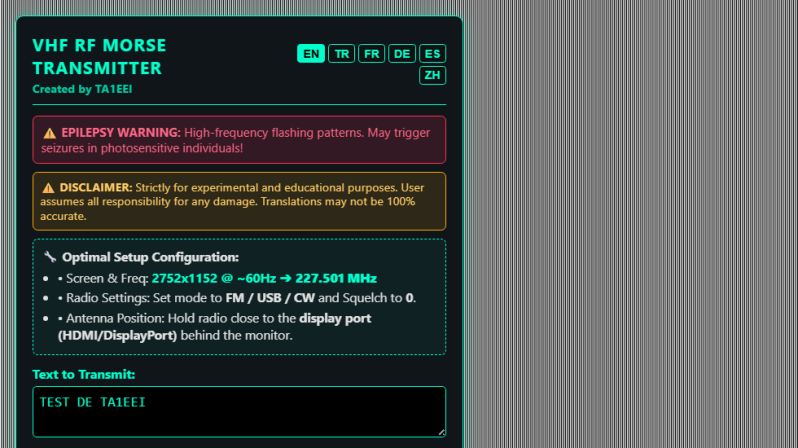
If you’re intending to transmit on the VHF band, you’re probably going to reach for a handheld or some kind of rackmount rig in your ham shack. But you needn’t bother with all that complexity, when you can use the computer on your desk to spit out such signals using a simple browser tool from [Efe].

The concept is straightforwardβ€”[Efe]’s tool manipulates pixel clocks in order to create spurious transmissions from your computer’s graphics hardware. The math pencils out pretty easilyβ€”multiply the horizontal resolution by the vertical resolution by the refresh rate, while paying attention to the precise timing of the video standard your monitor is using, and you’ve got your transmission frequency. For example, for a screen displaying 1080p at 60 Hz, with the CEA-861 timing standard, your horizontal and vertical resolutions are 2200 and 1125 respectively when paying attention to the requisite blanking intervals. Multiply those by 60 hz, and you’ll find you’re creating a signal at 148.500 MHz. Leverage this by displaying the right pattern of black and white pixels to maximise changes in voltage state on the HDMI or DisplayPort lines, and you might create a strong enough signal that you can actually pick something up. [Efe] created a tool to display these patterns to send simple Morse code messages over VHF just by flickering your screen just right.

You can test the transmitter tool for yourself here, right in your browser. You’ll want to hold your radio’s antenna nice and close to the monitor to see if you can pick up much of a signal. After all, the monitor, connectors, and cable are all built to optimize for clear signal transmission to the display, while preventing signal from leaking out to interfere with surrounding equipment.

Of course, a fair warningβ€”you’re not supposed to intentionally transmit on bands you’re not licensed for, even if it’s incredibly weak and unlikely for anyone else to notice in a scenario like this. Still, it’s an interesting project that shows you just how electromagnetic interference can leak out of just about anything under the right conditions.

❌