Login
Login
Combining Photogrammetry Utilities into a Simple GUI Tool
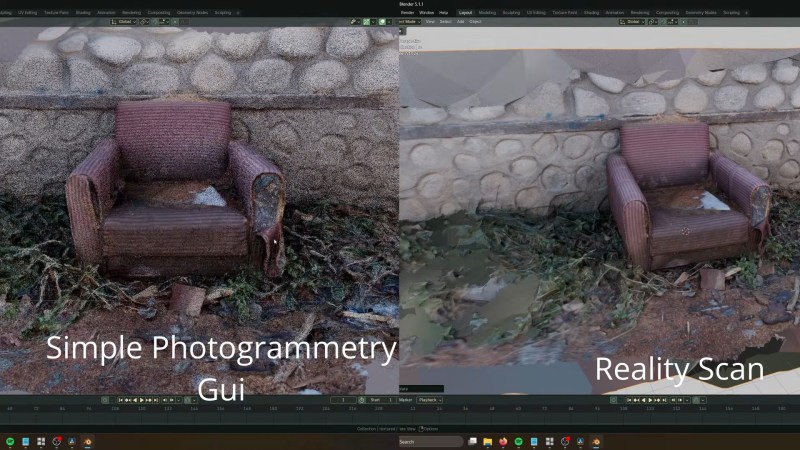
One of the fun aspects of open source software is that you can often find so many libraries and tools that implement the functionality you need, but ease of use for e.g. artists is often not a priority. This is where [Edin Spiegel] ‘s annoyances with photogrammetry tools led him down to the path of creating the Simple Photogrammetry GUI project, which is basically what it says on the tin.
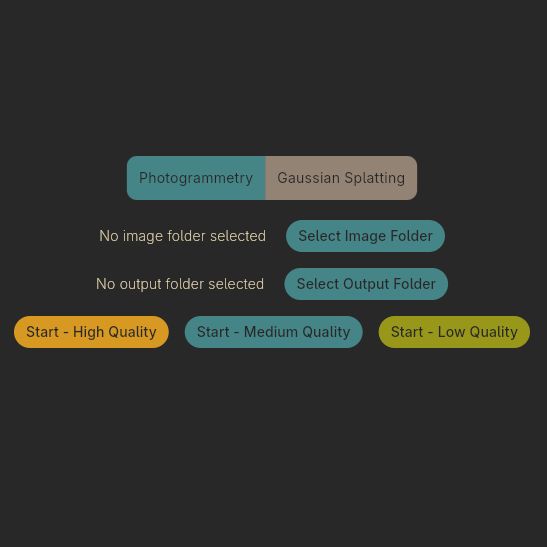 In an associated video its development and use is demonstrated, combining tools like Colmap, OpenMVS, mvs-texturing, pymeshlab, brush and PoissonRecon to implement both photogrammetry and gaussian splatting to turn those photos into a not too shabby mesh along with realistic textures.
The GUI uses the Flutter GUI kit, so Linux support is still somewhat sketchy, but should work in this new release of this GUI wrapper. The author is asking for people to test this GUI and report any issues found so that they can be addressed.
From a quick glance at the project and the comments to the video it seems quite useful for anyone who wants to get started quickly with photogrammetry. One niggle is perhaps that it relies on processing using CUDA, with a much slower fallback to CPU processing if you do not happen to have an Nvidia-blessed GPU installed. Of course this is one of those universal issues in a world where theoretically everyone should be using OpenCL already.
In addition to the build instructions you can also download an AppImage for Linux and compiled binaries for Windows to theoretically get started as fast as your internet connection allows. Interestingly, the AppImage is well over a GB in size, whereas the Windows ZIP file is just 207 MB for the v1.1.5 release, so take that into account.