A third-party arbitrator has ordered the IRS to restore telework for its employees. The agency has 30 days to decide if it wants to appeal the decision.
FILE - The exterior of the Internal Revenue Service (IRS) building in Washington, on March 22, 2013. The IRS released details Thursday, April 6, 2023, on how it plans the $80 billon it's getting to improve operations, promising investments in new technology, hiring more customer service representatives and expanding its ability to audit high-wealth taxpayers. (AP Photo/Susan Walsh, File)
Most Americans don’t read the rules that govern the federal grants funding science. Those rules, called the Uniform Guidance, shape how cancer research is funded, graduate students are trained, clinical trials are sustained, universities stock their labs and discoveries from those labs move into broader society.
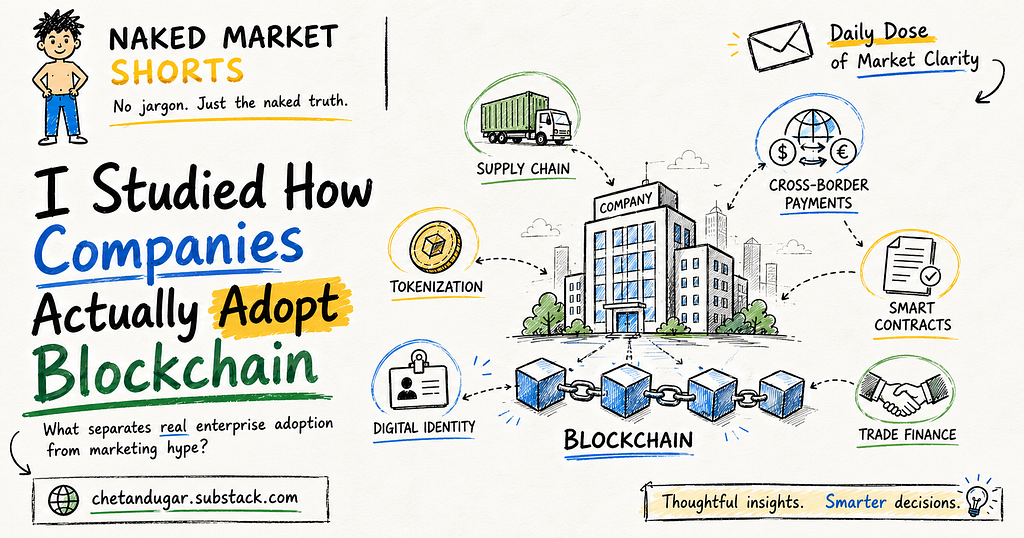
I went down a rabbit hole to understand how companies really adopt blockchain. What I found completely changed how I think about the technology and it might change how you see it too.
Naked Market breaks down macro finance, blockchain infrastructure, AI systems, and automated trading to help you understand the future of global finance before the mainstream catches up.
Two companies. Same Tuesday. Watch what they do.
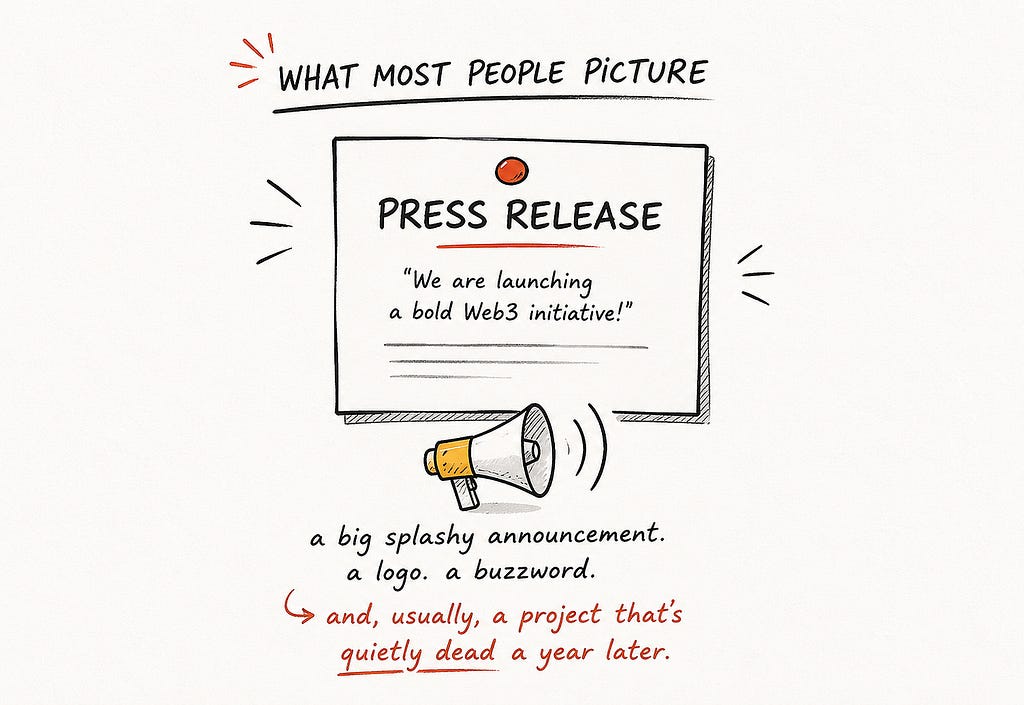
Company A sends out a glossy press release: “Were thrilled to announce our bold new Web3 blockchain initiative!” Theres a logo. Theres a buzzword. The stock ticks up, LinkedIn applauds, and an executive gives a talk at a conference with very uncomfortable chairs.
Company B says… nothing. Not a word. But deep inside its finance department, one quiet employee just moved a large payment to the other side of the world and watched it settle in seconds, a thing that used to take three days and a stack of fees.
Fast forward one year. Company As “Web3 initiative” is quietly dead, buried in a slide deck nobody opens. Company B is saving millions, doing it every single day, and its rivals still havent noticed.
Now which of those two companies actually “adopted blockchain”?
Thats the whole thing I want to unpack today, because the answer surprises almost everyone. Adopting blockchain first almost never looks the way you picture it. Its not a headline. Its a plumber, not a press conference. And once you see how it really happens, youll never read a splashy tech announcement the same way again wherever in the world you are.
First, the myth
When most people hear “a company is adopting blockchain,” this is the picture in their head: the big announcement. The stage. The word “revolutionary” used four times in one sentence.
And heres the uncomfortable truth about that version: its usually theatre. A lot of loud blockchain announcements arent really about solving a problem at all, theyre about looking innovative, giving the share price a little nudge, or keeping up with a competitor who just did the same. The tell is simple. If a company leads with the technology (“we are using blockchain!”) instead of a problem (“we fixed this expensive, annoying thing”), the project is usually months away from a quiet funeral.
The real thing looks completely different. So lets follow how it actually begins.
How it really starts: with a headache
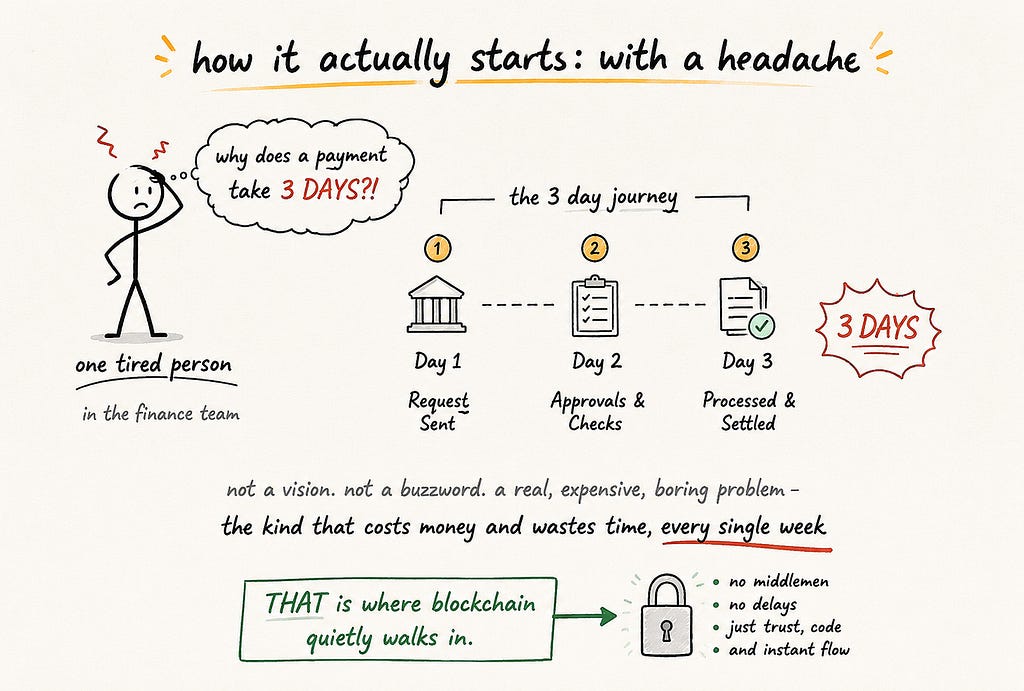
Real adoption doesnt start in the boardroom with a vision. It starts with one tired person and a boring, expensive problem.
Picture a woman in the finance team of some ordinary global company. Every week, she has to send money to suppliers or subsidiaries in other countries. And every week, the same nonsense: the payment takes two or three days to arrive, it passes through a chain of middlemen who each take a cut, and half the time she cant even see where the money is while its in transit. Its slow, its costly, and its been that way her entire career.
She isnt looking for a “bold Web3 future.” She just wants the money to move faster and cost less. And that — a real, recurring, money-wasting pain — is the doorway blockchain actually walks through. Not as a revolution. As an aspirin.
The entire pitch, in one line
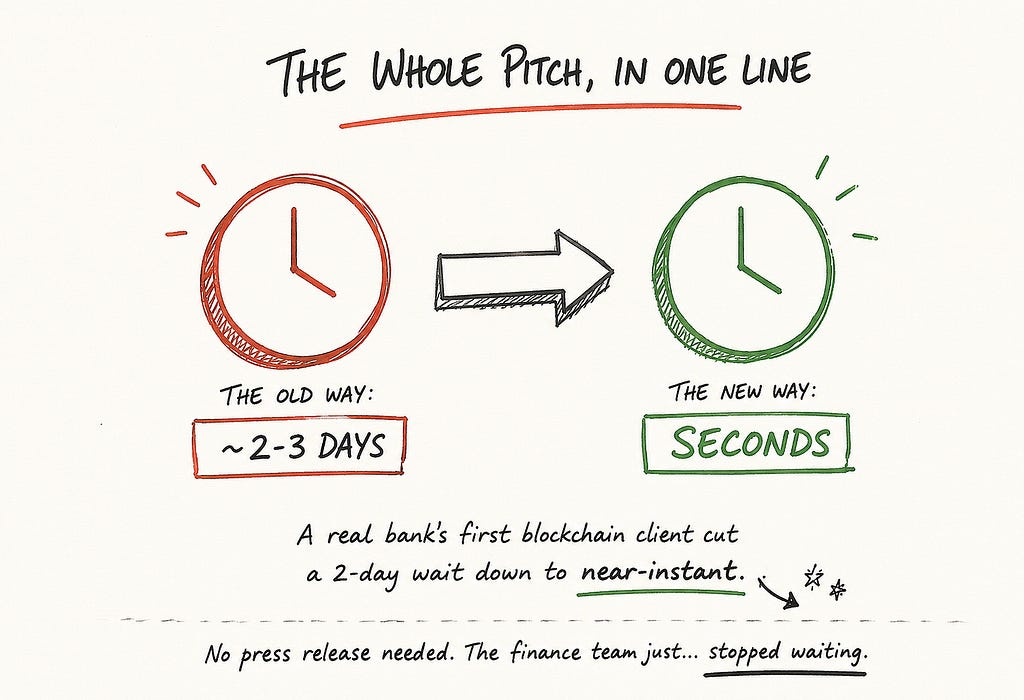
Heres the magic trick, and its almost embarrassingly simple. That payment that took three days? On blockchain rails, it can settle in seconds.
This isnt a hypothetical. One of the biggest banks in the world quietly built its own blockchain system, and its now handling trillions of dollars. But look at how it actually got going: its early clients werent chasing hype at all. One of them, a company that services loans, simply used it to turn a two-day settlement wait into something near-instant. Thats it. No stage, no buzzword — the finance team just… stopped waiting.
Why does blockchain do this? In plain words: normally, when money moves between companies, each side keeps its own separate records and they slowly reconcile with each other, passing paperwork back and forth through intermediaries which takes days. A blockchain is just a shared notebook that everyone writes into at the same time. One record, visible to all the right people at once. When theres only one shared copy, theres nothing to reconcile and no paperwork to pass around — so the payment just… clears. Days collapse into seconds.
Boring? Maybe. But “we turned three days into three seconds and cut the fees” is the single most powerful sentence in enterprise technology. That one sentence is how blockchain gets its foot in the door.
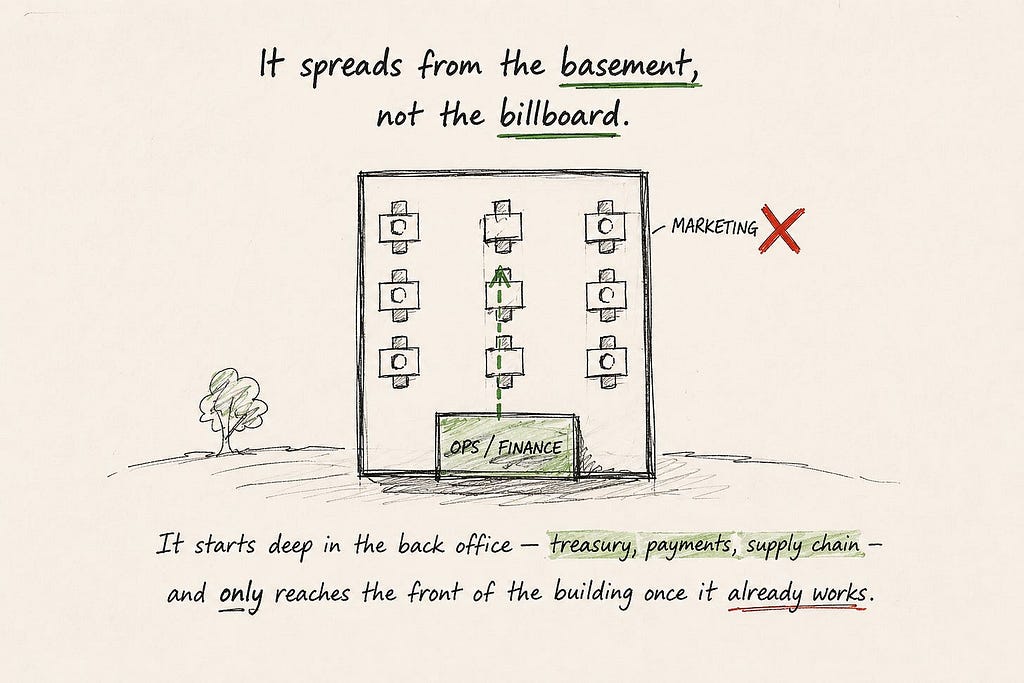
It spreads from the basement, not the billboard
Heres the next thing people get backwards. Real blockchain adoption doesnt start in the marketing department. It starts in the basement — the unglamorous back-office functions where money and data actually move.
Treasury. Payments. Settlement. Supply-chain tracking. These are the corners where the old way is slowest and most painful, which means theyre where a faster way pays off immediately. So a quiet pilot starts down there, proves it saves real money, and only then once it already works does it climb up through the company. By the time anyone in leadership is talking about it publicly, the thing has been running in the background for a year. The announcement, if it ever comes, is the last step, not the first.
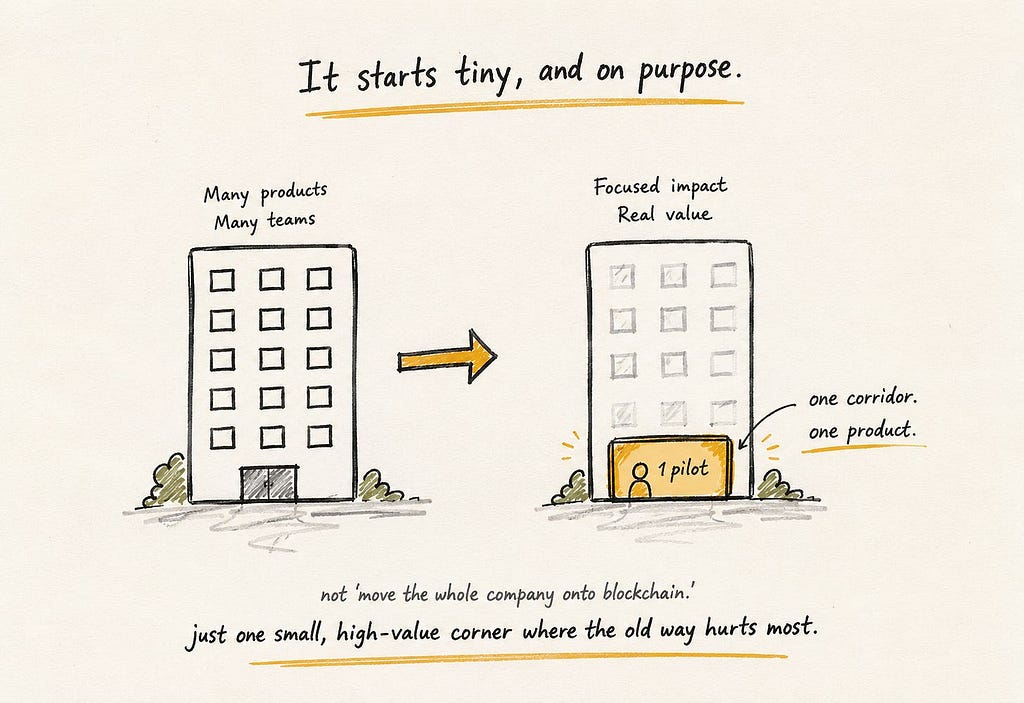
And it starts tiny on purpose
The smart first-movers dont try to “move the company onto blockchain.” That would be insane, like rewiring an entire skyscraper while people are still working in it. Instead, they pick one small, high-value corner and start there.
One payment route between two offices. One type of transaction. One product. They keep it narrow, they keep it low-risk, and they let it prove itself before they expand. Almost every real success story you can find started as one tiny, unglamorous pilot that worked — and then quietly grew.
Now the honest part: most of the big ones die
If I stopped here, youd think this is easy. Its not. And I promised youd get the real story, so here it is: the graveyard of failed corporate blockchain projects is enormous. And these werent silly little startups.
The most famous was TradeLens — a giant shipping tracker built by the worlds largest container line, Maersk, together with IBM. Serious companies. Hundreds of partners. It shut down. Australias stock exchange spent years trying to rebuild its core settlement system on blockchain and scrapped it after writing off around a quarter of a billion dollars. A whole string of bank-backed trade networks names like we.trade, B3i, Marco Polo, Contour all launched with fanfare, all collapsed.
Now heres the fascinating part. In almost every one of these failures, the technology worked fine. The blockchain wasnt the problem. So what killed them? Look closely, because the pattern is identical every single time and its the most important lesson in this whole piece.
Why the big group projects fall apart
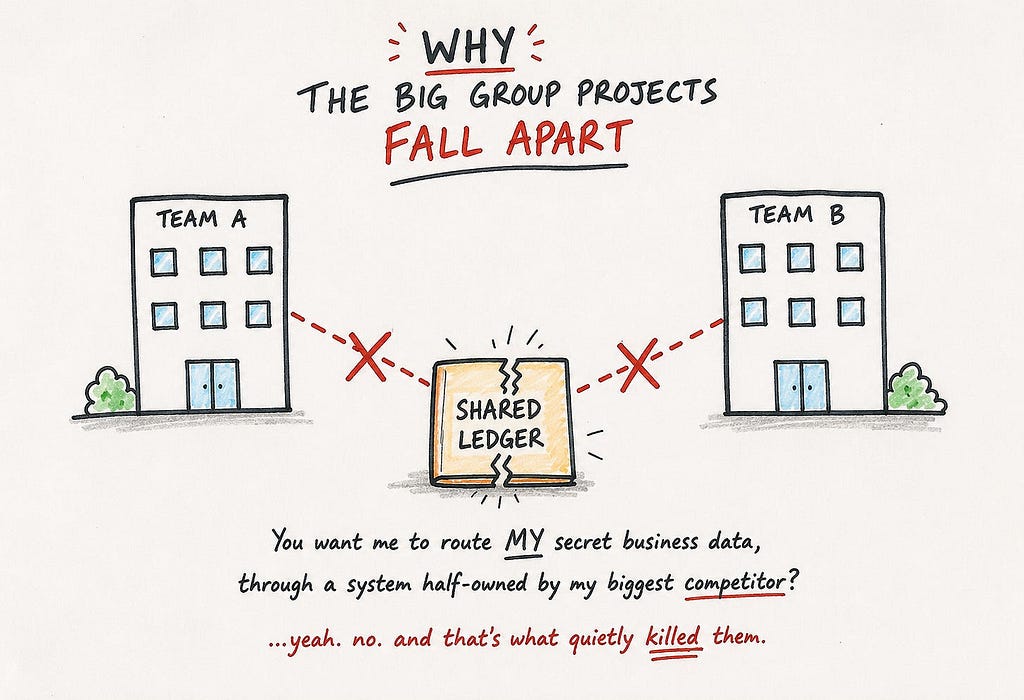
Every one of those doomed projects made the same bet: they tried to get a whole industry full of fierce rivals to share one ledger together. And that is where it always dies.
Remember, a blockchain is a shared notebook thats its superpower. But its also the trap. Because who on Earth wants to write their secret, business-critical data into a notebook thats half-owned by their biggest competitor? Thats exactly why TradeLens failed: rival shipping lines flatly refused to route their private data through a platform co-owned by Maersk, the giant they compete with every day. The tech was ready. Human nature wasnt.
The ledger was never the hard part. Getting enemies to hold hands and share it — that was the hard part.
Which points straight at the answer. (Its also why the “let one company privately control the shared ledger” idea is so tricky we pulled that apart in public vs private blockchains.) The projects that actually work are the ones a single company can adopt on its own, for its own benefit, without needing to herd a hundred suspicious rivals into the same room. One firm, one problem, one win. No hand-holding required.
So what do the winners actually do?
Put it all together and the recipe for adopting blockchain first is refreshingly clear and almost the exact opposite of the big splashy version.
They solve one real, expensive pain not a vision. They start in the back office and keep it small. They pick something that moves money (payments, settlement, treasury) over something that moves a brand (marketing stunts). They do it alone, so theyre not stuck waiting for competitors to agree. And they stay quiet about it — because while the loud company is giving a speech, the quiet company is banking the savings and building a lead. The silence isnt shyness. Its strategy.
Then quiet turns into a stampede
Heres how the story ends and why it matters far beyond any one company.
One firm quietly proves the boring thing works and starts saving real money. Then a rival notices its competitor is suddenly faster and cheaper, and panics. Then another. Then the whole industry lurches onto the new rails at once, terrified of being left behind. Its happening right now: that same bank is up to trillions in blockchain payments, the messaging network that underpins global banking just switched on a blockchain system with dozens of major banks, and companies are quietly paying contractors in digital dollars across dozens of countries. By the time all of this becomes a mainstream headline, the first-movers will have been winning for years.
And thats the deeper thing this whole newsletter keeps pointing at. The shared global money rails arent being built by some grand announcement or world summit. Theyre being built quietly, one company at a time, each one just trying to fix its own boring, expensive problem until one day you look up and the entire economy is running on them. Thats how the future actually arrives: not with a bang, but with a thousand finance teams that simply stopped waiting.
A test you can steal
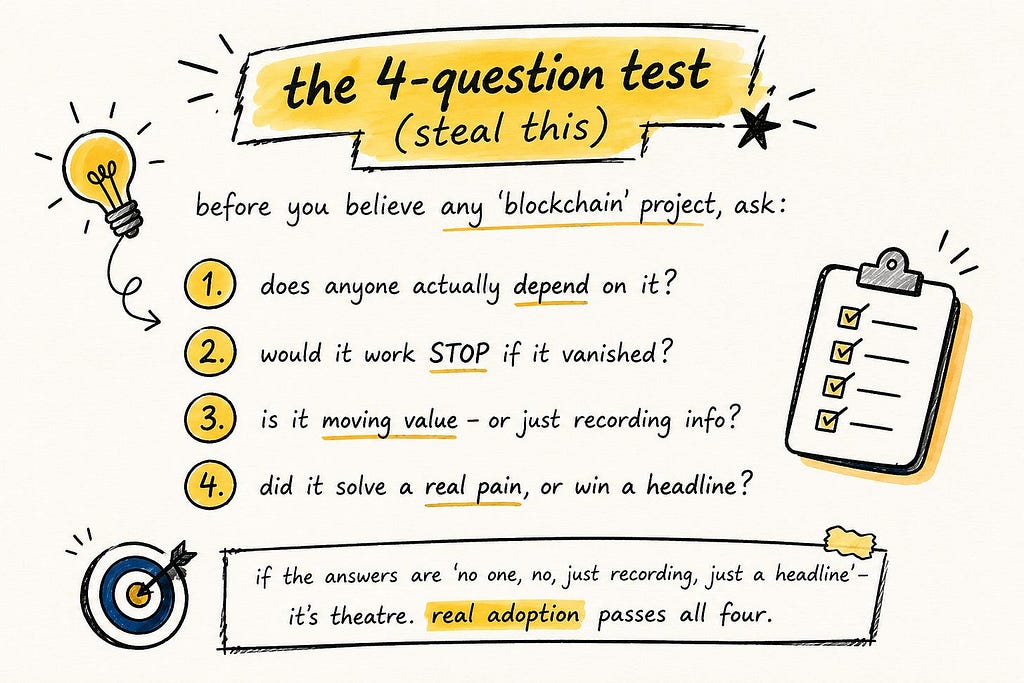
So the next time you see a company shout about a shiny new blockchain project, dont get swept up and dont sneer either. Just quietly run it through four questions. This little test cuts through almost all the noise.
1. Does anyone actually depend on it? Or is it a demo nobody would miss?
2. Would real work grind to a halt if it disappeared tomorrow? If it vanished and nobody noticed, it was never real.
3. Is it moving actual value or just recording information? Moving money and assets is where blockchain genuinely shines. “Putting records on the blockchain” is usually where a normal database would have been fine.
4. Did it solve a real, painful problem or just win a headline? Follow the pain, not the press release.
If the honest answers are “no one, no, just recording, just a headline” its theatre, and it will probably be dead within a year. Real adoption quietly passes all four.
Which company are you?
Which brings me, as always, to the one idea this whole newsletter is really about.
When it comes to a big shift like this, there are two kinds of company — and honestly, two kinds of person. The rich one chases the headline. It wants to be seen adopting the new thing: the announcement, the applause, the little bump. The wealthy one ignores all that and quietly rewires its own plumbing where it actually hurts and wins before anyone even realises the race has started. One wants to look like the future. The other just quietly becomes it.
You dont need to run a company for this to matter to you. The lesson works everywhere: the rich watch the announcements, the wealthy watch the plumbing. And right now, all over the world, the real adoption of blockchain isnt happening on a stage. Its happening in a back office youll never see, where somebody just turned three days into three seconds and didnt tell a soul.
Im not telling you to buy anything just to see clearly. Learn to look past the loud front door and notice the quiet back one. Because thats where the future almost always sneaks in.
If you want to keep reading finance this way — subscribe.
One clear breakdown at a time, for readers all over the world.
In a world where trust in institutions is mostly in decline, levels of trust in science remain relatively high. Yet at the same time, belief in scientific conspiracy theories, such as hushed-up effects of vaccines or airplane “chemtrails”, is also widespread.
Lately, we’ve covered several tools you can use with your laptop to track nearby devices and people. While they’re useful, their effectiveness depends on the strength of your Bluetooth adapter, and, of course, you need to have your laptop with you.
This time, we’re doing things differently. We want to show you a device that can automatically monitor nearby devices for extended periods, anywhere you choose to place it, and as often as you want. It doesn’t rely solely on Bluetooth, as it also uses Wi-Fi, which is far more likely to be enabled, increasing the chances of detecting someone in your area.
What is Paxcounter
Paxcounter is an open-source firmware project that takes a cheap little ESP32 development board and turns it into a sensor that can count people. Almost every smartphone in the world is constantly sending out small Wi-Fi signals, called probe requests, and Bluetooth signals too, even when the phone is not connected to anything. Paxcounter listens for these signals in the air. It counts how many different devices it hears during each scan, and from that, it can tell you a real time estimate of how many people are nearby.
The project started out as a simple way to measure how many passengers or pedestrians pass through a certain spot. But over time, it grew into something much bigger. Now it works as a general purpose IoT platform, built on hardware that usually costs somewhere between $10 and $30. Besides its main job of counting Wi-Fi and Bluetooth devices, a Paxcounter can also read environmental sensors, track its GPS position, keep accurate time, and send all of that data out through LoRaWAN, MQTT, a local serial connection, or straight onto an SD card.
How the Counting Works
The way Paxcounter counts people is simple, but it was clearly built with privacy in mind from the very start. Every scan cycle, which lasts 60 seconds by default, the device switches its Wi-Fi and Bluetooth radios into scanning mode and listens for probe requests and advertisement packets coming from nearby devices. Each of these packets carries a MAC address. Paxcounter takes just the last two bytes of that address and turns them into a short, temporary ID. This ID is only used to check for duplicates during that one scan cycle. Once the cycle ends, the count of unique IDs gets sent out, and the whole list is wiped from memory. The firmware also does not try to fingerprint any device. It never tries to figure out a phone’s brand, its operating system, or who owns it. All it wants to know is whether that device has already been counted in the current window.
This scan and clear cycle just keeps repeating, either nonstop or on a schedule if deep sleep power saving is turned on. The results, which include the Wi-Fi count, the Bluetooth count, and sometimes live sensor readings too, get packed into a small payload and sent out through whatever channel the device is set up to use. One thing worth knowing is that Wi-Fi and Bluetooth scanning actually share the same 2.4 GHz radio hardware on the ESP32. So running both scans at the same time slightly lowers the accuracy of each one. Because of that, the project’s own advice is to split Wi-Fi only counting and Bluetooth only counting across two separate devices whenever the best possible accuracy is needed for both.
One Firmware, Many Boards
Paxcounter comes with a hardware abstraction layer and its own pin mapping files for dozens of ESP32 and ESP32-S3 boards. These come from well known manufacturers like LILYGO and TTGO, Heltec, Pycom, WeMos, M5Stack, and Adafruit, and there is also a generic template ready for boards that are not officially supported yet. LILYGO even sells a ready-made board called Paxcounter LoRa, built specifically to run this firmware.
Depending on which board you pick, your device can end up supporting a LoRaWAN radio for sending data over long distances while using very little power, an OLED status screen, or a single color, RGB, or larger LED matrix light to show status. It can also support a physical button for flipping through display pages or sending an alarm message, battery voltage monitoring, GPS positioning, a real time clock chip along with IF482 or DCF77 time telegram output, and even an SD card slot for logging data locally when there is no network around.
Because the whole system was designed to be truly portable, the documentation goes into real detail about power draw, which usually sits somewhere between 450 and 1000 milliwatts depending on how the device is set up. It also makes good use of the ESP32’s deep sleep mode, so a device can keep running for a long stretch of time on just one 18650 lithium ion battery cell. Members of the community have already shared several 3D printable enclosure designs on Thingiverse for the more popular boards.
Getting the Device Up and Running
Paxcounter is built using PlatformIO instead of the plain Arduino IDE. This choice lets it work smoothly with editors like Visual Studio Code, Atom, or Eclipse, and it gives the project reproducible, script driven builds. In fact, the repository runs an automated PlatformIO build check every single time the code changes, using GitHub Actions, and there is even a CodeFactor badge that keeps an eye on ongoing code quality.
The configuration is intentionally spread across a handful of different files instead of being crammed into just one. This keeps board specific settings, behavioral settings, and personal settings nicely separated from each other. The platformio.ini file is where you select which board’s hardware profile you want to compile against. The paxcounter.conf file handles behavioral settings, things like how long a scan cycle lasts, sleep timing, and payload options. The shared lmic_config.h file sets the LoRaWAN region and frequency plan, so it matches the rules where you live. The shared loraconf.h file holds the device’s LoRaWAN join credentials, and the project recommends using OTAA rather than ABP for this. And the shared ota.conf file stores the Wi-Fi credentials the device uses for over the air firmware updates.
You can upload firmware the traditional way, over USB, or once a device has joined a LoRaWAN network, you can push updates over the air instead. A remote command tells the board to connect to Wi-Fi, check a hosted repository called PAX.express for a newer build, and then download and flash it automatically. If anything goes wrong during that process, it will roll back to the previous version on its own. Devices can also be set up to open a small local web based bootstrap menu right when they power on, which lets you upload a firmware file manually, even from a phone in tethering mode, without needing PlatformIO installed on site.
Configuration and Extensibility
Beyond just picking a board, Paxcounter gives you a long list of settings you can tune to fit your needs. It can log environmental data from sensors like the Bosch BMP180, BME280, BMP280, or BME680, read a Nova SDS011 particulate matter sensor to track dust in the air, and keep accurate time using either a DS3231 real time clock or a connected GPS module.
Display and LED
On boards that come with an OLED display, Paxcounter shows live status information you can cycle through with a short press of the button. This includes the current pax count, meaning the people count, a histogram of recent activity, GPS status, environmental sensor readings, and the time of day.
A long press of that same button sends an alarm message out over the network instead, which is a simple way to flag a problem from out in the field without needing any other kind of interface. Even on boards that do not have a display at all, a status LED still tells you what the device is doing through its blink pattern. You get a brief flash whenever a new Wi-Fi or Bluetooth device is spotted, a quick blink while the device is joining the LoRaWAN network, a short blink during data transmission, and a slow, long blink if there is a LoRaWAN stack error. Boards that have an RGB LED get a color coded version of these same signals.
How You Receive the Data
Once a Paxcounter has counted the people nearby and packed everything into a message, that data has to go somewhere so you can actually see it. How that happens depends on which output the device is using, and the good news is you can turn on more than one at the same time. If you are using LoRaWAN, which is the most common setup, the device does not send the data straight to you. Instead, a nearby LoRaWAN gateway picks up the signal first and forwards it on to a network server, usually The Things Stack. There is a small decoder script included with the project, and its job is to take that raw message and turn it into numbers you can actually read, something like a pax count of 14. From there, The Things Stack can pass the data along to your own app or dashboard using MQTT or a webhook, or you can simply watch it come in live through the built in console.
If a board does not have LoRa hardware built in, it can just skip the gateway completely and send that same kind of data straight to an MQTT service over Wi-Fi instead. You can also connect the device to a computer using a USB cable and read the numbers directly from a serial connection. This is a simple way to test things out without needing to set up a network at all. If SD card logging is turned on, everything also gets saved locally as a CSV file, so you can pull the card out later and open it up in a spreadsheet. This comes in handy in places where there is no network coverage to rely on.
Where It’s Used
Because a single Paxcounter device is cheap to build and can be left running unattended for a long time, you will find it popping up in a pretty wide range of places. Retailers and shopping centers use it to measure foot traffic without needing to install cameras. Event organizers use it to watch how crowds move around a venue in real time. Pentesters can get a passive read on how many Wi-Fi and Bluetooth devices are active in a building, or to notice unexpected devices showing up where they shouldn’t, all without needing camera access or network credentials.
Legal and Privacy Considerations
Since Paxcounter’s whole job involves listening to wireless traffic, its documentation is unusually upfront about the legal side of things. It points out that sniffing Wi-Fi and Bluetooth MAC addresses may be regulated or restricted depending on where you live, and it links to specific starting references for the US, the UK, the Netherlands and the EU, and Germany. It also makes clear that the legal responsibility for how a device is built and deployed falls on the person doing it, especially for public deployments where the results might get published somewhere. On the technical side of privacy, the project’s own design actually holds up pretty well against that legal backdrop. Identifiers are only ever built from the last two bytes of a scanned MAC address, they are kept in memory just for the length of one scan cycle, and then they are discarded completely. No MAC addresses or identifiers are ever sent out over the network, and the firmware does not do any extra tracking or fingerprinting of the devices it scans.
Summary
What really makes Paxcounter stand out is not any single feature on its own. It is the whole combination working together. One piece of open source firmware supports dozens of cheap boards, runs for a long time on a small battery, counts people without saving anything identifying about them, doubles as a general environmental sensor node, speaks LoRaWAN, MQTT, serial, and SD card all at once, and can be fully reconfigured from a distance once it is out in the field. The full source code, the complete board list, and all the documentation are available on GitHub.
If you enjoy experimenting with frequencies and trying new things, we recommend signing up for our SDR for Hackers training. With Master OTW, you’ll learn how to use your computer and inexpensive SDR hardware to explore and hack a wide range of radio signals.
AI tools are helping solo game developers build and release games faster, but writers, artists, and junior programmers are facing fewer opportunities in an increasingly competitive industry.
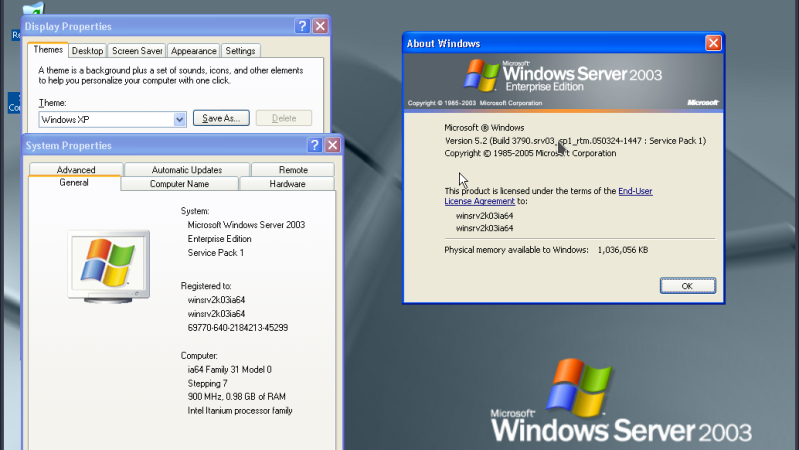
Intel’s Itanium architecture was an interesting experiment, but it has gone down in history as one of the chip giant’s bigger flops, so much so that it earned the name “Itanic” in the tech press. This is perhaps unfair, considering it did limp on until a quiet EOL in 2020. We didn’t know anyone missed it, but perhaps it was more the technical challenge than nostalgia for obsolete server hardware that led [Yufeng Gao] and [gdwnldsKSC] to spin up an instruction-set translator for the late, lamented, IA-64 architecture.
Note that it’s very much in alpha, version 0.1, so don’t expect all the things. Neither HP-UX and OpenVMS will boot, which is a pity since Itanium’s great success was arguably winning those OSes and thereby killing the bespoke architectures HP and DEC had at the time. Gentoo can get to a shell, as long as you use Kernel 6.6 or older, and Windows Server 2003 and XP-64 both apparently boot.
It’s not incredibly performant, with 486-level speeds when running on Ryzen 5000 series hardware, but then, it is a 64-bit hardware being emulated here, and pretty weird hardware at that. Itanium’s Very Long Word Instruction architecture was notoriously hard to program well. Specifically, it was hard to compile optimized programs for, so we expect optimizing an emulator is going to be similarly difficult. That’s why this is so impressive, even at this early stage.
There are a lot of AI coding applications out there, and as impressive as large language models and the agents they enable have become, many of the most recent developments in AI-assisted development have been in the software that manages those models, not just the models themselves.
Earlier this summer, I spoke with the head of product for Claude Code, Anthropic's Cat Wu, about that company's approach to building that software.
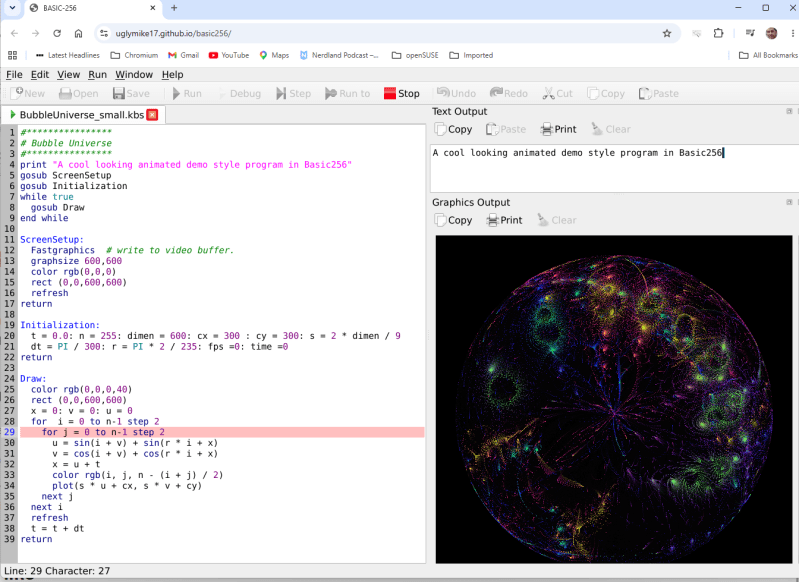
In the old days, you either swore by BASIC or you swore at it — but just about everybody got their start on the educational language. Nowadays, the kids are learning Python, but there’s a case to be made for BASIC — either for education, or just for nostalgic fun. BASIC-256 fills that niche, and now that it’s being ported to the oh-so-portable QT6 by [UglyMike], there’s even a webAssembly version that will let you run BASIC in your browser.
This version of BASIC is based on KidBASIC, which was aimed at the educational market. It’s got some handy-dandy graphics routines, 64-bit variables, and other quality-of-life features you can find in the docs. The new port is multi-platform, though the MacOS version has only been compiled for Apple Silicon — less of an issue than it used to be — and the web version naturally can’t get access to hardware for, e.g., serial ports, so it is somewhat more limited than a full install. There’s a second ARM build for Raspberry Pi along with the ubiquitous x86, but the project is open source, so if you really want to run this on an UltraSPARC system, you are welcome to compile it there. That said, this is a beta version, and the dev is actively looking for problems — so give it a go and let them know.
This isn’t the only open source BASIC out there — even Microsoft released their source code, at least for the 6502.
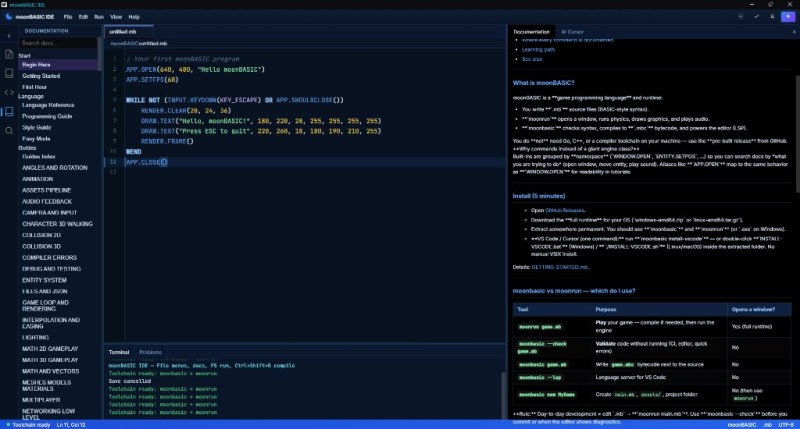
One of the major strengths of the BASIC programming languages has always been their no-fuss setup and rich set of commands for operations that would take considerably more work in a bare-bones language like C. MoonBASIC continues this legacy with a BASIC variant optimized for both 2D and 3D game development.
Included in the package are Raylib, Box2D, and Jolt, whose functionality is exposed via over 4,200 commands in their respective namespaces. You can also download a whole IDE package based around VS Code, use it on the command line, or add it to an existing VS Code installation.
A quick glance at the ‘getting started‘ guide gives a pretty good idea of what to expect of MoonBASIC, including a range of custom language additions and support for PBR materials, dynamic lighting, and other modern game engine features.
Whether writing a game in BASIC was on your bingo card for this year or not, it might be worth taking a look to see whether it’s your jam. After all, if BASIC was good enough for both AI and game development in the 1980s, surely it can be used for complex games in 2026.
The internal logic to support sequential inputs and multiple operators in a way that feels intuitive is a complex thing.
Resolving something like 1 + 2 = is pretty straightforward but complexity compounds rapidly after that, with numerous special cases. Let’s imagine one decides to program a simple calculator UI as a weekend project. The development process might look a little like this:
User types in 1 + 2 = and the calculator displays 3. What happens if the user immediately presses -?
No problem, just consider the result of the previous operation as an already-there input. So we’ll have 3 - for this next operation, and wait for more.
Unless we should have treated that - as a negative sign for whatever number is coming next, making it a negative number? No, ignore that. Just treat whatever results from pressing equals as a pre-typed input.
Unless the user hits a number. Because if they hit 2 (for example) then we’ll have a 32 and not a 2 which they probably, definitely don’t expect. So that’s a special case and we should insert a clear if that happens.
Oh, better clear if the user enters a decimal, too.
I’m going to need a coffee…
And that’s just the tip of the iceberg. Imagine trying to figure all this out for the very first time, without the benefits of habit and history to fall back on.
The fact is that supporting the apparently trivial behavior of a simple calculator requires an underlying complex state machine that deals with all kinds of special cases in order to make the UI feel intuitive. And that’s just for a basic four-function calculator; we haven’t even touched on how special keys like % should behave.
We know [lcamtuf] speaks from experience, not just because of their deep knowledge of calculator history but because they rolled their own calculator that uses voltmeters as digit displays and there’s nothing like actually implementing something to make one appreciate it.
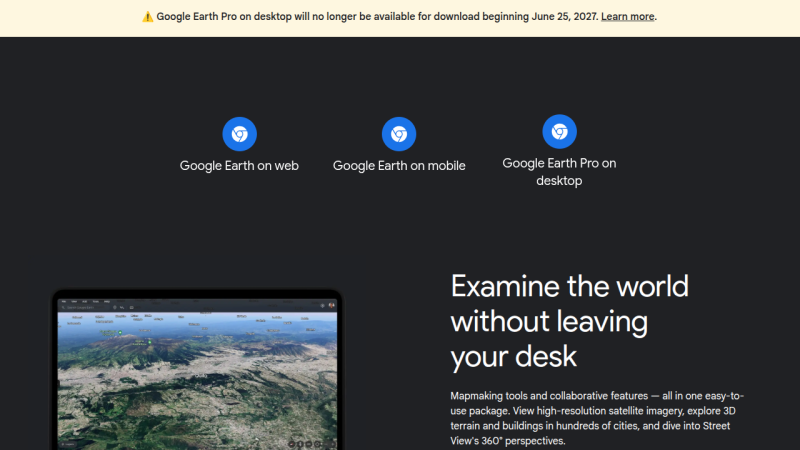
Come next year, those looking to explore the globe virtually via Google Earth will have to do so on their smartphone or from within their browser, as the search giant has decided to discontinue the service’s desktop client in June 2027.
The good news is, the lights won’t be going out immediately. According to a post made on Google Earth’s official support community by Community Manager [Aamir F.], the June cutoff date applies to new downloads, but nothing is changing on the backend, so existing installs will continue to work.
Now, while it’s safe to assume that you’ll have little trouble finding an alternate download of the Google Earth client for years to come, there’s no telling how long before they quit working. It probably goes without saying that Google won’t be providing updates to the software anymore, so if there’s any kind of breaking change on either the API side or at the OS level, that’s the end of the road. There’s always a chance that Google will decide to release the source and turn the whole thing over to the community… but we wouldn’t hold our breath on that one.
To be fair, we have absolutely no doubt that the majority of Google Earth users already access the service via the smartphone app or their browser. Honestly, you could say the same thing about most services these days. So in that respect, it’s not much of a surprise that Google doesn’t feel like keeping the native version going. That said, several commenters in the community thread pointed out features from the desktop client that aren’t available in the other versions.
Are you still using Google Earth on the desktop? Will this change impact something you’re working on? We’d love to get your take on this in the comments below.
The following article originally appeared on Addy Osmani’s blog and is being republished here with the author’s permission. I cowrote a Google whitepaper about how AI is changing the software lifecycle. I’m not going to summarize the whole thing. Instead, here are the handful of ideas in it I think actually matter, plus six figures […]
Think back to the first time you installed Kali Linux. It was probably one of those moments where you realized just how many cybersecurity tools existed. Your applications menu was packed with hundreds of tools covering everything from recon and vulnerability scanning to exploitation, password attacks, wireless security and much more.
At first, it was exciting. But most beginners spend hours clicking through the menus wondering what every tool does and when they should actually use it. Unfortunately, the sheer number of applications quickly becomes overwhelming. Even if you dedicate time to learning them, chances are you’ll forget many of their names simply because there are so many available. On top of that, documentation isn’t always beginner-friendly. Some projects have excellent documentation, while others assume you already know exactly what the tool is supposed to do before you even start reading.
The good news is that you don’t have to memorize hundreds of commands or remember every tool available. Instead, you can build your own arsenal of references that helps you quickly find the right tool.
In this article, we’re going to build exactly that. We’ll explore two resources called Arsenal-NG and Arsenal, both of which are designed to make finding offensive security tools, payloads, commands much faster.
Arsenal-NG
The first tool we’ll look at is Arsenal-NG. The name pretty much explains what it does. Arsenal-NG is essentially a searchable collection of offensive security tools, commands, and predefined workflows. Whether you’re doing reconnaissance, exploiting a service, generating payloads, Arsenal-NG can help you find the right tool for the job.
Let’s install it.
kali > git clone https://github.com/halilkirazkaya/arsenal-ng.git
kali > cd arsenal-ng
kali > make build
Once compilation finishes, you can launch the program directly. For convenience, you may also want to move the binary into one of the directories listed in your PATH environment variable. Doing so allows you to start Arsenal-NG from any directory.
kali > arsenal-ng
When it starts, you’ll immediately notice a large collection of tools organized inside the interface. Each tool includes predefined presets for different kinds of operations.
To display the complete list of available tools, simply run tools
If you already know what kind of task you’re trying to accomplish but don’t remember what tool can do it, you can use the built-in search feature. Searching by keywords makes it easy to discover them.
Once you’ve found the tool you need, selecting one of its presets walks you through the required parameters. There you simply provide the requested information and let it generate the command for you.
If you need additional information about the application itself, run help.
Arsenal
Unlike Arsenal-NG, Arsenal focuses primarily on web exploitation and can be used directly from your browser. There is no installation process, making it convenient when you simply need a quick reference.
One thing worth mentioning is that the website supports multiple languages. If the interface isn’t already in English, simply switch the language using the selector in the upper-right corner. Once inside, you’ll notice that the content is organized into several different sections, each designed to help with a different phase of a web penetration test.
One of them is Payloads.
This area contains a huge collection of payloads covering many different types of web vulnerabilities and exploitation techniques. Whether you’re working with command injection, SQL injection, XSS, SSTI, XXE, deserialization, or other common web vulnerabilities, chances are you’ll find useful examples here.
Another valuable section is Attack Chains.
Rather than simply providing payloads, Attack Chains guide you through the overall exploitation process. They outline the sequence of steps typically required to compromise a target.
The Commands section is another good reference.
You can build the command you need by selecting the appropriate options.
Then we have Wordlists.
There are numerous wordlists organized into logical categories, making it much easier to find exactly what you’re looking for. Each category often contains several different wordlists optimized for different situations.
You’ll also find a large collection of Scripts.
These scripts cover a wide variety of purposes, including reconnaissance, AI-related security checks, subdomain takeovers, automation and more.
Of course, we’ve only scratched the surface. Arsenal contains more additional sections that are worth exploring on your own. Spend some time clicking through the different categories and seeing what they have.
Summary
Building your own cybersecurity arsenal isn’t about memorizing every command ever written. In fact, no experienced pentester or hacker remembers every tool, every option or every payload. There are simply too many of them, and new ones are being developed all the time. Arsenal-NG and Arsenal can help you organize knowledge. They are valuable when you’re getting started and they remain just as useful years later when you’re experienced.
Since many of these tools fall into different categories, such as network pentesting, web pentesting, bug bounty hunting, and more, the best way to develop your skills is through our Member Gold subscription. It gives you access to a wide variety of training courses covering different areas.

 Login
Login