❌

Reading view

There are new articles available, click to refresh the page.

SDR (Signals Intelligence) for Hackers: Scanning Wireless Devices Using FieldWatch

Welcome back, aspiring cyberwarriors!

As you know, there are thousands of Bluetooth and WiFi signals we pass through daily, especially if we live an active life in a big city. That includes tags, smartphones, WiFi routers, drones, surveillance devices, vehicles, body cams and mesh radios. Clearly it doesn’t stop here and the list goes on.

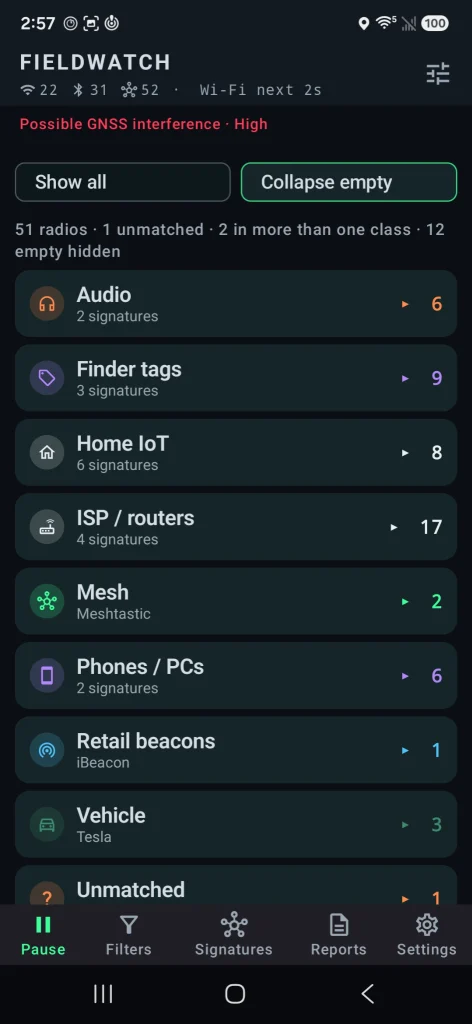
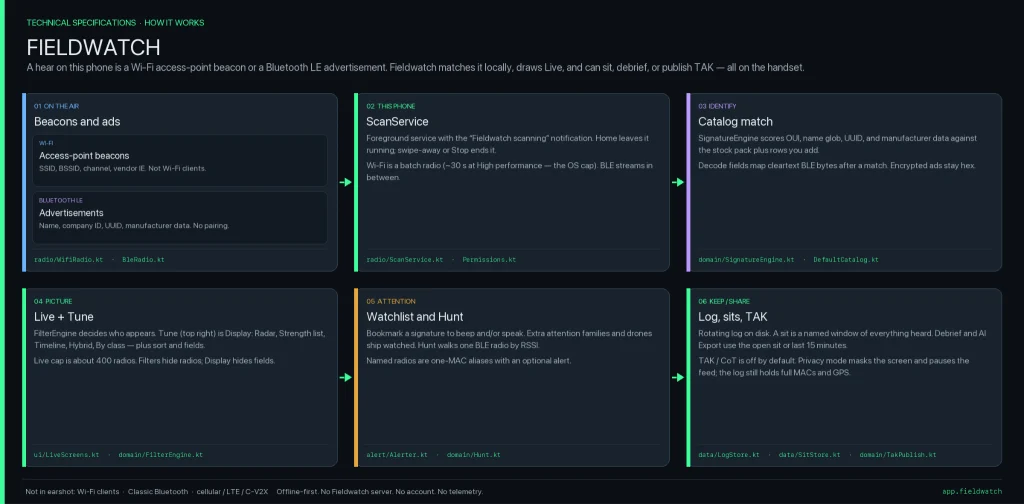
Many of you are privacy focused individuals and want to know what’s going on around you and whether you’re being tracked or watched by someone. That’s okay, protecting your privacy is a good thing. FieldWatch was made for this. It matches what it hears against an editable signature catalog of roughly 250 device types and shows the results in live views, recorded sessions, path maps and reports. Everything runs on the device and works fully offline.
FieldWatch

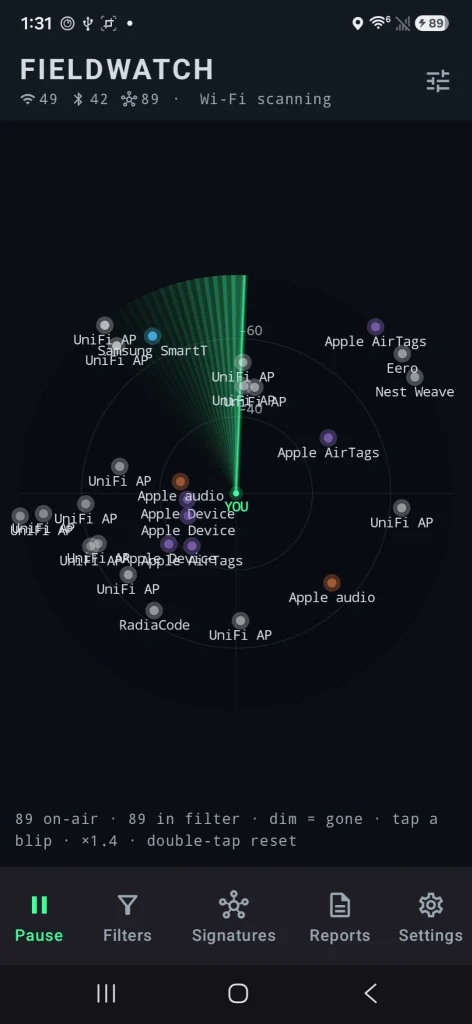
FieldWatch is a free, open-source Android app that listens to nearby Wi-Fi and Bluetooth signals using the radios already in your phone. It compares what it hears against a list of known device signatures and shows them. It only receives signals. It never transmits.Β 

Source: OGridPete
Source: OGridPete

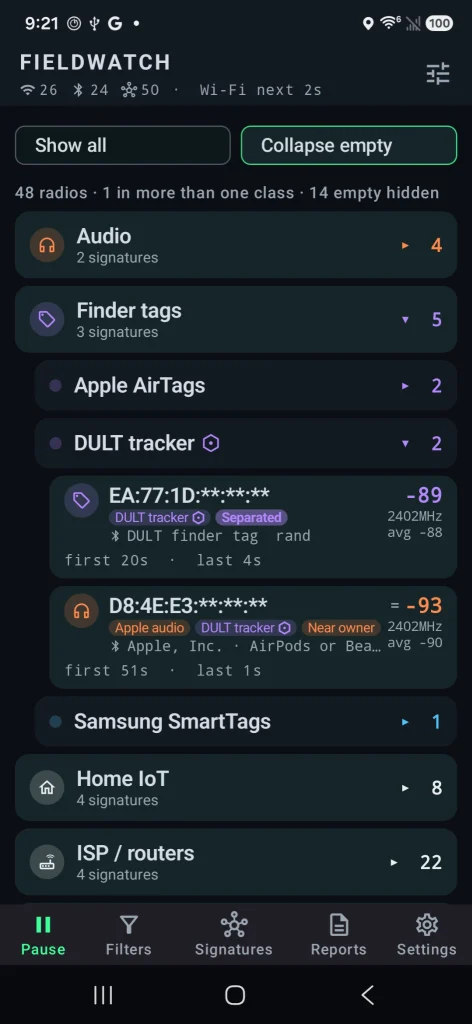
You can set alerts for specific devices, record what’s present during a walk or drive, and later compare sessions. All the findings are sorted under their category. It also has basic GNSS interference detection and can send results to mapping tools like TAK. Matches are based on patterns, not guaranteed identifications, and the app only sees what the phone’s radios and Android allow it to see.

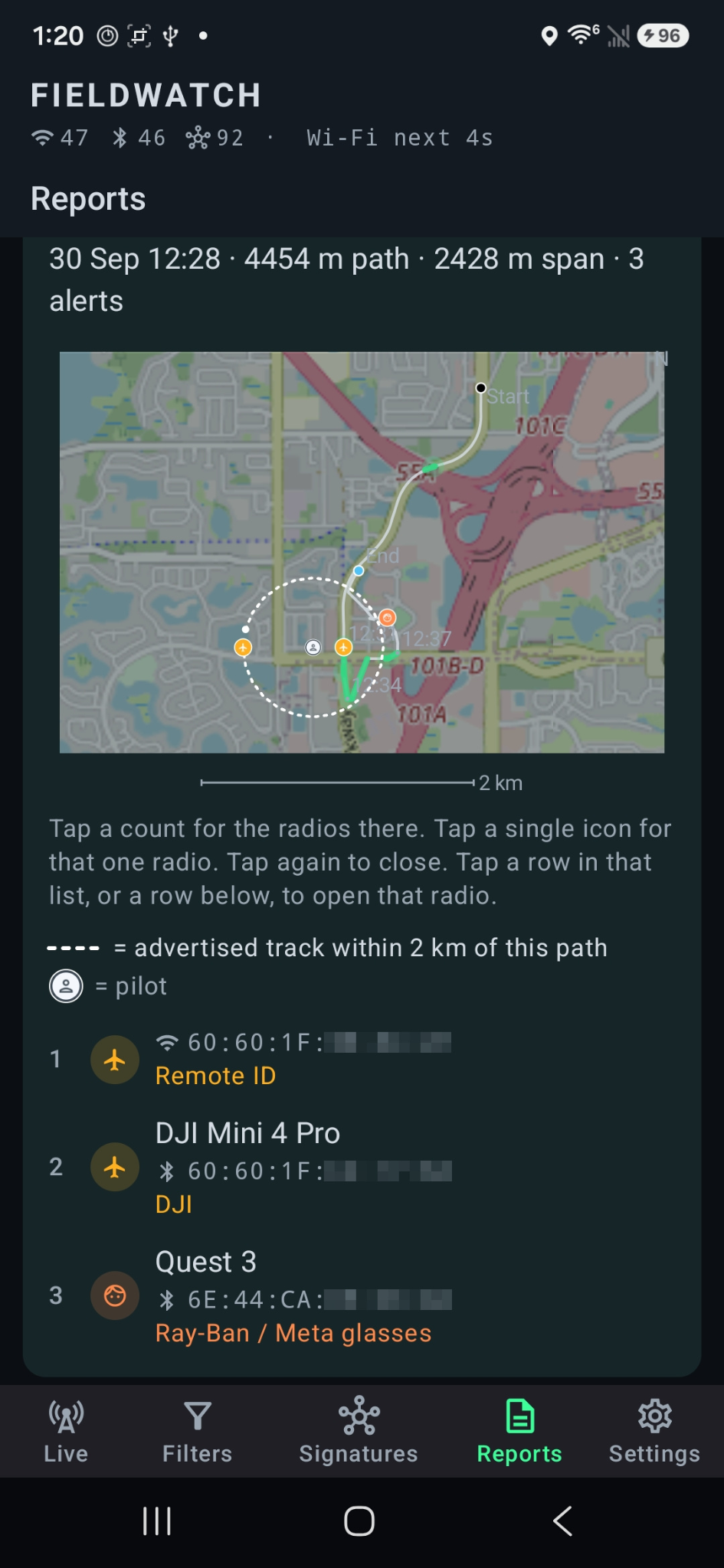
Depending on your preferences, you may want to see these devices on a radar or on a map. The app found the location of the drone operator as well as the drone itself.
Source: OGridPete
Source: OGridPete

TAK Support

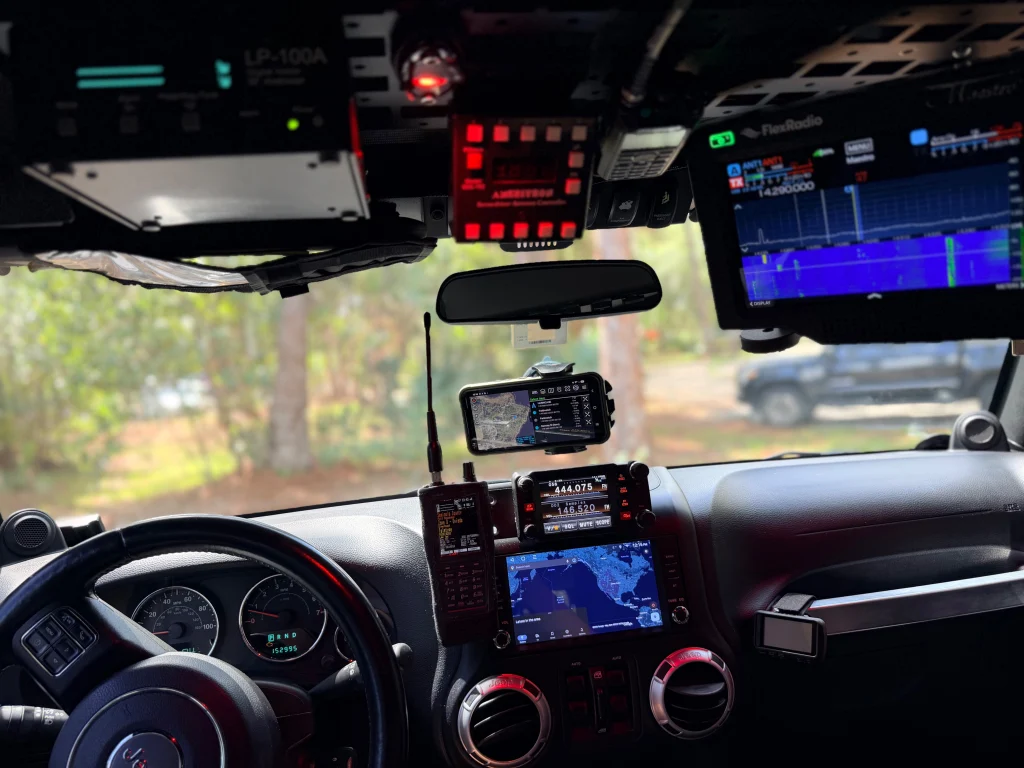
TAK and ATAK are free mapping apps used by military, emergency responders and some civilians to share locations and information on a map in real time. FieldWatch can send what it detects straight to TAK over the local network.

When FieldWatch sees a drone that’s broadcasting Remote ID, it can place a moving marker on the TAK map for the drone and a second marker for the pilot if that location is available. Other devices it finds, plus any GNSS interference alerts, can also appear as markers. Several phones running FieldWatch can send data to the same map at the same time, so a team sees the same picture.
Source: OGridPete

GNSS Interference Detection

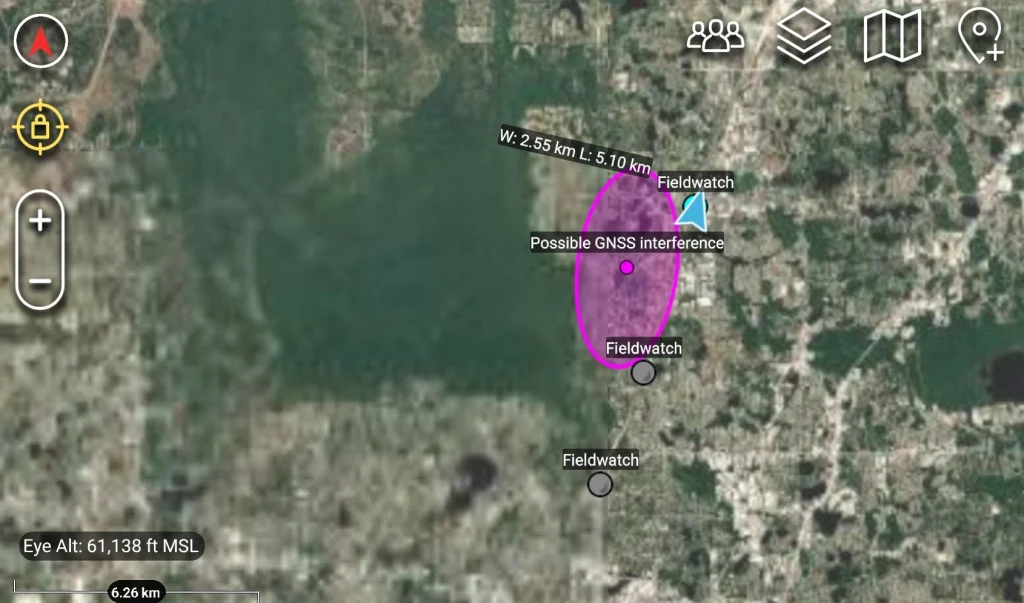
Newer versions check for signs of GPS interference or spoofing using the phone’s own receiver. After a short outdoor calibration, it can alert you and mark the spot on your path or on a TAK map. It shows where you were, not where the interference came from.
Source: OGridPete

Limits

Now let’s talk about its limits. It isn’t a direction finder. Also, it doesn’t scan Bluetooth Classic, cellular networks or full Wi-Fi traffic. Matches are based on patterns and those are not confirmed identities. Your results depend on the phone and what Android lets the app see. For better results use newer phones. Official versions only come from the GitHub repo.

Android App

Download the APK from the official GitHub page and sideload it. Android 10 or newer is required. Android 11 has more functions that can be used with this app. A short instruction file and manual are included. The repository has all the answers in terms of the app. It works on a cheap phone with no SIM card. OffGridPete recently posted that he used a Moto G for $30 for his test and it worked well. If you decide to use it, use it for your own privacy and security, and be respectful of other people’s privacy.

Summary

You can use your cheap phone as a scanner for devices nearby, and find jamming and tracking. There are different apps that do similar things, but they’re bound to Linux only, which is very inconvenient. FieldWatch works on an Android phone to find trackers, cameras, drones, body cams and more.

If you enjoy experimenting with frequencies and trying new things, we recommend signing up for our SDR for Hackers training. With Master OTW, you’ll learn how to use your computer and inexpensive SDR hardware to explore and hack a wide range of radio signals.

The post SDR (Signals Intelligence) for Hackers: Scanning Wireless Devices Using FieldWatch first appeared on Hackers Arise.

OSINT: WireTapper – Mapping Surveillance and Wireless Devices Around You

Welcome back, aspiring cyberwarriors!

Take a second and think about how many devices are actually working around you right now. Cameras on street corners, routers sitting inside nearby homes, Bluetooth earbuds in someone’s pocket, cell towers just outside of view. All of that is happening constantly, yet almost none of it is visible to the average person walking by. If you actually wanted to check what devices were nearby today, you would probably end up jumping from one app to another, waiting for each one to load, and still walking away without the full picture. It is slow, it is frustrating, and honestly, it takes all the fun out of exploring what is really going on around you.

A lot of these devices are not just sitting there minding their own business. Many of them are built specifically to track you. A recent video on X showed this. It captured a flock camera taking several pictures of a moving vehicle, running those pictures through some kind of analysis, and then filing everything away in an indexed format.

In the screenshot above, you can see the guy picking up the signal coming straight off the camera, while the camera itself keeps emitting a steady beam of infrared. Here is the full video.

Privacy is not a crime, and you have every right to know what might be watching you. The real challenge has always been figuring out where all of these surveillance devices are hiding. That’s where WireTapper can help us. It pulls data from Wigle, Shodan, and OpenCelliD one at a time. That way, you can see every one of these devices in your area.

WireTapper

WireTapper is a wireless OSINT tool designed to discover, map, and analyze radio based devices using passive signal intelligence. WireTapper detects and correlates signals coming from all the common wireless technologies you would expect to run into. This helps you understand what devices actually exist nearby and where they are likely located all without ever having to actively intrude on anything.

WireTapper can identify leaked Wi-Fi network credentials, and it does this through a privacy-protecting k-Anonymity query scheme, meaning it can check for exposed passwords without ever exposing your own search to the outside world.

Setting Up

Let’s quickly walk through the installation process. It’s a lot simpler than it looks.

kali > git clone https://github.com/h9zdev/WireTapper.git
kali > cd WireTapper
kali > python3 -m venv venv; source venv/bin/activate
kali > pip3 install -r WireTapper.txt

Once that finishes, you will need to grab API keys from each of the services mentioned above. Do not worry too much about Shodan, since its API is paid and WireTapper will still run fine without it. There are two ways to plug these keys into the app. You can either open app.py and enter them directly, or you can use app-env.py instead, which pulls the keys in through environment variables.

After you have picked your method, we recommend also installing python-dotenv, since it makes handling those environment variables a lot smoother.

kali > pip3 install python-dotenv

Working with WireTapper

Once everything is installed, you are ready to start the app and open the web interface.

kali > python3 app.py

The web interface will be waiting for you right here: http://localhost:8080/map-w

This is the dashboard you will land on the moment you open the page. It takes a little while to load everything, so give it a few minutes before you start clicking around. Once it settles in, you can zoom into whatever area you are curious about and start picking apart what is actually hiding there.

Just keep in mind that you need valid API keys for the app to work the way it is meant to. Without them, WireTapper will simply generate dummy data so you can still see how everything normally looks inside it. On Wigle specifically, your email needs to be verified before the connection will work properly.

At the top of the dashboard, you will notice a switch that lets you jump between Wi-Fi uplink and Bluetooth scanners. That is how you filter what you are looking at.

Flip the switch back the other way, and you get the same kind of view but for Wi-Fi devices instead. This side usually includes things like cameras, routers, and other similar devices.

Exporting Results

All of these results can be exported complete with their names and coordinates, in case you decide to use them somewhere else later on.

The example above is just a taste of how those exported results are going to look. You can use this JSON file with other tools.

Summary

There is far more happening around us than most people realize. WireTapper makes it easier to visualize that activity by bringing together information about nearby wireless infrastructure in one interface. If you’re into OSINT, privacy, or wireless security, it’s a handy tool.Β 

OSINT is a valuable skill in many areas, especially when it comes to privacy, cybersecurity, and cyber warfare. The more you understand what information is publicly exposed, the better you can protect yourself and your digital assets. Our Ultimate OSINT Beginner training covers OPSEC, tracking, investigations, and much more across 23 lessons and 7.5 hours of video content.

We’re also hosting a live Remaining Anonymous training on August 11-13 at 3:00 PM UTC for all Subscriber and Subscriber Pro students.

The post OSINT: WireTapper – Mapping Surveillance and Wireless Devices Around You first appeared on Hackers Arise.

❌