
 Login
Login
Living off The Browser: Running Popular Hacking Tools Inside Chrome
Welcome back, pentesters!
Most of you are used to working with tools on your Linux machine. A lot of these tools are built for it. WSL exists, but some of them can also run right inside your Chrome browser. NXC, SharpHound, LDAP-shell, Evil-WinRM and five more are bundled into one signed IWA with multi-protocol support.

Before we go any further, don’t use these tools against systems you’re not authorized to test, and don’t use your daily Chrome browser for this either.
Let’s take a closer look at the bundle and see how it works.
Setting Up
We’ll follow the manual on the website. The setup is quick and just needs a few adjustments to Chrome. The first step is enabling Chrome flags. Paste each of these links and change the status.

Then relaunch Chrome and open web-dev. Recent Chrome updates moved this from web-app-internals.
Here we install a new tool. Paste this link:
https://iwa-tools.pkilla.pw/iwa/update.json
Chrome will fetch the version. Press Install. In apps, you’ll see the iwa-tools console appear. That’s what you need to open.

Working with Tools
The first thing to do is list the help menu, which has all the commands you can run. Each command has its own help menu with the syntax.
iwa > help
iwa > command -h 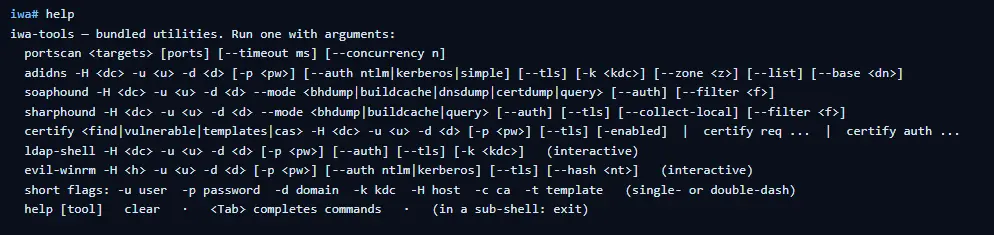
Let’s do a quick port scan and find out what’s open on our Windows machine in the lab.
iwa > portscan IP 88,389,445,5985,9389 --timeout 2000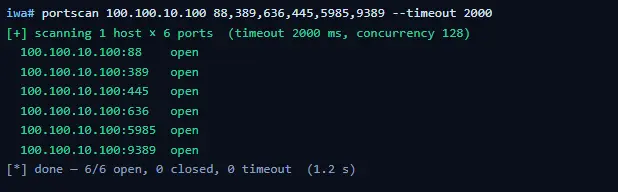
If Kerberos and LDAP are open, that means this host is a domain controller. We also have WinRM open. It may give us remote access on the DC with a valid admin account.
iwa > evil-winrm -H IP -u user -p passwordLet’s list the DNS zones that our domain has available.
iwa > adidns -H IP -u user -d domain -p password --auth kerberos --tls --list
Finally, let’s see if we can escalate our privileges with ADCS. Certipy is used here.
iwa > certipy find -H IP -u user -d domain -p password --tls -enabled 
If you get the same results showing ESC1 is vulnerable, that’s a quick win. There are plenty of write-ups out there on abusing it to get domain admin privileges in the tested domain.
Summary
Creativity has always been one of the most important skills for hackers. Turns out our favorite tools can run inside a browser and reach systems locally. You might still prefer the classic way, which is totally fine, but it’s good to know they work just as well from a browser tab.
If you’re interested in red teaming and want to build the skills required to be a pentester, we offer our Red Team Operator training program.
The post Living off The Browser: Running Popular Hacking Tools Inside Chrome first appeared on Hackers Arise.
