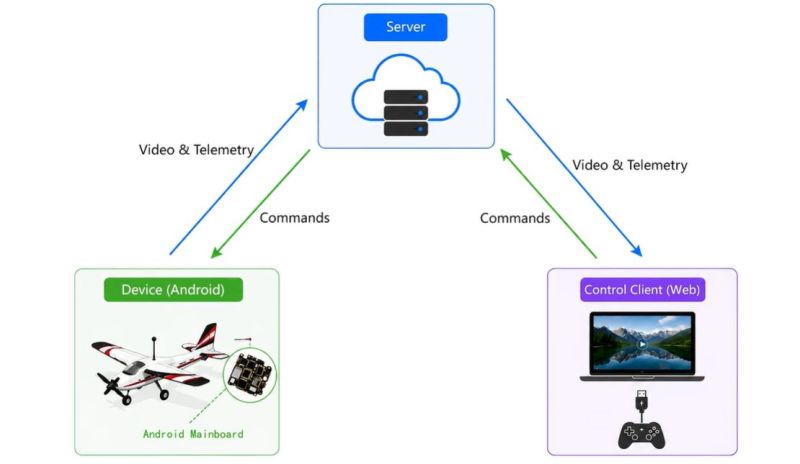
Upcycling smartphones makes a lot of sense, especially since they contain so many components that remain useful long after their desirability as a smartphone has faded. In the case of [Mountain DS Lab], they opted to use an 8-year old Xiaomi Mi 8 phone to add long-range FPV video link and remote control functionality to an RC plane, using the phone’s LTE cellular connectivity.
The smartphone was bought used for $23, with the default Xiaomi ROM overwritten by LineageOS to get a more lightweight and up to date Android installation on it. From the video it’s clear that this phone has seen better days, with the glass back cracked and a few ugly lines running across the display. Fortunately all that is needed is the motherboard itself.
One gotcha here is that the OS checks for the display on boot and will time-out if it’s not present, potentially halting the process entirely. The workaround requires disabling the display in the device tree, which is done by modifying the boot.img file as explained in the video. Next a custom bracket for the motherboard was printed so that it could be fitted inside the target airplane.
To communicate with the avionics, a USB-to-UART adapter PCB was created with a CH340 IC on it. This was then connected together for an initial test, with the extended front camera being used as the FPV camera for the custom Android application. Using the controller via the remote LTE link worked with the flight controller, so next the airplane was assembled for initial testing.
From this point it’s all pretty standard RC airplane assembly and testing, just with the typical RF-based control and FPV link replaced with the LTE link. Unfortunately flying drones isn’t permitted in the immediate area where the creator lives, so only some taxiing was tried prior to its maiden flight at a local airstrip that will be featured in an upcoming video.
Naturally, this isn’t the first time that someone has tried this type of remote control, with the ongoing Russo-Ukraine war being a prime example of LTE-based remote control of drones. Although we do not advocate wiping out a third of a nation’s strategic bomber fleet with upcycled smartphones, ultimately this is the same technology and a good way to create an RC drone that can last more than the few kilometers eked out from a 2.4 GHz link or so. Just be prepared for the LTE link to add a few milliseconds of latency.
The Nokia E6 is a smartphone from back in the old days when Symbian was a thing. [fluffleswaffled] has been doing the work to get the ancient handset running Linux instead, because that’s ultimately cooler than what the phone shipped with out of the box.
There isn’t an unlocked bootloader on the E6, so instead, [fluffleswaffled] used an altogether different route to boot Linux. A Symbian app is used to load the kernel and device tree into RAM, at which point the MMU and caches are turned off and the device jumps into Linux. It’s a one-way trip, from which there is no way back to Symbian without a power cycle. The setup nets a terminal on the phone’s own screen, and the hardware keyboard and touchscreen are functional. The display is controlled by a Broadcom VideoCore III, with [fluffleswaffled] capturing messages from Nokia’s original display driver to create a custom kernel driver that replays them.
There’s an issue, though. The phone doesn’t stay in Linux land for long — it always resets within a couple minutes of booting into the alternative OS. [fluffleswaffled] believes this is because the phone’s baseband chip is supervising the application processor, and killing things once it’s detected that the Symbian mobile stack has stopped running. They’re hoping that someone with experience with Nokia basebands or the relevant hardware can point them in the right direction to get this hack running for more than 3.5 minutes at a time.
There probably isn’t a great deal of utility in getting Linux running on a 2011 smartphone, but we love the hustle nonetheless. We’ve seen this done before, though, and it’s always interesting to learn what it takes to get the OS booting on a new platform. If you’re whipping up similar hacks in your home lab, don’t hesitate to let us know on the tipsline.
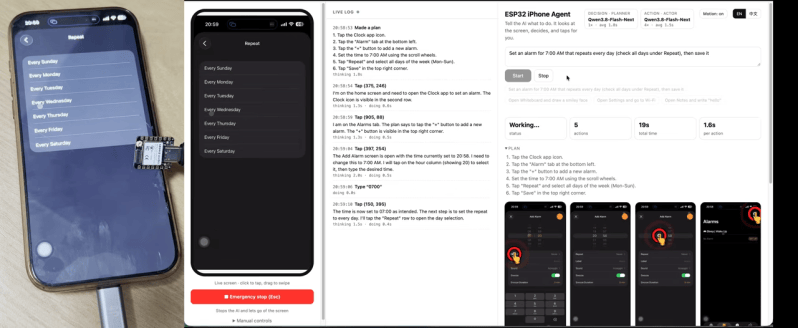
Do you want to get an AI agent to do something to an iPhone? You could try and jailbreak the device and do some heavy software hacking, or… you could grab a microcontroller off the shelf and have it do the hard work. [Henry Yuan] explains how to achieve this with an ESP32.
The first step is getting an AI agent access to the current state of the phone screen—which [Henry] achieves with AirPlay screen mirroring and UxPlay. A Gstreamer pipeline is then used to feed the screen as a JPEG stream to the AI agent of your choice. Then comes control, which is achieved by an ESP32-S3 acting as a USB-HID device, emulating both USB mouse and keyboard. With iOS AssistiveTouch enabled, this gives the agent control over inputs to the device. From there, it’s up to the AI agent to figure out the actions to make to achieve the desired behavior, which is obviously very use-case specific.
It might sound a little convoluted, but this approach has benefits. There’s no requirement to have an Apple Developer Account, or XCode, or a Macintosh at all. You can just get your agent tinkering away on the phone without any of that fussy overhead. We’ve featured some other great iPhone hacks of late, as well. Video after the break.
Repurposing old smartphones for more general purpose computing isn’t a new thing, but the project by [LastComputer] ups the ante by going from a Samsung Galaxy S23 that looks like it got run over by at least a few cars to a very serviceable gaming computer, courtesy of its Snapdragon 8 Gen 2 SoC.
The somehow still working but definitely worse for wear phone was purchased for 1,700 Ukrainian Hryvnia (~$40). It being SIM locked also helped reduce the price, even if someone had somehow wanted to use it again as a phone. Since the SoC inside is also used in quite capable gaming handhelds, but with good cooling, that would be a real waste.
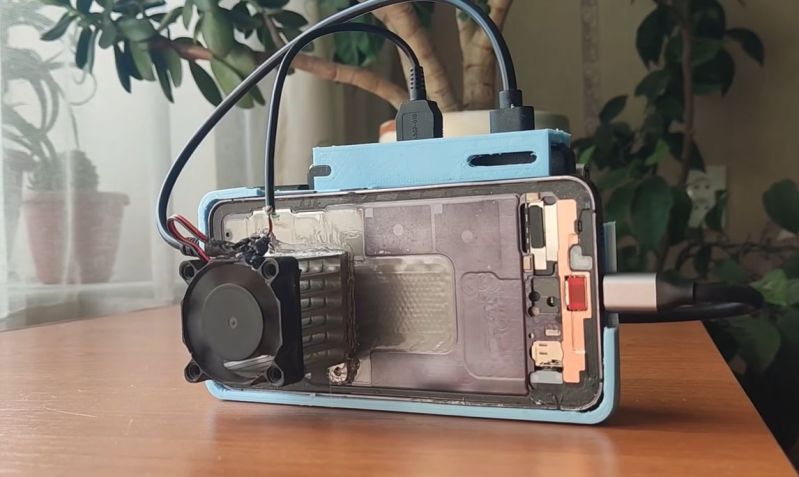
Converting it into proper gaming system requires some careful disassembly, some gentle whacking with a hammer to straighten out the frame and a new battery as the mainboard won’t work without one installed.
A 3D-printed phone case glued to an SSD cage for the 512 GB SSD serves as the enclosure, along with two USB hubs, one of which also provides HDMI output. For the active cooling system a heatsink was hot-glued to the vapor chamber with a properly sized fan mounted to it. Here we could definitely see some zip ties being added to prevent it from falling off.
Compared to running the phone in its stock cooling configuration this shaves off about seven degrees C, with thermal throttling noticeably reduced. This consequently provides a much better desktop experience in Samsung’s DeX (Desktop eXperience) desktop mode, which is what’s used for running applications and games.
Running God of War as an emulated PS2 game works pretty well, as does running games with the Dolphin emulator and the GameHub app using which PC games on Steam, GoG and others can be run. Although you can also install other OSes on the phone hardware, Samsung DeX doesn’t appear to be a bad option if you happen to repurpose a high-end Samsung phone that supports this mode.
Like more than a few of us , [Kevin Noki] is sick of being pulled out of flow state by that annoyingly addictive black rectangle we all carry around. His solution was to build a phone to escape his phone, in a YouTube video we embedded down below. We’d say that phone is straight out of the 1980s, except it’s not quite a phone. It would perhaps be more accurate to say he’s building a Bluetooth handset– actual telephony remains the province of a professional device with regulatory approval, because getting custom hardware on VoLTE is a nonstarter in many places.
He starts out using an ESP32, because he already had one and why not? It’s got bluetooth, after all. Alas, audio quality he was getting through it was a little too crunchy, so he pivoted to use a dedicated Hands Free Profile (HFP) bluetooth module that is purpose built for exactly this kind of application. He’s selling the design on his website, but given how much detail he shows on screen, recreating your own version would be easy enough to save the quid. You’d be missing out on the STL for the fantastic 80s brick he’s made, which may be the most interesting part of the build to us.
We’d likely have jumped right to CAD and printed out a few iterations of the case until we were happy, but [Kevin] takes a more traditional industrial-design approach, mocking up the phone with XPS foam and a manually-operated hot wire cutter. It’s not a step we see makers take very often, but it pays off here– at least for subtracting material, it’s a very quick way to iterate, and he only needs to do one 3D print for the final version. We also like very high-tech acrylic bending jig, which he uses to put some black LED acrylic over the display.
It’s a lot of work to make you less-likely to grab a phone you still need anyway– remember, there’s no cellular modem in this– but, hey, it beats torturing yourself, or worse, a tamagotchi.
Although Android is essentially just another Linux distribution, most people only experience it in the form of the rather restrictive and proprietary versions found on smartphones, tablets and smart TVs. While this is probably fine for the average person, there’s also a lot to be said for the more pure Android experience in the form of LineageOS.
With this fully open and community-supported version of Android you’re free to muck about with your hardware to your heart’s content, without annoyances like unremovable bloatware apps and restrictions on e.g. enabling developer mode.
Even more fun is that there are ports of LineageOS to systems such as the Raspberry Pi SBC, including in the Android TV configuration. This means that not only can your ten year old Android phone get a make-over with a recent version of Android, you can also create your own Android TV-based smart TV without all the spying and other nasty things that commercial smart TVs love to do.
The LineageOS Lineage
The history of LineageOS is slightly messy, being a fork of CyanogenMod, which itself was based on the Android Open Source Project (AOSP). Since Android is classified as Yet Another Linux Distribution, it’s got the same GPL license foundation and naturally a few dozen customized Android distros based around this AOSP.
Although CyanogenMod is no more, LineageOS is its effective successor, featuring probably the largest number of supported phones, tablets and other hardware. You also get most of the benefits of running an OEM-blessed Android distro, such as over-the-air (OTA) updates within a single major version of LineageOS.
When it comes to disadvantages, the closed nature of smartphone platforms means that initial installation and updating to a new major version requires an intimate experience with Fastboot mode, the Android debug bridge (ADB) and other aspects that make even me as a slightly more technically inclined Android – and Arch Linux – user and developer slightly nervous when looking at the installation steps.
A Smartphone Revival
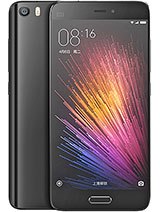
Welcome to Xiaomi’s high-end offerings in 2016. (Source: GSMArena)
It’s been said that the primary reason why smartphones are the way they are is due to computer manufacturers missing the boat on locking down the PC and Mac ecosystems back in the day, including the very hardware that the OS runs on. Unlike with installing a new OS on that old x86 or PowerPC-based system, smartphones – with very few exceptions – feature locked bootloaders and other obstacles designed to protect the children deter you from doing things with your own hardware that corporate disapproves of.
Consequently, getting LineageOS on the average smartphone is a bit of an ordeal, with my 2016-era Xiaomi Mi 5 being no exception. Fortunately Xiaomi does offer an official way to unlock the bootloader when you ask them nicely, so that was one of the first thing I did shortly after receiving my shiny new phone. This is also the first and most cumbersome step in the whole LineageOS installation procedure for the phone, so I’m grateful that I got that annoyance out of the way already.
This particular phone was left behind by Xiaomi in 2018, freezing it on Android 8.0 and consequently rendered it effectively useless for a wide range of apps as time moved on. Theoretically LineageOS would here bump the version up to Android 15, with regular OTA updates. I even had recently replaced its battery, which is still fairly easy on this era of smartphone, so it should be basically a brand new phone.
All I had to do now was follow the instructions.
Fast Fastboot Frustrations
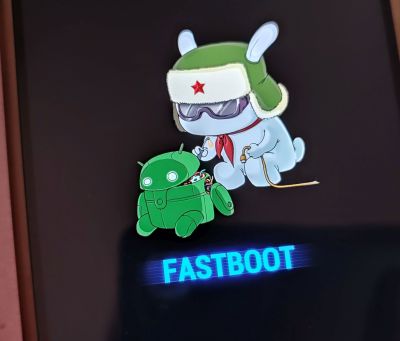
Welcome to the Xiaomi fastboot mode, comrade.
Unfortunately, after dutifully deleting all Google accounts on the phone and booting into Fastboot mode I ran into a seemingly unsurmountable obstacle: fastboot devices listed zero devices and a quick look at the Device Manager in Windows showed why, with the Yellow Triangle of Meh.
As it turns out, Xiaomi devices aren’t happy with the regular USB driver, but require a special Fastboot driver. This is where I’d spend the next few hours chasing a seemingly endless number of dead ends and useless advice. Rather than download sketchy driver installers or run some .bat file from six years ago off a GitHub page, I went with the Xiaomi Mi Unlock Tool, the same that is used to unlock the bootloader.
Here I ran around in circles for a bit with the version offered by Xiaomi being the ancient 6.x version without the needed driver and the update link being dead. Finally XDA Forums came to the rescue as usual, with someone having squirreled away a copy of the .zip file from which I could extract the driver and install it.
With this done the rest of the process was fairly easy, with the fastboot command from my existing Android SDK installation happily pushing the recovery image to the phone, followed by rebooting into the LineageOS recovery mode by keeping the power and volume up buttons pressed until the Mi logo appears.
Using adb you then sideload the main LineageOS image after mashing the appropriate buttons on the phone to accept it, with me opting to also sideload the special Google apps sauce. A reboot later and before I knew it I was busy setting up the ‘new’ phone, copying data and settings off my newer Xiaomi Note 10 Pro phone via Wi-Fi.
Mission success, with a 2016-era phone now running Android 15.
DIY Android TV
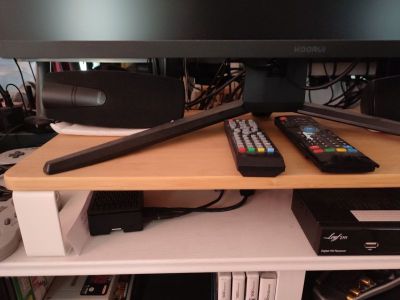
Welcome to the ‘black box’ Raspberry Pi 4B-based ‘smart TV’.
Of course, putting Android on phones is boring, with everyone and their dog doing it these days. Which is why long before I considered putting LineageOS on this phone of mine I had already put it on a Raspberry Pi 4 SBC that I had been trying to use for NymphCast receiver purposes in various guises over the years.
While this isn’t one of the officially supported devices by LineageOS, a wonderful person called Konga has ported LineageOS to the Raspberry Pi series of SBCs, both in their regular Android and Android TV versions.
The only real difference here is that Android TV uses the – shockingly – TV-optimized interface. This I installed in order to test whether the Android port of the NymphCast Server (NCS) would also play nice with Android TV. I had previously tried to use this SBC with regular Raspberry Pi OS and kin, but always ran into issues with the proprietary video hardware that requires custom patching of FFmpeg to work for basic features like hardware acceleration.
To my delight all of this, including video hardware decoding, worked out of the box, making it probably the most functional version of Linux that I have ever run on a Raspberry Pi board. Even if the RPi 4 isn’t your thing, there are also images for the RPi 3 and RPi 5, though I haven’t tried those yet. Android versions with this port are kept up to date, with the current release of Android 16 probably being something that I should update my board with.
Installation here is stupidly easy compared to the smartphone ordeal: simply write the image to an SD card, stick it into the SBC’s card slot and congratulations, you just installed LineageOS. You can even use the typical Android box-focused remotes to use them. I can recommend the ones that have a keyboard built-in to skip the on-screen keyboard. Or just wire up a full-sized keyboard, of course.
Updates are done via OTA images, which you have to flash by hand. This makes them more of an Over-SneakerNet (OSN) update system, but it works pretty much the same otherwise.
Welcome To Open Android
Coming from many years of using Huawai, Samsung, Xiaomi and Google’s interpretations of ‘Android’ I’m somewhat anxious to see what my LineageOS experience will be like. I’ll be using it as my regular phone, with ideally there being no difference from when I last used it back in the early 2020s, other than maybe being less awfully slow.
I do appreciate that I didn’t get strong-armed into inserting a SIM card to be even allowed to enable USB debugging, which I had to work around with my newest Xiaomi phone with a sneaky hack. This is where I feel that especially for us Android developers LineageOS can be incredibly useful.
On the ‘smart TV’ side of things, I haven’t really done too much with my little box other than cast video to it from a NAS like a DIY Netflix. I’d be up for exploring this setup as a proper alternative to OEM-blessed Android TV installations, though I imagine that apps that insist on DRM for precious streaming content will throw a fit.

 Login
Login
 The smartphone was bought used for $23, with the default Xiaomi ROM overwritten by LineageOS to get a more lightweight and up to date Android installation on it. From the video it’s clear that this phone has seen better days, with the glass back cracked and a few ugly lines running across the display. Fortunately all that is needed is the motherboard itself.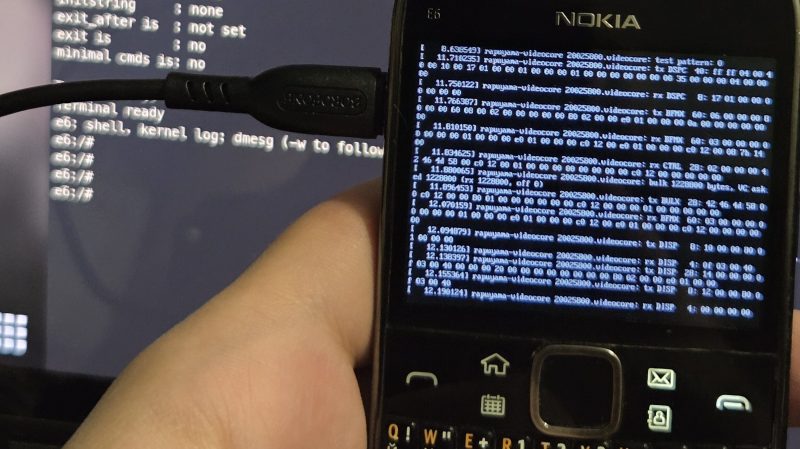
 Repurposing old smartphones for more general purpose computing isn’t a new thing, but the project by [LastComputer] ups the ante by going from a Samsung Galaxy S23 that looks like it got run over by at least a few cars to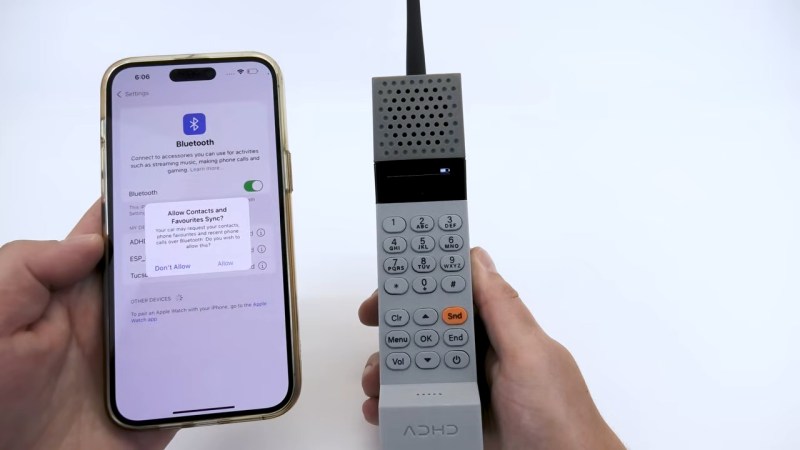
 The history of LineageOS is slightly messy, being a fork of CyanogenMod, which itself was based on the Android Open Source Project (AOSP). Since Android is classified as Yet Another Linux Distribution, it’s got the same GPL license foundation and naturally a few dozen customized Android distros based around this AOSP.