❌

Reading view

There are new articles available, click to refresh the page.

An AI Chatbot for the Apocalypse

You don’t have to be a full-on “prepper” to at least occasionally wonder what would happen if civilization collapsed. One thing you probably couldn’t do is go on the Internet and ask your favorite AI how to purify water, repel zombies, or treat a burn, all of which may be highly relevant depending on your situation. Now, with Survival LLM, you have a chance.

The  LLM is pretty much the stock chatbot, but it is trained on survival topics, and it runs locally. Naturally, you need the Internet to set it up, so you’d want to do that now before everything hits the fan. The training set uses medical references, survival manuals, FEMA and CDC documents, and nearly a million Wikipedia articles. It includes the survival references in a library and links to them when answering, too.

The installer is small, but it assesses your system and loads a model based on what you have. If you have less than 32 GB of RAM, you’ll get the IBM Granite 4.2 8B model, which was able to correctly answer 14 of 22 test questions. Other models do better, including the NVIDIA Nemotron 3.5 Super model, which got 21 correct, but requires at least 128 GB of memory.

Now, somehow you have to power your computer, but that’s a separate problem. At least there will be plenty of GPUs to scavenge from abandoned data centers. We’ve seen prepper digital libraries before. More than one, in fact.

Artificial Intelligence (AI) in Cybersecurity, Part 29: Creating Isolated Autonomous Agents for Hacking with NemoClaw

Welcome back, aspiring cyberwarriors!

OpenClaw demonstrated how autonomous, self-evolving agents can change how software operates. However, in the business world, having this power without proper control creates unmanaged risks.

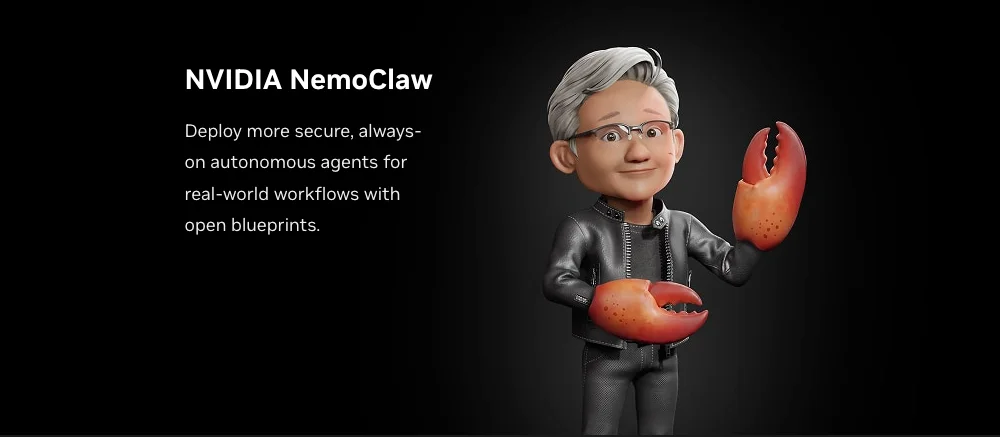
To safely use autonomous agents in a controlled environment, NVIDIA created NemoClaw. In this article, we will look at OpenClaw’s impact, the security issues it raises, the solutions NemoClaw offers to address them, and how to install it. Let’s get rolling!

OpenClaw

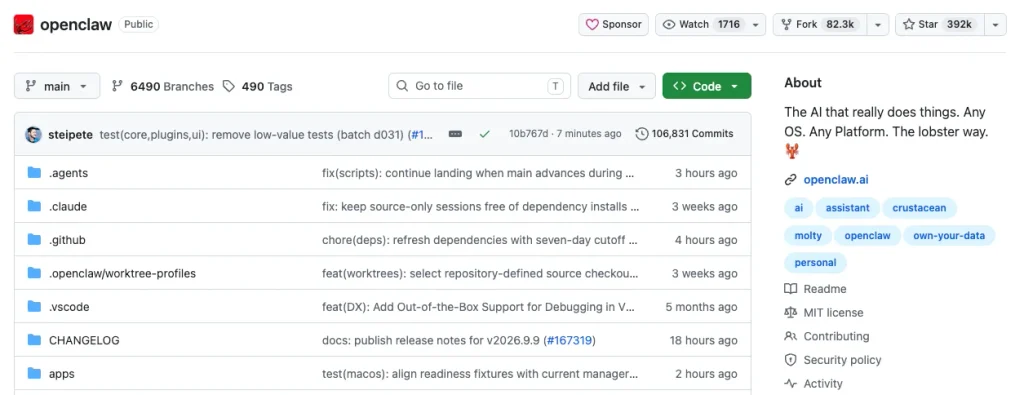
OpenClaw (formerly Moltbot and Clawdbot) is an open-source AI agent that runs on your machine, connects through the messaging apps you already use, and takes action on your behalf, including shell commands, browser automation, email, calendar, and file operations.

In a matter of weeks, OpenClaw blew past adoption milestones that took Linux three decades to achieve. The magic is how effortlessly it deploys: you type a single command in a terminal, and it instantly goes out, fetches OpenClaw, builds an active AI agent, and hands over the harnesses.

It’s important to understand that OpenClaw is not just another LLM. It is an operating system for agentic computers. Like traditional operating systems that manage memory and hardware, OpenClaw manages large language models and tool execution. You can text it, email it, talk to it, or even wave at your computer screen, and it will understand you.

“OpenClaw has open-sourced essentially the operating system of agentic computers. It is no different than how Windows made it possible for us to create personal computers. Now OpenClaw has made it possible for us to create personal agents.” — Jensen Huang

Real-world uses of this technology are already making a big difference. One example is Andrej Karpathy, who created a tool called “Research.” This tool lets users assign research tasks to an agent that can run 100 experiments overnight while you sleep. The agent keeps the successful results and discards the failures.

Immediately, turning large language models (LLMs) into an operating system changes how we use software. Instead of waiting for user input, it acts as an active agent, coordinating tasks across physical and digital domains.

But deploying raw, autonomous agents comes with significant risks. An agent must act independently to be valuable, which inherently creates a threat vector. By late 2026, there were 543 tracked CVEs for OpenClaw. In a previous article, we explored how malicious links can steal authentication tokens and compromise OpenClaw AI systems. Additionally, scanning tools have identified over 40,000 publicly accessible OpenClaw instances worldwide, many configured to bind to 0.0.0.0 with authentication disabled by default or operating over unencrypted HTTP.

To address these security challenges, NVIDIA worked with Peter Steinberger to create NemoClaw.

NemoClaw

NemoClaw is an open-source tool developed by NVIDIA that simplifies and secures the deployment of autonomous AI agents using the OpenClaw framework. It strengthens OpenClaw’s core security by running within NVIDIA OpenShell sandboxes and applying infrastructure-level security measures. OpenShell is an open-source runtime designed for executing fleets of autonomous AI agents in isolated, sandboxed environments with kernel-level protection. It combines sandbox runtime controls with a declarative YAML policy, letting teams run agents without giving them unrestricted access to local files, credentials, or external networks.

NemoClaw’s main goal is to make open-source autonomous-agent tools ready for enterprise use. It simplifies installation, provides guided onboarding, managed inference, network policy, managed integrations, and lifecycle operations through the NemoClaw CLI and its agent-specific aliases. Therefore, this setup tries to ensure that agents cannot compromise host files or gain unauthorized local privileges.

As of this article, NemoClaw supports OpenClaw, Hermes, and LangChain Deep Agents.

OpenClaw vs NemoClaw

Let’s compare the security features of those two tools.

Security Feature / DimensionOpenClawNemoClaw
System Isolation & Privilege LevelRuns directly on the host OS with full root permissions.

Associated CVEs: CVE-2026-24763 / CVE-2026-26329 (Command injection & path traversal allowing full host system compromise).
Runs inside isolated OpenShell containers/sandboxes; restricts filesystem writes, process execution, and privilege escalation.
Credential & Secret HandlingStores tokens and API keys in plaintext files on local disk.

Associated CVEs: CVE-2026-25253 (WebSocket token leakage allowing remote session hijacking).
Keeps provider credentials, web search tokens, and API keys outside the sandbox at managed egress boundaries.
Network Binding & ExposureBinds by default to 0.0.0.0 over unencrypted HTTP.

Real-World Threat: Over 40,000 public instances globally exposed to unauthenticated internet scans and automated attacks.
Enforces strict network policies, local loopback restrictions, and managed tunneling for secure communication.
Skill Supply Chain ControlInstalls third-party skills freely from public registries without runtime validation.

Real-World Threat: Over 300 malicious ClawHub skills found dropping infostealers (such as AMOS/Atomic Stealer variants).
Integrates scoped skill policies and structured Markdown documentation to audit and regulate extensions.
Prompt Injection & Blast RadiusVulnerable to indirect prompt injection via malicious web pages or emails.

Associated CVEs: CVE-2026-30741 (Tricking agents into executing arbitrary malicious shell commands with high blast radius).
Mitigated by sandboxing, behavioral guardrails based on NVIDIA NeMo architecture, and tightly scoped tool-calling permissions.

That table shows that NemoClaw really helps boost OpenClaw’s security. But just a heads-up.

First off, wrappers aren’t foolproof. If OpenClaw has a serious zero-day remote code execution vulnerability, an attacker could exploit it and potentially break out of the container if the runtime settings are misconfigured or the agent’s logic is directly compromised. NemoClaw does a good job limiting the damage by stopping the agent from tampering with system files or stealing SSH keys from your host machine, but it doesn’t magically fix flaws in the app’s core logic.

Second, container sandboxing and management tools like OpenShell and various runtimes have had their share of escape vulnerabilities, namespace issues, and privilege-escalation bugs. If the sandbox runtime has a flaw, a compromised agent could use it to target the host kernel.

That’s why running risky, untested AI frameworks directly on bare metal is a major security risk. Sandboxing gives you some protection and time, but a solid defense means keeping that underlying wrapper updated and cutting down on unnecessary network or tool permissions.

Set Up NemoClaw

NemoClaw can automatically discover an existing host-level OpenClaw installation and migrate its state into a secure OpenShell container sandbox. But in this demonstration, we’ll install everything from scratch.

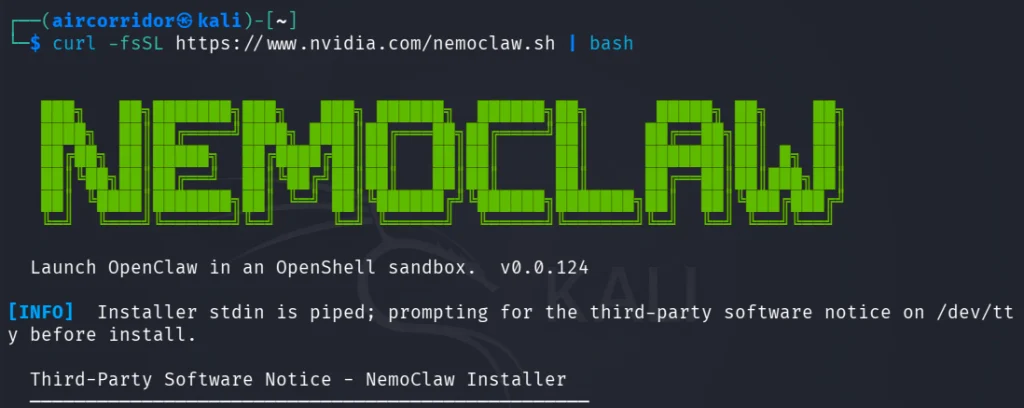
Before installation, ensure that Docker and Node.js are installed on your system. Then, run the following command:

kali> curl -fsSL https://www.nvidia.com/nemoclaw.sh | bash

Accept the third-party software notice when prompted.

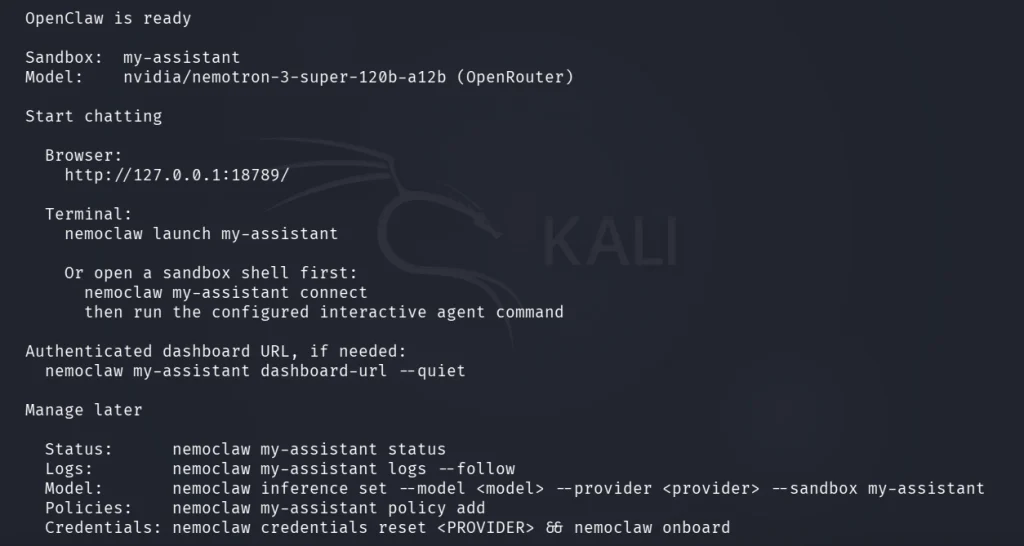
The interactive wizard creates the sandbox. Select OpenClaw when the installer prompts you to choose an agent. Choose an inference provider and model, then provide its credentials when prompted. Press Enter to accept the suggested my-assistant sandbox name. Follow the wizard, and then accept the suggested network policy tier.

At the end, you’ll see output like the one below.

After that, we can move on to testing the agent. NemoClaw supports terminal UI (TUI) and web mode. Let’s test the TUI.

kali> nemoclaw my-assistant connect

sandbox> openclaw tui

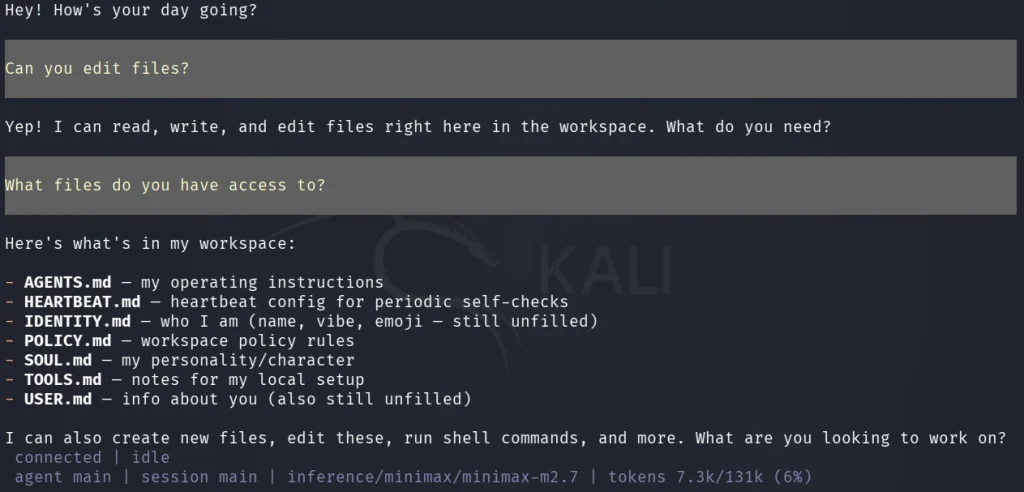
NemoClaw lists what is inside its workspace, but it can’t read or write outside /sandbox and /tmp.

NemoClaw in Action

Businesses have put together various reference guides, practical tips, and real-world examples for NVIDIA NemoClaw. While major public case studies are still emerging, Cisco is one company showing how it can be done.

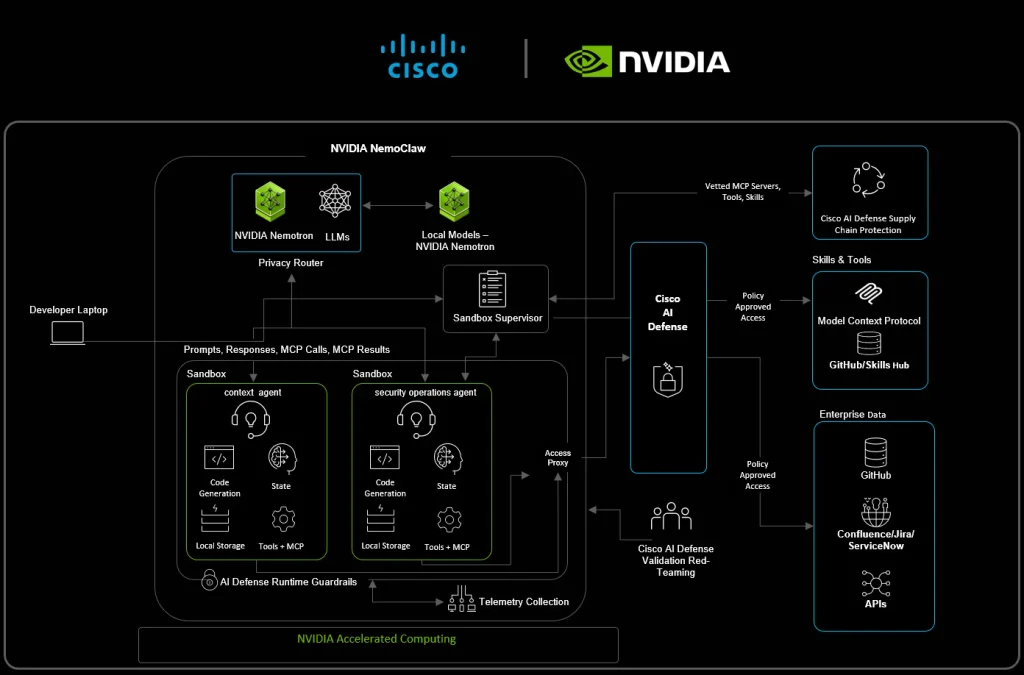
Cisco and NVIDIA teamed up to create a case study on how the NVIDIA OpenShell works with Cisco AI Defense to keep enterprise autonomous agents safe during live operations like automated security patching and device analysis.

In their setup, an autonomous agent actively maps out network device configurations and data into a live knowledge graph. When a new zero-day vulnerability emerges, the security operations agent analyzes the threat and checks it against the current network setup to assess potential impact and develop prioritized remediation plans.

To prevent runtime exploits, NVIDIA OpenShell keeps the agent secure in infrastructure-level sandboxes with limited access, restricted network endpoints, and local privacy routers. At the same time, Cisco AI Defense monitors AI tools. Besides that, MCP calls catch a simulated secret data exfiltration attempt hidden in a third-party reporting skill before any sensitive info can escape the secure environment.

Summary

AI agents are changing how we use software. Tools like OpenClaw can make us much more efficient, but they also might have many vulnerabilities. To help keep your setup safe, NVIDIA developed NemoClaw, and this article shows you how to get started. Keep coming back as we continue to explore artificial intelligence.

If you’re interested in using AI for cybersecurity, definitely check out this training!

The post Artificial Intelligence (AI) in Cybersecurity, Part 29: Creating Isolated Autonomous Agents for Hacking with NemoClaw first appeared on Hackers Arise.

A New Type of LLM on the Block: Decision-Making Models

Large language models (LLMs) output language, but they are commonly tasked with making a decision or classification of some kind instead of writing an essay or chat reply. An LLM will be provided with input, and asked to classify that content in some way: with a rating, yes/no answer, a best-fit categorization, and so forth. A recent new type of model by the name of Jev was released only weeks ago and it is extremely fast, ultra-cheap, and laser-focused on that decision-making role. It can’t write even a single sentence, but it can classify and categorize very, very quickly.

Jev works like this: it still accepts text input, but it outputs only floating-point numbers. Those numbers are the “answers” to user-specified yes/no type questions, lists of choices, and scoring-type requests. [Simon Willison] provides a concise summary of what Jev does, and what makes this new category of model so interesting.

To say that the idea has caught on would be a wild understatement. Folks are making their own decision-type models and experiments in a flurry. Kev and Nimble are two examples (Nimble was added as a supported model in Ollama just recently, and is small enough to run locally with relative ease.)

If this type of local AI model was the missing link you needed to get an idea working, don’t keep it to yourself! Tell us all about it on the tips line.

Jev Is Not a Chatbot. It’s a Judgment Engine — And I Built a Real-Time Log Guardian With It

How TypeSafe’s Jev — a model that returns probabilities, not paragraphs — replaces 500 regex rules with one API call, catches credential leaks in milliseconds, and monitors 100+ logs/sec using a batch window architecture nobody else is talking about.

🍋 The Lemon Explanation: What Even Is Jev?

Okay, let me start with the simplest possible explanation.

You know how when you ask ChatGPT something, it writes you paragraphs? It generates words. Lots of words. Some useful, some not. You then have to read those words and figure out what to do with them in your code.

Jev doesn’t do that.

Here’s the lemon version:

Imagine you have a super-smart friend who you can ask yes/no questions or “pick one from this list” questions — and they answer instantly with a confidence score. They don’t explain themselves. They don’t write essays. They just say: “Database issue. 87% confident. Emergency page on-call.”
That’s Jev.

Jev is a System One model — it’s built for fast, structured judgment. Like your gut reaction, but calibrated, typed, and callable from code.

The output isn’t a string of text. It’s a typed JSON object with probabilities. Your code reads it and acts. No parsing, no prompt engineering for output format, no string regex to extract the answer.

🧠 Jev vs. Traditional LLMs — What’s Actually Different?

Let me make this crystal clear with a table:

FeatureGPT / Claude / GeminiJev (TypeSafe System One)Output formatText (you parse it)Typed JSON (probabilities + choice)What it does wellWriting, reasoning, explanationFast structured judgmentSpeedSeconds (reasoning takes time)Sub-second judgmentsToken costInput + output tokensInput only — output tokens = 0How you use itWrite a prompt, parse a responseDefine questions + criteria, consume answersGood forOpen-ended tasksDecisions your code needs to makeUncertaintyHidden inside textExplicit — every answer has a probabilityDrift riskHigh (prompt changes break output format)Low (schema is your contract)

The key insight: traditional LLMs are optimized to be helpful to humans reading their output. Jev is optimized to be helpful to code reading its output.

⚙️ How Jev Works — Three Primitives, That’s It

Jev gives you three building blocks. Everything is a combination of these three:

1. choice — Pick one from a defined list

{
"type": "choice",
"instructions": "What is the failure domain of this log?",
"criteria": {
"database": "DB queries, connection pools, Postgres errors",
"network_dns": "Socket timeout, DNS failure, TLS handshake",
"auth_security": "Auth failures, token errors, credential leaks",
"app_logic": "NullPointer, assertion, business rule violation"
}
}

Jev returns: { choice: "database", confidence: 0.92 }

2. noul — Probability of a yes/no condition

{
"type": "noul",
"instructions": "Is there risk of an imminent system outage?",
"criteria": {
"true": "Cascading failure, resource exhaustion, multi-service degradation",
"false": "Isolated, recoverable, routine error"
}
}

Jev returns: { noul: 0.87 } — that's 87% probability of YES.

3. score — Rate something along a defined scale

{
"type": "score",
"instructions": "Rate severity from benign (1) to catastrophic (5)",
"criteria": [
"Level 1: Routine trace, healthy HTTP 200",
"Level 2: Normal operational event",
"Level 3: Non-critical warning",
"Level 4: Degraded subsystem, high latency",
"Level 5: Fatal failure, OOM, credential leak"
]
}

Jev returns: { score: 3.8, confidence: 0.91 }

You ask multiple questions in one API call, and they all run in parallel. No waiting for one to finish before asking the next.

🏗️ The Problem We Set Out to Solve: Log Analysis is Broken

Here’s what every engineering team does today:

  1. Logs go into Datadog / CloudWatch / ELK
  2. You write regex rules: if log.contains("OOM") → alert
  3. You get paged at 3am because “OOM” appeared in a test log
  4. OR you miss a real outage because the message was "heap exhausted" not "OOM"

Regex-based log alerting has three fatal flaws:

❌ It’s literal — it only catches exact strings. “DB connection failed” and “could not connect to postgres” are the same thing to a human but different patterns to a regex.

❌ It’s single-log blind — each log is evaluated in isolation. But the scary pattern is: DB pool timeout → queue backup → memory pressure → OOM crash. Three individually “fine” logs that together scream “wake up on-call NOW.”

❌ It exposes secrets silently — a log like "Connecting to postgresql://admin:super_secret_123@prod-db:5432/users" contains a plaintext credential. Regex might catch password= but it won't catch URL-encoded credentials, JWTs in headers, or PII in custom formats.

We wanted to solve all three with one model call.

🔨 How We Built the TypeSafe Log Guardian

Let me walk you through the actual architecture. It’s simpler than you think.

The Stack

  • Backend: Node.js + Express + TypeScript
  • AI Brain: TypeSafe Jev (via REST API)
  • Frontend: Vanilla HTML/CSS/JS (no framework needed)
  • Pattern: Batch Window Engine

The Breakthrough Idea: Batch Windows

Instead of analyzing logs one-by-one (which is slow and misses cross-log patterns), we collect ALL logs from a time window (say, 2 seconds) and send them to Jev in a single API call.

Logs coming in at 100/sec
↓
[Buffer for 2 seconds]
↓
2 seconds × 100 logs/sec = 200 logs
↓
ONE Jev call with all 200 logs
↓
Jev sees the whole picture, not just individual lines

This is the killer feature. Jev can say:

“3 services are showing simultaneous resource exhaustion. DB pool is full, memory is at 94%, and there are 284 requests queued. This is a coordinated cascade. Wake up on-call NOW.”

No per-log rule system can ever do that. Because each log, individually, looks borderline okay.

The Code: Sending a Batch to Jev

Here’s the real code from our typesafe-analyzer.ts:

// Build a compact log digest for Jev
const logDigest = logs
.map((l, i) =>
`[${i + 1}] svc=${l.service} level=${l.level} msg="${l.message.substring(0, 200)}"`
)
.join('\n');
const state = {
analysis_mode: 'batch_window',
window_duration_ms: windowMs,
log_count: logs.length,
services_present: [...new Set(logs.map(l => l.service))],
level_distribution: {
ERROR: logs.filter(l => l.level === 'ERROR').length,
WARN: logs.filter(l => l.level === 'WARN').length,
INFO: logs.filter(l => l.level === 'INFO').length,
},
log_batch: logDigest,
};
const questions = {
system_health_score: {
type: 'score',
instructions: `Rate the overall system health from 1 (catastrophic) to 10 (perfect)`,
criteria: [
'Level 1: Multiple simultaneous critical failures — OOM, DB pool exhausted, credential leaks',
// ... etc
],
},
highest_urgency: {
type: 'choice',
instructions: 'What is the HIGHEST urgency action required?',
criteria: {
none: 'All logs are benign. No action needed.',
low: 'Minor warnings. Engineering team should be aware.',
high: 'Significant issues — notify DevOps immediately.',
critical: 'CRITICAL: Multiple severe events — wake up on-call NOW.',
},
},
batch_outage_risk: {
type: 'noul',
instructions: 'Is there a credible risk of outage in the next 5–15 minutes?',
criteria: {
true: 'Patterns indicate cascading failure heading toward outage.',
false: 'Errors are isolated, handled, or not systemic.',
},
},
batch_leak_detected: {
type: 'noul',
instructions: 'Do ANY logs contain exposed secrets, credentials, or PII?',
criteria: {
true: 'At least one log has unredacted passwords, API keys, JWTs, or PII.',
false: 'No sensitive data detected in any log in this batch.',
},
},
};
// ONE API call for the entire batch
const response = await fetch('https://api.typesafe.ai/v1/systemone', {
method: 'POST',
headers: { 'Authorization': `Bearer ${API_KEY}`, 'Content-Type': 'application/json' },
body: JSON.stringify({ state, model: 'jev-latest', questions }),
});

That’s it. One POST. Jev evaluates ALL questions against ALL logs simultaneously and returns structured JSON.

What Jev Returns

{
"answers": {
"system_health_score": { "score": 2.1, "confidence": 0.88 },
"highest_urgency": { "choice": "critical", "confidence": 0.95 },
"batch_outage_risk": { "noul": 0.89 },
"batch_leak_detected": { "noul": 0.97 }
},
"usage": { "input_tokens": 847 }
}

Notice: output_tokens doesn't exist. Jev's structured judgments are computationally free on the output side. You only pay for what you send in.

The Single-Log Deep Inspector

For manual analysis or individual suspicious logs, we also support single-log mode with 5 parallel questions:

QuestionPrimitiveWhat it tells yousensitive_data_leakchoiceIs there a password, JWT, API key, or PII?impending_outage_risknoulProbability this log signals a coming crashseverity_scorescore1-5 architectural severityrecommended_actionchoicesuppress / record / notify / emergency pagefailure_domainchoicedatabase / memory / network / auth / app_logic

All five run in one API call, in parallel.

The Redaction Engine

When Jev detects a credential leak, we don’t just alert — we automatically redact:

// If Jev says it's a plaintext password:
redacted = message.replace(
/(password|pass|pwd|secret)\s*[:=]\s*["']?([^"',\s]+)["']?/gi,
'$1="[REDACTED_SECRET]"'
);
// If Jev says it's a JWT/API key:
redacted = message.replace(
/eyJ[a-zA-Z0-9_-]{10,}\.eyJ[a-zA-Z0-9_-]{10,}\.[a-zA-Z0-9_-]+/g,
'[REDACTED_JWT]'
);

The detection is AI-powered (catches anything). The redaction is precise regex (fast, deterministic). Best of both worlds.

The Server Architecture

Express Server (port 3000)
│
├── POST /api/logs/analyze → Single-log Jev analysis
├── POST /api/logs/batch → Batch window Jev analysis
├── GET /api/stream → SSE stream (single-log results)
├── GET /api/batch-stream → SSE stream (batch results)
└── Static files → /public → Frontend dashboard

The frontend connects via Server-Sent Events (SSE) — a lightweight WebSocket alternative. New Jev results appear in the UI in real time without polling.

🎯 Use Cases Beyond Log Analysis

Once you understand the Jev pattern — send structured state, ask typed questions, get calibrated answers — you start seeing it everywhere:

1. 🛒 E-commerce: Smart Cart Abandonment

State: { user_session, cart_value, pages_viewed, time_on_site }
Questions:
- purchase_intent: noul (probability they'll buy)
- discount_sensitivity: score (1-5 how price-sensitive)
- recommended_nudge: choice (none / email / coupon / live_chat)

No hallucinated persuasion copy. Just: show coupon? Yes/№78% confidence.

2. 🏥 Healthcare: Triage Routing

State: { patient_symptoms, vitals, history }
Questions:
- urgency_level: score (routine → emergency)
- likely_department: choice (cardiology / neurology / ortho / ...)
- escalate_to_physician: noul

3. 📧 Email: Support Ticket Classification

State: { email_subject, email_body, sender_tier }
Questions:
- department: choice (billing / technical / sales / abuse)
- sentiment: score (furious → delighted)
- requires_human: noul
- priority: choice (low / normal / urgent / critical)

4. 🔐 Security: Real-Time Threat Scoring

State: { ip_address, request_pattern, user_agent, geo_location }
Questions:
- is_bot: noul
- attack_type: choice (sql_injection / xss / brute_force / legitimate)
- block_action: choice (allow / rate_limit / captcha / block)

5. 📝 Content Moderation at Scale

State: { post_content, user_history, platform_rules }
Questions:
- violates_policy: noul
- violation_category: choice (spam / hate / misinformation / explicit)
- action: choice (approve / warn / remove / ban)

6. 💰 FinTech: Transaction Risk

State: { transaction, account_history, device_fingerprint }
Questions:
- fraud_probability: noul
- risk_tier: score (low → high)
- action: choice (approve / step_up_auth / decline / freeze_account)

The pattern is always the same:

  1. Describe your context as structured state
  2. Ask your questions using the three primitives
  3. Consume the typed answers in code
  4. Act deterministically based on probabilities

📊 Why This Beats Traditional Approaches for Log Analysis

Let me be concrete about the problem our app solves:

ScenarioRegex / RulesJev Batch Mode"password=abc123" in log✅ Caught (keyword match)✅ Caught"my DB creds are admin/secret"❌ Missed✅ Caught (understands context)JWT token in a URL param❌ Depends on regex✅ Caught3 services showing simultaneous exhaustion❌ Each log looks fine individually✅ Cross-log cascade detected"50 active connections" — critical or not?❌ No context✅ Context-aware (depends on max pool size, other logs)New log format you've never seen❌ New rules needed✅ Works out of the boxCostFree~$0.05–0.10 per 100-log batch

The $0.05–0.10 cost per 100-log batch vs. a security breach that costs $100,000+? The math is obvious.

🚀 Running It Yourself — 5 Minutes to a Running System

Prerequisites

Clone & Run

# Clone the repo
git clone https://github.com/padmarajkore/AI-Log-Analyzer.git
cd log-analyzer
# Install dependencies
npm install
# Add your API key
echo "TYPESAFE_API_KEY=your_key_here" > .env
# Start the server
npm run dev

Open http://localhost:3000 — you’ll see the dashboard.

Try the Simulator

# In a second terminal, start the log traffic generator
npm run simulate

This fires realistic microservice logs at 1 log/sec by default. Crank it up in the UI to 100+/sec to see the batch engine in action.

Send Your Own Logs

# Test a credential leak
curl -X POST http://localhost:3000/api/logs/batch \
-H "Content-Type: application/json" \
-d '{
"windowMs": 2000,
"logs": [
{
"service": "auth-service",
"level": "ERROR",
"message": "DB connect failed: postgresql://admin:super_secret_prod_123@db.prod:5432/users"
},
{
"service": "payment-gateway",
"level": "WARN",
"message": "Connection pool: active=50 idle=0 waiting=284"
}
]
}'

Watch the dashboard light up with a CRITICAL alert. Jev will catch the credential leak AND the cascading connection pool exhaustion — in one call.

🏁 What We Learned Building This

1. The batch window idea is underrated. The shift from per-log analysis to window-based batch analysis is a paradigm shift. It’s what lets you catch cascading failures that look invisible at the individual log level.

2. Output tokens = 0 is a superpower. Traditional LLM calls cost you input + output. Jev’s structured judgments have effectively zero output tokens. For a high-volume use case like log analysis, this cost model is orders of magnitude better.

3. Calibrated uncertainty is actually useful. When the outage probability is 0.51 vs 0.89, you want to know the difference. An LLM saying “there might be an issue” vs. Jev saying “87% outage probability” leads to completely different actions.

4. AI detection + deterministic redaction = best of both worlds. Don’t try to make AI do the redaction (slow, expensive, unpredictable). Use Jev to detect the category, then apply a precise regex to redact. Fast and reliable.

5. TypeScript + Jev = type safety all the way. Because Jev returns structured JSON with known shapes, you get end-to-end type safety. No any casting after parsing model output.

🔗 Try It Yourself

The full source code is available on GitHub:

👉 github.com/YOUR_GITHUB_LINK_HERE

It includes:

  • src/typesafe-analyzer.ts — The Jev integration (single + batch modes)
  • src/server.ts — Express API + SSE streaming
  • src/log-simulator.ts — 12 microservices, 80+ realistic log templates
  • public/ — The real-time dashboard UI
  • test/test-scenarios.ts — Ready-made test cases (credential leaks, OOM, cascades)

Clone it, drop in your TypeSafe API key, and have a live AI log guardian running in under 5 minutes.

💭 Final Thought

We’re at an interesting moment in AI tooling. There are two very different things AI can do for software:

  1. Generate content for humans to read — ChatGPT, Claude, writing assistants
  2. Make decisions for code to act on — Jev, structured judgment models

Most of the AI hype focuses on #1. But #2 — programmable AI decisions embedded directly in your application logic — is where I think the real engineering leverage is.

Jev is the first model I’ve used that genuinely feels like a programming primitive rather than a human assistant. You write code that uses its judgments the same way you’d use a return value from any function — type-safe, deterministic, predictable.

And for log analysis specifically? It catches the things regex can never catch, sees patterns across logs that per-log rules can never see, and runs at production scale for a cost that’s negligible compared to the incidents it prevents.

That feels like the future of AI in production software.

Built with TypeSafe Jev · Node.js · TypeScript · Express · Vanilla JS

👉 GitHub: https://github.com/padmarajkore/AI-Log-Analyzer
👉 TypeSafe docs: docs.typesafe.ai


Jev Is Not a Chatbot. It’s a Judgment Engine — And I Built a Real-Time Log Guardian With It was originally published in Coinmonks on Medium, where people are continuing the conversation by highlighting and responding to this story.

Artificial Intelligence (AI) in Cybersecurity, Part 24: Prompts That Will Supercharge Your OSINT Research

Welcome back, aspiring cyberwarriors!

Every OSINT investigator now has access to a large language model on their desktop. This tool can quickly summarize thousands of pages or organize chaotic names and dates into a clear timeline. And this is widely accepted. But the difference between an investigator who gets useful results and one who gathers unhelpful information lies not in the model they use, but in how they interact with it.

This article explains how to create prompts that improve your OSINT work. It draws on recent academic research about prompting strategies for security tasks and insights from experienced OSINT practitioners. Let’s get rolling!

Prompt Is More Important Than the Model

Recent research on large language models in offensive security tasks highlights an important point. Methods that relied on reasoning, such as few-shot and chain-of-thought prompting, produced better results. These methods generated code that closely matched the reference examples, executed correctly, and handled various situations well.

One surprising finding was that continuously refining a prompt or asking the model to rethink its answer often resulted in worse outcomes. This happened because rephrasing the prompt misinterpreted the original task and lowered the accuracy of the output. So, repeatedly saying “try again” or “are you sure” is not an effective debugging strategy. If your first prompt was unclear, it is better to follow up with a clear and structured prompt rather than trying to steer the model to a better answer afterward.

Focus on crafting clear instructions at the beginning.

Create a Master Prompt Before You Begin

Before discussing a specific OSINT case, it’s a good practice to create a master prompt. This set of rules, though not related to the target, guides how the model should perform during the session.

This approach uses a well-known idea called anchoring. The first instructions you give to a model have a big influence on all the following interactions. If your first message includes a leading assumption, the model will consider that assumption important for the rest of the conversation, even if you didn’t mean for it to be.

A strong master prompt might look something like this.

Act as a neutral OSINT analyst. Do not treat any hypothesis as proven. Separate facts, indicators, assumptions, and conclusions. Look for evidence against a theory as actively as evidence for it. If the available data is insufficient, say so directly instead of filling the gap.

In other words, this is the initial set of instructions that the AI will follow throughout the entire time you’re working on the task. This reduces the number of errors because it explains to the model in advance exactly how to proceed and which rules to follow.

Basically, a master prompt should specify:

the role;

the goal of the task;

neutrality;

verification rules;

the response format;

a prohibition on unconfirmed conclusions and fabrications;

a requirement to distinguish facts from hypotheses;

a requirement to indicate what is missing.

And then you can set a specific task: what you’re looking for, who you’re looking for, what time period you’re covering, what sources you already have, and so on.

Ask Neutrally

One important but often overlooked issue in AI-assisted open-source intelligence is sycophancy. This happens when a model tends to agree with what the user already believes. For example, if you ask, “prove that this person is connected to this company,” the model starts with the answer you want before it even begins its search. It will look for information that confirms your belief simply because that’s what you asked for.

To fix this, you need to change how you phrase your requests. Instead of using words like “prove,” “confirm,” or “expose,” use “check” or “assess.” Don’t present your suspicions as facts. Phrases like “I already know” or “I am certain” lead the model to validate your beliefs rather than question them. Instead, ask it to build arguments for and against your theory, suggest different explanations, and counter your own ideas.

Specific Prompts You Can Use in Your Own Investigations

Theory is useful, but what most investigators actually want is something they can paste into a chat window tonight. Below are working examples for common OSINT tasks.

For digging into a person’s background, a strong prompt reads something like this.

Act as a neutral OSINT analyst. I am researching a public figure named [name], active in [industry or region]. Using only the material I provide below, build a table of confirmed facts with a source for each one. Separate anything that is an inference or a pattern from anything that is a documented fact. Flag contradictions between sources. Do not draw a conclusion about the person's character or intentions, only report what the material actually supports.


For sorting through a pile of scraped social media posts or forum threads, the goal is structure and pattern detection rather than interpretation.

Read the following set of posts and extract every name, date, location, and organization mentioned. Group them into a timeline ordered by date. Note any account that repeats phrasing found in another account, since that may indicate coordinated rather than organic activity, but do not conclude that it is coordinated, only flag it for review.


For checking a corporate or business connection, the earlier example from this article works well as a template, but it is worth repeating in full because it demonstrates every rule at once.

Assess a possible connection between [subject] and [company] between 2020 and 2025. Use only the material provided. Produce a table with columns for fact, source, supporting detail, confidence level, and what still needs verification. Search for evidence against the connection as thoroughly as evidence for it. List the weak points in the theory separately at the end.


For translating and analyzing foreign language material, always ask for the original text alongside the translation, since that preserves your ability to verify tone, sarcasm, and slang later.

Translate the following text into English. Preserve the original text beside the translation. If any phrase relies on slang, sarcasm, or local idiom that may not translate directly, mark it and explain the likely intended meaning separately from the literal translation.


For comparing multiple documents or reports covering the same event, the model’s strength is spotting overlap and divergence quickly, provided you tell it not to resolve the divergence for you.

Compare the following three reports about the same event. List every claim that all three sources agree on, every claim only one source makes, and every direct contradiction between them. Do not decide which source is correct, only present the disagreement clearly.


And for stress testing your own working theory before it goes into a report, a short adversarial prompt catches more mistakes than another hour of reading.

Here is my working theory: [state theory]. Argue against it as convincingly as you can, using only the evidence already provided in this conversation. Then list what additional evidence, if it existed, would be needed to make the theory solid.

Summary

Carefully written prompts that encourage reasoning are more effective than careless, repetitive prompts. Another important point is that a claim from the model is just a suggestion, not a fact, until you check the source yourself. Even as the tool improves, it’s still your job to decide what is a true finding and what is just a coincidence.

We also invite you to join our AI for Cybersecurity training. During the training, we’ll show you different ways of using AI in cybersecurity, set up local models and solve labs. The field is evolving rapidly and the sooner you learn things, the greater the advantage you’ll have. There’s no reason to resist AI. It’s a tool to master.

The post Artificial Intelligence (AI) in Cybersecurity, Part 24: Prompts That Will Supercharge Your OSINT Research first appeared on Hackers Arise.

From Input to Impact: Secure AI Where It Runs

AI agents have made their way into virtually every layer of your environment. They run in the apps your employees adopt, on the endpoints where agents execute code, as users with access privileges those agents borrow, and in the cloud workloads that scale them. The platform that you trust to secure your endpoints is already already covering where AI operates today.

Here is the through-line that makes this one problem instead of four. Every AI attack starts as an interaction and ends as an action. A prompt gets manipulated, an agent gets tricked, and the damage lands on a host, reaches into an identity, or moves through the cloud. The tools that treat each surface as a separate product hand you fragments. SentinelOne treats them as one chain.

How SentinelOne Defends the Agentic Stack Today

Employee AI use is where the risk quietly enters. Your people are already using AI tools you never sanctioned, through browser, IDE, and API-connected apps and agentic AI tools. SentinelOne discovers that shadow AI use across browsers, IDEs, and copilots, highlights which tools and models are in play and governs it with policy. It keeps confidential data, PII, and secrets from reaching untrusted models, and it stops prompt injection and jailbreaks aimed at the tools you build. Legacy DLP reads patterns; this reads context, which is the only way to catch an attack aimed at AI systems that behave in a non-deterministic way.

The agent layer is where AI stops advising and starts acting. An employee’s prompt sends text. An agent sends commands, holds credentials, calls APIs, and chain actions without a human approving each step. That makes them non-human identities with standing access. SentinelOne governs that access. It inventories the agents and MCP servers already operating and scores what each one can reach and holds every agent to the privileges its task requires. Then it inspects the tool calls themselves, so an injected instruction gets blocked at the moment it would execute. What gets executed lands in a searchable record, and the same enforcement doubles as a kill switch.

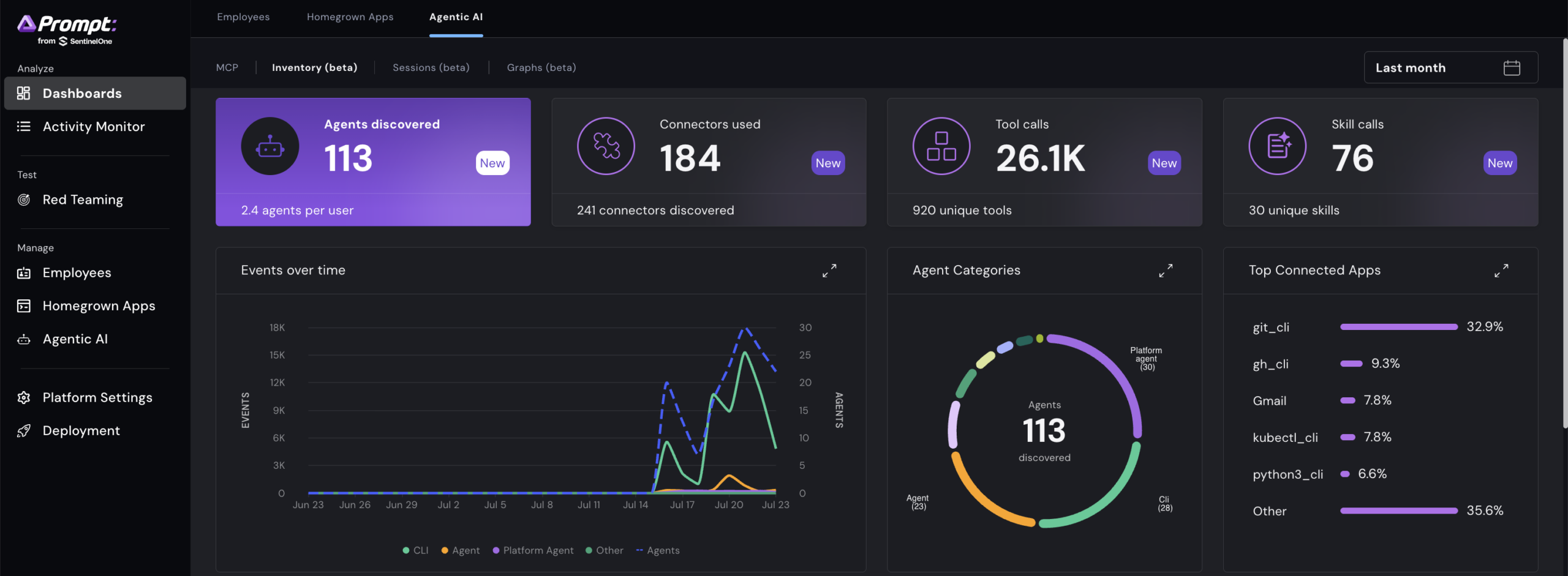
Inventory the agents already running in your environment, the connectors they reach, and every tool call they make.

While governance decides what an agent is allowed to do, the endpoint is where you find out what it actually did.

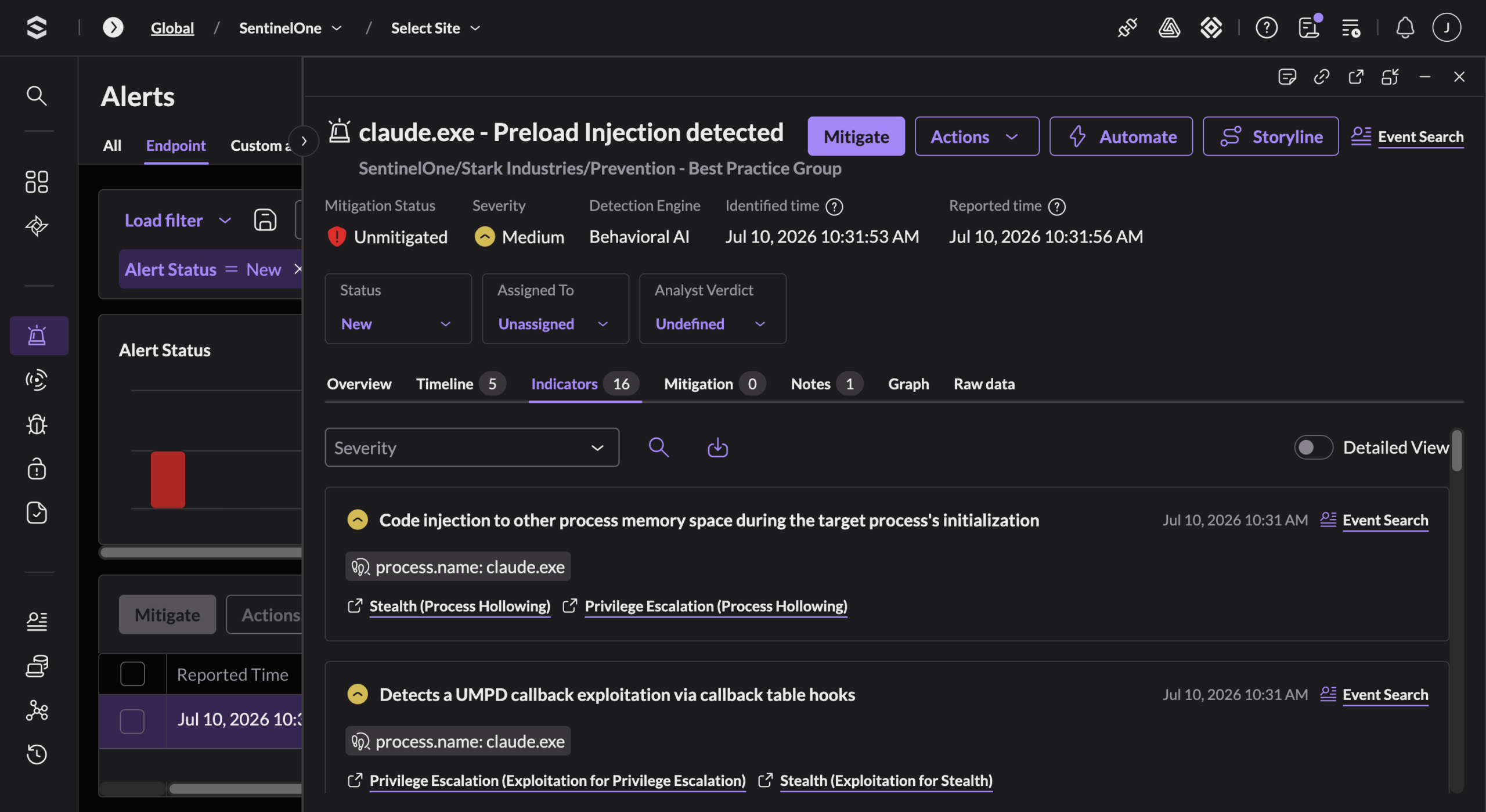
The endpoint is where agents execute. This is the frontier, and where SentinelOne has protected customers for over a decade. Our behavioral engine judges what a process does, not what it claims to be. That is how we caught QUIETVAULT – malware that spins up AI agents in “yolo” mode to exfiltrate secrets to GitHub. It is how we autonomously stopped the LiteLLM supply chain attack, where adversaries weaponized the Claude CLI to install a malicious payload. It is how we surfaced a DLL side-loading attack hidden inside an AI tool installer. Real detections, on the endpoint, today. Agents run on the host, and so do we.

The identity is where a hijacked agent runs next. Picture an employee’s AI coding agent that gets hijacked mid-task. It spawns a shell and reaches for cached credentials and cloud session tokens, trying to stop being a process and start being the user. That pivot to identity is what unlocks lateral movement, and it is where most AI attacks are headed. SentinelOne meets the move. It secures human and non-human identities alike, and seeds the environment with decoy credentials and honeytokens no legitimate user ever touches. The instant the hijacked agent grabs one, the trap trips, and Identity responds by forcing an MFA re-challenge, disabling the account, or isolating the host. Authorization at login is not enough. Access gets validated against behavior and pulled at runtime.

The cloud is where AI workloads scale. Consider an internal AI agent running in a Kubernetes cluster with standing access to a customer database. Security teams keep asking the same question about deployments like this. Where is the model connecting, and who is it talking to? SentinelOne answers with eBPF-native runtime protection that judges how the workload actually behaves, and flags the moment that inference service reaches an endpoint it has never touched before. It covers the control plane the deployment depends on, the secrets it reads, the pipelines it runs through, and the data it can access. Defending the AI you build takes more than watching it, it takes action on the workload in real time.

SentinelOne’s Singularity Platform Advantage

Each of these surfaces matters on its own. What closes the kill chain is following an attack across them without losing it at the handoff. This is where a single platform earns its keep. AI telemetry already streams into the Singularity™ Data Lake, alongside the endpoint data the platform has correlated for years. As identity and cloud signals join that same view, an analyst follows one attack from first prompt to final action, without stitching logs across six tools at two in the morning. A manipulated prompt, the process it spawns, the credential it reaches for, and the cloud resource it targets read as one story rather than six disconnected alerts.

Detection that only watches is observation. Runtime action is protection. When the Singularity Platform acts, autonomous response blocks the execution, rolls back the change, and revokes the access at the point of impact, without a human relaying orders between consoles. This is the difference between whether an attack is stopped or just gets logged.

That is the case for securing AI inside a platform built for autonomous runtime response. We are not adding a console to chase AI, we are extending the one already deployed where your agents run.

Questions to Ask When Assessing Your AI Security Options

When evaluating AI security, ask yourself three things.

  • Does the solution protect the endpoint where agents actually execute, or is it a roadmap item?
  • When a hijacked agent pivots to credentials and the cloud, does that telemetry land in the same platform, or are you manually connecting dots across three dashboards?
  • Can the solution act at the moment of execution, or only tell me what already happened?

SentinelOne protects the surfaces where AI runs today. This includes the apps your employees use, the agents they deploy, the endpoints where agents execute, the identities they borrow, and the cloud where they scale. One platform, built for autonomous response. While AI has changed the attack, it does not have to change your architecture.

See it for yourself. Talk to our team about securing AI across your endpoints, identities, cloud, and the AI apps your employees already use, all from the platform you run today. Contact SentinelOne today.

Third-Party Trademark Disclaimer:

All third-party product names, logos, and brands mentioned in this publication are the property of their respective owners and are for identification purposes only. Use of these names, logos, and brands does not imply affiliation, endorsement, sponsorship, or association with the third-party.

Hacking: How a “Calculator” Feature Can Leak Internal Object References (and Real User PII) in AI Chatbots

Welcome back, aspiring cyberwarriors!

Many software-as-a-service (SaaS) platforms are adding AI chatbots to their products. But these bots do more than just chat; they can access internal tools and perform tasks for users. Each of these actions creates a potential security risk, and developers are releasing these features faster than they can secure them.

In this article, I want to share a type of vulnerability I found while testing an AI chatbot – LLM02:2025 Sensitive Information Disclosure – which allowed me to obtain users’ first and last names and email addresses just by interacting with the chatbot. Let’s get rolling!

What is LLM02:2025 Sensitive Information Disclosure?

LLM02:2025 Sensitive Information Disclosure is a critical security issue listed in the OWASP Top 10 for LLM Applications 2025. This problem occurs when a Large Language Model (LLM) application accidentally reveals confidential or personal information in its responses.

This vulnerability happens because LLMs are designed to be helpful and use all available context, such as training data, system prompts, and runtime inputs, to create replies. If sensitive information is included in these sources without proper protections, the model may accidentally disclose information it should keep private.

Step 1: Find the Hidden Feature Behind the Feature

Our target had a chat feature that looked, on its face, completely trivial: type an arithmetic expression wrapped in double curly braces, and the bot evaluates it and replies with the answer.

{{5-5+0}} = 0
{{5*5+0}} = 25

Just like a calculator. But the interesting bugs live in the features nobody thought to test twice. So I started varying the input systematically, the way you’d fuzz any parameter in a pentest. And the calculator started talking back with things that were most definitely not numbers:

{{5-0+0}} → collectionPropertyOption://CollectionName
{{1-0+0}} → https://domain/p/CollectionName
{{2-0+0}} → user://UUID

This shows that the “calculator” is really a thin cover for a much riskier part of the code, which allows direct access to the platform’s internal system without any authentication.

Step 2: Isolate the Real Trigger

When you notice a leak like this, do not just note it down. Understand what is causing it.

My first guess was that the final answer of the expression is used as a lookup index. This is easy to test. Try expressions that all result in the same number through different math operations:

{{2+2}}    = 4        (plain number)
{{2+2+0}}  = 4        (plain number)
{{2-2+0}}  = user://UUID    ← NOT a plain number!

That last result contradicted my guess. The expression 2-2+0 simplifies to 0, but the result came back as an object reference instead of a plain number, similar to when the expression equals 2. This was a clue. I ran a few similar tests to confirm:

{{4-2}}    (=2)  → collectionProperty:// reference (type 4, not type 2)
{{5-2+0}}  (=3)  → collectionPropertyOption:// reference (type 5, not type 3)
{{0+2-2}}  (=0)  → plain number (type 0)

In conclusion, the lookup key is based on the first operand’s type, not the final arithmetic result. The developer’s evaluator takes the first number from the input and puts it directly into an internal array, sorted by object type, completely separate from what the expression calculates. I confirmed this by testing the limits:

{{99-2+0}}              = 97 (plain math, outside the enum)  
{{99999999999-0+0}}     = 99999999999 (same, safely out of range)

Step 3: Turn the Reference Into a Record

The next question is obvious: will the system actually resolve that reference if I hand it back to it?

Yes. It will.

{{user://<uuid>}} → returns first name, last name, and email address of that user.

This AI chatbot successfully provided information about any user by knowing his UUID.

Summary

Finding an issue like this, such as index leak, reference resolution, and PII disclosure, is not just luck; it is a systematic approach. This is the practical skill we teach at Hackers-Arise. As AI systems become part of every platform you will test, hackers who understand these new areas of attack will have the best tools and the highest salaries. Check out our Subscriber training package to start building these skills effectively and methodically.

The post Hacking: How a “Calculator” Feature Can Leak Internal Object References (and Real User PII) in AI Chatbots first appeared on Hackers Arise.

❌