 Login
Login
Susan’s Minnesota Garden, Part 2: Spring and Summer
A look back at the earlier months of the growing season in St. Paul


Bridges! We kind of expect them to just be there and do their job, ad infinitum. They are built into the landscape, and we often take them and the routes they open up for granted.
The reality, as any civil engineer will tell you, is that bridges are living, breathing things that require endless maintenance and monitoring to keep them safe, standing, and functional. A great example of this is found in the US Department of Transportation, and its publicly accessible register of bridge health reports.
The thing about bridges is that we rely on them. They serve as vital transport links in our communities, ferrying people to and from work and school, and acting as the very arteries of commerce as trucks and trains haul goods to and fro. When a bridge crossing has to close, either for maintenance or at end of life, this link is severed, often with serious economic and logistical impacts. For that reason, we tend to like to keep our bridges in service as long as possible. The result, of course, is that if pursuing this goal means that proper maintenance and repairs aren’t seen to, there is a risk of collapse—which often comes with worse consequences. Loss of life is common when bridges fail, and replacing a collapsed bridge is often much harder and more time consuming than handling things properly ahead of time.
In the United States, it’s a well known fact that the bridges are getting old. The average bridge is 44 years old, which is bumping up against the 50-year service limit many were originally built for. Being an average number, it’s indicative that many bridges are exceeding that figure significantly. Obviously, a bridge’s age isn’t a perfect proxy for its condition, but closer examinations indicate there’s definitely a problem. A 2024 report from the American Road & Transportation Builders Association noted that 36 percent of US bridges are in need of repair or replacement, a total of 221,800 spans. 42,067 spans were considered to be in “poor” condition, which in their total see 168.5 million motorists crossing them every day. It’s a particularly sobering figure as it highlights the size of the disaster possible if these structures are to fail.
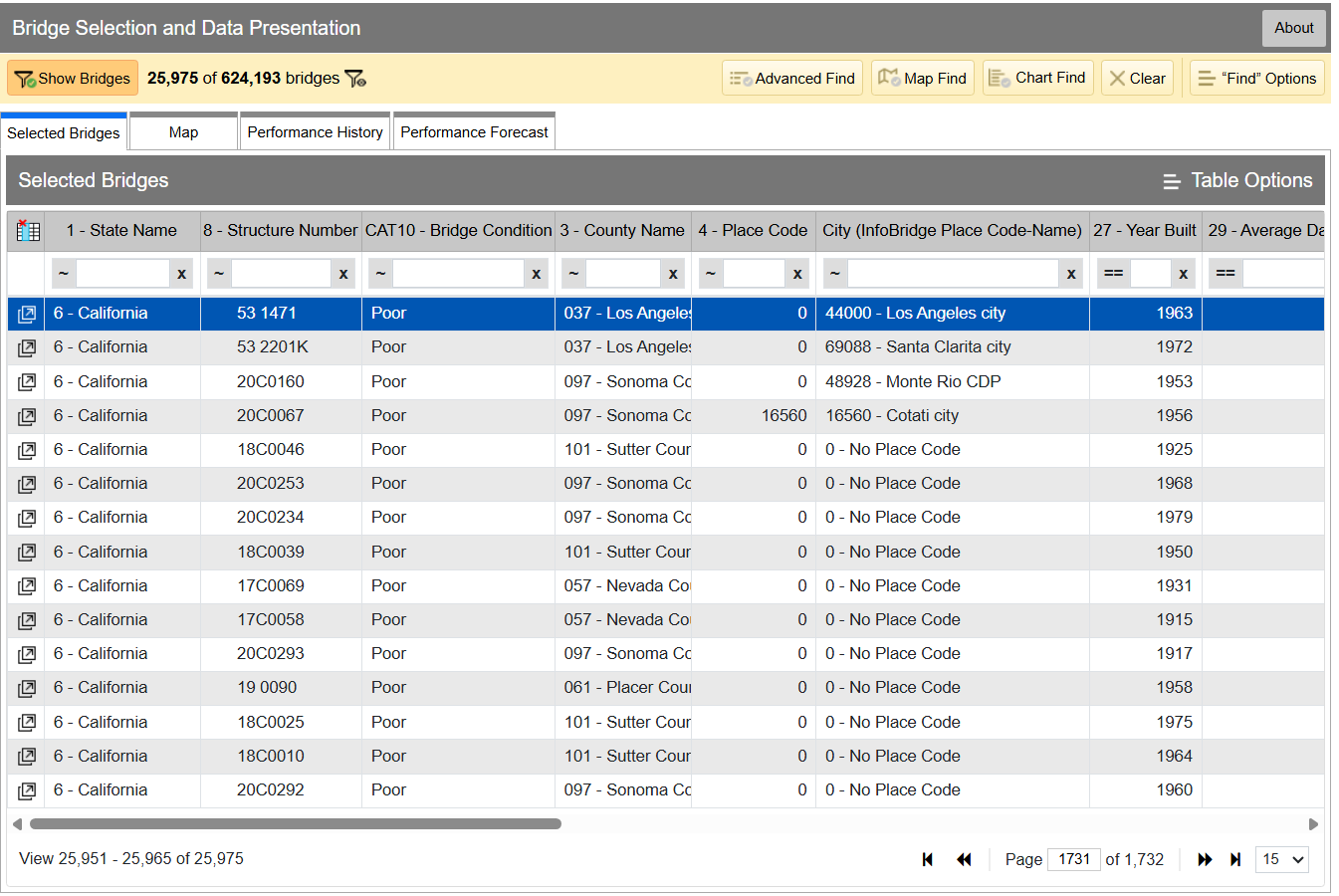
You can drill down into the data yourself if you desire. Within the Department of Transport, the Federal Highway Administration maintains LTBP InfoBridge, a database of information on bridges all across the country. It was developed by the Long Term Bridge Performance program, because the goal of the project is to understand how these structures hold up and perform over the decades. The database is publicly accessible, and serves as a portal for all the available data and statistics on how US bridges are doing. It hopes to enable everyone from state and federal authorities, to university students, faculty, and other researchers, to dive into bridge data and visualize and understand it better.
Data available is from a wide number of sources, including the National Bridge Inventory and National Bridge Element datasets, as well as climatic data collected from NASA’s MERRA-2 database. There’s also construction and design data sourced by the LTBP program, along with non-destructive evaluations that have been carried out. Data from various other special projects is available too, such as from Federal Highway Administration projects investigating timber bridges, steel weathering, and the use of ultra-high performance concrete structures.
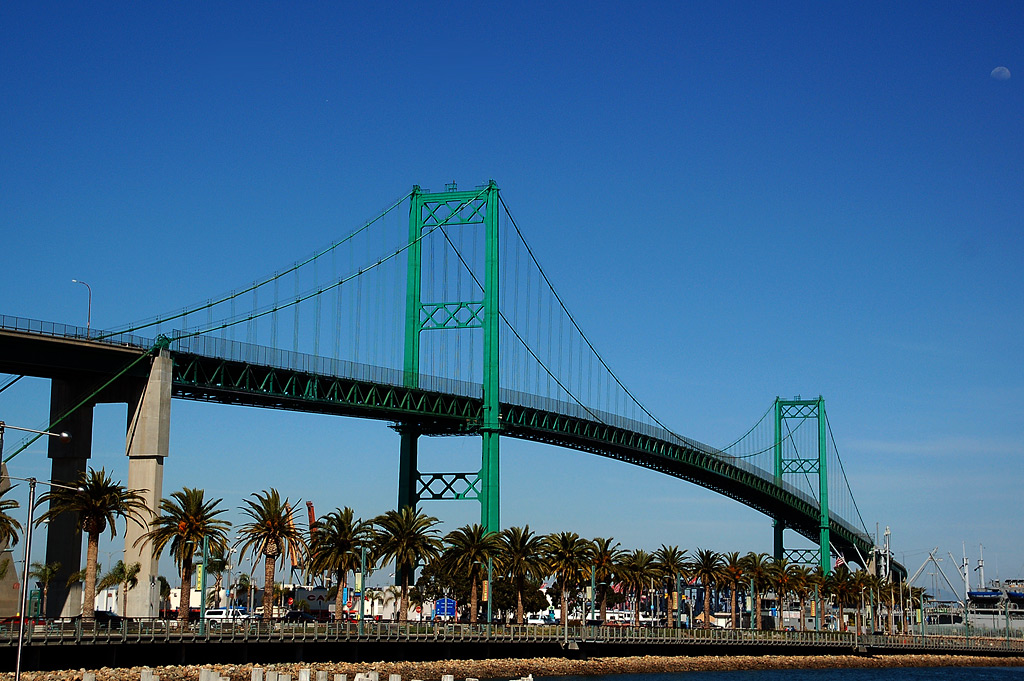
If you have a particular bridge of interest, it’s easy to get a quick break down of how it’s doing. For example, you might like to know about the Vincent Thomas Bridge, in Los Angeles, California: National Bridge Inventory number 53 1471. It links San Pedro with Terminal Island, and is a suspension bridge with a total length of 6,060 feet and a longest span of 1,500 feet. Built in 1963, we can see from the data alone that it’s now showing its age.
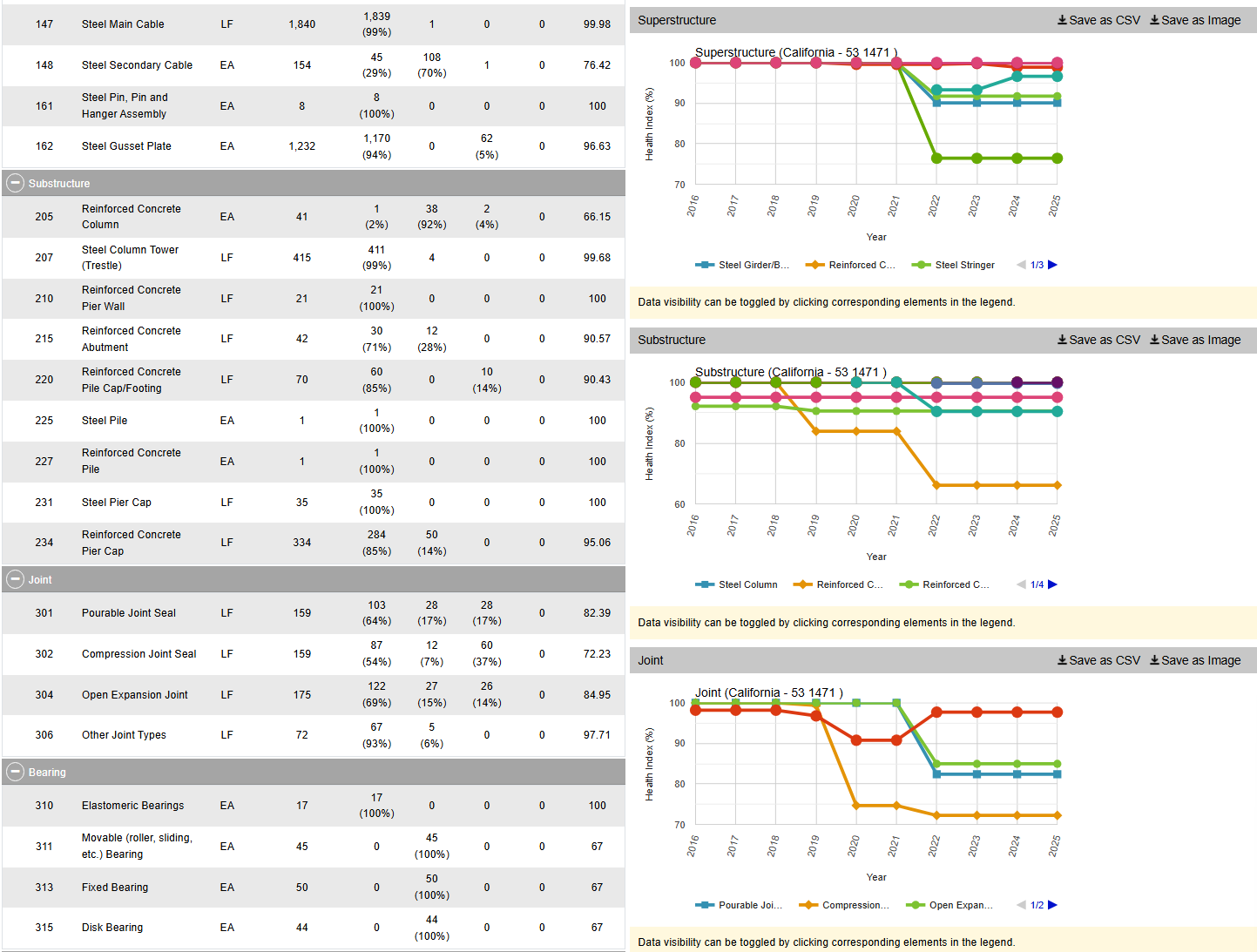
The bridge condition is listed as “Poor,” and if we dive deeper into the National Bridge Elements data, we can see why. The health indexes of the deck, substructure, and superstructure have all been trending down in recent years as the bridge’s age has increased, with a particular drop off from 2019 or so. In particular, the steel cables and girders on the bridge have been showing their age, and the concrete columns supporting the bridge have been similarly degrading. The deck, too, is in need of repair, with the California Department of Transport recently dedicating some $706 million to replace it ahead of the 2028 Olympic Games.
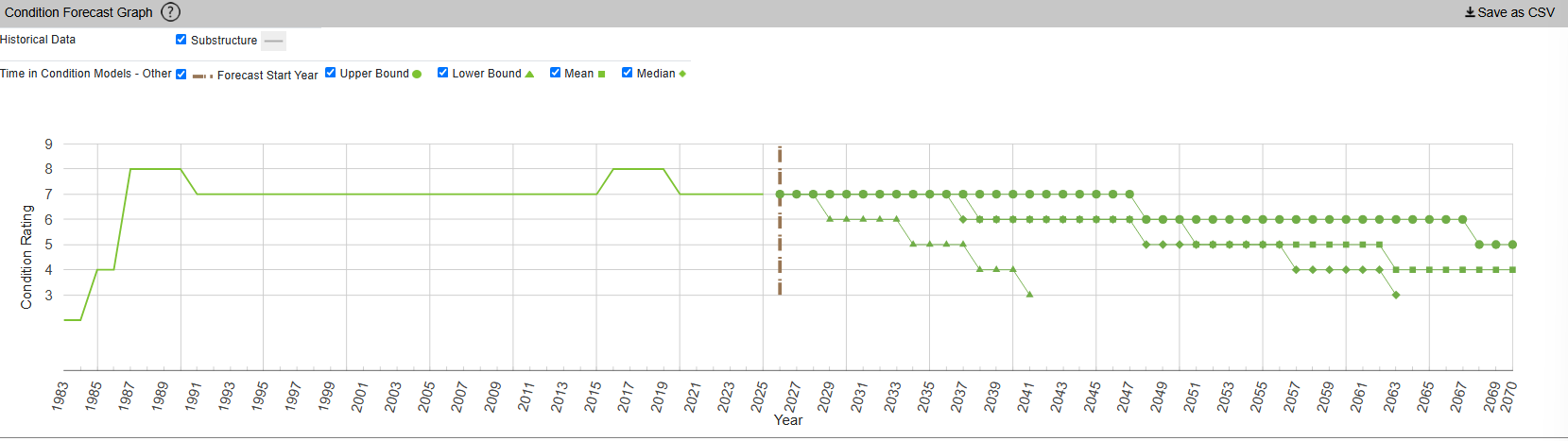
InfoBridge also offers condition forecasts for many bridges across the country. For example, the 24th Street Bridge over Rio Linda Creek is currently listed as being in “Good” condition. Current forecasts show that the deck and superstructure is expected to be in much poorer shape somewhere between 2035 and 2055, while the substructure is expected to hang on in good shape for a bit longer.
You might think that you’d have to query a government department and delve deep into some dusty records room to learn about the condition of your local bridges. Instead, thanks to the efforts of diligent civil servants, you can instead access all the rich inspection data you like from the comfort of your own web browser. It’s not just good for citizen oversight, either. It aids local authorities and bridge owners in making the right decisions, by putting the necessary data right at their fingertips.
It also creates a certain level of accountability—having the data available means there’s little room for anyone to make excuses that they were unaware of a bridge’s condition prior to something going wrong. Ultimately, it’s just one arm of a project that hopes to take US bridges safely long into the future.
Featured image: “Brooklyn Bridge – New York City” by [Simone Roda]

If you already know what a nonius is, you can probably skip this post. But, if like us, you would have to look it up, we’ll tell you what we found out. It turns out, a translation mistake taught us a new word and some history we weren’t aware of.
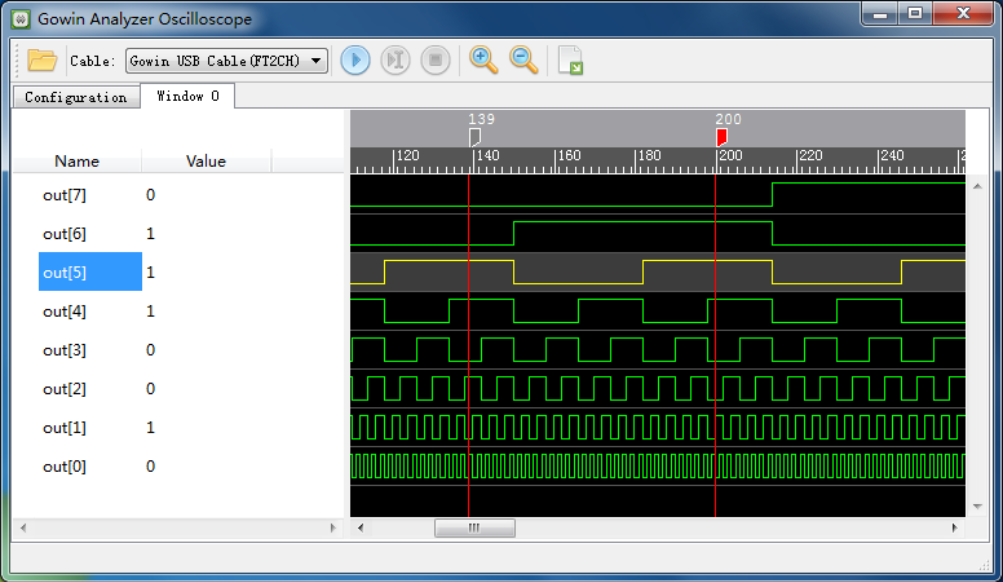
Have a look at the adjacent graphic from a waveform display. What would you call the vertical red lines at positions 139 and 200?
We’d probably call them markers. Or maybe cursors. The manual, however, calls each one a “nonius”. It refers to them that way multiple times.
Oddly, the manual also has sentences like “Select one nonius and right-click, and then select ‘Remove Marker’ in the next window to delete the nonius.”
So, clearly, a nonius is the vertical line marker or cursor. But that, of course, begs a question…
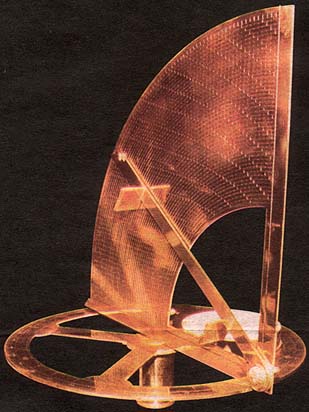
However, there was an earlier version used to improve measurements on astrolabes. A Portuguese navigator named [Pedro Nunes] created this type of astrolabe in 1542. The Latinized version of his name is [Petrus Nonius]. What are the odds of him inventing… oh wait, they named it after him. That does make more sense.
The nonius is a series of concentric circles traced on the instrument. Working towards the center, each circle has fewer divisions than the previous one. In fact, if the outer ring had 90 marks for 90 degrees, the next ring would have 89, and the following one would have 88.
The astrolabe’s line, the “alidade”, would cross all these circles but would be closest to one mark on one circle. Given that mark and that circle, you could look up the correct answer.
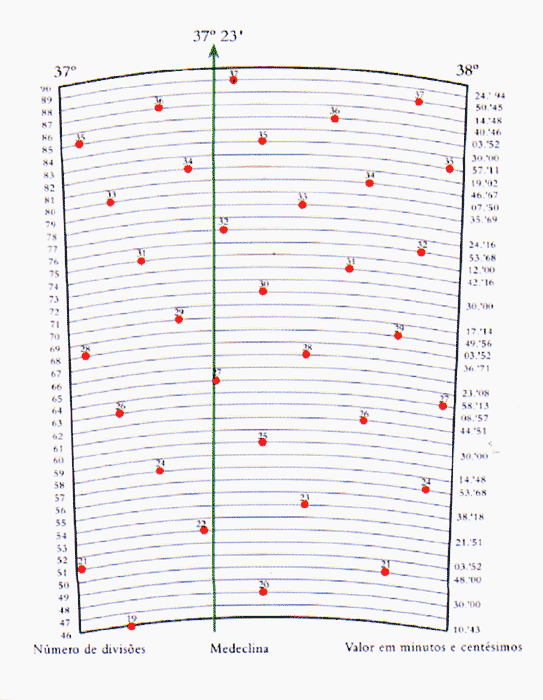
For example, the image shows such a system from [Nunes] himself. It shows the circle from 37 degrees to 38 degrees. You can see the 89th circle has only one mark for 37. The other marks are in other sectors of the outer ring. The 88th, for example, has two marks for 36 and 37.
On ring 65, the line runs right over the 27, which is hard to read because the line covers it up. With a table lookup, you’d find the correct value was 37º 23′ within 0.08′. Not bad. [Nunes] was considered one of the greatest mathematicians of his time.
But we had never heard of him, which goes to show that being a mathematician is not a good way to get lasting fame. [Charles V], [Nostradamus], and [John Calvin] were all born around the same time and, while not household names, are more likely to be known today than [Nunes].
And while this is interesting, it raises another question: Why did the GOWIN software instruction manual call the vertical marker line on a scope trace a nonius?

Our guess is that this is a translation mix-up: Chinese 游标 can mean either a computing cursor or a vernier. Or a nonius. Someone apparently selected the wrong English equivalent.
Of course, we figured it out. Plus, we learned a new word and a little history. So we aren’t complaining.
Astrolabes are pretty amazing. Navigation was so important that it drove many technological advancements. Of course, measuring things in general was also of keen interest to our forefathers.

When you first learn to program, memory seems pretty straightforward. You have a bunch of bytes, each with an address. If you want to read or write something, you specify the address, and the computer goes to that place and does your bidding. Sure, some addresses might be reserved for hardware or the operating system, but the general idea is simple: memory is a big array of bytes.
Just like we pretend that a wire is a perfect conductor, the big array of memory model used to be a slight twisting of the truth. On a modern computer, however, it is almost entirely a lie. The address you use probably isn’t a physical address. The data you read might not come from RAM at all. Even if it does, it might be sitting in one of several caches. And if you follow the rabbit hole far enough, you discover that your SSD is arguably just another level in the memory hierarchy.
The fundamental problem is that processors have gotten much faster than memory. A modern processor can execute several instructions per clock cycle, but accessing ordinary DRAM can take hundreds of cycles. If the processor had to wait for RAM every time it needed data, much of that impressive computing power would go to waste.
The solution is caching. Keep copies of frequently used data in smaller, faster memories closer to the processor. Most modern desktop processors have at least three levels of cache. The L1 cache is tiny but extremely fast, and often split between instructions and data. L2 is larger and somewhat slower, while L3 is even larger and usually slower as well.
Things get interesting with multiple cores, as is often the case these days. Typically, each core has its own L1 and L2 caches, while several cores share an L3 cache. But that’s not universal. Some processors share L2 caches between cores. Others have multiple L3 caches, each serving a group of cores. The exact arrangement depends on the processor architecture.
One important detail: caches don’t generally work byte by byte. They transfer and track blocks called cache lines, commonly 64 bytes on modern desktop processors. If you read one byte that isn’t cached, the processor generally fetches the entire line containing that byte.
This is why sequential memory access is often much faster than random access. If you read the next byte, there’s a good chance it’s already in the cache. Hardware prefetchers may even anticipate what you’ll need next.
But there can be problems. Imagine two cores modifying completely different variables. If those variables happen to occupy the same cache line, the cores may repeatedly invalidate each other’s copies, wasting time even though they aren’t logically sharing data.
Protocols such as MESI keep the caches coherent, coordinating which core owns a line and which copies are valid. MESI is an acronym for cache line states: modified, exclusive, shared, or invalid. Memory systems must figure out how to keep caches in sync. But coherence doesn’t eliminate the need for synchronization or memory-ordering rules in multithreaded programs. The point is that even our simple byte-addressed memory is secretly operating in larger chunks.
So far, we’ve assumed that the address you supply identifies a location in RAM. Usually, it doesn’t. Modern operating systems use virtual memory. Your program sees a virtual address space that the operating system and processor cooperate to map onto physical memory.
The memory management unit, or MMU, translates virtual addresses into physical addresses, typically using page tables. This lets different programs use identical virtual addresses without interfering with one another. It also provides memory protection and allows physical pages to be shared.
Of course, translating addresses takes time. So we add another cache.
The translation lookaside buffer, or TLB, remembers recently used address translations. A TLB hit avoids a potentially expensive page-table walk. Some processors even have multiple levels of TLBs. Unlike the ordinary CPU cache, which generally operates on cache lines, virtual memory usually works with pages, often 4 KB, although larger pages are also supported.
Notice what’s happening. We have caches for data, caches for instructions, and caches for the information needed to locate the data and instructions.
The simple act of reading a variable has become surprisingly complicated.
Even if we get through the caches and finally reach RAM, things aren’t necessarily simple. On systems with multiple processors or certain multicore arrangements, memory access can be non-uniform. This is called NUMA, or Non-Uniform Memory Access.
A processor may have relatively fast access to memory attached to its own NUMA node, while accessing memory associated with another node requires crossing an interconnect. Both locations are ordinary RAM, and both may appear in the same address space, but the access times and available bandwidth can differ.
The operating system tries to place memory near the processors using it. Moving a thread to another CPU can therefore change its memory performance, even though the program’s addresses haven’t changed.
And NUMA isn’t limited to traditional multiprocessor servers. Modern systems with chiplets, heterogeneous memory, and technologies such as CXL are making memory topology increasingly interesting.
Virtual memory has another trick. A virtual page doesn’t necessarily have to be backed by physical RAM at the moment you access it.
When a program accesses a page that isn’t currently mapped in a usable way, the processor generates a page fault. The operating system decides what to do. Sometimes it simply allocates a fresh page. Sometimes it retrieves data from an executable or memory-mapped file. Other times, the page was moved out of RAM to swap space and must be retrieved. Note that things like executable data are generally immutable, so most operating systems won’t swap them out. They simply trash them and know they can reload the same page later when needed.
This means your program can address data that isn’t presently in physical memory. Naturally, accessing an SSD is much slower than accessing RAM, so excessive swapping can bring a computer to its knees.
Virtual memory doesn’t actually require swapping, though. Address translation and protection are useful even on systems that never move pages to disk.
Suppose your program reads a file. You might imagine that the operating system sends a request to the SSD and waits for the data. But if the file was recently accessed, the data may already be in RAM.
Operating systems maintain a filesystem page cache, keeping frequently or recently accessed file data in memory. Writes may also be buffered in RAM before eventually reaching persistent storage.
This makes RAM act like a cache for secondary storage, much as L3 acts like a cache for RAM.
The analogy isn’t perfect. RAM is also the primary working storage for running programs, and anonymous memory isn’t necessarily a copy of anything on disk. But the general hierarchy is clear: registers, CPU caches, RAM, and persistent storage provide progressively different tradeoffs between speed, capacity, and cost.
Even SSDs have their own caches and address translations. Their flash translation layers map logical block addresses onto physical flash locations, hiding wear leveling and garbage collection from the host. Apparently, nobody wants to tell the truth about addresses.
But what if we could make RAM effectively larger without adding more? Compression offers another way to complicate our memory hierarchy. Instead of immediately moving an infrequently used page to disk, why not compress it and keep it in RAM?
Linux has two well-known mechanisms for doing this: zram and zswap. Zram creates a compressed block device in RAM. It’s commonly used as a swap device, allowing pages to be stored in compressed form rather than written to physical storage.
Zswap, on the other hand, is a compressed cache in front of a swap device. When Linux decides to swap out a page, zswap attempts to compress and retain it in RAM. If necessary, pages can eventually be evicted to the backing swap device.
Both trade processor time for memory capacity and reduced storage I/O. Decompressing a page costs CPU cycles, but that can be considerably cheaper than retrieving it from an SSD.
There’s a catch, though. These mechanisms operate through the swap subsystem. When a compressed page is needed again, it must be decompressed into an ordinary page before the program can access it. That means page faults, memory management overhead, and moving data around. But what if compressed memory could behave more like ordinary RAM?
That’s the idea behind CRAM, or Compressed RAM, a project presented by Meta’s Gregory Price at the October 2026 Linux Plumbers Conference.
Rather than treating compressed memory as a conventional swap device, CRAM proposes exposing it through a special NUMA node. Linux can then use existing memory-management mechanisms to move pages between ordinary DRAM and compressed memory. The most interesting part is the hardware-assisted compression and decompression, which allows access at much finer granularity than conventional page-oriented compressed swap.
The developers report impressive benchmark results, including read performance that approaches ordinary DRAM in some tests and dramatic improvements over zram for selected workloads.
That doesn’t mean compression has suddenly become free. Writes, compression ratios, hardware requirements, and managing incompressible data all matter. CRAM is still developmental work, not ready for everyday use.
But it illustrates where the memory hierarchy is heading. Instead of simply deciding whether a page is in RAM or on disk, the operating system may choose among ordinary RAM, compressed memory, slower memory tiers, and secondary storage.
Most programmers don’t need to think about any of this most of the time. That’s the point of an abstraction. But when performance matters, the illusion starts to leak. Sequential access can beat random access by enormous margins. Two threads modifying unrelated variables can fight over cache lines. Moving a process between CPUs can change its memory latency. A page that looks like ordinary memory might actually require decompression or a trip to an SSD.
On smaller embedded systems, of course, the picture may be very different. Without an MMU or elaborate caches, memory can look much more like the simple physical address space we learned about in the first place.
We started with an array of bytes. We ended up with a hierarchy of caches, translation tables, NUMA nodes, compressed memory pools, and persistent storage devices, all cooperating to maintain that simple illusion. Amazing how complicated something so simple can be.
